














File System and DBMS: Key Differences and Use Cases

Cecilia Lane
Go-to-Market Associate
Sep 18, 2026
Cecilia Lane
Sep 18, 2026

17 min read


When it comes to data management, understanding the file system and DBMS is essential for effective organization and retrieval of information. A file system serves as the basic layer where data is stored and accessed directly on storage devices, while a DBMS (Database Management System) offers a structured way to interact with that data, enabling complex queries and ensuring data integrity. This article is designed for students, interview candidates, and junior developers who wish to grasp the fundamental differences between these two systems. You'll gain insights into their advantages, disadvantages, and practical considerations for real-world applications, helping you navigate scenarios where either solution may be appropriate.
What is a file system?
At its core, a file system is a method used by operating systems to manage how data is stored and organized on storage devices. It provides a way for users and applications to access files and directories while maintaining the structure of that data.
It acts as the interface between the physical storage media and the applications that need access to the data. It manages the organization of files into directories, keeps track of their locations on the disk, and handles metadata, which includes details such as file size, timestamps, and permissions. Many operating systems use a hierarchical file system, which organizes files and directories in a tree-like structure, making navigation and storage management more efficient. Examples of file systems include NTFS, used in Windows, and the extended file system (EXT) family, commonly used in Linux, which play key roles in organizing and managing data on their respective platforms.
Basic components of the file system
The primary components of a file system include:
- Files: The smallest unit of storage, containing data or information.
- Directories: These are used to organize files logically, facilitating easier navigation and retrieval.
- Paths: The address that directs the operating system to the file's location on the disk.
- Metadata: Information about the file, including its size, the date it was created, the last modified date, and permissions that determine who can access or modify the file. File permissions are crucial for managing who can access or edit the same file, helping to prevent security issues and conflicts when multiple users attempt concurrent access.
A file processing system is used to store, access, and manage data across various files, playing a key role in organizing and retrieving information within a computer system.
Data storage in file systems
Data storage in file systems represents an elegant yet practical approach to organizing and managing files across storage devices—whether that's a traditional hard drive, modern SSD, or other storage medium. The beauty lies in the hierarchical structure, where files naturally group into directories and subdirectories, creating an intuitive framework that makes navigating even vast data collections feel manageable. Each file earns its unique identity through careful naming and precise location tracking, while the file system dutifully maintains essential metadata like file size, creation date, and permissions—a thoughtful system that balances simplicity with sophistication.
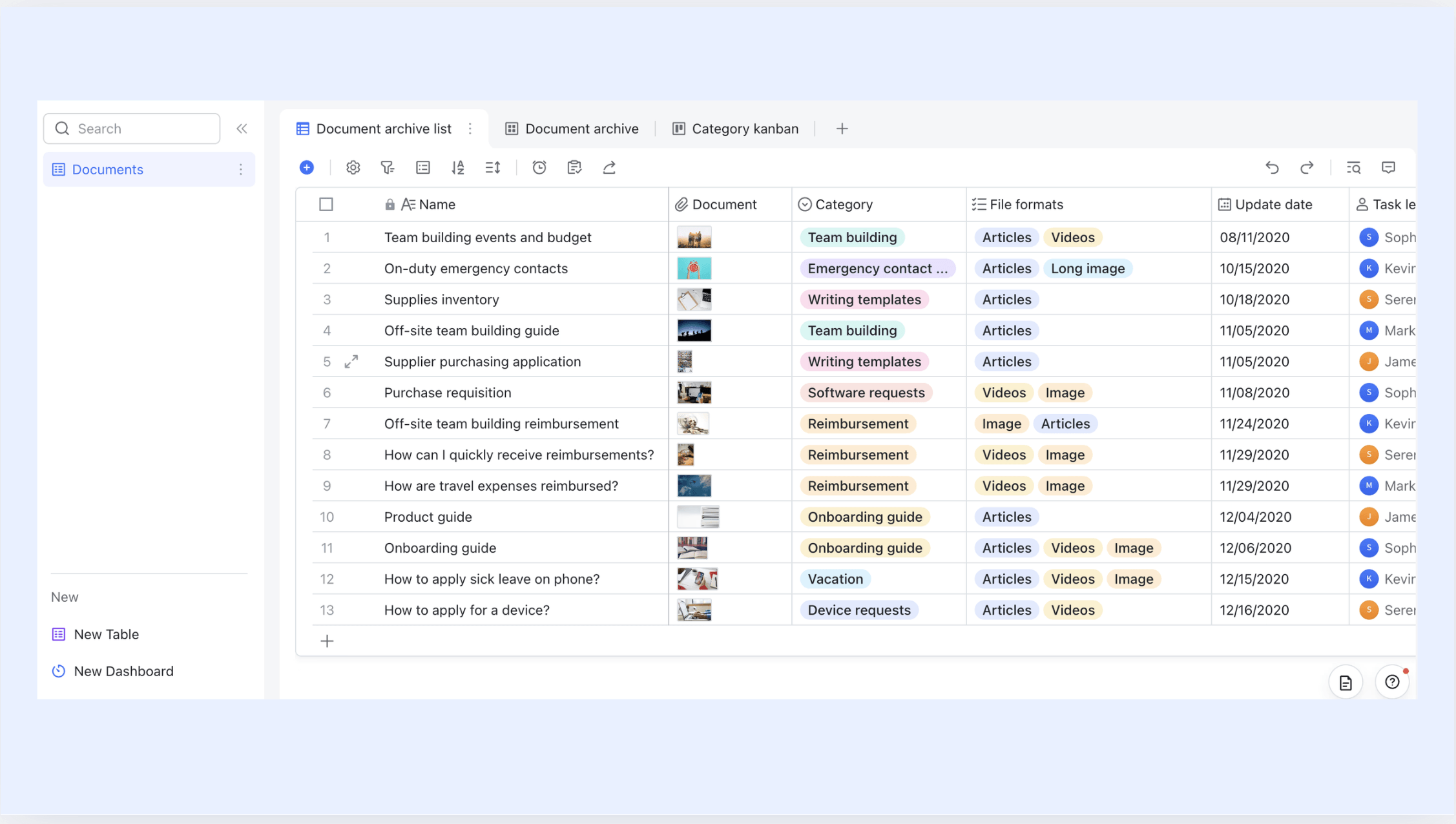
While database management systems excel at organizing structured data in neat tables, file systems embrace a more flexible philosophy, welcoming unstructured data—documents, images, videos—without demanding rigid schemas. This adaptability proves invaluable for storing diverse content at scale, though it does introduce certain trade-offs: Occasional data redundancy across multiple files and the ongoing challenge of maintaining consistency throughout the system. File retrieval remains refreshingly straightforward, yet searching within unstructured content can prove less efficient than DBMS queries—a reasonable compromise for the freedom it provides.
Examples of file systems
Common examples of file systems include:
- NTFS (New Technology File System): Used by Windows operating systems, supporting large files and advanced features like logging.
- FAT32 (File Allocation Table 32): An older file system that is widely supported across various operating systems but has limitations on file size.
- ext4: A popular file system for Linux, offering improvements over its predecessor, ext3.
- APFS (Apple File System): Designed for macOS and iOS, this file system enhances security and speed for Apple devices.
Types of file systems
There are various types of file systems designed for different uses:
- Disk-based file systems are the most common and are used on hard drives and SSDs.
- Network file systems facilitate file sharing over a network, allowing multiple users to access files on centralized storage.
- Flash file systems are optimized for flash storage devices, providing durability and performance improvements.

What is a DBMS?
A Database Management System (DBMS) is sophisticated software that allows users to define, create, maintain, and control access to databases. A DBMS is a type of database management software and a comprehensive software system designed for creating, maintaining, and securing databases. Unlike a file system, which provides basic data storage capabilities, a DBMS offers a suite of tools that support advanced data operations and integrity. DBMSs also provide mechanisms to control user access, ensuring that only authorized users can view or modify data, which enhances data security and proper permissions management.
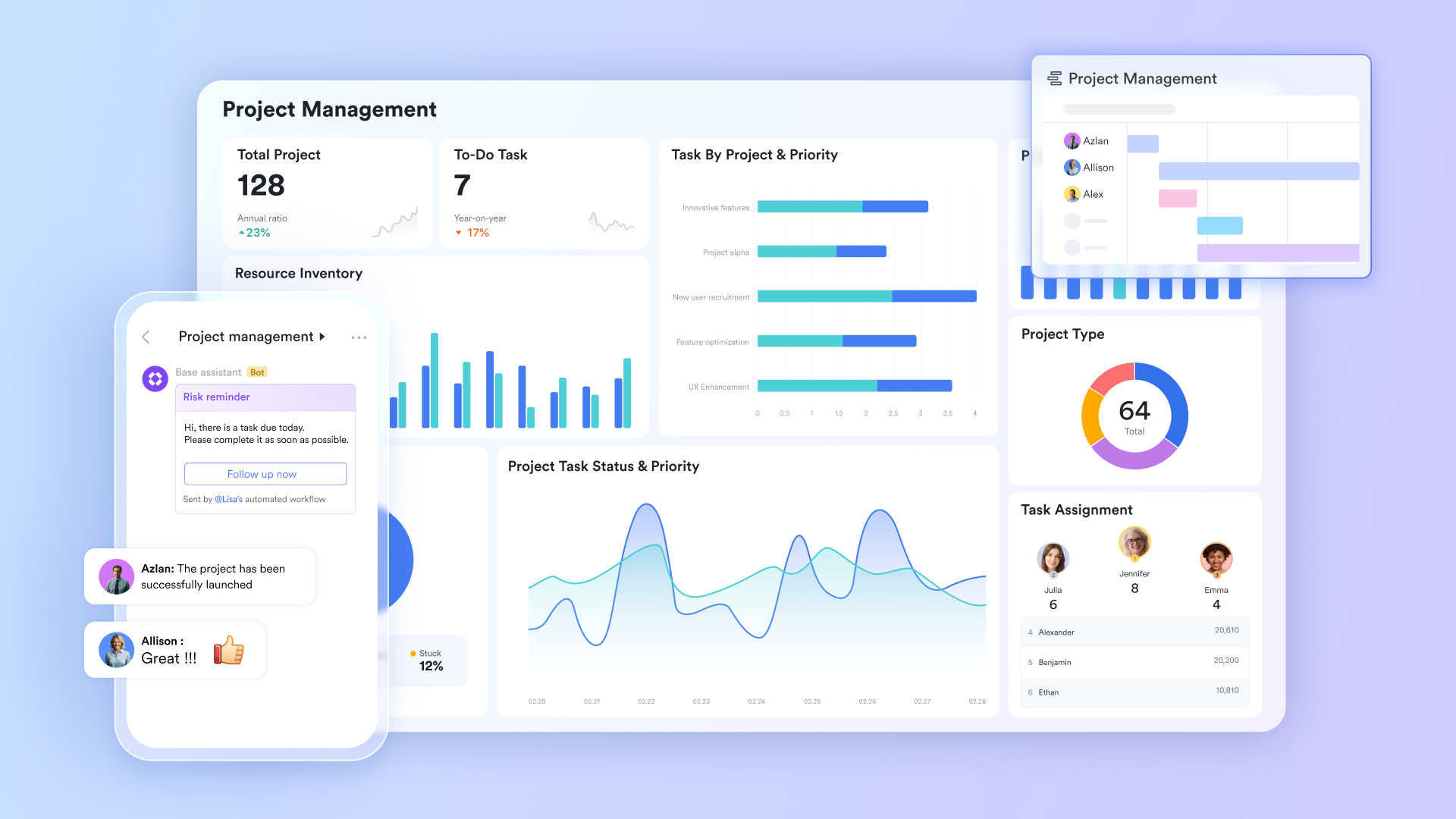
A DBMS serves as an intermediary between the end-user and the database, ensuring that data is stored efficiently and can be retrieved in a structured manner. It enables programmers and users to create applications that can interact with data using various operations, including adding, updating, deleting, and retrieving information.
Components of a DBMS
Key components of a DBMS include:
- Storage engine: Manages how data is stored on physical media, allowing for efficient data retrieval.
- Query processor: Interprets and executes SQL queries, optimizing them for performance. It enables users to perform database queries for efficient data retrieval and reporting.
- Transaction manager: Ensures the integrity and consistency of data during concurrent transactions.
- Metadata/catalog: Holds information about the database structure, including schemas, tables, and constraints. The schema defines data types and relationships between multiple tables.
Types of DBMS and common examples
DBMS can be categorized into several types based on their data handling models:
- Relational DBMS (RDBMS): This is the most common type, where data is stored in tables. Examples include MySQL, PostgreSQL, Oracle, Microsoft SQL Server, MS SQL Server, and SQL Server.
- NoSQL databases: Designed for unstructured or semi-structured data, they include MongoDB, Cassandra, and Redis. NoSQL database systems are often used in modern applications and can store data across multiple database systems interconnected via network links, supporting distributed databases.
- Embedded databases: These databases are incorporated within applications, like SQLite, which can serve as both a file system and a DBMS.
Using a database template can save time for setting up a database from scratch. In the following sections, we will delve into the file system and DBMS differences, highlighting how they compare in various aspects.
We'll also provide clarity on their applications and help determine when to utilize either solution effectively. This analysis will lay out the difference between file systems and DBMS in points, providing a clear understanding of their strengths and weaknesses.
File system vs DBMS: Key differences at a glance
When comparing file systems and DBMS, it's essential to recognize several key differences that highlight their unique strengths and weaknesses. The key difference between file systems and DBMS lies in their approach to data management and integrity: File systems manage data in a more basic, unstructured way, while DBMSs use structured methods to ensure data accuracy and reliability. Additionally, DBMSs provide more data consistency through processes like normalization and constraint enforcement, whereas file systems often suffer from less data consistency due to redundancy and a lack of structured management.
How file systems and DBMS handle data structures differently
The way file systems and database management systems handle data structures is fundamentally different. In file systems, data may be organized in an unstructured or semi-structured format, which makes it challenging to maintain consistency and integrity.
- File systems: Typically store data as raw files without enforced schemas or relationships. This lack of structure can result in difficulties when trying to pull insights from the data, asthe organization is often left to the end user.
- DBMS: Utilizes well-defined schemas, which means data is organized into tables, with relationships between these tables clearly defined. This structured approach not only enhances data quality but also improves maintainability, as changes in one part of the database can be effectively managed without disrupting other areas.
Data integrity, constraints, and validation
With data integrity being a critical aspect of data management, it is important to compare the built-in features of file systems and DBMS.
- File systems: Typically lack robust mechanisms to enforce data integrity. For example, if two different applications write data to separate files without coordination, inconsistencies can arise, leading to erroneous information. The absence of constraints means that logical errors are more likely.
- DBMS: Offers primary keys, foreign keys, unique constraints, and validation rules that help maintain data integrity. This system ensures that data is accurate, consistent, and trustworthy. For instance, using constraints prevents duplicate customer records from being entered, enhancing the overall reliability of the database.
Overall, understanding these differences helps clarify the file system and DBMS differences while emphasizing why a DBMS may be a more powerful choice for applications that demand high data integrity and robust querying capabilities.
Advantages of DBMS for real applications
A strong understanding of the advantages that a DBMS has over a file system informs the best approach to data management. Compared to traditional file systems, Database Management Systems (DBMS) provide more efficient and secure methods for accessing data, thanks to advanced features like querying and concurrency control. Here are several key benefits that a DBMS offers for real-world applications.
Reduced data redundancy and better consistency
One of the primary advantages of a DBMS is its capability to minimize data redundancy and improve consistency:
- Centralized storage: Data is stored in a centralized manner, which aids in reducing the repetition of data across different files. This centralization supports greater accuracy, as updates to the data make one change rather than multiple.
- Normalization: DBMS supports normalization processes that eliminate redundancy. For example, consider a scenario where customer information is stored across multiple records; normalization allows this data to exist in a single table while still being referenced as needed, significantly reducing the chance of discrepancies.
Stronger data security and controlled access
Security is paramount in today's data-driven world. A DBMS provides several advanced features that contribute to stronger security:
- User accounts, roles, and privileges: Unlike a file system, where access control is limited, a DBMS allows for granular control over who can access or modify data. User roles can be defined to restrict sensitive data to only those authorized.
- Encryption and compliance: DBMSs typically offer encryption features that safeguard sensitive data, helping organizations comply with data protection regulations. This is crucial for industries such as finance and healthcare, where private information must be secured.
ACID transactions and concurrency control
The ACID properties of a DBMS—"Atomicity," "Consistency," "Isolation," and "Durability"—ensure reliable processing of transactions, which is vital for operational integrity.
- Atomicity: Ensures that a series of operations within a transaction are completed in full or not at all. This prevents partial updates to the database, which could lead to inconsistencies.
- Consistency: Guarantees that a transaction brings the database from one valid state to another, maintaining integrity.
- Isolation: Enables multiple transactions to occur without interference, even if they run concurrently. This means that users can access the database without conflicts arising.
- Durability: Ensures that once a transaction has been committed, it will remain so even in the event of a system failure. This feature reduces the risk of data loss.
Powerful querying, indexing, and reporting
DBMS greatly enhances data handling capabilities through features such as querying, indexing, and reporting:
- SQL queries: Utilizing Structured Query Language (SQL), users can perform complex queries to retrieve precise data. This allows businesses to generate reports spanning multiple data points effortlessly.
- Indexing: DBMS can create indexes on key fields to speed up data retrieval, overcoming the limitations of file system access, which often requires a full scan of the files.
- Analytics and reporting: Built-in analytic tools enable easier data visualization and reporting, transforming raw data into meaningful insights. This capability is invaluable for decision-making processes.
By understanding these advantages, it's clear why many modern applications lean towards using a DBMS instead of a traditional file system. As we delve deeper into this topic, we will further explore the scenarios under which file systems may still serve a need and how both systems can be combined for enhanced data management.
Advantages of file systems
Despite the many advantages offered by a DBMS, there are still scenarios where a file system serves as a more practical solution. Understanding when to utilize a file system over a database system is crucial for effective data management.
Simple applications with limited data and users
For many straightforward applications, especially those with limited data volumes and user interactions, a file system remains an excellent choice. Here are some common use cases:
- Command-line tools, hobby projects, or scripts: When developing basic scripts or command-line tools, the overhead of a DBMS may not be justified. Using a file system allows for quick setup and immediate access to small data sets without the need for a complex database setup.
- Configuration files: Many applications rely on configuration files to adjust settings without the requirement for a large data model. File systems can store these settings efficiently, allowing easy access and minimal management.
- Log aggregation and temporary caches: In scenarios where data is collected temporarily, such as log files generated from applications, file systems are effective. They provide a simple structure for appending new data without the need for the rigorous control offered by a database system. This approach saves time and resources, especially in projects where logs are only briefly stored before analysis or processing.
Write-heavy, sequential data and low overhead
For applications predominantly focused on writing data without frequent reads, such as telemetry and streaming applications, a file system can often be the more efficient choice:
- Append-only logs: Data that is continually written in a sequential manner, such as append-only logs or telemetry data, benefits from the immediacy of file systems. They allow for swift data recording without the transactional overhead typically seen in a DBMS.
- Streaming data: In situations where large volumes of streaming data are captured but rarely revisited, leveraging a file system can drastically reduce the complexity and resource usage. Avoiding the overhead associated with a DBMS allows for more efficient handling of data that needs to be recorded quickly rather than queried frequently.
- Low overhead scenarios: In embedded or edge computing environments, where resource constraints are common, a file system provides an efficient alternative. The simplicity and minimal computational demand of file systems make them ideal for smaller devices. They can deliver the required functionality without overburdening the limited processing power available.
Environments with strict resource constraints
In environments where resources are constrained, the choice often leans heavily towards using a file system:
- Embedded devices and small utilities: Many embedded systems and small utilities are designed to perform specific tasks efficiently with limited hardware. In such cases, the complexity and overhead of installing and managing a DBMS may not be practical. File systems offer a straightforward means to manage data without requiring significant additional support.
- Trade-offs between convenience and robustness: While a DBMS may provide advanced features, it also introduces complexity and would necessitate more robust hardware and maintenance procedures. Choosing a file system allows developers to focus on simplicity and immediate functional necessities without delving into the intricacies of database management.
By understanding these contexts where a file system is still a good choice, you can better navigate data management decisions. File systems win out in scenarios with limited data demands, write-heavy tasks, and resource constraints, providing a pragmatic path to data handling when advanced capabilities are unnecessary or overly burdensome.
How to combine file systems and DBMS
Combining file systems and DBMS can provide significant advantages, allowing organizations to leverage the strengths of both systems for optimal data management. By unifying these systems, data sharing is enhanced, enabling users to access and collaborate on both structured and unstructured data more efficiently. Lark is an excellent example of a collaborative platform that can facilitate this integration seamlessly. Here's how users can benefit from combining file systems and DBMS while utilizing Lark's features.
Centralized document management and collaboration
Lark's cloud storage capabilities allow users to manage documents effectively while blending the simplicity of a file system with the robust features of a DBMS. In a typical scenario:
File storage and organization: Lark Wiki provides a cloud-based document management system where users can store documents, including Lark Docs, Base, Sheets, Slides, and so on. Users can create different Wiki spaces, like traditional folders, to manage files and materials for different uses. Users can also manage role-based access permissions to ensure data security.
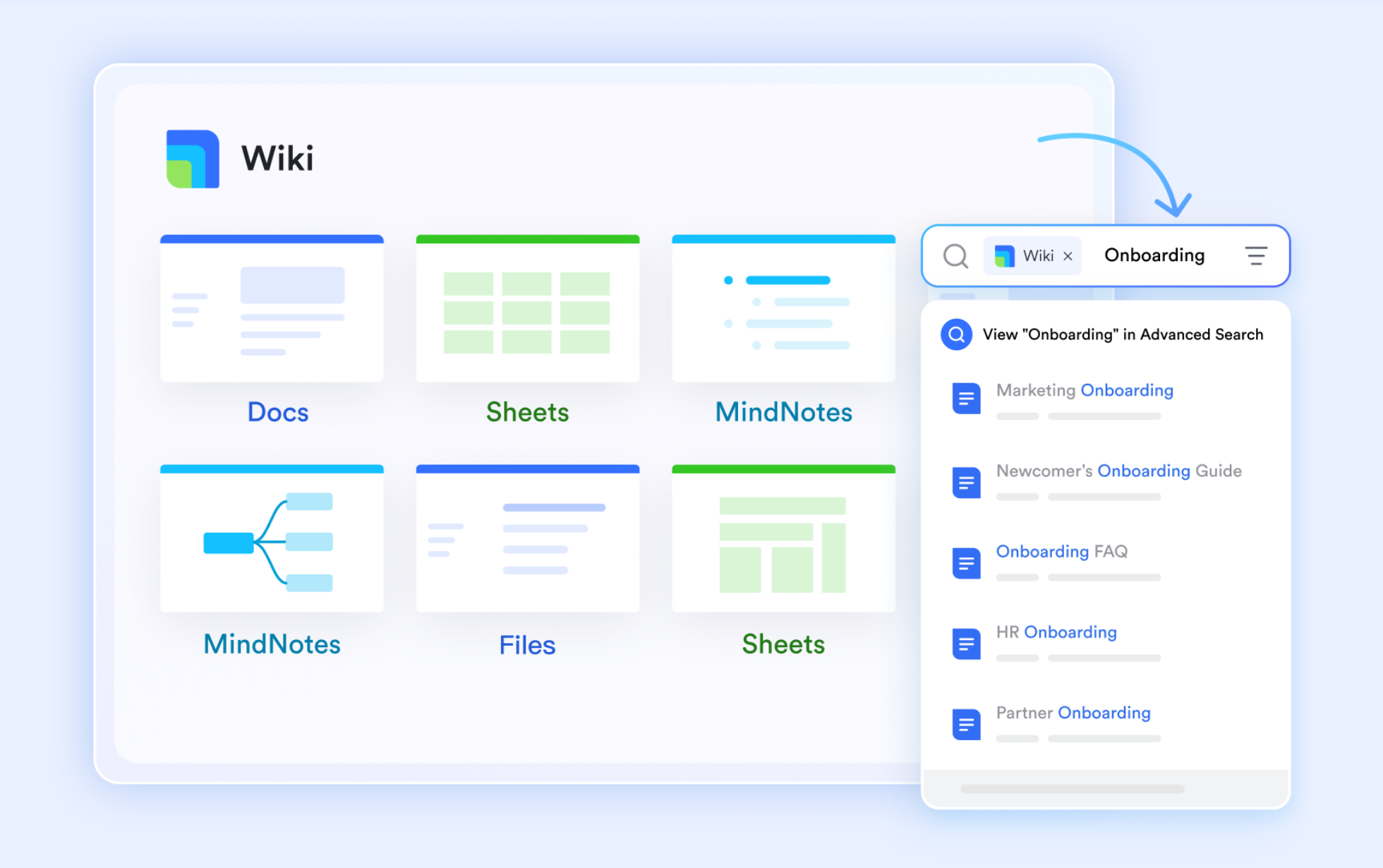
Real-time editing and feedback: While file systems primarily store data, Lark Docs enhances this by allowing team members to edit documents simultaneously. This feature not only improves efficiency but also mitigates data redundancy and consistency issues that can arise when relying solely on file systems. For example, updating a set of configuration parameters can happen collaboratively, reducing the risk of multiple versions and ensuring that all team members have access to the most current information.

Automation and workflow optimization
Lark's workflow automation features can streamline tasks typically associated with both file systems and databases.
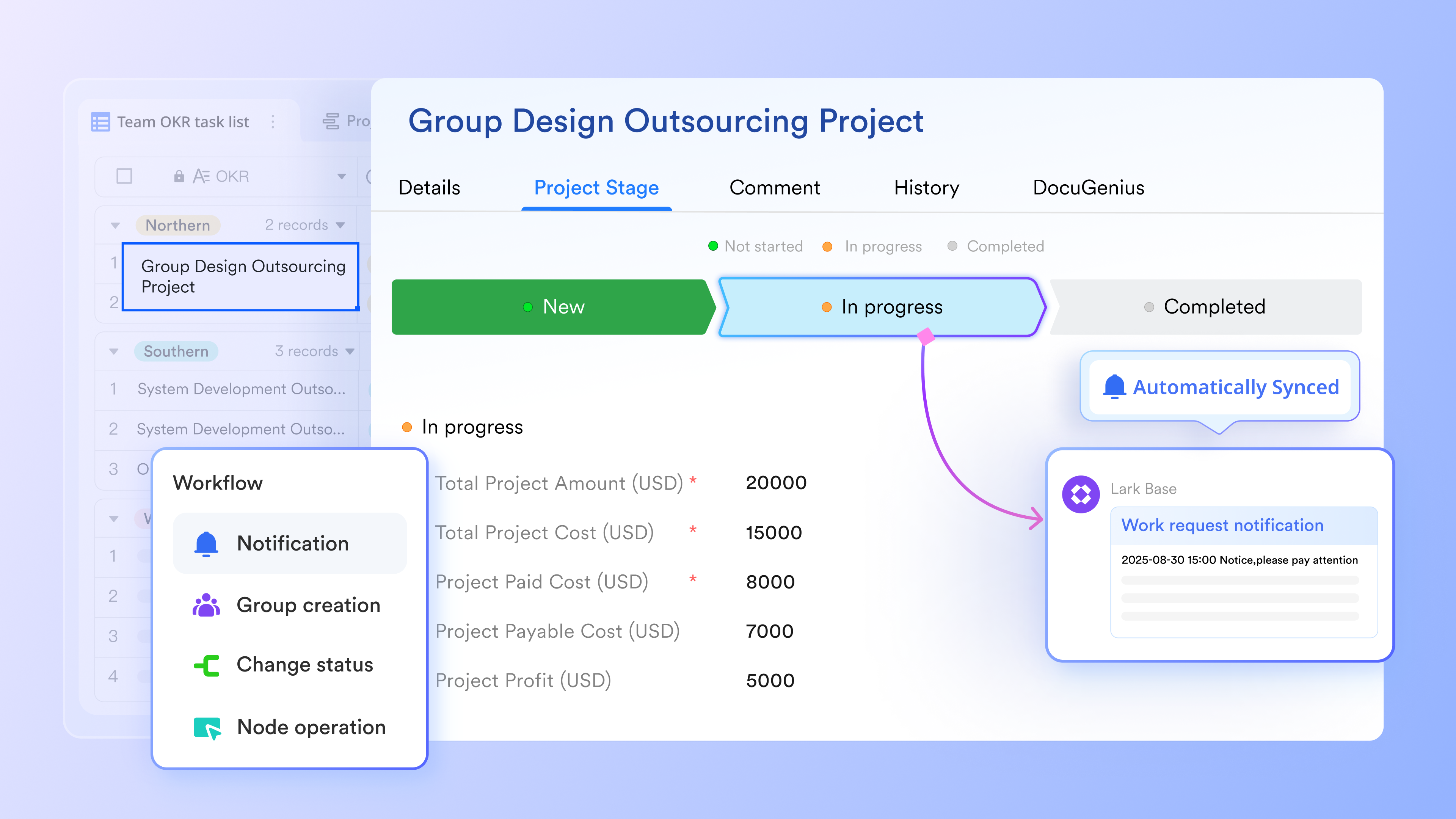
Comprehensive spreadsheets for processing: Lark Base is a versatile tool that empowers users to create efficient file management systems by incorporating a variety of customizable fields, including attachment fields. When users set up a database in Base, they can associate relevant documents directly with the records, transforming static files into dynamic assets that facilitate project management. Through this function, key attributes such as personnel, processes, dates, and priorities can be used to oversee various production tasks and document requirements, allowing teams to manage workflows actively.
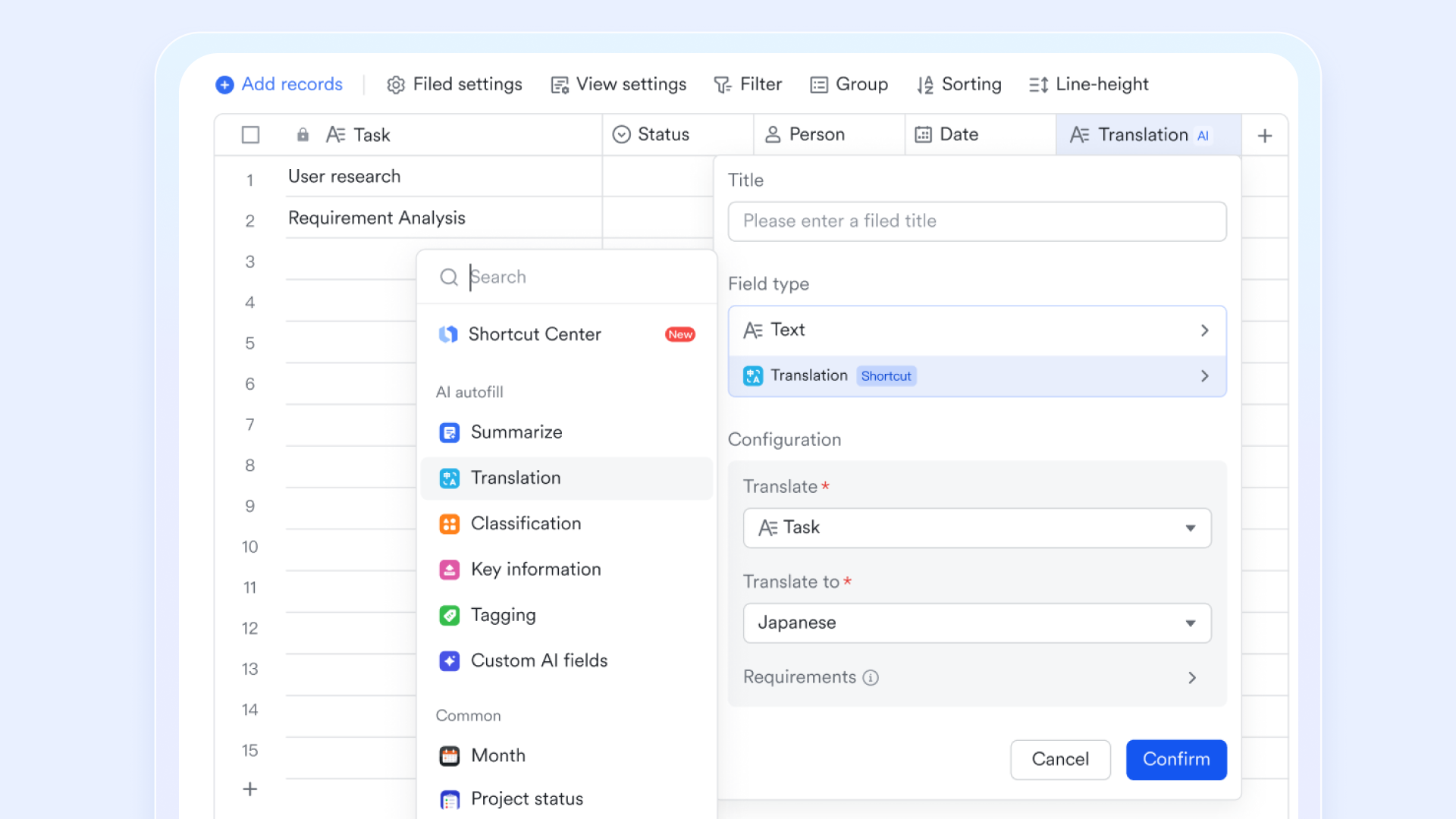
Automated workflow for smarter processing: Lark Base offers the ability to establish customized automation processes. For instance, when there are changes in a workflow, the Base assistant can automatically notify the responsible party for the next phase via Lark Messenger. This feature ensures that project updates happen seamlessly and efficiently, reducing the likelihood of miscommunication or delays. This ability to seamlessly transfer and manage data across systems enables organizations to maintain the flexibility of a file system while leveraging the advanced querying capabilities of a DBMS.
Enhanced data insights and reporting
Combining file systems and DBMS through Lark can significantly improve data visibility and insight generation.
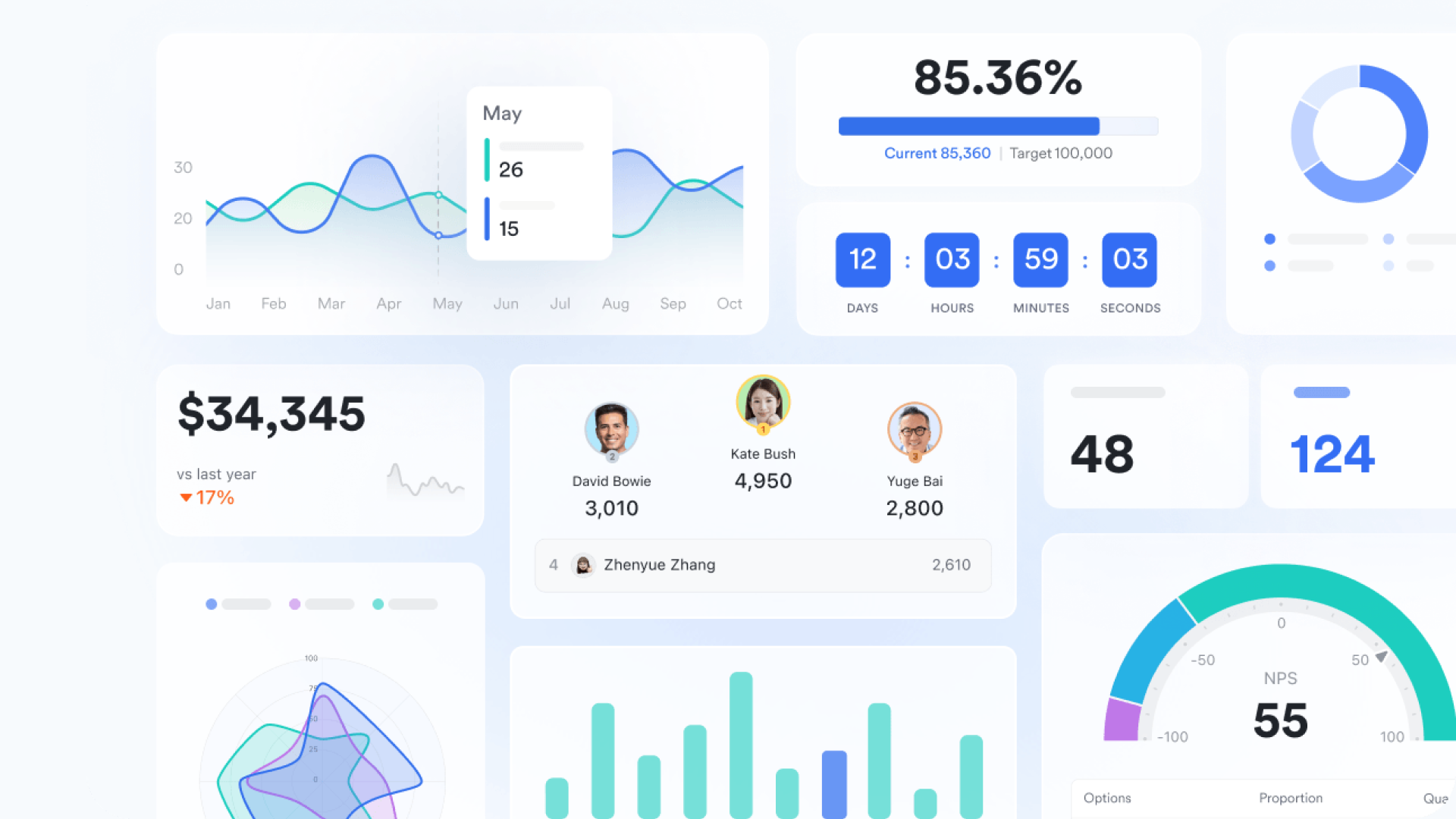
Data analysis and reporting: One of Lark Base dashboards' key strengths is its ability to visualize and report data effectively. Additionally, users can embed either the Base or the dashboard into Lark Docs for the team to view during meetings via Magic Share or discussions. This integration allows teams to access key data insights in real-time, enhancing collaboration and facilitating informed decision-making.
Lark provides an effective platform for combining file systems and DBMS, thereby enhancing data management and ensuring teams can work efficiently. By enabling real-time collaboration, automating workflows, and facilitating deeper insights from data, Lark empowers organizations to bridge the gap between simple file management and complex database interactions.
Moreover, by combining these functionalities with one tool, Lark helps organizations streamline their operations and ultimately save costs. To see how much your organization could save with Lark, consider using our savings calculator.














How many employees work at your company?
By number of people
1
20
500
5000+
1000
Which tools do you use?

Estimates are for reference only, contact us for an official quote

File systems and DBMS in modern architectures
In today's technology landscape, file systems and DBMS play pivotal roles in handling and storing data across various applications. Modern architectures often employ both structures to leverage their respective strengths. Understanding these implementations is key to optimizing data management strategies.
Cloud storage, object stores, and managed databases
Recent advancements in cloud storage have introduced solutions like Amazon S3 and Google Cloud Storage, which serve as large-scale file system alternatives.
- Object storage solutions: Object storage systems manage data as objects, allowing for scalability and redundancy while providing a richer metadata framework. These systems enable businesses to store massive amounts of unstructured data efficiently, offering retrieval capabilities comparable to traditional file systems. With the potential to organize and access data using APIs, these solutions simplify the management of large datasets without the complexity of a full DBMS.
- Managed DBMS offerings: Managed database services like Amazon RDS, Azure SQL Database, and Google Cloud SQL minimize the administrative burden associated with setting up and maintaining a DBMS. These services handle backups, patching, scaling, and failover, allowing organizations to focus on application development rather than database management. This shift to managed services enhances reliability and facilitates seamless integration with cloud-native applications, making it easier to leverage a database's powerful querying and transactional capabilities.
Microservices, APIs, and data ownership
The rise of microservices architecture has further blurred the lines between file systems and DBMS:
- Data ownership by microservices: In a microservices environment, each service can own its data store, whether that's a file system, a DBMS, or a combination of both. This decentralized approach allows individual services to manage data in a way that best suits their specific needs, leading to greater flexibility and efficiency. For example, a service handling temporary logs may choose to utilize a simple file system, while another focused on complex transactions may opt for a relational database.
- Importance of clear boundaries and data contracts: With microservices, it becomes crucial to establish clear boundaries and data contracts between services. Each service should know how to interact with its data store while adhering to defined interfaces. This practice ensures that data integrity is maintained and reduces the risk of data inconsistency that can occur when multiple services attempt to access or manipulate the same data concurrently.
NoSQL, embedded DBMS, and where they fit
As data management continues to evolve, new paradigms such as NoSQL databases and embedded DBMS present innovative alternatives:
- Key-value stores and embedded databases: NoSQL databases, including key-value stores, document stores, and graph databases, blur the distinction between traditional file systems and databases. These systems are designed to handle unstructured data at scale, making them ideal for applications requiring rapid data access without strict schema constraints. For instance, a key-value store can serve as a highly efficient way to manage session states in web applications, functioning similarly to a file system while offering the benefits of a database.
- Replacing traditional file systems: In scenarios where data is often accessed in an unstructured manner or where a flexible schema is necessary, NoSQL solutions can effectively replace traditional file systems. Use cases like content management systems, user profiles, and large-scale analytics workloads can benefit from the dynamic nature of NoSQL databases, enabling applications to adapt quickly to changing requirements while maintaining excellent performance.
Conclusion
In summary, both file systems and DBMS have distinct attributes that serve different data management needs. File systems are excellent for straightforward storage, while DBMSs excel in scenarios requiring complex data interactions and integrity. Modern architectures increasingly benefit from combining these approaches, utilizing cloud storage and managed databases, leveraging microservices to ensure effective data ownership, and adopting NoSQL solutions when warranted.
As you consider your organization's data management strategy, it's essential to assess your unique needs. Analyze the type of data you are dealing with, expected growth, and access patterns to make an informed decision on whether to utilize a file system, DBMS, or a combination of both. For those looking to save costs while managing a large number of files in an orderly structure, Lark presents an excellent choice. By unifying the benefits of both file systems and databases, Lark empowers organizations to streamline operations and enhance productivity.
FAQs
What are the 4 types of DBMS?
The four main types of DBMS include:
- Relational DBMS (RDBMS): Manages data in structured tables, like MySQL and Oracle.
- NoSQL DBMS: Handles unstructured data with a flexible schema, such as MongoDB and Cassandra.
- Hierarchical DBMS: Organizes data in a tree-like structure, commonly seen with older systems.
- Network DBMS: Allows for complex relationships and connections between data, often used in specialized applications.
Why is DBMS better than a file system?
DBMS offers advantages in data integrity, security, querying capabilities, and managing concurrent access. While file systems are suitable for basic data storage needs, DBMS provides a structured way to handle complex relational data and enforce rules, reducing redundancy and improving consistency.
Is a file system a type of database?
While a file system can be considered a basic form of data storage, it does not provide the functionalities typical of a database, such as query capabilities and data integrity constraints. Therefore, it is not classified as a database in the formal sense but rather as a foundational data management system.
What is the difference between file system security and DBMS?
File system security primarily relies on operating system-level access controls, which may not be granular enough to protect sensitive data adequately. In contrast, a DBMS typically incorporates advanced security features, such as user authentication, role-based access control, and encryption, ensuring that data is better protected from unauthorized access. These measures offer a higher level of security for sensitive information stored within a DBMS compared to a file system.
Related reading
Table of contents
Start using Lark today

Manage all your work in one place
Boost team efficiency by 10x
Save up to 70% on software costs
Table of contents
Start using Lark today
Manage all your work in one place
Boost team efficiency by 10x
Save up to 70% on software costs
Keep reading








2026 Lark Technologies Pte. Ltd.
Headquartered in Singapore with offices worldwide.






Explore: