Team communication tools are no longer judged only by how well they support chat, but by how effectively they help teams collaborate and execute work. As interest in detailed Flock review continues to grow, many teams are evaluating whether Flock can support both early collaboration and long-term scalability. Flock positions itself as a lightweight messaging platform designed for fast onboarding and simple communication. This review explores Flock's core features, usability, pricing, strengths, limitations, and why growing teams often consider broader workspaces like Lark over time.
See how modern teams collaborate beyond chat
What is Flock and who is it for?
Flock is a cloud-based team designed to help teams move away from internal email and communicate more efficiently. It centralizes conversations through direct messages and channels, allowing teams to organize discussions by topic or group. Flock emphasizes simplicity and quick setup, making it easy for teams to start collaborating without extensive configuration. Its design prioritizes fast communication over structured .
Flock is best suited for small teams, startups, and growing businesses that rely mainly on chat for daily coordination. Teams with informal workflows and limited cross-functional dependencies often find Flock effective in the early stages. It works well for organizations that need basic messaging, , and lightweight productivity tools. However, teams with complex processes or heavy collaboration requirements may find their capabilities restrictive as they scale.
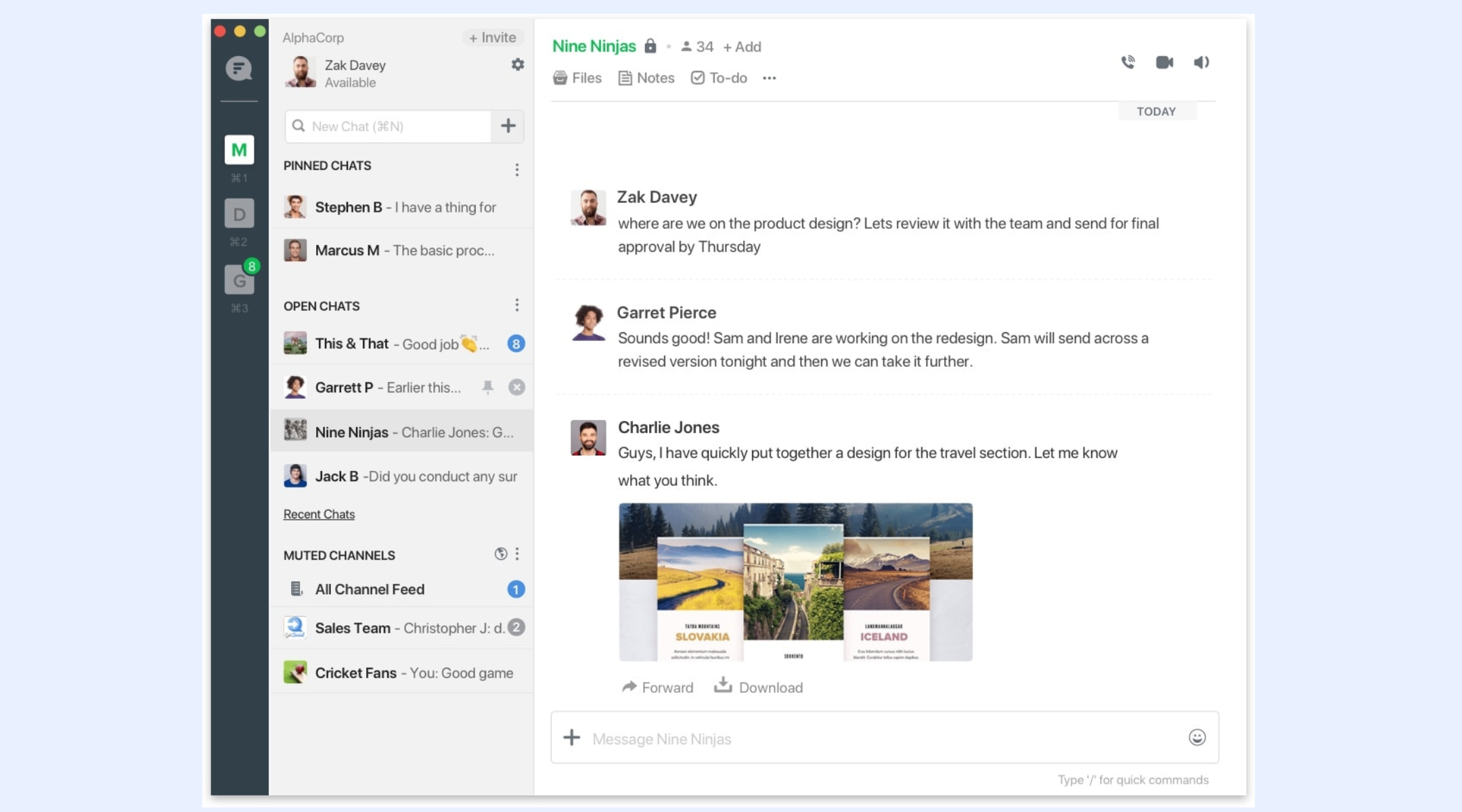
Image source: flock.com
Core features in Flock
Flock is built around a messaging-first collaboration model that helps teams communicate quickly and stay connected throughout the workday. Its core features focus on reducing friction in everyday communication while adding basic productivity capabilities. The platform is designed for fast adoption, making it easy for teams to get started without extensive setup. However, its feature scope reflects a focus on simplicity rather than deep .
Centralized team communication through channels and private conversations
Flock enables teams to through shared channels and private messages. Channels can be created for projects, departments, or ongoing discussions, helping teams keep conversations focused. Direct messages support quick one-to-one communication without cluttering channels. This structure works well for small teams that rely heavily on chat for daily coordination.
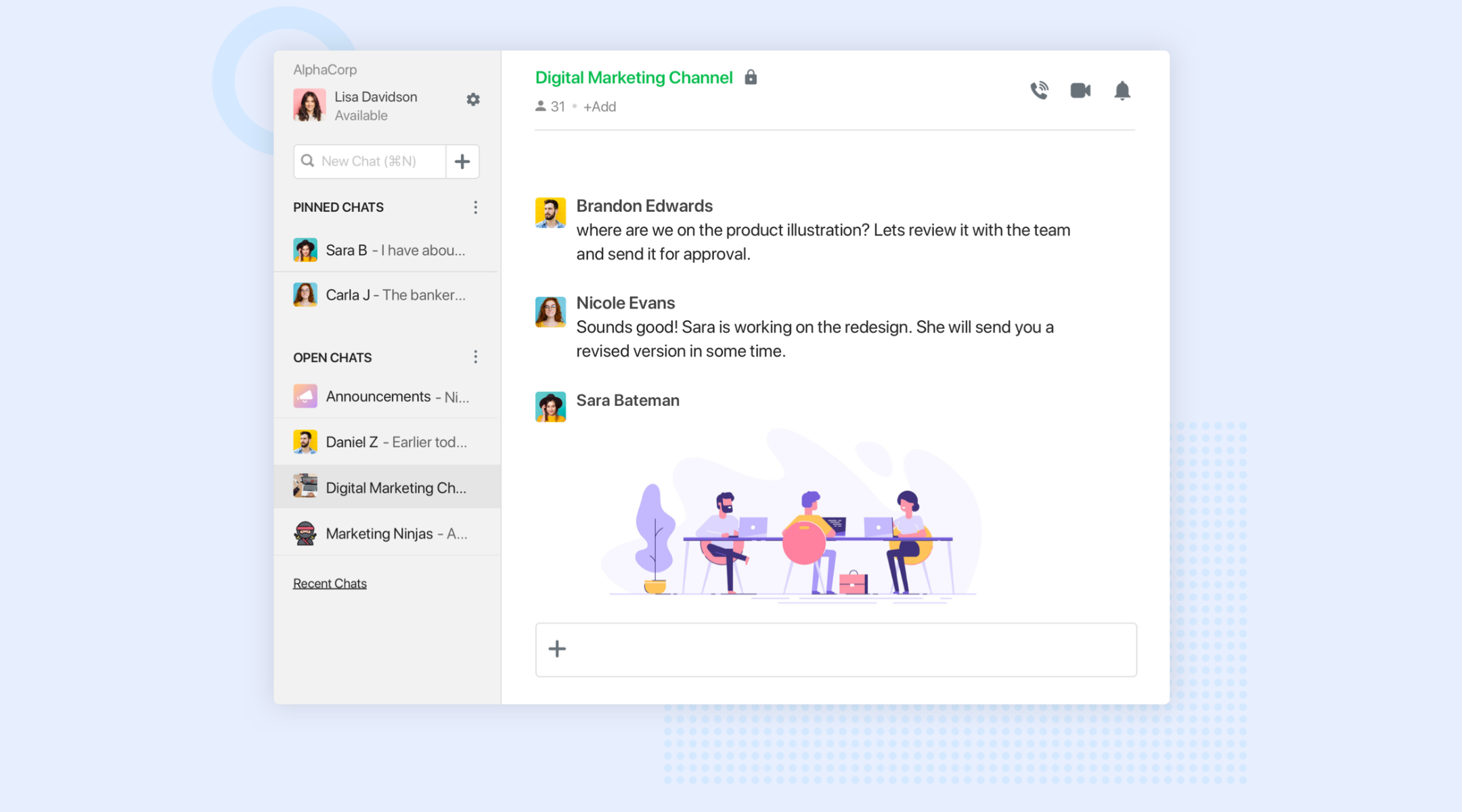
Image source: flock.com
Built-in voice and video communication for quick alignment
Flock includes native voice and video calling to support real-time discussions. Teams can move from chat to a call quickly when issues require immediate clarification. These calls are useful for informal meetings and quick updates. However, they lack advanced meeting features, making them less suitable for structured collaboration.
Lightweight productivity tools embedded in conversations
Flock offers built-in tools such as to-dos, reminders, polls, and notes to support basic productivity. These features help teams capture tasks, gather feedback, and document ideas without leaving the chat interface. They are simple to use and require minimal setup. However, they are not designed for managing complex workflows or long-term projects.
File sharing with a searchable conversation context
Users can directly within chats and channels, keeping documents tied to relevant conversations. Shared files remain accessible alongside message history, making it easier to revisit context. Search functionality helps locate messages and files, though access depends on plan limits. Over time, storage and search restrictions can impact usability for growing teams.
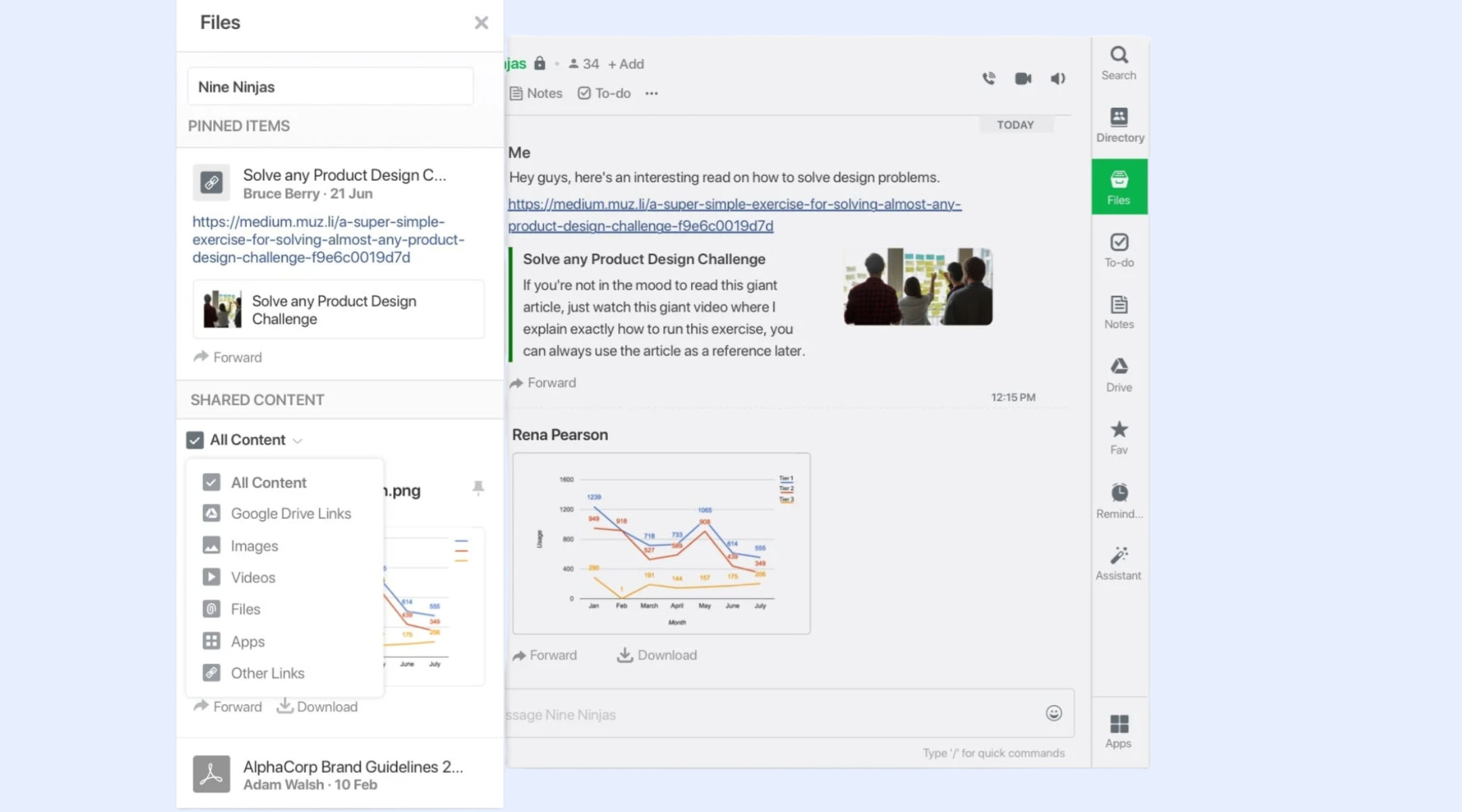
Image source: flock.com
Combined with commonly used workplace applications
Flock combines with popular tools such as Google Drive, Trello, GitHub, and other third-party apps. These combinations help teams receive updates and notifications directly within chat channels. This reduces context switching and keeps important activity visible. Combination depth remains limited compared to full workflow platforms.
For more Google Workspace's information, you can refer to and .
Administrative controls for user and workspace management
Flock provides admin tools to manage users, permissions, and basic security settings. Team admins can control access, manage channels, and configure workspace preferences. These controls are sufficient for small teams with simple needs. Larger organizations may find the administrative capabilities limited as complexity increases.
Cross-platform access through mobile and desktop apps
Flock is available on web, desktop, and , allowing teams to stay connected from anywhere. The mobile apps support messaging and notifications, making them suitable for remote and distributed teams. However, managing files and longer discussions on mobile phones can feel restrictive. Cross-platform access supports flexibility but not full workflow execution.
User experience of Flock: Is it easy to use?
Flock is designed with a strong focus on usability, aiming to help teams start communicating with minimal friction. Its interface prioritizes clarity and familiarity, making it easy for users to adopt without formal training. This emphasis on simplicity is one of the platform's key strengths. However, long-term usability can vary depending on team size and message volume.
- Comments on Flock's interface: Flock's interface is clean and straightforward, allowing new users to navigate the platform quickly. Teams can set up channels, invite members, and begin messaging within minutes. Both the web and mobile versions offer a consistent experience, which helps reduce confusion. The layout feels familiar to users of . This makes Flock particularly appealing to teams that want fast adoption.
- Common user frustrations: While Flock is easy to use, users often report occasional UI quirks during extended use. Message threading is limited, which can make long conversations harder to follow. As channels become more active, important contexts can get buried. These limitations are usually manageable for small teams. They become more noticeable as communication volume increases.
- Real-world usage insights: In everyday use, Flock performs reliably for teams with moderate activity levels. Cross-platform access allows users to stay connected from desktop and mobile devices. Performance generally remains stable, but high message traffic can reduce clarity and organization. Larger teams may experience challenges maintaining visibility. These factors often influence long-term satisfaction.
Pricing breakdown of Flock plans
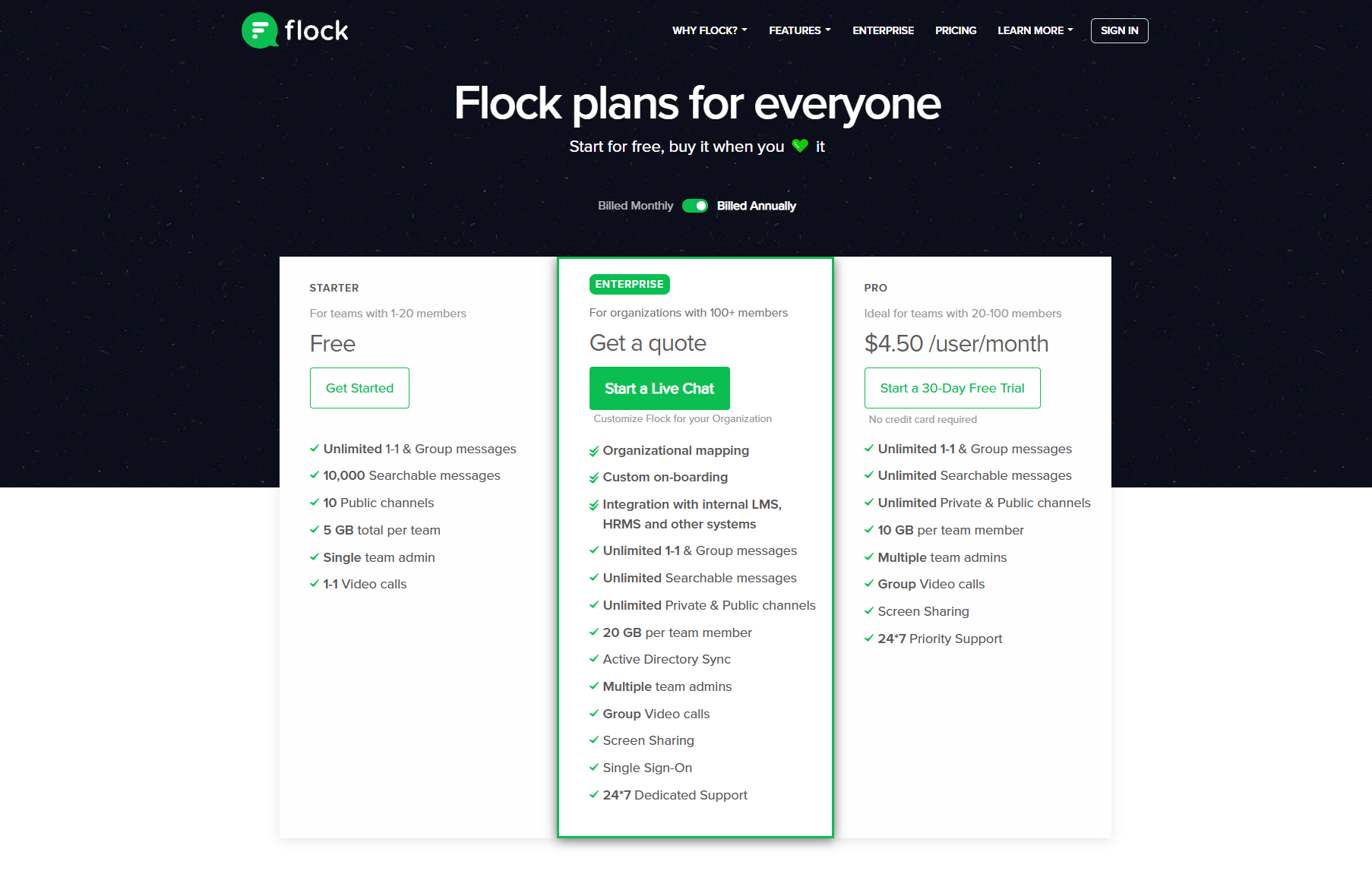
Image source: flock.com
Understanding Flock's pricing structure is important for both short-term collaboration and long-term growth. While Flock offers an affordable entry point, each pricing tier comes with trade-offs in storage, features, and administrative control. As teams grow, these differences become more important when evaluating overall value. This section explains how each Flock plan differs in functionality, cost, and suitability based on team size and collaboration needs.
Information source: flock.com
Update time: 2025/12/10
Note: Pricing and plan details reflect publicly available data as of the update date and may vary based on region, billing cycle, and number of agents.
Flock's pros and cons
User reviews of Flock consistently highlight both its strengths as a simple team and its limitations as collaboration needs grow. Feedback across platforms shows that Flock performs well for small teams seeking quick adoption and low overhead. At the same time, recurring concerns emerge around scalability, workflow depth, and long-term usability. The points below summarize the most common pros and cons shared by users.
Pros
- Easy onboarding and low learning curve: Many users highlight how quickly teams can get started with Flock without formal training. The interface feels familiar and intuitive, which reduces resistance from new users. Teams can create channels, invite members, and begin collaborating within minutes. This makes Flock especially attractive for startups and non-technical teams. Fast adoption is one of its strongest advantages.
- Clean and user-friendly interface: Flock's interface is designed to be simple and uncluttered, helping users focus on conversations. Navigation is straightforward across both web and mobile apps. Users appreciate that essential actions are easy to find without complex menus. This design choice supports daily usage without overwhelming teams. For small groups, this simplicity improves engagement.
- Affordable pricing for small teams: Flock's free and lower-tier paid plans are often praised for being budget-friendly. Small teams can access core messaging features without high cost. This lowers the barrier to entry for businesses exploring team chat tools. For early-stage teams, the pricing feels reasonable. Cost efficiency is frequently mentioned in positive reviews.
- Built-in lightweight productivity tools: Users value having basic tools such as notes, reminders, and polls built directly into the chat experience. These features help capture quick ideas, assign simple tasks, or gather feedback without leaving conversations. They are easy to use and require no additional setup. While basic, they add convenience for everyday collaboration. This reduces dependence on multiple tools early on.
- Cross-platform access for remote teams: Flock supports web, desktop, and mobile access, allowing teams to stay connected from anywhere. Remote and distributed teams benefit from consistent functionality across devices. Notifications help users stay updated in real time. This flexibility supports modern work patterns. Cross-platform availability is a commonly appreciated feature.
Cons
- Limited task management and workflow support: Many users report that Flock's task features are too basic for managing structured work. There is no support for task dependencies, progress tracking, or automation. As a result, teams often rely on external tools for execution. This creates fragmentation across workflows. The limitation becomes more apparent as teams grow.
- Message organization and threading challenges: While Flock supports basic replies, advanced message threading is limited. Long conversations can become hard to follow in busy channels. Important context may get buried over time. Users often mention this as a challenge during high-volume communication. This impacts clarity and efficiency.
- Storage and message history restrictions: Lower-tier plans place limits on searchable message history and storage. Teams may lose access to older conversations or files. This makes it difficult to revisit past decisions or onboard new team members. Many users see this as a major drawback. Long-term knowledge retention is affected.
- Basic meeting and calling capabilities: Flock's audio and video calling features are suitable for quick conversations but lack advanced options. There are no built-in recordings, , or detailed scheduling features. Teams that rely heavily on meetings often need additional platforms. This increases tool sprawl. Users frequently mention this gap.
- Limited scalability for growing teams: As organizations expand, Flock struggles to support cross-functional collaboration and visibility. Work remains chat-centric without structured execution. Managers find it harder to track progress or ownership. This limitation often leads teams to evaluate more comprehensive workspaces. Scalability concerns appear frequently in long-term reviews.
Flock can be a solid starting point for small teams that mainly rely on chat and simple productivity features. However, as teams grow, its messaging-first design starts to show limitations. Work becomes harder to track across departments, tasks lack structure, and visibility into progress is often fragmented. Limited storage, basic task management, and the absence of deeper workflow capabilities make it challenging to support more complex collaboration or repeatable processes. Over time, these gaps lead growing organizations to look for platforms that combine communication, structured , and execution in a single workspace-naturally pointing them toward a more scalable option like Lark.
Explore a more scalable collaboration approach
Lark: Built for teams that have outgrown chat-only tools
Teams often start with Flock as a simple , but growing collaboration needs to quickly expose its limits. As work becomes more cross-functional, teams need more than chats. They need meetings, documents, tasks, and follow-ups to live together without constant app switching. brings all of this into a single workspace, combining messaging, meetings, shared documents, , and automation, so teams can stay aligned as their work becomes more complex.
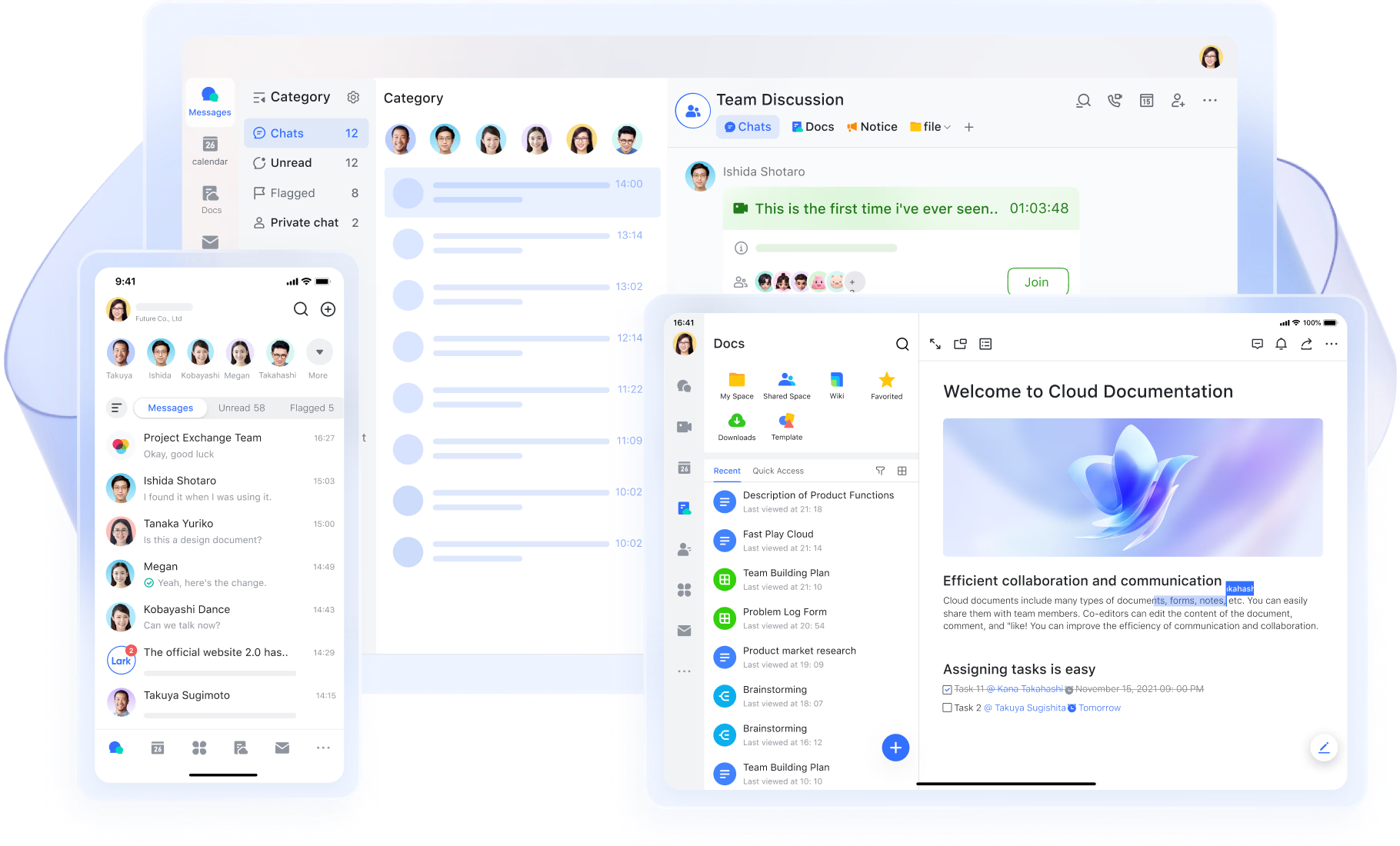
Faster, clearer communication across teams
enables real-time communication through direct messages and group chats designed for active teamwork. Threads, mentions, and powerful search help keep discussions organized and easy to revisit, even as conversations grow. Messages stay closely connected to related documents, tasks, and meetings, so context is never lost. Flock also supports team messaging, but discussions often remain isolated within chat rooms. Lark's approach keeps communication tied to actual work, making collaboration feel continuous rather than fragmented. 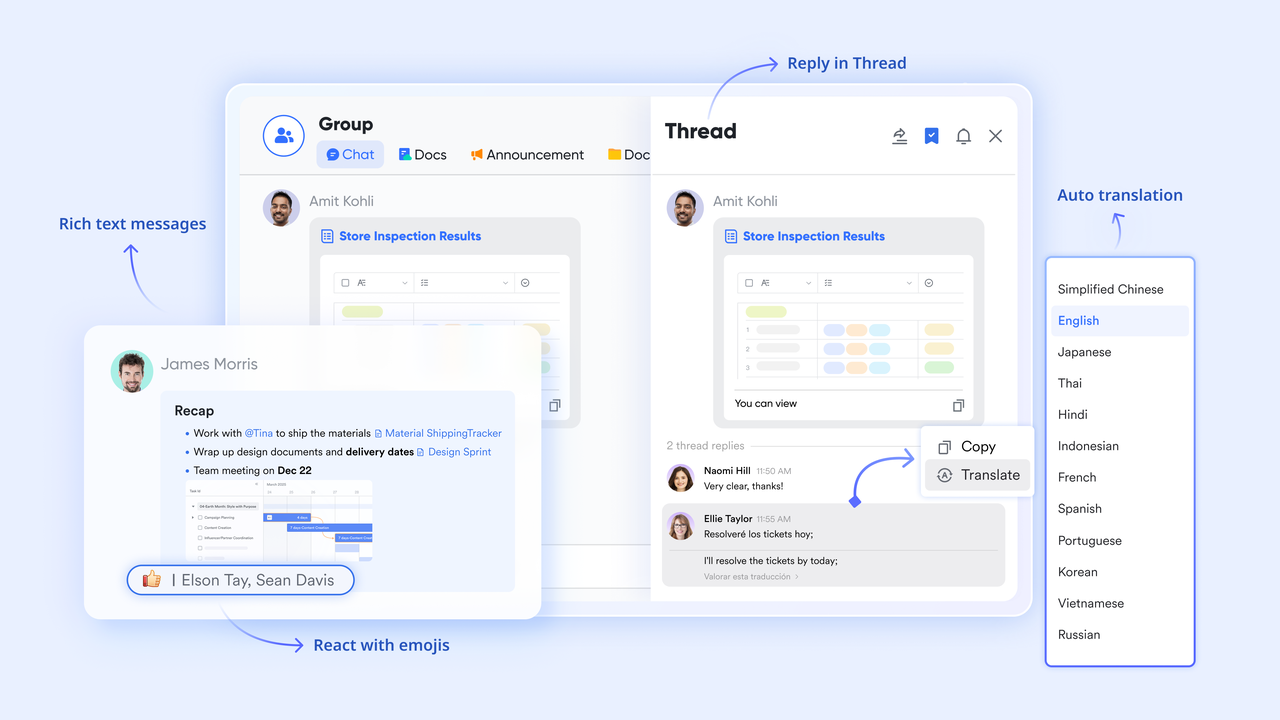
Turning conversations into scheduled work
Lark connects , , and Lark Tasks so that discussions naturally lead to action. From a chat message, voice note, event, or poll, team members can instantly create tasks, assign owners, add due dates, and break work into sub-tasks without leaving the conversation. Meetings can also be scheduled directly from chats, with a calendar showing available time slots for all participants. Tasks with deadlines automatically appear in Calendar views, giving teams a single . This tight connection between communication and execution goes far beyond Flock's basic task capabilities. 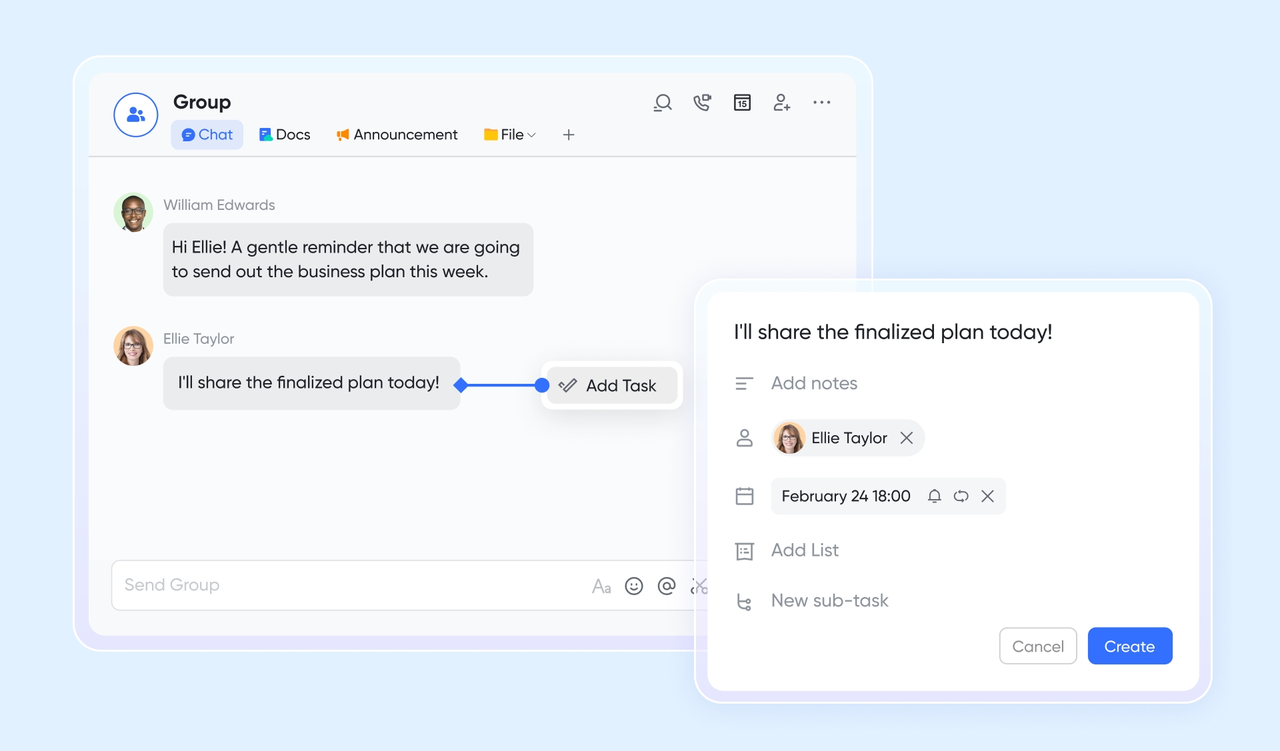
Meetings designed for daily collaboration
provides built-in video meetings that are stable, easy to start, and closely connected to Messenger and Calendar. Teams can move from a chat to a live meeting in seconds, without losing context or momentum. During meetings, participants can collaborate on content, review materials, and keep discussions structured. While Flock offers basic video calling, Lark Meetings supports more collaborative workflows, making it better suited for teams that rely on frequent calls for planning, reviews, and decision-making. 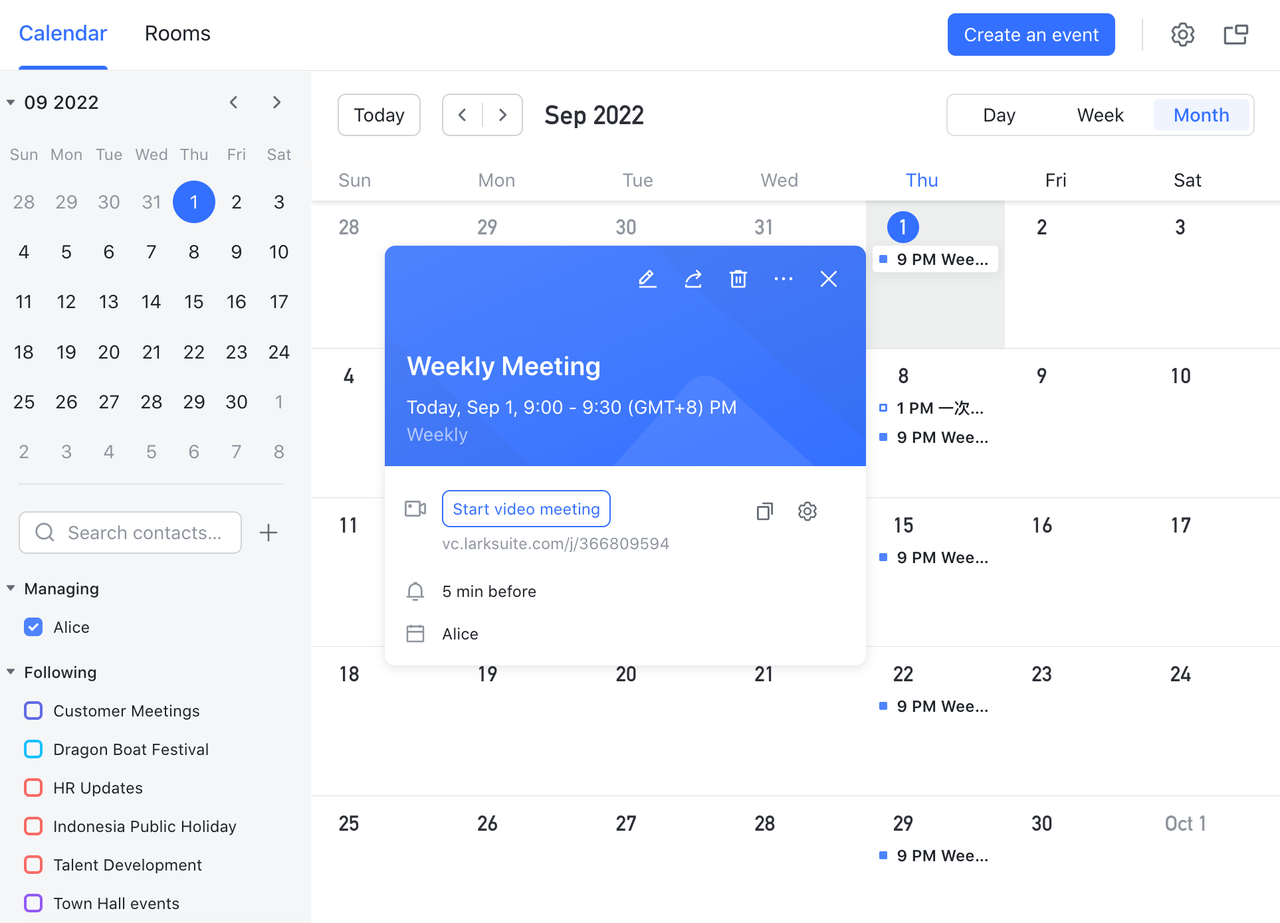
Interactive content sharing during meetings
Magic Share changes how teams collaborate during live discussions. Instead of passive screen sharing, participants can view and work on the same document or content together in real time. This creates more engaging meetings and helps teams move faster on reviews, brainstorming, and training sessions. Flock's screen-sharing experience remains static by comparison, limiting interaction and shared ownership during meetings. 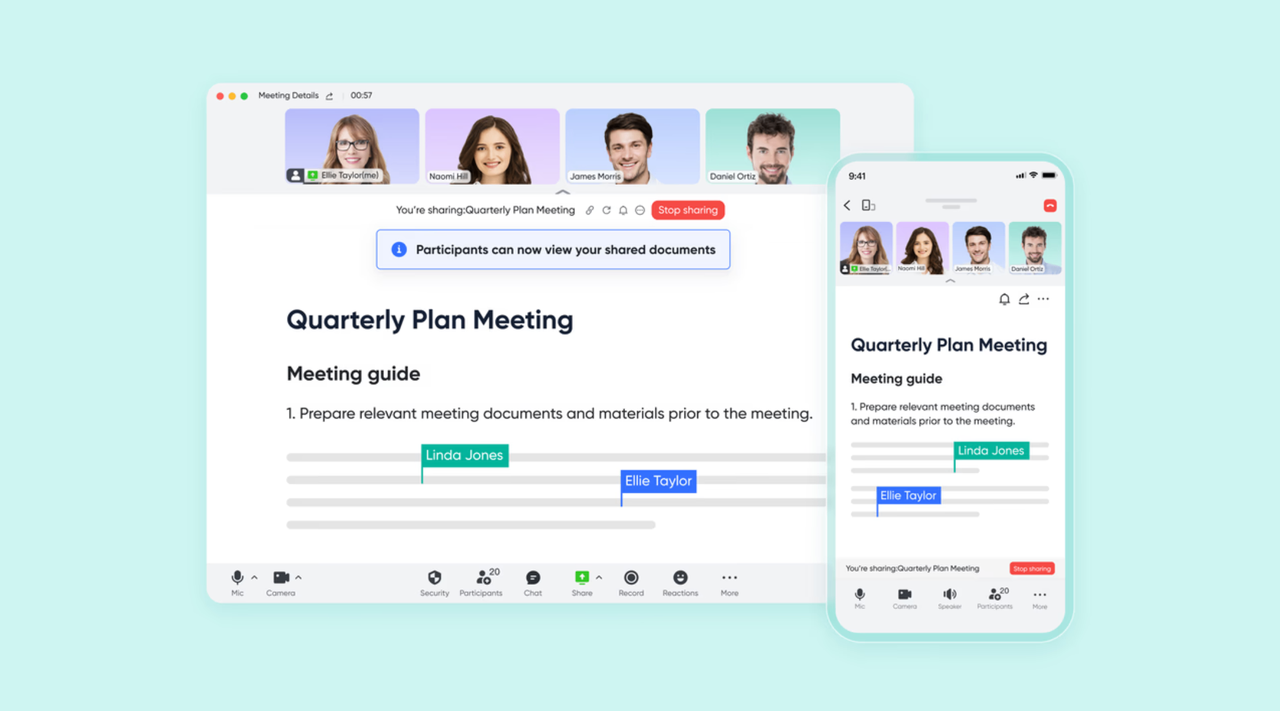
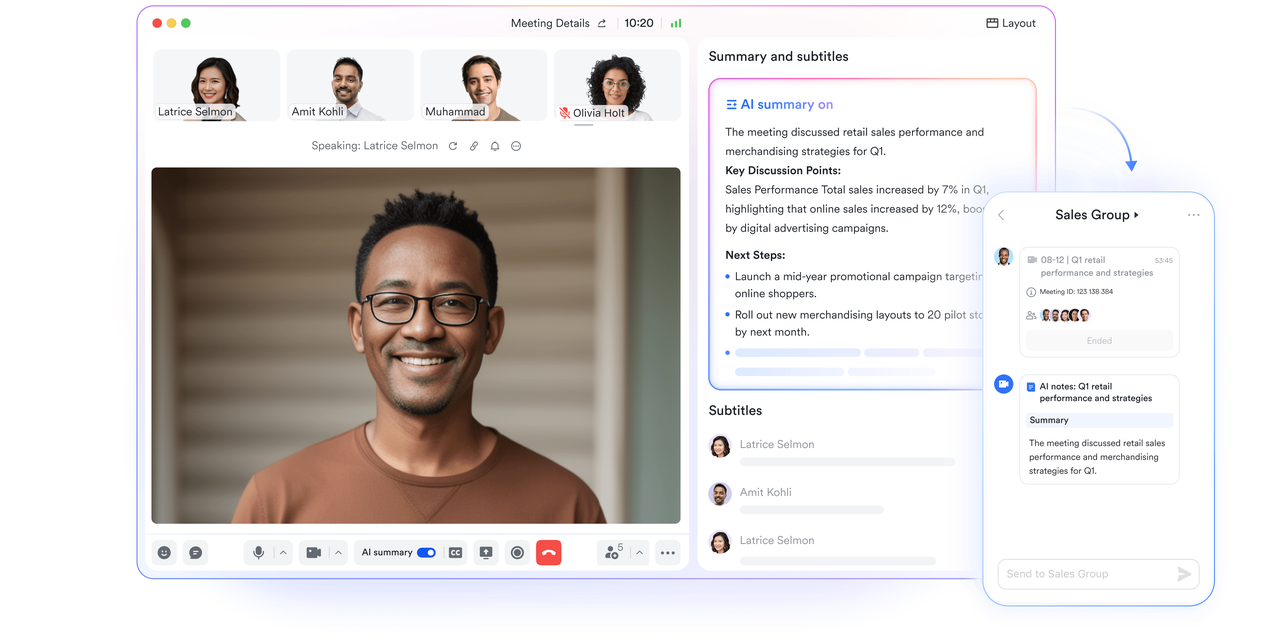
Automatic meeting records without extra effort
creates meeting records automatically from recordings or uploaded audio and video files. Teams no longer need to rely on manual note-taking or scattered chat summaries. Every meeting produces a clear reference that can be shared, reviewed, and reused. Flock does not provide automated meeting documentation, which often leads to incomplete records and missed details over time. 
AI-powered summaries that drive follow-up
turn meeting conversations into structured "Smart chapters" that highlight key points, decisions, and action items. Teams can quickly understand outcomes without rewatching recordings or reading long transcripts. Without built-in AI summaries, Flock users must depend on third-party tools or manual processes. Lark's AI-driven approach gives teams faster clarity and more reliable follow-through, especially in meeting-heavy environments.
:
- Starter plan: Free forever plan that includes 11 powerful tools for up to 20 users. It also comes with 100GB of storage, 1000 automation runs, AI translations, and more.
- Basic plan: $6/user/month (billed annually) for up to 500 users. It includes everything in Starter plus group calling for up to 500 attendees, 5TB of storage, 1000 automation runs, and more. For more details, please .
- Pro plan: $12/user/month (billed annually) for up to 500 users. It includes everything in Basic plus group calling for up to 500 attendees, 15TB of storage, 50,000 automation runs, and more.
- Enterprise plan: for custom pricing. Supports unlimited users and includes even more automation runs and advanced security, compliance, and management features.
For small teams with simple communication needs

18 months message history
1000 Base automation runs/month
2000 rows per table in Base
Most POPULAR
For companies with comprehensive collaboration and management needs
Unlimited message history
500-participant video meetings
50k Base automation runs/month
20k rows per table in Base
For large companies with advanced security and organizational management needs
Get a personalized demo and pricing
Unlimited message history
500-participant video meetings
15 TB storage + 30 GB storage/user
500k Base automation runs/month
50k Base automation runs/month
Most POPULAR
For companies with comprehensive collaboration and management needs
Unlimited message history
500-participant video meetings
50k Base automation runs/month
20k rows per table in Base
Lark vs Flock: Which tool fits long-term team collaboration
Choosing the right depends on how a team plans to work and grow over time. While Flock focuses on messaging and basic productivity, Lark is designed as a broader workspace that connects communication with execution. This comparison looks beyond surface features to evaluate how each platform supports . Understanding these differences helps teams choose a tool that aligns with long-term needs rather than short-term convenience.
Conclusion
Flock is a solid that primarily need a solution with minimal setup. Its chat-centric design, lightweight productivity features, and affordable pricing make it easy to adopt for basic collaboration. For teams with straightforward communication needs and limited workflows, Flock can continue to work well without adding unnecessary complexity.
However, as teams grow and collaboration becomes more structured, the limitations of chat-only tools become harder to ignore. Maintaining visibility, accountability, and follow-through requires more than messaging alone. This is where platforms like offer greater value by unifying chat, meetings, documents, tasks, and automation in one workspace. For organizations planning long-term growth, choosing a tool that connects communication with execution can significantly improve how work gets done.
Build collaboration that grows with your team
FAQs
Can Flock replace email entirely for team communication?
Flock can significantly reduce internal email for quick conversations and updates. Teams often use it for day-to-day coordination and informal discussions. However, structured communication and external messaging still rely on email. As workflows become more complex, teams usually combine Flock with other tools. At this stage, some begin exploring broader platforms like Lark for more combination communication.
How secure is Flock for business communication?
Flock provides basic security features that are suitable for small teams and general business use. These include standard access controls and workspace management options. Larger organizations may need more advanced compliance and administrative features. As security requirements grow, teams often reassess their collaboration stack. This evaluation can lead them to consider platforms such as Lark.
Does Flock support threaded conversations or message replies?
Flock supports basic message replies, which helps reduce some channel noise. However, threading options are limited compared to more advanced collaboration tools. Long discussions can become difficult to follow as message volume increases. Teams managing complex conversations often feel this limitation. Over time, some look for tools like Lark that offer stronger context and structure.
Can guests or external collaborators join Flock channels?
Flock allows limited external access depending on how the workspace is configured. Managing guests can work for simple use cases. As collaboration with partners becomes more frequent, access control can feel restrictive. Teams may need better visibility and coordination across organizations. This often leads them to explore more flexible workspaces such as Lark.
What productivity tools does Flock include besides messaging?
Flock includes basic tools like notes, reminders, tasks, and polls to support lightweight productivity. These tools are useful for simple follow-ups and quick decisions. However, they are not deeply connected to execution or workflows. As teams need stronger follow-through, these limitations become more noticeable. This is where platforms like Lark start to stand out by linking communication with action.
Related reading






























