Managing meetings efficiently is essential for individuals and teams working across multiple schedules and time zones. Many users rely on the Google Calendar scheduling tool because it offers a simple way to share availability and book appointments. As scheduling needs grow, organizations begin exploring tools that combine booking with workflow coordination and collaboration. It is where modern solutions go beyond basic scheduling and support connected work environments, with platforms like Lark gradually introducing more integrated approaches to scheduling workflows.
Key takeaways: Google Calendar scheduling tool overview
The Google Calendar scheduling tool is widely used for booking meetings and managing availability. It is easy to set up and integrates well with existing tools, making it suitable for simple scheduling needs.
- The Google Calendar scheduling tool allows users to create booking links and share availability easily, reducing back-and-forth communication and simplifying meeting coordination.
- The Google Calendar scheduling tool integrates with Gmail and Meet for seamless workflows, allowing meetings to be scheduled directly from emails with automatic video links.
- The free Google Calendar scheduling tool supports basic reminders and notifications, helping reduce missed meetings and keep attendees informed.
- It is best suited for individuals and small teams with simple scheduling needs, making it effective for managing personal calendars and appointments.
- Limited automation and collaboration features make it less suitable for complex workflows, so growing teams may need more advanced tools.
What is Google appointment scheduling?
Google Calendar includes a built-in appointment scheduling tool that lets users share their real-time availability via professional booking pages. This native functionality eliminates the need for third-party software, enabling you to manage time slots and host external bookings directly in your existing calendar.
This feature simplifies scheduling by eliminating manual coordination and . It also supports time zone adjustments, making it easier for global teams to schedule meetings. While the feature is effective for basic scheduling, it may not support complex workflows that require automation and collaboration.
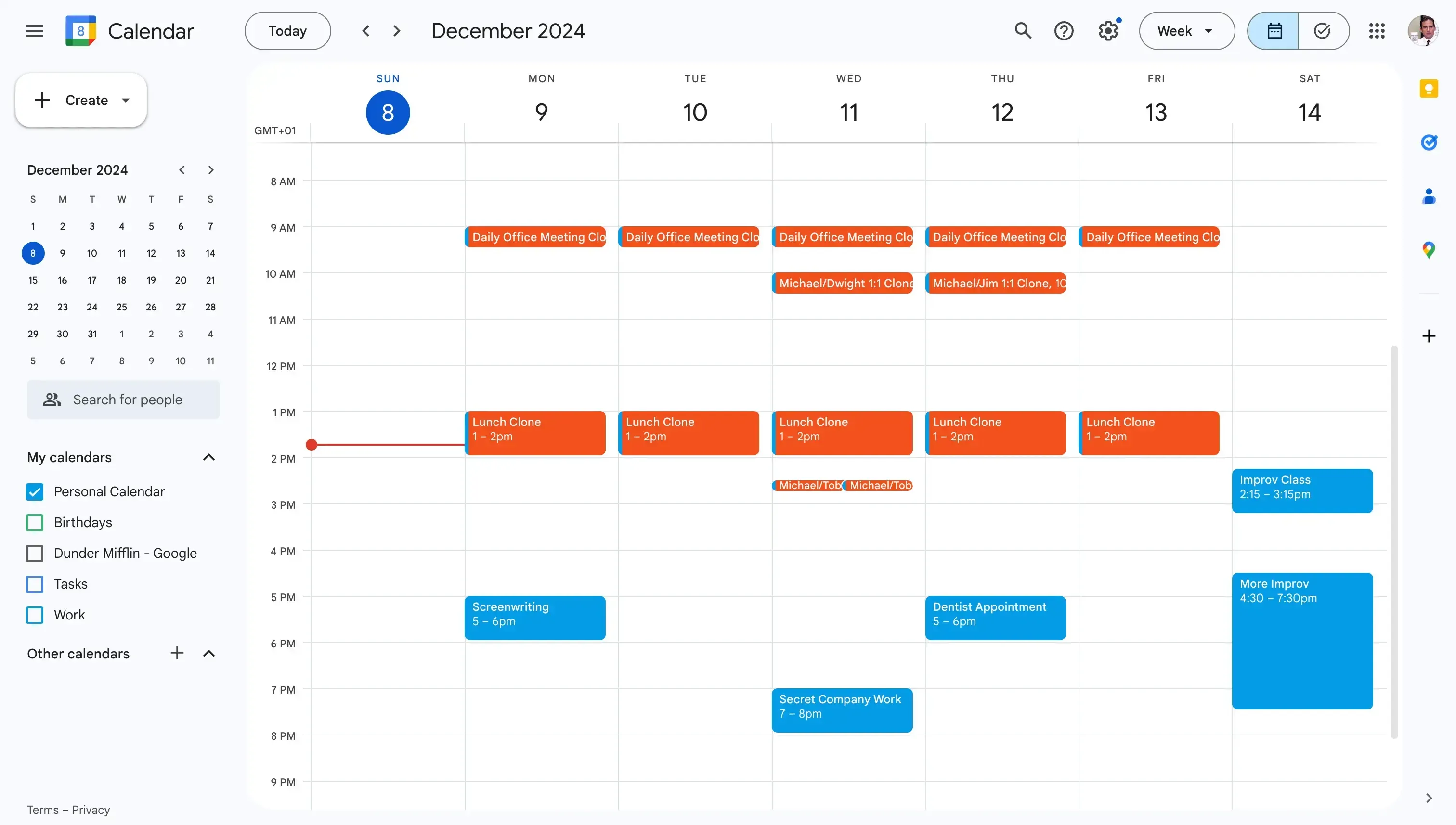
Image source: google.com
Key features of the Google Calendar scheduling tool
The Google Calendar scheduling tool offers simple features for managing appointments and sharing availability. It integrates with Google services to streamline scheduling. These features make it suitable for individuals and small teams.
- Appointment scheduling for meetings: The Google Calendar scheduling tool lets users create booking pages where others can reserve time based on availability.
- Automatic calendar syncing: All scheduled appointments are synced with the user's calendar in real time to avoid conflicts. The system checks availability across existing events before confirming bookings.
- Email notifications and reminders: The free Google Calendar scheduling tool sends automated confirmations and reminder emails for scheduled meetings. It reduces the risk of missed appointments. Both the host and attendees receive updates about bookings.
- Time zone support: The scheduling tool Google Calendar automatically adjusts based on participants' time zones. It ensures that meeting times are displayed correctly for all attendees.
- Integration with Gmail and Meet: The calendar scheduling tool Google integrates directly with Gmail and . Users can create meetings with video links automatically included.
Pricing details: Is the Google Calendar scheduling tool free or not
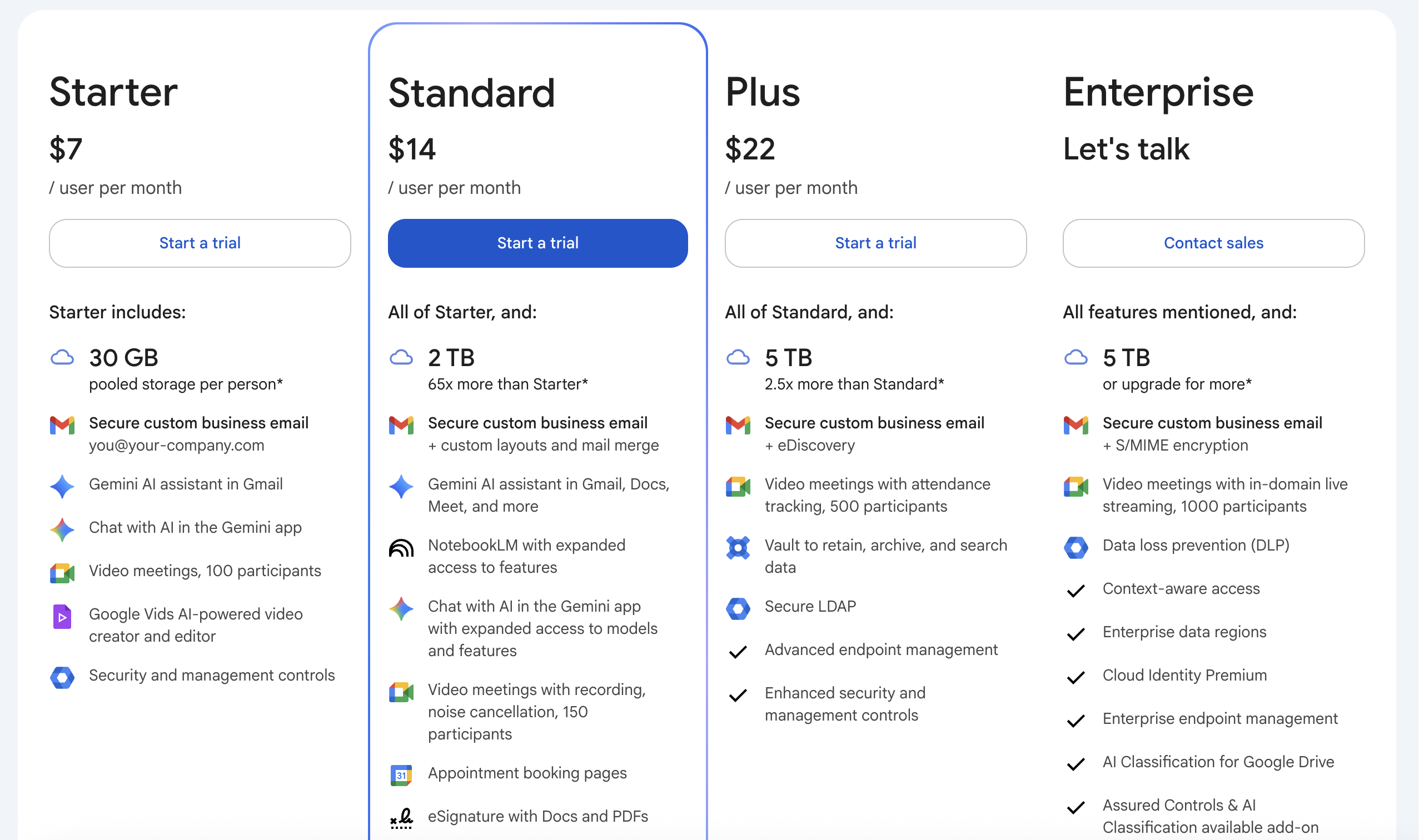
The Google Calendar scheduling tool is included within Google Workspace plans rather than offered as a standalone product. varies by tier, with each plan adding more storage, , and scheduling capabilities. While basic plans support simple booking needs, higher tiers provide enhanced features for larger teams. Understanding these pricing differences helps businesses choose the right plan based on their scheduling and operational requirements.
Information source: google.com
Update time: 2026-03-24
Note: Pricing and plan details reflect publicly available data as of the update date and may vary based on region, billing cycle, and number of agents.
Overall, Google Calendar scheduling is most cost-effective for teams already using Google Workspace. However, since scheduling is bundled within a broader suite, businesses may end up paying for features beyond scheduling, especially when more advanced capabilities are required.
How to use Google appointment scheduler
Using the Google Calendar is simple and helps users create and manage multiple booking pages. It allows others to schedule meetings based on your availability without manual coordination. This reduces back-and-forth communication and improves scheduling accuracy.
Step 1: Set up your appointment schedule
Open Google Calendar on desktop, click Create, then select Appointment Schedule. Choose your available days and define time slots that others can book. You can also set recurring availability for consistent scheduling. This step ensures your calendar reflects when you are open for meetings.
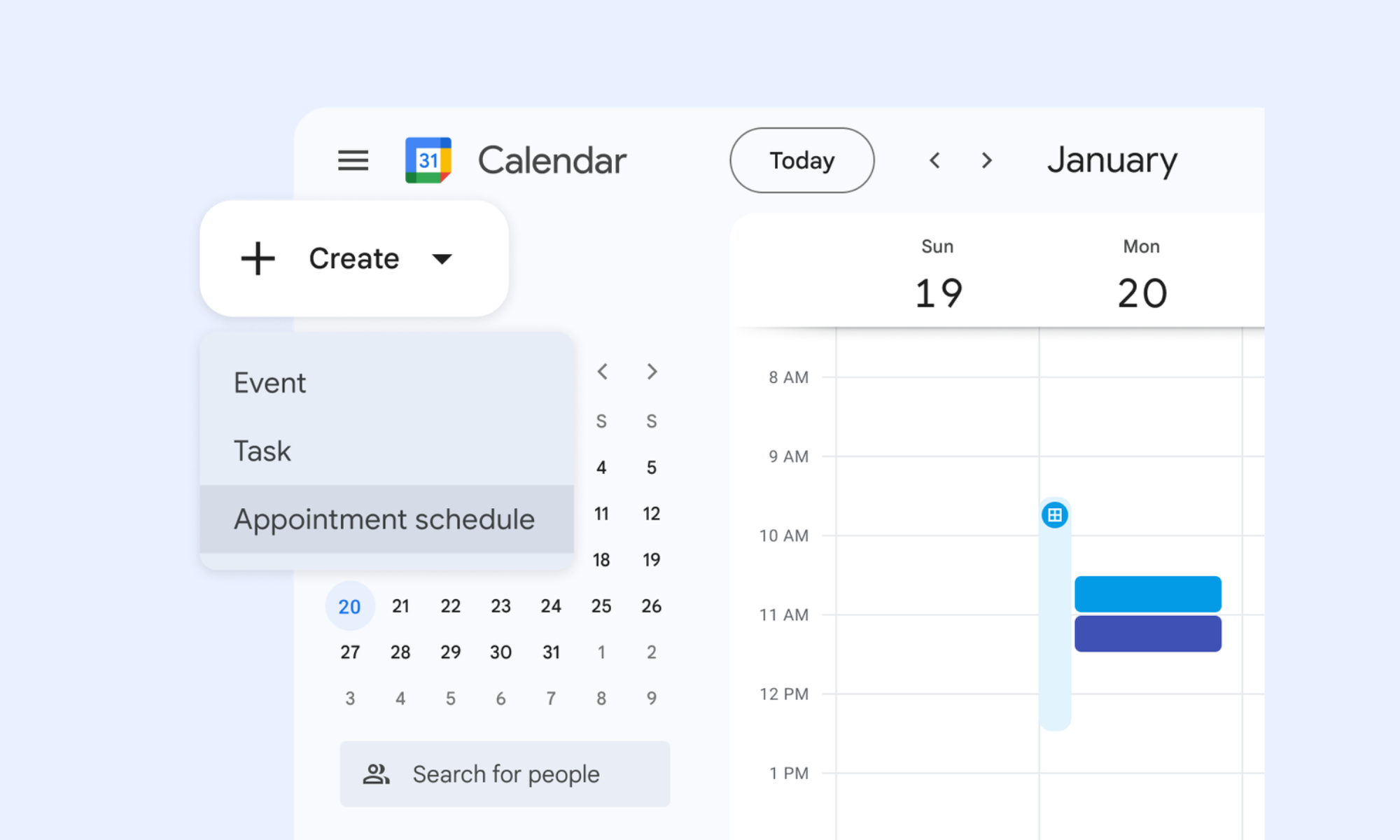
Image source: google.com
Step 2: Customize your booking details
Add a title, define the meeting duration, and choose your available dates and time slots. You can also include a location, add custom questions for attendees, and adjust other settings. Once everything is set, click Save.
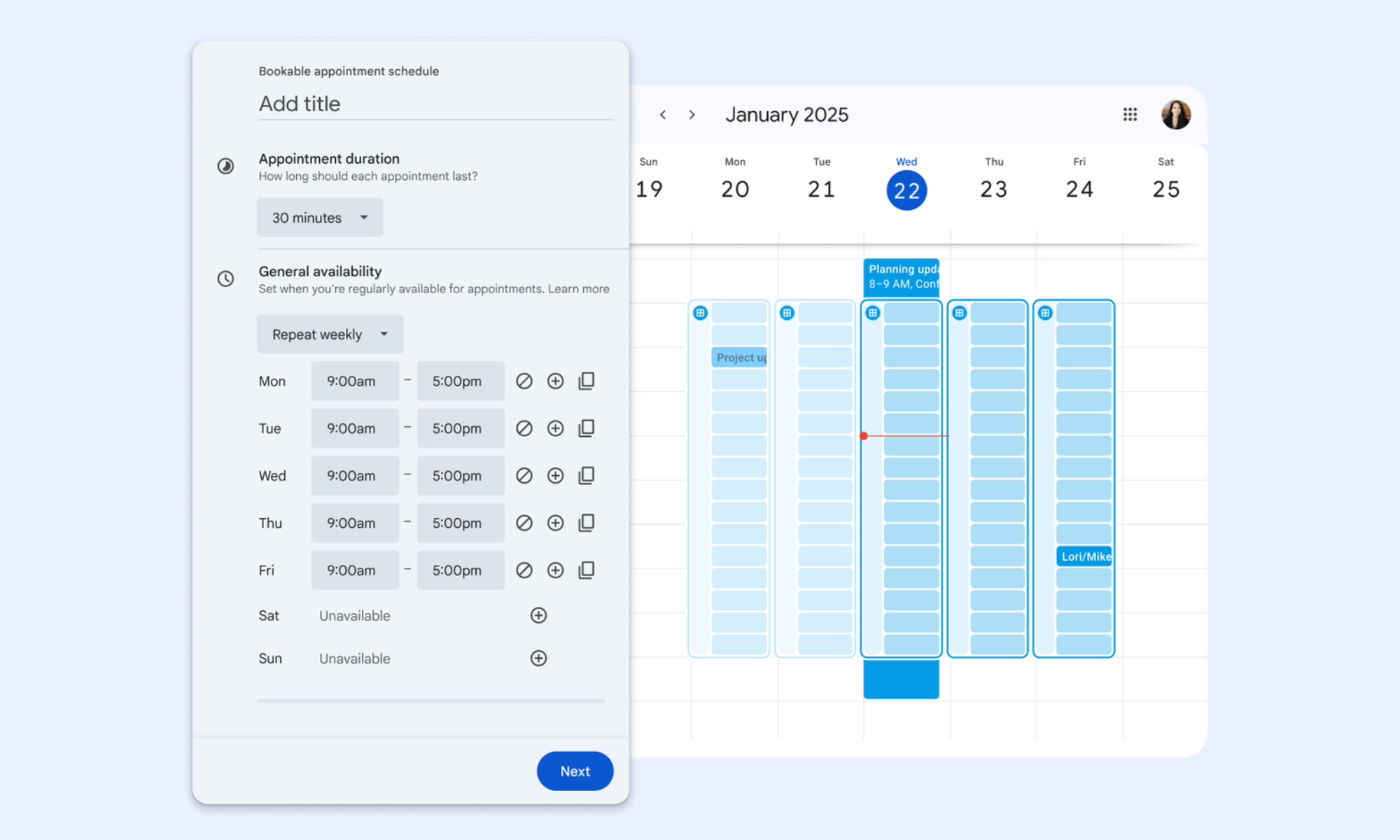
Image source: google.com
Step 3: Share your booking page
Click your appointment in the calendar view, then copy the booking link. Share this link via email, chat, or websites so others can book time with you. You can also manage multiple booking pages from the same interface.
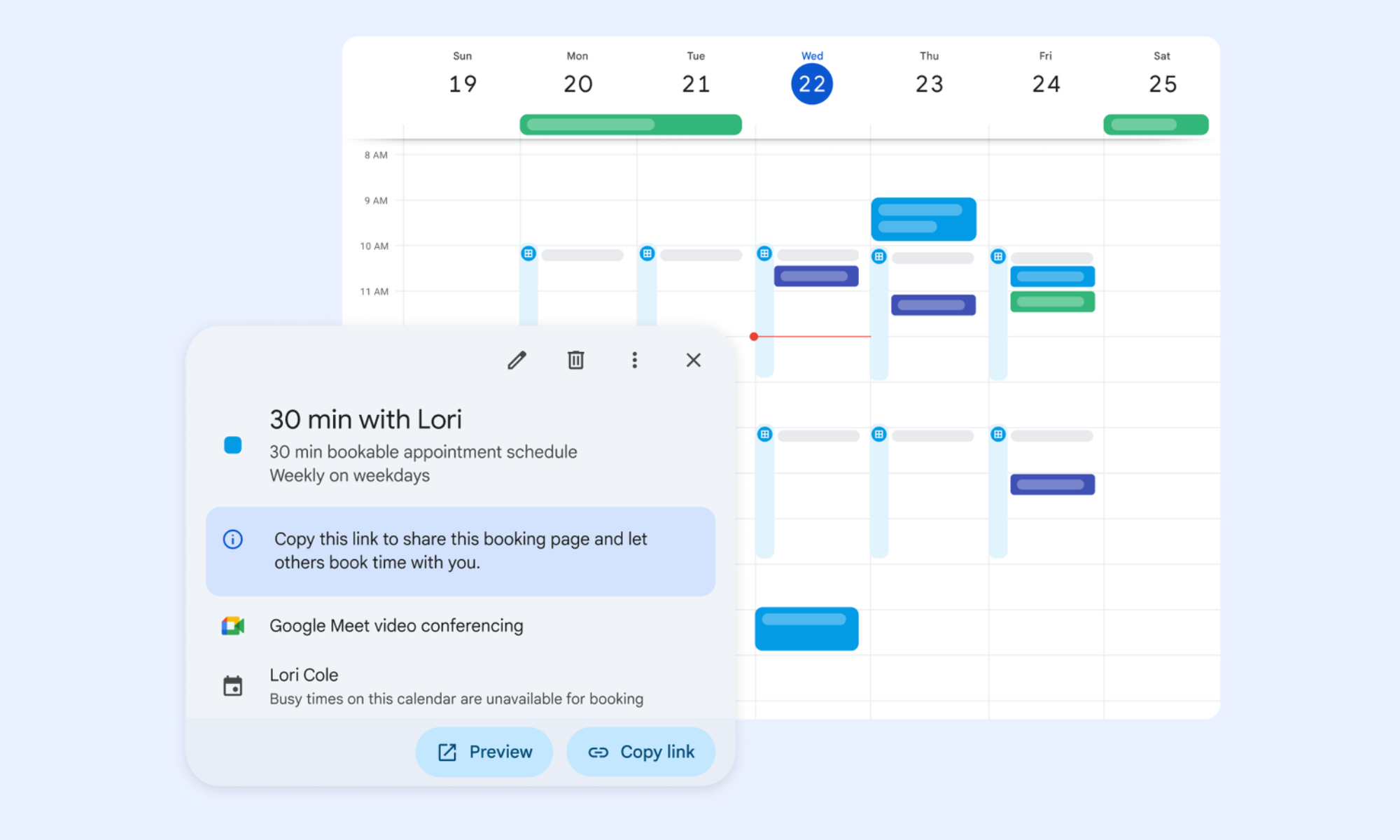
Image source: google.com
Strengths of the Google Calendar scheduling tool
The Google Calendar scheduling tool works best for simple scheduling needs. It is easy to use, quick to set up, and integrates well with Google services. Here are the breakdowns of why people love it:
- Simple meeting scheduling for individuals: The Google Calendar scheduling tool lets users quickly create booking pages and share availability. It removes the need for back-and-forth emails when scheduling meetings. Individuals can manage their time efficiently with minimal setup. It is especially useful for freelancers, consultants, and professionals handling their own schedules.
- Seamless use within the Google ecosystem: The calendar scheduling tool Google integrates directly with Gmail, Google Meet, and other tools. Meetings can be scheduled directly from emails with video links added automatically. It creates a smooth and connected workflow. Users benefit from having all scheduling activities within one ecosystem.
- Easy setup with minimal learning curve: The interface is simple and intuitive, allowing users to start scheduling without . Creating booking pages and setting availability takes only a few steps. It makes the free Google Calendar scheduling tool accessible for beginners. It supports quick adoption across individuals and small teams.
- Free access for basic features: The Google Calendar scheduling tool's free option provides essential features such as booking links, reminders, and calendar syncing. It makes it an affordable solution for users with basic needs. Small teams can manage scheduling without investing in additional tools. It lowers the barrier to entry for scheduling solutions.
Limitations of Google Calendar's appointment scheduling tool
Like nothing is perfect, the Google Calendar scheduling tool has limitations on complex workflows. These become more noticeable as teams grow and processes expand:
- Limited workflow automation: The tool offers basic notifications and reminders but lacks advanced automation. As a , it does not support multi-step workflows or automated processes beyond simple scheduling. This limits efficiency for teams managing high volumes of appointments. As operations scale, manual processes can become time-consuming.
- No advanced routing or logic-based scheduling: Google Calendar, the scheduling tool, does not support conditional logic for assigning meetings. It cannot route bookings based on availability, priority, or specific criteria. This makes it difficult to manage complex scheduling scenarios. Organizations with advanced needs may require more flexible solutions.
- Weak support for multi-step processes: The tool does not support an workflow or multi-stage scheduling processes. that requires layered approvals or follow-ups may face challenges. This limits its use in structured operational environments. It is better suited for simple, one-step scheduling tasks.
- Lack of deep collaboration features: Collaboration capabilities are limited compared to modern platforms. Teams cannot easily manage scheduling alongside communication and workflow tracking. This often requires the use of additional tools for coordination. As a result, workflows may become fragmented across multiple systems.
Automate your most complex schedules with clicks
Smart alternative: Reclaim your time with automated scheduling in Lark
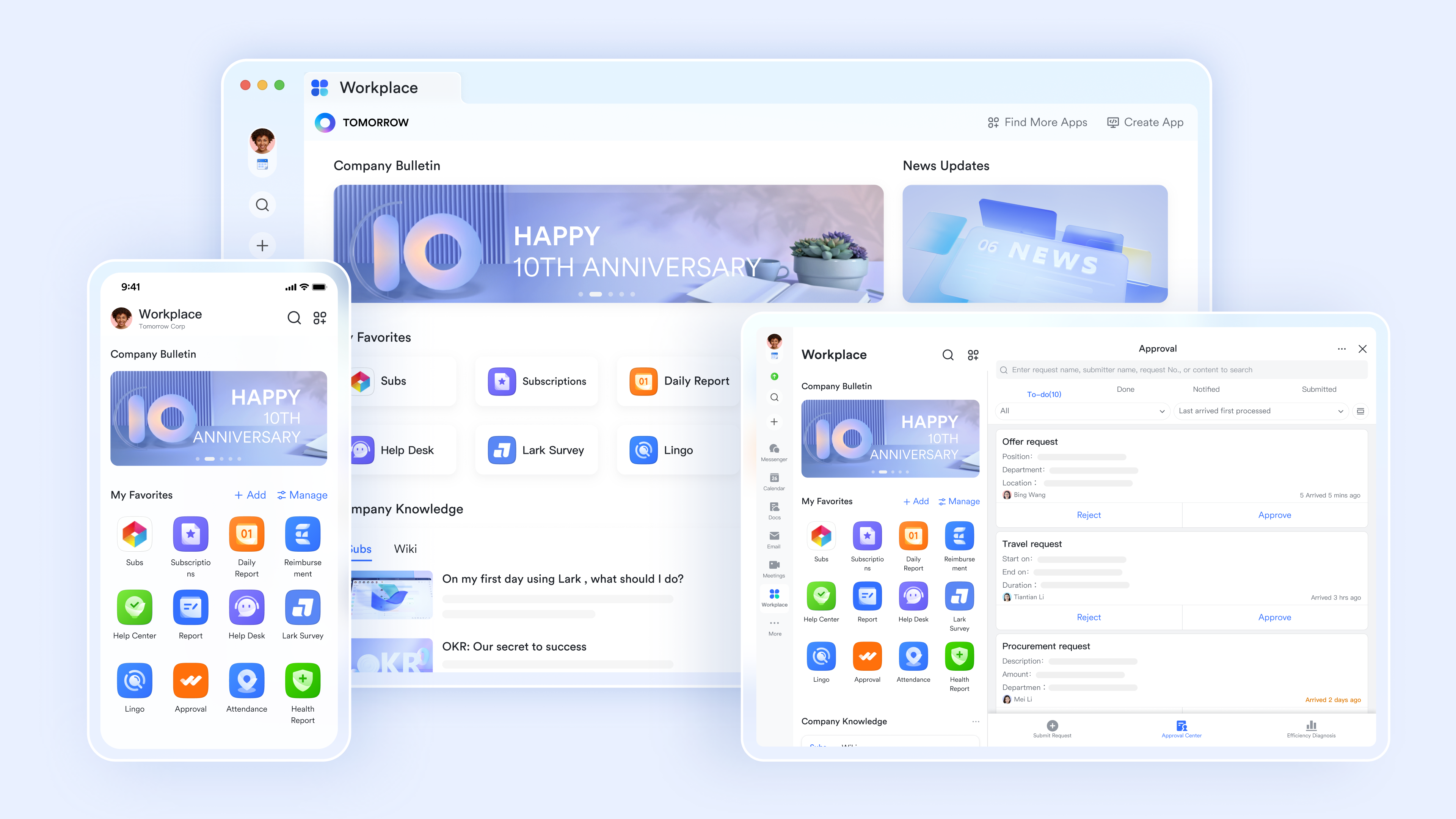
As scheduling becomes part of broader workflows, teams need tools that go beyond basic booking. provides a unified platform that combines , communication, and automation in one environment. It helps teams manage appointments while coordinating follow-ups and operational tasks. This makes it a standout choice among for organizations handling complex scheduling workflows.
Shared team scheduling with full cross-team availability visibility
displays every team member's availability in a single unified view, so meeting organizers book slots without sending availability polls. Shared group calendars overlay individual schedules. Color-coded calendar categories separate internal meetings, client appointments, and personal blocks. Timezone auto-adjustment ensures remote and distributed teams see every event in their local time. 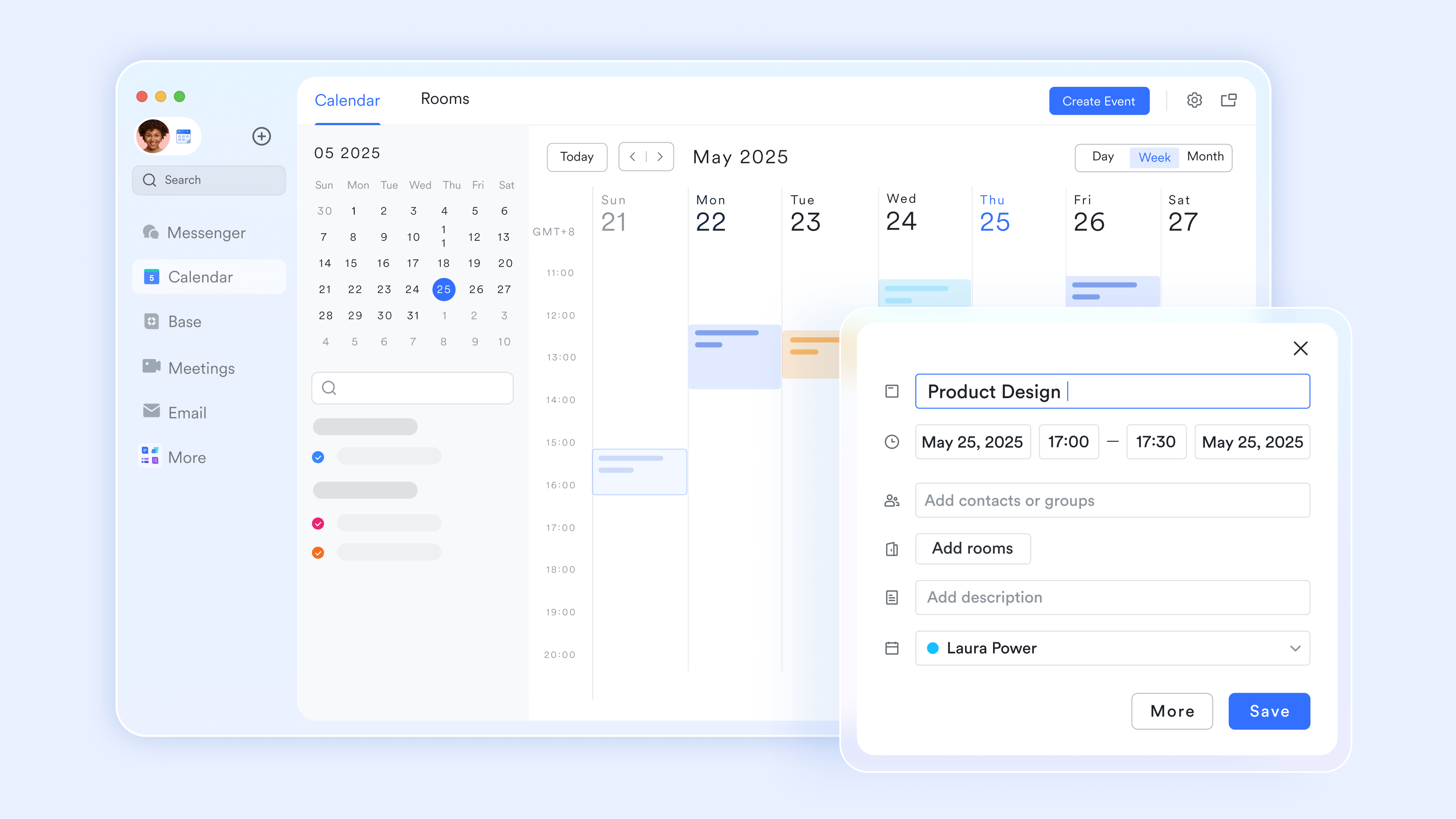
Book appointments without back-and-forth messages
Lark Calendar's scheduling function lets team members share a booking link showing their available slots based on their live calendar. The invitee selects a slot, and the meeting is automatically confirmed in both parties' Lark Calendars without any confirmation message. Buffer time between appointments is configured in the Lark Calendar to automatically prevent back-to-back scheduling conflicts. 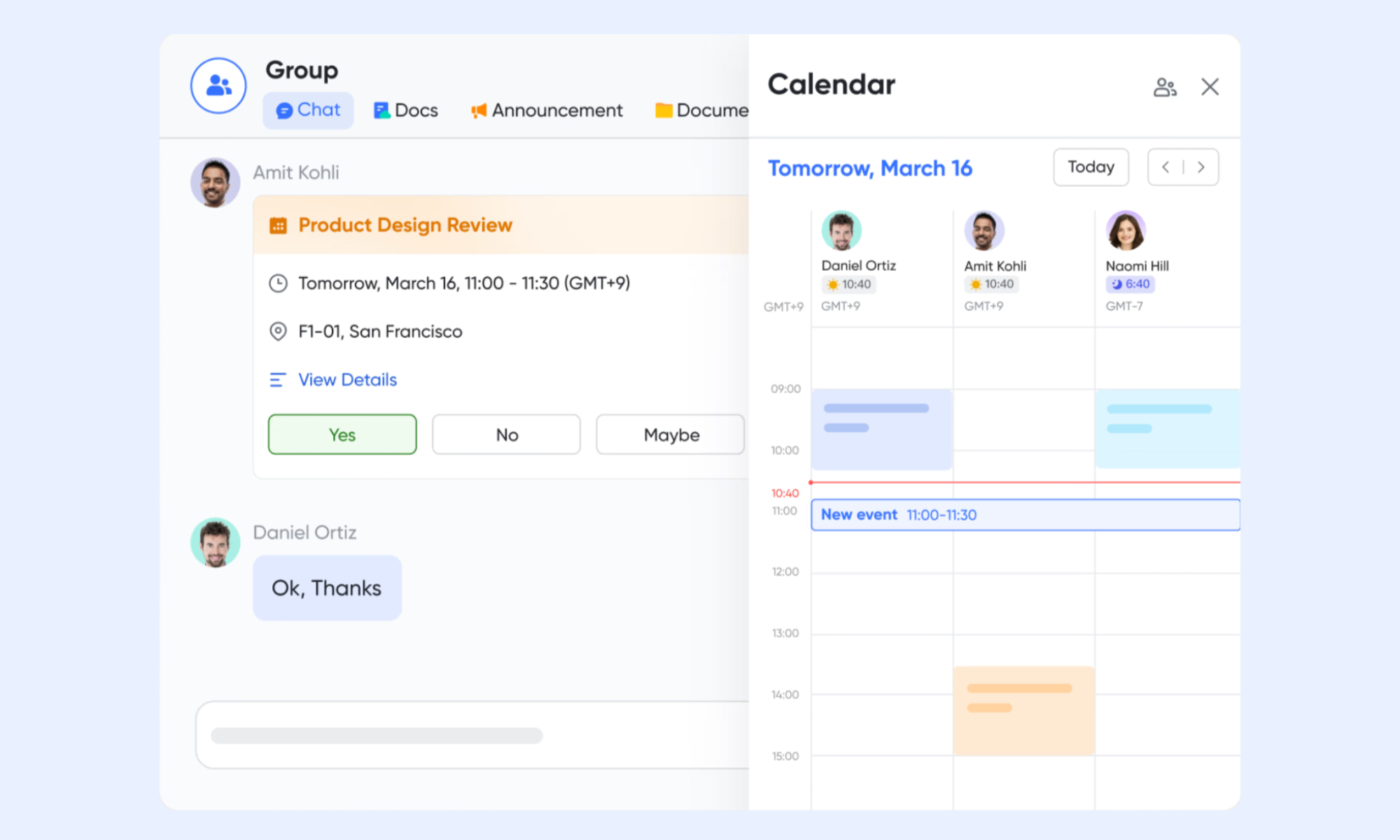
Video calls are generated automatically from every calendar event
When a meeting is created in the Lark Calendar, a video link is generated and embedded in the invite automatically. Attendees join with one click from the calendar event without copying a link into a separate tool. Lark Minutes transcribes the call and posts the summary directly back to the originating Lark Calendar event record. 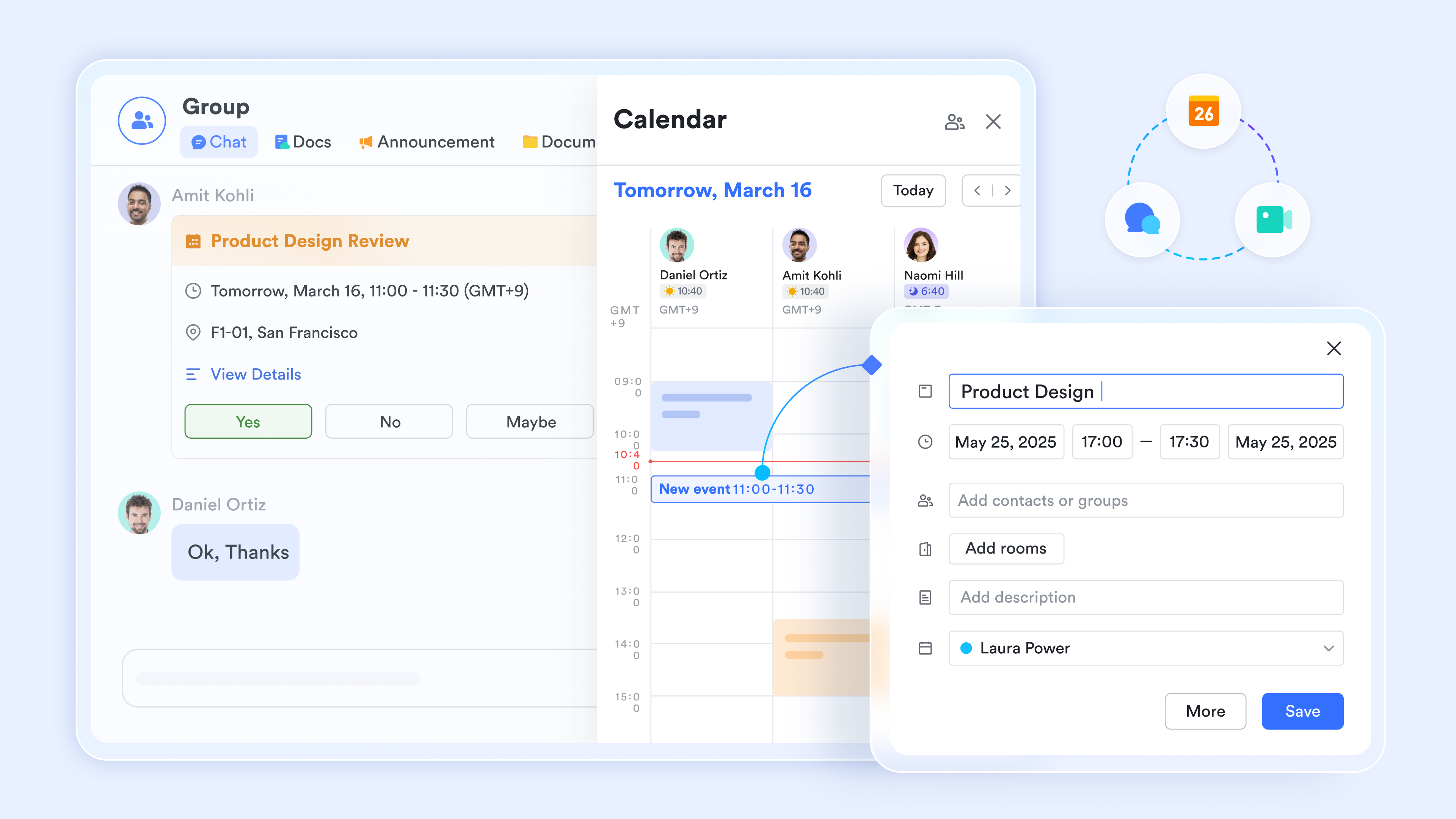
Appointment and booking records are tracked in a live structured database
Lark Base stores appointment records with time and date fields, member fields for assigned team members, single-select fields for appointment type and status, and formula fields calculating scheduling gaps or overdue follow-ups. Teams managing high-volume appointment pipelines-sales demos, client calls, service bookings-track every record in one live, multi-user database. 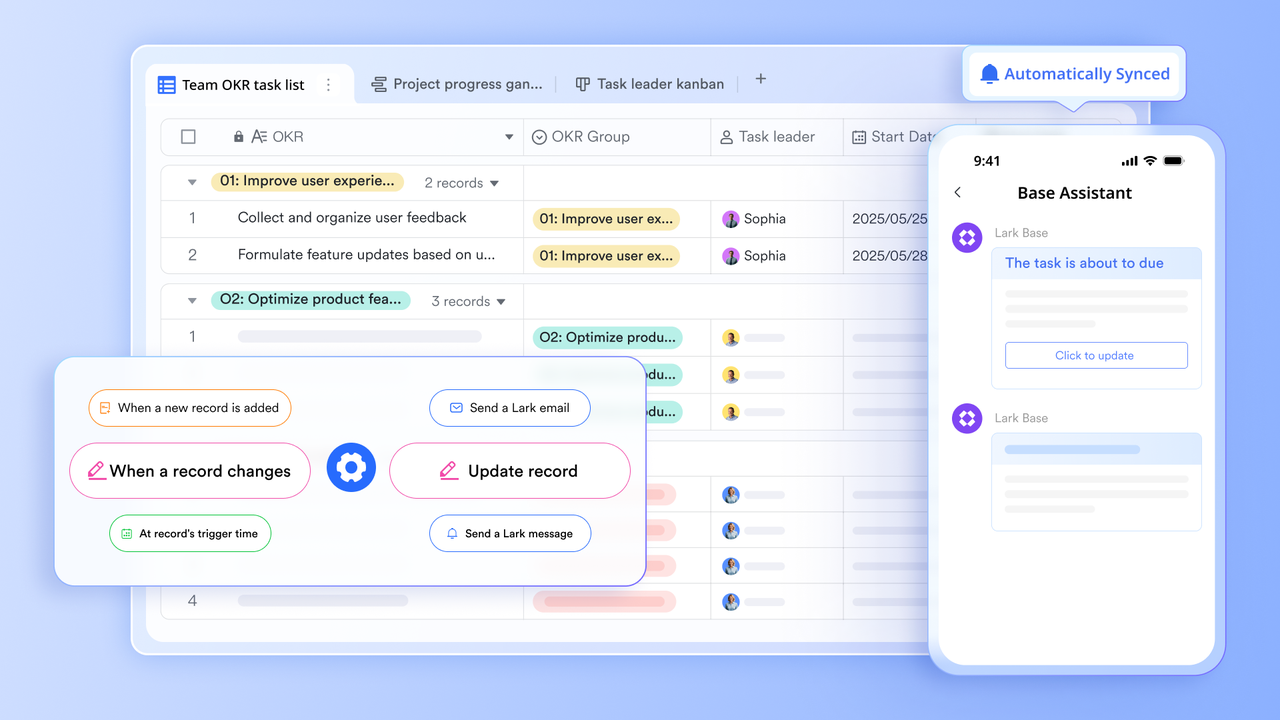
Scheduling confirmations and reminders sent without manual follow-up
Lark Base automation can trigger Lark Messenger notifications when an event record is created, updated, or when it approaches its scheduled time. When an appointment is booked at Lark Base, the automation sends a confirmation to the assigned team member and a reminder 24 hours before. No manual follow-up message, no missed appointment from a forgotten notification. 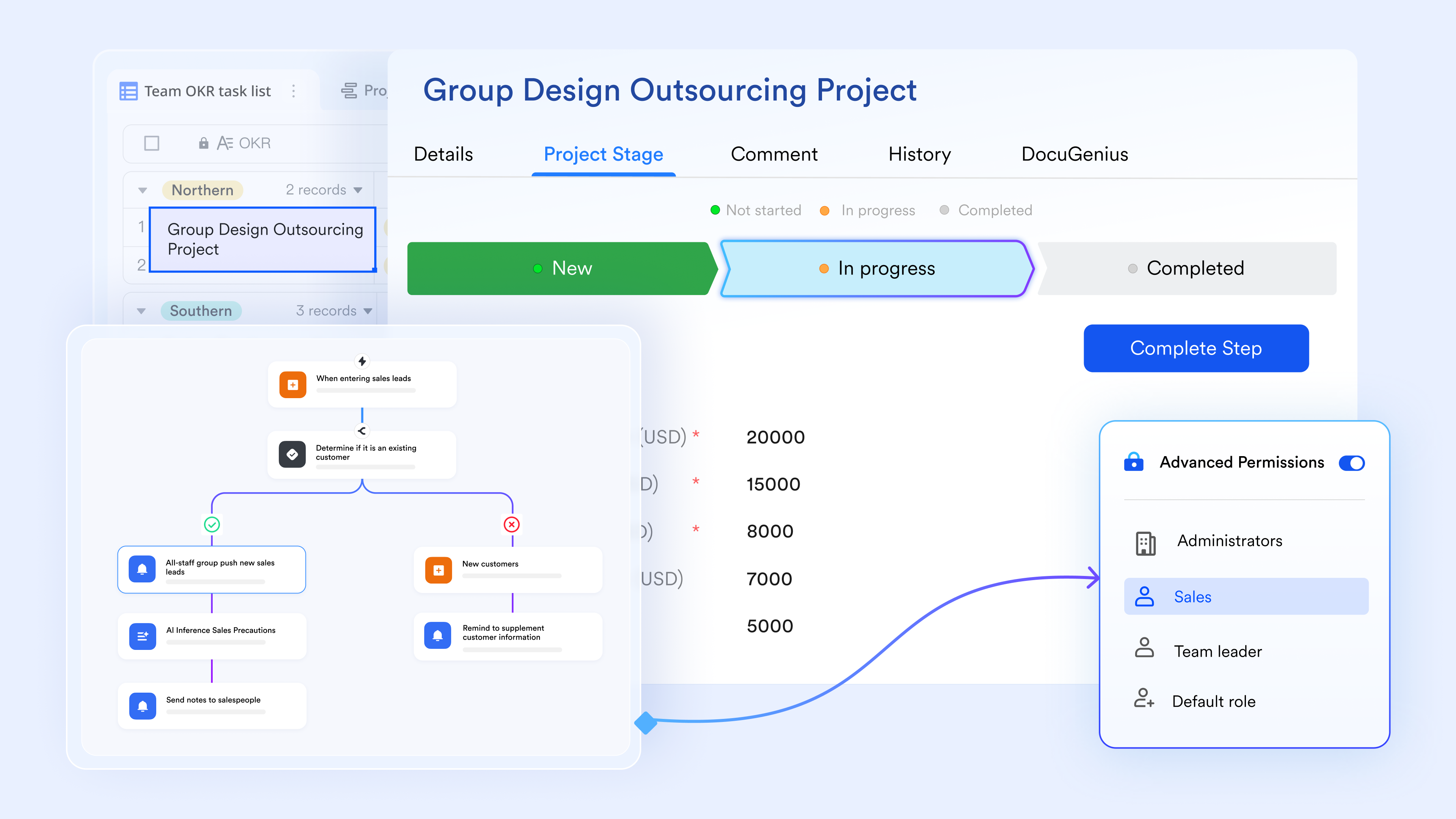
:
- Starter plan: Free forever plan that includes 11 powerful tools for up to 20 users. It also comes with 100GB of storage, 1000 automation runs, AI translations, and more.
- Basic plan: $6/user/month (billed annually) for up to 500 users. It includes everything in Starter plus group calling for up to 500 attendees, 5TB of storage, 1000 automation runs, and more. For more details, please .
- Pro plan: $12/user/month (billed annually) for up to 500 users. It includes everything in Basic plus group calling for up to 500 attendees, 15TB of storage, 50,000 automation runs, and more.
- Enterprise plan: for custom pricing. Supports unlimited users and includes even more automation runs and advanced security, compliance, and management features.
For small teams with simple communication needs

18 months message history
1000 Base automation runs/month
2000 rows per table in Base
Most POPULAR
For companies with comprehensive collaboration and management needs
Unlimited message history
500-participant video meetings
50k Base automation runs/month
20k rows per table in Base
For large companies with advanced security and organizational management needs
Get a personalized demo and pricing
Unlimited message history
500-participant video meetings
15 TB storage + 30 GB storage/user
500k Base automation runs/month
50k Base automation runs/month
Most POPULAR
For companies with comprehensive collaboration and management needs
Unlimited message history
500-participant video meetings
50k Base automation runs/month
20k rows per table in Base
Final checklist: Lark vs Google Calendar scheduling tool
Choosing between the Google Calendar scheduling tool and Lark depends on the complexity of scheduling needs and team workflows. To give you a full picture of their strengths and limits, here are the breakdowns:
For the individual professional: Google Calendar is the objective choice for high-speed, "set-it-and-forget-it" booking pages with a near-zero learning curve.
For the event planning team: Lark is the superior choice for maximizing annual ROI by consolidating fragmented tools—such as Slack, Airtable, and Calendly—into a single integrated environment.
Conclusion
The Google Calendar scheduling tool is a practical solution for individuals and small teams that need simple booking and availability management. It offers an easy setup, seamless integration with Google services, and essential features for everyday scheduling. For basic use cases, it remains a reliable and accessible option.
However, as scheduling becomes part of larger workflows, organizations often need tools that support automation, collaboration, and operational coordination. Managing , follow-ups, and cross-team communication requires more than basic scheduling features. Solutions like demonstrate how scheduling can evolve into a connected system where meetings, communication, and tasks are managed together. By choosing the right tool, businesses can improve efficiency, reduce manual work, and build scalable scheduling workflows that support long-term growth.
Connect your calendar to workflows with automations
FAQs
Is Google Calendar's scheduling tool free?
The Google Calendar scheduling tool's free option is available through plans and includes basic scheduling features such as booking pages and reminders. It is suitable for individuals and small teams with simple scheduling needs. However, advanced features and customization options require paid plans. As scheduling workflows grow more complex, some teams explore platforms like Lark for additional automation and coordination capabilities.
How does Google Calendar compare to Calendly?
The Google Calendar scheduling tool vs Calendly comparison shows that Calendly offers more advanced scheduling features, such as routing, automation, and integrations. Google Calendar focuses on simple booking and availability sharing within its . While it works well for basic use cases, it may lack flexibility for complex workflows. In such cases, teams may consider platforms like Lark that combine scheduling with collaboration and workflow management.
Can teams use Google Calendar for scheduling?
Yes, teams can use the scheduling tool Google Calendar to manage meetings and share availability. It is effective for small teams with straightforward scheduling requirements. However, as teams grow, managing multiple schedules and workflows can become challenging. Larger teams often require tools with stronger collaboration and automation features, which platforms like Lark are designed to provide.
What is better than Google Calendar for scheduling?
The Google Calendar scheduling tool is a strong option for basic scheduling needs, but advanced tools offer more flexibility and functionality. Platforms that support , approvals, and team collaboration provide greater value for growing organizations. These tools help manage not just meetings but also the processes that follow. Solutions like Lark are often considered when businesses need more integrated scheduling and operational workflows.
Related reading






























