














13 Best Meeting Scheduling Apps of 2026: My In-Depth Comparison

Jennifer Taylor
Product Demand Generation Specialist
Sep 18, 2026
Jennifer Taylor
Sep 18, 2026


What to look for in a meeting scheduler application
- Real-time calendar syncing: The app must read your current calendar (Google, Outlook, etc.) to prevent double-booking. If someone books a slot, it should instantly block that time out across all your devices.
- Time zone intelligence: Remote work means you are likely dealing with clients or colleagues in different regions. A good scheduler automatically detects the visitor's time zone and translates your availability into their local time.
- Workflow integration: Booking the meeting is only step one. Does the app automatically generate a video conferencing link? Does it send a reminder? If you manage an internal team, does it function as a meeting room scheduling app to reserve physical spaces alongside the digital booking?
Calendar management and integration
Top 13 meeting scheduling apps compared
1. Lark: Best all-in-one scheduling and collaboration platform
- Replaces the need for separate subscriptions to chat apps, document tools, and scheduling software.
- Exceptional value for small to medium enterprises; the free plan covers up to 20 users with robust features.
- G2 rating of 4.5/5 highlights strong user satisfaction with the unified experience.
- Might feel like too much software if you are a solo freelancer who only needs a basic booking link.
- Requires your internal team to migrate to the platform to unlock its full collaborative potential.
- Starter plan: Free forever plan with 11 powerful tools for up to 20 users, 100GB storage, 1,000 automation runs, AI translations, and more. No credit card needed.
- Basic plan: $6/user/month (billed annually) for up to 500 users. Includes everything in Starter plus unlimited message history, 5TB storage, 1,000 automation runs, and more. Some users may need to contact sales to purchase.
- Pro plan: $12/user/month (billed annually) for up to 500 users. Includes everything in Basic plus group calling for up to 500 attendees, 15TB storage, 50,000 automation runs, and more.
- Enterprise plan: Contact sales for custom pricing. Supports unlimited users and includes advanced automation, security, compliance, and management features.
Starter
For small teams with simple communication needs
$0
/ user / month

Pro
For companies with comprehensive collaboration and management needs
$12
/ user / month
Enterprise
For large companies with advanced security and organizational management needs
Get a personalized demo and pricing
Pro
For companies with comprehensive collaboration and management needs
$12
/ user / month
2. Calendly: Best overall for automated 1-on-1 scheduling
- Personalized booking links with custom URL slugs.
- Automated routing logic for sales teams (round-robin).
- Pre-meeting questionnaires to gather client context.
- Automated email and SMS reminders.
- Highly intuitive interface for the person booking the meeting.
- Massive library of native integrations with CRMs and marketing tools.
- Strong brand recognition helps clients feel comfortable using it.
- The free plan is quite restrictive, allowing only one active event type.
- It operates as a standalone tool, adding another layer to your software stack rather than unifying it.
- Free plan: Always free, designed for personal use. It provides essential features like creating 1 event type, connecting 1 calendar, and adding video conferencing.
- Standard plan: $10 USD per seat per month (billed yearly), suited for professionals and small teams. It includes everything in the Free plan plus unlimited event types, the ability to connect multiple calendars, and automated meeting reminders.
- Teams plan: $16 USD per seat per month (billed yearly), tailored for growing businesses. It includes everything in the Standard plan plus advanced tools like round-robin meeting routing, Salesforce integration, and advanced admin features.
- Enterprise plan: Starts at $15,000 USD per year, tailored for large companies requiring specific solutions. It builds on the Teams plan by adding premium benefits such as dedicated account support, domain control, and advanced enterprise security features like SSO & SAML.
3. Doodle: Best for group meeting polls and finding a shared time
- Group polling to vote on multiple proposed times.
- Visual calendar interface to compare availability.
- Automated reminders for participants to cast their votes.
- A "Booking Page" feature for traditional 1-on-1 scheduling.
- Excellent for coordinating board meetings or large team gatherings.
- Participants do not need an account or app download to vote.
- Clear visual layout makes identifying the most popular time slot easy.
- The free tier includes heavy advertising, which can look unprofessional to clients.
- The 1-on-1 booking feature feels less refined than dedicated link-sharing tools.
- Free plan: $0 free forever, designed for individuals getting started with seamless scheduling. It supports 1 user and provides essential features like unlimited group polls, one booking page, and basic video conferencing integrations.
- Pro plan: $6.95 per user per month (paid annually), suited for professionals who want an automated scheduling solution. Also for 1 user, it includes everything in the Free plan plus ad-free usage, unlimited booking pages, unlimited 1:1s, and custom branding.
- Team plan: $8.95 per user per month (paid annually), tailored for teams who need increased productivity and collaboration. It includes everything in the Pro plan and adds team-focused tools like an admin console, roles and permissions, and the ability to co-host events.
- Enterprise plan: Custom pricing ("Contact us"), tailored for enterprises and large teams looking for enhanced customization and control. It builds on the Team plan by adding premium benefits such as priority support, Single Sign-On (SSO), onboarding and training, and a 99.9% availability SLA.
4. Microsoft Bookings: Best for teams deeply integrated with Microsoft 365
- Deep, native synchronization with Outlook calendars.
- Automatic Microsoft Teams link generation.
- Customizable booking pages for different departments or services.
- Staff assignment rules to distribute incoming meetings.
- Included at no extra cost in many existing Microsoft 365 business plans.
- Meets strict enterprise security and compliance standards automatically.
- Users do not have to learn a completely new interface.
- The interface is functional but lacks the modern polish of standalone competitors.
- Customization options for the booking page are relatively rigid.
5. Appointy: Best for service-based businesses and class bookings
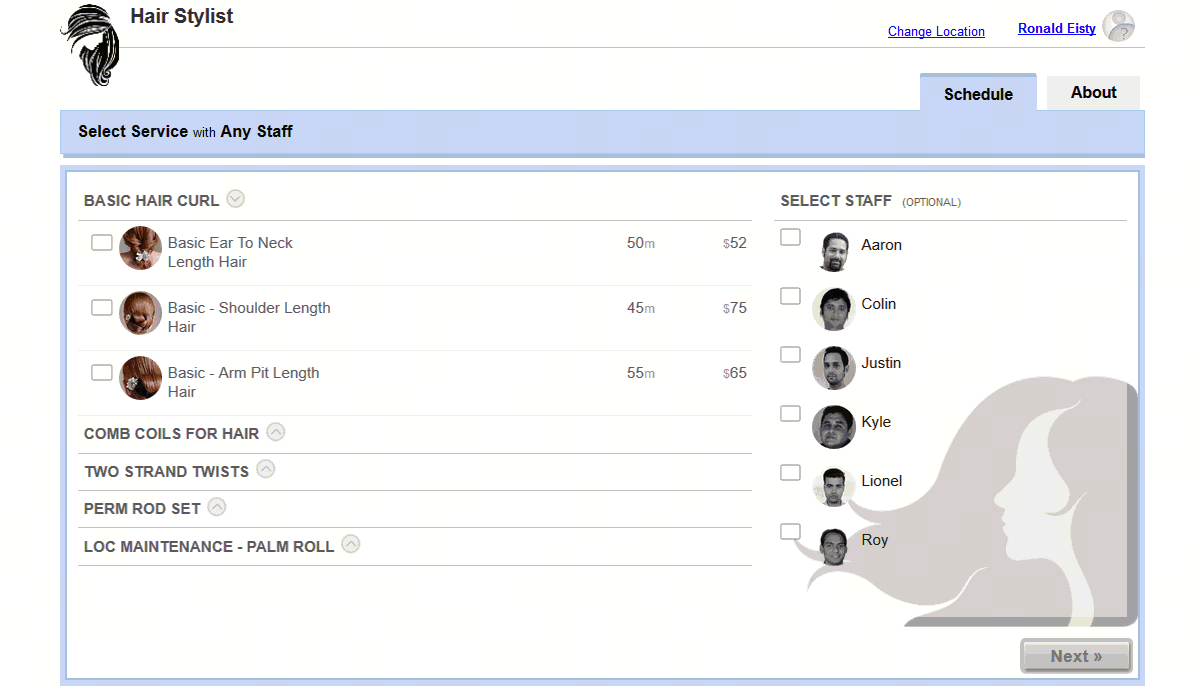 Image source: appointy.com
- Class and workshop scheduling for multiple attendees.
- Integrated payment gateways to accept deposits upfront.
- Staff management and roster scheduling.
- Social media booking integrations (e.g., booking directly from a Facebook page).
- Manages both complex service menus and physical storefront needs.
- Reduces no-shows by allowing you to require prepayment.
- Offers a robust mobile app for managing schedules on the go.
- The dashboard can feel overwhelming if you simply need to schedule B2B sales calls.
- The user interface feels slightly dated compared to newer market entrants.
- Microsoft 365 Business Basic plan: $6 per user per month. It provides essential features to get started, including mobile version access, file sharing, file storage, and tools to build and manage your business.
- Microsoft 365 Business Standard plan: $12.5 per user per month. It builds on the basic offerings by adding dedicated capabilities for teamwork and communication, alongside standard support and deployment.
- Microsoft 365 Business Premium plan: $22 per user per month. It offers comprehensive business management capabilities, including mobile app access, file sharing, advanced teamwork and communication tools, and deployment support.
- Microsoft 365 Apps for business plan: $8.25 per user per month. This plan focuses on core applications, providing desktop versions of Word, Excel, PowerPoint, and Outlook, along with 1 TB of cloud storage per user and anytime phone and web support.
6. SimplyMeet.me: Best simple and free scheduling tool for solopreneurs
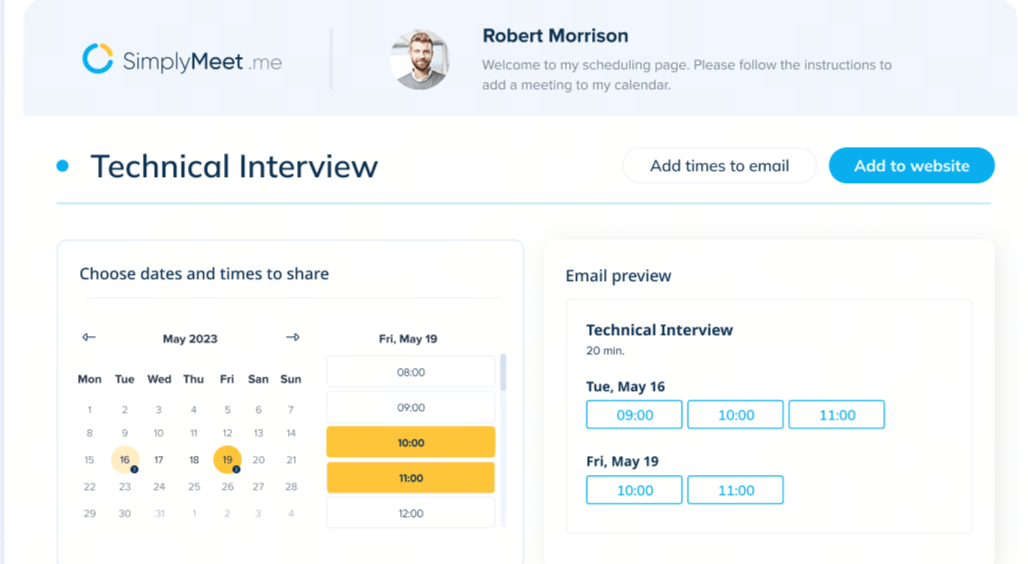 Image source: simplymeet.me
- Multiple meeting types and durations.
- CalDAV support for connecting non-standard calendars.
- Reverse calendar sync to push meetings to your primary calendar.
- Integrated payment processing via Stripe.
- The free tier is generous for solo users, allowing multiple meeting types.
- The setup process takes only a few minutes.
- The booking interface is minimal and modern.
- Lacks advanced team features like complex round-robin routing logic.
- Brand customization is limited to the lower-tier plans.
- Individual plan: $0 (free forever), designed for individuals. This base plan supports a maximum of 1 user and provides essential features like connecting up to 2 external calendars, unlimited meeting types, and an allowance of up to 500 meetings per month.
- Professional plan: $9.99 per user per month (with a 14-day free trial available), suited for teams. It accommodates up to 30 users and includes everything in the Individuals plan plus advanced tools like connecting up to 7 external calendars, round-robin scheduling, the ability to accept payments, and removable branding.
- Enterprise plan: Custom pricing, tailored for enterprises with specific contracts and support needs. It supports unlimited users and builds on the Professional plan by adding premium benefits such as a designated account manager, individualized onboarding and training, customized contracts, and phone support.
7. Rallly: Best free open-source alternative for group polls
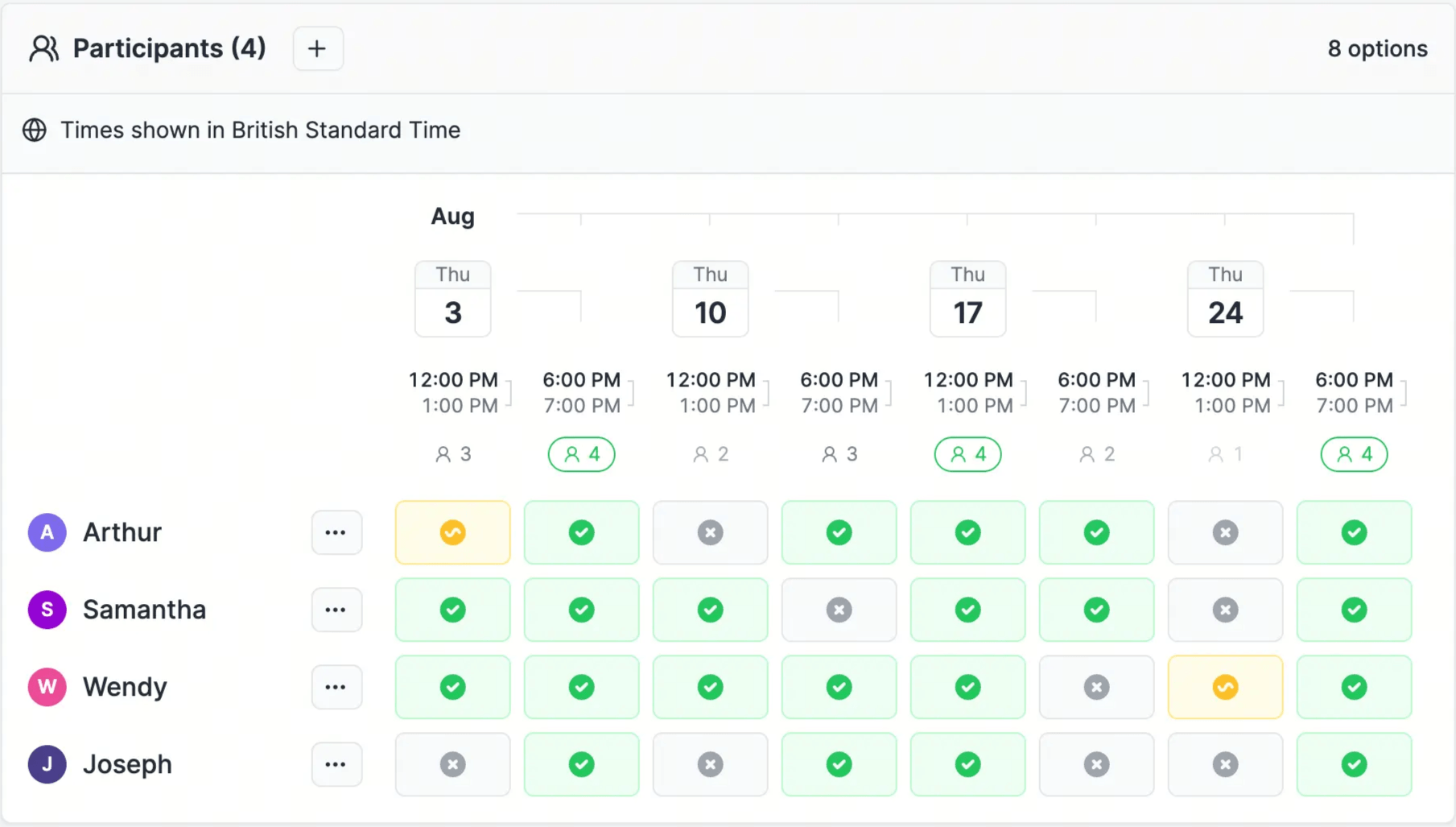 Image source: rallly.com
- Simple date polling for group events.
- Collaborative commenting within the poll.
- Anonymous participation options.
- Open-source codebase.
- Incredibly lightweight and fast to use.
- No advertisements, ensuring a clean experience for participants.
- Strong privacy focus due to its open-source nature.
- It only polls for dates, not specific times within those dates.
- Lacks integrations with CRMs or payment gateways.
- Hobby plan: $0 (free forever), designed for casual users. It provides access to the platform's core features to help you get started, with the limitation that polls are automatically deleted when they become inactive.
- Pro plan: $56 per year, suited for advanced and professional users. It unlocks all platform features, including the ability to retain your polls indefinitely and grants you early access to try out newly released features.
8. Zoho Bookings: Best for sales teams using the Zoho ecosystem
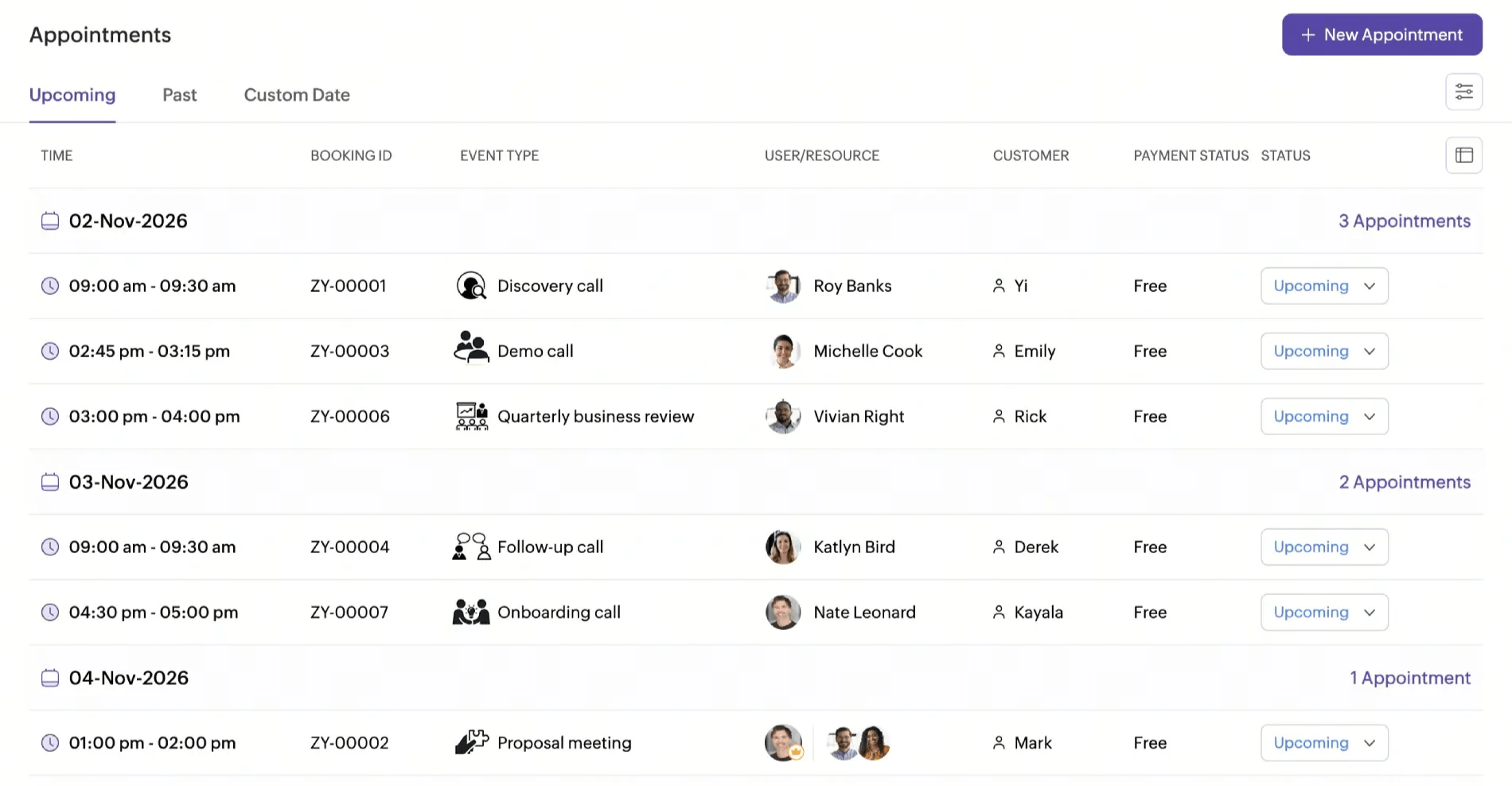 Image source: zoho.com
- Two-way synchronization with Zoho Calendar and external calendars.
- Resource and workspace scheduling.
- Custom domain mapping for branded booking pages.
- Integrated payment gateways for paid consultations.
- Flawless data flows into the broader Zoho software ecosystem.
- Highly affordable paid tiers compared to standalone competitors.
- Strong custom reporting capabilities.
- Setting up the integrations requires some technical patience.
- The user interface prioritizes function over modern aesthetics.
- Basic plan: R$37.58 BRL per user per month (billed annually), designed for teams looking to streamline their client bookings. It offers a simple and intuitive user interface and includes a free trial option with no credit card required to get started.
- Premium plan: R$56.42 BRL per user per month (billed annually), highlighted as the most popular option. It is tailored for organizations with multiple locations or departments that require advanced capabilities like third-party integrations and the ability to accept online payments.
9. Acuity Scheduling: Best for client intake forms and paid sessions
- Customizable intake forms presented during the booking flow.
- Ability to sell subscriptions, class packages, and gift certificates.
- Automated time zone conversion and reminder sequences.
- Deep customization to match your exact brand colors and logos.
- Exceptional for revenue-generating appointments like coaching or consulting.
- Acts as a lightweight CRM, keeping a database of client appointment history.
- Highly professional look and feel for the end-user.
- There is no free tier available.
- The sheer number of settings can make initial configuration time-consuming.
- Starter plan: $16 per month (billed annually), designed to get your business up and running. It includes essential features like 1 bookable calendar, unlimited services and appointments, client self-scheduling, and built-in payment processing, along with a free trial option.
- Standard plan: $27 per month (billed annually), recommended for growing businesses with more ways to engage clients. It includes everything in the Starter plan but expands your capacity to 6 bookable calendars and adds powerful tools like text message reminders, appointment packages, and automated billing for subscriptions.
- Premium plan: $49 per month (billed annually), suited for scaling businesses that need advanced scheduling tools. It builds on the Standard plan by offering up to 36 bookable calendars, HIPAA compliance (BAA), multi-time zone support for different staff or locations, and custom API and CSS access.
- Enterprise plan: Custom pricing, tailored for enterprise businesses requiring specific, custom-made solutions. It includes all Premium features while adding premium benefits such as unlimited bookable calendars, a dedicated account manager, centralized user management, and a signable custom BAA.
10. Cal.com: Best open-source and highly customizable scheduling app
- Open API and extensive webhooks.
- Self-hosting capabilities for strict compliance environments.
- Routing forms to send clients to the right team member based on their answers.
- Built-in workflow automations.
- Unmatched customization options for engineering teams.
- Generous free tier for individuals that includes unlimited event types.
- Strong privacy controls, especially when self-hosted.
- Can be intimidating for non-technical users to configure.
- Overkill if you just need a standard shareable link.
- Free plan (Individuals): $0 (free forever), designed to provide everything you need for scheduling as an individual. This plan supports 1 user and includes essential features like unlimited event types and calendars, email and SMS notifications, integration with over 100 apps, the ability to accept payments via Stripe and PayPal, and two-way sync for Salesforce and HubSpot.
- Teams plan: $12 per user per month (billed yearly), tailored for small teams and startups with combined scheduling needs. It offers a 14-day free trial and includes everything in the Free plan, plus collaborative features like scheduling across 1 team, round-robin scheduling, managed and collective event types, routing forms, booking analytics, and the removal of Cal.com branding.
- Organizations plan: $28 per user per month (billed yearly), suited for larger teams looking to have more control, privacy, and security. It also offers a 14-day free trial and builds on the Teams plan by adding unlimited sub-teams, a custom company subdomain, advanced security and compliance (SAML SSO, SCIM, SOC 2, HIPAA, ISO 27001), instant meetings, domain-wide delegation, and role-based permissions.
- Enterprise plan: Custom pricing (billed annually), providing the most advanced scheduling solution for enterprises without limits. It includes all the features of the Organizations plan while adding premium, dedicated support such as dedicated onboarding and engineering support, SLA & uptime guarantees, HRIS & directory integrations, priority Slack & account support, and a dedicated database.
11. YouCanBook.me: Best for educators and highly customized booking grids
- Custom CSS support for complete visual control.
- Granular availability settings (e.g., padding between meetings, specific start times).
- Automated, customizable email and SMS follow-ups.
- Team scheduling with pooled availability.
- Provides the most flexible design options on the market.
- Pricing is straightforward and based on the number of connected calendars.
- Excellent customer support and comprehensive documentation.
- The backend interface can feel a bit cluttered due to the number of settings.
- Fewer native CRM integrations compared to market leaders like Calendly.
- Free plan: $0 per month, designed to get you started with basic scheduling needs. This base plan allows for 1 calendar connection and 1 booking page. It provides essential features like customizable confirmation emails, the ability to take payments via Stripe, and basic calendar availability checks.
- Individual plan: $8.10 per month (billed yearly), tailored for users looking for a customized booking experience and occasional online scheduling. It increases your limits to 2 calendar connections and 2 booking pages. It includes everything in the Free plan plus options like custom colors and background images, extra branded notifications, and group session capabilities.
- Professional plan: $11.70 per month (billed yearly), highlighted as the most popular option, it is perfect for solopreneurs who rely heavily on meetings. This tier allows up to 6 calendar connections and 10 booking pages. It builds on the Individual plan by adding advanced tools such as automated workflows with customized reminders, the ability to list different resources on the same page, and direct integration with HubSpot.
- Team plan: $16.20 per member per month (billed yearly), suited for teams needing to schedule and coordinate across groups and departments. It provides 10 calendar connections and 15+ booking pages per user (with a custom "Contact sales" option for teams of 50+). It includes all Professional features while adding enterprise-level benefits like role-based access, centralized billing, unlimited API access, and personalized onboarding.
12. SavvyCal: Best intuitive UI with calendar overlay for recipients
- Interactive calendar overlay for the invitee.
- Ranked availability to gently push invitees toward your preferred times.
- Multi-use links for recurring meeting types.
- Delegation features allow assistants to manage accounts.
- Provides a best-in-class, respectful experience for the person booking the meeting.
- Clean, intuitive, and modern design.
- Easy to prioritize specific days without completely blocking out others.
- Pricing is slightly premium compared to basic alternatives.
- No free tier is available for accessing premium features.
- Basic plan: $12 per user per month, great for individuals and small teams with simple scheduling needs. It includes core features such as unlimited calendars, unlimited links, and team scheduling capabilities.
- Premium plan: $20 per user per month, ideal for businesses that need a bit more control over their scheduling flows. It builds on the Basic offerings by adding advanced features like custom domains, the ability to delegate to an assistant, and support for paid bookings.
13. Google Workspace scheduling: Best built-in option for Google Calendar power users
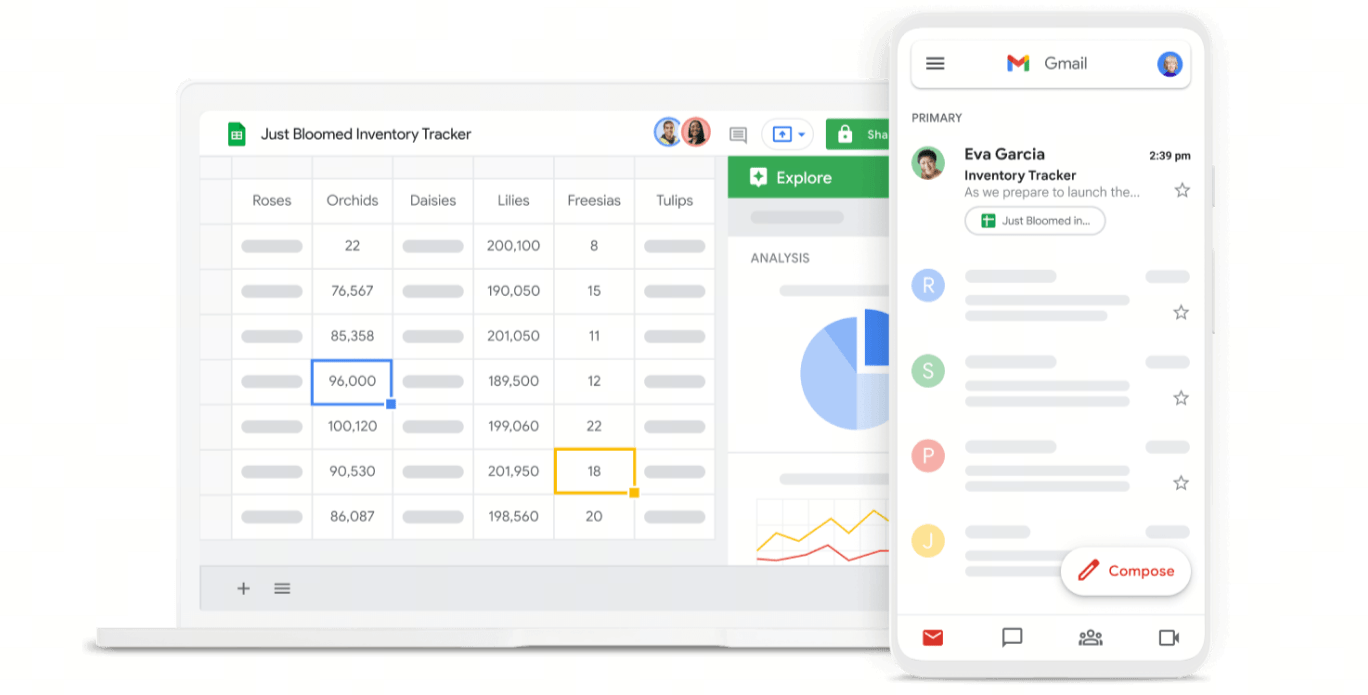 Image source: workspace.google.com
- Appointment schedules built directly into Google Calendar.
- Automatic Google Meet video link generation.
- Simple, shareable booking pages.
- Conflict prevention with your primary calendar.
- Requires zero extra cost if you already have a Google Workspace subscription.
- Provides a familiar interface with no new software to learn.
- No separate accounts or passwords to manage.
- Functionality is very basic compared to dedicated tools.
- Lacks advanced features like round-robin routing, payment processing, or detailed intake forms.
- Starter plan: S$ 9.40/user/month. Includes 30 GB of storage, custom business email, basic Gemini AI features (in Gmail and Chat), and video meetings for up to 100 participants.
- Standard plan: S$ 18.80/user/month. Upgrades to 2 TB of storage. Expands AI features to Docs and Meet, adds the NotebookLM research assistant, 150-participant meetings (with recording), appointment booking pages, and eSignatures.
- Plus plan: S$ 29.40/user/month. Upgrades to 5 TB of storage. Offers 500-participant meetings (with attendance tracking), Vault for data retention and search, and advanced security and endpoint management.
- Enterprise plan: Custom pricing (contact sales). Offers 5 TB or more of storage, 1,000-participant meetings with in-domain live streaming, and enterprise-grade security features like Data Loss Prevention (DLP) and Context-Aware Access.
How to choose a meeting room schedule app for internal teams
Conclusion

FAQs
What is the best app for scheduling meetings?
Is Calendly still free?
What is the most commonly used appointment scheduling system?
Related reading

Start using Lark today

Manage all your work in one place
Boost team efficiency by 10x
Save up to 70% on software costs
Start using Lark today
Manage all your work in one place
Boost team efficiency by 10x
Save up to 70% on software costs
Keep reading



![What Is a 2-2-3 Work Schedule? Explanation and More [2026]](https://framerusercontent.com/images/uKHRfkp4v7y4azRNTYUmuteNQz8.png)



2026 Lark Technologies Pte. Ltd.
Headquartered in Singapore with offices worldwide.





