Project management tools promise clarity, speed, and alignment, but not all platforms scale equally as teams grow. Hive has positioned itself as a flexible, user-friendly solution, especially popular with marketing teams, creative agencies, and fast-moving business units. With visual timelines, multiple project views, and quick onboarding, it appeals to teams that want structure without heavy setup.
However, as organizations expand and workflows become more interconnected, questions arise about scalability, depth of collaboration, and long-term costs. In this guide, this Hive review explores how Hive performs in real-world use cases, where it excels, where limitations appear, and when teams may begin evaluating more unified alternatives.
What is Hive
Hive is a designed to help teams plan, track, and execute work through flexible, visual workflows. At its core, Hive focuses on task and project organization, offering multiple views, including Kanban boards, Gantt charts, calendars, and tables. This flexibility makes it easier for teams to adapt the tool to different working styles without heavy configuration, a point often highlighted in a Hive project management review.
Hive is best suited for marketing teams, creative agencies, and operations-focused business units that , content calendars, and client deliverables. Teams that value quick setup, clear timelines, and task-level collaboration tend to see the most benefit. Hive is positioned as a practical choice for teams that prioritize execution speed over deep workflow customization.
While Hive can support growing teams, it is generally most effective for small to mid-sized organizations where collaboration remains task-centric, and process complexity is moderate.
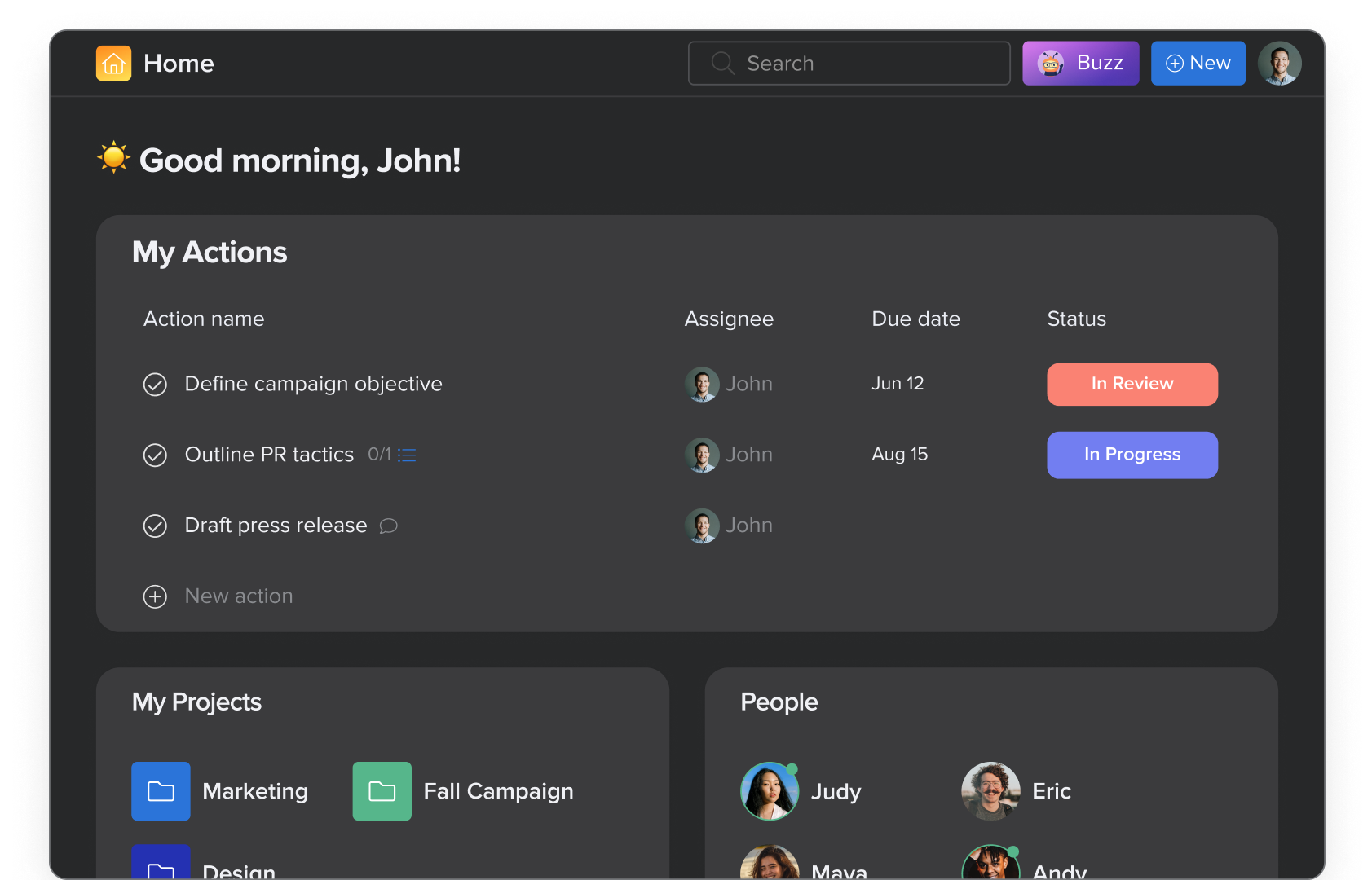
Image source: hive.com
Hive feature review at a glance: Strengths, limits, and real-world impact
Hive offers a robust set of project management features designed to help teams plan, track, and execute work efficiently. Its strengths lie in visual project views, , and quick onboarding. However, like any platform, Hive has limitations that can affect scalability and . In this section, we'll explore Hive's core capabilities, common challenges, and its performance in real-world team scenarios.
Hive core features overview
This section of our Hive review breaks down the platform's core features and explains how they support day-to-day project execution. Each capability is designed to balance flexibility and usability, though depth can vary depending on team complexity.
- Task and project management with flexible project structures: Hive allows teams to organize work into projects, breaking them down into tasks and subtasks. Project structures can be adapted to different workflows, making it easier to manage campaigns, client work, or internal initiatives. This flexibility supports varied team processes without extensive setup.
- Multiple project views, including Kanban, Gantt, calendar, and table: Teams can switch between , Gantt charts, calendars, and table views depending on how they prefer to plan and track work. Each view presents the same tasks from a different perspective. This helps individuals work in familiar formats while staying aligned with shared project data.
- Task dependencies, milestones, and timelines: Hive supports task dependencies and milestones to help teams understand sequencing and critical paths. Timelines visually map how tasks relate to each other over time. This is especially useful for deadline-driven projects where delays can impact multiple deliverables.
- Project templates for recurring workflows: Project templates allow teams to reuse proven workflows for recurring campaigns or processes. Templates reduce setup time and promote consistency across similar projects. This feature is particularly valuable for agencies and marketing teams with repeatable work patterns.
- Collaboration through comments, mentions, and file sharing: Hive keeps collaboration tied directly to tasks. Team members can share files, ask questions, and provide updates without leaving the project space. This task-centric collaboration helps reduce scattered feedback across tools.
- Email-style notifications and in-task discussions: Notifications in Hive follow an email-style format, alerting users to updates, mentions, and changes. Discussions remain attached to individual tasks for context. While effective for tracking updates, this approach is less suited for real-time conversations.
- Native automation rules and basic : Hive includes built-in automation rules to handle repetitive actions such as status updates or task assignments. Basic approval workflows help streamline sign-offs. More advanced automation options may require paid add-ons as workflow complexity increases.
- Time tracking and workload management: Time tracking allows teams to log hours spent on tasks and projects. Workload views help managers assess capacity and balance assignments. These features support resource planning and performance monitoring at the team level.
- Dashboards and reporting for project visibility: Hive offers dashboards that display project progress, task status, and time tracking data. Reports provide visibility into ongoing work and potential bottlenecks. However, reporting depth is generally geared toward operational oversight rather than strategic analysis.
- Integrations with popular workplace tools: Hive integrates with commonly used tools such as Slack, Google Workspace, and file storage platforms. Whether your team sticks with Google or migrates to to manage rising , these integrations help connect Hive to your evolving tech stack. Integration depth varies depending on the tool and plan selected.
- Per-user pricing with optional paid add-ons for advanced features: Hive uses a per-user pricing model, with add-ons available for advanced features. This allows teams to start small and expand functionality over time. However, pricing can increase as teams scale and require more advanced capabilities.
Hive pricing model explained
Hive offers flexible pricing to suit different team sizes and needs. Its plans typically include a free tier for small teams, a professional plan with advanced , and an enterprise option with custom solutions and support. Pricing scales per user, and additional features like integrations and analytics may affect the total cost. Understanding Hive's pricing helps teams and choose the plan that fits their workflow requirements.
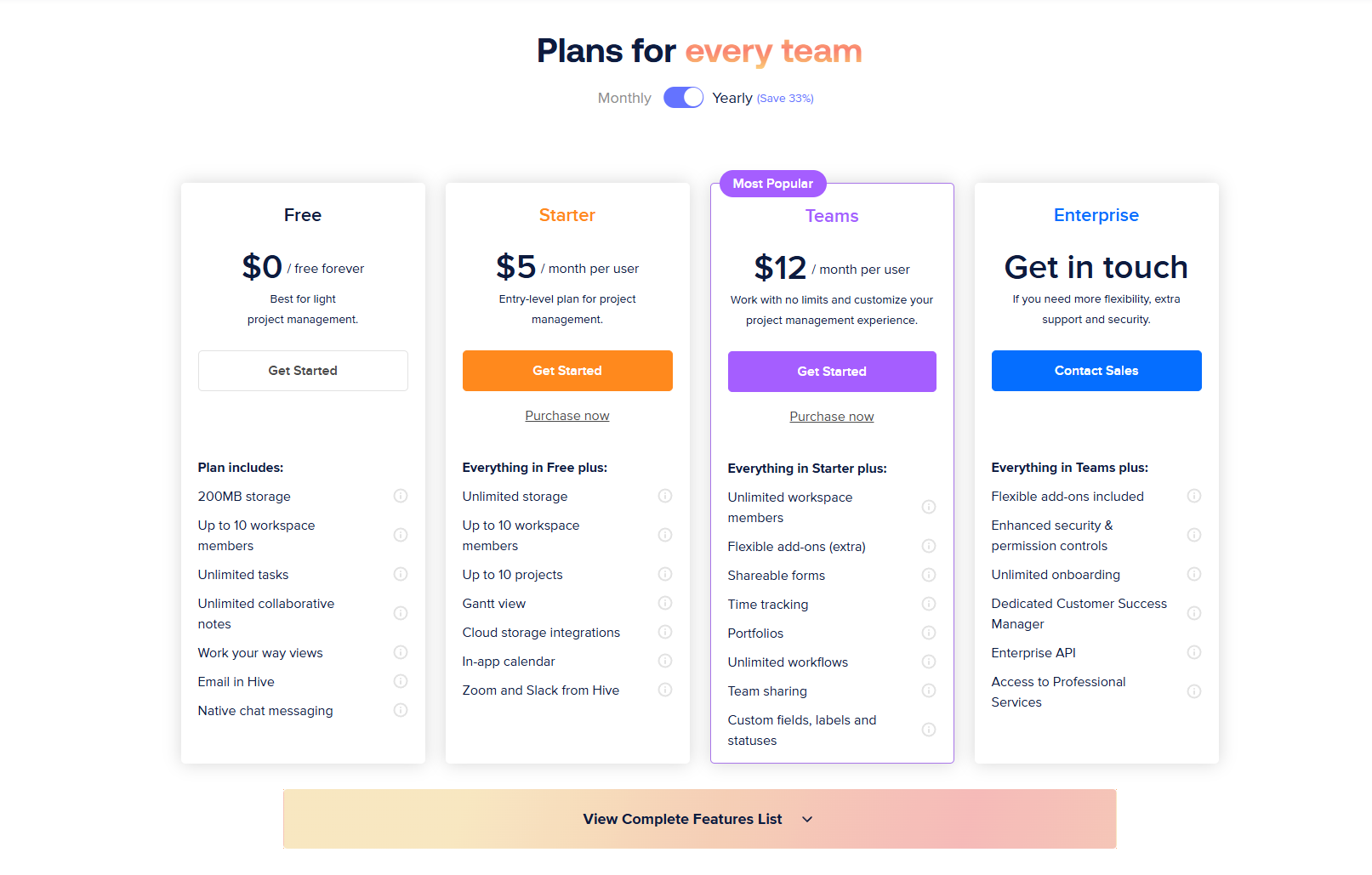
Information source: hive.com
Update time: 2025-12-12
Note: Pricing and plan details reflect publicly available data as of the update date and may vary based on region, billing cycle, and number of agents.
Hive pros: Where users see value
In this Hive review, the following advantages stand out consistently in user feedback and real-world use. These strengths explain why Hive is often chosen by marketing teams, agencies, and fast-moving business units looking for quick adoption and visual project planning.
- Clean interface and fast onboarding: Hive is known for its uncluttered interface, which makes it easy for new users to get started without extensive training. Most teams can begin creating projects and assigning tasks within a short time. This quick onboarding is especially valuable for teams adopting a new tool under tight timelines.
- Flexible views on different work styles: Hive offers multiple ways to visualize work, allowing individuals and teams to choose the view that best matches their working preferences. Some users favor Kanban boards for daily execution, while others rely on or calendars for planning. This flexibility helps teams stay aligned without forcing a single workflow style.
- Useful for marketing and agency workflows: Hive fits well with campaign-based and client-driven work, where timelines, dependencies, and deliverables are clearly defined. Marketing teams and creative agencies often benefit from its project templates and . These features support repeatable workflows and deadline-focused execution.
- Strong customer support reputation: Hive has built a positive reputation for responsive and helpful customer support. Users frequently highlight the need for timely assistance during onboarding and issue resolution. This level of support can be reassuring for teams that rely on consistent platform performance for daily operations.
Hive cons: Common limitations teams report
While Hive performs well for many use cases, this Hive review also reflects limitations that become more noticeable as teams grow or workflows become more complex.
- Feature fragmentation across add-ons: Some advanced features are only available through paid add-ons. This can make the platform feel fragmented as teams scale. Managing functionality across multiple add-ons may increase complexity and cost.
- Limited customization for : Hive offers flexibility on the surface but lacks depth for highly customized workflows. Teams with intricate processes may find configuration options restrictive. This can lead to workarounds or reliance on external tools.
- Scaling challenges for large organizations: As the number of teams and projects increases, cross-project visibility becomes harder to maintain. Separate project spaces can fragment coordination. Larger organizations may struggle with oversight and alignment.
- Fewer native collaboration capabilities: Collaboration in Hive is mostly task-based, relying on comments and notifications. There is limited native . Teams often supplement Hive with separate chat or documentation tools.
Manage multiple projects in one place
When teams outgrow Hive
This part of the Hive review focuses on the signals that indicate when Hive may no longer fully support a team's evolving needs. As workflows become more interconnected and teams expand, specific gaps tend to become clearer.
- Need for deeper : As teams scale, manual steps and basic automation rules often become limiting. Hive's native automation works well for simple actions but can struggle with complex, multi-step workflows. Teams managing approvals, handoffs, and conditional logic across departments may find the depth of automation insufficient.
- Desire for unified communication and documentation: Growing teams often want conversations, decisions, and documentation to live alongside execution. Hive relies mainly on task comments and notifications, which can fragment communication. As a result, teams frequently adopt separate chat and document tools, increasing context switching.
- Growing need for structured execution across departments: Cross-functional work requires shared visibility, consistent data, and coordinated ownership. Hive's project-based structure can make it harder to track dependencies across teams. This can lead organizations to seek more that support department-wide execution and reporting.
Hive helps teams organize and track work effectively, but collaboration, communication, and execution often exist in separate layers. This is where more unified platforms begin to stand out, bringing projects, conversations, documentation, and workflows together in a single, connected workspace.
Streamline team collaboration now
Meet Lark: A more unified and smarter alternative to Hive for growing teams
Lark is a unified collaboration and designed for growing teams that want fewer tools and clearer workflows. Instead of separating , documents, , and automation across multiple products, Lark brings everything into one connected workspace. For teams that find Hive limiting as complexity grows, Lark offers more flexibility without added operational overhead. It supports cross-functional collaboration while remaining easy to adopt and manage as teams scale.
Structured workspaces that support multi-project execution
Lark uses structured tables as the foundation of its workspaces, allowing teams to manage multiple projects within a single system instead of isolating work into separate project spaces. Each table can represent deals, tasks, campaigns, or initiatives, with custom fields for owners, statuses, priorities, dates, and dependencies. Records can be linked across tables, making it easier to track how work connects across teams. Compared to Hive's , this approach provides teams with shared visibility and reduces duplication when several projects run concurrently. 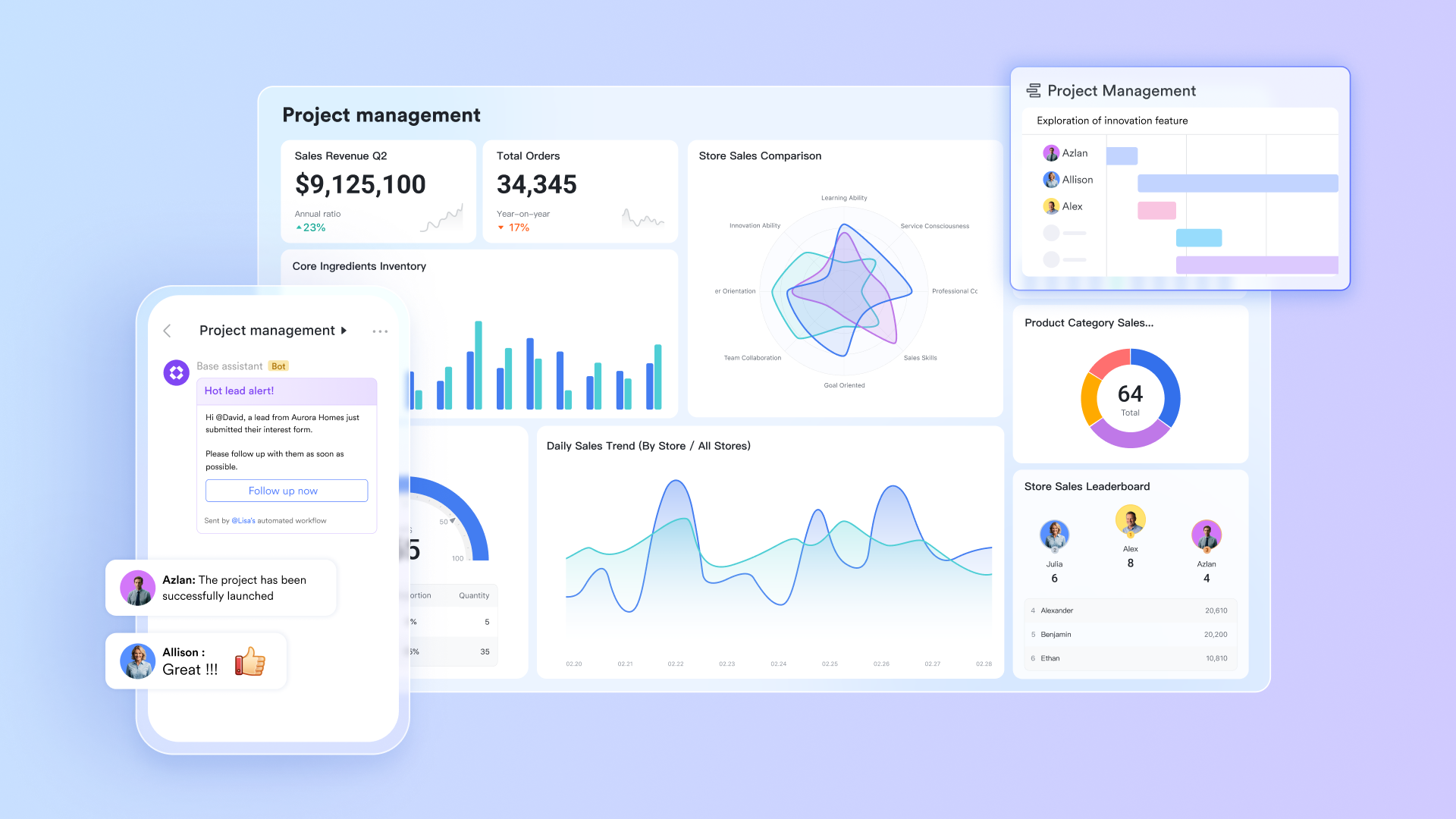
Task management embedded in structured records
In Lark, tasks are not standalone items; they live inside structured records that carry full context. Each task includes owners, due dates, statuses, attachments, comments, and linked data, all in one place. Teams can without jumping between task lists and project views. While Hive supports tasks with milestones and timelines, Lark's record-based task model tightly links execution to data, decisions, and documentation. 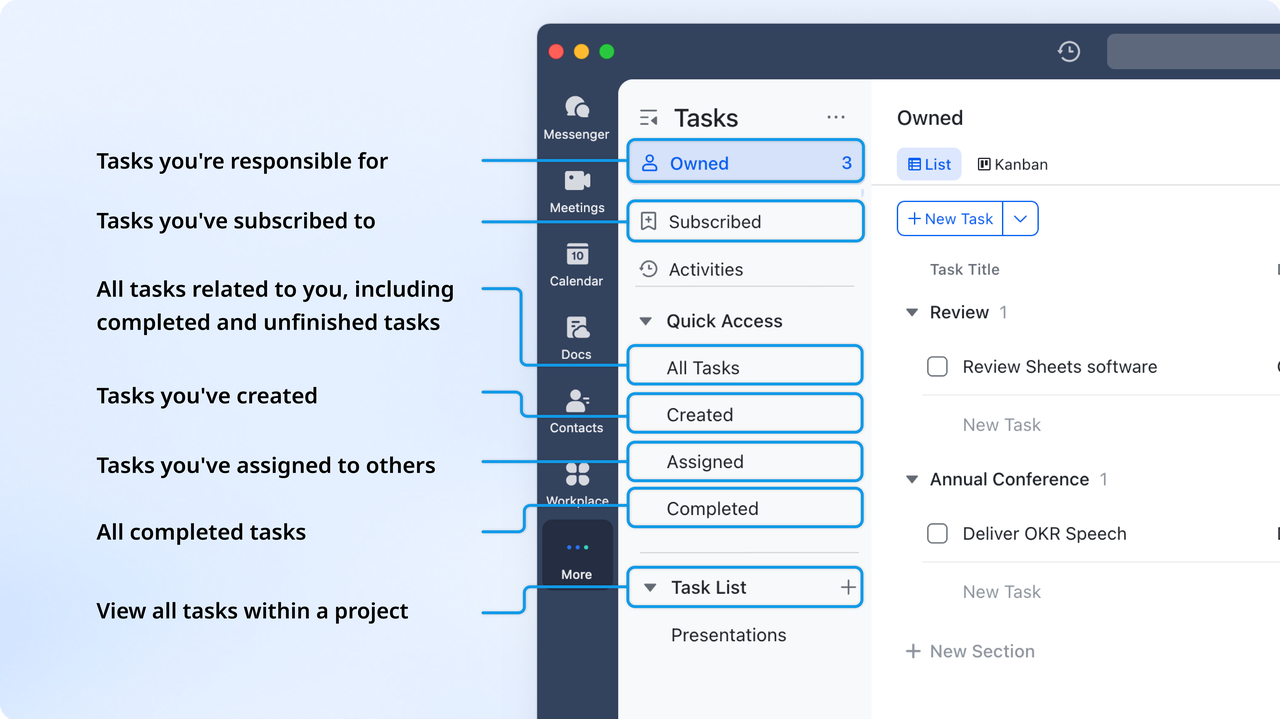
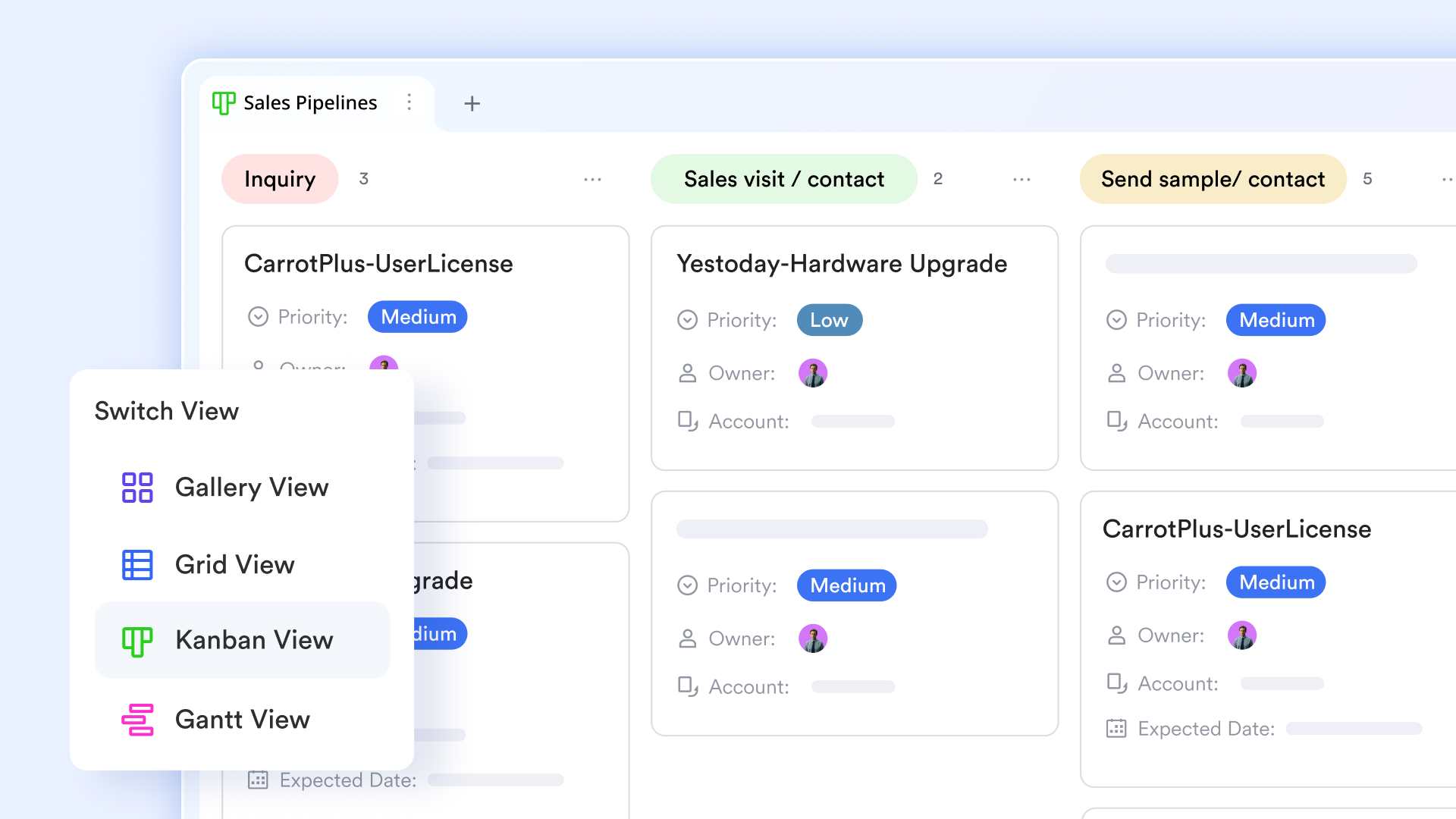
Consistent Kanban and timeline views in Lark Base
allows teams to switch between Kanban, grid, and using the same underlying dataset. Updates made in one view instantly reflect across the system, ensuring consistency between planning and execution. display rich information such as owners, deadlines, priorities, and linked records directly on the board. Hive offers similar views, but they are typically confined to individual projects, whereas Lark maintains consistency across teams and workstreams.
Real-time collaboration that stays tied to execution
Via , communication happens in real time through threads, mentions, and group discussions, all of which stay connected to tasks, records, and documents. Teams can discuss progress, resolve blockers, and share files without leaving the workspace where work happens. Hive relies more heavily on task comments and email-style notifications, which can slow conversations and scatter context. Lark's approach keeps collaboration continuous and immediately actionable. 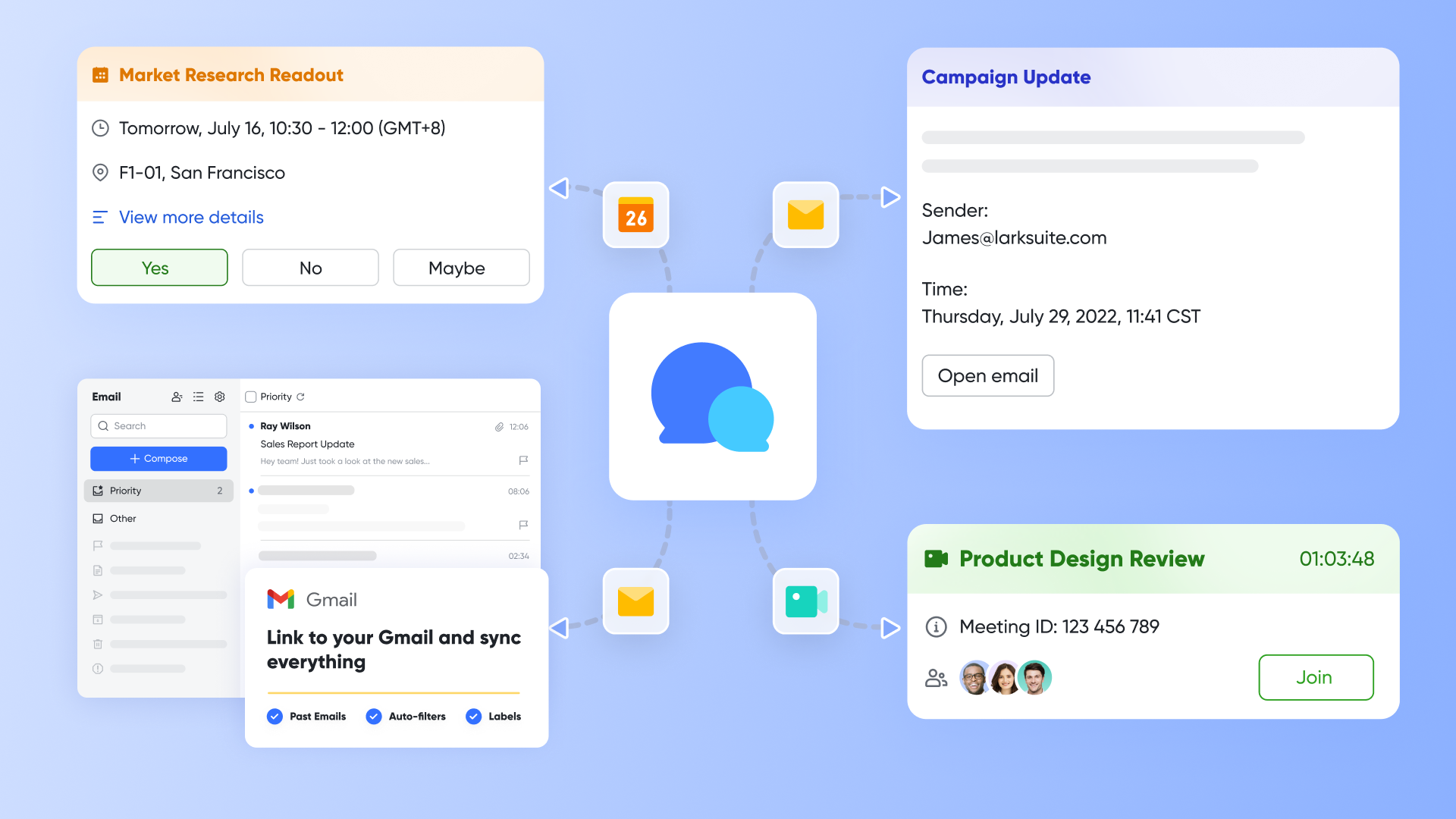
Collaborative documentation that evolves with work
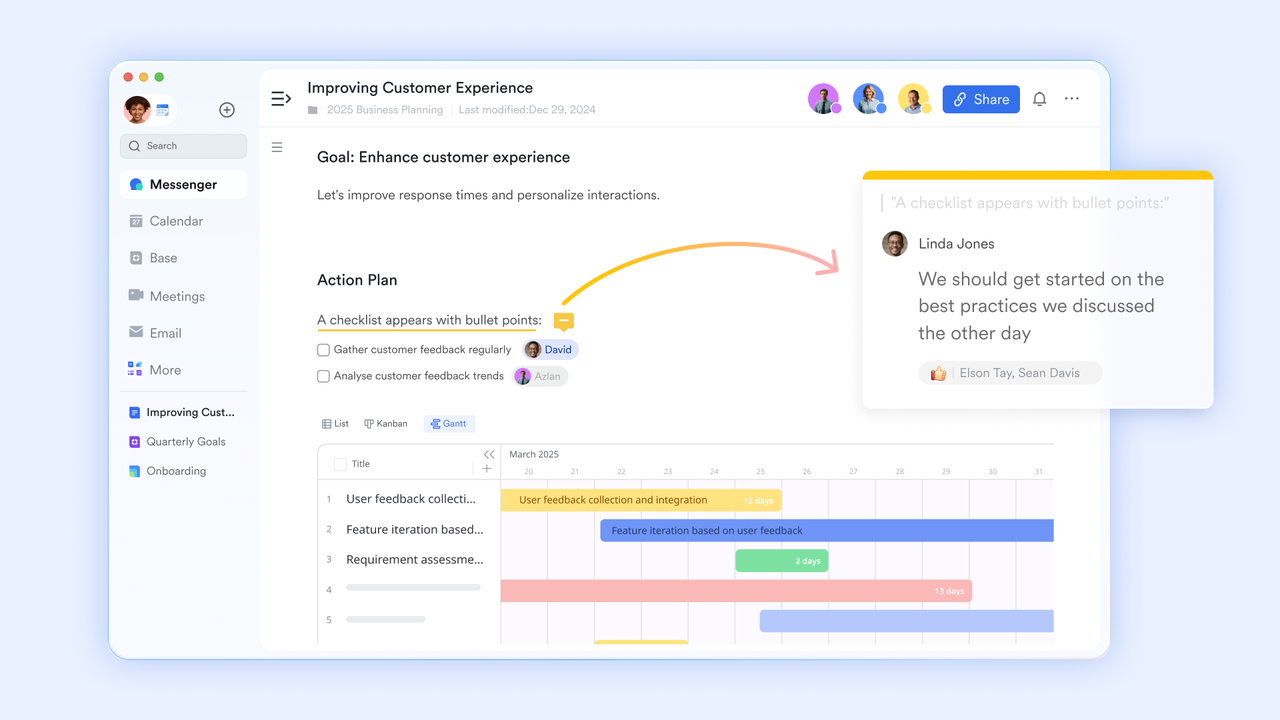
Lark enables teams to in real time for plans, briefs, proposals, and internal knowledge. Documents remain closely linked to tasks and workflows, ensuring that planning and execution stay aligned. Comments, suggestions, and edits happen live, reducing version confusion. Hive supports file sharing, but documentation often remains static and disconnected from daily execution.
First-glance data insights that serve both teams and leaders
Lark Base dashboards provide first-glance data insights by converting complex Base data into a variety of visual blocks, such as column charts for quick comparisons or funnel charts for process analysis. For teams, this means quickly monitoring operational status using metrics blocks. Leaders use these dashboards to aggregate performance data and use ranking blocks to assess team performance and track high-level trends. Hive provides dashboards and time tracking, but Lark's built-in dashboard makes it easier to across departments and initiatives. 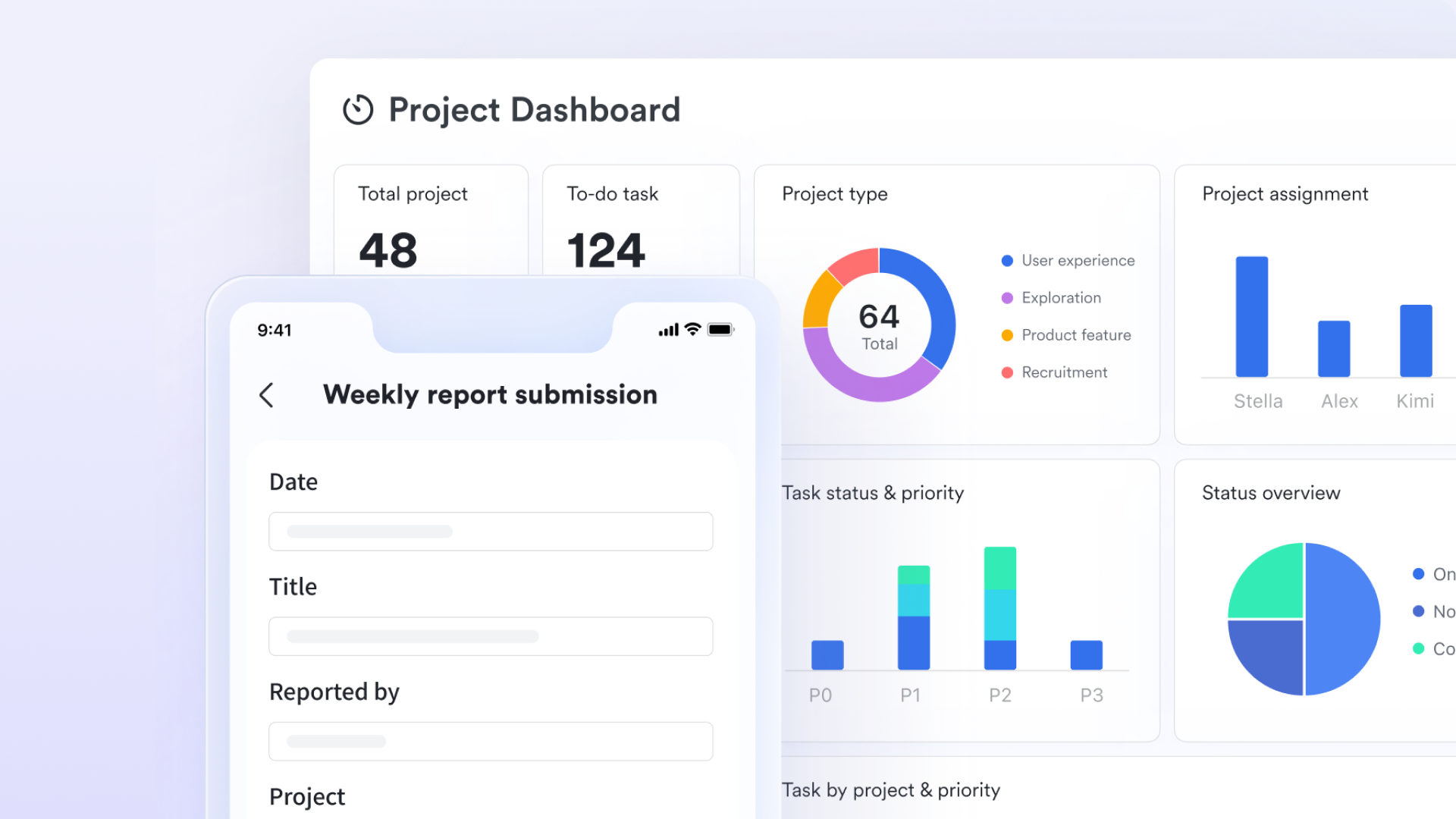
:
- Starter plan: Free forever plan that includes 11 powerful tools for up to 20 users. It also comes with 100GB of storage, 1000 automation runs, AI translations, and more.
- Basic plan: $6/user/month (billed annually) for up to 500 users. It includes everything in Starter plus group calling for up to 500 attendees, 5TB of storage, 1000 automation runs, and more. For more details, please .
- Pro plan: $12/user/month (billed annually) for up to 500 users. It includes everything in Basic plus group calling for up to 500 attendees, 15TB of storage, 50,000 automation runs, and more.
- Enterprise plan: for custom pricing. Supports unlimited users and includes even more automation runs and advanced security, compliance, and management features.
For small teams with simple communication needs

18 months message history
1000 Base automation runs/month
2000 rows per table in Base
Most POPULAR
For companies with comprehensive collaboration and management needs
Unlimited message history
500-participant video meetings
50k Base automation runs/month
20k rows per table in Base
For large companies with advanced security and organizational management needs
Get a personalized demo and pricing
Unlimited message history
500-participant video meetings
15 TB storage + 30 GB storage/user
500k Base automation runs/month
50k Base automation runs/month
Most POPULAR
For companies with comprehensive collaboration and management needs
Unlimited message history
500-participant video meetings
50k Base automation runs/month
20k rows per table in Base
Hive vs. Lark: Which platform should your team choose?
When choosing between Hive and Lark, teams need to consider workflow complexity, collaboration needs, and ease of adoption. Hive offers project management with integrated email and task tracking, while Lark focuses on , documents, and structured workflows in one platform. Both aim to improve , but their approaches differ in flexibility and scalability. This comparison helps teams decide which platform aligns best with their operational style and growth plans.
Why teams choose Hive
Hive is a strong option for marketing teams and creative agencies that value visual timelines, flexible project views, and quick setup. It works best when collaboration happens mainly around tasks and deadlines, and when automation and reporting requirements remain relatively light. Teams that already rely on separate communication tools may find Hive fits neatly into their existing workflow.
When teams choose Lark instead
Lark is better suited for teams that want project management, communication, documentation, and execution in one cohesive workspace. It supports structured workflows, real-time collaboration, and without relying on add-ons. Organizations managing multiple teams, growing workloads, or cross-functional processes often prefer Lark for its clarity, flexibility, and lower long-term complexity.
Boost visibility across projects
Conclusion
This Hive review shows that Hive is a capable project management tool for teams that value visual planning, fast onboarding, and straightforward task execution. It works particularly well for marketing teams and agencies managing campaigns, timelines, and repeatable workflows. However, as organizations grow, challenges around the depth of workflow automation, cross-team coordination, and unified collaboration become more visible. Feature add-ons and fragmented communication can increase complexity over time. For teams moving beyond single-project execution and seeking a more connected way to manage work, documentation, and communication, a unified platform becomes increasingly important. That's where teams often begin exploring more scalable, all-in-one alternatives like .
FAQs
Is Hive suitable for non-technical users?
Yes, Hive is generally suitable for non-technical users. Its clean interface and visual project views make onboarding straightforward, as noted in many Hive review articles. Similar to observations in a flow hive review, most users can start managing tasks and timelines without technical training, especially in marketing or agency environments.
Does Hive require paid add-ons for core features?
Hive includes essential project management features in its base plans, but some advanced capabilities require paid add-ons. This is often mentioned in comparisons like an Insight Hive Pro review, where automation depth and reporting expansion come at an extra cost. Teams should evaluate long-term needs to avoid unexpected pricing increases.
How does Hive compare to ClickUp or Asana?
Compared to ClickUp and Asana, Hive emphasizes simplicity and visual planning over deep customization. While ClickUp offers broader configuration and Asana focuses on structured workflows, Hive prioritizes ease of use. This positioning frequently appears in broader ecosystem comparisons, which assess overall fit, budget factors like , and ease of use, rather than just feature volume.
Can Hive support large cross-functional teams?
Hive can support cross-functional teams, but coordination becomes harder as scale increases. In larger setups, projects may fragment across spaces, limiting visibility. This challenge is often highlighted in long-form analyses, where collaboration depth and reporting flexibility become critical for enterprise-level operations. What are the long-term costs of using Hive?
Long-term Hive costs depend on team size and feature requirements. While entry-level pricing is manageable, add-ons can increase expenses as workflows become more complex.
Related reading






























