Choosing a CRM today is no longer just about feature checklists. It is about understanding how pricing scales, where limits appear, and how tools affect daily execution. As interest in insightly pricing continues to grow, many teams are looking beyond headline numbers to understand what they actually pay as usage expands. Insightly positions itself as a flexible CRM with sales, marketing, projects, and automation modules under one brand. This guide breaks down Insightly pricing in real-world terms, highlights where costs increase, and explains why some teams later explore more unified platforms as complexity grows.
Understanding Insightly before choosing a plan
Before comparing numbers, it is important to understand how Insightly is structured. Insightly is not a single pricing model but a collection of products that are priced separately. CRM, , AppConnect combinations, and support modules each have their own plans. This means teams often subscribe to multiple Insightly products as needs expand. Understanding this modular structure is essential when evaluating Insightly pricing plans accurately.
Insightly is commonly used by mid-sized sales teams that want CRM and project tracking in one system. It appeals to organizations that value structured pipelines, reporting, and combining. However, pricing complexity increases as teams add automation, marketing, or workflow volume. This section sets the context for evaluating insightly crm pricing realistically. 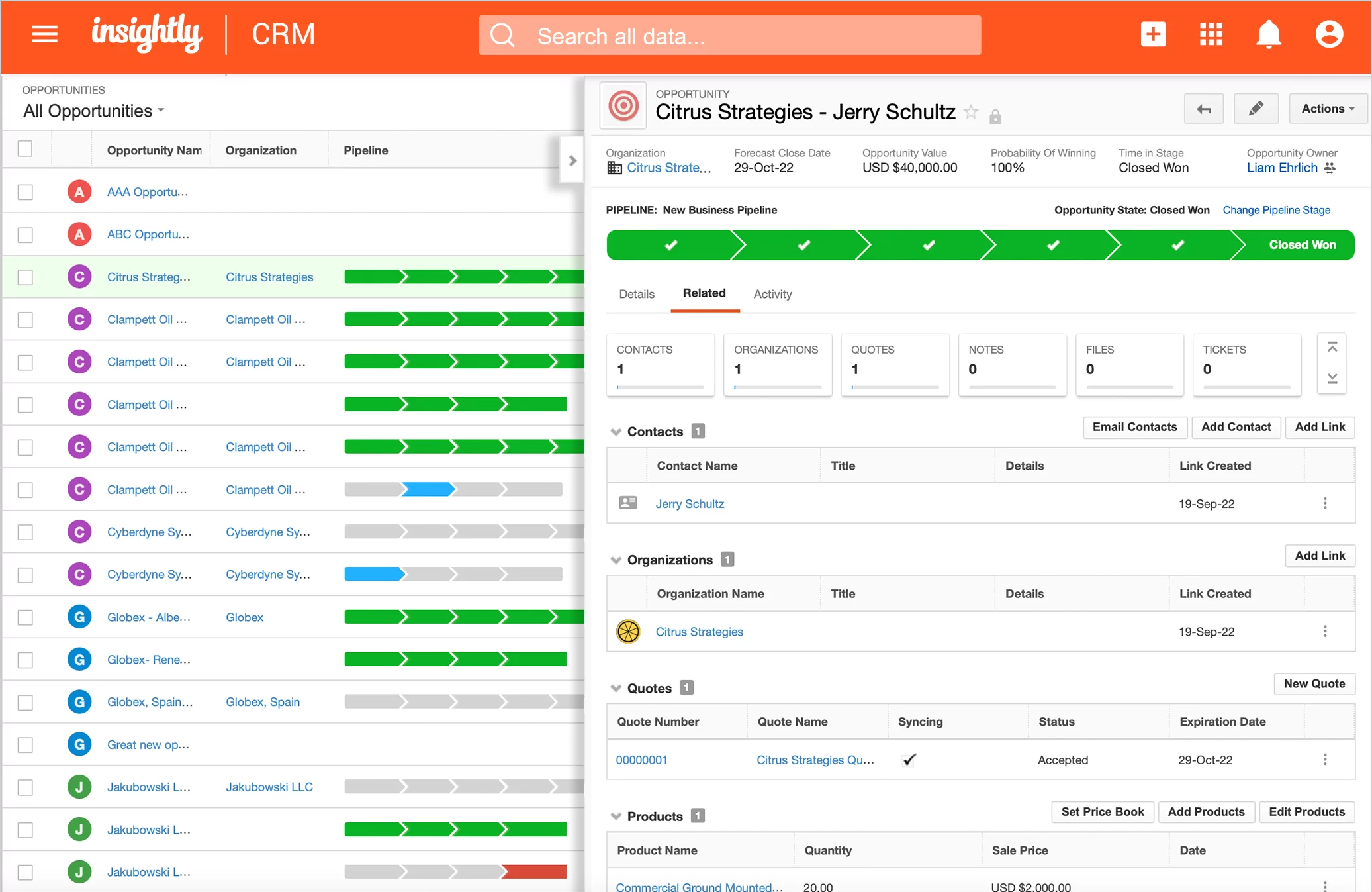
Image source: insightly.com
Feature-to-price analysis: What you actually get
Insightly pricing is best understood by directly to cost tiers. Entry plans cover core CRM functionality, but advanced automation, AI, and merging are locked behind higher plans. This structure means feature access grows alongside price, not gradually but in noticeable jumps. Teams often underestimate how quickly costs rise once automation or scale becomes necessary.
For example, workflow automation and AI Copilot are not available in lower tiers. As a result, teams evaluating insightly crm features pricing often discover that essential execution features require upgrades. This analysis focuses on what each tier truly delivers, rather than what is implied in marketing summaries.
Insightly All-in-One pricing vs features
Insightly All-in-One bundles CRM, marketing, and service tools into a single per-user price. While this simplifies procurement, it significantly raises monthly costs. The Plus tier starts at a premium level, positioning Insightly more toward established teams rather than startups. As usage grows, pricing becomes sales-led rather than self-serve.
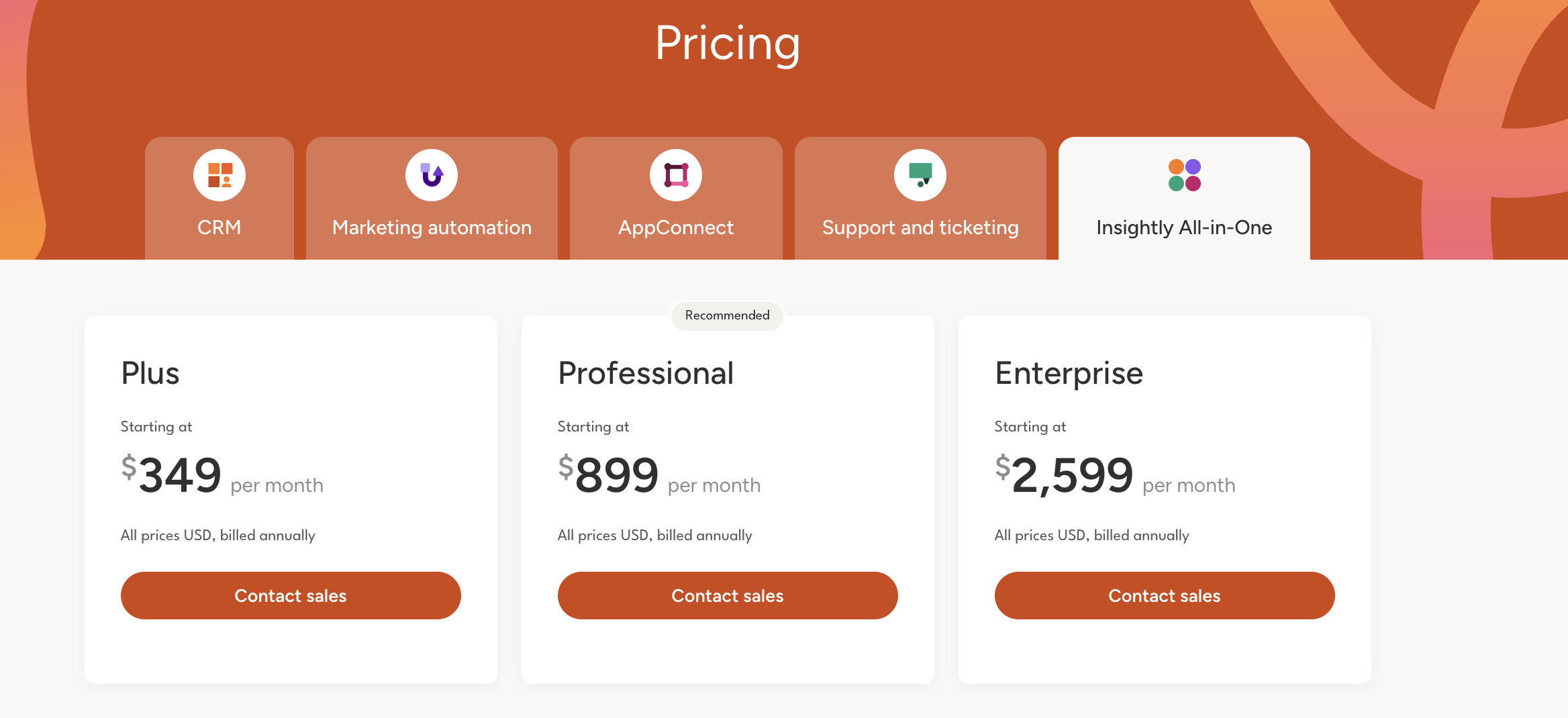
Image source: insightly.com
For organizations comparing pricing insightly against other CRMs, this model can feel restrictive. Teams pay for bundled functionality even if only part of it is used. This often leads decision-makers to reassess whether modular pricing truly aligns with operational needs.
Information source: insightly.com
Update time: 2025-12-19
Note: Pricing and plan details reflect publicly available data as of the update date and may vary based on region, billing cycle, and number of agents.
Insightly CRM pricing vs features
Insightly CRM pricing is the most commonly evaluated entry point. The Plus plan supports basic CRM and reporting, but lacks and AI. Professional unlocks automation and Copilot, making it the practical minimum for growing teams. Enterprise adds governance features but introduces higher administrative overhead.
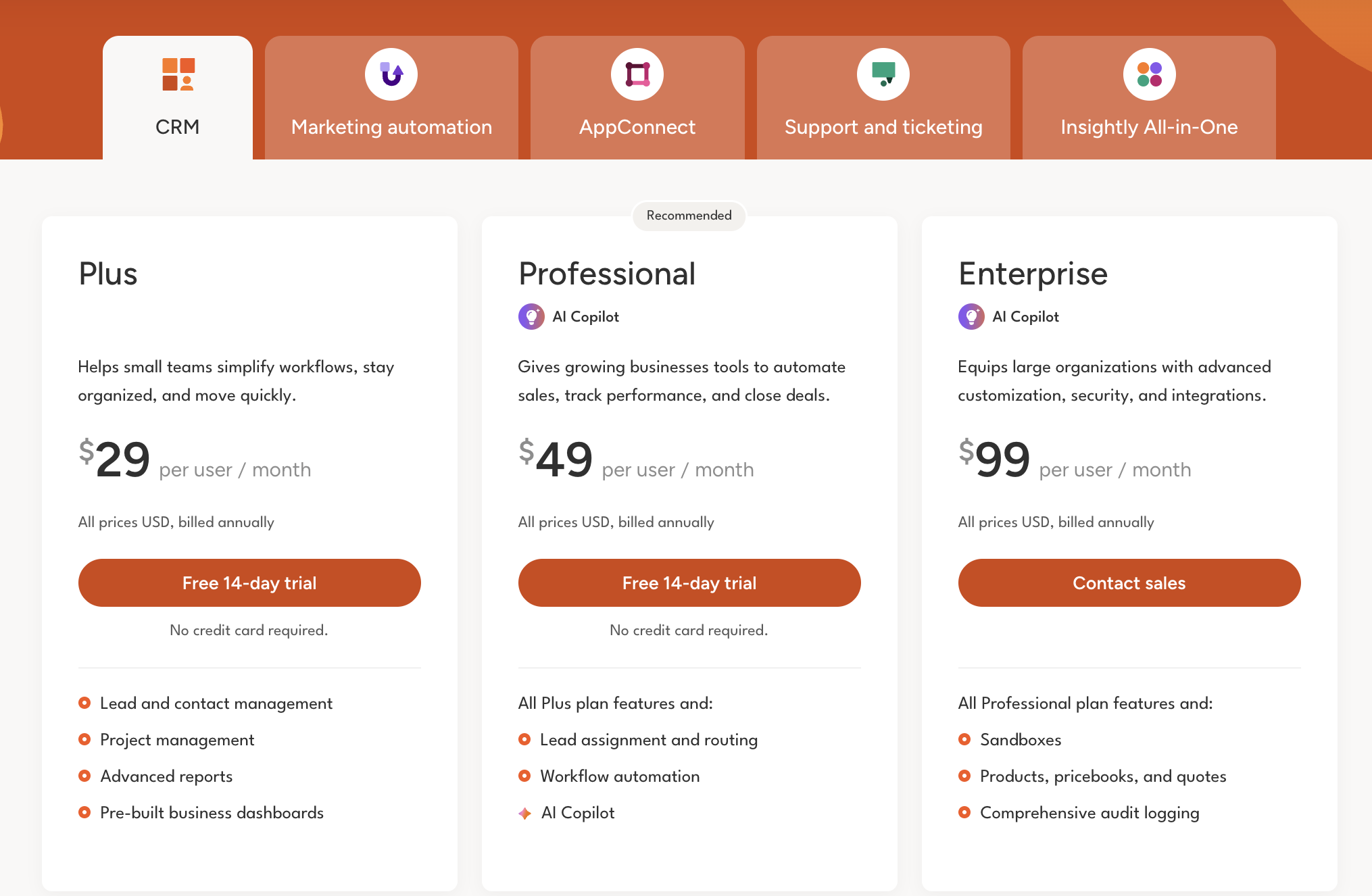
Image source: insightly.com
As teams scale, insightly crm pricing plans increase predictably per user. However, the total cost grows faster when combined with marketing, combinations, or support modules. Many teams using insightly crm pricing calculator models find that projected costs rise sharply within 12 to 18 months.
Insightly marketing automation pricing vs features
is priced separately from CRM. This surprises many buyers during evaluation. The Plus plan supports basic email automation, while Professional and Enterprise introduce advanced scoring and governance. The jump between tiers is significant, especially for mid-sized teams.
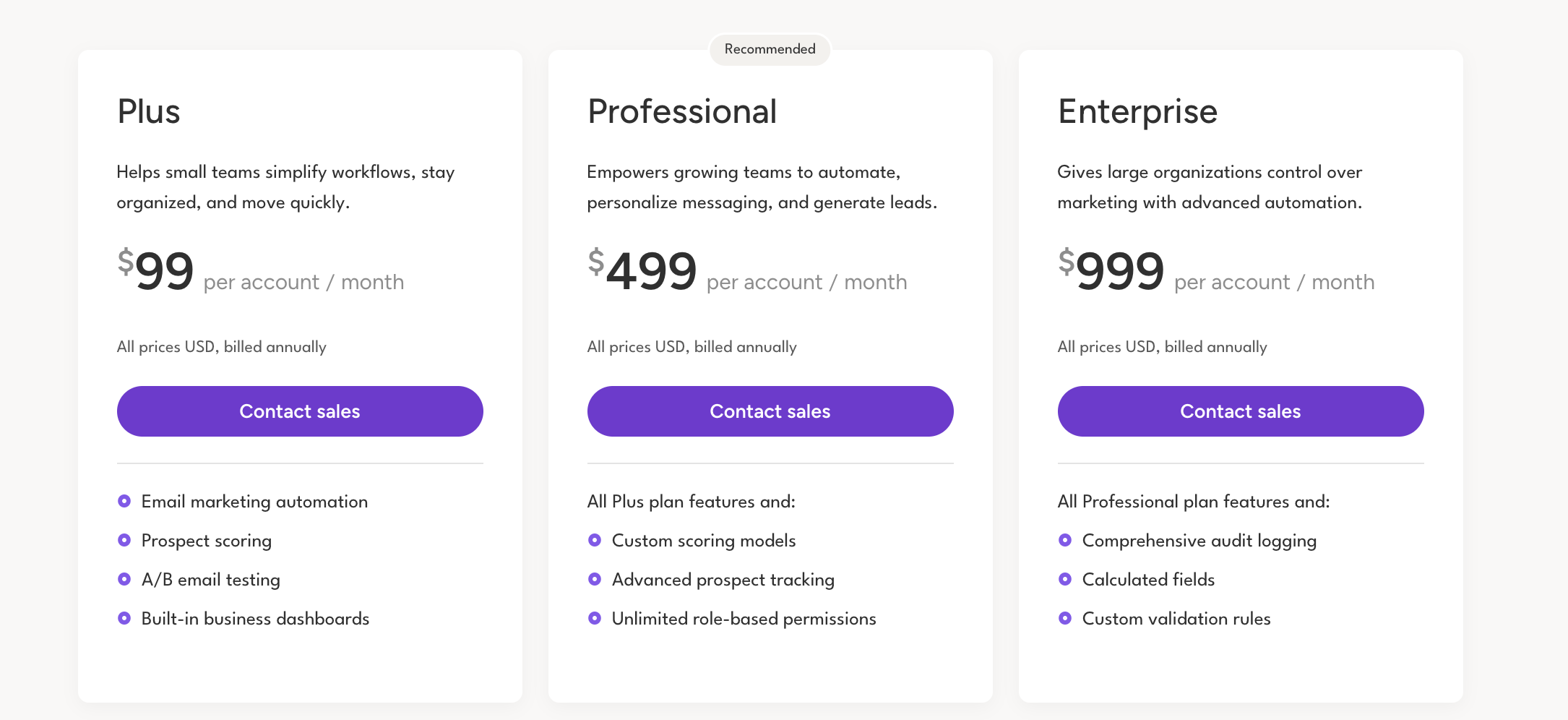
Image source: insightly.com
For organizations reviewing Insightly marketing pricing, the challenge is balancing demand generation needs against budget. Marketing features are powerful but costly relative to CRM tiers. This separation often results in fragmented execution between sales and marketing teams.
Insightly AppConnect pricing vs features
AppConnect enables merging and automation between Insightly and external systems. Pricing is based on task volume, not users. This introduces an entirely different cost dimension. Additionally, all AppConnect plans require a mandatory technical setup fee.
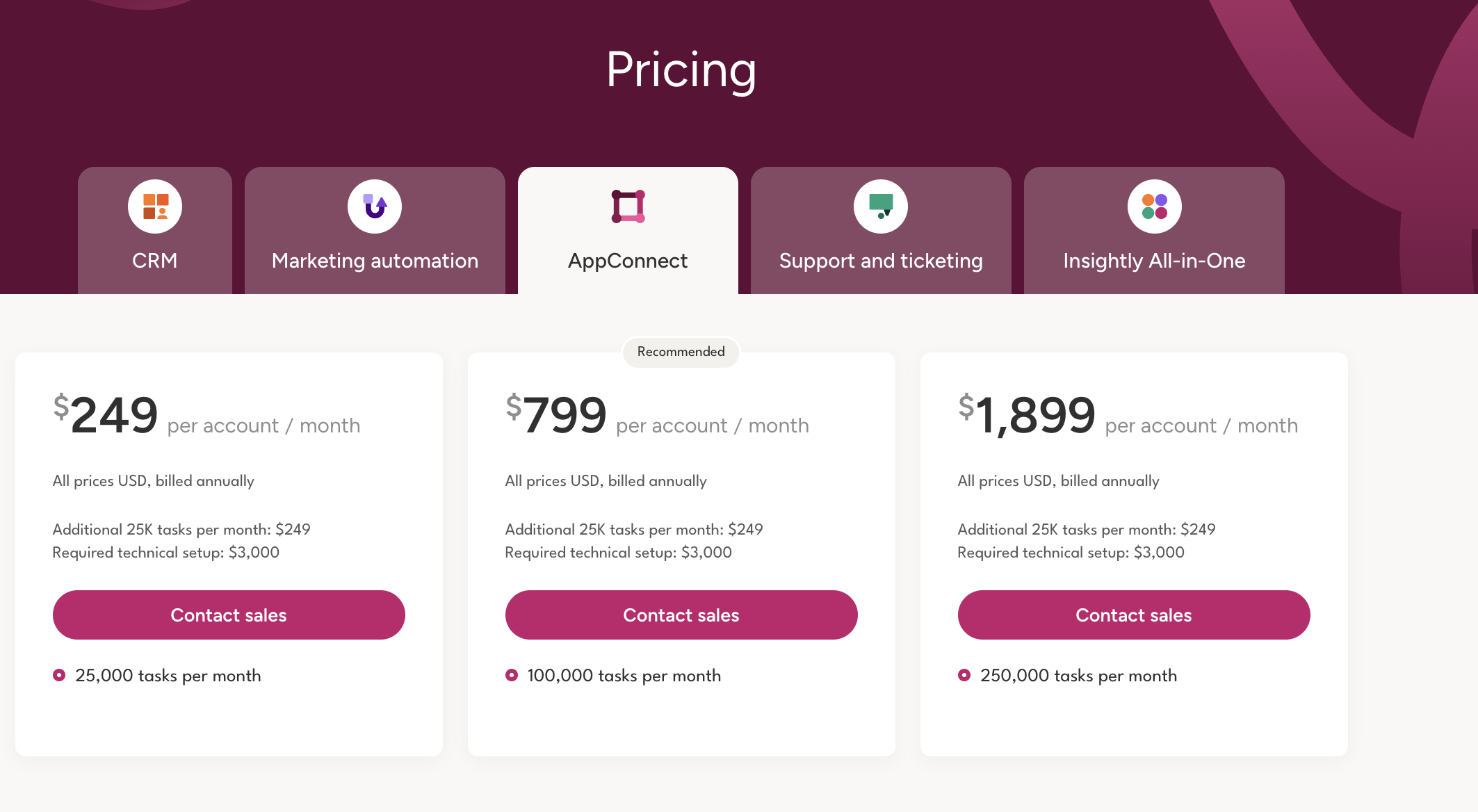
Image source: insightly.com
Teams evaluating insightly often overlook AppConnect until combined needs arise. Once workflows expand, AppConnect becomes necessary, adding both subscription and implementation costs. This is a common inflection point where teams reassess long-term value.
Insightly support & ticketing pricing vs features
Support and ticketing are also priced per user and sold separately. Lower tiers cover basic ticket handling, while higher tiers add and multi-brand support. Costs rise quickly for customer-facing teams with multiple agents.
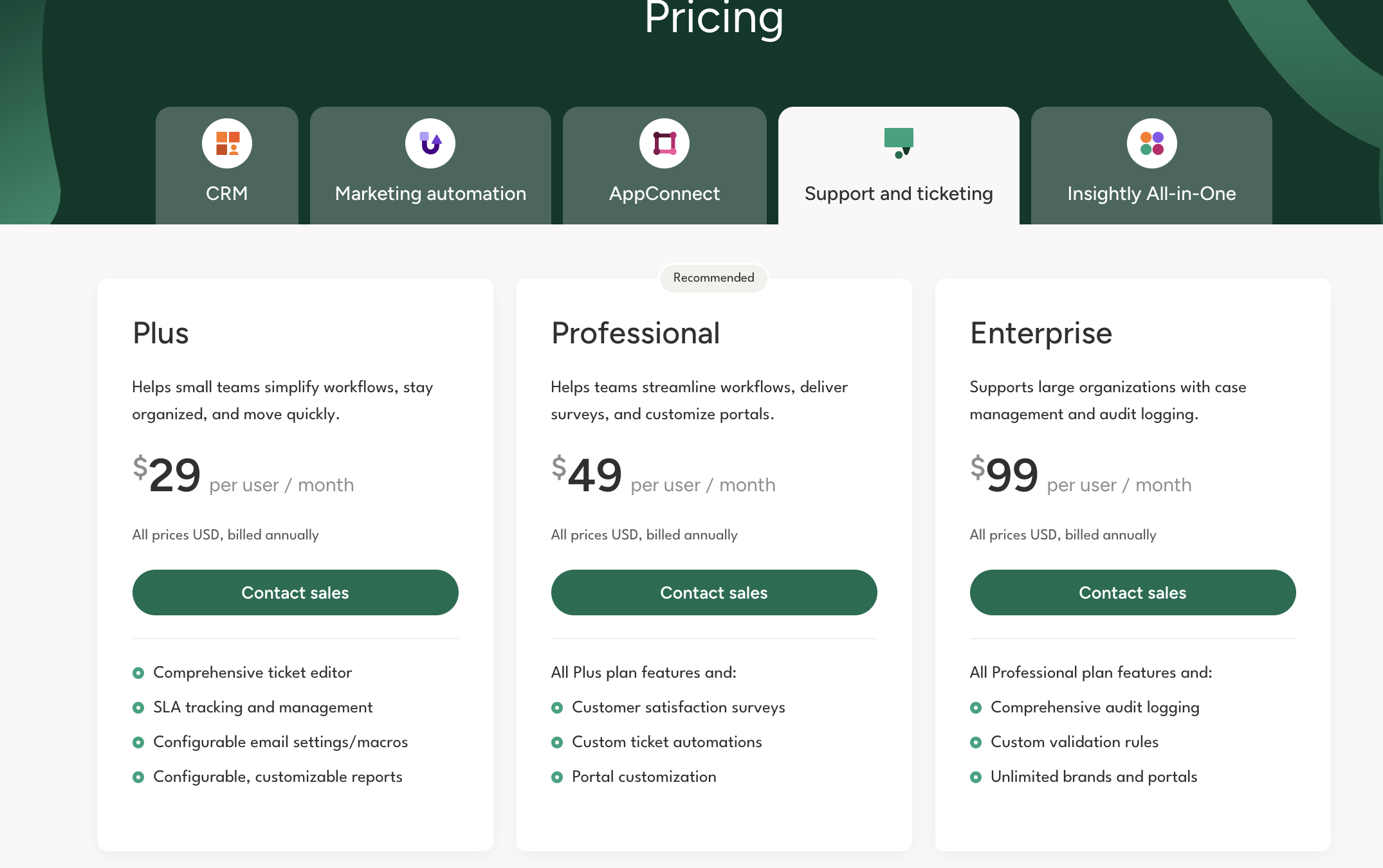
Image source: insightly.com
For nonprofits, Insightly nonprofit pricing can offer discounts, but module-based pricing still applies. Organizations must carefully model support costs alongside CRM expenses to avoid surprises.
Why teams switch from Insightly
At first glance, Insightly pricing appears competitive, especially for teams looking for a structured CRM with reporting and pipeline visibility. However, real-world usage often reveals gaps that pricing alone cannot compensate for. As teams grow, execution complexity increases, and workflows extend beyond CRM records into conversations, documents, and follow-ups. This section explains why many teams eventually reconsider Insightly, not because it lacks features, but because it struggles to support how actually work together.
- Collaboration and visibility challenges: Insightly centralizes customer data well, but collaboration remains fragmented across tools. Sales discussions, internal clarifications, and decision-making often happen in or meetings that sit outside the CRM. This makes it difficult for managers to maintain real-time visibility into deal progress and ownership. As a result, teams spend extra time syncing updates instead of moving deals forward.
- Process fragmentation across tools: As workflows expand, Insightly users often rely on additional tools for tasks, documents, approvals, and communication. While combining exists, execution becomes spread across systems. This fragmentation increases context switching and creates delays in follow-ups. Over time, teams feel that work is happening everywhere except where the data lives.
- Automation depth vs pricing tiers: Insightly's automation capabilities improve at higher pricing tiers, but this creates a cost versus flexibility trade-off. Basic plans support only simple rules, while more advanced workflows require upgrades or add-ons. For teams with dynamic , automation limitations can slow execution. This gap between automation needs and pricing tiers is a common trigger for exploring alternatives.
Explore execution-focused alternatives
Why Lark is a smarter value alternative to Insightly
As teams look beyond CRM-centric tools, they increasingly prioritize execution clarity over feature volume. Lark approaches sales and customer workflows from a different angle by combining structured data with in one workspace. Instead of treating CRM as a standalone system, Lark connects pipelines, conversations, documents, and tasks, so work progresses naturally. This makes a compelling option for teams seeking better value through simplicity and speed rather than layered pricing.
Dynamic CRM systems with clean views
Insightly focuses on tracking leads and opportunities through predefined . While this works for visibility, pipelines often remain static views, filled with irrelevant information.
Lark approaches pipelines as living systems through . Sales pipelines are modeled as structured records with customizable fields such as deal value, probability, owner, stage, and expected close date. Pipelines can instantly switch between table, Kanban, calendar, and timeline views, allowing sales leaders and reps to work from the same data in the format that suits them best. 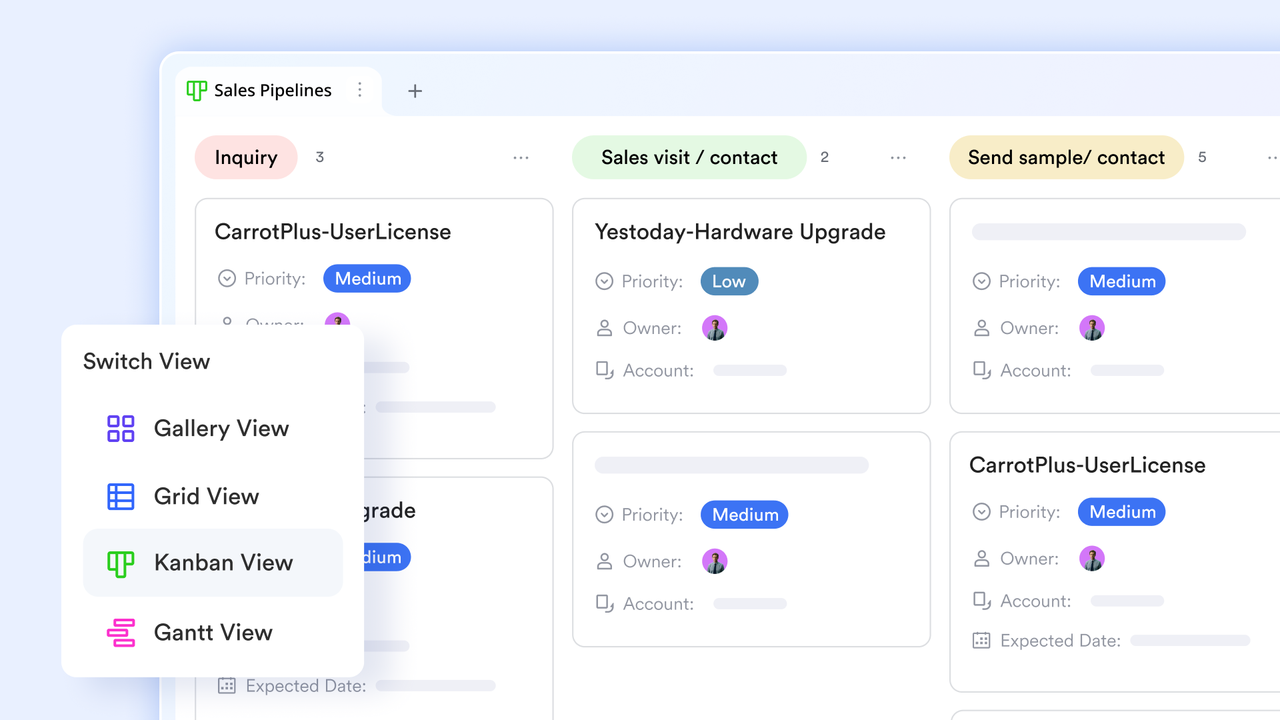
Centralized working hub for tasks, discussion, and documents
Insightly and opportunities well, but follow-ups often rely on separate task lists, emails, or reminders that live outside the core sales record. This can fragment ownership and delay responses.
Lark Base makes all the differences. For example, Base supports syncing task lists into the Base itself, Base can be shared in for deep discussion, and Base can also be inserted into and Lark Sheets for reports and documentation. By unifying task management, discussion, and reporting into a single source of truth, Lark Base eliminates the friction of fragmented tools 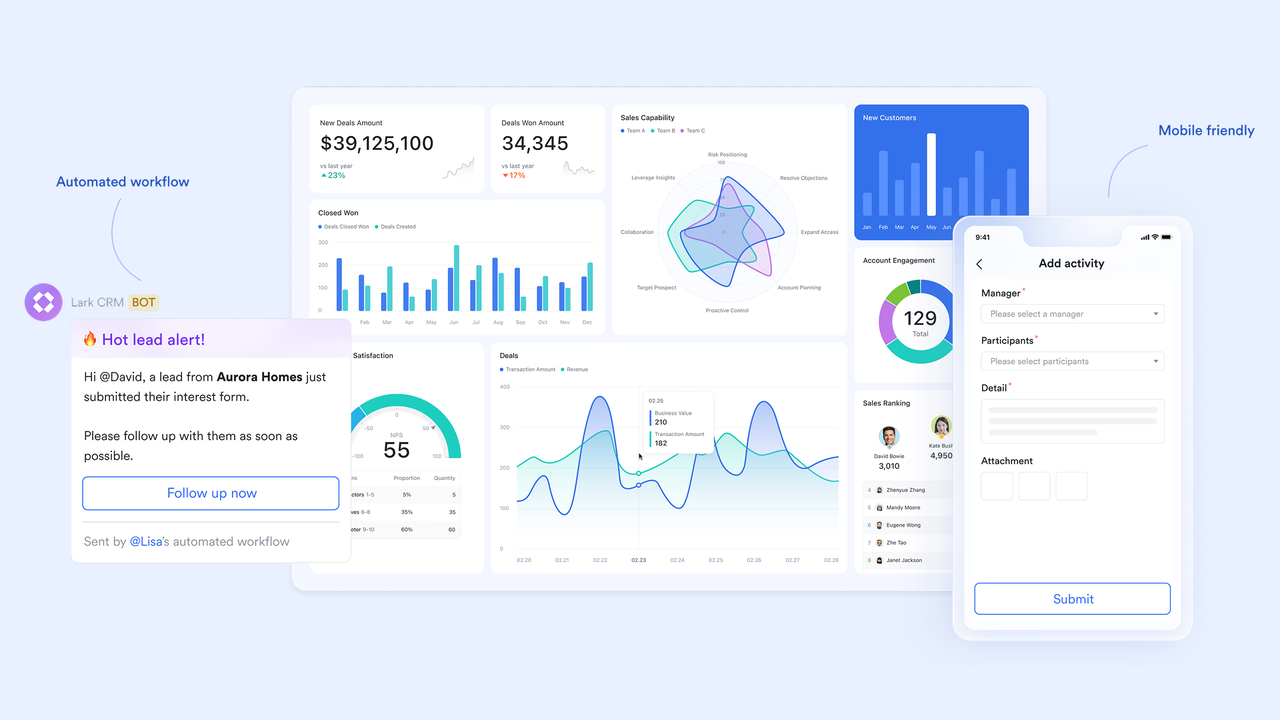
Workflow automation that adapts to real sales scenarios
Insightly offers workflow rules for actions like updating fields or sending alerts, but automation logic is often linear and limited to objects. Complex scenarios usually require add-ons or external tools. Lark workflows are logic-driven and deeply flexible. In , workflows can use conditional paths (If/Else), loops, formulas, and multi-step actions. For example, Lark can automatically route leads based on region and deal size, trigger approval steps for high-value discounts, or escalate stalled deals after a set number of days. No more manual efforts on trivialities and repetitive tasks; you and your team can focus on the business from the beginning. 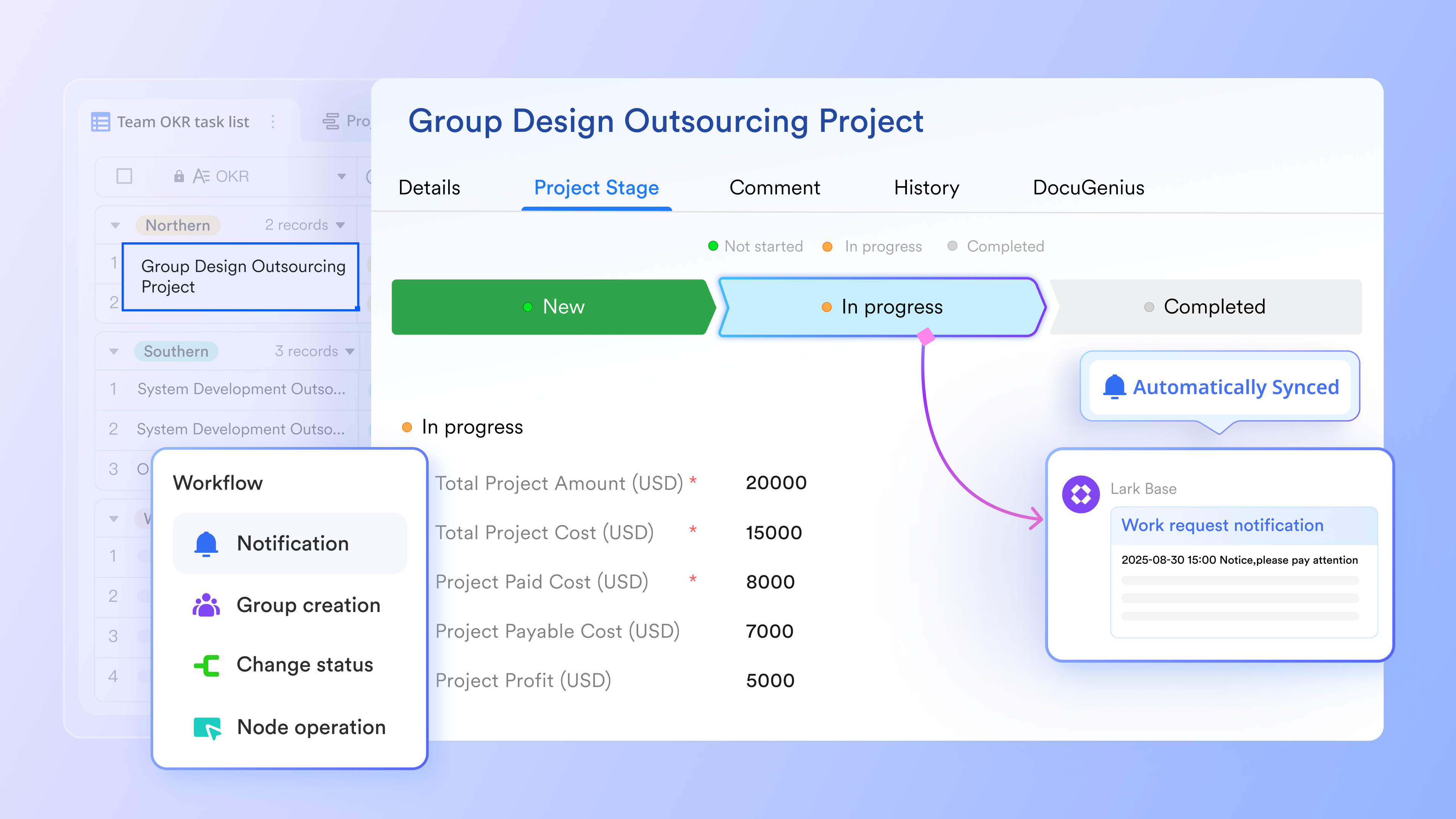
Permissions that protect data without slowing teams down
Insightly provides role-based access and validation rules, but permissions are largely tied to CRM roles and object-level controls, which can feel rigid as teams scale or diversify workflows.
Lark offers granular, multi-layer permissions through Lark Base advanced permissions. Admins can control access at the base, table, record, field, and even view level. managers might see revenue fields, while reps only see their own deals. External partners can submit updates through forms without accessing internal data at all. Validation logic in Lark is also more flexible. Required fields, conditional visibility, and automated checks can be enforced through workflows and formulas, ensuring data quality without blocking productivity. 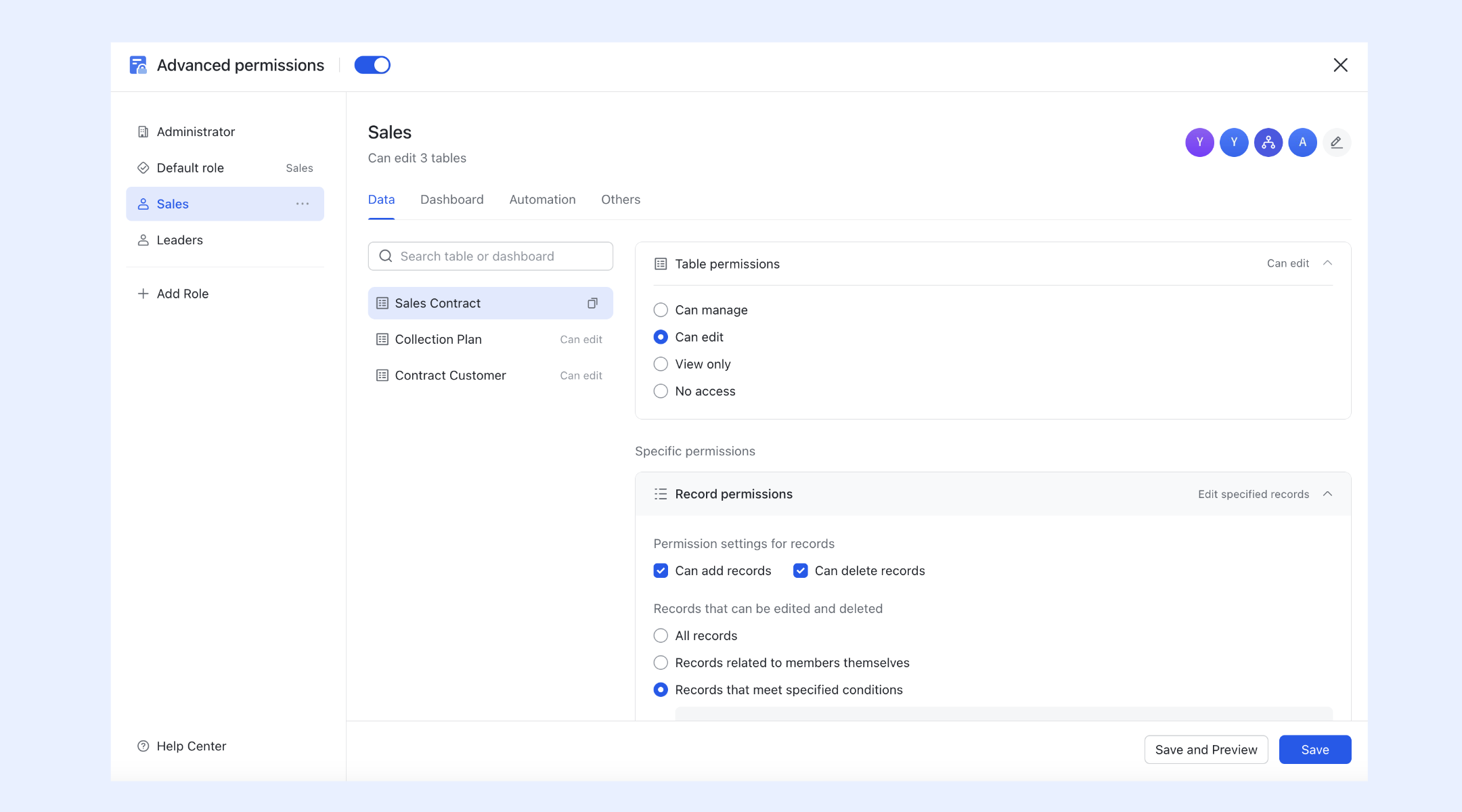
Affordable plans with competitive features
Lark is the ultimate affordable alternative to Insightly because it eliminates "subscription sprawl" by a single $12/user/month annual seat. Unlike Insightly, which locks workflow automation behind a $49/user Professional tier, the includes 50,000 automation runs and a massive 15TB of storage at its base price. By providing a unified "Superapp" that includes video conferencing and team chat tools you would otherwise pay extra for alongside Insightly, Lark allows you to cut your total software spend by up to 75% while gaining more advanced, interconnected features.
:
- Starter plan: Free forever plan that includes 11 powerful tools for up to 20 users. It also comes with 100GB of storage, 1000 automation runs, AI translations, and more.
- Pro plan: $12/user/month (billed annually) for up to 500 users. It includes everything in Starter plus group calling for up to 500 attendees, 15TB of storage, 50,000 automation runs, and more.
- Enterprise plan: for custom pricing. Supports unlimited users and includes even more automation runs and advanced security, compliance, and management features.
For small teams with simple communication needs

18 months message history
1000 Base automation runs/month
2000 rows per table in Base
Most POPULAR
For companies with comprehensive collaboration and management needs
Unlimited message history
500-participant video meetings
50k Base automation runs/month
20k rows per table in Base
For large companies with advanced security and organizational management needs
Get a personalized demo and pricing
Unlimited message history
500-participant video meetings
15 TB storage + 30 GB storage/user
500k Base automation runs/month
50k Base automation runs/month
Most POPULAR
For companies with comprehensive collaboration and management needs
Unlimited message history
500-participant video meetings
50k Base automation runs/month
20k rows per table in Base
Who benefits most from each tool?
Choosing between Insightly and a broader workspace like Lark depends less on feature checklists and more on how teams execute work daily. Some teams prioritize CRM metrics and reporting above all else, while others need conversations, tasks, documents, and automation to move together in real time. This section clarifies which types of organizations gain the most value from each approach.
Insightly works well for
- Mid-sized sales organizations focused mainly on CRM and project delivery: Insightly pricing works best for mid-sized sales organizations that rely heavily on CRM structure, pipeline visibility, and formal reporting. These teams typically operate with well-defined sales stages and predictable workflows. Insightly CRM pricing supports this model by offering strong opportunity tracking, , and project linkage. For organizations where execution happens largely within sales and delivery teams, Insightly provides a centralized system of record that supports accountability and performance tracking.
- Teams that want a CRM with built-in project linkage and reporting: Teams that manage customer delivery through projects often find value in Insightly's combined CRM and project capabilities. Insightly pricing plans include that connects customer records with delivery milestones and reports. This works well for professional services teams that prioritize visibility into timelines and outcomes. While collaboration may still require external tools, Insightly CRM pricing supports organizations that value structured reporting over real-time execution workflows.
- Organizations standardized on CRM metrics above team execution tracking: Organizations that evaluate success primarily through such as pipeline value, close rates, and forecast accuracy align well with Insightly pricing. These teams often have leadership that prioritizes dashboards and reports over daily collaboration flow. Insightly crm pricing delivers strong analytical capabilities, making it suitable for environments where execution tracking is secondary to performance measurement and historical insight.
Lark works better for
- Cross-functional teams that need collaboration, execution, and data in one place: Lark delivers more value for cross-functional teams where sales, marketing, operations, and leadership need to work together continuously. Instead of separating from conversations and tasks, Lark connects everything in one workspace. Teams can discuss deals, update records, assign tasks, and collaborate on documents without switching tools. This unified approach supports faster execution and clearer ownership as organizations scale.
- Organizations seeking real-time automation and combined communication: Organizations that rely on automation to move work forward benefit from Lark's logic-driven workflows and . Unlike CRM-centric automation that focuses mainly on data updates, Lark automates collaboration itself. Messages, tasks, approvals, and documents move together in real time. This makes Lark especially effective for teams that need automation to support execution rather than just reporting.
- Teams that want dashboards across business operations, not just CRM activities: Lark is well-suited for teams that want visibility beyond CRM activities. Its dashboards can reflect work across sales, operations, delivery, and internal projects using shared data views. This allows leaders to see real-time progress, blockers, and ownership across the organization. For teams seeking operational visibility rather than CRM-only reporting, Lark offers a broader and more flexible perspective.
While Insightly offers solid CRM and project alignment, Lark delivers a more connected, flexible, and execution-oriented workspace. , structured data views, native automation, merged meetings, and unified knowledge ecosystem help teams move from tracking interactions to driving work forward, all without stitching multiple tools together.
Conclusion
Insightly pricing remains a strong option for organizations that prioritize CRM structure, reporting, and pipeline governance. Its modular pricing and tiered features support sales-driven teams that operate within well-defined processes. For these teams, Insightly provides clarity and consistency, especially when execution requirements remain relatively contained within .
However, as teams grow more cross-functional and execution becomes more collaborative, pricing Insightly can feel limiting. The need to connect conversations, documents, tasks, and automation introduces complexity that CRM-centric systems struggle to absorb. In these environments, platforms like offer a simpler and more scalable approach by bringing execution and collaboration into one connected workspace.
Build faster execution without extra tools
FAQs
Does Insightly have a free plan?
As of December 2025, Insightly has officially discontinued its "Free Forever" plan for new users, shifting its focus entirely to paid tiers. While a 14-day free trial remains available, teams must now move to a paid subscription after the trial ends.
How does Insightly compare to Salesforce?
Insightly is widely viewed as a streamlined, more affordable alternative to Salesforce, specifically tailored for small to mid-sized businesses. Unlike Salesforce, which often requires a dedicated administrator for its complex interface, Insightly offers a much flatter learning curve and includes native project management tools out of the box. While Salesforce provides deeper AI and enterprise-scale features, Insightly typically delivers a 50% lower total cost of ownership for teams with standard sales and project needs.
Is Insightly a good CRM?
Insightly is generally considered a good CRM for mid-sized teams that need a blend of sales tracking and post-sale project management. It is often cited as a middle-ground option—more powerful than basic tools like Trello or Pipedrive, but more affordable and less complex than advanced CRM tools like Salesforce.
Does Insightly pricing increase after onboarding or contract renewal?
Insightly pricing itself does not change unexpectedly after onboarding, but total costs often increase as teams upgrade plans or add modules. Many organizations start on lower tiers and later move to higher Insightly pricing plans to access or advanced reporting. Renewal periods often prompt reassessment of usage and cost efficiency. Teams should plan for growth-related upgrades early. Some organizations explore Lark to manage execution without constant plan changes.
How does Insightly pricing affect multi-region or global teams?
For global teams, insightly crm pricing scales per user, which can increase costs quickly across regions. Managing permissions, workflows, and reporting across geographies may require higher tiers and additional admin effort. Time zone coordination and collaboration often rely on external tools. To reduce , some global teams introduce Lark to centralize communication and execution across regions.
Can Insightly replace internal project tracking tools at higher tiers?
At higher tiers, Insightly includes project management features that can replace basic tracking tools. However, these features focus more on reporting than daily execution flow. Teams still rely on external communication and document tools. As project complexity increases, execution visibility may decline. Lark complements this gap by keeping tasks, discussions, and documents connected.
Related reading






























