














Jira vs Basecamp: Features, Pricing, and Best Alternative

Ryan Tanner
Product Marketing Specialist
Sep 18, 2026
Ryan Tanner
Sep 18, 2026

18 min read


Choosing the right project management platform can be challenging when your team needs both structure and flexibility. In this Jira vs Basecamp comparison, we break down the features, workflows, pricing, strengths, and limitations of both tools to help you decide which one best fits your team. Whether you manage complex technical projects or need a simple system for organizing everyday work, this guide will highlight where each platform excels.

Jira vs Basecamp: Quick comparison snapshot
What is Jira?
Jira is a structured issue-tracking and agile project management platform primarily used by engineering, IT, and product development teams. It supports Scrum boards, Kanban workflows, epics, bugs, and technical sprints, making it ideal for agile teams. With advanced automation, customizable workflows, and developer-focused reporting, Jira excels in environments that need precision, repeatability, and detailed progress tracking across technical tasks.
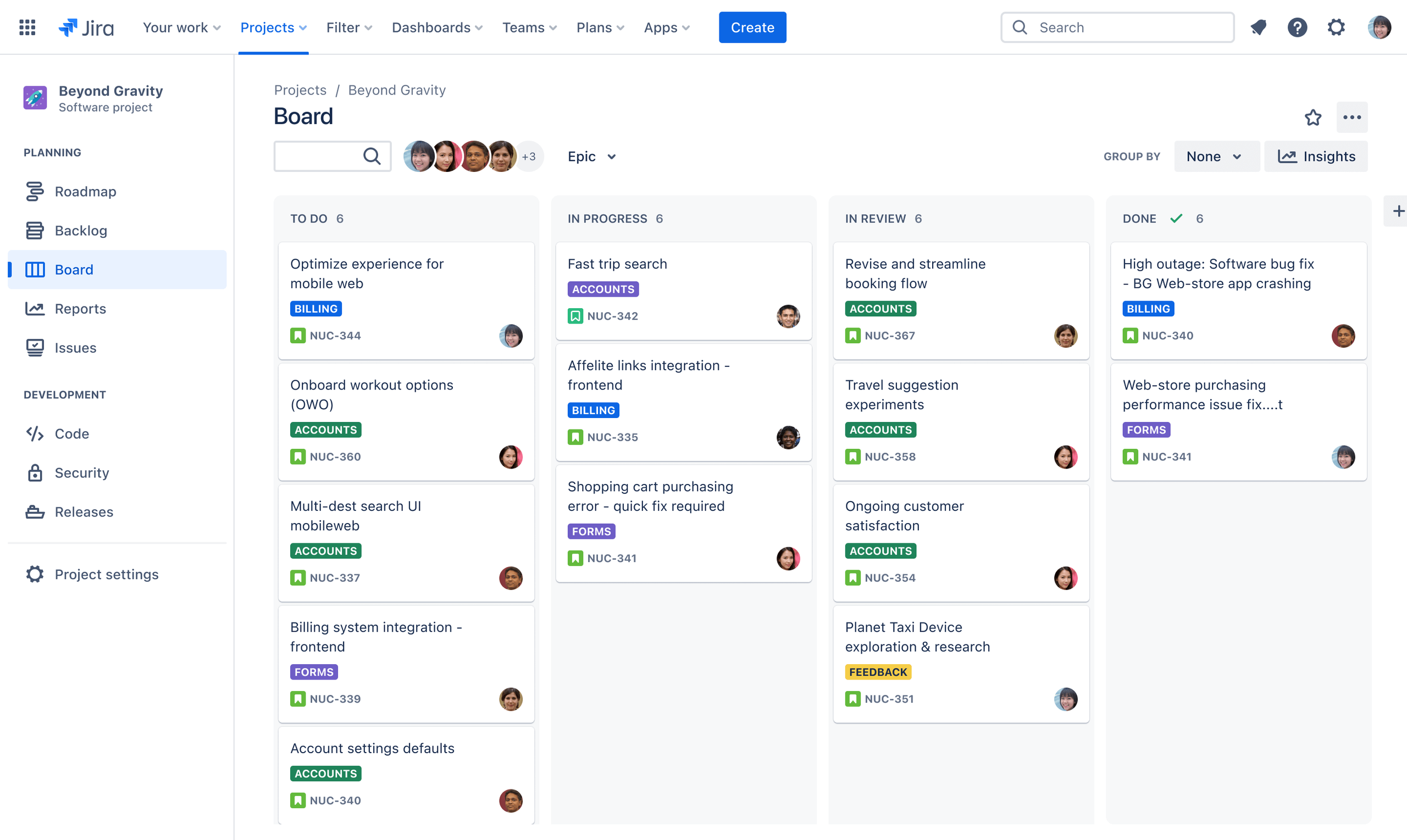
Image source: jira.com
What is Basecamp?
Basecamp is a simple, communication-focused project collaboration tool built for small to mid-sized teams that prefer clarity over complexity. It bundles message boards, Campfire chat, to-do lists, simple scheduling, and lightweight document handling into one clean interface. Basecamp avoids complex project structures in favor of ease of use, making it appealing for teams that want straightforward coordination without detailed workflows or deep configuration.
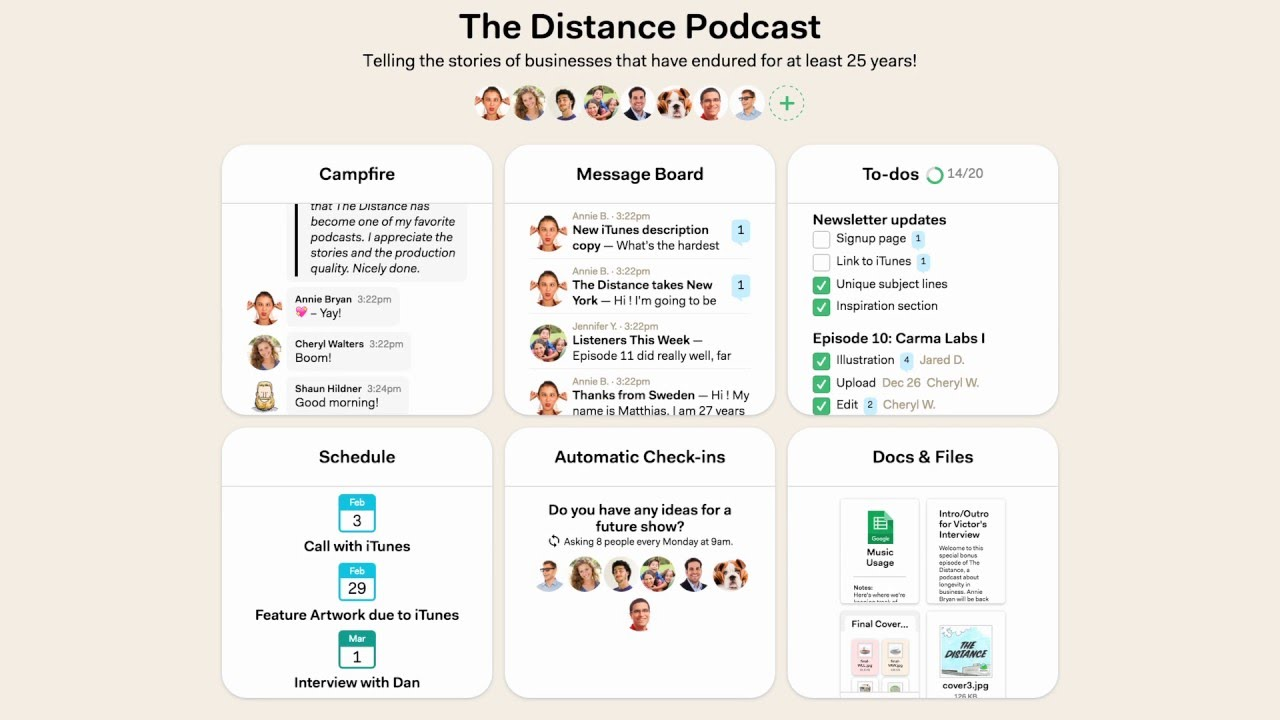
Image source: basecamp.com
Jira vs Basecamp features comparison
This Jira vs. Basecamp comparison will help you understand how different the two tools really are in terms of structure, communication, and workflow depth.
Project structure
Jira organizes work using issues, epics, stories, tasks, and highly customizable workflows, ideal for structured teams with engineering-style processes. It allows teams to design detailed flows for bugs, changes, improvements, and sprint activities, with the new version adding AI-assisted epic breakdowns for faster planning. This depth supports massive-scale projects, like those in Fortune 500 dev teams, where traceability from idea to release is non-negotiable.
Basecamp uses simple projects with lists, messages, files, and goals, which work well for smaller creative teams but limit use in operations or engineering. Best for smaller creative teams, there are no advanced workflows, but recent enhancements include auto-archiving inactive projects to keep things clutter-free. It's perfect for ad agencies or marketing groups who prioritize quick setup over rigid hierarchies.
Task management depth
Jira provides deep task management, including dependencies, statuses, sub-tasking, sprint allocation, and role-based ownership—this is a significant advantage in any Jira vs. Basecamp comparison. With 2025's Rovo AI integration, tasks can auto-prioritize based on velocity data, making it indispensable for software delivery. Engineering teams love how it links tasks to code commits via Bitbucket or GitHub for end-to-end visibility.
Basecamp keeps task management minimal: single-level to-dos, basic assignments, and simple deadlines, which is easy but not suitable for complex delivery. The 2025 update added recurring to-dos with smart reminders, streamlining routine creative work like content calendars. It's a breath of fresh air for non-dev teams who find Jira's layers overwhelming.
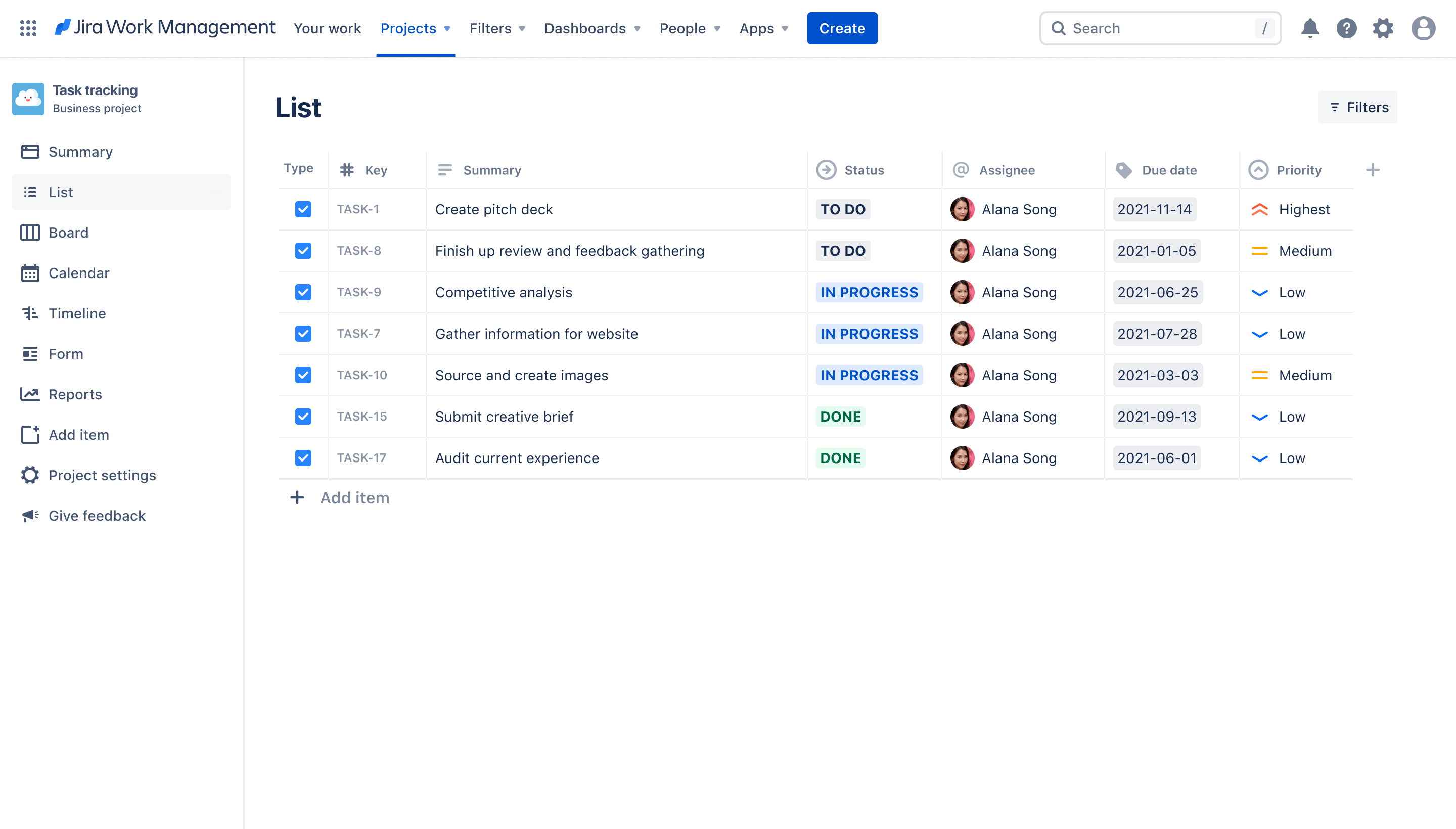
Image source: jira.com
Team communication
Jira uses comments inside issues, which is excellent for technical collaboration but doesn't support broader discussions or cross-team alignment. Recent Slack and Microsoft Teams integrations help bridge the gap, but it still feels siloed for non-technical chats. Dev teams appreciate threaded comments with @mentions and file previews directly in issues.
Basecamp excels at communication through Campfire chat, message boards, and check-ins—conversational and straightforward, but not deeply integrated with structured workflows. The new version brings a mobile-first redesign, making Campfire's real-time emoji reactions and voice clips even snappier for remote creatives. It's like a digital water cooler, fostering casual alignment without the formality of Jira's issue logs.
Document workflows
Jira requires Confluence for documentation, forcing teams to jump between tools, though 2025's unified search across the Atlassian suite eases navigation. Attachments in issues support previews and comments, but versioning demands Confluence's full power. Tech writers and product managers pair it seamlessly for living docs tied to epics.
Basecamp has basic text documents and file uploads, but lacks versioning, structured docs, or large-scale document management. Unlimited storage and drag-and-drop uploads make it hassle-free for sharing assets like mood boards. Creative agencies thrive here, as files auto-organize by project without extra plugins.
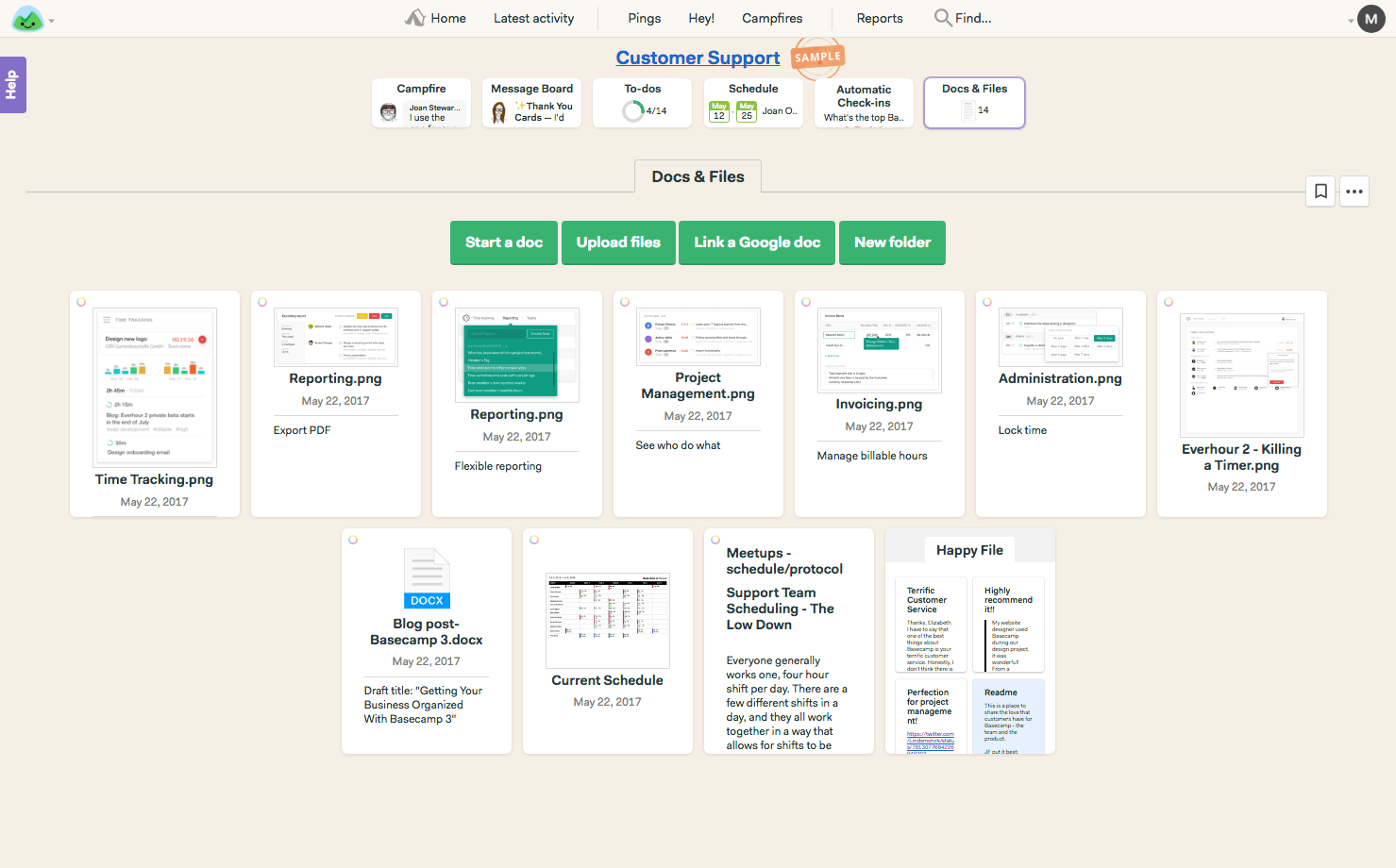
Image source: basecamp.com
Reporting & dashboards
Jira provides detailed agile dashboards, burndown charts, velocity tracking, and workload reports, with Rovo AI now auto-generating insights like risk predictions. Custom JQL queries let admins slice data for executive briefs. It's a goldmine for PMs tracking sprint health across 100+ teams.
Basecamp offers only lightweight, high-level views like progress overviews and hill charts—there are no advanced dashboards or performance insights. The check-in summaries provide quick team mood snapshots, but it's more qualitative than quantitative. Non-technical leads use it for high-level status updates without drowning in metrics.
Automation capabilities
Jira supports strong workflow automation with triggers, transitions, and advanced rule logic, enhanced by no-code AI builders for conditional branching. Automation rules can integrate with CI/CD pipelines for hands-off deployments. Ops teams automate ticket escalations, saving hours weekly.
Basecamp has minimal automation, suitable only for simple reminders and notifications like due-date pings. Recent auto-check-in scheduling adds a smarter touch, but it's far from programmable. It's enough for casual teams who automate via Zapier integrations rather than built-in depth.
User experience & learning curve
Jira has a steep learning curve and works best for technical teams comfortably with structured workflows, though its new onboarding AI tutorials have softened the entry. Customizable dashboards help once mastered, but new users often need 3–5 days of training. It's rewarding for power users in dev environments.
Basecamp is simple, intuitive, and easy for non-technical teams, but lacks depth for advanced project operations. The latest new version UI polish makes it even quicker to onboard in under an hour. No jargon or configs means anyone can contribute immediately. It's the go-to for bootstrapped startups valuing speed over sophistication.
Jira vs Basecamp pricing comparison
Jira pricing plan details
Jira offers a tiered pricing model designed to support teams of all sizes, starting with a free plan for up to 10 users that includes unlimited projects, basic task views, 2GB of storage, and 100 automation runs per month. The Standard plan, priced at $7.91 per user per month, expands automation capacity to 1,700 runs, adds external collaboration, role controls, and 250GB of storage, making it suitable for growing teams. The Premium plan, at $14.54 per user per month, introduces advanced features such as cross-team planning, unlimited storage, admin insights, custom approvals, and 24/7 support. For large organizations with complex workflows, the Enterprise tier offers custom pricing, unlimited automation, multi-site support, data residency, enterprise analytics, and dedicated SLAs.
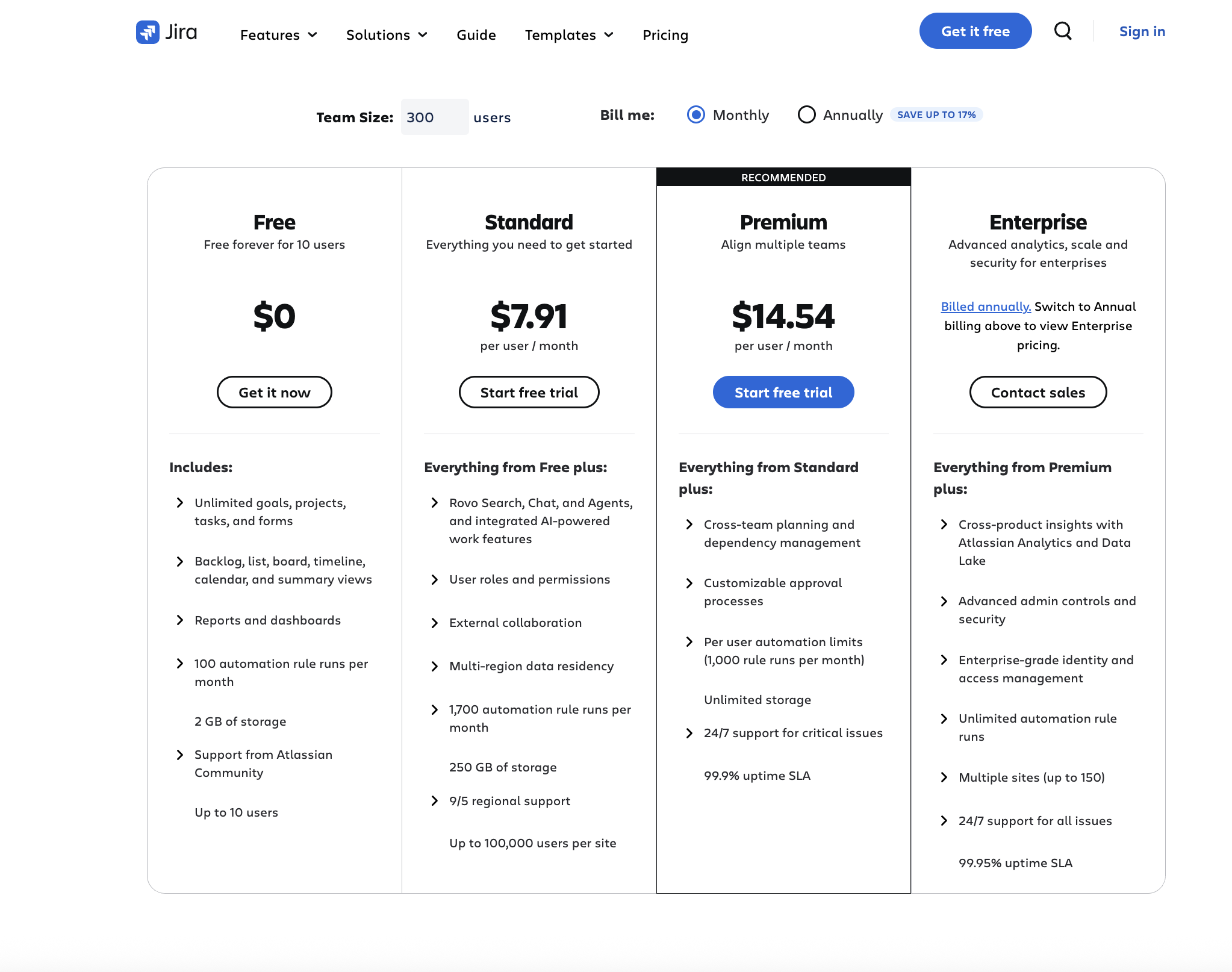
Information source: jira.com
Update time: 2025-11-25
Note: Pricing and plan details reflect publicly available data as of the update date and may vary based on region, billing cycle, and number of agents.
Basecamp pricing plan details
Basecamp offers straightforward pricing with a mix of per-user and flat-rate models. Its free plan lets you run a single project with 1 GB of storage, making it suitable for solo users. Tinycosts approximately $15 per user per month and includes Teams. The Plus plan costs roughly $15 per user per month and includes unlimited projects, 500 GB of storage, and 24/7 support, ideal for small to mid-size teams. For larger organizations, the Pro Unlimited plan starts at $299 per month (flat rate), offering unlimited users and projects, 5 TB of storage, and priority support, making costs predictable even as team size grows. Note: the free tier is minimal, and the Plus tier lacks advanced workflow features compared with more structured tools.
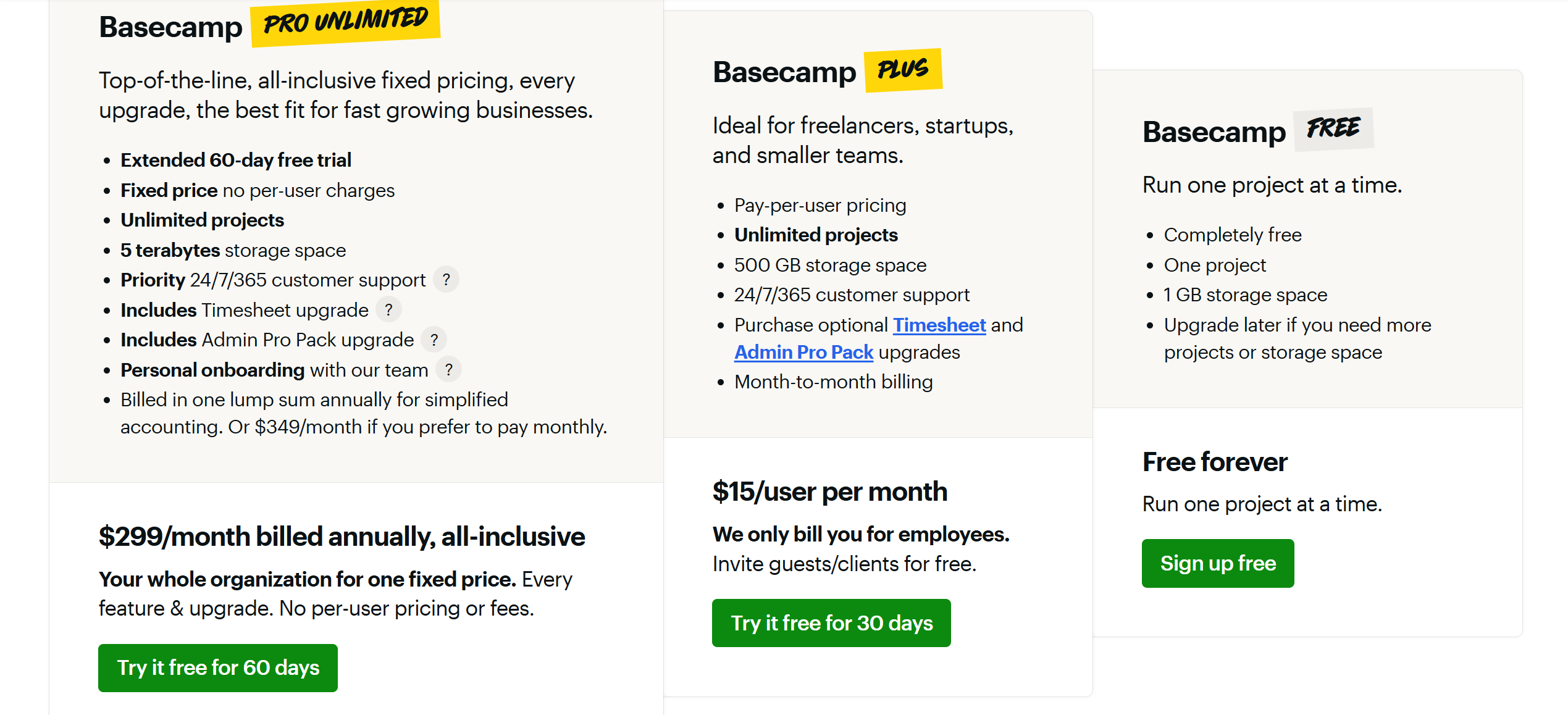
Information source: basecamp.com
Jira vs Basecamp: Which team should choose which tool?
Teams that fit Jira
- Engineering and development teams running sprints
- IT teams tracking incidents and service workflows
- Technical product teams managing epics, bugs, and roadmaps
- Organizations requiring automation-heavy processes
Teams that fit Basecamp
- Small businesses need simple communication
- Creative teams with light task workloads
- Agencies that rely more on discussion than workflow structure
- Teams prioritizing ease of use over process depth
Where both tools struggle
Even though Jira and Basecamp serve different audiences, they share several common limitations:
- Fragmented workflows that force teams to jump between multiple tools
- Weak cross-functional collaboration since communication isn't workflow-connected
- Limited automation (especially in Basecamp)
- Poor documentation experience (especially in Jira without Confluence)
- Not ideal for multi-department operations that require visibility and coordination
These gaps lead many teams to consider a unified tool that connects communication, documentation, tasks, and workflows in one place.
Limitations of both Jira and Basecamp
Even though Jira and Basecamp serve very different types of teams, they share several limitations that become more visible as organizations scale:
- Fragmented workflows: Both tools require multiple external platforms for communication, documentation, or advanced processes.
- Weak collaboration context for multi-team work: Conversations and project updates are scattered, making it difficult for departments to stay aligned.
- Limited automation (Basecamp): Basecamp offers only basic reminders and notification-style actions, restricting workflow efficiency.
- Limited documentation workflow (Jira): Jira depends heavily on Confluence, splitting project data and documentation into separate environments.
- Communication gaps: Jira's issue comments and Basecamp's message boards do not create a cohesive, contextual workspace.
- Not ideal for cross-functional operations: As more teams join, both tools struggle to connect tasks, communication, approvals, and documents into a unified experience.
These shared gaps often lead teams to search for a more unified, scalable system, one that brings communication, documentation, tasks, approvals, and structured workflows together in a single workspace. This is where Lark becomes a practical alternative, offering a connected environment that eliminates tool hopping and supports seamless collaboration across every department.
Meet Lark: All-in-one alternative with smart, collaborative functions
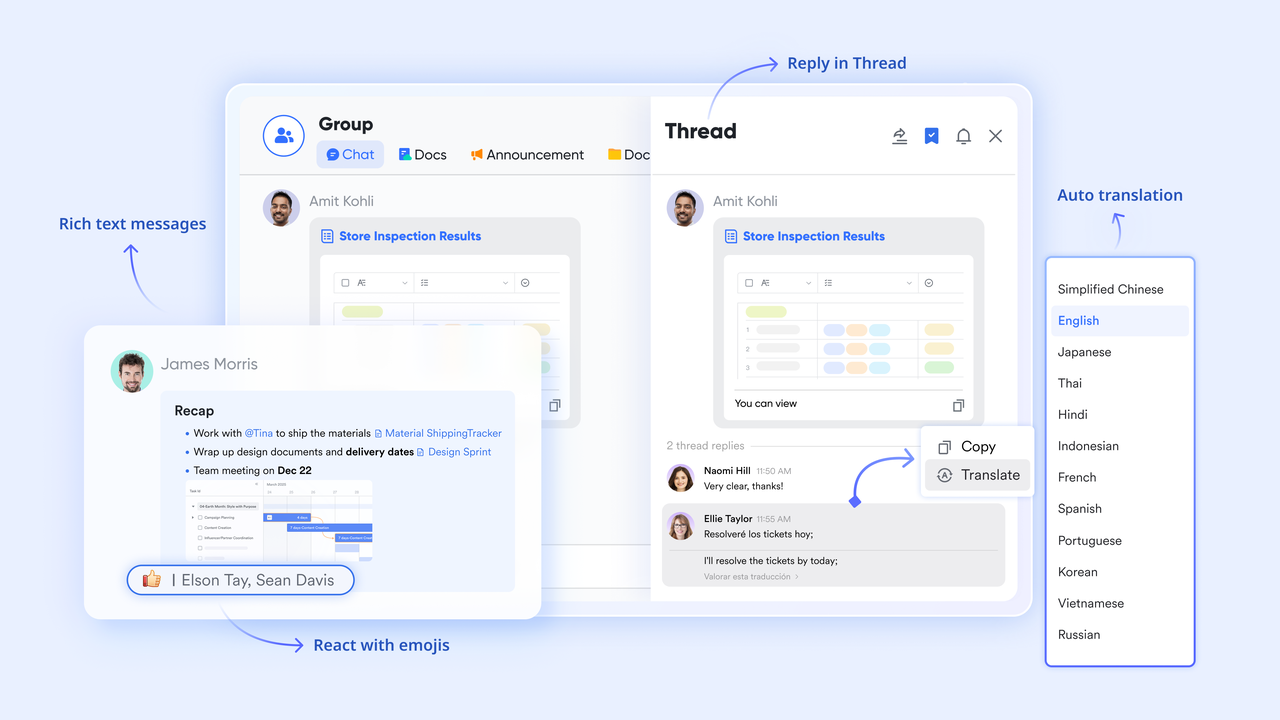
Modern teams need more than task lists or issue tracking; they need a workspace where communication, documentation, scheduling, and project data stay connected without extra tools. Lark brings all of this together in a unified environment that removes the fragmentation found in both Jira and Basecamp. Instead of juggling chats, dashboards, docs, and workflow management across multiple platforms, teams can manage everything from one place. This makes Lark far more scalable, easier to adopt across departments, and better suited for today's cross-functional operations.
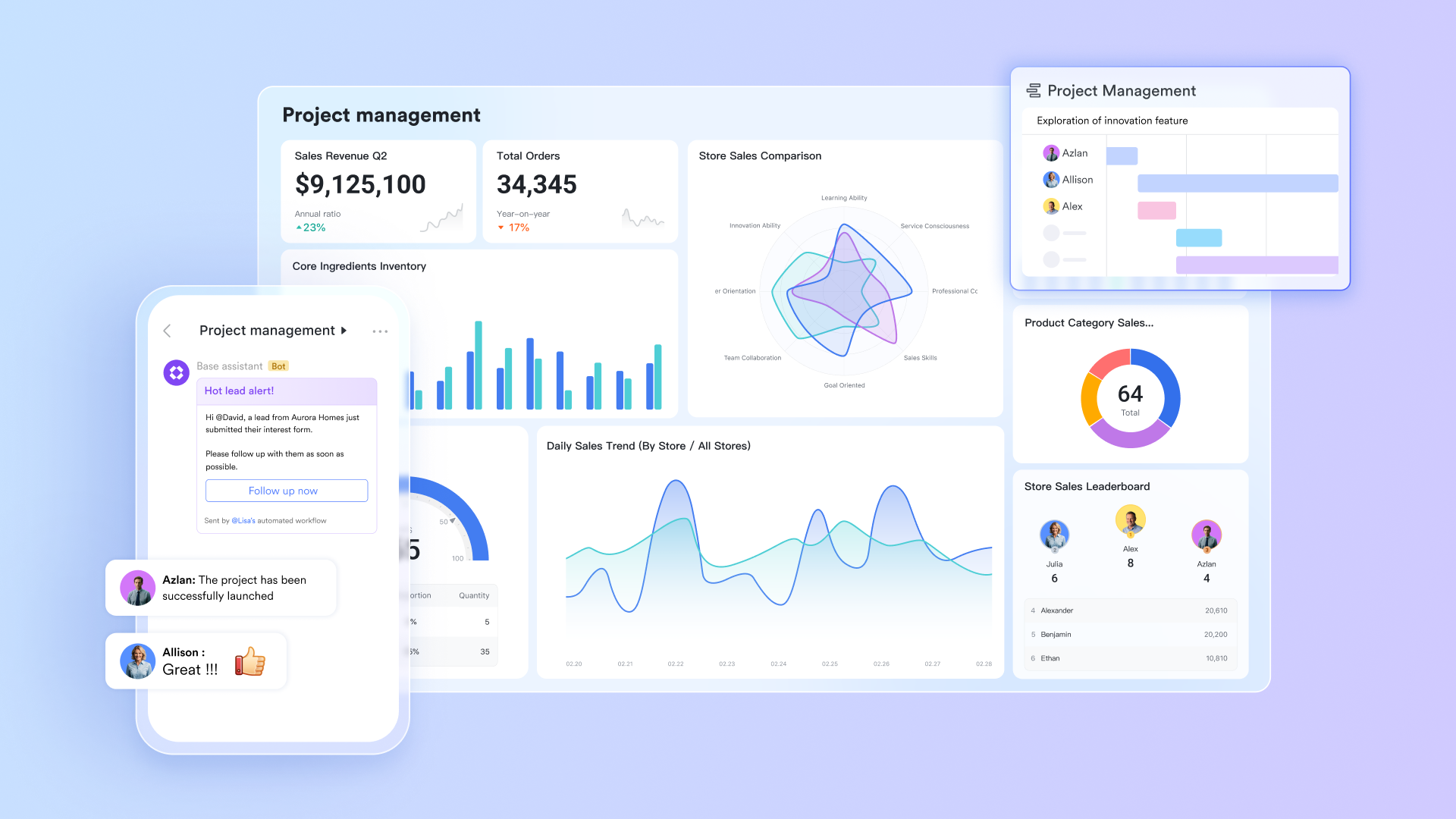
Structured data management console via Lark Base
Lark Base gives teams a structured way to manage project information using records, fields, status flows, and linked data, something neither Jira nor Basecamp handles in a unified, flexible format. Teams can build project databases, track timelines, monitor risks, and organize scope details in one place, all while giving different departments filtered views of the exact source of truth. Built-in dashboards make project snapshots instantly visible without complex setup. While Jira requires technical configuration and Basecamp offers minimal structure, Lark Base provides an adaptable, intuitive environment where operations, engineering, and business teams can collaborate on a single data set without friction.
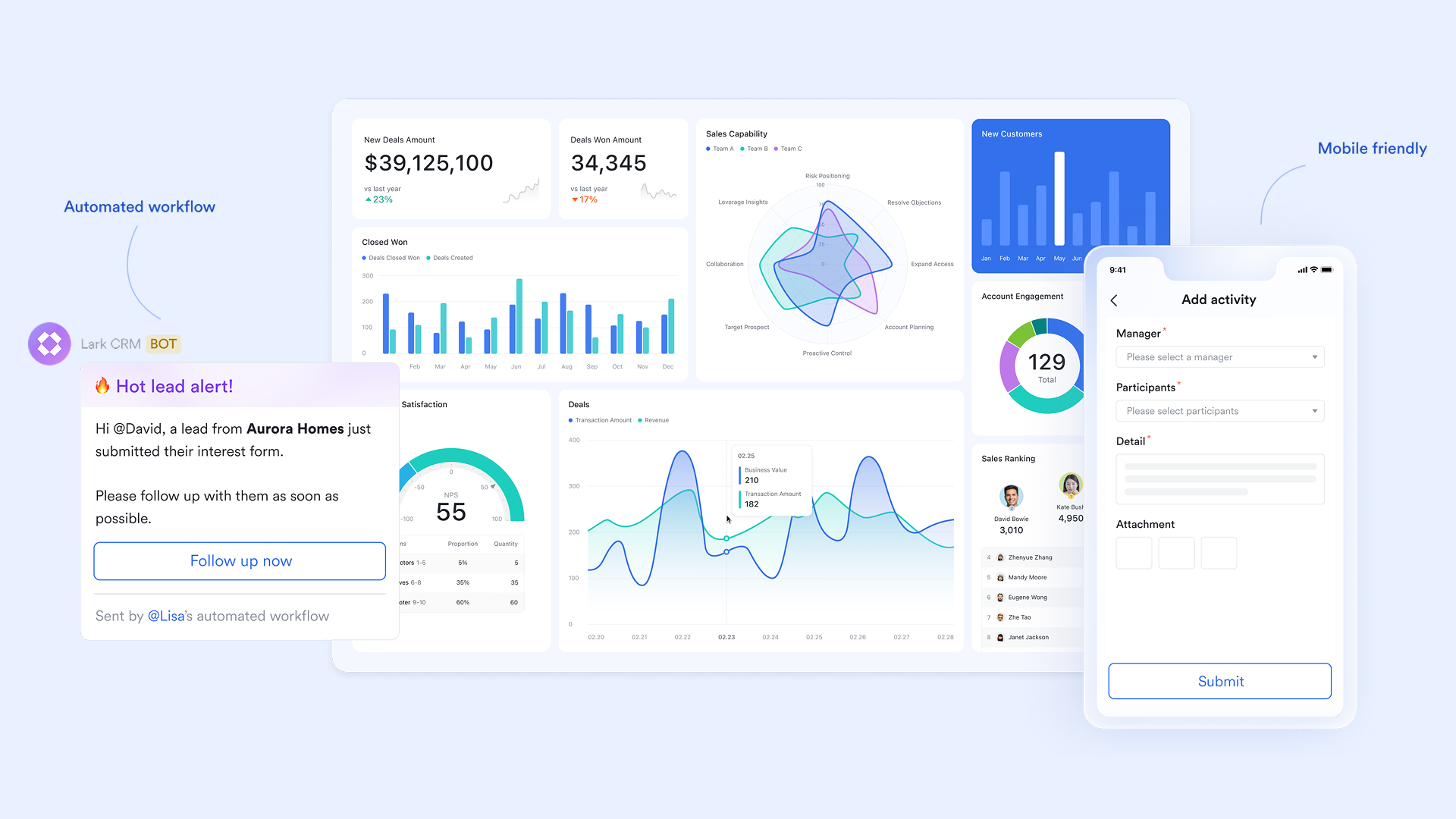
Communication is tied directly to work through Lark Messenger
Lark Messenger keeps conversations fully connected to the specific tasks, project records, documents, or workflows they belong to. Instead of scattered chats like Basecamp's Campfire or indirect comment threads like those in Jira, every discussion in Lark can live beside the relevant project item. This reduces the need to hunt for context and enables teams to make faster decisions, with all supporting details visible in the same space. The result is a communication experience that eliminates channel sprawl, keeps updates organized, and brings clarity that neither Jira nor Basecamp can match.
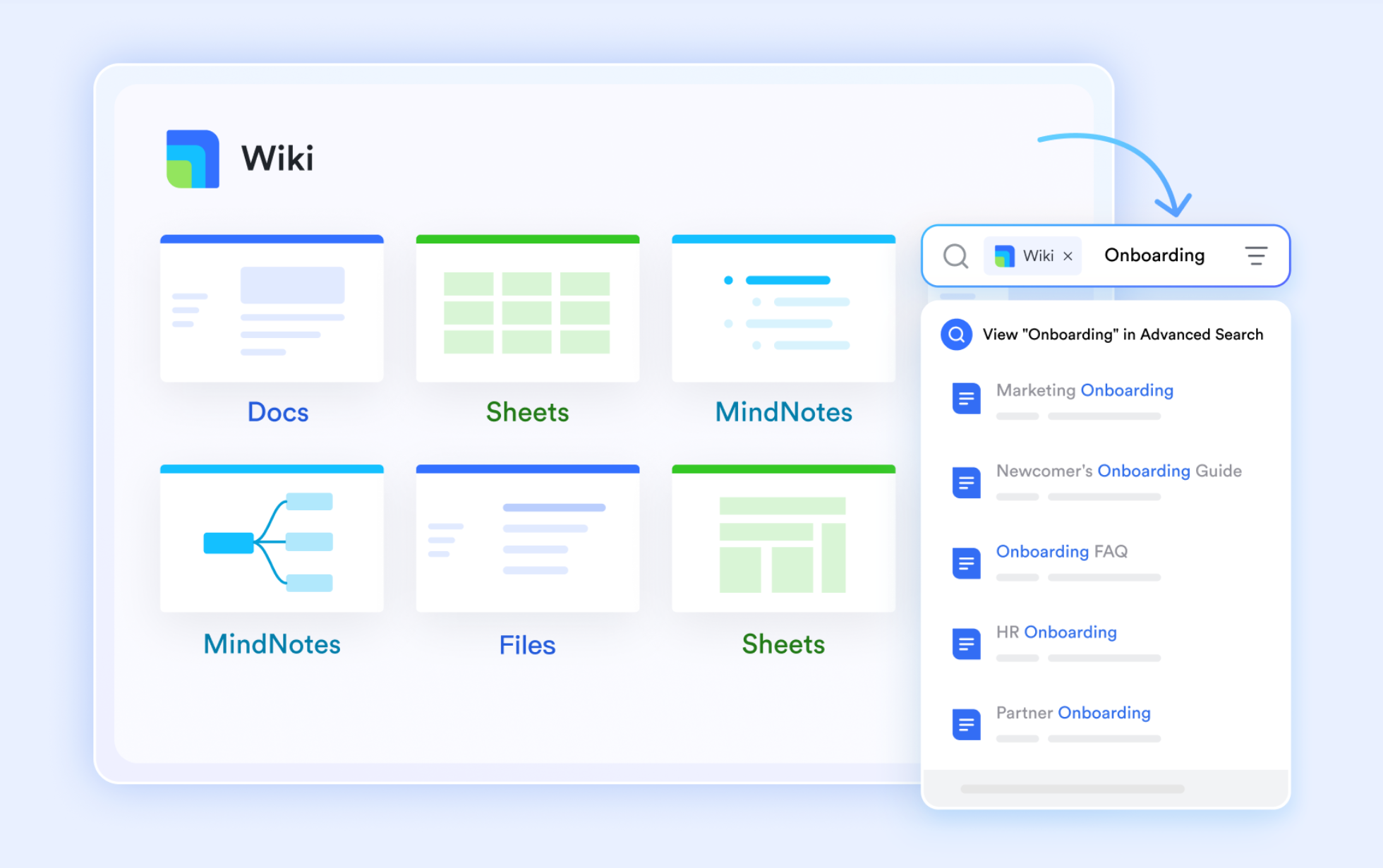
Documentation system with Lark Docs & Wiki
Lark Docs and Lark Wiki allow teams to create, edit, update, and standardize project documentation in real time. Whether it's requirements, design notes, project briefs, meeting summaries, or SOPs, everything stays version-controlled and accessible inside the same workspace. Basecamp's document handling is minimal, offering basic file uploads and simple text pages, while Jira relies on Confluence, forcing teams into separate tools and breaking workflow continuity. Lark keeps documentation closely tied to project data, making change management, collaboration, and cross-team visibility much smoother.
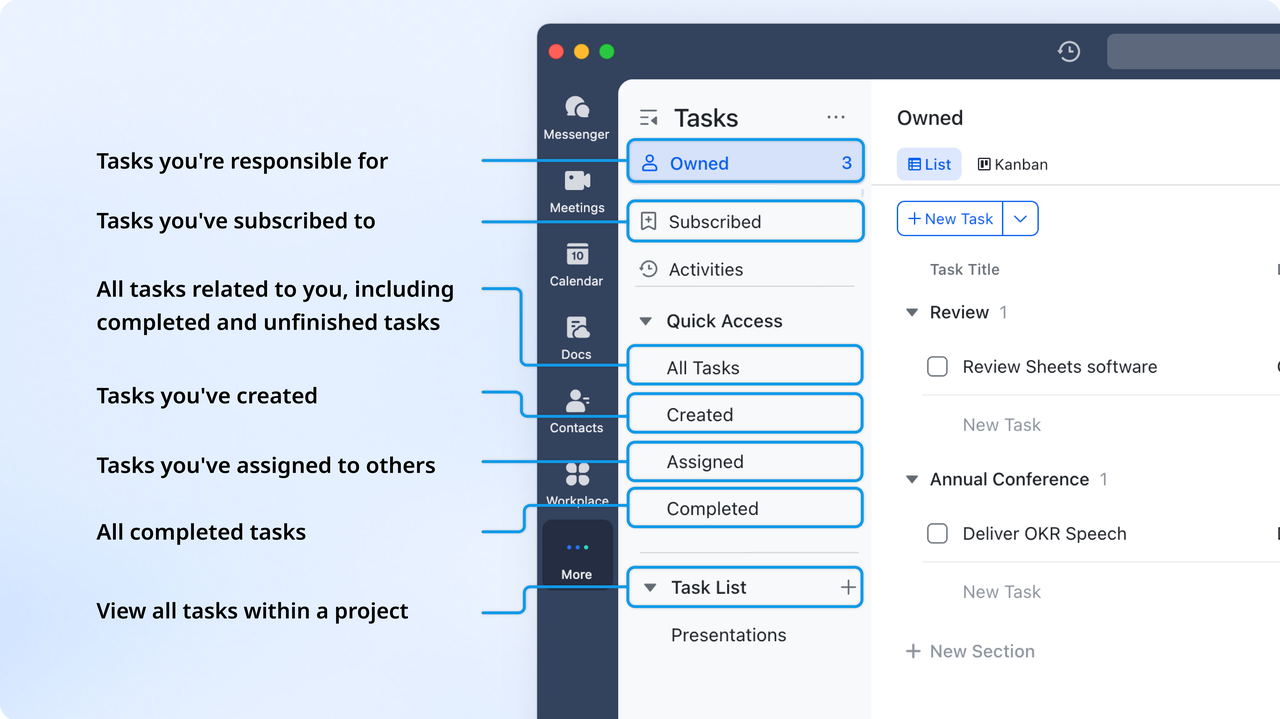
Clear task ownership with Lark Tasks
Lark Tasks helps teams stay organized and on track by assigning clear ownership, setting start and due dates, and prioritizing work with custom fields. Dependencies and progress are easily tracked, with status updates visible in Gantt and Kanban views, giving teams a complete overview of their projects at a glance. However, Basecamp offers only basic to-do lists, without advanced dependencies or structured approval flows, while Jira's complexity can be intimidating for non-technical teams. Lark strikes a balance between power and usability, giving teams a precise execution framework without the overhead of configuring Jira or the limitations of Basecamp.
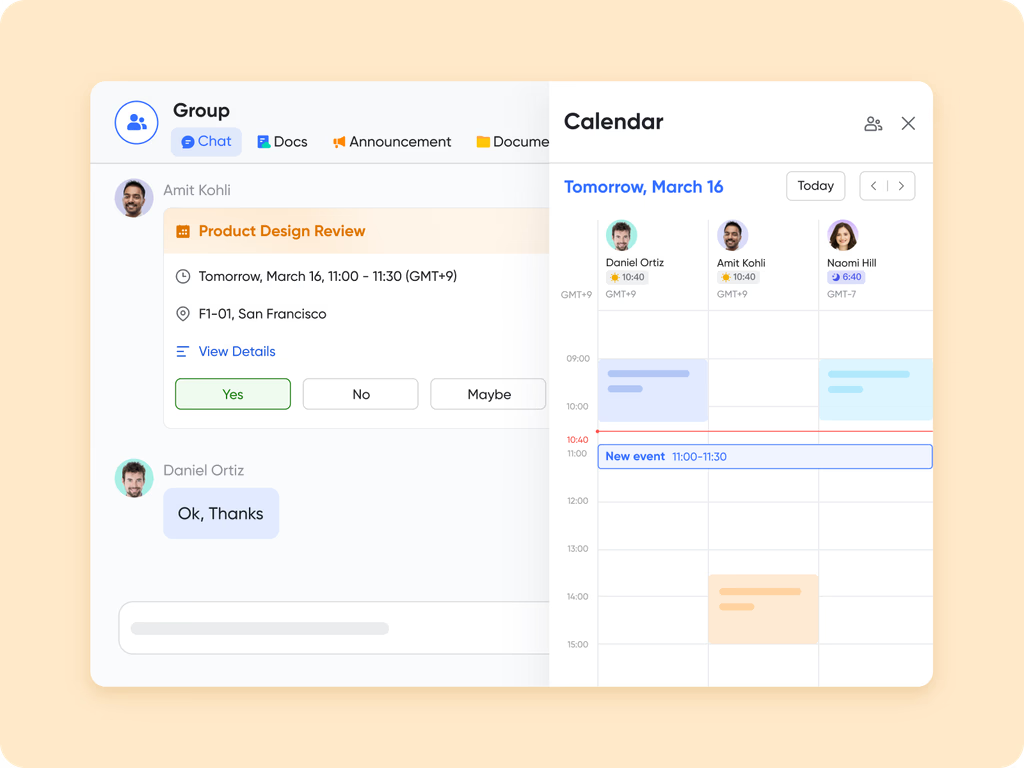
End-to-end coordination with Lark Meetings & Calendar
With Lark Meetings and Lark Calendar, Lark brings meetings, scheduling, summaries, and task alignment into a single coordinated system. Teams can schedule project check-ins, link agendas to Docs, attach tasks, and automatically generate summaries that feed back into the project workflow, something neither Basecamp nor Jira provides natively. Basecamp's scheduling is basic, and Jira relies heavily on third-party plugins to provide context. With Lark, every meeting becomes actionable, and every action stays connected to the broader project timeline, enabling smoother coordination across roles and departments.
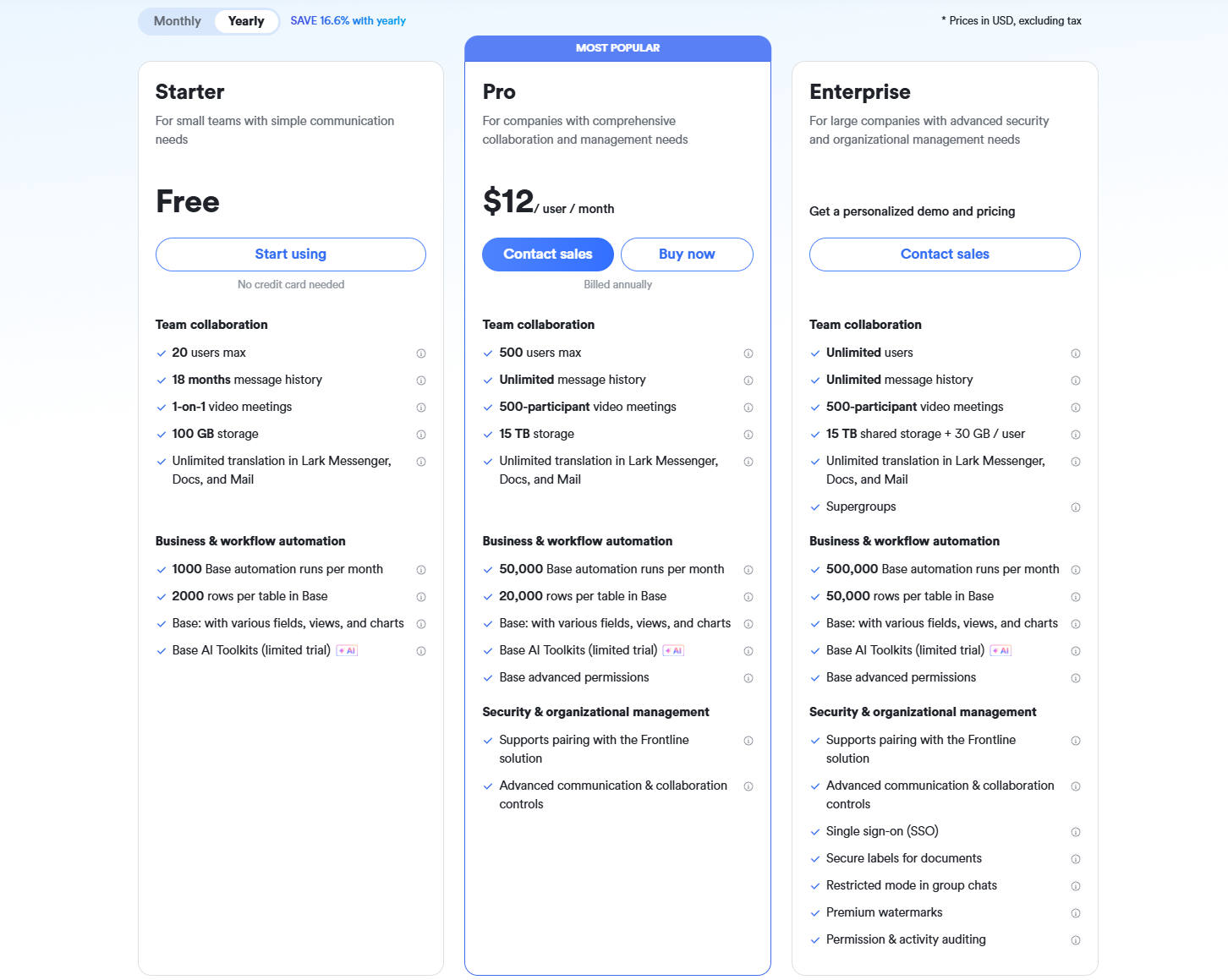
- Starter plan: Free forever plan that includes 11 powerful tools for up to 20 users. It also comes with 100GB of storage, 1000 automation runs, AI translations, and more.
- Basic plan: $6/user/month (billed annually) for up to 500 users. It includes everything in Starter plus group calling for up to 500 attendees, 5TB of storage, 1000 automation runs, and more. For more details, please contact sales.
- Pro plan: $12/user/month (billed annually) for up to 500 users. It includes everything in Basic plus group calling for up to 500 attendees, 15TB of storage, 50,000 automation runs, and more.
- Enterprise plan: Contact sales for custom pricing. Supports unlimited users and includes even more automation runs and advanced security, compliance, and management features.
Final verdict: Jira vs Basecamp vs Lark
When comparing Jira, Basecamp, and Lark, it becomes clear that each tool was built for a different type of team, but only one truly supports modern, cross-functional work at scale.
- Jira excels for technical and software teams, but its complexity makes everyday project work harder for non-technical departments.
- Basecamp offers simplicity but lacks structured project tracking, deep automation, strong documentation, and multi-team coordination.
- Lark, however, brings together everything today's teams need: structured data, documentation, messaging, scheduling, tasks, and approvals, inside a single, unified workspace.
Unlike Jira and Basecamp, where teams must jump between multiple tools or accept missing features, Lark delivers end-to-end clarity across planning, execution, communication, and review. Its built-in workflows, real-time collaboration, and integrated project data make it especially powerful for growing teams, multi-department operations, and organizations wanting a seamless digital workspace. In short, if you wish for a unified environment that replaces scattered tools, reduces complexity, and keeps every team aligned, Lark is the clear winner.
Conclusion
Choosing between Jira and Basecamp depends on your team's workflow. Jira suits structured engineering processes, while Basecamp focuses on simple collaboration. Both tools work well in their own spaces but struggle with fragmented communication, limited documentation, and weak cross-team alignment. These gaps become more visible as teams grow and need more connected workflows. That's why many organizations look beyond this Jira vs Basecamp comparison and choose a more unified platform. Lark brings messaging, tasks, docs, scheduling, and workflow logic together, creating a seamless workspace that keeps every team aligned without switching tools.
FAQs
Which tool handles agile workflows better in the Jira vs Basecamp comparison?
Jira is significantly better for agile teams because it provides sprints, backlogs, velocity tracking, and dev-ready workflows. Basecamp doesn't support structured agile execution and lacks sprint functionality entirely. If engineering-style workflows are a priority, Jira is the stronger choice.
Does Basecamp support sprint planning like Jira?
No, Basecamp is not designed for agile methodologies and does not include sprint boards, capacity tools, or burndown charts. It's focused on communication and simple task lists rather than structured delivery cycles. Teams needing formal sprint planning will quickly outgrow Basecamp.
Can teams use Jira and Basecamp together for hybrid workflows?
Yes, but it often introduces fragmentation because communication happens in Basecamp while execution lives in Jira. This separation can lead to duplicated updates, lost context, and slower decision-making. Most teams eventually seek a single platform that connects both collaboration and execution.
What's the learning curve difference between Jira and Basecamp for new teams?
Basecamp is easy for beginners thanks to its straightforward layout and minimal setup. Jira has a much steeper learning curve due to workflows, statuses, roles, and agile structures. Non-technical teams may struggle with Jira's complexity unless they invest time in onboarding.
Is there a better tool than both Jira and Basecamp for cross-functional teams?
Yes, tools like Lark offer a more unified experience by combining tasks, messaging, docs, meetings, approvals, and workflow logic into a single workspace. This eliminates the fragmentation in Jira and the limitations of Basecamp's simplicity, making Lark ideal for multi-department coordination.
Related reading
Table of contents
Start using Lark today

Manage all your work in one place
Boost team efficiency by 10x
Save up to 70% on software costs
Table of contents
Start using Lark today
Manage all your work in one place
Boost team efficiency by 10x
Save up to 70% on software costs
Keep reading



Lark recognized in 2023 Gartner® Collaborative Content Workspaces and Meeting Solutions reports
Lark, the global superapp for productivity, is delighted to announce it receives recognition in the Gartner's 2023 Innovation Insight for Collaborative Content Workspaces and Market Guide for Meeting Solutions.





2026 Lark Technologies Pte. Ltd.
Headquartered in Singapore with offices worldwide.






Explore: