Most teams measure more than they manage. They track activity—tasks completed, meetings attended, reports submitted—and mistakenly call it performance management. A KPI template changes that dynamic. By forcing every team to agree on precise metrics, clear targets, and designated owners before the quarter starts, it transforms random data points into an actionable roadmap.
To help you build a tracking system that actually drives results, this guide breaks down the difference between static reports and dynamic dashboards, the core elements you can't ignore, and the best ready-to-use templates for your team. Let's dive in.
KPI templates vs. regular performance reports
A KPI template is a recurring, structured tracking framework designed for ongoing monitoring. A regular performance report—say, a Q4 2025 PowerPoint—is a one-time snapshot built for communication, not continuity. The difference matters more than it sounds.
KPI templates help drive your , which is exactly what ad hoc decks fail to do. They ensure consistency in tracking performance metrics over 6–12 months, enabling trend analysis instead of isolated snapshots. Using a KPI template can save time in data collection and reporting because pre-defined metrics and calculations eliminate rework each cycle.
Core elements every KPI template should include
Regardless of department—finance, operations, HR, or marketing—effective KPI templates share the same backbone. Here are the essential fields for a modern key performance indicator :
- KPI name: Identifies the metric being measured (e.g., "Customer Acquisition Cost").
- Strategic objective link: Ties the KPI to a specific business goal or OKR.
- Definition: Plain-language explanation of what is measured and how. Write definitions precisely so any new team member can understand the metric without a walkthrough (e.g., "active user" should specify "a user who logged into the product in the past 30 days, excluding bot accounts").
- Formula: Mathematical calculation (e.g., CAC = total sales & marketing spend ÷ new customers acquired).
- Baseline & Target values: The starting point from a prior period, and what success looks like.
- Current value: Latest actual number.
- Owner: Person or team accountable for accuracy and action.
- Data source: System or tool providing the data.
- Update frequency: How often the metric is refreshed (daily, weekly, monthly).
- RAG status: Red / Amber / Green visual signal for quick health checks.
- Last updated date: Timestamp for the most recent refresh.
The shift from static spreadsheets to dynamic tracking
While knowing what to track is half the battle, how you track it makes all the difference. Historically, many teams rely on traditional tools to build their tracking frameworks. A standard or Google Sheets tracker is accessible but inherently static. It relies heavily on manual data entry, is prone to formula breakages, and easily leads to multiple conflicting versions floating through email threads. Static PDF or PowerPoint reports face similar issues, turning monthly reviews into a manual compilation nightmare. To bring those core KPI elements to life without the busywork, you need an automated, centralized system. This is where a dynamic in Lark changes the game. It flawlessly accommodates all the essential fields mentioned above while solving the fundamental issues of static files.
But don't just take our word for it—see what our customers have to say.

"Lark has not only transformed our internal collaboration but also revolutionized the way internal teams support our colleagues. We heavily rely on Suite, OKR, Helpdesk, and AnyCross across all departments. Lark's integrated platform goes beyond just ensuring that apps work together; it ensures that everyone is aligned and on the same page."

Kevin Ng
Chief Digital Officer
A well-structured KPI template minimizes confusion by establishing clear accountability and automated data flows, allowing your team to spend time improving the metrics rather than just reporting them.
Ready to see how this translates into practice? Let's dive into some practical examples you can start using today.
10 Ready-to-use Lark KPI templates
To help you bridge the gap between static reporting and proactive control, we've listed out 10 versatile templates. These ready-to-use resources are designed to standardize your metrics, automate your review cycles, and ensure that every indicator:
KPI evaluation management template
The KPI Evaluation Management Template is a structured tool designed to help you track, manage, and assess your key performance indicators effectively. It allows you to organize evaluation items, capture important details, and define specific evaluation periods.
KPI-performance review system template
Performance reviews are an essential part of any organization's HR strategy, helping assess employee performance, identify improvement areas, and set future goals. This KPI Performance Review System template simplifies the entire process, making it easier for both managers and employees to track progress and understand key metrics.
Financial performance tracker template
Financial KPIs play a key role in helping businesses measure and assess their financial performance. This template offers a clear framework for setting up, tracking, and analyzing financial KPIs effectively. It guides you from identifying important financial metrics to using insights for better decision-making.
OKR task management template
The OKR Task Management template is designed to help you efficiently manage and track your Objectives and Key Results (OKRs) tasks. With this template, you can easily collect and organize user feedback, formulate feature updates, assess needs, divide tasks, push feature development, patch known bugs, and more. It allows you to set start and end dates for each task, assign task leaders, and monitor progress.
Personal OKR execution and review template
The Personal OKR Execution and Review template is a practical tool that helps you set, track, and evaluate your personal objectives and key results (OKRs). It offers a clear structure to capture goals, prioritize tasks, and monitor progress over time.
Project tracking template
A project tracking template is a tool used to monitor the progress of a project and ensure that tasks, , and resources are aligned with project goals. It provides a structured framework for keeping track of key project components, such as tasks, deadlines, milestones, and budgets. There are various types of project tracking templates, each designed for specific project management needs:
Executive project status report template
Keeping track of multiple projects can be a daunting task. Each project has its own unique set of variables - from the project stage, budget, scope, lead, progress, goals, risks, improvement areas, to the timeline and last updated date. This is where our Executive Project Status Report Template comes in handy. With Lark's state-of-the-art features, you can track all these variables in one place, providing a comprehensive overview of all your projects.
Task management template
This task management template is designed to help you keep track of all your tasks in one place. It includes a task list, a status Kanban board, a progress Gantt chart, and a task calendar. The template allows you to add records, configure fields, filter tasks, group tasks, and sort tasks. It also includes a color-coding feature for easy visual reference. The template includes fields for task name, priority, test functionality, assess usability, gather feedback, status, and progress.
Scorecard template
Keeping track of participant performance, setting targets, and evaluating achievements can be a daunting task. That's why we've created this scorecard template. With Lark's advanced features, you can easily input participant names, set target scores, record achieved scores, calculate the percentage of target achieved, and even add comments or observations. You can also plan the next steps for improvement, all in one place.
Performance evaluation template
Performance evaluations are a critical part of any organization's HR strategy. They provide a structured way to assess an employee's performance, identify areas of improvement, and set goals for the future. However, managing these evaluations can be a complex task, especially for larger organizations. That's where our Performance Evaluation Template comes in. With this template, you can easily track and manage performance evaluations for all your employees.
Sync your strategy: Live KPI monitoring and performance on Lark
A static KPI template can only go so far in tracking performance. transforms it into a dynamic, real-time system where data, updates, and team collaboration come together in one place. Instead of manual tracking, teams get automated updates, shared dashboards, and instant visibility into performance. KPIs are no longer just numbers on a sheet but active indicators that drive decisions and actions. With built-in communication and features, Lark helps teams respond faster, stay aligned, and continuously improve performance without switching between multiple tools.
A KPI register where every result is updated in real time
stores the KPI register as a structured database with custom field types: number fields for target value, baseline, and current result; formula fields that auto-calculate percentage of target achieved and single-select fields for status (Red / Amber / Green) and measurement frequency. When a KPI owner updates the current result field, the formula field recalculates the percentage of target achieved, the status field updates, and the change is timestamped without anyone manually reformatting a conditional formatting rule. 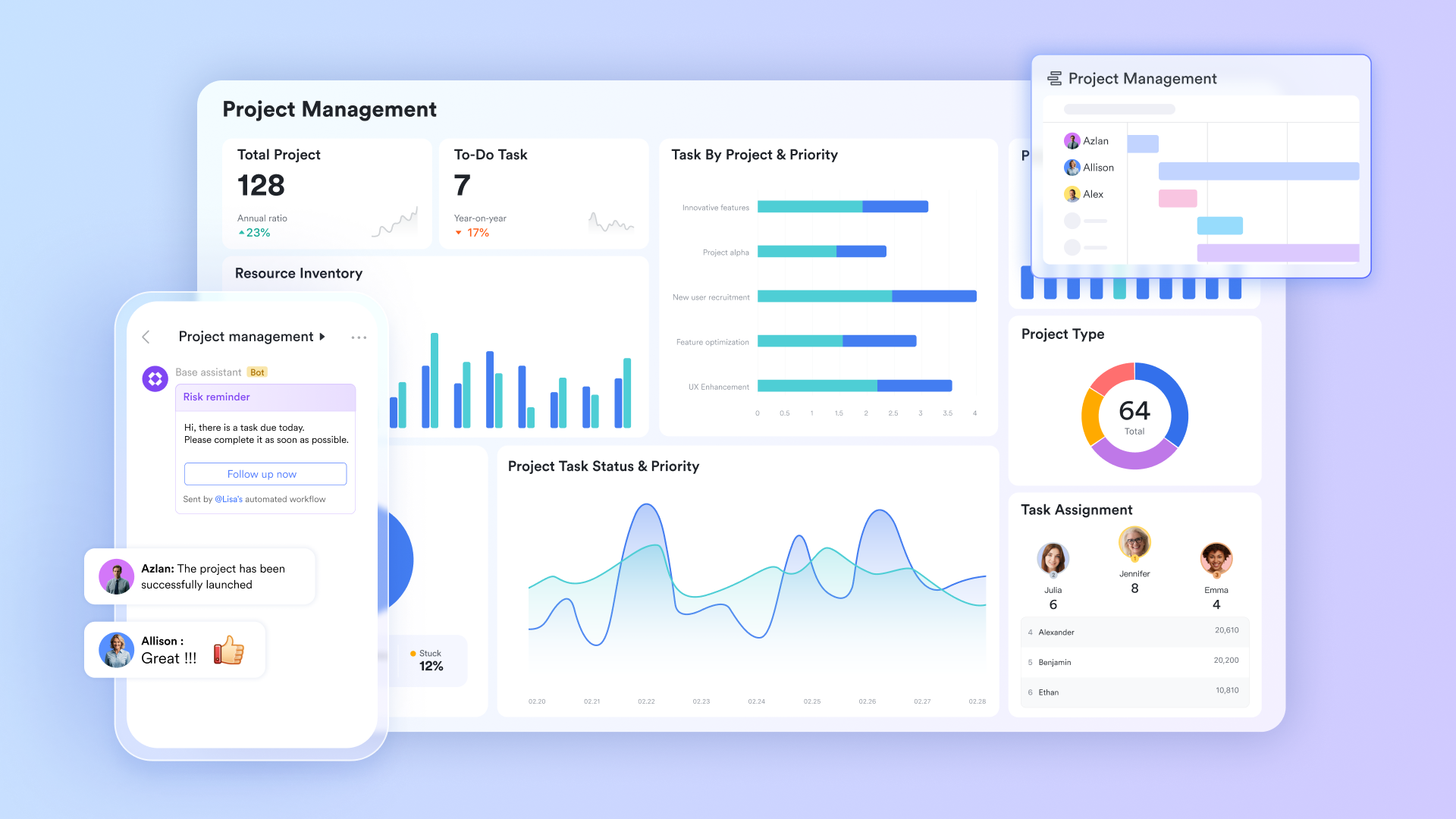
A live KPI dashboard that needs no manual compilation
Lark Base Dashboard View generates live charts directly from the KPI register fields—no separate dashboard tab to maintain, no pivot table to refresh, no COUNTIF formula to update. A status distribution chart shows the count of Red, Amber, and Green KPIs across the full team or company. A target achievement chart plots each KPI's percentage of target, sorted from lowest to highest, so the team can immediately see which indicators need the most attention. A trend chart shows week-over-week or month-over-month movement for each KPI. 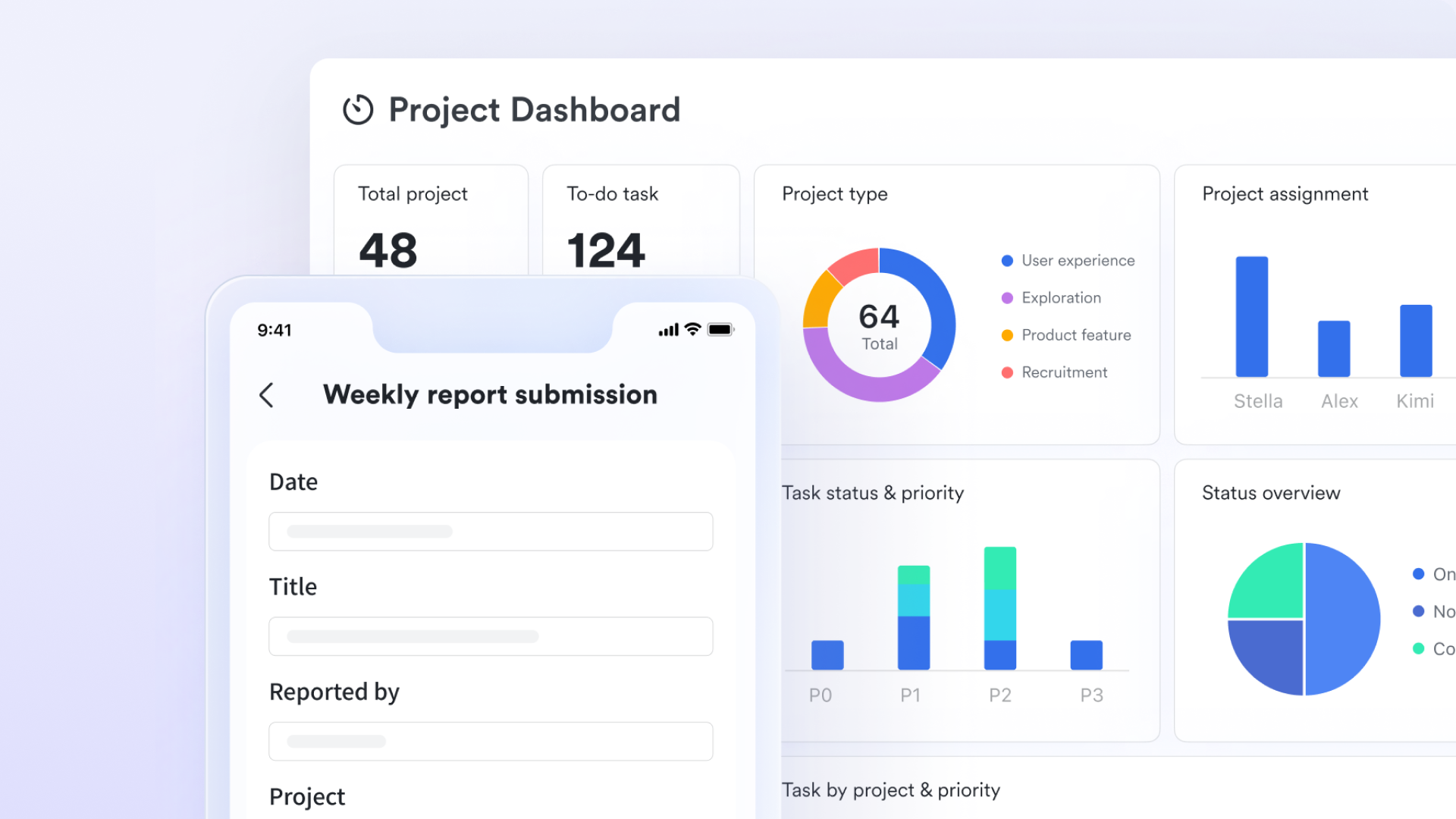
Red KPI alerts that reach the owner and their manager immediately
Lark Base Automation lets performance managers configure trigger-action rules that replace the manual monitoring process entirely. When a KPI's status field changes to red, the automation sends a notification to the KPI owner in with the KPI name, current result, target, variance, and a direct link to the record. When the same KPI has been red for two consecutive review periods without a status change to Amber or Green, the automation sends an escalation notification to the KPI owner's manager. 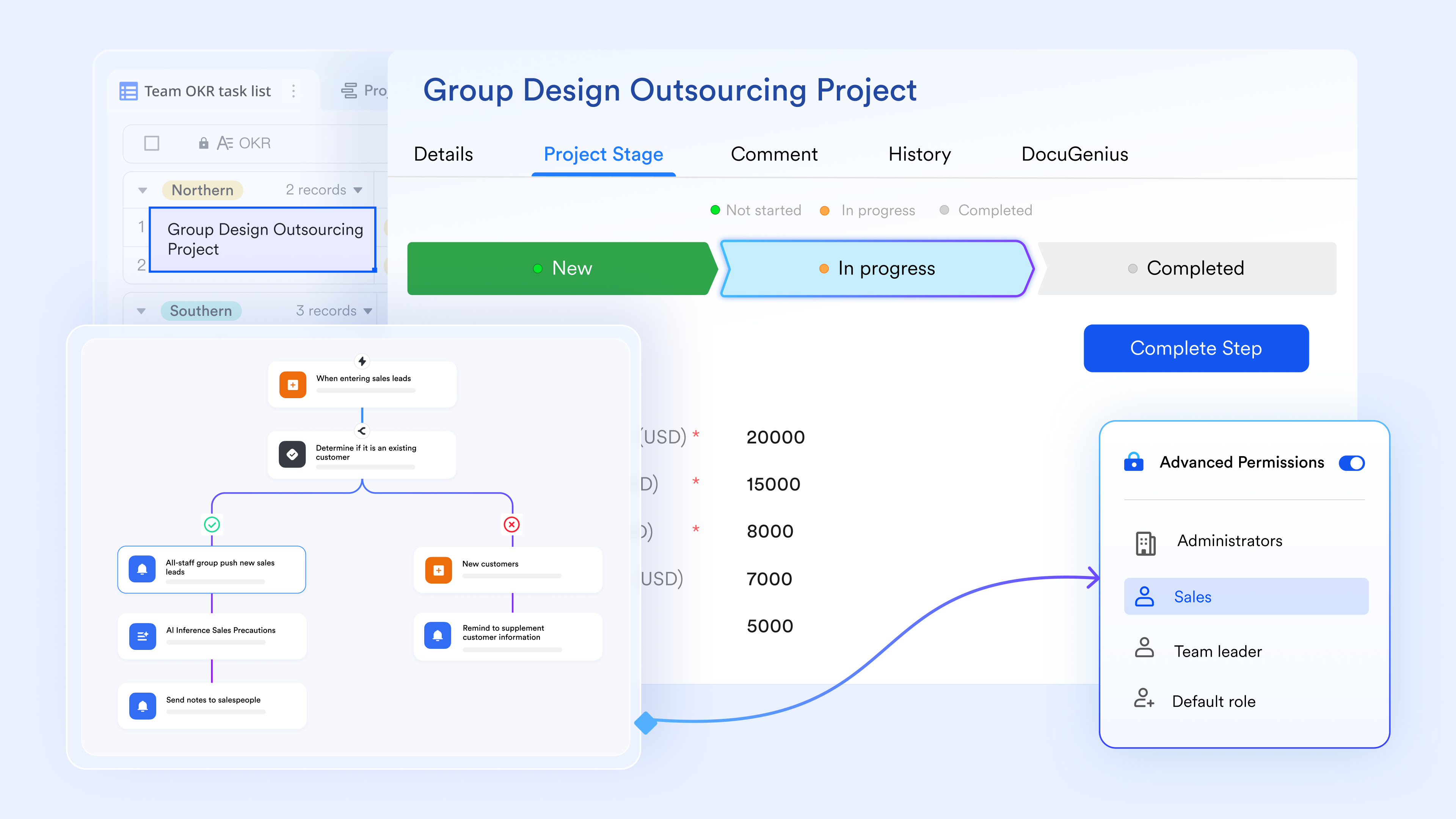
KPI updates connected to the action they require
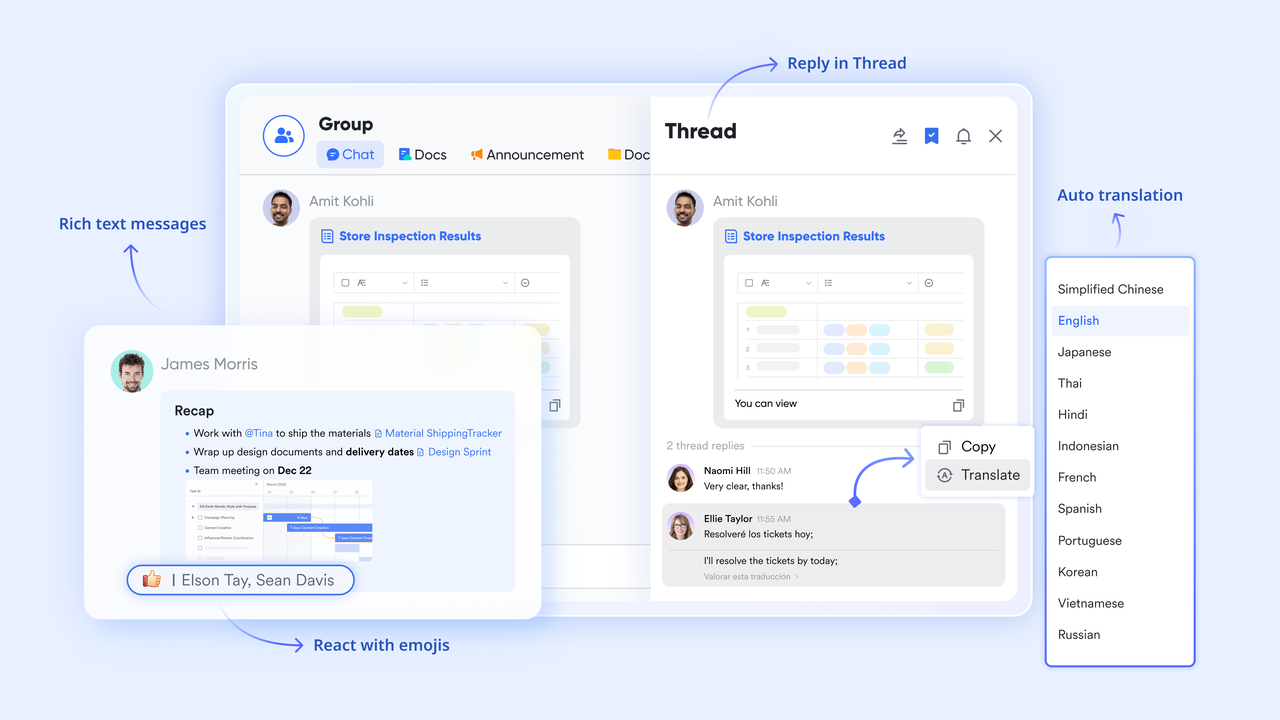
supports dedicated KPI review group chats, direct messages, and topic threads within the same platform where the KPI register lives. When Lark Base Automation fires a red KPI alert, it arrives in Lark Messenger as a structured notification with the KPI record embedded as a card, showing current result, target, owner, and last review date. The thread is stored linked to the specific KPI record it references. When leadership reviews the and needs context on a red indicator, the discussion history and agreed actions are accessible from the record without searching through a general chat history.
KPI definitions and review notes are linked directly to each record
supports real-time collaborative editing with inline comments, version history, and structured content blocks. Performance managers write KPI definitions, target rationale, data collection methodology, and quarterly review notes in Lark Docs, then link each document to the relevant KPI record in Lark Base. When a new team member joins and needs to understand what a KPI measures and why the target was set at that level, the linked Lark Docs is accessible from the KPI record, not in a separate onboarding folder that may not be current. 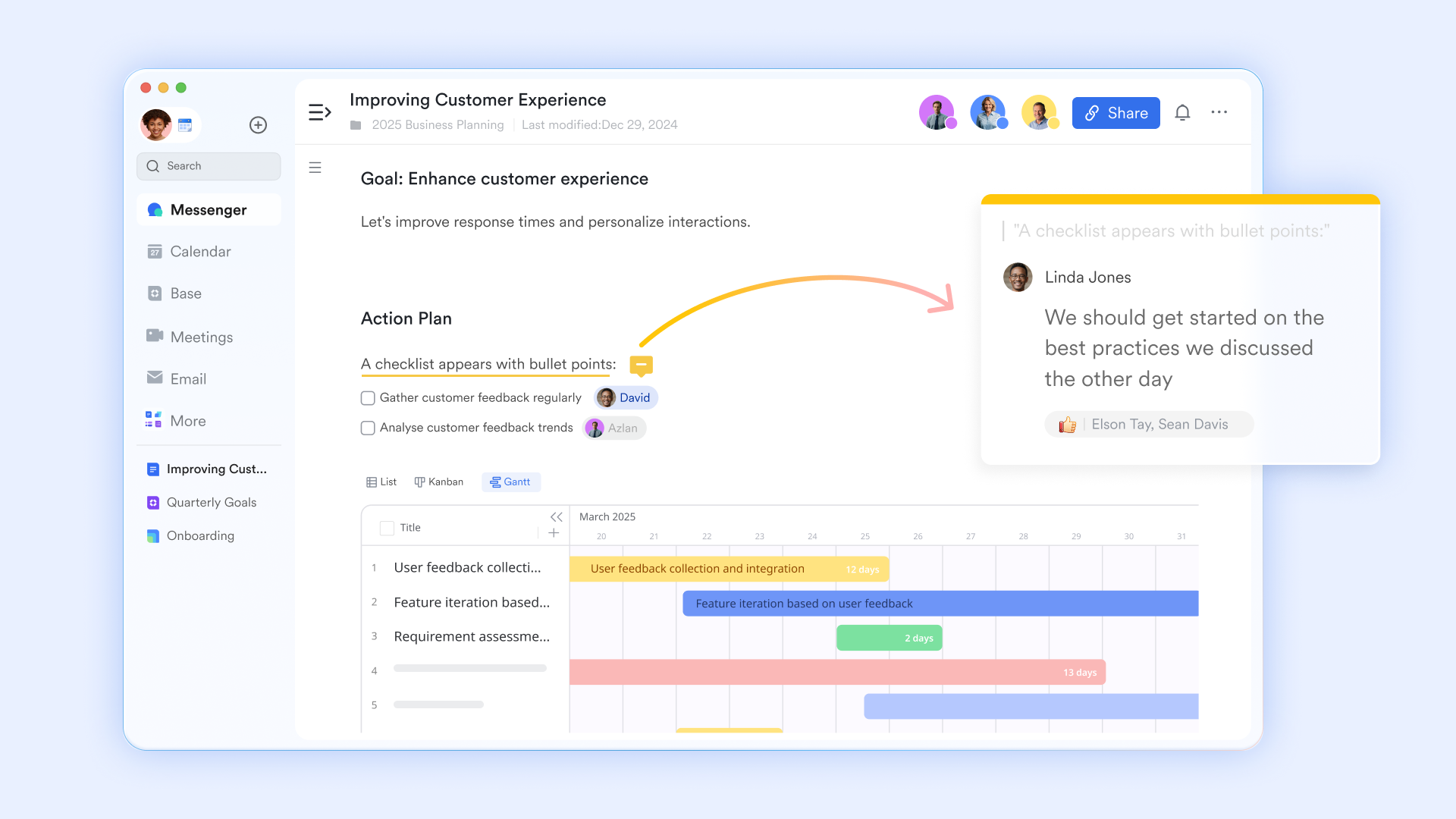
- Starter plan: Free forever plan with 11 powerful tools for up to 20 users, 100GB storage, 1,000 automation runs, AI translations, and more. No credit card needed.
- Basic plan: $6/user/month (billed annually) for up to 500 users. Includes everything in Starter plus unlimited message history, 5TB storage, 1,000 automation runs, and more. Some users may need to to purchase.
- Pro plan: $12/user/month (billed annually) for up to 500 users. Includes everything in Basic plus group calling for up to 500 attendees, 15TB storage, 50,000 automation runs, and more.
- Enterprise plan: for custom pricing. Supports unlimited users and includes advanced automation, security, compliance, and management features.
For small teams with simple communication needs

18 months message history
1000 Base automation runs/month
2000 rows per table in Base
Most POPULAR
For companies with comprehensive collaboration and management needs
Unlimited message history
500-participant video meetings
50k Base automation runs/month
20k rows per table in Base
For large companies with advanced security and organizational management needs
Get a personalized demo and pricing
Unlimited message history
500-participant video meetings
15 TB storage + 30 GB storage/user
500k Base automation runs/month
50k Base automation runs/month
Most POPULAR
For companies with comprehensive collaboration and management needs
Unlimited message history
500-participant video meetings
50k Base automation runs/month
20k rows per table in Base
Best practices for choosing KPIs
Choosing the right KPIs is essential for measuring what truly matters. The focus should be on clear, relevant metrics that align with business goals and drive meaningful outcomes.
- Start with the goal, not the metric: Every KPI must trace back to a specific business objective. Before selecting any indicator, write down the goal it is meant to measure progress toward. If the connection between the metric and the goal requires more than one sentence to explain, the metric is probably measuring activity rather than outcome.
- Limit to five to seven KPIs per team: More indicators create the illusion of rigor without producing more accountability. When a team tracks 15 KPIs, attention is distributed so thinly that no single number gets the focused review it needs. Five to seven forces the team to prioritize what actually matters. If every metric on a list feels essential, the goal itself is probably too broad. Narrow the goal first, then narrow the KPI set.
- Separate leading from lagging indicators: A lagging indicator measures what has already happened. Revenue closed, customer churn rate, and net promoter score are all lagging. A leading indicator measures what is likely to happen. coverage ratio, trial-to-paid conversion rate, and number of qualified discovery calls are leading. A KPI set with only lagging indicators gives the team no warning before a miss occurs.
- Confirm the data source before finalizing the KPI: A KPI without a confirmed, reliable data source is not a KPI. It is a number someone will argue about in every review meeting. Before adding any indicator to the template, confirm: where this number comes from, who pulls it, how often it is updated, and whether it is consistent with how other teams measure the same thing.
- Assign one owner per KPI, not a team: Shared ownership of a KPI produces shared avoidance of accountability. When a KPI is red, and the owner is listed as "Marketing Team" or uses option, no single person feels responsible for explaining the mistake or committing to a corrective action. Every KPI in the template must have one named individual responsible for updating the number, presenting it in review meetings, and owning the action plan when performance falls below target.
Conclusion
In a nutshell, a KPI template is effective when treated as a live commitment rather than a periodic report. Normally, high-performing teams succeed by maintaining a fixed review cadence, assigning a single named owner to every metric, and immediately linking "red" statuses to corrective actions.
However, transforms these templates into a dynamic system by integrating automated alerts and real-time syncing. This eliminates the "ceiling" of stale data and buried chat messages, allowing teams to move from reactive reporting to proactive, data-driven control.
Manage and track performance more efficiently with Lark
FAQs
What are the 4 pillars of KPI?
The four key pillars of KPIs are clarity, measurability, relevance, and actionability. A good KPI should be clearly defined, easy to measure, aligned with business goals, and useful for decision-making.
What is the difference between a KPI and a metric?
A metric tracks general performance data, while a KPI is a specific metric tied directly to a business goal. In simple terms, all KPIs are metrics, but not all metrics are KPIs.
How many KPIs should a team track?
Teams should focus on a limited number of KPIs, typically 5 to 10, to avoid overload and maintain focus on what truly impacts performance.
What is the best free KPI template for Excel?
The best option depends on your needs, but many kpi templates are freely available online and include features like dashboards, status tracking, and automated calculations. Choosing a template that is simple, customizable, and easy to update will help you track performance more effectively.
Related reading





























