Managing leads requires more than simple contact lists. The best lead tracking software enables teams to capture inquiries across channels, automate follow-ups, assign ownership, analyze conversion data, and close deals faster. This guide reviews leading sales lead tracking software, including free tools, specialized platforms for small businesses and real estate agents, and omnichannel systems designed to support marketing attribution and AI-assisted qualification.
Key takeaways: Best lead tracking software
1. Lark: Best unified lead tracking CRM and workflow platform
2. HubSpot CRM: Best inbound marketing lead tracker
3. Zoho CRM: Best multi-channel lead tracking software
4. Pipedrive: Best visual pipeline sales CRM
5. Freshsales: Best AI-powered lead scoring CRM
6. Salesforce: Best enterprise lead tracking system
7. Agile CRM: Best affordable lead tracking solution
8. Copper CRM: Best Google Workspace CRM
9. Close: Best sales dialer CRM
10. Bitrix24: Best all-in-one sales workspace
Start managing and converting leads efficiently
Top lead tracking software at a glance
In this guide, we will introduce 10 lead tracking software solutions available on the market, but we are highlighting a select few that stand out for their tracking capabilities:
Information source: Official vendor sites
Update time: 2025-12-01
Note: Pricing and plan details reflect publicly available data as of the update date and may vary based on region, billing cycle, and number of agents.
What is lead tracking software?
software is a digital system that helps businesses capture, organize, monitor, and manage potential customers (leads) throughout the sales process—from initial inquiry to final conversion.
It collects leads from channels such as websites, forms, emails, calls, social media, and chats, then stores them in a centralized database where sales teams can assign ownership, schedule follow-ups, record interactions, score lead quality, and track progress through . With built-in automation and reporting tools, lead tracking software ensures no lead is missed, follow-ups happen on time, and sales performance can be measured accurately to improve conversion rates.
Simplify lead management for your growing team
10 best lead tracking software tools
1. Lark: Best unified lead tracking CRM and workflow platform
is an all-in-one lead tracking software solution that combines with automation and collaboration tools in a single workspace. It enables teams to organize inbound inquiries from forms, emails, calls, and chat channels within structured workflows rather than scattered spreadsheets or inboxes. Custom databases and automated follow-up rules streamline , assignment, and handoff between marketing and sales. Built-in messaging, task management, documentation, and dashboards ensure that pipeline visibility remains clear while teams maintain consistent follow-up across every active opportunity.
Unified lead database for real-time tracking
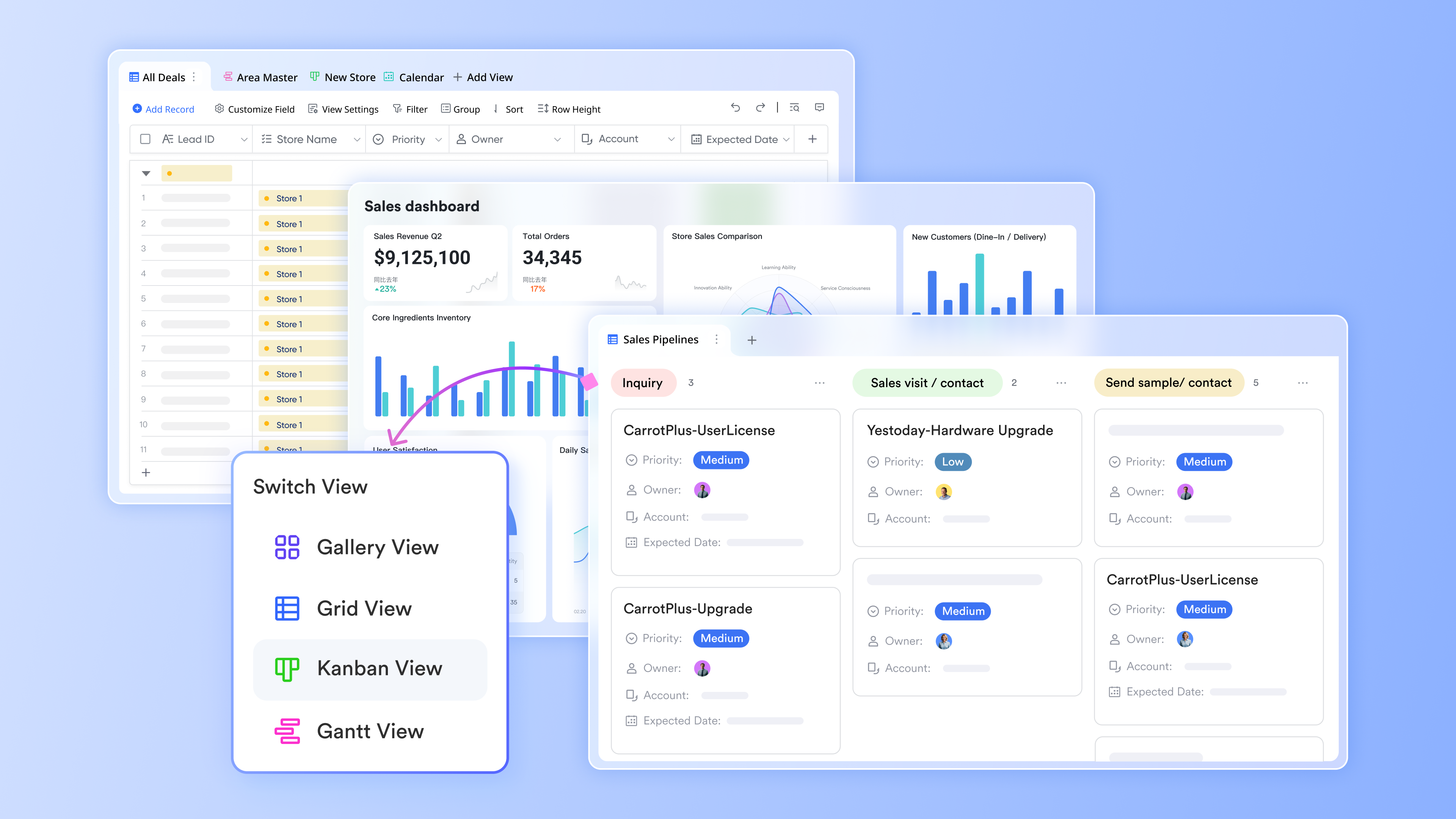
excels as a centralized lead database, providing a unified system where every lead or customer has a dedicated, structured row to track contact information, source, and metadata. This approach eliminates the problem of data being scattered across multiple spreadsheets. You can securely collect new information using custom form views and immediately capture responses into your tables. Furthermore, you can set up powerful automations to notify team members instantly of any status changes, ensuring all stakeholders remain updated. 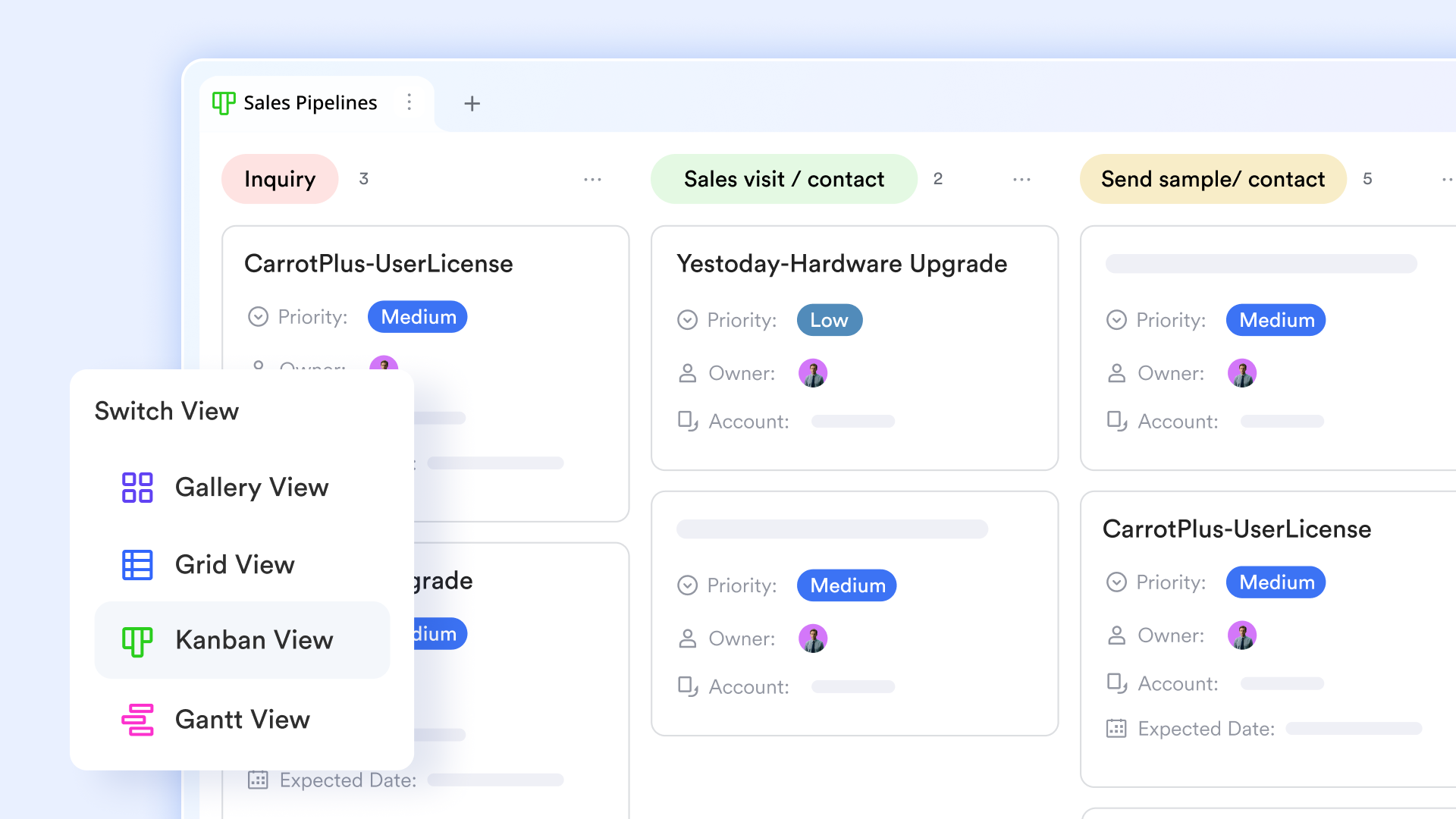
Flow fields & Kanban visualize the lead process clearly
Lark Base offers powerful tools to both structure and visualize your client relationships. You can implement a flow field to meticulously define and track each pre-sale stage, ensuring that only the relevant personnel can complete their assigned steps. The flow allows you to clearly designate the final outcome using a "Done Status," such as "Successful" or "Unsuccessful." To visualize the entire pipeline, use the , where each card represents a potential customer, and columns correspond to stages like 'Contacted' or 'Reviewing Contract,' giving you an immediate view of every customer's progress 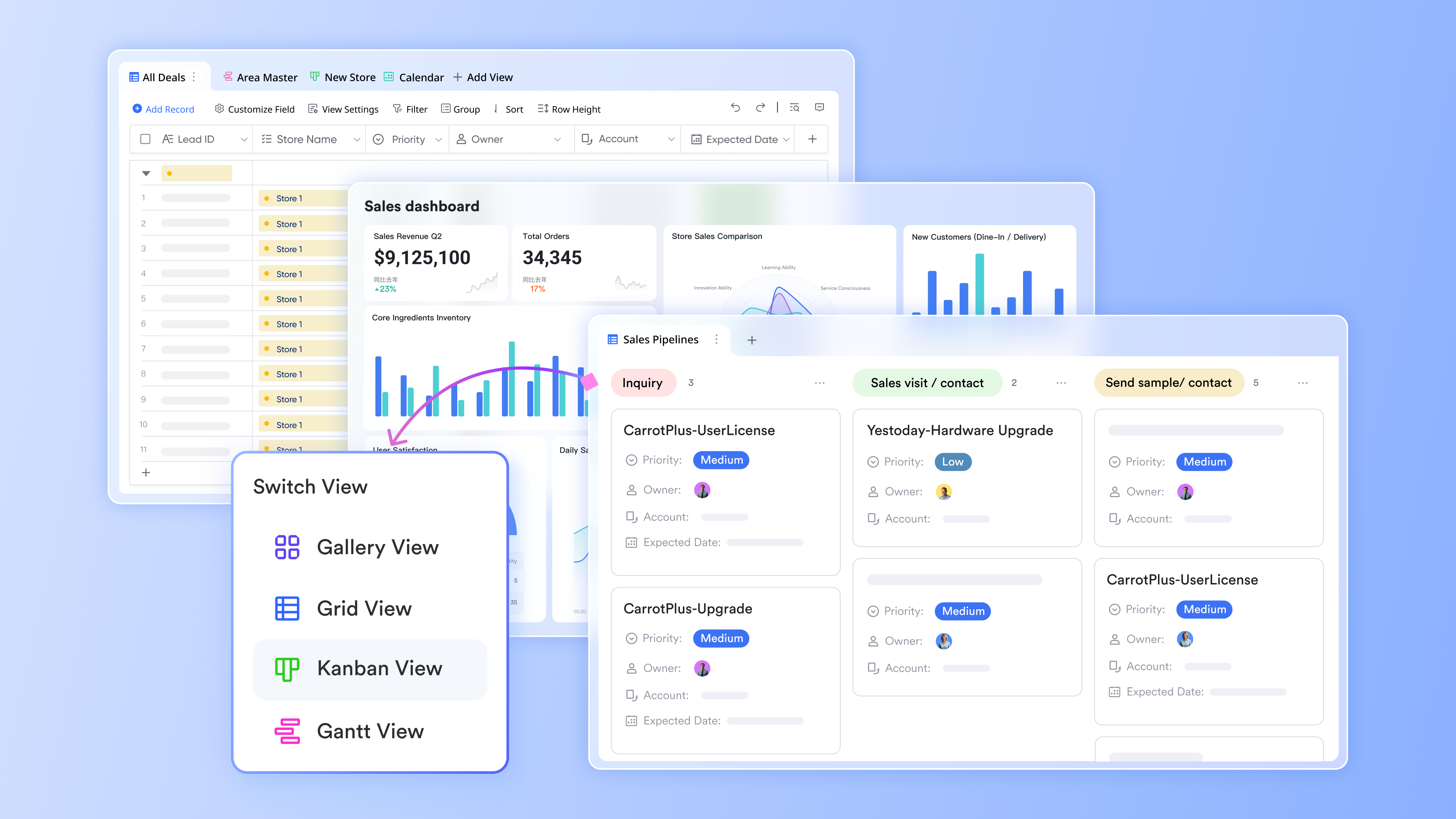
Automated lead follow-up workflows
enables marketing and sales teams to automate lead follow-up workflows so new inquiries are acted on instantly and consistently. Workflows can be triggered by events such as incoming lead emails from Outlook, form submissions, or the creation of a new record in the CRM database. Once triggered, automated actions handle routine follow-up tasks including assigning leads to the right owner, scheduling reminders or tasks, sending confirmation messages, and notifying stakeholders through . This removes manual handoffs and reduces response time while keeping every lead accounted for. 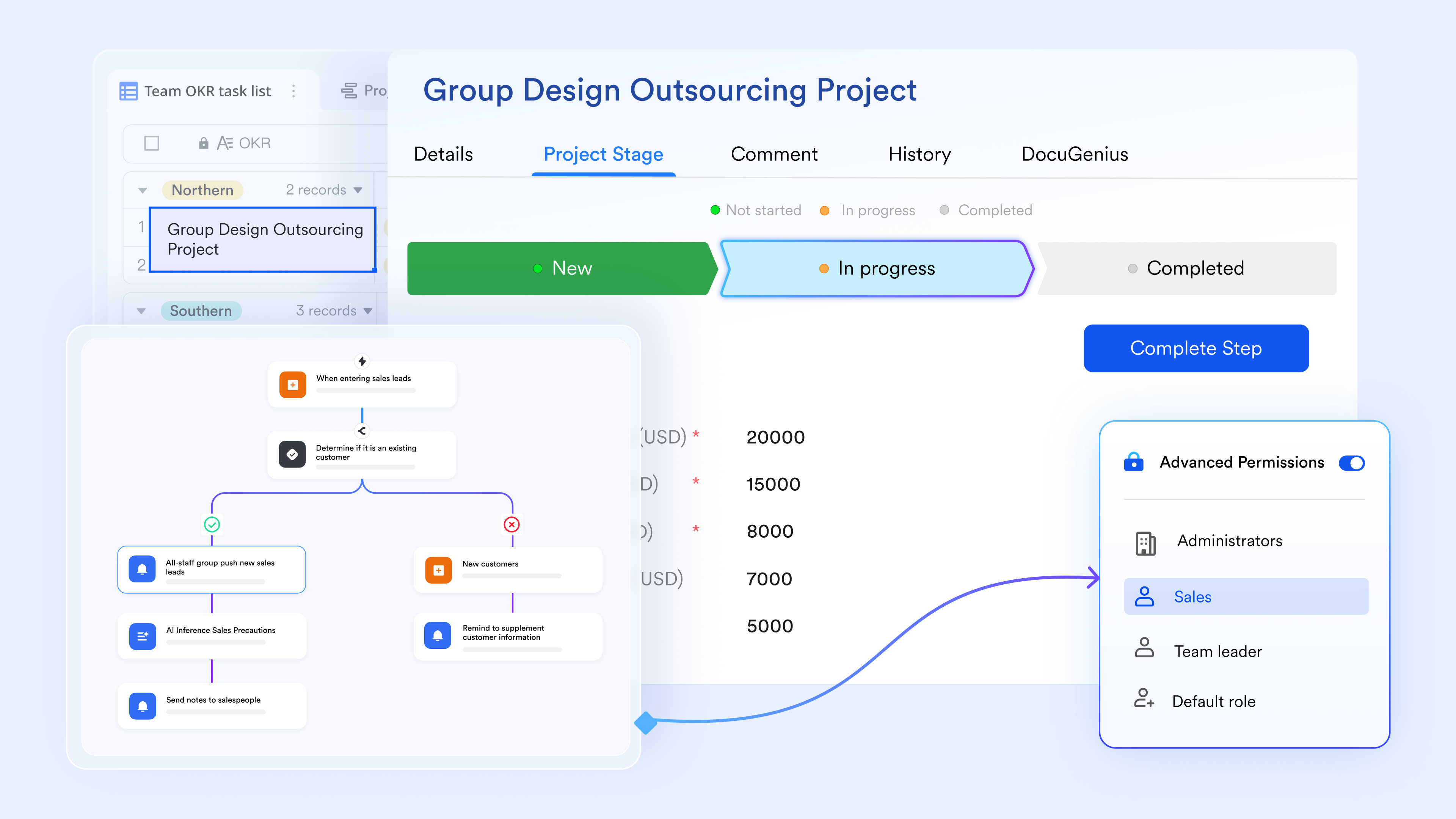
Built-in timeline add-on powers up lead tracking documentation
empowers teams to clearly present complex information, such as lead history and project interactions, using the built-in timeline add-on. By simply inserting the add-on, you can easily edit the nodes to represent key milestones, events, or customer interactions. This tool helps you transform raw data into a straightforward, visual narrative that outlines important dates and events for easy understanding. You have the flexibility to adjust the layout and details shown, ensuring your presentation is always tailored and highly effective. 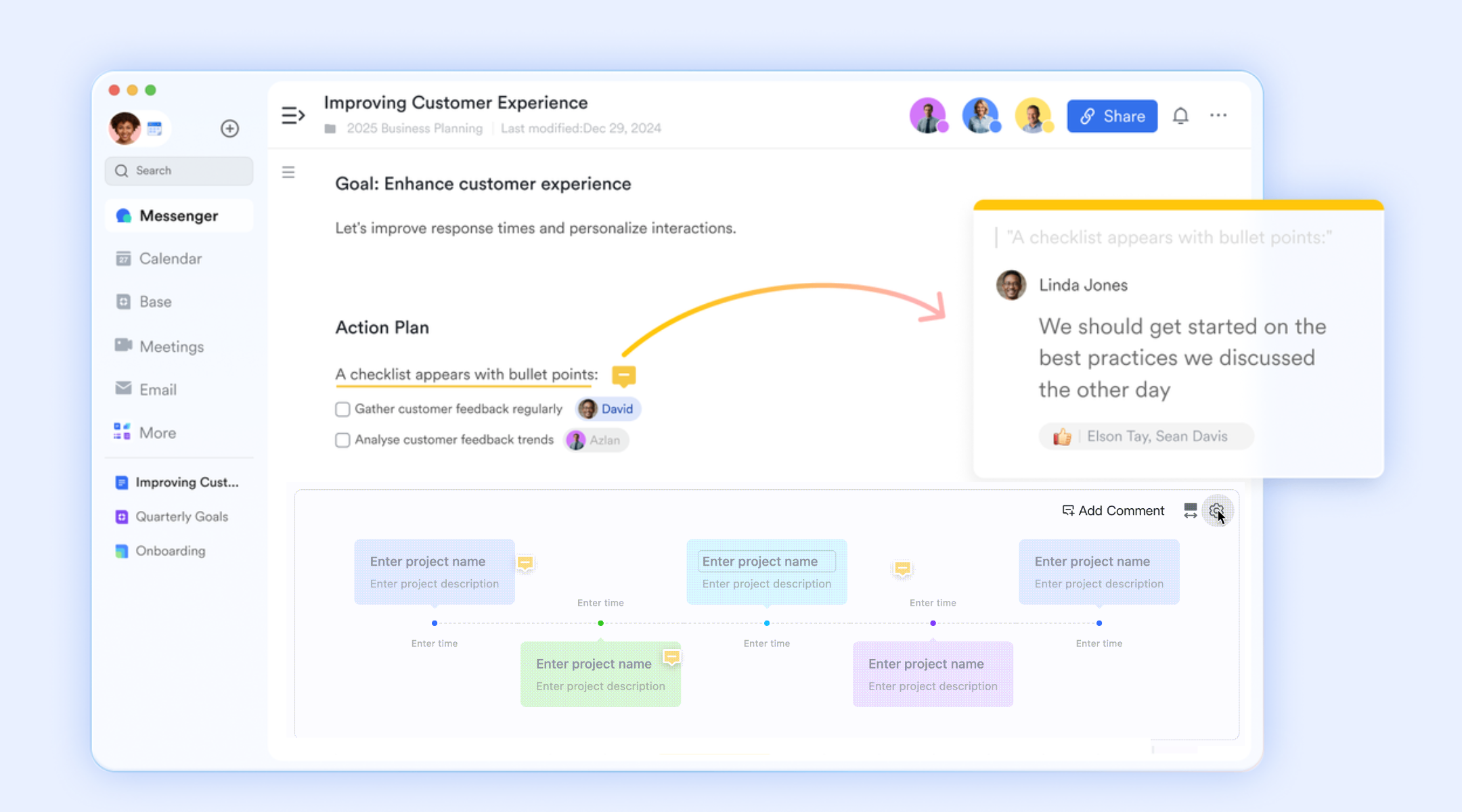
Fluent & seamless lead-related communication
Lark seamlessly integrates communication into lead tracking using and . For quick follow-ups, team members can use instant messaging with rich text, mentions, and file sharing to ensure everyone has access to the latest lead information. For formal alignment, meetings can be scheduled directly from chats, enabling the share docs feature during the call for real-time collaboration. Furthermore, you can use features like flagging important messages to track tasks and setting Calendar reminders to ensure you are always prepared for follow-ups and client meetings 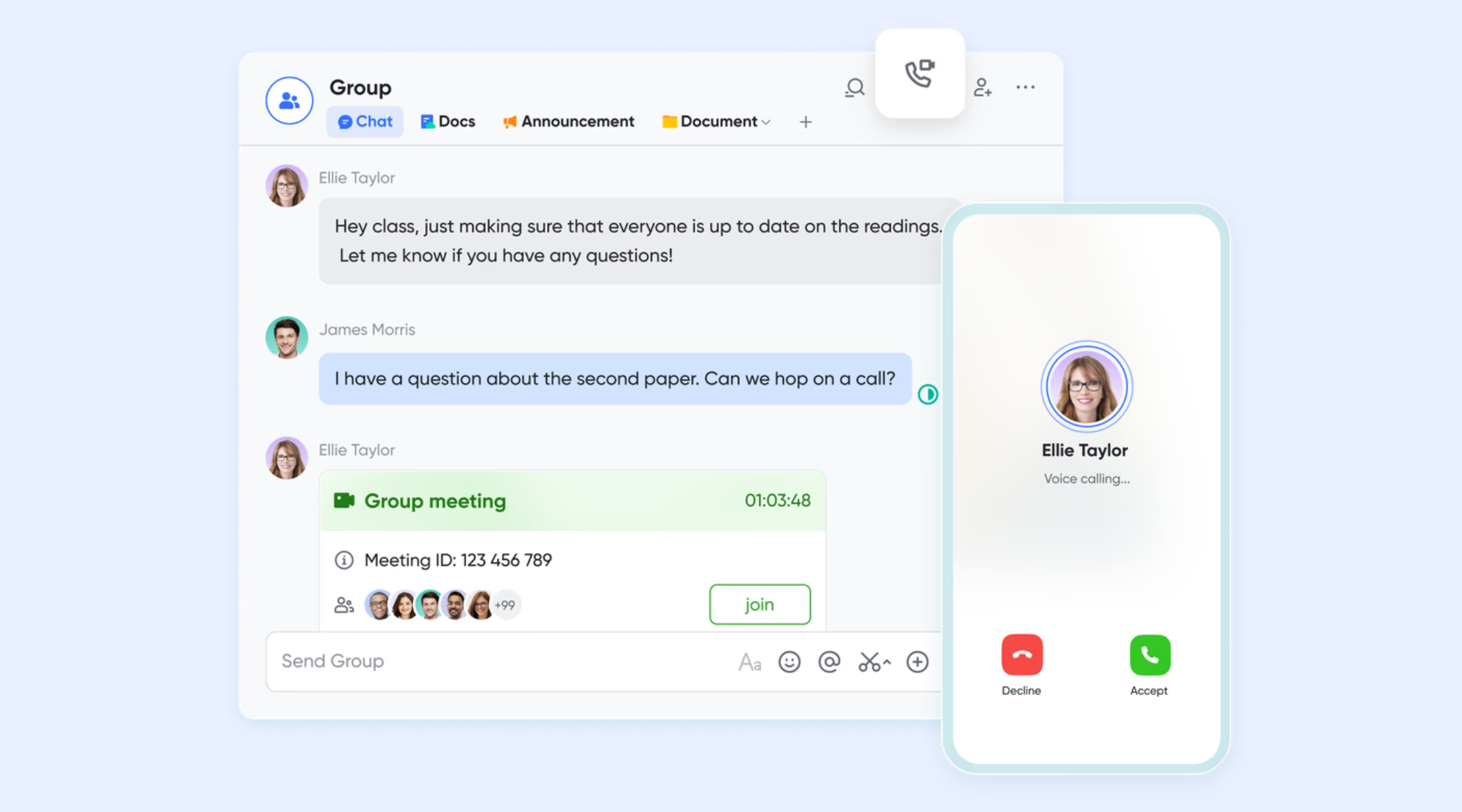
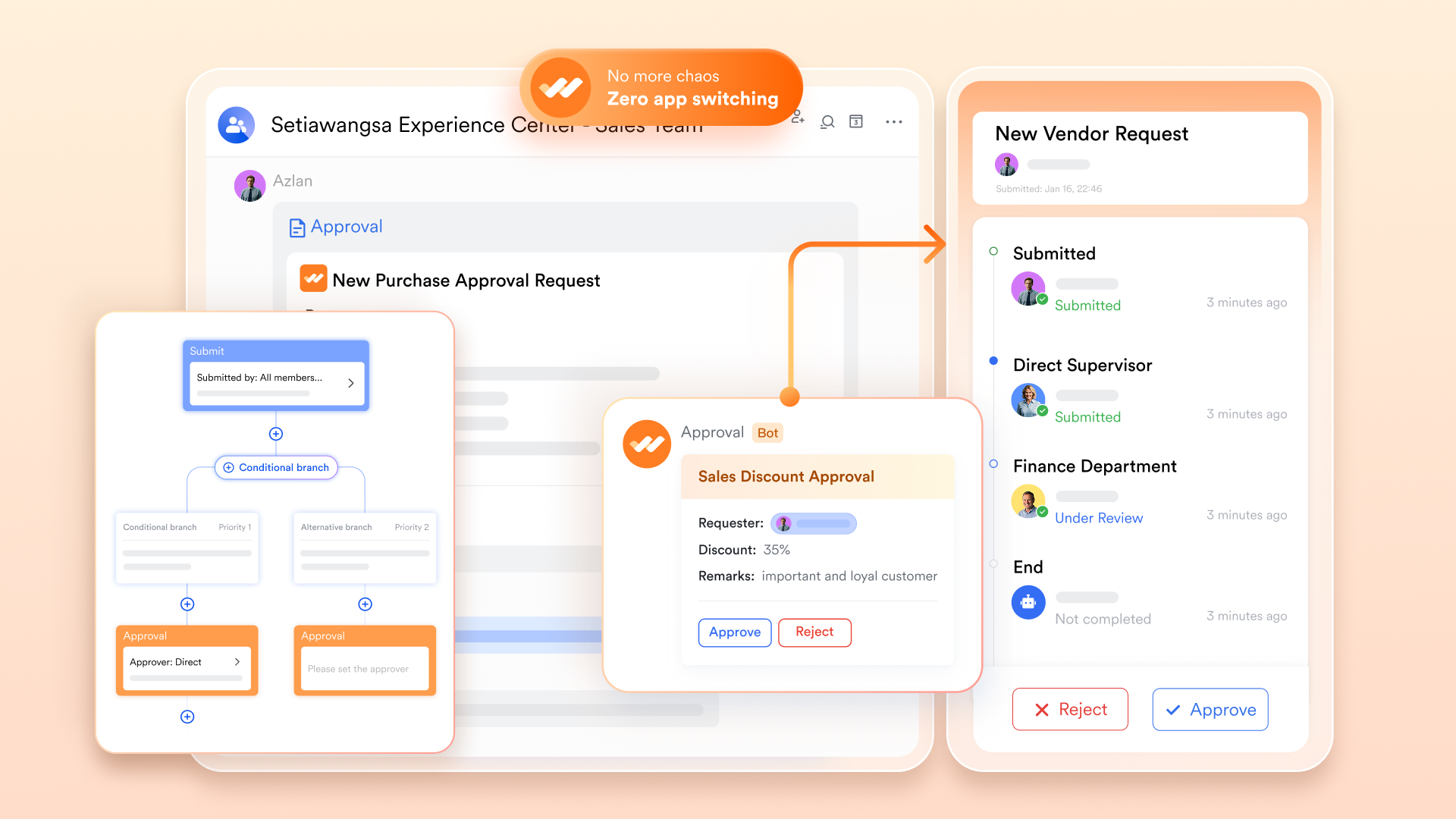
CRM approval processes with Lark Approval
Lark introduces structured approval flows into CRM operations through . Lead deal reviews, contract approvals, discounts, pricing overrides, and legal sign-offs can be submitted directly from CRM records into approval workflows. Stakeholders receive notifications, review supporting documents, request changes, or grant approvals within the same workspace used for sales activities.
This streamlines internal governance processes by removing email chains and isolated approval tools. All decisions remain logged, searchable, and clearly connected to specific opportunities or contracts, providing transparency, regulatory traceability, and improved turnaround times for closing deals.
:
- Starter plan: Free forever plan that includes 11 powerful tools for up to 20 users. It also comes with 100GB of storage, 1000 automation runs, AI translations, and more.
- Basic plan: $6/user/month (billed annually) for up to 500 users. It includes everything in Starter plus group calling for up to 500 attendees, 5TB of storage, 1000 automation runs, and more. For more details, please .
- Pro plan: $12/user/month (billed annually) for up to 500 users. It includes everything in Basic plus group calling for up to 500 attendees, 15TB of storage, 50,000 automation runs, and more.
- Enterprise plan: for custom pricing. Supports unlimited users and includes even more automation runs and advanced security, compliance, and management features.
For small teams with simple communication needs

18 months message history
1000 Base automation runs/month
2000 rows per table in Base
Most POPULAR
For companies with comprehensive collaboration and management needs
Unlimited message history
500-participant video meetings
50k Base automation runs/month
20k rows per table in Base
For large companies with advanced security and organizational management needs
Get a personalized demo and pricing
Unlimited message history
500-participant video meetings
15 TB storage + 30 GB storage/user
500k Base automation runs/month
50k Base automation runs/month
Most POPULAR
For companies with comprehensive collaboration and management needs
Unlimited message history
500-participant video meetings
50k Base automation runs/month
20k rows per table in Base
2. HubSpot CRM: Best inbound marketing lead tracker
HubSpot CRM is widely used CRM lead tracking software built around marketing-driven sales pipelines. It focuses on capturing web traffic from landing pages, forms, ad campaigns, and email subscriptions to build contact profiles automatically. Marketing and sales teams can coordinate from a shared dashboard while running basic follow-up automation sequences. Lead scoring tools help prioritize engaged contacts, while analytic reports offer useful insight into funnel performance across campaigns. Its ease of onboarding makes it especially popular among businesses launching inbound marketing programs.
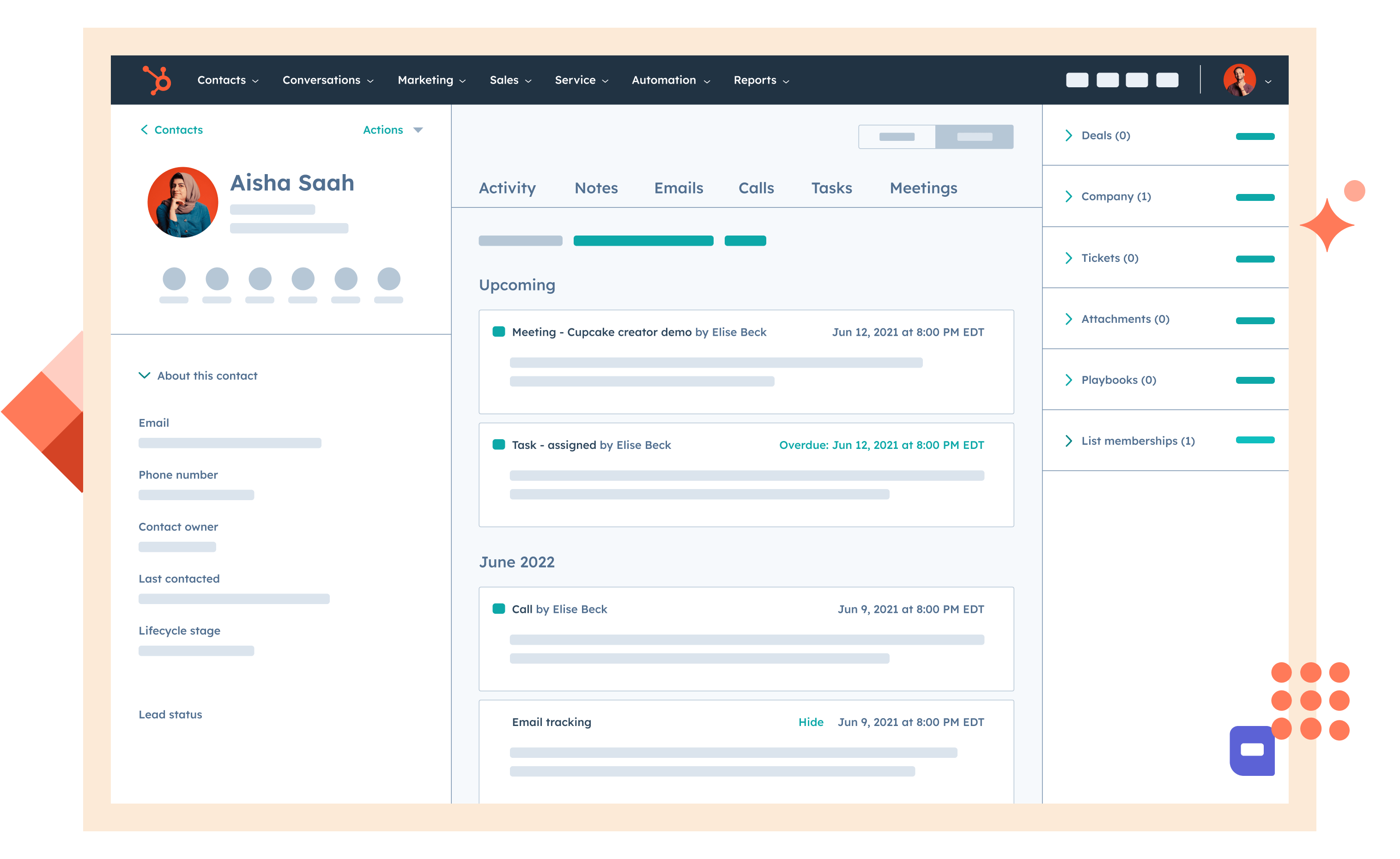
Image source: hubspot.com
Key features:
- Web form capture connects website traffic directly into centralized lead records.
- Basic automation sequences trigger follow-up emails based on contact engagement conditions.
- Lead scoring assigns priority values based on activities and profile data.
- Email tracking log records opens, clicks, and replies automatically on contact timelines.
- Reporting dashboards visualize funnel performance and campaign attribution results.
Pros:
- Excellent educational resources and strong user onboarding support.
- Very intuitive interface that minimizes training requirements.
- Trusted brand with extensive support documentation available.
- Works well as an entry point CRM for inbound-focused organizations.
Cons:
- Costs escalate quickly when scaling contact volumes.
- Custom pipeline logic is limited without premium tiers.
Pricing:
- Smart CRM Professional: $45/month per seat
- Smart CRM Enterprise: $75/month per seat
3. Zoho CRM: Best multi-channel lead tracking software
Zoho CRM is frequently adopted as real estate lead tracking software by agencies that require multi-channel pipelines beyond niche realtor tools. It captures web inquiries, call leads, and social responses into structured pipelines that allow brokers to manage buyers, sellers, and developers together. Automation rules assign prospects to territory-specific agents, while provide end-to-end visibility across listings and deal performance. The platform suits growing real estate organizations that want broader CRM functionality than agent-only platforms offer.
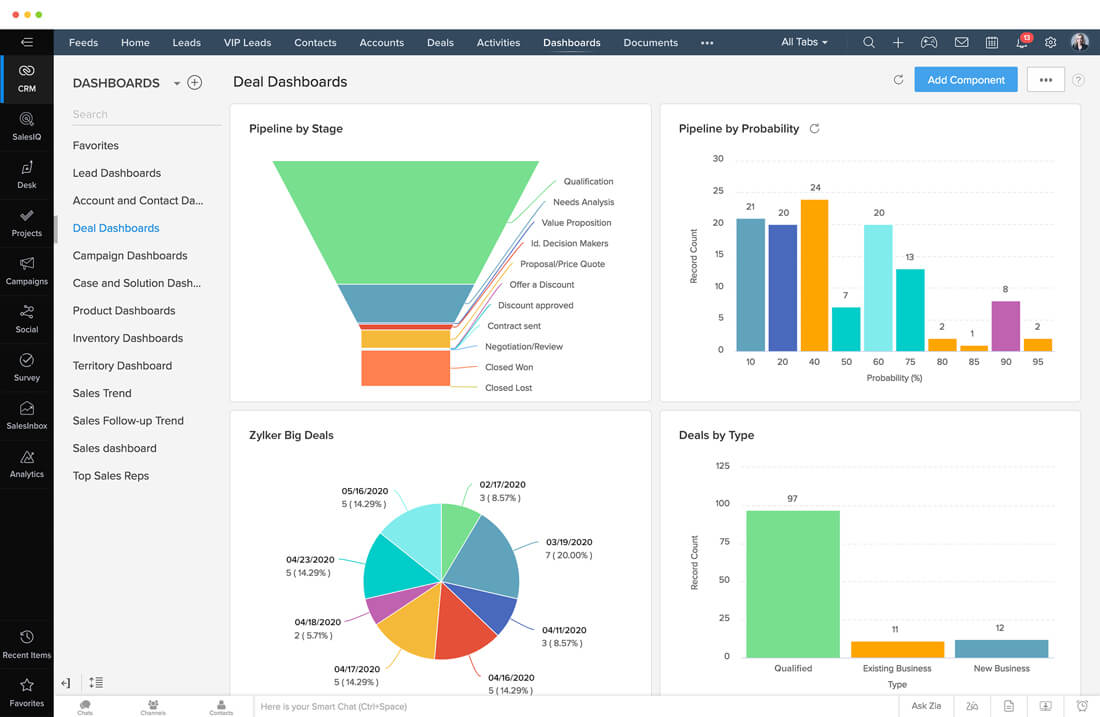
Image source: zoho.com
Key features:
- Multi-channel data capture consolidates phone, web chat, email, and social leads centrally.
- Workflow automation assigns ownership based on custom geographic or business mapping rules.
- Pipeline management tools provide stage visualization from inquiry through closed deals.
- Built-in analytics reports display conversion efficiency and revenue forecasting insights.
- Territory allocation features enable regional sales management automation efficiently.
Pros:
- Strong value pricing compared to most full-suite CRMs.
- Suitable for businesses operating across multiple geographic territories.
- Highly customizable to suit diverse sales processes.
- Large marketplace of third-party add-ons for extended functionality.
Cons:
- Interface can feel dense for non-technical users.
- Support response time varies by subscription tier.
Pricing:
- Standard: $20/user/month
- Professional: $35/user/month
- Enterprise: $50/user/month (Most Popular)
- Ultimate: $65/user/month
4. Pipedrive: Best visual pipeline sales CRM
Pipedrive is often cited as best lead tracking software for sales teams that prefer visual deal management over complex automation. Its drag-and-drop pipeline interface provides an intuitive way to move leads through stages while logging calls, emails, and meetings. Manual entry remains the primary method for lead capture, but reminders ensure consistent follow-up activity. While its reporting tools cover basic forecasting needs, companies requiring deep automation or complex attribution workflows typically need third-party add-ons to expand functionality.
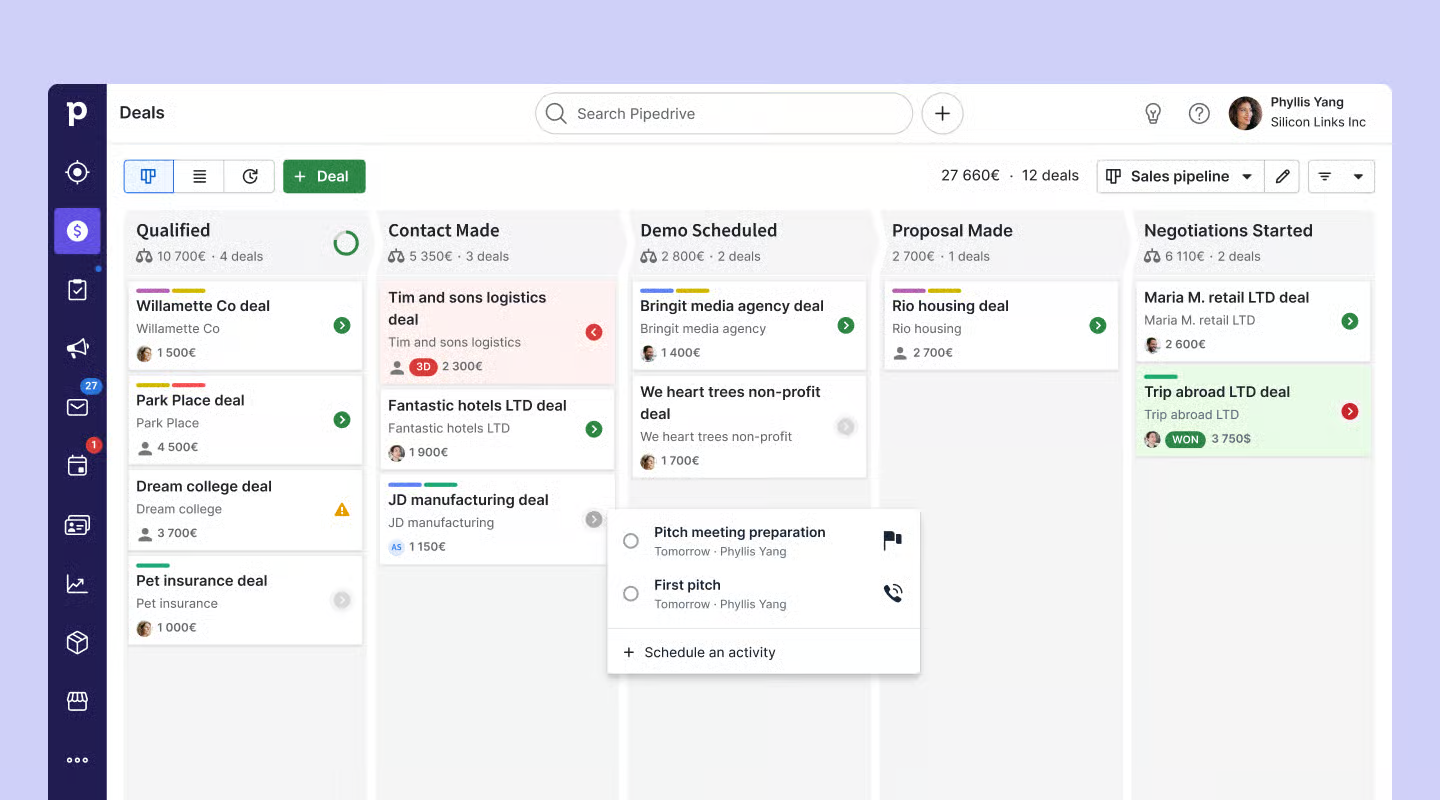
Image source: pipedrive.com
Key features:
- Visual pipeline boards enable simple drag-and-drop lead progression management daily.
- Activity reminder scheduling alerts sales representatives about upcoming follow-up commitments.
- Email integration logs communication history automatically within lead timeline records.
- Sales forecasting dashboards project expected revenue using active pipeline stages.
- Lead capture forms collect inquiries directly from websites.
Pros:
- Extremely easy adoption curve for first-time CRM users.
- Visually intuitive deal layout keeps processes simple.
- Low administrative overhead for sales managers.
- Ideal for solo sellers and small teams needing uncomplicated tools.
Cons:
- Limited marketing attribution options.
- Advanced automation depends on paid extensions.
Pricing:
- Lite: $14/user/month (billed annually)
- Growth: $24/user/month (billed annually)
- Premium: $49/user/month (Most Popular, billed annually)
- Ultimate: $69/user/month (billed annually)
5. Freshsales: Best AI-powered lead scoring CRM
Freshsales is modern built with AI-powered prioritization tools for fast-moving inside sales teams. It automatically scores prospects based on engagement activity, helping reps focus attention on the most promising opportunities first. Built-in phone, chat, and email tracking reduce tool switching, while automation sequences manage follow-up workflows efficiently. Sales analytics dashboards display deal velocity and funnel progress in real time. Freshsales works best for SaaS and subscription businesses managing large inbound lead volumes daily.
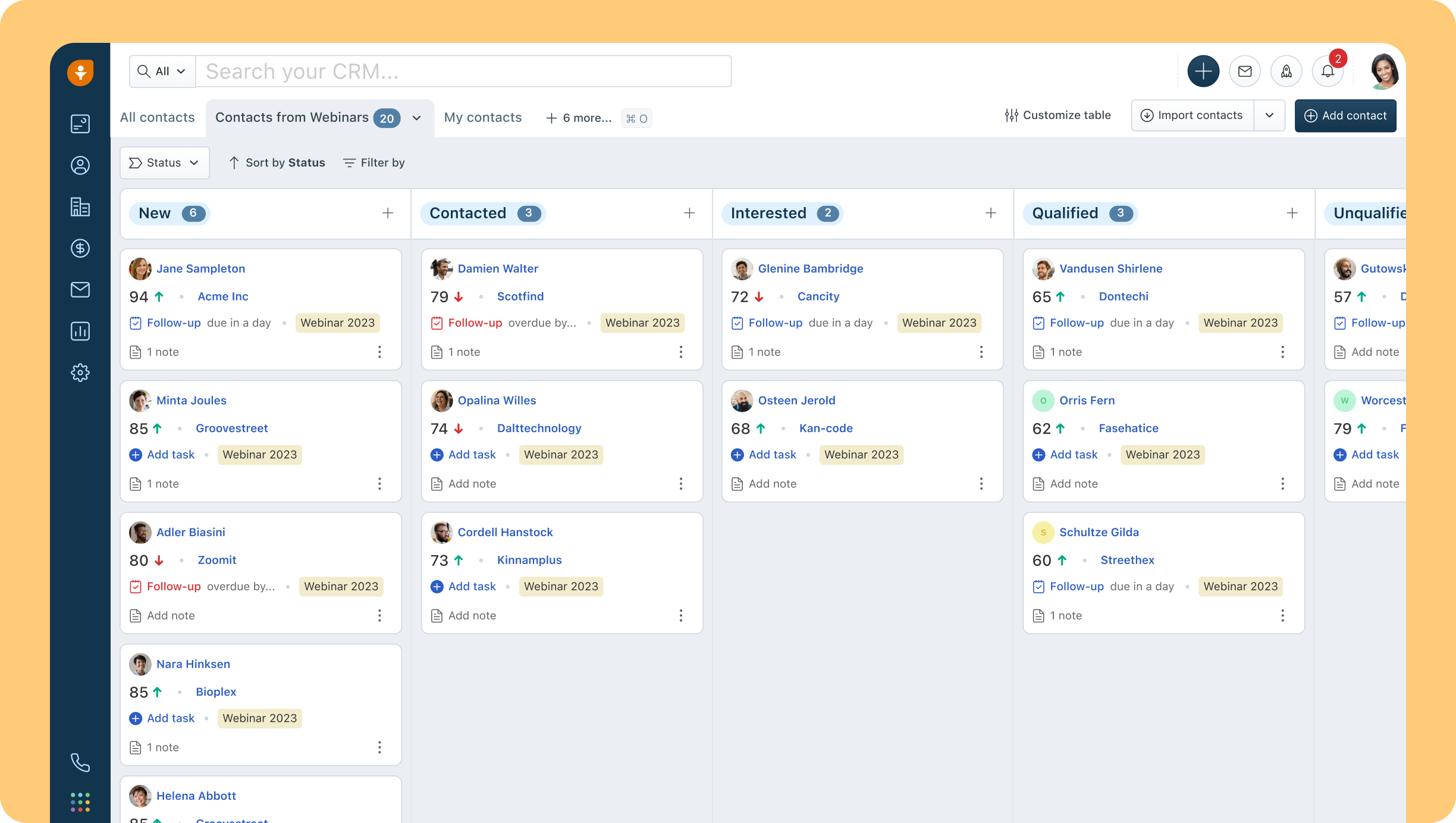
Image source: freshworks.com
Key features:
- AI lead scoring prioritizes prospects using behavioral data and interaction engagement patterns.
- Built-in phone dialer enables outbound and inbound contact tracking within CRM workflows.
- Automated email sequences deliver scheduled follow-up touchpoints consistently across prospects.
- Smart contact insights provide activity-driven recommendations for sales next actions.
- Sales performance reports display win rates and deal velocity metrics clearly.
Pros:
- Excellent performance for high-volume SDR and inside-sales teams.
- Modern design improves daily usage experience.
- Balanced platform combining automation with usability.
- Helpful AI recommendations for rep prioritization.
Cons:
- Best functionality restricted to higher-tier plans.
- Smaller customization ecosystem than larger CRMs.
Pricing:
- Growth: $9/user/month (billed annually)
- Pro: $39/user/month (billed annually)
- Enterprise: $59/user/month (billed annually)
- Free plan: $0 (for up to 3 users)
6. Salesforce: Best enterprise lead tracking system
Salesforce serves as the world's most widely implemented lead tracking system for large enterprises. It offers unmatched flexibility for creating custom CRM workflows, compliance reporting structures, and global sales territories. Organizations can build highly granular permission controls, data governance frameworks, and business intelligence dashboards on top of core CRM functions. While extremely powerful, Salesforce deployments often require dedicated administrators and consulting teams, making it better suited for organizations with sophisticated operational requirements and higher software budgets.
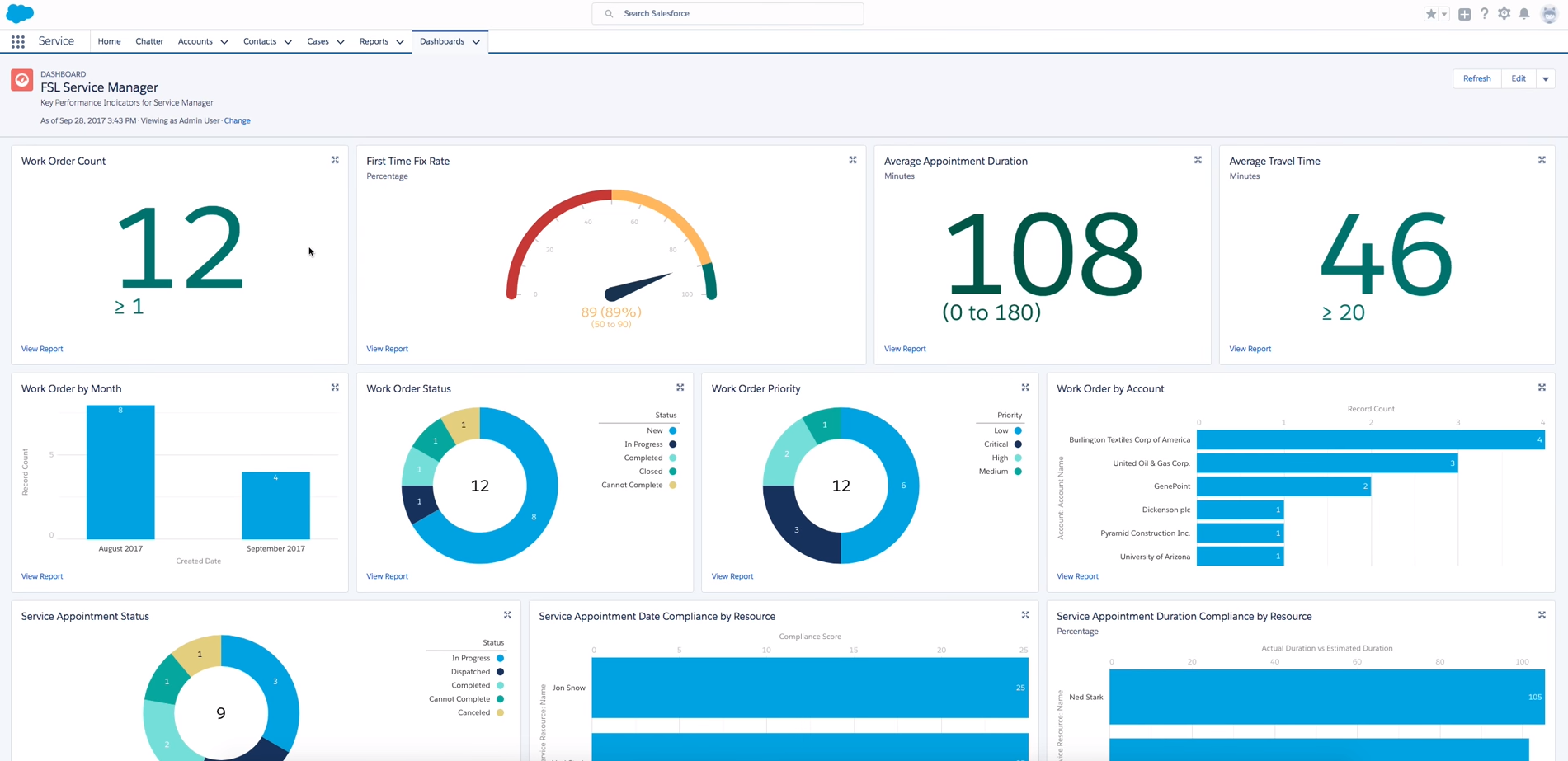
Image source: salesforce.com
Key features:
- Enterprise CRM pipelines manage global prospect lifecycles across multi-department sales teams.
- Advanced workflow builders automate escalations, approvals, and route handling across pipelines.
- Permission controls enforce strict data visibility and compliance management requirements.
- Business intelligence dashboards visualize forecasting data across organizations.
- API expansion tools connect third-party marketing and operations platforms.
Pros:
- Unmatched scalability across multinational sales organizations.
- Strong compliance and data governance controls.
- Industry standard ecosystem with vast consulting support.
- Best choice for complex enterprise sales environments.
Cons:
- Very steep learning curve for casual users.
- Expensive licensing and long implementation timelines.
Pricing:
- Free suite: $0/user/month (Maximum of 2 users)
- Starter suite: $25/user/month
- Pro suite: $100//user/month
7. Agile CRM: Best affordable lead tracking solution
Agile CRM is commonly selected as lead tracking software free by startups and smaller teams testing CRM adoption for the first time. It combines contact management, lightweight email campaigns, deal tracking, and task reminders into a single interface. Basic automation workflows support simple follow-ups, making it viable for low-volume sales environments. However, reporting depth and advanced analytics remain limited unless teams upgrade to paid tiers, which restricts its effectiveness for more data-intensive sales operations at scale.
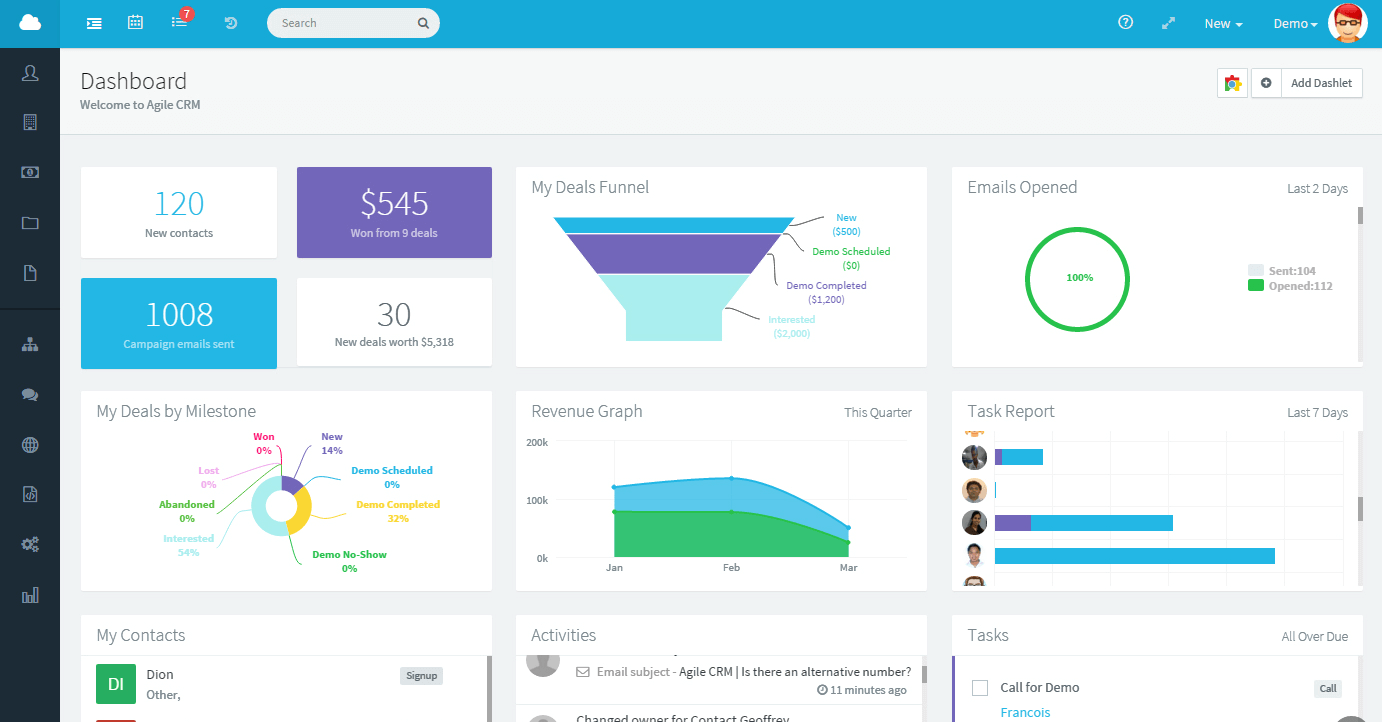
Image source: agile.com
Key features:
- Contact database tracks prospects and stores interaction activities centrally.
- Basic marketing email campaigns nurture early-stage lead relationships automatically.
- Task reminders notify sales users about upcoming outreach obligations regularly.
- Deal pipelines visualize current prospect progression through sales stages.
- Basic automation rules assign leads based on predefined triggers.
Pros:
- Easy starting point for new or bootstrapped companies.
- Low learning barrier for users without CRM experience.
- Combines basic sales and marketing needs affordably.
- Minimal software overhead for lean teams.
Cons:
- Reporting depth is limited.
- Does not scale well for complex operations.
Pricing:
- Free: $0/user/month (for up to 10 users)
- Starter: $8.99/user/month (Billed annually)
- Regular: $29.99/user/month (Billed annually)
- Enterprise: $47.99/user/month (Billed annually)
8. Copper CRM: Best Google Workspace CRM
Copper positions itself as the best lead tracking software with CRM integration for organizations that rely heavily on Google Workspace. It connects seamlessly with Gmail, Calendar, and Google Contacts to log interactions automatically without manual data entry. Sales reps can manage opportunities directly from familiar Google tools while maintaining visibility into structured pipelines. Its streamlined experience emphasizes adoption ease over advanced automation, making Copper popular with service-based teams prioritizing relationship management and activity tracking simplicity.
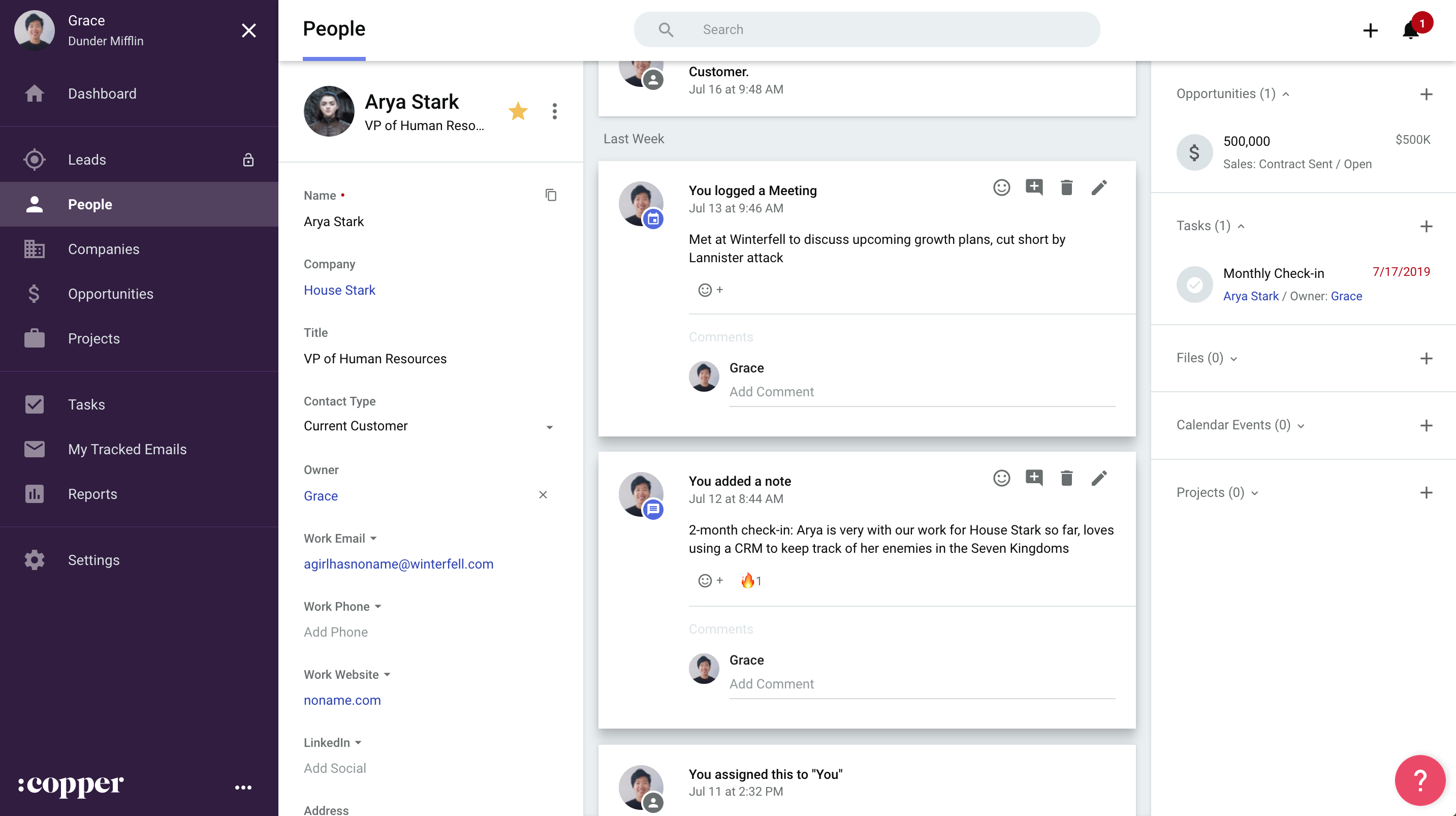
Image source: copper.com
Key features:
- Gmail syncing automatically attaches conversations to CRM customer records continuously.
- Calendar activity logging links scheduled meetings directly into pipeline timelines.
- Contact enrichment extracts data from email signatures and addresses automatically.
- Visual pipelines display opportunity movements through defined closing stages.
- Workflow triggers assign follow-up reminders to team members automatically.
Pros:
- Seamless adoption for teams already living inside Google Workspace.
- Eliminates much of the data-entry burden for sales reps.
- Clean interface suited to relationship-driven selling.
- Low maintenance operational footprint.
Cons:
- Expensive for the feature depth offered.
- Limited automation flexibility.
Pricing:
- Starter: $9/user/month (Billed annually)
- Basic: $23/user/month (Billed annually)
- Professional: $59/user/month (Billed annually)
- Business: $99/user/month (Billed annually)
9. Close: Best sales dialer CRM
Close works well as call tracking software for lead generation for sales teams that rely heavily on outbound prospecting and phone-driven revenue. Built-in dialer tools, SMS sequences, and email automation streamline high-volume follow-ups while logging detailed call data in centralized records. Sales leaders track contact ratios and agent productivity through performance dashboards, enabling continuous improvement across SDR teams that engage leads primarily through live calling channels.
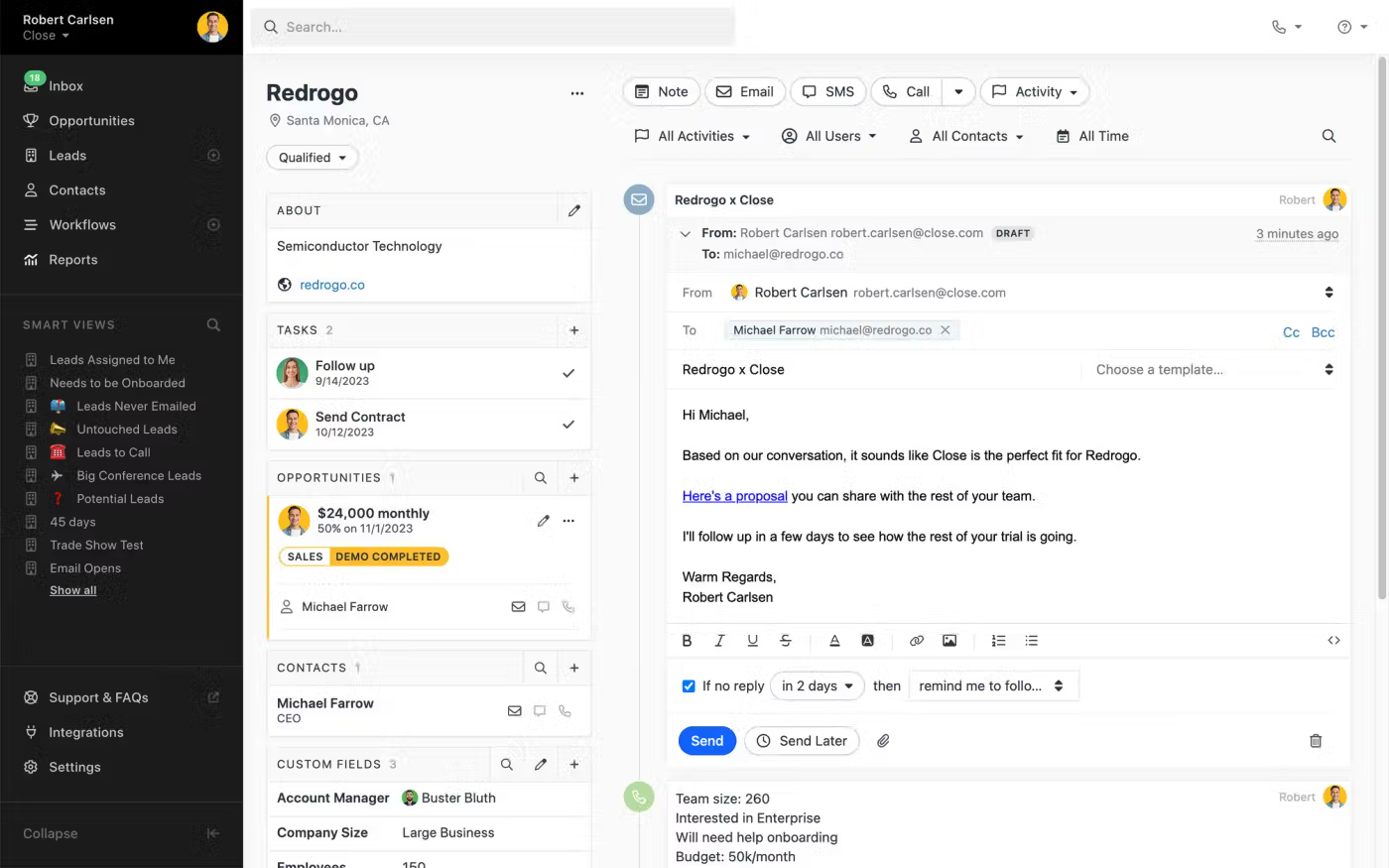
Image source: close.com
Key features:
- Power dialer enables rapid outbound lead follow-up at scale daily.
- SMS campaigns automate quick message sequences supporting cold outreach workflows efficiently.
- Email sequences schedule and send personalized prospect follow-ups consistently.
- Call recording stores conversations for quality assurance and training optimization purposes.
- Activity analytics provide insight into agent productivity and contact ratios.
Pros:
- Exceptional productivity focus for outbound sales reps.
- Streamlined experience optimized for speed and simplicity.
- Strong analytical insight into call-based conversions.
- Highly polished user interface.
Cons:
- Not optimized for inbound or long-cycle marketing funnels.
- Pricing can rise quickly for larger call teams.
Pricing:
- Solo: $9/user/month (Billed annually)
- Essentials: $35/user/month (Billedannually)
- Growth: $99/user/month (Billed annually)
- Scale: $139/user/month (Billed annually)
10. Bitrix24: Best all-in-one sales workspace
Bitrix24 is a popular lead tracking software for small business that combines CRM features with collaboration tools such as chat, document sharing, , and shared workspaces. It allows users to manage deals, schedule follow-ups, conduct internal communication, and automate workflows directly inside one platform. Website chat widgets and multi-channel lead capture feed into silos-free pipelines. While versatile, its extensive functionality can overwhelm users initially, requiring guided onboarding to fully utilize its offering.
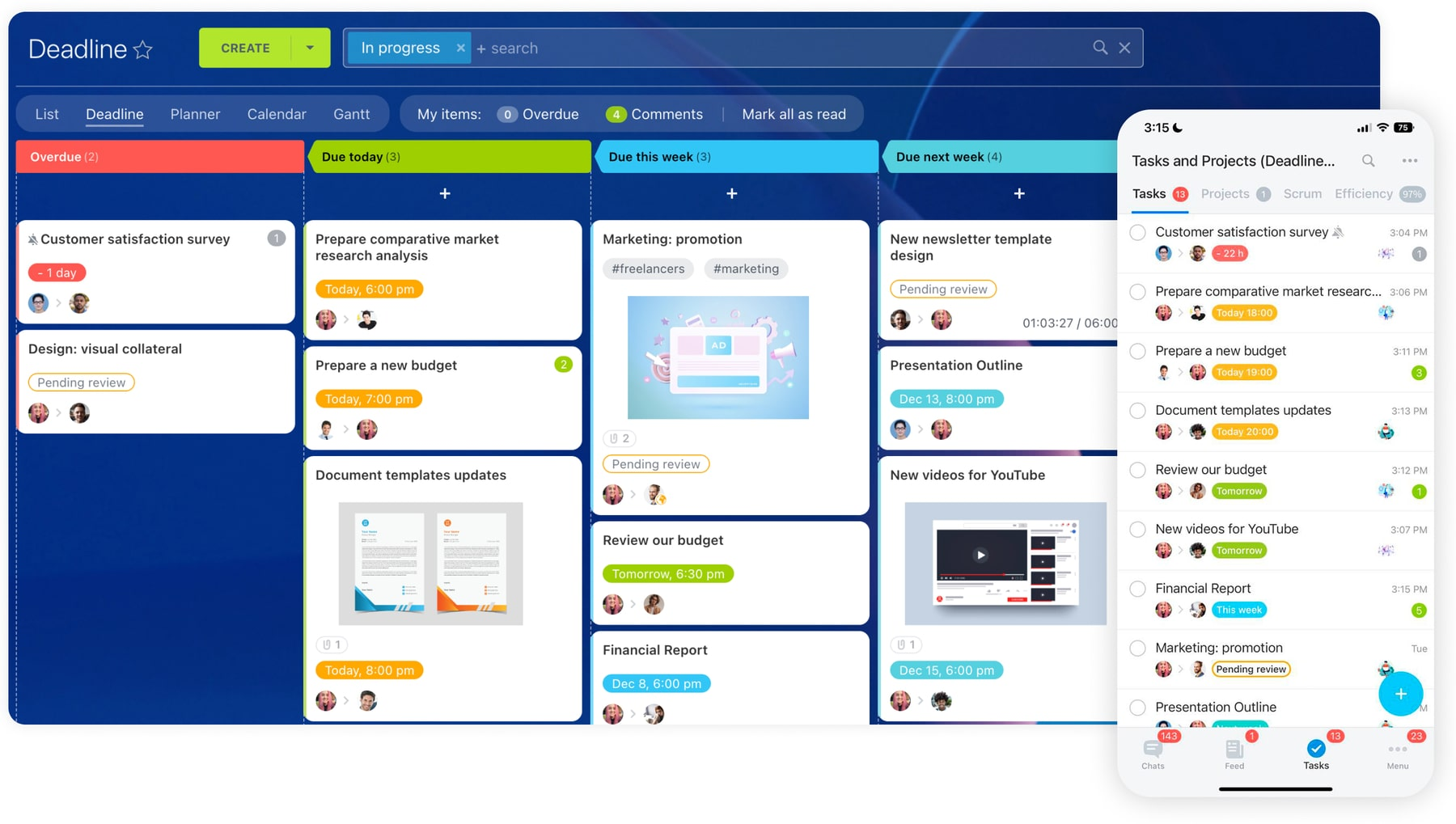
Image source: bitrix24.com
Key features:
- Multi-channel CRM captures inquiries from chat widgets, forms, and email sources.
- Workflow automation rules trigger tasks or notifications on lead movement changes.
- Shared document tools connect proposals and contracts directly to opportunities.
- Team chat enables real-time collaboration around sales strategies and negotiations.
- Cloud dashboards display basic pipeline tracking metrics for managers.
Pros:
- Combines collaboration and sales operations under one license.
- Generous functionality available at low cost or free plans.
- Useful for small teams needing internal work management alongside CRM.
- Suitable for companies replacing multiple disconnected tools.
Cons:
- User experience can feel cluttered.
- System navigation requires onboarding support.
Pricing:
- Free: $0/organization/month (Unlimited users)
- Basic: $49/organization/month (Includes 5 users)
- Standard: $87/organization/month (Includes 50 users)
- Professional: $175/organization/month (Includes 100 users)
- Enterprise: Starting from $350/organization/month (Includes 250 users)
Common mistakes when choosing lead tracking software
- Choosing price over scalability: Many businesses initially select without considering long-term scalability. While basic platforms may suit small teams, they often lack advanced workflows, multi-pipeline management, or reporting depth needed as lead volume grows. Migrating systems later can disrupt operations and cause data loss, making early scalability considerations critical.
- Ignoring automation needs: Teams frequently underestimate how essential automation is for consistent follow-ups and pipeline management. Without , sales reps rely on manual reminders or memory, leading to missed follow-ups, delayed responses, and inconsistent customer experiences. Effective lead tracking software should actively drive engagement rather than passively store contact records.
- Skipping compliance checks: Failure to evaluate data privacy safeguards and compliance capabilities creates legal and operational risks—especially when handling customer contact information, financial data, or recordings. should support permission controls, activity logging, audit trails, and regulatory compliance standards to ensure safe data handling practices.
- Poor reporting visibility: Selecting tools with limited analytics prevents companies from improving conversion rates. Without dashboards showing response times, pipeline velocity, channel attribution, and deal outcomes, sales leaders operate blind. Comprehensive reporting is essential for diagnosing bottlenecks, forecasting revenue accurately, and optimizing long-term .
Conclusion
Choosing the right lead tracking software is essential for building a sales operation that scales efficiently, responds quickly to prospects, and converts opportunities consistently. While many platforms offer basic contact management, true success comes from systems that combine automated follow-ups, structured pipelines, team collaboration, approval workflows, and real-time performance reporting in one cohesive environment.
Among all the tools reviewed, stands out as the best lead tracking solution for sales and marketing teams. Its ability to unify CRM databases, workflow automation, approval processes, financial data connections, and built-in collaboration enables teams to manage the entire lead lifecycle without juggling disconnected tools. From instant lead follow-ups to advanced conditional routing and rich performance dashboards, Lark transforms lead tracking into an active growth engine rather than a passive database.
For teams seeking flexibility, scalability, automation, and true operational visibility—without enterprise complexity—Lark provides the most complete and future-ready lead tracking platform available today.
Track, assign, and close leads with Lark
FAQs
What is the best lead tracking software for small businesses?
The best option for small businesses is a platform that combines affordability, automation, and ease of use. Lark is ideal because it offers a free starting plan with scalable workflows and built-in collaboration. This lets teams grow without migrating systems later.
Is free lead tracking software reliable?
Free lead tracking software can be reliable for early-stage teams with low lead volume. However, most free plans limit automations, reporting depth, or user access over time. As sales pipelines grow, paid tiers become necessary to maintain efficiency and visibility.
Can lead tracking software work without a CRM?
Lead tracking can work without a full CRM using simple tools for collecting and routing inquiries. However, without CRM functionality, teams lack long-term pipeline visibility, forecasting, and relationship history tracking. A CRM becomes essential once follow-ups become more complex.
Is call tracking software necessary for lead generation?
Call tracking software is valuable for businesses where phone inquiries drive a large portion of conversions. It provides attribution insights showing which ads, campaigns, or keywords generate calls. For primarily web-based sales flows, call tracking is helpful but not always mandatory.
What's the difference between lead management and lead tracking?
Lead tracking focuses on capturing contacts and recording interactions throughout the funnel. extends this process with qualification, automation, nurturing, approvals, and forecasting workflows. In short, tracking records activity, while management fully operationalizes pipeline growth.
Related reading
































