














16 Best Low-Code No-Code Platforms that Replace Manual Workflows

Ryan Tanner
Product Marketing Specialist
Sep 18, 2026
Ryan Tanner
Sep 18, 2026


Key takeaways: Top 5 platforms supporting no-code capabilities
Snapshot of the 5 platforms that offer low-code/no-code capabilities

What is a low-code or no-code platform?
Low-code vs no-code platforms differences explained
- Low-code requires minimal coding for customization: Low-code software development provides visual tools while allowing limited coding for advanced customization. This approach helps teams build more complex applications when needed. It is suitable for organizations that require flexibility along with faster development.
- Full visual development with no coding: No-code low-code platforms enable users to create applications using drag-and-drop interfaces without any coding knowledge. These platforms are ideal for non-technical users. They simplify development and allow faster deployment of simple applications.
- Use case differences based on complexity: Low-code application platform tools are often used for complex enterprise applications and integrations. No-code platforms are better suited for simple workflows and internal tools. Choosing the right platform depends on the level of complexity required.
- Flexibility vs simplicity trade-offs: Low-code platforms offer greater flexibility but may require technical knowledge. No-code platforms prioritize simplicity but may have limitations in customization. Organizations must balance flexibility and ease of use when selecting the best low-code and no-code platforms.
Top 16 low-code no-code platforms for business teams
1. Lark: Low- code no-code platform for workflow automation and collaboration
- Unified platform combining workflow automation, collaboration, and documentation.
- No-code tools allow teams to build applications and workflows quickly.
- Built-in AI features improve productivity and automate content tasks.
- Scalable solution supports growing teams and complex workflows.
- Some advanced configurations may require guidance from the Lark Help Center.
- Starter plan: Free forever plan that includes 11 powerful tools for up to 20 users. It also comes with 100GB of storage, 1000 automation runs, AI translations, and more.
- Basic plan: $6/user/month (billed annually) for up to 500 users. It includes everything in Starter plus group calling for up to 500 attendees, 5TB of storage, 1000 automation runs, and more. For more details, please contact sales.
- Pro plan: $12/user/month (billed annually) for up to 500 users. It includes everything in Basic plus group calling for up to 500 attendees, 15TB of storage, 50,000 automation runs, and more.
- Enterprise plan: Contact sales for custom pricing. Supports unlimited users and includes even more automation runs and advanced security, compliance, and management features.
Starter
For small teams with simple communication needs
$0
/ user / month

Pro
For companies with comprehensive collaboration and management needs
$12
/ user / month
Enterprise
For large companies with advanced security and organizational management needs
Get a personalized demo and pricing
Pro
For companies with comprehensive collaboration and management needs
$12
/ user / month
2. Airtable: Low-code platform for flexible database applications
- Flexible database structure supports tables, relationships, and custom fields for different workflows.
- Multiple views, such as grid, calendar, and Kanban, help teams visualize data effectively.
- Automation tools trigger notifications, updates, and workflow actions based on conditions.
- Integration support connects with third-party tools for data syncing and workflow expansion.
- Easy-to-use interface for building low-code applications quickly.
- Flexible data structures support a wide range of use cases.
- Visual views improve workflow tracking and collaboration.
- Strong integration ecosystem supports business workflows.
- Advanced automation features require higher-tier plans.
- Large datasets may impact performance.
- Limited scalability compared to enterprise platforms.
- Free plan: Free
- Team plan: $20/seat/month
- Business plan: $45/seat/month
- Enterprise scale: Custom pricing
3. OutSystems: Enterprise low-code platform for complex applications
- Visual development environment enables rapid application building with minimal coding.
- Full-stack development supports web and mobile applications within one platform.
- Integration tools connect enterprise systems, APIs, and databases seamlessly.
- AI-assisted development tools improve productivity and application performance.
- Strong scalability for enterprise application development.
- Advanced features support complex workflows and integrations.
- Comprehensive development lifecycle management tools.
- High performance for large-scale applications.
- High cost compared to smaller low-code platforms.
- Requires technical expertise for advanced use cases.
- Setup and deployment can be complex.
- OutSystems developer cloud: starting at $36,300
- OutSystems personal edition: Free
4. Mendix: Scalable low-code development platform for enterprises
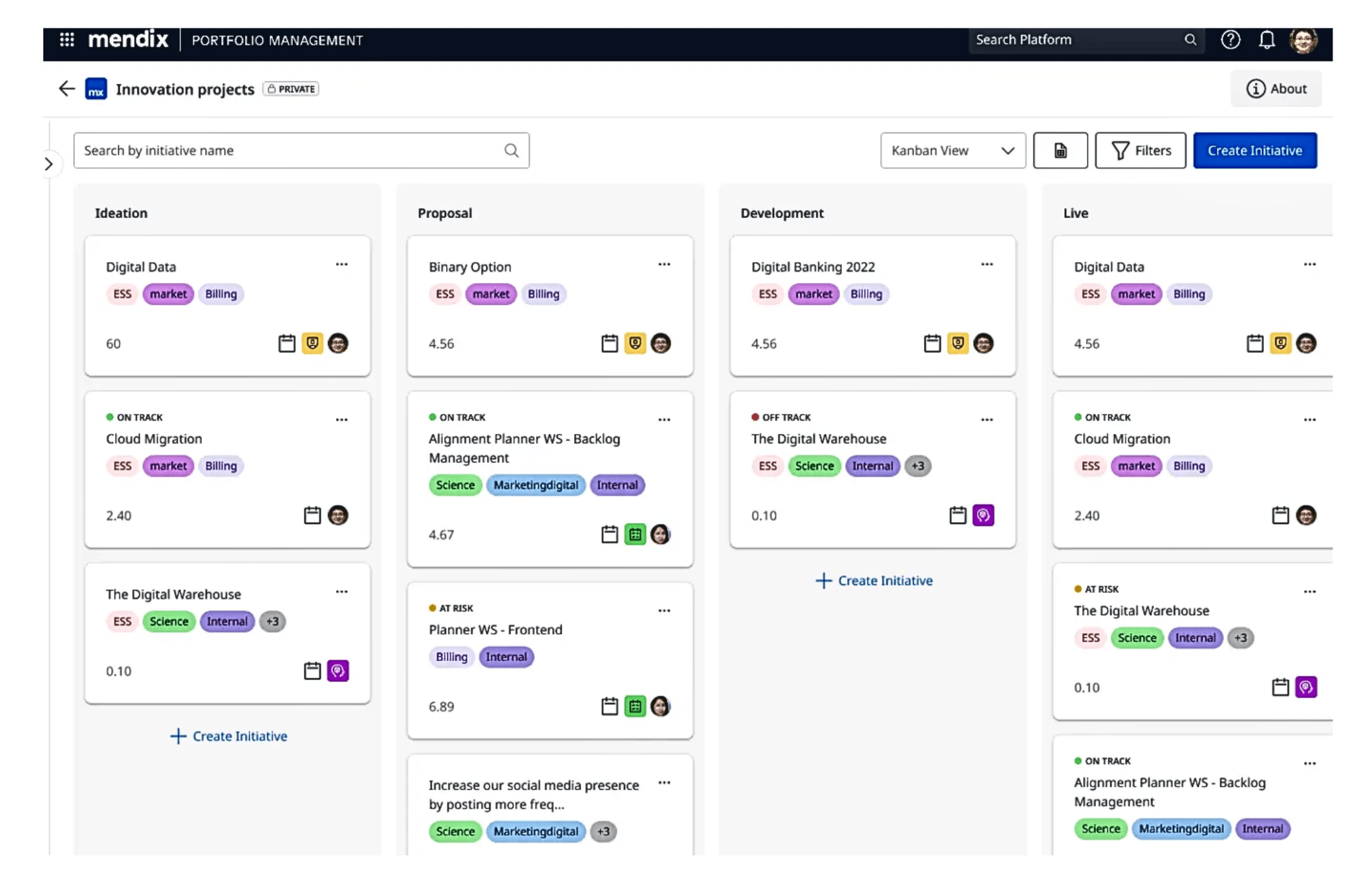
- Visual development tools support drag-and-drop application building.
- Collaboration features allow developers and business users to work together.
- Cloud deployment options support scalability and performance.
- Integration capabilities connect with enterprise systems and APIs.
- Strong collaboration between technical and non-technical users.
- Scalable architecture supports enterprise applications.
- Flexible deployment options, including cloud and on-premise.
- Good governance and compliance features.
- Learning curve for new users.
- Advanced features may require developer support.
- Pricing can be high for enterprise use.
- Free plan: $0/month
- Standard plan: $998/month (single app), $2,495/month (unlimited)
- Premium plan: Custom quote
5. Bubble: No-code platform for building web applications
- Visual editor allows drag-and-drop UI and workflow creation.
- Built-in database manages application data without external tools.
- Workflow automation defines application logic and user interactions.
- Hosting and deployment are included within the platform.
- No coding is required to build full web applications.
- Fast development for startups and MVPs.
- All-in-one platform including hosting and database.
- Strong community and learning resources.
- Performance limitations for large-scale applications.
- Limited flexibility compared to traditional coding.
- Vendor lock-in due to the proprietary environment.
- Free plan: $0/month
- Starter plan: $59/month
- Growth plan: $209/month
- Team plan: $549/month
- Enterprise plan: Contact sales
6. Rocket.new: AI-powered low-code no-code platform for building apps and websites
- AI-powered website, landing page, web app, and mobile app generation.
- Natural-language prompt-based building.
- Clean React code with Tailwind CSS.
- Separate staging and production environments with version control.
- SEO, WCAG, and GDPR-compliant build support.
- Custom domains, analytics, and performance tracking.
- 25+ integrations and connectors.
- Role-based access management.
- Solve capability for business problems, PRDs, and product planning.
- Intelligence capability for competitor tracking, daily briefs, and trend synthesis on higher plans.
- Helps teams move from idea to working software faster than traditional development workflows.
- Supports both no-code users and developers who want editable, structured output.
- Useful for MVPs, dashboards, internal tools, landing pages, and workflow-based apps.
- Includes production-focused features like staging, version control, analytics, and custom domains.
- The Solve feature helps teams clarify what to build before jumping into development.
- AI-generated builds still need human review before serious production use.
- Advanced use cases may require developer involvement for custom logic, security, or performance optimization.
- Beginners may need time to understand credits, environments, integrations, and product workflows.
- Higher-level Solve and Intelligence capabilities require more expensive plans.
- Free plan: $0
- Build plan: $25/month
- Solve + Build plan: $250/month
- Solve + Build + Intelligence plan: $350/month
6. Appian: Enterprise low-code platform for process automation
- Process automation tools streamline workflows and business operations.
- A low-code development environment enables rapid application building.
- AI and data integration support intelligent decision-making.
- Case management capabilities help manage complex business processes.
- Strong process automation capabilities for enterprise workflows.
- Scalable platform suitable for large organizations.
- Integrated AI and data tools improve operational efficiency.
- Supports complex use cases with robust features.
- Higher cost compared to smaller low-code platforms.
- Requires training for effective implementation.
- Setup and customization can be complex.
- Custom enterprise pricing based on requirements
7. Zoho Creator: Low-code application platform for businesses
- Drag-and-drop builder simplifies application creation for business users.
- Workflow automation tools streamline approvals and business processes.
- Integration with Zoho apps and third-party services.
- Mobile app support ensures access across devices.
- Easy to use for building business applications quickly.
- Strong integration with the Zoho ecosystem tools.
- Flexible customization for operational workflows.
- Affordable pricing for small and mid-sized businesses.
- Limited scalability for large enterprise environments.
- Advanced customization may require scripting knowledge.
- The interface may feel complex for beginners.
- Standard: $8/user/month billed annually.
- Professional: $20/user/month billed annually.
- Enterprise: $25/user/month billed annually.
- Flex: Contact for custom quote.
8. Microsoft Power Apps: Low-code platform within the Microsoft ecosystem
- Integration with Microsoft 365 tools such as Excel and SharePoint.
- Visual app builder supports rapid application development.
- Data connectors allow integration with multiple data sources.
- AI capabilities enhance automation and insights.
- Strong integration with the Microsoft ecosystem.
- Scalable for enterprise environments.
- Wide range of connectors for data integration.
- Secure and compliant platform for business use.
- Licensing structure can be complex.
- Requires familiarity with Microsoft tools.
- Advanced customization may need technical expertise.
- Power Apps developer plan: Free.
- Power Apps premium: $20/user/month/yearly.
9. Retool: Low-code platform for internal tool development
- Drag-and-drop interface simplifies building internal dashboards and operational tools.
- Integration with databases, APIs, and third-party services enables real-time data access.
- Pre-built components accelerate development and reduce setup time.
- Role-based access control ensures secure handling of sensitive data.
- Speeds up development of internal tools and dashboards.
- Strong integration capabilities with backend systems.
- Flexible customization for developers and technical teams.
- Improves efficiency across internal operations.
- Requires technical knowledge for advanced use cases.
- Not designed for customer-facing applications.
- Pricing may increase as usage grows.
- Free plan: $0/month
- Team plan: $10/month/builder + $5/month/internal user
- Business plan: $50/month/builder + $15/month/internal user
- Enterprise plan: Custom pricing
10. Glide: No-code platform for mobile apps from spreadsheets
- Converts spreadsheets into mobile apps with minimal configuration.
- Drag-and-drop interface allows easy customization of app design.
- Real-time syncing ensures data updates are instant across the app.
- Pre-built templates help users launch apps quickly.
- Very easy to use for non-technical users.
- Fast development using existing spreadsheet data.
- Affordable pricing for small teams and startups.
- Ideal for simple business and internal applications.
- Limited customization for complex workflows.
- Performance depends on spreadsheet structure and size.
- Not suitable for large-scale enterprise applications.
- Free plan: $0
- Business plan: $199/month/billed yearly
- Enterprise plan: Custom quote
11. Adalo: No-code platform for building mobile applications
- Drag-and-drop builder for designing app interfaces and workflows.
- Built-in database supports structured data management.
- Custom actions enable interactive app functionality.
- Publishing tools allow deployment to mobile and web platforms.
- No-coding required for building applications.
- Fast prototyping and deployment for startups.
- Beginner-friendly interface for new users.
- Supports both mobile and web app creation.
- Limited scalability for complex or large applications.
- Performance may decrease with large datasets.
- Advanced features may require workarounds.
- Free plan: $0/month/billed annually
- Starter plan: $36/month/billed annually
- Professional plan: $52/month/billed annually
- Team plan: $160/month/billed annually
12. Betty Blocks: Enterprise no-code platform with governance features
- No-code application builder designed for enterprise environments.
- Governance and compliance tools ensure secure development processes.
- Integration capabilities connect with enterprise systems and APIs.
- Workflow automation supports structured business processes.
- Strong governance and compliance features for enterprise use.
- Suitable for regulated industries and large organizations.
- Enables application development without coding.
- Good integration support for complex systems.
- Higher cost compared to smaller no-code platforms.
- Learning curve for new users.
- Limited flexibility compared to traditional coding approaches.
- Create: $1,780/month.
- Scale: $4,155/month.
- Enterprise: Contact sales.
13. Quickbase: Low-code platform for process management applications
- Custom application builder supports process management and workflow tracking.
- Workflow automation tools streamline task assignments and approvals.
- Reporting dashboards provide real-time insights into operational performance.
- Integration capabilities connect with external systems and data sources.
- Strong process management capabilities for business operations.
- Flexible customization for different workflow requirements.
- Real-time reporting improves decision-making.
- Scalable platform suitable for growing teams.
- Interface may feel outdated compared to newer platforms.
- Customization may require training for new users.
- Pricing can be high for smaller organizations.
- Free trial: $0 (30-days)
- Team plan: $35/user/month
- Business plan: $55/user/month
- Enterprise plan: Custom quote
14. Kissflow: Workflow-focused low-code platform for business teams
- Workflow automation tools help design and manage business processes.
- Drag-and-drop builder enables quick application development.
- Approval management supports structured decision-making workflows.
- Integration with business tools enhances operational connectivity.
- Easy to use for non-technical users.
- Strong workflow automation capabilities.
- Improves efficiency by reducing manual processes.
- Suitable for process-driven organizations.
- Limited advanced customization options.
- Integration setup may require configuration effort.
- Pricing may increase as usage grows.
- Basic plan: $2500/month
- Enterprise plan: Custom pricing
15. Ninox: Low-code platform for database-driven applications
- The database builder allows creation of custom data-driven applications.
- Workflow automation supports task tracking and process management.
- Cross-platform access enables use on web and mobile devices.
- Integration options connect with external tools and services.
- Flexible database customization for business needs.
- Easy to use for small and mid-sized teams.
- Supports workflow automation for operational tasks.
- Affordable pricing compared to enterprise platforms.
- Limited scalability for large enterprise environments.
- Fewer advanced features compared to larger platforms.
- Smaller integration ecosystem.
- Starter plan: $13/user/month
- Professional plan: $26/user/month
- Enterprise plan: Custom quote
How to choose the right low-code or no-code platform for your needs
- Simple apps: For simple applications, no-code platforms provide an easy way to build tools without technical expertise. These platforms allow teams to create basic apps such as forms, trackers, and small business tools quickly. They are ideal for startups and teams that need fast deployment with minimal complexity.
- Workflow automation: Workflow automation requires platforms that support approvals, task routing, and productivity tracking. Low-code platforms provide more flexibility to automate multi-step workflows across departments. These tools help organizations improve efficiency by reducing manual processes and standardizing operations.
- Enterprise apps: Enterprise applications require scalability, security, and integration with existing systems. Low-code platforms are better suited for building complex applications that handle large data volumes and advanced workflows. Organizations should evaluate governance, compliance, and performance capabilities before selecting a platform.
- Internal tools: Internal tools are often used for dashboards, admin panels, and operational tracking. Low-code platforms allow teams to build custom internal systems tailored to their workflows. These tools help improve productivity by providing centralized access to data and operational processes.
Key use cases of low-code and no-code platforms across teams
- Operations → workflow automation and approvals: Operations teams use low-code development platforms to automate repetitive workflows such as approvals, task routing, and process tracking. These tools help standardize operations and reduce manual coordination.
- HR → onboarding and employee workflows: HR teams rely on no-code low-code platforms to manage onboarding processes, employee records, and internal requests. These platforms help automate document approvals and employee lifecycle workflows.
- Sales → CRM and pipeline management: Sales teams use low-code application platform tools to build CRM systems and manage sales pipelines. These platforms help track leads, monitor deal progress, and automate follow-ups.
- IT → internal tools and dashboards: IT teams use low-code development platforms to build internal dashboards, monitoring systems, and operational software. These platforms support the rapid development of custom applications tailored to organizational needs.
Conclusion
FAQs
Who should use low-code platforms?
Are no-code platforms scalable for enterprises?
Can low-code platforms replace developers?
Shall I choose a no-code or a low-code development platform?
How long does it take to learn a no-code platform?
Related reading

Start using Lark today

Manage all your work in one place
Boost team efficiency by 10x
Save up to 70% on software costs
Start using Lark today
Manage all your work in one place
Boost team efficiency by 10x
Save up to 70% on software costs
Keep reading







2026 Lark Technologies Pte. Ltd.
Headquartered in Singapore with offices worldwide.





