For decades, Microsoft Project has been the default choice for organizations managing complex project schedules. Its deep Gantt chart functionality and structured planning tools made it a staple in enterprise project management offices. However, the way teams work today has fundamentally changed. Distributed teams, agile workflows, real-time collaboration, and cross-functional execution now define modern project management.
In this guide, we'll explore the 10 best Microsoft Project alternatives for modern teams, compare their strengths and weaknesses, and explain why more teams are moving away from traditional project planning software in favor of collaborative, all-in-one workspaces.
Key takeaways: Best alternatives to Microsoft Project
1. Lark: All-in-one workspace replacing fragmented project tools
2. ProjectLibre: Familiar desktop-style planning without the license cost
3. OpenProject: Open-source project control for structured teams
4. GanttPRO: Visual-first alternative for timeline-driven projects
5. ClickUp: Flexible project management beyond classic PM tools
Go beyond rigid schedules to real team execution
Snapshot of Microsoft Project alternatives
For a quick overview, the table highlights 5 top Microsoft Project alternatives, allowing you to compare features, pricing, and suitability at a glance. If you're looking for a more detailed review, we've covered additional tools and in-depth analysis in the upcoming sections of this guide, helping you find the perfect solution for your team's needs.
Information source: Official vendor sites
Update time: 2025-12-20
Note: Pricing and plan details reflect publicly available data as of the update date and may vary based on region, billing cycle, and number of agents.
Plan, track, and collaborate in one workspace
What is Microsoft Project?
Microsoft Project is a developed by Microsoft, designed to help organizations plan, schedule, and control complex projects. It is best known for its powerful Gantt charts, task dependencies, and critical path analysis, making it a long-standing choice for enterprises and project management offices (PMOs). Teams use Microsoft Project to define project timelines, allocate resources, manage workloads, and track progress against baselines.
Traditionally, Microsoft Project follows a file-based, , which works well for structured, long-term planning but can feel rigid for modern teams. It is primarily used in industries such as construction, engineering, and IT infrastructure, where detailed scheduling is essential.
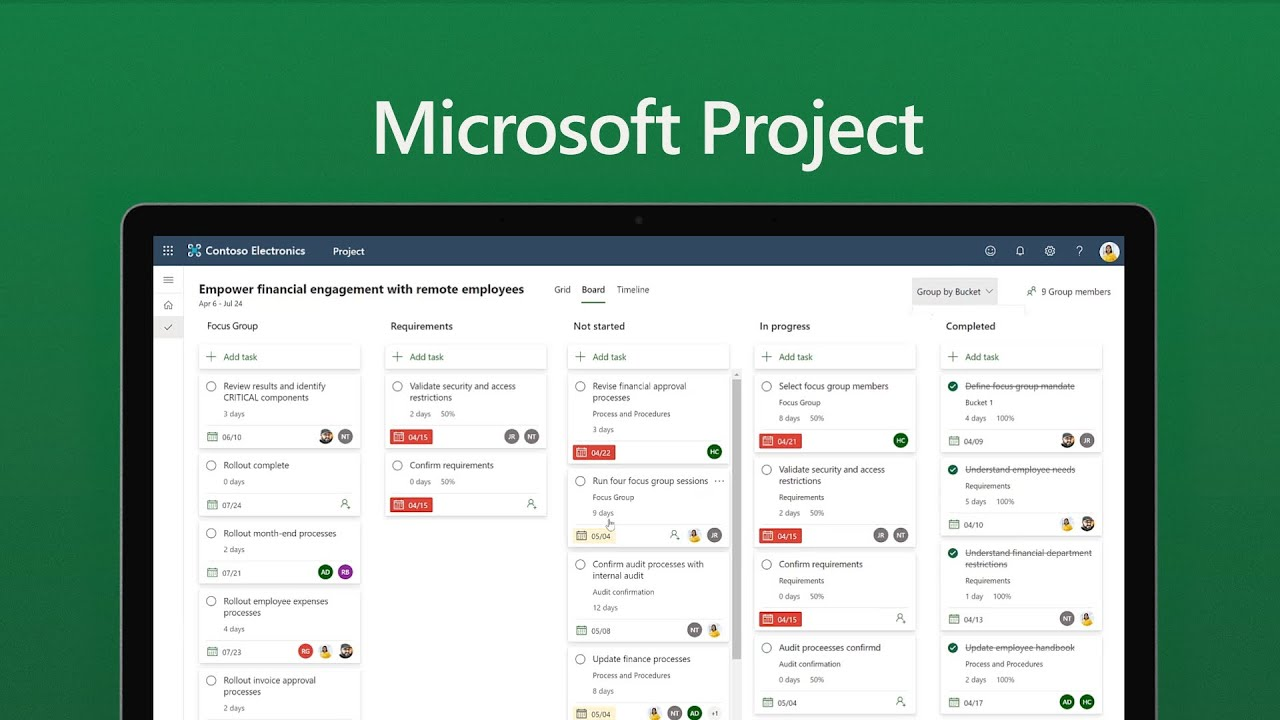
Image source: microsoft.com
Why teams are actively moving away from Microsoft Project
As the way teams work continues to evolve, many organizations are reassessing whether Microsoft Project still fits their needs. Despite its strengths in traditional planning, several structural limitations are driving teams to explore Microsoft Project alternatives that better support modern, collaborative work.
- Licensing complexity and rising costs: Microsoft Project's licensing model can be challenging to navigate, especially for growing teams. Costs increase quickly as more users need access, and there are limited free or low-cost options. This has led many organizations to seek free Microsoft Project alternatives or more transparent pricing models.
- Limited collaboration compared to modern workspaces: Microsoft Project was built primarily for planners rather than for daily . Real-time comments, in-context discussions, and shared updates are often handled outside the tool. Modern Microsoft Project alternatives online embed collaboration directly into project data.
- Mac compatibility and browser-based access gaps: Native macOS support remains limited, and browser-based functionality does not always match the desktop experience. This creates friction for mixed-device teams. As a result, demand for Microsoft Project alternatives for Mac continues to grow.
- Microsoft Project online retirement and product fragmentation: The retirement of Microsoft Project Online and the splitting of features across different Microsoft tools have confused users. Teams now face fragmented workflows instead of a single unified system. This uncertainty pushes organizations to evaluate more cohesive alternatives.
- Steep learning curve for non–project managers: Microsoft Project requires , making it challenging for non–project managers to contribute effectively. Training time slows adoption and productivity. Many teams now prefer simpler tools that balance power with usability.
Eager to overcome these challenges with a reliable tool?
Alternatives for Microsoft Project that every team needs to know about
1. Lark: All-in-one workspace replacing fragmented project tools
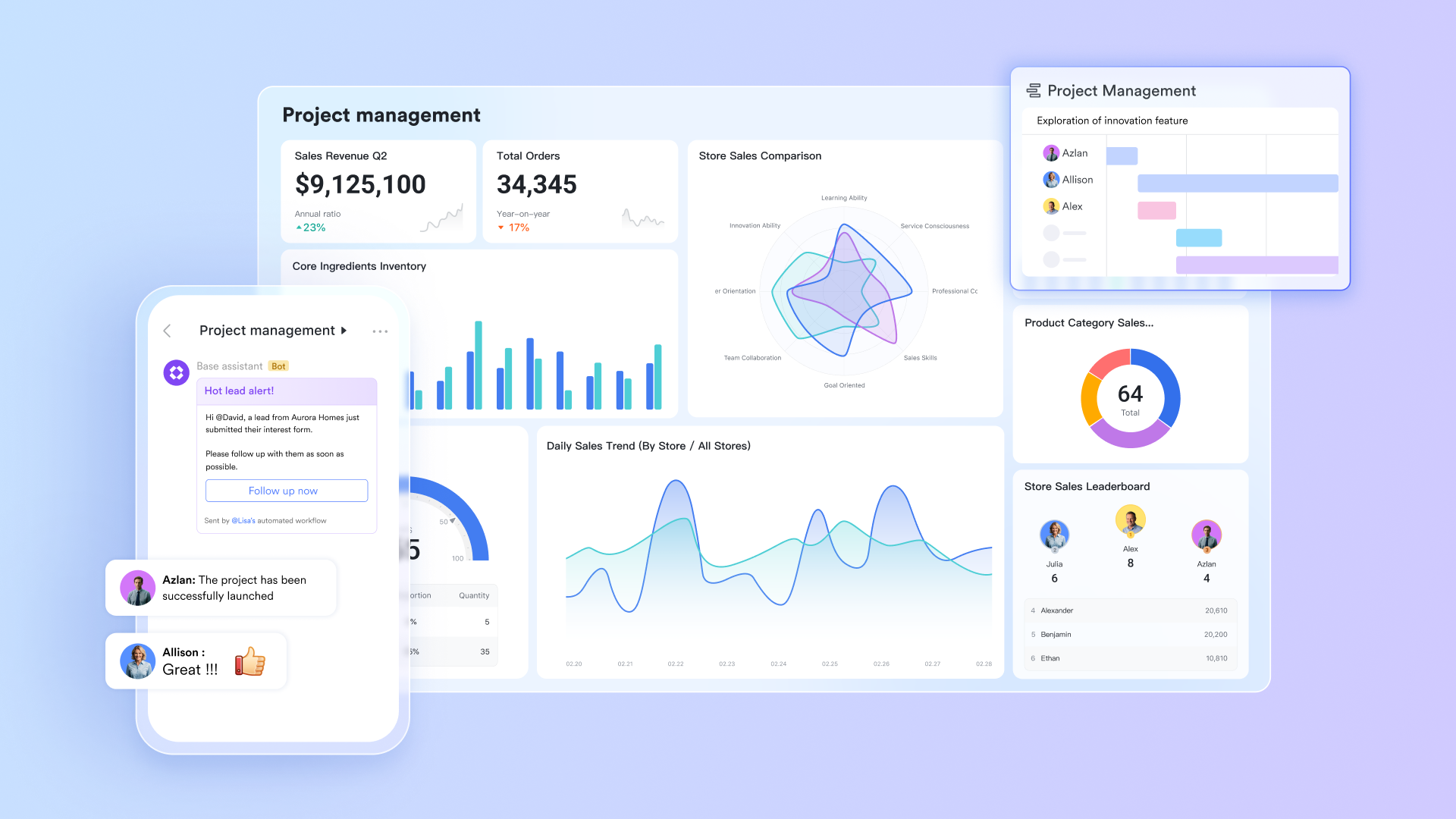
is a modern, all-in-one workspace designed to replace the fragmented tools teams often use alongside Microsoft Project. It brings , , automation, and communication into a single platform, reducing context switching and manual coordination. Unlike traditional, file-based project tools, Lark adapts to different workflows and team structures with ease. This makes it a strong choice for organizations seeking a flexible, collaborative alternative to Microsoft Project.
Flexible project data modeling beyond fixed project files
Microsoft Project relies on predefined project files with rigid task hierarchies, making it challenging to adapt workflows without restructuring plans. takes a database-first approach, where projects are built from customizable records and fields. Teams can define precisely what a "project item" means, tasks, , risks, budgets, or dependencies, using field types like assignees, progress, status, dates, formulas, and linked records. This flexibility allows organizations to manage multiple project types in one system without duplicating files, making Lark far more adaptable than Microsoft Project's file-based structure.
Gantt planning that stays connected to live execution
Microsoft Project is well known for Gantt charts, but its timelines often act as planning artifacts that require manual updates. Lark Base Gantt view automatically generates timelines from date fields or formula-based dates, ensuring schedules stay synced with real work. Dragging a Gantt bar updates underlying records instantly, and those changes reflect across all other views, grid, Kanban, calendar, and dashboards, without rework. This keeps planning and execution aligned, while Microsoft Project users often struggle with version conflicts and outdated timelines. 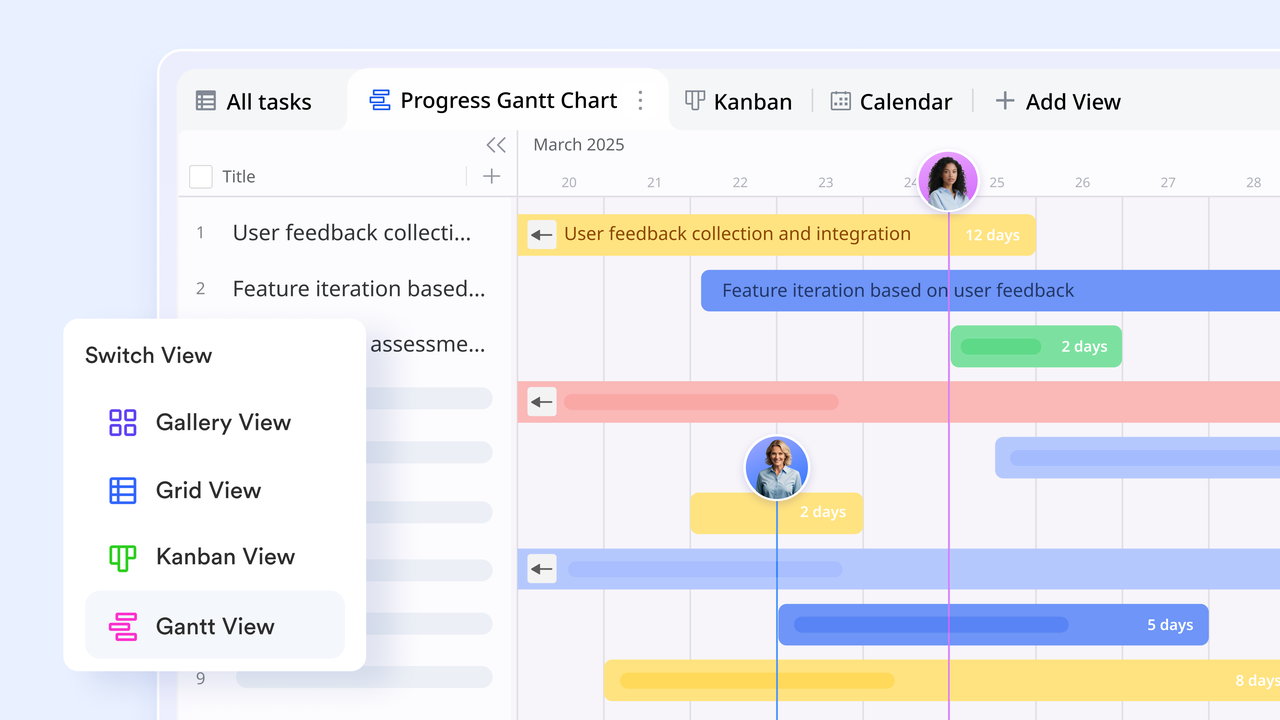
Resource and workload visibility with real-time updates
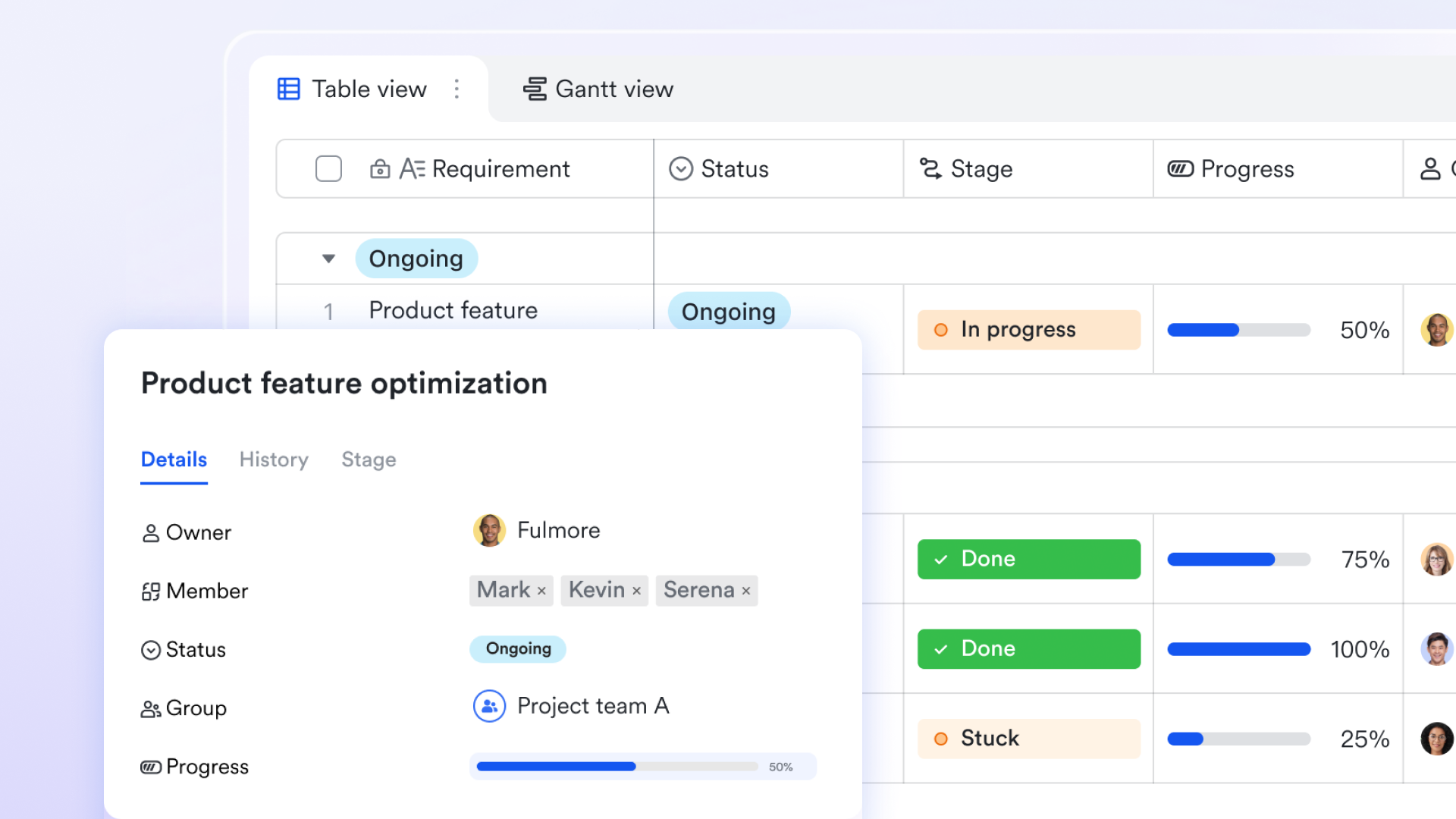
Microsoft Project offers advanced resource management, but it can become complex and admin-heavy. Lark Base simplifies by using assignee fields, capacity indicators, progress metrics, and calculated formulas. Teams can , identify overloaded owners, and rebalance tasks in real time. Because updates happen instantly, managers don't need to regenerate reports or re-baseline schedules, something that often slows teams down in Microsoft Project.
Automation that removes manual coordination
While Microsoft Project supports automation through the broader Microsoft ecosystem, setup and maintenance can be complex. Lark Base includes that trigger actions when records change. For example, when a task status moves to "Blocked," Lark can notify stakeholders, create follow-up tasks, or update related records automatically. Conditional logic and formulas allow workflows to adapt dynamically, reducing the manual follow-ups and dependency tracking that Microsoft Project typically requires users to manage manually. 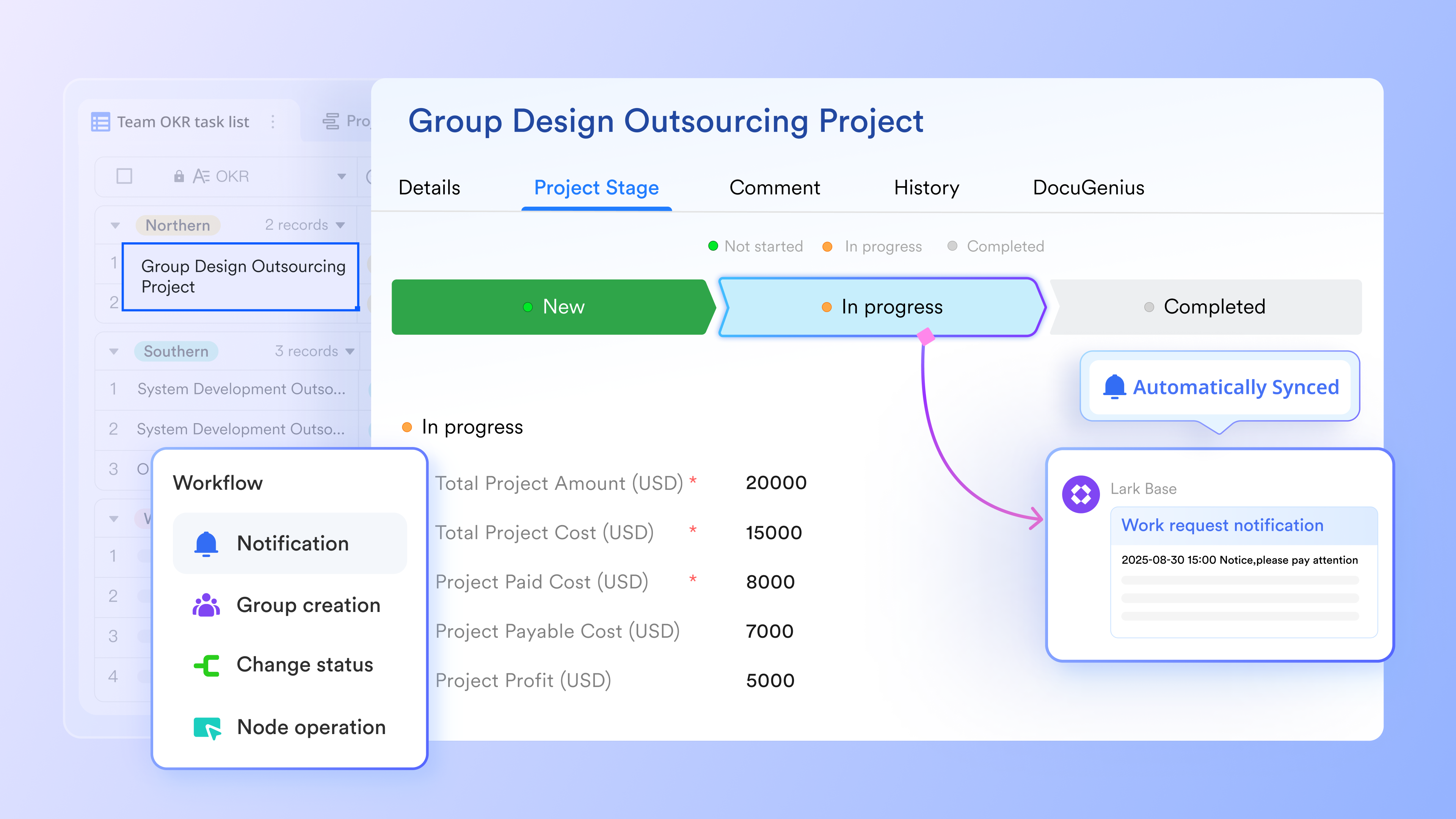
A simple and unified task management console
Microsoft requires you to jump between To Do, Planner, and Project depending on the complexity of your work. However, Lark Tasks streamlines it by providing a single, cohesive tool that scales from simple checklists to complex project management. It supports various visual workflows, including Kanban and Gantt charts, allowing you to track progress, check , and deadlines in the format that works best for your project. With the ability to assign owners, add subscribers, and create custom fields for priority or risk, it ensures clear accountability across the team. 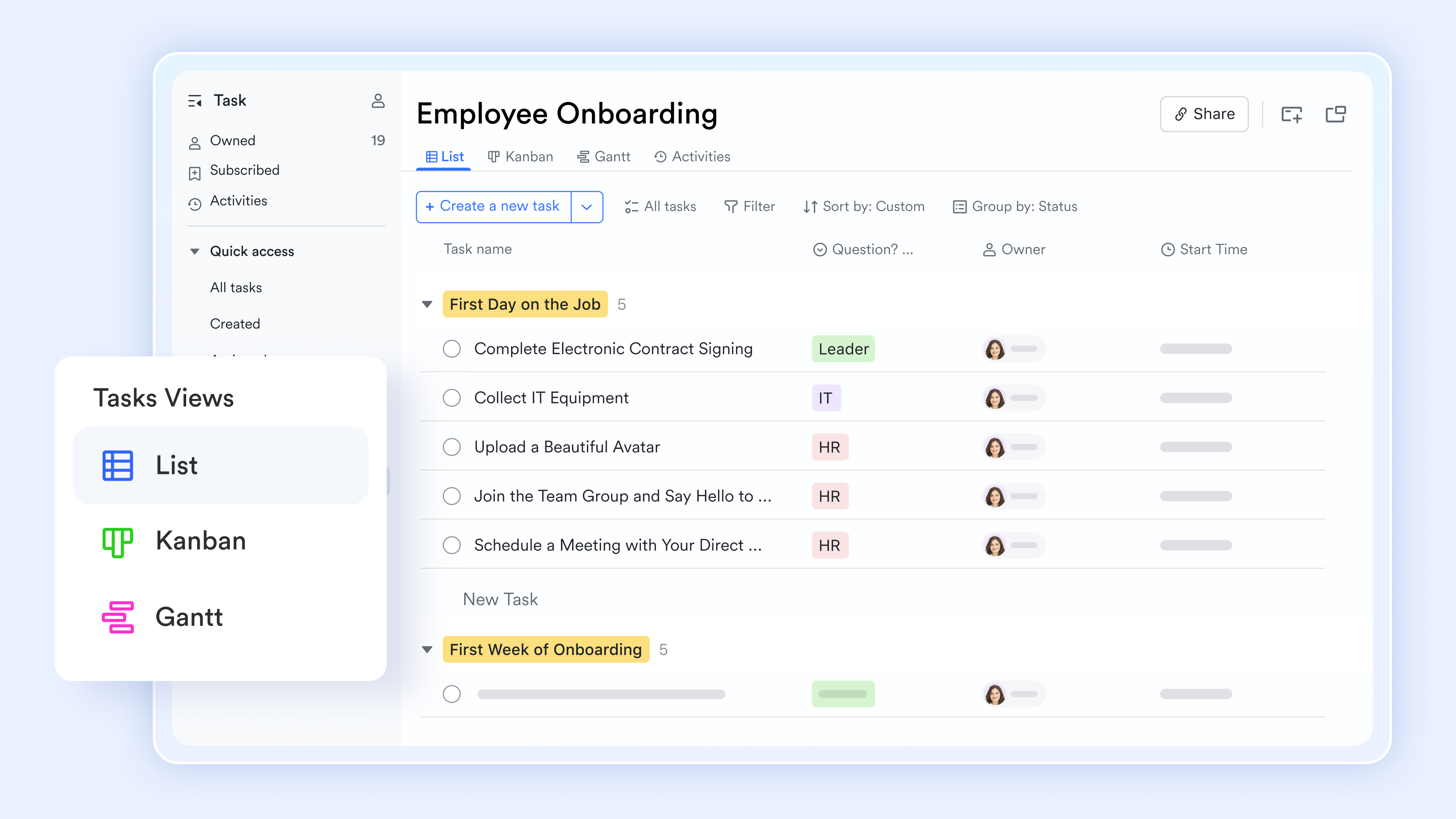
Native communication hub that fuse into daily project workflows
Unlike Microsoft Projects, which connects team communication with Microsoft Teams, is your native communication hub in Lark. It can turn simple chat conversations into actionable workflows, where you can convert messages into tasks and schedule meetings based on team members' availability. It uses threaded replies and pinned messages to keep project discussions organized and ensures key updates are never lost in a busy feed. With it, you receive instant notifications on document edits and task progress directly within your chat window. 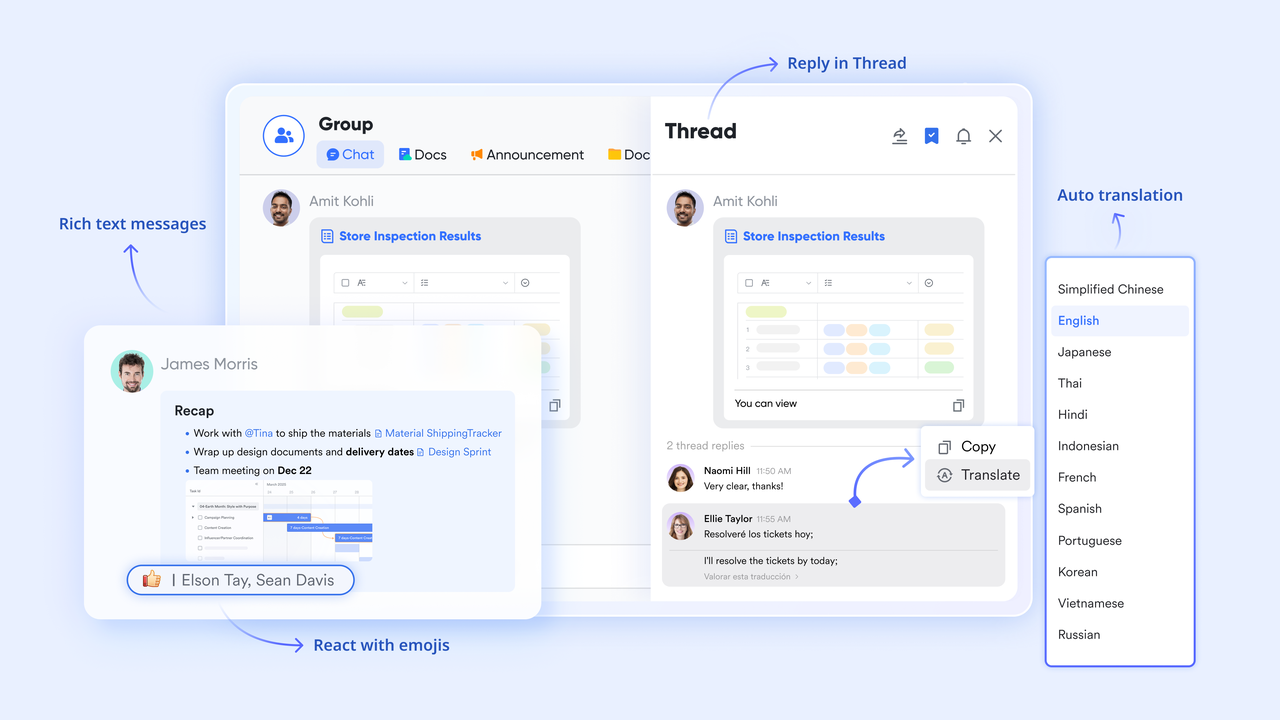
:
- Starter plan: Free forever plan that includes 11 powerful tools for up to 20 users. It also comes with 100GB of storage, 1000 automation runs, AI translations, and more.
- Basic plan: $6/user/month (billed annually) for up to 500 users. It includes everything in Starter plus group calling for up to 500 attendees, 5TB of storage, 1000 automation runs, and more. For more details, please .
- Pro plan: $12/user/month (billed annually) for up to 500 users. It includes everything in Basic plus group calling for up to 500 attendees, 15TB of storage, 50,000 automation runs, and more.
- Enterprise plan: for custom pricing. Supports unlimited users and includes even more automation runs and advanced security, compliance, and management features.
For small teams with simple communication needs

18 months message history
1000 Base automation runs/month
2000 rows per table in Base
Most POPULAR
For companies with comprehensive collaboration and management needs
Unlimited message history
500-participant video meetings
50k Base automation runs/month
20k rows per table in Base
For large companies with advanced security and organizational management needs
Get a personalized demo and pricing
Unlimited message history
500-participant video meetings
15 TB storage + 30 GB storage/user
500k Base automation runs/month
50k Base automation runs/month
Most POPULAR
For companies with comprehensive collaboration and management needs
Unlimited message history
500-participant video meetings
50k Base automation runs/month
20k rows per table in Base
2. ProjectLibre: Familiar desktop-style planning without the license cost
ProjectLibre is an open-source project management software designed for teams who prefer traditional desktop tools without paying license fees. It offers features similar to Microsoft Project, including Gantt charts, task dependencies, and resource management. Teams can plan, schedule, and track projects in a familiar interface, making transitions from MS Project easy. Its offline desktop setup allows uninterrupted planning even without internet access. ProjectLibre is ideal for individuals, consultants, and small teams looking for a cost-effective, structured project planning solution.
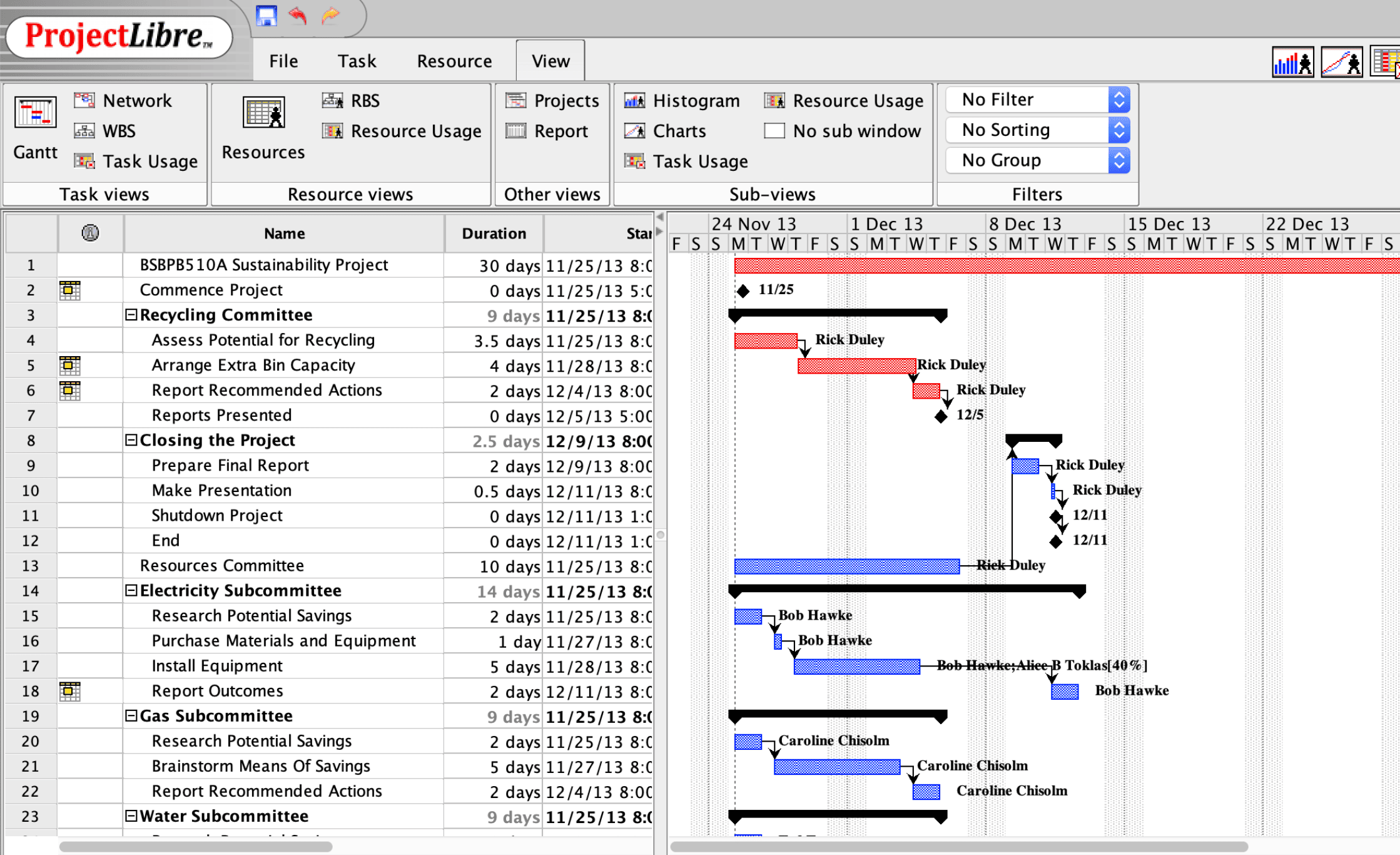
Image source: projectlibre.com
Key features:
- MS Project–like interface: Offers a familiar layout with Gantt charts, task lists, and resource views, reducing the learning curve.
- Offline desktop application: Works fully offline, making it suitable for environments with limited connectivity.
- Gantt charts & dependencies: Visualize timelines, milestones, and task relationships for structured project planning.
- Resource management: Assign resources, track workload, and manage availability across tasks.
- File compatibility: Opens and edits Microsoft Project (.mpp) files for easier migration.
Pros:
- Free and open-source desktop alternative
- Very familiar to Microsoft Project users
- Strong Gantt and scheduling capabilities
- No recurring subscription required
Cons:
- Lacks real-time collaboration features
- Limited cloud and team collaboration functionality
- Interface feels dated compared to modern tools
Pricing:
3. OpenProject: Open-source project control for structured teams
OpenProject is an open-source project management platform built for teams that need structure, transparency, and collaboration. It supports both agile and traditional project methodologies, including Scrum boards and Gantt charts. Teams can centralize tasks, communication, and documentation in one secure platform. Role-based permissions ensure clear accountability while providing access to relevant team members. OpenProject is perfect for mid-sized to large teams handling complex, multi-department projects that require full oversight.
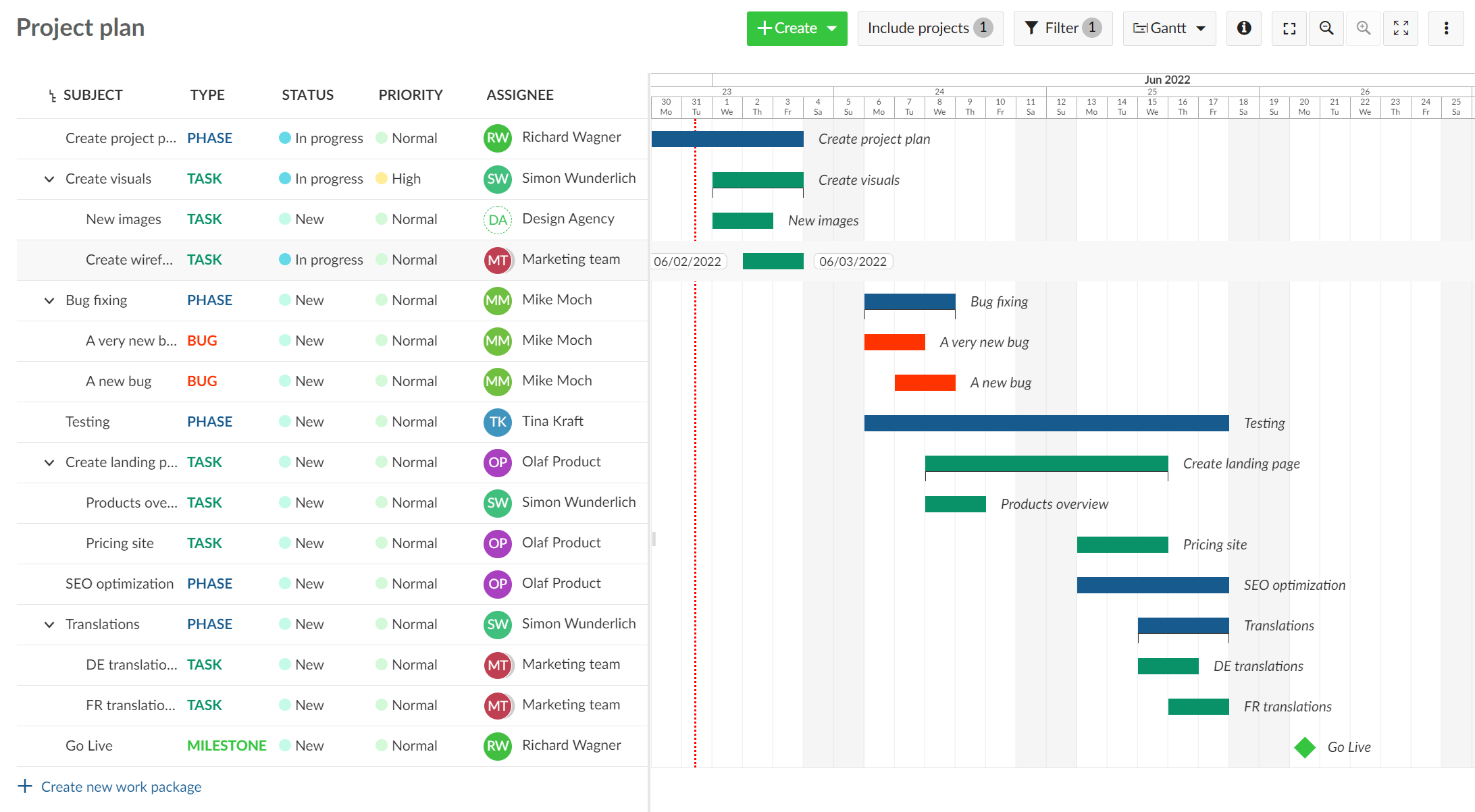
Image source: openproject.org
Key features:
- Open-source core: Full transparency and flexibility, with the option to self-host for maximum control.
- Gantt charts & roadmaps: Plan long-term initiatives, manage dependencies, and track milestones visually.
- Agile & classic project support: Includes Scrum boards, backlogs, and work packages alongside traditional planning tools.
- Collaboration & documentation: Wikis, comments, and activity feeds centralize project communication.
- Role-based permissions: Control access and responsibilities across teams and stakeholders.
Pros:
- Strong choice for structured, process-driven teams
- Open-source with active community support
- Supports both agile and waterfall methodologies
- Flexible deployment (cloud or self-hosted)
Cons:
- The interface can feel complex for new users
- Advanced features require paid plans
- Less intuitive for lightweight task management
Pricing:
- Professional: $13.50/user/month
- Premium: $19.50/user/month
4. GanttPRO: Visual-first alternative for timeline-driven projects
GanttPRO is a project management tool focused on visual planning through intuitive Gantt charts. It allows teams to manage timelines, track dependencies, and monitor milestones in real time. The platform supports resource allocation and workload management to keep teams productive. Collaboration is streamlined with comments, attachments, and notifications. GanttPRO is ideal for marketing, consulting, construction, and product development teams that rely heavily on timeline-driven planning.
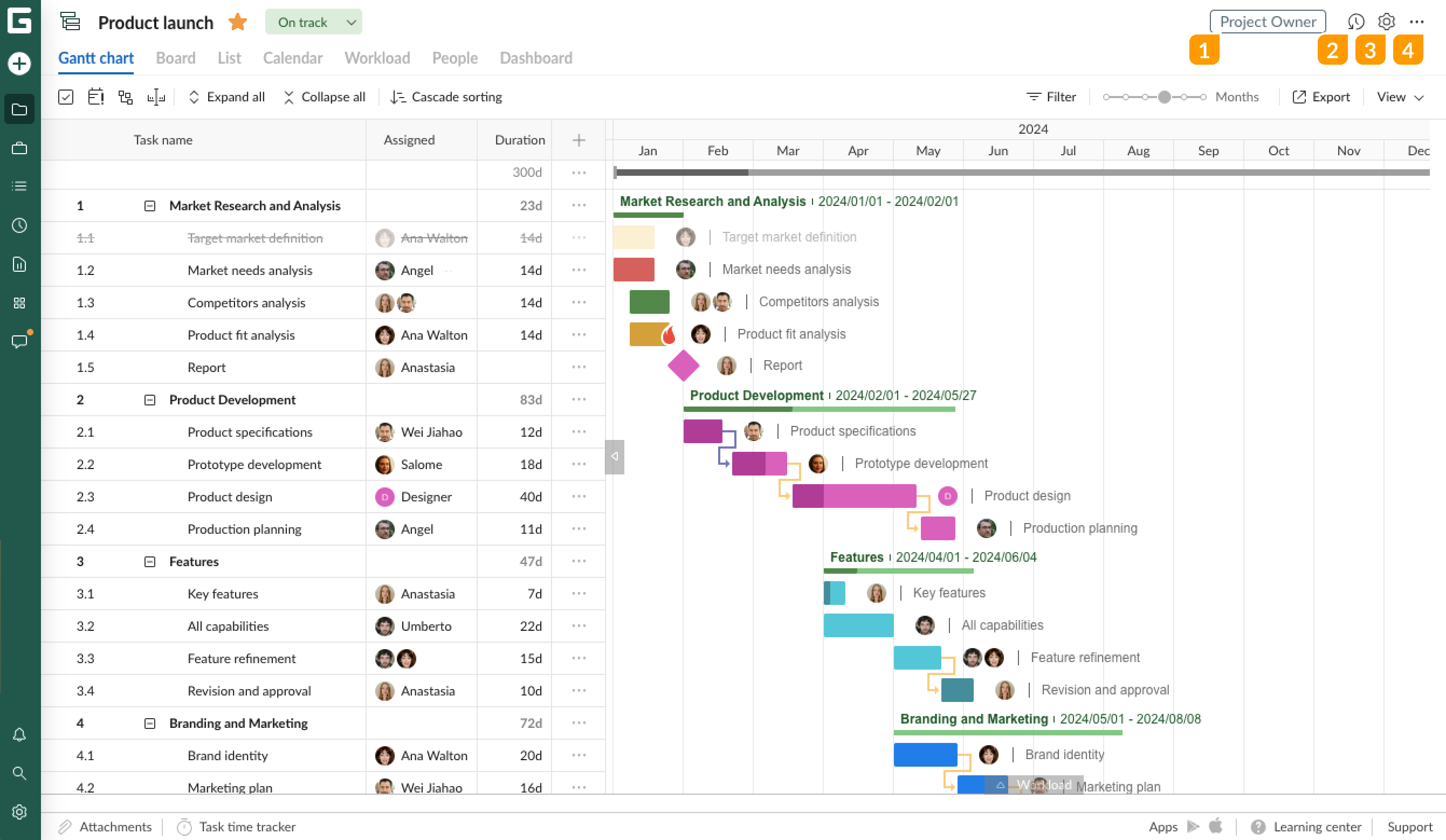
Image source: ganttpro.com
Key features:
- Interactive Gantt charts: Build and adjust project timelines with drag-and-drop scheduling and real-time updates.
- Task dependencies & milestones: Define relationships between tasks to keep projects on track and prevent delays.
- Resource management: Assign team members, track workload, and balance capacity across projects.
- Collaboration tools: Share projects, comment on tasks, and attach files to keep communication centralized.
- Progress tracking: Monitor completion rates, deadlines, and overall project health at a glance.
Pros:
- Clean, user-friendly interface
- Excellent Gantt chart functionality
- Easy to learn for non-technical teams
- Strong in planning and scheduling
Cons:
- Limited advanced workflow automation
- Not ideal for highly complex enterprise projects
Pricing:
- Core: $7/user/month (billed annually)
- Advanced: $10/user/month (billed annually)
- Business: $17/user/month (billed annually)
- Enterprise: Custom pricing
5. ClickUp: Flexible project management beyond classic PM tools
ClickUp is a comprehensive project management platform that helps teams centralize tasks, documents, goals, and workflows in one place. It's designed to improve productivity, streamline collaboration, and ensure alignment across teams of all sizes. With custom statuses, goal tracking, and powerful automation, ClickUp makes it easy to manage projects from high-level planning to daily task execution. Its flexibility suits marketing, IT, operations, and creative teams alike. By combining multiple work tools into a single platform, ClickUp reduces tool-switching and keeps work organized and visible.
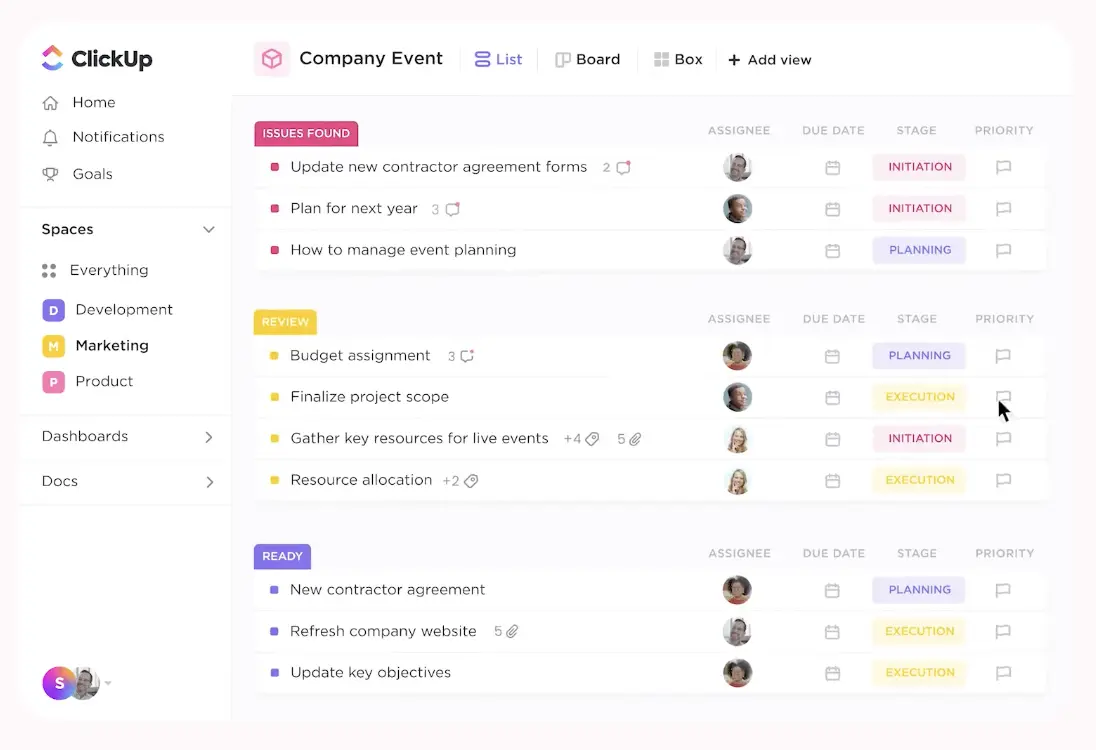
Image source: clickup.com
Key features:
- Multiple project views: Plan and track work using Gantt charts, timelines, Kanban boards, lists, and calendars.
- Custom workflows & statuses: Create approval stages, priorities, and task states that match your team's processes.
- Docs & task collaboration: Write documentation, add comments, and link tasks directly to project docs.
- Automation rules: Reduce manual work with automated task updates, assignments, and status changes.
- Goal & progress tracking: Measure project outcomes and team performance with built-in goal tracking.
Pros:
- Extremely customizable for different teams
- Combines planning, execution, and documentation
- Strong free plan for individuals and small teams
- Scales as well as teams grow
Cons:
- Can feel overwhelming for first-time users
- Performance may slow with very large workspaces
Pricing:
- Free forever: Free – Best for individual users
- Unlimited: $7/user/month – Best for small teams
- Business: $12/user/month – Best for mid-sized teams
- Enterprise: Custom pricing – Best for large teams
For more information? 👉
6. Asana: Lightweight planning for cross-functional teams
Asana is a work management platform designed to help teams plan, organize, and execute projects efficiently. It provides clear task ownership, deadlines, and visibility into progress across all projects. Teams can collaborate easily through comments, attachments, and notifications within tasks. Visual timelines and boards make it simple to understand dependencies and track work. Asana is suitable for cross-functional teams in marketing, product, operations, and business functions who need lightweight yet structured project planning.
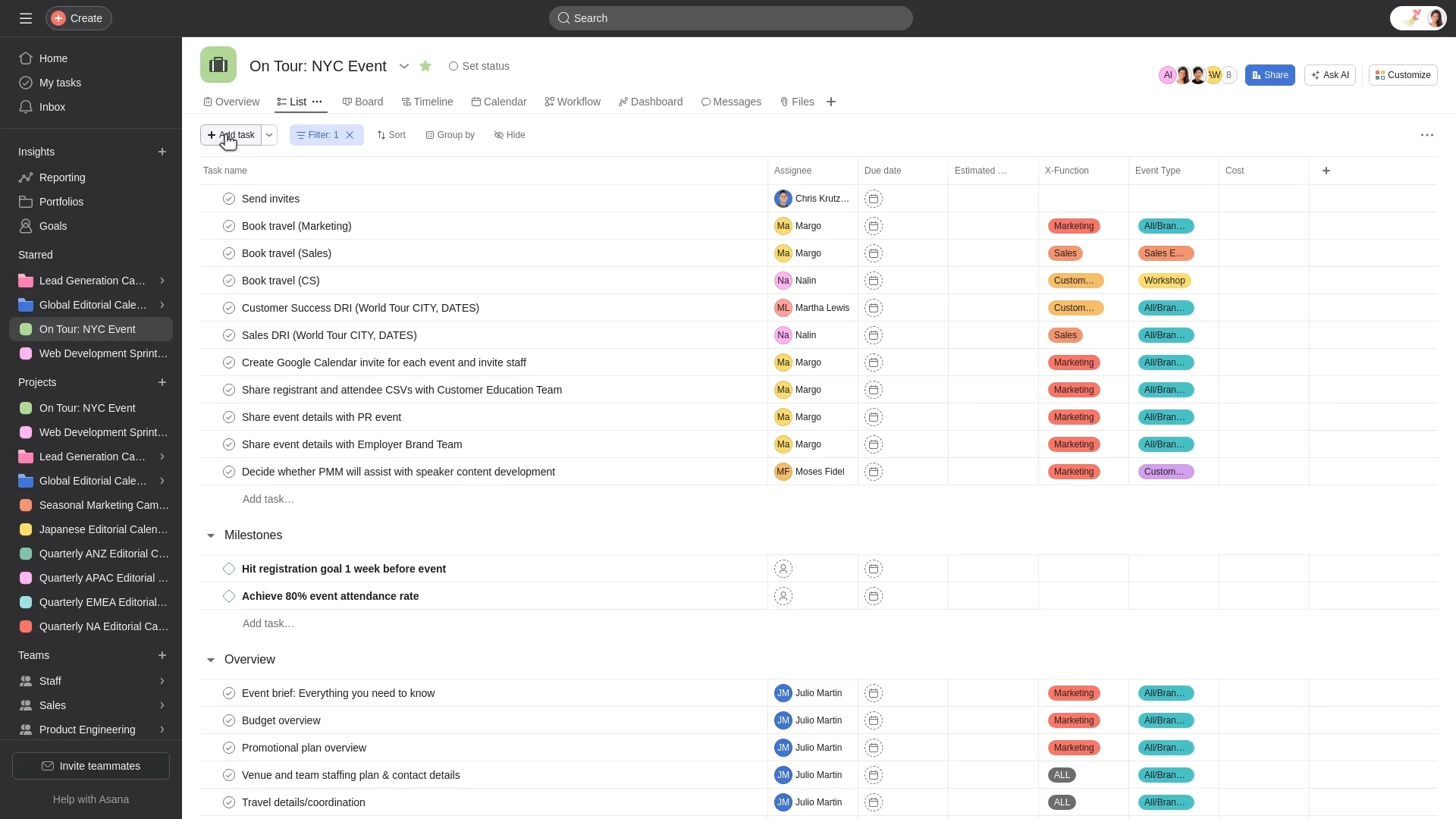
Image source: asana.com
Key features:
- Task & project management: Create tasks, assign owners, set deadlines, and track progress across teams.
- Timeline & Gantt-style views: Visualize project plans, dependencies, and shifting deadlines in real time.
- Cross-team collaboration: Comment on tasks, tag teammates, and share files to keep work centralized.
- Workload management: View team capacity and rebalance assignments to avoid burnout or delays.
- Reporting & goals: Track project status and connect work to company-wide objectives.
Pros:
- Clean, intuitive interface
- Easy adoption for non-technical users
- Strong collaboration and visibility
- Works well for cross-department coordination
Cons:
- Limited advanced scheduling compared to classic PM tools
- Automation features are basic on lower plans
Pricing:
- Starter: $10.99/user/month (annual)
- Advanced: $24.99/user/month (annual)
- Enterprise: Custom pricing
7. Smartsheet: Spreadsheet-style planning with enterprise controls
Smartsheet combines the familiarity of spreadsheets with robust project management and collaboration tools. It provides Gantt charts, task sheets, and automated workflows for efficient project planning and execution. Resource management features allow teams to balance workloads and track capacity. Custom dashboards and reports give insight into project progress, performance, and KPIs. Smartsheet is ideal for enterprise teams or operations-heavy projects that require both flexibility and control.
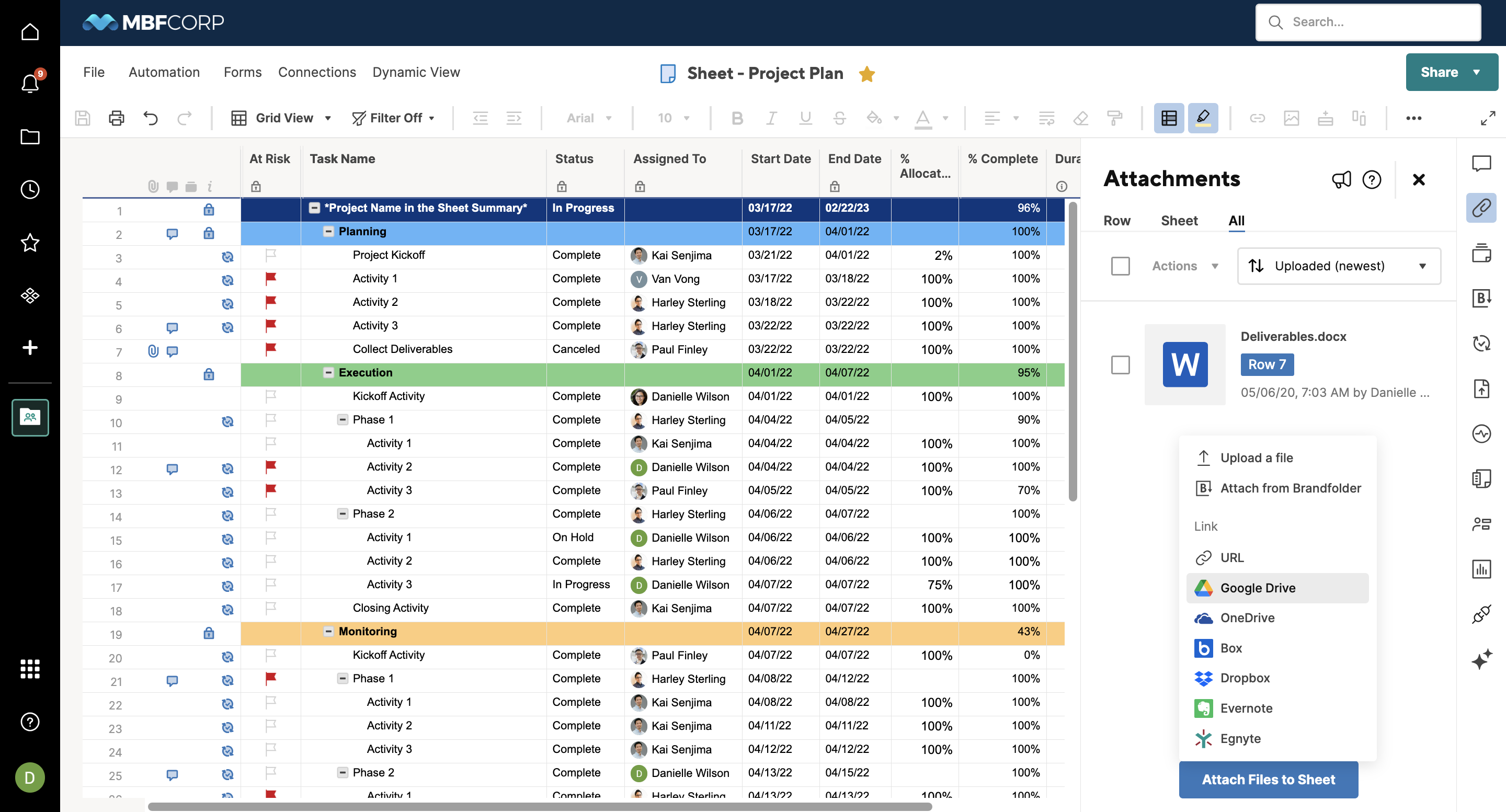
Image source: smartsheet.com
Key features:
- Spreadsheet-style project sheets: Manage tasks, deadlines, and resources in a familiar grid interface.
- Gantt & calendar views: Visualize project timelines and dependencies with interactive charts.
- Automated workflows: Trigger alerts, approvals, and reminders to reduce manual follow-ups.
- Resource & workload management: Track team capacity, balance assignments, and avoid overloading members.
- Reports & dashboards: Create custom reports, track KPIs, and monitor project health in real time.
Pros:
- Combines spreadsheet familiarity with project management tools
- Strong enterprise controls and automation
- Excellent for multi-project tracking
- Flexible reporting and dashboards
Cons:
- Can feel complex for small teams or simple projects
- Slightly steeper learning curve for beginners
Pricing:
- Pro: $9/member/month (billed yearly)
- Business: $19/member/month (billed yearly)
- Enterprise: Custom pricing
- Advanced work management: Custom pricing
8. Wrike: Structured work management for large teams
Wrike is a cloud-based project management solution designed to help teams manage complex projects with visibility and control. It includes dashboards, task tracking, Gantt charts, and reporting tools for efficient oversight. Automation features reduce repetitive work and streamline approvals, keeping projects on schedule. Collaboration tools allow teams to communicate, share files, and manage feedback in a centralized space. Wrike is best suited for marketing, creative, and cross-functional teams in medium to large organizations.
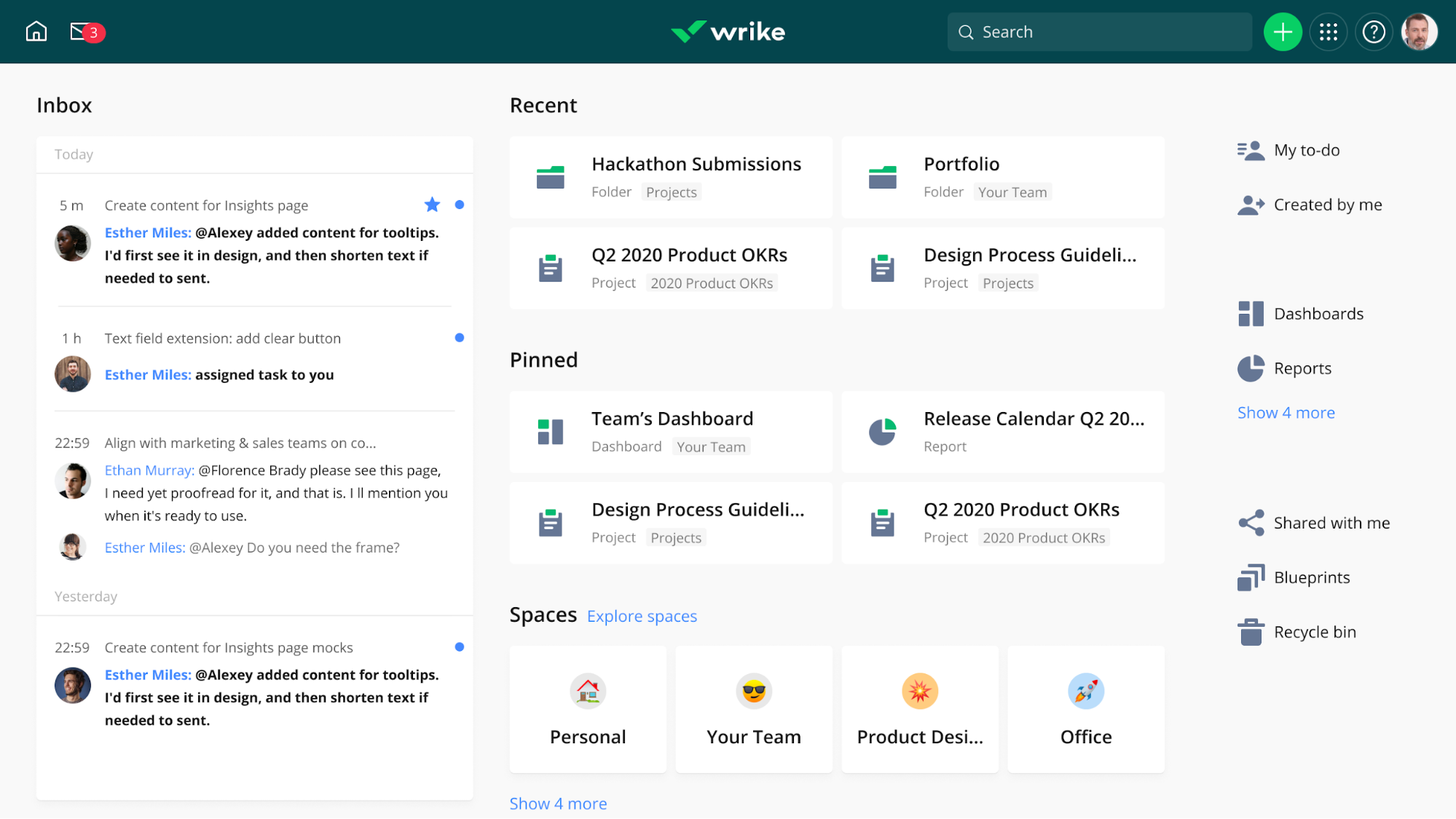
Image source: wrike.com
Key features:
- Customizable dashboards: Visualize tasks, projects, and performance metrics in real time.
- Task & project tracking: Assign tasks, set deadlines, track dependencies, and monitor progress.
- Collaboration tools: Comment on tasks, share files, and tag team members to centralize communication.
- Workflow automation: Automate repetitive tasks, approvals, and notifications to save time.
- Resource management & reporting: Track team workload, manage capacity, and generate detailed performance reports.
Pros:
- Strong for large teams and complex projects
- Advanced reporting and analytics
- Flexible dashboards for team visibility
- Good workflow automation and approvals
Cons:
- It can be overwhelming for small teams
- Pricing scales quickly with larger teams
Pricing:
- Business: $25/user/month
- Enterprise: Custom pricing
- Pinnacle: Custom pricing
9. Monday.com: Visual project tracking with customization
Monday.com is a visual project management platform that helps teams plan, track, and execute work efficiently. Customizable boards and workflows allow teams to design processes that fit their needs. Timeline, Kanban, and Gantt views provide a clear visual overview of tasks, deadlines, and dependencies. Automation rules reduce repetitive tasks and streamline workflows. Monday.com is perfect for small to mid-sized teams that need flexibility, visibility, and collaboration across multiple projects.
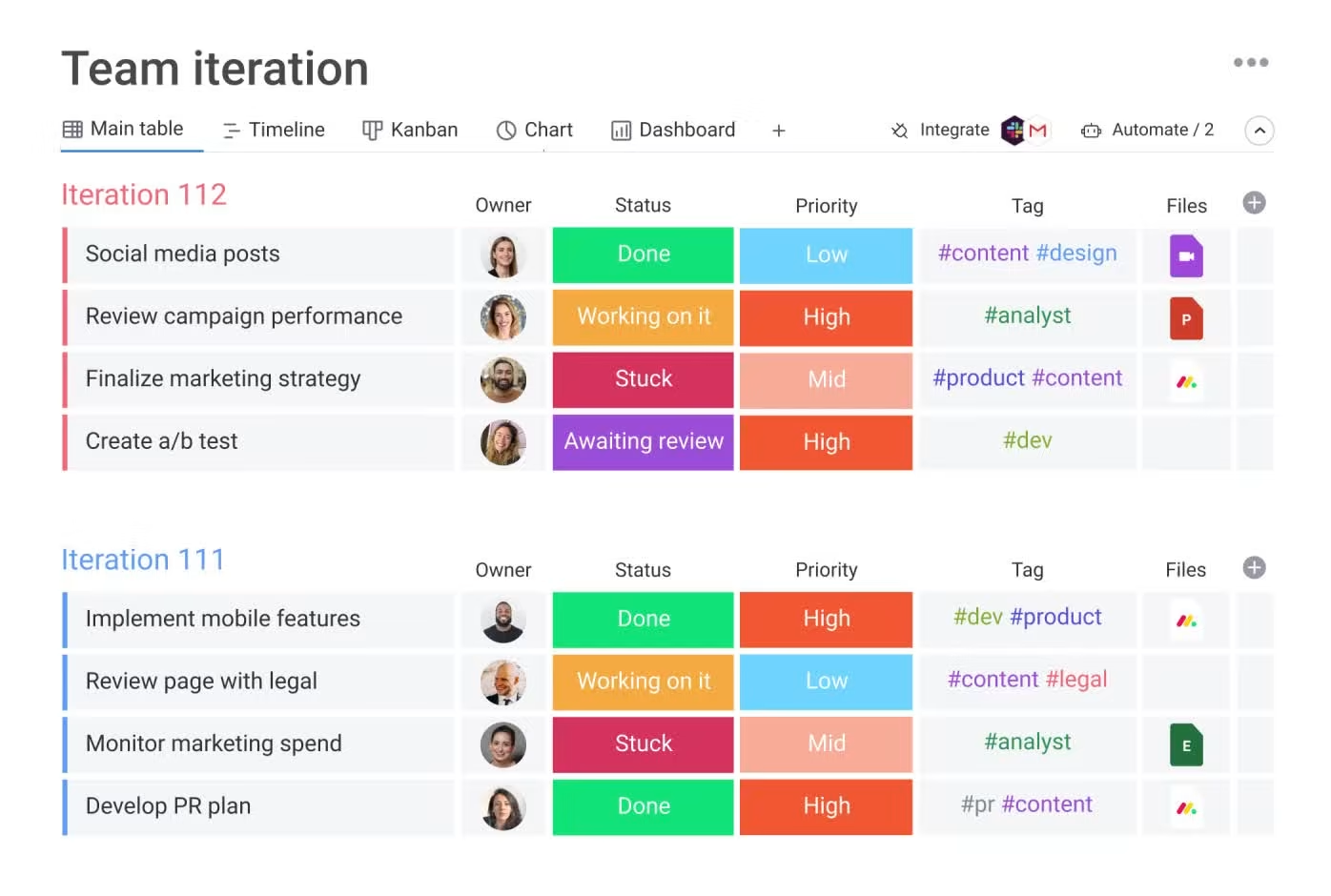
Image source: monday.com
Key features:
- Customizable boards & workflows: Design task boards that match your team's unique processes.
- Timeline & Gantt views: Visualize project schedules, milestones, and dependencies.
- Automation rules: Reduce manual follow-ups with automatic notifications, task updates, and recurring workflows.
- Collaboration & file sharing: Comment, tag teammates, and attach files directly to tasks.
- Dashboards & reporting: Track progress, monitor KPIs, and get insights across multiple projects.
Pros:
- Highly visual and intuitive interface
- Strong customization options for workflows
- Effective collaboration and file management
- Works well for small to mid-sized teams
Cons:
- Can become expensive as teams scale
- Limited advanced project management features on lower-tier plans
Pricing:
- Free: Up to 2 seats, for individuals tracking their work
- Standard: $12/seat/month (billed annually)
- Pro: $19/seat/month (billed annually)
- Enterprise: Custom pricing
10. Zoho Projects: Budget-friendly alternative inside a broader suite
Zoho Projects is a cloud-based project management tool that integrates seamlessly with the Zoho ecosystem. It provides Gantt charts, task tracking, milestones, and collaborative features for better project planning and execution. Time tracking and budget management help teams stay on schedule and within budget. Custom reports and dashboards give managers insight into project progress and team performance. Zoho Projects is ideal for small to mid-sized teams looking for an affordable, integrated solution for project management and collaboration.
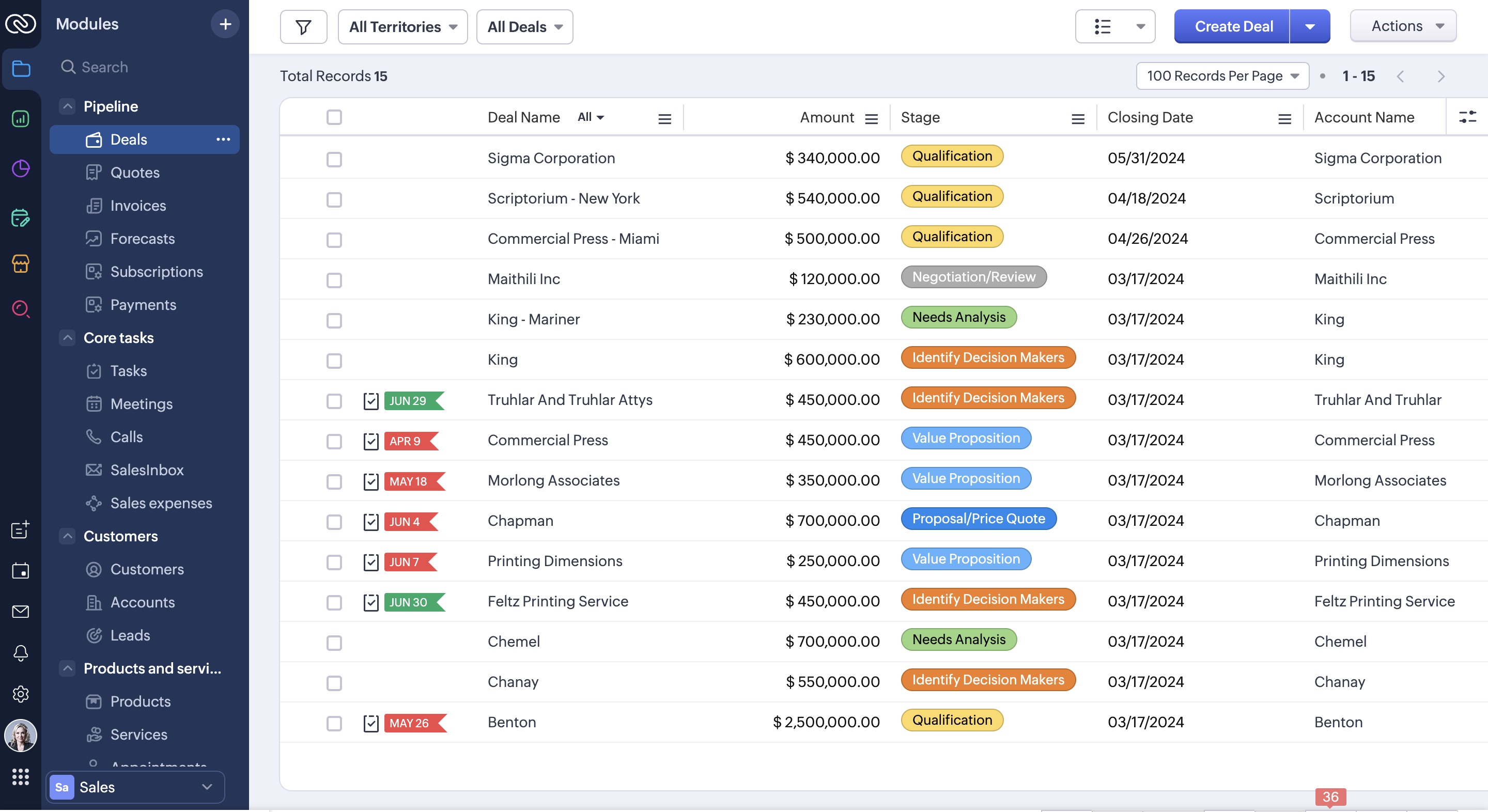
Image source: zoho.com
Key features:
- Task & milestone management: Plan tasks, assign owners, and track progress against project milestones.
- Gantt charts & timelines: Visualize project schedules, dependencies, and critical paths.
- Time tracking & billing: Log hours spent on tasks and monitor project budgets.
- Collaboration tools: Comment on tasks, share documents, and centralize communication.
- Reporting & dashboards: Generate progress reports, track KPIs, and monitor team productivity.
Pros:
- Affordable for small to mid-sized teams
- Integrates well with other Zoho apps
- Good mix of planning, tracking, and collaboration features
Cons:
- Limited advanced workflow automation
- Some integrations outside the Zoho ecosystem require workarounds
Pricing:
- Premium: $4/user/month (billed annually)
- Enterprise: $9/user/month (billed annually)
- Ultimate: $14/user/month (billed annually)
Choosing the right Microsoft Project alternative for your team
Finding the right Microsoft Project alternative requires understanding your team's unique workflows, collaboration needs, and technology preferences. With so many options available, including free Microsoft Project alternatives and cloud-based platforms, selecting the right tool can significantly improve productivity and reduce overhead.
- Evaluate team size and workflow complexity: Smaller teams or those with straightforward projects may not need all the of Microsoft Project. Consider a platform that scales with your team's size and complexity. This ensures you only pay for features you actually use while maintaining efficiency.
- Prioritize real-time collaboration and communication: Modern teams thrive on collaboration, especially when distributed across locations. Look for tools that embed discussions, file sharing, and updates directly into tasks. Platforms that offer this reduce context switching and improve execution compared to traditional Microsoft Project setups.
- Check cross-platform and browser support: With hybrid work becoming standard, teams need access from Macs, PCs, and mobile devices. Tools with robust browser-based interfaces allow everyone to contribute seamlessly. This is especially critical for organizations seeking Microsoft Project alternatives for Mac.
- Assess budget and licensing flexibility: Microsoft Project can be costly and complex to license. Alternatives with transparent pricing, freemium models, or flexible plans reduce financial overhead. Free and low-cost options are handy for startups or teams exploring alternatives to Microsoft Project.
- Consider integration and : Your projects may rely on other software, such as Slack, email, or CRM systems. A Microsoft Project alternative with strong integration and built-in automation can streamline workflows. Automating repetitive updates and notifications keeps teams focused on meaningful work.
Conclusion
Microsoft Project has long been a trusted solution for structured, schedule-driven project management, but it no longer fits the way many modern teams work. Rising costs, limited collaboration, and platform constraints have prompted organizations to explore more flexible and accessible alternatives to Microsoft Project. Today's tools offer real-time collaboration, cloud-based access, and simpler onboarding while still supporting timelines, dependencies, and reporting. Whether you need free Microsoft Project alternatives, Mac-compatible tools, or all-in-one workspaces, the right choice can significantly improve execution and team alignment. For teams seeking a modern, collaborative approach to project management, the shift often leads to .
Upgrade from legacy project management tools
FAQs
What is replacing Microsoft Project?
Many teams are replacing Microsoft Project with cloud-based, collaborative platforms designed for modern workflows. These alternatives to Microsoft Project focus on real-time updates, ease of use, and cross-team visibility. You'll find many Microsoft Project alternatives online, including tools highlighted on review platforms like alternatives to Microsoft Project GetApp, which emphasize flexibility over rigid planning.
Is MS Project being phased out?
Microsoft Project is not entirely discontinued, but changes such as the retirement of Project Online and a shift in product focus have created uncertainty. This has encouraged teams to explore alternatives to Microsoft Project for Mac and browser-first tools. As work becomes more distributed, many organizations prefer modern platforms over traditional desktop-based solutions.
Is there a Google equivalent to MS Project?
Google does not offer a direct equivalent to Microsoft Project. However, many teams use Microsoft Project alternatives online that integrate well with Google Workspace. These tools often provide timelines, dependencies, and collaboration in one place, making them practical Microsoft Project alternatives for Mac and cloud-first teams.
For more Google Workspace's information, you can refer to and .
Is there a free MS Project?
Microsoft Project does not offer a full-featured free version. This is why many teams turn to free Microsoft Project alternatives or Microsoft Project free alternatives. These tools provide essential project planning features, such as Gantt charts and task tracking, without the high licensing costs of Microsoft Project.
How long does it typically take teams to migrate from Microsoft Project to a new platform?
Migration timelines vary, but most teams transition within a few weeks. Simpler projects move faster, especially when using Microsoft Project for Mac alternatives with import tools. Choosing familiar free alternatives to Microsoft Project can reduce training time and help teams adopt new workflows more quickly.
Related reading






























