A priority matrix helps teams decide what to work on first when everything feels important. Without a clear framework, decisions are often driven by urgency, opinions, or loud stakeholders rather than impact. A priority matrix brings structure by visually ranking tasks, projects, or incidents using consistent criteria. As modern teams move faster and juggle more work, many are also exploring tools like Lark to turn prioritization into daily execution rather than static planning.
Bring structure to daily priorities from now on
What is a priority matrix?
A priority matrix is a visual decision-making tool used to rank tasks, projects, or initiatives based on defined criteria. Common dimensions include urgency, importance, impact, and effort, allowing teams to compare work objectively rather than relying on intuition. Models such as the Eisenhower priority matrix and action priority matrix use simple grids to show what should be done first, scheduled later, delegated, or deprioritized. This clarity helps teams stay focused and avoid reactive decision-making.
In practice, a priority matrix is applied across many contexts, including a task priority matrix for daily work, a for portfolio planning, or an impact urgency priority matrix for operations and incidents. By using , teams reduce conflict, improve transparency, and align decisions with business goals. When used consistently, a priority matrix becomes a shared language for making smarter, faster decisions.
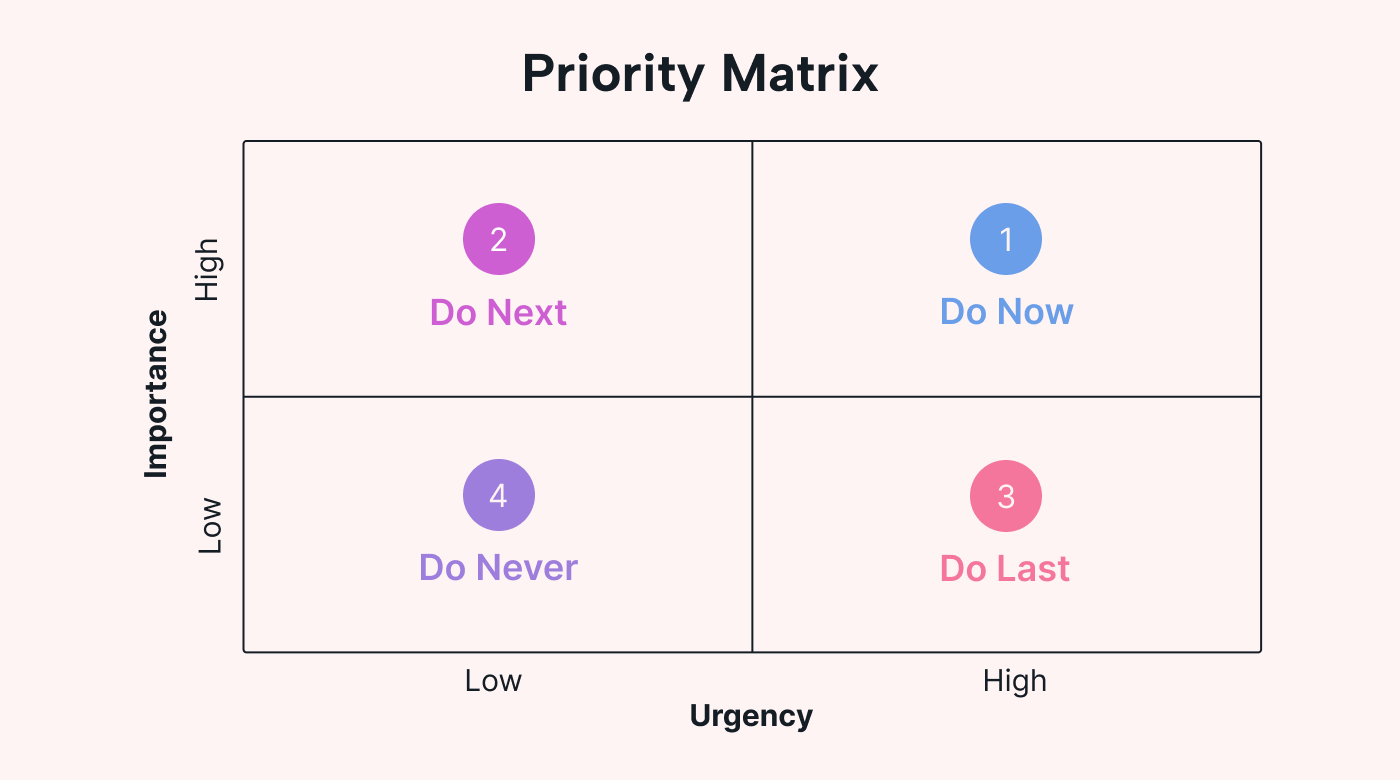
Image source: usemotion.com
Why is a priority matrix so important?
Without a priority matrix, prioritization often breaks down when teams rely on gut feeling, urgency, or stakeholder pressure. In the meantime, people label work as "high priority" inconsistently, making it difficult to explain trade-offs or defend decisions. Teams jump between tasks, react to the loudest requests, and lose sight of long-term impact. In the absence of a priority matrix, there is no common reference point to align urgency, importance, or effort across roles.
Over time, this lack of structure leads to constant reprioritization, missed deadlines, and overloaded teams. Operational teams struggle to escalate issues without an impact urgency priority matrix, while leaders face friction when priorities are questioned. A clear framework replaces ambiguity with and enables teams to prioritize with confidence.
Common types of priority matrix and when to use each
Different teams face different prioritization challenges, which is why no single priority matrix works for every situation. Each model emphasizes specific decision criteria such as urgency, impact, effort, or risk. Choosing the right framework helps teams make clearer trade-offs and avoid overcomplicating decisions. Below are the most commonly used priority matrix types and when each is most effective.
- Eisenhower priority matrix (urgent vs important): The Eisenhower priority matrix helps individuals and teams distinguish between urgent and important work. Tasks are grouped into four quadrants that guide whether work should be done immediately, scheduled, delegated, or eliminated. This model is especially useful for personal productivity and leadership planning. It prevents teams from spending too much time reacting to urgency instead of focusing on meaningful outcomes.
- Action priority matrix (impact vs effort): The action priority matrix compares tasks based on their potential impact and the effort required to complete them. High-impact, low-effort tasks are identified as quick wins, while high-impact, high-effort items become strategic initiatives. This is a staple for and operations teams to maximize ROI. It helps maximize results when time and resources are limited.
- Impact urgency priority matrix for operational teams: The impact urgency priority matrix is commonly used in customer support and operations. It ranks work based on business impact and time sensitivity to ensure critical issues are addressed first. High-impact, high-urgency items receive immediate attention. This framework supports consistent escalation and reduces confusion during high-pressure situations.
- Project priority matrix for portfolio decisions: A project priority matrix helps leaders evaluate multiple initiatives competing for shared resources. Projects are compared using criteria such as strategic alignment, cost, risk, and expected return. This approach supports objective and reduces political decision-making. It is widely used by PMOs and executive teams.
- Incident priority matrix in ITIL environments: An incident priority matrix is a core component of ITIL practices. It combines impact and urgency to assign incident priority levels consistently. This ensures predictable response times and escalation paths. IT teams rely on this matrix to meet service-level agreements and manage incidents effectively.
- Six sigma priority matrix for process improvement: The six sigma priority matrix supports data-driven process improvement initiatives. Issues are ranked based on factors such as severity, frequency, and detectability. This helps teams focus on root causes with the greatest operational impact. It is commonly used during DMAIC cycles in quality and manufacturing environments.
Priority matrix examples from real team scenarios
Priority matrices become most valuable when applied to real, everyday decisions. Across teams and functions, they help turn abstract trade-offs into clear, visual choices. By applying the same prioritization logic consistently, teams reduce conflict and improve execution. The examples below show how different teams use priority matrices in practical scenarios.
- Product backlog prioritization: Product teams use a to rank features, enhancements, and bug fixes. Impact reflects customer value, while effort represents development complexity. This approach helps teams focus on high-value work without overloading sprints. It also keeps roadmaps aligned with available capacity.
- Marketing campaign planning: Marketing teams rely on a project priority matrix to compare campaigns based on reach, cost, and expected return. This ensures budgets are allocated to initiatives with the highest impact. Low-value ideas are deprioritized early. Campaign execution becomes more focused and measurable.
- IT incident response escalation: IT teams use an incident priority matrix to assess outages and service disruptions.() Incidents are ranked by urgency and business impact. This creates consistent escalation paths and faster response times, utilizing to notify stakeholders instantly.
- Leadership trade-off decisions: Executives use a project priority matrix to evaluate strategic options and investments. Competing initiatives are compared objectively rather than politically. Trade-offs become easier to explain across the organization. Alignment improves at the leadership level.
- Project intake and resource allocation: Operations teams apply a project priority matrix template to evaluate incoming requests. Each request is scored before approval to prevent overload. Resources are allocated to the most valuable work. Transparency improves trust and decision clarity.
How to build a priority matrix step by step
Building a priority matrix requires structure, clarity, and consistency across the team. When steps are skipped or rushed, prioritization quickly becomes subjective and ineffective. Following a clear process ensures that decisions are transparent, repeatable, and aligned with real constraints. The steps below outline a practical approach teams can apply across tasks, projects, or incidents.
Step 1: Define the decision scope (tasks, projects, incidents)
Start by clearly defining what you are prioritizing. Mixing tasks, projects, and incidents in the same priority matrix leads to inconsistent scoring. A task priority matrix works best for daily work, while a project priority matrix suits portfolio decisions. A clear scope ensures fair comparison.
Step 2: Choose the right dimensions (urgency, impact, effort, risk)
Select dimensions that reflect real trade-offs your team faces. Common choices include urgency, impact, effort, and risk. Avoid adding too many dimensions, as complexity reduces clarity. Well-defined criteria improve alignment and scoring consistency.
Step 3: Score consistently and transparently
Use shared scoring scales and document what each score means. Transparency helps stakeholders understand why items are ranked the way they are. Consistent scoring reduces bias and conflict. This step builds trust in the prioritization process.
Step 4: Place items and review edge cases
Plot each item into the matrix and review borderline cases together. Discussions should focus on criteria, not opinions. This is an essential part of , as it ensures everyone agrees on the high-stakes "Do First" tasks.
Step 5: Revisit priorities as conditions change
Priorities are not static and must be reviewed regularly. Changes in capacity, deadlines, or business goals affect rankings. A living priority matrix stays relevant over time by utilizing to adapt to new information. Regular reviews prevent outdated decisions from slowing execution.
Turn priorities into execution
Priority matrix templates for a quick start
Priority matrix templates help teams move from theory to execution without spending time on setup. Each template below is designed for a specific prioritization use case, using proven frameworks that teams can adopt immediately. These templates reduce friction, improve consistency, and make prioritization visible across the organization. Teams can customize them as workflows evolve while keeping a shared structure in place.
Eisenhower matrix template
The Eisenhower matrix template is designed to help individuals and teams distinguish between urgency and importance. It forces clarity by asking whether a task truly matters or merely feels urgent under external pressure. Tasks are categorized into four quadrants: Do now, schedule, delegate, or eliminate, which reduces reactive work and improves focus.
Urgent important matrix template
The urgent, important matrix template expands Eisenhower-style thinking into a collaborative team setting. Instead of prioritizing tasks privately, teams align on what is urgent and essential together, using shared definitions. This reduces confusion when multiple stakeholders label their work as high priority. The template is especially useful for weekly , sprint kickoffs, and cross-team coordination.
Priorities kanban template
The template blends a task priority matrix with execution workflows. Priority levels visually organize tasks and move across columns as urgency or impact changes. Unlike static matrices, this template supports continuous reprioritization while work is already in progress. It is ideal for agile , operations teams, and fast-moving environments where priorities shift frequently.
Action plan for leadership template
The template is based on the action priority matrix framework, which evaluates initiatives by impact and effort. It helps leadership teams distinguish between quick wins, strategic initiatives, low-value work, and resource-heavy distractions. This template is commonly used during strategic planning, quarterly reviews, and executive decision sessions. It supports transparent trade-offs and helps leaders justify why certain initiatives move forward while others are paused.
Risk assessment matrix for risk managers
This template applies Six Sigma priority matrix principles to risk management. Risks are evaluated based on likelihood and potential impact, making high-risk scenarios immediately visible. This structured approach helps teams prioritize mitigation efforts rather than reacting after issues occur. It is widely used in compliance, security, operations, and governance contexts.
Action time: Turn priority matrices into living systems with Lark
To move beyond a static grid, you need to turn your matrix into a "living system" where data flows automatically between your planning docs and your team's daily tasks. accomplishes this by bridging the gap between data management, , and workflows, ensuring that as you shift priorities in your matrix, the change instantly triggers notifications and updates across your entire workspace.
Multi-view Base synchronization
allows you to enter data once and view it in multiple formats simultaneously. You can use the Grid View to input detailed task data, then instantly switch to a Kanban View or Gantt Chart to visualize priorities. Because these views are synced, dragging a task from "P2" to "P0" on a Kanban board automatically updates the priority status across every other view and dashboard in your workspace. 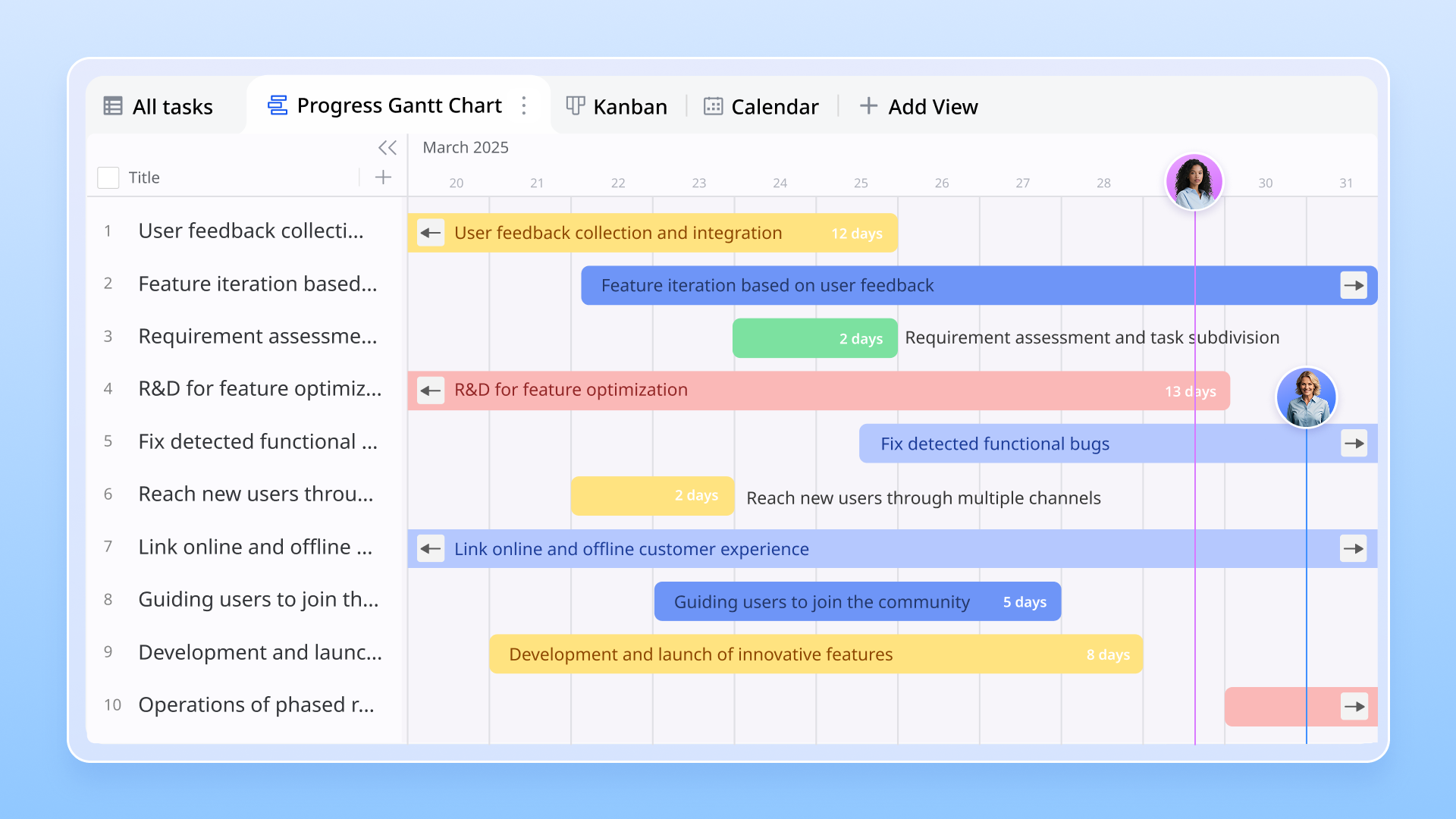
Automated trigger notifications
You can set up Base automations that act as the nervous system for your priority matrix. For example, you can configure a "When record matches conditions" trigger: If a task's priority is set to "High" and the deadline is within 24 hours, Lark will automatically send a customized message in alert to the task owner. This ensures that the most critical work stays top-of-mind without manual checking. 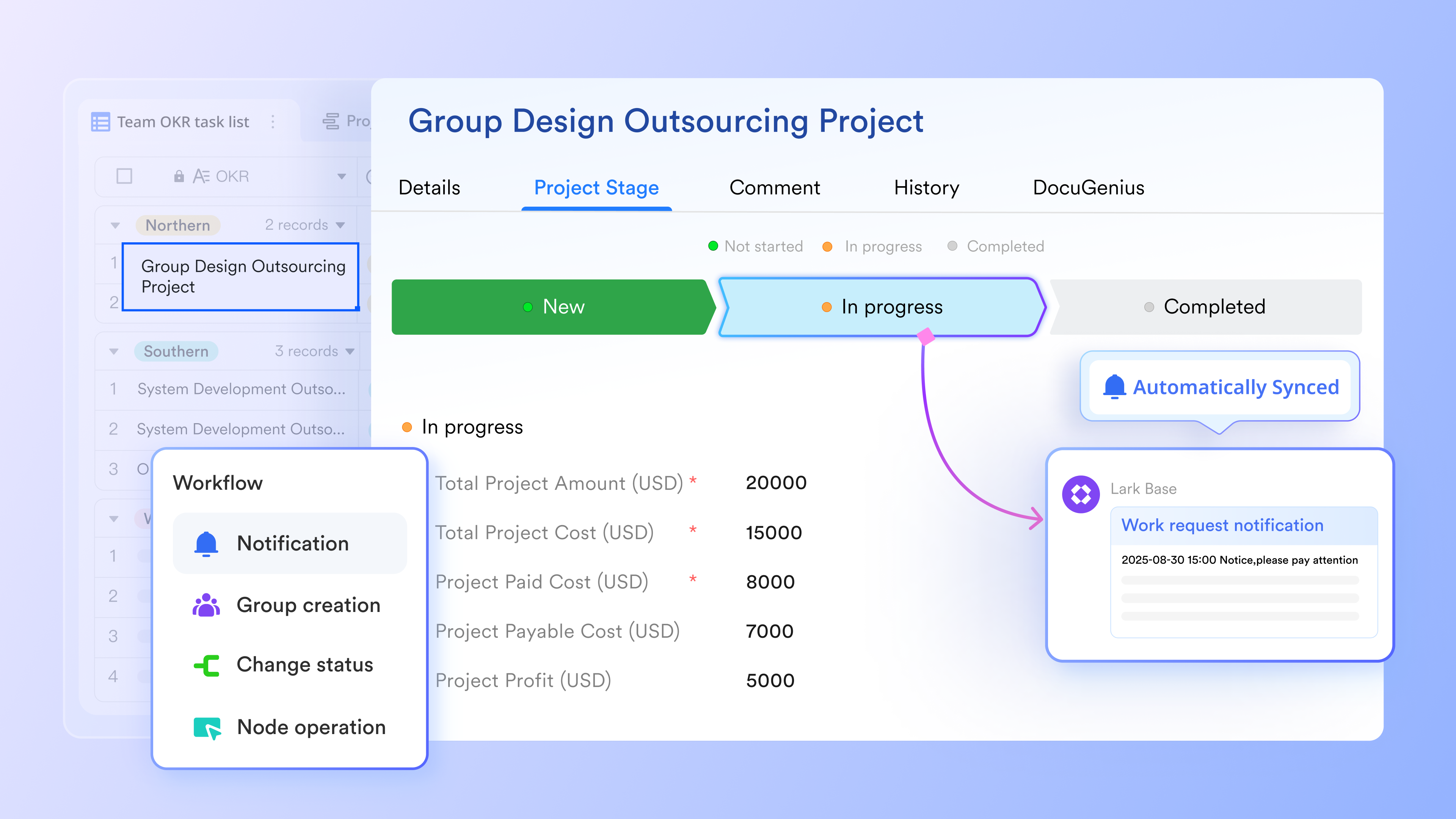
Bi-directional doc embedding
Lark allows you to embed a priority matrix base directly into a document. Unlike a copy-pasted screenshot, this embedded matrix is interactive; you can filter, sort, and edit the priority levels directly from within your meeting agenda. Any change made in is reflected in the master database in real-time, keeping your "Strategy" and "Execution" perfectly aligned. You can also to ensure only the right stakeholders can modify the matrix data. 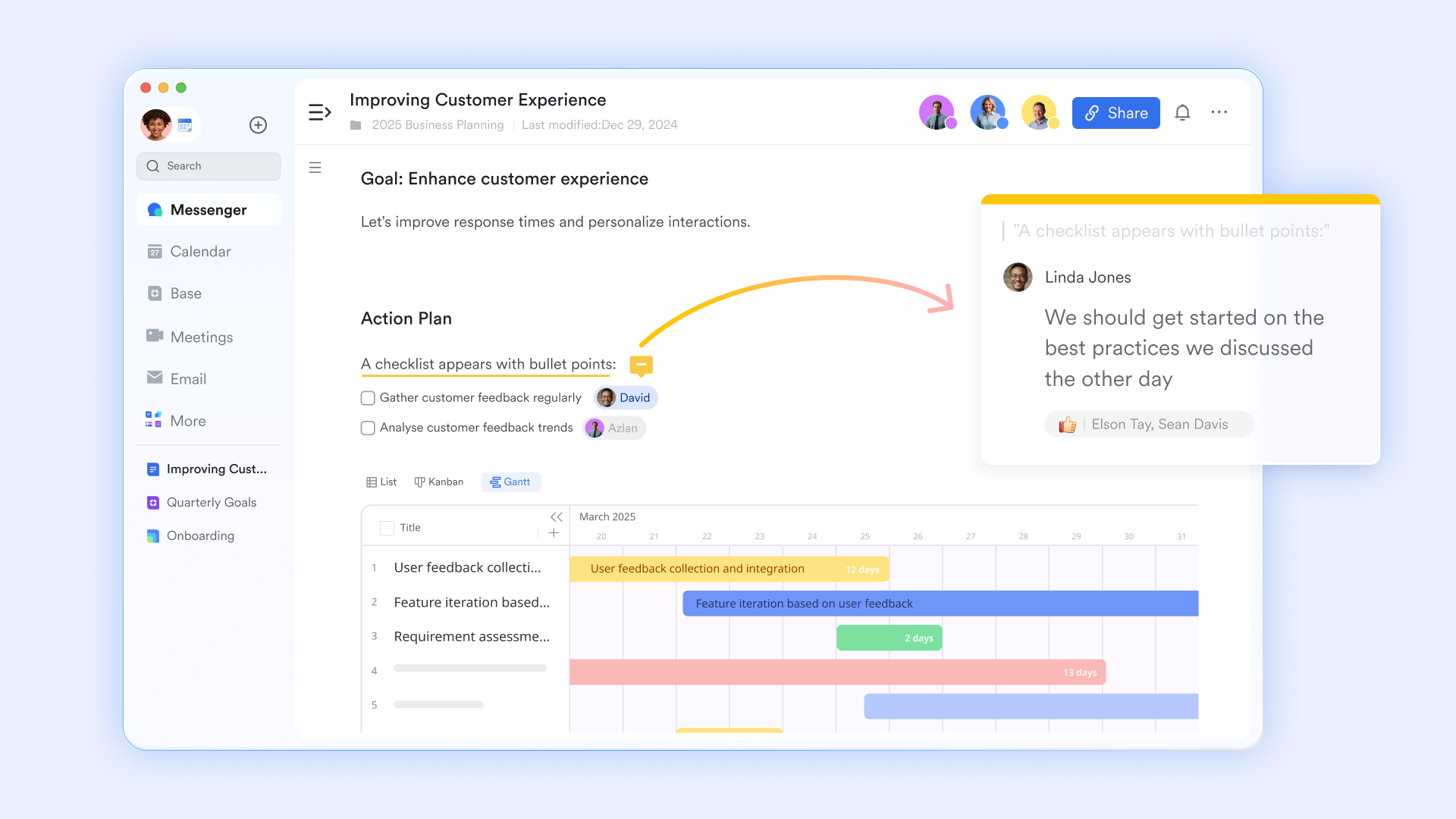
AI-powered status summaries
By using during priority-setting meetings, Lark can automatically extract "next steps" and generate a textual summary from your conversation. After the meeting, the AI Notes document is stored on Lark Drive and shared with participants. This eliminates the "administrative lag" between recording a meeting and actually updating your tracking system. 
Dynamic task-to-chat linking
Within Lark Messenger, static priority records can be shared in active conversations. Every item you have talked about with your colleagues is searchable, and you can use a dedicated chat thread to specify the important ones. By pinning the message and @mentioning a teammate, the context stays attached to the priority level, ensuring that everyone knows exactly why a task was moved to the top of the list. 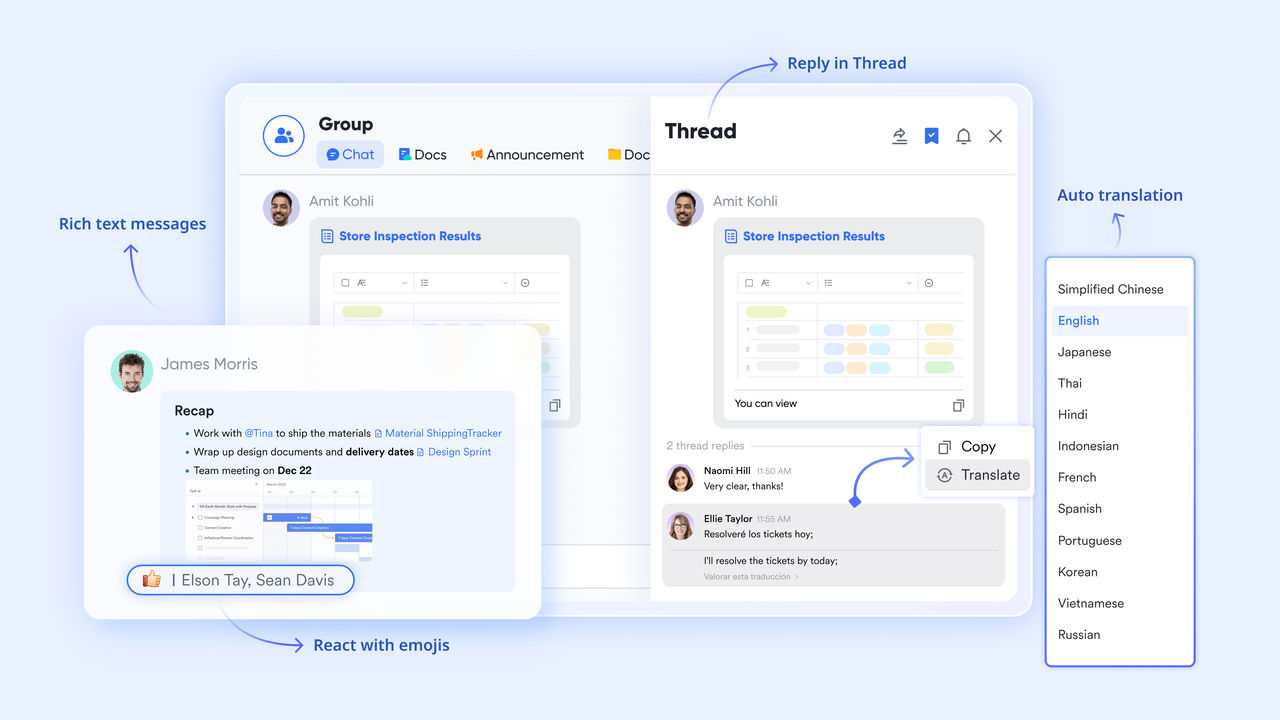
:
- Starter plan: Free forever plan that includes 11 powerful tools for up to 20 users. It also comes with 100GB of storage, 1000 automation runs, AI translations, and more.
- Pro plan: $12/user/month (billed annually) for up to 500 users. It includes everything in Starter plus group calling for up to 500 attendees, 15TB of storage, 50,000 automation runs, and more.
- Enterprise plan: for custom pricing. Supports unlimited users and includes even more automation runs and advanced security, compliance, and management features.
For small teams with simple communication needs

18 months message history
1000 Base automation runs/month
2000 rows per table in Base
Most POPULAR
For companies with comprehensive collaboration and management needs
Unlimited message history
500-participant video meetings
50k Base automation runs/month
20k rows per table in Base
For large companies with advanced security and organizational management needs
Get a personalized demo and pricing
Unlimited message history
500-participant video meetings
15 TB storage + 30 GB storage/user
500k Base automation runs/month
50k Base automation runs/month
Most POPULAR
For companies with comprehensive collaboration and management needs
Unlimited message history
500-participant video meetings
50k Base automation runs/month
20k rows per table in Base
Common mistakes teams make with priority matrices
Even well-designed priority matrices can fail if teams misuse them in practice. These mistakes usually come from treating prioritization as a one-time exercise instead of an ongoing discipline. When priorities are not reviewed, aligned, or connected to execution, the matrix loses credibility. Understanding these common pitfalls helps teams keep prioritization effective and trusted.
- Treating priority as permanent: One of the most common mistakes is assuming priorities never change. , capacity, and risks evolve constantly. When teams fail to revisit priorities, outdated work continues to consume time. A priority matrix must be reviewed regularly to remain relevant. Flexibility is essential for sustained effectiveness.
- Over-scoring without alignment: Teams sometimes add too many scoring criteria or apply scores inconsistently. This creates false precision without real agreement. When stakeholders interpret scores differently, prioritization becomes confusing. Alignment on what scores mean matters more than complex math. Simpler models often produce better decisions.
- Ignoring capacity and dependencies: High-priority work still requires available capacity and resolved dependencies. Teams often rank tasks without considering workload constraints. This leads to overcommitment and missed deadlines. A priority matrix should reflect what is realistically achievable. must follow prioritization.
- Separating prioritization from execution: Priorities lose impact when they are not tied to daily work. Teams may agree on priorities but track execution elsewhere. This disconnect causes delays and confusion. Effective teams link priority decisions directly to tasks, owners, and timelines. Prioritization should guide action, not just planning.
Conclusion
A priority matrix is one of the most effective for bringing clarity and structure to decision-making. Whether teams use an Eisenhower priority matrix, an action priority matrix, or a project priority matrix, the real value comes from consistency and shared understanding. When applied thoughtfully, priority matrices reduce noise, align stakeholders, and protect focus. However, static lists and disconnected tools often prevent priorities from translating into real progress.
As teams grow and work becomes more dynamic, prioritization must evolve from a planning exercise into a living system. This is where all-in-one productivity suites like help bridge the gap between deciding priorities and acting on them. By connecting data, discussion, and execution, teams can keep priorities visible, adaptable, and actionable. Implementing a robust allows for the seamless transition from high-level strategy to daily checklists, ensuring that your most important work never falls through the cracks.
Turn priorities into action with Lark today
FAQs
How often should teams revisit their priority matrix?
The frequency depends on how fast priorities change within the team. Operational, product, and customer-facing teams often benefit from weekly reviews to reflect shifting urgency and capacity. Strategic or leadership teams may revisit priorities monthly or quarterly. The key is consistency rather than perfection. Teams that treat the priority matrix as a living tool stay aligned and avoid working on outdated priorities, especially when supported by shared systems that make updates easy.
Can AI help adjust priorities automatically as conditions change?
AI can assist by highlighting signals such as approaching deadlines, workload imbalances, , or recurring delays. It helps teams spot patterns and potential conflicts earlier than manual reviews. However, AI should support human decision-making rather than replace it. Context, judgment, and strategy still matter. Modern platforms increasingly combine AI insights with collaborative workflows, allowing teams to adjust priorities faster without losing control.
How do you resolve conflicts when stakeholders disagree on priority scores?
Conflicts usually arise when scoring criteria are unclear or interpreted differently. The most effective approach is to agree on definitions before scoring begins. When disagreements occur, discussions should focus on impact, urgency, and capacity rather than authority or opinions. Making assumptions visible helps teams reach alignment. Shared views and documented rationale reduce repeated debates and build long-term trust in the prioritization process.
What’s the best way to prioritize work across multiple departments?
Cross-department prioritization works best when teams use shared criteria and a common priority matrix. A project priority matrix helps compare initiatives objectively across functions. Visibility into dependencies and resource constraints is essential to avoid conflicts. Centralized prioritization prevents siloed decision-making. like Lark help departments align by keeping priorities, context, and execution in one place.
How do priority matrices scale in fast-growing organizations?
As organizations grow, priorities change more frequently and involve more stakeholders. Static spreadsheets and isolated tools quickly become bottlenecks. prioritization requires real-time updates, automation, and shared visibility across teams. Priority matrices must evolve into systems that connect planning with execution. Teams that adopt collaborative, data-driven platforms can scale prioritization without adding process overhead or slowing decision-making.
Related reading





























