Procore is widely used by construction teams to manage projects, documentation, and financial workflows across complex job sites. As more companies search for a practical Procore review, the focus often shifts from feature lists to real-world usability, pricing impact, and long-term flexibility.
This guide examines how Procore performs in daily construction operations, where it delivers value, and where teams encounter friction as projects scale. While Procore remains a strong system for structured construction management, many teams gradually reassess how well it supports collaboration between field and office teams.
What is Procore?
Procore is a cloud-based designed to help contractors, owners, and project teams manage projects from preconstruction through closeout. It centralizes core construction workflows such as project management, financial tracking, quality and safety processes, and document control within a single system. Many teams use Procore to standardize how RFIs, submittals, drawings, and daily logs are handled across multiple projects. The platform is widely adopted by large construction firms that require consistent reporting and compliance across complex job sites.
Procore is built around structured processes and centralized oversight rather than flexible, ad hoc workflows. Its tools are designed to support long-term project visibility, cost control, and at scale. While this approach benefits organizations with stable operations and dedicated admin resources, it can feel rigid for teams that need faster adjustments or lighter collaboration tools. As project environments become more dynamic, some teams begin evaluating how well Procore supports real-time coordination between field and office teams compared to newer, more adaptable platforms.
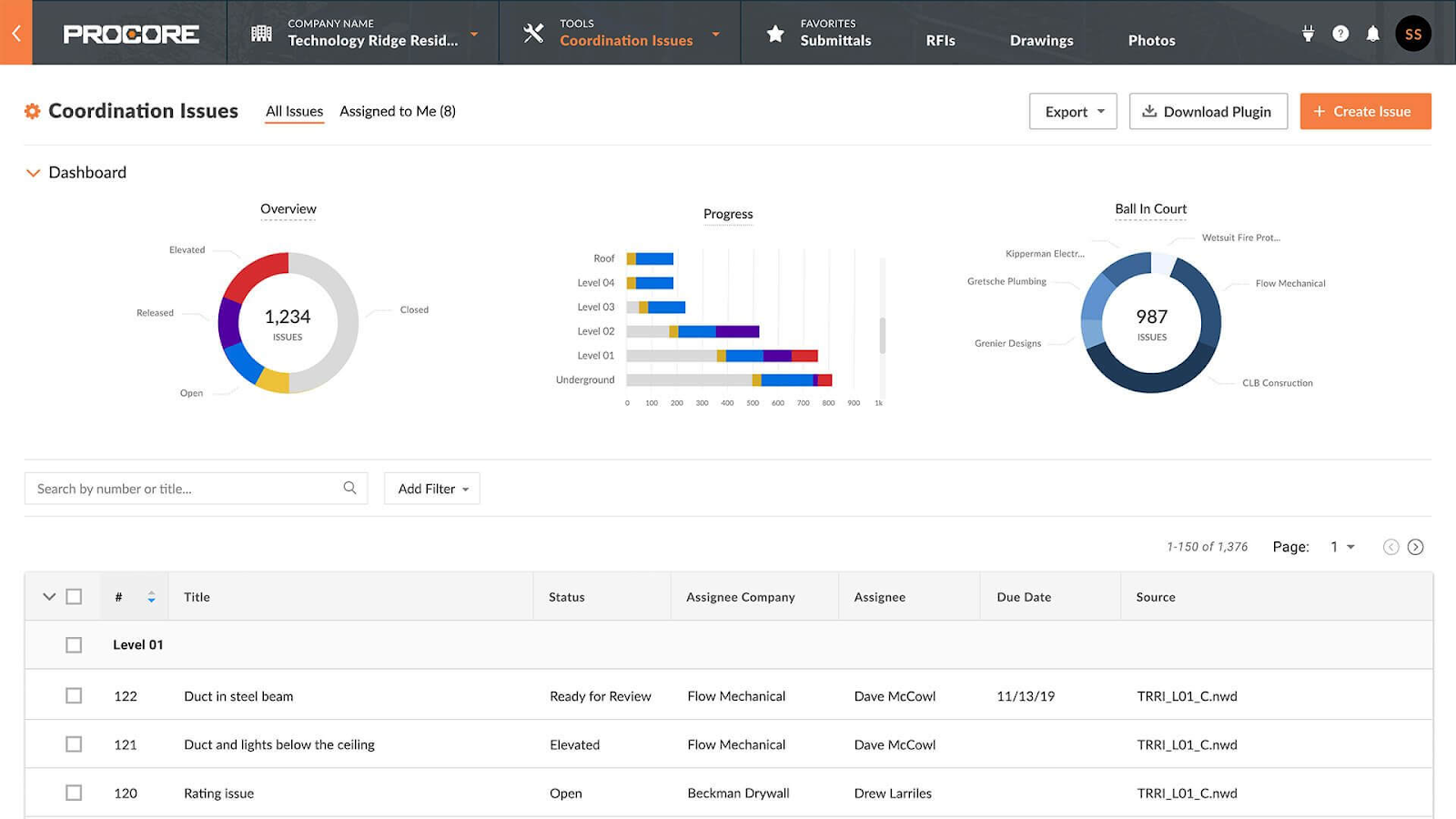
Image source: procore.com
Procore features review for construction project management
Procore offers a broad set of construction-specific tools designed to manage planning, execution, and financial control across job sites. These features focus on maintaining structured records, enforcing accountability, and improving visibility for . Teams evaluating Procore construction management software review content often look at how well these tools support coordination between site teams, subcontractors, and office staff. The following features represent Procore's core functional areas in daily construction operations.
RFI, submittal, and drawing management
Procore provides dedicated modules for handling RFIs, submittals, drawings, and daily logs in a centralized system. These tools help teams track approvals, revisions, and responses with clear audit trails. Field teams can submit updates directly from job sites, while office teams review and respond within the same platform. This structure reduces reliance on email and scattered documentation. For large projects, this consistency helps prevent information gaps.
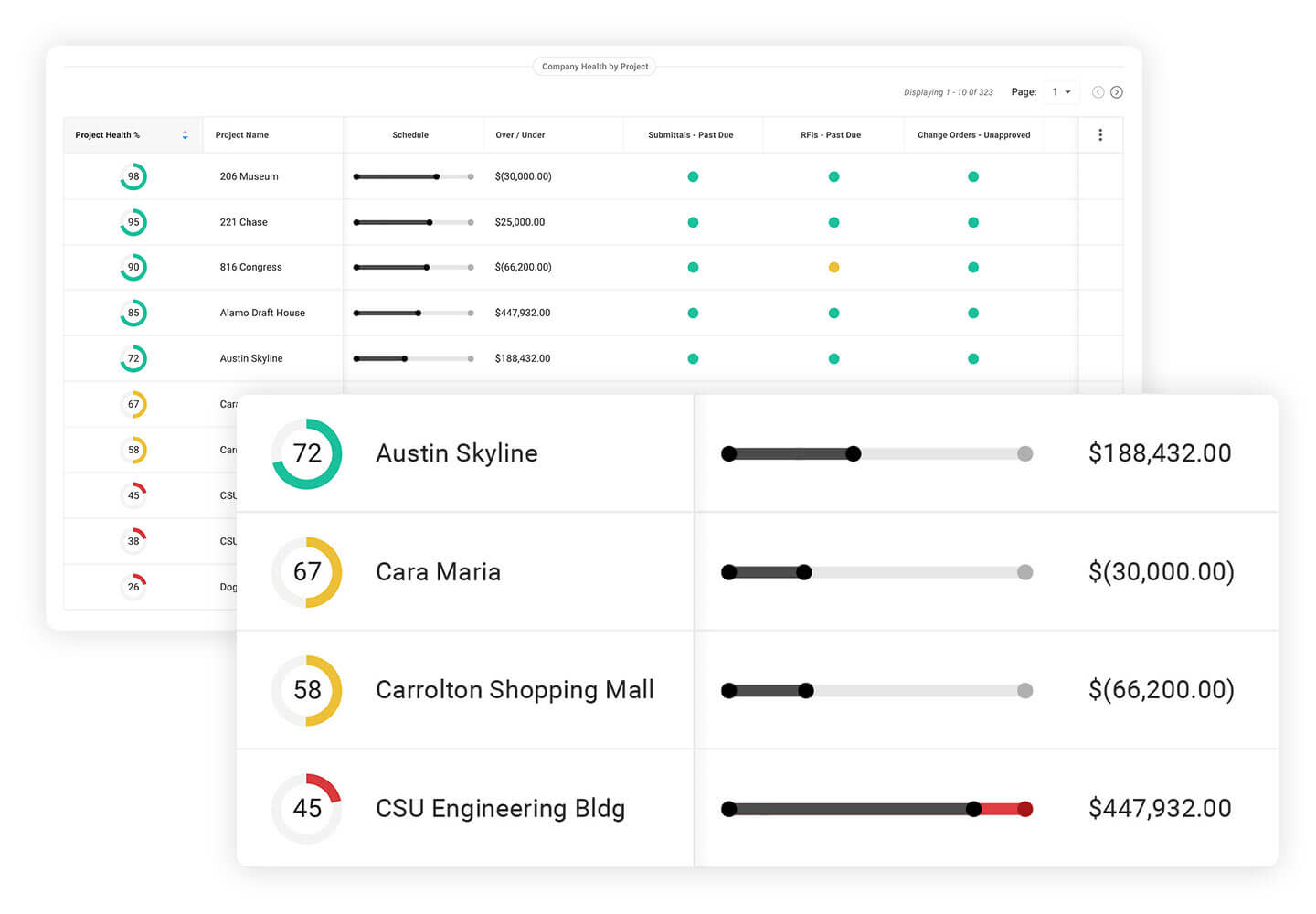
Image source: procore.com
Construction scheduling and milestone tracking
Procore supports milestone tracking by connecting schedules with project records and field updates. Teams can monitor progress against planned timelines and identify delays early. While Procore does not replace full for all users, it provides visibility into critical phases of construction work. Managers often rely on these features to coordinate trades and monitor sequencing. Scheduling visibility improves accountability across teams.
Budgeting, cost tracking, and change order management
Financial control is one of Procore's strongest areas, offering tools for budgeting, cost tracking, and . Teams can track committed costs, forecast final budgets, and manage variations in scope. Change orders follow structured approval workflows, reducing disputes and delays. This level of financial visibility is especially valuable for commercial construction projects. However, setup requires careful configuration.
Estimating and preconstruction planning
Procore includes estimating and preconstruction features that support early project planning and bidding. Teams can connect estimates to budgets and project records as work progresses. This continuity helps maintain alignment between preconstruction assumptions and execution realities. Estimating tools are often used by teams already invested in the Procore ecosystem. Smaller firms may find these features more than they need. Teams evaluating estimating capabilities frequently look at a Procore construction estimating software review to assess how well early cost assumptions align with execution and long-term budgeting.
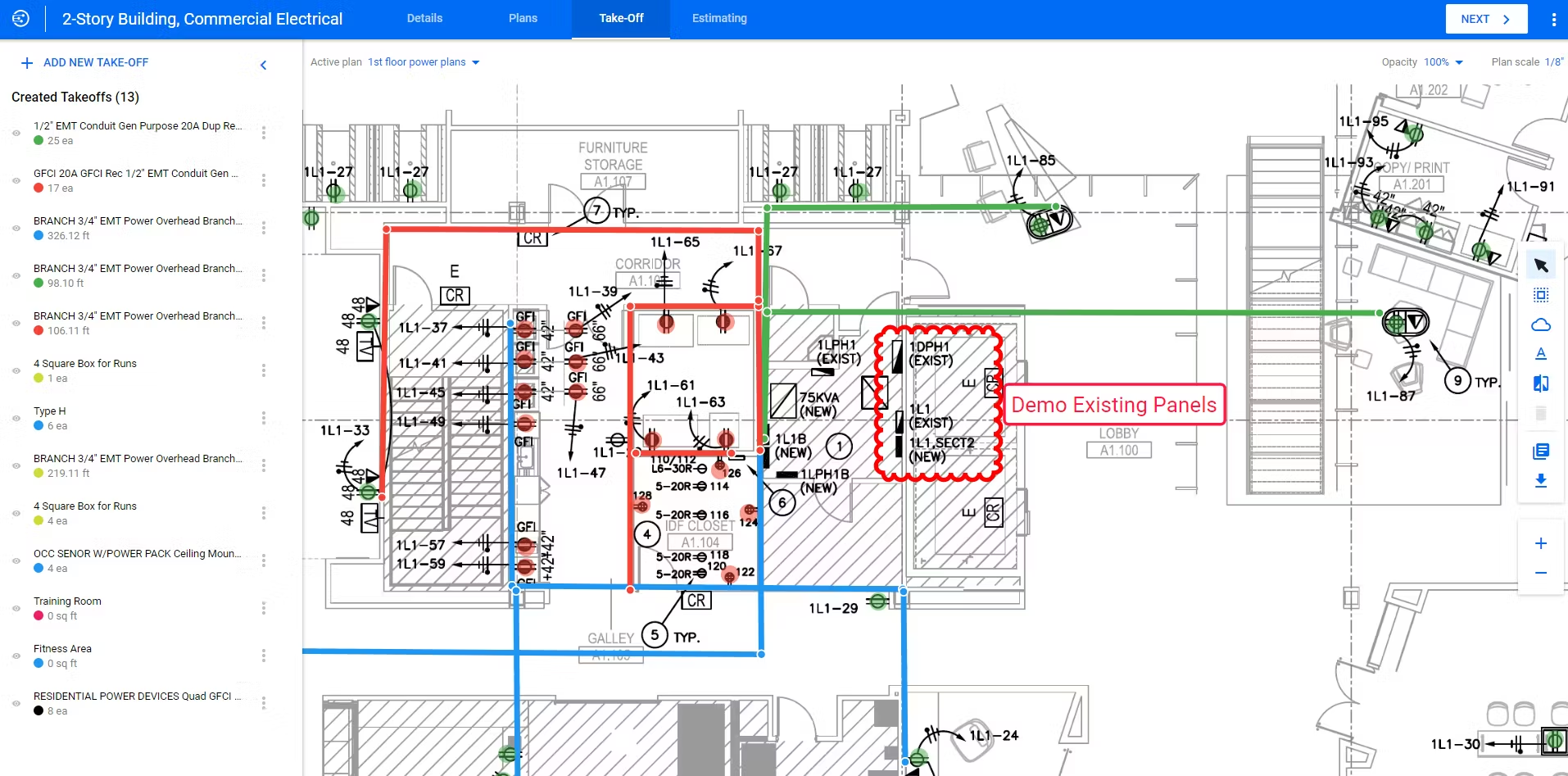
Image source: procore.com
Field productivity features, including inspections and punch lists
Field teams use Procore to manage inspections, punch lists, and site observations through mobile devices. These tools allow issues to be logged with photos, locations, and assigned owners. Office teams gain real-time visibility into field conditions without waiting for reports. This improves response times and issue resolution. Adoption depends on consistent field usage.
Mobile app support for on-site reporting and updates
Procore's mobile apps enable on-site staff to submit updates, access drawings, and complete inspections from the field. Offline capabilities allow data entry in low-connectivity environments. This is critical for active construction sites where desktop access is limited. Mobile usage helps bridge the gap between field and office teams. Training is often required for full adoption.
Document control with version tracking and access permissions
Procore offers controlled document storage with version history and role-based permissions. Teams can ensure that only approved drawings and documents are accessible on-site. Version tracking reduces the risk of outdated information being used during construction. This supports compliance and quality control requirements. Document organization follows Procore's structured hierarchy.
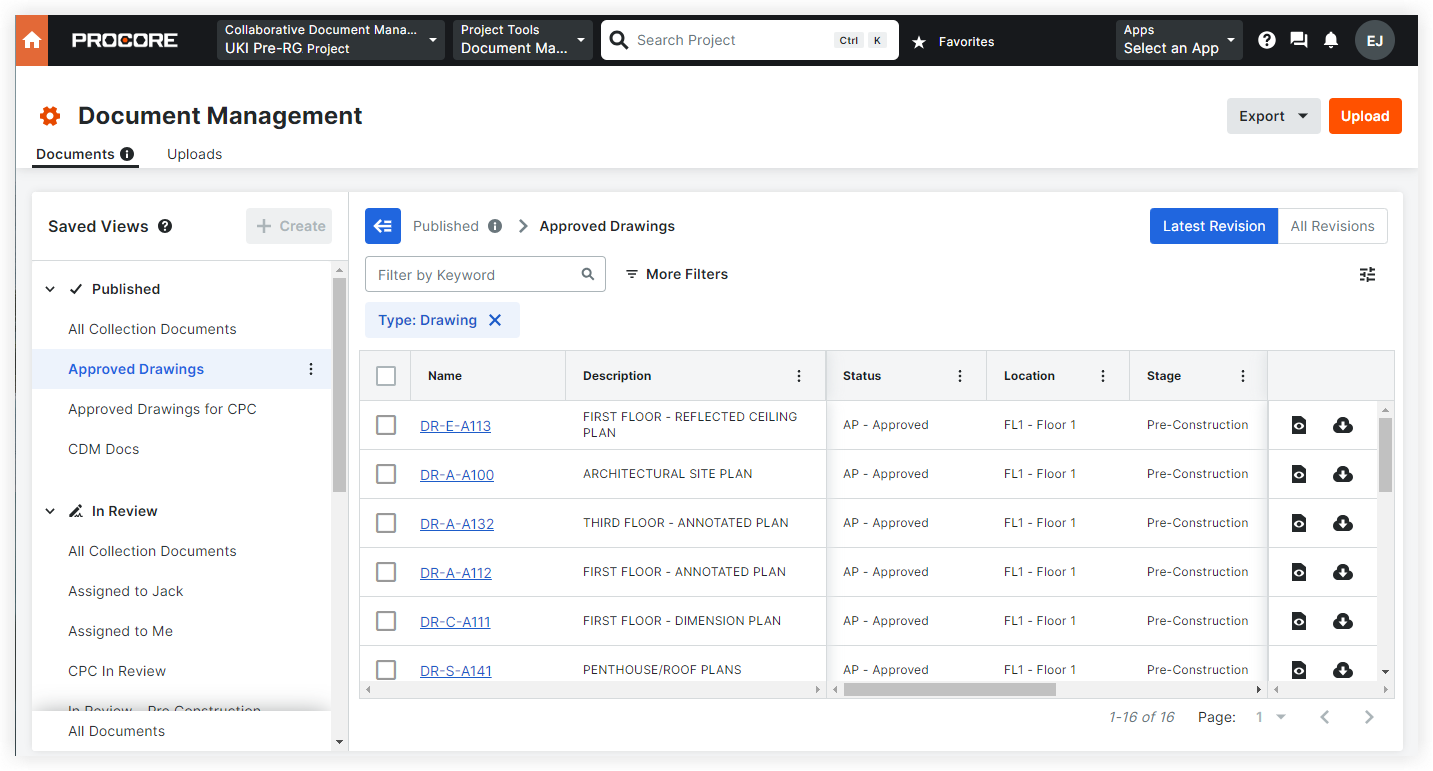
Image source: procore.com
Quality and safety management workflows
Quality and safety workflows in Procore help teams track incidents, inspections, and corrective actions. These tools support and internal audits. Safety documentation remains centralized and accessible to stakeholders. For regulated environments, this is a key benefit. Configuration varies by organization.
Role-based access control and compliance management
Procore uses role-based permissions to control access to projects, documents, and financial data. This helps organizations enforce internal policies and protect sensitive information. Access levels can be adjusted by role or project. Larger organizations benefit most from this control structure. Smaller teams may find it complex.
Reporting and analytics for project and financial visibility
Procore includes reporting tools that aggregate project, cost, and activity data into dashboards. Managers can monitor performance trends and identify risks early. Custom reports often require admin setup and refinement. While powerful, reporting flexibility can feel limited without configuration effort. Data accuracy depends on consistent usage.
Procore pricing model: How much does Procore usually cost
Procore pricing is fundamentally different from most because it requires a quota, and costs are calculated based on a company's Annual Construction Volume (ACV), which represents the total value of projects managed each year. This pricing approach can benefit large firms with stable volumes, but it often creates uncertainty for growing or fluctuating businesses. Understanding how this model affects long-term budgets is critical before committing to the platform.

Image source: procore.com
- Volume-based pricing model: Procore calculates fees based on your Annual Construction Volume rather than the number of users or projects. As project value increases, costs typically rise as well. This makes pricing closely tied to business performance, which can be challenging for firms with inconsistent workloads.
- Custom quotes: Procore does not publish a standard pricing table. Companies must request a custom quote based on their ACV, selected products, and operational scope. This makes it harder to estimate costs upfront or compare pricing transparently with other tools.
- Product-based plans: Pricing is influenced by the specific Procore product suites a company chooses, such as , financials, or quality and safety tools. Organizations often need multiple modules to cover full workflows, which can increase the total contract value over time.
- Annual commitment required: Procore is available only through annual contracts, with no monthly subscription option. This limits flexibility for teams that want to scale usage gradually or reassess tools mid-year.
- Upfront annual billing: Fees are billed annually and are calculated based on projected ACV and selected products. If project volume grows beyond expectations, future renewals may increase significantly.
- Unlimited user access: Companies can add unlimited users without additional per-seat charges. This benefits large teams and external collaborators, especially on complex projects with many stakeholders.
- All-inclusive pricing: Data storage, , and platform updates are included in the contract cost. This reduces surprise add-on fees but does not offset increases tied to higher construction volume.
- Trial availability: Procore does not offer a free plan. New users can access a limited 14-day trial to explore the platform, which may not be sufficient time to fully evaluate the long-term fit or cost impact.
Procore limitations: What are the cons of Procore
Procore consistently highlight that the platform is powerful but demanding, especially for teams managing fast-moving . While it delivers strong industry-specific capabilities, many users report challenges related to cost predictability, setup effort, and day-to-day usability. These limitations become more visible as projects scale or when teams need quicker coordination between the field and office. Understanding these common concerns helps teams evaluate whether Procore aligns with their operational pace and long-term flexibility needs.
- High and unpredictable costs due to ACV-based pricing: Procore pricing is tied to Annual Construction Volume, which makes costs fluctuate as project values change. Teams often find it difficult to forecast budgets accurately when workloads increase or vary year to year. Reviews frequently mention that this uncertainty creates financial risk for growing contractors. Smaller or mid-sized firms feel this impact more sharply.
- Annual contracts only, with limited pricing flexibility: Procore requires yearly commitments, which limits the ability to adjust usage or spending mid-cycle. Companies cannot easily scale down during slower periods. Reviews note that this rigidity can feel restrictive for seasonal or project-based workloads. Flexibility is a common concern for teams still refining their growth plans.
- Steep learning curve and time-consuming onboarding: Many users report that onboarding takes significant time due to the platform's depth and complexity. New users often need structured training before becoming productive. Field teams in particular may struggle with adoption if workflows are not carefully configured. This slows early project momentum.
- Rigid workflows that are difficult to customize: Procore provides predefined modules that work well for standard processes, but can be limiting for unique project requirements. Adjusting workflows often requires workarounds or additional configuration. Reviews mention that teams sometimes adapt their processes to the software instead of the other way around. This reduces flexibility on dynamic projects.
- Heavy reliance on admin setup and ongoing maintenance: Effective use of Procore depends heavily on dedicated administrators. Setting up permissions, workflows, reports, and combinations requires ongoing attention. Smaller teams without specialized admins may find this challenging. Maintenance overhead is a recurring theme in long-term user feedback.
- Fragmented communication between field and office teams: While Procore supports comments and discussions, communication is often separated from real-time execution. Field updates, photos, and clarifications can feel disconnected from decision-making. Reviews highlight delays caused by switching between modules, emails, and external messaging tools. This affects responsiveness on active sites.
- Reporting and dashboards require extra effort to tailor: Procore offers strong reporting capabilities, but customization takes time and expertise. Many teams rely on standard reports because building tailored is complex. Reviews note that extracting quick insights is not always straightforward. This can limit visibility for managers who need fast updates.
As construction projects become faster-paced and more collaborative, many teams start looking beyond traditional, system-heavy platforms. The limitations highlighted in Procore reviews often point to a broader need: tools that are easier to adapt, quicker to deploy, and better at connecting people with their work in real time. This is where modern workspaces like Lark stand out-by focusing on flexible workflows, clear ownership, and seamless collaboration across field and office teams, without the overhead that slows projects down.
Ready to explore a more flexible approach?
Why Lark is a stronger alternative for modern construction teams
offers a more adaptable approach for construction teams that need speed, clarity, and real-time coordination across projects. Instead of relying on rigid systems built around fixed modules, Lark brings , data, documents, and workflows into one connected workspace. This makes it easier for field and office teams to stay aligned as conditions change on site. For modern construction teams and fast decisions, Lark focuses on flexibility, visibility, and execution without heavy setup or ongoing administrative overhead.
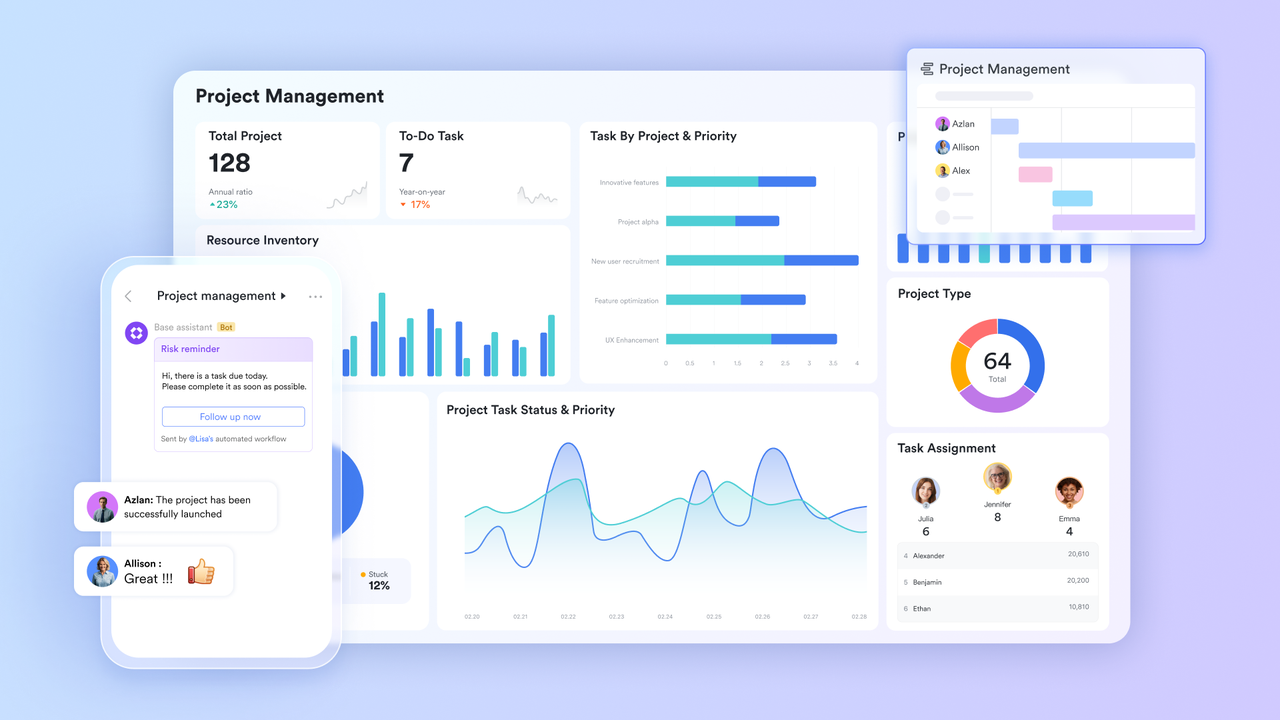
Field reporting and issue tracking
Compared to Procore's fixed field modules, gives construction teams far more flexibility in how site data is structured and updated. Teams can design punch lists, inspection logs, defect registers, and subcontractor records to match real instead of adapting to preset templates. Field staff can submit issues from mobile devices with photos, ownership, and status updates in one place, while managers view live progress through configurable views rather than static reports. This makes issue tracking faster, more transparent, and easier to adjust as project needs change.
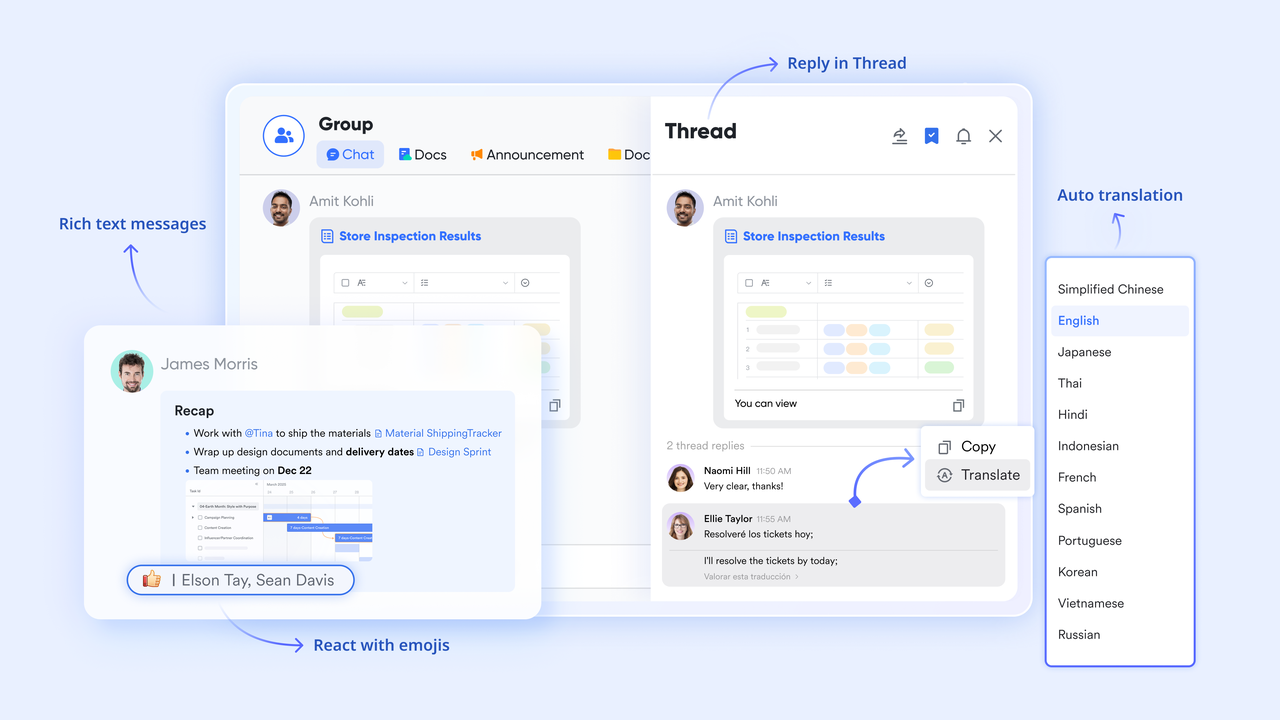
Real-time field-office communication
Procore discussions often sit separately from the work items they reference, which can slow decision-making. keeps conversations directly connected to project records, tasks, and updates. Site teams can instantly share photos, videos, or clarifications from the field, while office teams respond in context without searching through emails or comment threads. Dedicated topic by site or phase reduce noise and keep communication focused, making coordination more immediate and less fragmented than traditional construction platforms.
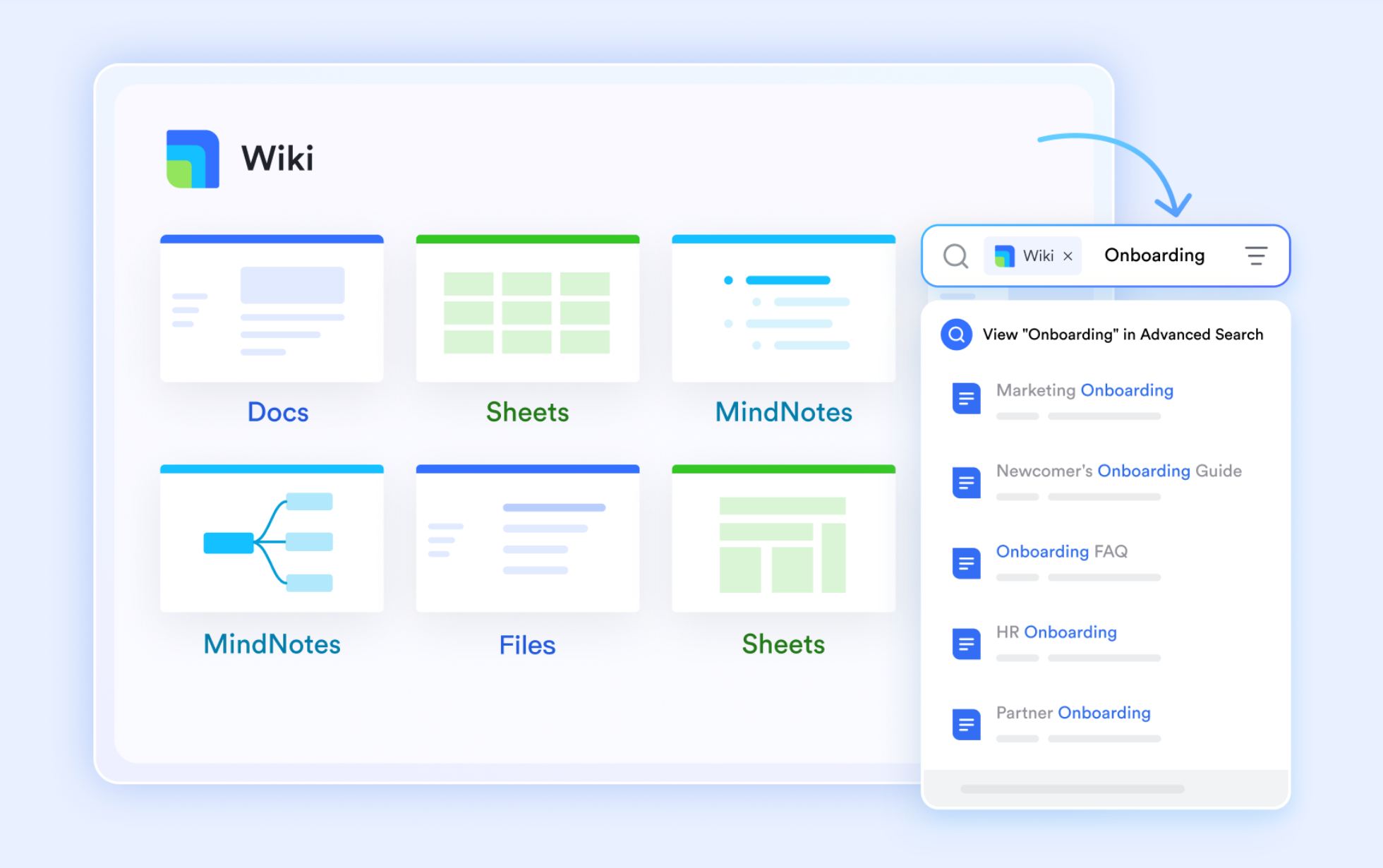
Centralized drawings and documentation
While Procore stores drawings and documents effectively, updates often require navigating multiple layers. and allow teams to co-edit instructions, safety documents, and site guidelines in real time, ensuring everyone works from the latest version. Changes become visible instantly to field crews and subcontractors, reducing the risk of outdated drawings or procedures being followed. Wikis also make compliance documents easier to find and maintain, creating a clearer single source of truth than document-heavy systems.
Clear task ownership and milestone tracking
Procore focuses heavily on logs and records, but task-level accountability can feel disconnected. Lark Tasks makes responsibility explicit by linking tasks directly to people, trades, and deadlines. reflect actual construction sequencing, so teams understand what must happen before work moves forward. Automatic updates and reminders help prevent missed handoffs or delayed inspections, and the Gantt view gives project managers tighter control over timelines than checklist-based approaches. 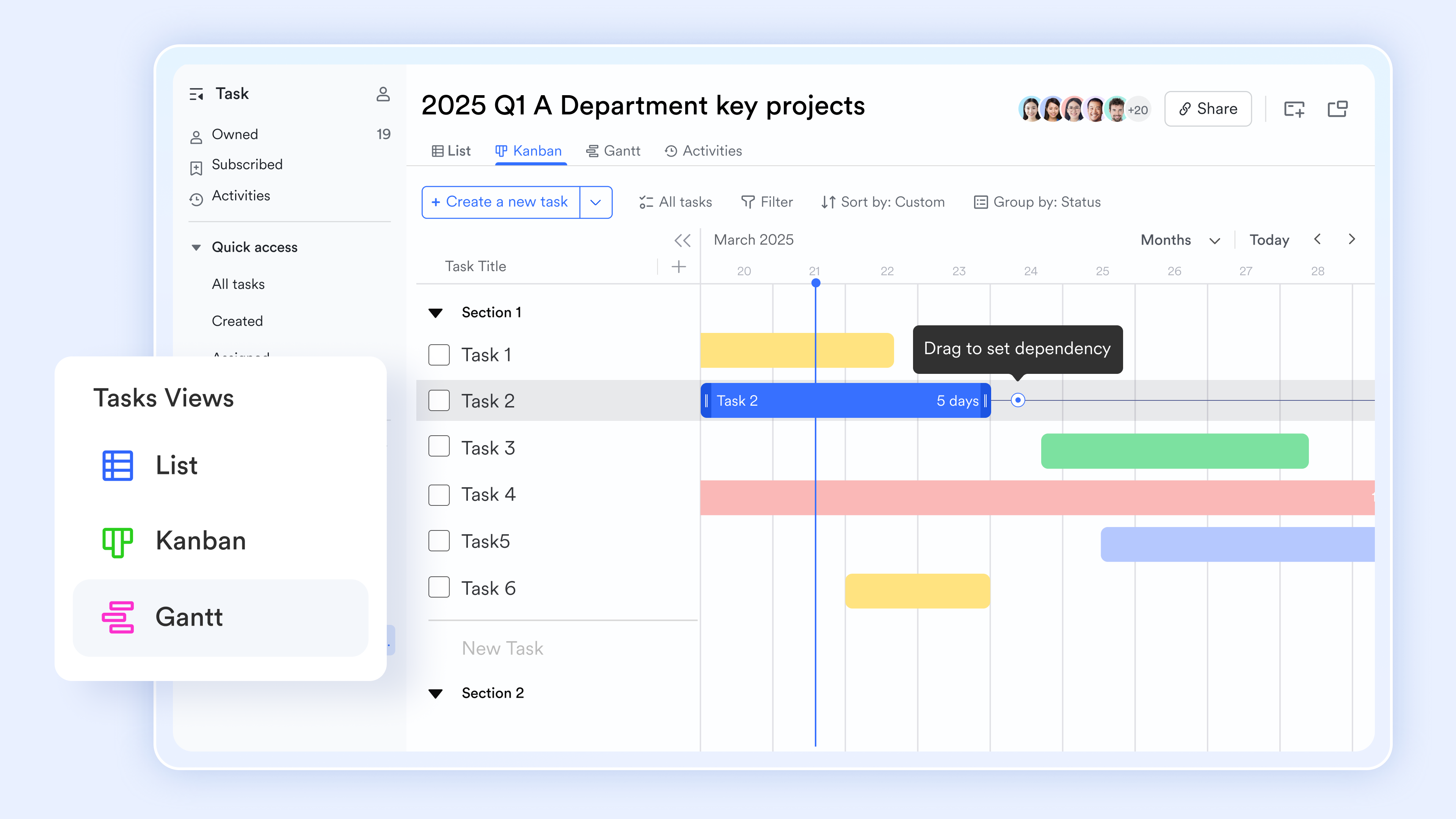
Faster approvals for RFIs, change orders, and inspections
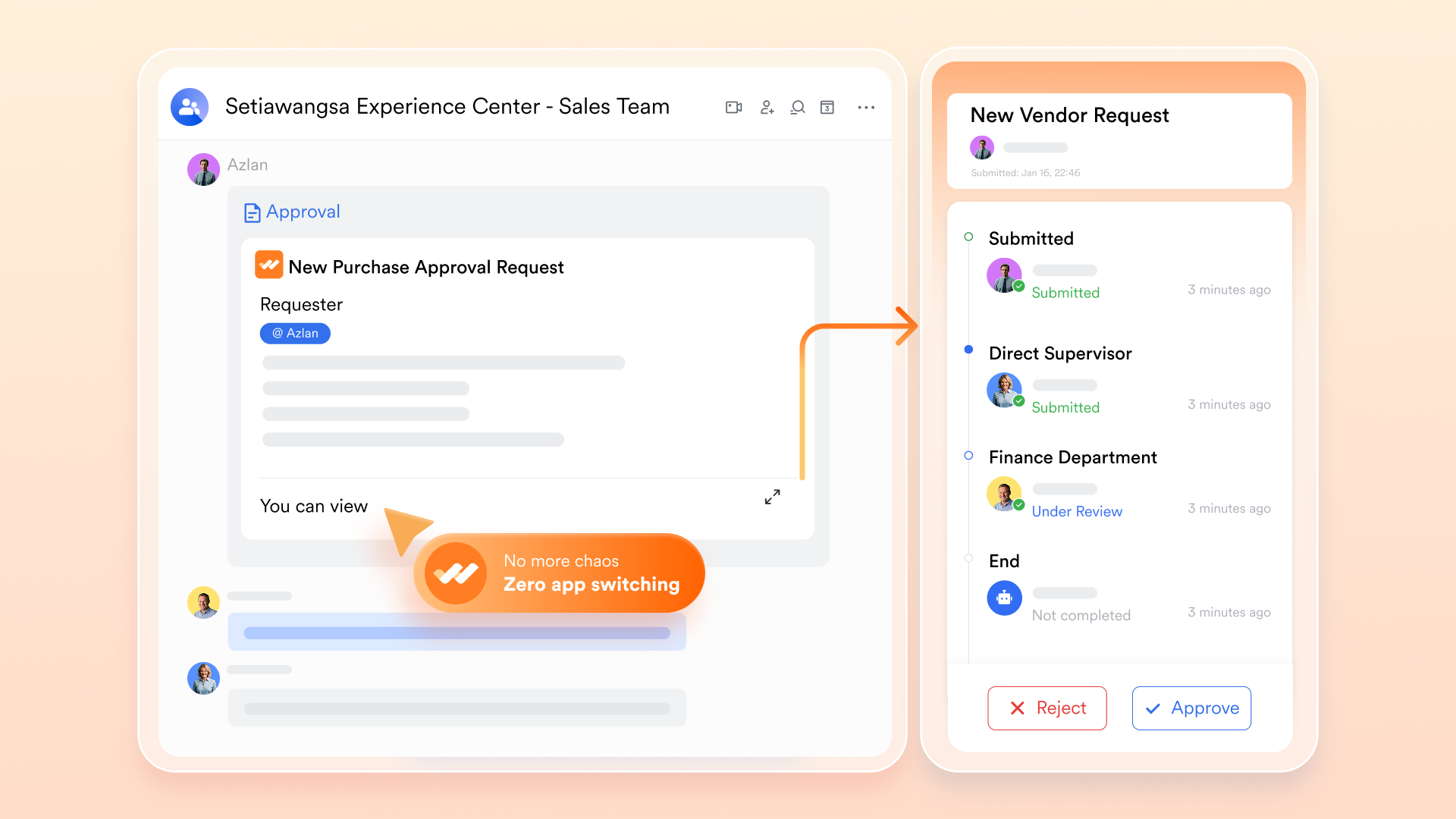
Approval delays are a common pain point in Procore workflows, especially when decisions rely on email follow-ups. centralizes approval processes so , change orders, and inspections move through predefined paths without confusion. Reviewers receive timely prompts, all supporting materials stay attached, and approvals can be completed on mobile devices. This shortens turnaround time, reduces administrative overhead, and keeps projects moving without waiting on disconnected approval chains.
:
- Starter plan: Free forever plan that includes 11 powerful tools for up to 20 users. It also comes with 100GB of storage, 1000 automation runs, AI translations, and more.
- Pro plan: $12/user/month (billed annually) for up to 500 users. It includes everything in Starter plus group calling for up to 500 attendees, 15TB of storage, 50,000 automation runs, and more.
- Enterprise plan: for custom pricing. Supports unlimited users and includes even more automation runs and advanced security, compliance, and management features.
For small teams with simple communication needs

18 months message history
1000 Base automation runs/month
2000 rows per table in Base
Most POPULAR
For companies with comprehensive collaboration and management needs
Unlimited message history
500-participant video meetings
50k Base automation runs/month
20k rows per table in Base
For large companies with advanced security and organizational management needs
Get a personalized demo and pricing
Unlimited message history
500-participant video meetings
15 TB storage + 30 GB storage/user
500k Base automation runs/month
50k Base automation runs/month
Most POPULAR
For companies with comprehensive collaboration and management needs
Unlimited message history
500-participant video meetings
50k Base automation runs/month
20k rows per table in Base
Procore vs Lark: Side-by-side comparison
Teams comparing Procore and Lark often focus on how each platform handles flexibility, collaboration, and cost predictability. While Procore emphasizes standardized , Lark prioritizes adaptability and execution speed. The comparison below highlights practical differences that impact daily work.
When to choose Procore
Procore is a strong choice for large construction firms managing highly complex that require deep, industry-specific compliance controls and standardized processes. Companies with dedicated admin resources and predictable annual construction volume may benefit most from Procore's structured environment and established construction ecosystem.
When to choose Lark
Lark is better suited for teams that need flexibility, faster deployment, and clearer collaboration between field and office teams. Construction companies looking to customize workflows, reduce approval delays, and maintain real-time visibility without long setup cycles often prefer Lark. It works especially well for growing firms or teams managing multiple projects that evolve quickly and require adaptable .
Conclusion
Procore remains a dependable platform for that require structured processes, deep financial tracking, and standardized compliance workflows. Its strength lies in managing large-scale projects where predictability and control matter most. However, as construction teams become more dynamic and collaborative, limitations around flexibility, cost transparency, and communication become harder to ignore. Many organizations now look beyond system-heavy tools toward platforms that adapt to how teams actually work. Lark represents this shift by connecting people, tasks, documents, and approvals in one workspace. By reducing friction between field and office teams, helps projects move faster without sacrificing visibility or accountability.
Move toward faster, flexible project execution
FAQs
What is Procore basically useful for?
Procore is an all-in-one construction management platform that centralizes project data between the office and the field. It is primarily used to manage RFIs, submittals, and drawings, while also tracking project financials and safety compliance. By creating a "single source of truth," it helps teams reduce rework and ensures every stakeholder is working from the latest plans.
Is Procore difficult to learn?
Procore has a steep learning curve due to its vast array of specialized modules and technical interface. While the mobile app is highly rated for field use, the web platform can feel "clunky" and overwhelming for new users. Most companies require structured onboarding or Procore Certification to ensure their teams can navigate the system effectively.
Is Procore good for estimating?
Yes, Procore offers robust estimating and AI-powered takeoff tools that allow for automated area detection directly from drawings. While it excels at integrating these estimates into a project's budget and contract workflow, some users find it less flexible than Excel or dedicated niche software. It is best for teams looking for a seamless flow from bid to execution rather than a standalone calculator.
Is Procore suitable for non-commercial or mixed-use projects?
Procore performs best in standardized construction environments with repeatable processes. For non-commercial, residential, or mixed-use projects, the platform can feel overly complex and heavy to manage. Teams working across varied project types may struggle with rigid workflows and extensive setup requirements. In these cases, some companies begin considering tools that adapt more easily to different project structures and changing scopes.
How do modern platforms reduce setup time compared to Procore?
Modern platforms are often built around configurable components rather than fixed, industry-specific modules. This allows teams to start with simple workflows and refine them as projects evolve. Reduced setup time means less training, fewer admin resources, and faster adoption across teams. Platforms like Lark follow this approach by emphasizing flexibility and real-time collaboration, helping teams get started quickly without long cycles.
Related reading






























