














Top 10+ Construction Collaboration Software to Improve Site & Office Coordination

Ryan Tanner
Product Marketing Specialist
Sep 18, 2026
Ryan Tanner
Sep 18, 2026

32 min read


Construction projects are fast-moving, detail-heavy, and highly collaborative—every milestone relies on smooth coordination between field teams and office staff. Miscommunication, outdated drawings, and slow approvals can quickly lead to rework, delays, and safety risks. That's why many teams now use construction collaboration software to streamline communication, manage documents, and keep everyone aligned. These tools bring together supervisors, engineers, architects, subcontractors, and clients in a single system for clearer visibility and faster decision-making.
In this guide, we highlight the top construction collaboration platforms—including Lark—which help teams improve field reporting, organize workflows, enhance BIM coordination, and maintain real-time accuracy across commercial, residential, and infrastructure projects.
Key takeaways: Top 10+ construction collaboration platforms
1. Lark: Unified collaboration hub for construction teams
2. Procore: Construction project management collaboration software
3. Fieldwire: Collaboration software for construction field teams
4. Autodesk Construction Cloud: Advanced coordination & document management
5. Revizto: BIM collaboration for design & construction teams
6. Buildertrend: Construction management collaboration software for contractors
7. Smartsheet: Collaboration and tracking for construction operations
8. Asana: Lightweight construction team collaboration software
9. Monday.com: Visual construction collaboration workspace
10. Bluebeam: Document and blueprint collaboration
11. ServiceTitan: Enterprise platform for commercial specialty contractors managing construction and service coordination

Overview snapshot: Best construction collaboration software
What is construction collaboration software?
Construction collaboration software is a digital platform that helps construction teams coordinate work, share information, and communicate in real time across the entire project lifecycle. It centralizes drawings, documents, schedules, RFIs, approvals, and field updates so site crews, office staff, subcontractors, and clients always operate from the same source of truth. Unlike basic communication tools, construction project management collaboration software combines messaging, file sharing, task tracking, and workflow automation to reduce delays and prevent miscommunication.
These platforms also provide mobile access for field reporting, enabling teams to upload photos, mark up plans, and update progress directly from the job site. By streamlining document control, version tracking, and cross-trade coordination, construction project collaboration software helps reduce rework, improve safety alignment, and maintain schedule accuracy. Ultimately, it creates a single, connected environment for smoother, faster, and more transparent construction delivery.
Key features of construction project management collaboration software
Modern construction teams rely on digital coordination tools to keep projects moving smoothly, prevent rework, and ensure everyone—field crews, subcontractors, and office teams—operates from accurate information. This is why demand for construction collaboration software in Australia continues to grow, as companies seek integrated platforms that simplify communication and documentation. These tools reduce delays, streamline site-to-office reporting, and help stakeholders stay aligned on scope, schedules, and compliance needs. With centralized dashboards and mobile access, teams can make faster, better decisions. Ultimately, good collaboration software creates operational clarity and eliminates the fragmentation that often holds projects back.
- Real-time messaging and updates: Real-time chat keeps site teams and project managers connected through a single unified platform, powered by modern construction collaboration software. Instant updates prevent delays caused by phone-tag or outdated email chains. Notifications ensure crews stay aligned on schedule changes and safety alerts. It also reduces misunderstandings between subcontractors and general contractors. This capability accelerates decision-making and keeps all project activities transparent.
- Blueprint/document sharing: Teams can upload and share drawings, plans, and specs instantly using construction collaboration software. Everyone works from the latest version, reducing costly misinterpretation and rework. Digital markup tools help teams clarify issues directly on the plan sheets. Cloud-based access ensures field workers always have the latest documents on their mobile devices. This centralized approach improves coordination across all project phases.
- Field reporting & mobile support: Using construction collaboration software, workers can submit daily logs, punch lists, and safety reports from their phones. Mobile accessibility minimizes paperwork and speeds up communication between the site and the office. Photos, notes, and GPS-tagged entries make field reporting more reliable. Supervisors receive updates in real time, enabling quicker approval cycles. This ensures accurate progress tracking and better workforce coordination.
- Task and phase tracking: Construction teams can monitor activities across all project stages using construction collaboration software. Task dashboards help identify delays before they escalate. Managers can assign responsibility, set deadlines, and audit progress instantly. Cross-team visibility ensures trades stay aligned and avoids scheduling conflicts. This improves predictability and keeps projects moving toward milestones.
- Photo, video, and file management: A centralized media library lets teams store progress photos, defect images, and inspection videos in construction collaboration software. Visual documentation improves accountability and supports dispute resolution. Field technicians can upload media directly from the site. Filters and tags make it easy to retrieve files during audits. This creates a reliable digital trail for compliance and reporting.
- Workflow automation for RFIs, approvals, and inspections: In construction collaboration software, automated workflows route RFIs, drawings, and inspection requests to the right stakeholders instantly. This eliminates bottlenecks caused by manual approvals. Standardized templates ensure quicker submissions and fewer errors. Teams track statuses in real time, improving transparency. Automation accelerates project cycles and strengthens quality control.
Full list: 10+ Best construction collaboration software
1. Lark: Unified collaboration hub for construction teams
Construction projects move fast, and teams need a single source of truth to keep field crews, subcontractors, and office staff aligned. Lark serves as a unified collaboration hub that centralizes messaging, documentation, workflows, and real-time updates into a single seamless platform. For construction teams juggling drawings, RFIs, inspections, and schedules, Lark eliminates the friction of scattered tools.
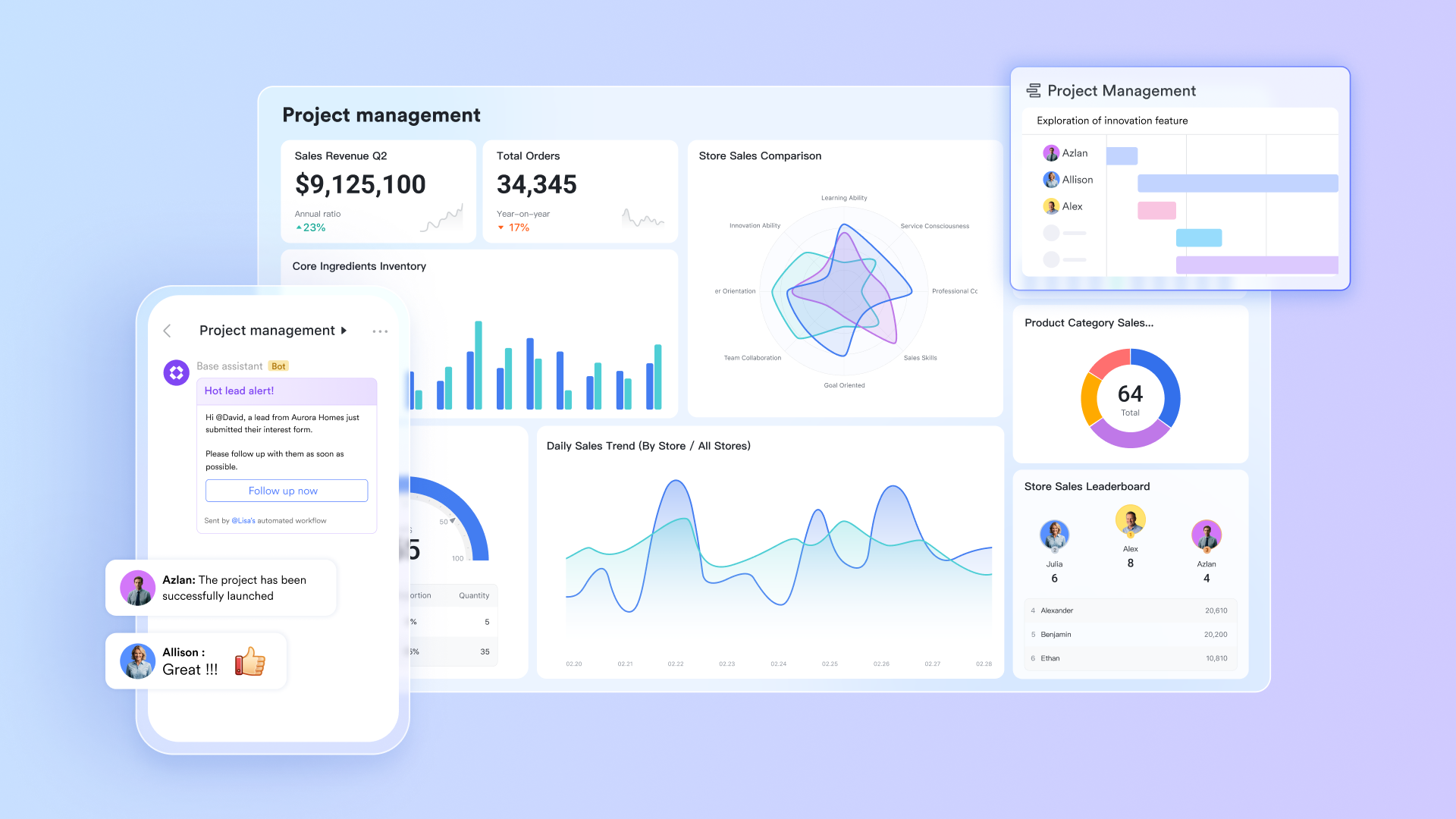
Field reporting and issue tracking via Lark Base
Accurate field reporting is essential to resolving delays, tracking defects, and documenting site conditions. Lark Base provides construction teams with a flexible structure to manage punch lists, inspections, daily logs, subcontractor assignments, and defect tracking—all within a customizable database designed for construction workflows. Site engineers can log issues directly from their mobile devices, attach photos, assign responsible contractors, and update status as work progresses. Project managers can use dashboard views to monitor the overall project lifecycle, identify bottlenecks, or track high-risk items that could affect the schedule.
Real-time field–office communication via Lark Messenger
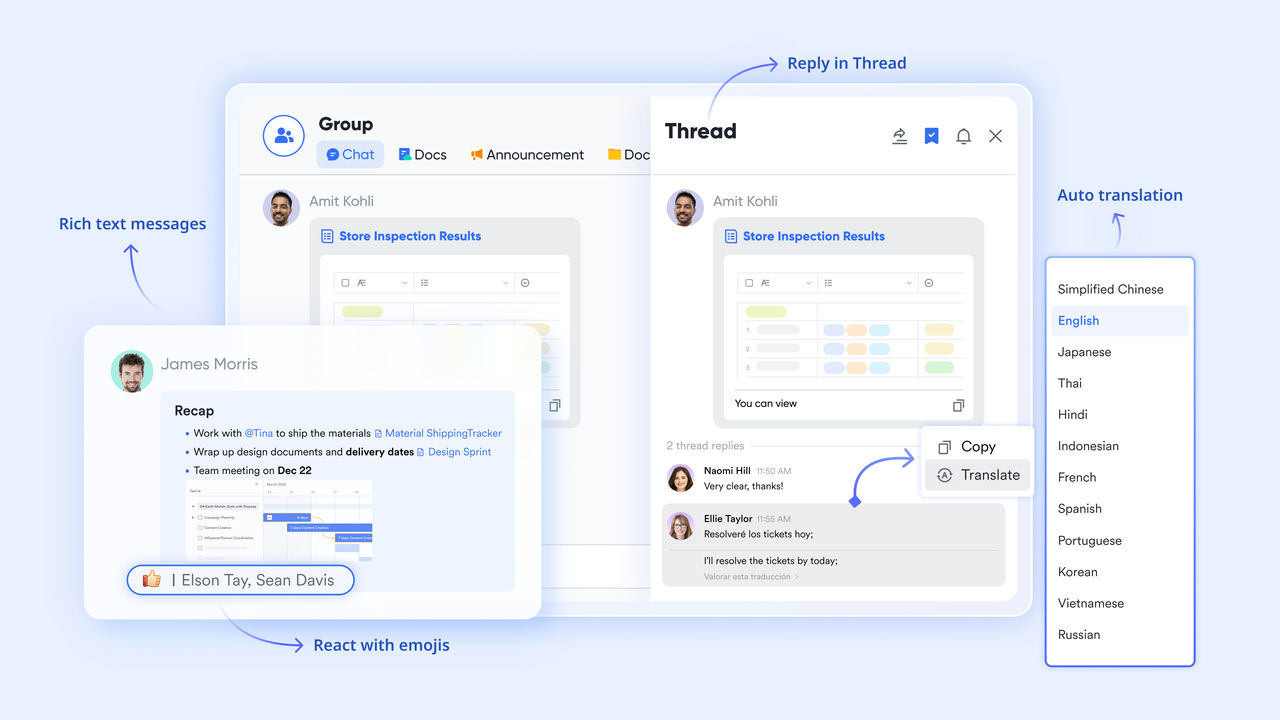
Effective construction collaboration depends on how quickly field teams and office teams can exchange updates. Lark Messenger gives construction crews a fast, centralized communication space where every message stays tied to the proper project context. Site supervisors can share photos or videos of progress, defects, or unexpected issues directly from mobile devices. At the same time, subcontractors can update tasks or RFIs through threaded conversations linked to Base records. Channels dedicated to each site or project phase help project managers maintain visibility across trades without having to jump between apps.
Centralized drawing, blueprint, and document control via Lark Docs & Lark Wiki
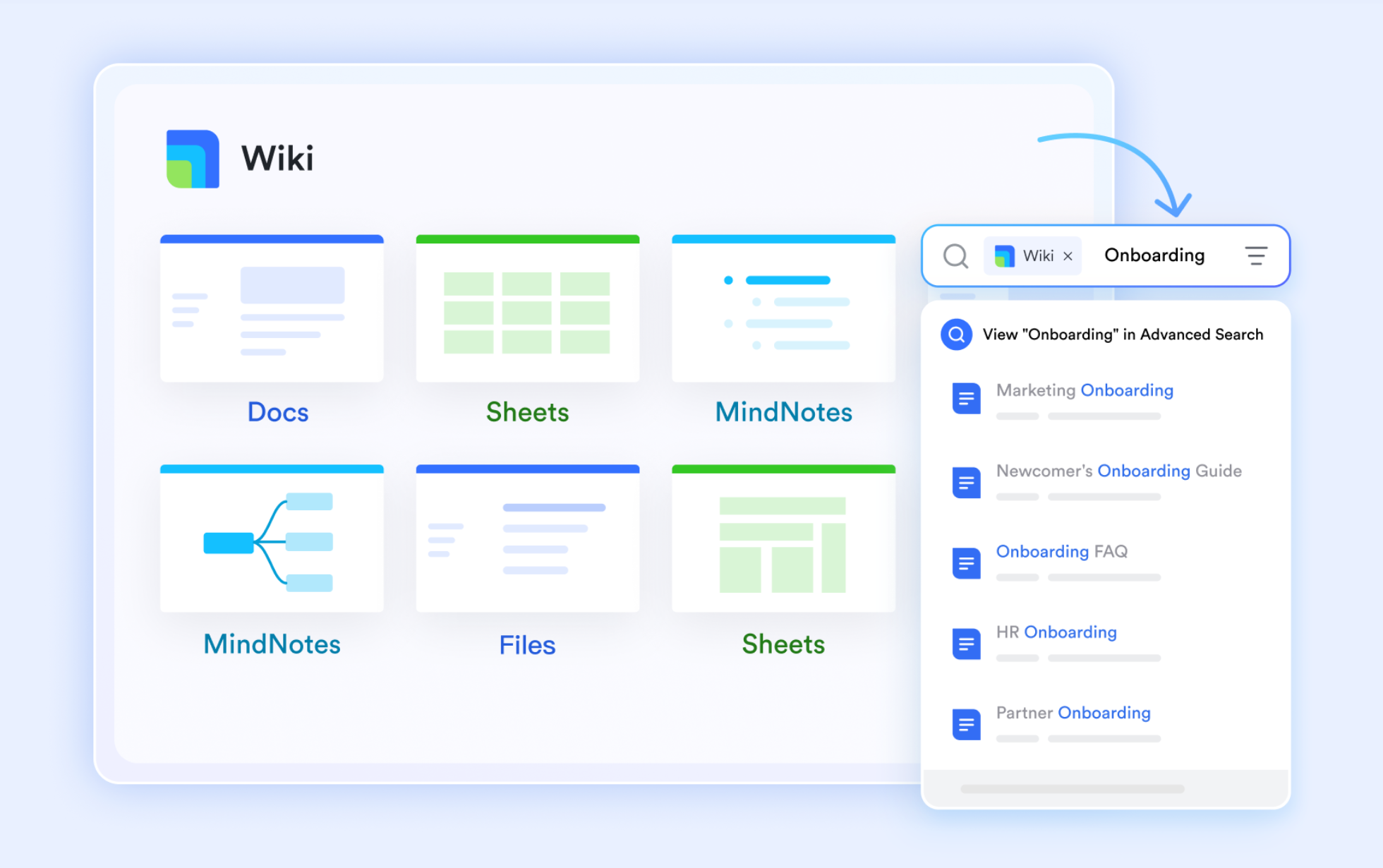
Construction projects rely heavily on accurate drawings, RFIs, safety forms, and updated instructions. Lark Docs and Lark Wiki provide a structured hub where all these documents remain version-controlled, easy to co-edit, and instantly accessible on-site or in the office. Teams can revise drawings or instructions in real time during project changes, minimizing the risk of outdated versions circulating among subcontractors. Safety manuals, SOPs, and site procedures can be stored in a Wiki that acts as a single source of truth for compliance and daily operations.
Task ownership and milestone tracking via Lark Tasks
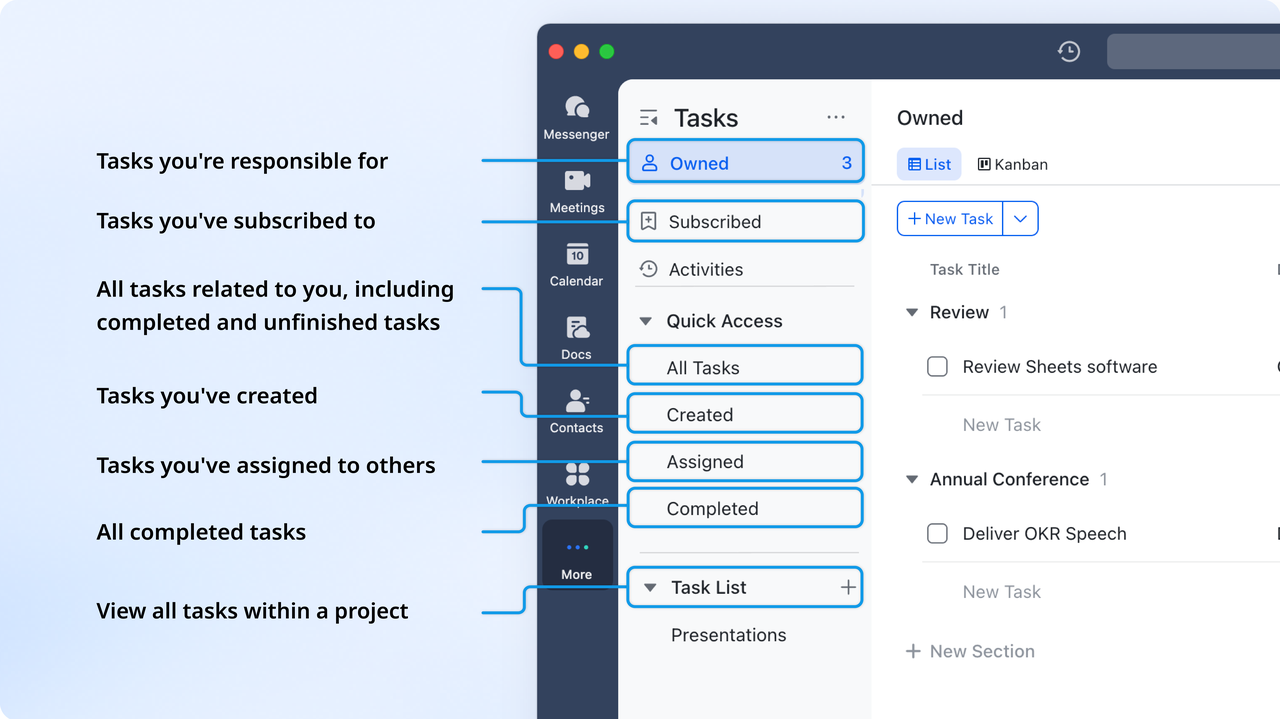
Construction collaboration breaks down when deadlines, dependencies, and responsibilities aren't clearly mapped. Lark Tasks gives teams a project-wide view of who owns what—whether it's a concrete pour, inspection, material delivery, or subcontractor handoff. Tasks can be assigned by trade or team, with dependencies that reflect real construction sequencing. As progress updates occur, stakeholders receive automatic notifications when deadlines approach or critical items are blocked. This helps project managers prevent delays, maintain workflow continuity, and ensure every task ties back to the broader construction schedule.
Approval for RFIs, change orders, and inspections via Lark Approval
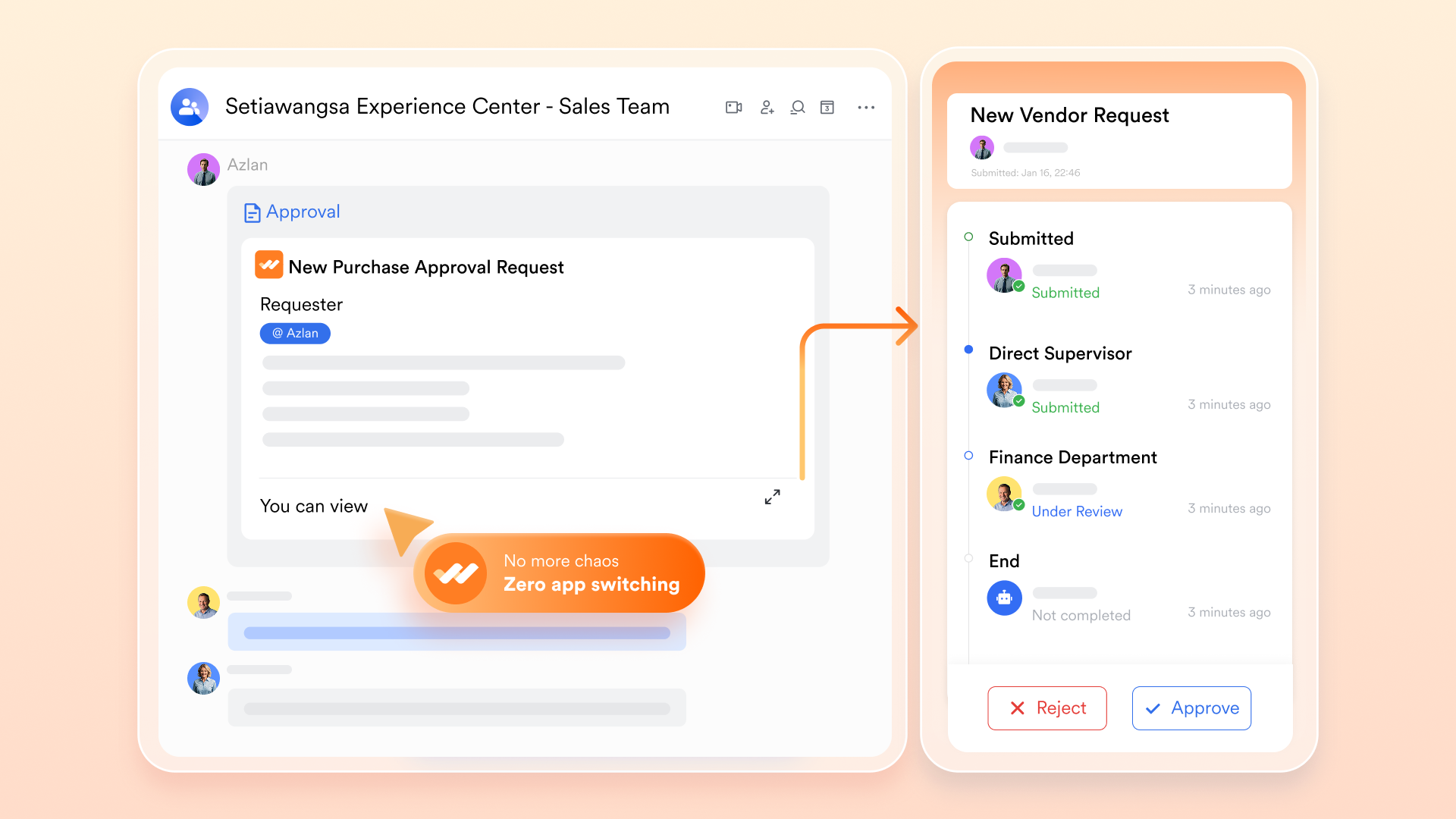
Construction projects rely on fast, accurate approvals—especially for RFIs, change orders, and inspection sign-offs that directly affect timelines and cost. Lark Approval centralizes these approval flows so they move through the right people without delays or confusion. RFIs can be routed to engineers, architects, or consultants with all supporting documents attached. At the same time, change orders follow predefined paths for financial and technical review. Inspection and safety approvals can be completed on mobile, keeping field teams moving without waiting for email responses. Automated reminders prevent bottlenecks by notifying reviewers when approvals are pending, ensuring decisions happen quickly and workflows stay on schedule.
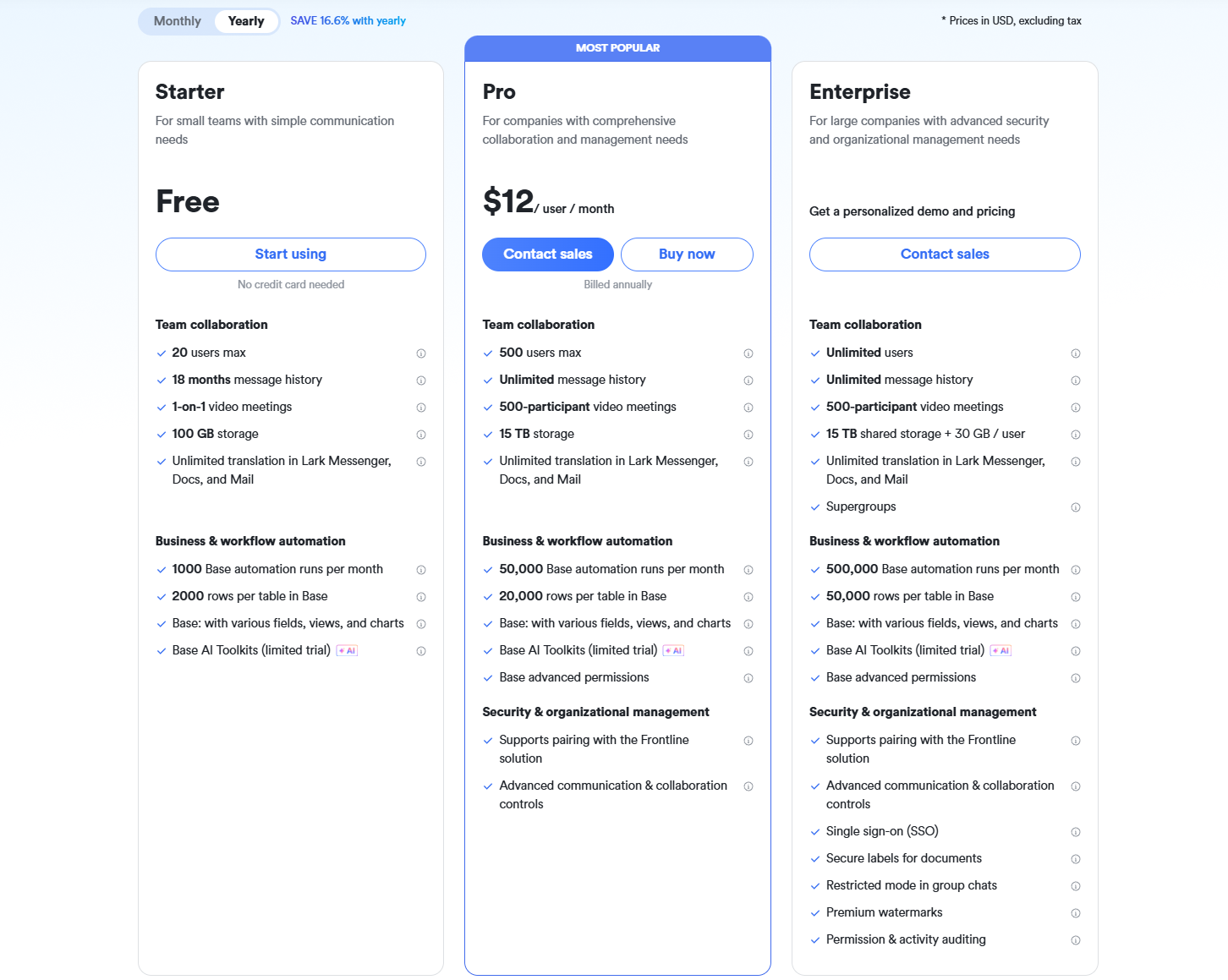
- Starter plan: Free forever plan that includes 11 powerful tools for up to 20 users. It also comes with 100GB of storage, 1000 automation runs, AI translations, and more.
- Basic plan: $6/user/month (billed annually) for up to 500 users. It includes everything in Starter plus group calling for up to 500 attendees, 5TB of storage, 1000 automation runs, and more. For more details, please contact sales.
- Pro plan: $12/user/month (billed annually) for up to 500 users. It includes everything in Basic plus group calling for up to 500 attendees, 15TB of storage, 50,000 automation runs, and more.
- Enterprise plan: Contact sales for custom pricing. Supports unlimited users and includes even more automation runs and advanced security, compliance, and management features.
2. Procore: Construction project management collaboration software
Procore is a comprehensive platform built for construction teams who need to manage the whole project lifecycle — from preconstruction through execution to handover. It brings site and office teams together in one system that supports document control, RFIs, submittals, and field coordination. With Procore, you get real-time visibility into budget, tasks, and quality, helping your team reduce risk and avoid rework. The software is modular, so you can pick the features that match your business needs and scale as your projects grow. Its design supports unlimited users, encouraging broad adoption across all project stakeholders.
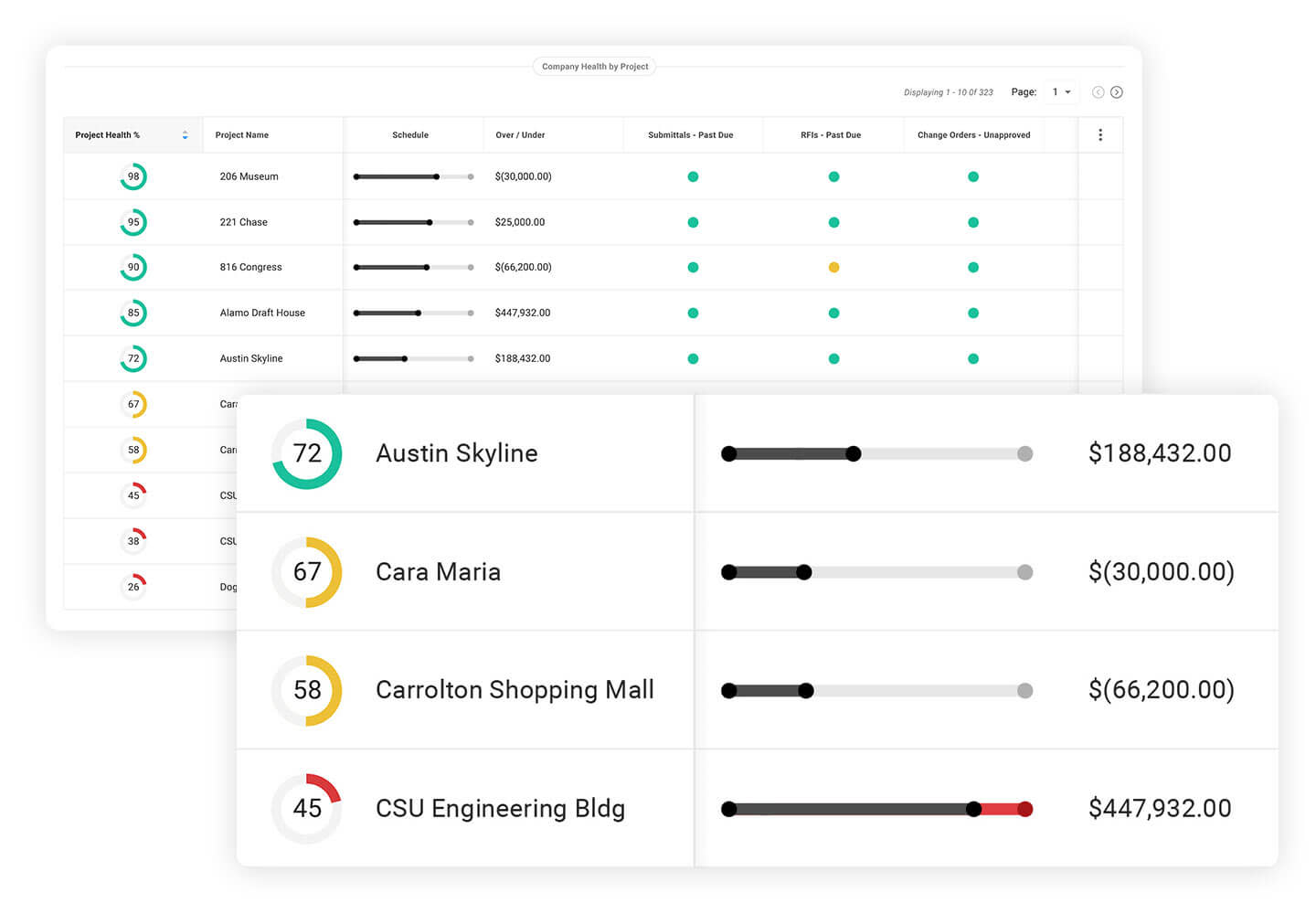
Image source: procore.com
Key features:
- Comprehensive project management suite including RFIs, submittals, punch lists, meeting logs, and project dashboards for visibility into daily tasks.
- Document and blueprint control with version tracking, markups, revision history, and a centralized file hub to keep teams aligned.
- Field reporting tools such as daily logs, inspections, observations, checklists, and mobile site updates to support accurate on-site documentation.
- Task and phase tracking maps activities to timelines, helping teams monitor dependencies, delays, and overall project progress.
Pros:
- Highly scalable modular design suitable for small contractors, mid-size firms, and enterprise-level builders.
- A central collaboration environment that keeps everyone updated, minimizes miscommunication, and ensures access to current information.
- Unlimited user access encourages broad adoption across internal teams, clients, consultants, and subcontractors.
Cons:
- Implementation can be time-consuming and may require structured onboarding and training.
- Users may experience a learning curve, especially those transitioning from paper-based workflows.
Pricing:
- Custom pricing. Procore offers custom annual contracts rather than fixed public pricing. Their plans are based on your Annual Construction Volume (ACV) and the Procore modules you choose.
3. Fieldwire: Collaboration software for construction field teams
Fieldwire is a construction collaboration tool designed primarily for field crews and site supervisors who need reliable access to plans, tasks, reporting, and checklists from their mobile devices. It centralizes project plans and punch lists, allowing field teams to mark up drawings, log issues, and track task progress even in low-connectivity environments. With Fieldwire, office managers, superintendents, and subcontractors stay in sync through real-time updates, ensuring that field conditions inform decision-making continuously. The software supports both small and large job sites, offering a lightweight yet powerful way to connect field operations with project management workflows.
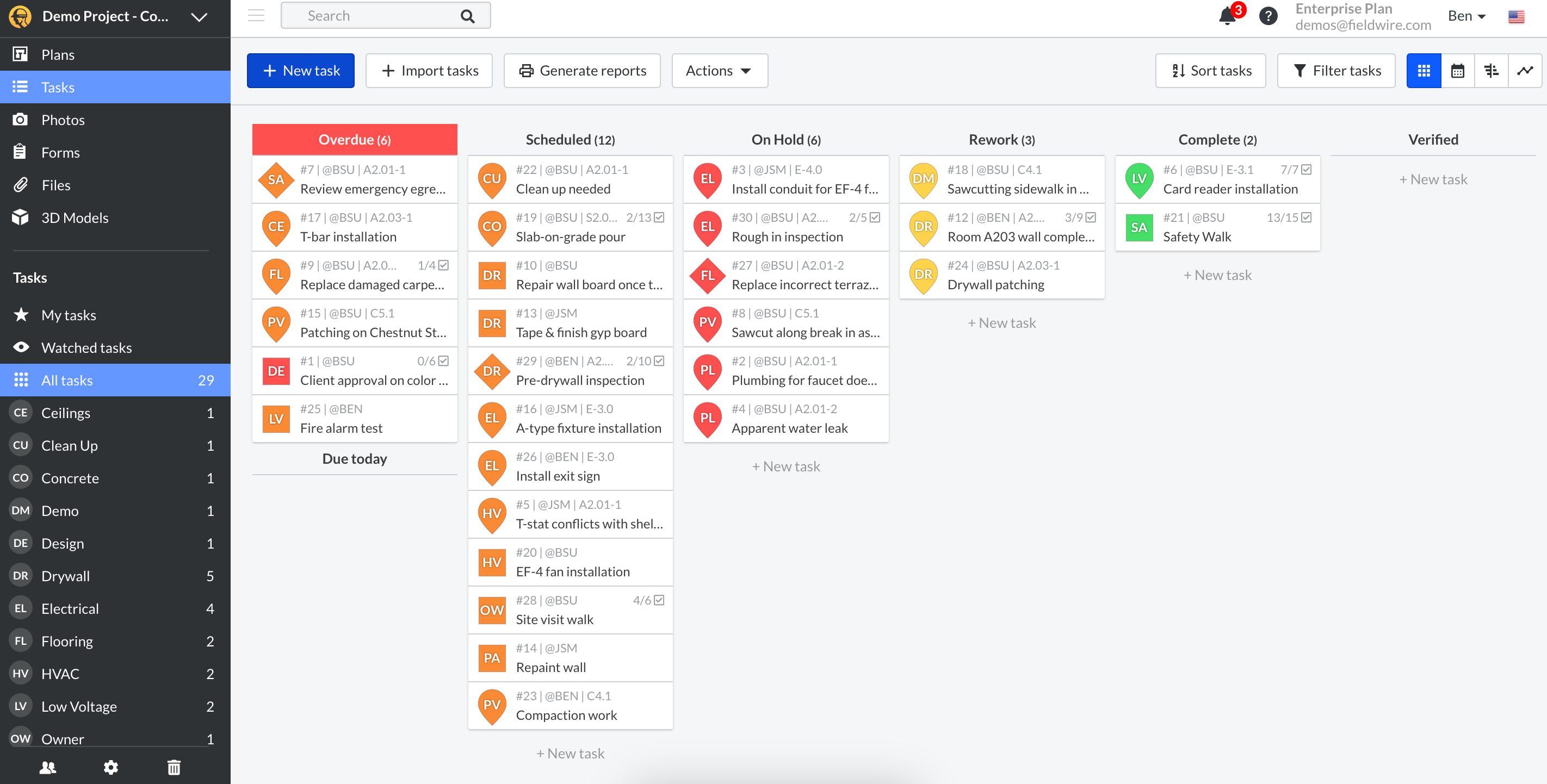
Image source: fieldwire.com
Key features:
- Task management with punch-list creation, assignment, and tracking across trades and phases, letting field supervisors assign specific tasks to crew members and follow up on status.
- Plan viewing and markup with drawing upload, annotation, and version control, so team members always work from the most up-to-date blueprint.
- Mobile-first daily reports, checklists, and inspections that enable field teams to capture progress, quality issues, and safety observations directly from their smartphones or tablets.
- Photo and file attachments on tasks and issues, allowing visual context to be added instantly from the field, making problem reporting more transparent and more actionable.
Pros:
- Designed specifically for field teams, giving site supervisors and labor crews a user-friendly interface optimized for mobile.
- Strong offline capabilities ensure that critical task information and plan data remain accessible even when connectivity is poor.
- A clear, simple punch list and issue-tracking help reduce rework and increase accountability on-site.
Cons:
- Limited financial and cost-management features make it less suitable for teams needing advanced budgeting or invoicing tools.
- Fewer built-in automation workflows for RFIs, change orders, or approvals compared to more comprehensive construction management platforms.
Pricing:
- Pro plan: $39 per user/month (billed annually).
- Business plan: $64 per user/month (billed annually).
- Business plus plan: $89 per user/month (billed annually).
4. Autodesk Construction Cloud: Advanced coordination & document management
Autodesk Construction Cloud (ACC) is a unified, cloud-native platform that brings together design, planning, construction, and operations workflows into a single integrated environment. It uses Autodesk Docs as the shared data environment, ensuring that project documentation, models, and issues remain consistent across teams. ACC supports everything from BIM coordination to project execution and closeout, helping teams reduce rework, improve visibility, and make data-driven decisions. With mobile access, stakeholders on the job site and in the office can stay connected in real time. The modular structure allows companies to choose just the components they need, giving flexibility and scalability across projects.
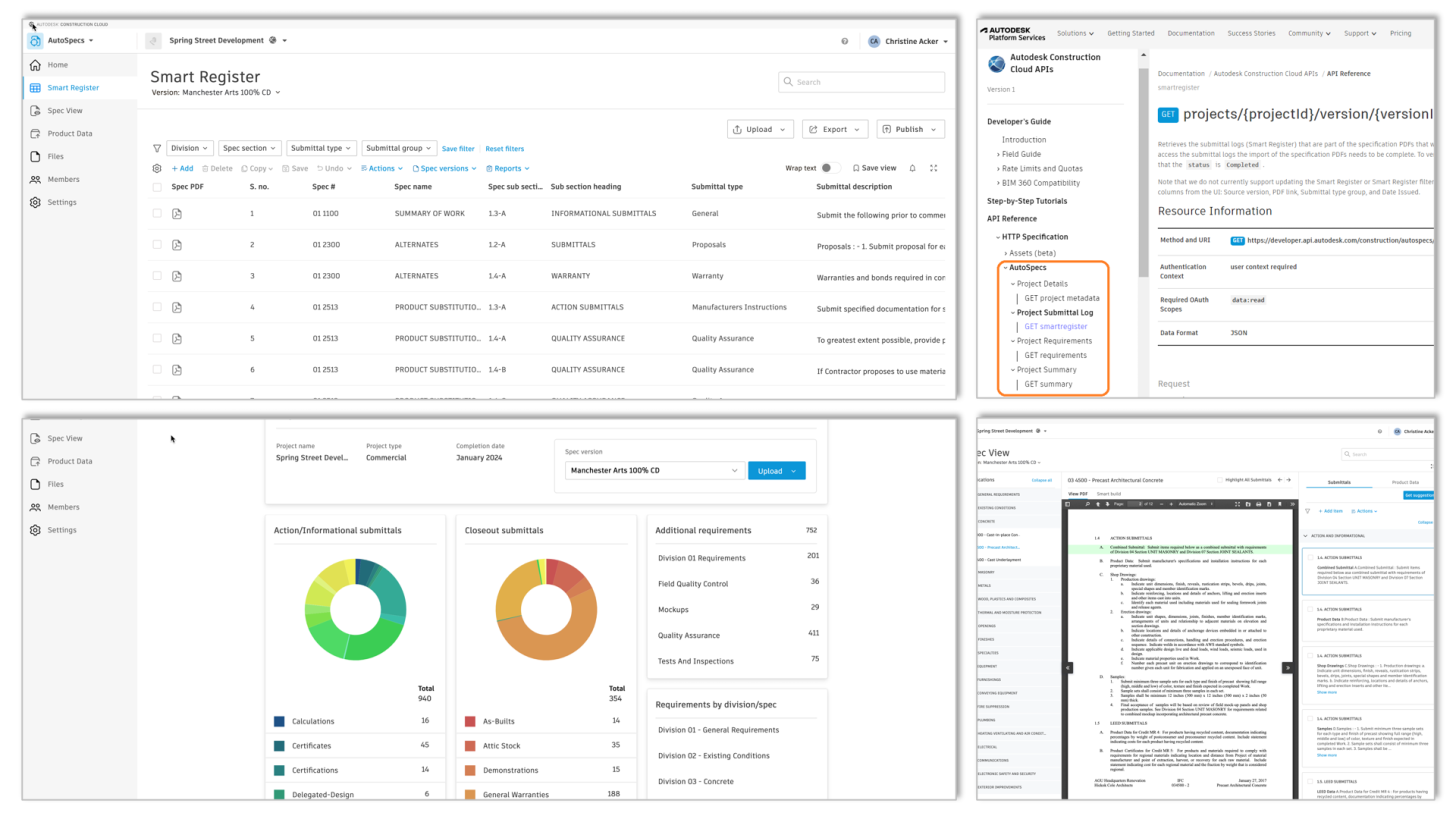
Image source: autodesk.com
Key features:
- Centralized document and model management, ensuring all stakeholders work from the latest drawings, files, and versions.
- Model coordination and design collaboration tools that help identify clashes, track issues, and streamline the review process.
- Field execution features, including RFIs, submittals, punch lists, checklists, and daily reports, support both project managers and site crews.
- Takeoff capabilities that support accurate material quantification and help teams build detailed estimates.
Pros:
- Comprehensive, modular platform that supports everything from design collaboration to site execution.
- Tight integration with Autodesk's design ecosystem enables smoother handoffs between architects, engineers, and builders.
- Strong visibility into project risks and issues thanks to integrated analytics and reporting tools.
Cons:
- It can be expensive, especially when multiple modules or advanced BIM features are required.
- Licensing can feel complex due to the number of products and permissions across the ecosystem.
Pricing:
- Custom pricing. ACC pricing is quote-based and depends mainly on which modules (Docs, Build, Collaborate, etc.) you choose.
5. Revizto: BIM collaboration for design & construction teams
Revizto is a BIM collaboration and coordination platform used by design teams, VDC specialists, contractors, and trade partners to streamline issue tracking and model-based communication. It unifies 2D and 3D information in a single environment, allowing teams to navigate models, review clashes, assign tasks, and monitor design or construction issues in real time. Revizto enables early coordination and faster decision-making by helping teams resolve conflicts before they reach the field. Its intuitive interface makes it suitable for both BIM experts and non-technical stakeholders, ensuring consistent project visibility from preconstruction to closeout.
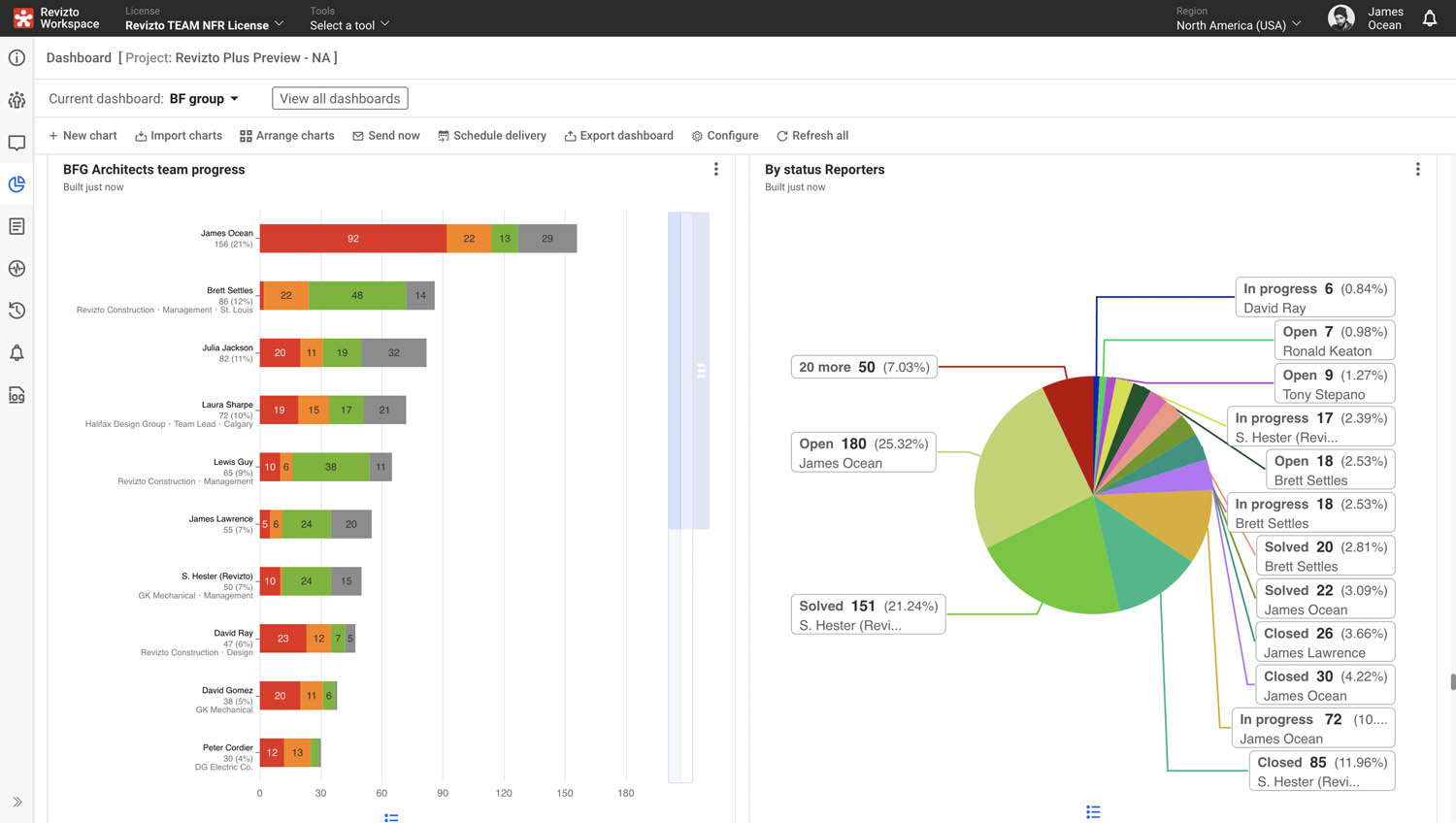
Image source: revizto.com
Key features:
- Integrated 2D and 3D model viewer that brings drawings, sheets, and full BIM models into a unified space for easy navigation.
- Issue tracking engine that lets teams create, assign, prioritize, and track coordination issues across design and construction phases.
- Clash identification and coordination tools that help teams detect conflicts and manage resolution workflows more efficiently.
- Real-time collaboration that allows architects, engineers, and contractors to comment, pin issues, and update tasks simultaneously.
Pros:
- Easy-to-use interface that works for both technical and non-technical team members.
- Real-time updates help keep all project stakeholders aligned around the latest model changes and issue status.
- Compatible with a wide range of modeling tools, making it flexible for multi-disciplinary teams.
Cons:
- It can be expensive for large teams, especially when many users require full coordination access.
- Limited traditional project management tools, which may require teams to use separate platforms for scheduling or financial tracking.
Pricing:
- Custom pricing. Revizto offers subscription-based pricing that varies by team size, number of users, and required access level.
6. Buildertrend: Construction management collaboration software for contractors
Buildertrend is a cloud-based construction collaboration platform designed especially for home builders, remodelers, and specialty contractors. It brings together project management, client communication, and financial tools in a single system, enabling teams to coordinate seamlessly from pre-sale through construction and closeout. Using Buildertrend, builders can share progress with clients, handle selections, manage change orders, and streamline billing, all while keeping field crews and office staff aligned. Its mobile app ensures that everyone on site or in the office can access the same up-to-date project data.
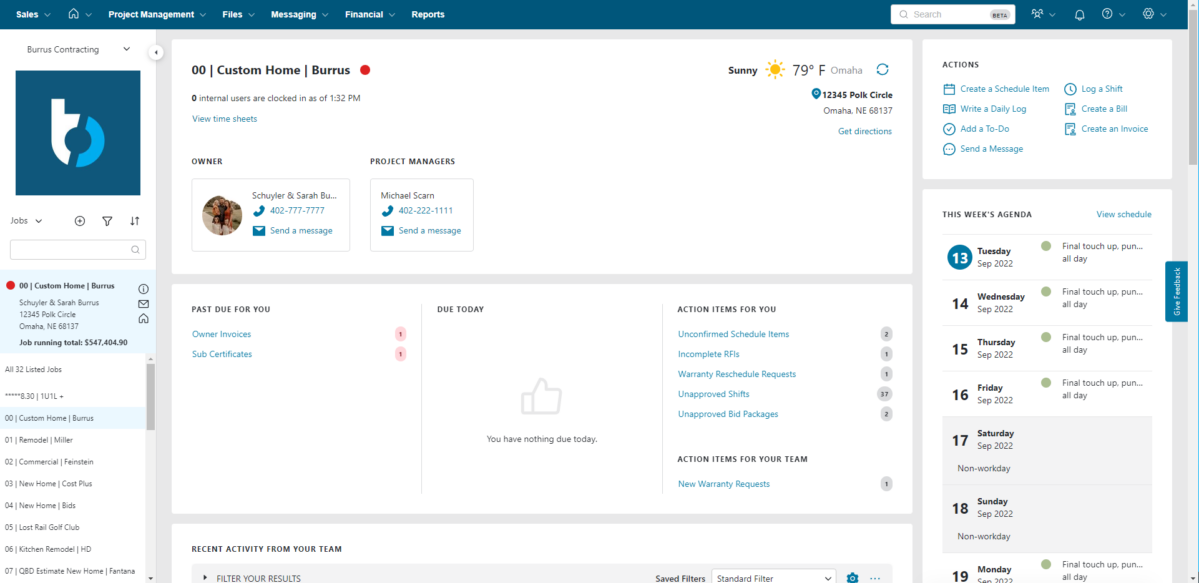
Image source: buildertrend.com
Key features:
- Project scheduling: Includes Gantt-style timelines, to-do lists, and calendar-based views so teams can plan and monitor work across tasks and phases.
- Daily logs and time tracking: Field teams can submit daily reports, record hours, and track labor directly from their mobile devices.
- Financial tools: Budgeting, change orders, purchase orders, and invoicing are all built in, enabling real-time cost tracking and billing.
- Client portal: Customers can view project progress, make selections (like finishes), send messages, and even pay invoices through an integrated portal.
Pros:
- Well-tailored for residential construction and remodeling, making it especially useful for small to mid-size builders.
- Unlimited users and projects allow full-team collaboration without extra per-seat costs.
- The client portal builds trust and transparency by giving homeowners real-time visibility into progress, budgets, and selections.
Cons:
- Pricing can feel steep for tiny teams or those just starting, especially with higher-tier plans.
- The user interface and workflow complexity can be a hurdle for first-time users, requiring some learning.
Pricing:
- Custom pricing
7. Smartsheet: Collaboration and tracking for construction operations
Smartsheet is a work execution and collaboration platform designed to help teams plan, track, and automate projects with a spreadsheet-style interface. Construction teams use it to streamline schedules, manage documents, coordinate field–office communication, and automate approvals. Its multiple views, forms, dashboards, and reporting tools make it adaptable to different construction workflows. With mobile access, field teams can update progress and share information instantly. Smartsheet works well as construction management collaboration software for teams needing flexibility and structured task coordination across all phases of a project.
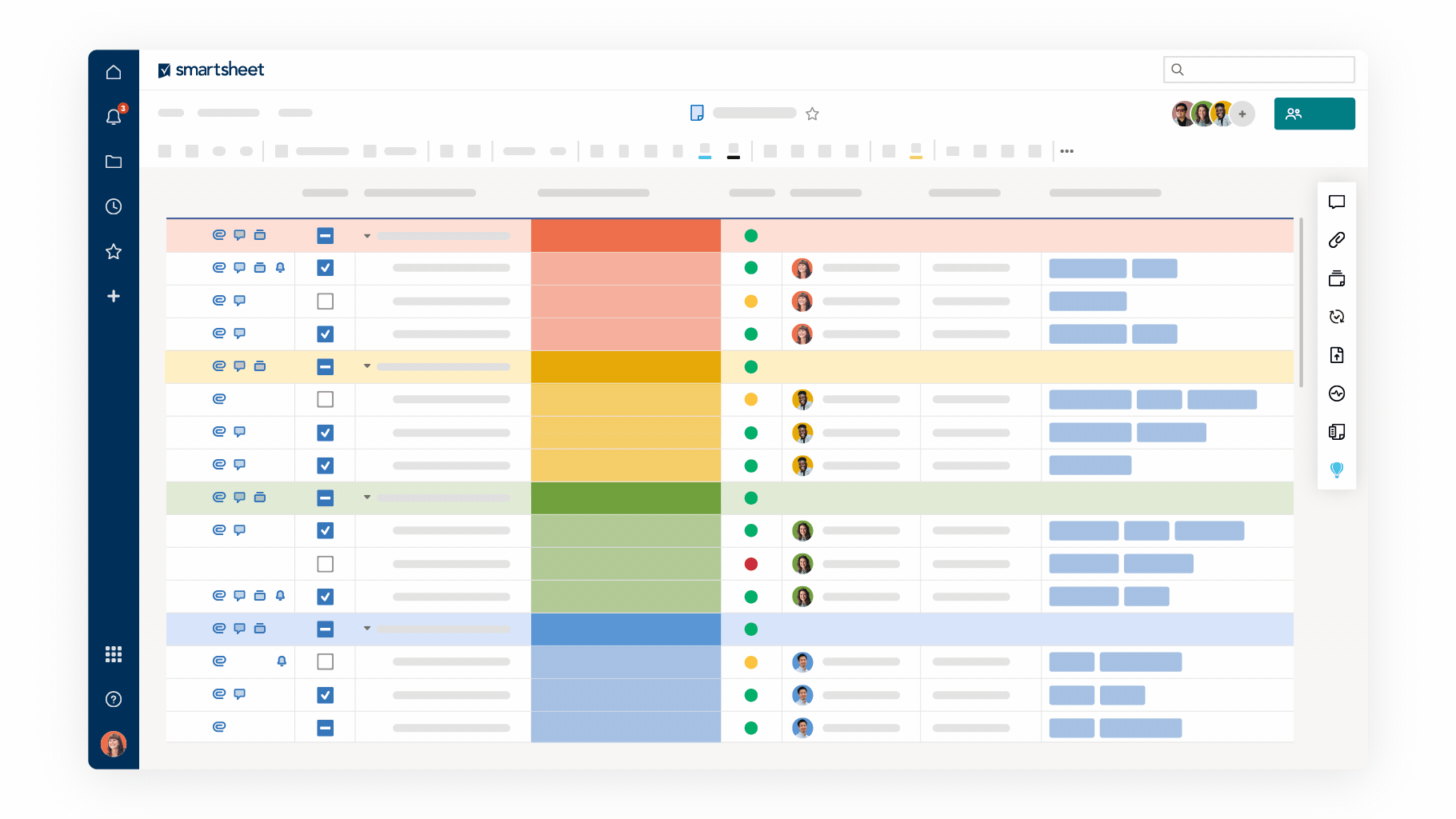
Image source: smartsheet.com
Key features:
- Flexible project views that allow teams to use grid, Gantt, calendar, or board layouts to visualize tasks and timelines.
- Automation capabilities that handle reminders, approval routing, and repetitive workflows to reduce manual follow-up.
- Forms and data intake tools that streamline submissions for RFIs, safety checks, daily logs, and requests from the field.
- Dashboards and reports that provide real-time visibility into KPIs, project status, and team workload.
Pros:
- Extremely flexible structure that adapts to different construction workflows and team preferences.
- Strong automation features that reduce repetitive tasks and enforce consistent processes.
- An effective collaboration environment with permission-based sharing for internal and external stakeholders.
Cons:
- A spreadsheet-style layout may feel overwhelming or less intuitive to users who prefer visual tools.
- Lacks specialized construction modules such as BIM coordination, requiring additional tools.
Pricing:
- Free: No free plan (30-day trial available).
- Pro: $9/user/month (unlimited sheets, basic automation).
- Business: $19/user/month (advanced automation, 20GB storage).
- Enterprise: Custom pricing (unlimited storage, AI tools, SSO).
8. Asana: Lightweight construction team collaboration software
Asana is a structured project and task management platform designed to help construction teams organize schedules, coordinate work, and streamline communication. Its multiple views and automation capabilities make it suitable for office-to-field alignment, even though it is not built specifically for construction. Teams use it to manage tasks, share documents, monitor deadlines, and track progress in real time. Asana works effectively as software for construction team collaboration when supported by customized workflows. With reliable mobile access, field workers can upload photos, update tasks, and stay synced with office operations. Its clarity, structure, and ease of use make it a popular choice for multi-team coordination.
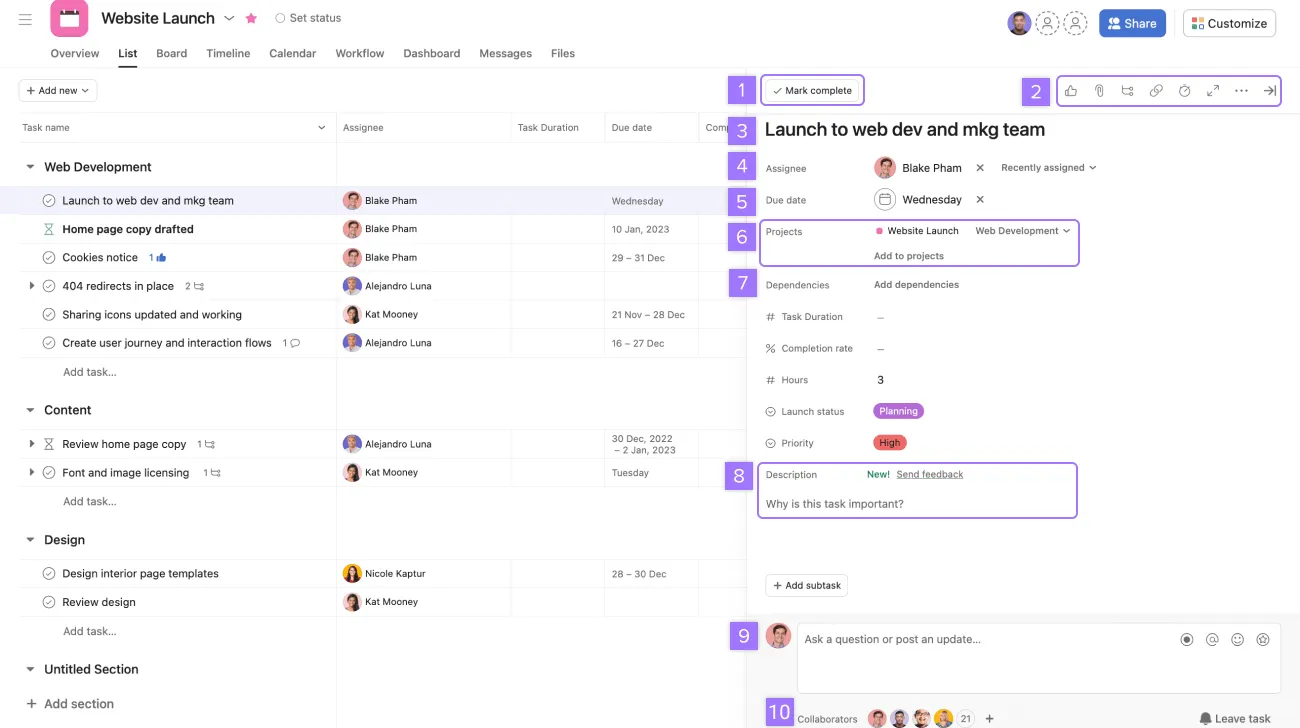
Image source: asana.com
Key features:
- Task and project views that include list, board, timeline, and calendar layouts, helping teams visualize phases, dependencies, and progress clearly.
- Workflow automation that manages approvals, reminders, assignments, and notifications to reduce manual coordination and improve overall efficiency.
- Document and file sharing that allows teams to attach drawings, specifications, photos, and essential reports directly to each related task.
- Prebuilt templates for construction workflows, such as punch lists, meeting agendas, procurement checklists, and safety or inspection tracking.
Pros:
- User-friendly interface that helps construction teams adopt the platform quickly, with minimal training and technical complexity.
- Strong automation that saves time by standardizing task routing, approvals, reminders, and repetitive communication loops.
- Multiple project views that support different management styles and provide clarity for both office and field teams.
Cons:
- Not construction-specific, meaning teams need to customize workflows and may still require additional field or document tools.
- Limited features for RFIs, submittals, drawing management, or version control compared to construction-focused platforms.
- Weak offline capabilities make it less reliable for teams working in remote job sites with limited connectivity.
Pricing:
- Free: Up to 10 users (basic tasks, list/board/calendar views).
- Starter: $10.99/user/month (timeline views, 5GB storage).
- Advanced: $24.99/user/month (portfolios, goals, 100 automations/month).
- Enterprise: Custom pricing (~$35/user/month; advanced security, unlimited storage).
9. Monday.com: Visual construction collaboration workspace
Monday.com is a flexible work operating system that construction teams use to plan schedules, coordinate tasks, and visually track project progress. Its boards, automations, and dashboards help teams organize work easily, making it suitable for construction operations that require clarity and fast communication. With custom workflows, teams can manage timelines, approvals, materials, and subcontractor activities in one shared space. It works well as software for construction team collaboration when paired with field tools or document systems. Monday.com's visual approach helps both office and site teams stay aligned, ensuring smooth coordination across phases. Its adaptability makes it ideal for teams needing a customizable collaboration workspace.
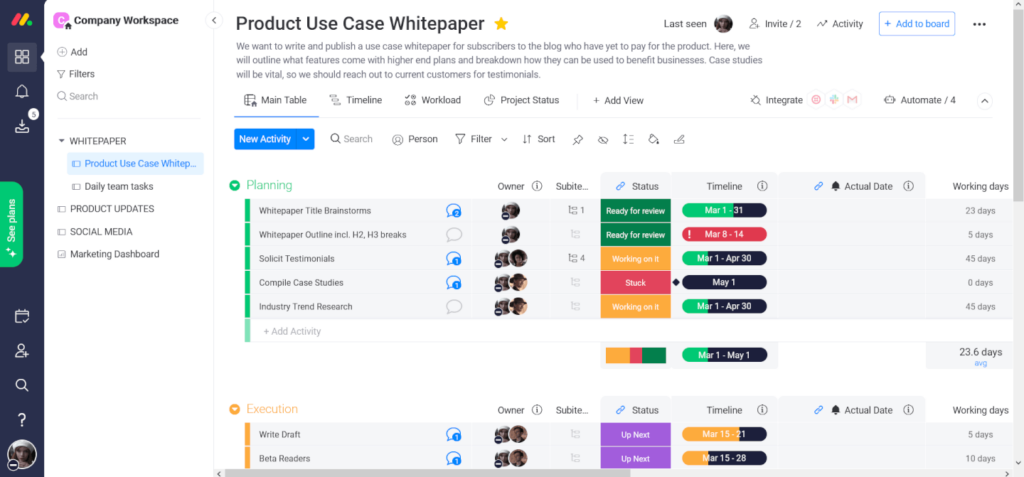
Image source: monday.com
Key features:
- Visual boards that enable construction teams to track schedules, subcontractor tasks, project phases, and daily operations in an organized, easy-to-read format.
- Automation capabilities that handle repetitive steps, such as reminders, task routing, deadline alerts, and status changes, to simplify coordination.
- File and document uploads that support drawings, contracts, specifications, and reports directly within boards, keeping information central and accessible.
- Timeline, calendar, and Gantt views that allow managers to plan resources, map dependencies, and maintain clarity over complex construction schedules.
Pros:
- Highly visual interface that makes it easy for construction teams to interpret information quickly and understand project status at a glance.
- Strong automation workflows that reduce manual coordination, improve consistency, and free teams from repetitive administrative tasks.
- Flexible customization that allows teams to tailor boards for procurement, scheduling, inspections, materials, and subcontractor oversight.
Cons:
- Not purpose-built for construction, requiring teams to create their own templates for RFIs, submittals, inspections, and document workflows.
- Limited blueprint or drawing management, lacking advanced version tracking or markup tools needed by technical construction teams.
Pricing:
- Free: Up to 2 seats (limited features).
- Basic: $9/user/month (min. 3 users; unlimited items, 5GB storage).
- Standard: $12/user/month (automations, integrations).
- Pro: $19/user/month (advanced reporting, time tracking).
- Enterprise: Custom pricing (enhanced security, unlimited users).
10. Bluebeam: Document and blueprint collaboration
Bluebeam is a widely adopted platform for document management, PDF markup, blueprint collaboration, and construction drawing reviews. It is beneficial for teams that rely heavily on plan revisions, submittals, and detailed technical communication. Bluebeam simplifies how architects, engineers, contractors, and field teams collaborate on drawings by providing powerful markup, measurement, and versioning tools. Its real-time Studio Sessions enable multiple stakeholders to review documents together, speeding up coordination and reducing errors. While not a whole construction project management system, Bluebeam integrates well with existing workflows and serves as a strong document collaboration tool. It is especially valuable for teams working on complex projects that require precise, traceable drawing communication.
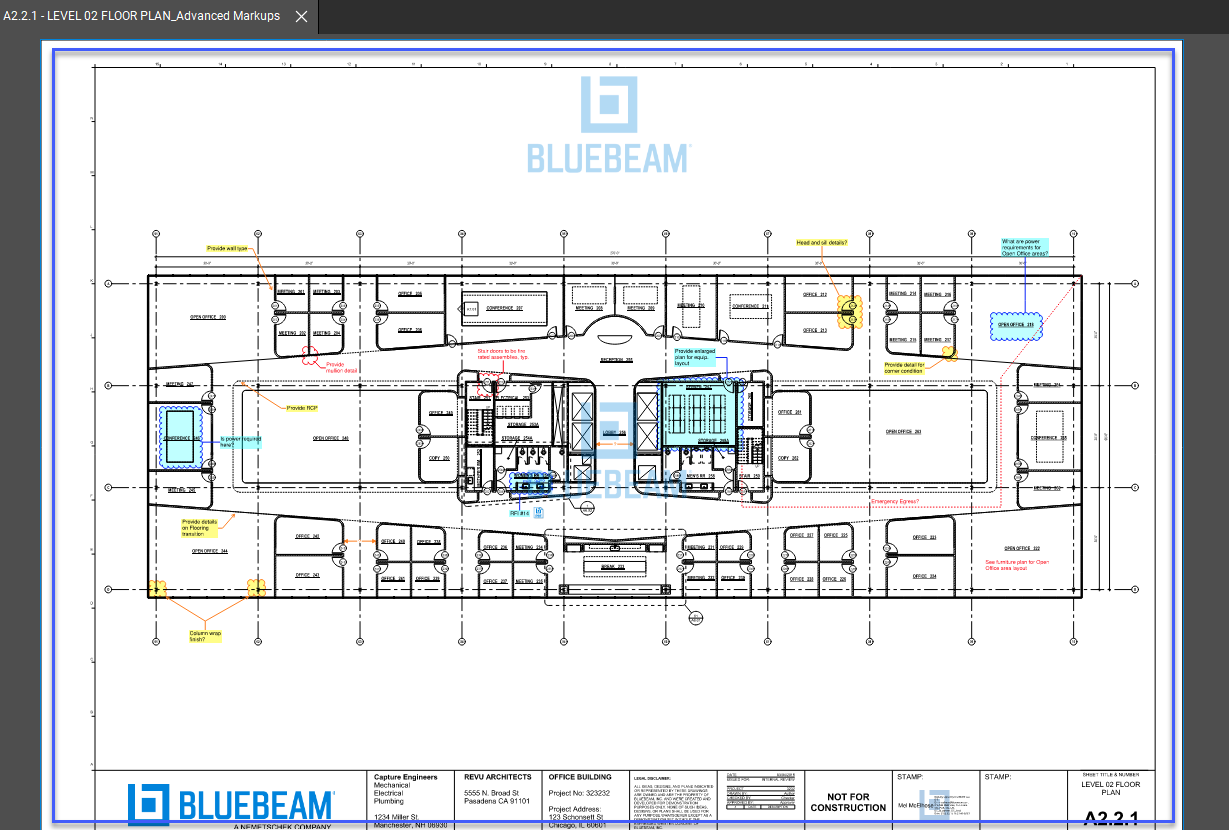
Image source: bluebeam.com
Key features:
- PDF markup and annotation tools that allow teams to add comments, measurements, symbols, and notes directly onto drawings and technical documents during reviews.
- Studio Sessions that support real-time collaboration, enabling multiple stakeholders to view, mark up, and discuss construction documents simultaneously.
- Document management capabilities that help teams organize drawings, track revisions, maintain folder structures, and ensure everyone accesses the latest files.
- Measurement and quantity takeoff tools help estimate, plan, and verify construction details with precision and consistency.
Pros:
- Strong markup tools that help technical teams communicate clearly on drawings and reduce misunderstandings during construction phases.
- Real-time collaboration that accelerates document reviews and ensures faster alignment between architects, engineers, and contractors.
- Reliable versioning that prevents outdated drawings from circulating and improves accuracy in field execution.
Cons:
- Not a complete project management or scheduling tool, requiring teams to use additional software for tasks, RFIs, or approvals.
- Desktop-heavy setup that may feel complex for smaller teams or those transitioning from simpler document tools.
Pricing:
- Free: No free plan (free trial available).
- Basics: $260/user/year (core markup tools, mobile access).
- Core: $330/user/year (document comparison, Studio collaboration).
- Complete: $499/user/year (advanced scripting, full cloud features).
- Enterprise: Custom pricing (volume discounts, dedicated support).
11. ServiceTitan: Enterprise platform for commercial specialty contractors managing construction and service coordination
ServiceTitan is the enterprise operating system used by multi-location commercial specialty contractors to consolidate their tech stack — managing construction workflows like job costing, progress billing, and subcontractor coordination alongside ongoing service operations in one platform. For mechanical contractors in HVAC, plumbing, and electrical, the collaboration problem isn't simply about messaging or document sharing — it's about connecting field technicians, project supervisors, dispatch teams, and back-office staff inside a single system that also drives the business forward. Where most tools on this list address one layer of the coordination challenge, ServiceTitan is the platform commercial specialty contractors use to manage multi-site construction collaboration without adding yet another tool to a fragmented stack.

Image source: servicetitan.com
Key features:
- Multi-site dispatch and field coordination: Centralizes scheduling and dispatch for commercial specialty contractors running crews across multiple locations simultaneously. Project supervisors and office teams operate from the same job data, so field updates, assignment changes, and status shifts are visible in real time — no phone calls or manual syncing required.
- Trade specialty coordination and workflow management: ServiceTitan gives multi-trade commercial contractors a structured environment to manage subcontractor handoffs, task assignments, and progress tracking across trades — ensuring each trade's responsibilities, timing, and status are visible to the teams that depend on them.
- Integrated communication tied to job context: Communication in ServiceTitan is attached to the job, so exchanges between field technicians, project managers, and office staff live alongside the work order, schedule, and cost data they relate to — eliminating the gap that forms when conversations happen in one tool and job records live in another.
- Approval and change order workflows: Structured approval workflows keep change orders, scope adjustments, and field decisions documented, routed to the right people, and reflected in the project record — rather than lost in email threads or chat histories.
Pros:
- Built for the operational reality of multi-location commercial specialty contracting, where field crews, project managers, and office teams coordinate inside the same system that runs dispatch, tracks job costs, and manages service agreements.
- Provides continuity for multi-trade contractors managing both construction installs and long-term maintenance across the same customer relationships — because the coordination layer and the operational layer are the same platform.
- Enterprise onboarding infrastructure suited to multi-trade operators scaling across multiple locations.
Cons:
- Designed for commercial specialty and residential service contractors, not owners managing design-build or GC-level project delivery. Teams whose primary need is standalone BIM coordination, document markup, or blueprint version control will find other tools on this list better suited to those workflows.
- Implementation requires dedicated onboarding, and the platform's depth may exceed what smaller single-trade operators need from a collaboration tool alone.
Pricing:
Custom pricing based on company size, trade mix, and operational scope. Contact the sales team at servicetitan.com for a quote.
Common mistakes when selecting collaboration tools
Selecting the right platform can be challenging for construction companies, especially when balancing communication, document management, field coordination, and long-term project needs. Many teams focus only on basic features and overlook the deeper requirements that construction workflows demand. Tools must support both field and office operations, which is why construction management collaboration software and structured document systems are essential. Without careful evaluation, teams often end up with fragmented solutions that introduce delays rather than eliminate them. Understanding the most common mistakes helps teams make better technology choices. A well-aligned collaboration stack ensures smoother execution, fewer errors, and more predictable project outcomes.
- Choosing a tool without a mobile-first focus: Many teams select tools that work well in the office but fail on the job site, especially for field workers who depend heavily on mobile access. Software for construction team collaboration must function reliably in outdoor environments and provide easy access to drawings, tasks, and updates. Without a mobile-first design, field reporting slows down, and critical information may be delayed. Collaboration software for construction needs to support fast loading, offline access, and intuitive interfaces for workers on the move. Failing to prioritize mobility often leads to communication gaps and unproductive field operations.
- Ignoring document workflows: Construction projects rely on accurate drawings, RFIs, submittals, and specifications, so document workflows must be robust and well-organized. Many teams choose tools that lack versioning, review structures, or markup support, creating confusion across trades. Construction project collaboration software must ensure that everyone works from the latest documents, especially during fast-moving changes. Missing or outdated files can lead to rework, cost overruns, and on-site safety risks. Ignoring document workflows often leaves teams scrambling to track revisions, rather than focusing on execution.
- Underestimating cross-team visibility needs: A significant challenge in construction is keeping every trade, contractor, and department aligned as projects evolve. Teams often choose platforms without dashboards, shared boards, or transparency features that allow everyone to see the full project picture. Construction project management collaboration software should offer clear views of schedules, dependencies, and responsibilities. Without visibility, tasks fall behind, accountability weakens, and delays become harder to track. Strong visibility tools help ensure smoother coordination between field crews, engineers, architects, and office teams.
- Not planning for long-term scalability: Construction teams sometimes choose simple tools that work for current needs but cannot support future growth, larger projects, or multi-site operations. As teams expand, construction collaboration software must scale to accommodate increased storage, users, automation, and complexity. Tools without long-term capability force companies to constantly migrate systems, disrupting ongoing projects. Scalable construction management collaboration software supports more workflows, integrations, and advanced features as needs increase. Failing to plan for scalability often leads to inefficiency, higher costs, and operational fragmentation later on.
Why construction teams need project collaboration solutions
Modern construction projects involve multiple stakeholders, fast-changing site conditions, and constant information flow between office and field teams. Misaligned updates or outdated documents can quickly cause rework, safety issues, and delays. This is why many companies rely on construction management collaboration software to create a unified environment for communication, documentation, and task tracking. These platforms keep engineers, contractors, architects, and site crews connected in real time. As projects become more complex, structured workflows and visibility tools become essential. Here are the reasons why project collaboration solutions are essential for consturction plans:
- Field–office communication gaps: Field teams often work with incomplete updates, while office teams struggle to understand on-site conditions. Software for construction team collaboration bridges this gap with real-time messaging, mobile reporting, and organized channels. Supervisors can instantly share photos, videos, or safety concerns from the field. Office staff can respond quickly with instructions or approvals. This reduces delays caused by unclear or slow communication and helps teams stay aligned throughout the project.
- Document control and version tracking: Construction projects produce constant revisions to drawings, specifications, RFIs, and installation guides. Without strong version control, outdated information can circulate efficiently among trades. Construction management collaboration software stores documents in a central, controlled environment with automatic version tracking. Teams can view, annotate, and update files on both desktop and mobile devices. This minimizes rework and ensures that every subcontractor works from the latest approved version. Good documentation workflows also support audits and handover requirements.
- RFI, drawings, and submittals coordination: RFIs, drawings, and submittals move through multiple reviewers, making manual tracking slow and error-prone. Modern construction collaboration software automates routing, approvals, and notifications. Engineers and architects receive timely alerts when action is required. Field teams get immediate access to approved documents, preventing on-site bottlenecks. A structured workflow also reduces the risk of lost or overlooked submissions. This improves project pace and ensures greater transparency across all stakeholders.
- Cross-trade collaboration challenges: Mechanical, electrical, plumbing, civil, and finishing teams must work in a tight sequence. Misalignment between trades is a common cause of delays. Software for construction team collaboration allows every trade to view dependencies, progress updates, and upcoming activities in a shared platform. Clashes or scheduling conflicts can be identified early through integrated dashboards. Teams stay aligned with responsibilities and timing. This reduces rework, improves coordination, and strengthens accountability at each project phase.
- Compliance, safety, and inspection alignment: Construction sites must comply with strict safety and inspection requirements. Without systematic workflows, inspections, checklists, and safety reports can become inconsistent or poorly documented. Construction management collaboration software standardizes these processes with digital forms, mobile inspections, and automatic record-keeping. Supervisors can log issues directly from the field, complete checklists, and track corrective actions. Centralized data makes audits easier and improves regulatory compliance. This leads to safer work sites and more reliable documentation for future reference.
Conclusion
Construction collaboration software has become essential for modern project delivery, especially as teams juggle complex schedules, field operations, subcontractor coordination, and document-heavy workflows. The right tool not only improves communication but also strengthens document control, streamlines RFIs and approvals, enhances visibility across trades, and helps prevent delays or rework. From end-to-end platforms to specialized field tools, each solution offers unique advantages depending on project scale and team structure. For construction companies seeking an integrated workspace that supports messaging, tasks, approvals, field reporting, documentation, and automation in a single system, Lark offers a unified, flexible environment that keeps both site and office teams aligned. With real-time collaboration and customizable workflows, Lark helps teams maintain accuracy, speed, and clarity from planning to handover. To explore how Lark can support your construction operations, you can start using the platform or begin a free trial today.
FAQs
What is the difference between construction collaboration software and construction project management tools?
Construction collaboration software focuses on communication, document sharing, field coordination, and real-time teamwork across trades, while construction project management tools emphasize scheduling, budgeting, and resource allocation. Collaboration tools ensure that drawings, RFIs, updates, and site data flow smoothly between the office and the field. Project management tools handle long-term planning and oversight. Many teams use both, combining daily coordination features with high-level project controls. Platforms like Lark unify messaging, tasks, approvals, and documents, bridging the gap between collaboration and project operations.
Which construction collaboration software works best for field teams with limited connectivity?
The best tools for limited connectivity offer offline capabilities, lightweight mobile interfaces, and fast-loading documents for site crews working in remote or low-signal areas. Solutions that sync automatically once reconnected ensure continuity and accuracy in field reporting. Lark supports mobile-first workflows that help teams stay aligned, even in challenging environments. While some tasks may require full connectivity, its streamlined mobile experience helps reduce delays. Choosing tools built for field realities prevents communication breakdowns and incomplete updates.
Can construction collaboration tools help with safety compliance and inspections?
Yes, many collaboration platforms support digital checklists, inspection forms, photo uploads, and structured reporting needed for compliance management. These features help supervisors track hazards, document corrective actions, and maintain consistent records across job sites. Tools with workflow automation ensure safety approvals move efficiently without bottlenecks. Lark enables teams to centralize safety documentation and route inspection approvals through customizable workflows. This improves visibility and ensures safety standards are upheld throughout the project lifecycle.
How do contractors use collaboration software to manage subcontractors and RFIs?
Contractors rely on collaboration tools to organize subcontractor tasks, track handoffs, share drawings, and maintain accountability across trades. RFI workflows become faster when documents, photos, and clarifications are exchanged through structured channels rather than scattered emails. Dashboards help project managers identify delays or unresolved issues. Lark supports RFI routing, task assignment, and document sharing within one unified workspace, keeping subcontractors aligned with project requirements. This reduces communication gaps and speeds up decision-making.
Is cloud-based construction collaboration software secure for sensitive project documents?
Most cloud-based tools provide encryption, access control, audit trails, and secure storage to protect drawings, contracts, and compliance data. Security frameworks ensure only authorized users can view or edit project files, reducing the risk of data breaches or unauthorized distribution. Construction teams benefit from centralized document control rather than relying on scattered local storage. Lark includes enterprise-grade security features that safeguard sensitive project information while supporting collaborative workflows. This makes cloud-based collaboration both safe and operationally efficient.
Related reading
Table of contents
Start using Lark today

Manage all your work in one place
Boost team efficiency by 10x
Save up to 70% on software costs
Table of contents
Start using Lark today
Manage all your work in one place
Boost team efficiency by 10x
Save up to 70% on software costs
Keep reading


![What Is a 2-2-3 Work Schedule? Explanation and More [2026]](https://framerusercontent.com/images/uKHRfkp4v7y4azRNTYUmuteNQz8.png)



2026 Lark Technologies Pte. Ltd.
Headquartered in Singapore with offices worldwide.






Explore: