In today's competitive business landscape, ensuring consistent quality is not just a regulatory obligation; it is a fundamental driver of customer satisfaction and long-term success. Quality Management Software (QMS) has emerged as an indispensable tool for organizations looking to streamline their quality processes, maintain compliance, and foster a culture of continuous improvement. For enterprise managers, navigating the array of QMS solutions available can be a daunting task. This guide is designed to clarify the complexities, offer strategic insights, and help you make an informed decision when selecting the best QMS software for your organization.
Why quality management software matters more than ever
The demands on quality management have intensified significantly. Businesses today face heightened regulatory scrutiny, operate within intricate global supply chains, and serve customers with ever-increasing expectations. Relying on outdated manual processes or disconnected systems risks not only non-compliance but also operational inefficiencies and reputational damage.
A robust QMS software shifts an enterprise from a reactive mode of fixing problems to a proactive stance of preventing them. This proactive approach offers several key benefits:
- Streamlined compliance: A QMS centralizes documentation and processes, making it easier to meet regulatory requirements and demonstrate adherence during audits.
- : By automating tasks and providing real-time data, QMS software reduces manual effort, minimizes errors, and .
- Proactive risk mitigation: It enables earlier identification of potential issues, allowing for corrective and preventive actions before they escalate.
- Cost savings: Preventing failures, reducing waste, and avoiding non-compliance penalties directly contributes to a healthier bottom line.
- Protected brand integrity: Consistent quality builds trust with customers and safeguards your brand's reputation.
For instance, consider a manufacturing company struggling with recurring product defects. Without a centralized QMS, identifying the root cause might involve sifting through disparate spreadsheets, email threads, and paper documents across multiple departments. A dedicated QMS, however, centralizes non-conformance data, facilitates quick CAPA (Corrective and Preventive Action) assignments, and into the resolution process, preventing future occurrences and reducing waste. This approach ensures that quality standards are consistently met, even as the enterprise scales.
Beyond features: understanding your enterprise’s unique QMS needs
It's common to assume that a QMS solution with the most features is automatically the best. However, this perspective can often lead to overspending on capabilities you don't need or, worse, implementing a system that and . The true value of QMS software lies not in its sheer number of functions, but in its ability to effectively address your enterprise's specific quality challenges and strategic objectives.
Before even looking at vendor demos, I recommend an internal assessment. Consider the following key questions:
- Identifying core pain points: What are your most significant quality-related challenges? This could be inconsistent document control, frequent audit failures, or difficulty tracking corrective actions across departments.
- Compliance and regulatory landscape: What specific compliance standards or regulations must you meet? Different industries have unique requirements (e.g., FDA for pharmaceuticals, ISO 9001 for general quality).
- Strategic : What are your overall quality objectives? Are you aiming for zero defects, faster product delivery, or improved customer satisfaction?
Wondering what a smart QMS tool would be like?
Key capabilities to look for in a modern QMS solution
When assessing QMS software, certain core capabilities are universally important for enterprise-level . These functionalities form the backbone of an effective QMS, enabling organizations to maintain control, ensure compliance, and drive continuous improvement.
Document control and management
The foundation of any quality system is robust document control. Your QMS should provide a centralized repository for all quality-related documents, including standard operating procedures (SOPs), work instructions, policies, and records. It should offer comprehensive version control, ensuring that only the most current and approved documents are in use. For example, if your engineering team updates a product specification, the QMS should automatically archive the old version, publish the new one, and notify relevant stakeholders, complete with an audit trail of who made changes and when. This capability eliminates confusion, reduces errors, and is critical for regulatory compliance.
Audit management
Effective audit management allows enterprises to plan, conduct, and track both internal and external audits with precision. A good QMS solution provides tools to schedule audits, assign auditors, generate checklists, record findings, and manage non-conformances discovered during the audit process. After an internal audit identifies a recurring issue in a production line, the QMS should facilitate the assignment of corrective actions to the responsible team, set deadlines for completion, and allow for verification of the implemented changes, ultimately closing the loop on the audit finding. This structured approach helps ensure timely resolution of issues and demonstrates a commitment to quality standards like ISO 9001.
Corrective and preventive actions (CAPA)
The CAPA process is at the heart of continuous improvement. A modern QMS should provide a systematic framework for identifying, investigating, and resolving non-conformances or potential issues. This includes tools for root cause analysis, assigning responsibility for corrective and preventive actions, ha ha ha, and verifying the effectiveness of the implemented solutions. When a customer complaint comes in, for example, the QMS helps log the complaint as a non-conformance, triggers a root cause investigation, documents the CAPA plan, and tracks its execution until the issue is fully resolved and prevented from recurring.
Risk management
Quality management extends beyond reactive measures to proactive risk identification and mitigation. A modern QMS should offer tools to identify, assess, and prioritize quality-related risks across your operations. This might involve FMEA (Failure Mode and Effects Analysis) capabilities or other risk assessment methodologies. For instance, before launching a new product, a QMS can help teams document potential failure points, assess their severity and likelihood, and plan mitigating actions. This capability not only helps prevent costly failures but also demonstrates due diligence, particularly important in highly regulated industries.
Training management
A well-trained workforce is fundamental to maintaining quality standards. QMS software should provide functionality to manage employee training records, track qualifications, and ensure compliance with internal and external training requirements. This includes scheduling recurring training, documenting attendance, and assessing competency. Imagine a scenario where a new regulatory standard requires all production staff to complete an updated safety course. Your QMS should allow you to assign this training, track completion status for each employee, and provide automated reminders for those who are overdue, ensuring your team is always up-to-date and compliant.
Supplier quality management
In today's complex supply chains, the quality of your product or service is often contingent on the quality of your suppliers. A QMS with supplier quality management capabilities allows you to evaluate and monitor supplier performance, manage non-conformances related to supplied materials, and ensure adherence to your quality requirements. For example, if a batch of raw materials from a particular supplier consistently fails incoming inspection, the QMS can log these non-conformances, initiate a supplier corrective action request, and track the supplier's response and resolution, helping to maintain the integrity of your production inputs.
Explore all these features in Lark
Cloud-Based vs. On-Premise: Choosing the Right Deployment for Your Enterprise
The choice between a cloud-based (SaaS) and an on-premise QMS solution is a significant one, impacting everything from cost and accessibility to security and control. Each model offers distinct advantages and considerations that should align with your enterprise's IT strategy and operational needs.
Cloud-based QMS (SaaS)
Cloud-based QMS solutions are hosted by the vendor and accessed via the internet. This model is often characterized by:
- Faster deployment: Quick setup and minimal infrastructure requirements mean you can get started sooner.
- Lower upfront costs: Typically involve subscription models, reducing large initial capital expenditures.
- Automatic updates and maintenance: The vendor handles software updates, security patches, and system upkeep.
- Flexibility and accessibility: Users can access the system from anywhere with an internet connection, ideal for distributed or hybrid teams.
- Scalability: Easily scale resources up or down as your business needs evolve.
However, opting for a cloud solution also means less direct control over the underlying infrastructure and a reliance on the vendor's security protocols. For a global enterprise with multiple sites and a workforce that needs access on the go, a cloud-based solution often provides the necessary agility and scalability.
On-premise QMS
On-premise QMS, by contrast, involves software installed and managed on your company's own servers and infrastructure. This deployment model offers:
- Maximum control: Your IT department has complete control over data security, system customization, and maintenance.
- Data security and privacy: Ideal for organizations with extremely stringent security requirements or specific regulatory mandates necessitating internal hosting.
- Customization potential: Greater flexibility to tailor the system to highly specific, unique business processes.
- Long-term ownership: Once purchased, the software license is yours, though ongoing maintenance and support costs apply.
While it typically requires a larger upfront investment in hardware and IT resources, an on-premise solution can be the preferred choice for organizations with a robust in-house IT team that can manage the system effectively. For example, a government contractor handling highly sensitive data might opt for on-premise to maintain maximum control over their data environment.
Explore Lark's flexible QMS for your enterprise
User adoption and change management: the human element of QMS success
Even the most technologically advanced QMS software will fail to deliver its promised benefits if your team doesn't embrace and effectively use it. User adoption is a critical, yet often overlooked, factor in the success of any QMS implementation. It's not just about installing software; it's about changing behaviors and established workflows.
Effective change management is key, involving several crucial components:
- Clear communication: Explain why a new QMS is being introduced, focusing on the benefits. Emphasize how it will , reduce errors, and ultimately benefit individual team members, not just the organization.
- Thorough and accessible training: Go beyond basic software navigation. Focus on how the QMS supports daily tasks and addresses specific pain points. For instance, conduct workshops showing quality inspectors how to log a non-conformance directly in the new QMS, moving away from paper forms, to accelerate adoption.
- User-friendly interface: A system that is intuitive and easy to navigate naturally encourages more consistent usage. This directly drives the return on your QMS investment.
By prioritizing these human elements, you can ensure your team not only accepts the new QMS but actively leverages it to enhance quality processes.
How Lark can transform your quality management workflows
While is not a traditional, purpose-built QMS, its and productivity tools offers unique advantages for enhancing specific quality management workflows within an enterprise. Many organizations find that a flexible platform centralizing communication, documentation, and customizable workflows can address many QMS needs without the rigidity or high cost of specialized systems.
Centralized documentation for quality control
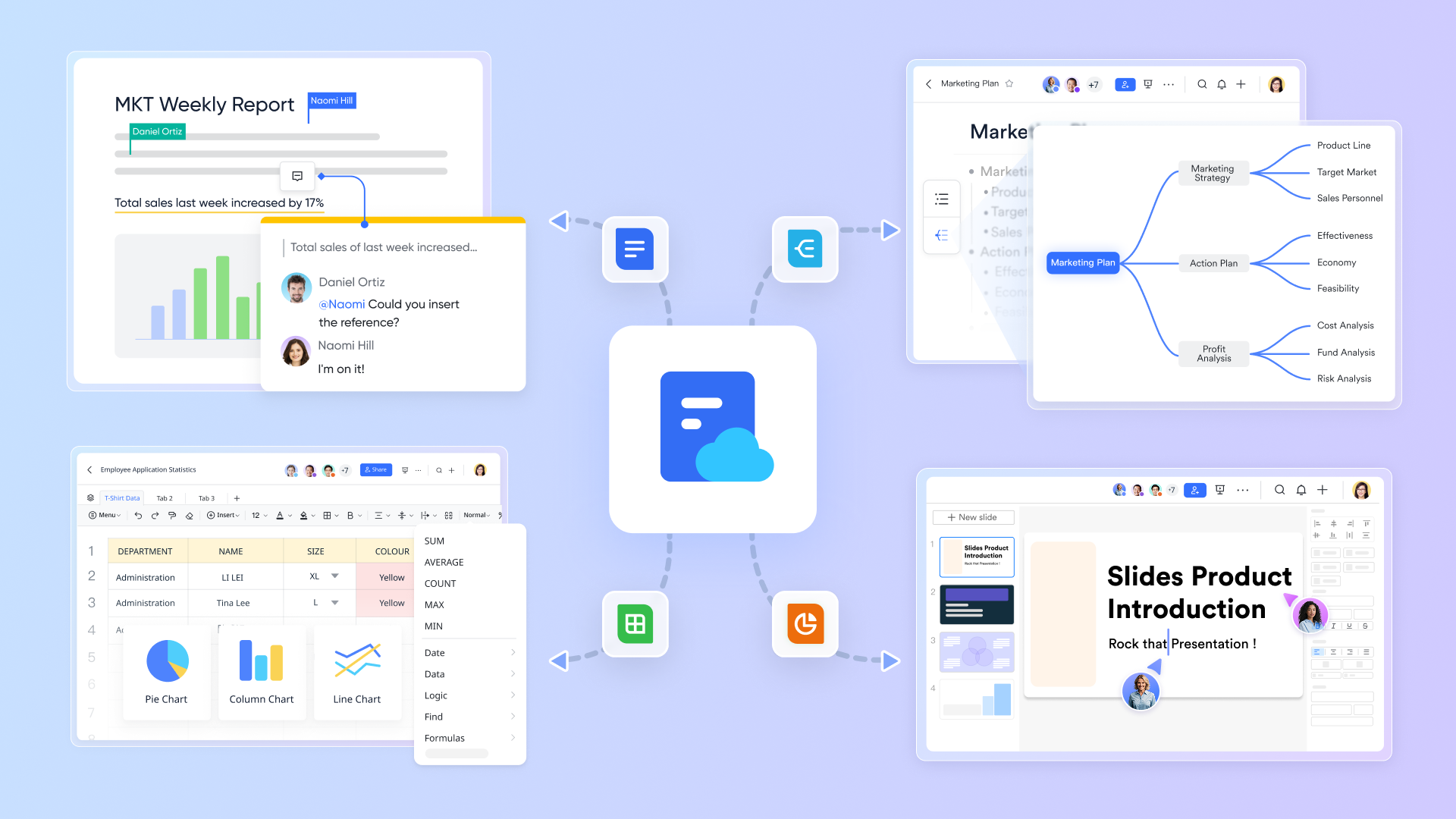
At the heart of quality management lies documentation—SOPs, policies, work instructions, and records. & features provide a centralized, accessible platform for all QMS-related knowledge. Teams can create and update quality manuals using , with real-time collaboration and version history ensuring everyone works with the latest approved information. For instance, a quality assurance team updating an inspection checklist can collaborate directly in a , tracking changes and ensuring instant updates, which significantly reduces the risk of using outdated documents and improves compliance.
Real-time communication for swift quality action
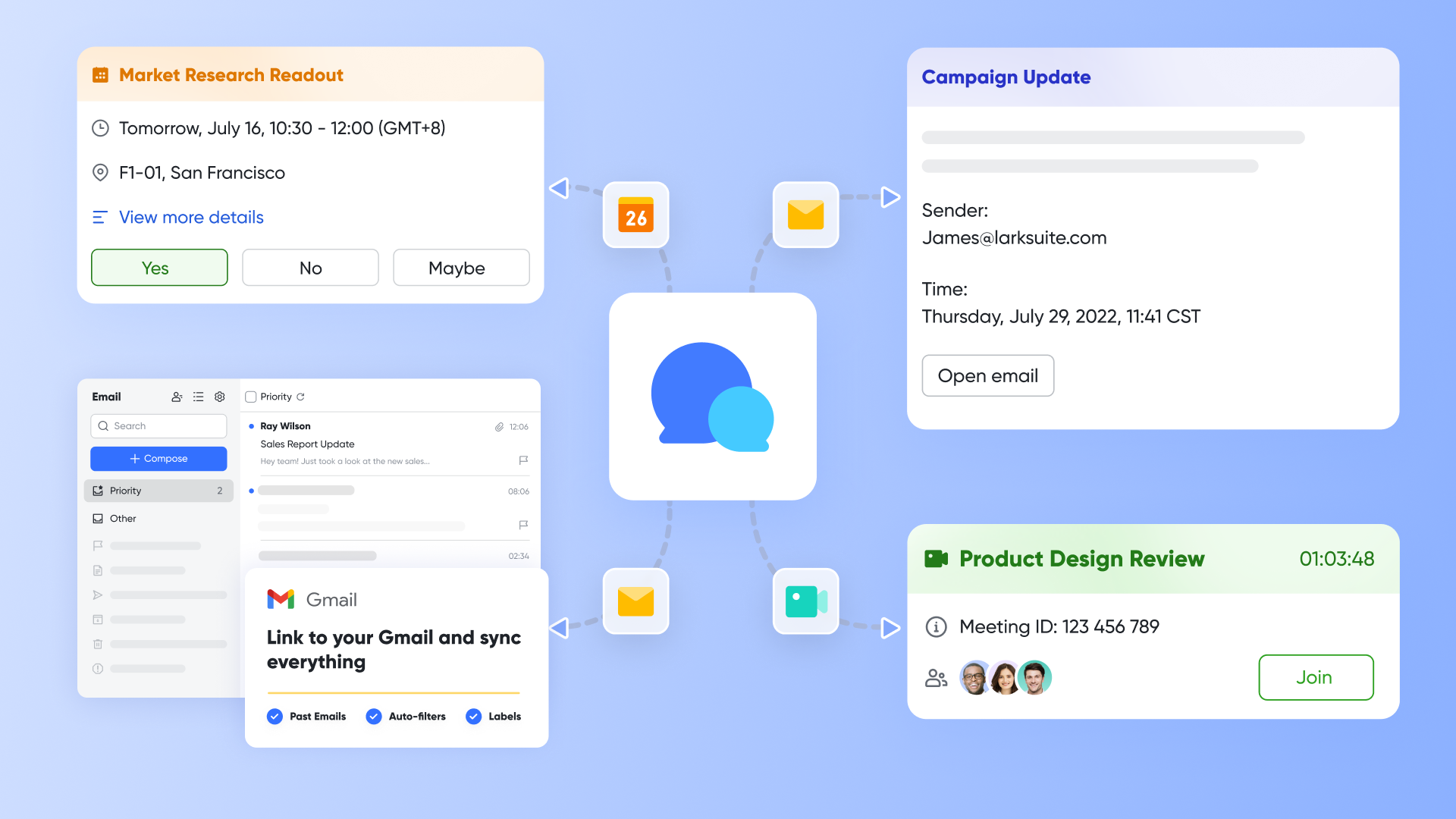
Effective quality management often hinges on rapid and clear communication, especially during incidents or audits. and tools can significantly accelerate quality processes. When a product defect is discovered, relevant team members can quickly convene a video meeting to discuss the issue, share photos or videos, and assign initial investigative tasks, all within . Dedicated chat groups for specific quality projects or non-conformance investigations allow for focused discussions and real-time updates, helping shorten resolution times and improve coordination.
Custom workflow automation for adaptable QMS
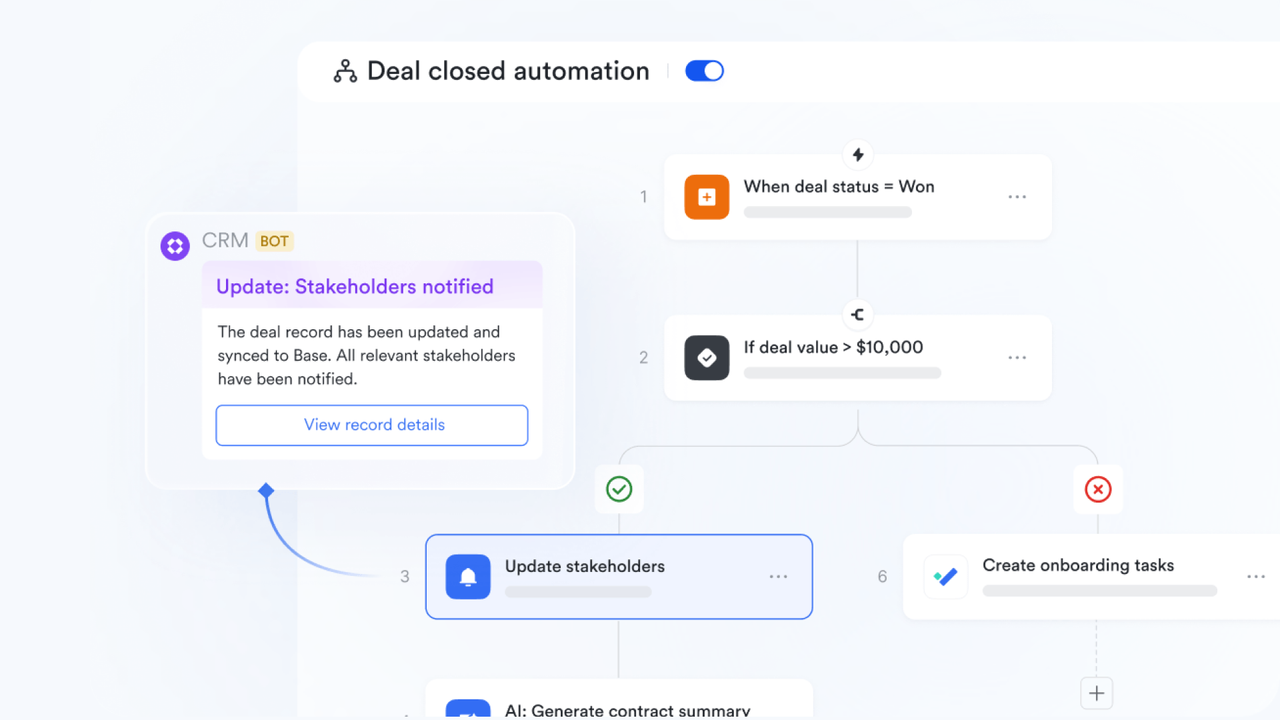
One of 's powerful capabilities is its flexibility to build custom applications and automate workflows without extensive coding. Using , an enterprise can create custom applications to track non-conformances or manage audit findings, tailoring fields and processes to exact requirements. Furthermore, can automate review and approval workflows for document changes or equipment calibration requests. This enables your quality team to design workflows that align perfectly with ISO standards or internal procedures, providing a customized QMS experience that adapts to evolving needs, rather than forcing processes into a rigid software framework.
Beyond the operational efficiencies and improved quality processes that platforms like Lark can facilitate, a critical consideration for any enterprise is the financial aspect of such an investment.
:
- Starter plan: that includes 11 powerful tools for up to 20 users. It also comes with 100GB of storage space, 1000 automation runs, AI translations, and more. No credit card needed.
- Basic plan: (billed annually) for up to 500 users. It includes everything in Starter and unlimited message history, 5TB of storage space, 1,000 automation runs, and more. Some users may need to to purchase this plan.
- Pro plan: (billed annually) for up to 500 users. It includes everything in Basic plus group calling for up to 500 attendees, 15TB of storage space, 50,000 automation runs, and more.
- Enterprise plan: for custom pricing. Supports unlimited users and includes even more automation runs and advanced security, compliance, and management features.
For small teams with simple communication needs

18 months message history
1000 Base automation runs/month
2000 rows per table in Base
Most POPULAR
For companies with comprehensive collaboration and management needs
Unlimited message history
500-participant video meetings
50k Base automation runs/month
20k rows per table in Base
For large companies with advanced security and organizational management needs
Get a personalized demo and pricing
Unlimited message history
500-participant video meetings
15 TB storage + 30 GB storage/user
500k Base automation runs/month
50k Base automation runs/month
Most POPULAR
For companies with comprehensive collaboration and management needs
Unlimited message history
500-participant video meetings
50k Base automation runs/month
20k rows per table in Base
The financial aspect: understanding QMS pricing models and ROI
Investing in a Quality Management System (QMS) is a significant financial decision. To make an informed choice, it's essential to grasp the various pricing models and effectively assess the return on investment (ROI).
QMS pricing models & true cost
QMS vendors offer diverse pricing structures:
- Pricing models: Typically include per-user pricing (common for cloud), tiered pricing (for different business sizes), and custom enterprise plans (for large organizations).
- True cost considerations: Beyond initial subscription/license fees, factor in implementation services (configuration, data migration), team training, ongoing support, and potential customization expenses.
Calculating QMS return on investment (ROI)
Calculating QMS ROI involves quantifying both direct and indirect benefits:
- Direct benefits: Quantifiable gains like reduced waste, lower costs from fewer product recalls, and decreased regulatory fines through enhanced compliance.
- Indirect benefits: Impactful but often harder to measure advantages such as improved brand reputation, increased customer satisfaction, and greater employee productivity from streamlined processes. Consider, for example, how a 30% reduction in non-conformance resolution time translates into savings in labor hours and prevented downtime.
By carefully evaluating these elements, you can build a compelling business case for your QMS investment.
Making the final decision: a checklist for enterprise managers
Choosing the right QMS for your enterprise is a significant undertaking that requires careful consideration. Having thoroughly explored the functionalities, deployment options, user adoption strategies, and financial implications, it's time to consolidate these insights into a actionable framework. To help simplify this complex process, we've compiled a practical checklist summarizing the key decision-making points that enterprise managers should systematically address.
By systematically addressing each point on this checklist, you can make a confident and strategic decision that sets your enterprise up for long-term quality success.
Conclusion
Selecting the right Quality Management Software is a pivotal decision for any enterprise committed to excellence. It’s about more than just checking boxes for compliance; it's about fostering a culture of continuous improvement, mitigating risks, and ultimately, delivering superior products and services. By focusing on your unique needs, evaluating core capabilities, and understanding the human and financial elements involved, you can choose a QMS solution that truly transforms your quality workflows. To see how a flexible and collaborative platform can empower your quality management efforts, explore 's capabilities today.
Transform your software development with Lark today
FAQs
What is the difference between QMS and EQMS?
QMS (Quality Management System) is the general term for a system that helps manage quality processes. EQMS (Enterprise Quality Management System) typically refers to a QMS designed specifically for large organizations with complex needs, often featuring broader functionality, greater scalability, and deeper data analytics capabilities across multiple departments and sites.
How long does it take to implement a QMS software?
Implementation times vary widely depending on the complexity of the software, the size of your organization, the extent of data migration, and the resources dedicated to the project. Simple cloud-based solutions might be operational in a few weeks, while large enterprise-wide deployments can take several months to a year.
Can QMS software help with ISO 9001 certification?
Yes, absolutely. QMS software is designed to help organizations meet the requirements of ISO 9001 and other quality standards. It provides the necessary tools for document control, audit management, CAPA processes, and record-keeping, all of which are essential for achieving and maintaining ISO 9001 certification.
What are the biggest challenges in QMS implementation?
Common challenges include resistance to change from employees, poor planning, inadequate training, difficulties in configuring the software to match specific workflows, and issues with data migration from legacy systems. User adoption and executive sponsorship are critical for overcoming these hurdles.
How much does QMS software typically cost?
QMS software costs can range significantly. Free plans (like Lark's Starter plan for up to 20 users) or basic subscriptions for smaller teams might be a few dollars per user per month. Enterprise-grade solutions can range from hundreds to thousands of dollars per user per year, depending on features, support, and customization. It's important to consider the total cost of ownership, including implementation and training.
What are the 4 types of quality management?
While frameworks can vary, the four widely recognized types or components of quality management often include:
- Quality planning: Defining the quality standards, objectives, and procedures relevant to a project or product.
- Quality control: Monitoring specific project results to determine if they comply with relevant quality standards and identifying ways to eliminate causes of unsatisfactory performance.
- Quality assurance: Auditing the quality requirements and the results from quality control measurements to ensure appropriate quality standards and operational definitions are used.
- Quality improvement: Continually seeking to enhance the effectiveness and efficiency of processes to deliver better products or services.
What is a Quality Management System (QMS)?
A Quality Management System (QMS) is a formalized system that documents processes, procedures, and responsibilities for achieving quality policies and objectives. It helps an organization meet the requirements of customers and other stakeholders. A QMS is about setting policies, processes, and procedures to ensure that an organization can meet its stated quality objectives and deliver consistent results. Many companies use a QMS to help them get certifications like ISO 9001.
Related reading