Zoho CRM is one of the most widely adopted customer relationship management platforms for small and mid-sized businesses looking to organize leads, track deals, and manage sales pipelines. As more teams search for a detailed Zoho CRM review, questions often focus on how flexible Zoho CRM really is, how much configuration it requires, and whether it supports modern collaboration needs. This guide explores Zoho CRM features, pricing, combinations, and real-world usability in depth to help teams understand where the platform performs well and where it may feel limiting. Zoho CRM is often chosen for its structured approach to sales management and reporting. Over time, many execution focused teams also begin evaluating how well their CRM connects with communication, documents, and day-to-day work, which becomes an important consideration later in this review.
What is Zoho CRM?
Zoho CRM is a cloud-based customer relationship management system designed to help businesses manage customer data, , and ongoing client interactions in one centralized platform. It allows teams to track leads, contacts, accounts, and deals while maintaining a clear record of communication history and sales activity. Beyond traditional CRM functions, Zoho positions itself as a broader solution, often discussed in a Zoho CRM cloud data platform review, by connecting customer records with analytics, automation, and ecosystem tools. Many users exploring Zoho CRM are looking for a structured system that enforces consistent sales processes across teams. The platform emphasizes control, reporting, and automation over .
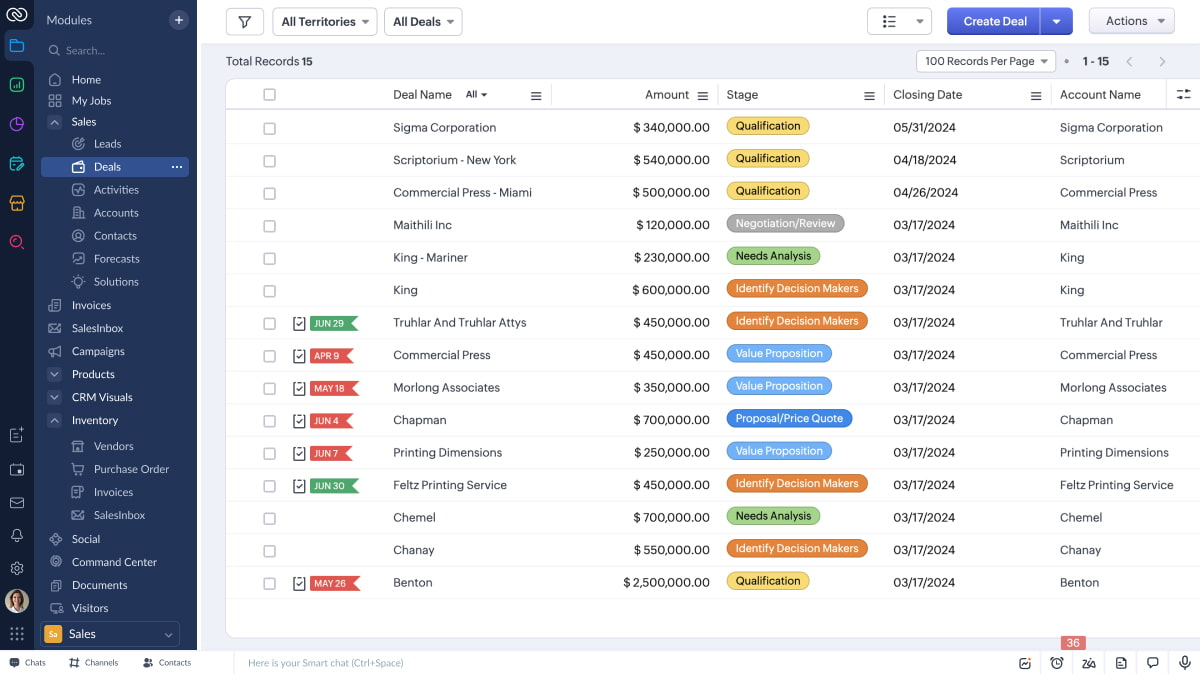
Image source: zoho.com
Core Zoho CRM features reviewed
Zoho CRM includes a wide set of features that support , customer management, and performance analysis. These tools are designed for teams that want defined workflows and detailed visibility into every stage of the sales cycle. Understanding how these features work in practice helps clarify whether Zoho CRM fits daily sales execution needs.
Lead and contact management: Zoho CRM enables teams to capture leads from multiple sources, such as web forms, emails, and third-party tools, then convert them into contacts and accounts. Each record stores interaction history, ownership details, and deal associations, which helps maintain continuity throughout the sales process. This structure reduces the risk of lost information when it leads to movement between team members. For many teams, lead management is the foundation of their Zoho CRM usage. It works especially well for organizations that prioritize clean data and clearly defined handoffs.
and workflows: Zoho CRM offers automation rules that help teams assign leads, update fields, trigger notifications, and enforce process steps automatically. These workflows support consistency across pipelines and reduce manual data entry. As automation needs grow, configuration becomes more detailed and often requires careful planning. Many users note that while automation is powerful, it can feel complex during setup. Teams with dedicated administrators usually get the most value from these features. This Zoho crm sales automation review perspective is especially relevant for teams that rely heavily on workflow rules, lead assignment logic, and multi-step approval processes.
Pipeline and deal tracking: The platform provides visual pipelines that display deal stages, values, and expected close dates. Teams can customize pipelines to match different products or sales motions. This helps revenue and identify stalled opportunities more easily. Pipeline tracking is one of Zoho CRM’s strongest areas for structured sales teams. It supports long-term planning and performance monitoring across departments.
Analytics and reporting: For teams evaluating CRM as a broader customer intelligence layer, the Zoho CRM customer data platform review angle highlights its strength in structured data storage rather than real-time behavioral insights. Zoho CRM includes customizable dashboards and reports that allow teams to analyze sales performance, conversion rates, and activity levels. Users can build reports based on almost any data point stored in the system. This level of detail is valuable for leadership teams that rely on metrics for decision-making. However, building advanced reports often requires familiarity with the platform. For data-driven organizations, reporting is a major advantage of Zoho CRM.
User experience of Zoho and learning curve
Zoho CRM offers extensive functionality, but the user experience can feel dense, especially for first time users. The interface includes numerous modules, settings, and configuration options, which can be overwhelming during the initial . Most teams require training or guided setup to use the platform effectively. While experienced users appreciate the level of control Zoho CRM provides, newer users may find navigation less intuitive compared to newer tools. Once configured, the system is reliable and powerful, but ease of use often depends on how well the CRM is customized to the team’s workflow. As needs evolve, some teams later reassess whether their CRM should connect more naturally with communication and execution tools.
Zoho CRM ecosystem and connections review
From an ecosystem standpoint, a Zoho CRM integrations review often focuses on how smoothly customer data flows across Zoho tools versus external platforms. Zoho CRM is built as part of a larger software ecosystem rather than a standalone . This approach appeals to organizations that want most of their business operations handled by a single vendor. Understanding how Zoho CRM connects with other Zoho products and external tools is critical for evaluating long-term flexibility and scalability.
- Zoho ecosystem connections: Zoho CRM is tightly merged with products such as Zoho Projects, Zoho People, Zoho One, and Zoho Campaigns. These connections allow customer data, project updates, and internal information to move across Zoho applications with minimal setup. For teams already using Zoho Projects for delivery or Zoho People for , this creates a centralized system with shared data structures. However, this ecosystem works best when most tools come from Zoho itself. Organizations using a mixed software stack may find deeper reliance on Zoho products over time.
- External tool connectivity: Zoho CRM supports connections with common tools like Gmail, Outlook, accounting software, and marketing platforms. These combinations allow teams to sync emails, calendar events, and customer data directly into CRM records. A can extend that record with WhatsApp conversations so sales and support teams retain complete customer context. While the platform offers many connectors, configuration can require additional setup effort compared to plug and play tools. Teams evaluating zoho projects review and alternatives often consider how easily Zoho CRM fits into an existing tech stack without creating friction.
- API and customization options: Zoho CRM provides APIs and developer tools that allow advanced customization and custom merging. This is useful for businesses with unique workflows or internal systems. However, these options typically require technical expertise or external consultants. Smaller teams may not fully utilize these capabilities due to resource constraints. As complexity increases, maintenance effort also grows.
- Ecosystem strengths and limitations: The Zoho ecosystem offers breadth, covering CRM, , HR, finance, and support tools under one umbrella. This can reduce vendor sprawl and simplify billing. At the same time, teams that need faster collaboration, lighter configuration, or more flexible workflows sometimes feel constrained by the ecosystem model. These factors often influence whether Zoho CRM remains a long-term fit.
Zoho CRM pricing and editions: From standard to ultimate
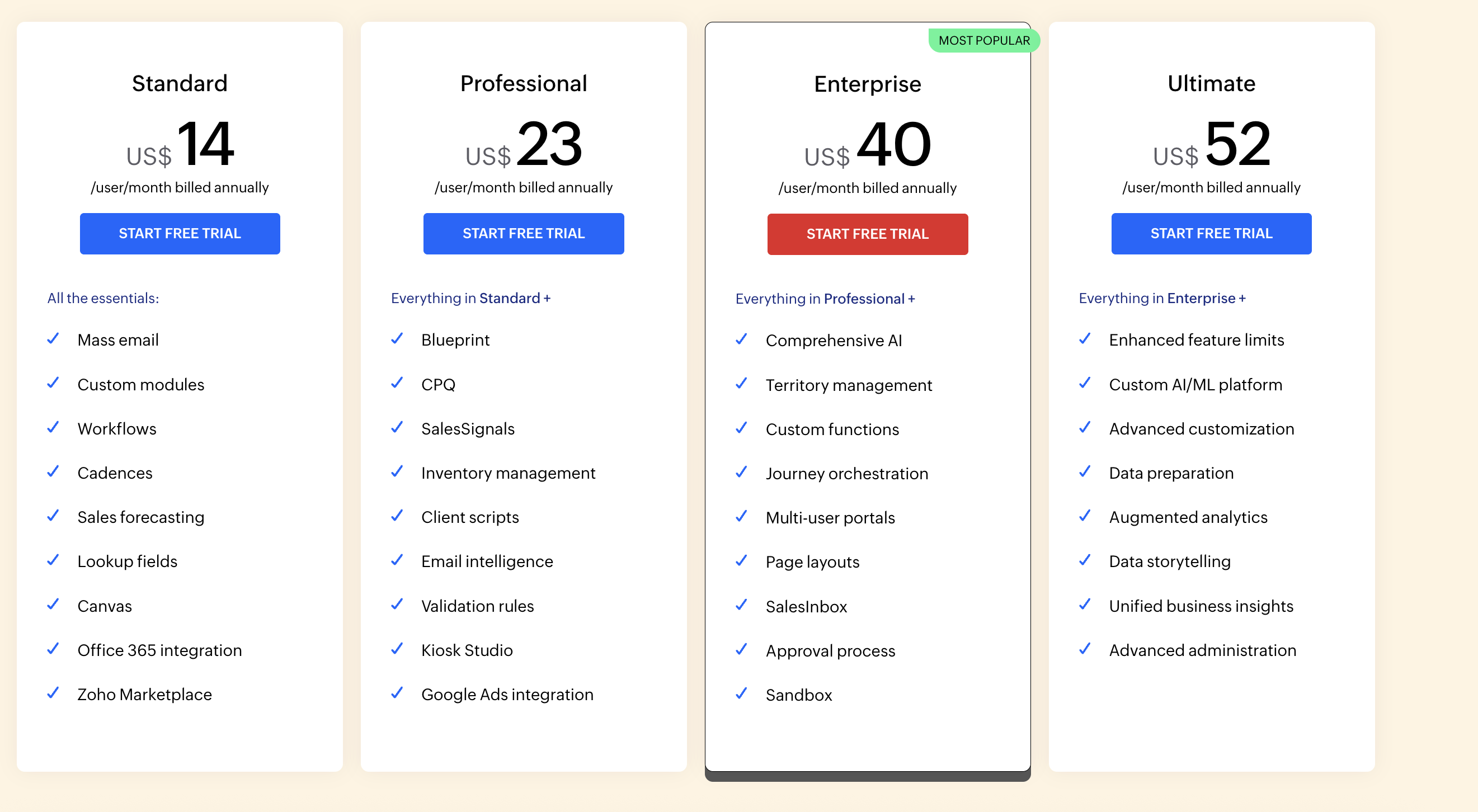
Zoho CRM pricing is structured across multiple editions, each designed to support different levels of automation, reporting, and customization. Teams comparing plans typically evaluate how much process control they need versus ease of use and onboarding effort. Understanding what each edition includes helps clarify whether the platform scales efficiently with team growth. When estimating software expenses, many companies include and in their analysis.
Information source: zoho.com
Update time: 2025-12-15
Note: Pricing and plan details reflect publicly available data as of the update date and may vary based on region, billing cycle, and number of agents.
Any detailed Zoho CRM review of pricing should consider not only license cost but also the added tools required for collaboration and execution.
If you want to know more about Zoho CRM pricing 👉
Pros and cons of Zoho CRM
In nearly every long-form review of Zoho CRM, usability and setup complexity emerge as recurring discussion points. Zoho CRM delivers a powerful and flexible , but it is not the right fit for every team. While it offers strong customization and reporting for structured sales processes, some teams experience challenges with usability, collaboration, and setup complexity. The pros and cons below highlight where Zoho CRM performs well and where it may require additional tools or effort as business needs evolve.
Pros of Zoho CRM
- Strong sales process customization that allows teams to tailor pipelines, fields, and workflows to match their exact business structure. This makes Zoho CRM suitable for companies with defined sales stages and compliance needs.
- Powerful reporting and that help managers track conversion rates, deal velocity, and sales performance across teams. Custom dashboards support data driven decision making.
- Deep combination within the Zoho ecosystem, including Zoho Projects, Zoho People, and . This creates a connected environment for organizations already using Zoho products.
- Advanced automation capabilities in higher tiers reduce manual work through workflow rules, lead assignment logic, and AI-assisted insights.
- Scalable pricing tiers allow businesses to start small and unlock more advanced features as their sales operations grow.
Cons of Zoho CRM
- Steep learning curve for new users due to a dense interface and extensive configuration options. Teams often need training and onboarding before achieving full productivity.
- Limited real-time compared to modern work platforms. Sales teams often need separate tools for chat, , and task execution.
- Setup and customization can be time-consuming, especially for advanced workflows and automation rules. Smaller teams without dedicated admins may find this challenging.
- Advanced features such as AI tools and deep analytics are locked behind higher-priced plans, which increases total cost as needs expand.
- Less suitable for fast-moving, execution focused teams that want sales data, communication, and work management tightly connected in one workspace.
See how modern sales teams execute faster
Lark: A modern alternative to Zoho CRM for execution-focused teams
As one of the best , offers a different approach for teams that want sales execution closely connected with daily communication and collaboration. Instead of treating CRM as a standalone system, Lark brings customer data, conversations, documents, and tasks into one unified workspace. This makes it easier for teams to move from discussion to action without switching tools. For execution focused teams, Lark emphasizes speed, visibility, and shared ownership across the sales process. A unified foundation for customer information
allows teams to organize customer records, deals, and follow-ups in flexible tables that behave like a CRM but remain easy to adapt. Sales data can be viewed, filtered, and updated in real time across multiple perspectives, including Kanban boards for pipeline management and Gantt charts for . Critical metrics are visualized instantly through integrated dashboards, providing strategic insights without leaving the platform. Because Base is connected to chat, docs, and tasks, and leverages automations for repetitive processes, teams can act on customer information immediately. This combination of powerful data structuring, real-time analytics, and native workflow integration reduces delays and keeps customer data practical and actionable for execution-focused teams. 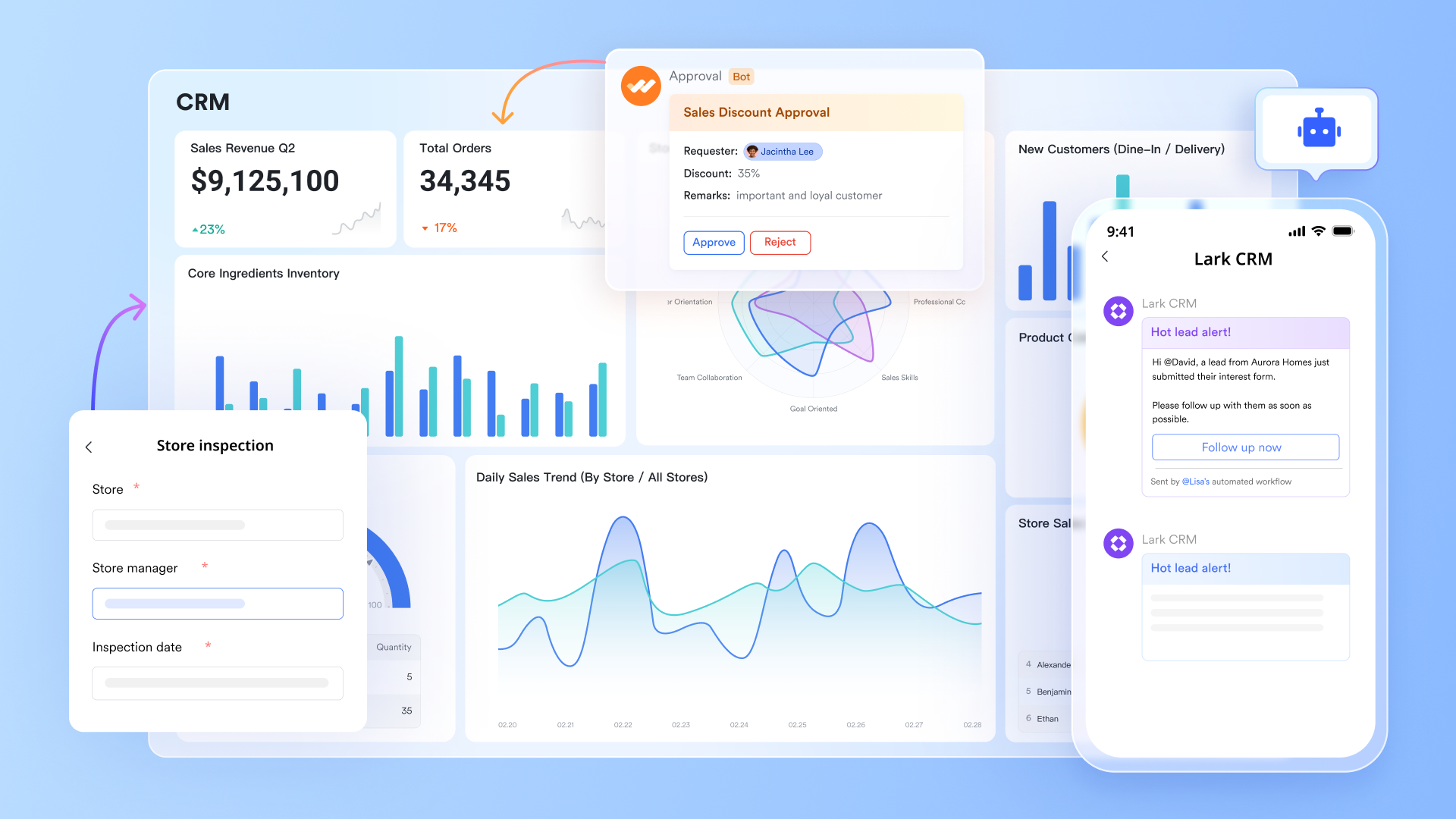
Context-driven communication across the sales cycle
keeps sales conversations directly connected to customer context and shared work. Teams can discuss leads, updates, and deal progress in group chats or direct messages while referencing related documents or records. Threads and mentions help keep conversations organized and easy to follow. This reduces miscommunication and scattered updates. Compared to traditional CRM notes, Messenger supports faster alignment across the sales team. 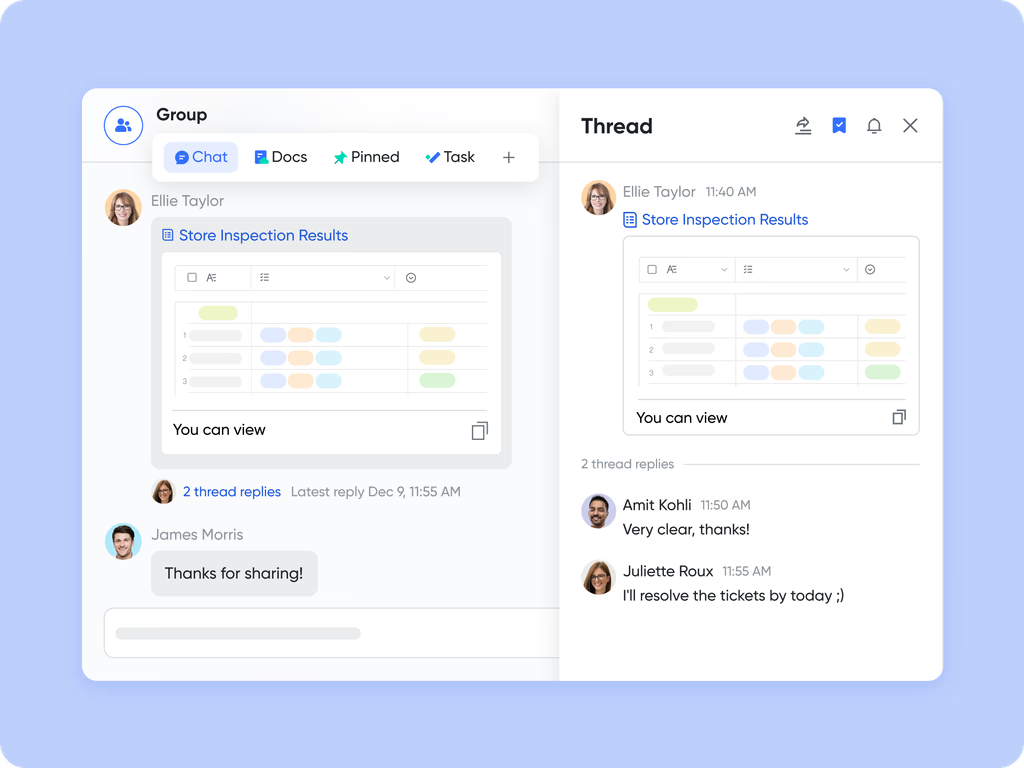
Turning discussions into accountable next steps
Lark Tasks helps teams turn sales discussions into clear next steps with owners and due dates. Follow-ups, renewals, and handoffs can be created directly from conversations or documents. Tasks stay visible across the team, reducing missed actions. Progress tracking helps managers see where deals may be slowing down. This task-driven approach strengthens execution without adding complexity. 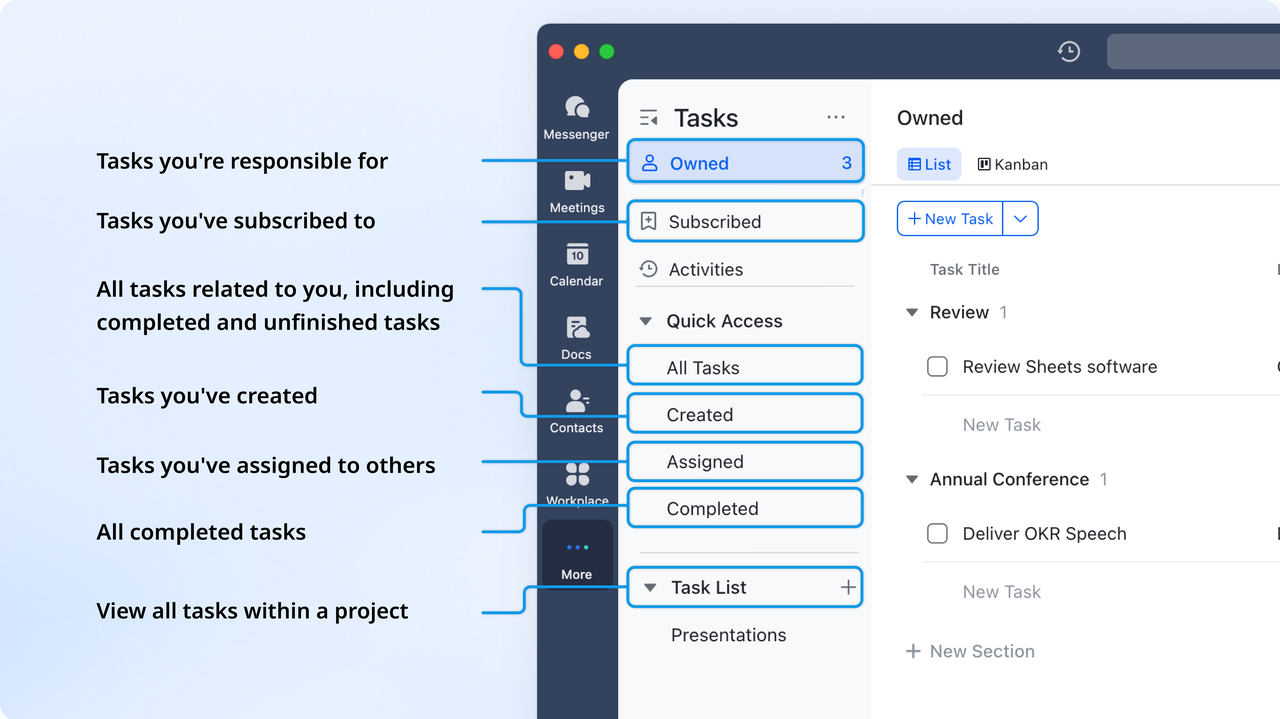
Shared ownership of sales content and knowledge
enables teams to create and edit proposals, meeting notes, and sales playbooks together in real time. Multiple teammates can contribute simultaneously while discussing changes in chat. Version history and comments reduce confusion during revisions. This makes sales documentation faster and more accurate. Docs work best for teams that need shared ownership rather than static files. 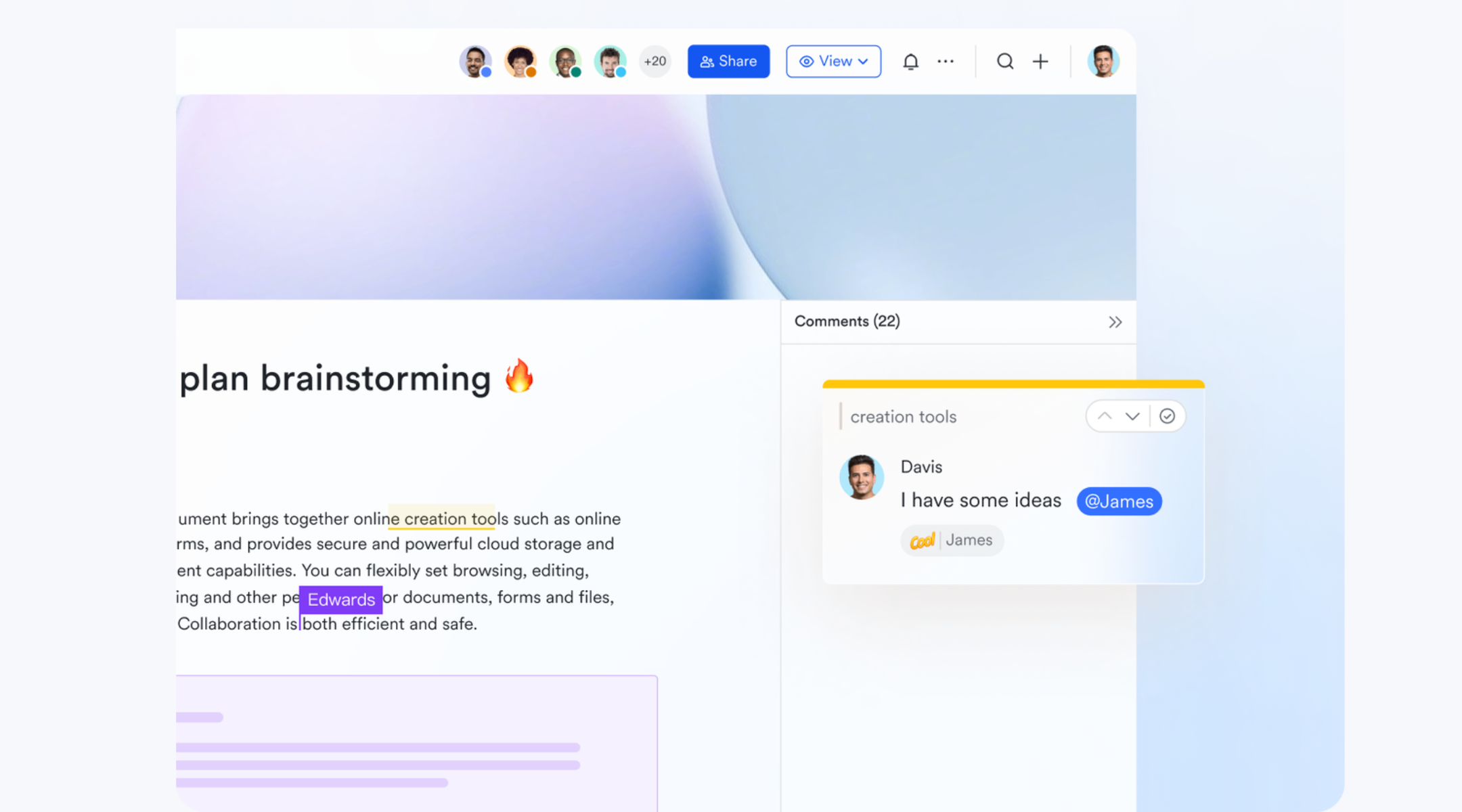
:
- Starter plan: Free forever plan that includes 11 powerful tools for up to 20 users. It also comes with 100GB of storage, 1000 automation runs, AI translations, and more.
- Basic plan: $6/user/month (billed annually) for up to 500 users. It includes everything in Starter plus group calling for up to 500 attendees, 5TB of storage, 1000 automation runs, and more. For more details, please .
- Pro plan: $12/user/month (billed annually) for up to 500 users. It includes everything in Basic plus group calling for up to 500 attendees, 15TB of storage, 50,000 automation runs, and more.
- Enterprise plan: for custom pricing. Supports unlimited users and includes even more automation runs and advanced security, compliance, and management features.
For small teams with simple communication needs

18 months message history
1000 Base automation runs/month
2000 rows per table in Base
Most POPULAR
For companies with comprehensive collaboration and management needs
Unlimited message history
500-participant video meetings
50k Base automation runs/month
20k rows per table in Base
For large companies with advanced security and organizational management needs
Get a personalized demo and pricing
Unlimited message history
500-participant video meetings
15 TB storage + 30 GB storage/user
500k Base automation runs/month
50k Base automation runs/month
Most POPULAR
For companies with comprehensive collaboration and management needs
Unlimited message history
500-participant video meetings
50k Base automation runs/month
20k rows per table in Base
Zoho CRM vs Lark: Key differences that matter
Teams comparing platforms in a Zoho CRM review context often focus on whether CRM should remain a standalone system or become part of a connected execution workspace. Choosing between Zoho CRM and Lark depends on how teams handle sales execution beyond data tracking. Zoho CRM is designed around structured pipelines, records, and reporting, making it suitable for teams that prioritize process control and analytics. Lark approaches the problem differently by placing sales work inside a connected workspace where communication, documents, tasks, and meetings live together. Teams comparing these platforms often focus on how easily they can move from discussion to action without tool switching. The table below outlines the differences that most directly affect day-to-day execution.
Should you choose Zoho CRM
Zoho CRM is a strong fit for organizations that need structured , detailed reporting, and high levels of customization. It works well for teams with defined sales processes and dedicated administrators who can manage setup and ongoing optimization. Businesses already using Zoho One, Zoho People, or Zoho Projects often benefit from staying within the same ecosystem. If your priority is data control, forecasting, and process enforcement, Zoho CRM remains a reliable option.
Should you choose Lark
Lark is better suited for teams that want sales execution tightly connected with and collaboration. It works well for fast-moving teams that rely on shared context, quick follow-ups, and real-time coordination. Instead of managing sales in isolation, Lark allows teams to handle customer data alongside chats, documents, tasks, and meetings. For organizations focused on speed, visibility, and reducing tool switching, Lark offers a more flexible and execution driven approach.
Conclusion
Zoho CRM remains a dependable choice for businesses that need structured , detailed reporting, and deep customization across pipelines. Its strength lies in handling customer data methodically, supporting forecasting, and enforcing consistent sales processes. For organizations with dedicated CRM administrators and clearly defined workflows, Zoho CRM can deliver long-term value as sales operations scale. However, as teams become more cross-functional and execution driven, gaps often appear around collaboration, follow-ups, and day-to-day coordination.
This is where many teams begin rethinking how CRM fits into their broader work environment. Lark enters the picture as a modern alternative that connects customer data with communication, documents, tasks, and meetings in one workspace. By reducing tool switching and keeping execution visible, supports faster decision-making and shared ownership across teams. Exploring both platforms helps organizations choose between a traditional, process-focused CRM and a more connected, execution oriented approach that aligns better with how modern teams actually work.
Move toward connected sales execution
FAQs
Does Zoho CRM really have a free plan?
Zoho CRM does offer a Free edition that supports a small number of users with basic contact management, lead tracking, and limited sales features. This plan is usually suitable for very small teams or businesses that want to test core CRM functionality. However, it lacks advanced automation, reporting, and customization tools. As sales processes grow more complex, most teams eventually move to paid plans.
How much does Zoho CRM cost beyond the free plan?
Zoho CRM pricing increases as you move through the Standard, Professional, Enterprise, and Ultimate editions. Each tier adds more automation, , customization, and AI driven features. Pricing varies by region and billing cycle, so monthly and annual costs can differ. Teams evaluating long term value often compare these costs against the additional tools they may need for collaboration and execution.
Can I customize Zoho CRM for my specific business needs?
Zoho CRM is highly customizable and allows teams to tailor modules, fields, workflows, and layouts to match their sales processes. This flexibility is one of its strengths, especially for structured organizations. However, deeper usually requires setup time and admin knowledge. Some teams later explore platforms like Lark when they want simpler configurations combined with built-in collaboration and execution tools.
Is my data safe with Zoho CRM, and what about contracts?
Zoho CRM includes standard security measures such as role-based access controls, , and compliance options that support common business and regulatory requirements. Contract data and customer records can be protected through permission settings and audit logs, depending on the plan used. However, managing security often depends on proper configuration by administrators. Teams that handle sensitive contracts sometimes look for platforms where documents, approvals, and access controls are managed together in one workspace, which is where tools like Lark may be considered later.
What kind of support can I expect, and is help available for setup?
Zoho CRM provides documentation, knowledge bases, and customer support across all plans, with higher tiers receiving faster response times and dedicated assistance. Setup support varies by edition, and complex customizations may require internal expertise or paid onboarding services. Many teams plan extra time for training and configuration during rollout. Organizations that prefer quicker onboarding and simpler setup often evaluate platforms like Lark that focus on faster adoption with built-in collaboration tools.
Related reading
































