Figuring out software pricing can be a frustrating task. For a tool as ubiquitous as Zoom, understanding the true cost is a common challenge for many businesses. The recent evolution from "Zoom One" to the new "Zoom Workplace" has introduced new packages and features, making it even more important to know what's included versus what costs extra.
This guide provides a clear, honest breakdown of the Zoom Workplace pricing structure. It analyzes each plan, uncovers the real-world costs of popular add-ons like Zoom Phone and Webinars, and highlights potential hidden fees. The goal is to provide the clarity needed to determine if Zoom is the right investment, or if an all-in-one platform with more transparent pricing might be a better fit.
A quick look at Zoom Workplace pricing plans
For those of you who just want a fast, high-level overview, we get it. This simple table breaks down the main Zoom Workplace pricing plans to give you a starting point, reflecting the most current offerings directly from Zoom's website.
Information source: zoom.us
Update time: 2025-11-27
Each plan includes a set of basic features, such as video meetings and team chat, while higher tiers unlock more advanced options tailored to business needs. However, Lark contains most of the features you need to pay additionaly in Zoom Workplace with more affordable prices.
Explore a cheaper, all-in-one collaboration tool
What is Zoom Workplace?
Before we dive into the numbers, it helps to understand what Zoom Workplace actually is. It isn't a brand-new application built from scratch. Rather, it is the new brand name for Zoom's bundled suite of collaboration tools. Think of it less like a single, unified app and more like a cable TV package. You're choosing a bundle of channels—in this case, apps like Meetings, Chat, and Phone—that are integrated to work together. Zoom Workplace is positioned as an ai first work platform, integrating enhanced by AI capabilities to improve productivity and streamline workflow.
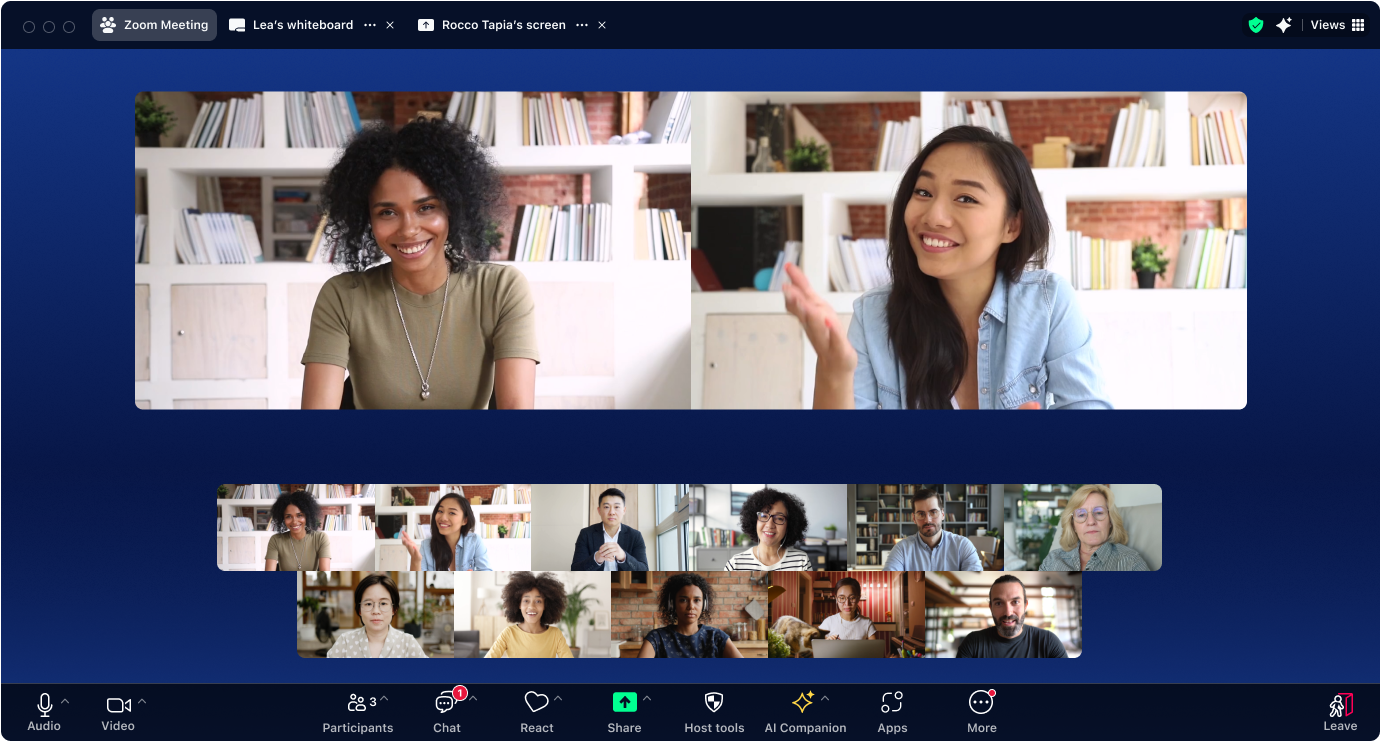
Image source: zoom.us
This represents a strategic move for Zoom, evolving from being primarily a into a broader communication hub. The goal is to provide a central place for your team's daily conversations and collaboration.
The core components of the suite, which are offered in various combinations depending on the zoom plans and pricing, include:
- Zoom Meetings: The world-renowned video conferencing tool.
- Zoom Team Chat: A persistent messaging tool for teams to communicate outside of meetings.
- Zoom Whiteboard: A and visual collaboration.
- Zoom Mail & Calendar: Clients that allow you to connect your existing email and calendar services (like Google or Microsoft 365) within the Zoom app.
- Zoom AI Companion: An artificial intelligence assistant designed to summarize meetings, help compose messages, and more.
The Zoom platform serves as a comprehensive, cloud-based solution for video conferencing and collaboration, bringing together these built-in tools and integrations to create a complete communication ecosystem.
Understanding this bundled structure is the key to decoding Zoom Workplace pricing plans. You are essentially paying for a specific collection of these tools and features, with the option to purchase others as add-ons.
Zoom Workplace pricing: A detailed plan-by-plan breakdown
The summary table gives you a great starting point, but the real decision-making happens when you dig into the details. What exactly do you get for your money with each plan? More importantly, what are the limitations that might force you to upgrade sooner than you think?
Let's walk through each of the Zoom pricing plans one by one. We'll look at the features, the ideal user, and the specific reasons you might need to move up to the next tier.
Zoom Workplace Basic: What you get for free
The Basic plan is how millions of people were first introduced to Zoom. It's free forever, which makes it an incredibly generous offering for casual use.
Price: $0
Key features:
- Video Meetings: You can host meetings with up to 100 participants. One-on-one meetings are unlimited, but any meeting with three or more people has a 40-minute time limit.
- Team Chat: You get access to persistent chat channels to communicate with colleagues.
- Zoom Whiteboard: You can use up to three editable digital whiteboards for brainstorming, though they have some functional limitations compared to the paid versions.
- Mail and Calendar: You can connect your existing email and calendar service to access them within the Zoom app.
Who is this plan for: The Basic plan is perfect for individuals, students, families, and friends. It's also a viable option for a freelancer who only has one-on-one client calls or a very while keeping costs at zero.
When you'll need to upgrade: The 40-minute group meeting limit is the single biggest reason people upgrade. The moment you need to host a team meeting, a client presentation, or an interview that runs longer than 40 minutes, you will need a paid plan. You also miss out on cloud recording and the powerful AI Companion features.
Zoom Workplace Pro: The essential toolkit for professionals
The Pro plan is the first paid tier and unlocks the most critical feature for professional use: long-duration meetings. It's a significant step up from the free plan.
Price: $16.99 per user/month (billed monthly), or $13.33 per user/month (billed annually).
Key features:
- No time limits: Host group meetings for up to 30 hours, which is effectively unlimited for any standard business purpose.
- AI Companion: This is a huge value-add. You get access to AI-powered meeting summaries, smart chapters, and next-step generation to save you from taking manual notes.
- Cloud recording: You get 5 GB of cloud storage per license for recording your meetings. This is essential for sharing sessions with those who couldn't attend or for training purposes.
- More whiteboards: The limit of three editable whiteboards is removed.
- App integrations: You can integrate Zoom with popular apps from the marketplace.
Who is this plan for: The Pro plan is tailor-made for solo entrepreneurs, freelancers, and consultants. If you are the primary person in your business running meetings, this plan gives you everything you need to appear professional and work efficiently without the constraints of the free version.
When you'll need to upgrade: The Pro plan is limited to a maximum of nine licenses. As soon as your business grows to 10 people who need a license, you are required to move to the Business plan. It also lacks the centralized admin and branding features that growing teams need.
Zoom Workplace Business: The foundation for growing teams
The Business plan is where Zoom Workplace starts to feel like a true organizational tool. It adds features focused on team management, branding, and larger meeting capacity.
Price: $21.99 per user/month (billed monthly), or $18.33 per user/month (billed annually).
The big catch: This plan requires a minimum purchase of 10 licenses. You cannot buy the Business plan for a team of five; you must pay for 10 licenses, bringing your minimum starting cost to over $2,100 per year.
Key features:
- Increased participant capacity: Host meetings with up to 300 participants.
- Unlimited whiteboards: Full access to unlimited, fully-featured digital whiteboards for the entire team.
- Single Sign-On (SSO): Allows employees to log in using your company's standard authentication system (like Google or Okta), which is a major plus for security and IT management.
- Managed domains: You can claim your company's email domain to easily manage employee accounts.
- Company branding: You can add your company's logo, that reflect your brand identity, and create custom URLs for your meeting portal.
Who is this plan for: This plan is designed for small to medium-sized businesses (SMBs) with at least 10 employees who need licensed accounts. It's for teams that have outgrown the administrative limitations of the Pro plan and need a more centralized, secure, and branded solution.
When you'll need to upgrade: You'll consider upgrading to Enterprise if your company grows beyond 300-participant meetings, you require more advanced security features like a business associate agreement (BAA) for HIPAA, or you need bundled services like Zoom Rooms. Many businesses at this stage also begin to evaluate Zoom Phone pricing to see if bundling their voice system makes sense. Zoom Workplace Enterprise: For large-scale deployment
The Enterprise plan is not a one-size-fits-all solution. It's a custom-built package for large organizations with specific needs for scale, security, and support.
Price: Contact Sales. This is a custom quote based on your company's size and required features. Expect an annual commitment.
Key features:
- Massive scale: Host meetings with up to 1,000 participants.
- Advanced analytics: Access a comprehensive admin dashboard with detailed reports on usage and adoption.
- Webinar & Rooms bundle: A certain number of Zoom Webinar and Zoom Rooms licenses are often included in the package, which can offer better value than buying them separately.
- Dedicated support: You get a dedicated customer success manager to help with onboarding and strategy.
Who is this plan for: This plan is for large corporations, universities, and government agencies. It's for any organization that needs to deploy Zoom across thousands of users and requires the highest level of security, control, and support. Companies looking at this tier are often also considering an enterprise-wide zoom contact center pricing model.
When you might need more: At this level, you have the full suite. Further expansion is typically about adding more licenses or exploring highly specialized products. It is worth noting that some organizations, when eligible, may be able to secure zoom nonprofit pricing, which provides discounts on various plans and should be explored with the sales team.
Check more transparent and cheaper pricing plans
Understanding the hidden costs of Zoom Workplace
One of the most critical things to understand about Zoom Workplace pricing is that the per-user plan cost is often just the starting point. Zoom operates on an add-on-based pricing module where many of the most powerful business features are not included in the core plans. They are add-ons that you must purchase separately.
To accurately budget for Zoom, you need to see beyond the sticker price and understand how these additional layers contribute to your . Let's break down the main categories of extra costs.
Cost category 1: Scaling your audience (Webinars & Events)
There's a fundamental difference between a collaborative meeting and a large-scale presentation, and Zoom prices them accordingly. If you need to host events for a large, mostly non-interactive audience, you will need to purchase a separate license.
Zoom Webinars: This add-on is essential for marketing events, company all-hands, or training sessions. It allows for view-only attendees, moderated Q&A, and registration features not available in standard meetings. The zoom webinar pricing is a recurring fee based on the maximum number of attendees you need (e.g., 500, 1,000, 5,000), and this cost is in addition to your basic Workplace license.
Zoom Events: For more complex, multi-session virtual or hybrid conferences, Zoom Events provides even more features like dedicated event hubs and networking tools. This is another distinct product with its own zoom events pricing structure.
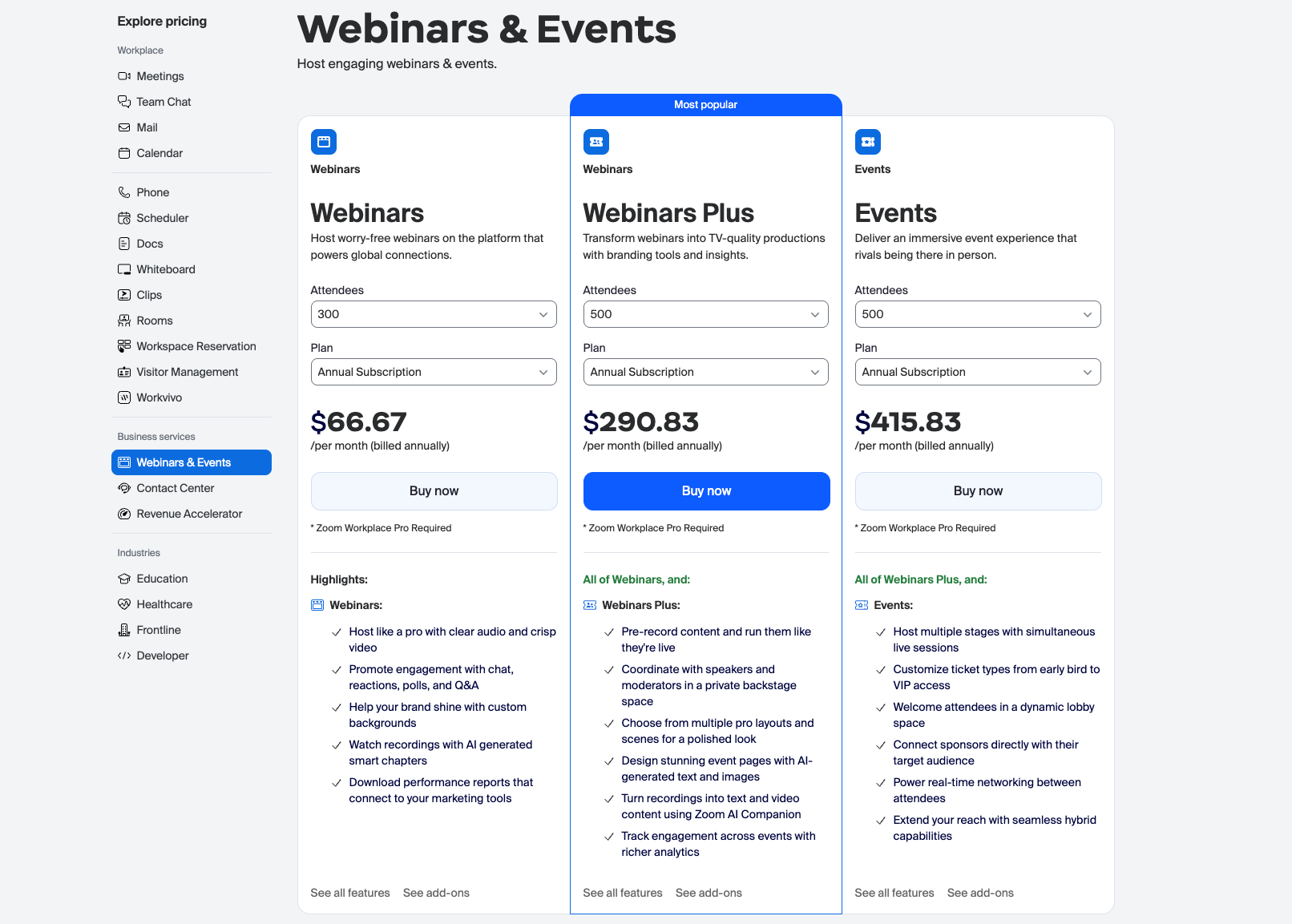
Image source: zoom.us
Update time: 2025-11-26
Cost category 2: Expanding your communication tools (Phone & Contact Center)
Zoom's vision is to replace your stack, which means moving beyond video meetings into voice services. These are powerful but come at a significant additional cost.
Zoom Phone: This is a full-featured, cloud-based VoIP phone system that integrates into the Zoom app. If you want employees to have dedicated business phone numbers for making and receiving external calls, you must add Zoom Phone licenses. The zoom phone pricing is a separate per-user, per-month fee, often tiered based on whether you need domestic or international calling plans.
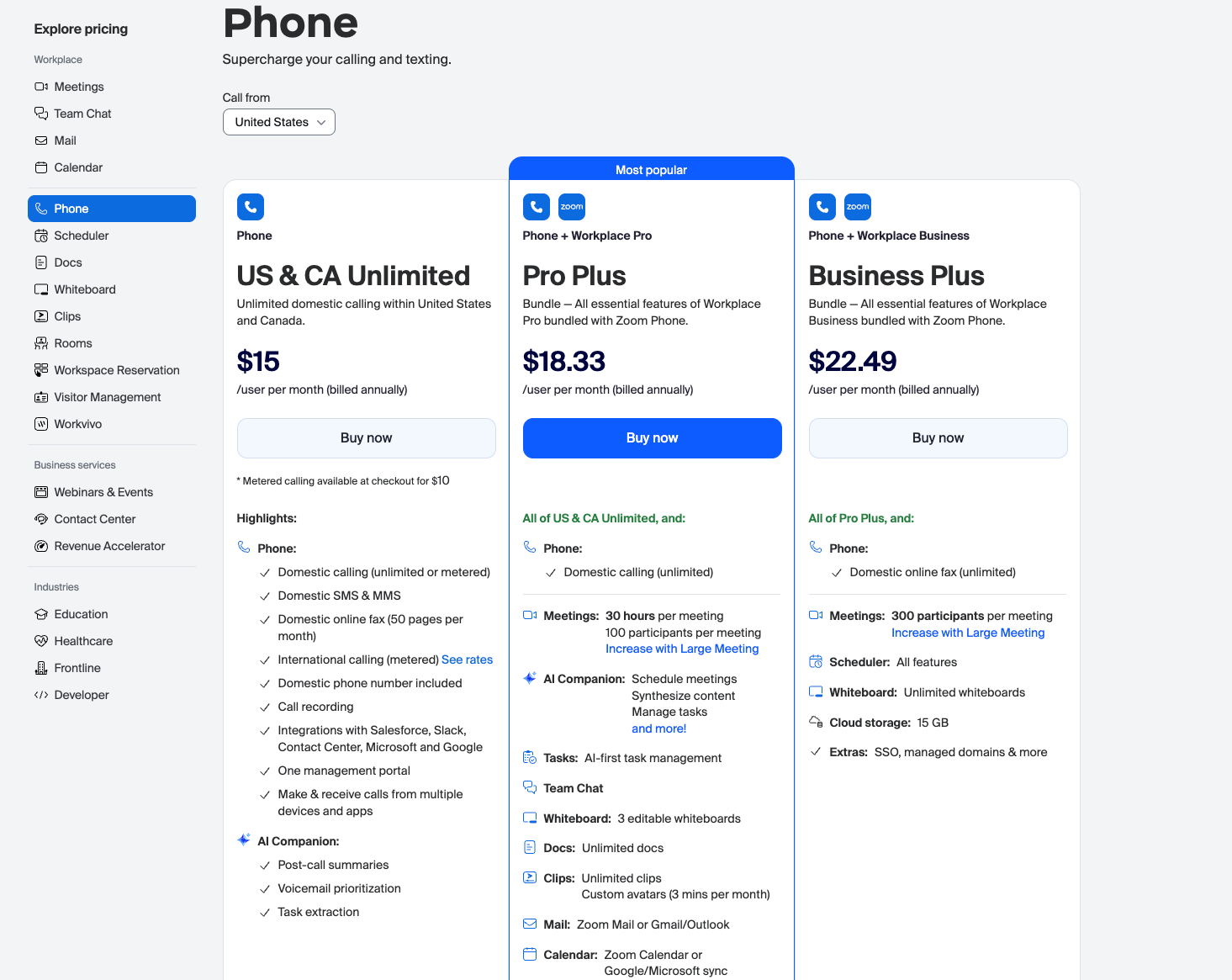
Image source: zoom.us
Update time: 2025-11-26
Zoom Contact Center: For companies with formal sales or customer support teams, this is an even more advanced add-on. It's an omnichannel platform for managing interactions across voice, chat, SMS, and video. The zoom contact center pricing is entirely separate from Workplace plans, licensed on a per-agent basis.
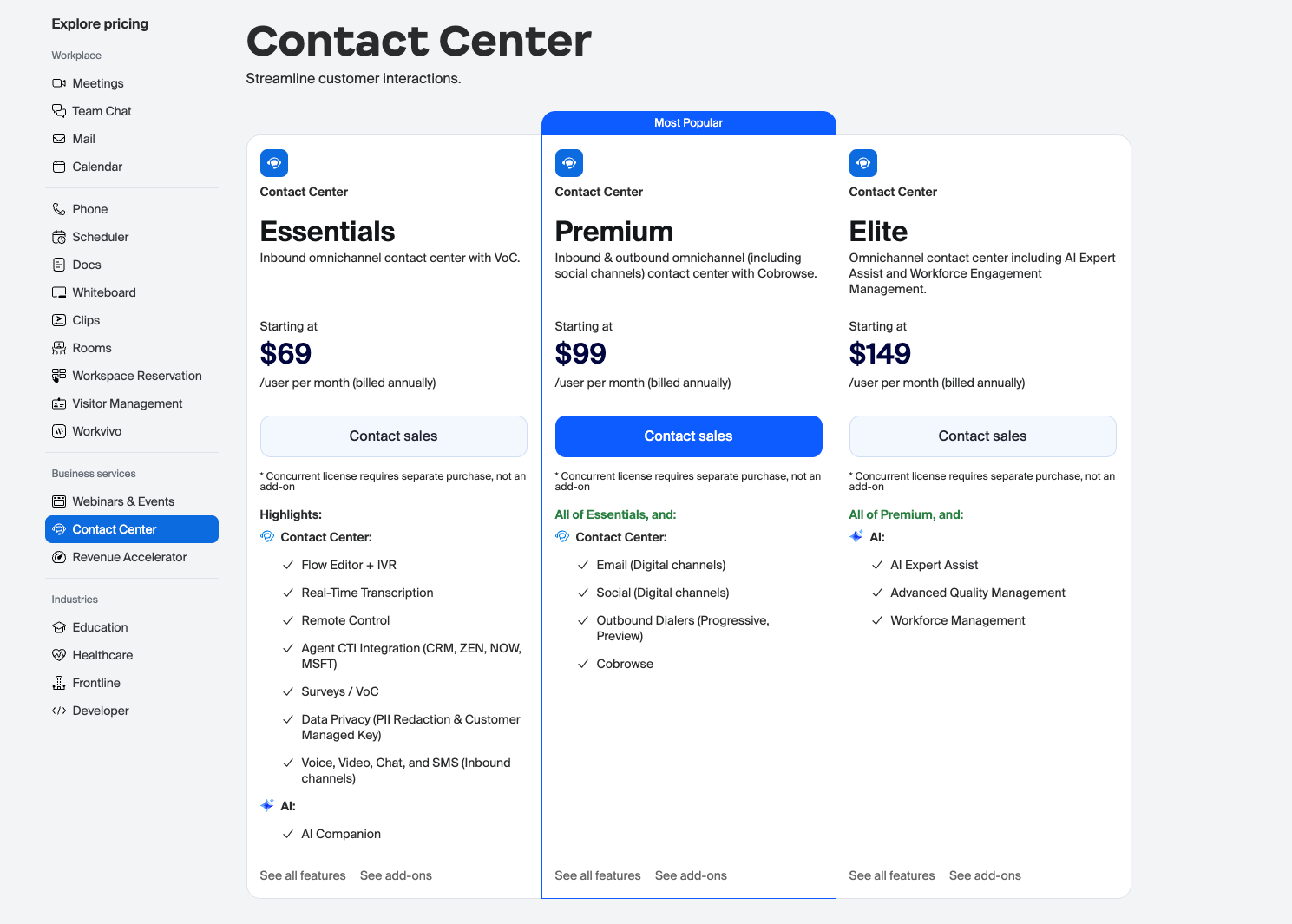
Image source: zoom.us
Update time: 2025-11-26
Cost category 3: Paying for everyday collaboration (Whiteboard, Docs & Scheduler)
Beyond specialized tools, even features for daily teamwork can come with limitations designed to push you into paying more. While Zoom is building out its collaboration suite, full functionality is not always included in your base plan.
Zoom Whiteboard: Every Zoom plan includes a basic whiteboard, but it is heavily restricted. Free and Pro users can only create and edit 3 whiteboards at a time. For any team that relies on visual collaboration, this limit is impractical. To unlock unlimited boards and advanced features, you must purchase the Whiteboard Plus add-on.
Zoom Docs & Scheduler: Currently, Zoom includes its new Docs (a collaborative document tool) and Scheduler (a meeting booking tool) within its paid plans to add value. However, the precedent set by Whiteboard demonstrates Zoom's core strategy: new features are often introduced with limitations that eventually lead to a paid, premium tier.
Here is a pricing plans table about Zoom Whiteboard, Zoom Docs and Zoom Scheduler:
Information source: zoom.us
Update time: 2025-11-27
This is a stark contrast to a , where unlimited , advanced whiteboards (Lark Board), and sophisticated scheduling () are all core, fully-cohesive components of the single subscription price, not feature-limited add-ons. Even though you don't pay for Lark, you can still have full experience. Cost category 4: Platform limits and minimums
Finally, some of the most overlooked "hidden costs" aren't add-ons, but limitations built into the plans themselves.
- The 10-license minimum: The Business plan cannot be purchased for fewer than 10 users. If your team has 8 people, you must pay for 10 licenses, creating a significant price jump from the Pro plan.
- Cloud storage: The Pro plan only includes 10 GB of cloud recording storage. For teams that record meetings frequently, this is used up very quickly, forcing the purchase of additional storage packs at a recurring monthly cost.
Choose a platform with no hidden costs
What is the Zoom AI Companion and is it really free?
You've probably seen a lot of buzz around AI features lately, and Zoom is right in the middle of it with its AI Companion. It's one of the most significant updates to the platform, but the marketing around it can be a little confusing. So, let's answer the big question first: is it really free?
The short answer is yes, the AI Companion is included at no additional cost… if you have a paid plan.
This is a critical detail. You cannot access the AI Companion on the free Basic plan. It is a powerful incentive designed to show the value of upgrading to a Pro, Business, or Enterprise license. Think of it not as a free product, but as a core feature of the paid experience.
So, what does it actually do for you? The AI Companion is designed to work like an assistant before, during, and after your meetings to save you time and improve productivity. Its key functions include:
- Meeting summaries: Automatically generates a summary of a meeting so you and anyone who missed it can get the key takeaways without watching a full recording.
- Smart chapters: It divides cloud recordings into easy-to-navigate chapters, allowing you to quickly jump to specific topics.
- Next steps: Automatically identifies and lists action items for attendees, helping ensure that decisions made in the meeting translate to real work.
- Chat and email composition: It can help you draft entire messages or emails based on a simple prompt, right within Zoom Team Chat or Zoom Mail.
- Whiteboard generation: You can use a text prompt to generate ideas and templates on a Zoom Whiteboard to kickstart a brainstorming session.
Having these capabilities built directly into your communications tool is a powerful advantage. It eliminates the need to pay for a separate AI transcription service. When you are evaluating the different Zoom Workplace pricing plans, the inclusion of the AI Companion is a significant factor that adds a lot of value to the overall cost.
How to choose the right Zoom Workplace pricing plan
Now that we've broken down the plans, the add-ons, and the new AI features, it's time to put it all together. Choosing the right plan is about matching Zoom's offerings to your company's specific needs and budget. Instead of getting overwhelmed by the options, I encourage you to answer a few key questions. This will quickly narrow down your choice from four plans to the one that makes the most sense.
Start with your team size and meeting habits
This is the most fundamental filter. How many people in your organization need to host meetings longer than 40 minutes?
- If you are a solo user (1 person): The Pro plan is almost certainly your best fit.
- If you have 2-9 users: You will likely need to give each person a Pro license.
- If you have 10 or more users: You must start with the Business plan. Remember, you cannot buy the Business plan for fewer than 10 people, so even if you only have a team of 8, you will need to pay for 10 licenses. This 10-license minimum is one of the most important factors in the zoom pricing plans cost.
What level of admin control and security do you need?
As your team grows, managing users and ensuring security becomes a top priority. This is where the differences between Pro and Business become very clear. Ask yourself:
- Do we need a custom company landing page and branded emails?
- Do we need to require employees to log in via Single Sign-On (SSO) for better security?
- Do I, as an admin, need a dashboard to manage all users from one central place?
If you answered "yes" to any of these, you need the Business plan at a minimum. These features are not available on the Pro plan.
Will you be hosting large-scale events or webinars?
Think about your marketing and communication strategy. Are you planning on hosting training sessions, product demos, or for a large, external audience? A standard meeting is often not the right tool for this.
If this is a core part of your strategy, you will need to budget for the Zoom Webinars add-on. The zoom webinar pricing is based on attendee count and can be a significant recurring cost. If hosting large events is a frequent need, you may even find that the Enterprise plan, which can bundle these features, is more cost-effective. For more complex, multi-day events, you'll also want to investigate the separate zoom events pricing.
Do you need to replace your phone system?
One of Zoom's biggest pushes is to become an integrated communication provider, and the phone is a huge part of that. If your organization is still using traditional desk phones or a separate VoIP provider, bundling your system with Zoom could simplify things. Be sure to carefully evaluate the Zoom Phone pricing tiers (which offer different calling zones like domestic and international) and add that cost on top of your chosen Workplace plan to find your true total.
By answering these questions, you move from simply looking at a price list to strategically building a solution that fits your business.
Things to know before buying Zoom Workplace
No tool is perfect, and it's important to have a balanced view before you make a significant investment. While Zoom is an excellent and reliable platform for video communication, there are some potential downsides you should consider. Acknowledging these trade-offs will help you make a fully informed decision.
The pricing model can be complex and expensive
As we've detailed throughout this guide, the biggest challenge with Zoom Workplace is understanding the total cost. The attractive base price of a plan is often just the starting point. When you begin to add essential business functions, the costs accumulate quickly:
- The 10-license minimum on the Business plan creates a high cost of entry for smaller teams.
- Features that many assume are included, like Webinars or a Phone system, are expensive add-ons.
- Storage limits on lower-tier plans can also necessitate additional purchases.
This module model requires careful planning to avoid surprise bills and can make budgeting more difficult compared to simpler, all-inclusive pricing structures.
It's a bundled suite, not a truly unified platform
This is a more subtle but incredibly important point. Zoom Workplace was created by bundling several distinct products (Meetings, Chat, Calendar, Mail) together. While they are integrated to work with each other, they don't always feel like a single, seamless application.
You often find yourself switching contexts—jumping from the meeting window to the chat window, then opening a separate whiteboard. It works, but it isn't as fluid as a platform that was designed from the ground up with all these functions in one place. This can lead to a slightly disjointed user experience and moments of friction as you move between different modes of work.
Core business workflows are missing
While Zoom has mastered communication, it is not a . Critical business workflows that happen before and after conversations are not built into its core. For example:
- No complex project and : There is no native, advanced system to manage projects, assign tasks with deadlines, and track progress.
- No deep : While you can share files and use basic notes, Zoom doesn't have a deeply integrated document editor and knowledge base (like Lark Docs and Lark Wiki) where work can be created, co-edited, and stored as a single source of truth.
- No and databases: There is no built-in way to handle common business processes like leave requests, expense reports, or simple data collection without relying on third-party integrations.
For these essential functions, you will almost certainly need to purchase, integrate, and manage other software (like Asana, Slack, Confluence, or Airtable), which adds to your overall tech stack complexity and cost.
Avoid these drawbacks with the true unified platform
A powerful Zoom Workplace alternative: Better pricing & stronger features
If you've been reading through the different zoom pricing plans, adding up the costs of add-ons, and trying to map it all to your budget, you might be feeling a little exhausted. You're probably wondering, "Is there a simpler, more predictable way to get all the tools my team needs?"
This feeling is exactly why many modern businesses are looking for alternatives. They are moving away from the "bundled suite" model and toward truly all-in-one platforms. If the complexity and hidden costs of Zoom are a concern, I'd like to introduce you to a different philosophy with .
Boost meeting efficiency from start to end
I know that meeting features are one of the most important things you care about when you search for Zoom Workplace alternatives. And I'd like to tell you that can also meet your needs.
Enhance real-time collaboration during meetings: Lark Meetings supports screen/app/mobile casting for various sharing needs. When sharing collaborative documents, participants can follow the host or edit in real time. A built-in multi-person whiteboard allows writing, drawing, and annotating, making idea sharing more intuitive and meeting efficiency higher. Intelligently simplify meeting notes and follow-ups: Beyond basic HD audio/video, virtual backgrounds, and real-time interaction, Lark Meetings has built-in AI tools. offers multilingual recognition, and auto-extracts key words, topics, and decisions for structured notes. It visualizes logic, sends instant post-meeting summaries with action items, owners, and timelines, and extracts specific speakers' key remarks—cutting manual note-taking efforts and boosting follow-up efficiency.
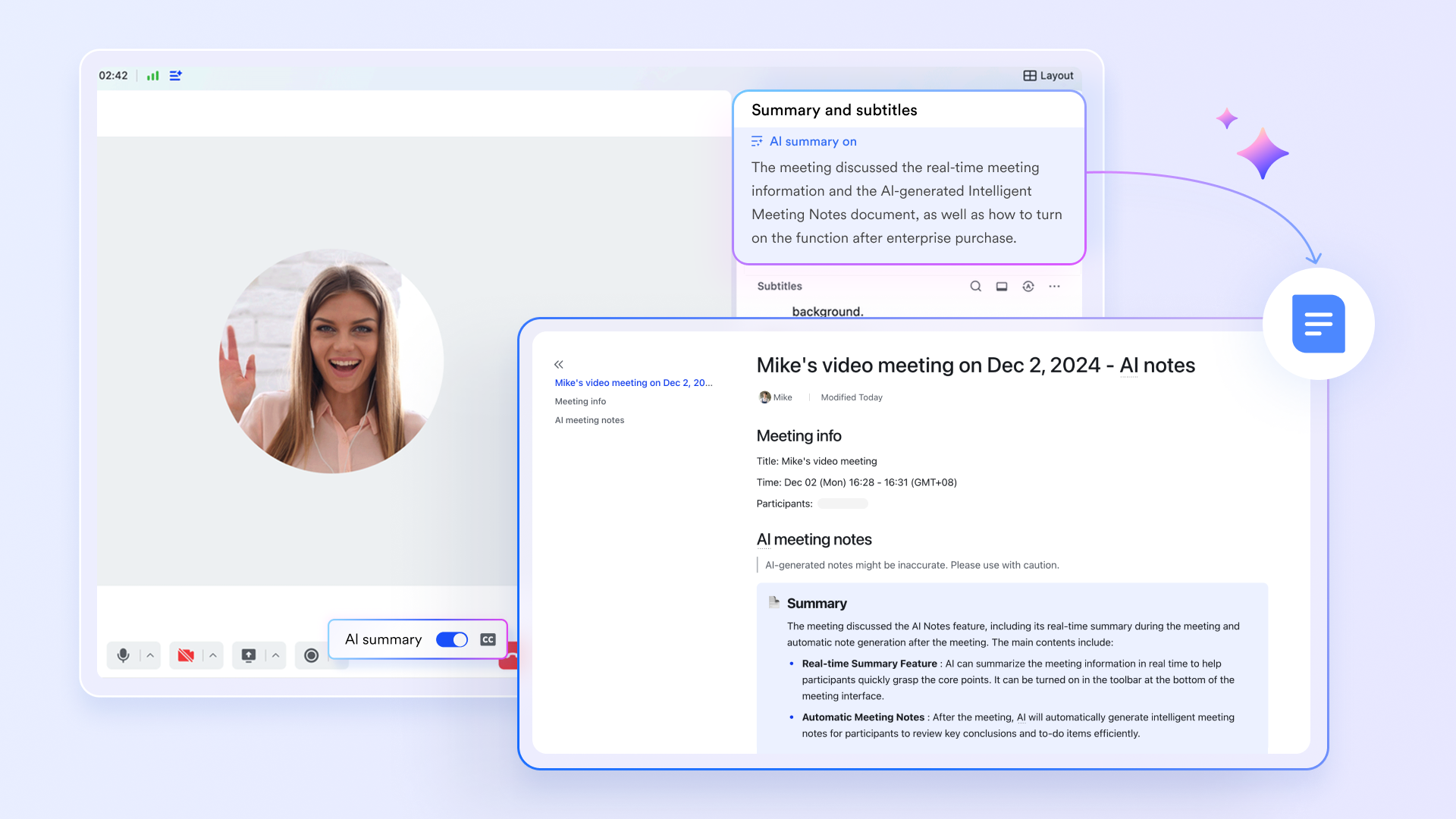
Connect meetings to post-meeting workflows: Involved with a collaborative ecosystem, enables direct , editing, and sharing during meetings. Notes auto-sync to documents post-meeting, and action items can be one-click converted to tasks. However, when you use Zoom to brainstorm a new marketing campaign, the workflow often breaks after the meeting ends. You use the whiteboard, have a great conversation, and the AI Companion summarizes it. What happens next? You still have to move to a separate tool like Asana to create the tasks, go to Confluence or Google Docs to write the brief, and use Slack to follow up. This fragmented experience can also make it harder to evaluate overall software value, especially when teams are comparing and . But can excellently fix this problem.
Seamless collaboration to empower your work
Beyond core meeting features, Lark solves Zoom Workplace's pain points of isolated use and tedious switching via "deep unified ecosystem." This makes collaboration smoother across instant messaging, schedule management, and email. (which can be reflected in Zoom Chat, Zoom Calendar and Zoom Mail).
From simple chat to "communication + collaboration" in one: Zoom Chat focuses on instant messaging but has weak links to docs/tasks (often requiring tool switching). But breaks this communication silo: your teams can send messages by thread, without searching through historical records; support quick emoji reactions to cut "received" spam, keeping key info visible; collaborate on docs and assign tasks in the chat window.
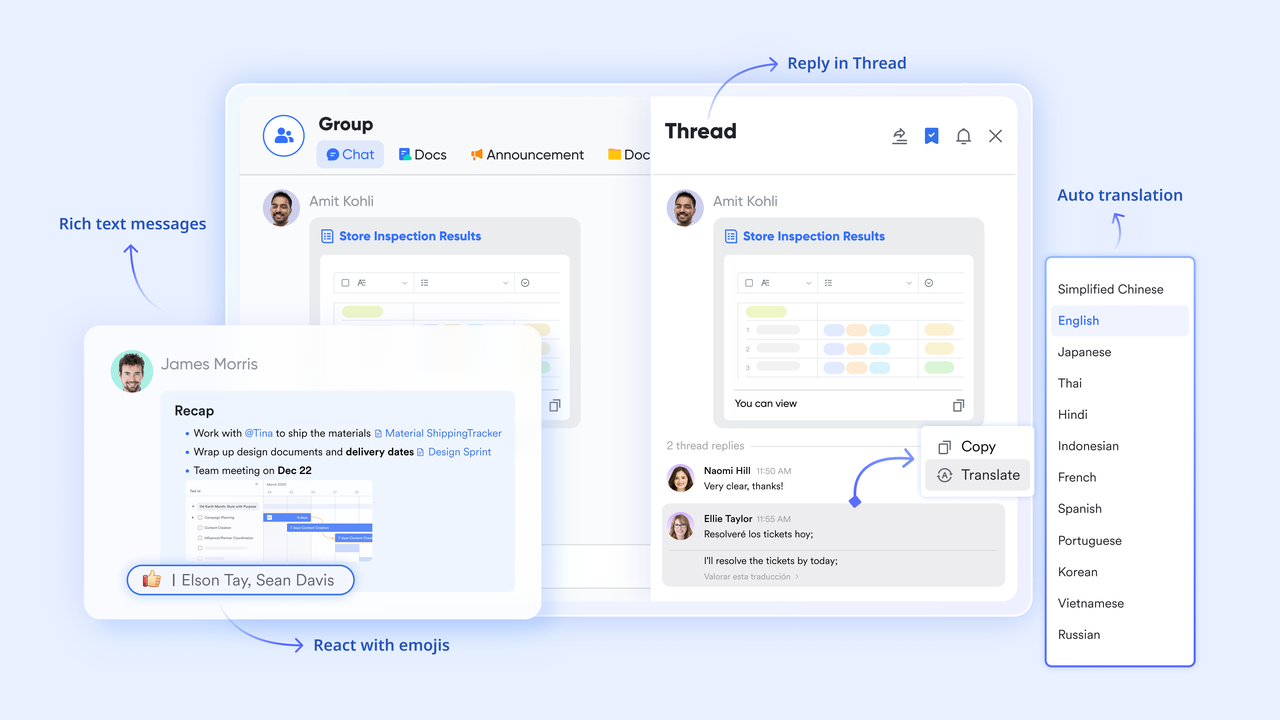
From basic booking to "smart scheduling + resource coordination": Zoom Calendar meets basic booking/reminder needs but lacks cross-team/resource features. offers an intelligent system: you can subscribe to colleagues' calendars to set meeting times; share project plans in public calendars and sync with Tasks schedules; receive meeting notifications automatically.
From sending/receiving to "email + workflow" combination: Zoom Mail is standalone with weak Zoom integration (manual info extraction needed). is involved deeply with the ecosystem: you can experience smart email categorization and tag filter; convert emails to tasks with assignees or link them to chat.
Flexible hub for project and data management
While Zoom Workplace offers task management features, their functionality remains relatively basic. Lark's multi-dimensional tables (), however, is a much more powerful core component. Teams can use it to:
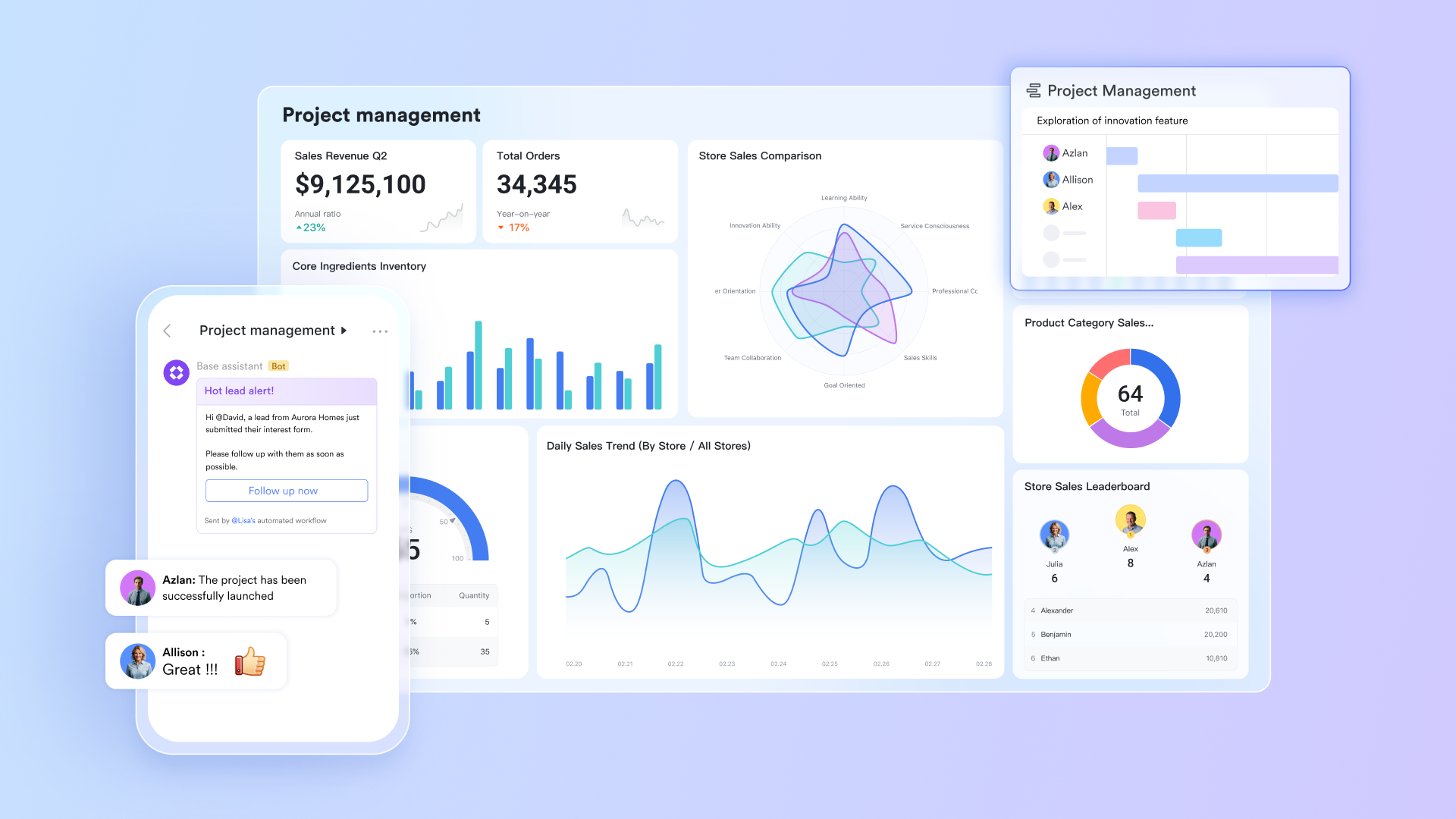
- Customize workflows for different teams (like sales, marketing, or HR), building fully tailored management systems to , manage hiring, or organize campaigns.
A rich suite of tools covering full workflows
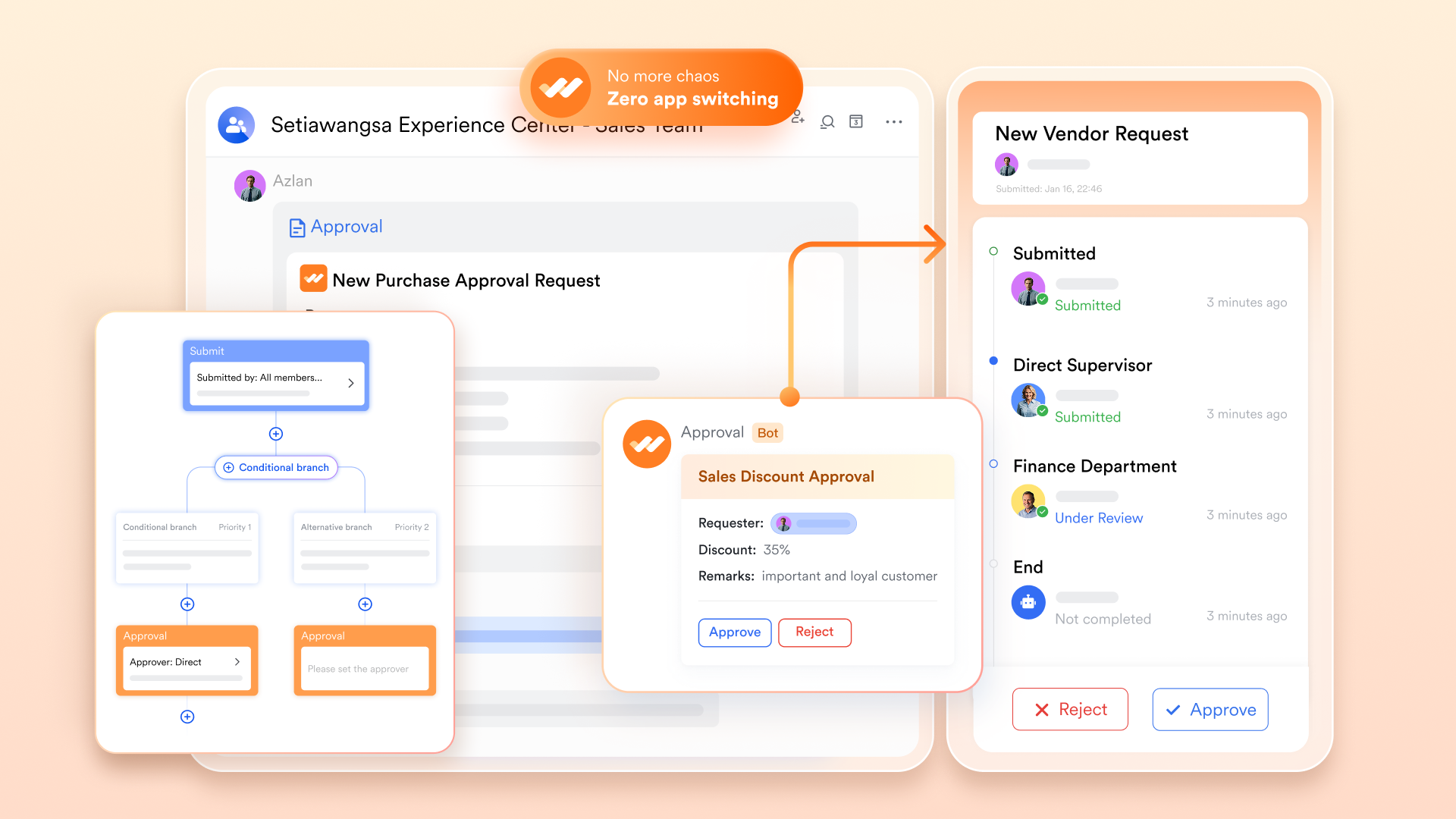
Beyond Meeting, Chat, Calendar, and Mail, Lark also offers a rich suite of additional collaborative tools to cover full workflow needs. It includes for real-time multi-person co-editing, for centralized knowledge storage and sharing and to streamline review processes like leave requests or expense submissions. These tools are combined seamlessly with core features, forming an all-in-one platform that supports everything from idea brainstorming to task closure.
Simple all-inclusive pricing without extra add-on fees
This is one of the most significant differences. Instead of a complex menu of plans and expensive add-ons, Lark offers a radically simple pricing model. Think about the features that require separate budgeting with Zoom:
- A rich, collaborative document and ? Lark Docs and Lark Wiki included in all plans.
- Task and ? Supported by Lark Base and Lark Tasks.
- Custom workflows and approvals? Native features of Lark.
- Webinars? Included in Lark Pro and Enterprise plan.
With Lark, you don't have to worry about zoom webinar pricing or paying extra for essential collaboration tools. It's all there from the start, making your budget predictable and your total cost of ownership significantly lower.
Here is Lark's detailed pricing plans:
- Starter plan: Free forever plan that includes 11 powerful tools for up to 20 users. It also includes 100GB of storage, 1,000 automation runs, AI translations, and more.
- Basic plan: $6/user/month (billed annually) for up to 500 users. It includes everything in Starter plus group calling for up to 500 attendees, 5TB of storage, 1000 automation runs, and more. Some users may need to to purchase.
- Pro plan: $12/user/month (billed annually) for up to 500 users. It includes everything in Starter, plus group calling for up to 500 attendees, 15 TB of storage, 50,000 automation runs, and more.
- Enterprise plan: for custom pricing. Supports unlimited users and includes even more automation runs and advanced security, compliance, and management features.
For small teams with simple communication needs

18 months message history
1000 Base automation runs/month
2000 rows per table in Base
Most POPULAR
For companies with comprehensive collaboration and management needs
Unlimited message history
500-participant video meetings
50k Base automation runs/month
20k rows per table in Base
For large companies with advanced security and organizational management needs
Get a personalized demo and pricing
Unlimited message history
500-participant video meetings
15 TB storage + 30 GB storage/user
500k Base automation runs/month
50k Base automation runs/month
Most POPULAR
For companies with comprehensive collaboration and management needs
Unlimited message history
500-participant video meetings
50k Base automation runs/month
20k rows per table in Base
The final comparison: Zoom Workplace vs. Lark
To make the choice crystal clear, let's put Zoom Workplace and Lark side-by-side. This table isn't about which tool is "better" in a vacuum, but about which philosophy of work and pricing model is a better fit for your team.
Conclusion
The choice between Zoom Workplace and an alternative like Lark comes down to a simple question: Do you want a best-in-class tool for conversations, or a single platform to manage your entire workflow?
Zoom offers an excellent video meeting experience, but achieving its full potential means navigating a complex web of zoom pricing plans, user minimums, and expensive add-ons. Lark presents a fundamentally different path. It provides one powerful, unified platform where meetings, chat, collaborative documents, and project management exist together—all for a single, predictable price.
If you're tired of hidden costs and the inefficiency of switching between a dozen apps, it's time to make a change. Unify your team and simplify your budget with a platform designed for complete work, not just communication.
Stop juggling subscriptions and start collaborating seamlessly. Try for free today and discover a smarter way to work.
Start collaborating more effectively for lower cost
FAQs
How much does workplace Zoom cost?
Zoom Workplace pricing is tiered, starting with a free Basic plan. Paid plans begin at 13.33/user/month(annually) for Pro plan and 18.33/user/month(annually) for Business plan. But the total cost increases with add-ons like Webinars or Phone. For simpler, all-inclusive pricing, an alternative like Lark bundles all features into one predictable plan.
What is the difference between Zoom basic and Zoom Workplace?
There is no difference—Zoom Basic is simply the free pricing plan within the larger Zoom Workplace product suite. The real difference is between the free Basic plan (with its 40-minute meeting limit) and the paid premium plans like Pro and Business, which unlock professional features.
Do I have to pay to use Zoom Workplace?
No, you can use the Zoom Workplace Basic plan for free to host unlimited 1-on-1 meetings and 40-minute group meetings. However, for any professional use case that requires longer meetings, cloud recording, or AI features, you will need to upgrade to a paid subscription plan.
Is Zoom Workplace premium?
Zoom Workplace operates on a "freemium" model. The Basic plan is free, while the Pro, Business, and Enterprise plans are premium tiers that unlock advanced features. A premium Zoom plan gets you best-in-class meetings, whereas a premium all-in-one like Lark offers a suite that also includes project management and a knowledge base.
Related reading






























