














Clickup vs Notion: Complete Comparison for Modern Teams

Donna Shao
Content Specialist
Nov 3, 2026
Donna Shao
Nov 3, 2026

9 min read
Add to preferred sources


The search for the perfect productivity platform often leads to a crossroads. Two tools dominate the conversation: ClickUp vs Notion. Both promise to streamline work, but they approach this goal from fundamentally different angles. Choosing the wrong one can lead to frustration, wasted time, and a failure to realize the promised productivity gains.
This comprehensive ClickUp vs Notion comparison moves beyond surface-level features. It provides a deep analysis of both platforms to help you make an informed decision. We will explore their core strengths, hidden challenges, and ideal use cases. The goal is to find the right fit for your team's unique workflow.
At a glance: ClickUp vs Notion
For those seeking a quick overview, this table summarizes the core identity of each platform.
What is ClickUp?
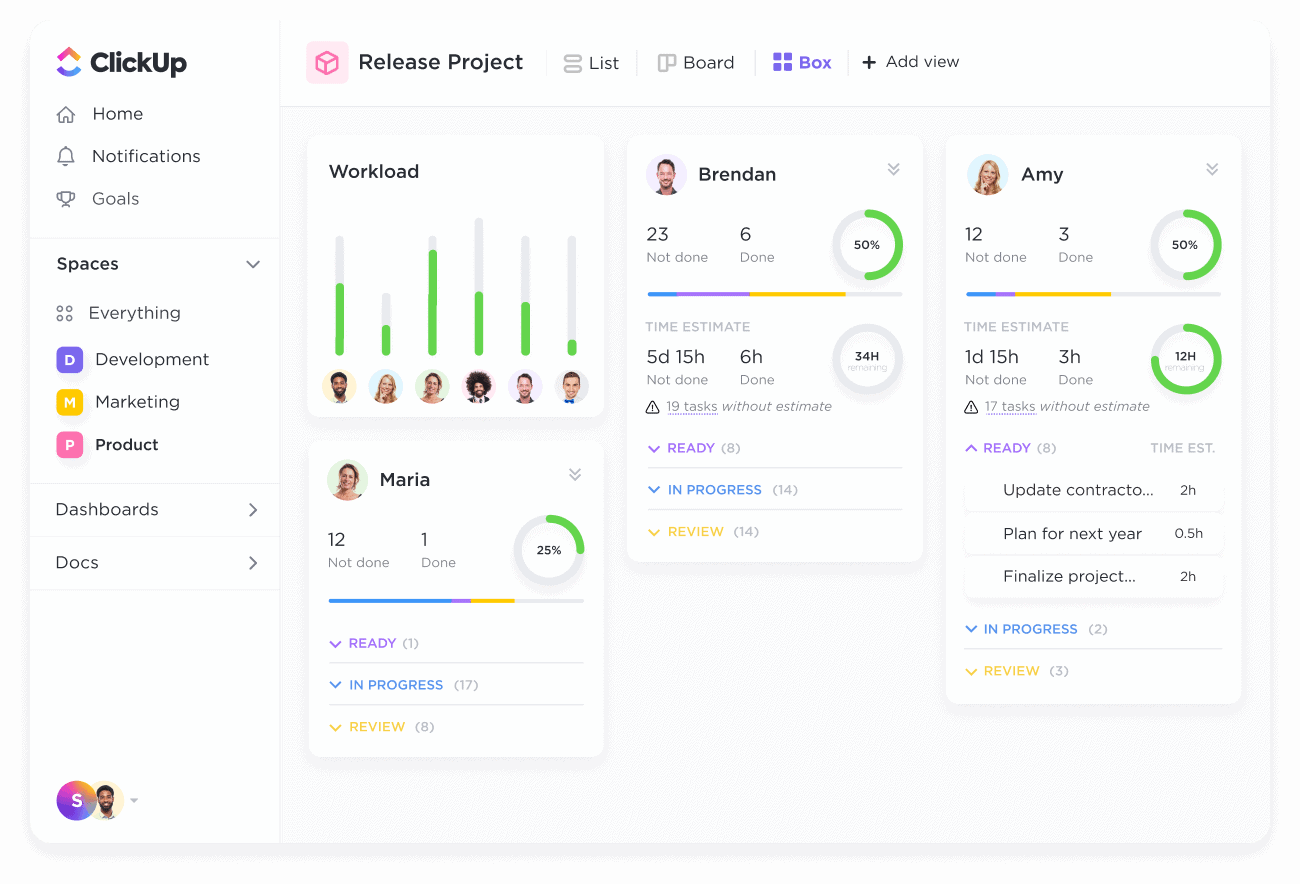
Image source: clickup.com
ClickUp positions itself as one app to replace them all. It is designed specifically for teams that need to manage complex projects from start to finish. The platform's core strength lies in its structured task hierarchy, which organizes work into Spaces, Folders, Lists, and Tasks. This creates a clear framework for execution that helps teams maintain visibility and control.
The system offers an extensive array of viewing options, allowing teams to visualize work in Lists, Boards, Calendars, or Gantt charts. This flexibility enables different team members to interact with work in their preferred format. Beyond task management, ClickUp incorporates built-in time tracking, goal setting, and mind mapping capabilities. Its comprehensive approach aims to consolidate multiple work tools into a single platform, reducing the need for additional software and streamlining project oversight.
What is Notion?
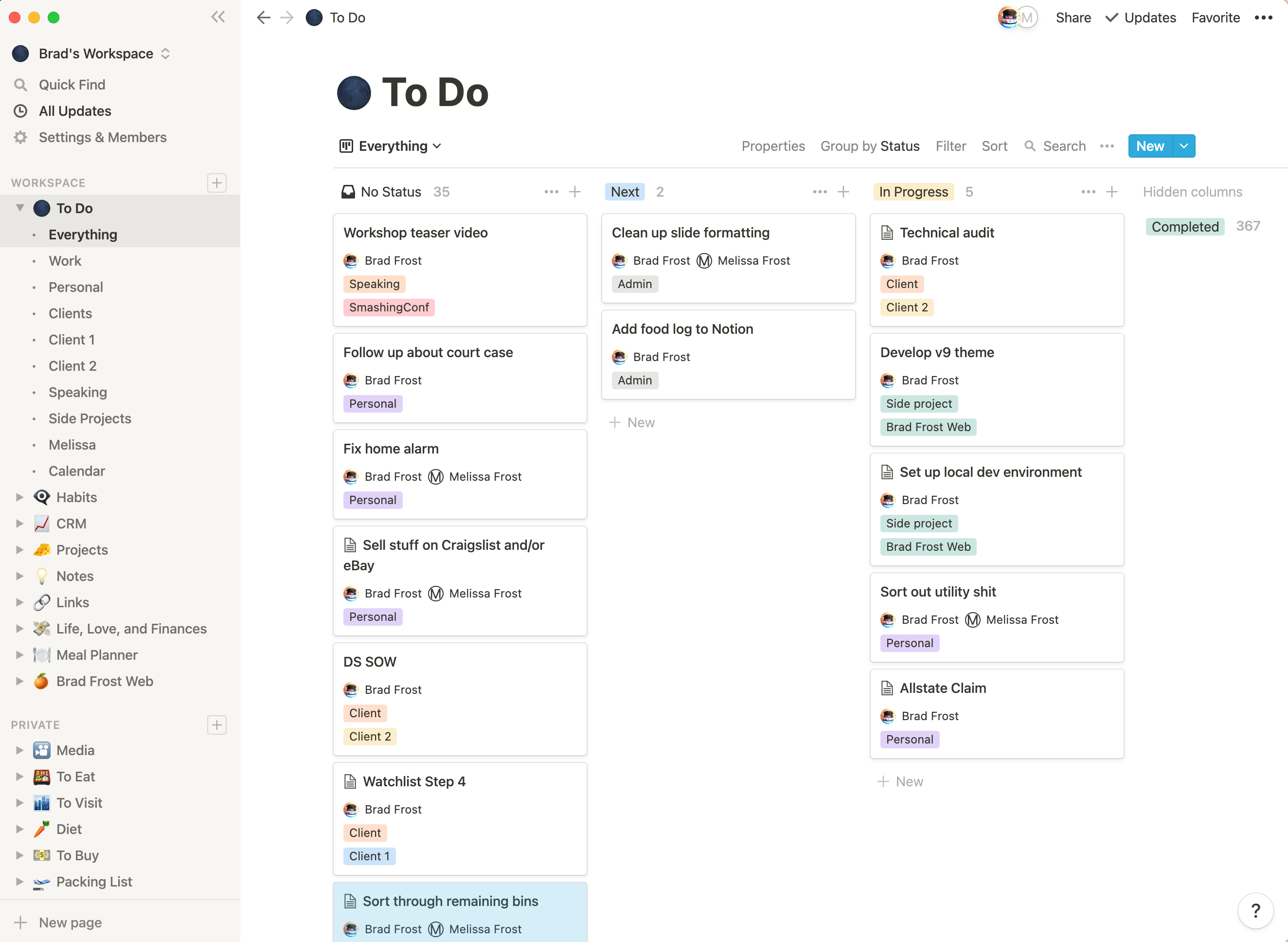
Image source: bradfrost.com
Notion began as an elegant note-taking application and has evolved into a versatile, all-in-one workspace. Its fundamental architecture uses blocks as building elements. Every component, from simple text lines to complex databases, exists as a block that can be manipulated and connected. This modular design allows for remarkable customization and adaptation to various workflows.
The platform's true distinction emerges through its interconnected database system. Users can create separate databases for projects, tasks, and team members, then establish relationships between them. This creates a dynamic, living ecosystem of information rather than isolated documents. Notion particularly excels as a knowledge base, company wiki, or personal organization system. It empowers users to design their own workflows rather than imposing a rigid structure, making it ideal for teams that value adaptability and information connectivity over predefined processes.
A detailed feature comparison: ClickUp vs Notion
Choosing between ClickUp and Notion is less about which tool is objectively better and more about which philosophy aligns with your team's operational DNA. One provides a powerful, pre-built structure for getting work done, while the other offers a flexible toolkit for building your own system. The following breakdown moves beyond a simple checklist to examine how their core features function in practice, revealing the distinct trade-offs between structured power and adaptable freedom. Understanding this core distinction is crucial for selecting the platform that will genuinely enhance, rather than complicate, your team's workflow.
Task and project management capabilities
This is where the fundamental difference between the two tools becomes clear. ClickUp provides an opinionated structure for task management. The hierarchy of Spaces, Folders, and Lists ensures work is organized in a specific way. Tasks can have custom fields, multiple assignees, and dependencies. The Gantt chart view is robust, making it suitable for project managers who need to track timelines and manage resources.
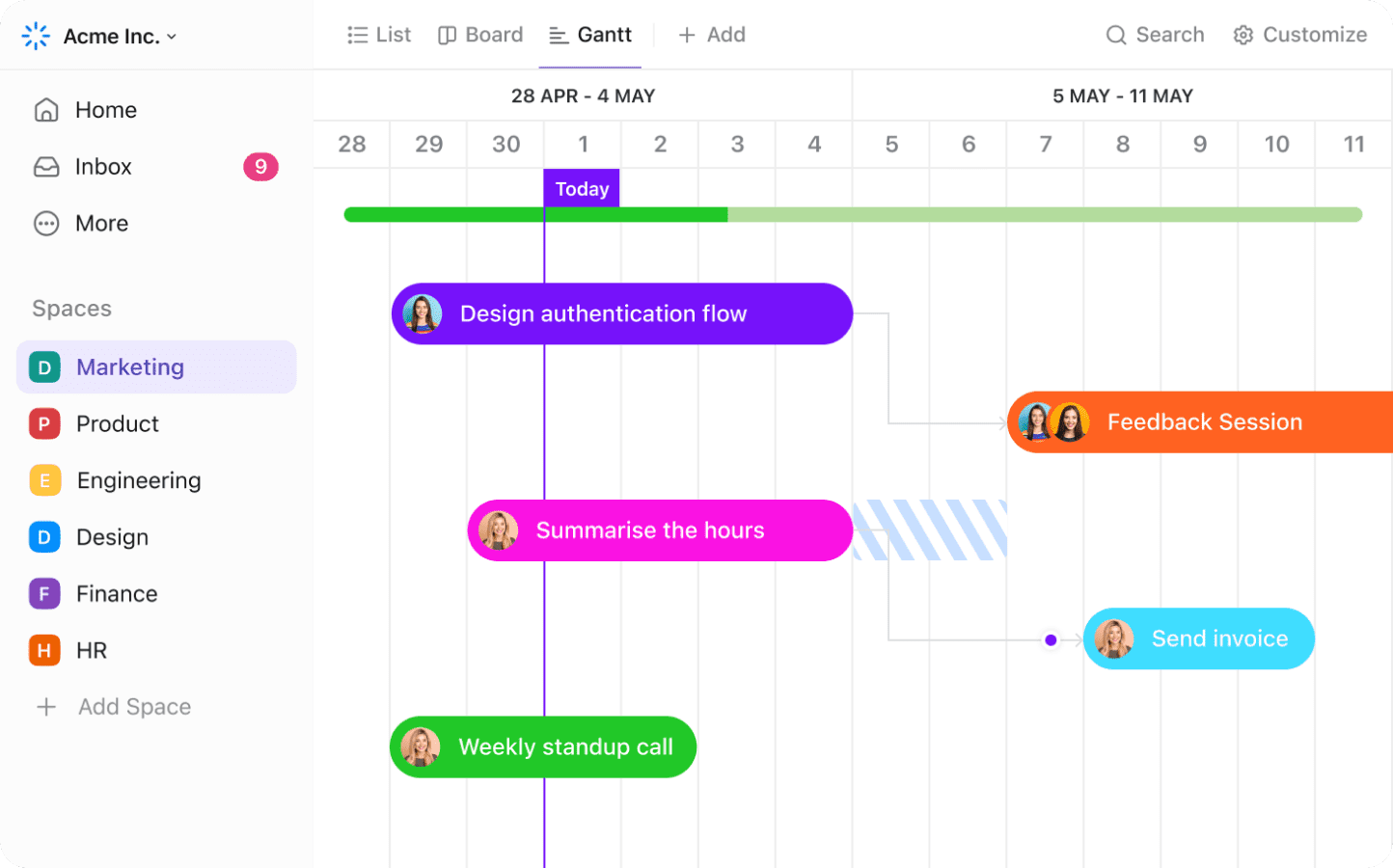
Image source: clickup.com
Notion approaches task management through the lens of its databases. You create a database and then add properties like status, assignee, and due date. You can then view that database as a table, a board, or a calendar. It offers ultimate flexibility, but it requires you to build your own system. For teams that want a ready to use task manager, ClickUp has the advantage. For teams that want to design a unique workflow, Notion provides the building blocks.
Docs, wikis, and knowledge bases
When it comes to creating and managing knowledge, Notion is the clear leader. Its aesthetic and intuitive editor makes creating beautiful documents a simple process. The ability to nest pages within pages and link databases creates a powerful, interconnected wiki. Many teams use Notion primarily as their central source of truth for company documentation.
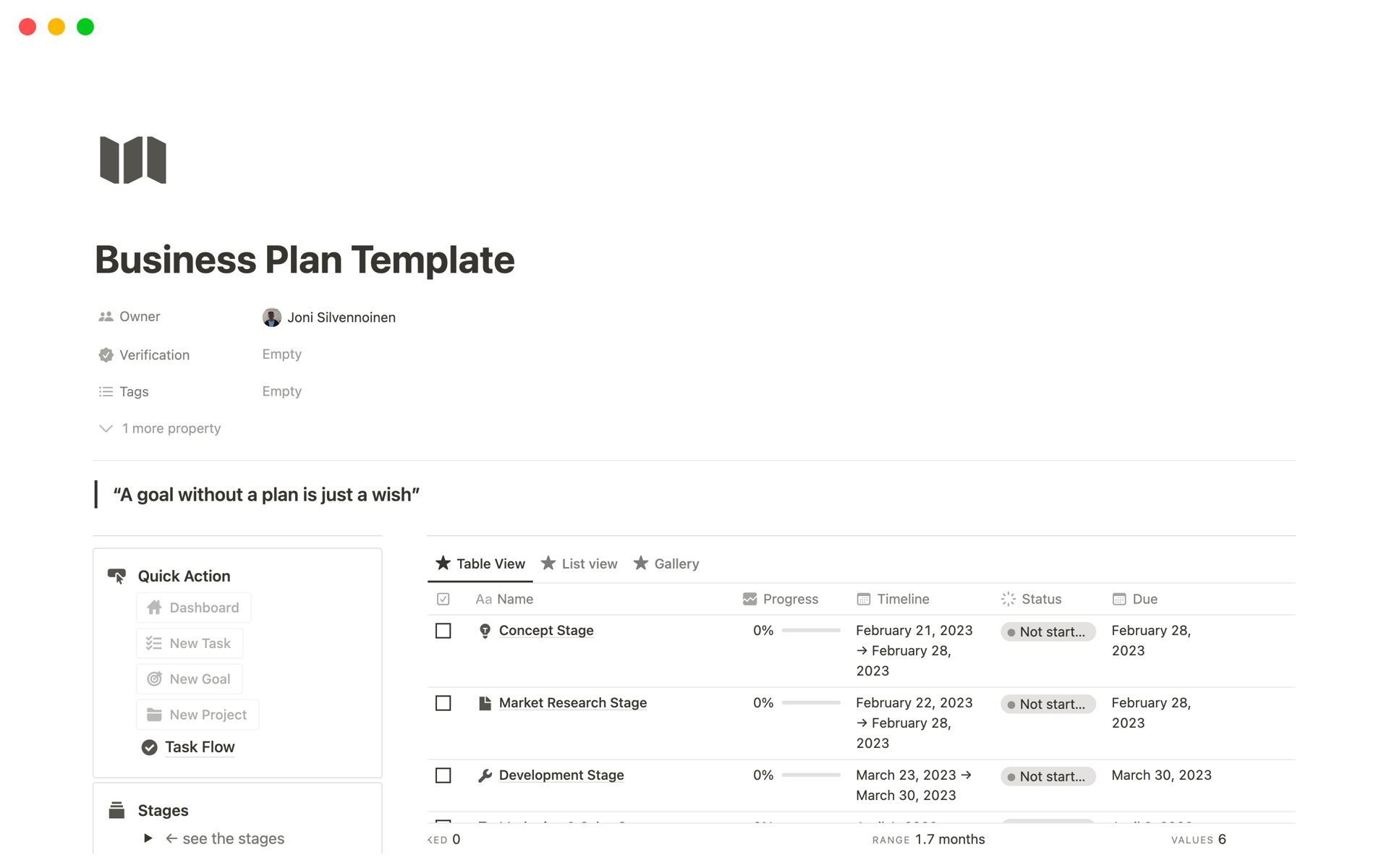
Image source: notion.com
ClickUp includes a feature called Docs for documentation. It allows you to create documents and embed them within tasks and projects. This is useful for providing context. However, it lacks the elegant, database driven power of Notion's knowledge base. If your primary need is documentation and knowledge management, Notion is often the preferred choice.
Collaboration and communication features
Both platforms support real time editing, comments, and @mentions. The difference lies in the collaboration experience. In ClickUp, comments are often tied directly to a specific task. This is effective for task specific communication.
In Notion, discussion can happen on any page or database item. The experience feels more integrated with the content itself. However, neither platform includes a native, robust messaging system like Slack. They rely on comments and integrations for communication. This means teams often use a third party chat app alongside either tool.
User interface and ease of use
This category highlights a significant trade off. ClickUp's strength is its comprehensiveness. This can also be its weakness. New users often face a steep learning curve due to the sheer number of features and settings. The interface can feel cluttered. It takes time to configure ClickUp to fit a team's needs without feeling overwhelmed.
Notion's interface is clean and minimalist. The initial experience is simple. However, the learning curve reveals itself when you try to build complex systems. Understanding relational databases, rollups, and complex formulas requires a significant time investment. The blank page can be intimidating. You are not just using a tool; you are building one.
Automation and workflow optimization
Automation is crucial for scaling processes. ClickUp offers a built-in automation feature that allows you to create rules. For example, you can automatically change a task's status, assignee, or priority based on a trigger. It is visual and relatively straightforward, designed to mimic the workflow automation found in other project management tools.
Notion handles automation through its database integrations and third party tools like Make or Zapier. You can create automations that update database entries or create new pages. However, native, simple automations are less prominent. The power is in connecting Notion to other parts of your tech stack. For in app workflow automation, ClickUp has a more direct approach.
AI features
Both platforms offer AI add ons. ClickUp Brain is positioned as a work assistant that can summarize tasks, generate action items from meetings, and even write content. It is designed to work across the various features of ClickUp.
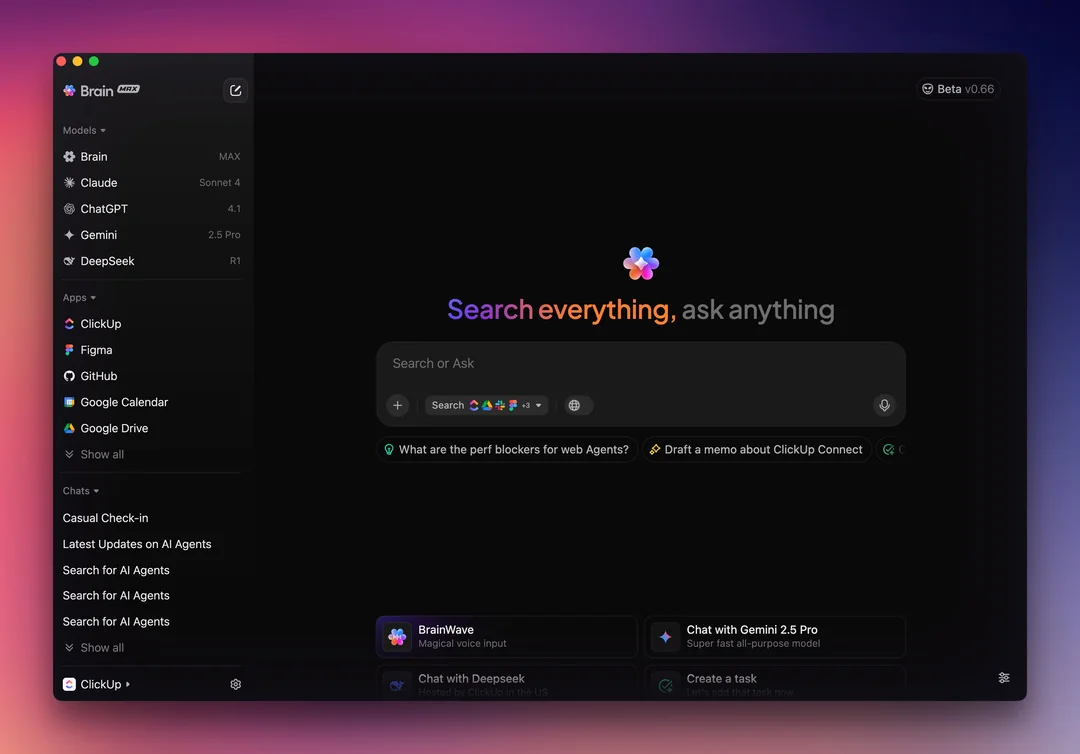
Image source: reddit.com
Notion AI is deeply integrated into the editing experience. It helps with writing, summarizing notes, generating ideas, and translating text. It feels like a natural extension of the core note taking function.
The decision here depends on your primary use case. If you need AI to assist with project management tasks, ClickUp Brain is relevant. If your focus is on enhancing writing and knowledge work, Notion AI is a powerful tool. ClickUp now includes AI in all paid plans (with credit allowances that scale by tier), while Notion AI remains a paid add-on.

Pricing and plans: Which offers better value?
The scalability challenge: Performance and complexity considerations
As teams grow and projects expand, platform performance becomes critical. Both ClickUp and Notion face specific scalability challenges that can impact team productivity.
Performance bottlenecks at scale
ClickUp users sometimes report performance issues when managing large volumes of tasks and documents. The platform may experience slowdowns during peak usage periods, particularly in workspaces with complex hierarchies and multiple automation rules. These delays can disrupt workflow momentum and affect team productivity.
Notion encounters different scaling challenges, primarily with extensive databases. As databases grow larger, filtering, sorting, and loading times can noticeably increase. Teams working with interconnected databases across multiple pages may find that performance degradation impacts their daily workflow efficiency.
Complexity and maintenance overhead
The flexibility of both platforms introduces administrative challenges. In ClickUp, the very features that make it powerful can become obstacles. Teams may struggle with:
- Overwhelming customization options requiring constant configuration
- Complex folder structures that become difficult to navigate
- Notification overload from multiple project streams
Notion presents its own complexity issues. Organizations frequently face:
- Database sprawl with inconsistent structures across teams
- Difficulty maintaining clean information architecture as teams expand
- Significant time investment required to optimize and clean workspaces
Integration limitations and workflow gaps
Both platforms rely heavily on third-party integrations to create complete workflows. This dependency introduces additional points of failure and maintenance overhead. Teams often find themselves constantly switching between applications, leading to context switching costs and reduced focus.
The separation between communication, task management, and documentation in these platforms creates workflow friction. Important discussions happen in chat apps while tasks live in ClickUp and documents reside in Notion, making it challenging to maintain clear context and accountability.
These scalability challenges highlight the need for a platform that maintains performance under heavy loads while reducing administrative complexity. The ideal solution would integrate essential workflow components natively, eliminating the friction of managing multiple disconnected systems.
ClickUp vs Notion: Which tool is the right choice?
Choose ClickUp if your team specializes in:
- Structured project execution: Teams that manage complex projects with clear processes benefit from ClickUp's task hierarchy and automation. Software development teams find the Gantt charts and sprint planning features essential for tracking deliverables. Marketing agencies rely on its custom fields and dependencies to manage campaign timelines and client approvals.
- Centralized task management: Departments handling numerous simultaneous projects appreciate having one platform for all tasks and subtasks. The ability to switch between list, board, and calendar views helps team members visualize work according to their preferences while maintaining consistent tracking.
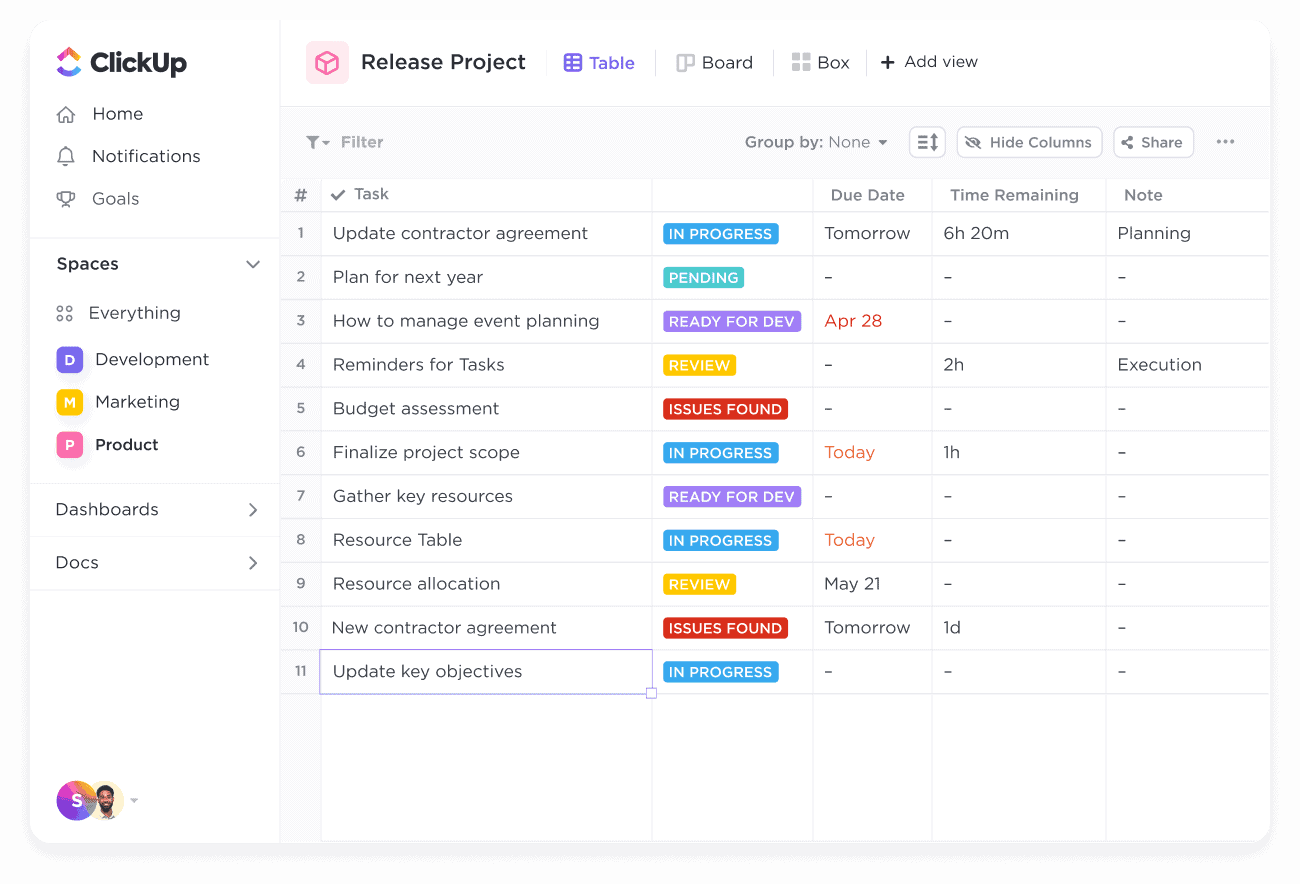
Image source: clickup.com
- Manager-driven workflows: Organizations with dedicated project managers utilize ClickUp's advanced reporting and workload management features. The detailed permission settings and template libraries enable consistent process implementation across departments and project types.
Select Notion when your team focuses on:
- Knowledge-intensive work: Research institutions and content studios leverage Notion's database connections to create living knowledge systems. The bidirectional linking between research notes, source materials, and project outlines creates an organic network of information that grows more valuable with use.
- Custom workflow design: Startups and consulting teams build tailored solutions using Notion's building-block approach. They create client portals, product wikis, and procedure manuals that adapt as their business evolves, without being constrained by predefined structures.
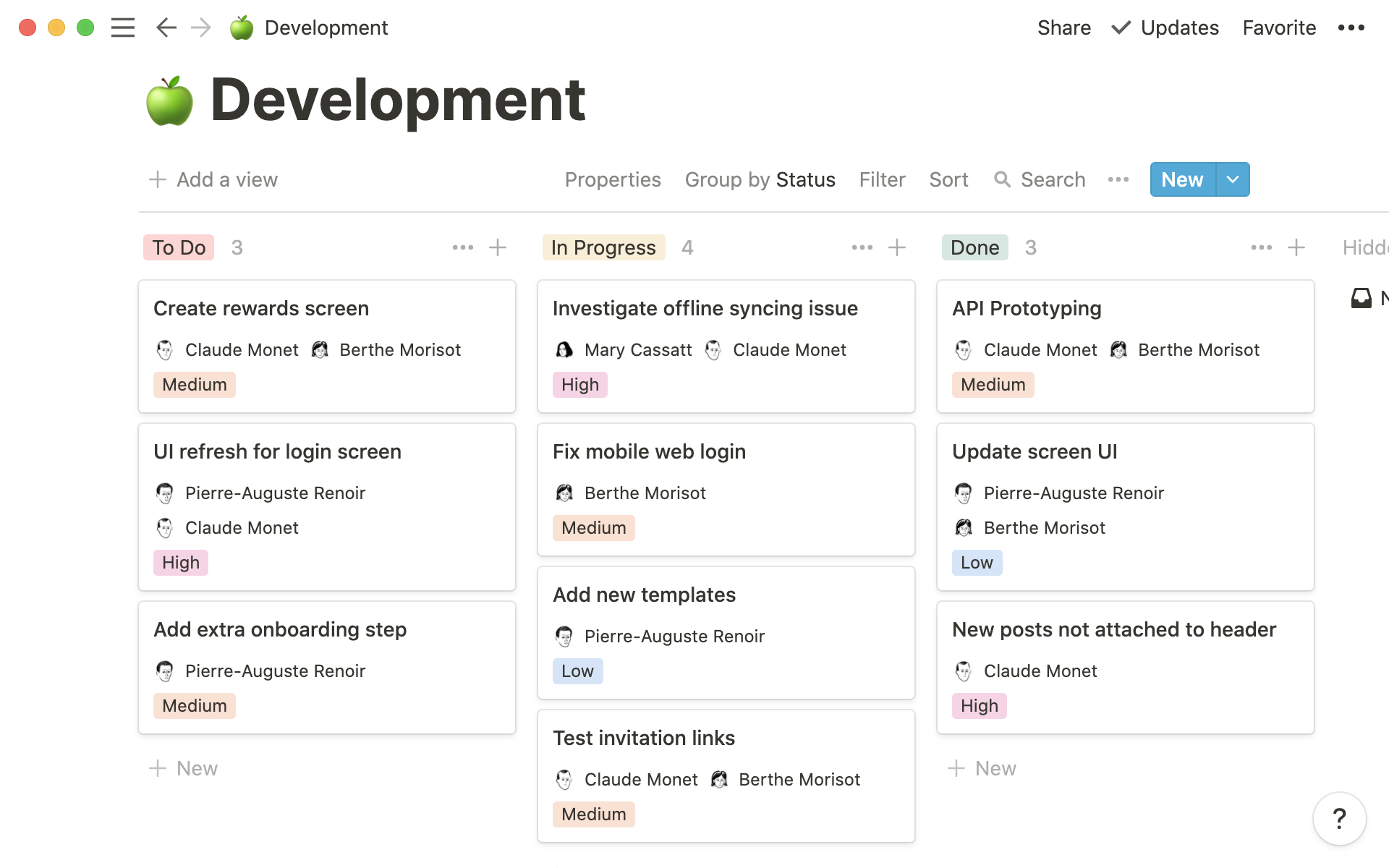
Image source: notion.com
- Information connectivity: Educational teams and strategy groups use Notion's relation databases to connect meeting notes, decision logs, and reference materials. This creates transparent information trails that help new members quickly understand context and historical decisions.
An unified alternative to combine the best of both worlds
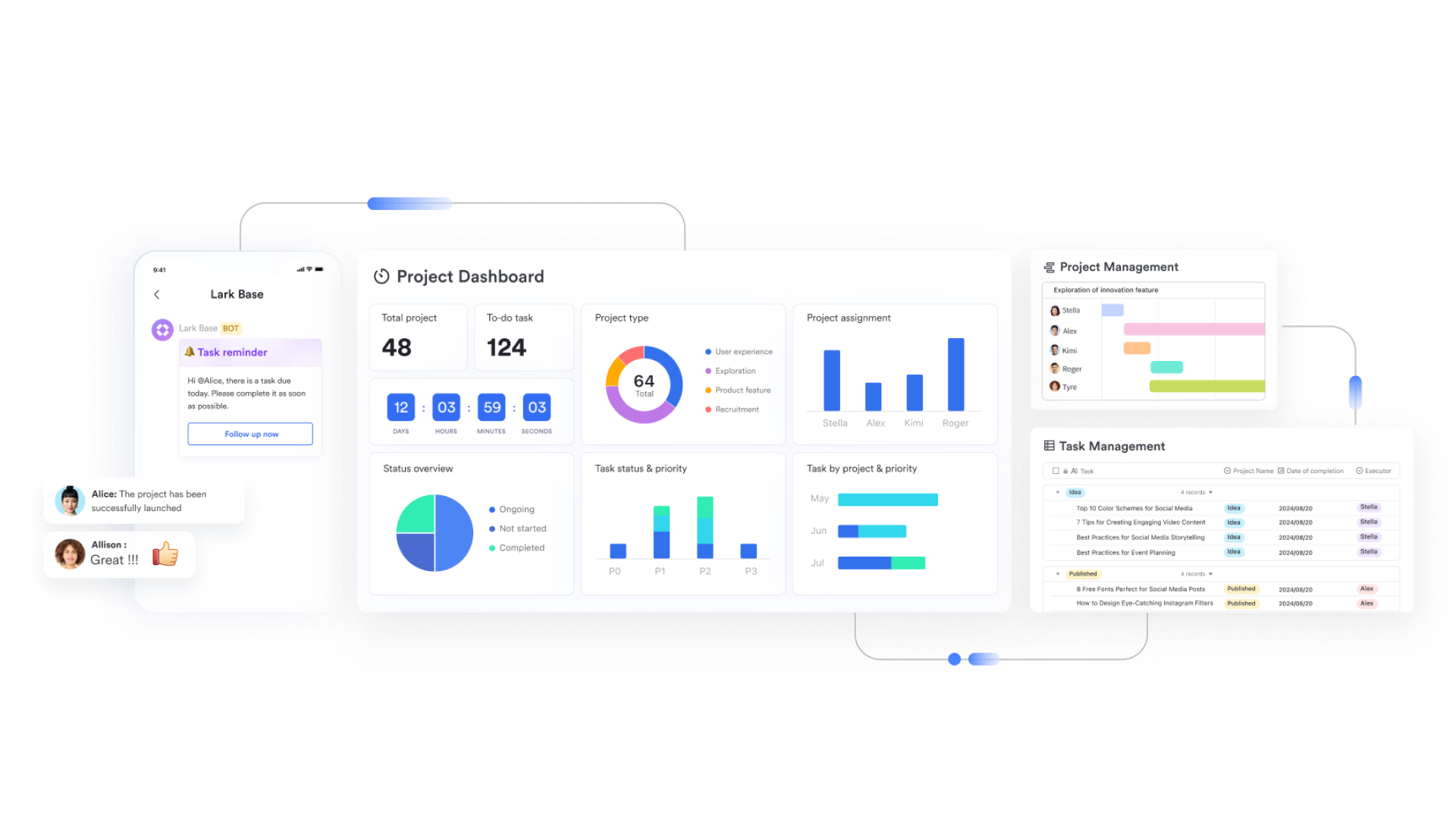
The choice between ClickUp's structured environment and Notion's flexible workspace often leaves teams feeling they must compromise on either power or adaptability. This dilemma becomes particularly apparent when organizations discover that their actual workflow requirements span both structured project management and dynamic knowledge sharing. This challenge highlights the need for a platform that bridges these capabilities without forcing teams to manage multiple disconnected systems. And here Lark stands out. This ideal solution would provide enough structure to maintain operational discipline while offering sufficient flexibility to adapt to evolving business needs.
Centralized information hub
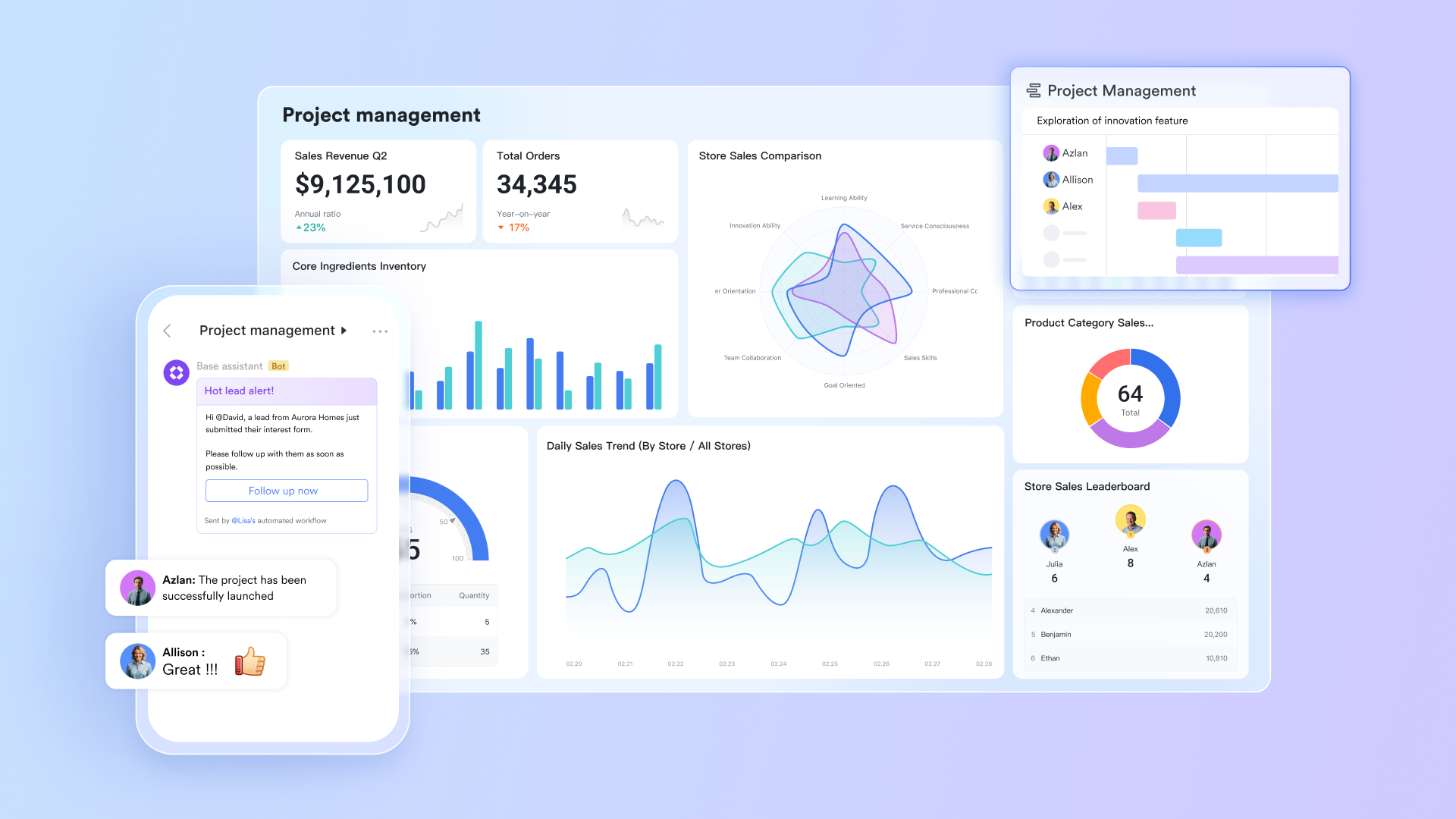
Lark Base serves as a unified repository for all team knowledge and data. Unlike separate systems for documentation and tasks, it maintains deep connections between information elements. Customer details, project specifications, and meeting notes coexist in an interconnected ecosystem. This architecture eliminates the data silos that commonly plague growing organizations while ensuring information remains accessible and actionable.
Streamlined communication to action workflow
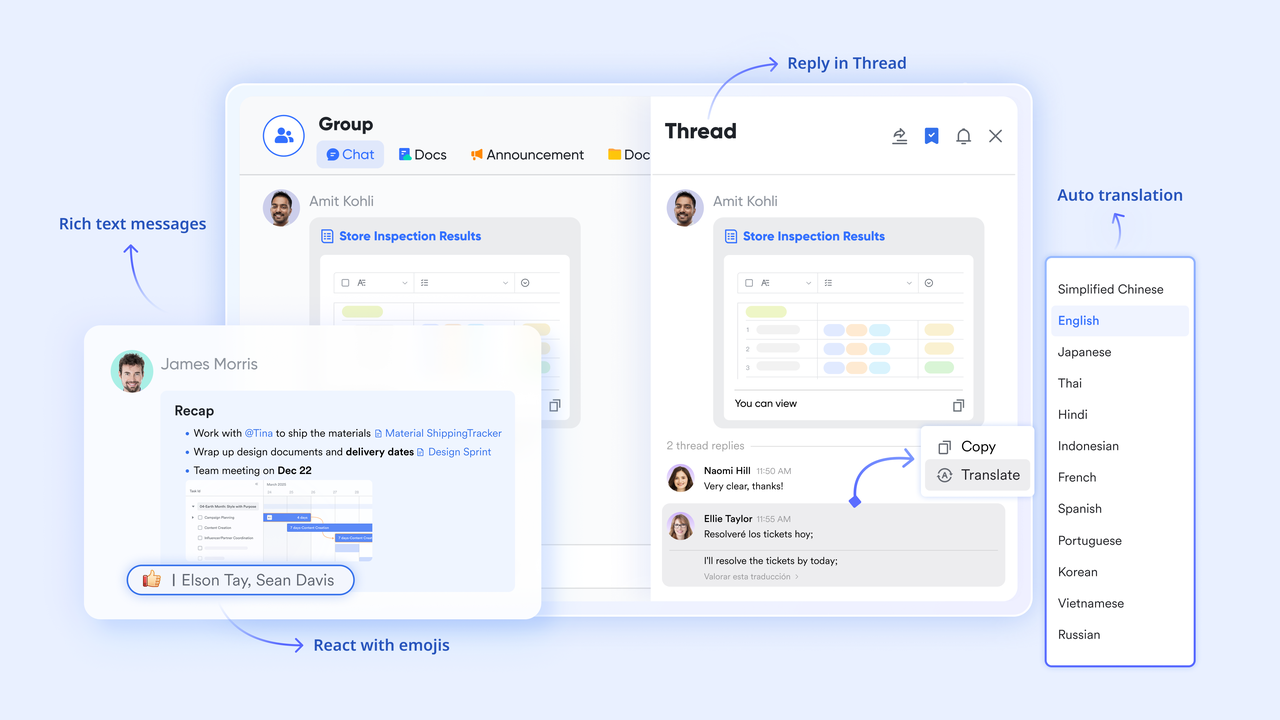
The transition from discussion to execution becomes fluid through Lark Messenger and Lark Tasks. Conversation threads within Lark Messenger naturally evolve into tracked tasks without requiring platform switching. Team members can convert message exchanges into assigned actions with deadlines and priorities. This native connectivity prevents ideas from getting lost in chat streams while maintaining full context for each task.
Adaptable workspace configuration
Lark provides structured flexibility that supports various team workflows without demanding extensive customization. For example, consider a project management template in Lark Base. The company can deploy a standardized template for all teams, which includes essential fields like Task, Status, and Assigned to with. This gives every team a consistent starting point that aligns with company reporting standards.
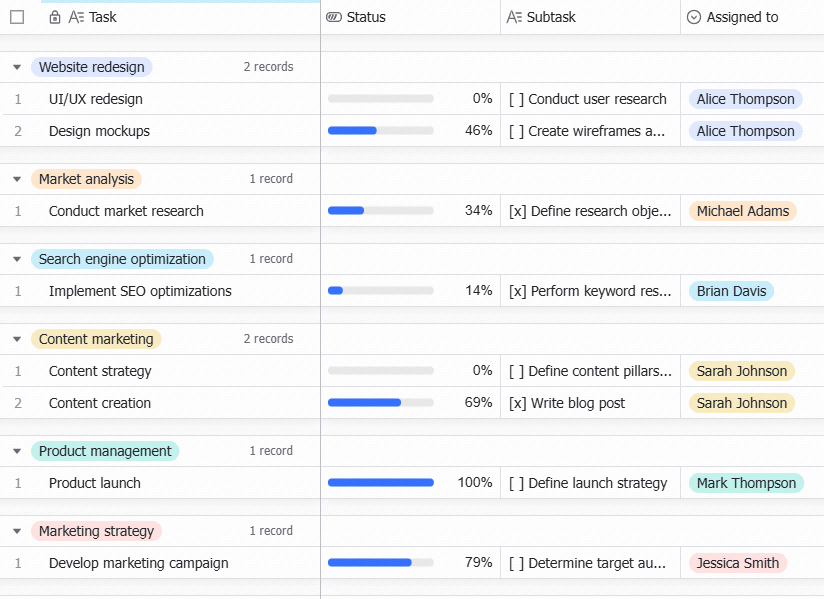
However, different departments can then adapt this template to their specific needs without breaking the core structure. The marketing team might add custom fields for "Campaign Type" and "Design Assets," while the engineering team could add "Sprint Number" and "Bug Priority" fields. Both teams work within the same standardized system, yet each has the flexibility to capture team-specific information. This approach eliminates the need for teams to build complex systems from scratch while ensuring cross-departmental consistency where it matters most.
Native functions in one workplace
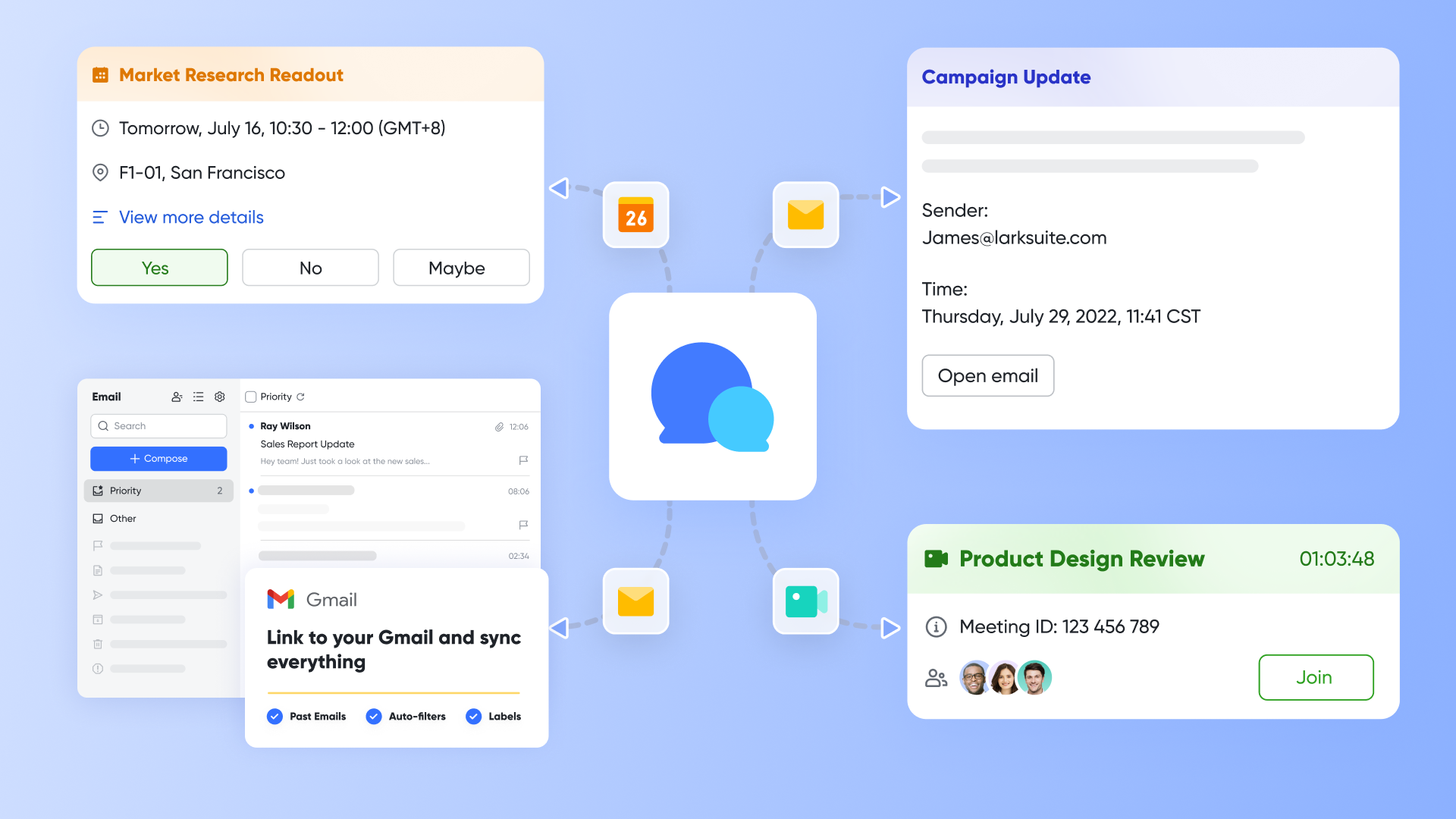
Rather than relying on third-party connections, Lark incorporates essential workplace tools within its ecosystem. Lark Calendar, Lark Docs and Lark Meetings operate as native components rather than bolted-on features. This eliminates the friction of constantly switching between applications while reducing the security and compatibility concerns of multi-vendor solutions. Teams experience a cohesive environment where all tools share common interfaces and data structures.
Cohesive platform performance at scale
Lark's unified architecture addresses common scalability concerns through optimized resource management. The platform maintains consistent performance even as team size and data volume increase significantly. Unlike solutions that layer features atop existing frameworks, Lark's core design ensures smooth operation across all functions. This technical foundation supports growing enterprises without compromising user experience or requiring extensive administrative oversight.
This unified approach demonstrates how modern teams can overcome the traditional trade-offs between powerful functionality and streamlined user experience. By addressing core workflow challenges through unified design, Lark provides a scalable foundation for organizational productivity.
Pricing:
- Free plan: Includes 11 powerful products, supporting up to 20 users, 100 GB storage, 1,000 automation runs and unlimited AI translation in chats, docs and email.
- Basic plan: Starts at $6/user/month, supporting teams with over 20 users. Includes 1,000 runs/month for workflows and automations, 2,000 rows in a single Base table, 5TB storage, unlimited Open API calls, and 10 SSO apps.
- Paid plans: Starts at $12/user/month, supporting up to 500 users. Includes unlimited message history, 50,000 automated Base workflow executions per month.
- Enterprise plan: Contact sales for custom pricing. Supports unlimited users and includes even more automation runs and advanced security, compliance, and management features.
Conclusion
The choice between ClickUp and Notion fundamentally comes down to your team's core operational needs. For teams requiring rigorous project management with structured workflows, ClickUp provides the necessary framework for execution. For organizations prioritizing knowledge connectivity and flexible workspaces, Notion offers unparalleled customization. Both platforms serve distinct purposes excellently, yet each requires accepting certain limitations.
For teams seeking to transcend these trade-offs, Lark presents a compelling alternative that harmonizes structured productivity with flexible collaboration. Its all-in-one environment naturally bridges the gap between task execution and knowledge sharing, creating a seamless workflow experience.
We invite you to experience how Lark's unified approach can transform your team's productivity. Visit our website to explore use cases specific to your industry or start a free trial to discover how Lark brings together the best of both worlds in one cohesive platform.
FAQs
Is Notion still relevant in 2025?
Absolutely. Notion remains highly relevant as teams increasingly prioritize flexible knowledge management. Its database-driven approach continues to excel for documentation, wikis, and custom workflow building. The platform maintains strong popularity among startups and creative teams who value adaptability over rigid structure.
Why is ClickUp so popular?
ClickUp's popularity stems from its all-in-one approach to project management. It successfully consolidates multiple tools into a single platform, reducing context switching. Teams appreciate its comprehensive feature set covering tasks, docs, goals, and time tracking in one interconnected system.
Why did users stop using Notion?
Many users transition from Notion when they need more structured project management out-of-the-box. The flexibility that initially attracts users can become a burden, requiring significant time to build and maintain systems. Performance concerns with large databases and limited native automation also drive some teams to seek alternatives.
Is Notion a Chinese app?
No, Notion is not a Chinese application. It is an American company founded in San Francisco, California. The company maintains its headquarters in the United States and operates as an independent entity, not owned by any Chinese corporation or government body.
Related reading
Table of contents
Start using Lark today

Manage all your work in one place
Boost team efficiency by 10x
Save up to 70% on software costs
Table of contents
Start using Lark today
Manage all your work in one place
Boost team efficiency by 10x
Save up to 70% on software costs



2026 Lark Technologies Pte. Ltd.
Headquartered in Singapore with offices worldwide.






Explore: