Project timelines often look simple on the surface, but the tools behind them can introduce hidden costs and workflow complexity over time. As interest in detailed Instagantt pricing analysis continues to rise, many teams are trying to understand not just what Instagantt costs, but whether the value matches how they actually work. Instagantt positions itself as a visual Gantt chart companion designed to bring clarity to project schedules, especially for teams already using Asana. This guide explores how Instagantt works, what its core features offer, and how pricing decisions affect real project execution. Along the way, it also briefly acknowledges why some teams eventually explore alternatives when timelines alone stop being enough.
What is Instagantt?
Instagantt is a cloud-based focused primarily on creating and managing Gantt charts. It is best known for its close relationship with Asana, where it acts as an external timeline layer rather than a full standalone . Teams use Instagantt to transform task lists into visual schedules that clearly display dependencies, durations, and milestones. The platform is designed for users who want fast timeline clarity without deep configuration or process overhead.
Instagantt is commonly adopted by marketing teams, agencies, and project managers who rely heavily on deadline coordination. Access is browser-based, with no mandatory desktop installation, and most users begin through an Instagantt login connected to their existing Asana workspace. While it can function independently, its strongest use case remains alongside rather than as a complete replacement.
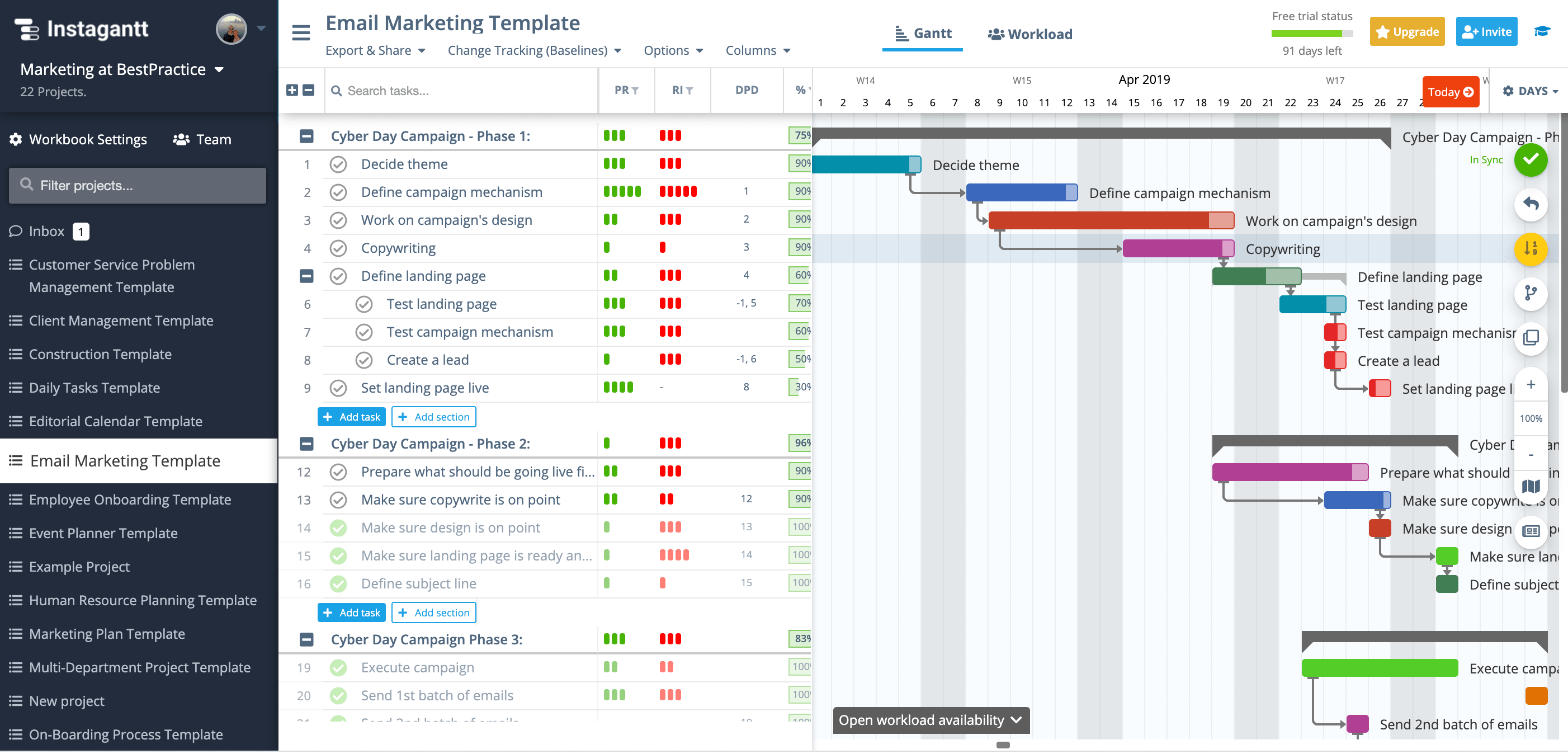
Image source: Instagantt.com
Instagantt's core features
Instagantt is built to give teams clear, visual control over without adding unnecessary complexity. Its feature set is centered on Gantt chart planning, making it especially useful for teams that want fast schedule clarity rather than a full execution platform.
- Visual Gantt charts for timeline planning: Instagantt's primary feature is its interactive , which allows users to map tasks across a timeline visually. Tasks can be dragged and resized directly on the chart, making schedule adjustments intuitive. Dependencies, start dates, and durations are easy to understand at a glance.
- Task dependencies and automatic schedule updates: Instagantt supports task dependencies that define how work flows from one task to another. When a task is delayed or moved, dependent tasks automatically adjust to maintain logical sequencing.
- Milestones and baseline comparisons: Milestones allow teams to mark key delivery points within a . Baselines capture the original project plan so teams can compare planned versus actual progress over time.
- Resource workload and capacity views: Instagantt includes workload views that show how tasks are distributed across team members. Managers can quickly identify overloaded or underutilized resources and rebalance assignments accordingly.
- Multiple planning views beyond Gantt: In addition to Gantt charts, Instagantt offers list and calendar style views for managing tasks. These views help users switch between high-level planning and day-to-day task review.
- Instagantt plus Asana: One of Instagantt's most important features is its tight combination with Asana. Through the Instagantt Asana connection, tasks sync between platforms, allowing users to visually while keeping execution in Asana.
- Cloud-based access and easy setup: Instagantt is fully cloud-based and accessed through a browser, requiring no local installation. Teams can get started quickly using their Instagantt login, often connected to an existing Asana account.
Instagantt pricing plans: A detailed breakdown
Instagantt pricing is structured around access to its visual planning capabilities rather than broader . Plans are designed to scale based on usage depth, team size, and whether Instagantt is used independently or in conjunction with Asana. While entry-level access allows experimentation, most real-world projects need to require paid plans. Evaluating pricing in context helps teams understand long-term costs, especially when combined with other subscriptions. This breakdown clarifies who each plan is best suited for and how feature access changes.
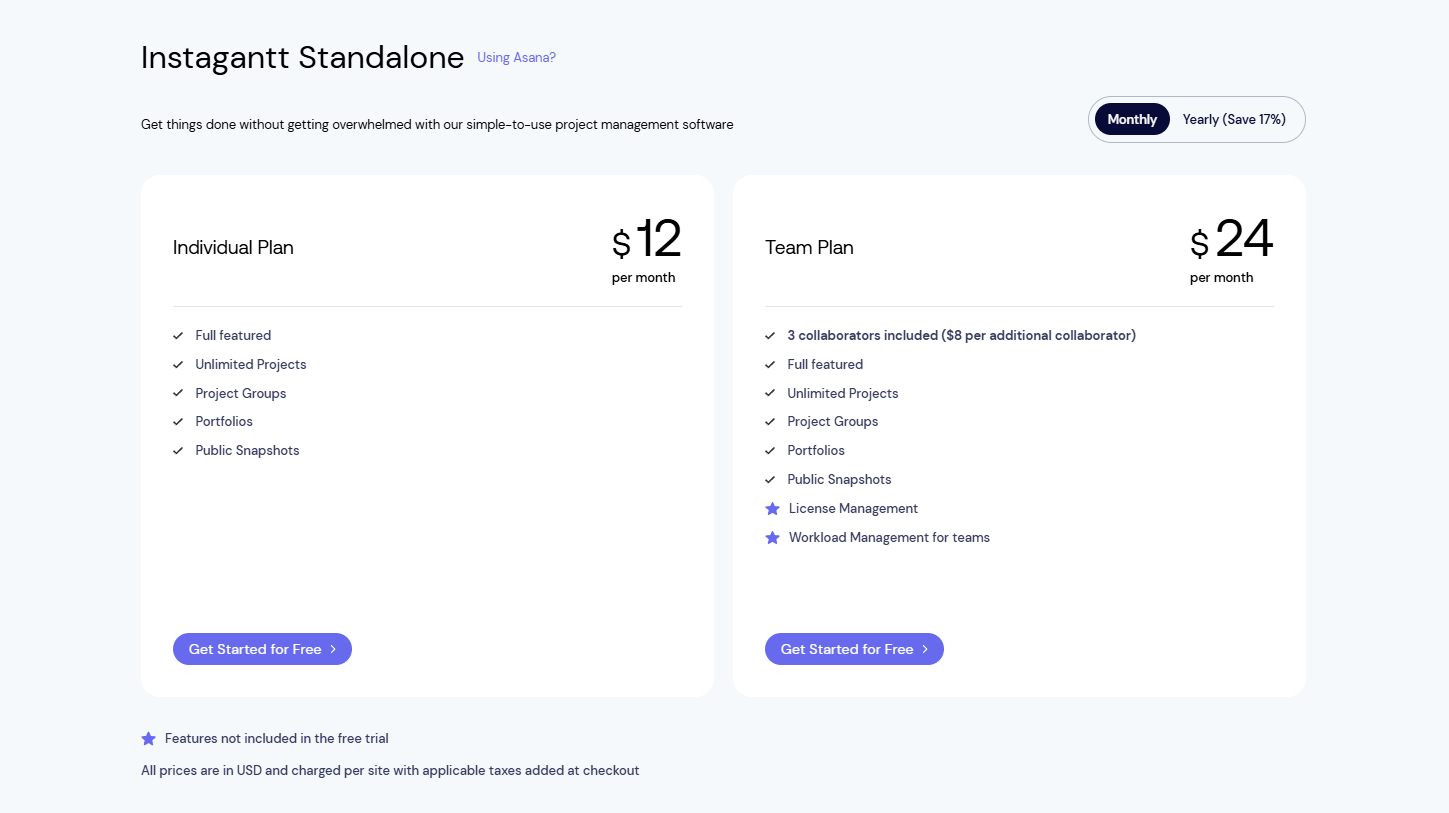
Image source: Instagantt.com
Information source: Instagantt.com
Update time: 2025-12-18
Note: Pricing and plan details reflect publicly available data as of the update date and may vary based on region, billing cycle, and number of agents.
Check out affordable plans with competitive features
Instagantt & Asana workflow: Strengths and friction points
Instagantt is most commonly used alongside Asana rather than as a standalone . This combined workflow is designed to give teams strong visual timelines while keeping task execution in Asana. While combining it delivers clear planning benefits, it also introduces operational trade-offs as projects grow. Understanding both the strengths and friction points helps teams decide whether this two-tool setup supports long-term efficiency or adds unnecessary complexity.
- Seamless unification: Instagantt connects directly with Asana, allowing tasks, dates, and dependencies to sync automatically between platforms. Project managers can plan visually in Instagantt while teams continue executing tasks in Asana. Changes to timelines reflect back into Asana without manual updates. This setup preserves existing workflows and reduces disruption during adoption. For timeline-heavy planning, combining delivers immediate clarity.
- Inevitable context switching: Despite tight syncing, teams must move between Instagantt for planning and Asana for daily execution. Discussions, files, and decisions often live outside the requiring constant tool switching. Over time, this fragmented experience slows coordination and increases cognitive load. As projects accelerate, gaps between planning and execution become more visible. This friction often prompts teams to reassess their tool stack.
- Instagantt customer service experience: Instagantt is generally responsive for onboarding, billing, and technical support requests. Support resources focus on helping users understand features and resolve combining issues with Asana. While service quality is helpful, it cannot address workflow limitations created by using two separate platforms. As usage matures, teams often seek structural solutions rather than support workarounds.
Pros and cons of Instagantt
Instagantt delivers clear strengths for teams that rely heavily on , but it also comes with limitations that affect long-term scalability. While its Gantt-focused design simplifies planning and schedule communication, it does not aim to replace full project execution platforms. Evaluating both pros and cons helps teams set realistic expectations before committing. This balanced view is especially important for growing teams that need clarity not only in planning but also in collaboration, ownership, and follow-through.
Pros
- Exceptional visual clarity for timelines and schedules: Instagantt excels at turning complex task lists into easy-to-read Gantt charts that clearly show timelines, dependencies, and milestones. This makes it ideal for communicating plans to stakeholders and aligning teams around deadlines.
- Low learning curve and fast adoption: The interface is intuitive and requires little training, allowing teams to get value quickly. Users can begin almost immediately without heavy configuration or setup.
- Strong dependency and baseline tracking: and baseline comparisons help teams manage schedule changes and track progress against original plans. These features support better planning discipline and retrospective analysis.
- Seamless visual extension for Asana users: For teams already Instagantt provides a powerful visual layer without forcing a workflow overhaul. Task syncing preserves existing execution habits while improving timeline visibility.
Cons
- Limited collaboration beyond planning: Instagantt focuses on schedules, leaving discussions, documentation, and approvals for external tools. This separation can slow execution as projects become more collaborative.
- Context switching between tools: When used with Asana, teams constantly move between platforms for planning and execution. Over time, this fragmented workflow adds cognitive load and inefficiency.
- Costs add up in multi-tool setups: Paying for both Instagantt and Asana increases the total cost of ownership. Teams may question whether maintaining two subscriptions delivers proportional value.
- Not designed as a full project execution system: Instagantt lacks native task ownership tracking, automation, and cross-functional visibility. As project complexity grows, teams often outgrow their planning-only focus.
Instagantt is designed primarily for visual , helping teams see task durations and dependencies at a glance. However, as projects grow, teams often need more than static schedules. They need connected execution, collaboration, and real-time visibility. That's where Lark comes at a competitive alternative. Take a close look at this new solution.
Plan your project without workflow friction
How Lark goes beyond Instagantt's Gantt-only focus
extends Gantt planning into a full work system where , tasks, documents, , and automation operate on the same data foundation. This all-in-one platform eliminates the friction of jumping between tools, allowing your team to move from high-level strategy to granular execution without ever losing sight of the big picture. These huge changes in workflows turn from planning artifacts into live, actionable workflows that adapt as work evolves.
A fully interactive Gantt view that stays connected to real work
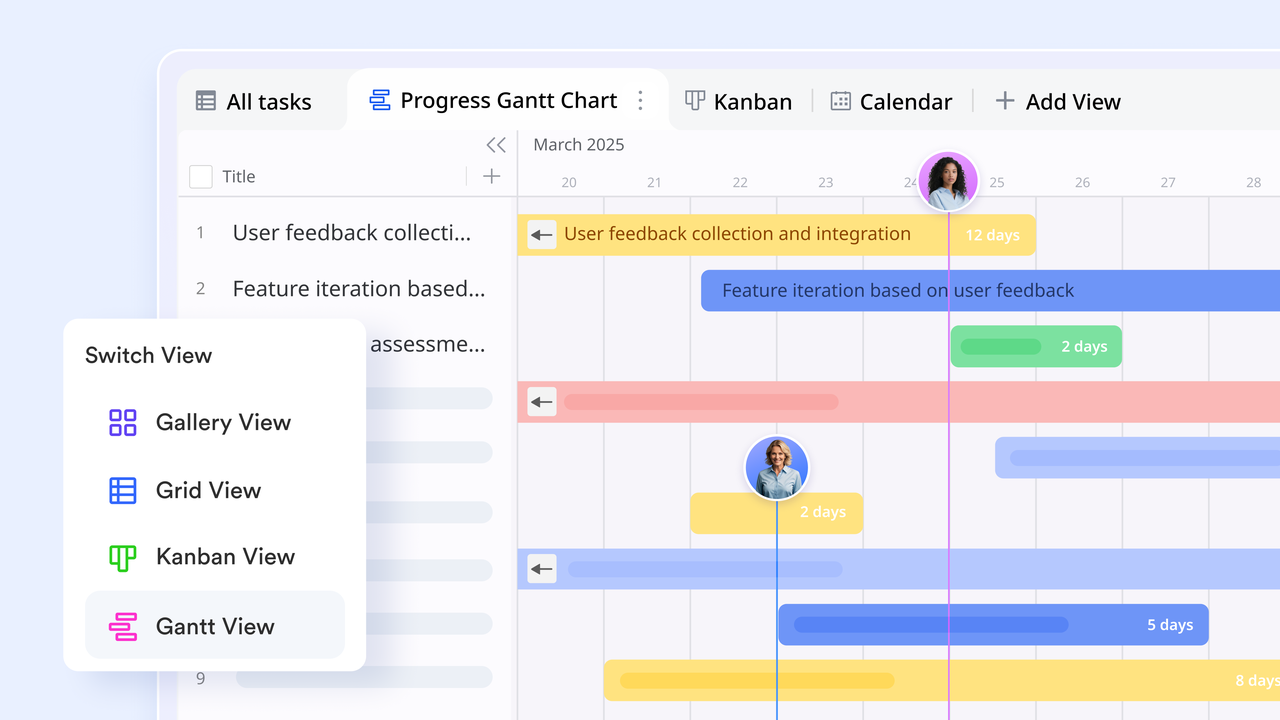
Lark Base's Gantt view visualizes project timelines with time displayed horizontally and records listed vertically, similar to Instagantt at first glance, but the difference lies in how the data behaves. Time bars are automatically generated from date fields and remain directly editable through drag-and-drop interactions. When a timeline changes, updates instantly reflect across other views such as tables, calendars, and dashboards. Instagantt focuses mainly on visual scheduling layered on top of Asana tasks. In contrast, Lark's Gantt view is powered by live database records, meaning timelines are not just visuals-they are the source of truth driving task ownership, progress, and reporting.
Calendar views that turn timelines into actionable schedules
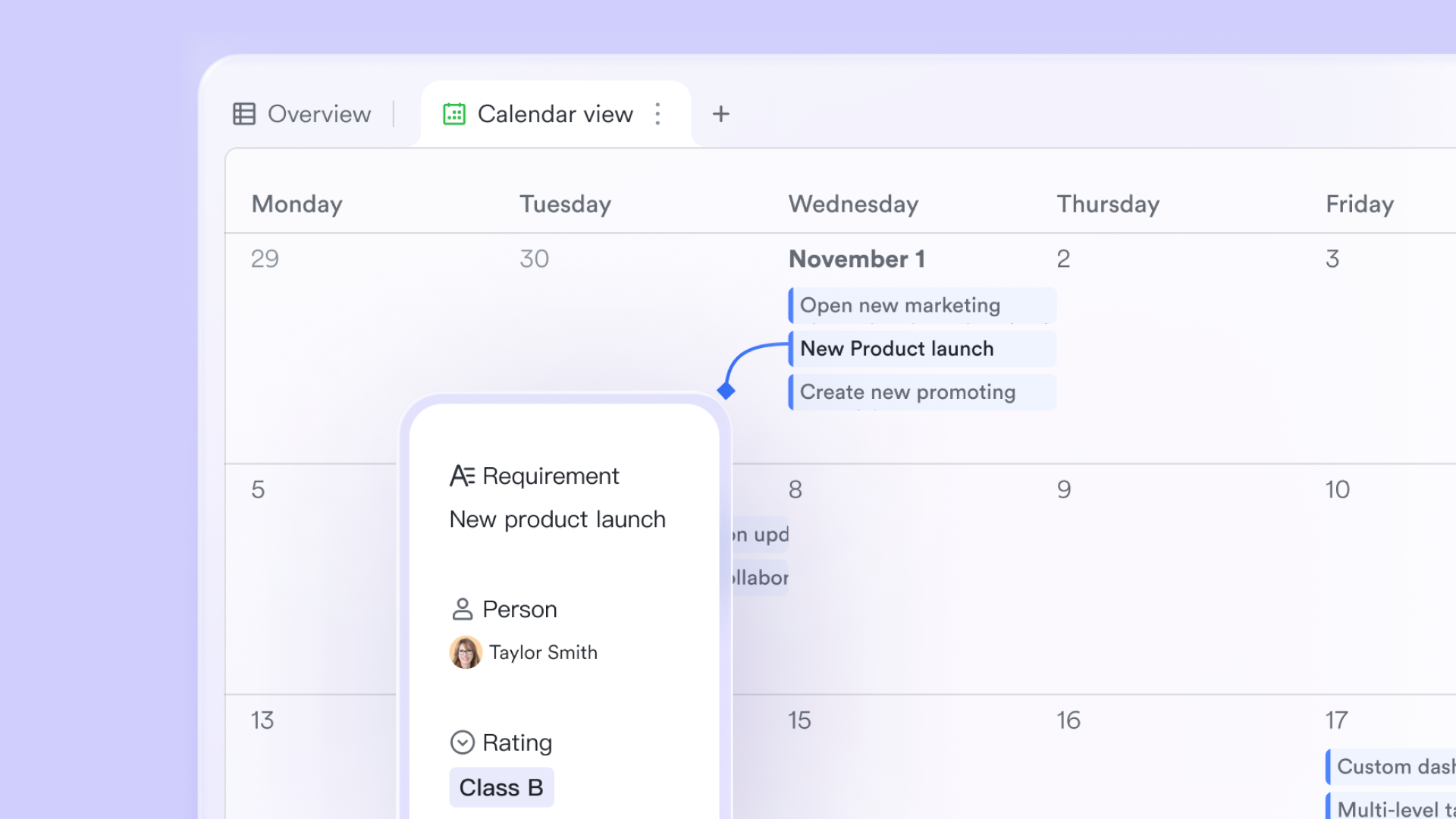
Lark Base calendar views allow teams to visualize tasks, milestones, and deadlines in a calendar format using the same underlying data as the Gantt view. Teams can switch instantly between Gantt views and calendar views perspectives without duplicating work or reconfiguring layouts. While Instagantt offers strong timeline visualization, it lacks deeper scheduling flexibility across multiple views. view bridges long-term planning and day-to-day execution, helping teams align delivery timelines with real availability and workload.
Live dashboards for tracking progress beyond timelines
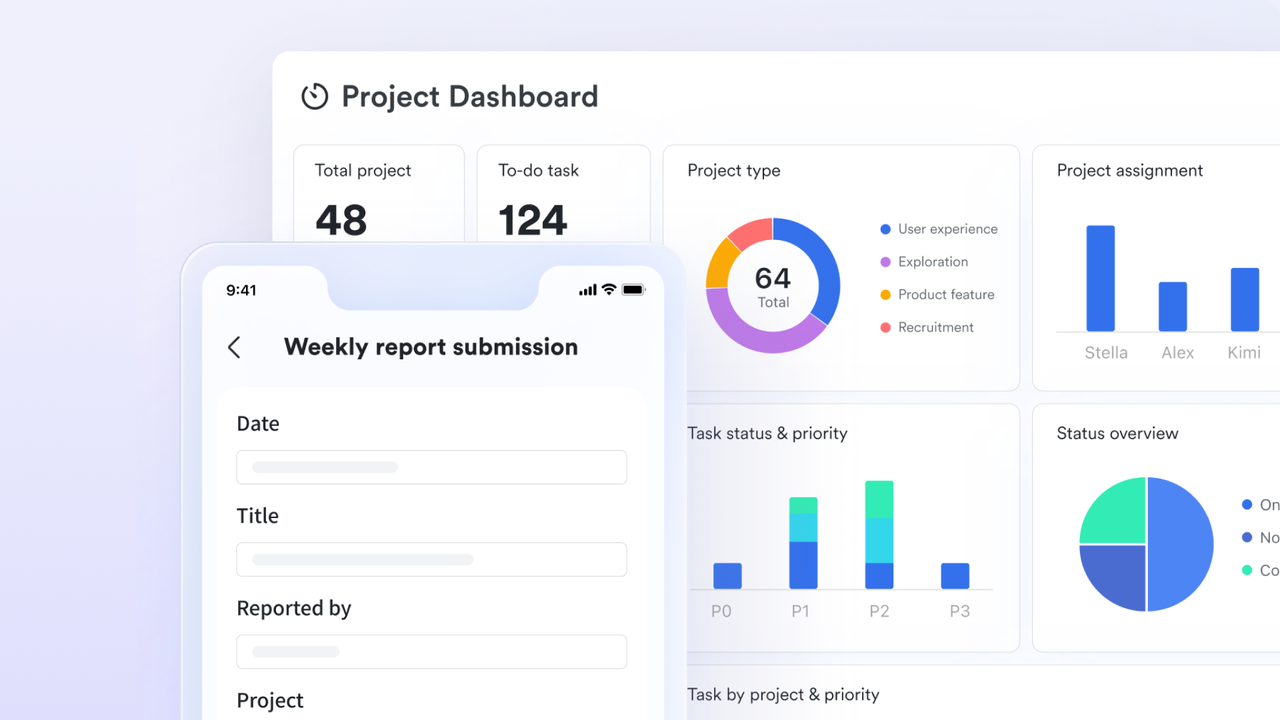
Dashboards in Lark Base allow teams to visualize project progress using charts, metrics, and time-based indicators pulled directly from task data. Teams can track completion rates, overdue work, workload distribution, or milestone status in real time as records change. Instagantt offers limited reporting focused on schedule visualization. Lark dashboards extend visibility beyond timelines, giving stakeholders a broader operational view without exporting data or relying on external reporting tools.
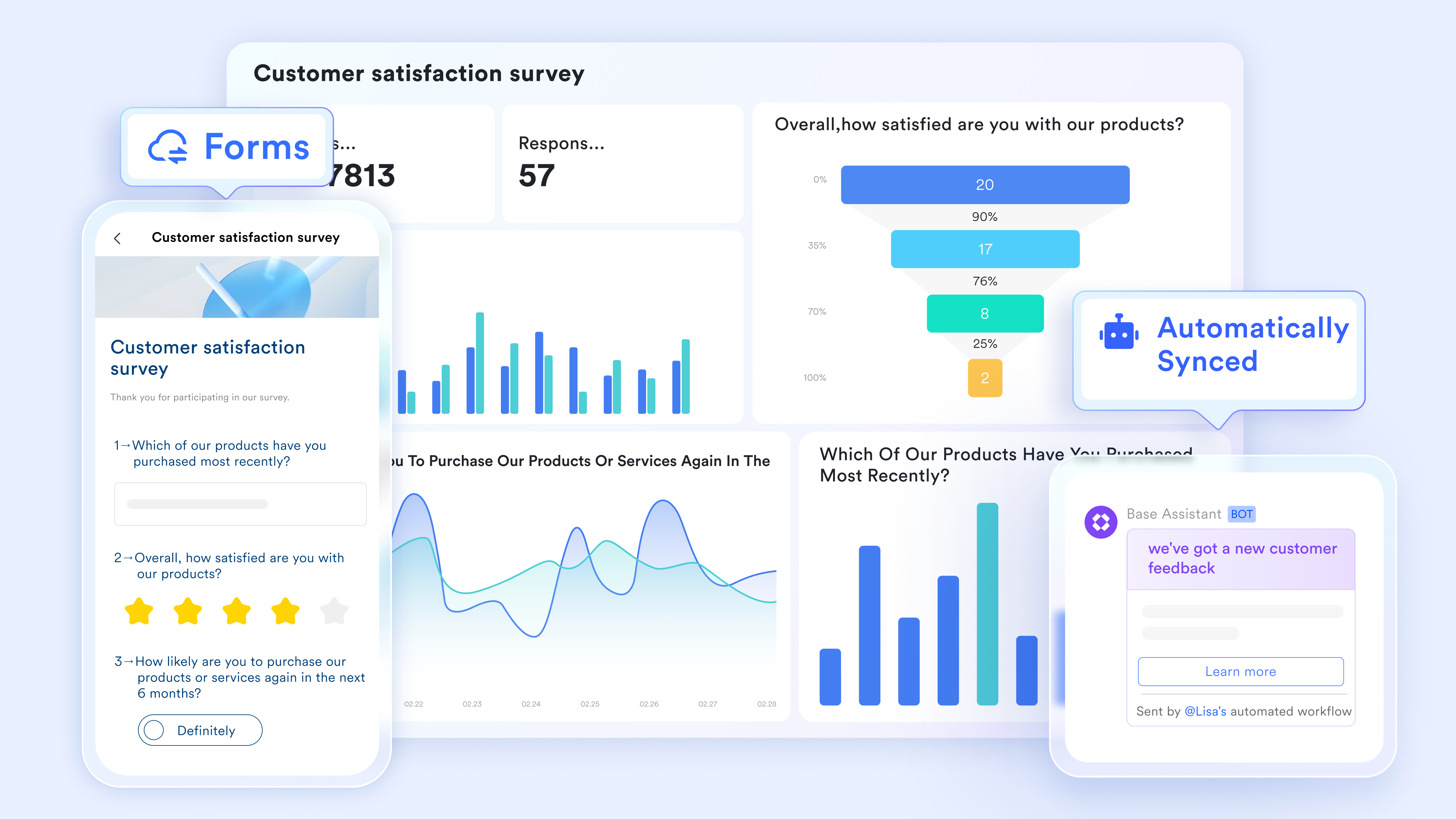
Form-based task intake that feeds directly into timelines
Lark Base forms let teams collect work requests, project inputs, or updates through structured forms. Default values can be prefilled to reduce manual effort, and submitted entries are instantly added as records in the Base automatically appearing in Gantt, calendar, and table views. Instagantt depends on tasks already created in Asana. Lark enables teams to capture work at the source, transforming form submissions into scheduled, trackable tasks without extra steps.
Project documentation that stays linked to execution
function as live workspaces where teams can embed tables, timelines, forms, and doc updates directly into planning documents. Project briefs, timelines, and decisions live alongside the data that drives execution, eliminating disconnects between planning and delivery. Also, Lark allows Base forms to be embedded directly inside Docs, enabling users to submit information without leaving the document they are reading or editing. Instagantt operates separately from documentation. Lark keeps context intact by allowing teams to plan, document, and execute within the same workspace. 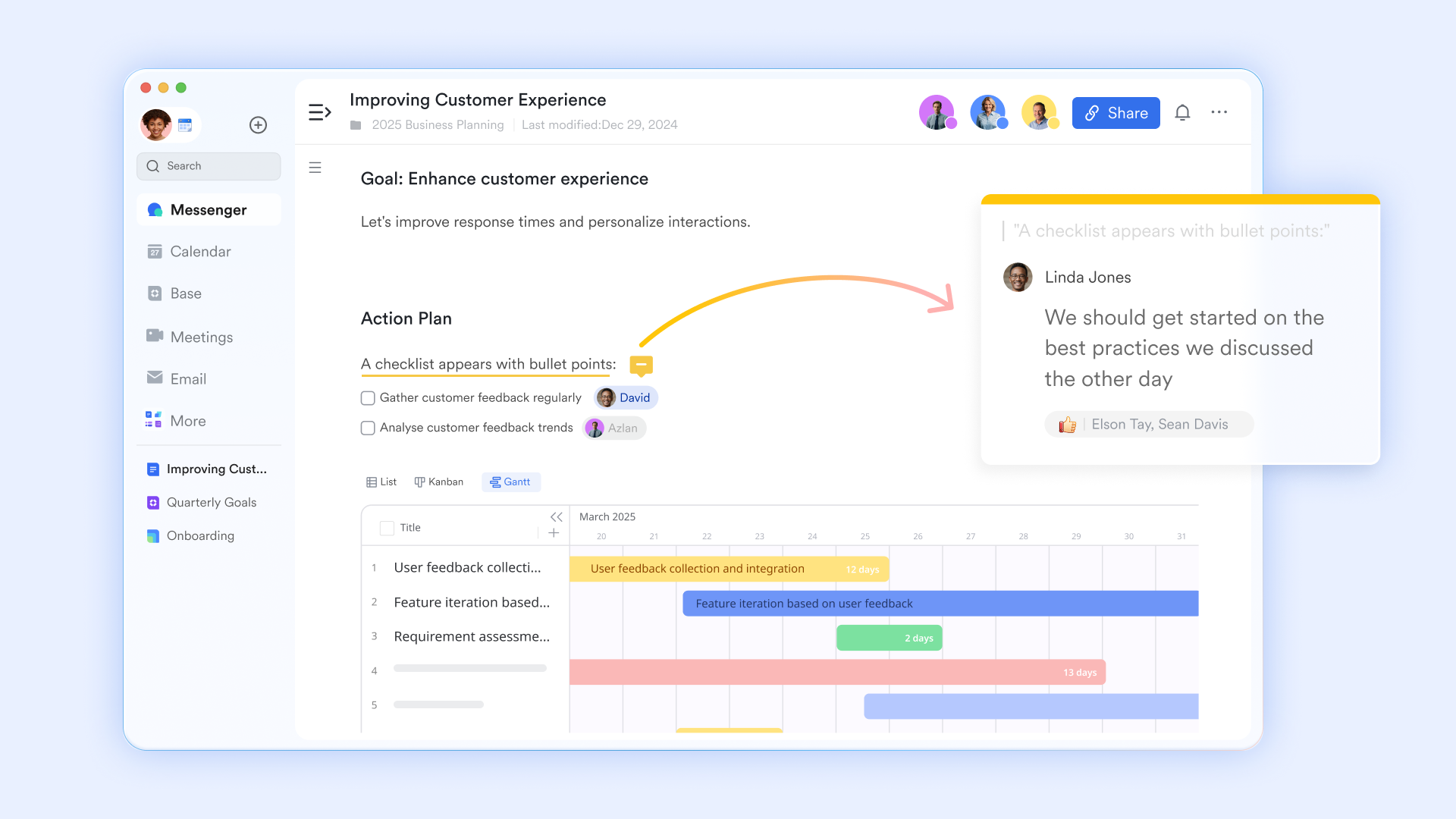
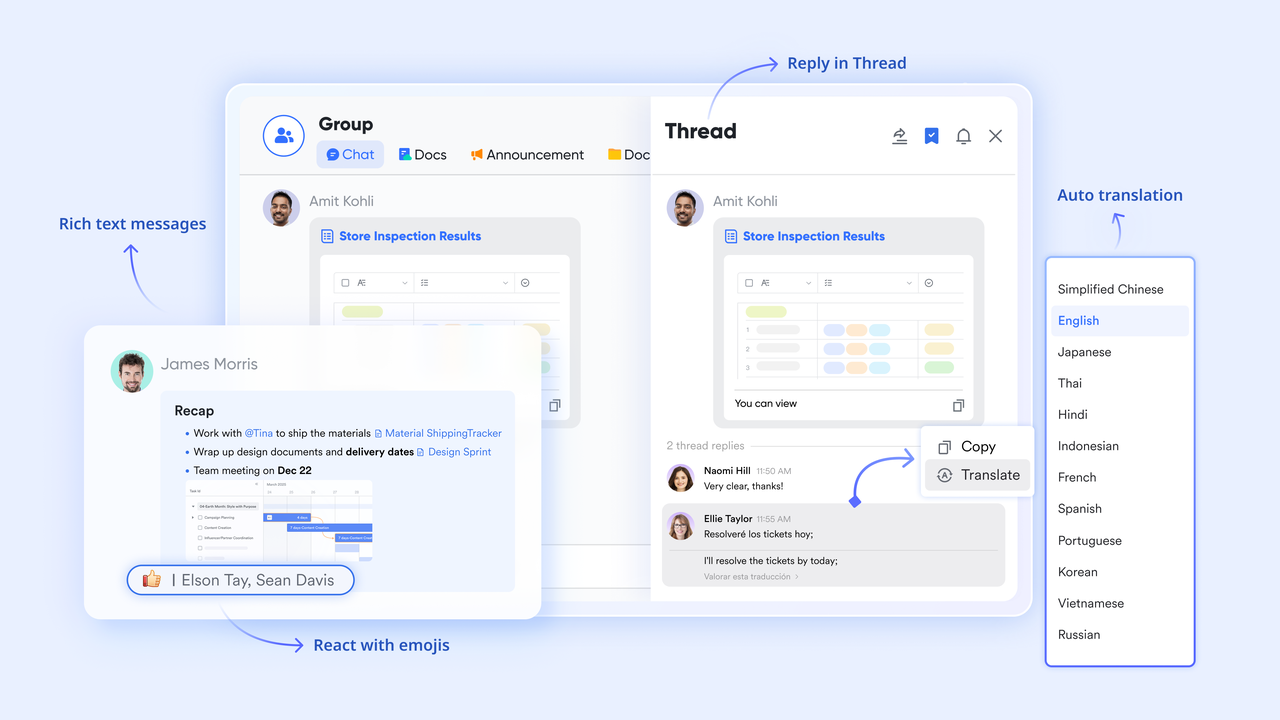
Real-time communication that turns plans into action instantly
keeps conversations tied to work. Messages can be turned into tasks, timelines discussed alongside live records, and updates shared without switching tools. Threads and mentions help keep discussions focused and searchable. Compared to Instagantt's reliance on Asana comments, Lark enables faster coordination by keeping communication, timelines, and execution tightly connected, reducing delays caused by context switching.
:
- Starter plan: Free forever plan that includes 11 powerful tools for up to 20 users. It also comes with 100GB of storage, 1000 automation runs, AI translations, and more.
- Basic plan: $6/user/month (billed annually) for up to 500 users. It includes everything in Starter plus group calling for up to 500 attendees, 5TB of storage, 1000 automation runs, and more. For more details, please .
- Pro plan: $12/user/month (billed annually) for up to 500 users. It includes everything in Basic plus group calling for up to 500 attendees, 15TB of storage, 50,000 automation runs, and more.
- Enterprise plan: for custom pricing. Supports unlimited users and includes even more automation runs and advanced security, compliance, and management features.
For small teams with simple communication needs

18 months message history
1000 Base automation runs/month
2000 rows per table in Base
Most POPULAR
For companies with comprehensive collaboration and management needs
Unlimited message history
500-participant video meetings
50k Base automation runs/month
20k rows per table in Base
For large companies with advanced security and organizational management needs
Get a personalized demo and pricing
Unlimited message history
500-participant video meetings
15 TB storage + 30 GB storage/user
500k Base automation runs/month
50k Base automation runs/month
Most POPULAR
For companies with comprehensive collaboration and management needs
Unlimited message history
500-participant video meetings
50k Base automation runs/month
20k rows per table in Base
Feature comparison: Instagantt for Asana vs. Lark
Choosing between Instagantt for Asana and a unified platform like Lark comes down to how teams plan and execute work over time. While Instagantt enhances Asana with visual timelines, it still relies on a two-tool setup that separates planning from . Lark takes a different approach by bringing timelines, tasks, communication, and documentation into one connected workspace. This comparison highlights how each option supports daily execution, scalability, and long-term workflow clarity.
Feature comparisons
Pricing comparisons
Conclusion
Instagantt delivers clear value for teams that need fast, visual Gantt charts, especially those already invested in Asana. Its strength lies in simplifying timeline creation, dependency tracking, and schedule communication without introducing a steep learning curve. For planning-focused use cases, this combination can work well in the early stages of . However, as projects become more collaborative and execution-heavy, the limitations of a split tool stack become harder to ignore. Managing timelines in Instagantt while coordinating tasks, discussions, documents, and decisions elsewhere adds friction and cost over time. This is where teams begin to rethink whether planning tools alone are enough.
offers a broader approach by bringing timelines, tasks, communication, documentation, and automation into a single workspace. Instead of layering tools together, teams operate from one connected system where planning and execution evolve together. For organizations looking beyond visualization toward scalable delivery and clearer accountability, this unified model often proves more sustainable.
Unify planning and execution with Lark today
FAQs
Is there really a free version of Instagantt, and what can I actually do with it?
Instagantt offers limited free or trial access that allows users to explore basic Gantt chart functionality. This is useful for testing the interface and creating simple timelines. However, advanced features such as dependencies, baselines, and team collaboration require a paid plan. Most teams outgrow the free experience quickly once real projects begin.
If I'm already paying for Asana Premium, is adding Instagantt worth the extra cost?
Adding Instagantt can improve timeline visibility for Asana users, especially for schedule-heavy projects. However, it also means paying for two separate tools. Over time, teams evaluate whether the added clarity offsets the cost and workflow . Some eventually look for platforms like Lark that combine planning and execution in one place.
How do I cancel my Instagantt subscription?
To cancel your Instagantt subscription, navigate to "My Profile" and select "Subscription Settings," where you can choose the option to cancel. Please be aware that canceling will cause you to lose your premium status immediately, so ensure you have exported any necessary data beforehand.
How does the Instagantt for Asana combination work? Does it sync both ways?
The combined syncs tasks, dates, and between Asana and Instagantt. Changes made in Instagantt reflect back in Asana and vice versa. While syncing is reliable, teams still switch between tools for planning and execution. This dual environment works best for structured planning but less so for complex collaboration.
What happens to my Instagantt projects if I stop my subscription or cancel Asana?
If an Instagantt subscription ends, access to advanced features is restricted, and projects may become read-only. Canceling Asana affects synced task data, limiting Instagantt's usefulness in connected mode. Many teams keep archived timelines for reference while moving active work elsewhere. Some introduce platforms like Lark gradually to avoid disruption while .
Related reading





























