Choosing the right CRM for your team is a critical decision that can impact productivity, collaboration, and revenue growth. Two of the most popular options on the market are Pipedrive and Zoho CRM, both designed to streamline sales processes and manage customer relationships effectively. But how do you know which platform will best meet your team's unique needs?
In this comparison, we will dive into Pipedrive vs Zoho CRM across core features, pricing, integrations, pros and cons, and overall usability. By the end of this guide, you'll have a clear understanding of which CRM is more suitable for your team and why modern teams are increasingly looking for tools beyond traditional CRMs.
Enhance cross-team workflow efficiency
What is Pipedrive?
Pipedrive is a sales-focused designed to help teams manage their pipelines, track deals, and close sales more efficiently. Known for its clean and intuitive user interface, Pipedrive emphasizes simplicity and fast onboarding, making it an ideal choice for small to medium-sized sales teams. Unlike more complex CRMs, Pipedrive focuses on the core needs of sales professionals, offering visual pipeline management, activity tracking, and deal probability features. When comparing Zoho CRM vs Pipedrive, one of Pipedrive's key advantages is its ease of use, allowing teams to adopt the platform quickly without extensive training. It integrates with popular email, calendar, and communication tools, supporting streamlined workflows. While Pipedrive may lack some of the advanced automation features found in Zoho CRM vs Pipedrive comparison, it remains highly effective for teams seeking a user-friendly CRM focused on pipeline visibility and sales efficiency.
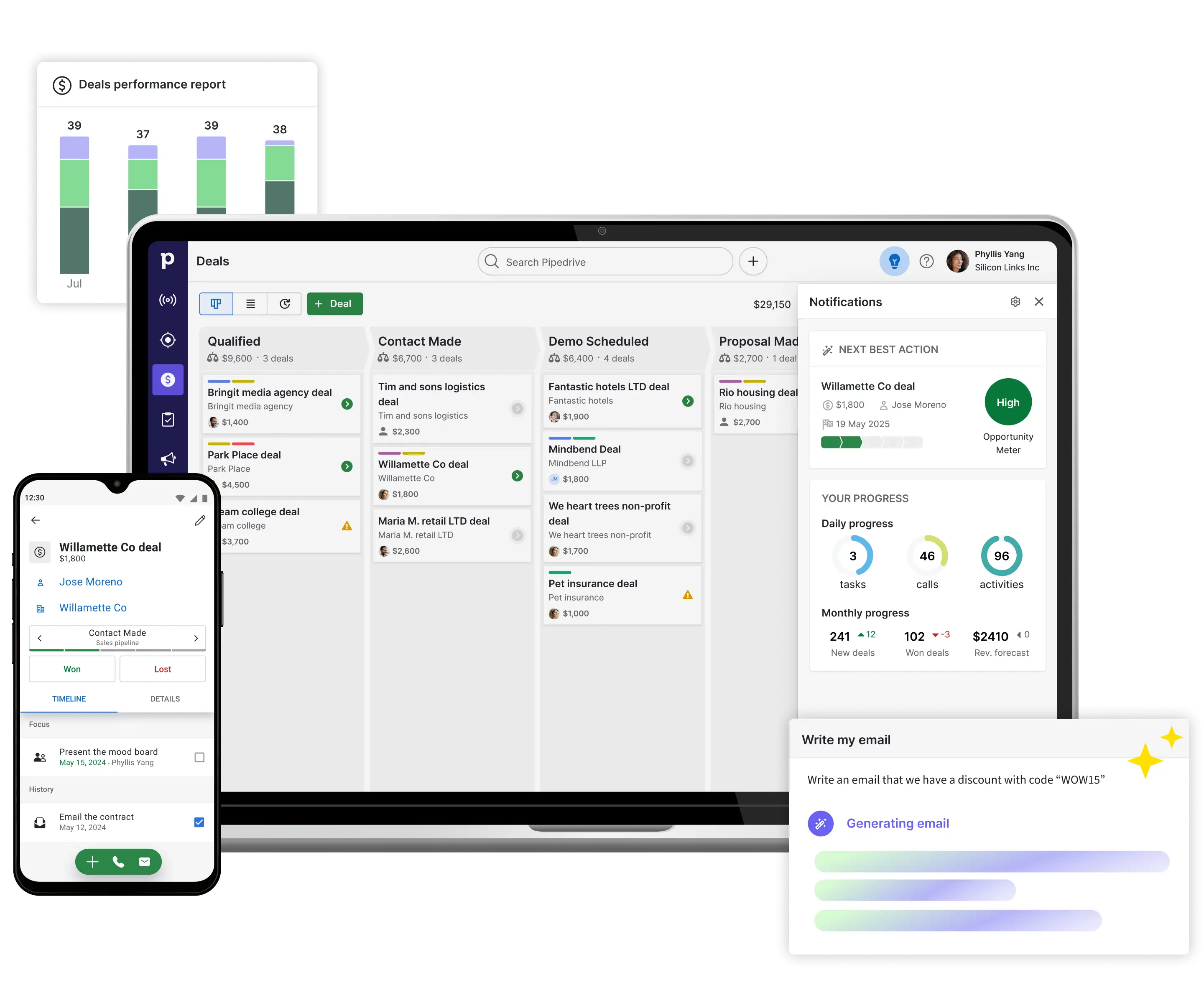
Image source: pipedrive.com
What is Zoho CRM?
Zoho CRM is a designed for businesses of all sizes, offering advanced tools for sales, marketing, and customer support. Unlike simpler CRMs, Zoho CRM provides powerful customization and automation, enabling teams to create multi-step workflows, custom modules, and detailed reporting dashboards. Its robust features make it suitable for organizations that need more than just pipeline management.
In a Zoho CRM vs Pipedrive comparison, Zoho stands out for its enterprise-level controls, integration with the broader Zoho ecosystem, and AI-powered insights. While it has a steeper learning curve and a more complex UI than Pipedrive, it excels at tracking leads, , and automating repetitive tasks across departments. For teams requiring deep customization, advanced reporting, and cross-functional workflows, Zoho CRM offers a scalable solution that grows with the business while keeping all customer data centralized and actionable.
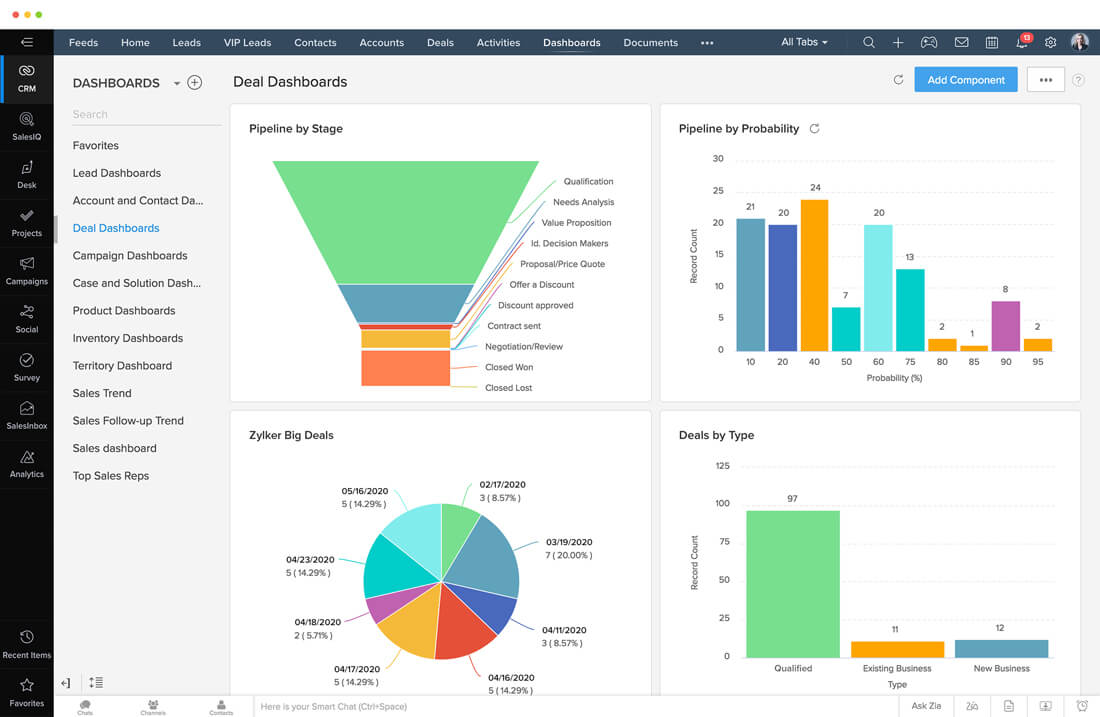
Image source: zoho.com
Pipedrive vs Zoho CRM: Core feature comparison
Choosing the right CRM can make or break your and sales efficiency. Pipedrive and Zoho CRM are two of the most popular options, each offering unique features and workflows. While Pipedrive focuses on simplicity and fast sales adoption, Zoho CRM provides deep customization and . In this comparison, we'll explore Pipedrive vs Zoho CRM to help you decide which platform fits your team best.
Summary
- Choose Pipedrive if: You have a smaller, high-velocity sales team that needs a tool they can learn in an hour. It is built to get out of the way and let reps focus on selling.
- Choose Zoho CRM if: You need a highly customizable "business OS." It is ideal if you want to integrate your sales with marketing, inventory, and support—and you have the time to set up its powerful AI and automation features.
Pipedrive vs Zoho CRM pricing comparison
Understanding pricing is essential when comparing Pipedrive vs Zoho CRM, as costs can vary significantly by feature and team size. Both platforms offer tiered plans designed to support growing businesses, from basic to advanced automation. In this pricing comparison, we break down key plan differences and the value they offer to help you choose the right CRM. Whether you prioritize affordability or rich functionality, this guide will clarify which option aligns with your budget and business goals.
Zoho CRM pricing plans and what they offer
Exploring Zoho CRM pricing plans and what they offer helps you understand how costs relate to features and team needs. Zoho CRM's tiered plans range from bare CRM essentials to advanced automation and analytics for larger teams. Each plan includes tools designed to enhance contact management, , and reporting. This overview will guide you in choosing the Zoho CRM plan that best fits your business goals and budget.
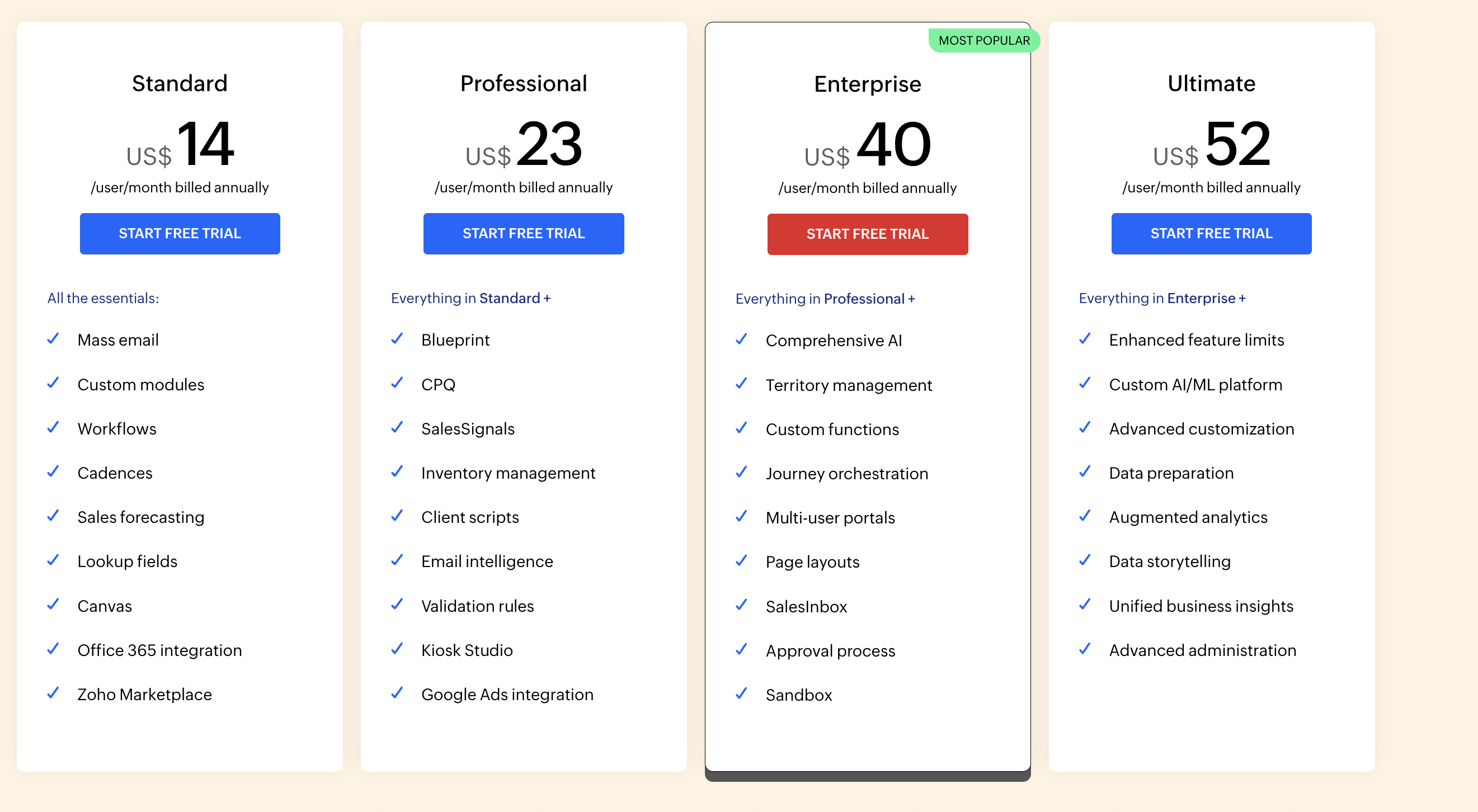
Image source: zoho.com
Information source: zoho.com
Update time: 2025-12-17
Note: Pricing and plan details reflect publicly available data as of the update date and may vary based on region, billing cycle, and number of agents.
Pipedrive pricing plans and what they offer
Understanding Pipedrive pricing plans and what they offer is essential when evaluating the right CRM for your team. Pipedrive provides tiered subscription options that cater to different stages of business growth, from basic sales tracking to advanced analytics. Each plan unlocks additional features designed to improve pipeline visibility, automation, and . This overview will help you compare which Pipedrive plan aligns best with your team's needs and budget.
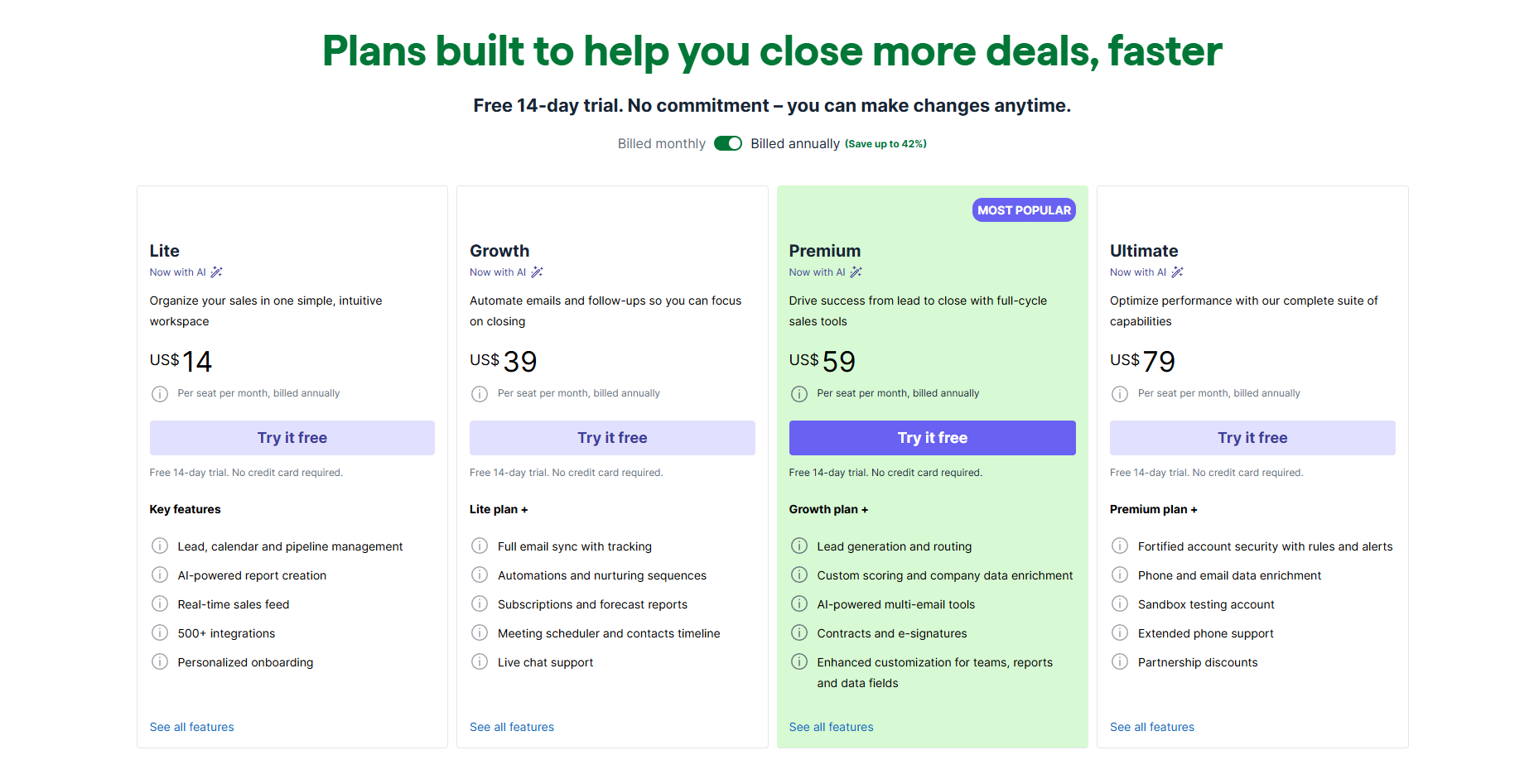
Image source: pipedrive.com
Summary
- Best for budget and scale: Zoho CRM is the more cost-effective option if you want to keep your annual costs low while gaining access to advanced automation and AI. It offers more value at every tier above the entry level.
- Best for sales focus: Pipedrive charges a premium for its ease of use and visual pipeline. It is better suited for teams that prioritize a clean, simple interface over complex feature sets and are willing to pay a higher annual seat price.
Notes: Pipedrive's annual plans offer significant savings compared to their monthly rates, while Zoho typically provides a similar discount structure that rewards yearly billing.
Try an affordable alternative to save on budgets
Pipedrive vs Zoho CRM integrations and ecosystem
Integrations play a critical role when comparing Zoho CRM vs Pipedrive, as they affect workflow efficiency, customization, and . Understanding how each CRM connects with other tools can help teams minimize friction and maximize productivity.
- Native integrations vs third-party reliance: Pipedrive relies on a mix of native integrations and third-party apps to connect with email, marketing, and sales tools. Zoho CRM offers deep native integrations, especially within the Zoho ecosystem, reducing the need for external apps. Teams must weigh whether simplicity or a broader app network is more valuable for their workflows.
- Zoho ecosystem lock-in considerations: Zoho CRM's strength lies in its seamless connection to Zoho tools like Campaigns, Desk, and Projects. However, this can create dependency on the Zoho ecosystem, making migration to other platforms more complex. Teams should evaluate whether long-term ecosystem lock-in aligns with their business strategy.
- API flexibility and customization trade-offs: Zoho CRM provides extensive API support for custom integrations and advanced automation, but implementing them often requires technical expertise. Pipedrive's API is simpler and easier to use, but lacks the depth for complex . Choosing between them depends on your team's development resources.
- Why fragmented integrations increase operational friction: Using multiple disconnected tools can lead to manual work, duplicate data, and delayed communication. Pipedrive may require third-party apps for full functionality, while Zoho CRM minimizes this but can be complex to configure. Streamlined integrations reduce operational friction and improve overall efficiency.
Pipedrive vs Zoho CRM: Pros and cons summary
When evaluating Zoho CRM vs Pipedrive, it's important to weigh each platform's strengths and weaknesses to see which aligns with your team's workflow.
Pipedrive pros
- Clean, intuitive interface: Pipedrive is designed for simplicity, making it easy for sales teams to navigate without extensive training.
- Fast onboarding and sales adoption: Teams can start managing deals and pipelines quickly, reducing ramp-up time.
- Strong pipeline visibility: and activity tracking help teams monitor deal progress at a glance.
Pipedrive cons
- Limited native automation depth: Advanced workflows often require add-ons or third-party tools.
- Add-ons required for advanced features: Features such as complex reporting or multi-step automation may require additional integration.
- Not ideal for cross-functional workflows: Pipedrive primarily focuses on sales, limiting its usefulness for broader team collaboration.
Zoho CRM pros
- Powerful customization and automation: Zoho CRM supports multi-step workflows, custom modules, and advanced automation.
- Strong reporting and enterprise controls: Teams can access and analytics for informed decision-making.
- Deep Zoho ecosystem integrations: Native connections to Zoho apps like Campaigns, Desk, and Projects streamline workflows.
Zoho CRM cons
- Steep learning curve: The platform can be overwhelming for new users due to its extensive features.
- Complex UI for sales teams: Navigating multiple modules and dashboards may slow adoption.
- Configuration-heavy for admins: Setting up workflows, automation, and integrations often requires technical expertise.
Bring streamlined workflows to your routines today
What both Pipedrive and Zoho CRM lack for modern teams
While the Pipedrive vs Zoho CRM comparison highlights their strengths in sales and contact management, modern teams require more than just pipeline tracking. Both platforms fall short in unified collaboration and simplified automation across departments.
- Unified docs, chat, meetings, and CRM workflows: Neither Pipedrive nor Zoho CRM provides a single platform that combines with real-time document editing, chat, and video meetings. Teams often need multiple tools to manage customer data, communication, and project tasks. Unified workflows reduce context switching and improve productivity.
- Cross-team collaboration beyond sales: Both CRMs are sales-centric and lack native features to enable seamless cooperation between marketing, HR, and operations teams. Modern businesses need cross-department visibility and shared workflows to align goals and streamline execution.
- Simpler automation without heavy admin overhead: Setting up advanced automation in Zoho CRM can be complex, and Pipedrive requires add-ons for multi-step workflows. Teams benefit from automation that is easy to configure and maintain without needing technical expertise, allowing employees to focus on value-added work.
While Pipedrive and Zoho CRM excel in sales and contact management, many modern teams need a platform that goes beyond traditional CRM capabilities. This is where Lark comes in as an all-in-one solution that unifies CRM workflows, , team communication, and collaboration tools in a single platform. Keep scrolling and find the new trendsetter.
Start smarter project management and sales tracking
Trend over industries: Understand why modern teams choose Lark
As mentioned, traditional CRMs like Pipedrive and Zoho CRM focus primarily on sales and , leaving gaps in and workflow efficiency. meets this need by unifying chat, docs, meetings, and automation into a single workspace. This all-in-one approach helps teams stay aligned, streamline processes, and boost productivity across departments.
Centralized workspace for streamlined CRM
lets teams build and CRM‑like pipelines tailored to their business processes, without relying on separate CRM tools. It acts as a versatile data engine that brings stakeholders, records, and resources together into a single source of truth. By utilizing customizable fields and multi-dimensional views—such as for lead stages and Gantt views for —teams can visualize their entire sales pipeline from one integrated platform. This centralized approach ensures that all client data is organized and accessible, replacing the need for multiple disconnected tools.
The workspace further streamlines operations through granular advanced permissions and no-code automation, ensuring data security while removing repetitive manual tasks. Managers can restrict access so sales reps only see their own accounts, while automated triggers send real-time notifications to Lark Messenger whenever a deal progresses. This seamless transition from data management to team communication allows for a high-velocity . 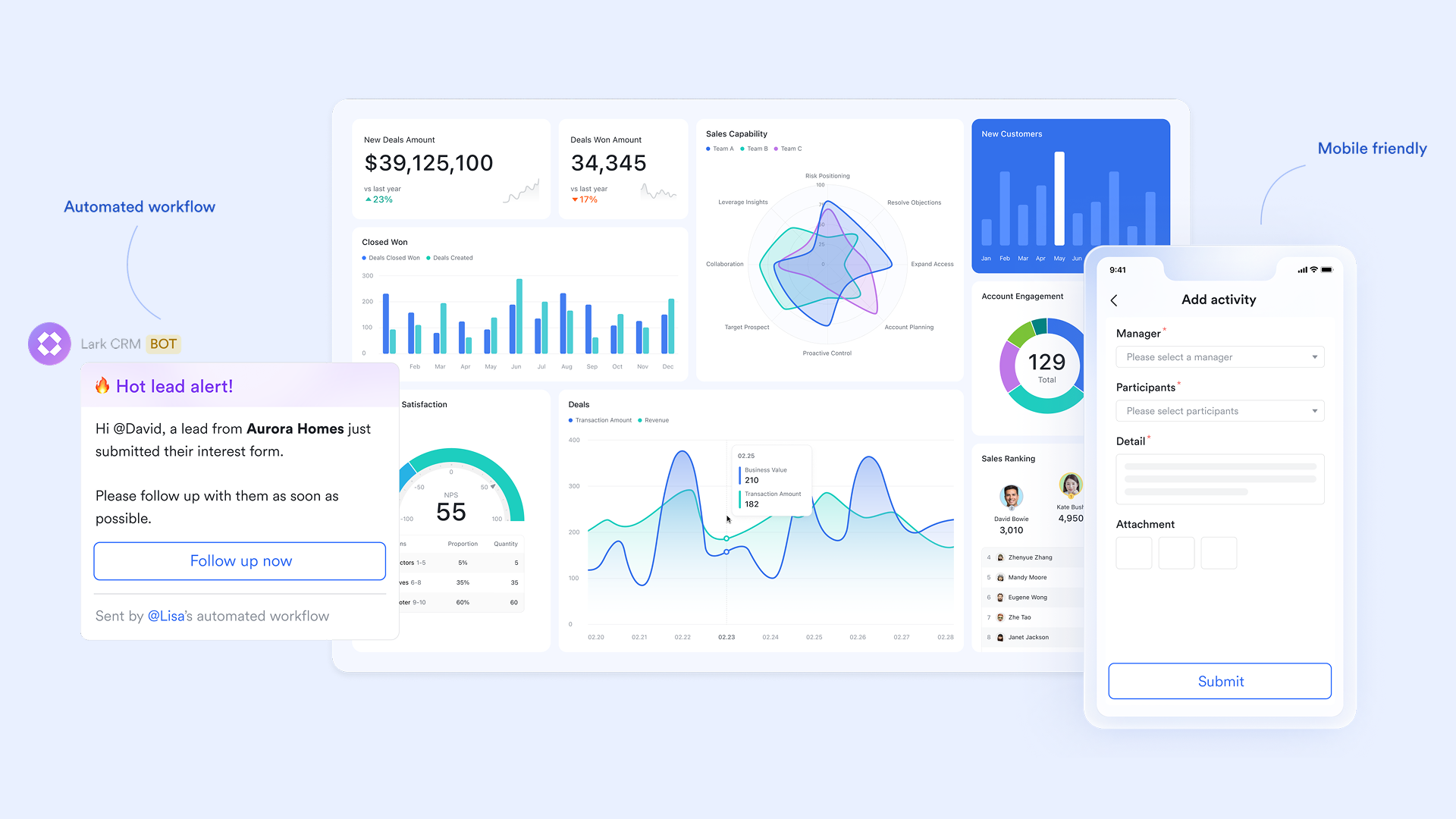
Unified communication and collaboration
Lark brings , , , and calendars into one platform, eliminating the need to switch between separate apps for communication and CRM workflows. Teams can discuss customer updates in Messenger, co-edit proposals in Docs, and launch a video call from a chat thread, all without context switching. This integrated design boosts productivity and keeps everyone aligned across sales, support, and operations. 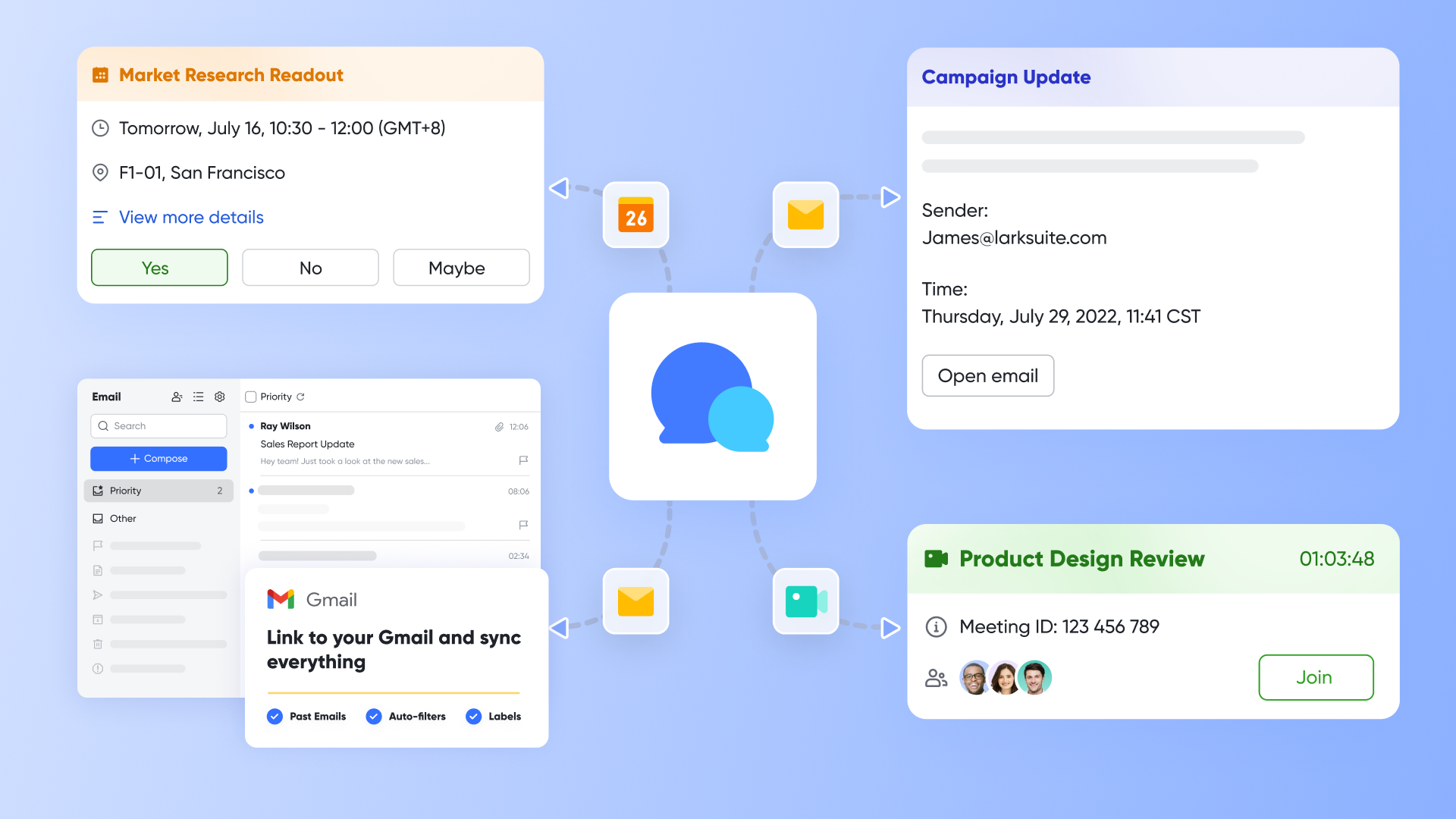
Real-time document and workflow collaboration
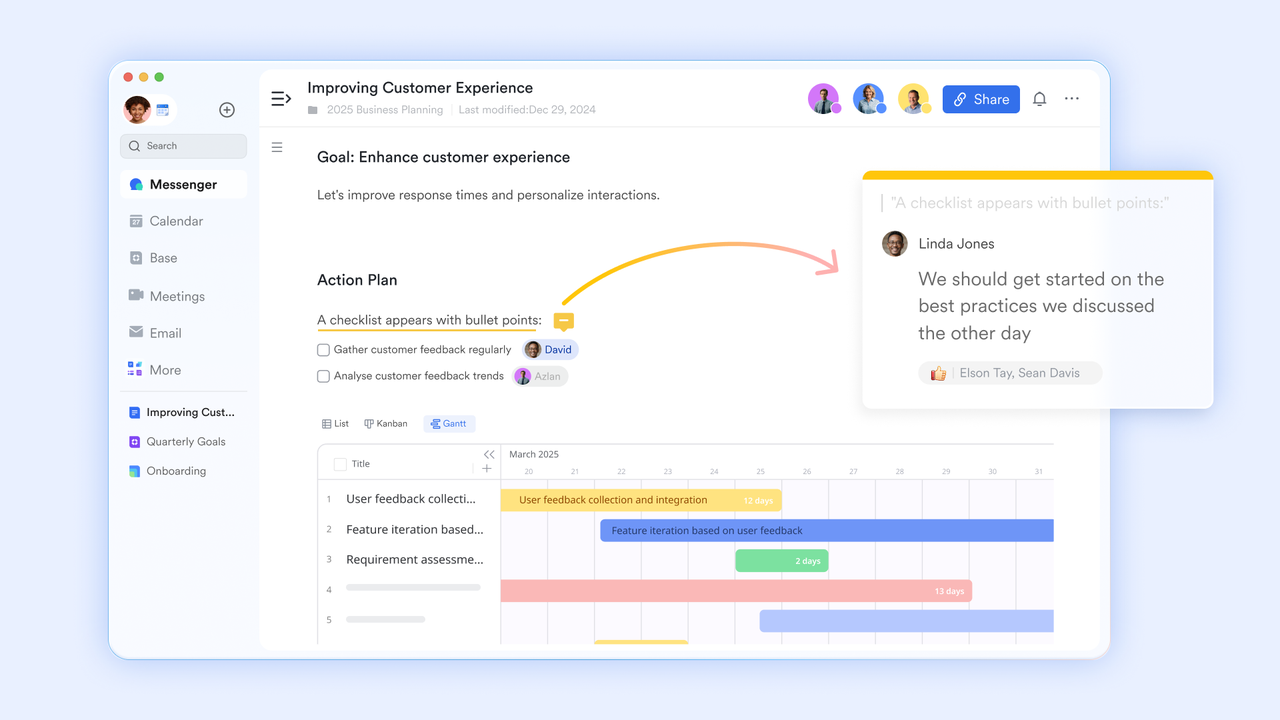
Unlike traditional CRM tools that focus mainly on sales data, Lark enables teams to , spreadsheets, and databases in real time. Multiple collaborators can work simultaneously while linking content directly to chats, calendars, or tasks, ensuring all , proposals, and reports stay up to date. Real-time workflows reduce miscommunication and speed decision-making across projects.
Built-in automation for approval processes
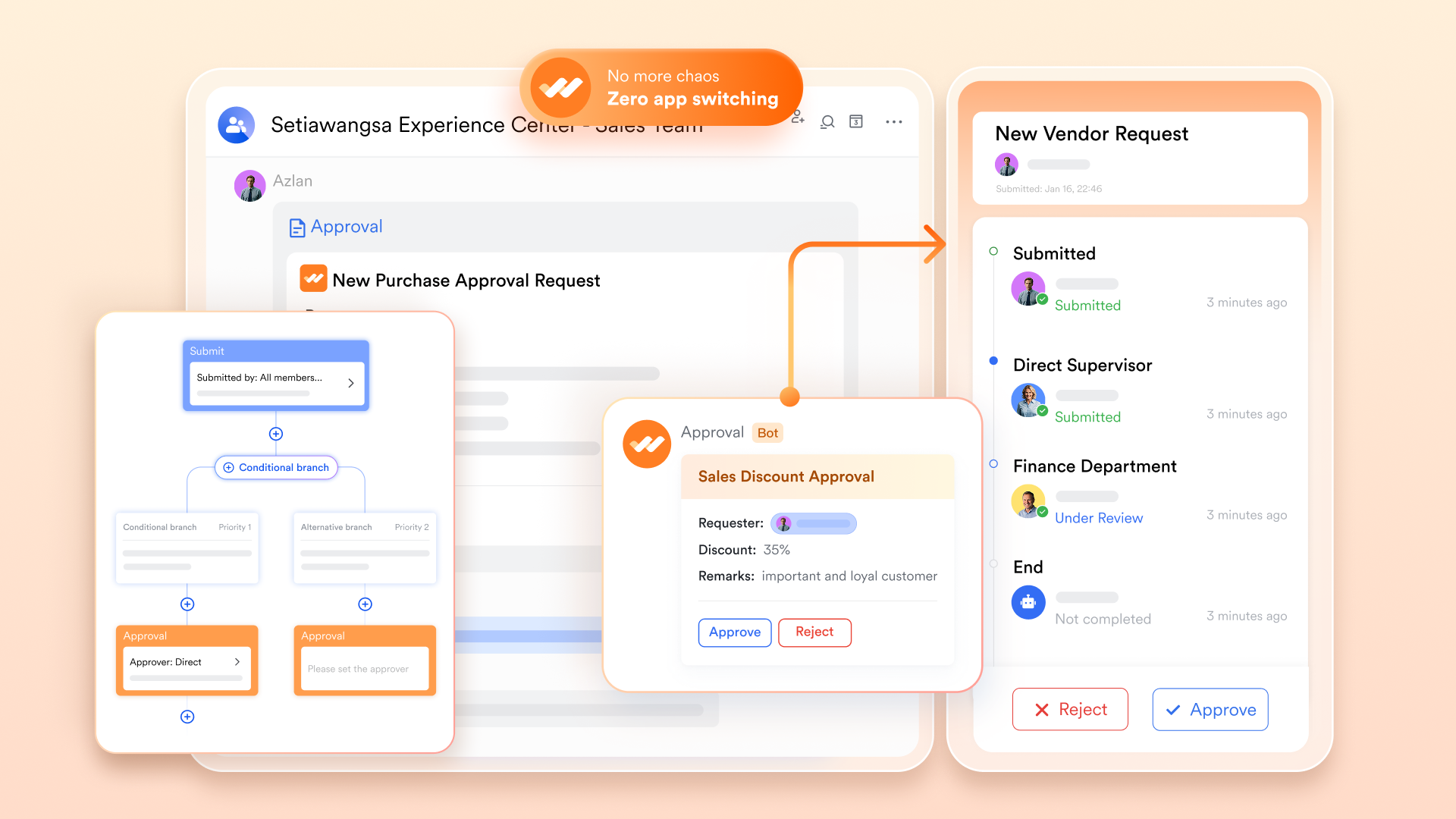
Modern teams don't want the heavy admin overhead of managing requests and approval. offers low-code automation for . It simplifies the process by replacing offline paperwork with customizable digital forms and visual process designers, allowing admins to set conditional branches and parallel paths without writing code. Through the Approval Bot, teams can process requests directly within chat, ensuring that workflows remain fast, transparent, and mobile-ready.
Smart meetings and AI‑driven insights
With online video conferencing, , live translation, and , turns calls into actionable records that can be saved to docs or linked to projects. This ensures that customer calls and internal syncs with sales, marketing, and support teams become productive and documented, removing the friction that standalone CRM systems often struggle to capture.

:
- Starter plan: Free forever plan that includes 11 powerful tools for up to 20 users. It also comes with 100GB of storage, 1000 automation runs, AI translations, and more.
- Basic plan: $6/user/month (billed annually) for up to 500 users. It includes everything in Starter plus group calling for up to 500 attendees, 5TB of storage, 1000 automation runs, and more. For more details, please .
- Pro plan: $12/user/month (billed annually) for up to 500 users. It includes everything in Basic plus group calling for up to 500 attendees, 15TB of storage, 50,000 automation runs, and more.
- Enterprise plan: for custom pricing. Supports unlimited users and includes even more automation runs and advanced security, compliance, and management features.
For small teams with simple communication needs

18 months message history
1000 Base automation runs/month
2000 rows per table in Base
Most POPULAR
For companies with comprehensive collaboration and management needs
Unlimited message history
500-participant video meetings
50k Base automation runs/month
20k rows per table in Base
For large companies with advanced security and organizational management needs
Get a personalized demo and pricing
Unlimited message history
500-participant video meetings
15 TB storage + 30 GB storage/user
500k Base automation runs/month
50k Base automation runs/month
Most POPULAR
For companies with comprehensive collaboration and management needs
Unlimited message history
500-participant video meetings
50k Base automation runs/month
20k rows per table in Base
Pipedrive vs Zoho vs Lark: How to choose the correct option
Choosing the right CRM or collaboration platform depends on your team size, workflow complexity, and feature needs. Comparing Pipedrive, Zoho CRM, and Lark helps businesses evaluate simplicity, automation, reporting, and cross-team collaboration to select the best fit.
Choosing the right platform based on your team's needs
When deciding between Pipedrive, Zoho CRM, and Lark, the best choice depends on your team's size, workflow complexity, and collaboration needs. Pipedrive works well for , while Zoho CRM excels in advanced automation and reporting. However, modern teams seeking a unified workspace that combines CRM, project management, communication, and automation often choose Lark for seamless cross-team collaboration and streamlined workflows. Conclusion
Choosing the right CRM depends on your team's size, workflow complexity, and automation needs. Pipedrive excels in simplicity, fast adoption, and visual pipeline management, making it ideal for sales-focused teams. Zoho CRM offers advanced customization, robust reporting, and deep ecosystem integrations, making it well-suited for businesses needing enterprise-level control.
However, both platforms have limitations in cross-team collaboration and unified workflows. Modern teams increasingly seek tools that combine CRM, project management, and communication in one place. addresses these gaps, offering an all-in-one solution that streamlines collaboration, automates workflows, and keeps teams aligned for maximum productivity.
Enhance cross-team workflow efficiency
FAQs
Can Pipedrive handle multi-department workflows beyond sales?
Pipedrive is primarily a sales-focused CRM, so its support for is limited. In a Zoho CRM vs Pipedrive comparison, Zoho CRM outperforms Pipedrive for cross-department automation. While Pipedrive excels in pipeline visibility and sales adoption, businesses seeking complex, multi-team workflows may need to integrate additional tools or consider more comprehensive platforms like Zoho or Lark.
How difficult is it to migrate from Zoho CRM or Pipedrive later?
Migration can be challenging depending on data complexity, custom fields, and workflows. A Pipedrive vs Zoho CRM comparison shows that Zoho CRM often requires more careful mapping due to extensive customization. While basic data export/import is possible, teams must plan for automation, integrations, and user training to ensure a smooth transition.
Is Zoho better than Pipedrive?
Whether Zoho is better depends on the team's needs. A Zoho CRM vs Pipedrive user interface comparison highlights Pipedrive's simplicity and ease of use, while Zoho CRM provides advanced customization and reporting. Teams needing deep automation and multi-department support benefit from Zoho, whereas small sales-focused teams may prefer Pipedrive's intuitive interface and quick adoption.
Which CRM platform is best?
The best CRM depends on workflow and scale. A Zoho CRM vs Pipedrive vs HubSpot CRM comparison shows that Pipedrive is excellent for small sales teams, Zoho CRM for complex workflows, and HubSpot for marketing-sales alignment. Considering Pipedrive vs Zoho CRM for ease of use, teams must weigh simplicity, automation, and integration needs to select the right platform.
Can you use Pipedrive as a CRM?
Yes, Pipedrive functions as a full-featured CRM focused on pipeline and . In a Pipedrive vs. Zoho CRM or Zoho CRM vs. Pipedrive comparison, it's clear that Pipedrive handles core CRM functions effectively but may require add-ons for cross-department workflows. It's ideal for teams prioritizing sales adoption and pipeline visibility.
Related reading


















