Pipedrive has long been considered one of the most intuitive sales CRMs—valued for its visual pipelines, activity-focused workflows, and overall ease of use. But as this Pipedrive review shows, the CRM landscape in 2025 has evolved. Modern sales teams now expect more than pipeline tracking: integrated communication, automated approvals, deeper analytics, and flexible no-code customization without relying on multiple external tools. In this Pipedrive review, we break down features, pricing, pros and cons, onboarding, Reddit sentiment, and top alternatives.
Start now and streamline every step of your workflow
What Pipedrive is and who typically uses it
Pipedrive is a dedicated sales CRM designed to help teams manage leads, deals, and activities through clear, . It focuses on simplicity and efficiency, making it easy for sales reps to track conversations, schedule follow-ups, and prioritize deals without navigating complicated menus. In most pipedrive crm software reviews, the platform is recognized for its intuitive interface, quick setup, and practical tools for small and mid-sized teams.
Pipedrive is typically used by B2B sales teams, agencies, consultants, real estate firms, and service businesses that want a lightweight CRM without the complexity of enterprise systems. Most pipedrive crm review feedback highlights that it works best for companies with straightforward sales cycles, limited collaboration needs, and activity-driven processes. Teams that rely heavily on structured pipelines, , and deal forecasting often find Pipedrive a comfortable fit, especially when they need a clean CRM that emphasizes usability and speed.
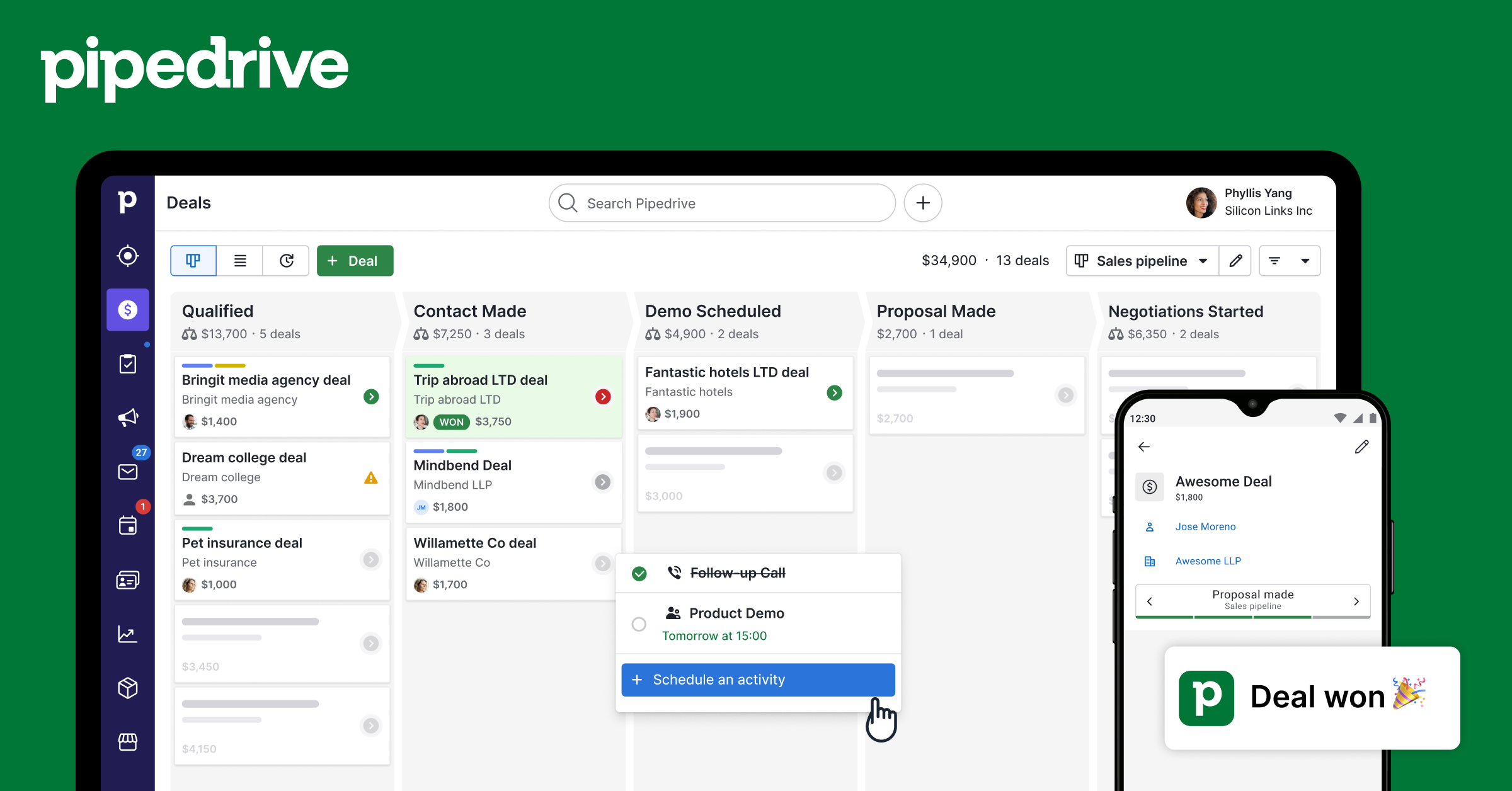
Image source: pipedrive.com
Pipedrive CRM software review
Pipedrive offers a streamlined CRM experience designed to help sales teams manage deals with clarity and speed. Many users exploring Pipedrive review Reddit threads say the platform stands out for its simplicity and focuses on pipeline execution.
- Visual sales pipelines: Pipedrive's drag-and-drop interface lets teams quickly move deals through each stage. Discussions on Pipedrive vs Salesforce often highlight how Pipedrive feels lighter and more intuitive for day-to-day sales work.
- Activity tracking: Reps can , emails, and meetings directly within each deal. Feedback on Pipedrive Reddit frequently praises the activity view for keeping follow-ups from slipping through the cracks.
- Sales automation: reduce manual data entry and trigger actions such as stage changes and reminders. Many teams comparing Pipedrive alternatives appreciate its simplicity, even if advanced automation requires higher plans.
- Reporting and insights: Pipedrive provides showing deal progress, win rates, and revenue forecasts. These reports help managers understand team performance trends in real time.
- Lead management: The Lead Inbox centralizes new inquiries, allowing teams to qualify prospects before adding them to the pipeline. This improves focus by separating early-stage leads from active deals.
- Mobile CRM: Pipedrive's mobile app enables reps to update deals, log activities, and access contacts on the go. It's beneficial for field sales teams that need quick, reliable access to their CRM data.
Pipedrive login and onboarding experience
Pipedrive's login and onboarding experience is built for speed, helping new users get into their workspace with minimal steps. Many teams evaluating often compare its simplicity to larger systems like Pipedrive vs Zoho.
- Web-based login flow and mobile support: The Pipedrive login process is quick, offering email, SSO, and mobile access so users can enter their CRM from any device. Its mobile app mirrors the desktop experience, keeping deal updates seamless while on the move.
- Initial setup process for pipelines and lead stages: Setting up pipelines involves choosing predefined stages or . This guided process helps teams start tracking deals quickly without needing technical expertise.
- Importing contacts and emails: Users can import spreadsheets, sync email accounts, and within a few clicks. Automated matching ensures data fields align correctly, reducing cleanup time.
- Learning curve for first-time CRM users: Pipedrive's interface is straightforward, making it approachable for beginners. Tooltips, guided tours, and templates help new sales reps adapt without overwhelming training.
Pipedrive plans: Is Pipedrive free or not
Pipedrive does not offer a permanently free plan—its pricing begins with paid subscription tiers. For new users and small teams evaluating CRM options, this is often an important consideration. Below is how Pipedrive handles cost and trial access.
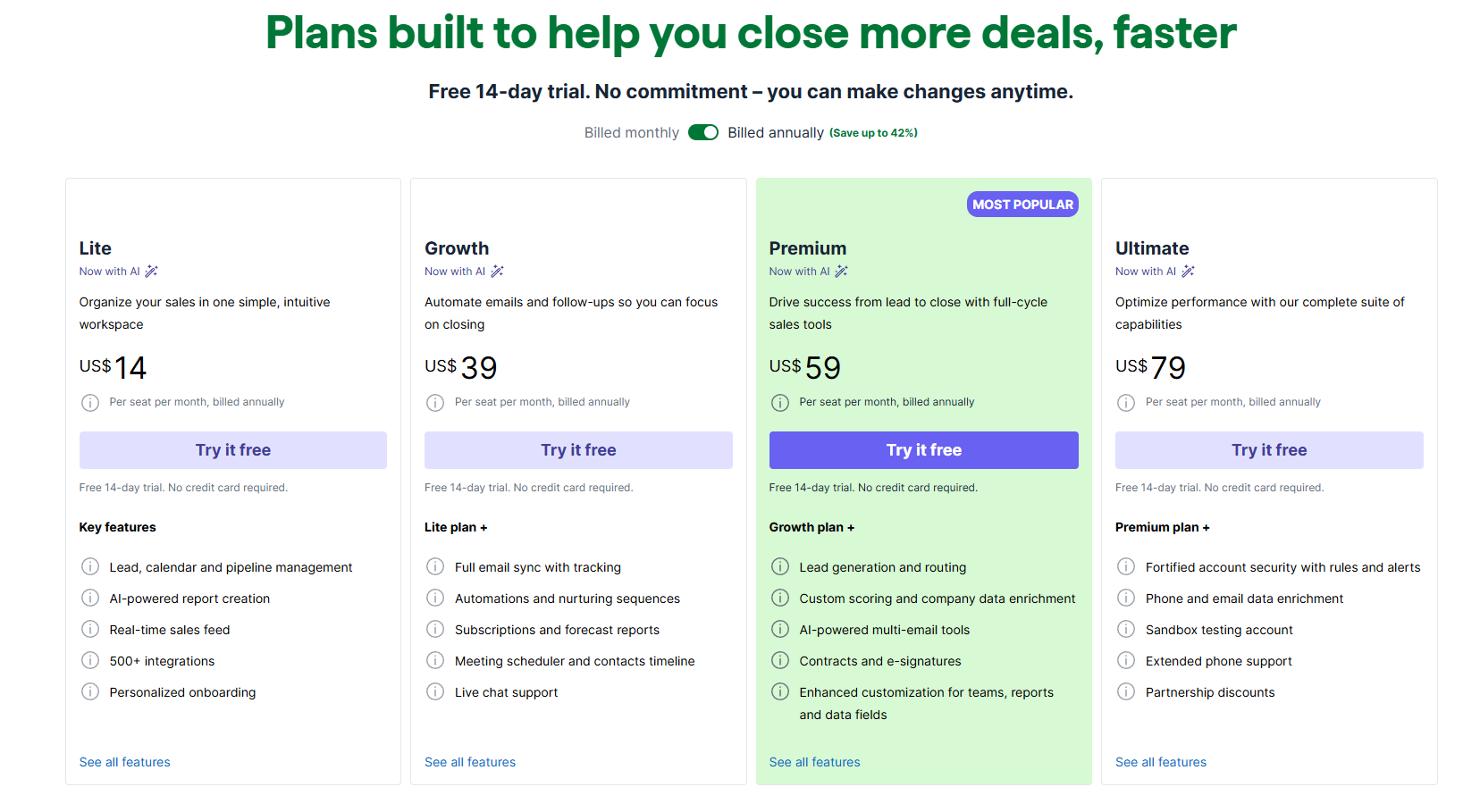
Image source: pipedrive.com
Lite: $14/user/month (billed annually)
The Lite plan offers essential CRM capabilities for teams that want simple deals, calendar, and pipeline management. It includes AI-powered report creation and a real-time sales feed for quick visibility. Ideal for small teams starting with structured sales workflows without advanced automation. Growth: $39/user/month (billed annually)
The Growth plan adds full email sync, tracking, and automated follow-up sequences to . Teams also get subscription management and more detailed forecasting tools. It's a strong option for growing sales teams that need automation but not enterprise-level complexity.
Premium: $59/user/month (billed annually)
Premium unlocks deeper capabilities, including lead generation tools, routing, and enriched company data. AI-powered multi-email tools help reps manage outreach more efficiently. Best for scaling teams that need advanced productivity features and full-cycle sales operations support.
Ultimate: $79/user/month (billed annually)
Ultimate includes the complete suite of advanced capabilities, such as fortified account security and rule-based permissions. Teams also gain access to phone and email enrichment, as well as sandbox testing for safer . It suits larger or regulated teams requiring maximum control, scalability, and governance.
Pipedrive pros and cons
Pipedrive offers a strong, sales-focused CRM experience built around clarity, speed, and usability. Below are the main pros and cons to help teams understand where it excels and where limitations may appear.
Pros
- Very intuitive pipeline interface: Pipedrive's drag-and-drop layout makes deal management effortless for new and experienced reps. Teams can quickly and identify stalled opportunities without navigating complex menus.
- Simple automation for deal movement: Basic workflows allow users to auto-assign tasks, move deals, or trigger reminders with minimal setup. It's a time-saver for teams that want lightweight automation without deep configuration.
- Built-in meeting scheduling: Scheduling links help reps book calls directly with prospects, reducing back-and-forth communication. Appointments sync with calendars, keeping everyone aligned on availability.
- Easy CRM setup compared to enterprise tools: New users can , import data, and start tracking deals in under an hour. Onboarding is straightforward, making Pipedrive accessible to small teams without admin support.
Cons
- No free version: Pipedrive requires a paid subscription, even for basic use, and its plans can be limited for startups. A 14-day trial is available, but there is no forever-free trial.
- Reporting restricted to higher plans: Advanced insights and forecasting features are locked behind Premium and Ultimate. Smaller teams may feel compelled to upgrade sooner than expected.
- Collaboration features are basic: Pipedrive lacks integrated chat, , or shared workspaces. Teams often rely on external apps to coordinate activities around deals.
- Scaling beyond sales pipelines requires add-ons or external tools: More complex workflows—approvals, service delivery, —need third-party integrations. This can increase cost and create fragmented processes as businesses grow.
Pipedrive review in Reddit: Community sentiment
Pipedrive gets mixed but generally positive feedback on Reddit, with users appreciating its simplicity while acknowledging certain limitations. Overall, the community views it as a strong starter CRM best suited for small to .
- Easy and intuitive for sales teams: Users frequently praise Pipedrive's clean interface and quick learning curve, especially for teams switching from spreadsheets.
- Good value for money: Many Redditors say Pipedrive offers solid functionality at a fair price, making it appealing compared to heavier .
- Strong for basic deal tracking: Community sentiment highlights that Pipedrive excels at pipelines and activity management, but isn't ideal for complex outreach.
- Automation can feel limited: Users note that often require add-ons or integrations, which can increase overall effort and cost.
- Scalability is a concern: Some feel Pipedrive is great early on but may become restrictive as teams grow and need multi-team workflows or deeper reporting.
Afterthought
Most CRM platforms—including Pipedrive—often require teams to rely on additional tools for communication, documentation, approvals, and reporting beyond basic . This creates fragmented workflows, with sales reps switching between apps to manage conversations, proposals, follow-ups, and internal reviews. Lark simplifies this process by combining CRM-style tracking and within a single workspace.
Enhance sales operations with another solution
Meet Lark: All-in-one platform for CRM, collaboration, & workflows
Pipedrive excels at and deal management, but it remains primarily a sales-only CRM. Teams frequently add external tools for chat, meetings, document collaboration, and internal approvals. bridges these gaps by offering flexible CRM-style tracking through Lark Base, structured workflow approvals via Lark Approval, and built-in collaboration using Messenger, Meetings, Docs, and Wiki—eliminating the need for constant tool switching while keeping costs lower and workflows centralized.

Flexible workflows beyond deal tracking
functions as a customizable CRM layer that enables sales teams, travel agencies, or service businesses to build tailored databases for clients, leads, opportunities, and contracts. Teams can shift between Kanban, table, or calendar views to manage deals at every stage. For example, when a sales rep moves a record from "Inquiry" to "Proposal Sent," Base can trigger an automated follow-up task or reminder—ensuring no deal stalls due to manual tracking.
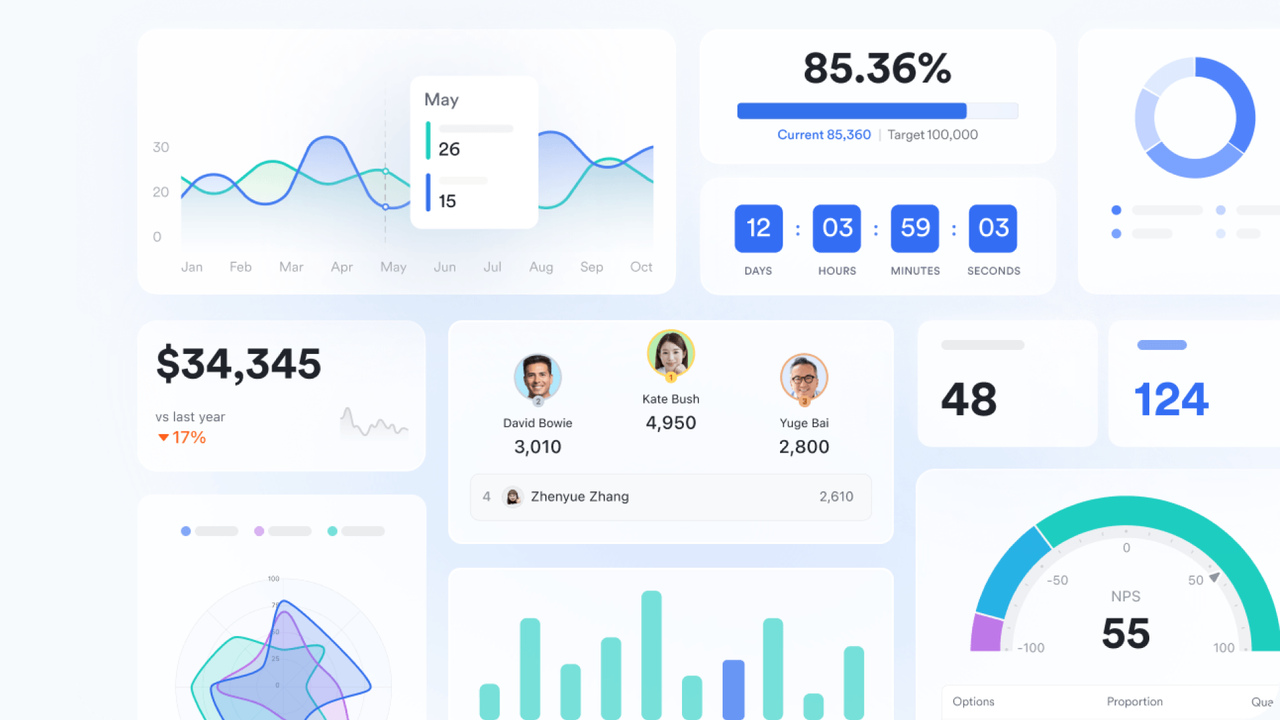
Base also includes for performance monitoring, allowing managers to track KPIs such as pipeline value, win rates, deal velocity, and rep performance in real time. Leaders can quickly identify negotiation bottlenecks, forecast revenue, or spot reps exceeding targets—all from a single control panel. This blend of pipeline tracking and built-in reporting often requires multiple add-ons when using Pipedrive alone.
Faster deal approvals and contract workflows
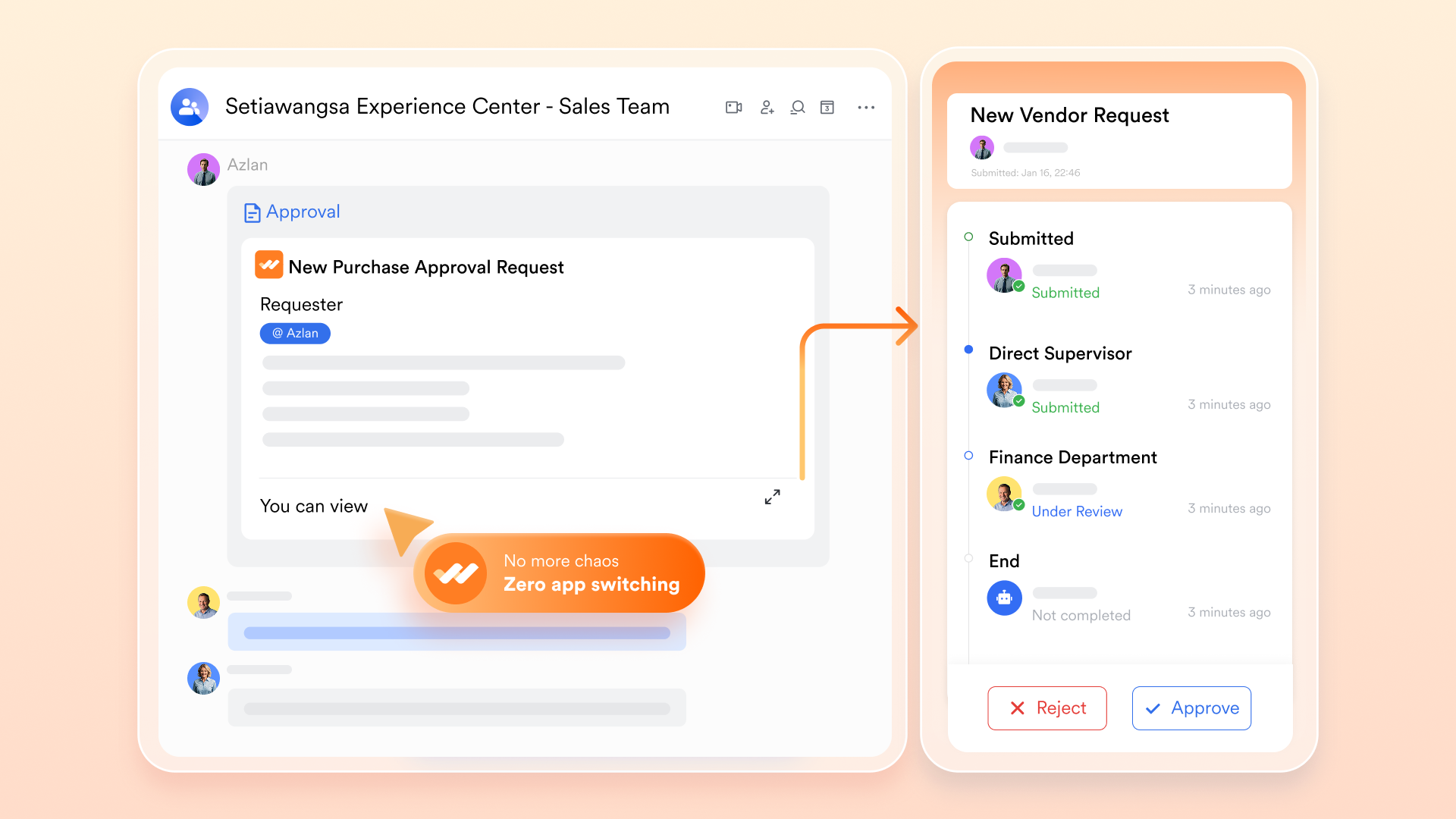
Approval delays are common in sales operations using traditional CRMs. Discount requests, refunds, or contract exceptions usually wait in email inboxes or approval queues. introduces structured, for approvals tied directly to sales activity. When a rep submits a discount request, it automatically routes to the correct manager for review and approval inside Messenger. Every step is logged, decisions are timestamped, and approvals occur in minutes rather than days—helping deals close faster while maintaining complete transparency.
Centralized deal communication
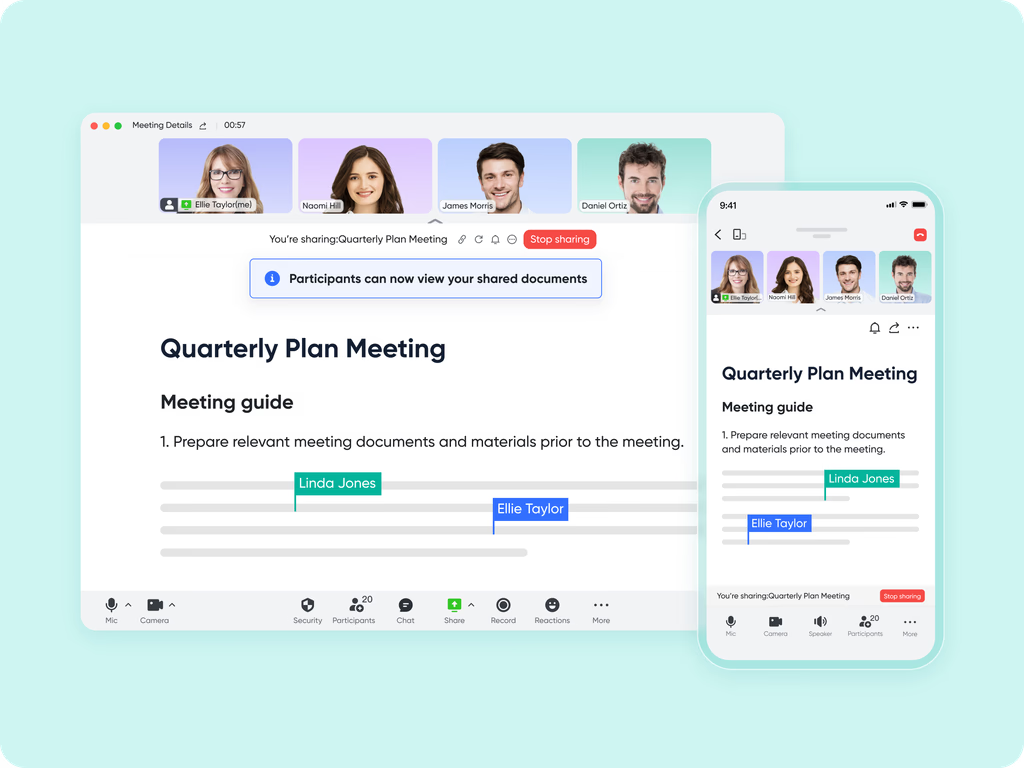
Unlike Pipedrive, which depends on separate chat or video tools, Lark includes real-time collaboration directly within the . Sales teams can create dedicated deal chats, assign tasks within conversations, share proposal drafts, or launch instant video calls using without switching platforms.
For example, a sales manager can pin pipeline updates in Messenger threads so the entire team can view progress instantly. At the same time, client presentations or negotiations can take place in Meetings, with shared screens and notes captured in Docs. This keeps deal communication tied directly to execution, rather than scattered across disconnected messaging tools.
Organized sales documentation
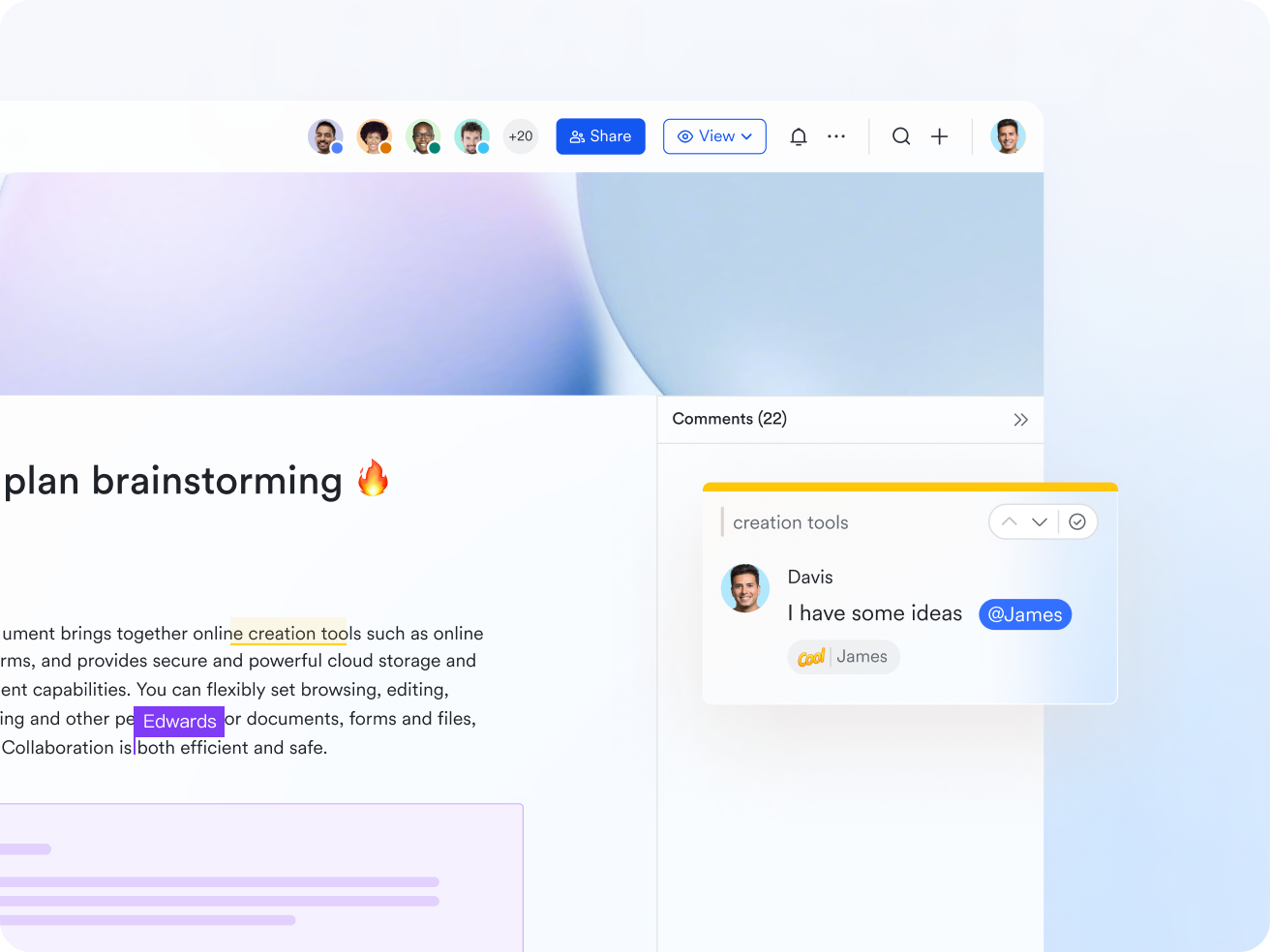
Sales teams generate large volumes of content—proposals, contracts, itineraries, onboarding workflows, and call notes. Pipedrive supports only limited document attachments, but offers with comments, version history, and shared editing. Teams can link live data from Base directly into Docs to auto-update pricing, deal status, or client details.
Finished documents, templates, and SOPs can then be stored in , creating a centralized and searchable knowledge hub. For example, a travel agency can build custom client itineraries in Docs, connect them to booking records in Base, and archive finalized templates in Wiki for repeat use. This eliminates scattered files and ensures critical knowledge is always accessible to the whole team.
:
- Starter plan: Free forever plan that includes 11 powerful tools for up to 20 users. It also comes with 100GB of storage, 1000 automation runs, AI translations, and more.
- Pro plan: $12/user/month (billed annually) for up to 500 users. It includes everything in Starter plus group calling for up to 500 attendees, 15TB of storage, 50,000 automation runs, and more.
- Enterprise plan: for custom pricing. Supports unlimited users and includes even more automation runs and advanced security, compliance, and management features.
For small teams with simple communication needs

18 months message history
1000 Base automation runs/month
2000 rows per table in Base
Most POPULAR
For companies with comprehensive collaboration and management needs
Unlimited message history
500-participant video meetings
50k Base automation runs/month
20k rows per table in Base
For large companies with advanced security and organizational management needs
Get a personalized demo and pricing
Unlimited message history
500-participant video meetings
15 TB storage + 30 GB storage/user
500k Base automation runs/month
50k Base automation runs/month
Most POPULAR
For companies with comprehensive collaboration and management needs
Unlimited message history
500-participant video meetings
50k Base automation runs/month
20k rows per table in Base
Which should you choose: Pipedrive or Lark
Choosing the right CRM or depends on whether you prioritize streamlined sales pipelines or a unified workspace with broader team tools. Below is a quick comparison to help you decide.
- Pipedrive shines if your core need is straightforward sales—visual pipelines, deal tracking, and meeting scheduling with minimal setup. It's highly focused on closing deals and ideal for small-to-medium sales teams. However, you may still need additional tools for chat, documentation, approvals, or broader collaboration. If managing leads, follow-ups, and pipelines efficiently is all you need, Pipedrive delivers a clean, purpose-built CRM.
- Lark offers CRM-style tracking plus built-in collaboration, document editing, , tasks, and approvals—all in one unified workspace. This makes it much easier for teams that need to combine sales workflows with internal communication, contract approvals, and document collaboration. By centralizing everything, Lark reduces the need to switch between multiple apps, making it ideal for teams that want scalability beyond basic sales operations.
Conclusion
Pipedrive remains a dependable choice for teams that want a clean, sales-focused CRM with intuitive pipelines and straightforward deal management. Its simplicity and make it especially appealing for small to mid-sized teams that prioritize activity tracking and clear visibility over complex automation. However, as sales operations expand, many organizations find themselves relying on multiple external tools for communication, approvals, documentation, and reporting.
That's where a unified workspace becomes valuable. offers an alternative approach by combining CRM-style tracking with built-in collaboration, automation, docs, and approvals—helping teams manage the entire sales cycle without juggling separate apps. If your organization is looking for a scalable, all-in-one environment that supports both sales execution and cross-team coordination, Lark provides the flexibility and integration Pipedrive lacks.
Get started today and simplify how your team works
FAQs
Does Pipedrive work well for non-sales teams?
Pipedrive is primarily designed for sales workflows, so non-sales teams may find its structure limiting. While it can be adapted for basic tracking, it lacks broader collaboration tools that many departments need. Teams seeking more flexible, cross-functional workflows often turn to platforms like Lark, which support projects, docs, , and approvals in one place.
Can Pipedrive manage complex approval workflows?
Pipedrive offers simple automation, but advanced approvals—such as multi-step or conditional routing—usually require external tools. This can make processes harder to manage as organizations scale. Platforms like Lark include built-in Approval workflows that streamline routing, escalation, and documentation.
How flexible are its automation rules compared to no-code platforms?
Pipedrive's automation is helpful for basic deal movement and reminders, but is limited when compared to full no-code builders. Many teams require more profound logic, triggers, and branching that are not available natively. Tools like Lark provide more adaptable workflow automation that supports end-to-end process design.
Can CRM documents be stored and edited collaboratively in Pipedrive?
Pipedrive allows file attachments but doesn't support real-time document editing or version control. Teams typically use external apps for collaboration, which can fragment workflows. Solutions like Lark, with integrated Docs and shared editing, keep documents more seamlessly connected to daily operations.
What CRM tools offer the best free plans for startups?
Pipedrive does not offer a permanent free tier, making it less ideal for budget-constrained startups. Several platforms offer free plans, but they often limit collaboration or automation features. Startups seeking a robust free option usually consider Lark, which offers multiple tools, , and collaboration features at no cost for small teams.
Related reading






























