Project planning often starts with timelines, but keeping work moving requires more than visual schedules. As interest in a detailed TeamGantt review continues to grow, many teams are evaluating whether TeamGantt can support both planning and execution as projects scale. TeamGantt positions itself as a Gantt-first project management tool built for clarity and ease of use. This review explores how TeamGantt performs in real-world workflows, where it excels, and where limitations appear as collaboration becomes more complex. It also briefly acknowledges why some teams later explore more connected workspaces when timelines alone are no longer enough.
See how teams manage projects today
What is TeamGantt?
TeamGantt is a cloud-based project management platform centered around visual timeline planning. Its core experience is built on creating and managing Gantt charts that show tasks, dependencies, and schedules at a glance. The tool is designed to help teams plan work clearly without heavy configuration. TeamGantt is often chosen by teams that want simplicity over complex project management frameworks.
TeamGantt is commonly used by marketing teams, agencies, , and project managers who rely heavily on timelines. It appeals to users who want to avoid steep learning curves while still managing dependencies and deadlines. Access to the platform begins through the TeamGantt login, which is web-based and does not require local installation. While a TeamGantt desktop app is not required, browser access supports most workflows.
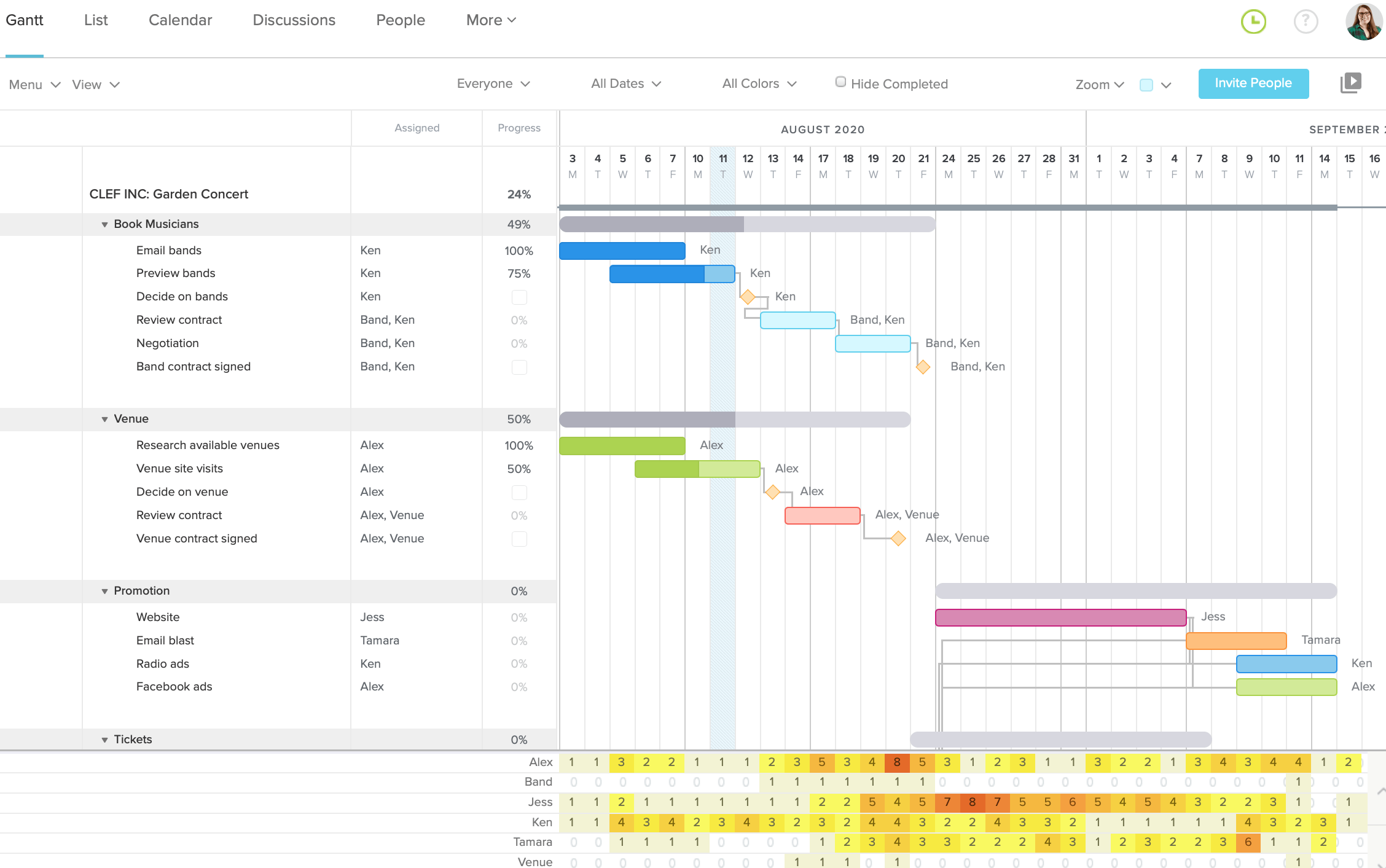
Image source: teamgantt.com
TeamGantt core features & functionality explained
TeamGantt focuses on making easy to build, understand, and share. Its functionality prioritizes visual planning and straightforward collaboration. Understanding its core features helps teams determine whether it fits their execution style.
- Visual Gantt charts built for fast schedule planning: TeamGantt's core strength lies in its visually driven Gantt charts that make easy to understand and adjust. Tasks, dates, and dependencies are displayed in a clean layout that reduces planning friction. This approach helps teams quickly spot overlaps and conflicts. It is especially useful for projects where timeline clarity matters most.
- Task dependencies that update timelines automatically: Dependencies in TeamGantt allow teams to define task order and ensure work progresses logically. When a task is delayed or moved, connected tasks shift automatically. This reduces manual schedule adjustments and prevents downstream conflicts. It helps teams maintain realistic delivery plans.
- Multiple project views for flexible planning styles: Beyond , TeamGantt supports list, calendar, and board views for managing tasks. Teams can switch views depending on whether they need a high-level overview or a daily task focus. This flexibility supports different roles without complex configuration. However, views remain planning-focused rather than execution-driven.
- Resource workloads and capacity visibility: TeamGantt includes workload views that show how tasks are distributed across team members. Managers can quickly see who is overloaded and who has available capacity. This helps balance work and avoids bottlenecks. Accurate workloads depend on consistent task updates.
- Baselines and progress accountability: Baselines allow teams to compare original plans with actual progress over time. Visual progress indicators make delays easy to identify. This feature supports accountability during project reviews. It is useful for reporting and post-project analysis.
- File attachments and task-level notes for basic context: TeamGantt lets users attach files and add notes directly to tasks. This keeps reference materials close to timelines. It works well for lightweight documentation needs. Teams with heavier collaboration requirements often supplement this with external tools.
Advanced features: Where TeamGantt goes beyond basic Gantt charts
While TeamGantt is best known for its timeline visualization, it includes several advanced features designed to support larger projects and more structured planning. These capabilities help teams move beyond simple into portfolio visibility and accountability. Understanding these features is essential for evaluating long-term fit. This section highlights where TeamGantt extends past basic Gantt functionality.
- across multiple projects: TeamGantt allows users to view multiple projects within a single portfolio view. This helps managers understand how timelines overlap and where dependencies exist across initiatives. Portfolio views are especially useful for agencies and PMOs managing concurrent workstreams. Progress indicators roll up from individual projects. However, execution still relies on task updates.
- RACI charts for role clarity: RACI charts in TeamGantt help teams define responsibility, accountability, consultation, and information roles for tasks. This reduces confusion around ownership and decision-making. RACI views are valuable for complex projects with multiple stakeholders. They add governance to planning. However, enforcement remains manual.
- Time tracking tied to project timelines: TeamGantt includes time tracking that connects logged hours directly to tasks. This allows teams to compare planned timelines with actual effort. Time data supports budgeting and discussions. Reporting is useful for retrospective analysis. Real-time operational insights are limited.
- Baseline comparisons for schedule variance: Baselines allow teams to capture original plans and compare them against current progress. This highlights schedule drift and delays clearly. Managers can identify risk earlier. Baseline reporting supports accountability conversations. It is most effective in structured environments.
TeamGantt pricing plans: How much does TeamGantt cost
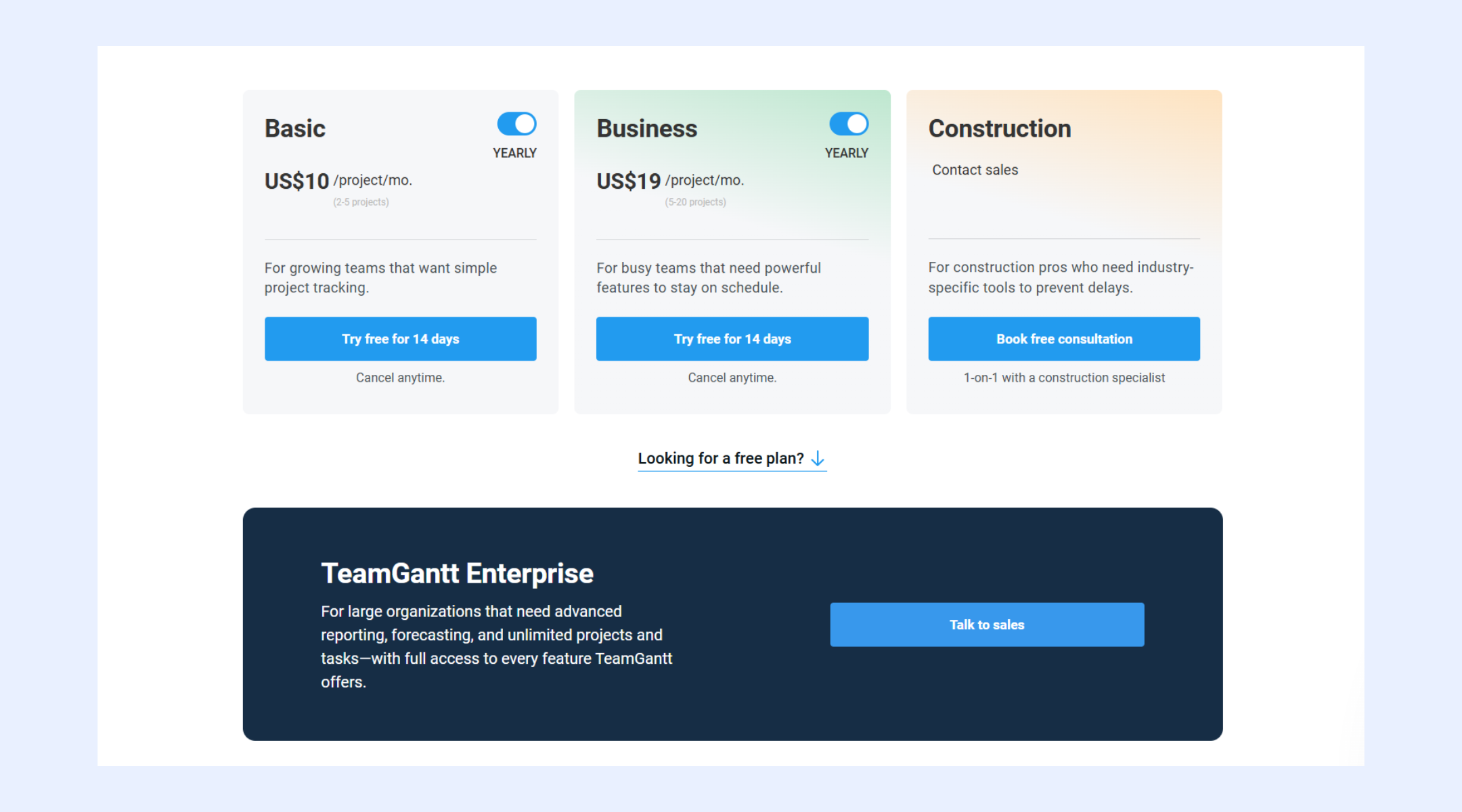
TeamGantt pricing is structured around the level of planning depth, scale, and industry-specific needs. Each plan builds on the core Gantt experience while adding capabilities for , reporting, and portfolio oversight. Understanding how pricing works in practice helps teams estimate long-term costs more accurately. Differences between plans become more significant as team size and project complexity grow. This breakdown explains who each plan is designed for and what value it delivers.
Information source: teamgantt.com
Update time: 2025-12-18
Note: Pricing and plan details reflect publicly available data as of the update date and may vary based on region, billing cycle, and number of agents.
Pros and cons of TeamGantt: The real user verdict
Evaluating TeamGantt requires looking at both its strengths and limitations in daily use. Feedback across TeamGantt reviews highlights strong satisfaction with planning clarity, alongside concerns about execution depth. These pros and cons reflect how the tool performs as projects grow. This balanced view helps teams set realistic expectations.
Pros
- Visual clarity that simplifies project planning: The TeamGantt chart makes timelines easy to understand for all stakeholders. Tasks, dependencies, and milestones are clearly displayed. This reduces planning confusion. Teams can communicate schedules visually. It is ideal for timeline-driven work.
- Low learning curve for new users: TeamGantt is widely praised for ease of adoption. Users can start planning quickly without training. The interface feels intuitive. This makes smooth. Many TeamGantt reviews highlight this advantage.
- Strong scheduling and dependency handling: Automatic dependency updates help maintain realistic schedules. Teams avoid manual recalculations. Planning accuracy improves. This is valuable for deadline-driven projects. It supports structured delivery.
- Flexible views without heavy configuration: List, board, calendar, and support different planning preferences. Teams can adapt views to roles. Configuration remains simple. This flexibility improves usability. However, depth remains limited.
Cons
- Limited execution and depth: TeamGantt focuses on planning rather than execution. Communication, documents, and decisions live outside the timeline. This creates fragmentation. Teams often add other tools. Execution visibility can suffer.
- Scaling costs and feature gating: As teams grow, TeamGantt pricing increases due to manager-based billing. Advanced features are tied to higher plans. Budget predictability becomes harder. Larger teams feel this impact most.
- Limited support for cross-functional workflows: TeamGantt is primarily designed for project managers and planning-focused teams. It does not natively support cross-department workflows that involve sales, operations, or leadership collaboration. Work often stays siloed within project timelines. This limits visibility across the broader organization.
- Basic document handling and knowledge management: While TeamGantt allows file attachments at the task level, it lacks structured and knowledge organization. There is no built-in Wiki or real-time co-editing. Teams often rely on external document tools. This increases tool switching and reduces shared context over time.
As projects grow more complex, many teams realize that timelines alone are not enough to keep work moving forward. help visualize schedules, but execution often breaks down when communication, documentation, and task ownership live in separate tools. This is where teams start looking beyond timeline-focused software toward a more connected way of managing work, leading naturally to platforms like Lark.
Explore connected execution alternatives
Meet Lark: Realise smooth collaboration and workflows in one place
TeamGantt is built around timeline visualization, which works well for schedule-focused planning. However, as teams scale, projects require more than dates and . delivers a complete work environment that brings together planning, execution, communication, and visibility in one place. By combining structured project data with , Lark supports the full project lifecycle, not just scheduling, making it a natural next step for teams that have outgrown Gantt-only workflows.
From timeline tool to unified project command center
TeamGantt primarily acts as a scheduling interface, helping teams map dependencies and track timelines. Lark takes a broader approach by functioning as a centralized project system built on , where all project information lives in structured tables. Each project item exists as a record enriched with fields such as owner, status, priority, relationships, and linked work.
These records stay connected across the workspace, meaning updates instantly reflect on tasks, dashboards, and timelines. Base also supports workflow logic that can trigger actions, such as notifications or task creation, when project data changes. This transforms Lark from a planning tool into a live project control hub where coordination, updates, and execution happen together. 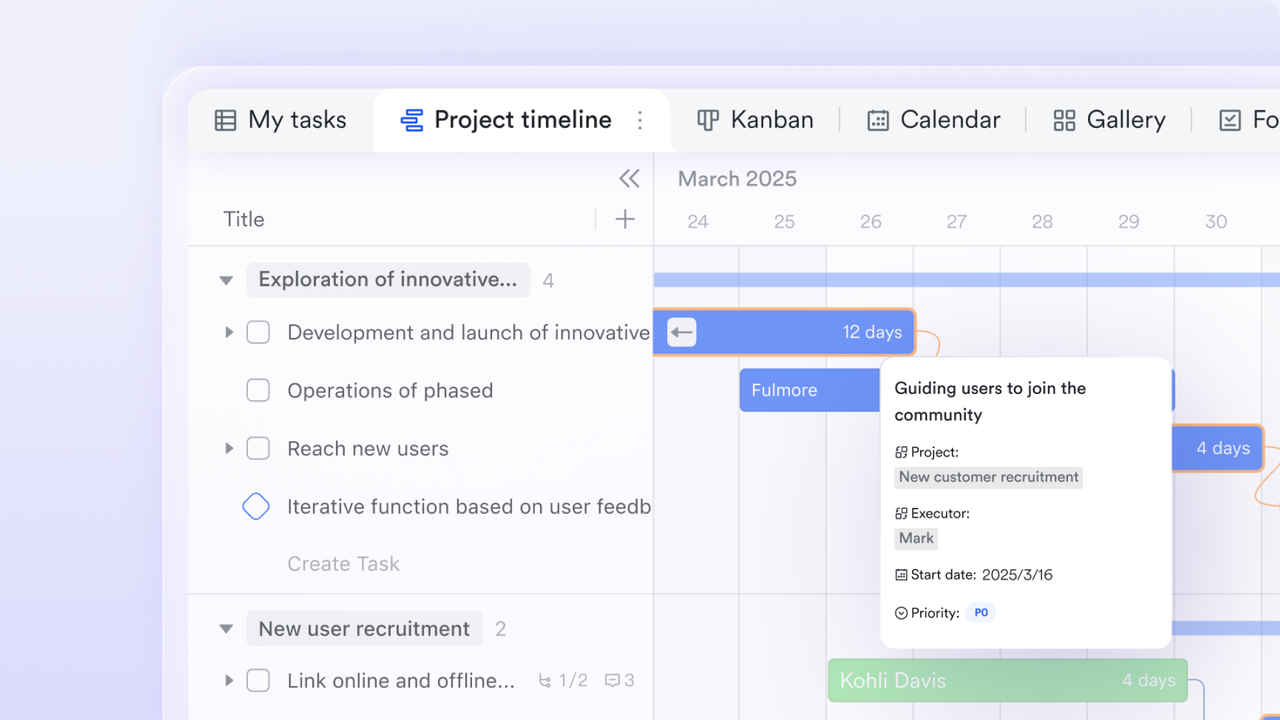
Adaptive Gantt planning powered by live project data
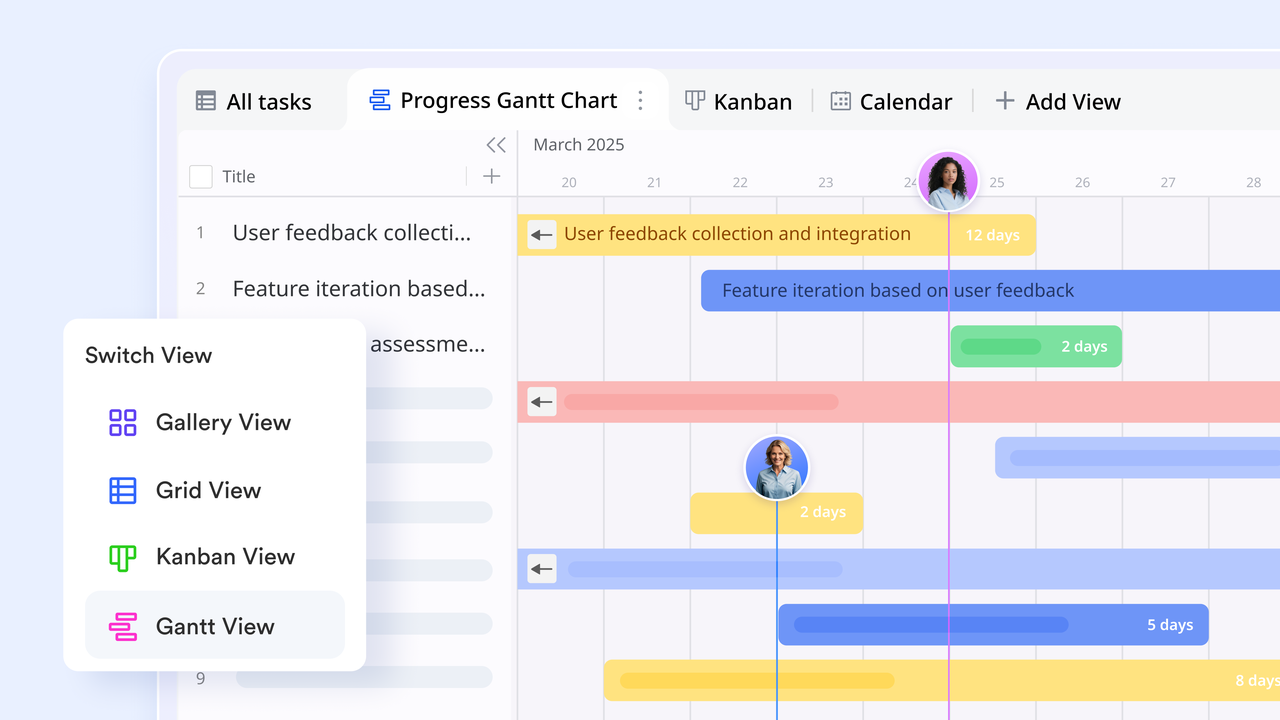
TeamGantt centers its experience around fixed Gantt timelines tied to predefined task structures. In contrast, Lark's Gantt view is generated directly from project data fields, including date and formula-based fields. Timeline changes, such as dragging a task bar, automatically updating related views, and ensuring data stays consistent everywhere. Lark also offers advanced timeline controls, including customizable bar colors for status or priority, configurable working days, and milestone tracking. This creates a more dynamic planning experience where timelines evolve naturally with execution, rather than remaining static planning artifacts.
Live dashboards that reflect real project health
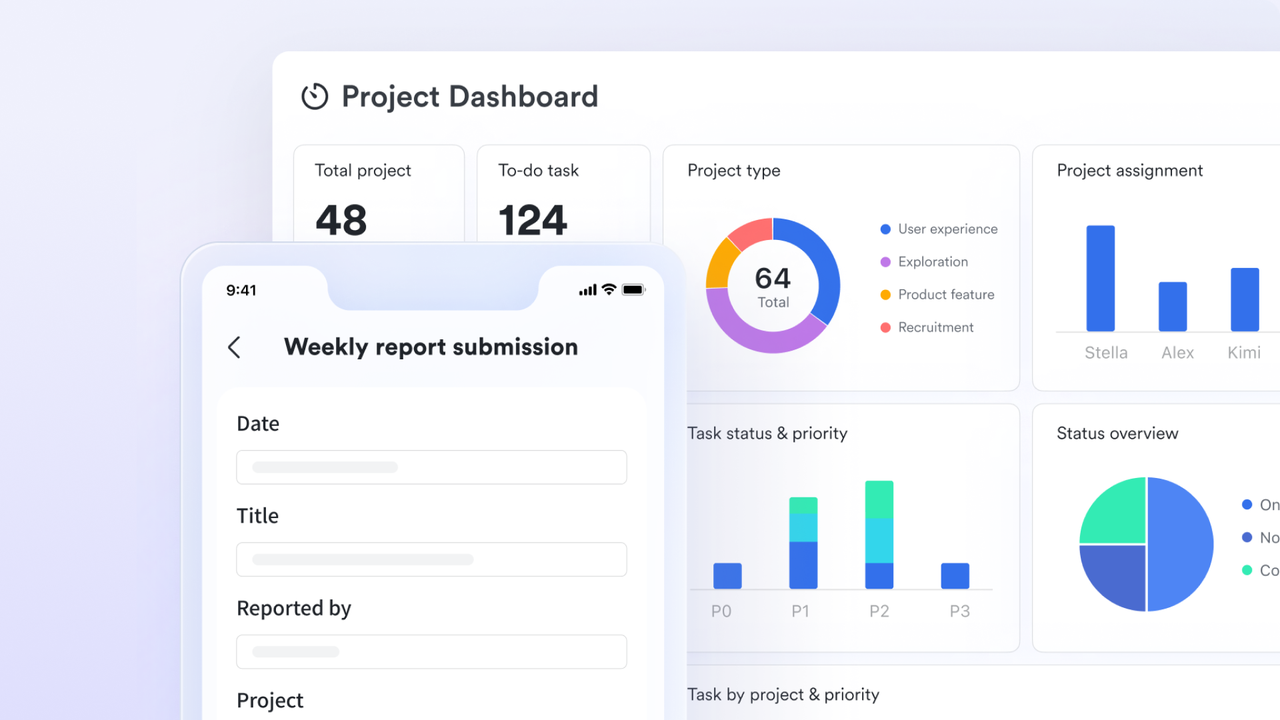
While TeamGantt emphasizes visual schedules, deeper reporting often requires plan upgrades or exports. Lark Base dashboards provide real-time visibility by pulling live data from tasks, timelines, and records. Teams can track progress, workloads, deadlines, and risk indicators through auto-updating charts and widgets. This approach enables continuous monitoring instead of periodic reviews. Stakeholders gain instant insight into what's on track, what's blocked, and where attention is needed without leaving the workspace or relying on static reports.
Turning plans into accountable execution
TeamGantt clearly shows when tasks should happen, but ownership and follow-through can feel secondary. Lark Tasks puts accountability at the center of execution. Each task includes an owner, deadline, priority, and links back to project records in Base. As tasks move forward, progress updates automatically appear in Gantt views, dashboards, and calendars. Built-in reminders and notifications help teams stay on track, ensuring timelines are actively driven by execution rather than passively observed. 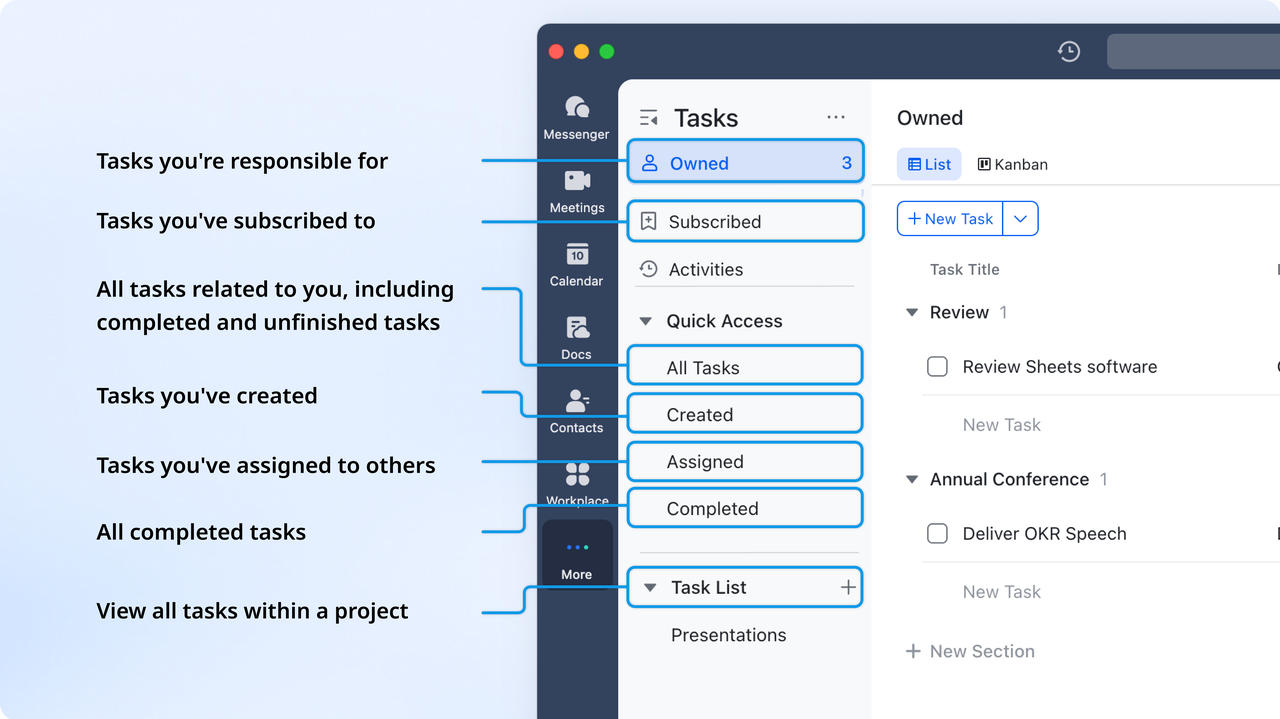
Native document collaboration and knowledge base
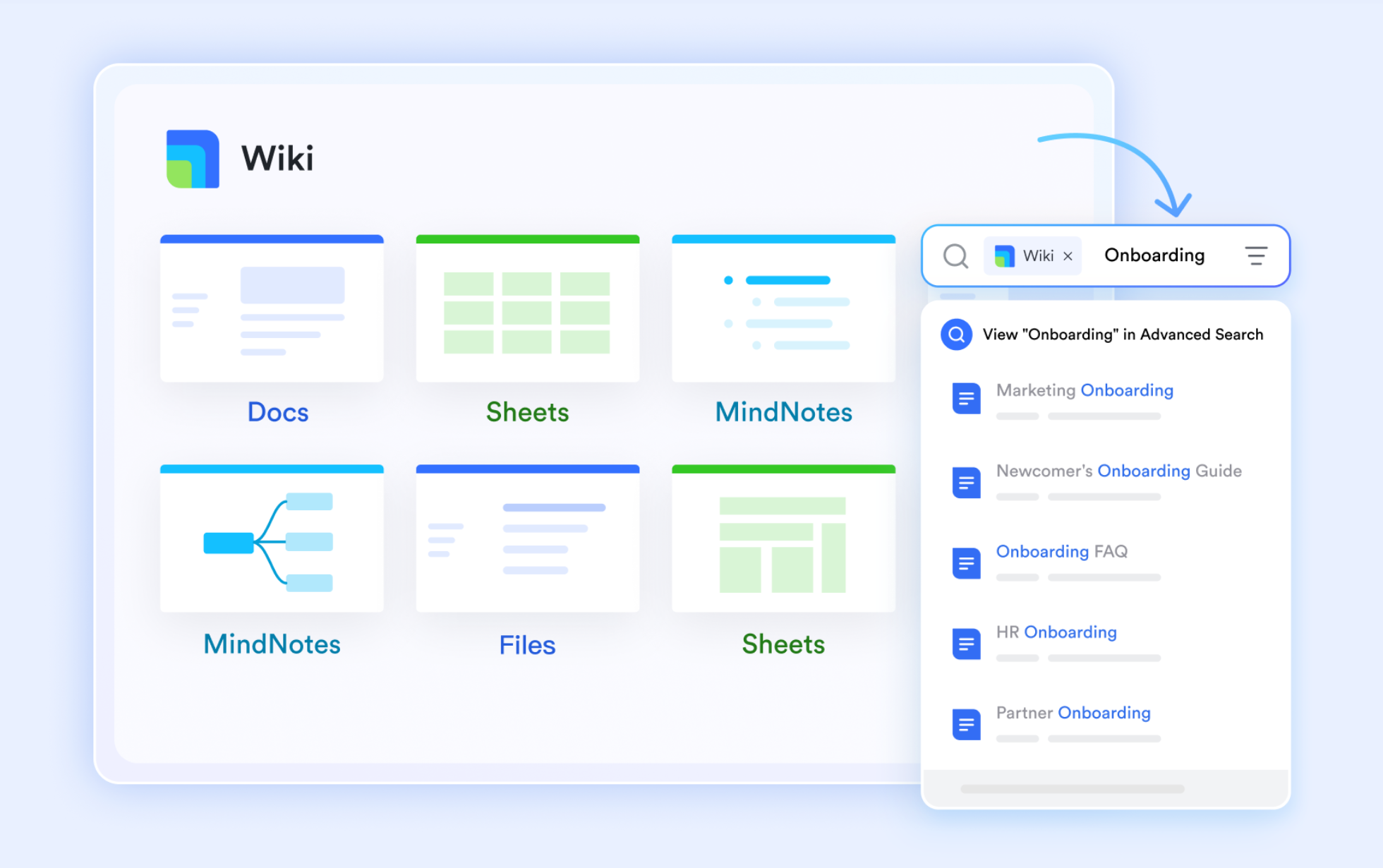
As mentioned, TeamGantt lacks structured and knowledge organization. So, teams often rely on third-party document tools. However, Lark provides Lark Docs and Lark Wiki to transform fragmented information into a structured, searchable knowledge ecosystem that scales with your team.
serves as a high-velocity workspace where you can co-edit in real-time and embed interactive elements like polls and live charts to keep project context in one place. Once work is finalized, Lark Wiki provides a centralized home for long-term knowledge, organizing files into a clear, hierarchical tree that acts as your company's "source of truth." This seamless flow between active creation and systematic archiving ensures that critical data is never lost in a folder and is always accessible via a single global search.
Calendar-driven coordination across teams and departments
TeamGantt's calendar views remain closely tied to project timelines. goes further by supporting real-time availability checks across individuals and group chats when scheduling events. Teams can instantly see open time slots, prepare meeting groups, and coordinate delivery timelines with actual team availability. Public calendars and shared scheduling help align work across departments, reducing conflicts and miscommunication. This unified approach makes scheduling a collaborative process rather than a manual coordination task. 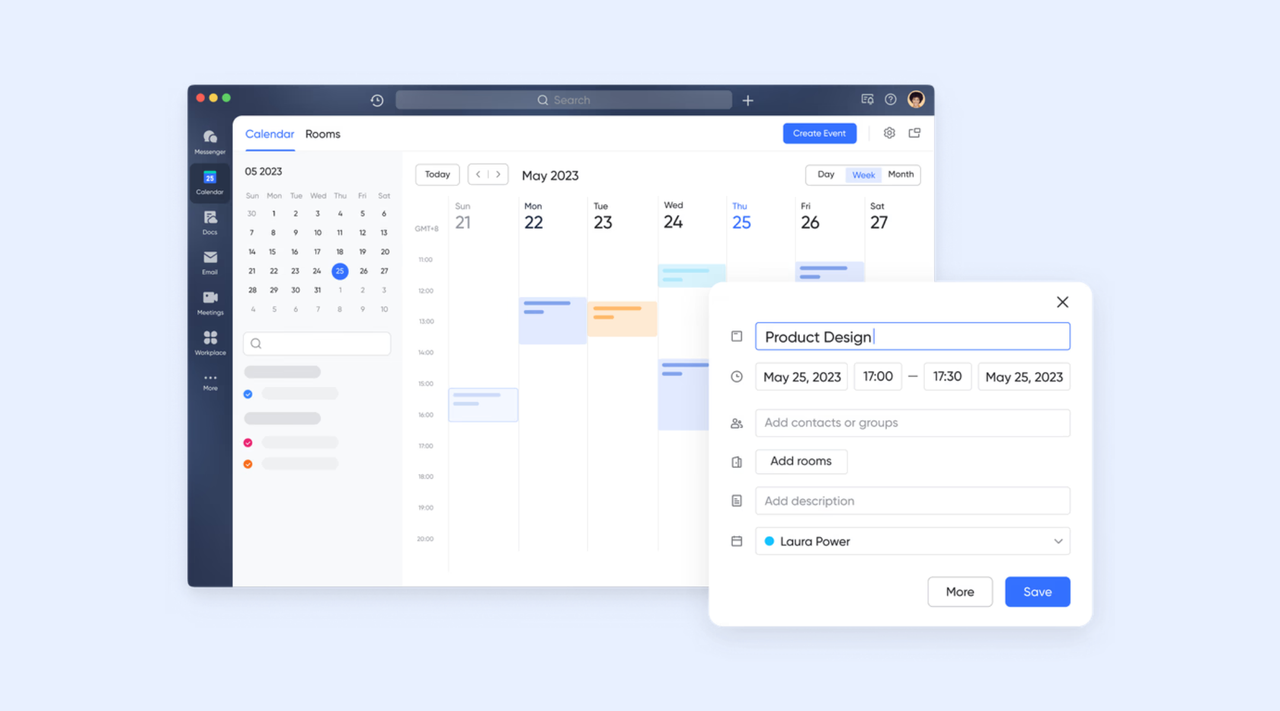
:
- Starter plan: Free forever plan that includes 11 powerful tools for up to 20 users. It also comes with 100GB of storage, 1000 automation runs, AI translations, and more.
- Pro plan: $12/user/month (billed annually) for up to 500 users. It includes everything in Starter plus group calling for up to 500 attendees, 15TB of storage, 50,000 automation runs, and more.
- Enterprise plan: for custom pricing. Supports unlimited users and includes even more automation runs and advanced security, compliance, and management features.
For small teams with simple communication needs

18 months message history
1000 Base automation runs/month
2000 rows per table in Base
Most POPULAR
For companies with comprehensive collaboration and management needs
Unlimited message history
500-participant video meetings
50k Base automation runs/month
20k rows per table in Base
For large companies with advanced security and organizational management needs
Get a personalized demo and pricing
Unlimited message history
500-participant video meetings
15 TB storage + 30 GB storage/user
500k Base automation runs/month
50k Base automation runs/month
Most POPULAR
For companies with comprehensive collaboration and management needs
Unlimited message history
500-participant video meetings
50k Base automation runs/month
20k rows per table in Base
TeamGantt vs. Lark: Key differences at a glance
Choosing between TeamGantt and Lark depends on how deeply a team needs to connect planning with execution. While both tools support , they approach work from very different angles. TeamGantt emphasizes timeline clarity and visual scheduling, whereas Lark focuses on unifying work across communication, tasks, documents, and . Understanding these differences helps teams select a tool that matches how they operate today and how they plan to scale. This comparison highlights where each platform fits best.
Who should choose which tool?
TeamGantt is best suited for teams whose primary need is clear timeline visualization and structured project planning. It works well for project managers, agencies, and construction teams that rely heavily on to manage dependencies and schedules. Teams that value simplicity, predictable workflows, and minimal setup often find TeamGantt sufficient for managing deadlines and milestones. Lark, on the other hand, is better suited for teams that need planning, communication, and execution to happen in one connected workspace. As collaboration becomes more and projects require faster follow-ups, shared documents, and real-time coordination, Lark supports these needs more effectively.
Conclusion
TeamGantt delivers strong value for teams that want a straightforward way to visualize project timelines and manage dependencies. Its focus on , workload views, and schedule planning makes it a reliable choice for timeline-driven work. For teams that prioritize planning clarity over deep collaboration, TeamGantt remains a practical and easy-to-adopt solution. It allows to communicate schedules clearly without overwhelming users with complex features.
However, as projects grow and teams collaborate across functions, timelines alone may not provide enough execution visibility. Communication, documentation, and task ownership often need to live closer together to keep work moving. This is where platforms like gradually come into focus, offering a more connected environment where planning and execution happen side by side. For teams looking to reduce tool switching and improve long-term collaboration, a unified workspace can provide meaningful advantages.
Unify planning and execution in one workspace
FAQs
Is TeamGantt good?
TeamGantt is a strong option for teams that rely heavily on timeline visualization and structured planning. Its Gantt charts are easy to use and help teams clearly understand and deadlines. Many users value its simplicity and low learning curve. It performs best in environments where schedules are the primary driver of work. As collaboration needs grow, some teams begin exploring connected platforms like Lark for broader execution support.
Is TeamGantt really free?
TeamGantt does not offer a fully featured free plan for ongoing use. While limited trial access may be available, most capabilities require a paid subscription. Costs scale based on the number of managers and collaborators involved. This pricing model works well for smaller teams but can increase quickly as projects grow. Some teams later compare this with workspaces like Lark that provide more flexibility at entry levels.
What is the best software for making Gantt charts?
TeamGantt is widely regarded as one of the best tools for creating clear and Gantt charts. Its drag-and-drop scheduling and management simplify timeline planning. For teams focused purely on schedules, it remains a top choice. However, when projects require closer coordination between tasks, documents, and conversations, teams may evaluate broader platforms like Lark that include Gantt views alongside execution tools.
How do I cancel TeamGantt?
TeamGantt are managed through the account's billing settings, where users can review and cancel plans before renewal. Annual plans require careful timing to avoid unexpected charges. Teams often plan cancellations alongside data exports or transitions to new tools. This process becomes more important for larger organizations with multiple projects. Some teams introduce Lark gradually to maintain continuity during transitions.
Related reading


















