Project management tools are essential for teams to plan, track, and deliver work efficiently. Among them, TeamGantt has gained popularity for its intuitive Gantt chart interface and focus on timeline visualization. But how much does it cost to use TeamGantt effectively? And is it worth the investment compared to other tools?
In this post, we'll break down TeamGantt pricing plans, explain the differences between Pro, Unlimited Everything, and Construction Edition, highlight add-ons that can drive up costs, and compare TeamGantt with more versatile platforms like Lark. By the end, you'll understand whether TeamGantt fits your team's needs and budget.
Manage multiple projects in one place
What is TeamGantt
TeamGantt is a built primarily around Gantt charts, designed to help teams plan, schedule, and track projects visually. Unlike traditional project management software, TeamGantt focuses on creating clear timelines, making it easier to manage task dependencies, milestones, and workloads. Its intuitive interface allows project managers to assign tasks, set deadlines, and monitor progress across multiple projects.
The platform is suitable for small to medium-sized teams, especially those that prioritize visual timeline planning over advanced collaboration or automation. TeamGantt offers different pricing plans, including Pro, Unlimited Everything, and Construction Edition, each with varying limits on managers, collaborators, and features. For teams seeking TeamGantt pricing, free plan insights, or pricing for TeamGantt features, it's important to note that many advanced features, such as custom boards and project health reports, require higher-tier plans or add-ons.
Overall, TeamGantt simplifies but may need additional tools for full-scale team collaboration.
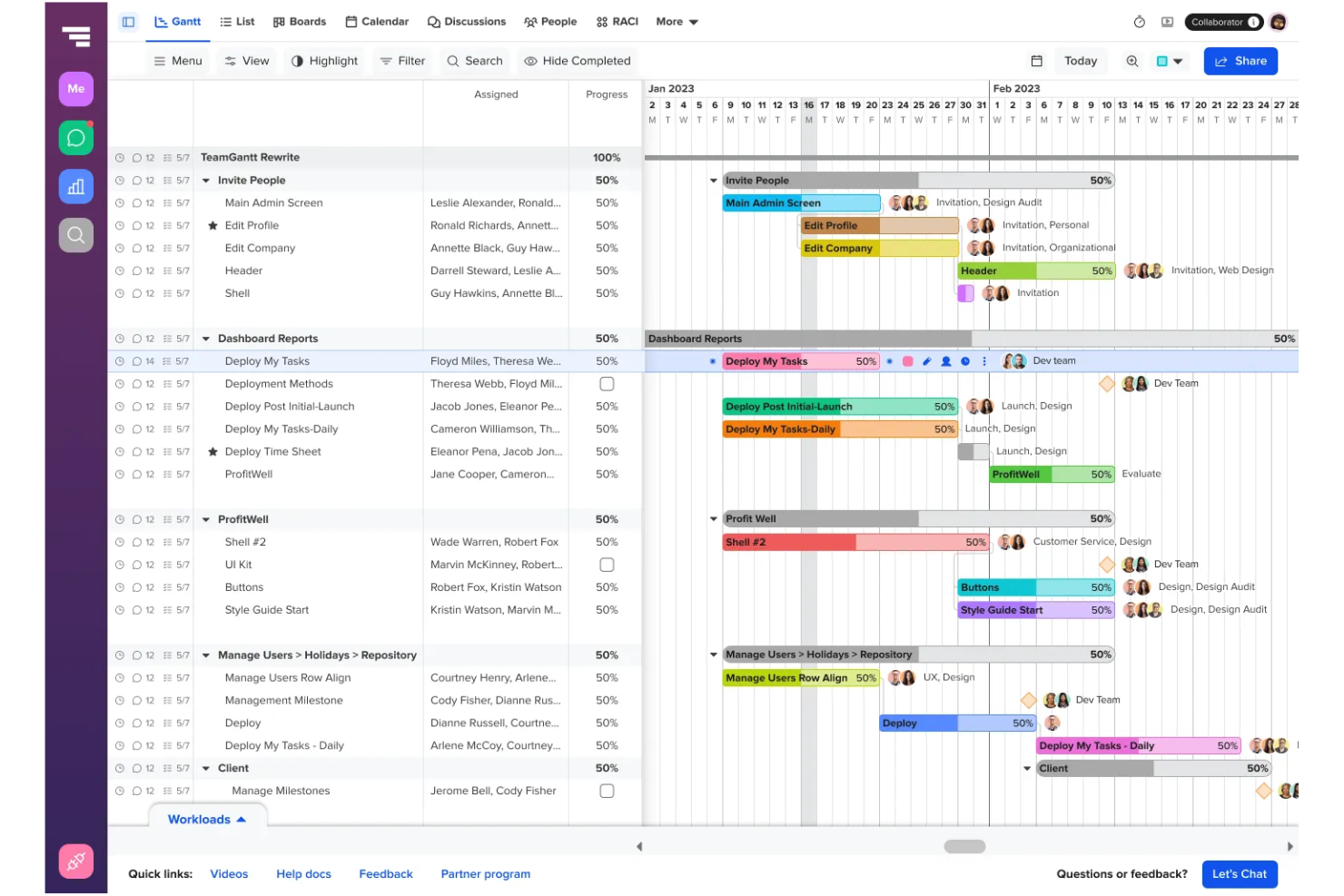
Image source: teamgantt.com
What TeamGantt is built for
TeamGantt is designed for teams that want to simplify project planning and focus on visual timelines. Its tools are tailored to manage tasks, dependencies, and deadlines efficiently, making it a go-to for timeline-focused project management.
- Visual : TeamGantt helps teams create clear Gantt charts that show tasks, dependencies, and milestones at a glance. Managers can quickly see how tasks overlap and adjust schedules, making planning more efficient. This visual approach reduces confusion and keeps teams aligned on project timelines.
- Small to medium team collaboration: TeamGantt is ideal for small teams or departments with a few project managers. It allows assigning tasks, setting deadlines, and tracking progress while keeping collaboration simple without overwhelming features. Teams can involve collaborators without losing control over project oversight.
- Task and : The platform provides tools for tracking task completion, workload management, and project baselines. Users can monitor deadlines, identify bottlenecks, and ensure projects stay on schedule. This makes TeamGantt's pricing worthwhile for teams focused on timeline accountability.
- Construction and specialized projects: TeamGantt's Construction Edition caters to construction and project-based industries. It includes cost-loaded scheduling, project health reports, and dedicated support to manage complex timelines. Teams in specialized industries can plan and track large-scale projects efficiently.
TeamGantt pricing plans: Quick feature overview
TeamGantt offers multiple pricing plans designed to meet different team sizes and project needs. Each plan varies in the number of managers, collaborators, projects, and advanced features included. Understanding the differences helps teams choose the right option for their workflow and budget. Below is a quick overview of what each plan offers.
TeamGantt pricing plans explained
TeamGantt offers a range of pricing plans to suit teams of different sizes and project complexities. Each plan includes specific features, limits on managers and collaborators, and optional add-ons. Understanding these differences helps teams decide which plan provides the best value. Below, we break down each plan in detail and highlight key features and use cases.
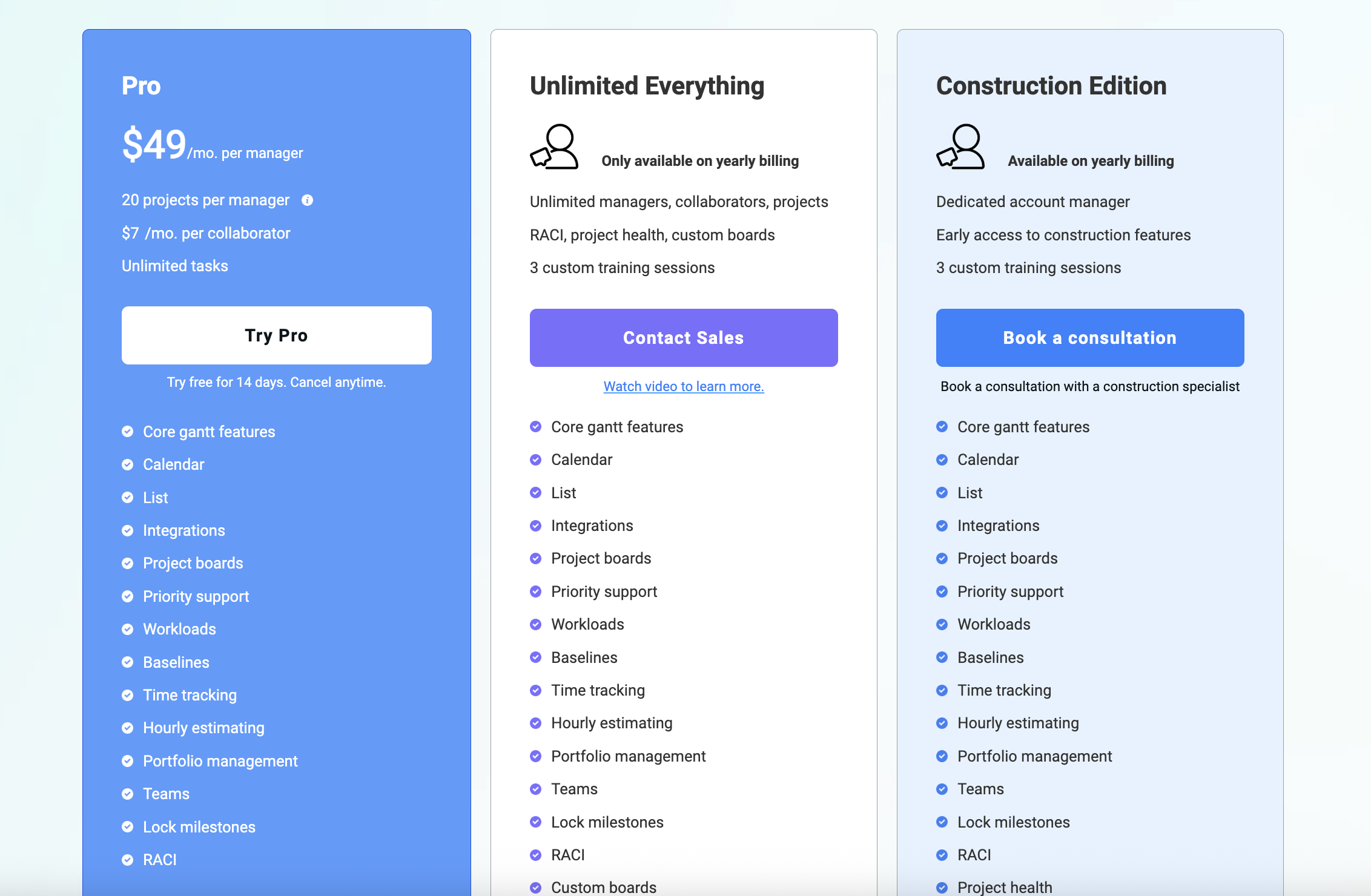
Information source: teamgantt.com
Update time: 2025-12-12
Note: Pricing and plan details reflect publicly available data as of the update date and may vary based on region, billing cycle, and number of agents.
TeamGantt Pro plan reviews
The TeamGantt Pro plan is the most popular option for small teams looking to manage projects with visual timelines. It offers essential features at a predictable price, making it a good starting point for those exploring TeamGantt pricing plans.
- $49/Month per manager pricing: The Pro plan costs $49 per manager per month and includes access to core Gantt chart tools. This pricing is ideal for small teams with a limited number of managers. Teams should budget for additional costs if they plan to expand the number of managers.
- Project Limits per manager: Each Pro plan manager can manage a limited number of projects simultaneously. This ensures small teams focus on manageable workloads without overloading the platform. Teams needing unlimited projects may need to upgrade to higher tiers.
- Additional cost per collaborator: Collaborators beyond the included number incur extra charges, which can increase total monthly spend. This pricing model is suitable for teams with a small group of contributors. Large teams should consider TeamGantt's pricing, free plan alternatives, or higher-tier plans.
- Features included in the Pro plan: The Pro plan includes core Gantt charts, task dependencies, calendar and list views, workload management, time tracking, and baselines. Advanced features like RACI charts and custom boards are limited or require add-ons. This makes the plan suitable for and monitoring.
- Best-fit use cases for small teams: The Pro plan is ideal for small teams managing a few projects with clear deadlines. It's best for teams that need straightforward timeline planning without advanced reporting or automation. For teams seeking more , higher-tier plans or all-in-one platforms may be more cost-effective.
TeamGantt Unlimited Everything plan reviews
The Unlimited Everything plan is designed for growing teams that need maximum flexibility and access to features. Unlike the Pro plan, it removes most limits and includes advanced capabilities, making it a popular choice for teams exploring TeamGantt features pricing, and long-term scalability.
- Available only on yearly billing: This plan is offered exclusively with annual billing, providing teams with predictable costs throughout the year. While monthly billing is not an option, yearly billing often comes with better value. Teams should to maximize ROI.
- Unlimited managers, collaborators, and projects: Unlike the Pro plan, the Unlimited Everything plan allows unlimited managers, collaborators, and projects. This removes growth barriers for expanding teams and makes the platform suitable for large or multi-department organizations. Teams no longer need to worry about per-manager or per-project costs.
- Access to advanced features like RACI and project Health: The plan unlocks advanced features, including RACI charts and project health reports, without requiring add-ons. Teams gain better visibility into accountability, progress tracking, and overall . This makes the Unlimited Everything plan ideal for teams needing more robust project oversight.
- Inclusion of custom boards without add-ons: Custom boards are included by default, allowing teams to tailor workflows and views without additional cost. Users can organize projects and tasks visually according to their preferences. This feature enhances collaboration and reduces the need for third-party tools.
TeamGantt Construction Edition pricing reviews
The Construction Edition of TeamGantt is tailored for teams managing complex construction and related industry projects. It combines the flexibility of the Unlimited Everything plan with specialized features, making it a strong option for teams exploring TeamGantt pricing plans for industry-specific needs.
- Sales-based pricing model: The Construction Edition uses a sales-based pricing model, meaning costs are customized based on team size, project complexity, and specific requirements. This approach allows organizations to pay for precisely what they need. Teams should contact sales for detailed quotes to plan budgets effectively.
- Dedicated account manager: Teams subscribing to Construction Edition receive a dedicated account manager to assist with onboarding, training, and ongoing support. This ensures smoother adoption and personalized guidance for . Dedicated support helps teams maximize the platform's capabilities.
- Early access to construction-specific features: Subscribers gain early access to features like cost-loaded scheduling, construction milestones, and specialized reporting. This allows teams to leverage new tools before they are available on standard plans, improving efficiency and project tracking.
- Target users and industries: The plan is designed for construction firms, engineering teams, and with complex schedules. Teams that manage multiple overlapping projects or large-scale construction timelines benefit most from this edition.
- How it differs from standard unlimited plans: Construction Edition adds industry-specific tools, personalized support, and cost-based scheduling that the standard Unlimited plan lacks. These enhancements make it ideal for organizations requiring specialized workflows and tighter project oversight.
In summary, TeamGantt's pricing is relatively expensive and complex, charging $49/month per manager while imposing strict project limits and additional fees for collaborators and essential features like custom boards. In contrast, its competitors offer a much more transparent and affordable model. For example, Lark provides a free plan and its paid plans start at $12/user/month (billed annually), providing an all-in-one suite for projects.
TeamGantt add-ons that increase the total cost
While TeamGantt's core plans cover essential project management features, many advanced functionalities require paid add-ons. These add-ons can significantly increase the overall cost, especially for growing teams or complex projects. Understanding which features come as add-ons helps teams plan budgets effectively. Below is an overview of key add-ons and their impact on pricing.
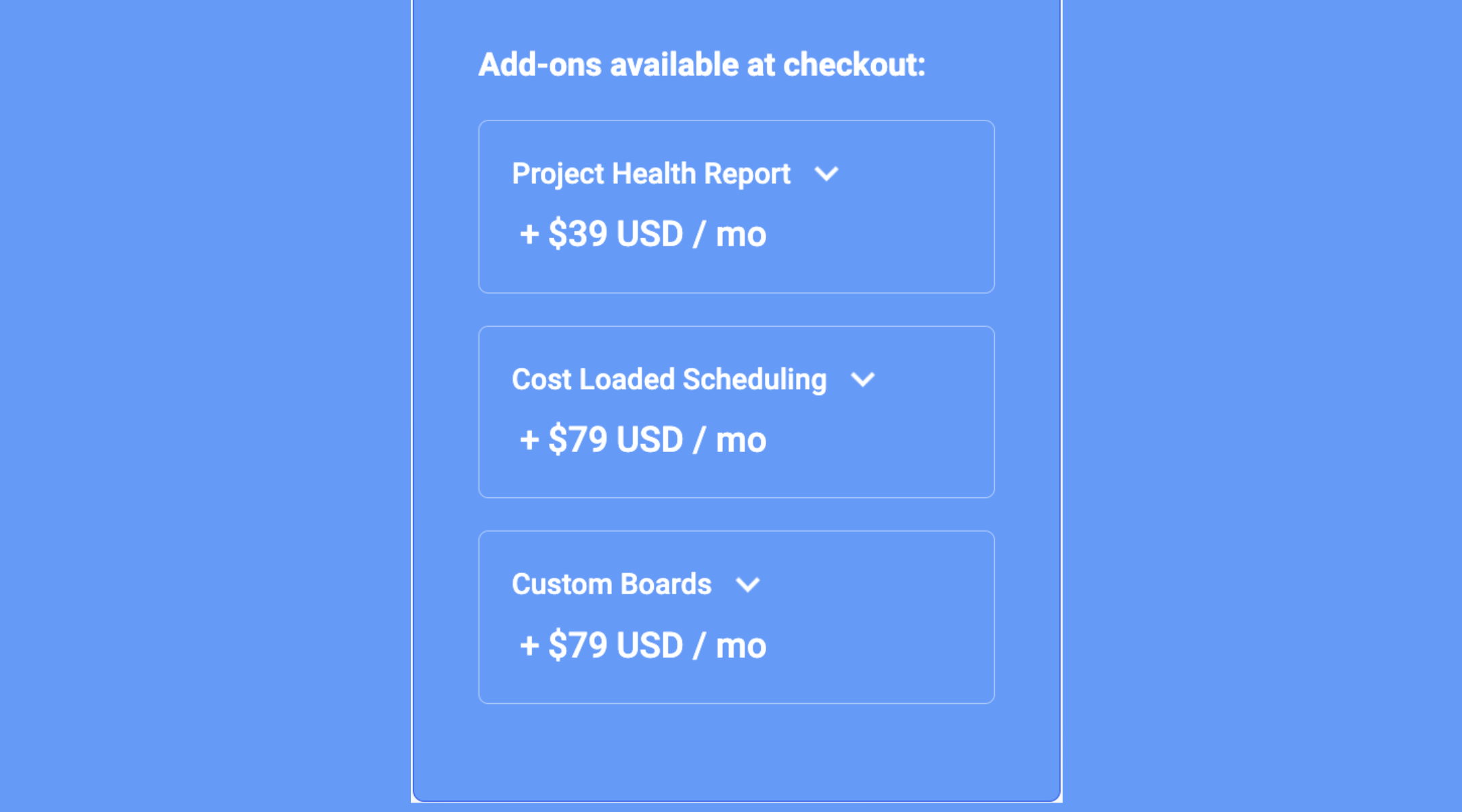
Imagesource: teamgantt.com
Explore another alternative with transparent pricing
When TeamGantt pricing makes sense, and when it doesn't
Understanding TeamGantt pricing helps teams decide whether the platform fits their needs and budget. While it excels at visual timeline planning, it may not be the best choice for all organizations.
When TeamGantt pricing makes sense
- Visual timeline planning: Ideal if your team's primary need is , providing explicit task dependencies and milestones.
- Small number of projects: Best for teams managing a limited number of projects with clearly defined timelines.
- Few project managers: Keep per-manager costs low when only a few people oversee projects.
- Minimal automation & reporting needs: Suitable if advanced reporting, automation, or deep collaboration aren't required.
- Focused scheduling tool: Works well when a dedicated scheduling platform is sufficient rather than a complete project management system.
When TeamGantt pricing may not be right
- Growing teams: Costs rise as you add more managers or collaborators.
- Need for flexible workflows: Limited if your team requires workflows beyond timelines and dependencies.
- Advanced features required: Custom boards, reporting, and analytics often require higher-tier plans or add-ons.
- Predictable pricing needed: Per-manager and add-on fees can make costs unpredictable.
- All-in-one management: Not ideal if you want a single platform for planning, execution, communication, and documentation.
In these scenarios, broader project management software like Lark often delivers better long-term value by combining timelines, collaboration, and automation without rising costs as teams scale.
Collaboration gaps not reflected in TeamGantt pricing
While TeamGantt excels at visual timeline planning, it has notable limitations in team collaboration.
- Limited : TeamGantt provides minimal options for real-time chat or discussion within projects. Teams often rely on external communication tools, which can slow down decision-making and create fragmented workflows.
- Separation between planning and discussion: Planning tasks and timelines in TeamGantt is separate from team discussions, making it harder to align execution with communication. Important context and decisions can get lost outside the platform.
- Lack of built-in : TeamGantt lacks native tools for documentation, file versioning, or knowledge management. Teams must integrate third-party solutions to track project documents effectively.
Because of these collaboration gaps, teams looking for all-in-one project management solutions may find platforms like Lark more effective. Lark combines timelines, task management, real-time communication, and documentation workflows in a single workspace, seamlessly bridging the gap between planning and execution.
Track tasks, deadlines, and milestones with ease
Introduce Lark: All-in-one workspace vs Gantt-only planning
While TeamGantt focuses primarily on Gantt chart-based timelines, many teams need more than just visual scheduling. Lark provides a complete workspace that combines project planning, task management, dashboards, and real-time collaboration. By integrating multiple views and communication tools, Lark ensures teams can plan, execute, and track projects efficiently. This makes it a strong alternative for teams outgrowing Gantt-only solutions.
Not just a scheduling hub, but a centralised project center
TeamGantt primarily serves as a scheduling hub, which mainly provides an interface for managing resources and visualizing the project's critical path. Unlike it, Lark functions as a centralized hub for projects and collaboration primarily through , a unified database platform. Base employs a structured organization where tables store all project data, which is detailed using various fields that teams can follow to receive timely notifications of like Person, Progress, and Link fields to track ownership and relationships. Individual project items are represented as records, which teams can follow to receive timely notifications on any changes. Furthermore, Base use powerful workflow feature to connect project status changes with actions across the Lark suite, such as sending messages or creating tasks, making it a cohesive command center for all work. This structure ensures all collaboration, communication, and project data are cohesive and accessible in one place. 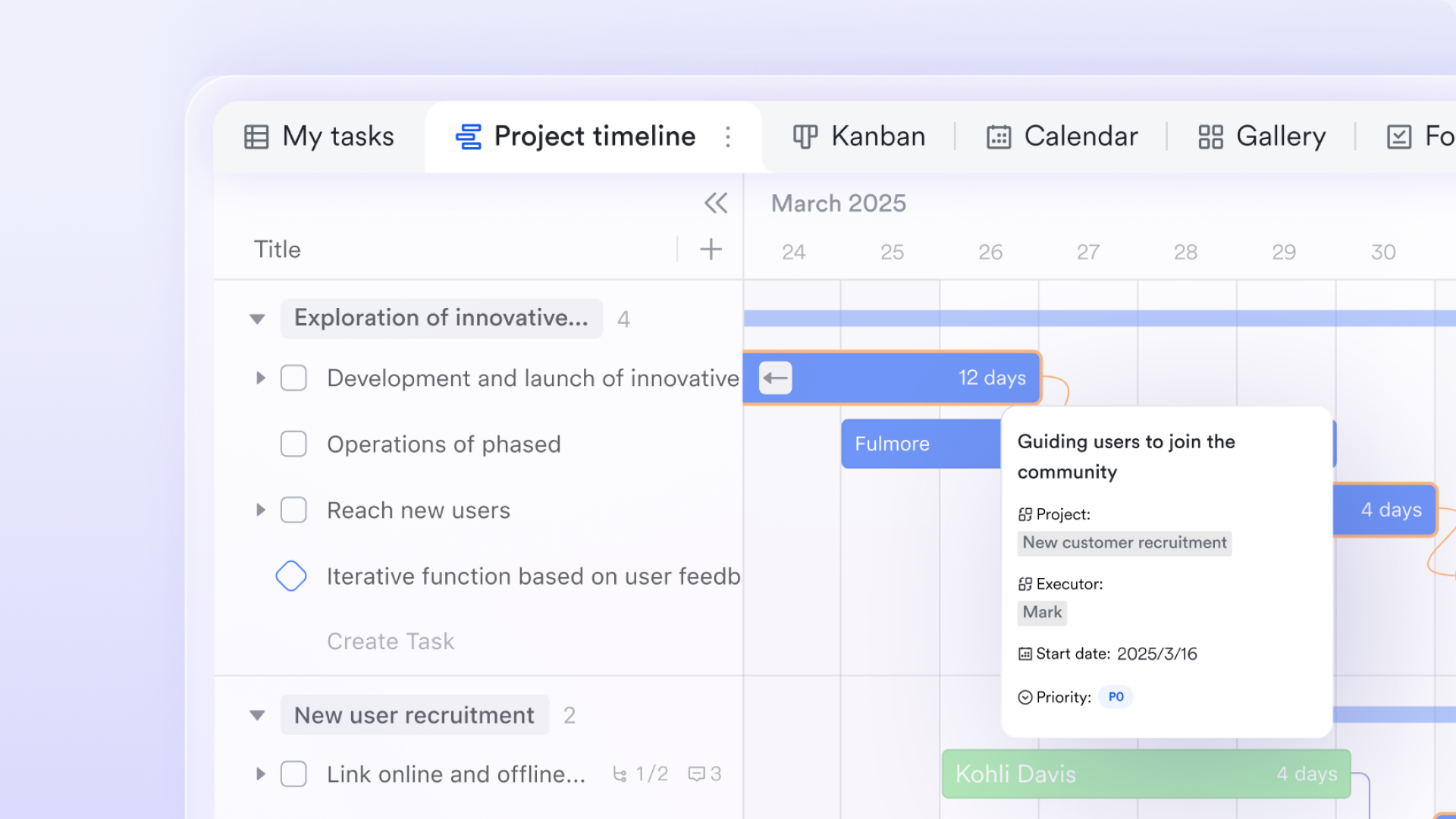
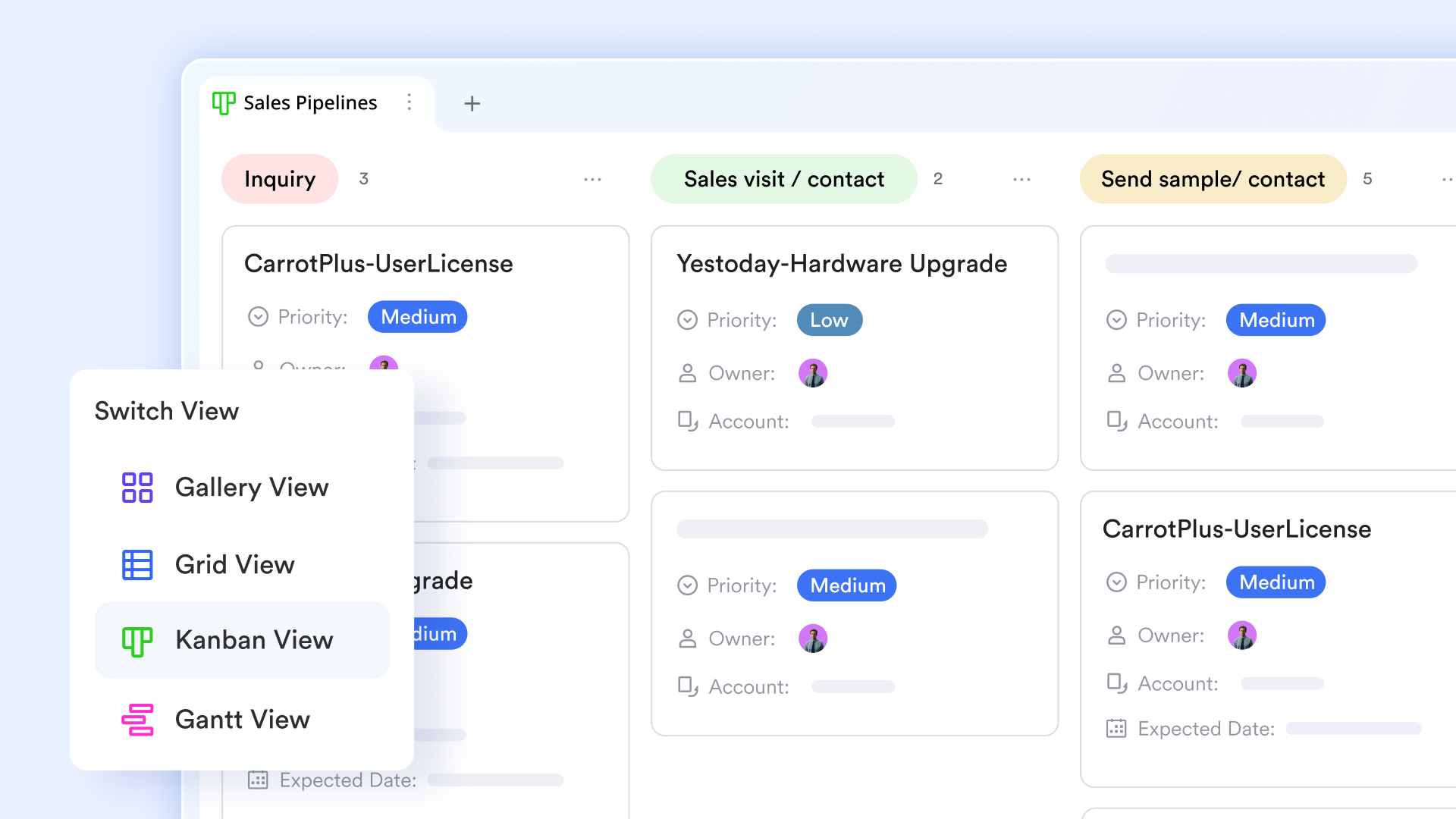
Multiple choices of views without add-ons or plan restrictions
One of TeamGantt's limitations is that advanced capabilities, such as custom boards, health reporting, or cost-loaded scheduling, are locked behind higher tiers or paid add-ons. Lark Base includes multiple views (Gantt, calendar, grid, form) by default, allowing teams to adapt how they visualize and manage work without upgrading to a paid plan. Teams can group, filter, and , tailoring views for project managers, contributors, or executives. This flexibility allows Lark to scale from simple timelines to complex project ecosystems without forcing teams to upgrade to costly plans.
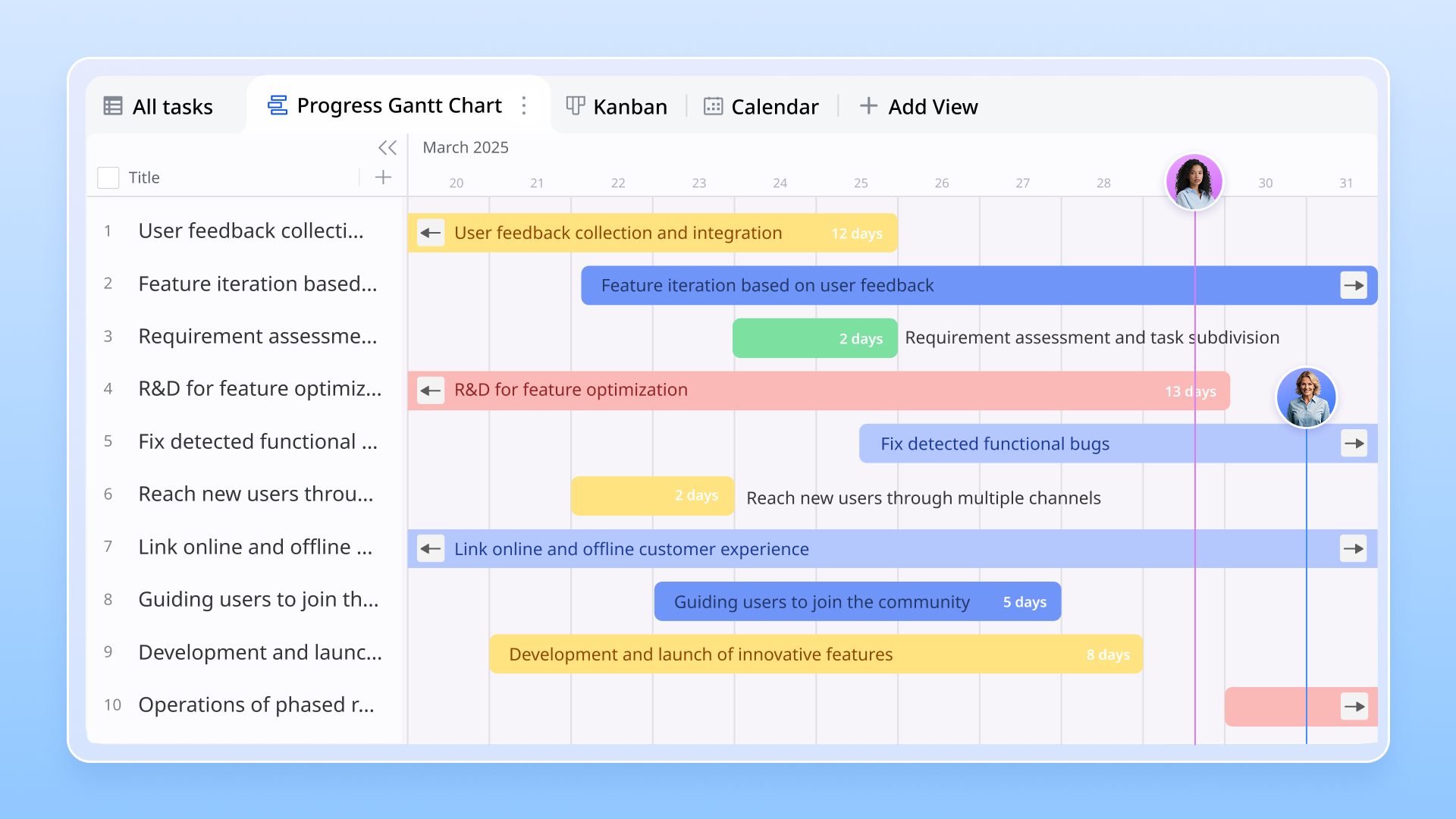
Gantt view planning beyond TeamGantt timelines
TeamGantt is built primarily around Gantt charts, but its timelines are largely fixed to predefined project structures. Lark Base's Gantt view offers a more flexible and data-driven approach to timeline planning. Time bars are automatically generated from date fields or formula-based date fields, allowing teams to visualize schedules without manual setup. Unlike static Gantt tools, changes made by dragging time bars instantly update across all other views, keeping schedules, tables, and calendars in sync. Lark Base also provides advanced visual controls that TeamGantt lacks. Teams can customize time bar colors to reflect task status, priority, or categories, making complex schedules easier to read at a glance. Working days can be configured to exclude weekends or custom non-working dates, giving a more realistic view of project duration. Milestones can be added directly to the timeline, helping teams track critical delivery points without creating separate task layers. This makes Lark's Gantt view not just a planning tool, but a live execution layer connected to real project data.
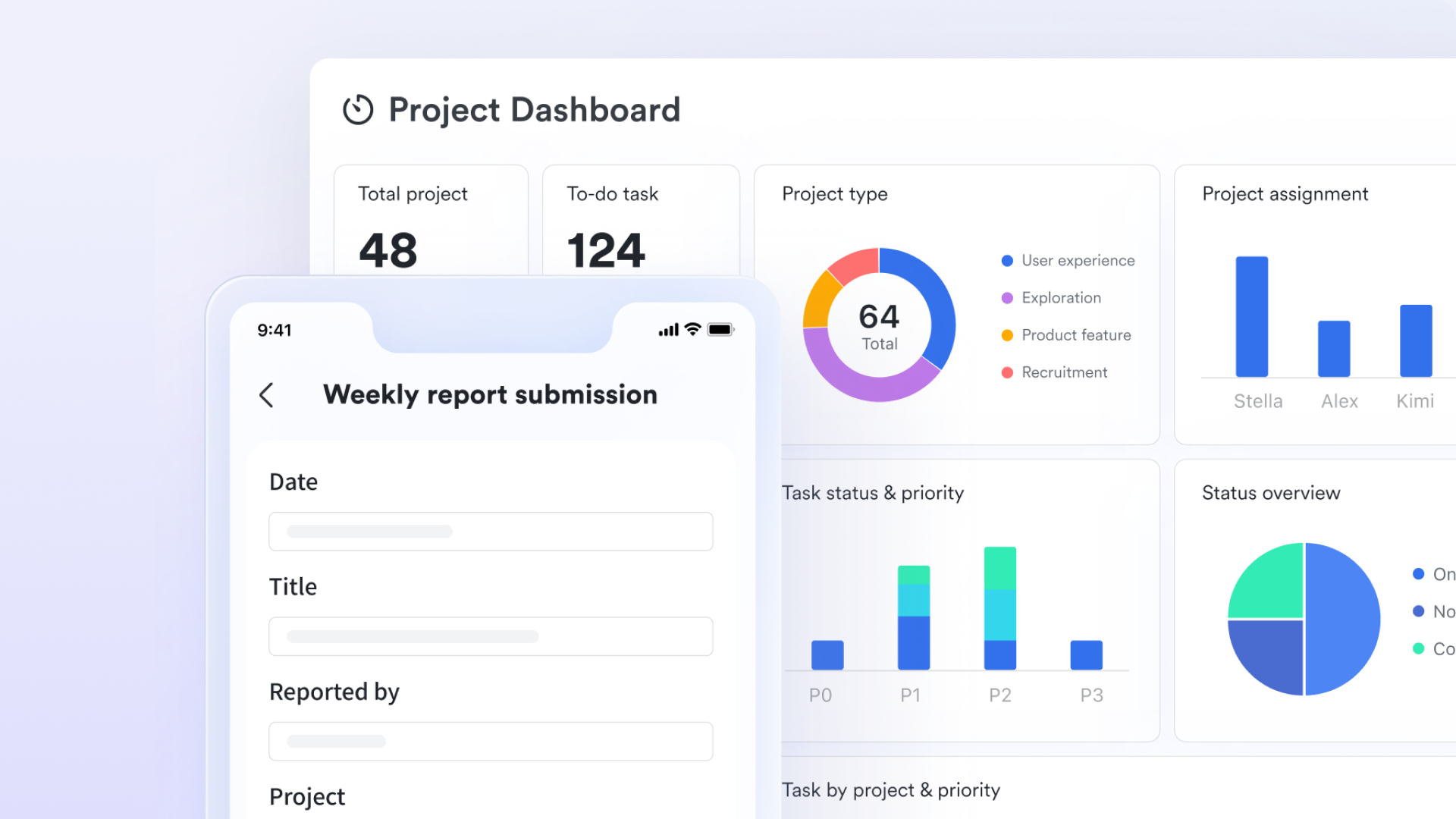
Real-time dashboards for project visibility
While TeamGantt focuses on visual schedules, it offers limited real-time analytics unless teams upgrade or add extra reports. Lark Base dashboards provide a centralized view of project health using live data from tasks, timelines, and records. Teams can build dashboards with progress charts, workload summaries, countdowns, and metrics that update automatically as data changes. Unlike timeline-only reporting, Lark dashboards allow stakeholders to monitor risks, delays, and workload distribution across multiple projects without exporting data. This turns into a continuous, real-time process rather than a snapshot-based review, improving long-term visibility and decision-making.
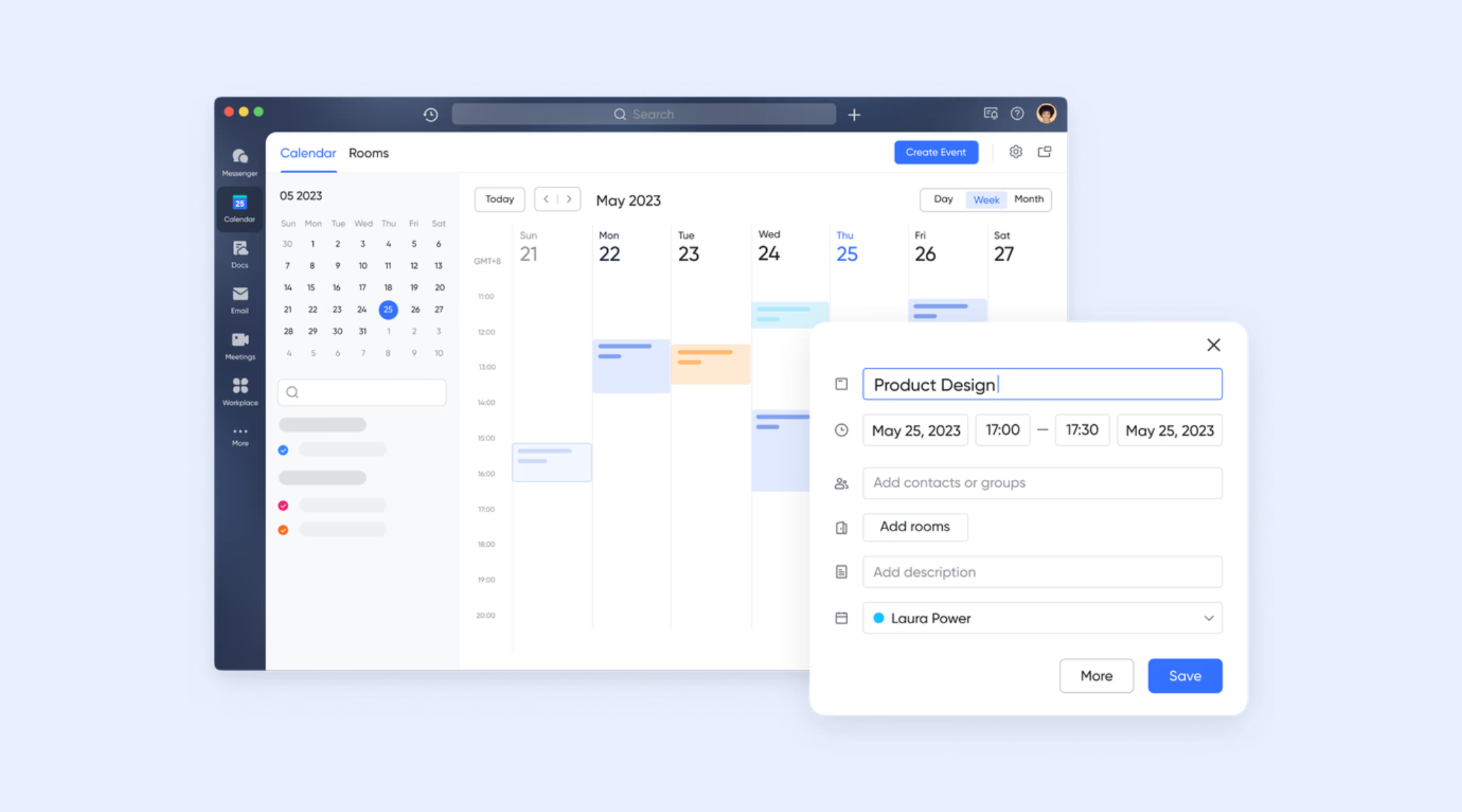
Built-in calendar for more powerful schedule coordination
TeamGantt includes basic calendar views tied to project timelines, but they remain limited to scheduling context. Differently, is a robust scheduling and time management tool designed for seamless team coordination. Its key feature for cross-team alignment is the ability to instantly check the availability of individual members or entire group chats when creating an event, ensuring meetings are scheduled at the optimal time for all participants. Additionally, features like public calendars promote organizational transparency, and you can prepare a meeting group directly from the calendar event. This enables teams to coordinate work across departments, align delivery dates with availability, and avoid scheduling conflicts, without switching tools or duplicating data. For growing teams managing overlapping projects, this unified scheduling approach offers far more flexibility than standalone Gantt calendars.
Task execution and ownership with Lark Tasks
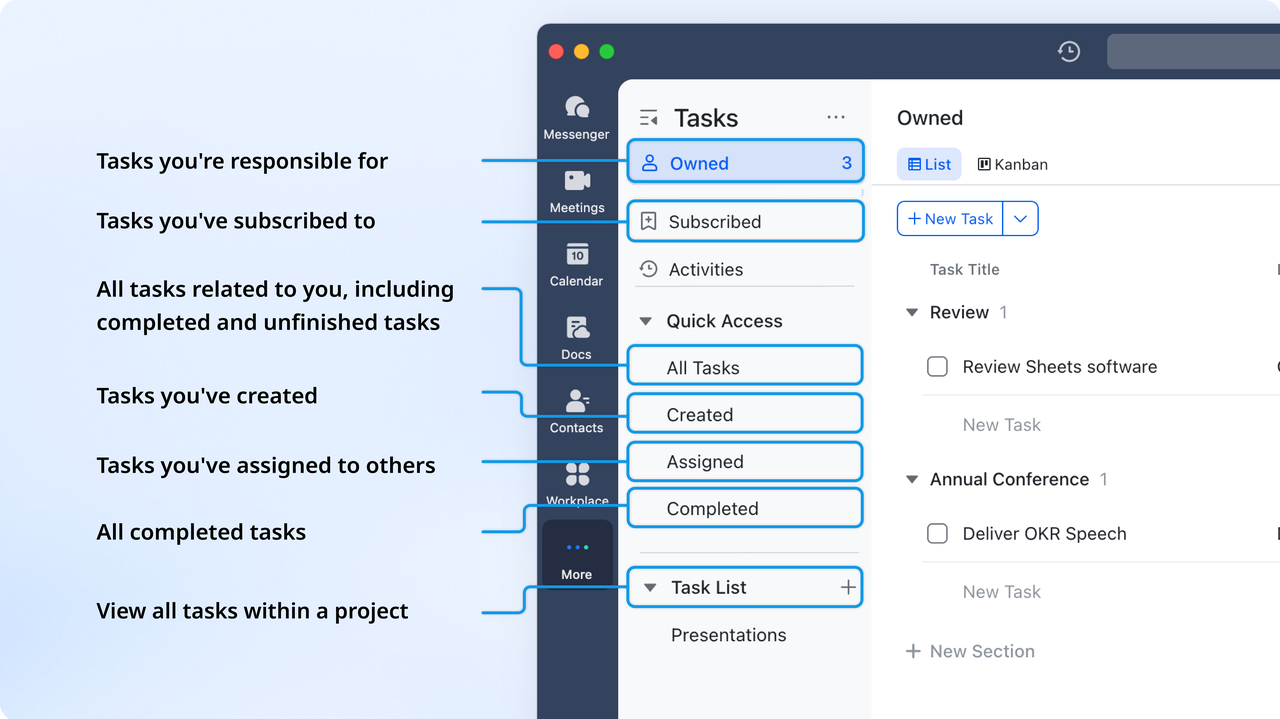
TeamGantt excels at showing when work should happen, but task ownership and execution often feel secondary to the timeline. Lark Tasks shifts focus from just planning to accountability. Every task has a clear owner, priority, and deadline, and can be linked directly to records in Lark Base. As tasks progress, updates are automatically reflected across , dashboards, and calendars. Notifications keep stakeholders informed when deadlines approach or when tasks are blocked. This ensures timelines don't exist in isolation but are actively driven by execution, reducing the gap between planning and delivery that many Gantt-only tools struggle with.
:
- Starter plan: Unlike TeamGantt, Lark offers its free forever plan that includes 11 powerful tools for up to 20 users. It also comes with 100GB of storage, 1000 automation runs, AI translations, and more.
- Basic plan: Different from the high price of the TeamGantt Pro plan, at $ 49/user/month, the Lark Basic plan is priced at $6/user/month (billed annually) for up to 500 users. It includes everything in Starter plus group calling for up to 500 attendees, 5TB of storage, 1000 automation runs, and more. For more details, please .
- Pro plan: Lark Pro plan has a transparent tier: $12/user/month (billed annually) for up to 500 users. It includes everything in Basic plus group calling for up to 500 attendees, 15TB of storage, 50,000 automation runs, and more.
- Enterprise plan: for custom pricing. Supports unlimited users and includes even more automation runs and advanced security, compliance, and management features.
For small teams with simple communication needs

18 months message history
1000 Base automation runs/month
2000 rows per table in Base
Most POPULAR
For companies with comprehensive collaboration and management needs
Unlimited message history
500-participant video meetings
50k Base automation runs/month
20k rows per table in Base
For large companies with advanced security and organizational management needs
Get a personalized demo and pricing
Unlimited message history
500-participant video meetings
15 TB storage + 30 GB storage/user
500k Base automation runs/month
50k Base automation runs/month
Most POPULAR
For companies with comprehensive collaboration and management needs
Unlimited message history
500-participant video meetings
50k Base automation runs/month
20k rows per table in Base
TeamGantt vs Lark: Pricing transparency and long-term ROI
Comparing TeamGantt pricing with an all-in-one workspace highlights differences in cost, features, and scalability. While TeamGantt charges per manager with add-ons, comprehensive platforms offer predictable per-user pricing and built-in tools. Understanding these differences helps teams evaluate long-term ROI and choose a solution that scales efficiently with growth.
Final verdict: Which tool is best for you?
TeamGantt is best for dedicated project managers and specialized firms—such as construction, engineering, and creative agencies—who require highly refined, interactive Gantt charts as their primary workspace. Its intuitive drag-and-drop interface is specifically designed for users who need to manage complex dependencies, baselines, and resource scheduling with precision. It excels for those who prioritize a visual "timeline-first" approach and need professional, print-ready reports to share with external clients.
Lark is best for for high-growth, tech-forward SMBs and frontline industries (like retail or manufacturing) that want a unified business ecosystem rather than a standalone tool. Since you use annual pricing, Lark's all-in-one model provides exceptional value by combining Gantt charts and project tracking directly with team chat, video meetings, and documentation for a predictable $12/user/year fee. It is ideal for teams that want to eliminate "tool sprawl" and ensure that project updates and communication happen in one continuous, mobile-friendly flow.
Conclusion
TeamGantt pricing is well-suited for teams that need focused, visual timeline planning with Gantt charts. Its Pro, Unlimited Everything, and Construction Edition plans provide flexibility, but costs can rise quickly with additional managers, collaborators, or add-ons. While it excels at scheduling and task tracking, limitations in collaboration, reporting, and workflow customization may make it less ideal for growing teams or those seeking an all-in-one solution.
For organizations that want predictable pricing, robust automation, and seamless project management across timelines, tasks, dashboards, and communication, offers a comprehensive alternative that combines planning and execution in a single, scalable workspace.
Manage timelines and tasks efficiently
FAQs
Does TeamGantt pricing increase as projects grow in size or complexity?
Yes, TeamGantt pricing plans are largely per-manager and may include additional fees for collaborators. As projects grow in size or complexity, teams may need extra features or add-ons, which increase costs. Unlike platforms with predictable per-user pricing, TeamGantt's structure means that TeamGantt features pricing can rise significantly as teams expand.
Can TeamGantt replace full project management software for teams?
While TeamGantt is excellent for , it cannot fully replace comprehensive project management platforms. It lacks native workflows, deep collaboration, and advanced reporting. Teams relying on TeamGantt features pricing for Gantt charts may still need other tools for communication, documentation, and automation. For full-scale management, all-in-one solutions are often better.
What happens when teams outgrow Gantt-only planning?
When teams outgrow Gantt-only planning, they face limitations in workflow flexibility, collaboration, and . TeamGantt pricing plans may become cost-prohibitive as add-ons and extra collaborators are needed. Teams often need platforms that combine timelines, dashboards, and tasks, as relying solely on TeamGantt charts restricts efficiency and overall project visibility.
Are there better free alternatives to TeamGantt for collaboration?
Yes, for smaller teams or limited budgets, TeamGantt free plan pricing provides basic functionality but may fall short in collaboration. Alternatives like Trello or Lark offer free plans with boards, tasks, and communication tools. Comparing TeamGantt Trello pricing and TeamGantt pricing free plan can help teams find cost-effective solutions for project tracking without recurring fees.
How does TeamGantt pricing compare long-term with all-in-one tools?
Long-term, TeamGantt pricing features can become expensive as teams grow due to per-manager fees and add-ons. All-in-one platforms provide broader functionality, such as dashboards, calendars, automation, and communication, often at predictable per-user costs. Considering TeamGantt free plan pricing versus comprehensive solutions highlights potential ROI differences and the benefits of integrated project management.
Related reading






























