Choosing a CRM for B2B SaaS sales teams is no longer just about tracking deals but about supporting how sales teams execute work every day. As interest in a detailed close crm review continues to grow, many SaaS leaders are evaluating whether Close CRM fits their outbound-heavy workflows and fast sales cycles. Close positions itself as a sales-first CRM optimized for calling, outreach, and speed rather than cross-team coordination. This guide examines how Close CRM performs across features, pricing, usability, and scalability, while briefly acknowledging why some teams later explore broader execution platforms like Lark.
What is Close CRM?
Close CRM is a sales-focused built primarily for outbound and high-velocity sales teams. It centralizes calling, email, SMS, and into a single interface designed to keep sales reps productive. Close is widely adopted by B2B SaaS companies that rely on SDR and AE teams to drive pipelines through proactive outreach. Its design emphasizes speed, simplicity, and daily execution inside the sales workflow.
Unlike traditional CRMs that support many departments, Close CRM is intentionally built for sales-only use cases. Leads, deals, and activities are structured to minimize friction during outreach. This focus makes Close effective for specific sales motions, while also shaping its limitations as teams expand beyond pure selling.
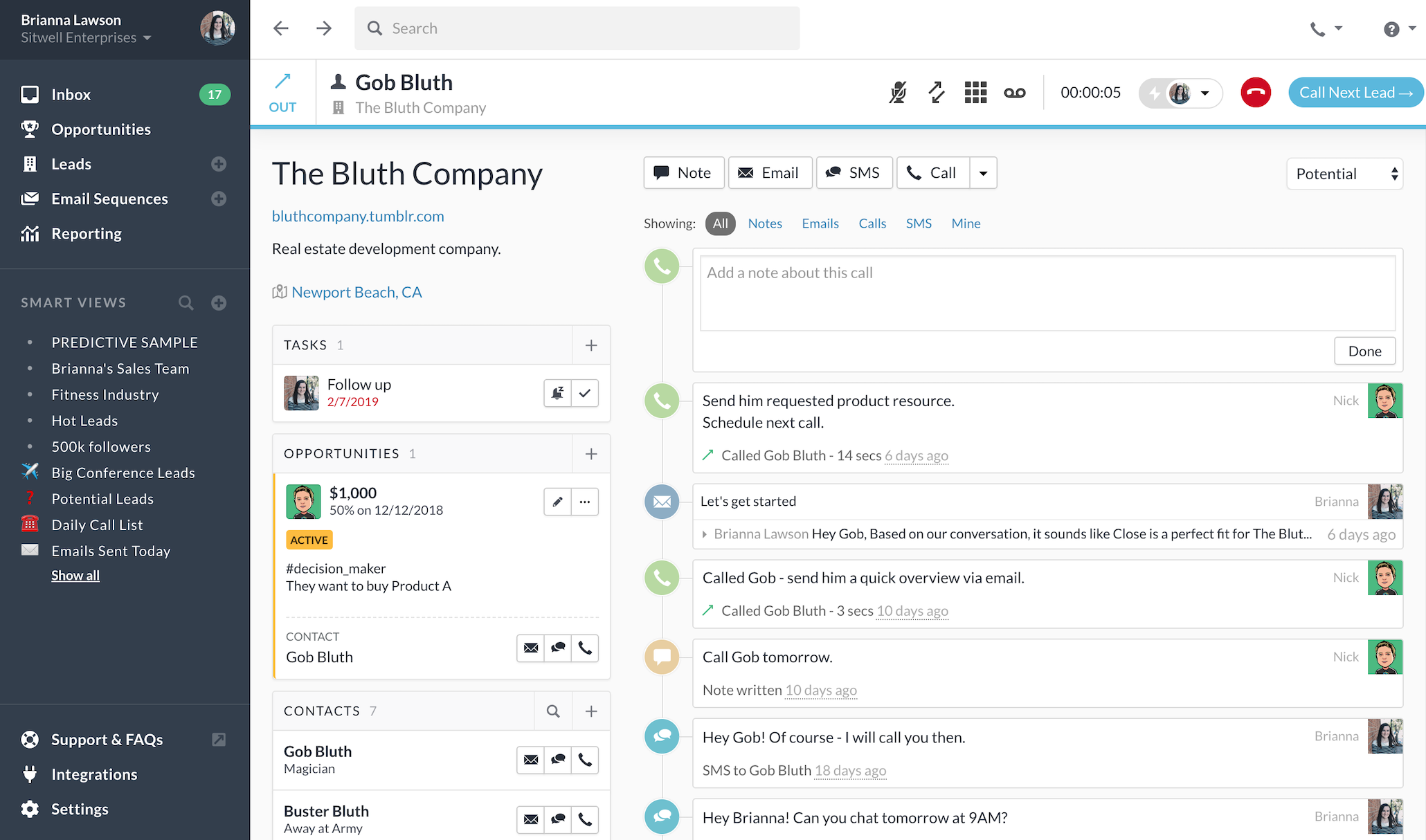
Image source: close.com
Close CRM features that sales teams rely on
Close CRM includes a tightly combined feature set designed to support outbound sales execution. These features aim to reduce context switching and keep reps focused on calling, emailing, and moving deals forward. While the platform excels in communication-heavy workflows, its feature scope reflects a deliberate emphasis on sales speed rather than broader execution.
- Built-in calling with power dialer, call recording, and call coaching tools: Calling is one of Close CRM's strongest features, with native dialers built directly into the platform. Sales reps can place calls, record conversations, and review call outcomes without switching tools. Power dialers help teams move through call lists efficiently, while call coaching supports . This setup is ideal for outbound teams that rely heavily on phone-based selling.
- Native email and SMS workflows that keep all outreach in one place: Close CRM supports native email and SMS workflows that centralize outreach activity. Sales reps can send emails, follow up via SMS, and track responses directly within deal records. This unified communication view reduces manual logging and keeps engagement history complete. Teams that also engage prospects on WhatsApp can use a to keep those conversations connected to deal context. For high-touch outreach, this setup improves speed and consistency.
- Sales-focused pipeline views designed for fast deal movement: Pipelines in Close CRM are optimized for speed, with clear stages and minimal configuration. Deals can be moved quickly as conversations progress. This simplicity helps reps stay focused on closing rather than managing system complexity. However, pipeline movement often relies on manual updates rather than execution signals.
- Activity timelines that show every call, email, and touchpoint clearly: Close CRM provides detailed activity timelines that display every interaction tied to a lead or deal. Calls, emails, and notes are visible in one chronological view. This helps reps quickly understand engagement history before outreach. While visibility is strong, timelines focus on past activity more than future execution.
- Automation for follow-ups, reminders, and task creation: Automation in Close CRM supports common sales actions such as reminders and follow-up tasks. These automations help ensure reps do not forget the next steps after conversations. For outbound workflows, this reduces missed opportunities. Automation remains focused on sales actions rather than broader workflows.
- Real-time reporting on calls, emails, and sales activity: Close CRM includes r that track call volume, email activity, and sales performance. Managers can monitor rep output and outreach effectiveness in real time. These reports are useful for optimizing sales motions. Deeper may require additional tools.
- Designed for outbound and high-velocity sales teams: The platform is clearly designed for outbound-heavy teams that prioritize speed and volume. SDRs and AEs benefit from a workflow that minimizes friction. This focus makes Close CRM a strong fit for specific sales motions. Teams with different selling styles may find it limiting.
- Clean, fast interface optimized for daily sales execution: Close CRM's interface is clean and responsive, making it easy for reps to work quickly throughout the day. Navigation is straightforward, and key actions are always accessible. This contributes to high adoption among sales teams. Customization options remain intentionally limited.
Close CRM pricing is briefly explained
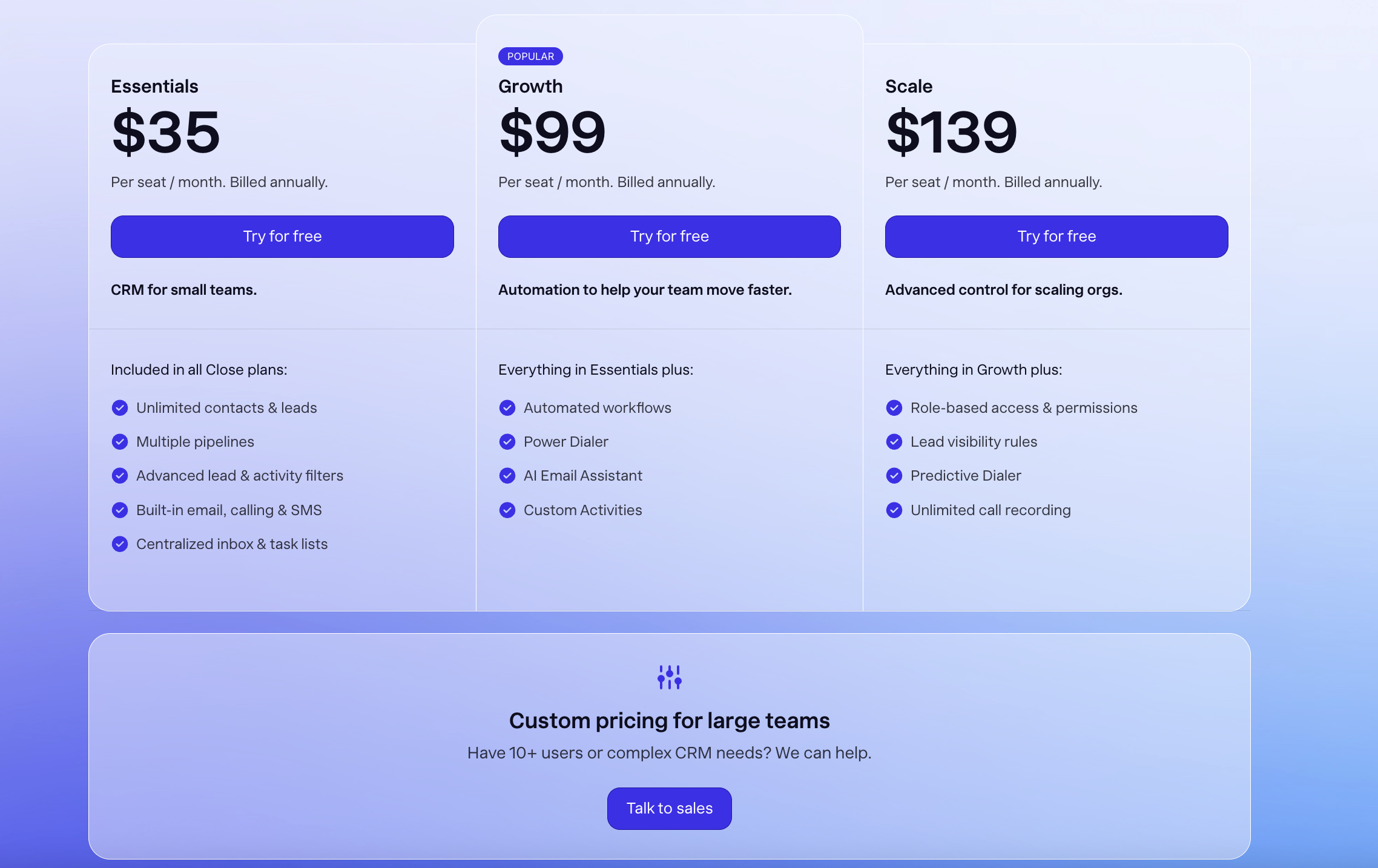
Understanding Close CRM pricing is essential for B2B SaaS teams planning long-term growth. Pricing is structured by plan, with higher tiers unlocking more , dialing power, and administrative control. This approach aligns cost with sales acceleration needs, but expenses can rise quickly as teams scale.
Information source: close.com
Update time: 2025-12-17
Note: Pricing and plan details reflect publicly available data as of the update date and may vary based on region, billing cycle, and number of agents.
Strengths that make Close CRM stand out
Close CRM stands out by focusing heavily on the daily realities of outbound sales work. Its design prioritizes speed, communication, and ease of execution for sales reps who spend most of their time engaging prospects. Rather than trying to serve every department, Close concentrates on helping sales teams move faster and stay focused. This makes it especially appealing for organizations with clear, .
- Built-in calling and communication focus: Close CRM's built-in calling, email, and SMS tools allow sales reps to manage outreach without leaving the platform. Calls can be placed, recorded, and reviewed directly from lead and deal records. This tight combination reduces context switching and keeps activity history centralized. For outbound teams that rely on high call volume, this focus significantly improves daily efficiency.
- Speed for outbound sales motions: The platform is optimized for fast-paced outbound sales motions where timing and volume matter. Features like power dialers, quick lead navigation, and streamlined pipelines help reps move through prospects efficiently. This speed supports rapid experimentation with messaging and outreach strategies. Sales teams operating in competitive markets often value this responsiveness.
- Clean experience for sales-only teams: Close CRM offers a clean and uncluttered interface that avoids unnecessary features. Sales reps can focus on deals, conversations, and follow-ups without distractions. The simplicity of the interface supports quick and consistent usage. For teams that want a CRM dedicated solely to sales execution, this focused experience is a strong advantage.
Where Close CRM starts to feel limiting
As teams grow and become more interconnected, some limitations of Close CRM become more apparent. The platform's sales-first design can make it harder to support execution beyond outreach. These constraints are most noticeable when coordination and ownership extend beyond individual reps. Understanding these gaps helps teams evaluate long-term fit.
- Execution gaps beyond calling and deals: While Close CRM excels at managing calls and deals, it offers limited support for execution after conversations take place. Tasks, documents, and are not deeply tied to dealing with progress. This can lead to reliance on manual tracking and external tools. As deal complexity increases, execution gaps become harder to manage.
- Weak connection between conversations and next steps: Close CRM captures conversation history effectively, but does not always enforce structured follow-through. Notes and reminders depend on individual discipline rather than system-driven accountability. Managers may find it difficult to see whether the next steps are progressing. This weak linkage can affect consistency at scale.
- Limited support for cross-functional work: The platform is primarily designed for sales teams, with limited visibility for marketing, operations, or customer success. Cross-functional handoffs often occur outside the CRM. This separation can slow coordination and reduce shared understanding. Teams that require tight may encounter friction over time.
Explore execution beyond outbound sales
From outreach to ownership: Why teams choose Lark
As mature, success increasingly depends on what happens after outreach is complete. Calls, , and emails create opportunities, but ownership, follow-ups, and coordination determine outcomes. Teams often begin looking for that connect sales activity with real execution. This shift is where Lark starts to enter the conversation as a broader workspace rather than a traditional CRM.
Input and manage data, create lists, and track status
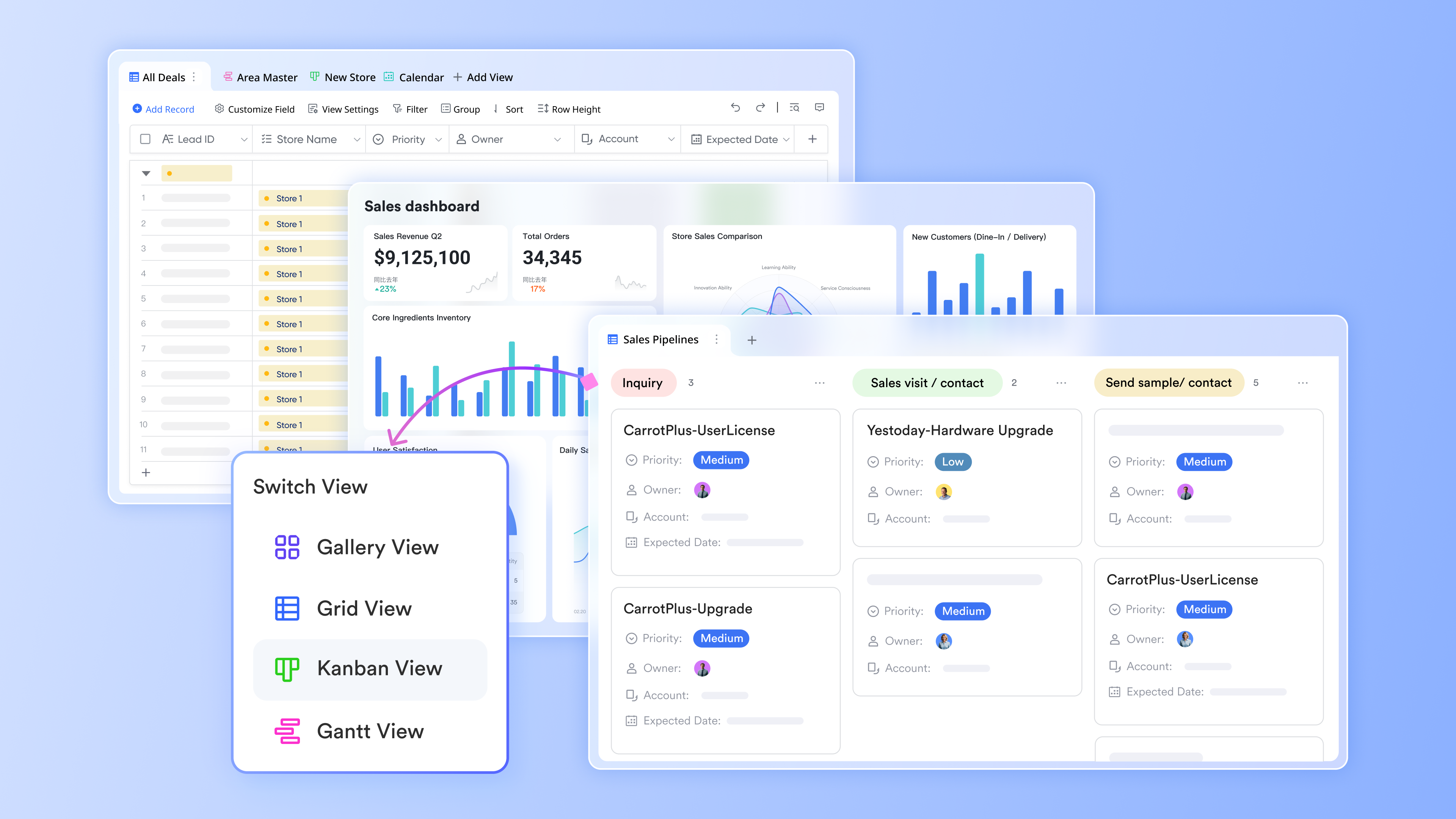
allows teams to input and using flexible tables. Each record can represent a lead, account, task, or activity, with status, owner, and due dates tracked in real time. Lists update instantly as data changes, ensuring everyone sees the latest information. You can also visualize data in various views (Kanban, grid, Gantt, gallery) for a clear view of how data displays. This makes Lark effective for managing both CRM data and the sales processes in one place.
Internal reports and dashboards with charts and graphs
Lark Base dashboards turn raw CRM and execution data into live visual reports using charts, metrics, and ranking blocks that update automatically as records change. Teams can track pipeline health alongside task completion, approvals, and goal progress in one view, not just sales activity. Unlike Close CRM, which focuses mainly on outreach metrics such as calls and emails, Lark shows whether real work is getting done behind each deal. Leaders can monitor performance by team, region, or owner without exporting data or building external reports. This gives decision-makers visibility into execution quality, not just sales volume. 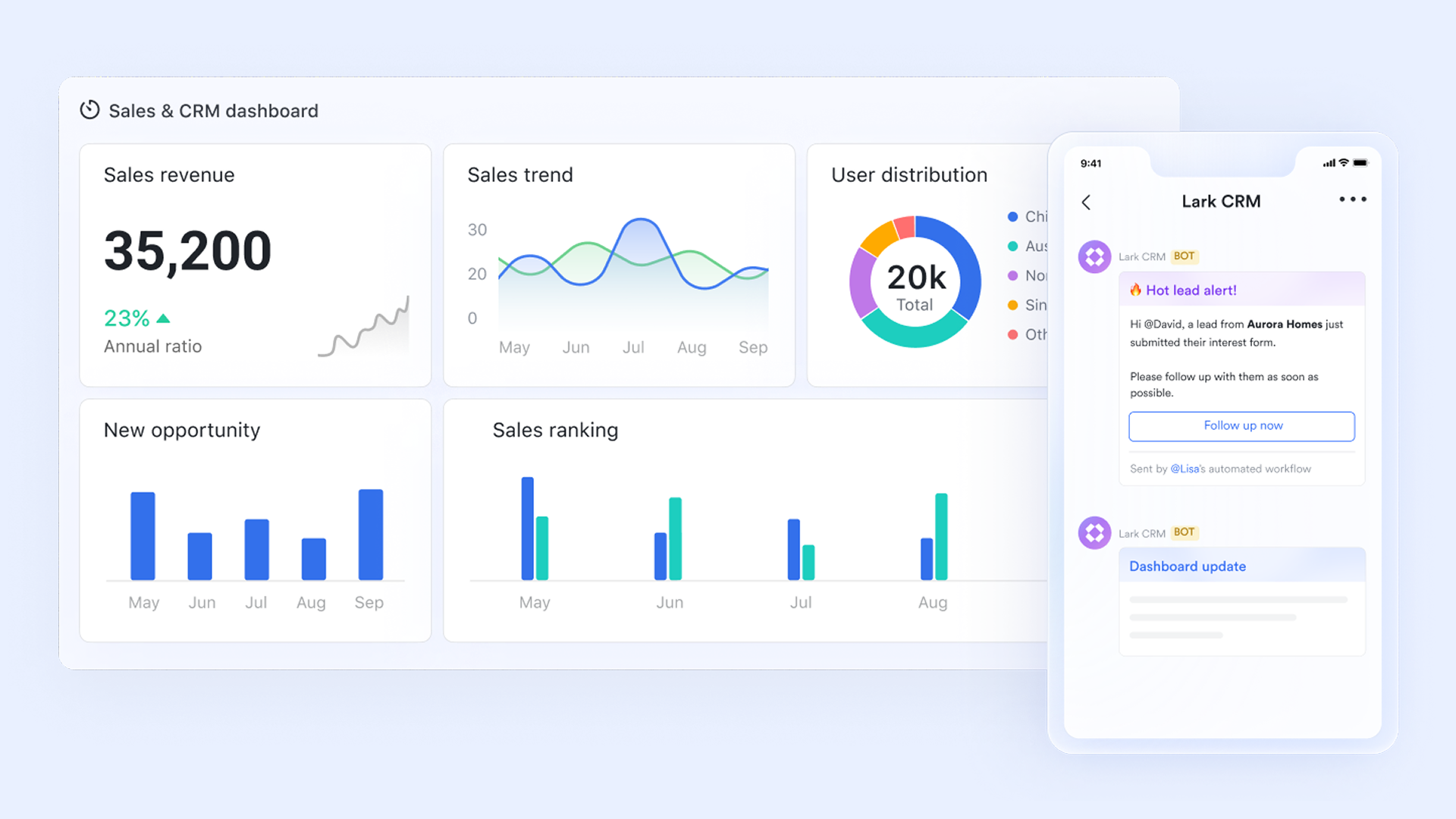
Execution-driven automation beyond sales follow-ups
Workflow automation mainly supports sales actions such as follow-up reminders, emails, and deal updates. automation is triggered by real execution signals like task completion, status changes, and approvals. When a deal progresses, Lark can automatically assign onboarding tasks, notify operations, and update customer records. This ensures handoffs happen consistently without manual coordination. As deal volume grows, teams scale execution without increasing operational effort. 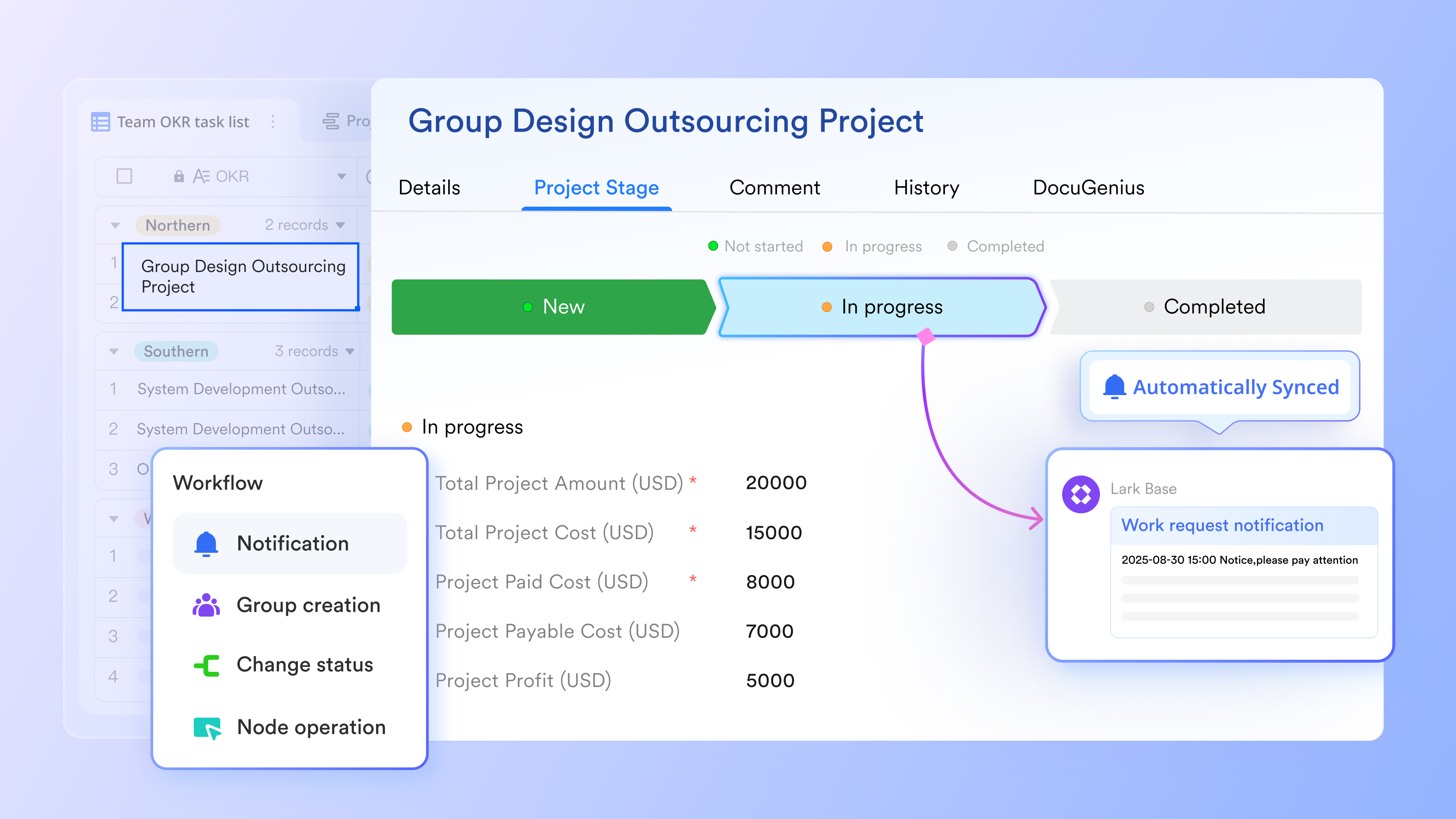
CRM control and tracking, including OKR and goals
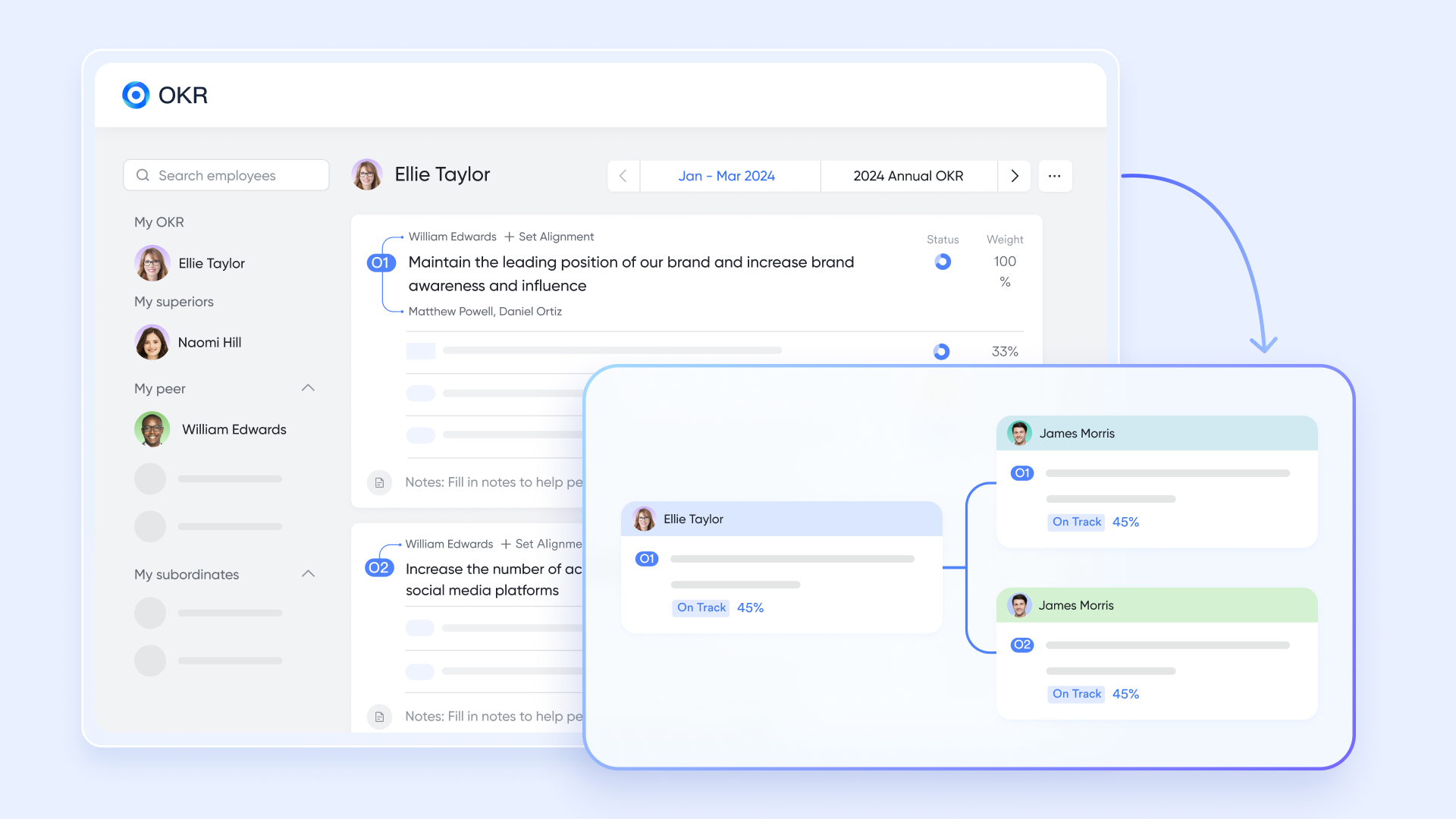
enhances your CRM by connecting high-level business goals directly to daily sales activities, ensuring every lead managed in the CRM contributes to strategic growth. By collaborating with Lark Base automation, key results can automatically update your progress in Progress Settings, so that closing a deal or hitting a revenue target updates your in real-time. This eliminates manual reporting and provides the sales team with a transparent, unified view of how their customer interactions drive the company's overall success.
Close communication supports smooth sales cycles
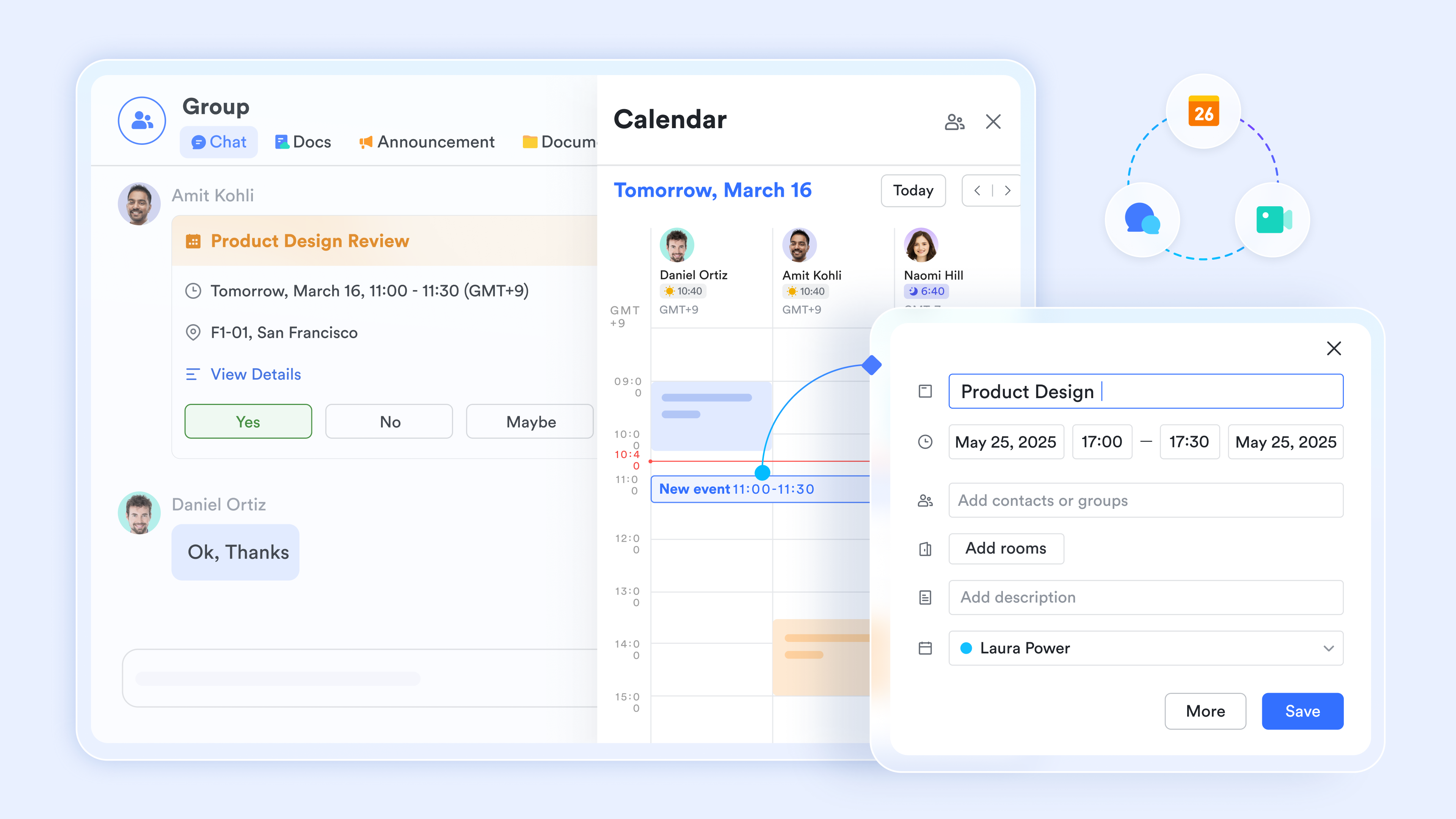
Lark transforms CRM workflows by co-working , , and into a unified communication hub. You can schedule client calls directly in a chat by clicking the Calendar icon to view availability, or launch instant voice and video meetings for immediate discussions. With Calendar sync for Google and Outlook, external customer schedules are centralized, while automatic group chat creation after meetings ensures seamless follow-up with all stakeholders. Furthermore, real-time Messenger notifications for document interactions keep your team aligned on every client proposal without leaving the conversation.
:
- Starter plan: Free forever plan that includes 11 powerful tools for up to 20 users. It also comes with 100GB of storage, 1000 automation runs, AI translations, and more.
- Basic plan: $6/user/month (billed annually) for up to 500 users. It includes everything in Starter plus group calling for up to 500 attendees, 5TB of storage, 1000 automation runs, and more. For more details, please .
- Pro plan: $12/user/month (billed annually) for up to 500 users. It includes everything in Basic plus group calling for up to 500 attendees, 15TB of storage, 50,000 automation runs, and more.
- Enterprise plan: for custom pricing. Supports unlimited users and includes even more automation runs and advanced security, compliance, and management features.
For small teams with simple communication needs

18 months message history
1000 Base automation runs/month
2000 rows per table in Base
Most POPULAR
For companies with comprehensive collaboration and management needs
Unlimited message history
500-participant video meetings
50k Base automation runs/month
20k rows per table in Base
For large companies with advanced security and organizational management needs
Get a personalized demo and pricing
Unlimited message history
500-participant video meetings
15 TB storage + 30 GB storage/user
500k Base automation runs/month
50k Base automation runs/month
Most POPULAR
For companies with comprehensive collaboration and management needs
Unlimited message history
500-participant video meetings
50k Base automation runs/month
20k rows per table in Base
Close CRM vs Lark: Calling power vs execution clarity
Close are built around different priorities that reflect how teams approach sales work. Close emphasizes speed and efficiency for outbound calling and deal movement. Lark focuses on execution clarity by connecting with tasks, communication, and collaboration. Understanding this distinction helps teams choose a platform that aligns with both their current workflow and future growth.
When to choose Close CRM
Choose Close CRM if your sales motion is heavily outbound and calling-driven, and your team lives inside the dialer all day. It's a strong fit for SDR-and AE-led teams that prioritize call volume, speed, and simple pipelines over .
When to choose Lark
Choose Lark if your sales process extends beyond calls into proposals, handoffs, follow-ups, and coordination with marketing or operations. Lark is better suited for teams that need sales execution, , documents, and accountability to live in one connected workspace as they scale.
Conclusion
Close CRM delivers strong value for that rely on outbound calling and fast deal movement. Its built-in communication tools and clean interface support high-velocity sales execution without unnecessary complexity. For sales-only teams focused on outreach volume, Close CRM remains a powerful option.
As organizations grow, sales success increasingly depends on what happens after calls end. Ownership, follow-through, and collaboration become just as important as outreach. At this stage, teams often explore platforms like that connect customer data with tasks, documents, and communication in one place. Choosing a system that supports both speed and execution can shape long-term success.
Build execution clarity across teams
FAQs
Is Close CRM only suitable for outbound sales teams?
Close CRM works best for teams that rely heavily on outbound calling and fast-moving . It supports high activity volume and keeps sales reps focused on conversations. As teams expand beyond pure outbound sales, coordination needs often increase. At that stage, some teams begin exploring workspaces like Lark to support broader execution.
How well does Close CRM work once teams grow beyond sales?
Close CRM becomes harder to use effectively when multiple need access to deal context. Marketing, operations, and customer success often operate outside the system. This can create visibility gaps and slower handoffs. Over time, teams may look toward platforms such as Lark that connect sales with cross-team execution.
What breaks first when deal volume increases?
As deal volume grows, follow-up and ownership tracking are usually the first challenges. Manual reminders may not scale, and execution gaps become more visible. Managers may struggle to see real progress across deals. These issues often lead teams to evaluate execution-focused tools like Lark.
What is Close CRM used for?
Close is a sales-focused designed to help small and mid-sized teams close deals faster. It integrates communication tools directly into the platform, allowing users to make calls, send emails, and text leads without leaving the app. It is primarily used by high-velocity sales teams that need to automate follow-ups and centralize their sales outreach.
How does Close CRM compare to Salesforce?
Close is built for simplicity and speed, offering a "out-of-the-box" experience that requires very little setup compared to Salesforce’s complex implementation. While Salesforce is an enterprise-level platform capable of managing every department in a massive company, Close focuses strictly on the sales process. For a smaller team, Close provides built-in calling and SMS features that would often require expensive third-party integrations in Salesforce.
Is Close CRM free?
Close does not offer a free-forever plan, but they do provide a 14-day free trial to test all features. Since you prefer annual pricing, you can save significantly: the Solo plan starts at $49/month (billed annually), whereas the month-to-month price is higher. This pricing model includes the core CRM features and communication tools needed for a single-person sales operation.
Related reading






























