














Guide to Sales Project Management: Streamline Your Sales Cycles

Ryan Tanner
Product Marketing Specialist
Sep 18, 2026
Ryan Tanner
Sep 18, 2026

15 min read


Managing sales like a project can dramatically shorten deal timelines, improve team coordination, and eliminate bottlenecks across the pipeline. This guide breaks down how structured sales project management helps teams plan better, track progress, and execute each stage of the sales cycle with more clarity and consistency. By applying sales project management principles, sales teams gain a repeatable process that reduces guesswork and boosts productivity. Tools like Lark can support organized workflows and collaboration—without promoting any specific platform—while helping teams stay aligned from lead generation to closing.

What is sales project management?
Sales project management is the practice of managing sales tracking using structured project management methods—breaking the sales cycle into clear tasks, timelines, and responsibilities. It helps teams track progress, coordinate follow-ups, and reduce delays at every stage of the pipeline. Many organizations use sales project management software to organize customer data analysis , automate tasks, and ensure each deal moves smoothly from lead to close.
Core components of sales project management
Strong sales management process execution depends on clear structure and alignment. Strong sales project management relies on structure, clarity and alignment across the entire sales process. When these core components are in place—and supported by resources from sales enablement teams—sales cycles become smoother, more predictable and easier to scale. Here's a closer look at the key elements that keep everything running efficiently:
- Task and activity planning: Breaks sales cycles into actionable steps with clear ownership. Sales cycles involve many moving parts, from prospecting to closing and onboarding. Breaking these into actionable steps gives reps a clear roadmap. Each task has a defined owner and purpose, which helps maintain steady progress and prevents important actions from being overlooked.
- Timeline control: Ensures follow-ups, proposals, and approvals stay on schedule. Timely follow-ups, proposal reviews and internal approvals are critical to keeping deals alive. With structured timelines, reps can stay ahead of deadlines, avoid long gaps in communication and maintain momentum throughout the sales cycle.
- Collaboration and communication: Keeps reps, managers, and cross-functional teams aligned. Sales rarely work in isolation. Reps need input from managers, marketing, product teams and customer success. A good project management approach ensures everyone stays aligned through shared updates, clear communication channels and real-time visibility into deal status.
- Resource allocation: Helps assign the right people, internal communication tools, and information to each deal. Deals move faster when the right people and information are available at the right moment. Project management helps teams assign resources such as subject matter experts, internal documents, pricing details or tools without confusion or delay.
- Documentation and knowledge access: Centralizes playbooks, templates, and customer data. Centralized playbooks, templates, past proposals and customer data make it easier for reps to work efficiently. Instead of searching through scattered files, they can access everything they need in one place, which improves accuracy and speeds up preparation.
- Reporting and performance monitoring: Tracks deal progress, bottlenecks, and rep productivity. Tracking deal progress and rep activity highlights what's working and what needs attention. Performance dashboards reveal bottlenecks, pipeline risks, and productivity trends. Using sales tracking software for small business helps managers monitor sales performance, coach reps more effectively, and improve forecasting with real-time insights.
The sales project lifecycle
Sales management follows a lifecycle that mirrors the stages of a deal rather than traditional project phases. This approach gives teams a clearer way to manage customer expectations, coordinate internal work and deliver consistent results. Each stage supports smoother collaboration and ensures both the customer and internal teams stay aligned from start to finish.
- Identify project-level work: Determine whether the opportunity requires structured tasks, cross-team input, or coordinated execution. Not every opportunity requires full project coordination, so the first step is understanding the complexity of the deal. This includes checking whether it needs structured tasks, input from multiple teams or a detailed execution plan. Deals with technical requirements, custom pricing or multi-step delivery often fall into this category.
- Gather requirements across teams: Collect customer needs, technical details, and stakeholder expectations. Once a deal qualifies as a project, the next step is collecting all the necessary details. This means gathering customer needs, technical specifications, security or compliance requirements and input from stakeholders like product, engineering or legal. Capturing this early prevents rework and keeps expectations clear.
- Define deliverables, timelines, customer expectations: Outline what will be delivered, by when, and under what conditions. A clear plan sets the tone for the entire sales process. This includes defining what will be delivered, when it will be completed and any conditions that need to be met along the way. Setting expectations upfront helps avoid misunderstandings and aligns internal and external teams on the same timeline.
- Internal + customer-facing work: Complete demos, proposals, reviews, and cross-team collaboration tasks. This stage covers all the activities that drive the deal forward. It typically includes demos, proposal creation, technical reviews, pricing approvals, risk assessments and collaboration across departments. Tight coordination ensures each step supports the customer's decision-making process.
- Check alignment with the deal plan: Ensure progress matches customer expectations and internal timelines. As work progresses, teams review the status to make sure it matches the customer's expectations and internal targets. This helps identify gaps early, adjust timelines if needed and keep the deal on track. Regular alignment checks reduce last-minute surprises and make the process more reliable.
- Final outputs (proposal, demo, onboarding): Provide the agreed materials or services to the customer. When the deal reaches its final stages, teams deliver the agreed-upon outputs. This could include a final proposal, a polished demo, implementation details or onboarding instructions. Delivering these on time and with accuracy builds confidence and reinforces trust with the customer.
- Handover to CX or customer success: Transition the customer smoothly to post-sale teams for onboarding and long-term support. After the deal closes, a smooth transition to customer experience or customer success teams is essential. This handover includes sharing all requirements, commitments, timelines and relevant documents, so the onboarding and long-term support remain seamless. A clean handoff ensures the customer continues to receive consistent value after the sale.
Tools sales teams commonly use and their limitations
Sales teams often rely on a mix of cloud-based CRM platforms, spreadsheets, communication apps, and basic task tools to manage sales and project management processes. While these tools help with daily activities, they often fall short when workflows become complex or cross-functional.
Arrange all in one: Use Lark for modern sales project management
Lark offers a unified workspace that brings communication, tasks, documents, and automation together—making it easier for sales teams to manage deals like structured projects. While not promoting any specific platform, Lark provides the kind of unified environment that supports modern project management for sales workflows, helping teams stay aligned as opportunities move from discovery to close.
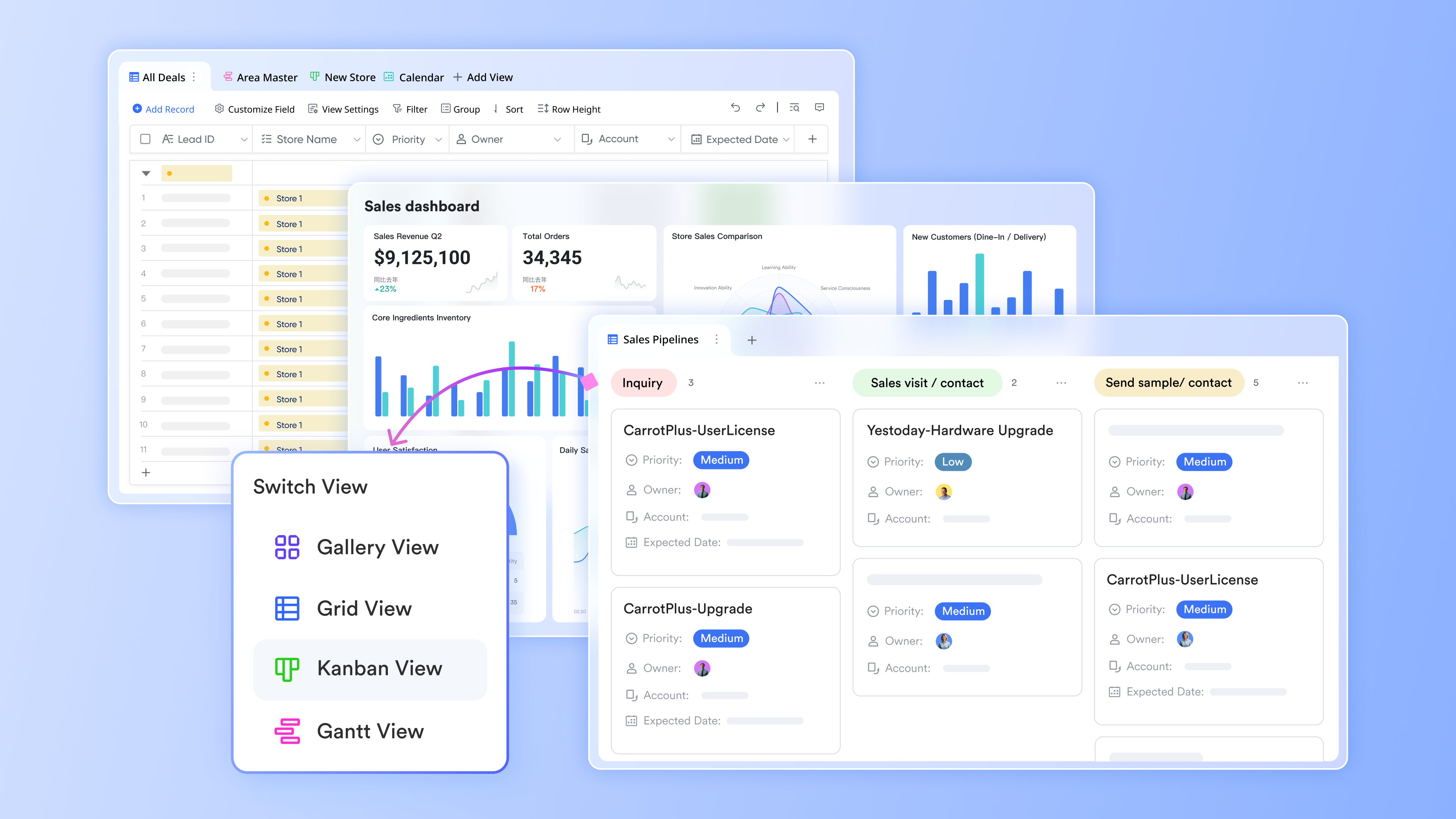
Multiple tables for structured project management
Lark Base allows sales teams to organize information into separate, purpose-built tables so each part of a sales project stays clean and easy to manage. For example, one table can store deal stages, another can hold task assignments, and a third can track team members' responsibilities or customer details. Because each table focuses on a specific element of the sales cycle, teams can navigate large volumes of information without confusion. This structure helps maintain clarity during complex sales initiatives such as enterprise proposals, POCs, onboarding flows, or cross-functional campaigns.
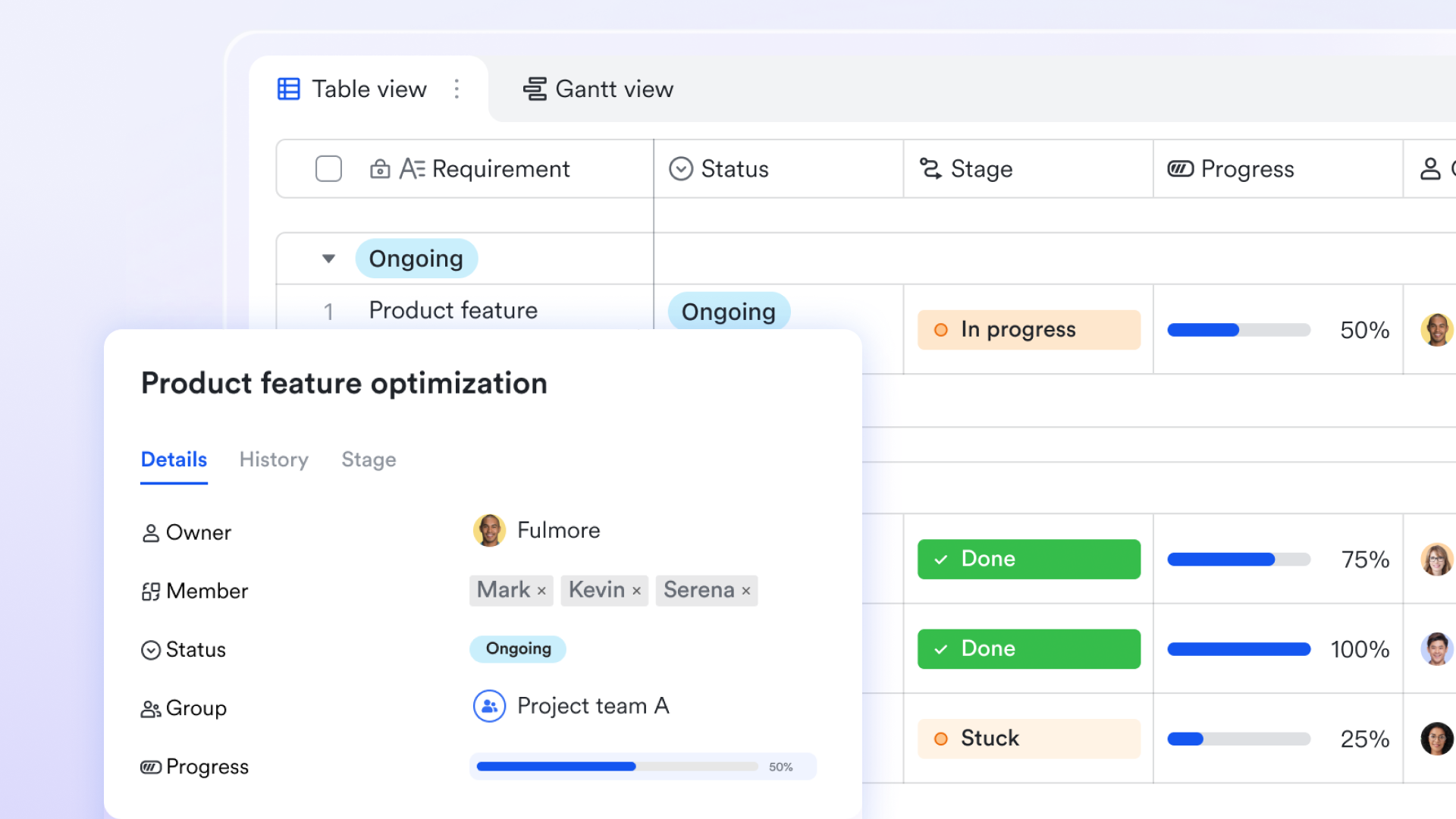
Lark Meetings: Seamless online video communication
Lark Meetings is a comprehensive video conferencing tool built into Lark. It lets you schedule, start, and join meetings directly from the Meetings tab, Calendar, or chats. You can manage hosts and co-hosts, set agendas, reserve rooms, and optimize performance with a low-bandwidth mode. Via Magic Share, participants can share documents during meetings, ensuring everyone views the same content in real time. By syncing with Lark Calendar, Lark Meetings ensures that participants' availability is visible, while built-in reminders and settings streamline the scheduling process.
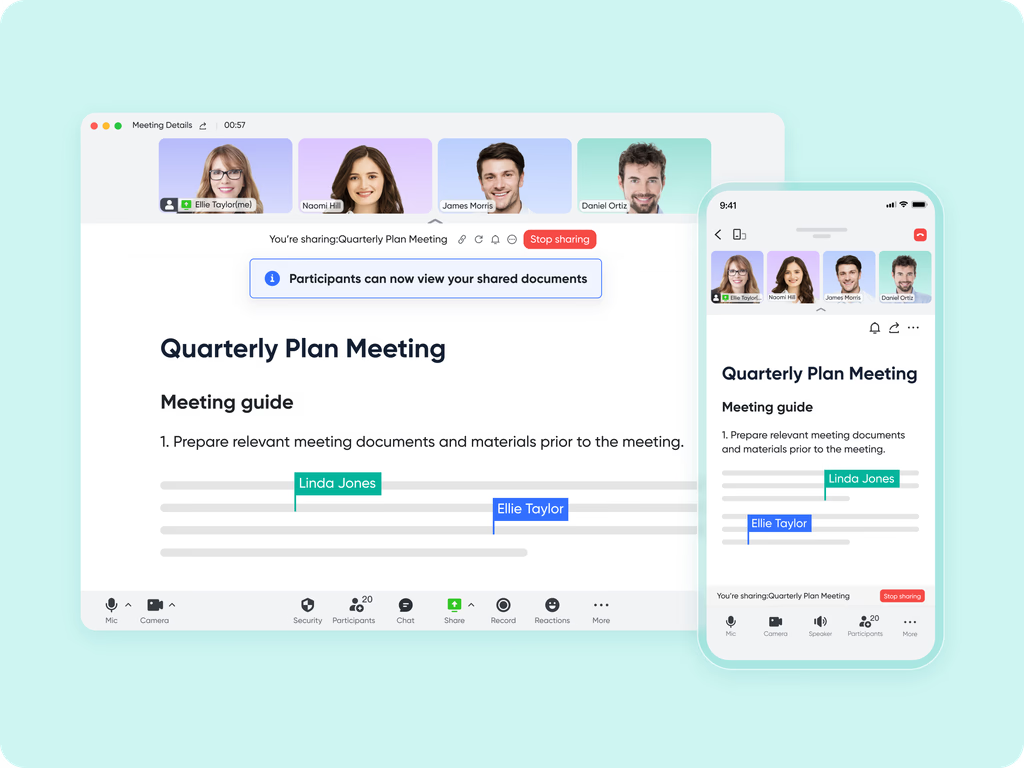
Lark Docs & Wiki: Collaborative content connected to meetings
Lark Docs and Lark Wiki enhance collaboration by making it easy to share agendas, briefs, and follow-up materials. Teams can co-edit documents in real time, add comments, adjust sharing permissions, or attach Docs directly to Calendar events. Notifications keep everyone aware of key changes or updates.
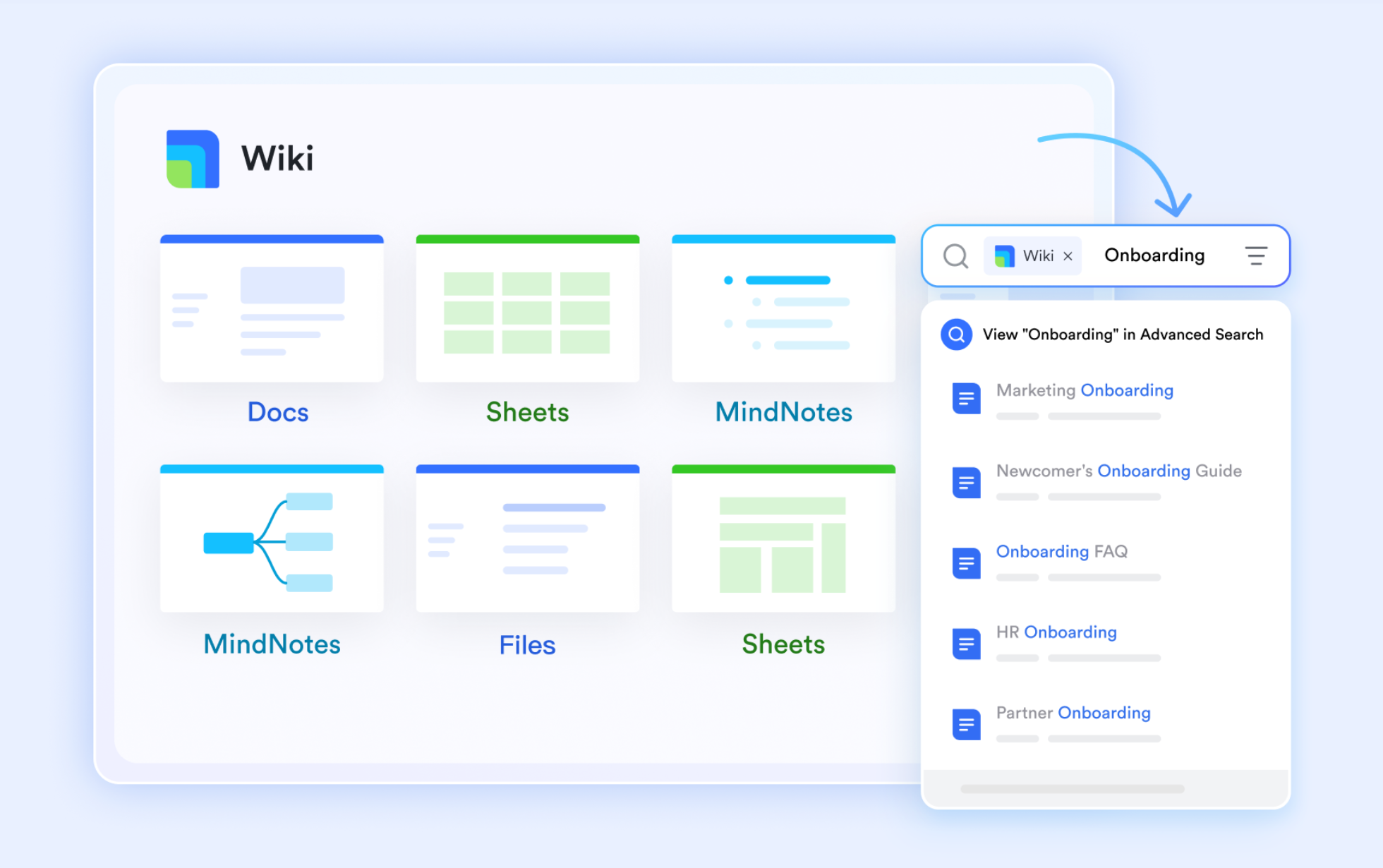
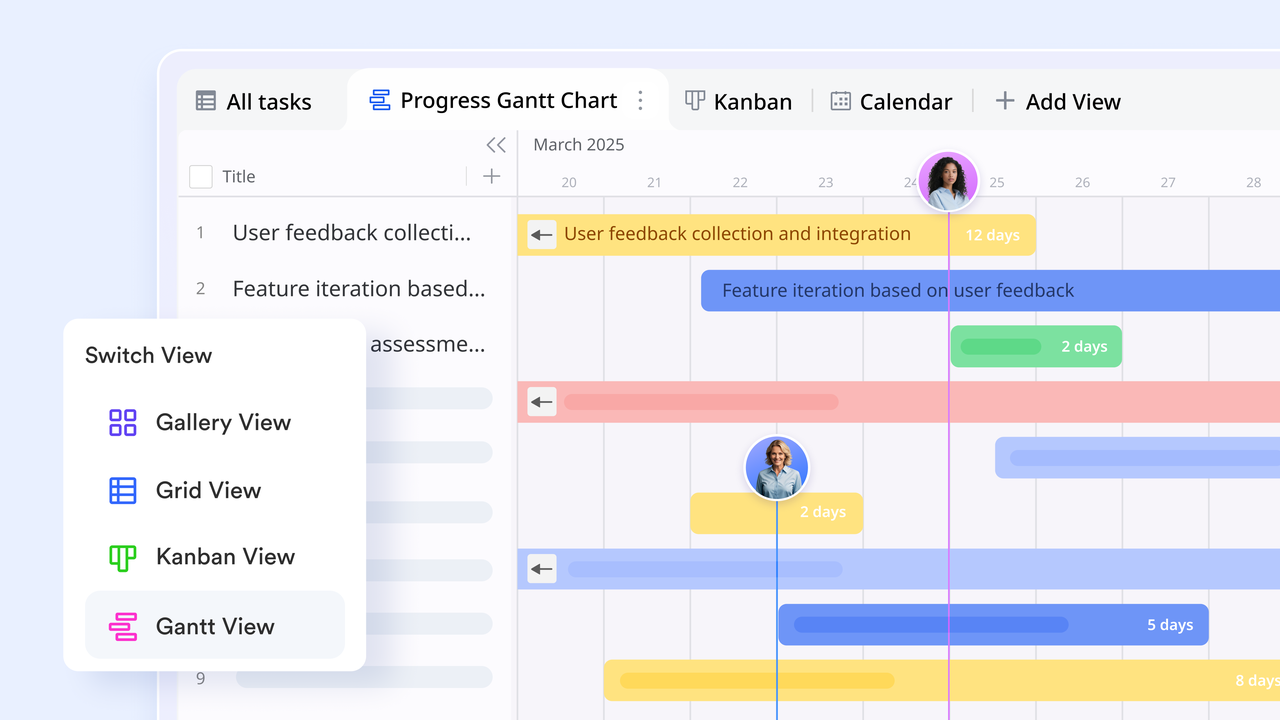
Multiple views: Kanban for progress, Gantt for scheduling
- Gantt view provides timeline clarity, showing how tasks overlap, which deadlines are approaching, and how long key milestones are expected to take. These views help sales teams manage capacity, prepare customer commitments more accurately, and keep every project on schedule.
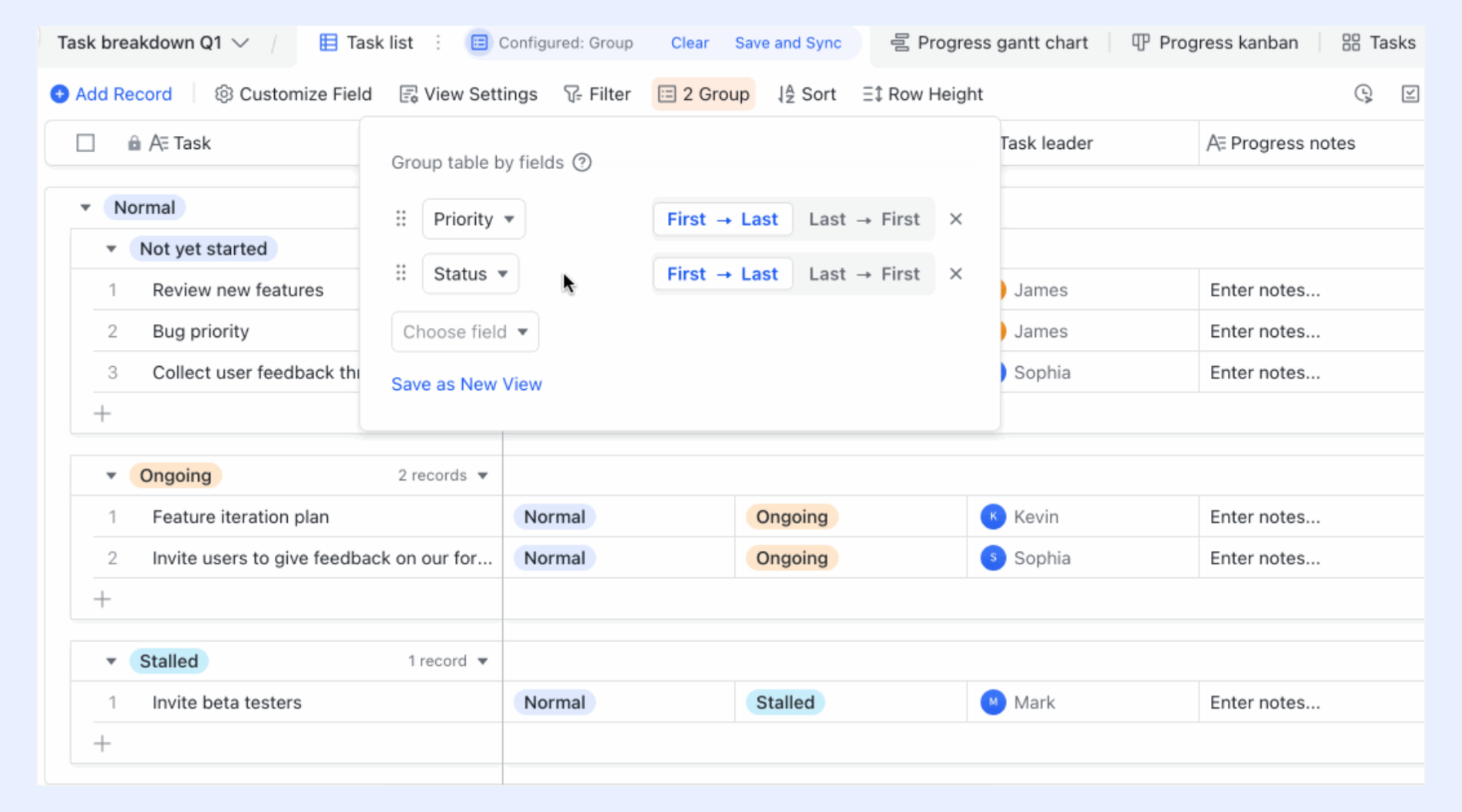
Groups and filters for fast navigation
Lark Base allows users to use groups and filters records by categories—such as deal owners, project types, territories, or deadlines—so information becomes easier to skim and prioritize. Filters further refine what users see, allowing them to highlight only the tasks assigned to them, view urgent customer deliverables, or surface overdue items immediately. This ensures every team member focuses on the work that matters most, instead of sorting through long, unorganized tables.
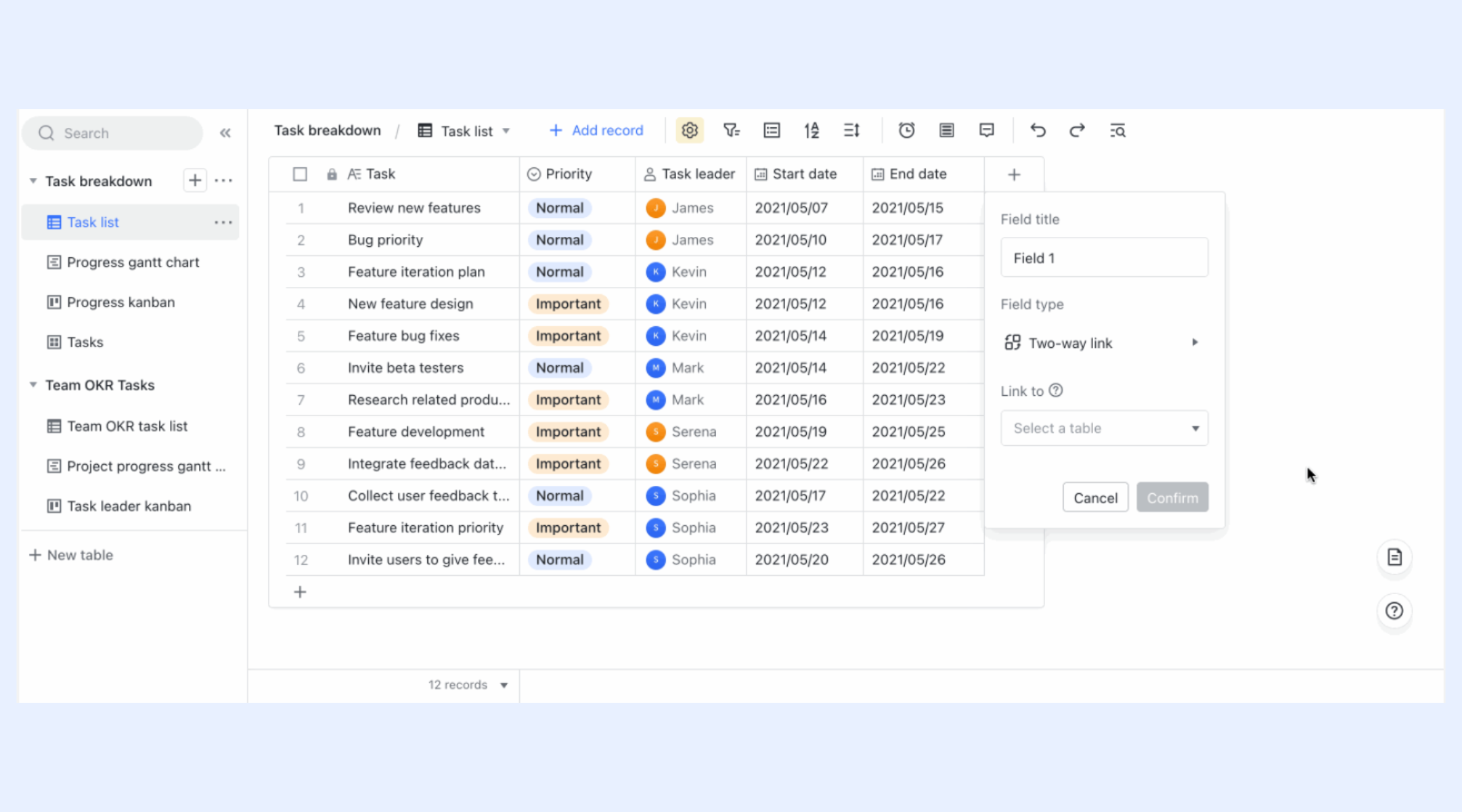
Two-way links for real-time synchronization
Two-way links fields connect records across different tables, ensuring that updates made in one location appear instantly in the related view. When sales teams manage several moving pieces—like customer details, tasks, deliverables, and project stages—these links keep everything consistent. For example, if a customer name or deal stage changes in the main table, every other table referencing that record reflects the update automatically. This eliminates duplicate data entry and reduces the risk of outdated information during fast-moving sales cycles.
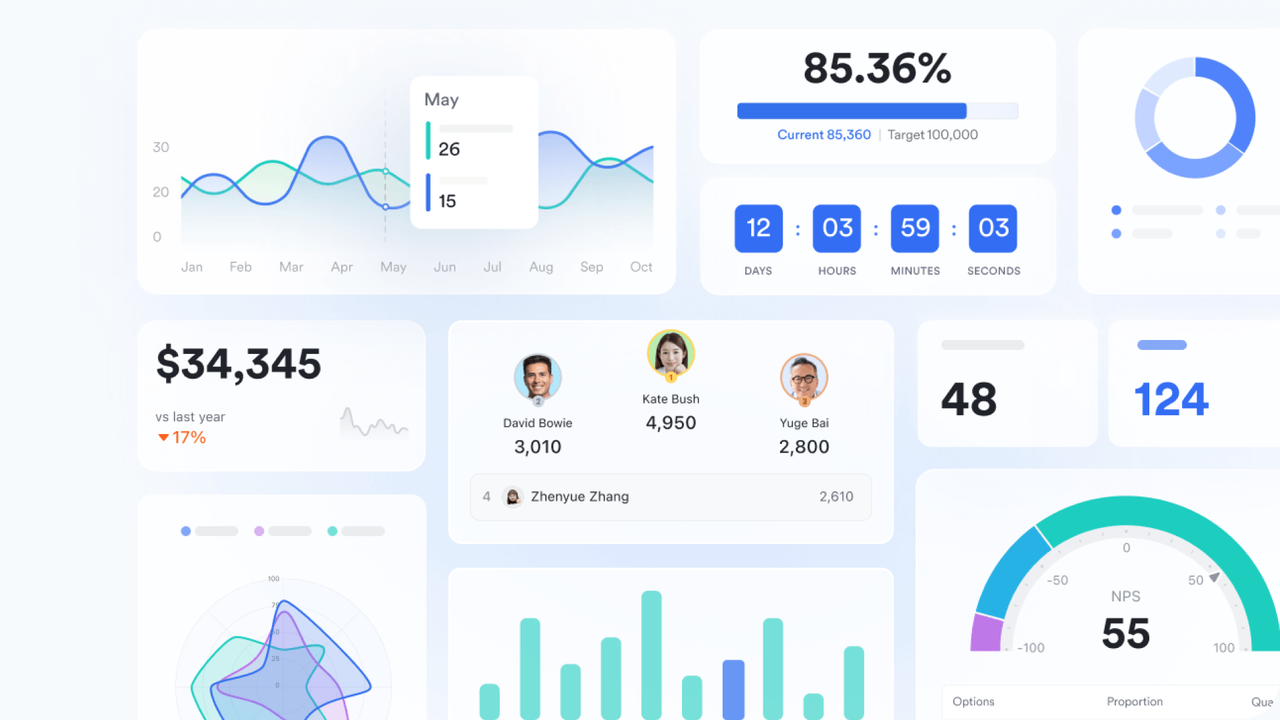
Dashboards for tracking sales performance and project progress
Dashboards combine charts, progress bars, metrics, and visual summaries into one consolidated page. Sales leaders can monitor KPIs examples such as proposal turnaround time, task completion rates, workload distribution, and project health indicators. Team members see only the data relevant to them, while managers can access broader performance views thanks to permission controls. This helps the entire department make faster decisions, plan better, and stay aligned on priorities.
Automated reminders and flow fields for timely updates
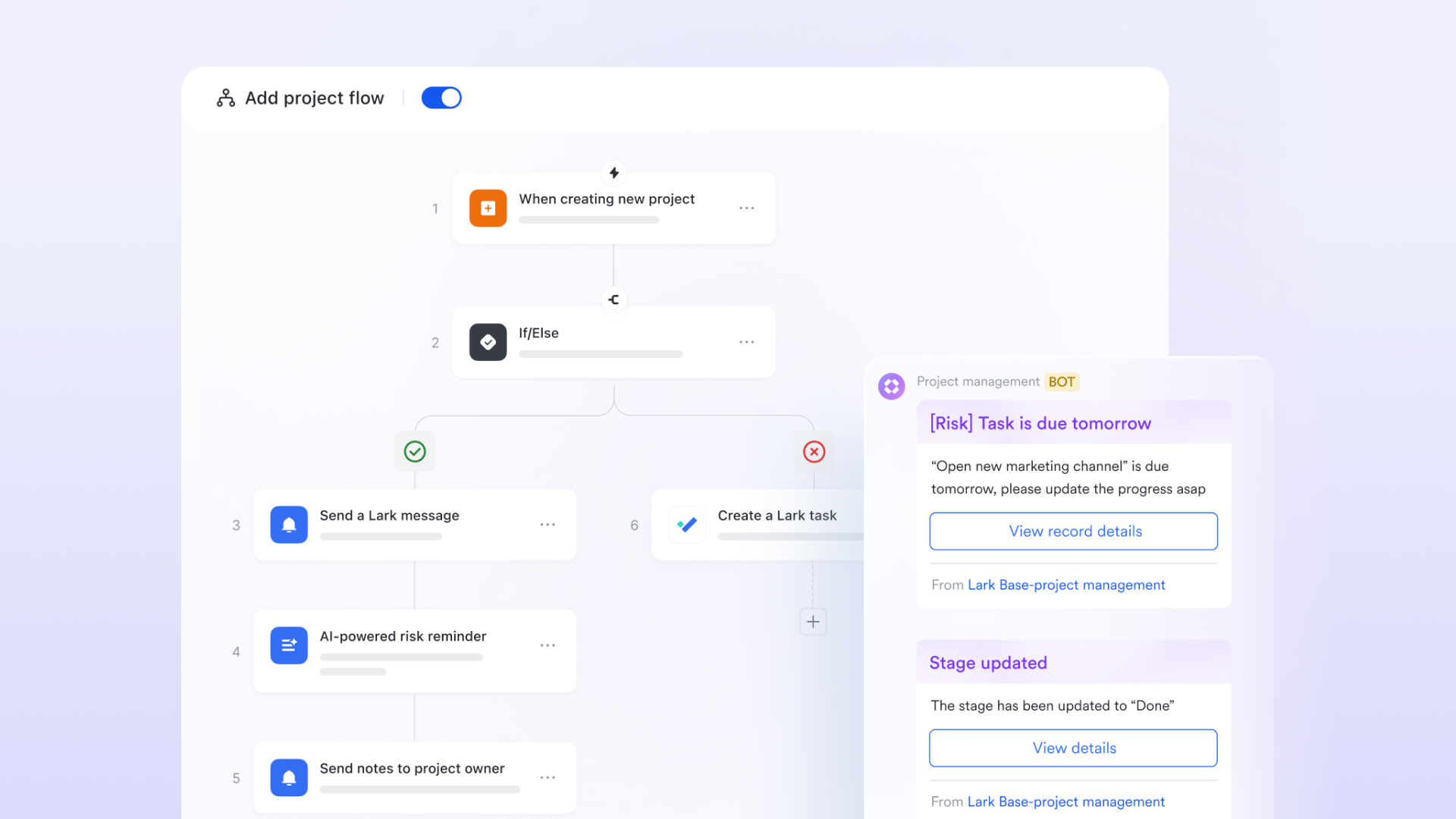
Lark Base Workflow supports rules that prompt users when project timeline approach, tasks are overdue, or key milestones require action. This helps prevent delays in sales deliverables like proposals, demo preparations, or onboarding handoffs. Flow fields, on the other hand, automatically calculate values—such as project duration, progress percentages, or next-stage readiness—based on real-time data inside the workflow. Together, these tools ensure every sales project moves forward smoothly and stays accurately tracked without manual follow-ups.
- Starter plan: Free forever plan that includes 11 powerful tools for up to 20 users. It also comes with 100GB of storage, 1000 automation runs, AI translations, and more.
- Pro plan: $12/user/month (billed annually) for up to 500 users. It includes everything in Starter plus group calling for up to 500 attendees, 15TB of storage, 50,000 automation runs, and more.
- Enterprise plan: Contact sales for custom pricing. Supports unlimited users and includes even more automation runs and advanced security, compliance, and management features.
Sales project management metrics that matter
Tracking the right metrics helps sales teams maintain momentum, improve team collaboration, and deliver a consistent customer experience. Tracking meaningful metrics helps sales teams stay focused, identify slowdowns, and deliver a reliable experience throughout the sales cycle. These indicators highlight how well deals are progressing, how effectively teams are working together and where improvements can make the biggest impact.
- Proposal turnaround time: Measures how quickly proposals are created and delivered. This measures how quickly proposals move from request to delivery. Faster turnaround reflects strong internal coordination and helps maintain momentum with prospects who may be comparing multiple vendors or waiting on key information to make a decision.
- Demo readiness scores: Tracks how prepared teams are before presenting demos to prospects. Demo quality often influences whether a deal moves forward. Tracking readiness helps teams understand how prepared they are before meeting prospects. It includes factors like having the right materials, updated product configurations and clear speaking points for the sales engineer or rep.
- Cross-team response time: Evaluates how fast supporting teams (legal, product, finance) provide inputs. Sales rely heavily on input from other departments. Monitoring how quickly legal, finance, product or engineering provide support shows how efficiently teams collaborate. Faster response times prevent bottlenecks and keep deals moving without last-minute rushes.
- Project cycle length: Shows the total time taken from lead qualification to deal closure. This reflects the total time from lead qualification to deal closure. Shorter cycles often mean fewer delays, better planning, and a smoother experience for the customer. Tracking this metric helps teams identify where deals slow down and which steps need more structure or automation.
- Customer satisfaction post-delivery: Reflects how well the final deliverables met customer expectations. After the deal closes, customer feedback shows how well the team delivered to expectations. High satisfaction indicates strong alignment during the sales process and effective handover to delivery or customer success teams. Lower scores often point to unclear expectations or missed steps in the project phase.
Why sales teams need project management
Effective project management gives sales teams the structure they need to stay organized and maintain momentum throughout the entire sales cycle. It brings more clarity to daily work, reduces unnecessary delays and helps teams deliver a consistent experience to prospects and customers. Here's why it plays such an important role:
- Coordinating multi-step sales activities: Ensures every task, follow-up, and approval flow is completed on time. Sales cycles often require several touchpoints, follow-ups and internal approvals. Project management keeps these steps organized and ensures nothing slips through the cracks. Every task has an owner, a deadline and a clear sequence, which helps deals move forward smoothly.
- Managing proposals, deliverables, customer onboarding, renewals: Keeps all stages structured and predictable. Sales aren't just about closing new deals. Reps also manage proposals, handoffs to delivery teams, customer onboarding and renewal conversations. A structured process makes each stage predictable and reduces the chaos that comes with juggling multiple responsibilities.
- Handling multiple accounts simultaneously: Helps reps balance workloads and prioritize high-value deals. Sales reps usually manage several prospects at once. Project management tools help them prioritize high-value opportunities, track where each deal stands and stay aligned with internal teams. This prevents overload and helps reps allocate their time wisely.
- Improving consistency and reducing bottlenecks: Reduces delays caused by miscommunication or missed steps. Delays often come from miscommunication, missed follow-ups or unclear next steps. A well-defined workflow improves collaboration and reduces these bottlenecks. Tasks move forward faster because everyone knows what needs to happen and when.
- Ensuring predictable customer experience: Creates repeatable processes that build trust and improve outcomes. When the sales process follows a clear pattern, prospects receive the same reliable experience every time. This builds trust, reduces confusion and makes it easier to deliver on expectations. Consistency also helps teams forecast results more accurately.
Sales project management examples
Project management in sales adapts to different industries by shaping workflows around unique customer expectations and operational needs. Sales project management looks different across industries because each sector has its own customer expectations, technical requirements and internal coordination needs. These examples show how structured sales workflows help teams stay organized and deliver a predictable buyer experience.
- SaaS enterprise deals: Coordinating demos, security reviews, procurement steps, and multi-stakeholder approvals. Enterprise software sales often involve long cycles with many decision-makers. Project management helps coordinate product demos, technical deep dives, security assessments, procurement reviews and contract approvals. A structured approach ensures every requirement is handled in order and nothing slows down the deal due to missed steps.
- Agencies & consulting: Managing proposals, scoping sessions, deliverables, and client onboarding like structured project phases in startups. Service-based businesses rely heavily on clear scoping and smooth delivery. Sales project management helps teams handle proposal creation, discovery calls, pricing reviews, resource planning and client onboarding. This approach mirrors project phases in startups, making client handoffs cleaner and expectations clearer from the start.
- Manufacturing sales cycles: Handling complex quotations, manufacturing inputs, custom requirements, and production timelines. Manufacturing deals typically involve customized products or configurations. Project management keeps track of complex quotations, production inputs, engineering approvals, supply timelines and delivery schedules. Organized workflows ensure customers get accurate timelines and that internal teams stay aligned across production and sales.
- Field sales operations: Organizing territory planning, visit schedules, follow-ups, and reporting. For field reps managing territories, project management helps organize daily activities like visit planning, lead follow-ups, equipment checks and reporting. Structured workflows create consistency in how territories are handled, help prioritize high-value accounts and ensure key activities aren't missed during busy schedules.
- Partner channel management: Overseeing partner enablement, deal registration, co-selling tasks, and shared deliverables. Channel sales rely heavily on coordination with external partners. A project-based approach helps manage deal registrations, partner onboarding, co-selling tasks, joint marketing efforts and shared deliverables. This keeps partner relationships well-structured and makes collaboration across organizations smoother.
Conclusion
Sales project management brings structure, clarity and predictability to every stage of the sales cycle. By treating deals like projects and supporting reps with the right project management resources sales enablement teams provide, organizations can reduce delays, improve collaboration and deliver a more consistent customer experience. By treating deals like projects, teams can reduce delays, improve collaboration, and deliver more consistent customer satisfaction. Whether handling complex enterprise opportunities or managing multiple accounts, a project-based approach helps sales teams stay organized and focused on what moves deals forward. As workflows become more cross-functional, tools like Lark support smoother execution—from lead qualification to customer handover—ultimately shortening sales cycles and improving outcomes.
FAQs
How is sales project management different from traditional project management?
Traditional project management focuses on delivery timelines and resource coordination, while sales project management centers around customer-facing activities, deal progression, and revenue outcomes. It requires faster cycles, cross-team alignment, and constant adaptation to customer needs.
Do small sales teams need sales project management?
Yes. Even small teams handle multiple prospects, proposals, and onboarding tasks. A structured approach helps eliminate missed follow-ups, improves consistency, and creates a repeatable process for growth.
What should a sales project management tool include?
A capable tool should support shared workspaces, multi-step workflows, collaboration, documentation, timelines, and automated reminders. It must also help manage customer tasks and internal coordination without relying on multiple disconnected apps.
Can sales project management improve customer experience?
Absolutely. A well-managed sales project ensures timely updates, organized deliverables, and fewer communication gaps. Customers see a consistent, professional process from discovery to onboarding.
How often should sales project workflows be reviewed or updated?
Most teams refresh their workflows quarterly or after major product updates, market shifts, or internal process changes. Regular reviews ensure the workflow stays aligned with sales goals and customer expectations.
Related reading
Table of contents
Start using Lark today

Manage all your work in one place
Boost team efficiency by 10x
Save up to 70% on software costs
Table of contents
Start using Lark today
Manage all your work in one place
Boost team efficiency by 10x
Save up to 70% on software costs
Keep reading







2026 Lark Technologies Pte. Ltd.
Headquartered in Singapore with offices worldwide.






Explore: