














20 Must-Have Online Collaboration Tools for Growing Teams

Ryan Tanner
Product Marketing Specialist
Sep 18, 2026
Ryan Tanner
Sep 18, 2026


Key takeaways: 5 tools for online collaboration
Overview: Top 5 online collaboration tools

What are online collaboration tools?
How online collaboration tools benefit creative teams
- Real-time brainstorming and idea sharing: Online collaboration platforms allow creative teams to brainstorm together using shared documents, whiteboards, and chat channels. Ideas can be added instantly by multiple contributors, encouraging spontaneous creativity. This helps teams capture inspiration quickly and develop concepts collectively.
- Faster feedback and approvals: Creative projects often require multiple review cycles. Collaboration tools allow team members to leave comments, suggestions, and annotations directly on files. This streamlines the feedback process and helps teams finalize designs, campaigns, or content more efficiently.
- Centralized asset management: Creative work often involves many files, such as design assets, drafts, and presentations. Online collaboration tools store these resources in a shared workspace, so everyone can access the latest versions. This prevents confusion caused by outdated files or scattered documents.
- Improved cross-team collaboration: Creative teams frequently collaborate with marketing, product, and leadership teams. Online collaboration platforms make it easy for different departments to share ideas, updates, and feedback in one place. This ensures creative work aligns with broader business goals.
- Better project visibility and coordination: Creative projects involve multiple stages, deadlines, and contributors. Collaboration tools provide task boards, timelines, and status updates that help teams track progress. This visibility helps creative teams manage workloads and deliver projects on schedule.
20 online collaboration platforms for seamless teamwork
1. Lark: An all-in-one collaboration workspace for seamless teamwork
- Combines messaging, meetings, documents, project tracking, and automation into one platform, reducing the need for multiple collaboration tools.
- Real-time document collaboration, task tracking, and integrated communication help teams stay aligned and manage projects more efficiently across locations.
- Generous free plan with multiple productivity features, making it accessible for startups and growing teams exploring online collaboration solutions.
- Some advanced features require onboarding. However, its Help Center can provide detailed guides.
- Starter plan: Free forever plan that includes 11 powerful tools for up to 20 users. It also comes with 100GB of storage, 1000 automation runs, AI translations, and more.
- Basic plan: $6/user/month (billed annually) for up to 500 users. It includes everything in Starter plus group calling for up to 500 attendees, 5TB of storage, 1000 automation runs, and more. For more details, please contact sales.
- Pro plan: $12/user/month (billed annually) for up to 500 users. It includes everything in Basic plus group calling for up to 500 attendees, 15TB of storage, 50,000 automation runs, and more.
- Enterprise plan: Contact sales for custom pricing. Supports unlimited users and includes even more automation runs and advanced security, compliance, and management features.
Starter
For small teams with simple communication needs
$0
/ user / month

Pro
For companies with comprehensive collaboration and management needs
$12
/ user / month
Enterprise
For large companies with advanced security and organizational management needs
Get a personalized demo and pricing
Pro
For companies with comprehensive collaboration and management needs
$12
/ user / month
2. Slack: Best for remote team collaboration
- Organized channel-based messaging allows teams to structure conversations by projects, departments, or topics, making communication easier to track and manage.
- Extensive integration marketplace connects Slack with project management, CRM, and productivity apps, enabling teams to streamline workflows without switching tools.
- Built-in file sharing, search functionality, and threaded conversations help teams quickly find discussions, documents, and updates across different channels.
- Huddles and video calls support quick meetings and spontaneous collaboration, helping remote teams communicate more naturally within the messaging platform.
- Highly intuitive interface makes it easy for teams to adopt quickly and maintain consistent communication across departments and distributed work environments.
- A large ecosystem of integration allows organizations to connect Slack with existing business tools, improving workflow automation and productivity.
- A flexible channel structure helps teams organize conversations effectively, reducing communication clutter and keeping project discussions focused.
- Heavy reliance on integration may mean teams need multiple additional tools for full project management or document collaboration functionality.
- Large organizations may experience notification overload and message clutter if channels and communication guidelines are not properly managed.
- Pro plan: $7.25/user/month (billed annually).
- Business+ plan: $15/user/month (billed annually).
- Enterprise+ plan: Custom pricing.
3. Microsoft Teams: Best for enterprise collaboration
- Integrated chat, video meetings, and calling features allow teams to communicate instantly while keeping discussions organized within dedicated channels.
- Deep integration with Microsoft 365 apps like Word, Excel, and PowerPoint enables teams to collaborate on files directly within the platform.
- Built-in meeting tools support webinars, screen sharing, live captions, and recordings, making virtual meetings easier for distributed teams.
- Secure enterprise-grade infrastructure includes compliance, identity management, and data protection features designed for large organizations and regulated industries.
- Seamless integration with Microsoft 365 tools enables teams to edit documents, manage files, and collaborate without leaving the platform.
- Robust security and compliance features make it suitable for enterprises handling sensitive data and complex regulatory requirements.
- Supports large meetings, webinars, and internal communication channels, helping organizations manage collaboration across multiple departments and locations.
- The interface can feel complex for new users, especially for teams unfamiliar with the Microsoft ecosystem and its multiple collaboration features.
- Performance may slow down on older devices or limited bandwidth due to the platform's extensive features and integrations.
- Microsoft Teams Essentials plan: $4/user/month (billed annually).
- Microsoft 365 Business Basic plan: $6/user/month (billed annually).
- Microsoft 365 Business Standard plan: $12.50/user/month (billed annually).
- Microsoft 365 Business Premium plan: $22/user/month (billed annually).
4. Google Workspace: Best for real-time document collaboration
- Real-time document editing lets multiple users work simultaneously on Docs, Sheets, and Slides, with changes visible instantly.
- Google Drive provides centralized cloud storage where teams can organize, share, and access files securely from any device.
- Built-in commenting, suggestions, and version history help teams review edits, track changes, and collaborate efficiently on shared documents.
- Integrated communication tools like Google Meet and Chat enable teams to discuss updates and collaborate directly within the workspace.
- Real-time collaboration features make it easy for distributed teams to co-edit documents and maintain transparency throughout projects.
- A simple, intuitive interface allows teams to adopt the platform quickly without extensive training or technical expertise.
- Cloud-based accessibility enables team members to access files and collaborate from any device with an internet connection.
- Limited advanced project management capabilities compared with dedicated collaboration or task management platforms used by large teams.
- Heavy reliance on internet connectivity may affect productivity when teams work in environments with unstable or slow connections.
- Business starter plan: $7/user/month (billed annually).
- Business standard plan: $14/user/month (billed annually).
- Business plus plan: $22/user/month (billed annually).
- Enterprise plan: Custom pricing.
5. Notion: Best for a knowledge management workspace
- Customizable pages and databases allow teams to organize documents, project plans, and knowledge resources within a highly flexible workspace.
- Collaborative editing and comments enable team members to contribute ideas, review content, and update information in real time.
- Integrated task management features support Kanban boards, timelines, and to-do lists for tracking project progress across teams.
- Templates and workspace customization allow teams to build tailored workflows for documentation, planning, and knowledge management.
- A highly flexible structure enables teams to create customized workspaces for documentation, project planning, and internal knowledge sharing.
- Combines notes, databases, and task tracking in one platform, reducing the need for multiple separate productivity tools.
- Strong collaboration features allow teams to edit pages simultaneously and maintain a centralized knowledge repository.
- Initial setup and customization can take time, especially for teams unfamiliar with Notion's database structure and workspace design.
- Performance may slow down in large workspaces with extensive databases, pages, and embedded content.
- Plus plan: $8/user/month (billed annually).
- Business plan: $15/user/month (billed annually).
- Enterprise plan: Custom pricing.
6. ClickUp: Best for in-app video recording and project collaboration
- Multiple task views, including list, board, timeline, and calendar, allow teams to visualize projects in formats that match their workflows.
- Built-in collaboration features such as comments, mentions, and shared documents help teams communicate and coordinate work within tasks.
- In-app video recording with ClickUp Clips lets users record explanations, feedback, or tutorials directly on the platform.
- Automation tools streamline repetitive tasks, enabling teams to trigger actions, assign work, and update statuses automatically.
- A highly customizable workspace allows teams to tailor task structures, views, and workflows according to project requirements and team preferences.
- Combines project management, document collaboration, and communication tools within one platform, reducing reliance on multiple productivity applications.
- Powerful automation and reporting features help teams track project performance and improve workflow efficiency.
- Extensive customization options may feel overwhelming for new users unfamiliar with complex project management platforms and workflows.
- Interfaces can sometimes appear crowded due to the large number of features and configuration options available.
- Unlimited plan: $7/user/month (billed annually).
- Business plan: $12/user/month (billed annually).
- Enterprise plan: Custom pricing.
7. Wrike: Best for custom workflows
- Customizable workflows allow teams to define project stages, automate approvals, and manage complex processes tailored to their operational needs.
- Interactive dashboards and real-time reporting help managers monitor project progress, workloads, and deadlines across multiple teams.
- Built-in collaboration tools such as comments, file sharing, and proofing features streamline feedback on creative and project deliverables.
- Multiple project views, including Gantt charts, Kanban boards, and calendars, help teams visualize timelines and manage resources effectively.
- Strong workflow customization enables organizations to adapt the platform for marketing campaigns, product development, and cross-department collaboration.
- Advanced reporting and analytics tools provide managers with detailed insights into project performance and team productivity.
- Scalable platform supports growing teams and complex projects requiring structured planning and resource management.
- The interface may feel complex to new users due to the platform's advanced project management and workflow configuration features.
- Some advanced collaboration and automation features are available only in higher-tier paid plans.
- Team plan: $9.80/user/month (billed annually).
- Business plan: $24.80/user/month (billed annually).
- Enterprise plan: Custom pricing.
8. monday.com: Best for connecting goals and projects
- Visual project boards allow teams to organize tasks, deadlines, and responsibilities using customizable columns, statuses, and workflow structures.
- Multiple views, including timeline, calendar, Kanban, and workload, help teams visualize projects and manage resources effectively.
- Automation tools reduce repetitive work by triggering updates, notifications, or task assignments based on predefined workflow conditions.
- Integration capabilities connect monday.com with tools such as Slack, Google Workspace, and CRM systems to streamline collaboration.
- Intuitive visual interface makes it easy for teams to track tasks, monitor deadlines, and collaborate across departments.
- Highly customizable boards allow teams to adapt workflows for project management, sales tracking, marketing campaigns, or operations planning.
- Automation and integrations help teams streamline processes and reduce manual updates across multiple tools.
- Pricing can increase quickly for larger teams as advanced features and automation capabilities are included in higher-tier plans.
- Some users may find the number of customization options overwhelming during initial setup and workflow configuration.
- Basic plan: $9/user/month (billed annually).
- Standard plan: $12/user/month (billed annually).
- Pro plan: $19/user/month (billed annually).
- Enterprise plan: Custom pricing.
9. Smartsheet: Best for a high level of security
- Spreadsheet-style interface allows teams to organize tasks, timelines, and project data while maintaining familiar workflows for planning and reporting.
- Multiple project views, including grid, Gantt, card, and calendar, help teams visualize schedules and manage project timelines effectively.
- Collaboration tools such as comments, file attachments, and automated notifications keep team members aligned on project updates.
- Enterprise-grade security and compliance features help organizations protect sensitive data and manage user access across projects.
- A familiar spreadsheet layout makes it easier for teams to adopt the platform without extensive training or workflow adjustments.
- Strong reporting and dashboard features provide managers with real-time visibility into project progress and performance metrics.
- Advanced security and permission controls make it suitable for organizations handling regulated or sensitive information.
- The interface may feel less visually modern than newer collaboration platforms focused on design and user experience.
- Some advanced automation and collaboration features are limited to higher-tier plans, increasing costs for larger teams.
- Pro plan: $7/user/month (billed annually).
- Business plan: $25/user/month (billed annually).
- Enterprise plan: Custom pricing.
10. Zoom: Best for AI-powered meeting notes
- High-quality video conferencing supports large meetings, webinars, and breakout rooms, making it suitable for remote teams and virtual events.
- Screen sharing and collaborative annotation tools allow participants to present ideas, review documents, and discuss updates during meetings.
- AI-powered meeting summaries and transcriptions automatically capture key points, decisions, and action items after meetings.
- Integrated chat and file sharing features enable participants to continue conversations and share resources beyond scheduled meetings.
- Reliable video and audio quality make it one of the most trusted platforms for remote meetings and virtual collaboration.
- An easy-to-use interface allows participants to join meetings quickly, without extensive setup or training.
- Supports large webinars, breakout rooms, and advanced meeting controls for structured online collaboration.
- Limited project management or document collaboration capabilities compared to all-in-one workplace productivity platforms.
- The free plan includes meeting duration limits, which may affect longer discussions or team workshops.
- Pro plan: $14.16/user/month (billed annually).
- Business plan: $18.33/user/month (billed annually).
- Enterprise plan: Custom pricing.
11. Miro: Best for online whiteboarding
- Infinite digital whiteboard allows teams to brainstorm ideas, create diagrams, and organize visual content collaboratively in one shared workspace.
- A large template library supports workflows such as mind mapping, sprint planning, product roadmaps, and design thinking sessions.
- Real-time collaboration tools allow multiple users to add notes, shapes, and comments simultaneously during brainstorming sessions.
- Integrations with platforms like Slack, Google Workspace, and project management tools help teams connect visual planning with daily workflows.
- Highly interactive visual workspace encourages creative brainstorming and collaborative planning for distributed teams and workshops.
- An extensive template library helps teams quickly set up boards for ideation, project planning, or strategy sessions.
- Real-time editing allows participants to collaborate simultaneously, making remote brainstorming sessions more engaging and productive.
- Large boards with extensive visual elements can be difficult to navigate without clear organization or a structured board layout.
- Some advanced collaboration and facilitation features are limited to paid plans, which may increase costs for larger teams.
- Starter/team plan: $8/user/month (billed annually).
- Business plan: $16/user/month (billed annually).
- Enterprise plan: Custom pricing.
12. FigJam: Best for design collaboration
- An interactive whiteboard allows teams to brainstorm ideas using sticky notes, shapes, drawings, and diagrams within a shared visual workspace.
- Real-time collaboration enables multiple participants to add content, comment, and react simultaneously during workshops or design discussions.
- Built-in templates help teams run design sprints, retrospectives, and planning sessions with structured visual frameworks.
- Seamless integration with Figma allows teams to connect brainstorming sessions directly with design workflows and prototypes.
- A simple, intuitive interface makes it easy for teams to start visual brainstorming sessions without a complex setup.
- Real-time interaction features like reactions, stamps, and cursor chat encourage more engaging remote collaboration.
- Strong integration with Figma supports smooth transitions between ideation and design execution.
- Limited advanced project management features compared to dedicated work management or collaboration platforms.
- Some collaboration and organization capabilities may require using additional tools alongside FigJam for full project coordination.
- Team plan: $8 per editor per month (billed annually).
- Enterprise plan: Custom pricing.
13. Document360: Best for centralized knowledge bases
- The knowledge base builder allows teams to create structured documentation, including product manuals, troubleshooting guides, and internal resources, on a single centralized platform.
- Rich text and Markdown editors support multimedia content, version control, and collaborative editing to maintain accurate documentation.
- Advanced search functionality helps users quickly find relevant articles, making large documentation libraries easier to navigate.
- Analytics tools provide insights into article performance, search queries, and user engagement within the knowledge base.
- A centralized documentation platform helps teams organize company knowledge and make information accessible across departments and support teams.
- Version control and collaboration features allow multiple contributors to manage updates while maintaining documentation accuracy and consistency.
- Flexible knowledge base options support both internal employee documentation and external customer help centers.
- Primarily focused on documentation management rather than broader project management or communication and collaboration tools.
- Advanced customization and analytics capabilities may require higher-tier plans depending on organizational needs.
14. Axero: Best for knowledge management
- A customizable intranet workspace allows organizations to create a centralized digital hub for communication, knowledge sharing, and internal collaboration.
- Built-in document management enables teams to store, organize, and collaborate on files within a shared workspace.
- Social collaboration features such as activity feeds, discussion forums, and announcements help employees stay informed and engaged.
- Advanced search functionality helps users quickly locate documents, people, and knowledge resources across the intranet.
- A centralized digital workplace helps organizations improve communication and collaboration across departments and remote teams.
- A customizable intranet structure allows companies to tailor workflows, pages, and knowledge resources to organizational needs.
- Built-in engagement features such as discussion forums and activity feeds encourage employee interaction and knowledge sharing.
- Implementation and setup may require planning and configuration, especially for large organizations building a customized intranet structure.
- Primarily focused on internal communication and knowledge sharing rather than full-scale project management functionality.
15. Quickbase: Best for application development
- A low-code application builder allows teams to create custom business tools for tracking projects, managing workflows, and organizing operational data.
- Workflow automation features help teams streamline repetitive processes, automatically assign tasks, and maintain consistent operational workflows.
- Data integration capabilities connect information from multiple systems, enabling teams to work from a unified database and shared workspace.
- Reporting dashboards provide real-time insights into project progress, operational performance, and workflow efficiency.
- A highly customizable platform allows organizations to design applications and workflows tailored to specific operational needs.
- Automation and workflow management tools help teams improve efficiency and reduce manual administrative work.
- Centralized data management helps teams track projects, processes, and performance in one collaborative workspace.
- Initial setup and customization may require time and planning to configure workflows and applications effectively.
- Pricing may be higher compared to simpler collaboration tools focused mainly on messaging or task management.
- Team plan: $35 per user per month (billed annually).
- Business plan: $55 per user per month (billed annually).
- Enterprise plan: Custom pricing.
16. Guru: Best for instant answers within workflows
- Knowledge cards allow teams to store important information in structured formats that are easy to search and access.
- Browser extensions and integrations deliver relevant knowledge directly inside tools like email, chat platforms, and CRM systems.
- Verification workflows ensure that information remains accurate by prompting subject-matter experts to regularly review and update content.
- AI-powered search helps employees quickly find answers, documentation, and internal resources without switching between platforms.
- A centralized knowledge base helps organizations reduce repeated questions and improve information accessibility across teams.
- Integrations with workplace tools allow employees to access knowledge without leaving their daily workflows.
- Content verification features help ensure that documentation and internal knowledge remain accurate and up to date.
- Primarily focused on knowledge management rather than broader project management or collaboration features.
- Large knowledge libraries may require careful organization to ensure information remains easy to locate.
17. ProWorkflow: Best for customizable templates
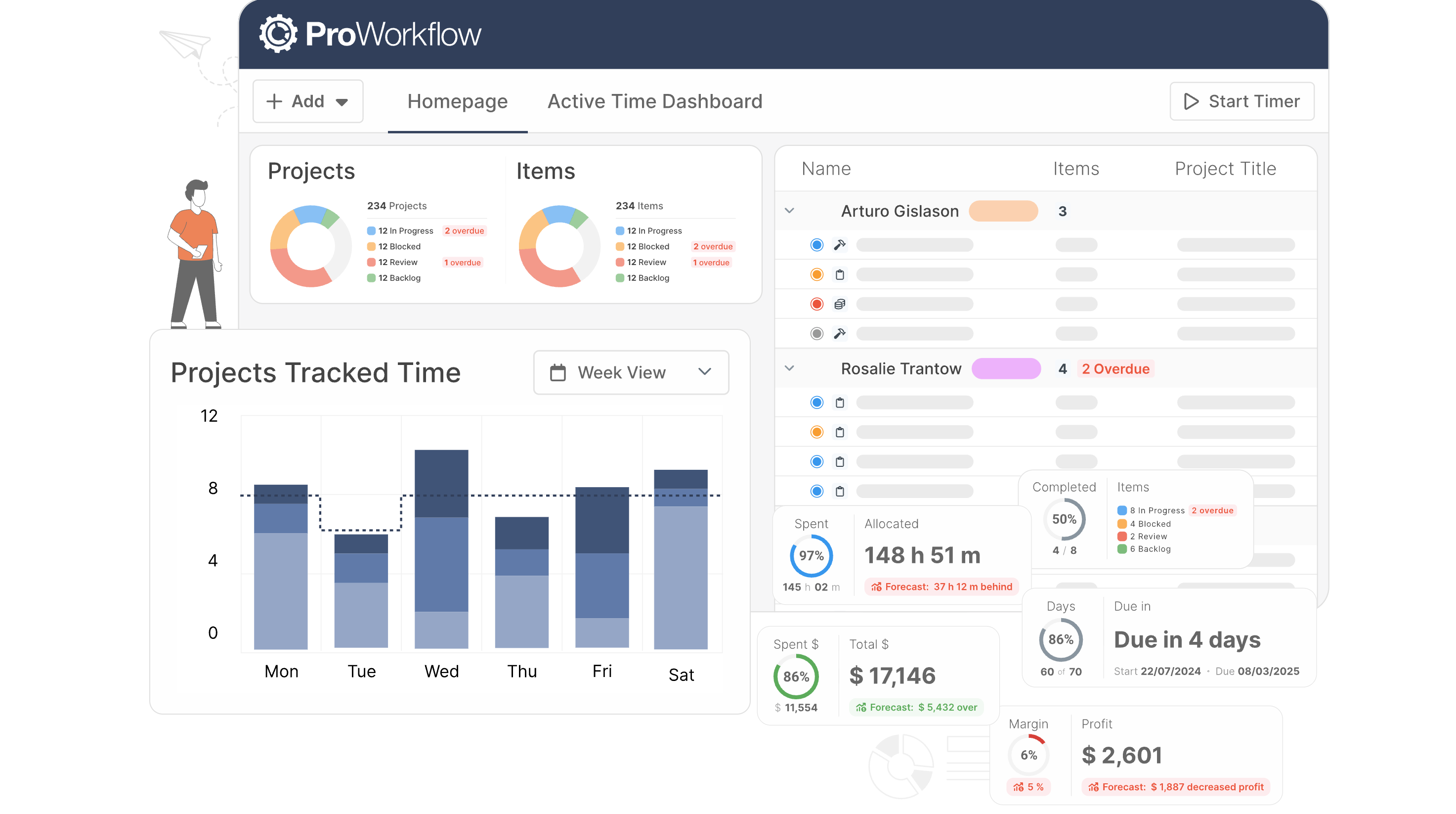 Image source: proworkflow.com
- Project and task management tools allow teams to create projects, assign responsibilities, set deadlines, and monitor task progress.
- Built-in time-tracking and timesheet tools help teams record work hours and monitor productivity across projects.
- Customizable workflow templates allow teams to standardize processes and manage recurring project structures more efficiently.
- Reporting and dashboard features provide insights into project timelines, workloads, and team performance.
- Combines project management, time tracking, and reporting features in one platform, helping teams manage projects more efficiently.
- Customizable workflows allow organizations to adapt the platform for different project types and operational processes.
- Detailed reporting tools provide visibility into project performance, deadlines, and team workloads.
- The interface may feel less modern than newer collaboration platforms focused on visual design and automation.
- Smaller ecosystem of integrations compared with some widely used project management and collaboration platforms.
- Professional plan: $18 per user per month (billed annually).
- Advanced plan: $27 per user per month (billed annually).
- Enterprise plan: Custom pricing.
18. Missive: Best for collaborative inboxes
- Shared inboxes allow multiple team members to manage and respond to the same email accounts while maintaining visibility into conversations.
- Internal chat and comments enable teams to discuss email threads privately before sending responses to customers or partners.
- Collaborative drafting allows multiple users to write and edit email replies together in real time.
- Task assignment and conversation management tools help teams delegate responsibilities and track email workflows effectively.
- Shared inbox functionality helps teams coordinate responses and prevent duplicate replies to customer or client messages.
- Combines email, internal chat, and task management in one workspace, reducing the need to switch between communication tools.
- Real-time collaboration features allow teams to review and finalize responses together before sending emails.
- Primarily designed for email collaboration rather than full project management or document collaboration workflows.
- Teams with large communication volumes may need structured processes to keep inboxes organized.
- Starter plan: $14 per user per month (billed annually).
- Productive plan: $24 per user per month (billed annually).
- Enterprise plan: $36 per user per month (billed annually).
19. Troop Messenger: Best for secure messaging
- One-on-one messaging and group chats allow teams to communicate instantly and organize conversations by projects, teams, or departments.
- Audio and video calling features enable quick discussions and virtual meetings without switching to separate communication platforms.
- File sharing tools allow users to exchange documents, images, and other files directly within conversations.
- Administrative controls help organizations manage user permissions, monitor activity, and maintain secure internal communication environments.
- Strong focus on secure internal messaging makes it suitable for organizations prioritizing controlled workplace communication.
- Combines messaging, calling, and file-sharing features on a single platform for streamlined team communication.
- Administrative controls allow organizations to manage access, maintain security policies, and oversee communication workflows.
- The interface may feel slightly complex for teams unfamiliar with structured enterprise messaging tools.
- Smaller integration ecosystems compared with some widely used collaboration and workplace communication platforms.
- Premium plan: $2.50 per user per month (billed annually).
- Enterprise plan: $5 per user per month (billed annually).
20. MeisterTask: Best for visual project boards
- Visual Kanban-style boards allow teams to organize tasks into stages, track progress, and manage project workflows with clear structure.
- Task assignments, due dates, and checklists help teams coordinate responsibilities while maintaining visibility across projects and deadlines.
- Built-in automation tools trigger actions such as task movement, notifications, or assignments when specific workflow conditions are met.
- Comments, file attachments, and notifications allow team members to communicate directly within tasks while collaborating on projects.
- Intuitive visual interface helps teams quickly understand project status, task ownership, and progress across different stages.
- Simple setup and easy navigation make the platform accessible for teams adopting project management tools for the first time.
- Automation features reduce repetitive administrative tasks and help teams maintain consistent workflows across projects and departments.
- Limited advanced reporting and resource management capabilities compared to enterprise-level project management platforms used by larger organizations.
- Teams managing complex, multi-department projects may require additional tools for deeper analytics and workflow customization.
- Pro plan: $7 per user per month (billed annually).
- Business plan: $12.50 per user per month (billed annually).
- Enterprise plan: Custom pricing.
How to choose the right site for online collaboration
- Evaluate your team's collaboration needs: Start by identifying the type of collaboration your team requires. Some teams prioritize messaging and communication, while others need project management or document collaboration tools. Understanding these needs helps narrow down the most suitable site for online collaboration.
- Look for integration capabilities: The best collaboration platforms integrate with tools your team already uses. Integrations with project management systems, cloud storage, and communication tools reduce workflow disruptions. A well-connected platform ensures smoother coordination across multiple business applications.
- Consider scalability and team growth: Choose a platform that can grow with your organization. As teams expand, collaboration tools should support additional users, projects, and workflows. Scalable solutions eliminate the need to switch platforms frequently as business needs evolve.
- Prioritize ease of use and adoption: Even the most powerful tool will be ineffective if teams struggle to use it. Look for platforms with intuitive interfaces and clear navigation. Easy adoption ensures employees can start collaborating quickly without extensive training.
- Assess security and data protection features: Collaboration platforms often store sensitive company information and shared documents. Security features such as user permissions, encryption, and access controls help protect important data. Choosing a secure tool ensures safe internet collaboration across teams and partners.
Emerging trends shaping the future of online collaboration
- AI-powered collaboration tools: Artificial intelligence is becoming a major component of collaboration platforms. AI features can summarize meetings, generate task lists, and automatically organize documents. These capabilities help teams reduce manual work and improve decision-making during internet collaboration.
- All-in-one digital workspaces: Many organizations are moving toward unified platforms that combine messaging, documents, meetings, and project management. Instead of switching between multiple tools, teams can work within a single workspace. This approach simplifies workflows and improves productivity.
- Real-time and asynchronous collaboration: Modern teams often work across different time zones. Collaboration tools are increasingly designed to support both real-time interaction and asynchronous updates. This allows employees to contribute ideas, share feedback, and track projects without being online at the same time.
- Visual collaboration environments: Interactive whiteboards, visual project boards, and collaborative design tools are becoming more common. These platforms make brainstorming and planning more engaging for remote teams. Visual workspaces help teams organize ideas and collaborate creatively.
- Stronger security and compliance features: As organizations rely more on digital collaboration tools, protecting sensitive information becomes critical. Modern platforms are introducing stronger encryption, access controls, and compliance capabilities. These features help organizations maintain secure online collaboration across departments and partners.
Conclusion
FAQs
What is the best online collaboration tool?
Is Google collaboration free?
What are the 3 C's of collaboration?
Which is an example of an online collaboration tool?
Related reading

Start using Lark today

Manage all your work in one place
Boost team efficiency by 10x
Save up to 70% on software costs
Start using Lark today
Manage all your work in one place
Boost team efficiency by 10x
Save up to 70% on software costs
Keep reading


![What Is a 2-2-3 Work Schedule? Explanation and More [2026]](https://framerusercontent.com/images/uKHRfkp4v7y4azRNTYUmuteNQz8.png)



2026 Lark Technologies Pte. Ltd.
Headquartered in Singapore with offices worldwide.





