Project scheduling is one of the most critical aspects of project management. Teams must coordinate tasks, allocate resources, and ensure deadlines are met without disrupting project dependencies.
A Gantt chart for scheduling helps visualize project timelines and task relationships, allowing teams to understand how activities connect and when work should begin or finish.
This guide explains how Gantt charts work, how dependencies affect scheduling, and how modern collaboration tools help teams manage project timelines more effectively.
Key takeaways
- Gantt charts visualize project timelines and dependencies.
- Scheduling tools improve project planning accuracy.
- Dependencies help coordinate complex task sequences.
- Excel Gantt charts offer basic scheduling capabilities.
- Modern tools connect Gantt charts with workflows.
What is a Gantt chart for scheduling?
A Gantt chart for scheduling is a that displays tasks along a timeline. Each task is represented by a horizontal bar showing the start date, duration, and completion progress. This format allows teams to understand how tasks relate to one another and how the project timeline unfolds.
Project managers rely on Gantt chart management techniques to coordinate complex workflows that involve multiple teams and dependencies. By mapping tasks across time, Gantt charts make it easier to identify delays, adjust schedules, and allocate resources effectively.
Many organizations begin with spreadsheet-based scheduling systems, such as a project management Gantt chart Excel template. These spreadsheets allow teams to create basic timelines and assign responsibilities. However, more advanced project environments require and automated scheduling capabilities.
A Gantt chart for scheduling helps transform project planning into a structured visual framework that supports better coordination, improved communication, and more predictable project outcomes.
Arrange project timelines with a modern collaboration tool
How Gantt charts improve project scheduling
Effective project scheduling requires teams to coordinate tasks across different timelines while maintaining visibility into dependencies and milestones. Gantt charts simplify this process by providing a structured visual representation of project activities. By organizing tasks on a timeline, Gantt charts help managers see the project's full scope and track how each task contributes to the final outcome.
Visualizing project timelines
Project timelines often involve many activities occurring across different phases. Without visualization tools, it can be difficult to understand the full scope of the schedule.
- Clear visibility: A Gantt chart for scheduling displays tasks across a structured timeline, showing when each activity begins and ends. This allows project managers to quickly understand the total project duration and identify overlapping tasks that may affect scheduling.
- Improved workload planning: When project timelines are visualized clearly, managers can better distribute work among team members. This helps ensure that workloads remain balanced and resources are allocated efficiently.
- Better communication with stakeholders: Project timelines displayed through Gantt chart management frameworks are easier for stakeholders to understand than complex task lists. Visual schedules allow leaders to present and expected delivery timelines clearly.
- Improved schedule transparency: Visual timelines allow teams to see how individual tasks contribute to overall project progress. This transparency improves coordination across departments and ensures teams stay aligned with project objectives.
Coordinating task dependencies
Dependencies play an important role in determining how tasks relate to each other within a project schedule.
- Defined task relationships: Gantt chart dependencies clearly show how tasks connect to one another. This ensures that activities begin only after the necessary prerequisite work is complete.
- Preventing workflow conflicts: Dependencies in Gantt chart scheduling prevent tasks from starting prematurely. When dependencies are properly defined, teams can maintain logical workflows across project phases.
- Improved coordination between teams: When multiple departments contribute to a project, Gantt chart dependencies help coordinate task handoffs between teams.
- Structured workflow sequencing: Defining dependencies in Gantt chart timelines ensures that project tasks follow a structured sequence, reducing confusion and improving scheduling accuracy.
Managing project milestones
Milestones represent important checkpoints that measure progress toward project completion.
- Clear project checkpoints: Milestones highlight major deliverables or project stages that indicate progress toward final goals. These checkpoints help teams evaluate project performance at critical moments.
- Improved project accountability: When milestones are included within a Gantt chart for scheduling, teams remain focused on key objectives rather than only individual tasks.
- Progress evaluation opportunities: Milestones enable project managers to assess whether the project is progressing on schedule.
- Enhanced : Milestones provide clear reference points that help managers communicate progress with stakeholders and leadership teams.
Monitoring progress against schedules
Maintaining visibility into project progress is essential for successful scheduling.
- Real-time progress tracking: Teams update task completion status within the Gantt chart. This shows which activities are finished, in progress, or delayed. Managers can quickly evaluate project performance and identify tasks that require immediate attention.
- Identifying schedule risks: If a task falls behind schedule, Gantt charts reveal how delays may affect dependent tasks. This allows project managers to address problems before they affect the entire timeline.
- Improved project transparency: Project leaders and stakeholders can view progress updates directly within the schedule. This improves communication and helps teams remain aligned with project goals.
- Adaptive scheduling adjustments: When delays occur, project managers can adjust task durations or dependencies to maintain the overall schedule.
Understanding Gantt chart dependencies in scheduling
Dependencies are a core component of . They define how tasks influence each other and determine the order in which activities must occur. Without properly defined dependencies in Gantt chart planning, project schedules can quickly become disorganized. Teams may start tasks before prerequisites are complete, leading to rework and confusion.
Definition of task dependencies
describe relationships between activities in which one task must begin or finish before another can proceed. Dependencies in Gantt chart planning are shown as connectors between tasks. When dependencies are clearly defined, project managers can identify the work sequence and estimate the impact of delays. For example, if task B depends on task A, task B cannot begin until task A is completed.
Many teams create dependency structures within tools, such as an Excel Gantt chart with dependencies or a Gantt chart in Excel with dependencies. These tools allow managers to visualize task relationships and maintain scheduling accuracy.
Why dependencies are critical for scheduling
Dependencies play a crucial role in maintaining accurate project schedules. They ensure tasks are performed in logical order and prevent teams from starting work prematurely. Without Gantt chart dependencies, teams may unintentionally schedule tasks at the same time even though they require sequential execution. This creates scheduling conflicts and disrupts project workflows.
Dependencies also allow project managers to calculate the impact of delays. If one task runs late, the Gantt chart automatically shows which tasks will be affected. Even within spreadsheet tools such as Gantt chart Excel with dependencies or Excel Gantt with dependencies, defining relationships between tasks helps maintain structured scheduling logic.
How dependencies prevent project conflicts
Dependencies reduce the risk of scheduling conflicts by ensuring tasks occur in the correct order. This helps teams avoid overlapping work that may cause confusion or duplication. When dependencies in Gantt chart timelines are mapped correctly, teams can coordinate handoffs between departments. For example, design tasks must finish before development work begins.
In complex projects, dependencies also help identify the critical path. This path represents the sequence of tasks that determines the total project duration. By effectively managing Gantt chart dependencies, project managers maintain smoother workflows and reduce the likelihood of delays.
Manage project planning and dependencies with Lark
How to create a Gantt chart for scheduling
Creating a Gantt chart for scheduling involves organizing project tasks, defining relationships between activities, and assigning responsibilities. A structured process ensures that the schedule accurately represents project workflows. Here are the steps that you can follow:
Step 1: Define project tasks
Every project begins with identifying the tasks required to achieve project objectives. Project managers typically break large goals into smaller, actionable activities.
Step 2: Estimate task duration
Each task must have an estimated duration to determine the . Managers analyze past projects, resource availability, and task complexity to estimate how long each activity should take. In spreadsheet tools such as Excel, durations are entered manually to generate timeline bars in a Gantt chart with dependencies.
Step 3: Map dependencies between tasks
Dependencies define the relationships between tasks and determine scheduling order. Project managers establish Gantt chart dependencies so that tasks begin only after prerequisite activities are completed. Even when using tools like an Excel Gantt chart with dependencies, mapping dependencies ensures accurate scheduling.
Step 4: Assign responsibilities
Each task must be assigned to a specific team member or department. Clear responsibility assignments improve accountability and ensure tasks progress according to schedule. In many cases, project managers maintain assignments in project management Gantt charts in Excel files or on collaborative scheduling platforms.
Step 5: Monitor scheduling progress
Once the Gantt chart is created for scheduling, teams must continuously and update timelines. Delays, changes in scope, or resource constraints may require schedule adjustments. Consistent monitoring helps maintain scheduling accuracy and ensures project deadlines remain achievable.
10 ready-to-use Gantt chart templates
These templates support teams that want to implement free project management with Gantt chart capabilities while maintaining clear visibility into task progress.
Project management Gantt chart template
A project management Gantt chart template helps teams organize tasks, timelines, and dependencies within a structured schedule. By visualizing project activities on a timeline, managers can monitor progress and ensure that each phase follows the correct sequence. This template supports Gantt chart management by helping teams coordinate tasks and maintain clear visibility into schedules.
Employee task tracker template
An employee task tracker template helps teams monitor task assignments, deadlines, and progress across multiple projects. By organizing responsibilities within a structured framework, managers can maintain better visibility into team workloads. This template supports project coordination by ensuring tasks are assigned clearly and progress is easy to track.
OKR management template
The OKR management template helps organizations align project activities with measurable objectives and key results. By organizing goals and initiatives within one structured system, teams can track progress toward strategic priorities more effectively. This template helps managers ensure that project timelines support broader business goals.
New media podcast content creation management template
Content production teams often manage complex workflows involving research, recording, editing, and publishing. The new media podcast content creation management template helps teams organize these activities within a structured production schedule. By mapping content tasks across a timeline, teams can maintain consistent publishing workflows.
Recruitment onboarding template
Recruitment and onboarding processes require careful coordination across multiple tasks such as candidate screening, interviews, hiring decisions, and employee onboarding. The recruitment onboarding template helps teams organize these steps within a structured workflow. By mapping recruitment activities across timelines, teams can maintain better visibility into hiring progress.
Content calendar template
Marketing teams often manage , content pieces, and publishing schedules simultaneously. A content calendar template helps teams organize these activities within a structured timeline. By planning campaigns and publishing deadlines in advance, teams can maintain consistent content production workflows.
Smartsheet project scheduling Gantt
This curated library of free Excel Gantt chart templates gives you the ability to map tasks, visualize deadlines, manage dependencies, assign resources, and track project progress. Note that building and updating Gantt charts in a spreadsheet can be time-consuming because every change requires manual formatting and shifting cells.
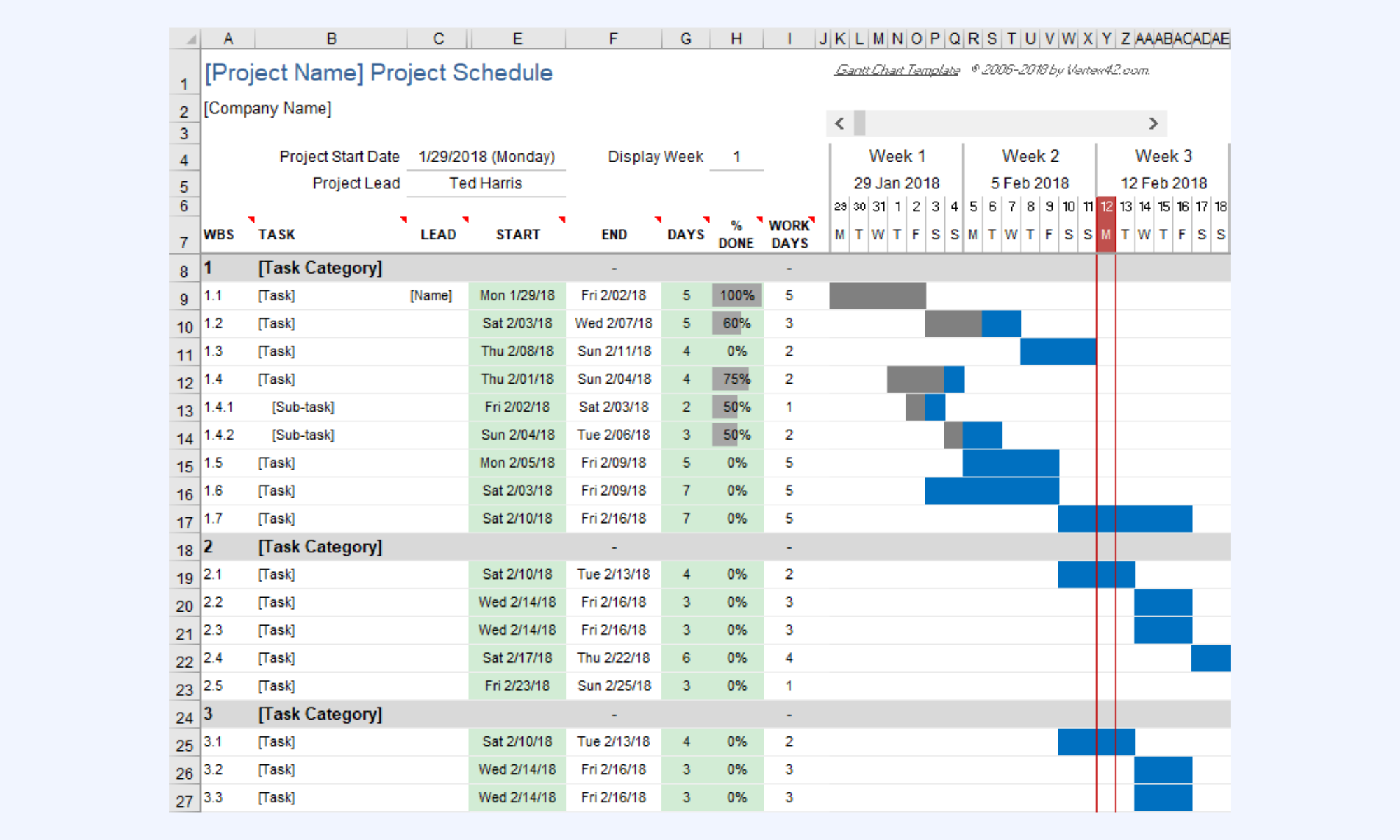
Image source: smartsheet.com
Timeline-based Gantt chart
This is the "original" template featuring a scrollable timeline and automated bars that update based on start dates and durations. It includes a % complete tracking system and a vertical red line that automatically indicates the current date.
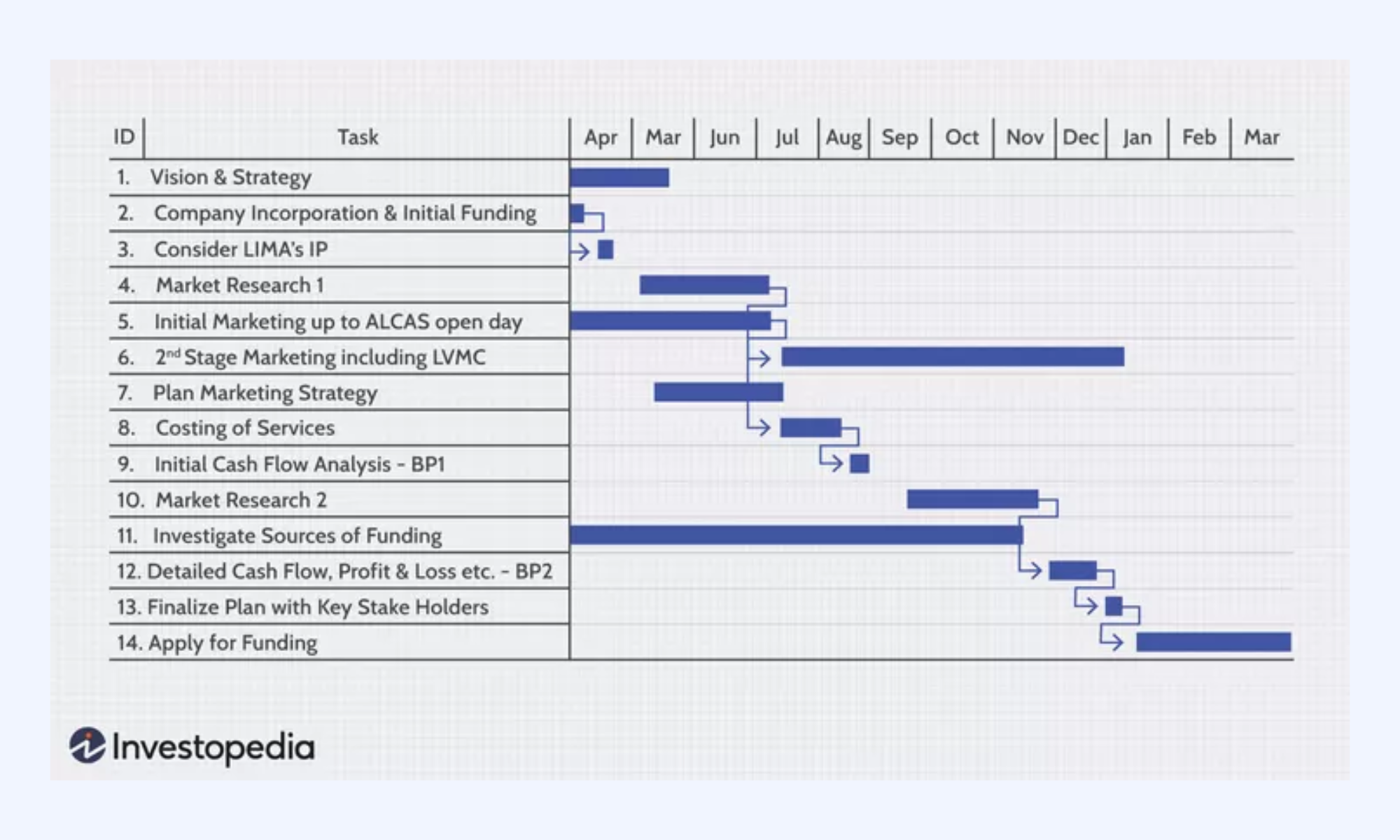
Image source: vertex42.com
Project management Gantt chart
This template is designed to provide a "light" version of a project schedule. Unlike traditional, data-heavy charts, it uses a clean horizontal layout with editable milestones, making it easier for stakeholders and clients to digest key project events at a glance.
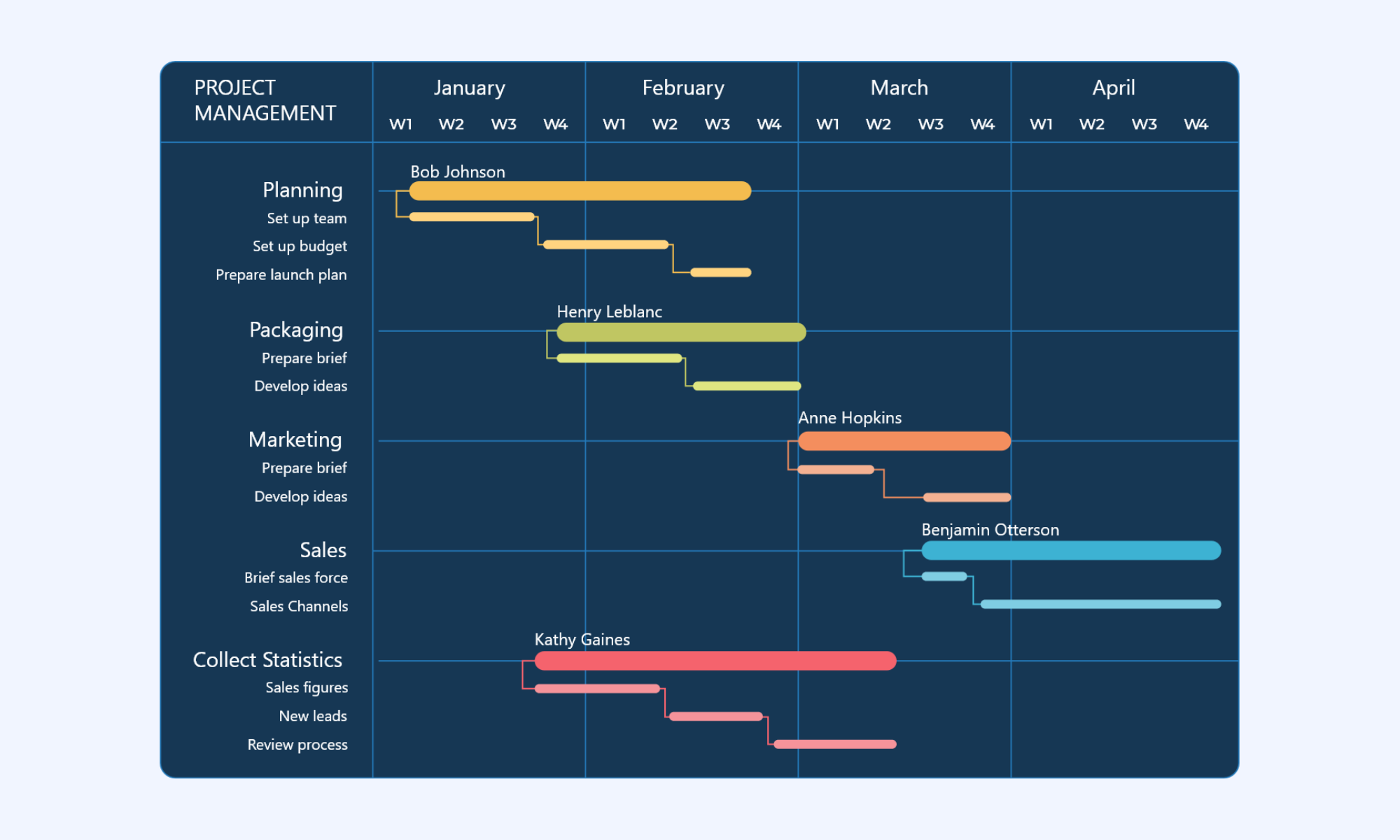
Image source: investopedia.com
Milestone Gnatt chart template
This template includes the terminal elements (the specific tasks), the summary elements (the broader project stages), and the explicit visualization of dependencies—showing how the start of one task is tied to the completion of another.
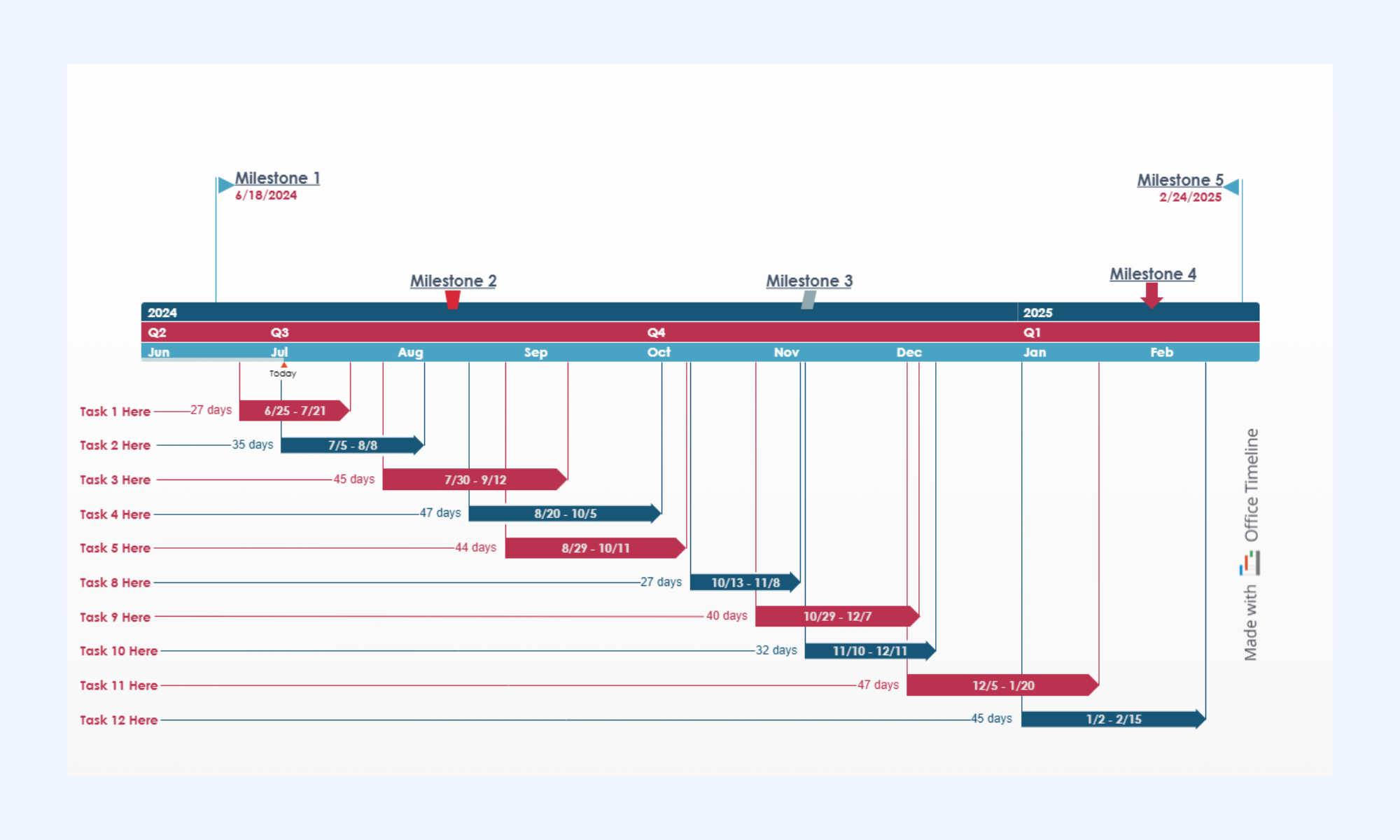
Image source: officetimeline.com
Modern choice: Plan, track, and execute your Gantt chart with Lark
Modern project teams benefit from platforms that connect project planning with communication and documentation. provides a unified workspace where teams can manage project schedules, coordinate tasks, and share information in real time.
Instead of switching between multiple tools, teams can maintain and discussions within one environment. This improves transparency and reduces communication delays during project execution.
Accurate project scheduling
Project scheduling requires flexible data structures that support multiple views of project information. allows teams to build customizable project databases that organize tasks, dependencies, and deadlines. Teams can visualize schedules using timeline, calendar, or . This flexibility allows project managers to track dependencies on Gantt charts while maintaining detailed task records.
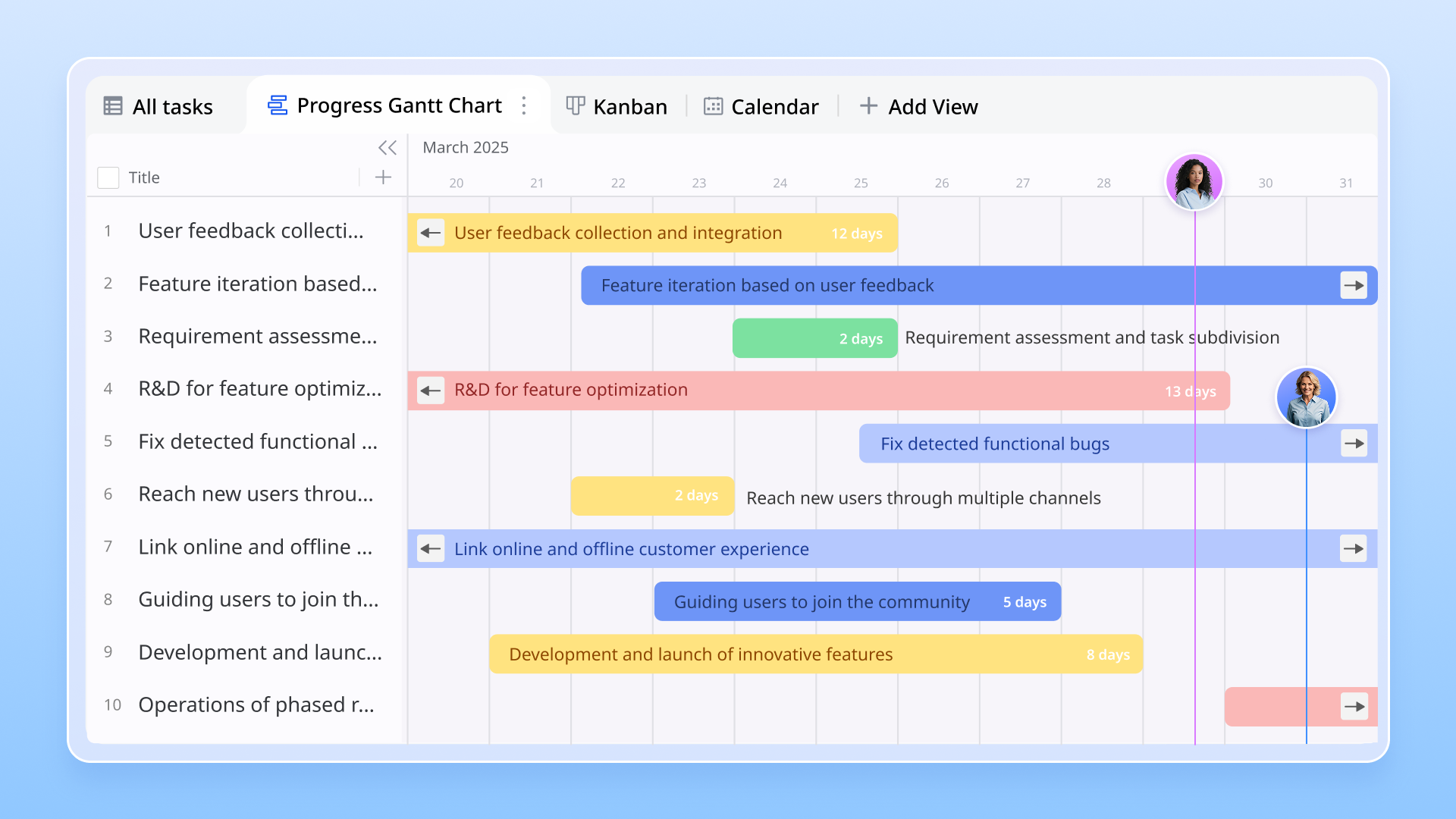
Seamless task coordination
Project scheduling depends on clear task ownership and accountability. Lark Tasks helps teams assign responsibilities, set deadlines, and track progress within shared workflows. Managers can monitor task status and , ensuring activities align with project timelines. This visibility helps maintain scheduling accuracy and prevents delays from spreading across the project. 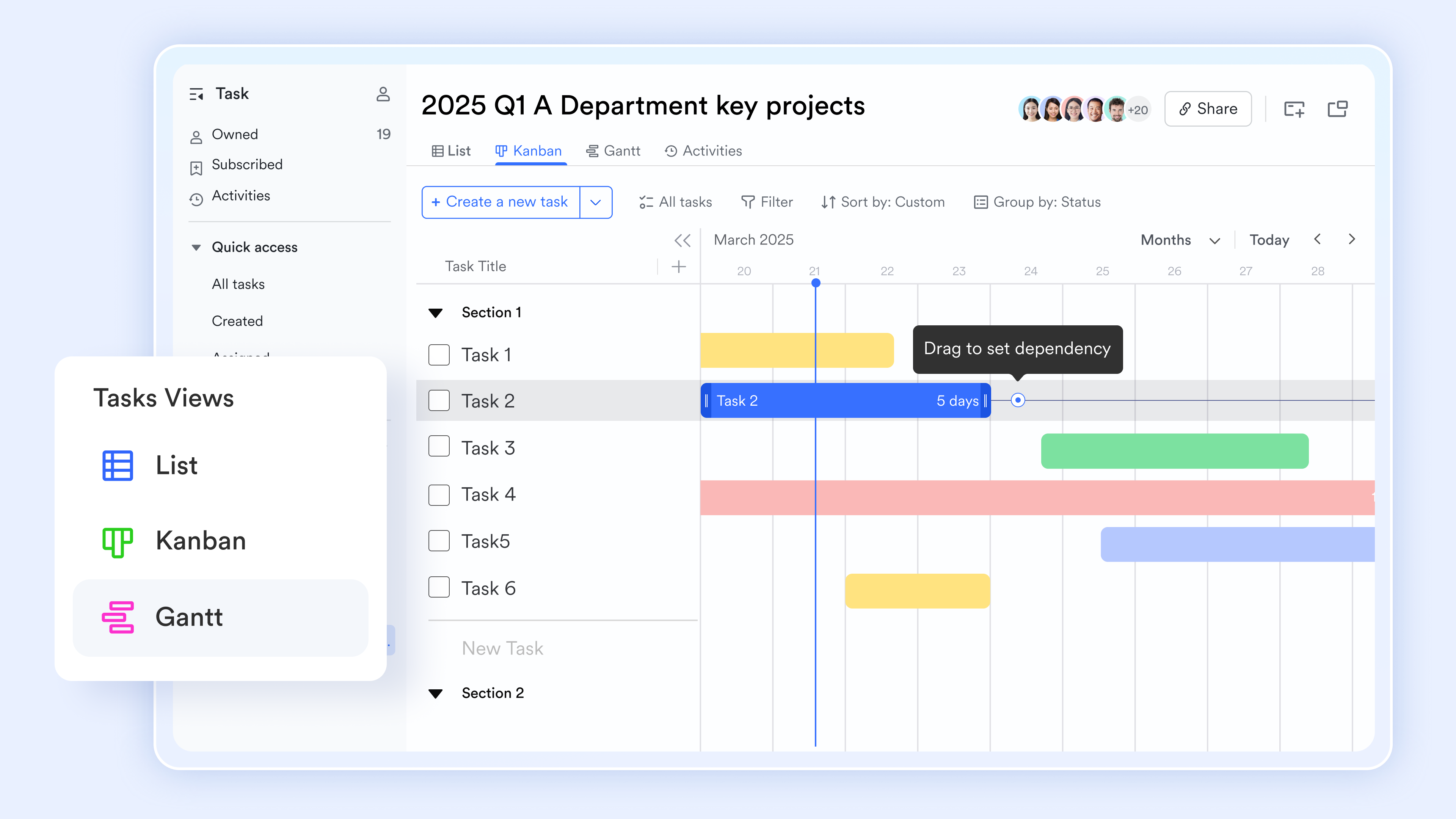
Collaborative project documentation
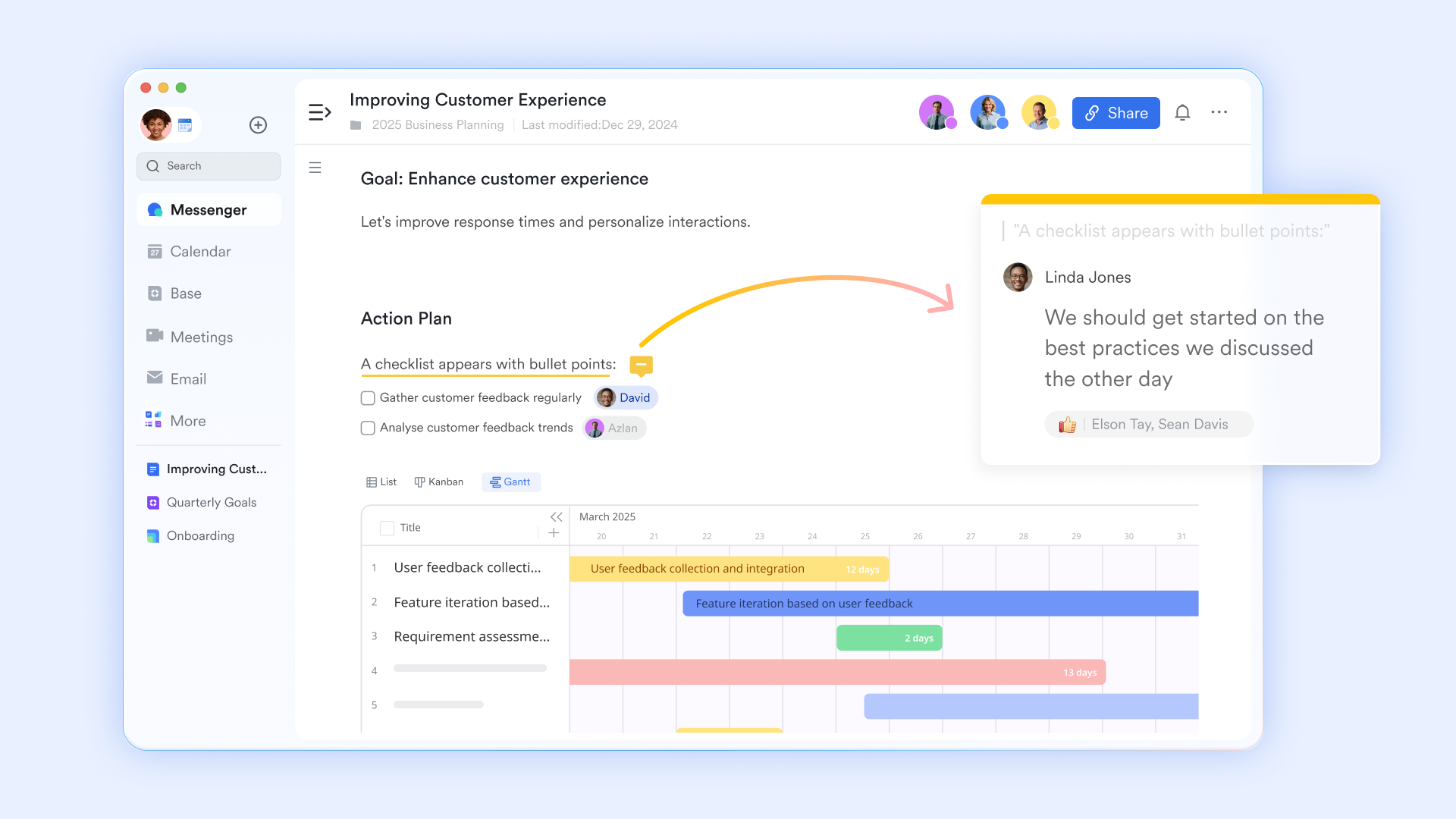
Successful requires accurate documentation and planning materials. allows teams to maintain project plans, meeting notes, and process documentation within a collaborative workspace. When teams combine documentation with scheduling tools, decision-making becomes more efficient, and project plans remain accessible to all stakeholders.
Real-time coordination
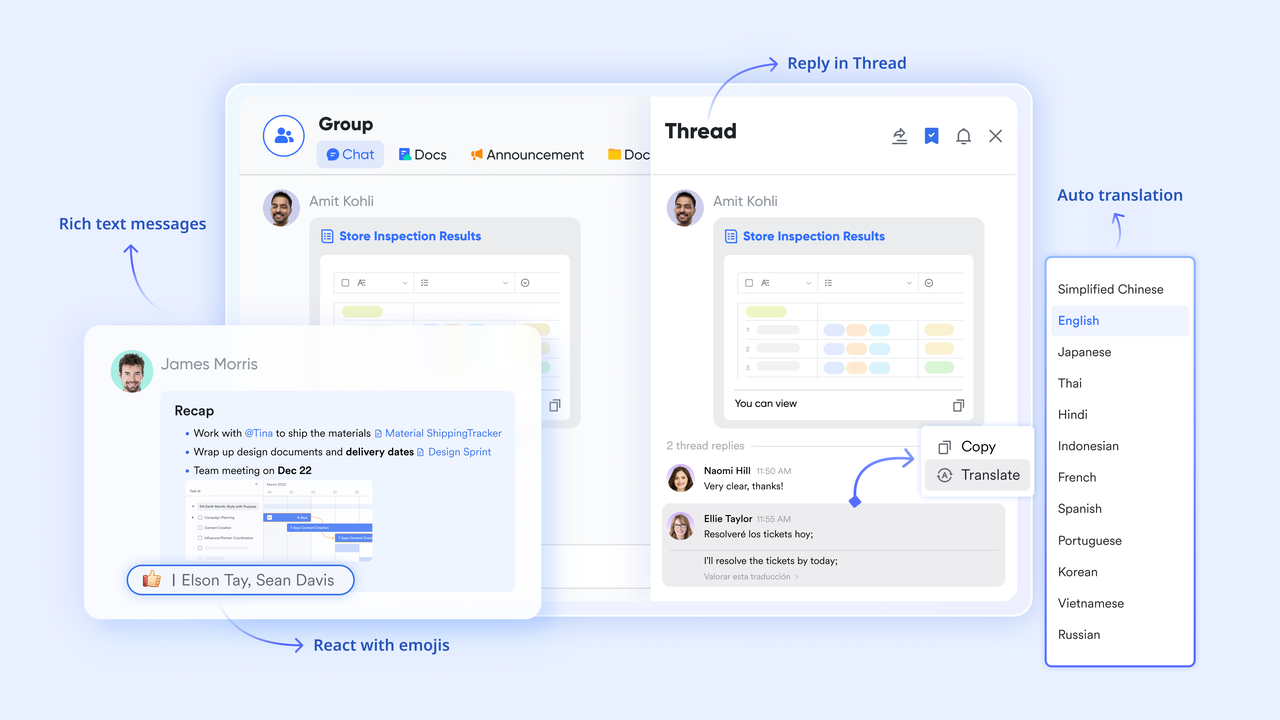
Communication plays a critical role in maintaining project schedules. enables teams to discuss timeline updates, report blockers, and coordinate changes directly within the . By connecting messaging with project workflows, teams reduce delays and maintain continuous visibility across project schedules.
:
- Starter plan: Free forever plan that includes 11 powerful tools for up to 20 users. It also comes with 100GB of storage, 1000 automation runs, AI translations, and more.
- Pro plan: $12/user/month (billed annually) for up to 500 users. It includes everything in Starter plus group calling for up to 500 attendees, 15TB of storage, 50,000 automation runs, and more.
- Enterprise plan: for custom pricing. Supports unlimited users and includes even more automation runs and advanced security, compliance, and management features.
For small teams with simple communication needs

18 months message history
1000 Base automation runs/month
2000 rows per table in Base
Most POPULAR
For companies with comprehensive collaboration and management needs
Unlimited message history
500-participant video meetings
50k Base automation runs/month
20k rows per table in Base
For large companies with advanced security and organizational management needs
Get a personalized demo and pricing
Unlimited message history
500-participant video meetings
15 TB storage + 30 GB storage/user
500k Base automation runs/month
50k Base automation runs/month
Most POPULAR
For companies with comprehensive collaboration and management needs
Unlimited message history
500-participant video meetings
50k Base automation runs/month
20k rows per table in Base
Best practices for scheduling projects with Gantt charts
Project scheduling requires consistent planning discipline and . When teams follow structured scheduling practices, they can maintain accurate timelines and reduce the risk of delays. These practices help project managers coordinate tasks effectively and ensure that project workflows remain organized throughout the project lifecycle.
- Clearly define task dependencies: Defining dependencies in Gantt chart timelines ensures tasks occur in the correct order. When teams understand how activities connect, they can prevent tasks from starting before prerequisite work is completed. This improves coordination and reduces workflow conflicts across the project.
- Break projects into manageable phases: Dividing projects into smaller phases makes scheduling easier to manage. Each phase can be represented on a Gantt chart to track progress step by step, so teams can track progress step by step. This structured approach improves planning accuracy and helps teams focus on achievable milestones.
- Track milestones for major deliverables: Milestones act as checkpoints that measure progress toward important . By tracking milestones within Gantt chart management timelines, project managers can monitor whether the project is progressing according to schedule. This helps identify delays before they affect the entire project.
- Update schedules regularly: Project schedules often change as tasks progress and conditions evolve. Updating Gantt chart management timelines ensures the schedule reflects actual project progress. Regular updates allow teams to adjust timelines quickly and maintain accurate scheduling information.
- Communicate schedule changes with teams: Transparent communication ensures that all stakeholders understand schedule updates and task adjustments. When teams share schedule changes quickly, they can respond to delays and coordinate work more effectively. Clear communication helps maintain alignment across departments.
Common scheduling mistakes in Gantt charts
Even well-planned schedules can encounter problems if teams overlook important planning principles. Understanding common scheduling mistakes helps project managers avoid errors that may disrupt project timelines. By recognizing these issues early, teams can improve and maintain more reliable project schedules.
- Ignoring task dependencies: When Gantt chart dependencies are not defined properly, tasks may start before prerequisite work is completed. This creates scheduling conflicts and disrupts project workflows. Clearly mapping dependencies in Gantt chart timelines helps maintain the correct task sequence.
- Underestimating : Unrealistic time estimates often cause projects to fall behind schedule. When tasks take longer than expected, dependent activities may also be delayed. Accurate duration estimates help maintain realistic project timelines.
- Failing to update project timelines: When project schedules are not updated regularly, Gantt chart management becomes inaccurate. Teams may continue working with outdated information that no longer reflects project progress. Regular updates ensure schedules remain reliable.
- Overloading team resources: Assigning too many tasks to a single team member can slow project progress. When workloads are unbalanced, deadlines may be missed, and project timelines may extend. Balanced resource allocation improves scheduling efficiency.
- Lack of communication about delays: When delays are not communicated quickly, dependent tasks may continue according to the original schedule. This can cause confusion and extend the project timeline. Clear communication helps teams adjust schedules effectively.
Conclusion
Project scheduling plays a central role in successful project management. A Gantt chart for scheduling allows teams to visualize timelines, coordinate tasks, and manage dependencies throughout the . By organizing tasks along a timeline, project managers gain better visibility into project progress and can address delays before they disrupt the schedule.
Gantt chart dependencies help ensure tasks occur in the correct order, improving coordination across teams and reducing workflow conflicts. While spreadsheet tools such as project management Gantt chart Excel templates can support basic scheduling needs, modern projects often require more collaborative solutions.
Platforms like help teams move beyond traditional spreadsheets by integrating scheduling, communication, documentation, and task management into a single workspace. This approach improves project transparency and allows teams to maintain accurate schedules across complex projects.
As project environments continue to evolve, organizations that adopt collaborative scheduling tools will be better equipped to manage timelines, coordinate teams, and deliver projects successfully.
Start planning project schedules with Lark today
FAQs
What is a Gantt chart used for in scheduling?
A Gantt chart is used to visualize project timelines and organize tasks within a structured timeline. It shows when tasks begin, how long they last, and how they connect with other activities. By mapping Gantt chart dependencies, teams can coordinate workflows and maintain better control over . Modern collaboration platforms such as Lark also help teams integrate scheduling, communication, and task tracking.
How do dependencies work in a Gantt chart?
Dependencies in Gantt chart planning define how tasks relate to one another within a project schedule. These relationships determine whether tasks must start or finish before other activities can begin. When dependencies in Gantt chart timelines are clearly mapped, teams can maintain a structured workflow and avoid scheduling conflicts. Platforms like Lark can help teams track these dependencies while keeping project communication connected.
Can you create Gantt charts in Excel?
Yes, teams can create a Gantt chart with dependencies in Excel using stacked bar charts and task timelines. Many organizations build schedules using tools such as Excel Gantt charts with dependencies or Gantt chart Excel templates with dependencies. These spreadsheets allow teams to visualize project timelines and manage basic task relationships. However, collaborative tools like Lark offer more advanced scheduling features and shared project visibility.
What tools support Gantt chart scheduling?
Several project management platforms offer Gantt chart features to help teams organize tasks and monitor project timelines. These tools allow teams to track dependencies, assign responsibilities, and maintain visibility into project progress. Spreadsheet tools such as project management, Gantt charts, and Excel templates are commonly used for simple projects. For more collaborative workflows, platforms like Lark combine scheduling, documentation, and communication within one environment.
How do Gantt charts improve project planning?
Gantt charts improve project planning by providing a clear visual timeline that shows how tasks connect throughout the project lifecycle. By using a for scheduling, teams can track deadlines, manage dependencies, and adjust timelines when delays occur. This structured view helps project managers make better scheduling decisions. When combined with collaborative platforms like Lark, teams can also coordinate tasks, discussions, and project documentation in one workspace.
Related reading





























