Remote meetings are now a core part of daily work, but Google Meet isn't always the perfect fit for every team. Some businesses need longer free meeting limits, others want stronger privacy guarantees, while many look for deeper collaboration features like project workflows, file sharing, and integrated chat. This guide breaks down the best Google Meet alternatives, comparing free platforms, open-source tools, and complete collaboration solutions, so you can choose the video conferencing software that best fits your team's needs.​
​Key takeaways: Best 5 Google Meet alternatives
​​
1. Lark: Best unified workspace with features of scheduling and meetings​
2. Zoom: Best large-scale webinars and external meetings​
3. Microsoft Teams: Best for Microsoft 365 users​
4. Jitsi Meet: Best open-source Google Meet alternative​
5. Brave Talk: Best privacy-focused meetings​
​Upgrade to meetings built into your workspace
​​ ​Quick preview: Top Google Meet alternatives at a glance
​​
A quick comparison helps teams understand how each platform stacks up against Google Meet. From meeting limits to collaboration tools and pricing, every alternative offers strengths for different workflows. This snapshot highlights the key features companies evaluate when choosing a more flexible or powerful video platform. Use this table to find the Google Meet alternative that fits your team's needs.​
Information source: Official vendor sites​
Update time: 2025-11-30​
Note: Pricing and plan details reflect publicly available data as of the update date and may vary based on region, billing cycle, and number of agents.​
​What is Google Meet?
​​
Google Meet is Google's cloud-based designed for virtual meetings, online classes, webinars, and remote collaboration. Integrated with Google Workspace, it lets users start or join calls directly from Gmail, Calendar, or the Google Meet app, making it convenient for both personal and business use. While the platform is easy to use, many teams eventually search for Google Meet alternatives when they need more advanced capabilities.​
Google Meet supports screen sharing, chat, and recording, but lacks deeper collaboration features such as built-in tasks, , and project documentation. As organizations scale, they often compare alternatives to Google Meet that offer longer meeting durations, stronger privacy controls, or all-in-one workspaces. Some teams even explore Google Meet alternatives with no time limit, or prefer Google Meet alternative open source platforms like Jitsi Meet for self-hosting and enhanced data control. As remote work expands, many businesses now evaluate which Zoom alternatives or free apps like Google Meet best match their workflow needs.​
​7 reasons why teams look for Google Meet alternatives
​​
As remote and hybrid work grow, many companies are rethinking their meeting tools and exploring Google Meet alternatives that better support collaboration. While Google Meet is accessible and straightforward, teams often outgrow its limitations as their workflows become more complex. Organizations needing stronger security, deeper integration, or better meeting follow-up turn to alternatives to Google Meet that fit modern work demands. From privacy concerns to lack of built-in project tools, here's why teams start looking beyond Google Meet.​
- Limited built-in collaboration outside meetings: Google Meet focuses almost entirely on live video calls. Teams still need separate tools for chat, file sharing, documentation, task tracking, approvals, or workflows, which leads to fragmented workspaces and constant app-switching.​
- Weak meeting follow-up workflows: After meetings end, Google Meet provides minimal support for turning discussions into action. There's no native way to link meeting outcomes to tasks, project plans, or shared workspaces, making accountability harder to maintain.​
- Cost increases as teams scale: Advanced features such as larger meeting capacity, recording storage, enhanced security, and administrative controls require paid Google Workspace tiers, which become increasingly expensive as organizations add more users.​
- Limited customization for business workflows: Google Meet offers few options for workflow automation or customization tailored to business processes. Teams that need approvals, structured scheduling, or integrated project flows must rely on third-party tools.​
- Basic scheduling and coordination tools: While meetings can sync with Google Calendar, there's limited visibility into team availability, shifts, project timelines, or without separate scheduling or workforce management platforms.​
- Concerns around privacy and data control: Certain organizations prefer alternatives that offer enhanced encryption, stricter data sovereignty options, self-hosting capabilities, or privacy-forward operating models beyond what Google Meet typically provides.​
- Lack of all-in-one workspace experience: Many teams now favor platforms that combine meetings, messaging, documents, calendars, and workflows under one environment. Google Meet remains a single-function meeting tool rather than a unified collaboration hub, driving teams to seek more comprehensive .​
​Move your team to smarter, connected meetings
​​ ​15 best Google Meet alternatives for video conferencing
​​
​1. Lark: Best unified workspace with features of scheduling and meetings
​​
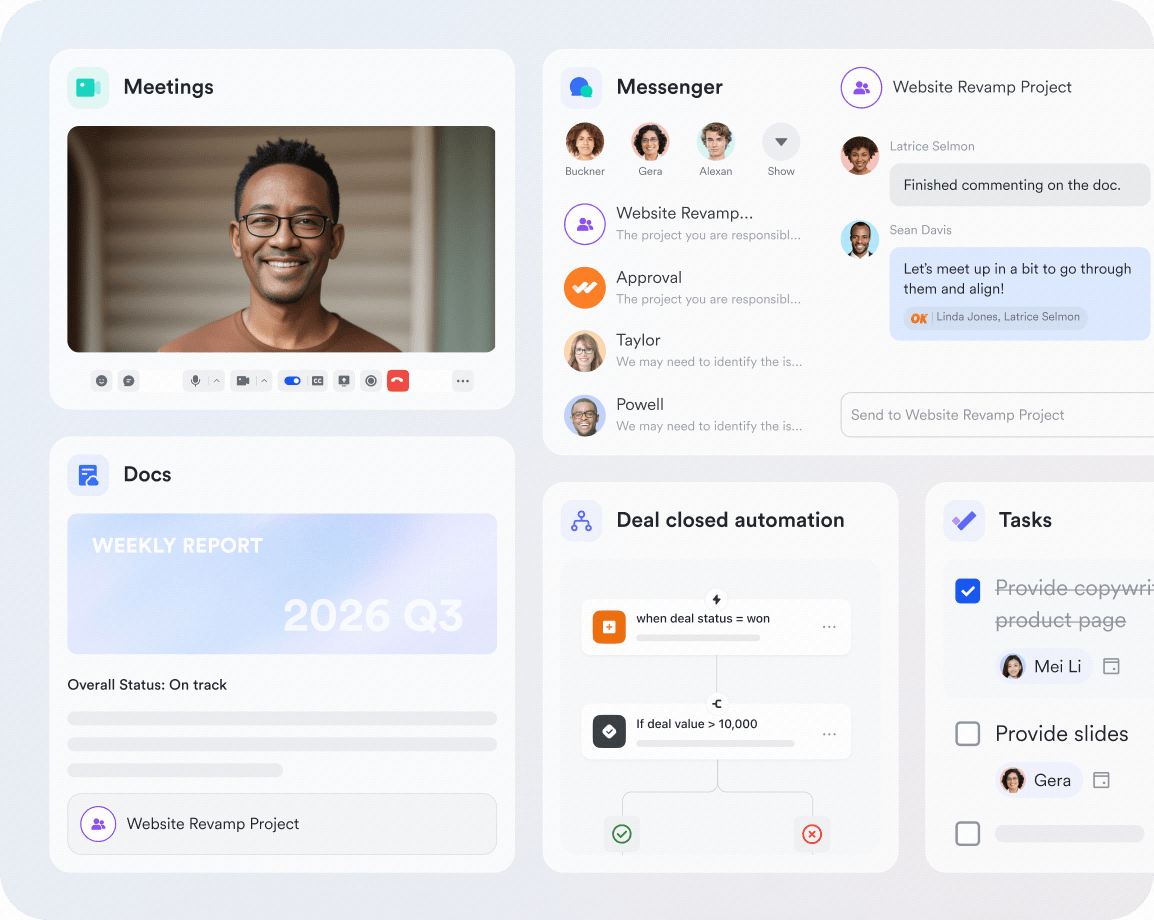
is more than a Google Meet alternative; it's a unified hub where , schedules, docs, and chats live together. Teams can launch calls, share screens, co-edit notes, and track decisions in one flow. With built-in calendars, forms, and , Lark turns every meeting into organized, actionable work.​
​
​​ Built-in HD video meetings with no separate tools​
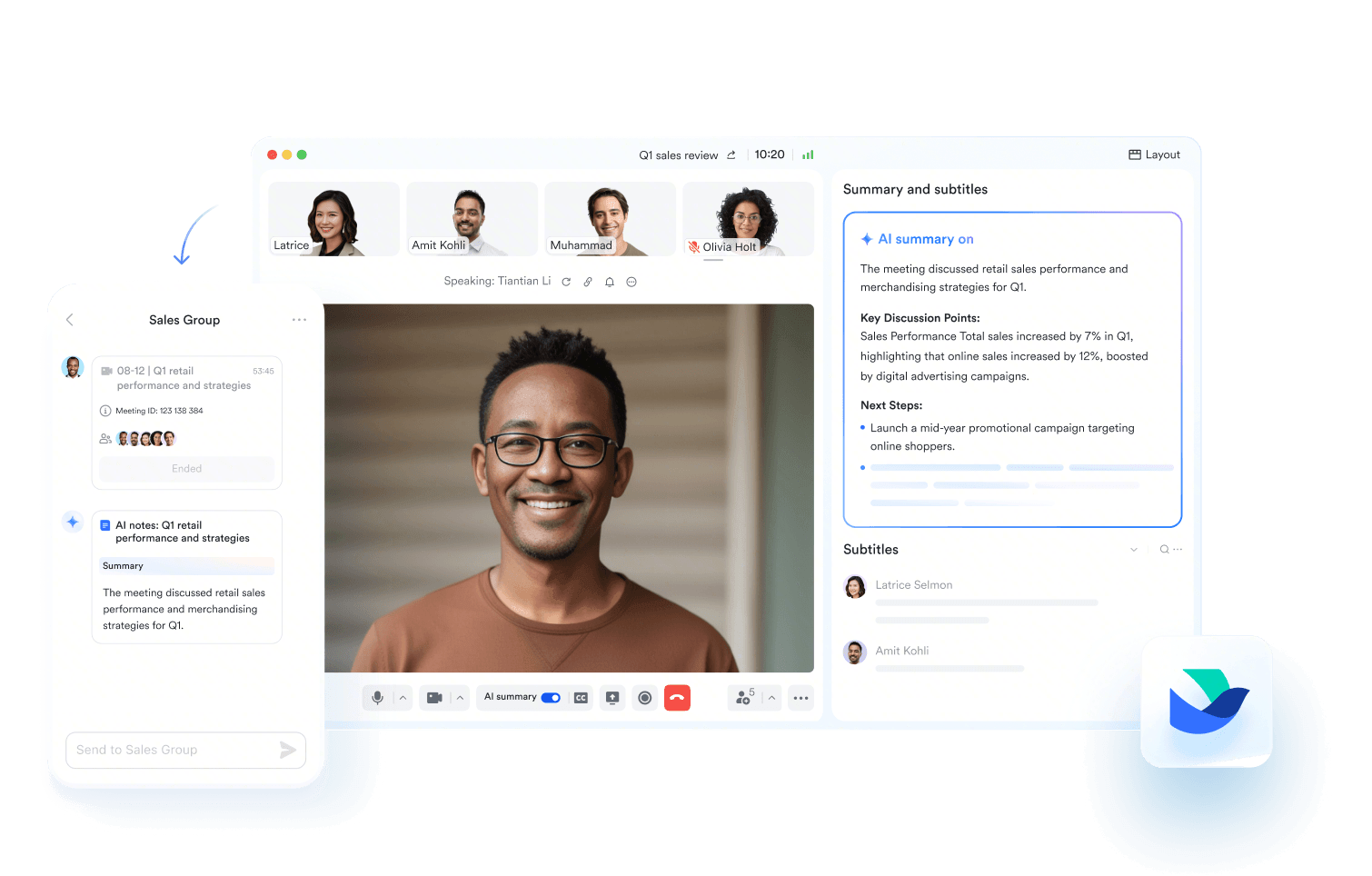
Lark includes native directly inside the workspace, no switching between apps or accounts. Teams schedule or start meetings straight from chat or Calendar, invite internal or external participants, and launch calls in one click. Screen sharing, chat, recording, participant management, and virtual backgrounds are all built in. You can use the Meeting Chat to seamlessly share messages, links, and files during calls, complete with rich text and mentions. ​ For global collaboration, Lark provides real-time captions using automatic speech recognition in English, Chinese, and Japanese. These subtitles can be instantly translated into multiple languages, displayed alongside the original text. Best of all, you can easily search, filter, and copy the entire Subtitle History after the meeting is over. Unlike Google Meet, meetings automatically live alongside tasks, documents, and team conversations, keeping work context in the discussion.​ ​
​​ Searchable, shareable meeting intelligence​
automatically records meetings with full video playback, synchronized transcripts, and timestamped highlights. Every spoken word becomes searchable, making it easy for teams to revisit key moments without rewatching entire sessions. Users can jump directly to the exact point in the recording where a decision or instruction was made, export transcript snippets into Docs, and share minute-level links with teammates who couldn't attend.​
Unlike basic recording tools, Lark Minutes embeds meeting records into the workspace so transcripts remain connected to tasks, documents, and project pages. This transforms recordings from static files into living reference assets—supporting accountability, onboarding, knowledge transfer, and compliance documentation across teams.​
​
​​ AI meeting notes for automatic summaries and task follow-up​
in Lark are automatically generated during or after each meeting by the Video Meeting Assistant, turning live conversations into structured documentation without manual effort. Each notes document includes essential meeting details, a concise AI-written summary of discussion points, and a clear to-do list capturing next actions and responsibilities. This ensures that key information is accurately preserved while participants remain fully engaged during the meeting.​
By default, all meeting participants receive notifications giving them access to view and collaborate on the notes immediately. The meeting organizer or host can customize permissions at any time, controlling who can view or edit the documentation to maintain privacy or restrict sensitive content when required.​
​
​​ Webinars for large-scale presentations and training​
Lark Webinar enables stable, large-attendee online events directly inside the workspace without relying on third-party platforms. Teams can host product launches, onboarding sessions, training workshops, company town halls, or marketing events with registration pages, audience chat moderation, speaker management, and controlled screen-sharing.​ Webinars maintain full connection to Lark's collaboration tools—allowing presenters to share docs live, post-session resources in Messenger, and route post-event follow-ups into tasks or approvals. Attendance data and recordings can be stored in Lark Base, giving organizers clear visibility into engagement metrics and training coverage without exporting data across disconnected tools.​
​
​​ Calendar scheduling with project context​
does more than book meeting slots. Every meeting can be connected to project tasks, , or release milestones. Calendar visibility shows teammates' availability and workload alongside active deliverables, so sessions are planned around real execution schedules rather than isolated time slots. Automatic reminders and timezone syncing keep global teams aligned without juggling external calendar tools or endless rescheduling threads.​
​
​​ Meeting-to-workflow documentation via Magic Share & Lark Docs​
During meetings in Lark, teams can tap open Magic Share and edit docs, slides, mindnotes, or sheets for real-time agendas, notes, decisions, and action items. Unlike Google Meet's loose note-taking approach, lets you create tasks directly from meeting notes, assign ownership, and cross-link them to project records stored in Base. This ensures that meeting outcomes don't vanish once the call ends, decisions and follow-ups are documented immediately and become part of the workflow.​ ​
​​ Messenger threads tied to meetings and follow-ups​
supports ongoing conversation threads attached to scheduled meetings or related tasks. Participants can message before sessions to prepare, chat during meetings to share resources or links, and continue discussions after calls without losing context. Important messages can be pinned, action items flagged, and unresolved issues tracked, all without leaving the workspace or sorting through scattered chat platforms.​ ​
​​ :​
- Starter plan: Free forever plan that includes 11 powerful tools for up to 20 users. It also comes with 100GB of storage, 1000 automation runs, AI translations, and more.​
- Basic plan: $6/user/month (billed annually) for up to 500 users. It includes everything in Starter plus group calling for up to 500 attendees, 5TB of storage, 1000 automation runs, and more. For more details, please .​
- Pro plan: $12/user/month (billed annually) for up to 500 users. It includes everything in Basic plus group calling for up to 500 attendees, 15TB of storage, 50,000 automation runs, and more.​
- Enterprise plan: for custom pricing. Supports unlimited users and includes even more automation runs and advanced security, compliance, and management features.​
​For small teams with simple communication needs

18 months message history

1000 Base automation runs/month

2000 rows per table in Base
Most POPULAR
For companies with comprehensive collaboration and management needs

Unlimited message history

500-participant video meetings

50k Base automation runs/month

20k rows per table in Base
For large companies with advanced security and organizational management needs
Get a personalized demo and pricing

Unlimited message history

500-participant video meetings

15 TB storage + 30 GB storage/user

500k Base automation runs/month

50k Base automation runs/month
Most POPULAR
For companies with comprehensive collaboration and management needs

Unlimited message history

500-participant video meetings

50k Base automation runs/month

20k rows per table in Base
​​ ​ 2. Zoom: Best large-scale webinars and external meetings
​​
Zoom is one of the most widely used video conferencing platforms, known for its reliability, scalability, and performance during significant virtual events. It's ideal for teams that host webinars, client meetings, training sessions, or external workshops with hundreds or even thousands of participants. Zoom offers advanced features like breakout rooms, registration forms, audience engagement tools, and high-quality streaming. Its ease of use and enterprise-grade stability make it a top Google Meet alternative for organizations that regularly run large or public-facing meetings.​
​
​​ Image source: zoom.com​
Key features:​
- Large meeting & webinar capacity: Host up to thousands of participants with smooth video performance.​
- Interactive webinar tools: Use Q&A, polls, chat, reactions, and registration pages to boost engagement.​
- Breakout rooms: Split attendees into smaller groups for workshops, training, or discussions.​
- Cloud recording & transcripts: Save meetings securely with searchable transcripts and cloud storage options.​
- Integrations & add-ons: Connect with , calendars, LMS platforms, and marketing tools.​
Pros:​
- Highly reliable for significant events​
- Great webinar hosting tools and analytics​
- Easy for guests to join without setup​
- Works well across devices and networks​
Cons:​
- Advanced webinar features cost extra​
- Occasional security concerns in past versions​
Pricing:​
- Pro: $13.33/user/month (billed annually)​
- Business: $18.33/user/month (billed annually)​
- Enterprise: Contact sales for pricing​
​ 3. Microsoft Teams: Best for Microsoft 365 users
​​
Microsoft Teams is the strongest Google Meet alternative for organizations already using the Microsoft 365 ecosystem. It unifies video meetings, chat, file sharing, and collaboration inside a single hub connected to Outlook, SharePoint, OneDrive, and Office apps. Teams are built for internal communication, ideal for companies that need secure, structured meetings, persistent channels, and deep document collaboration. With enterprise-grade security, robust admin controls, and seamless Microsoft integration, Teams is best suited for mid-size and large organizations.​
​
​​ Image source: microsoft.com​
Key features:​
- Deep Microsoft 365 integration: Join meetings directly from Outlook, collaborate in Word/Excel/PowerPoint, and store files in OneDrive or SharePoint.​
- Channels + chat + meetings: Communicate asynchronously or instantly with persistent channels and threaded messaging.​
- Breakout rooms & presenter modes: Engage participants with structured discussions and polished presentation layouts.​
- Robust security & compliance: Enterprise-grade encryption, eDiscovery, retention policies, data loss prevention, and admin-level controls.​
- Webinars & Town Halls: Run significant virtual events with registration, reporting, and attendee engagement features.​
Pros:​
- Best choice for Microsoft 365 users​
- Excellent collaboration and file integration​
- Strong admin controls and enterprise-level security​
- Great for internal communication​
Cons:​
- Can feel heavy for simple meetings​
- The interface may overwhelm non-Microsoft users​
Pricing:​
- Microsoft Teams essentials: $1.40/user/month​
- Microsoft 365 business basic: $1.75/user/month​
- Microsoft 365 business standard: ~$9.30/user/month​
​ 4. Jitsi Meet: Best open-source Google Meet alternative
​​
Jitsi Meet is an entirely free, open-source video conferencing platform known for its flexibility, privacy, and self-hosting capabilities. Unlike traditional meeting tools, Jitsi lets teams host their own servers for complete data control, making it ideal for developers, tech teams, and privacy-focused organizations. With encrypted calls, no account requirements, and easy browser access, Jitsi Meet is a lightweight yet powerful Google Meet alternative for teams that want maximum freedom without vendor lock-in.​
​
​​ Image source: jitsi.org​
Key features:​
- Open-source + self-hosting: Deploy Jitsi on your own server to maintain full control over meeting data and security.​
- Browser-based meetings: Join instantly without downloads, accounts, or passwords, ideal for quick, frictionless calls.​
- End-to-end encryption options: Provides strong privacy for sensitive conversations, especially on self-hosted setups.​
- Unlimited free meeting rooms: Create as many meetings as needed with no participant or time restrictions.​
- Developer-friendly APIs & SDKs: Build custom video apps, embed meeting rooms, or automate workflows using Jitsi components.​
Pros:​
- Completely free and open-source​
- No logins or installations required​
- Strong privacy for self-hosted deployments​
- Highly customizable for developers​
Cons:​
- The feature set is lighter than the enterprise tools​
- Quality depends on hosting/server performance​
Pricing:​
- Jitsi installation (8 hours): $300 to $800​
- Jitsi Setup & rebranding (24 hours): $500 to $1,400​
- Jitsi Setup, rebranding & integration (40 hours): $800 to $2,000​
​ 5. Brave Talk: Best privacy-focused meetings
​​
Brave Talk is a video conferencing platform built with privacy at its core. Developed by the makers of the Brave browser, it offers encrypted video calls, no tracking, and minimal data collection, making it ideal for organizations and individuals who prioritize confidentiality. With browser-based meetings and optional integration with Brave's ecosystem, Brave Talk offers a lightweight, secure alternative to Google Meet for small teams, freelancers, and privacy-conscious businesses.​
​
​​ Image source: brave.com​
Key features:​
- End-to-end encryption: Ensures that meetings remain private and secure from unauthorized access.​
- Browser-based calls: Join meetings instantly with no downloads, logins, or account setup.​
- Integration with Brave browser: Optimized performance and privacy for Brave users, reducing data tracking.​
- Self-hosted option: Enterprises can deploy their own Brave Talk servers for greater control over data.​
- Recording & moderation tools: Optional recording features and host controls for managing participants.​
Pros:​
- Strong focus on privacy and security​
- Easy, browser-based access for all participants​
- Minimal data collection and tracking​
- Suitable for individuals and small businesses​
Cons:​
- Limited features compared to larger enterprise solutions​
- Smaller user base, fewer integrations​
Pricing:​
- Brave VPN: $9.99/month or $99.99/year​
- Brave search premium: $3.00/month or $29.99/year​
- Leo AI premium: $14.99/month or $149.99/year​
- Brave talk premium: $7.00/month or $69.99/year​
​ 6. Whereby: Best simple browser-based video meetings
​​
Whereby is a lightweight, browser-based video conferencing platform designed for quick, hassle-free meetings. It requires no downloads or complex setup, making it ideal for freelancers, small teams, and businesses looking for a simple, reliable Google Meet alternative. With easy room links, screen sharing, and flexible participant limits, Whereby focuses on accessibility and ease of use, providing a straightforward solution for video calls without the bloat of enterprise features.​
​
​​ Image source: whereby.com​
Key features:​
- Browser-based meetings: Join instantly via a link with no downloads, logins, or accounts required.​
- Custom room URLs: Personalize your meeting link for easy access and branding.​
- Screen sharing & collaboration: Share screens, documents, or presentations seamlessly during calls.​
- Participant management: Lock rooms, remove participants, and manage access for secure meetings.​
- Integrations: Works with Google Calendar, Outlook, Slack, and other productivity tools for scheduling.​
Pros:​
- Extremely easy to use with no software installation​
- Ideal for freelancers and small teams​
- Secure, browser-only meetings​
- Clean and minimal interface​
Cons:​
- Limited advanced features like breakout rooms or webinar tools​
- Participant limits are lower than enterprise solutions​
Pricing:​
- Pro: $8.99/month per host​
- Business: $11.99/month per host (minimum three hosts)​
​ 7. Zoho Meeting: Best SMB webinar hosting
​​
Zoho Meeting is a cloud-based video conferencing and webinar platform tailored for small to mid-sized businesses. It allows teams to host secure online meetings, training sessions, and webinars without complex setups. Integrated seamlessly with the Zoho ecosystem, including Zoho CRM, Projects, and Calendar, Zoho Meeting helps teams manage communications, attendee registration, and follow-ups efficiently. Its focus on affordability, simplicity, and reliability makes it an excellent Google Meet alternative for SMBs looking to run professional webinars and internal meetings.​
​
​​ Image source: zoho.com​
Key features:​
- Online meetings & webinars: Schedule and host video calls and webinars with attendee registration and engagement tools.​
- Screen sharing & presenter controls: Share presentations, documents, and screens, with options to control participant access.​
- Zoho ecosystem integration: Sync with Zoho CRM, Projects, and Calendar to streamline scheduling, follow-ups, and reporting.​
- Recording & analytics: Record meetings and webinars, and access detailed attendee reports to measure engagement.​
- Security & compliance: Supports encrypted meetings, password-protected sessions, and data privacy compliance.​
Pros:​
- Affordable and SMB-friendly​
- Seamless integration with Zoho products​
- Easy-to-use interface for webinars and meetings​
- Secure and compliant for business communications​
Cons:​
- Fewer advanced features than enterprise-grade platforms​
- Limited third-party integrations outside the Zoho ecosystem​
Pricing:​
- Standard: $4.60/host/month (billed annually)​
- Professional: $11.50/host/month (billed annually)​
- Standard Webinar: $34.50/organizer/month (billed annually)​
- Professional Webinar: $72.50/organizer/month (billed annually)​
- Enterprise: $362/organizer/month (billed annually)​
​ 8. BigBlueButton: Best education-focused meetings
​​
BigBlueButton is an open-source web conferencing platform specifically designed for online learning and education. It provides virtual classrooms, interactive whiteboards, breakout rooms, and real-time collaboration tools, making it ideal for schools, universities, and e-learning providers. BigBlueButton integrates with learning management systems (LMSs) such as Moodle and Canvas, enabling educators to host engaging, secure, and scalable online classes. Its focus on education makes it a strong Google Meet alternative for instructors and students needing specialized teaching tools.​
​
​​ Image source: bigbluebutton.org​
Key features:​
- Virtual classrooms & webinars: Host online classes, workshops, or training sessions with interactive tools.​
- Whiteboard & annotation: Draw, highlight, and annotate presentations in real time for collaborative learning.​
- Breakout rooms: Divide students into smaller groups for discussions or activities within the same session.​
- LMS integration: Connect with Moodle, Canvas, and other LMS platforms to streamline class scheduling and attendance tracking.​
- Recording & playback: Record sessions for later review or sharing with students who couldn't attend live.​
Pros:​
- Open-source and free to use​
- Specifically designed for educational use​
- Strong interactive tools for learning​
- Integrates with popular LMS platforms​
Cons:​
- The interface is less polished than commercial platforms​
- Requires hosting or a third-party service for scalability​
Pricing:​
Premium plans:​
- Premium 150: $220/year​
- Premium 250: $380/year​
Economy plans:​
- Economy 120: $130/year​
- Economy 250: $280/year​
​ 9. Cisco Webex: Best enterprise-grade security
​​
Cisco Webex is a robust video conferencing platform designed for large enterprises that require secure, reliable, and feature-rich meetings. Known for its enterprise-grade security, Webex supports end-to-end encryption, compliance standards, and advanced admin controls. It's ideal for corporate meetings, webinars, and training sessions where confidentiality, scalability, and integration with enterprise tools are critical. Webex also offers AI-powered features like real-time transcription, meeting highlights, and background noise reduction, making it a strong Google Meet alternative for professional organizations.​
​
​​ Image source: webex.com​
Key features:​
- Enterprise-grade security: End-to-end encryption, single sign-on (SSO), compliance with HIPAA, GDPR, and other standards.​
- AI-powered meeting tools: Real-time transcription, meeting highlights, voice commands, and background noise suppression.​
- Screen sharing & collaboration: Share screens, files, whiteboards, and co-annotate documents in meetings.​
- Scalable webinars & large meetings: Host thousands of participants with breakout sessions, polls, and Q&A tools.​
- Integrations & workflow automation: Connect with Microsoft 365, Google Workspace, Slack, Salesforce, and other enterprise apps.​
Pros:​
- Strong security and compliance for enterprises​
- Scalable for large meetings and webinars​
- AI-driven productivity features​
- Extensive integrations with enterprise tools​
Cons:​
- More expensive than SMB-focused platforms​
- It can be complex for smaller teams or casual users​
Pricing:​
- Webex free: $0/user/year​
- Webex starter: $78/user/month or $936/user/year​
- Webex business: $102.50/user/month or $1,230/user/year​
- Webex enterprise: Contact sales for pricing​
​ 10. GoTo Meeting: Best reliability for corporate calls
​​
GoTo Meeting is a dependable video conferencing platform designed for professional and corporate environments. It offers high-quality audio and video, reliable connectivity, and a simple user interface, making it ideal for business meetings, client calls, and internal team collaboration. GoTo Meeting integrates with popular productivity tools such as Outlook, Google Calendar, and Slack, enabling seamless scheduling and meeting management. Its focus on reliability and ease of use makes it a strong Google Meet alternative for organizations prioritizing stable, professional-grade calls.​
​
​​ Image source: gotomeeting.com​
Key features:​
- HD video and audio: Ensures clear, high-quality calls for professional presentations and discussions.​
- Screen sharing & collaboration tools: Share screens, documents, and presentations with real-time annotation.​
- Meeting scheduling & calendar integrations: Sync with Outlook, Google Calendar, and Slack for seamless meeting management.​
- Recording & transcription: Record meetings for later reference and generate transcripts for documentation.​
- Mobile & desktop apps: Join meetings from any device with consistent performance and interface.​
Pros:​
- Highly reliable and stable connection​
- Professional-grade features for corporate environments​
- Easy to schedule and join meetings​
- Works across desktop and mobile platforms​
Cons:​
- Limited free plan functionality​
- Fewer advanced webinar features compared to competitors​
Pricing:​
- Professional: $12/organizer/month (billed annually)​
- Business: $16/organizer/month (billed annually)​
- Enterprise: Contact sales for custom pricing​
​ 11. RingCentral Video: Best phone + meeting packages
​​
RingCentral Video is a unified communication platform that combines video conferencing with cloud phone system capabilities, ideal for teams that want meeting tools plus voice calling in one package. It suits companies that handle both internal collaboration and external client calls, offering seamless integration of meetings, calls, messaging, and team collaboration. RingCentral Video offers HD video calls, team messaging, and voicemail-to-email features, making it a flexible alternative to Google Meet for businesses seeking a comprehensive communication suite.​
​
​​ Image source: ringcentral.com​
Key features:​
- Integrated video + VoIP phone system: Use one platform for video meetings and cloud phone calls. There is no need for multiple services.​
- Team messaging and collaboration: Chat, share files, and manage tasks alongside meetings for unified communication.​
- High-quality video conferencing: HD video and audio, screen sharing, and meeting controls for professional calls.​
- Voicemail, call recording & forwarding: Manage calls, voicemails, and call routing directly inside the platform.​
- Device flexibility: Works across desktop, mobile, and browser , allowing meetings or calls from anywhere.​
Pros:​
- Combines video meetings and phone services​
- Ideal for teams needing both internal collaboration and client calls​
- Flexible across devices and platforms​
- Simplifies the communication stack by reducing tool sprawl​
Cons:​
- More expensive than simple meeting tools​
- Extra phone/VoIP features may be unnecessary for some users​
Pricing:​
- Meetings: Free plan available​
- Town halls (Webinars): $54/organizer/month (500 attendees, billed annually)​
- Rooms: $49/room/month (billed annually)​
- Webinars & events: $119/organizer/month (billed annually)​
​ 12. Discord: Best community video calls
​​
Discord is a versatile communication platform designed for communities, gaming groups, and teams that need voice, video, and chat all in one space. Its persistent servers, channels, and voice/video rooms make it ideal for large groups, informal collaboration, or community engagement. While not a traditional corporate meeting tool, Discord offers features such as screen sharing, video calls, and live streaming, making it a lightweight Google Meet alternative for teams and communities seeking flexible, real-time communication.​
​
​​ Image source: discord.com​
Key features:​
- Persistent servers & channels: Organize communities or teams into topic-based channels for ongoing communication.​
- Voice & video calls: High-quality calls with screen sharing and live video support for group discussions.​
- Screen sharing & streaming: Share applications, presentations, or gameplay with participants in real time.​
- Roles & permissions: Control access to channels, video rooms, and administrative functions with granular settings.​
- Integrations & bots: Automate tasks, moderate communities, and extend functionality with custom bots and apps.​
Pros:​
- Free and easy to set up for communities​
- Persistent text, voice, and video channels for ongoing discussions​
- Supports large groups and flexible communication​
- Extensive integrations with third-party apps and bots​
Cons:​
- Less suited for formal business meetings​
- Lacks enterprise-grade security and compliance features​
Pricing:​
- Free: Basic free plan with standard features​
- Nitro basic: $2.99/month or $29.99/year​
- Nitro: $9.99/month or $99.99/year (localized pricing may apply)​
​ 13. Tox: Best decentralized video communication
​​
Tox is a peer-to-peer, open-source communication platform focused on privacy, security, and decentralization. It provides video calls, messaging, and file sharing without relying on central servers, making it ideal for privacy-conscious users or organizations that want full control over data. Tox ensures that all communication is end-to-end encrypted and free from tracking, offering a unique alternative to Google Meet for teams, communities, and individuals who prioritize security and decentralization.​
​
​​ Image source: tox.chat​
Key features:​
- Decentralized architecture: Peer-to-peer connections eliminate the need for central servers, enhancing privacy and control.​
- End-to-end encryption: All messages, video calls, and file transfers are fully encrypted for maximum security.​
- Video, voice, and text chat: Supports high-quality audio and video calls, alongside real-time messaging.​
- Cross-platform support: Available on Windows, macOS, Linux, Android, and iOS for broad accessibility.​
- Open-source and community-driven: Fully open-source with active community contributions and no hidden tracking.​
Pros:​
- Strong focus on privacy and security​
- Fully decentralized and open-source​
- Supports video, audio, and messaging in one platform​
- Cross-platform compatibility​
Cons:​
- Interface and usability can feel basic​
- Fewer advanced collaboration features compared to commercial tools\​
Pricing:​
- Monthly subscription: $19.99/month (full access to all features)​
- Yearly subscription: $199.99/year (save $39.89, full access to all features)​
​ 14. ClickMeeting: Best webinar automation platform
​​
ClickMeeting is a cloud-based video conferencing and webinar platform designed for businesses that want to host professional webinars, online courses, or live events. It provides advanced tools for audience engagement, automated webinar scheduling, and analytics, making it ideal for marketers, educators, and SMBs. With features such as polls, Q&A, screen sharing, and integrations with CRM and email marketing tools, ClickMeeting is a robust Google Meet alternative for teams focused on lead generation, training, and event management.​
​
​​ Image source: clickmeeting.com​
Key features:​
- Webinar automation: Schedule and automate webinars with pre-recorded presentations or recurring sessions.​
- Audience engagement tools: Polls, Q&A, and chat features to interact with attendees in real time.​
- Screen sharing & multimedia: Share presentations, videos, and other media to deliver dynamic webinars.​
- Analytics & reporting: Access attendee statistics, engagement reports, and follow-up insights to measure effectiveness.​
- Integrations: Connect with , email marketing tools, and calendars for seamless workflow management.​
Pros:​
- Ideal for webinars and online events​
- Automation features save time for recurring sessions​
- Strong engagement tools for audience interaction​
- Integrates with marketing and CRM platforms​
Cons:​
- Not ideal for casual or small team meetings​
- Advanced webinar features require higher-tier plans​
Pricing:​
- Free trial: 14 days, test live and paid webinars/meetings, up to 25 attendees​
- Live plan: $37/month (billed annually), 50 attendees, unlimited live meetings & webinars​
- Automated plan: $48/month (billed annually), 50 attendees, automated event organization, promotion, and monetization​
- Enterprise plan: Custom pricing​
​When a Google Meet alternative makes more sense
​​
Teams often turn to Google Meet alternatives when their collaboration needs expand beyond basic video calls. As workflows become more complex, businesses need meeting tools that integrate tightly with projects, communication, and security workflows.​
- Free meeting limits need to be higher or unlimited: Free plans on Google Meet come with restrictions, especially for or client calls. Many free apps, like Google Meet, offer unlimited meeting durations, enabling uninterrupted collaboration. This makes them ideal for teams hosting webinars, workshops, or extended remote work sessions.​
- Stronger privacy or encryption requirements are needed: Some industries need advanced security beyond Google Meet's standard protections. Privacy-first tools or Google Meet alternatives, such as open-source platforms like Jitsi Meet, provide end-to-end encryption and optional self-hosting. These options give organizations greater control over data storage and compliance.​
- Meetings must be tied directly to project workflows: Google Meet doesn't connect meetings to tasks, docs, or follow-up actions. Teams wanting structured execution often compare alternatives to Google Meet that integrate meetings with project boards, approvals, and databases. This ensures discussions turn directly into accountable work.​
- Teams want chat, docs, tasks, calendars, and approvals in one workspace: Modern teams prefer unified platforms where communication and happen in a single system. Tools like Lark combine meetings with messaging, wikis, forms, and workflows, reducing app-switching. This creates a single hub for planning, communication, and execution.​
- Hybrid work or distributed collaboration must remain centralized: Hybrid and global teams need a platform that keeps every conversation, file, and meeting context in one place. Some Google Meet alternatives offer shared hubs that keep remote and in-office staff aligned. Centralized workspaces reduce miscommunication and keep distributed teams synchronized.​
​What to look for in Google Meet alternatives
​​
Choosing the right platform means going beyond basic and evaluating how well a tool supports your broader workflow. The best Google Meet alternatives strengthen collaboration, streamline communication, and keep meetings productive from start to finish.​
- Meeting duration limits – critical for training and external demos: Longer meetings are often essential for workshops, onboarding, customer demos, and support sessions. Many Google Meet alternatives with no time limit offer unrestricted call durations on free or affordable plans. This prevents disruptions and ensures a smooth learning or demo experience.​
- Screen sharing quality – presentations & troubleshooting depend on clarity: Transparent screen sharing is vital for walkthroughs, sales pitches, and technical troubleshooting. Platforms that optimize high-resolution sharing help teams communicate visually without lag. This is especially important when comparing Zoom alternatives or tools used for live client presentations.​
- Recording controls – team documentation and onboarding playback: Teams need flexible options for recording, storing, and sharing meeting content. Strong recording tools help preserve knowledge, , and allow absent teammates to catch up. Look for platforms with customizable storage policies and easy sharing.​
- Chat + collaborative tools – decisions stay documented in context: Integrated chat, shared docs, and real-time note-taking reduce information loss after calls. Some free apps like Google Meet alternatives combine messaging, tasks, and files directly within the meeting window. This helps teams capture decisions and actions without switching apps.​
- Calendar scheduling sync – fewer no-shows and double bookings: A reliable scheduling system helps prevent conflicts and ensures participants are aligned on timing. Integrations with tools like Google Calendar or Outlook improve coordination. Alternatives that support smart reminders and time-zone syncing are handy for distributed teams.​
- Mobile reliability – distributed workforce participation: Remote and hybrid teams depend on for on-the-go calls. A good alternative ensures stable video, smooth screen sharing, and low battery consumption on mobile devices. This is essential for field teams, sales reps, and global employees.​
- Security features – encryption, guest controls, admin permissions: Security is a significant factor when evaluating Google Meet alternatives for business. Look for platforms that offer end-to-end encryption, guest access controls, and granular admin permissions. These features protect sensitive conversations and keep organizations compliant with regulations.​
​Conclusion
​​
As organizations expand remote and hybrid work, many teams are seeking Google Meet alternatives that offer stronger collaboration, better security, and more flexible meeting options. From open-source platforms to privacy-focused tools and all-in-one workspaces, the right solution depends on how your team communicates and executes work. Whether you need longer meeting durations, richer workflows, or centralized scheduling, choosing a platform that supports your full collaboration lifecycle is essential. For teams that want video meetings seamlessly connected to chat, docs, tasks, approvals, and project workflows, offers a unified workspace built for modern teamwork.​
​Experience calls, workflows, and docs together
​​ ​FAQs
​​
​Are there Google Meet alternatives with no time limit and free plans?
​​
Yes , several alternatives to Google Meet offer unlimited meetings on free plans. The most popular Zoom alternative free no time limit option is Jitsi Meet, a lightweight Google Meet alternative no time limit tool that runs fully in the browser. It's ideal for teams seeking free apps like Google Meet that still support HD calls and easy screen sharing.​
​Which Google Meet alternative works best for privacy-conscious teams?
​​
prefer open-source Google Meet app replacements such as Jitsi Meet, a trusted Google Meet alternative open source platform. It provides encryption, self-hosting, and strong access controls, making it one of the safest alternatives to Google Meet. Because it's also a Zoom alternative free no time limit, teams get privacy without sacrificing call duration or collaboration features.​
​Can open-source meeting tools replace Google Meet safely?
​​
Yes , open-source platforms like Jitsi Meet can safely replace the Google Meet app when deployed correctly. As a Google Meet alternative open source, it offers transparency, customizable security, and community-audited code. Many organizations use it as a secure Google Meet alternative no time limit option, especially when seeking Zoom alternatives that don't rely on centralized servers or proprietary data handling.​
​Which video platforms work best for webinars vs team collaboration?
​​
For webinars, tools like Zoom and YouTube Live outperform other Zoom alternatives with stronger hosting, chat controls, and attendee limits. For collaboration, platforms such as Jitsi Meet and other free apps like Google Meet excel with instant rooms and . These alternatives to Google Meet also work well when teams need a free Zoom alternative with screen sharing.​
​Do all alternatives require app installations, or can meetings run in the browser?
​​
No, many alternatives to Google Meet work directly in the browser. Jitsi Meet is a leading Google Meet alternative open source that requires no installation and functions like other free apps like Google Meet. Browser-based tools are great for fast joining, especially when choosing a Free Zoom alternative with screen sharing or a Google Meet alternative no time limit platform.​
​Related reading
​​
​
​
​