














What Is HubSpot Customer Relationship Management? A Guide for Buyers

Benjamin Grant
Lark Content Manager
Sep 18, 2026
Benjamin Grant
Sep 18, 2026

13 min read


Customer relationship management is key to success, and more and more aspects of that are handled by software solutions. HubSpot customer relationship management (HubSpot CRM) has grown to become one of the most trusted brands in the market, helping businesses large and small win over customers.
In this guide, we'll explore what makes HubSpot so special, examine its artificial intelligence capabilities, and see how it stacks up against other software leaders.
Key takeaways
- HubSpot is a customer relationship management platform that unifies marketing, sales, service, and data operations into one centralized database.
- There is a free plan with very basic features and premium plans that cost $9 per user/month to over $150 per user/month.
- A diverse range of CRM alternatives is available, including Lark for a more affordable, all-in-one collaboration workspace and Salesforce for deep enterprise customization.
What is CRM software?
Customer relationship management software (CRM software) serves as a centralized database and operational framework. Organizations can use it to orchestrate every single interaction with both current and prospective buyers.
This technology organizes, automates, and synchronizes customer-facing operations, moving your business away from scattered sticky notes and disorganized channels. The capabilities of these platforms are diverse. For example, they can provide a complete, chronological view of the buyer's journey by consolidating every touchpoint, spanning from the first website visit to closed contracts and post-sale support tickets.
What is HubSpot CRM?
Brian Halligan and Dharmesh Shah founded the company in 2006 based on a fundamental shift in how people buy things. They recognized that outbound marketing techniques like cold calling and disruptive advertising were becoming ineffective. In response, they pioneered the inbound marketing philosophy, which focuses on attracting prospects organically through valuable content, engaging them naturally, and delighting them to foster loyalty.
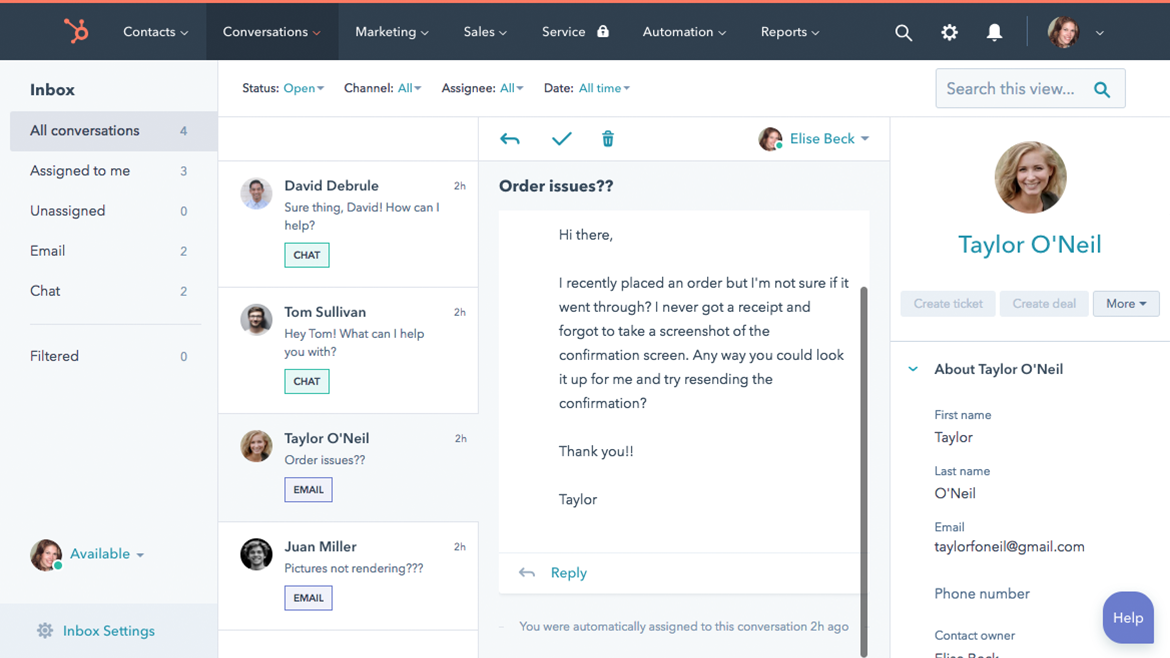
Image source: hubspot.com
This inbound philosophy required an entirely new software architecture. Many older enterprise competitors awkwardly stitched together acquired systems, but HubSpot was built from the ground up on a single, unified codebase.
This offers several operational advantages:
- Ensures a consistent user interface across marketing, sales, or support teams.
- Reduces the learning curve for new hires.
- Accelerates platform adoption by up to fifty percent compared to traditional systems.
- Lowers software maintenance overhead for IT departments by as much as ninety percent.
The platform utilizes a modular structure built around distinct Hubs so that different departments can adopt highly specialized tools while still sharing one unified view of the customer journey. These are the six main hubs under its Customer Platform.
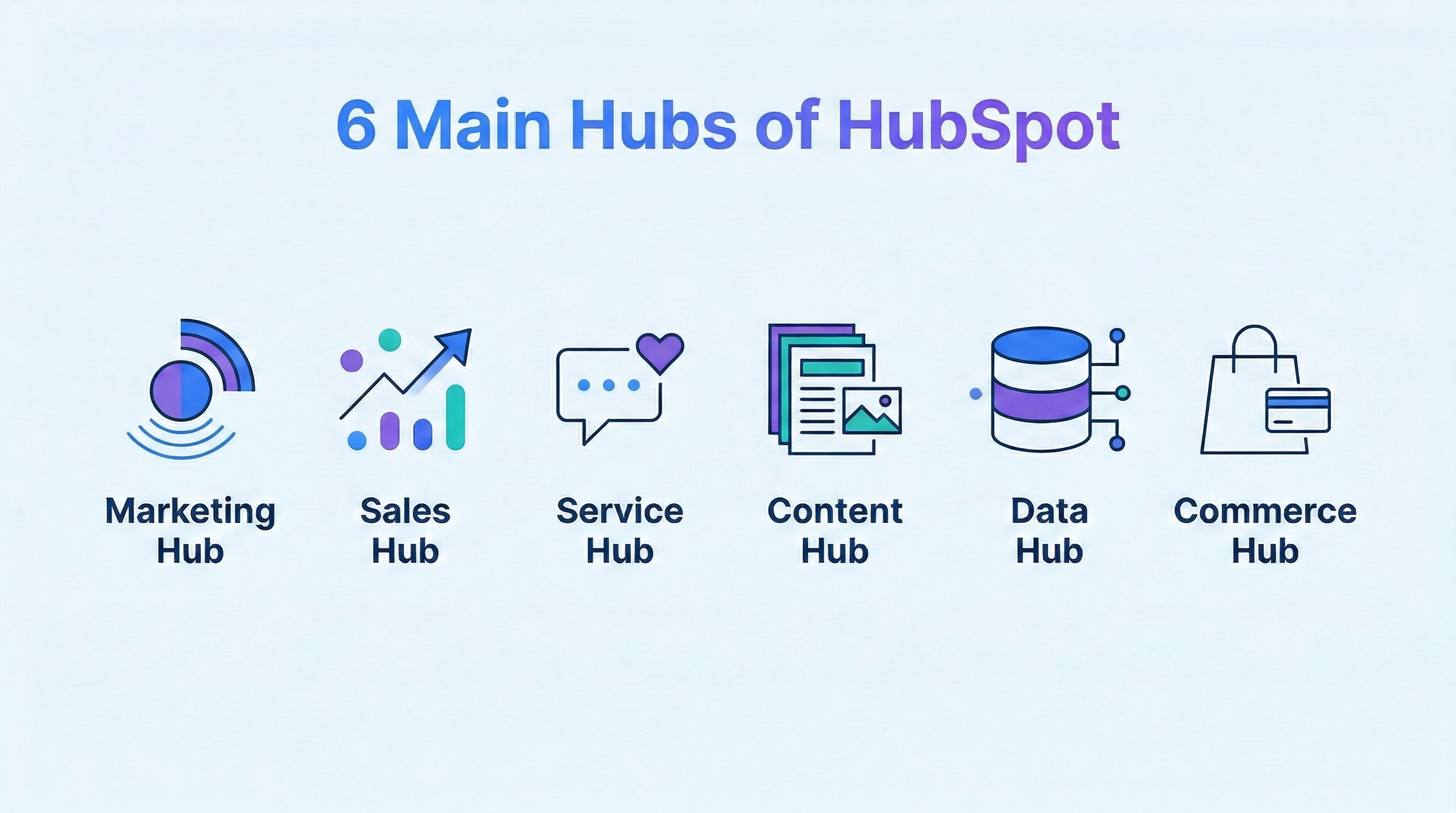
Marketing Hub
The Marketing Hub transitions businesses away from disjointed campaign tools. It is designed to attract and convert high-intent audiences.
- Intelligent forms and dynamic CTAs: Create assets that adapt based on a visitor's profile and past behavior.
- Advanced automation: Design multi-channel workflows that trigger personalized emails based on user actions, such as downloading a whitepaper.
- Social media management: Schedule, publish, and track engagement across multiple networks from a unified interface.
- Multi-touch revenue attribution: Pinpoint exactly which assets contributed to a closed deal to optimize budget allocations.
Pricing scales gracefully from a Free tier to Enterprise levels that unlock deep customer journey mapping and predictive A/B testing.
Sales Hub
Engineers built the Sales Hub to accelerate pipeline velocity and eliminate administrative friction.
- Dedicated prospecting workspaces: Consolidate daily tasks and outreach activities so reps stop guessing what to do next.
- Automated email sequences: Utilize multi-step sequences that pause automatically the moment a prospect replies.
- Meeting scheduler: Allow buyers to book time directly on a representative's calendar, bypassing availability negotiations.
- Commerce Hub integration: Generate professional contracts and collect digital payments without leaving the platform.
Average users report acquiring 129% more leads and closing 36% more deals after just one year of utilizing these tools.
Service Hub
The Service Hub provides tools to scale post-sale support, ensuring you keep the customers you acquire.
- Centralized help desk: Consolidate inquiries from email, live chat, and social media into a single ticketing pipeline.
- SLA management: Automatically route high-priority tickets to the right customer service team members before response times slip.
- Self-service tools: Build search-engine-optimized knowledge bases and secure customer portals to deflect routine inquiries.
Commerce Hub
Commerce Hub is a unified revenue platform that brings essential financial tools directly into the Smart CRM to help teams stop juggling separate software.
- AI-powered CPQ: Generate professional, branded quotes in seconds using artificial intelligence without leaving the platform.
- Payment links and checkout: Create and share trackable payment links to get paid faster in just a few clicks.
- Invoicing and billing: Easily create, send, and track professional invoices directly from the customer data.
- Subscription management: Automate recurring billing and subscriptions to handle continuous revenue streams efficiently.
By housing all financial workflows where the customer data lives, businesses eliminate data silos and accelerate the quote-to-revenue cycle.
Content and Data Hubs
Specialized modules for data governance and content creation round out the core ecosystem.
The Data Hub addresses the severe complexities of modern enterprise tech stacks. It offers:
- A unified data studio.
- Bidirectional synchronization with external cloud storage.
- Automated data quality monitors to flag formatting errors and duplicate records.
The Content Hub focuses on audience-facing digital assets. Key features include:
- Intuitive drag-and-drop website builders.
- Specialized landing page templates.
- Content remixing tools that automatically format long-form content into multiple bite-sized distribution formats in seconds.
Pros and cons of HubSpot
There is a good reason why HubSpot CRM is so popular across the industry, with many teams absolutely swearing by its unified ecosystem and intuitive design. But no software is perfect, and this platform certainly has a few notable drawbacks.
Here are some key factors to help you determine if HubSpot is actually a good fit for you.
Pros:
- Unified ecosystem: The platform connects marketing, sales, and service data into one single source of truth. This prevents disjointed communication across your company.
- Exceptional ease of use: The interface is clean and highly intuitive. Teams can adopt the software much faster than traditional, clunky enterprise systems.
- Powerful artificial intelligence: The Breeze AI suite acts like a digital teammate. It drafts emails, scores leads, and resolves tickets automatically to save your staff countless hours.
- Generous free tier: Startups can begin organizing their contacts and tracking deals at absolutely no cost.
Cons:
- Steep pricing jumps: Costs escalate rapidly as your business grows. Adding premium hubs or increasing your marketing contacts pushes the monthly bill up significantly.
- Fragmented team collaboration: The platform lacks deep, built-in communication tools. You still have to rely on external applications like Slack or Zoom to chat with colleagues and host meetings.
- Limited enterprise customization: The system provides great flexibility for most businesses. Massive corporations with highly complex, industry-specific data models might find it restrictive compared to a platform like Salesforce.
What are the key features of HubSpot CRM?
A series of deeply interconnected features transforms the database into an active, intelligent participant in your revenue strategy. We will explore the specific functions that make this platform so powerful for services, marketing, and sales teams.
Contact and lead management
A powerful database for contact and lead management sits at the core of the platform. Teams use it to store highly detailed profiles of every prospect and customer. The system automatically tracks complete interaction histories, communication preferences, and personal notes. It even enriches bare records automatically by pulling external data from the web and a proprietary dataset of over 200 million company profiles.
Sales pipeline management
Visualizing your sales process is incredibly simple with customizable deal pipelines. Representatives can track opportunities through various progressive stages from the first meeting to the final signature. The visual interface helps managers easily identify bottlenecks and forecast future revenue with impressive accuracy. Sales leaders gain a comprehensive view of team performance and individual deal health in seconds.
Marketing automation and email tracking
You can easily build complex, multi-channel workflows to nurture leads without manual effort. The system triggers personalized emails based on specific user actions, such as downloading a guide or visiting a pricing page. Built-in tracking tools notify sales reps the moment a prospect opens an email or clicks a link, ensuring they can strike when interest is highest. Teams can also turn their top-performing outreach messages into shared templates to standardize their communication.
Customer service and help desk ticketing
The platform provides a centralized help desk to manage incoming support requests at scale. Service teams can organize tickets, set priority levels, and ensure responses meet strict service level agreements without dropping the ball. You can also build search-engine-optimized knowledge bases to deflect routine questions and empower customers to find answers independently.
Analytics and custom reporting
Raw data becomes actionable intelligence through flexible, real-time dashboards. Leaders can track key performance metrics like sales team productivity, revenue targets, and marketing campaign effectiveness at a glance. Multi-touch revenue attribution modeling pinpoints exactly which assets contributed to a closed deal. This specific feature takes the guesswork entirely out of budget allocation.
Omnichannel communication
Buyers expect to communicate across various channels, and this software captures those disparate threads perfectly. It centralizes messages from standard email, website live chat, SMS, and WhatsApp into a single shared inbox. Deep conversation intelligence tools also record, transcribe, and analyze voice-over-IP phone calls in real time. Sales managers utilize these transcripts to coach their teams based on actual customer conversations.
Configure, Price, Quote (CPQ) tools
Closing deals often requires complex pricing structures and professional documentation. Integrated CPQ tools accelerate the quoting process directly from the unified platform. Sales representatives can generate accurate quotes with a single click, send them out for e-signature, and collect digital payments without ever switching to another application. The system pulls context from deal records to automatically update line items and business summaries.
Which essential integrations for HubSpot CRM should you use?
Your organization is probably using a wide range of other software solutions for communications and other business functions. Here are some integrations that you may need to make HubSpot a seamless part of your workflow.
Use cases of HubSpot CRM across industries
Theoretical software capabilities only matter when they solve actual business problems. HubSpot is widely adopted across different sectors and industries. We'll look at how various industries leverage the software to accelerate growth and resolve their unique bottlenecks.
Software and technology companies
Tech companies frequently struggle with notoriously long sales cycles, highly fragmented customer data, and complicated pricing models. Software providers use the platform to establish a single source of truth and consolidate their lead management.
They can utilize integrated artificial intelligence features to configure complex pricing and quotes automatically, which significantly reduces manual errors during high-stakes contract negotiations. This unified approach provides deep analytical capabilities to refine ideal customer profiles and dramatically increases overall sales close rates.
Manufacturing firms
Heavy industry and manufacturing sectors are actively digitizing their historically relationship-based sales motions. Organizations execute strategic migrations to unify their marketing and sales pipelines, permanently moving away from generic communications. They deploy highly personalized, behavior-driven email tracks to nurture prospects and generate high-quality leads.
Manufacturing firms also use the software to cultivate vast distributor relationships and track equipment lifecycle milestones, allowing them to route technical queries to specialists instantly and offer proactive maintenance support.
Food and beverage
Customer loyalty is absolutely essential in the food and beverage industry. Brands can use the CRM capabilities to consolidate customer data and track specific preferences and order histories. They can also implement automated marketing campaigns that send personalized promotions, menu updates, and event invitations directly to their audience.
Retail industry
Retailers use the software to consolidate both B2B and B2C interactions into one seamless environment. Brands can generate thousands of contacts through optimized landing pages, track customer feedback to centralize their reviews, and automate follow-ups to drive long-term brand loyalty.
The integrated digital marketing and content management tools help retail organizations achieve strong online positioning, allowing them to expand into new market sectors and improve their prospect conversion rates effortlessly.
Education and non-profits
Educational institutions and nonprofits deal with massive inquiry volumes and need to nurture prospects through very complex journeys. Schools use the system to track prospective students from their initial inquiry all the way through acceptance and registration. They rely on automated lead routing and personalized emails to streamline admissions and build stronger alumni relationships.
Nonprofits leverage this same architecture as a single source of truth for fundraising and communications. This allows them to scale personalized donor engagement and manage volunteer pipelines effectively, even with a strictly limited staff headcount.
How does HubSpot CRM pricing work?
The platform's cost scales significantly based on the specific hubs like Marketing, Sales, Service, Content, Data, and Commerce, the subscription tiers, and the number of seats or contacts your team requires.
HubSpot's modular structure means you can easily mix and match. For example, you can choose the Marketing Hub at the Professional tier and keep your Sales Hub at the Starter tier to fit your exact needs.
Here is how the pricing generally relates to the different tiers:
- Free tier: Foundational tools for contact management, basic email marketing, and simple ticketing are available to users at absolutely no cost across all the core hubs.
- Starter tier: Paid plans remove platform branding and unlock higher usage limits for growing teams. Pricing for the Sales Hub, Service Hub, and Content Hub typically begins around $9 to $20 per user per month. The Marketing Hub Starter falls into this range as well. It charges additional fees based on your total number of marketing contacts, starting in increments of 1,000.
- Professional tier: This level unlocks advanced omnichannel automation, Breeze AI features, and custom reporting. Costs jump significantly here depending on the hub. The Marketing Hub Professional starts around $890 per month, which includes 2,000 marketing contacts while Sales and Service Hub Professional plans are seat-based, usually starting around $90 to $100 per seat per month.
- Enterprise tier: Large organizations that need advanced governance, predictive lead scoring, and complex routing will look at this top tier. The Marketing Hub Enterprise starts around $3,600 per month, covering up to 10,000 contacts, and requires a $7,000 setup fee. Sales Hub and Service Hub Enterprise plans start at $150 per seat per month.
You can get the bundled Customer Platform, which combines all the hubs into a single package, which costs a lot less compared to buying each hub individually.
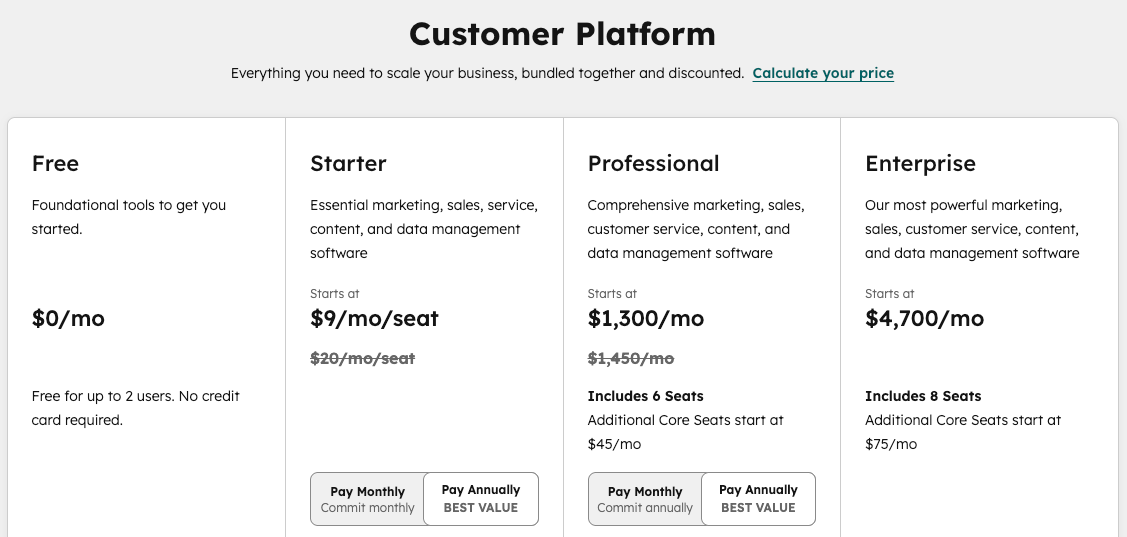
Image source: hubspot.com
How does HubSpot CRM compare to the competition?
The competitive landscape for CRM systems is heavily saturated. You must carefully weigh your organizational complexity, budget constraints, and technical proficiency to select the appropriate infrastructure.
Zoho vs HubSpot
Zoho approaches relationship management from the opposite direction by offering maximum flexibility at minimum cost, making it a powerful alternative to HubSpot. HubSpot locks advanced features like predictive lead scoring behind expensive premium tiers. Conversely, Zoho provides its AI-powered scoring system, Zia, on its standard plans. It also provides highly customizable reports, robust data visualizations, and more pipeline views like Kanban and timeline formats that accommodate very complex sales processes.
This platform is generally the better choice for budget-conscious businesses that possess the technical capability to set up and manage their own systems. Zoho delivers superior value over the premium-priced HubSpot ecosystem if your organization prioritizes deep customization and transparent pricing that stays affordable regardless of team size.
Salesforce vs HubSpot
Salesforce operates as a highly customizable powerhouse that functions much like the open-source Linux operating system compared to HubSpot's plug-and-play Apple approach. It offers an unparalleled level of architectural depth, allowing for complex relationship types, industry-specific data models, and unlimited custom objects. Furthermore, it boasts the largest third-party ecosystem in the industry through its AppExchange, giving users access to thousands of pre-built integrations that far exceed HubSpot's native offerings.
This deep customization makes Salesforce the definitive choice for large enterprises dealing with highly complex workflows and strict data governance requirements. Salesforce provides unmatched scalability if your organization has the budget for higher licensing costs and employs dedicated technical administrators who can mold the software to exact specifications.
Pipedrive vs HubSpot
Pipedrive differentiates itself by stripping away bloated marketing tools to focus obsessively on pure sales execution and pipeline visibility. It features a highly visual, drag-and-drop Kanban interface that requires virtually no configuration, allowing teams to get up and running in hours rather than weeks. Its straightforward, action-oriented workflow prioritizes the next steps needed to move deals forward, giving reps a streamlined experience that HubSpot's comprehensive suite can sometimes overcomplicate.
This laser-focused approach makes Pipedrive an incredibly attractive option for small to medium-sized sales teams and founder-led sales efforts. It is the ideal platform for organizations that simply need an affordable, visual way to track deals and organize daily sales activities without paying for marketing features they will never use.
Lark vs HubSpot
Modern teams face the frustrating challenge of never-ending app-switching. Representatives constantly have to toggle between communication applications, document editors, and databases, leading to fractured attention.
Lark is designed from the ground up to tackle those challenges by putting CRM functionality directly into the unified workspace where teams already chat, meet, and collaborate.
This structural integration yields powerful operational advantages:
- No-code customization: Build flexible workflows, customize deal stages, and deploy lead-capture forms instantly without coding knowledge.
- Seamless workflow automation: Transitions in a deal stage automatically trigger intelligent chat alerts. Automated approval flows keep negotiations moving without email bottlenecks.
- Unified knowledge management: Sales scripts and meeting notes live within integrated Wiki and Docs features, ensuring immediate access during negotiations.
- AI-driven efficiency: Lark automatically categorizes prospects, enriches records with contextual data, and scores leads based on conversion probability.
Lark provides a cohesive space for strategy, communication, and execution. By embedding deep customer intelligence directly into the collaborative workflow, teams can not only eliminate software fragmentation, but also cut down on subscription costs and close deals faster.
Final thoughts
You should view the CRM selection process as finding a system that genuinely fits your team's workflow rather than chasing a flawless tool. HubSpot is an established brand in this space, with advanced marketing automation and inbound lead generation. The drawbacks are the high cost and the reliance on third-party integrations.
If you're considering alternatives, Lark could be a smart choice. Everything you need to collaborate and manage customer relationships can be found on one platform. You do not have to waste time piecing together third-party integrations while eliminating constant app-switching. You could also save up to hundreds of thousands of dollars too, depending on the number of apps you replace.
Leading global organizations like Xiaomi, GoTo, and 7-Eleven trust Lark to power their massive daily operations and scale their growth. Consider Lark if your organization values an all-in-one solution that scales effortlessly with your growth.

FAQs
What is the best CRM for small businesses?
The most effective CRM solutions for small businesses are typically cost-effective, mobile-friendly, and very easy to use. Platforms like Lark, HubSpot, and Zoho frequently top the list for small teams. Lark specifically meets all these criteria by offering powerful, customizable features at highly affordable prices alongside deep collaboration tools.
What is the best free alternative to HubSpot?
Lark serves as a remarkably strong free alternative if you want to go beyond standard CRM functionalities. It includes team collaboration, document sharing, and communication tools right within the same workspace. This structure is perfect for startups or small teams that want to centralize their work without paying for multiple app subscriptions.
How much does HubSpot CRM cost?
Free HubSpot CRM is available for small teams to get started. For teams needing more features, paid plans begin with the Starter tier at $15 to $20 per month. The Professional tier starts at $890 per month and provides advanced omnichannel automation. The Enterprise tier begins at $3,600 per month for larger organizations. Both the Professional and Enterprise tiers also require a one-time onboarding fee.
Related reading
Table of contents
Start using Lark today

Manage all your work in one place
Boost team efficiency by 10x
Save up to 70% on software costs
Table of contents
Start using Lark today
Manage all your work in one place
Boost team efficiency by 10x
Save up to 70% on software costs
Keep reading



Lark recognized in 2023 Gartner® Collaborative Content Workspaces and Meeting Solutions reports
Lark, the global superapp for productivity, is delighted to announce it receives recognition in the Gartner's 2023 Innovation Insight for Collaborative Content Workspaces and Market Guide for Meeting Solutions.





2026 Lark Technologies Pte. Ltd.
Headquartered in Singapore with offices worldwide.






Explore: