Choosing the right CRM can dramatically impact how efficiently your sales, marketing, and service teams operate. Two of the most widely adopted options, Pipedrive and HubSpot, offer strong capabilities, yet they differ significantly in usability, automation depth, scalability, and pricing. In this guide, we break down Pipedrive vs HubSpot across features, costs, pros and cons, and real-world suitability for different team sizes. You'll also see how modern collaboration platforms like Lark and other unified tools compare for teams that need more than a standalone CRM. This overview helps you choose the platform that best fits your workflow and growth stage.
Upgrade your pipeline with smarter collaboration
What is Pipedrive?
Pipedrive is a built to help small and mid-sized teams manage pipelines, track deals, and automate routine sales activities with minimal complexity. Unlike broader platforms discussed in Pipedrive vs. HubSpot, Pipedrive focuses almost exclusively on the sales process. Its clean interface, customizable stages, and visual Kanban-style pipelines make it easy for reps to prioritize tasks, log activities, and move deals forward.
Pipedrive also includes email sync, contact and , activity reminders, forecasting, and basic workflow automation, features often evaluated in HubSpot vs Pipedrive comparisons. While it delivers substantial value for teams wanting a simple, streamlined tool, Pipedrive lacks the deep marketing automation, content tools, and multi-hub ecosystem typically highlighted in pipedrive crm vs hubspot reviews. This makes it ideal for sales-first organizations that don't need an all-in-one suite and prefer a lightweight, intuitive CRM to support day-to-day deal management.
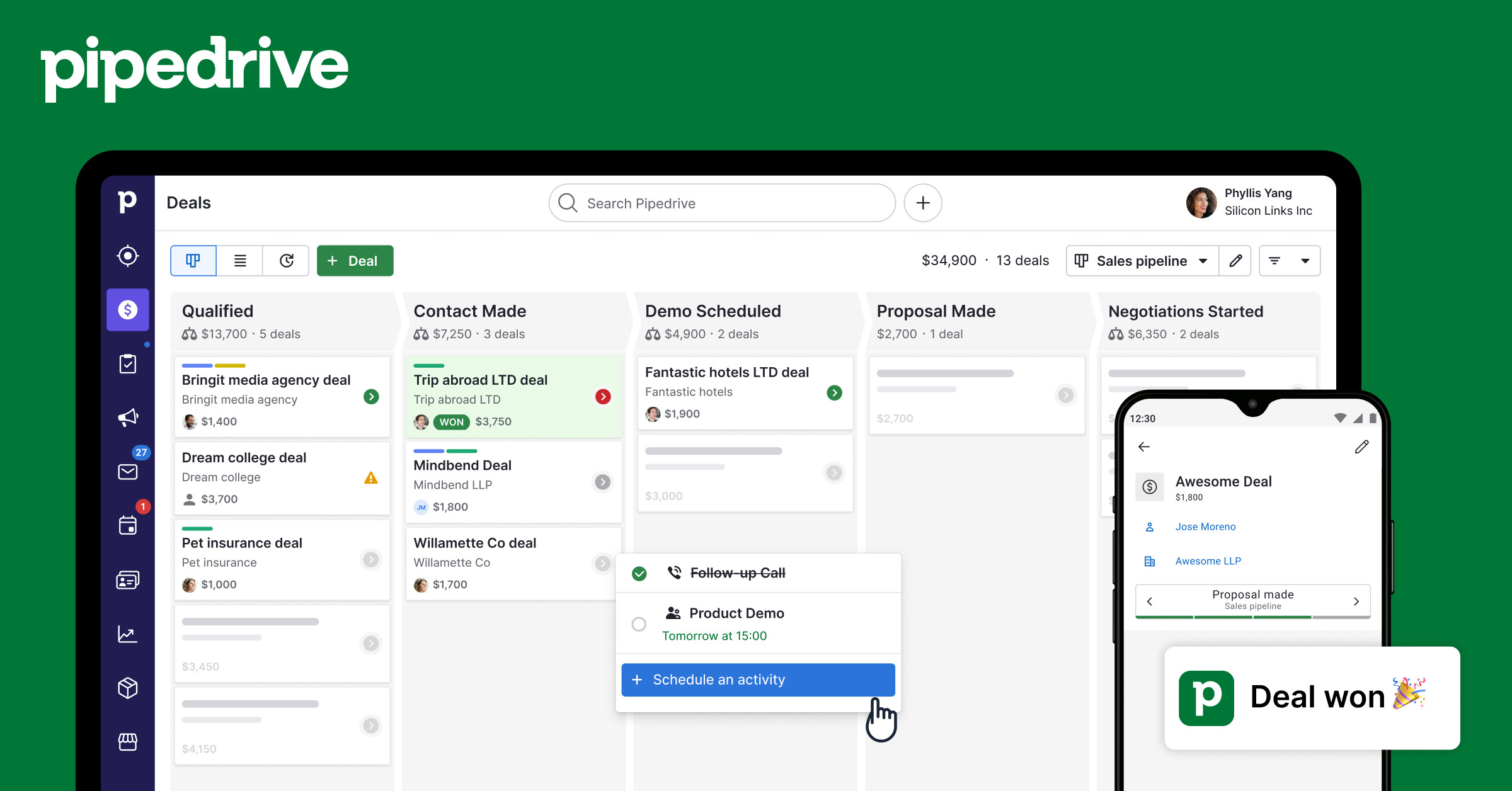
Image source: pipedrive.com
What is HubSpot?
HubSpot is an all-in-one CRM platform designed to support the full customer lifecycle across marketing, sales, and service. Known for its generous free CRM, HubSpot gives teams access to , email marketing, landing pages, deal pipelines, customer support tools, and analytics within a unified system. In many Pipedrive vs. HubSpot comparisons, HubSpot stands out for its extensive marketing automation, scalable workflows, and large app ecosystem.
Unlike Pipedrive, which focuses primarily on sales pipelines, HubSpot offers multiple "Hubs" that businesses can mix and match: Marketing, Sales, Service, CMS, and Operations. This makes it a strong option for growing teams that want deeper automation, cross-channel campaigns, and richer reporting across departments. However, many advanced capabilities require higher-tier subscriptions, a common point raised in HubSpot vs. Pipedrive or Pipedrive vs. HubSpot CRM comparison discussions. Overall, HubSpot is ideal for businesses seeking a comprehensive platform that supports both acquisition and long-term .
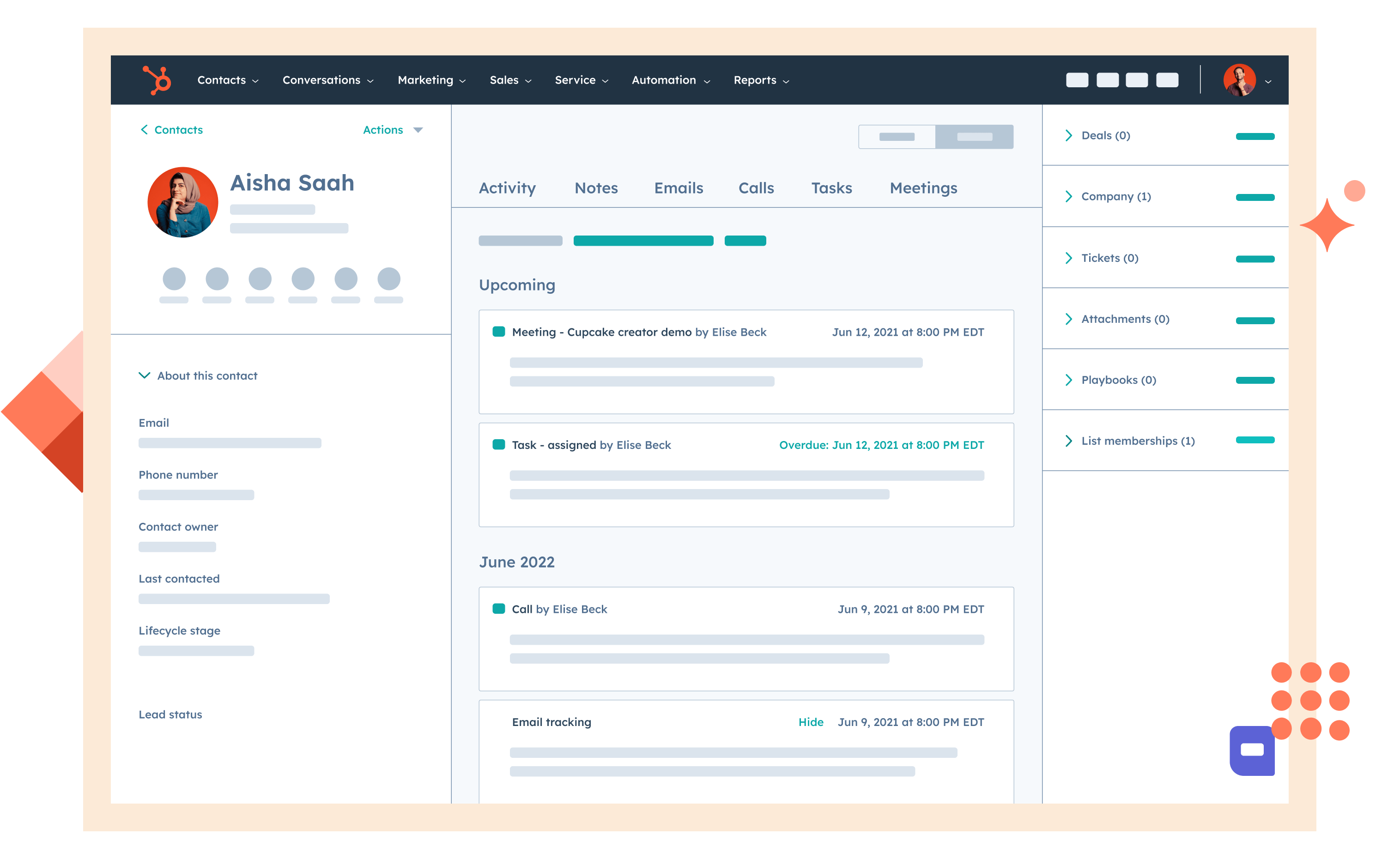
Image source: hubspot.com
Pipedrive vs HubSpot features comparison
When evaluating Pipedrive vs. HubSpot, understanding the core features of each platform helps teams choose the right CRM for their workflow. This section breaks down the key capabilities that influence usability, automation, and overall efficiency.
Contact & lead management
Pipedrive's approach to contact and is strictly sales-focused, providing customizable fields, activity logging, and the core ability to track prospects efficiently. Its "Leads Inbox" acts as a staging area, keeping unqualified contacts separate from the main sales pipeline. Pipedrive also offers key lead-capture features via the LeadBooster add-on, including web forms and a prospector tool.
Conversely, HubSpot offers a unified 360-degree customer view across its ecosystem, integrating marketing and sales data for superior insights. It features advanced tools like predictive lead scoring and deep behavioral tracking (e.g., website visits and content engagement) for richer segmentation, giving it the edge for teams requiring holistic, data-driven lead nurturing.
Sales pipeline management
Pipedrive excels in sales pipeline management due to its visually intuitive, drag-and-drop Kanban-style interface, which is a core strength designed to maximize sales rep usability. The platform's structure is designed to promote deal velocity by clearly showing the next required activity for each deal and enabling easy revenue forecasting based on stage probability.
HubSpot supports the creation of multiple pipelines and offers a high degree of customization and flexibility, making it better suited for businesses with various, complex sales processes (e.g., separate pipelines for new business and renewals). However, Pipedrive is often considered the best-in-class for sheer ease of use and focus on pipeline hygiene.
Marketing tools
When comparing marketing tools, the platforms diverge significantly. Pipedrive is lean, offering only basic email campaign functionality through its native Campaigns add-on for simple outreach, requiring users to rely on the extensive marketplace of integrations (like Mailchimp) for any sophisticated marketing automation or inbound tactics.
HubSpot, a company founded on inbound marketing, offers a robust Marketing Hub with native features such as multi-step marketing automation workflows, SEO tools, blog management, landing pages, and comprehensive multi-channel campaign tracking. For any team that requires tight alignment between marketing and sales, HubSpot's all-in-one suite is the clear differentiator.
Automation & workflow capabilities
Pipedrive focuses on simple, sales-process-specific rules, such as automatically creating a follow-up task or sending a basic notification when a deal changes stage. This keeps the platform fast and straightforward for sales reps.
HubSpot, particularly in its higher tiers, supports advanced, multi-step workflows with complex logic, triggers based on behavior, and the ability to automate actions across its different Hubs (Marketing, Sales, Service). This flexibility allows for sophisticated, cross-departmental automation, but businesses often note that this power comes with a steeper learning curve compared to Pipedrive's streamlined approach.
Reporting & analytics
In reporting & analytics, Pipedrive provides fundamental dashboards and reports necessary for monitoring core sales KPIs, like conversion rates and individual rep performance. These tools are straightforward and effective for smaller teams focused purely on sales funnel metrics. HubSpot offers a deeper and broader analytical capability, including multi-touch revenue attribution (linking revenue to initial marketing sources) and custom reporting that spans marketing, sales, and service data. This unified data visibility is crucial for data-driven organizations that need to track the customer journey from first touch to final close.
Integrations & app marketplace
The respective integrations & app marketplaces reflect each platform's focus. Pipedrive has a respectable marketplace of over 400 apps, heavily focused on integrating with sales enablement tools like dialers, communication platforms, and proposal generators to enhance its core sales function.
HubSpot, designed as a comprehensive platform, offers a significantly larger marketplace of over 1,500 native apps covering marketing, operations, and service, providing greater out-of-the-box native solutions for a complete software ecosystem.
Mobile experience
Finally, the Mobile Experience comparison hinges on focus versus breadth. Pipedrive's mobile app is lightweight, fast, and highly efficient, perfect for field reps who need to quickly update deal stages, log calls, and check their next activity.
HubSpot's mobile app is also robust and allows access to data across all its hubs; however, due to the sheer volume of features and data it handles, it can feel more complex and less streamlined than Pipedrive's laser-focused mobile pipeline view.
Detailed Pipedrive vs HubSpot pricing comparison
Pipedrive pricing
Understanding Pipedrive pricing is essential when comparing Pipedrive vs. HubSpot, especially for teams with tight budgets. Pipedrive offers tiered plans that scale from basic sales needs to . Pricing varies by region, billing cycle, and user count, so evaluating each tier helps match value to requirements. Below is a breakdown of key pricing options and highlights.
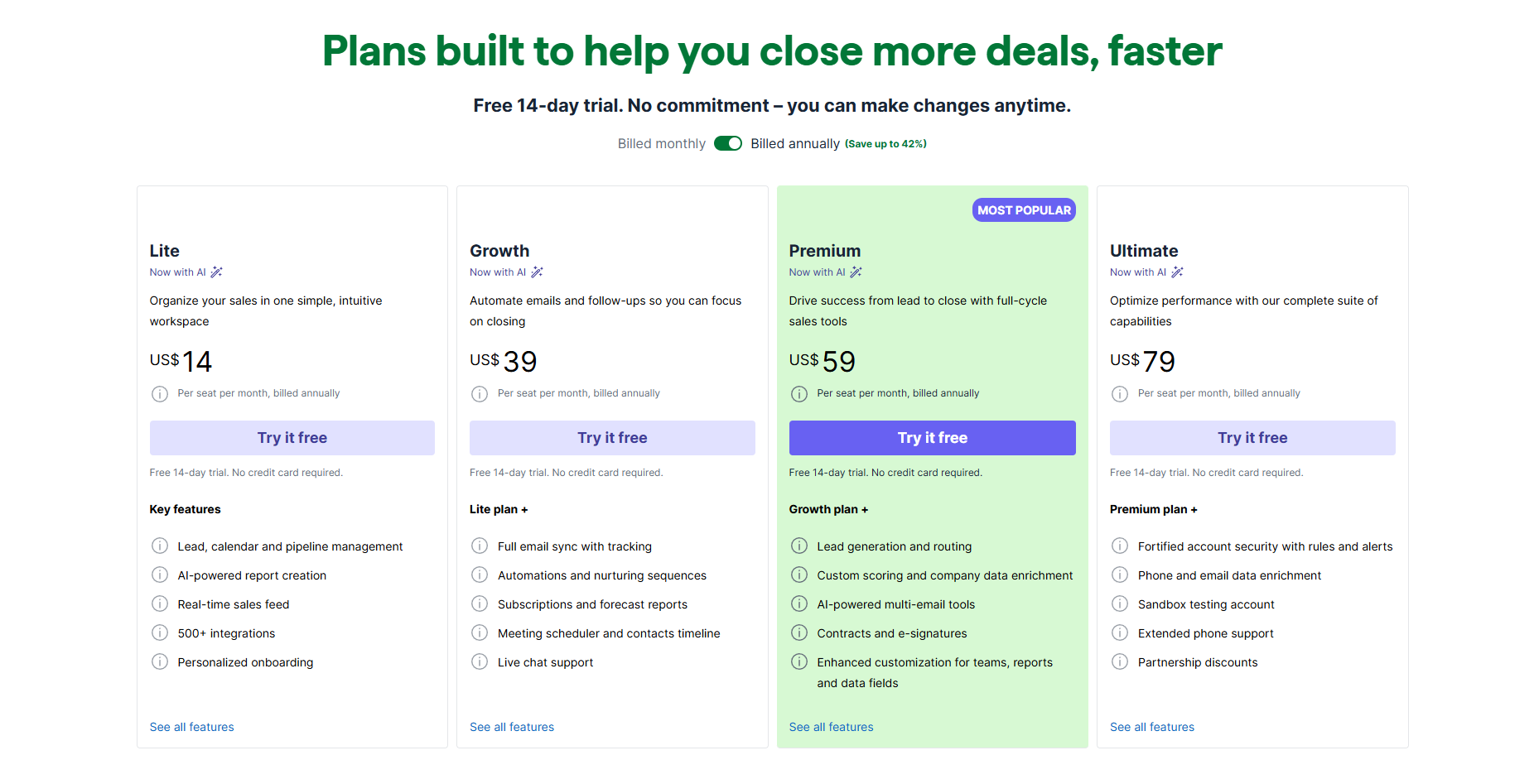
Information source: pipedrive.com
Update time: 2025/12/10
Note: Pricing and plan details reflect publicly available data as of the update date and may vary based on region, billing cycle, and number of agents.
HubSpot pricing
HubSpot pricing differs from most CRMs because it uses separate pricing structures for its distinct products: Smart CRM, Marketing, Sales, Service, Content, Data, and Commerce. This model allows teams to purchase only what they need, but overall costs can grow as features are added. When comparing HubSpot vs. Pipedrive, understanding these tiered costs is crucial. Below is an overview of HubSpot's pricing structure across key plans.
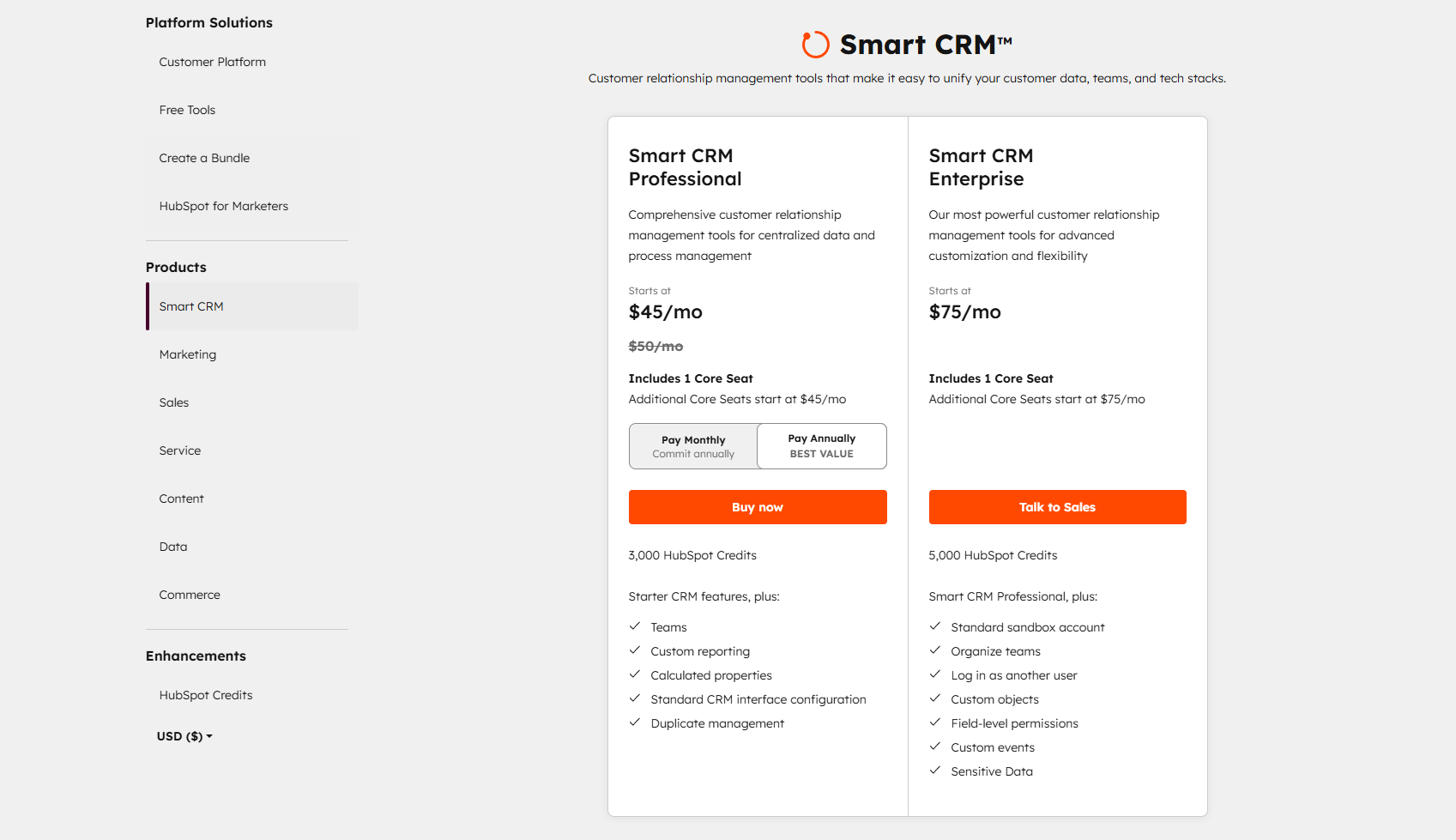
Information source: hubspot.com
Update time: 2025/12/10
Note: Pricing and plan details reflect publicly available data as of the update date and may vary based on region, billing cycle, and number of agents.
Pipedrive vs HubSpot: Pros and cons
When comparing Pipedrive vs HubSpot, understanding each platform's advantages and limitations helps teams make the right choice. This section highlights the key pros and cons of both CRMs for sales, marketing, and service workflows.
Pipedrive pros
- Very easy to use with a clean, sales-focused interface: Pipedrive offers an intuitive design that minimizes the learning curve. Sales teams can easily track deals and manage activities. In Pipedrive vs. HubSpot comparisons, this simplicity is a significant advantage.
- Affordable for small–mid-sized teams: Pricing is competitive, giving growing businesses access to essential CRM features. Teams can implement Pipedrive without high upfront costs. This makes it appealing in HubSpot vs. Pipedrive evaluations.
- and strong mobile apps: Deal stages can be tailored to match team workflows. The mobile app allows reps to update deals on the go. Flexibility and mobility enhance productivity for sales-focused teams.
- Simple automations suited for sales workflows: Automates repetitive tasks like follow-ups and reminders. Keeps pipelines moving efficiently without complex setup. Best suited for teams focusing primarily on sales activities.
Pipedrive cons
- Limited native : Pipedrive lacks built-in email campaigns, landing pages, and advanced marketing features. Teams often need third-party apps to run marketing initiatives. This limitation is frequently noted in Pipedrive vs. HubSpot comparisons.
- Advanced reporting and analytics require higher plans: While basic dashboards are included, deeper insights are only available on premium tiers. Businesses tracking complex KPIs may find this restrictive.
- No free plan: Pipedrive does not offer a permanent free tier. This can make adoption harder for startups or tiny teams compared to HubSpot's free CRM.
- Not ideal for companies needing a full marketing + sales + service suite: Pipedrive focuses primarily on sales pipelines. Marketing and service features are minimal, making it less suitable for teams seeking an all-in-one solution.
HubSpot pros
- All-in-one platform covering marketing, sales, and service: HubSpot integrates multiple hubs in a single CRM, supporting the . Marketing, sales, and service teams can work seamlessly together. This is a key advantage in pipedrive vs hubspot crm comparisons.
- Generous free CRM with strong core features: The free tier includes contact management, deal tracking, and basic reporting. Teams can start without upfront investment and scale as needed. Many businesses highlight this in HubSpot vs. Pipedrive evaluations.
- Robust automation and analytics: HubSpot supports complex workflows, triggers, and multi-channel campaigns. Advanced dashboards provide actionable insights across teams. Automation capabilities often surpass Pipedrive in the Pipedrive vs. HubSpot lead management comparison.
- Scales well with business growth and has a large ecosystem of integrations: HubSpot can expand across marketing, sales, service, and operations. Its marketplace offers thousands of integrations for evolving business needs.
HubSpot cons
- Becomes expensive as you upgrade hubs: Adding advanced features or multiple hubs significantly increases costs. Small teams may find budgets stretched quickly. This is a common consideration in Pipedrive vs. HubSpot comparisons.
- It can feel complex for small teams needing only basic CRM features: The wide range of tools and options can overwhelm users. Teams that only need simple sales tracking may find HubSpot unnecessarily complicated.
- Many are locked behind higher-tier plans: Automation, reporting, and marketing features often require paid subscriptions. Limited access at lower tiers is a frequent point in HubSpot vs. Pipedrive evaluations.
- The interface may feel overwhelming for new users: The multi-hub setup and extensive functionality create a steep learning curve. Onboarding can take longer compared to simpler CRMs like Pipedrive.
What both Pipedrive and HubSpot lack
Even when evaluating Pipedrive vs. HubSpot, both platforms have limitations that can affect collaboration, , and team productivity. Understanding these gaps helps businesses plan for integration needs and adoption strategies.
- Neither platform offers truly unified communication (chat, video calls, docs, tasks) inside the CRM: Users cannot complete all collaboration within the CRM itself. For meetings, messaging, and document edits, teams rely on external tools like Slack or Zoom. This lack of native communication leads to fragmented workflows between Pipedrive and HubSpot setups.
- Collaboration often requires switching between multiple apps or integrations: Teams must juggle different platforms to coordinate tasks, , and share updates. Switching between CRMs, chat apps, and project tools slows down decision-making and reduces efficiency.
- Document management, internal notes, and team messaging are not seamlessly connected: Files, internal notes, and discussions exist in separate areas or external tools. There is minimal contextual linking between CRM records and documents, making collaboration less intuitive.
- Real-time cross-team communication (sales ↔ marketing ↔ support) relies on external tools: Communication between departments is fragmented and often delayed. Teams must rely on email threads, chat apps, or notifications outside the CRM to align efforts.
- Workflow execution (tasks, approvals, file sharing) happens outside the CRM environment: Task assignments, approvals, and file sharing are not integrated directly with CRM data. Teams often need tools like Asana, Trello, or Monday.com to manage execution effectively.
- Steeper learning curves when scaling features across multiple teams: Adding more users or departments significantly increases complexity. Teams require more training to utilize advanced features, especially in hubspot vs pipedrive crm comparison scenarios.
- Additional costs for advanced features or marketing/sales hubs: Many essential automation, reporting, or marketing tools are only available in premium tiers. Growing teams may face higher subscription costs than simpler CRMs.
Manage your sales pipeline with effective techniques
Why modern teams choose Lark over traditional CRM platforms
Modern teams need more than what traditional CRMs like Pipedrive and HubSpot can offer. As workflows expand across , , projects, and automation, switching between multiple tools becomes a significant productivity drain. Instead of relying on disconnected apps, teams now prioritize platforms that unify daily work in one place. This shift is why many organizations choose over traditional CRM systems.
Structured CRM workflows and flexible data management
gives teams relational databases, customizable fields, linked records, and , allowing them to build CRM-style pipelines, lead tables, onboarding trackers, or customer records without rigid templates. Pipedrive is limited to deal pipelines with minimal database flexibility, while HubSpot locks advanced customization behind expensive tiers. With Base, teams get spreadsheet-style editing, Kanban views, filters, formulas, and automations in one place, creating a deeper CRM context without additional subscriptions. 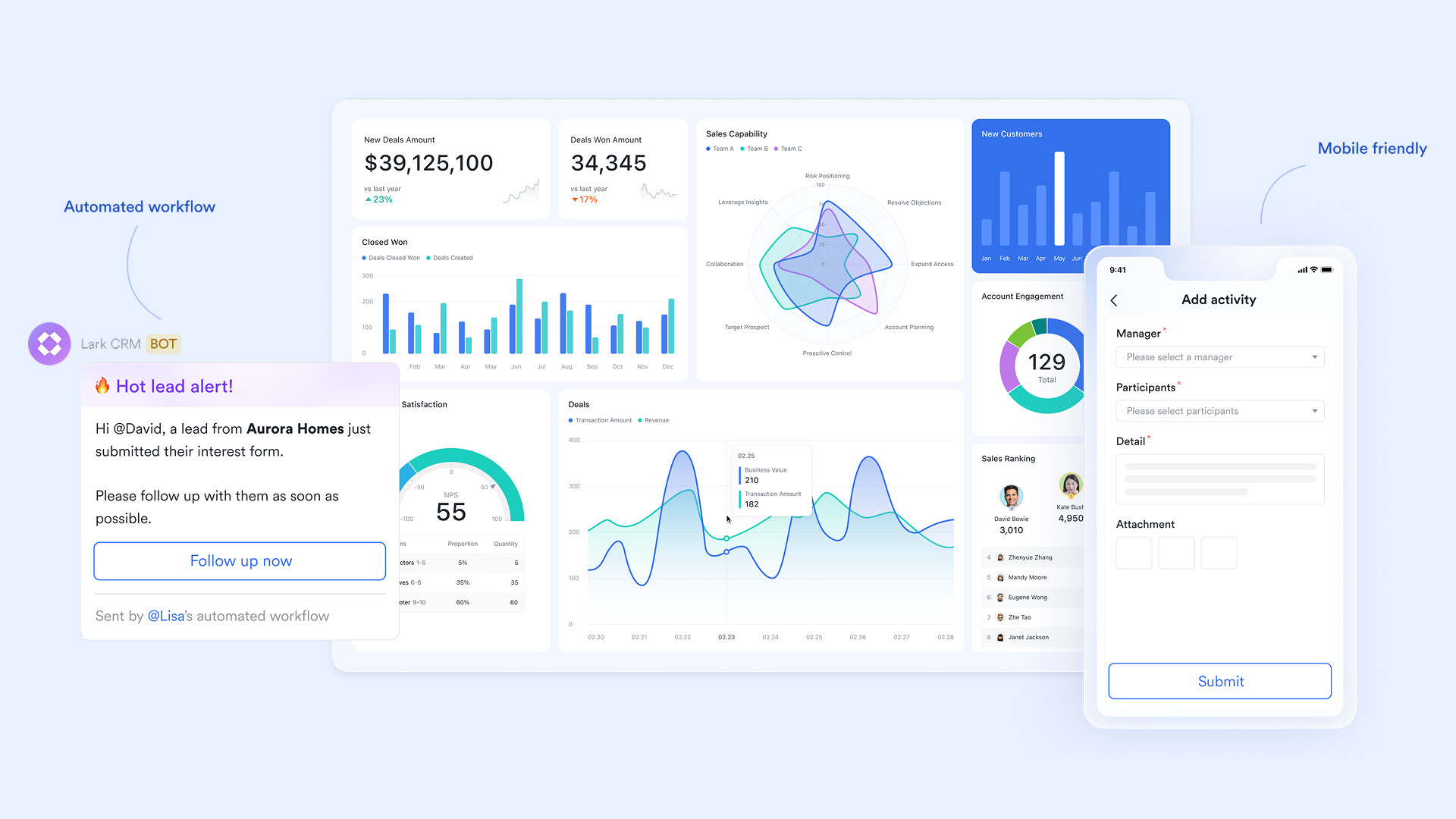
End-to-end execution within the sales process
While Pipedrive and HubSpot track deals, neither platform offers a fully integrated task execution system tied to docs, chats, and meetings. Lark Tasks turns every stage of the into actionable work, assigns follow-ups, sets deadlines, , connects tasks to docs, or syncs with Base records for real-time pipeline execution. This bridges the gap between CRM tracking and actual team execution, eliminating the need for separate task tools like Asana or Trello. 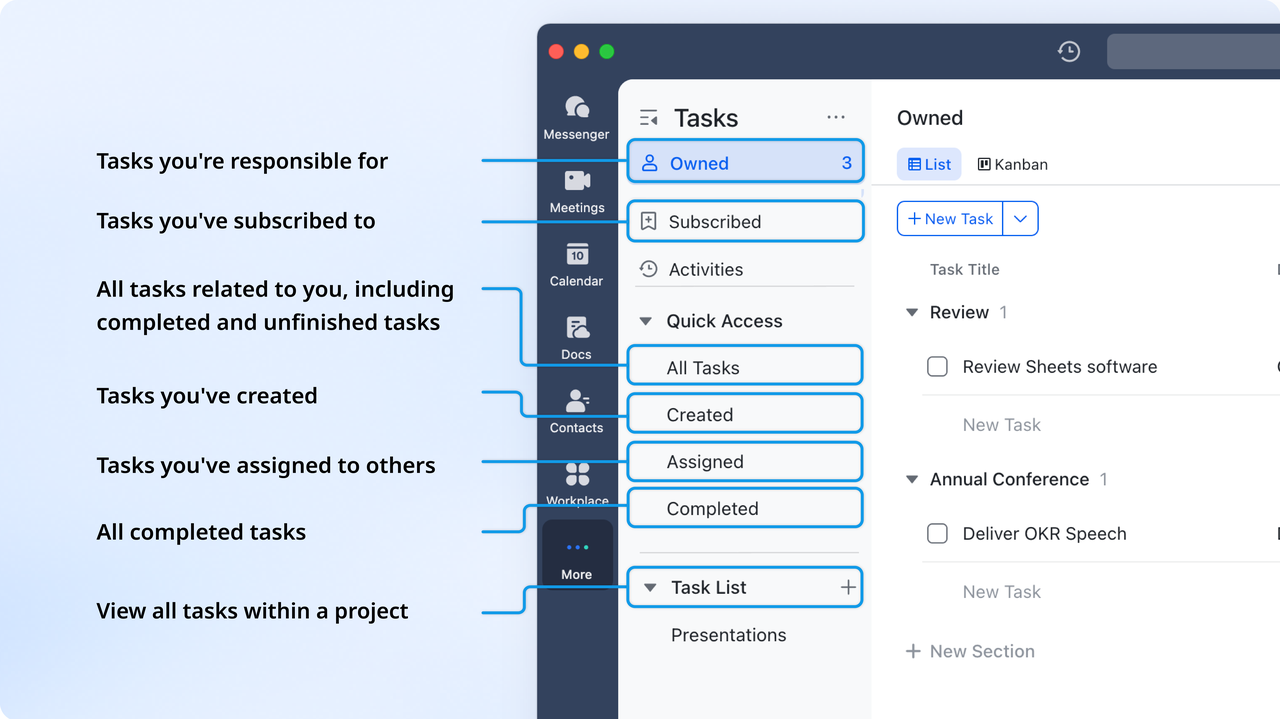
Real-time sales collaboration without switching apps
gives teams chat, channels, file sharing, mentions, message threading, and contextual discussions, all built into a single workspace alongside CRM data. In contrast, Pipedrive and HubSpot rely heavily on email or external chat apps like Slack, creating fragmented communication. With Lark, sales, marketing, and support teams can communicate instantly while accessing lead data, documents, and tasks in a single interface. This results in faster decisions, fewer miscommunications, and more substantial cross-team alignment. 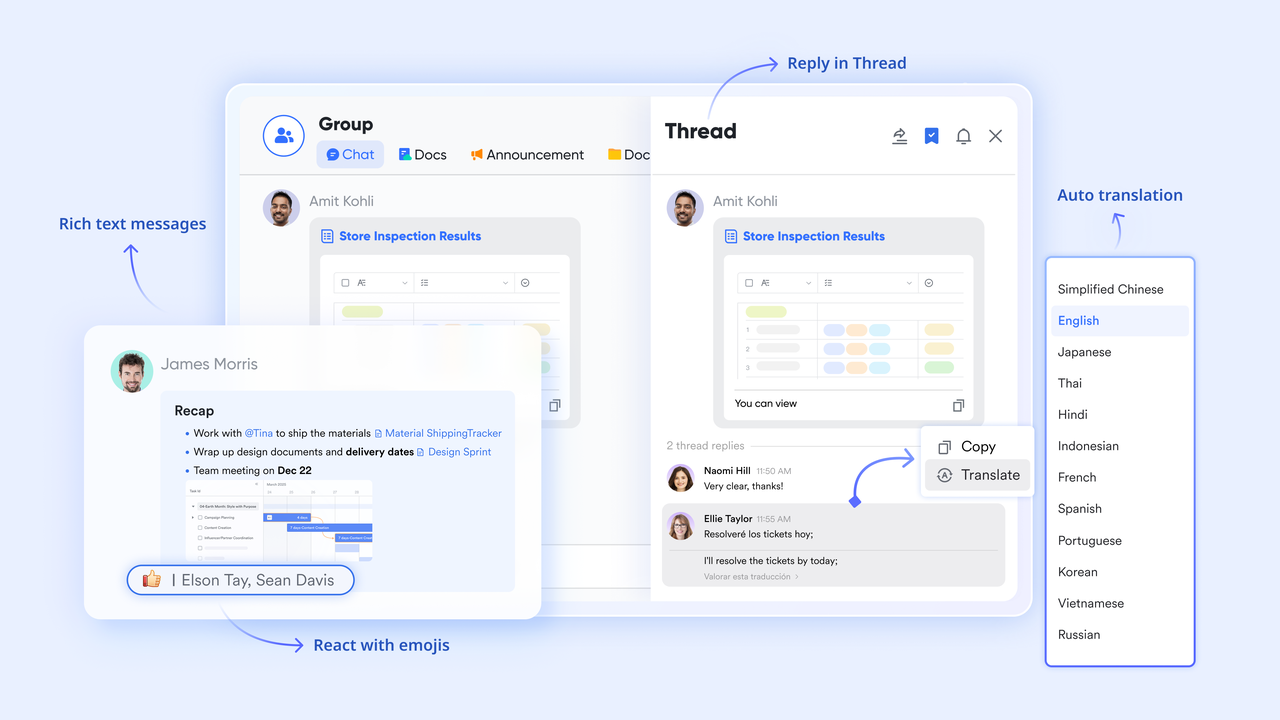
Collaborative briefs, proposals, and CRM-linked documentation
supports real-time editing, inline comments, version history, embedded tables, and linked tasks or Base records. Sales teams can draft proposals, meeting notes, and playbooks directly alongside lead data. Pipedrive offers no native , and HubSpot's notes feature is basic, with limited collaboration. Lark Docs lets teams co-create materials without switching out of the workflow, no switching to Google Docs or Notion, making content creation and knowledge sharing smoother and faster. 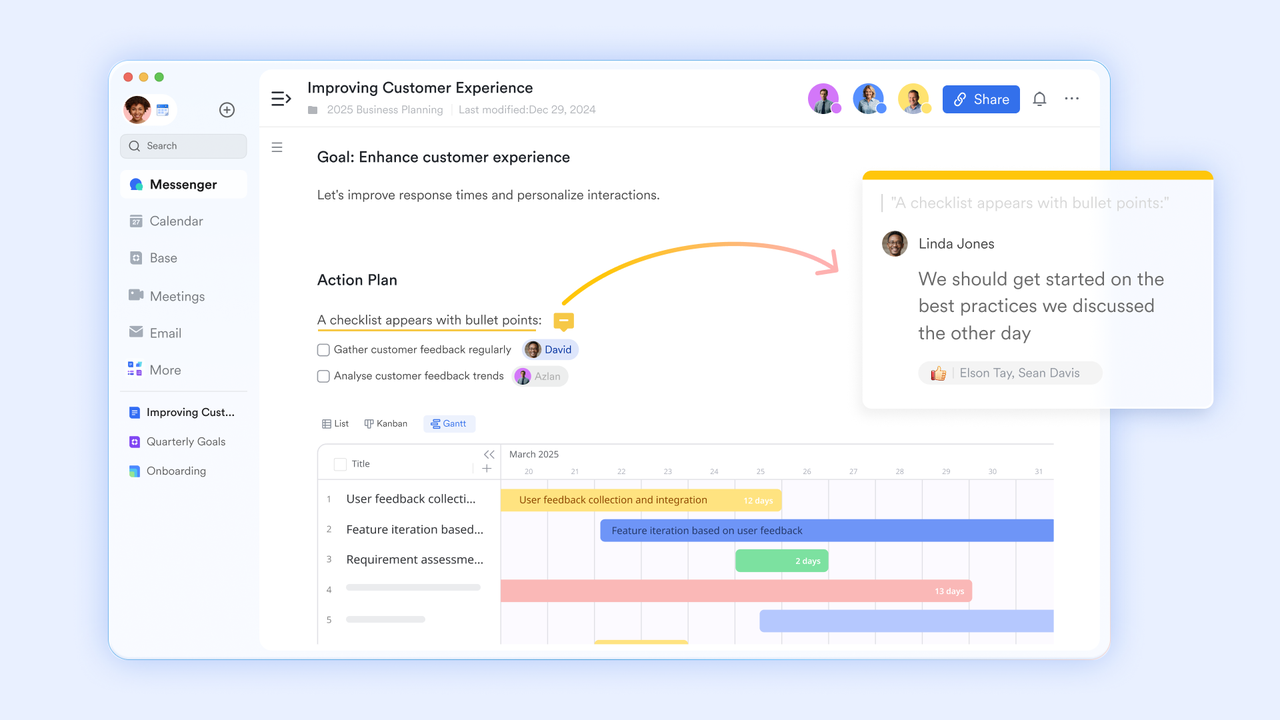
AI Notes for unified communication and deal acceleration
provides high-quality video calls, instant screen sharing, Magic Share, and that automatically summarize sales calls. Pipedrive and HubSpot depend on integrated meeting tools like Zoom or Google Meet, adding more complexity and cost. With Lark, teams host calls, collaborate on Docs during meetings, track decisions with Minutes, and sync outcomes directly to tasks or Base records. This creates a seamless handoff from meetings to execution, something traditional CRMs cannot match. 
:
- Starter plan: Free forever plan that includes 11 powerful tools for up to 20 users. It also comes with 100GB of storage, 1000 automation runs, AI translations, and more.
- Basic plan: $6/user/month (billed annually) for up to 500 users. It includes everything in Starter plus group calling for up to 500 attendees, 5TB of storage, 1000 automation runs, and more. For more details, please .
- Pro plan: $12/user/month (billed annually) for up to 500 users. It includes everything in Basic plus group calling for up to 500 attendees, 15TB of storage, 50,000 automation runs, and more.
- Enterprise plan: for custom pricing. Supports unlimited users and includes even more automation runs and advanced security, compliance, and management features.
For small teams with simple communication needs

18 months message history
1000 Base automation runs/month
2000 rows per table in Base
Most POPULAR
For companies with comprehensive collaboration and management needs
Unlimited message history
500-participant video meetings
50k Base automation runs/month
20k rows per table in Base
For large companies with advanced security and organizational management needs
Get a personalized demo and pricing
Unlimited message history
500-participant video meetings
15 TB storage + 30 GB storage/user
500k Base automation runs/month
50k Base automation runs/month
Most POPULAR
For companies with comprehensive collaboration and management needs
Unlimited message history
500-participant video meetings
50k Base automation runs/month
20k rows per table in Base
Pipedrive vs HubSpot vs Lark: Which platform delivers the best value?
Both Pipedrive and HubSpot offer strong CRM capabilities, but they still rely on external tools for collaboration, project execution, documentation, and communication. Lark stands out as a unified workspace that merges CRM workflows with real-time messaging, meetings, Docs, Sheets, automation, and shared databases, allowing teams to run their entire sales engine in one place.
Why Lark often emerges as the strongest choice
Lark excels for modern teams because it eliminates the fragmentation that Pipedrive and HubSpot cannot avoid. Instead of switching between five or six tools to run a pipeline, teams manage leads, , share files, conduct meetings, automate workflows, and maintain CRM data, all in one platform. This reduces operational friction, , and lowers subscription costs.
Lark becomes especially valuable for:
- Distributed teams need real-time collaboration
- Companies want CRM functionality connected to everyday workflows
- Teams frustrated by switching between Pipedrive/HubSpot and external productivity tools
- Organizations are scaling fast, but need predictable, affordable pricing
Conclusion
Choosing between Pipedrive and HubSpot ultimately depends on your team's priorities. Pipedrive excels in simplicity and sales-focused workflows, while HubSpot delivers a broader all-in-one platform with stronger marketing, automation, and scalability, though at a higher cost. Both CRMs perform well but require additional tools for collaboration, documentation, and task execution. Modern teams looking to streamline their tech stack often need more than standalone CRM features. That's why many businesses now prefer unified platforms that connect communication, workflows, and data in one place, making it easier to scale efficiently with .
Boost your construction productivity starting today
FAQs
Can I migrate data easily between Pipedrive and HubSpot?
Data migration between Pipedrive and HubSpot is possible through native import/export tools or third-party connectors. In many Pipedrive vs. HubSpot discussions, users note that fields often require . While hubspot crm vs pipedrive setups support migration, custom objects may need adjustments. Overall, Pipedrive vs. HubSpot implementation ease depends on data complexity, integrations, and your team's technical comfort.
Which CRM offers better customer support and onboarding resources?
When comparing HubSpot vs. Pipedrive, HubSpot provides more robust onboarding, including extensive documentation, courses, and paid consulting. Pipedrive offers solid but simpler support options. In most pipedrive vs hubspot crm comparison discussions, HubSpot wins for structured learning paths. However, small teams who prefer lightweight onboarding may find Pipedrive sufficient, depending on their needs in a Pipedrive vs. HubSpot comparison.
Which platform, Pipedrive or HubSpot, works better for B2B lead generation?
For B2B organizations, HubSpot generally edges ahead due to its integrated , landing pages, and lead scoring. Still, Pipedrive remains strong for straightforward pipelines. Many Pipedrive vs. HubSpot lead management comparison reviews highlight HubSpot's automation advantage. However, teams with simpler sales cycles may favor Pipedrive. Both platforms remain viable pipedrive vs hubspot alternatives for B2B workflows.
Which CRM is better for email marketing without external tools?
Email marketing is an area where HubSpot outperforms Pipedrive. In most HubSpot vs. Pipedrive comparison breakdowns, HubSpot's built-in templates, automation, and segmentation stand out. Pipedrive supports email syncing but lacks deep marketing features unless add-ons are used. For teams evaluating pipedrive vs hubspot crm, HubSpot is typically the most complete marketing solution without external tools.
Do both CRMs support multi-language and international teams?
Yes, both platforms offer multi-language interfaces and global availability. In the Pipedrive vs. HubSpot discussion, Pipedrive provides broad language support, while HubSpot adds region-specific features for international marketing. Organizations comparing salesforce pipedrive vs hubspot comparison options also note that both CRMs handle currency, locale, and global permissions well, making them suitable pipedrive vs hubspot crm choices for distributed teams.
Related reading






























