Microsoft Planner has become a familiar name for teams seeking simple task tracking inside Microsoft 365. Yet as projects grow more complex, many teams quickly encounter rising costs and functional limitations. This guide dives deep into Microsoft Planner pricing, what each subscription includes, the real cost of ownership when add-ons and upgrades are factored in, and whether Planner makes sense for your organization in 2026. We also introduce a modern alternative for teams needing flexible workflows, integrated collaboration, and predictable pricing.
Manage your project and tasks smartly
What is Microsoft Planner?
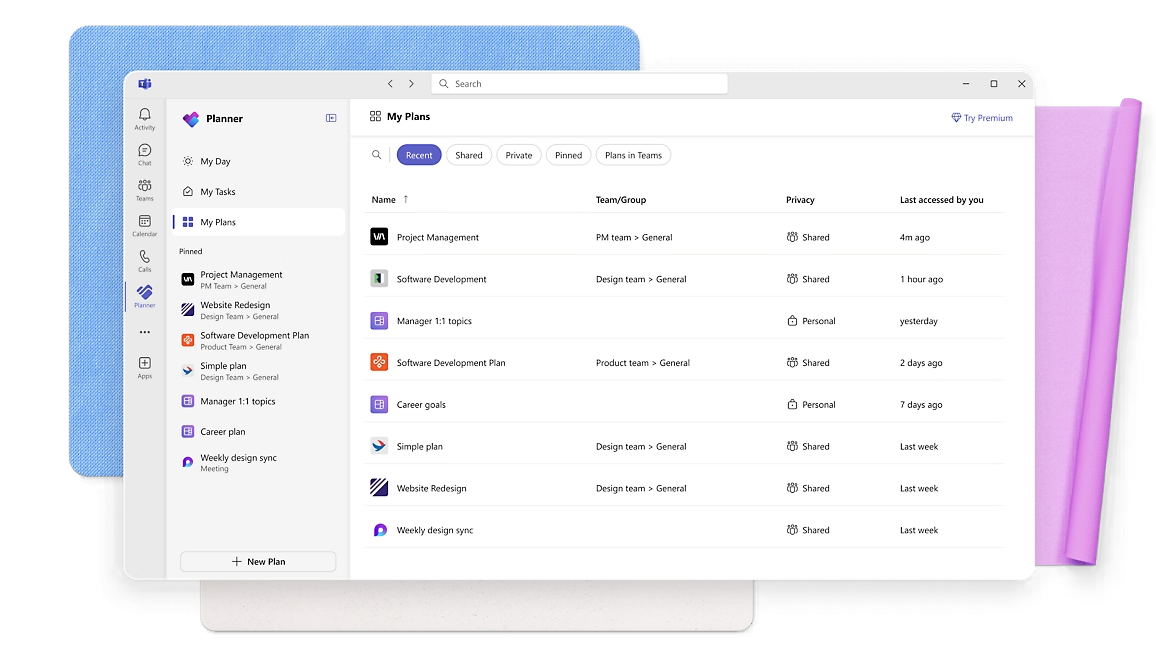
Microsoft Planner is a cloud-based task and that lives inside the Microsoft 365 ecosystem. It enables teams to organize tasks into boards, assign ownership, track progress, and collaborate through Microsoft Teams and web apps. As interest grows around Microsoft Planner pricing 2026, many organizations are reviewing whether its evolving plan structure still fits their needs as workflows become more complex.
Planner focuses on simple, visual task organization rather than full enterprise project management. Teams can create buckets (columns), assign tasks with attachments or checklists, and monitor progress in a kanban-style interface. It is ideal for lightweight coordination but limited for automation-heavy or reporting-focused projects.
The tool became more popular as Microsoft unified its Planner and Project portfolios into tiered offerings—enabling customers to scale from lightweight teamwork to without adopting separate software, though escalating costs under newer pricing tiers remain a consideration for growing teams.
Information source: microsoft.com
What is Microsoft Planner used for?
Microsoft Planner is typically used for:
- Managing team to-do lists and short-term assignments
- Coordinating basic projects with limited dependencies
- Tracking marketing campaigns, , or internal initiatives
- Supporting sprint backlogs for small agile teams
- Managing shared workloads inside Microsoft Teams
In short, it serves teams looking for within Microsoft's productivity environment rather than full project lifecycle management.
Breaking down Microsoft Planner plans and pricing: What each tier means
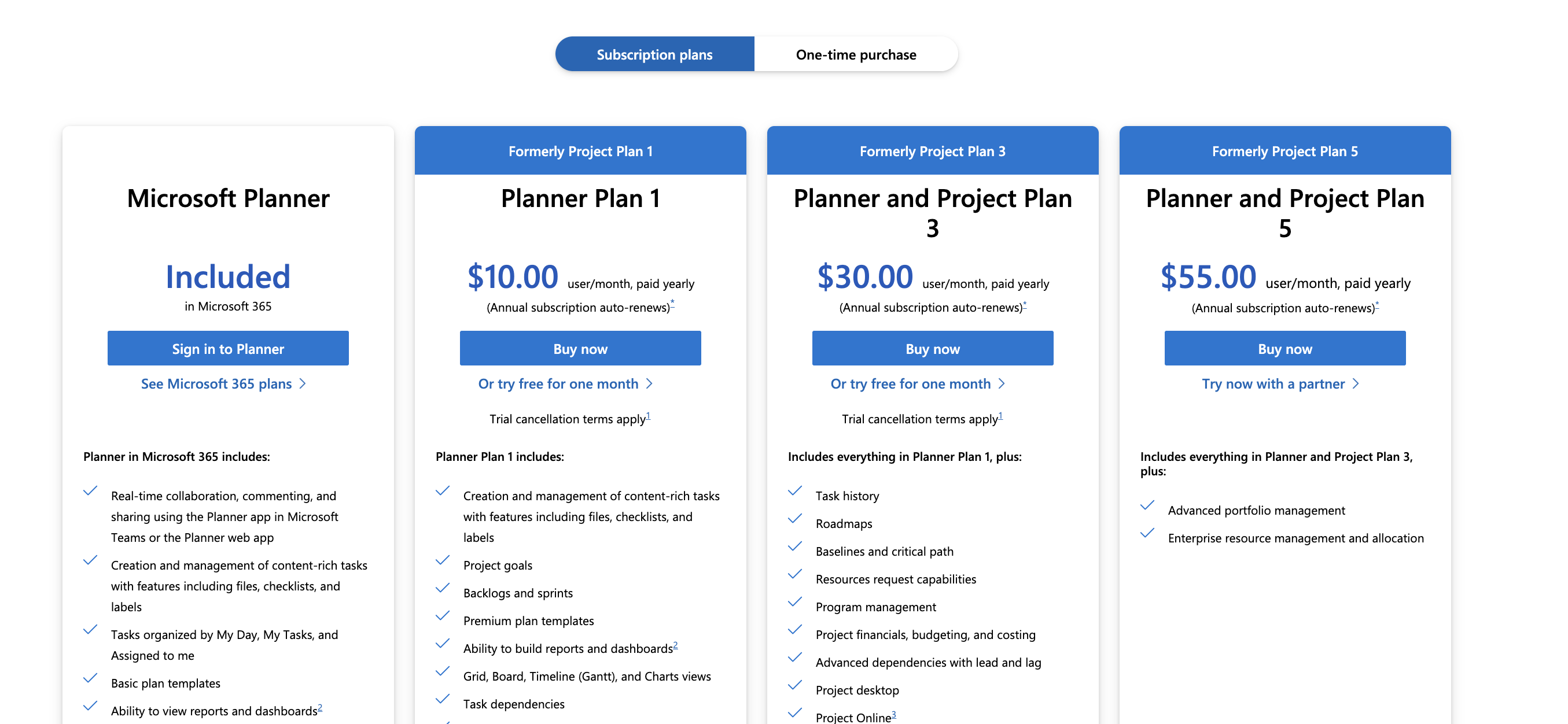
Understanding Microsoft Planner plans and pricing helps teams choose the right level of functionality without overspending on unused features. Many users start with Microsoft Planner pricing free through their Microsoft 365 subscription, then upgrade as project complexity increases. Each tier unlocks deeper planning, reporting, and governance tools, but also adds to overall costs as teams scale their workflows.
Information source: microsoft.com
Update time: 2025-12-08
Note: Pricing and plan details reflect publicly available data as of the update date and may vary based on region, billing cycle, and number of agents.
- Microsoft Planner (included in Microsoft 365): This is the entry-level offering that comes bundled with Microsoft 365. It provides the basic , collaboration tools, task lists, attachments, checklists, and simple board layouts. It's best suited for individuals or small teams who want lightweight project management integrated with their office suite—for small internal projects, team to-dos, or simple collaborative work without deep project scheduling or resource tracking.
- Microsoft Planner plan 1 pricing ($10/user/month, annually billed): Plan 1 upgrades from basic task tracking to a more capable project workflow system. It unlocks features such as backlog and , richer task management (labels, checklists, attachments), project templates, multiple board views (list, board, timeline/Gantt, charts), and ability to build dashboards and custom reports. This makes it suitable for small to medium-sized teams managing recurring projects, sprints, or marketing campaigns—teams that need more structure but not full enterprise project controls.
- Planner & project plan 3 ($30/user/month, annually billed): Plan 3 significantly expands project management capabilities. It adds tools for full project planning and control: advanced dependencies (lead/lag), baselines and critical-path scheduling, roadmaps, resource request workflows, program-level resource management, financial tracking (budgeting and cost tracking), project history, and desktop + online project management interfaces. This tier is ideal for mid-sized to large teams executing complex projects—e.g. IT rollouts, product development cycles, or multi-phase organizational initiatives—where detailed planning, resource allocation, and cost control are critical.
- Planner & project plan 5 ($55/user/month, annually billed): Plan 5 is positioned for enterprise-level portfolios. On top of all Plan 3 functionality, it adds portfolio management tools, , and features designed for managing multiple large-scale projects simultaneously. This tier fits organizations with many ongoing projects, needing cross-project resource balancing, consolidated reporting, and enterprise-grade planning oversight—such as construction firms, large IT departments, or corporations managing multiple internal projects in parallel.
Microsoft Planner features included in plans
Choosing the proper Microsoft Planner premium pricing
- Use Planner (M365) if your needs are lightweight: basic task lists, simple collaboration, small-team coordination.
- Choose Plan 1 if you need structured project workflows, sprint/backlog planning, and enhanced task management—ideal for small/medium teams or recurring internal projects.
- Opt for Plan 3 when projects are complex, with dependencies, cost tracking, and resource requirements—appropriate for mid to large teams needing detailed project control.
- Select Plan 5 if your organization handles many projects simultaneously, requires resource allocation across teams, and demands .
Find affordable tools to automate project workflows
Navigating Microsoft Planner add-ons and extra costs
While Microsoft Planner's plans outline core project management capabilities, many organizations encounter additional costs when expanding beyond basic task tracking into full collaboration and workflow operations. Several essential features often require separate subscriptions or bundled licensing, increasing the total cost of ownership over time.
- Mandatory foundation: Microsoft 365 licenses are mandatory even before accessing Planner's core features. Users must maintain M365 subscriptions in addition to any Planner Plan 1, 3, or 5 fees, meaning teams effectively pay twice—once for the productivity suite and again for project functionality.
- Advanced collaboration: Advanced collaboration tools such as enhanced meeting experiences, extended audio/video capacity, transcription, AI assistants, or document storage upgrades may require higher-tier Microsoft Teams or Office licensing. These tools are often treated as parallel add-ons rather than part of a single unified plan.
- Automation and workflow: are not native features of Planner. Organizations typically add Power Automate licenses to build cross-tool workflows for approvals, reminders, and system routing. These add-on automations involve separate per-user or per-flow charges that scale quickly as workflow complexity increases.
- Reporting and business intelligence: Reporting and business intelligence often push teams toward standalone subscriptions like Power BI Pro or Premium to create dashboards that consolidate Planner data across projects and portfolios. Basic reporting exists in higher Planner tiers, but advanced visual reporting typically increases licensing needs.
- Storage and compliance: and compliance tools introduce further costs. Teams exceeding standard storage limits must upgrade SharePoint or OneDrive storage plans, while organizations requiring compliance, governance, and security auditing must license additional Microsoft security tools.
Although Microsoft Planner's pricing appears straightforward at first glance, real-world deployment often involves stacking multiple licenses across Microsoft 365, Teams features, Power Automate, Power BI, additional storage, and enterprise compliance bundles. Businesses comparing collaboration platforms often review and before making a final decision. For teams that require tight collaboration, automation, integrated documentation, and reporting, cumulative overhead can significantly exceed the advertised planner plan price—making ownership more complex and expensive than anticipated.
The pros and cons of choosing Microsoft Planner
Before committing to Microsoft Planner, it's helpful to weigh how well its strengths match your team's workflow against its operational limitations. While Planner delivers simplicity and familiarity within Microsoft 365, scaling projects often introduces complexity and added costs. Below is a clear breakdown to support informed decision-making.
Pros
- Simplicity: Quick setup with an intuitive task board that makes onboarding effortless for most Microsoft 365 users.
- Microsoft ecosystem compatibility: Works smoothly with Teams, Outlook, and SharePoint for teams already standardized on Microsoft tools.
- Scalable tier structure: Gradual upgrade path from basic task tracking to enterprise project and portfolio management as needs grow.
Cons
- Limited project reporting: Advanced analytics and custom dashboards often require separate Power BI subscriptions.
- Not ideal for complex workflows: Native support for cross-team automation, approvals, and multi-system routing is minimal without add-ons.
- Upgrade pressure for advanced features: Gantt timelines, dependencies, cost tracking, and portfolio tools are locked behind higher-priced tiers that increase total spend.
Is Microsoft Planner right for your business?
Microsoft Planner is a strong option if:
- Your team comfortably operates inside Microsoft Teams
- Projects remain relatively simple
- You want minimal onboarding complexity
- You already maintain Microsoft 365 licenses
Afterthought
However, teams managing cross-department projects, remote-first workflows, CRM and delivery coordination, or automated approval chains often outgrow Planner's capabilities—or face ballooning licensing stacks. This is where Lark becomes a unified alternative, bringing project management, communication, databases, and automation into one platform.
Streamline the overall project lifecyle in a new way
Robust option: Enjoy smooth workflows across teams with Lark
As mentioned, teams evaluating Microsoft Planner pricing often discover that basic task tracking quickly expands into a stack of add-ons, upgrade tiers, and disconnected tools. Luckily, offers a unified workspace that replaces this scattered setup with built for collaboration, automation, and execution. Instead of managing tasks separately from approvals, reporting, or documentation, teams manage everything together. For organizations seeking a predictable alternative to Microsoft Planner plans and pricing, Lark delivers greater flexibility without hidden expansion costs.
Unified workspace replacing fragmented project tools
Instead of juggling separate tools such as Planner for tasks, SharePoint for document storage, and Excel for tracking data, brings these functions together into one flexible workspace. It combines structured databases, spreadsheet-style editing, and file management into a single environment that teams can tailor to their exact project needs.
Teams can construct comprehensive project management systems that perfectly align with their unique workflows without constant application switching. For example, a single Base can maintain complete project timelines, interconnected task records, relevant documentation, and real-time performance dashboards—all synchronized within a collaborative workspace. This approach effectively consolidates and streamlines functions typically distributed across simple Project plans and Planner boards, all accessible within a single, coherent interface. 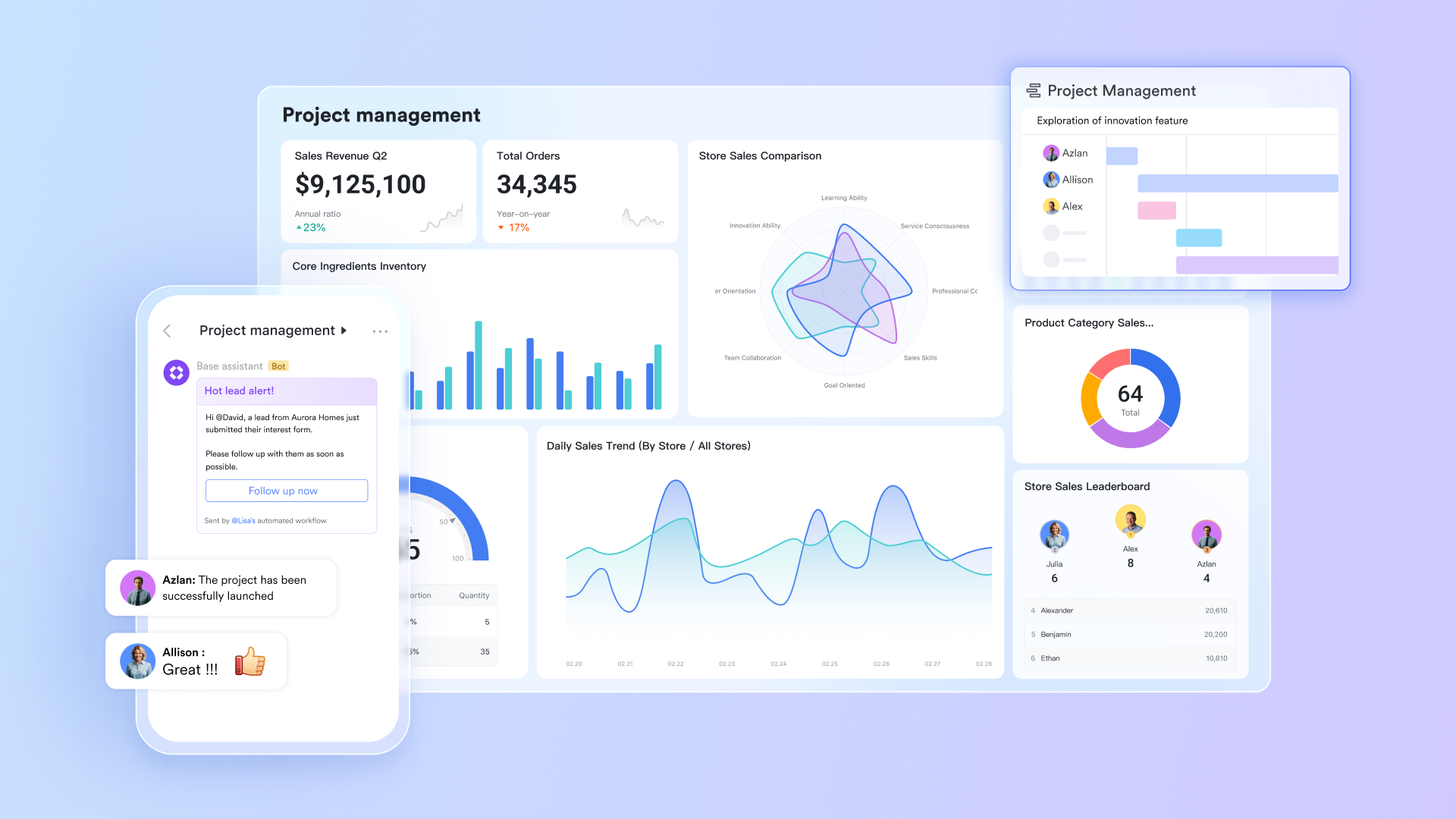
Unified time and task management
A persistent challenge in project management involves the organizational disconnect between formal project plans and individual team member schedules. Using Outlook Calendar alongside Planner or Project often necessitates managing separate views of time commitments and project deadlines.
and Lark Tasks show a deep bidirectional combination. Tasks containing specific due dates automatically appear within calendar views, providing a unified perspective of meetings, project milestones, and personal work blocks. This feature resolves the persistent problem of maintaining project plans in isolation from available working time, enabling more realistic planning and comprehensive time management across individual and team schedules. 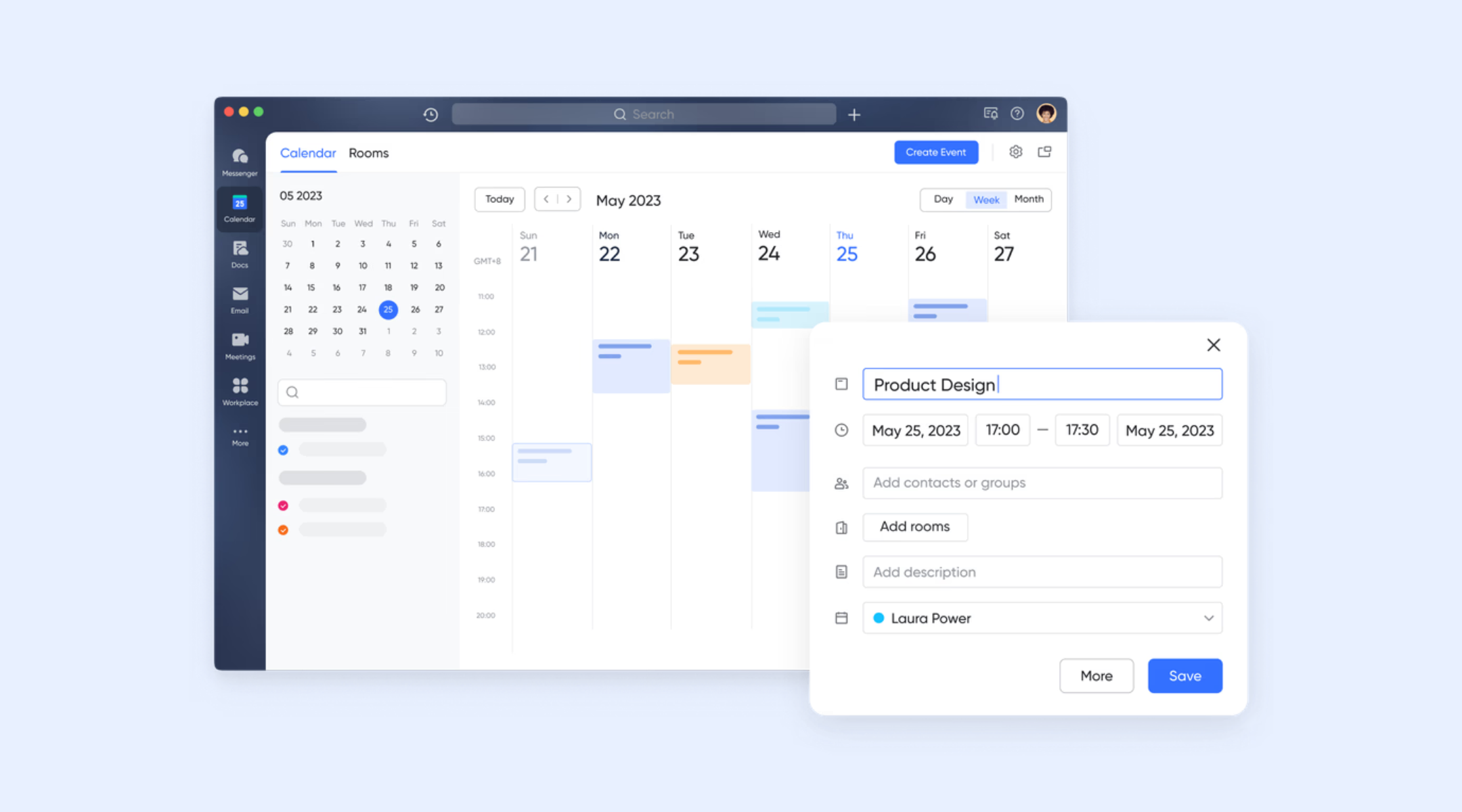
Seamless communication capabilities
In traditional Microsoft environments, project conversations often become fragmented across disconnected apps. Team discussions take place in Teams chats, task updates live separately in Planner, and important decisions may be logged in OneNote or shared documents—making it difficult to access all relevant information in one place when action is needed.
solves this disconnect by allowing teams to share and pin Tasks, Docs, and Calendar items directly inside chat threads, keeping discussions fully connected to the work being referenced. Teams can also convert chat messages into Lark Tasks with a single action, ensuring decisions made in conversation immediately become tracked deliverables. This seamless link between communication and execution keeps accountability clear and eliminates lost follow-ups. 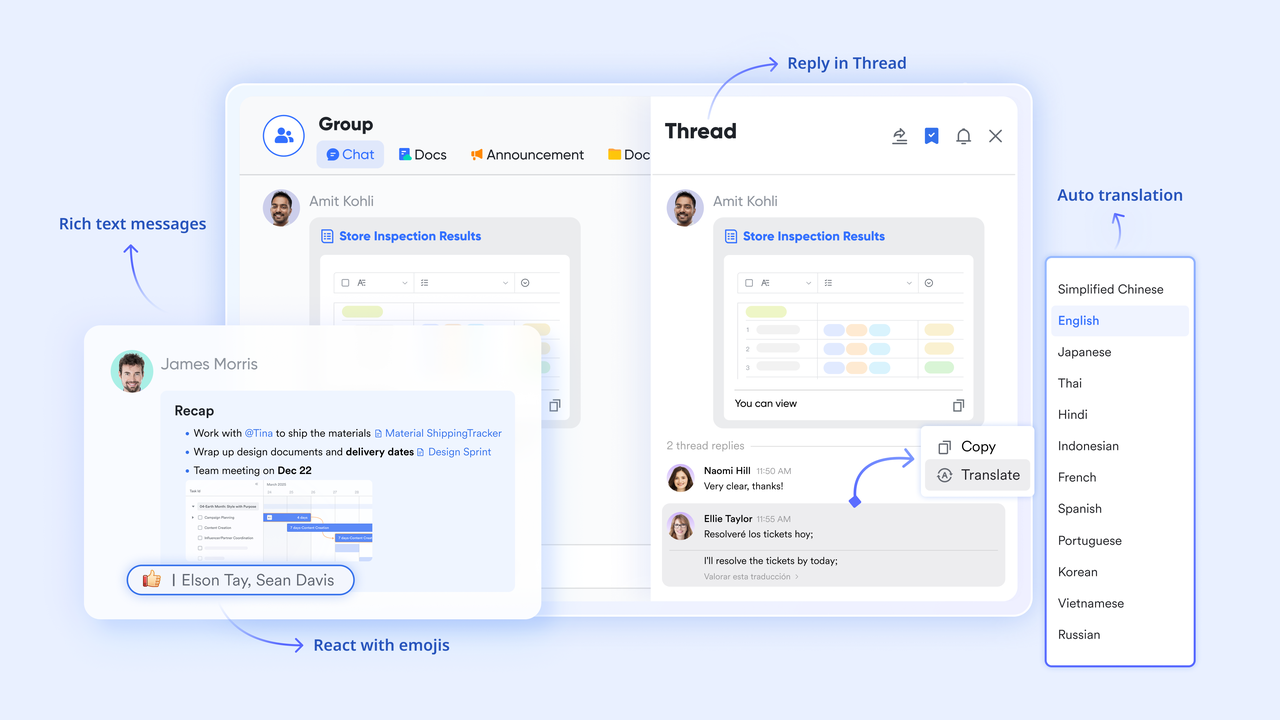
Built-in approvals that keep work moving
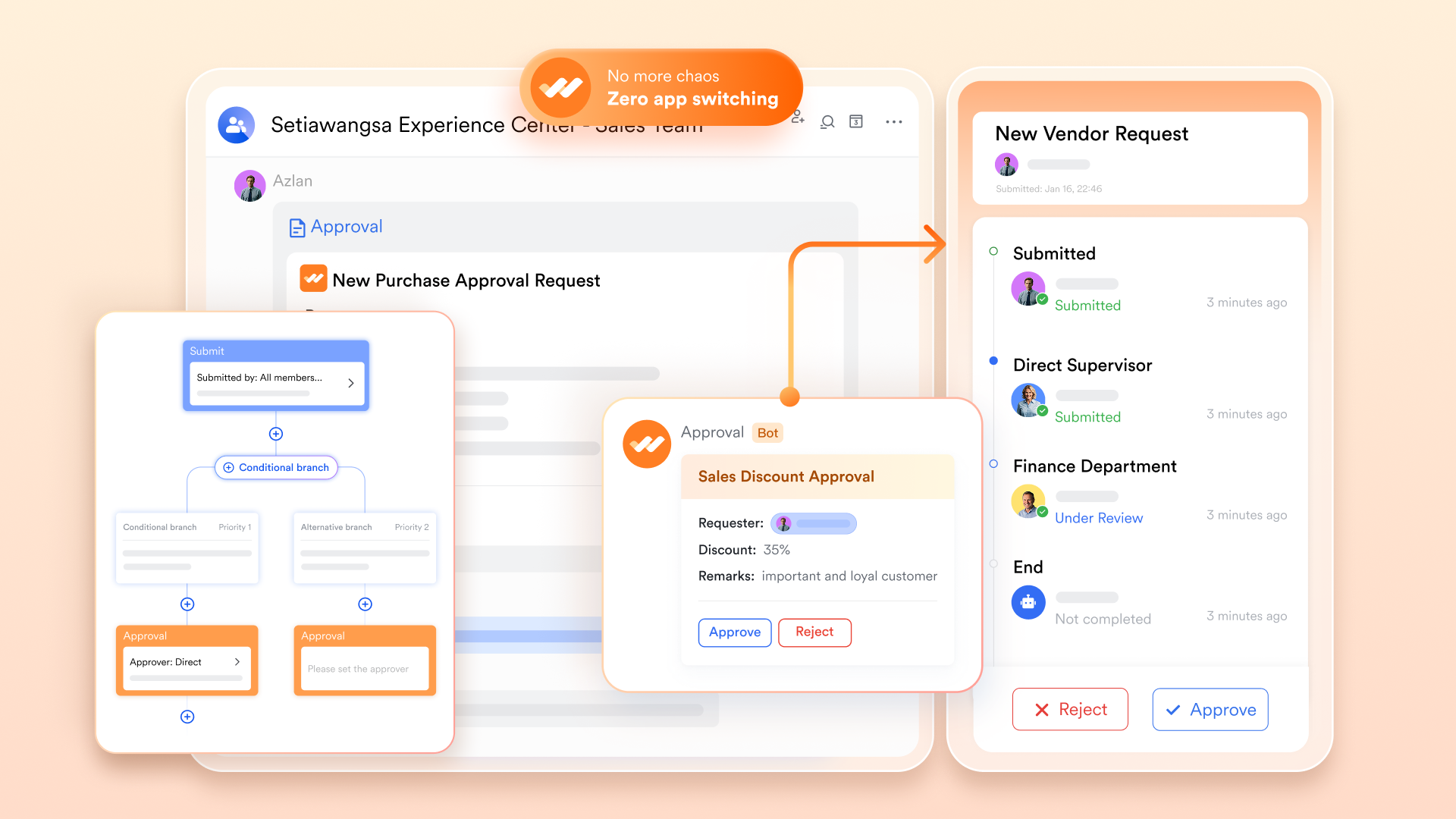
In many Microsoft-based workflows, approvals are fragmented across email threads, shared forms, or disconnected tools—making it difficult to maintain visibility, track status, or avoid decision delays. These manual handoffs often slow projects down and introduce errors or missed follow-ups, especially when approvals span multiple departments or management levels.
brings governance directly into the workspace where daily work happens. Teams can design multi-step with conditional routing based on project status, cost thresholds, or role-based permissions. When requests are submitted, approvers will receive instant notifications and can review the full request details and context before making decisions. Real-time tracking shows each approval stage clearly, ensuring stakeholders always know what is pending, approved, or escalated—dramatically reducing bottlenecks compared to traditional email-based approval processes.
Collaborative documentation environment
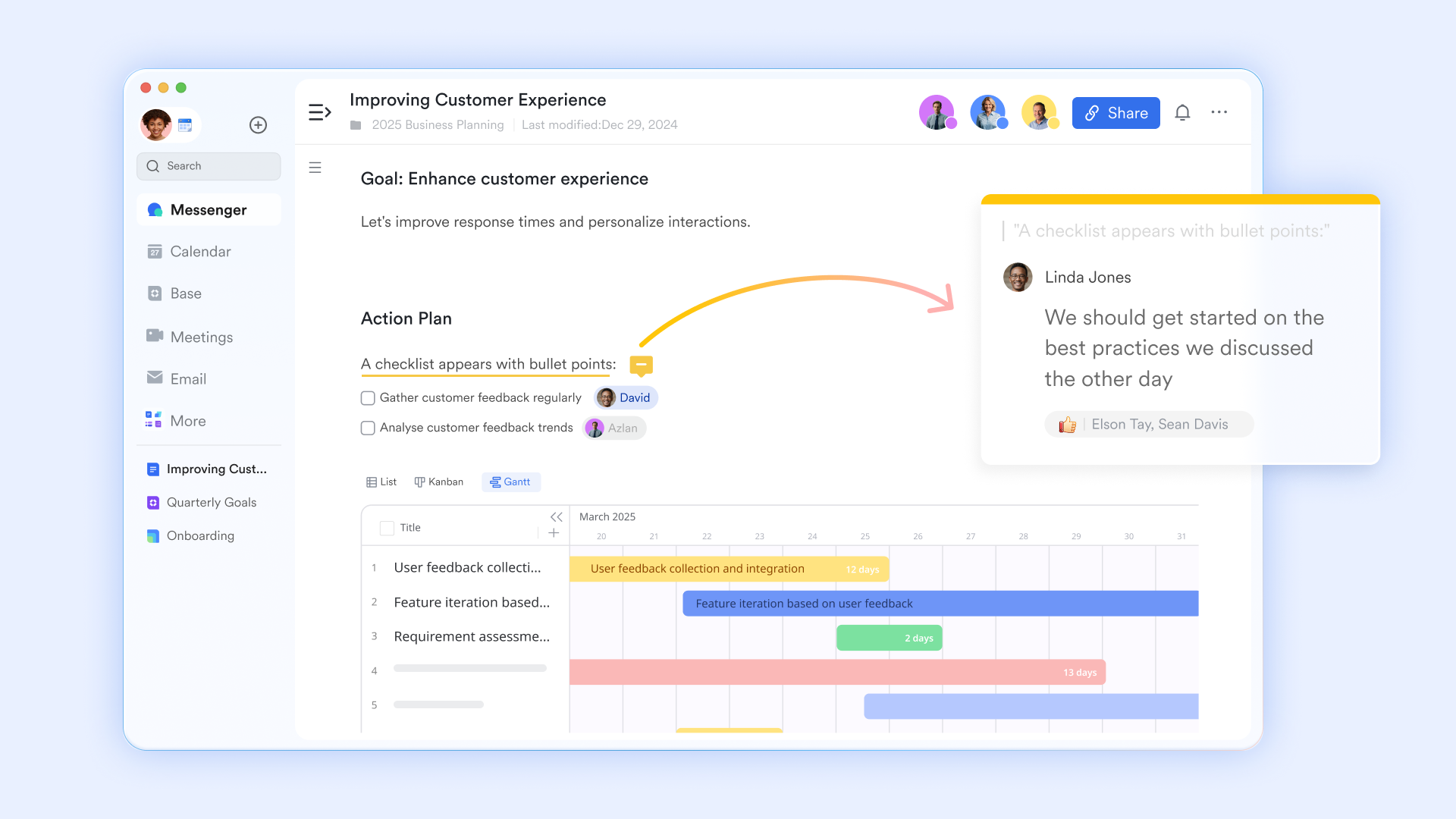
transforms traditional document creation into a seamless collaborative experience within the unified workspace. Unlike standalone document tools that operate in isolation, Lark Docs enables real-time co-editing where multiple team members can simultaneously work on the same document. This eliminates version confusion and accelerates content creation.
The platform enhances collaborative efficiency through intuitive commenting and mention features. Team members can provide specific feedback and directly tag colleagues using @mentions to assign responsibility. This creates clear accountability and ensures timely responses.
:
- Starter plan: Free forever plan that includes 11 powerful tools for up to 20 users. It also comes with 100GB of storage, 1000 automation runs, AI translations, and more.
- Basic plan: $6/user/month (billed annually) for up to 500 users. It includes everything in Starter plus group calling for up to 500 attendees, 5TB of storage, 1000 automation runs, and more. For more details, please .
- Pro plan: $12/user/month (billed annually) for up to 500 users. It includes everything in Basic plus group calling for up to 500 attendees, 15TB of storage, 50,000 automation runs, and more.
- Enterprise plan: for custom pricing. Supports unlimited users and includes even more automation runs and advanced security, compliance, and management features.
For small teams with simple communication needs

18 months message history
1000 Base automation runs/month
2000 rows per table in Base
Most POPULAR
For companies with comprehensive collaboration and management needs
Unlimited message history
500-participant video meetings
50k Base automation runs/month
20k rows per table in Base
For large companies with advanced security and organizational management needs
Get a personalized demo and pricing
Unlimited message history
500-participant video meetings
15 TB storage + 30 GB storage/user
500k Base automation runs/month
50k Base automation runs/month
Most POPULAR
For companies with comprehensive collaboration and management needs
Unlimited message history
500-participant video meetings
50k Base automation runs/month
20k rows per table in Base
Direct comparison: Microsoft Planner vs Lark
Making your final decision: Which to choose?
Who should choose Microsoft Planner?
- Organizations are already standardized on Microsoft Teams
- Teams running lightweight projects
- Users are comfortable managing add-on licenses
- Internal collaborative working groups
Who should choose Lark?
- Teams wanting unified collaboration + project delivery
- Businesses requiring approvals, CRM workflows, and automation
- Distributed or hybrid teams needing real-time dashboards
- Organizations looking to reduce monthly SaaS complexity
In essence: Choose Microsoft Planner for simplicity and seamless integration into the MS ecosystem. Choose Lark for unification and powerful, built-in automation across collaboration and project delivery.
Conclusion
Understanding Microsoft Planner pricing requires more than reading subscription tables. While the core tiers appear affordable, real-world implementation includes Microsoft 365 dependencies, automation licenses, reporting add-ons, collaboration tool subscriptions, storage extensions, and compliance bundles that increase the total cost of ownership.
For teams managing modern operations—where planning, approvals, documentation, CRM workflows, and automation merge into daily execution— offers greater flexibility at lower predictable costs. Its unified platform eliminates tool sprawl while enabling scalable project delivery across organizations.
Refresh the perspective of projects and task management
FAQs
Is Microsoft Planner included in all Microsoft 365 subscriptions?
Microsoft Planner is available in most Microsoft 365 business plans, but not all subscription tiers include full access. Basic task boards are bundled with core licenses, while premium features require separate Planner plans. Advanced capabilities such as Gantt views, dependencies, and reporting are locked behind paid upgrades. Teams should verify their license details before assuming full Planner availability.
Does Microsoft Planner work offline or only online?
Microsoft Planner is primarily a cloud-based tool and requires an active internet connection to function. Limited access to task lists may be available through cached data in Microsoft apps, but updates, collaboration, and syncing require being online. Offline functionality is minimal, making continuous connectivity essential for normal use.
Is Microsoft Planner secure for enterprise use?
Yes, Microsoft Planner inherits Microsoft's and compliance standards, including data encryption and identity controls. However, organizations that need advanced compliance management, auditing, or regulatory reporting often require additional Microsoft security licenses. These advanced protections typically introduce extra costs beyond standard Planner subscriptions.
Can Microsoft Planner replace Microsoft Project?
Planner can handle basic project coordination and team task management but does not replace the full capabilities of Microsoft Project. Complex scheduling, critical-path analysis, portfolio management, and detailed resource allocation require higher-tier Project plans. For enterprise-scale project management, Planner alone is generally insufficient.
Does Microsoft Planner support automation and workflows?
Planner does not offer native automation or workflow routing on its own. Teams rely on to build approvals, reminders, system triggers, and integration workflows. These automations require separate licenses, increasing overall platform complexity and cost as processes grow.
Related reading






























