














How to Use Notion for Project Management: 5-Min Guide

Ryan Tanner
Product Marketing Specialist
Sep 18, 2026
Ryan Tanner
Sep 18, 2026

14 min read


Modern teams need tools that balance clarity, structure, and collaboration—and Notion project management has become a popular approach for organizing tasks, planning projects, and keeping documentation in one place. Its flexible databases, visual views, and customizable templates allow individuals and small teams to build the exact workflows they need. But this flexibility comes with trade-offs, including manual setup, limited automation, and performance challenges as workspaces grow in size and complexity.
In this comprehensive guide, we'll explore how Notion supports project management, its core features, templates, and user reviews, along with its limitations.

What is Notion project management?
Notion project management refers to using Notion's flexible workspace to plan, organize, and track projects through customizable databases, linked views, and visual dashboards. Teams and individuals use it to manage tasks, deadlines, documentation, and collaboration in one place. Because Notion supports Kanban boards, calendars, timelines, and list views, it allows users to structure their workflow in a way that fits their needs. On the other hand, a Notion project management template helps teams get started quickly, while features like relational databases, rollups, and multi-view dashboards make it possible to build scalable systems.
Many users appreciate how using Notion for project management brings tasks, notes, and planning together in a single interface. However, creating a full Notion project management dashboard or setting up project management in Notion often requires manual configuration. Overall, Notion suits teams looking for a customizable and visual project management tool that adapts to varied workflows.
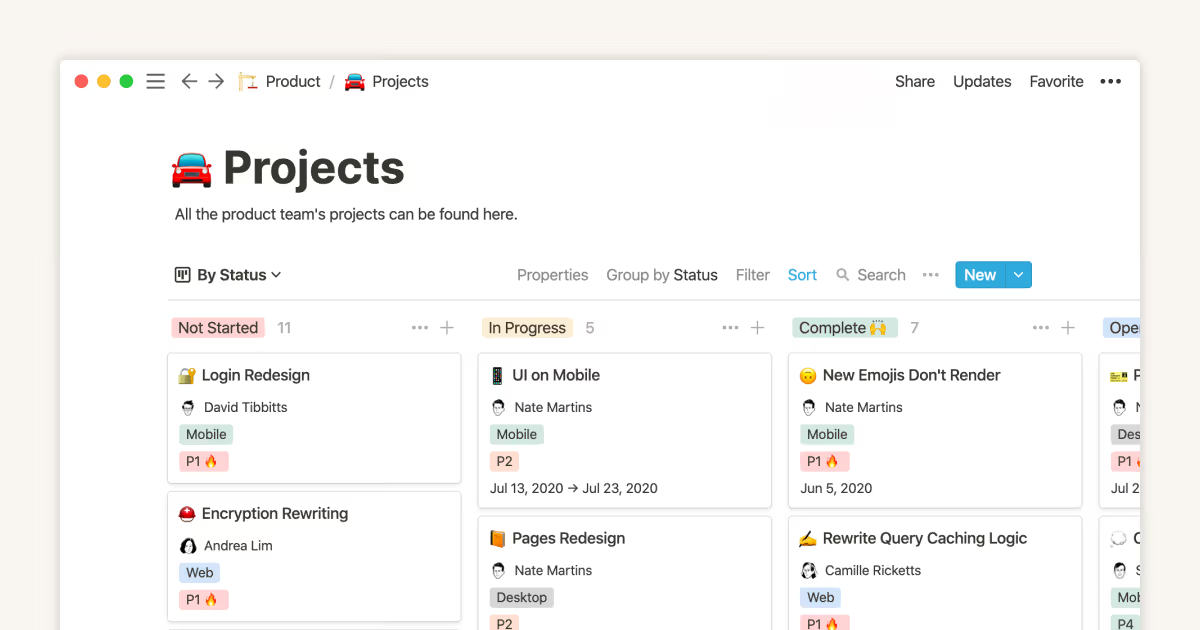
Image source: notion.com
Core features of Notion for project management
Notion's project management features bring structure, visibility, and collaboration into a single workspace that teams can adapt to any workflow. Its flexibility makes it suitable for task tracking, documentation, database management, and cross-functional planning. With customizable dashboards and shared workspaces, teams can streamline execution while keeping knowledge centralized. Notion's modular design allows every project to evolve without switching tools or systems.
Task and project tracking
Notion supports kanban-style task management, due dates, and workflow mapping for smooth execution across teams. Tasks can be grouped, filtered, and visualized for greater clarity. It becomes easy to move items through stages and maintain consistent tracking.
- Kanban boards, calendars, lists, timelines: These views help teams visualize work in multiple formats depending on their needs. Boards are great for workflow stages, calendars highlight schedules, and lists structural tasks. Timelines support long-term planning and cross-functional coordination.
- Status labels, owners, priorities: Tasks can be assigned with clear ownership and priority levels to avoid ambiguity. Status labels help track progress across multiple project phases. This structure ensures accountability and better workload management.
Databases and linked views
Notion databases allow teams to store tasks, resources, and project assets in a centralized, structured format. Linked views let multiple teams see the same data from different angles. This brings scalability and reduces duplication across projects.
- Customizable fields: Teams can define fields such as deadlines, tags, scoring, or dependencies. Customization ensures the database fits any workflow or department. It increases clarity and keeps data consistent across all entries.
- Relational views: Relations allow two databases to connect, linking tasks to projects, assets, or team members. Rollups automate summaries like total tasks or progress completion. This relational structure supports deeper analytics and better reporting.
- Multi-database dashboards: Dashboards combine several database views into one command center. Teams can track priorities, deliverables, and KPIs without switching pages. This helps leaders maintain real-time visibility across workstreams.
Documentation + project planning
Notion combines documentation and project execution in the same space. Teams can maintain everything from SOPs to product specs without relying on separate tools. This reduces context switching and keeps information accessible.
- Wikis, notes, roadmaps: Wikis offer structured documentation for long-term knowledge sharing. Notes help capture ideas, meeting points, and quick references. Roadmaps provide strategic direction for ongoing projects and product development.
- One place for ideas, specs, SOPs, and project briefs: Having all documents centralized reduces fragmentation across teams. Information stays up to date and easy to reference during execution. This supports alignment during planning and implementation phases.
Collaboration features
Notion enables team communication directly within tasks and documents. This eliminates long email chains and helps decisions stay connected to work. Collaboration becomes faster and more transparent across departments.
- Comments, mentions, updates: Team members can discuss tasks, tag colleagues, and leave updates in real time. This keeps everyone aligned and reduces back-and-forth communication. Comments stay attached to the relevant project items.
- Sharing and workspace-level coordination: Notion allows controlled sharing within teams or external partners. Workspace permissions help manage access to sensitive or ongoing projects. This ensures smooth coordination across all stakeholders.
Templates for fast setup
Templates save time by offering ready-made structures for different project types. They help standardize workflows across teams. This ensures consistency, especially when scaling project management practices.
- Notion's own project templates: Notion offers pre-built templates for sprints, task lists, product roadmaps, and more. These help teams get started without building from scratch. They are highly customizable to match specific workflows.
- Community templates: The Notion community provides thousands of templates across industries. These templates help teams explore creative workflows already tested by others. It reduces setup time and expands use cases.
- Engineering, marketing, design project templates: Specialized templates support technical planning, campaign management, and creative workflows. Each comes with structures suited to the department's needs. This helps streamline planning for diverse teams.
Notion project management dashboards
Dashboards bring multiple project views together to support comprehensive monitoring. Teams can track workload, timelines, and milestones. This supports data-driven decision making and keeps performance transparent.
- Multi-view dashboards: These dashboards combine kanban, timelines, tables, and charts into a single page. It allows teams to switch between views without losing context. Everything stays organized and accessible.
- Portfolio overviews: Portfolio views help leaders monitor progress across different projects. They highlight delays, dependencies, and high-priority work. This improves strategic planning and resource allocation.
- Team workload visibility: Workload indicators show how tasks are distributed across team members. This prevents burnout and ensures balanced task assignments. It also helps managers optimize capacity planning.
- OKR trackers: Notion dashboards can track objectives and key results for accountability. Teams can link tasks to OKRs for better alignment with goals. This improves outcome-focused execution and performance monitoring.
Notion pricing
- Free: Price: $0/user/month. Key features include unlimited pages and blocks, collaborative workspaces, basic databases, basic version history, and mobile access.
- Plus: $10/user/month (billed annually) or $12 monthly. Key features include unlimited file uploads, 30-day version history, advanced permissions, more database features, and better sharing controls.
- Business: $20/user/month (billed annually) or $20 monthly. Key features include everything in Plus, plus SAML SSO, advanced workspace controls, user provisioning, private team spaces, and enhanced automation limits.
- Enterprise: Custom (contact sales). Key features include advanced security & compliance, audit logs, dedicated success manager, data residency, guaranteed uptime, and enterprise-level controls.
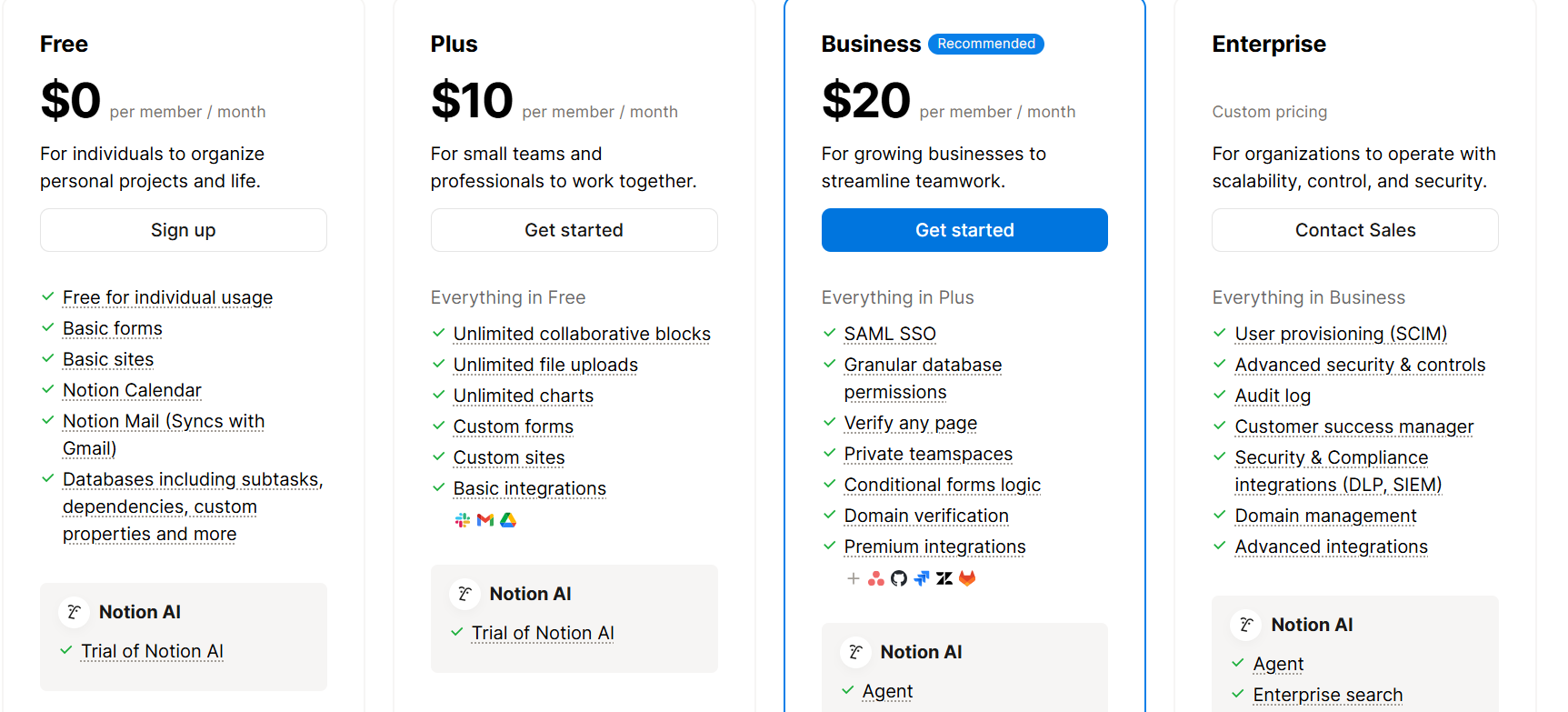
Image source: notion.com
How to use Notion for project management
Using Notion for project management is a simple way to organize tasks, projects, and documentation in one flexible workspace. Beginners can start small with templates and gradually build structured workflows that scale with team needs. With customizable databases, multiple views, and collaborative tools, Notion adapts to any project style. This makes it ideal for planning, execution, tracking, and creating a unified source of truth.
Step 1: Choose a template or start from scratch
Notion offers project templates for kanban boards, timelines, task lists, and roadmaps, making setup quick for beginners. You can start from scratch if you want full control over structure and fields. Templates ensure consistency while reducing setup time for project planning.
Step 2: Build your database properties
Adding properties like status, priority, owner, due date, and tags helps organize tasks and standardize workflows. These properties create a clean structure that improves tracking and reporting across teams. With custom fields, you can tailor your project workspace to any methodology.
Step 3: Create multi-view project pages
Notion allows multiple views like board, calendar, table, list, and timeline to manage tasks from different angles. Each view gives unique insights into deadlines, workloads, and milestones. Multi-view pages help teams adopt flexible project tracking and agile workflows.
Step 4: Add documentation, briefs, and context
Use Notion's pages to store requirements, meeting notes, SOPs, and project briefs in one place. Keeping documentation and tasks together reduces context switching and improves team clarity. This also supports knowledge management and cross-functional collaboration.
Step 5: Create dashboards for team and leadership visibility
Dashboards pull data from multiple databases for tracking KPIs, OKRs, tasks, and milestones in real time. They offer high-level visibility for managers while keeping team-level details accessible. Dashboards enhance decision-making and ensure alignment across departments.
Step 6: Establish workspace rules and naming conventions
Consistent naming, folder structures, and workflow rules keep the workspace organized as your projects grow. Shared standards help teams avoid clutter and maintain version control. Clear conventions also support long-term scalability and project governance.
Notion reviews for project management: What users like
Notion project management reviews often highlight how the tool balances flexibility with an easy-to-use interface. Users appreciate that Notion can adapt to different workflows, whether it's task management, documentation, or building custom dashboards. Its modular workspace makes it especially appealing for teams wanting a unified place for planning and execution. These strengths frequently appear in user feedback across forums, communities, and review platforms.
- Highly flexible structure: Users love that Notion lets them design project workflows exactly the way they want, from simple to advanced. The ability to customize databases, fields, and layouts supports personalized project systems. This flexibility makes Notion project management suitable for many styles, including agile, kanban, and roadmap planning.
- Combines docs + tasks in one place: One major advantage is having documentation and task tracking integrated in a single workspace. Teams can keep specs, meeting notes, briefs, and tasks connected through linked databases. This reduces scattered information and improves overall project visibility.
- Great for individual contributors or small teams: Notion is frequently praised for its lightweight setup, making it ideal for freelancers, creators, and small teams. Its simplicity allows users to manage projects, goals, and workflows without needing complex tools. This makes project management in Notion more approachable for beginners.
- Reputation for being intuitive and visual: Users describe Notion as clean, visual, and easy to navigate, especially compared to traditional project management software. Drag-and-drop features and multi-view layouts help create a clear picture of tasks and priorities. This intuitive design contributes to Notion's popularity for planning and task management.
Notion limitations for project management
Notion is a powerful workspace, but user reviews often point out that it has limitations when used for full-scale project management. While it works well for lightweight planning, documentation, and personal productivity, it can struggle when projects become larger or more complex. Many teams find themselves relying on workarounds to manage advanced workflows. These common challenges show why Notion project management may not always be ideal for fast-growing teams or structured operations.
- Can get messy without strong structure: Notion's flexibility becomes a drawback when teams don't set clear rules, templates, and naming conventions. Without structure, pages multiply quickly and databases become inconsistent. This lack of standardization can make project management in Notion feel disorganized over time.
- Not ideal for advanced scheduling or dependencies: Notion doesn't natively support complex dependencies, critical paths, or detailed scheduling needed for technical or enterprise projects. Users often rely on manual workarounds to track blockers and timelines. This limits adoption for teams needing structured project scheduling tools.
- Limited automation compared to specialized systems: While Notion offers basic automation through buttons and integrations, it lacks workflow automation found in dedicated platforms. Routine tasks like reminders, approvals, and escalations must often be done manually. This slows down teams that need efficient, automated project management workflows.
- Performance issues with large databases: As teams grow and data increases, Notion databases can load slowly or lag during edits. This affects dashboards, relational setups, and multi-view project pages. These performance constraints make large-scale project management in Notion challenging.
- Requires manual setup and maintenance: Most project setups in Notion need custom configuration—creating databases, linking views, defining properties, and maintaining structure. Regular upkeep is required to prevent clutter and maintain consistency. This adds overhead for teams that prefer ready-made project management systems.
- Permission rules may feel lightweight for bigger companies: Notion's access control works well for small teams but can lack the granular permissions large organizations need. Managing people who can edit, view, or create items can become complex when scaling. This may limit adoption for enterprises requiring strict governance and compliance.
Meet Lark: A smarter alternative to Notion for project management
Lark, one of the most versatile project management tools, provides teams with a unified workspace to plan projects, track progress, and ensure every task moves smoothly. It brings together tasks, live docs, chat, and workflows so teams don't need to switch between tools. With flexible project views and structured databases, Lark supports everything from day-to-day task tracking to long-term planning. Its built-in automation reduces manual work and helps projects move faster with fewer errors. Teams can also create dashboards for real-time visibility across functions and leadership levels. Overall, Lark offers a more streamlined and scalable alternative to Notion for project management.
Multiple tables for structured tracking
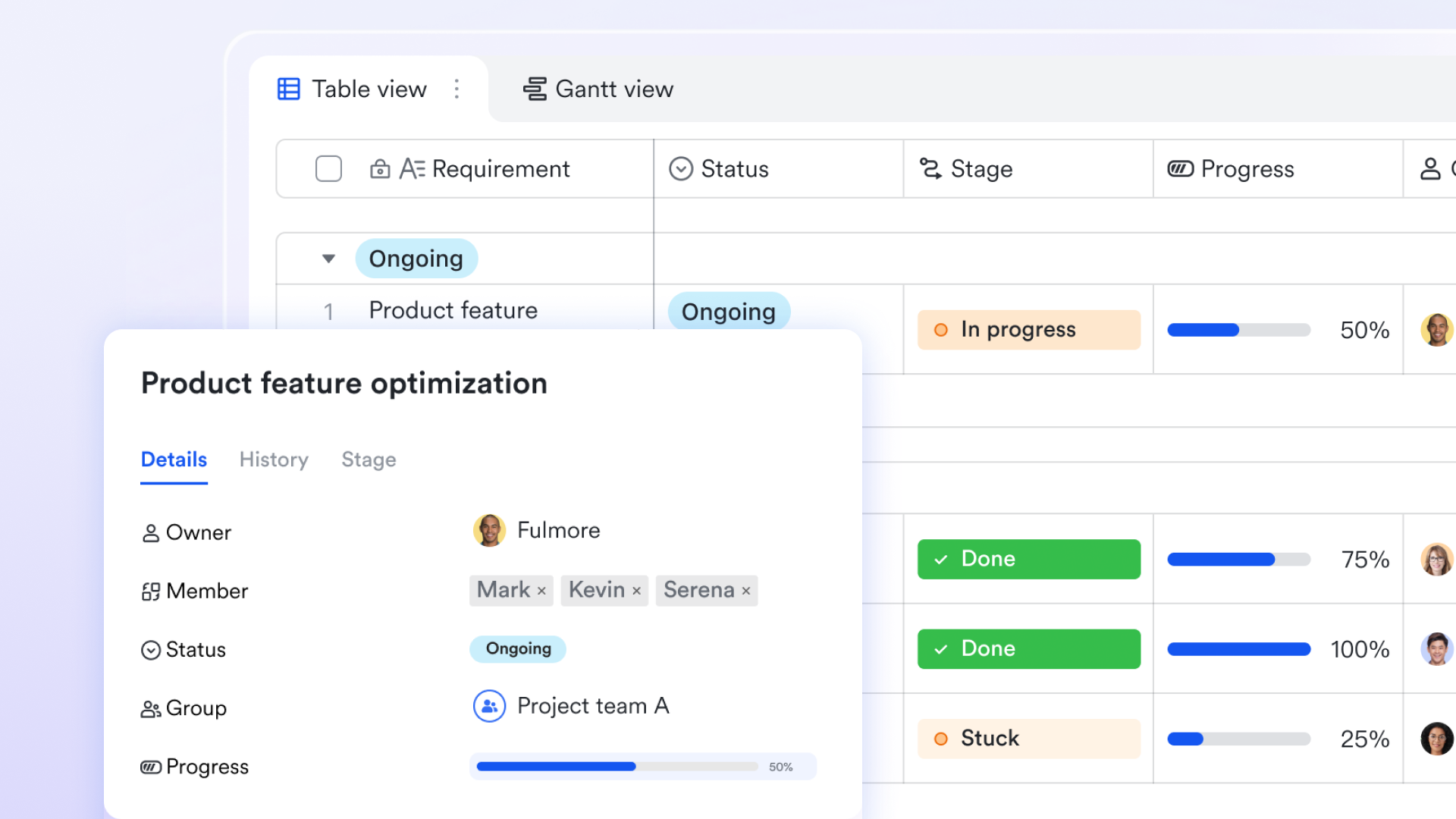
Via tables in Lark Base, teams can organize projects across several tables to capture every detail—whether by task, owner, milestone, sprint, or department. This lets you break large initiatives into smaller, manageable components while keeping all data in one organized environment. As projects grow, tables help maintain order and clarity without adding complexity.
Multiple views for visual planning
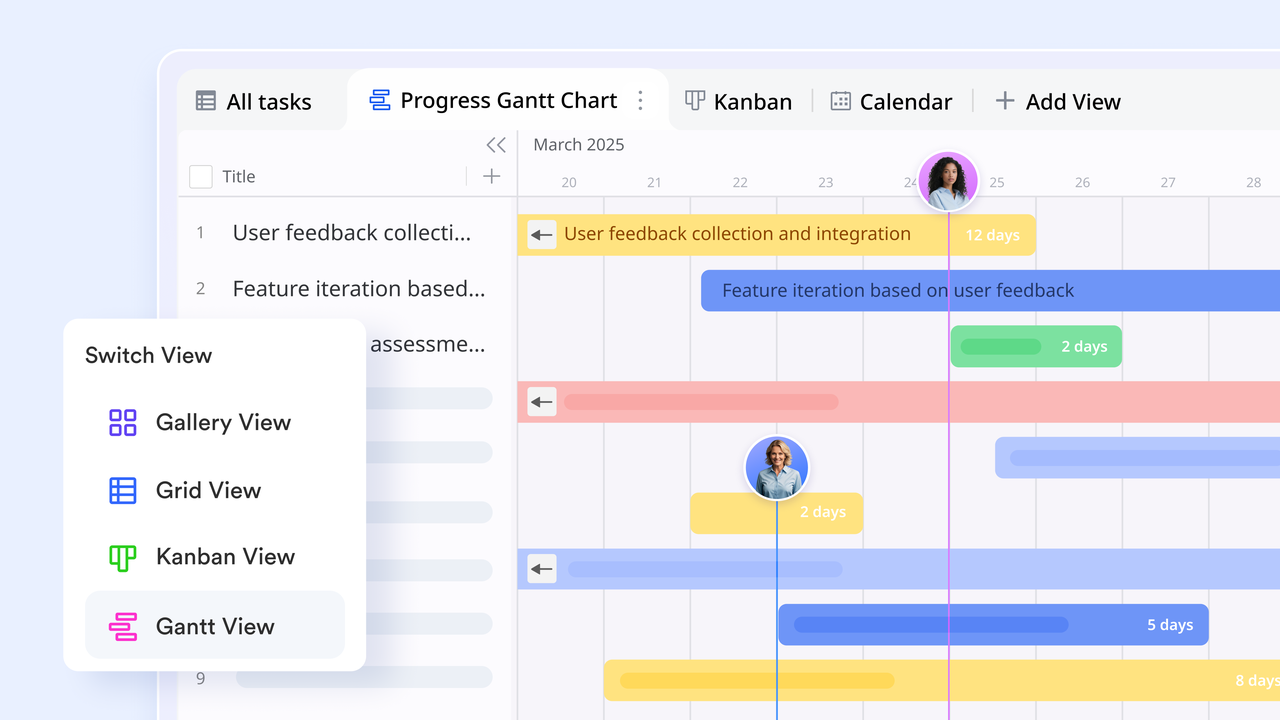
Lark supports mutliple views that help teams understand progress instantly. Kanban views show task movement from "To-do" to "Done," making status reviews clear and quick. Gantt views highlight schedules, dependencies, and overlaps, giving teams a full picture of timelines and workload. Switching between views keeps everyone aligned, regardless of how they prefer to work.
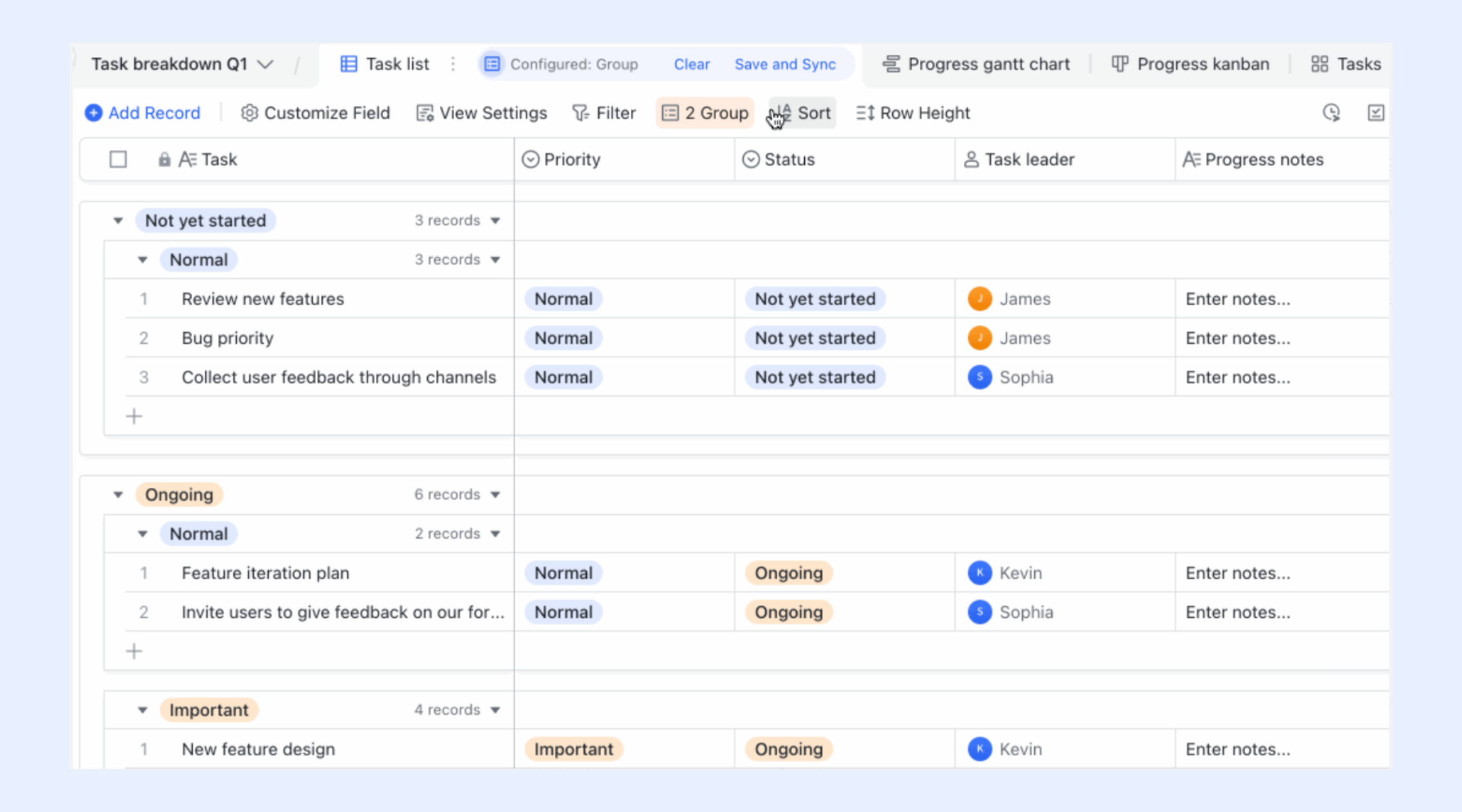
Groups and filters for quick navigation
With grouping and filtering options, teams can instantly surface what matters—work assigned to a specific member, tasks due this week, high-priority items, or blockers needing attention. This keeps daily standups, planning sessions, and reviews sharply focused and efficient.
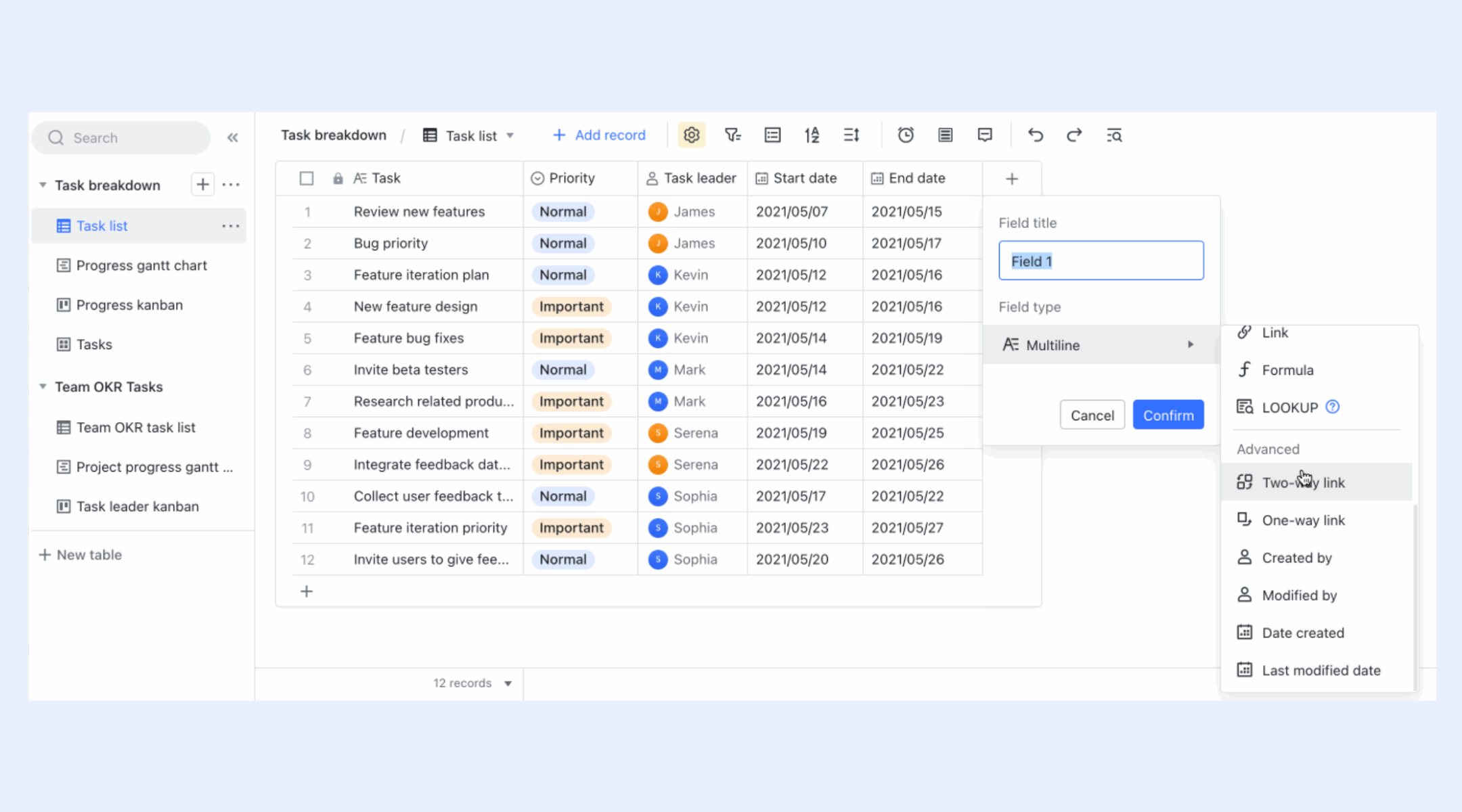
Two-way links for consistent data
Two-way links connect information across tables so updates stay aligned everywhere. When a detail changes—like a task owner or deadline—the corresponding fields in related tables update automatically. This prevents duplication, reduces errors, and helps teams maintain a single source of truth during fast-moving projects.
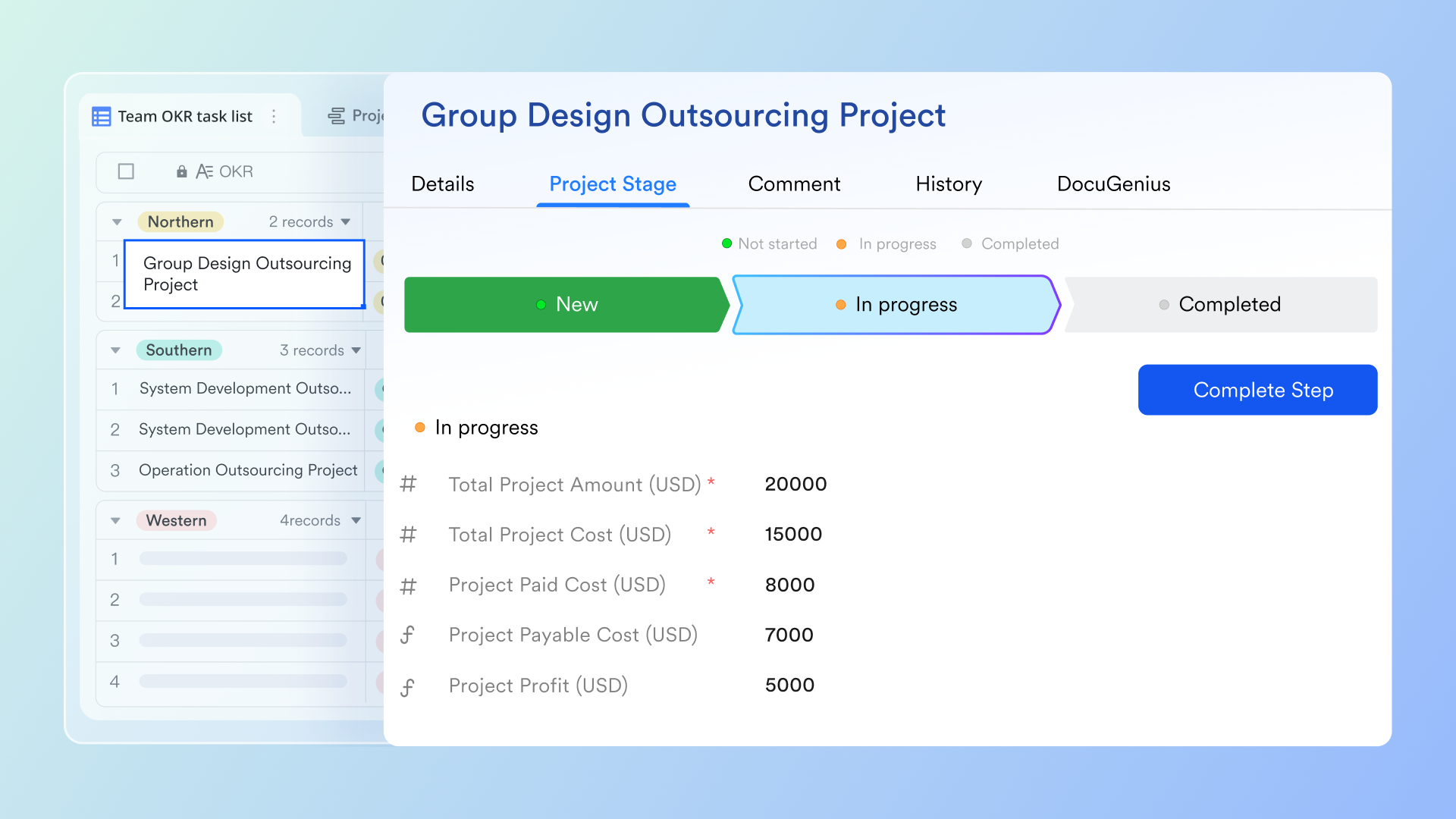
Automation for smoother execution
Lark Base automations support automated reminders and workflow actions that help teams maintain momentum. You can trigger alerts for overdue items, create tasks when status changes, or automatically notify owners when milestones approach. These automated workflow capabilities reduce manual follow-ups and keep projects running on schedule.
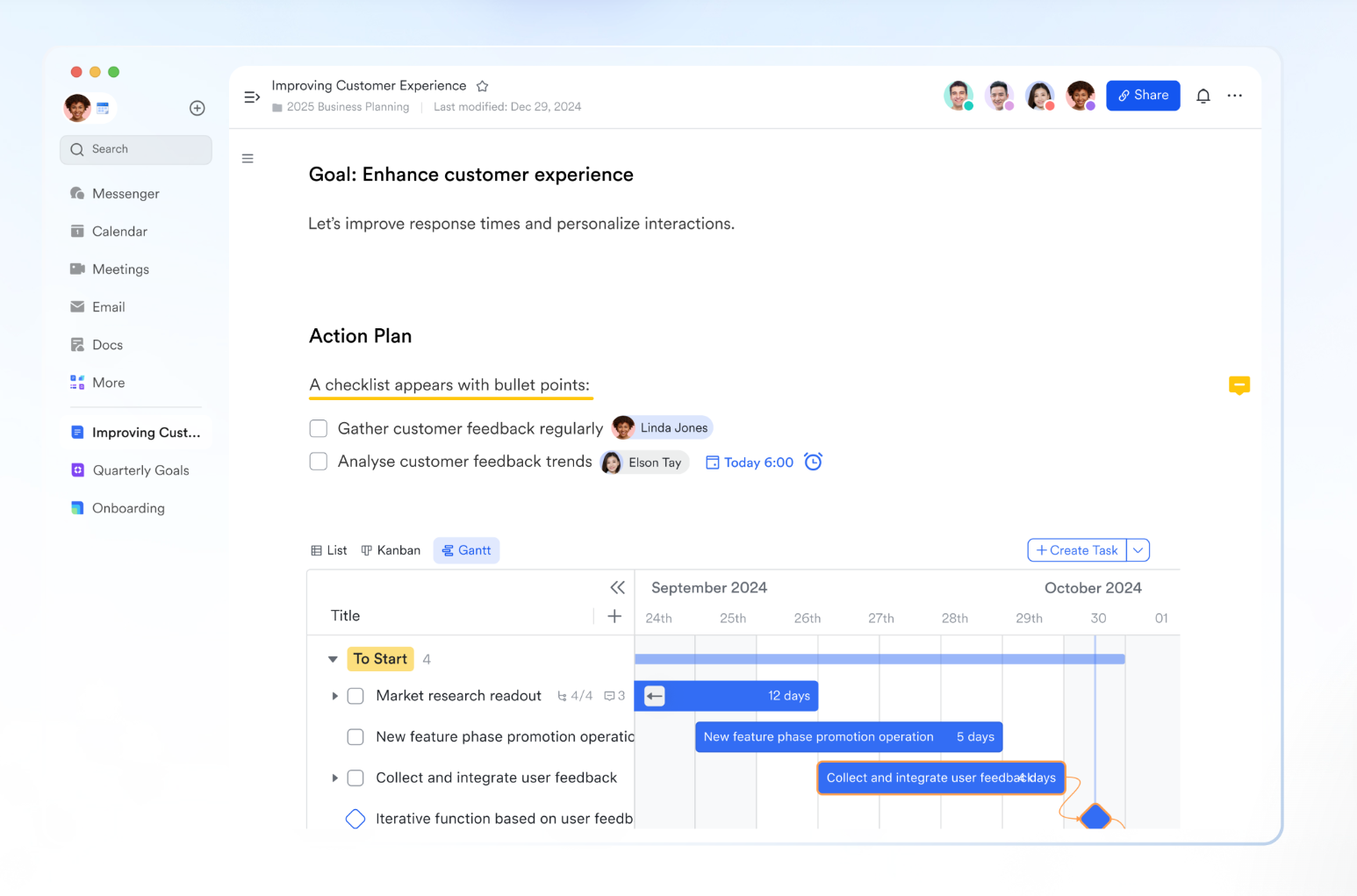
Lark Docs for collaborative planning
Project teams can brainstorm, plan, and document work in Lark Docs using text, images, videos, Sheets, and MindNotes. Every document stays connected to the project, making it easy to attach briefs, outline requirements, store meeting notes, and track decisions without leaving the workspace.
Calendar for schedules and deadlines
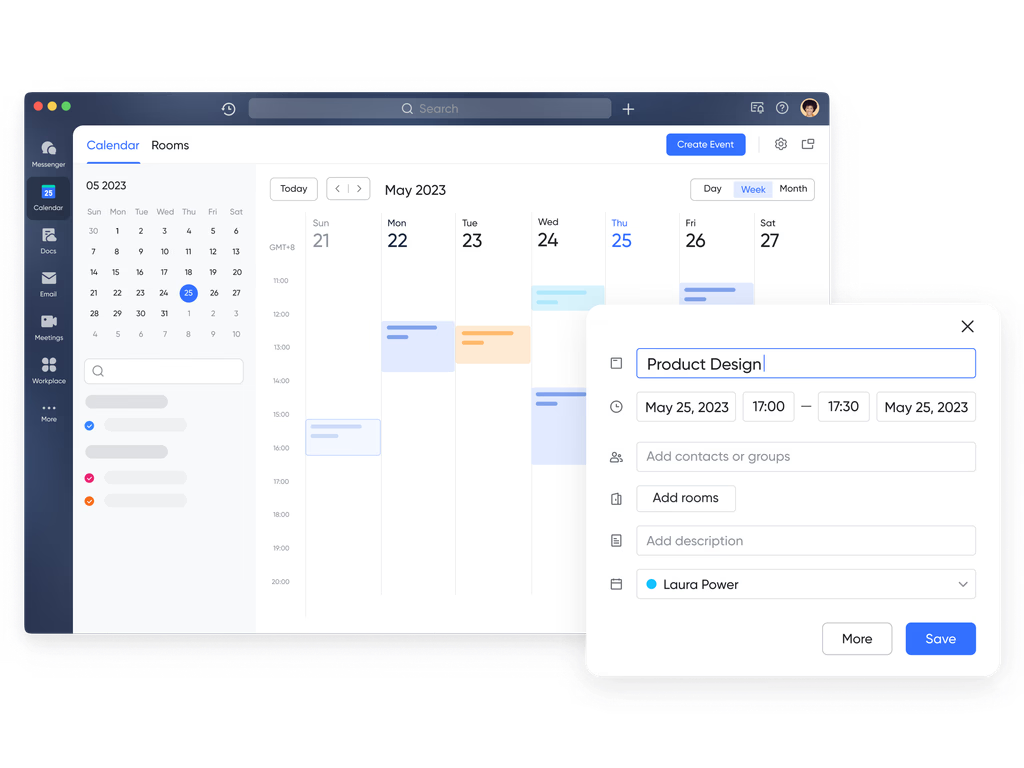
Lark Calendar gives teams a clear view of upcoming deadlines, reviews, and scheduled meetings. Tasks and events appear in one place, helping members plan their week, manage availability, and prepare for milestones with confidence.
Tasks for daily progress tracking
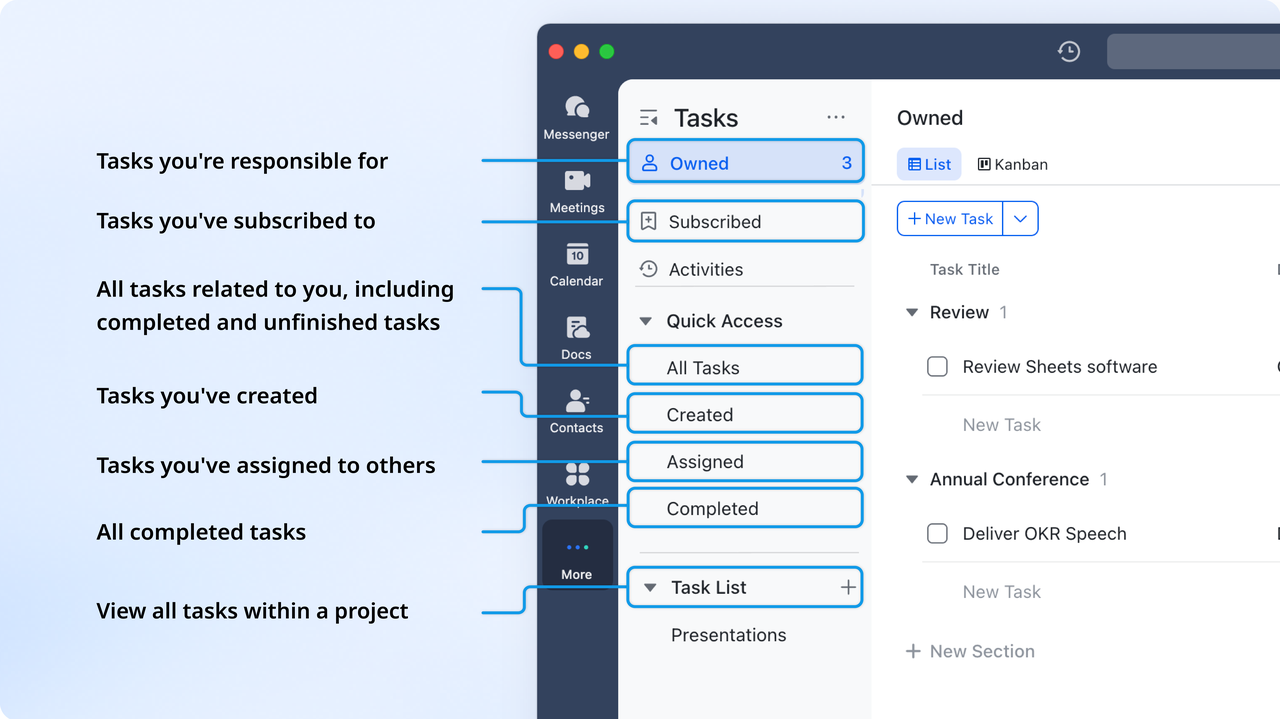
Lark Tasks helps teams manage individual responsibilities inside broader project workflows. Members can see exactly what they need to complete, follow deadlines, update progress, and maintain accountability. This creates a smooth link between strategic plans and day-to-day execution.
- Starter plan: Free forever plan that includes 11 powerful tools for up to 20 users. It also comes with 100GB of storage, 1000 automation runs, AI translations, and more.
- Basic plan: $6/user/month (billed annually) for up to 500 users. It includes everything in Starter plus group calling for up to 500 attendees, 5TB of storage, 1000 automation runs, and more. Some users may need to contact sales to learn more about this plan.
- Pro plan: $12/user/month (billed annually) for up to 500 users. It includes everything in Starter plus group calling for up to 500 attendees, 15TB of storage, 50,000 automation runs, and more.
- Enterprise plan: Contact sales for custom pricing. Supports unlimited users and includes even more automation runs and advanced security, compliance, and management features.
Lark's project management templates
Lark project management templates provide ready-made structures that help teams launch projects quickly without building systems from scratch. These templates cover planning, tracking, reviews, and reporting, making them useful for both simple and complex workflows. Each template includes organized views, fields, and layouts so teams can start working immediately. Whether managing tasks, roadmaps, or requests, Lark's templates offer a consistent foundation that can be customized as projects evolve.
Lark Base - Project management
The Lark Base project management template gives teams a structured way to organize tasks, milestones, owners, and timelines in one centralized workspace. It includes flexible views such as tables, Kanban boards, and Gantt timelines, making it easy to switch between planning and execution. Built-in fields and relationships help teams track dependencies and maintain clarity across workstreams. This template is ideal for teams that want a ready-to-use system that can scale with growing project complexity.
Multi-project tracker
The project tracker template helps teams oversee several projects at once by consolidating key details such as status, owners, deadlines, and progress indicators. It provides clear visibility into how different initiatives are moving, making prioritization and resource allocation easier. With grouped and filtered views, teams can instantly surface high-priority projects or those at risk. This template is especially useful for managers who need a single source of truth across multiple workstreams.
Project request list
The project request list template gives teams a structured intake system for collecting, reviewing, and approving new project proposals. It centralizes all incoming requests, so nothing gets lost in chats or emails. With fields for priority, requester details, impact, and required resources, teams can evaluate each request consistently. This template is ideal for organizations that need a clear, organized workflow for intake, triage, and decision-making.
Business analysis
The business analysis template helps teams break down complex initiatives into clear insights, data points, and action items. It provides structured sections for goals, metrics, stakeholder inputs, and findings, making analysis more organized and repeatable. With dashboard-style views, teams can visualize trends and track the progress of recommendations over time. This template is perfect for analysts, strategists, and project leads who need a reliable framework for informed decision-making.
Roadmap
The roadmap template helps teams plan long-term initiatives by mapping projects, milestones, and timelines in a clear visual layout. It offers an organized way to communicate priorities, phases, and dependencies, so everyone understands what's coming next. With timeline and board views, teams can zoom out for strategic planning or zoom in for execution-level clarity. This template is ideal for product teams, project leads, and managers who need to align stakeholders around future plans and upcoming deliverables.
Notion vs Lark: Feature comparison (high-level)
Conclusion
Notion project management offers flexibility, customization, and an intuitive visual interface that many individuals and small teams appreciate. Its ability to combine documents, tasks, and dashboards makes it a versatile workspace, especially for teams that enjoy building their own systems. However, this flexibility also brings challenges—manual setup, limited automation, performance issues at scale, and the need for constant structural upkeep. As teams grow, these limitations can make it harder to maintain clarity and consistency across projects.
For teams that want a more structured, scalable, and connected environment, Lark provides an alternative that integrates tasks, docs, chat, automation, and multi-view tracking into a single workspace. It reduces manual overhead, improves coordination, and supports more complex, cross-functional projects with ease. If you're looking for a modern workspace that brings planning, execution, and collaboration together, exploring Lark can be a valuable next step.
FAQs
Is Notion good for teams?
Notion is a strong choice for teams that value flexibility and want a workspace they can shape to fit their processes. Its mix of documents, tasks, and databases makes it useful for coordinating work in smaller or more agile groups. However, teams often need to invest time in structure and maintenance to keep everything organized. For growing teams that prefer built-in alignment and smoother coordination, Lark offers a more unified environment with native chat, docs, tasks, and automation.
What are the best Notion templates for project management?
Popular Notion project management templates include task boards, product roadmaps, engineering sprints, OKR trackers, and multi-project dashboards. These templates help reduce setup time and give teams a starting structure they can customize. However, maintaining these templates still requires manual updates and consistent workspace rules. Lark provides ready-to-use templates with stronger automation, making scaling and cross-team tracking easier.
Can Notion replace traditional project management tools?
Notion can replace traditional tools for teams that prioritize simplicity, documentation, and flexible layouts. It works well for task tracking, knowledge sharing, and building lightweight workflows. But teams needing advanced scheduling, dependencies, or automated processes may find Notion limiting over time. Platforms like Lark offer more structured workflows, multi-table databases, and built-in automation better suited for complex operations.
How do I create a project dashboard in Notion?
To build a project dashboard in Notion, you can combine linked databases, filtered views, rollups, and custom fields to track progress across tasks, owners, and timelines. This allows teams to design a dashboard that fits their workflow, but it often requires careful planning and manual adjustments. For teams wanting faster setup, Lark provides multi-view dashboards and auto-updating data structures that simplify visibility across departments.
What's the best alternative to Notion for team projects?
Teams looking for a Notion alternative often consider platforms with stronger automation, structured task modules, and built-in communication. Lark stands out because it combines project management, docs, chat, meetings, workflows, and dashboards in one connected workspace. This reduces switching between tools and helps teams maintain clarity as projects grow. It's particularly effective for cross-functional teams that need a more integrated project execution environment.
Related reading
Table of contents
Start using Lark today

Manage all your work in one place
Boost team efficiency by 10x
Save up to 70% on software costs
Table of contents
Start using Lark today
Manage all your work in one place
Boost team efficiency by 10x
Save up to 70% on software costs
Keep reading







2026 Lark Technologies Pte. Ltd.
Headquartered in Singapore with offices worldwide.






Explore: