














Notion Review: Features, Pricing, and Pros & Cons

Ryan Tanner
Product Marketing Specialist
Sep 18, 2026
Ryan Tanner
Sep 18, 2026

23 min read


Notion has evolved from a minimalist note-taking app into one of the most versatile workspaces available today. In this notion review, we explore how the platform's flexibility, large community, and modular system have made it a popular choice for personal productivity, documentation, lightweight project management, and knowledge bases. While Notion excels in customization and creative workflows, it may fall short for teams that require real-time communication, structured data management, automation, or seamless cross-tool execution.
This review also provides a balanced comparison with Lark, a unified digital workspace that integrates communication, data, and collaboration. Together, these insights help you evaluate whether Notion fits your team's needs.

What is Notion?
Notion is an all-in-one productivity tool that brings notes, documents, databases, project management, and team collaboration into one customizable workspace. It lets individuals and teams create pages, task trackers, wikis, and knowledge bases using flexible templates that adapt to different workflows. With its modular block-based editor, you can organize tasks, manage projects, capture meeting notes, and build dashboards without needing separate apps.
Notion also supports real-time collaboration, making it easy for teams to share information, centralize documentation, and streamline work. Its database features allow you to structure information using tables, calendars, kanban boards, and timelines—ideal for task tracking, planning, and content management. Overall, Notion acts as a unified workspace that helps improve productivity, organization, and workflow efficiency across personal and professional use cases.
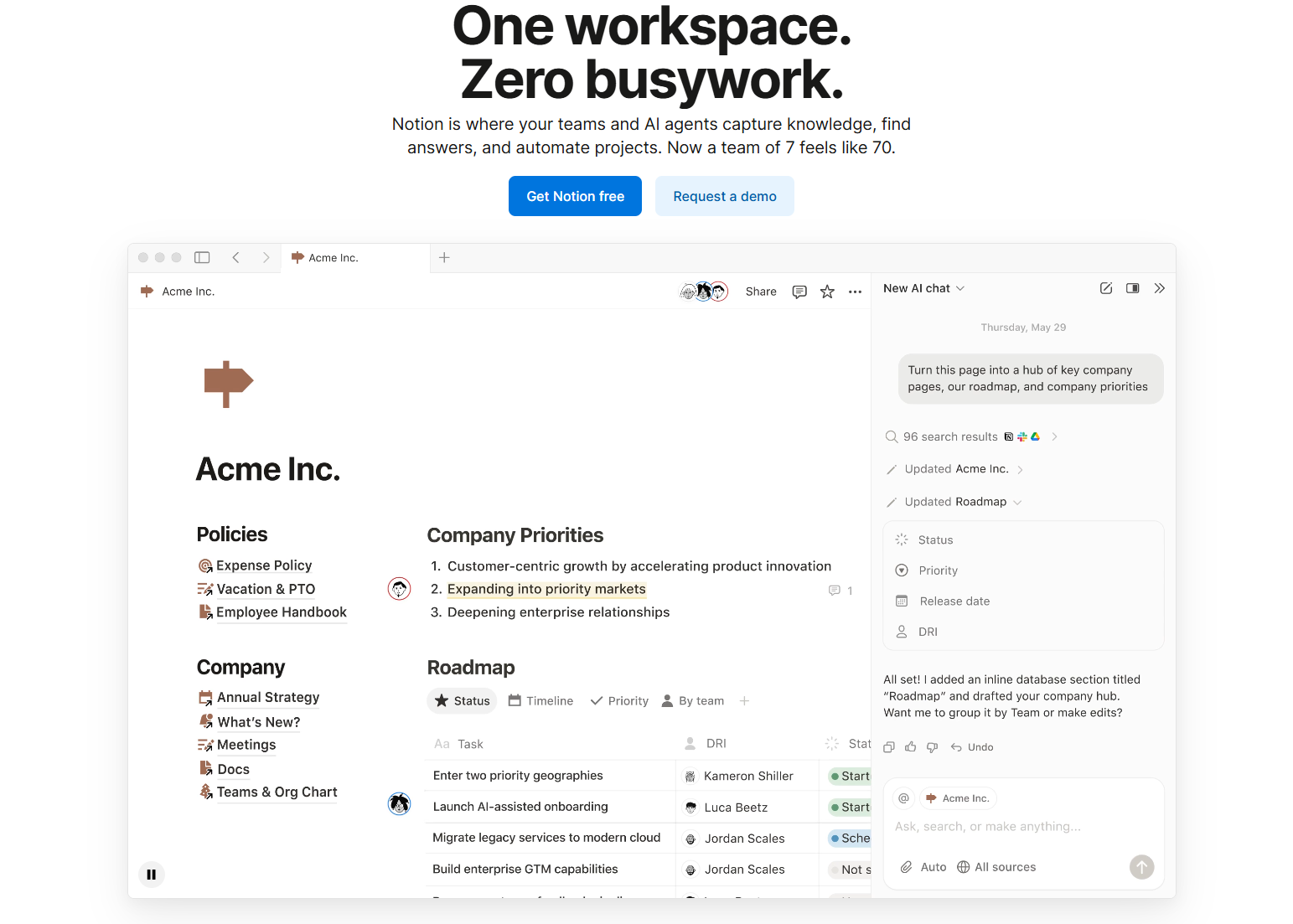
Image source: notion.com
Notion key features: A deep dive
Notion packs a wide range of features that make it more than just a note-taking app—it's a flexible workspace for organizing information, managing projects, and collaborating with teams. Its block-based system lets you build pages exactly the way you want, while databases and AI tools enhance efficiency. Whether you're creating wikis, tracking tasks, or centralizing team knowledge, Notion adapts to nearly any workflow. This review of Notion also highlights its key features, such as Notion Mail Review and Notion Calendar Review. Below is a deep dive into its core capabilities:
Notion docs & note-taking
- Rich text editor: Notion's rich text editor lets you combine headings, lists, tables, toggles, and media in one seamless page. It supports markdown shortcuts for fast formatting. The block structure keeps content organised and easy to rearrange. This makes it ideal for both long-form writing and quick notes, frequently mentioned in Notion software review discussions.
- Inline databases, embeds, slash commands: Inline databases help you manage structured information directly inside pages. Embeds allow integration of videos, files, and external tools. Slash commands speed up creation of blocks and formatting actions. Together, they turn plain documents into interactive workspaces—something often praised in Notion app review articles.
- Comparisons to Google Docs/Confluence: Unlike Google Docs, Notion blends documents and databases for deeper customization. Compared to Confluence, it's more flexible, visually cleaner, and easier for teams to adapt. However, Google Docs still wins for simultaneous long-form editing, while Confluence offers stronger enterprise structure. Notion sits between ease and modularity. These trade-offs come up frequently in Notion reviews across productivity communities.
Notion databases
- Tables, calendars, boards, galleries, timelines: Notion databases can be viewed as tables, Kanban boards, calendars, galleries, or timelines. Each view provides a different perspective on the same information. This flexibility supports everything from project tracking to content planning. Users can switch views without duplicating data.
- Views & filters: Filters, sorts, and groups make large databases manageable. You can display only what matters—like tasks due today or items assigned to specific people. Custom views help teams personalize workflows. This keeps information structured and accessible, especially useful for processes like a Notion weekly review template.
- Database relations & rollups: Relations connect two databases, while rollups pull summary information from connected items. This enables sophisticated systems like multi-project dashboards or linked tasks across areas. It reduces duplication and creates a dynamic, interconnected workspace. These features make Notion feel like a lightweight relational database, often praised in detailed Notion app reviews and Notion software review posts.
- Typical use cases (CRMs, project trackers, task lists): Databases power CRMs, sales pipelines, editorial calendars, project trackers, and personal task lists. Teams use them for OKRs, sprints, and operations hubs. Individuals track habits, budgets, or study plans. Notion's flexibility tailors to nearly any system you can imagine.
Notion calendar (formerly Cron)
- Scheduling features: Notion Calendar provides advanced scheduling with natural language input, color coding, and integrated availability views. Users can manage events from multiple calendars in one place. It syncs with Google Calendar for real-time updates. The interface is clean and productivity-focused.
- App performance & multi-time zone support: The app is optimized for speed and handles busy schedules smoothly. Multi-time-zone support makes it easy for distributed teams to coordinate. Event previews and quick actions improve usability. Overall, performance is one of its standout strengths.
- How well it connects with Notion workspaces: Notion Calendar links tightly with workspace pages and databases. You can attach Notion docs directly to events. Database items with dates automatically sync into the calendar. This bridges planning and execution seamlessly.
Notion AI
- AI writing tools: Notion AI assists with drafting, rewriting, brainstorming, and summarizing content. It integrates directly into documents for an uninterrupted workflow. It helps improve clarity and tone quickly. Editing becomes significantly faster.
- Summaries, translation, task creation: The AI can produce instant summaries of long pages or meeting notes. It translates content into multiple languages with strong accuracy. It can generate tasks from written content automatically. These features save time and reduce manual effort.
- AI autofill for databases: AI Autofill predicts missing fields, tags content, or categorizes entries in databases. It speeds up large-scale data cleanup. It's helpful for content pipelines, CRMs, or research trackers. It reduces repetitive work dramatically.
- Limitations vs specialized AI tools: Notion AI lacks the depth of full-featured AI platforms for coding, analysis, or advanced reasoning. It occasionally misinterprets context in large databases. Export options are also limited. It works best as a built-in assistant rather than a replacement for standalone AI tools.
Notion collaboration features
- Comments: Comments enable quick feedback on any block or page. They support threads to organize discussions. Users can resolve comments when tasks are completed. This helps streamline team communication.
- Mentions: You can mention teammates, pages, or dates in any block. Mentions trigger notifications, ensuring nothing is missed. They also help create contextual links across a workspace. This enhances navigation and accountability.
- Real-time editing: Multiple people can edit a page together smoothly. Real-time cursors show who is working where. Changes sync instantly, reducing version conflicts. It works well for meetings, brainstorming, and shared documents.
- Page sharing/permissions: Notion offers granular permission levels—view, comment, edit, or full access. Pages can be shared internally or publicly. Teams can protect sensitive content through workspace rules. This flexibility suits small teams and enterprises.
Notion wiki & knowledge base capabilities
- Internal documentation: Notion excels at building internal knowledge hubs. Pages can host policies, onboarding guides, or team notes. The hierarchical page structure keeps documentation tidy. Everything lives in one organized space.
- SOP libraries: Standard Operating Procedures can be created using templates and reusable components. Teams can update steps effortlessly. Version history helps track changes. This ensures consistent operations across teams.
- Knowledge search: The global search finds pages, blocks, and database items quickly. Filters help narrow results by person, type, or date. The search is fast even in large workspaces. This keeps information discoverable.
Notion project management
- Tasks: Tasks can be created in databases or embedded in pages. Users can assign owners, due dates, and statuses. Views like boards or calendars help visualize progress. This supports both simple and advanced workflows.
- Dependencies: Dependencies allow tasks to be sequenced logically. Gantt-style timelines help identify blockers. This benefits teams managing multi-step projects. It adds structure to complex plans.
- Roadmaps: Roadmaps combine timelines, milestones, and linked databases. They provide a high-level view of ongoing initiatives. Teams use them for product planning, content pipelines, or strategic goals. They make long-term planning more transparent.
Notion pricing
Notion offers four pricing tiers designed for individuals, small teams, and growing organizations. Each tier adds more collaboration, security, and automation features as you move up.
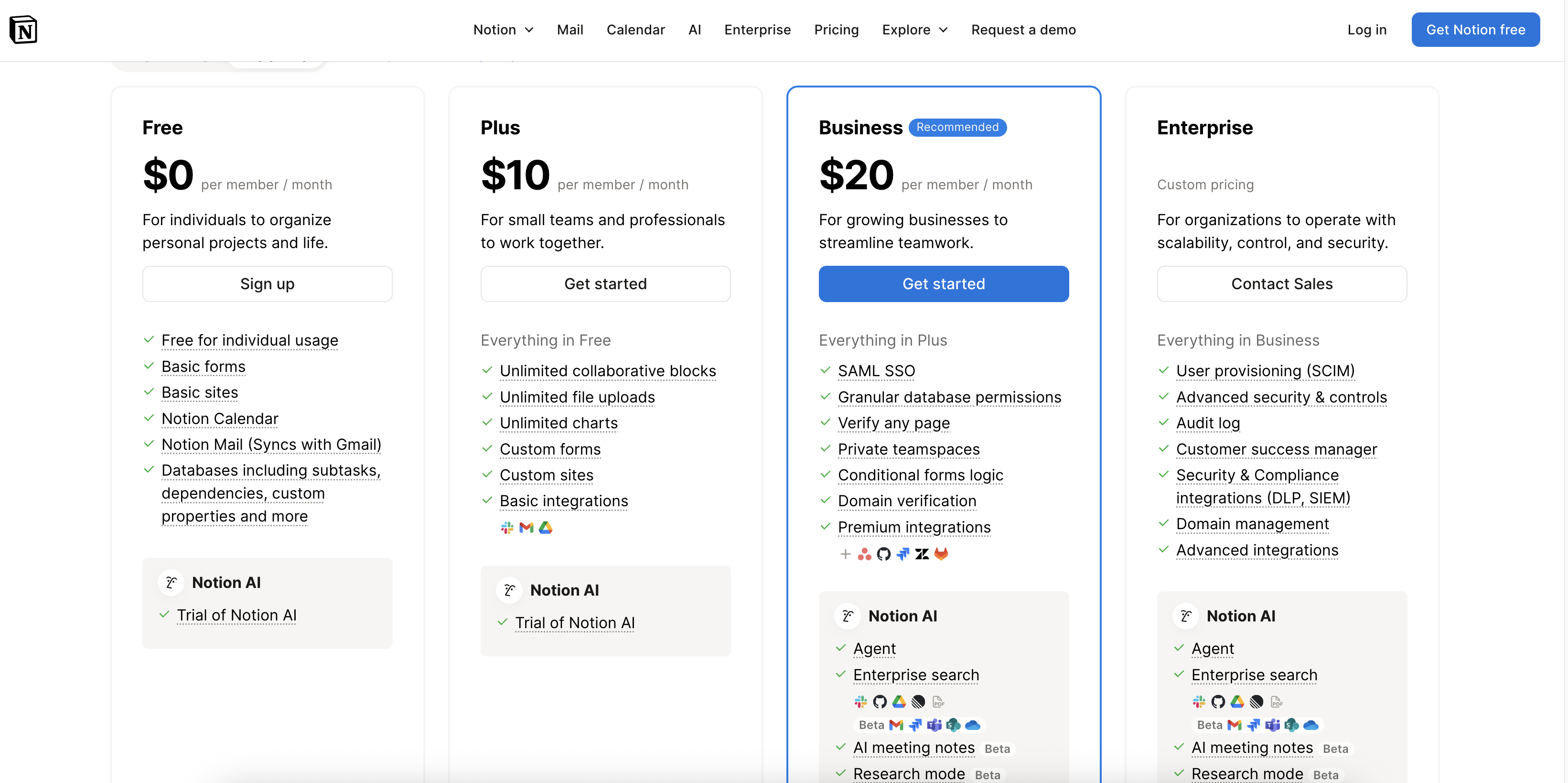
Image source: notion.com
Free plan
Best for individuals or personal projects. This plan includes essential tools for organizing notes, tasks, and simple databases.
Key features:
- Basic forms
- Basic sites
- Notion Calendar
- Notion Mail (syncs with Gmail)
- Databases with subtasks, dependencies, and custom properties
- Trial access to Notion AI
Ideal for: Students, freelancers, and anyone trying Notion for the first time.
Plus plan
Notion Plus plan charges $10 per member/month, which is designed for small teams that need richer collaboration.
Everything in Free:
- Unlimited collaborative blocks
- Unlimited file uploads
- Unlimited charts
- Custom forms & custom sites
- Basic integrations (Google, Slack, etc.)
- Trial for Notion AI
Ideal for: Small teams, early-stage startups, and creators who need structured teamwork.
Business plan
Notion's Business plan charges $20 per member/month, and it's made for growing companies that need advanced controls and scalable workflows.
Everything in plus:
- SAML SSO
- Granular database permissions
- Verify any page
- Private teamspaces
- Conditional form logic
- Domain verification
- Premium integrations
- Advanced Notion AI features: Agent, Enterprise search, meeting notes, summaries, research mode
Ideal for: Mid-sized teams, agencies, and companies requiring more security and advanced customization.
Enterprise plan
Users need to contact sales for Enterprise plan's custom pricing. This plan is built for large organizations requiring full administrative control and compliance.
Everything in business:
- User provisioning (SCIM)
- Advanced security & admin controls
- Audit log
- Dedicated customer success manager
- Security & compliance integrations (DLP, SIEM)
- Domain management
- Advanced integrations
- Full Notion AI suite
Ideal for: Enterprises with strict compliance, security needs, and large-scale onboarding.
Information source: Official vendor sites
Update time: 2025-11-18
Note: Pricing and plan details reflect publicly available data as of the update date and may vary based on region, billing cycle, and number of agents.
Notion use cases
Notion is highly versatile, making it suitable for a wide range of personal and professional use cases. Its combination of note-taking, databases, calendars, and collaboration tools allows users to organize information, manage tasks, and track projects efficiently. Whether for individuals or teams, Notion adapts to different workflows and industries. Here's a detailed look at its most common use cases.
- Students & personal organization: Students and individuals can use Notion to organize study schedules, class notes, assignments, and personal projects. Its calendar and database features allow tracking of deadlines and progress efficiently. Users can also build habit trackers or budget planners within the workspace. Notion's flexibility supports personal productivity across multiple aspects of life.
- Project management: Notion serves as a lightweight project management tool with Kanban boards, timelines, and tables for tracking projects. Teams can assign tasks, set deadlines, and visualize workflows in one centralized workspace. While it lacks advanced automation or built-in Gantt charts, it still provides an intuitive solution for small to medium projects. This makes it ideal for creative, educational, or collaborative projects.
- Task tracking: Tasks can be tracked individually or within databases using tables, boards, and calendar views. Users can mark completion, assign responsibilities, and set reminders for deadlines. Custom properties and filters allow prioritization and organization. Task tracking in Notion enhances accountability and transparency for teams and individuals alike.
- Content planning: Content creators and marketing teams use Notion for editorial calendars, campaign tracking, and idea management. Databases and relations enable linking content drafts, deadlines, and publication schedules. Embedded files, checklists, and notes streamline planning processes. This ensures consistency and efficiency across content workflows.
- Company wikis: Notion is ideal for building internal documentation, SOPs, and knowledge bases. Teams can centralize resources, processes, and guidelines in structured pages. Relations and backlinks make information easy to navigate. This creates a reliable reference system for onboarding, training, and cross-functional collaboration.
- CRM (lightweight use cases only): Small teams can use Notion databases to track leads, clients, and interactions in a simple CRM software. Custom properties, views, and filters enable pipeline tracking and reporting. While not suitable for enterprise-level sales automation, it works for lightweight, personalized CRM workflows. This is useful for freelancers, startups, or small business teams.
Notion pros
Notion offers a unique blend of note-taking, project management, databases, and collaboration features, making it a highly adaptable workspace for different workflows. Its flexibility, clean interface, and strong template ecosystem make it popular among students, professionals, and teams. With tools like Notion databases, wikis, calendars, and AI, it supports everything from documentation to task tracking. These strengths are frequently mentioned in Notion reviews, Notion app reviews, and detailed Notion software review write-ups. Below are the key advantages that set Notion apart.
- Highly flexible: Notion's modular block system allows you to build pages, databases, dashboards, and wikis exactly the way you need. You can structure data using tables, calendars, boards, and timelines for full customization. It adapts to simple note-taking as well as complex project management. This flexibility lets users create workflows that scale with their needs—one of the top points praised in many Notion reviews and Notion AI review breakdowns.
- Suitable for both individuals and teams: Individuals can use Notion for journaling, personal tasks, study notes, or budget tracking, while teams rely on it for project management, documentation, and databases. Real-time editing, comments, and shared workspaces improve collaboration. Permissions keep team information organized and secure. It works well for both lightweight and advanced workflows.
- Excellent templates and community ecosystem: Notion offers thousands of templates for CRMs, project trackers, OKRs, wikis, and personal planners. The community continuously shares systems for productivity, content planning, knowledge bases, and databases. These templates help users get started quickly and customize as they grow. This ecosystem significantly enhances Notion's usability and is frequently highlighted in Notion software reviews and Notion reviews from creators and productivity experts.
- Clean interface and modern UI: Notion's minimal design keeps pages clutter-free, making navigation simple and intuitive. The interface supports smooth interactions, from drag-and-drop blocks to inline databases. Its modern layout works well across desktop, mobile, and web apps. This polished UI enhances the overall user experience.
- Great for documentation and linking notes to data: Notion excels at building wikis, SOP libraries, and knowledge bases, allowing teams to centralize information. You can connect notes to databases using relations and backlinks, creating a structured knowledge system. This makes it easy to trace context across tasks, projects, and documents. It's ideal for teams that rely on organized documentation.
Notion cons
While Notion is powerful and flexible, it does come with limitations that can affect productivity, project management workflows, and team collaboration at scale. These drawbacks are especially noticeable in larger workspaces, complex databases, or data-heavy operations. Understanding these challenges helps users decide whether Notion fits their long-term structure and workflow needs. Here are the key cons to consider before adopting it as your primary workspace.
- Performance slows with large workspaces: As databases grow and pages become more complex, Notion can experience delays in loading, searching, and switching between views. This impacts teams that rely heavily on project management, task tracking, or extensive documentation. Large knowledge bases or multi-layered databases especially strain performance. For high-volume operations, this slowdown can hinder efficiency.
- Limited native automation: Notion lacks built-in advanced automation for workflows like approvals, triggers, and conditional logic. Users often depend on external tools or integrations for repetitive tasks. This limits real workflow automation for teams managing structured processes. It's less ideal for operations that require seamless, rule-based task execution.
- No built-in Gantt chart: Although Notion provides timelines, it doesn't offer a complete Gantt chart with dependencies, critical paths, or resource management. Teams running complex roadmaps or project planning must rely on third-party tools. This gap affects visibility for cross-functional collaboration. It limits its usefulness for advanced project management structures.
- Steeper learning curve for beginners: Notion's flexibility can overwhelm new users who are unfamiliar with databases, views, or workspace organization. Building dashboards, templates, or task systems requires experimentation and knowledge. Beginners may struggle to configure their workspace efficiently. This can slow initial setup for individuals and teams.
- Offline mode still underdeveloped: Notion's offline reliability remains inconsistent compared to traditional note-taking or document apps. Users may face syncing delays or be unable to access certain database features. This affects people working remotely or traveling frequently. Offline constraints make it less dependable as a primary knowledge base.
- Not ideal for data-heavy operations or enterprise structures: Notion isn't built for high-volume data processing, complex workflows, or enterprise-level structure. Large teams needing advanced reporting, analytics, or scalable databases may find it limiting. Permissions, controls, and operational safeguards aren't as strong as dedicated enterprise tools. It suits smaller teams more than large organizations.
New alternative: Try Lark to realise more seamless collaboration
While Notion is highly flexible for note-taking, documentation, and lightweight project management, some teams need a more connected and operational workspace. Lark offers a unified platform that combines communication, task management, structured data, calendars, and virtual meetings in one environment. This integration reduces the need to switch between multiple apps and ensures information stays consistent across teams. For organizations that prioritize operational efficiency and end-to-end execution, Lark provides a compelling alternative.
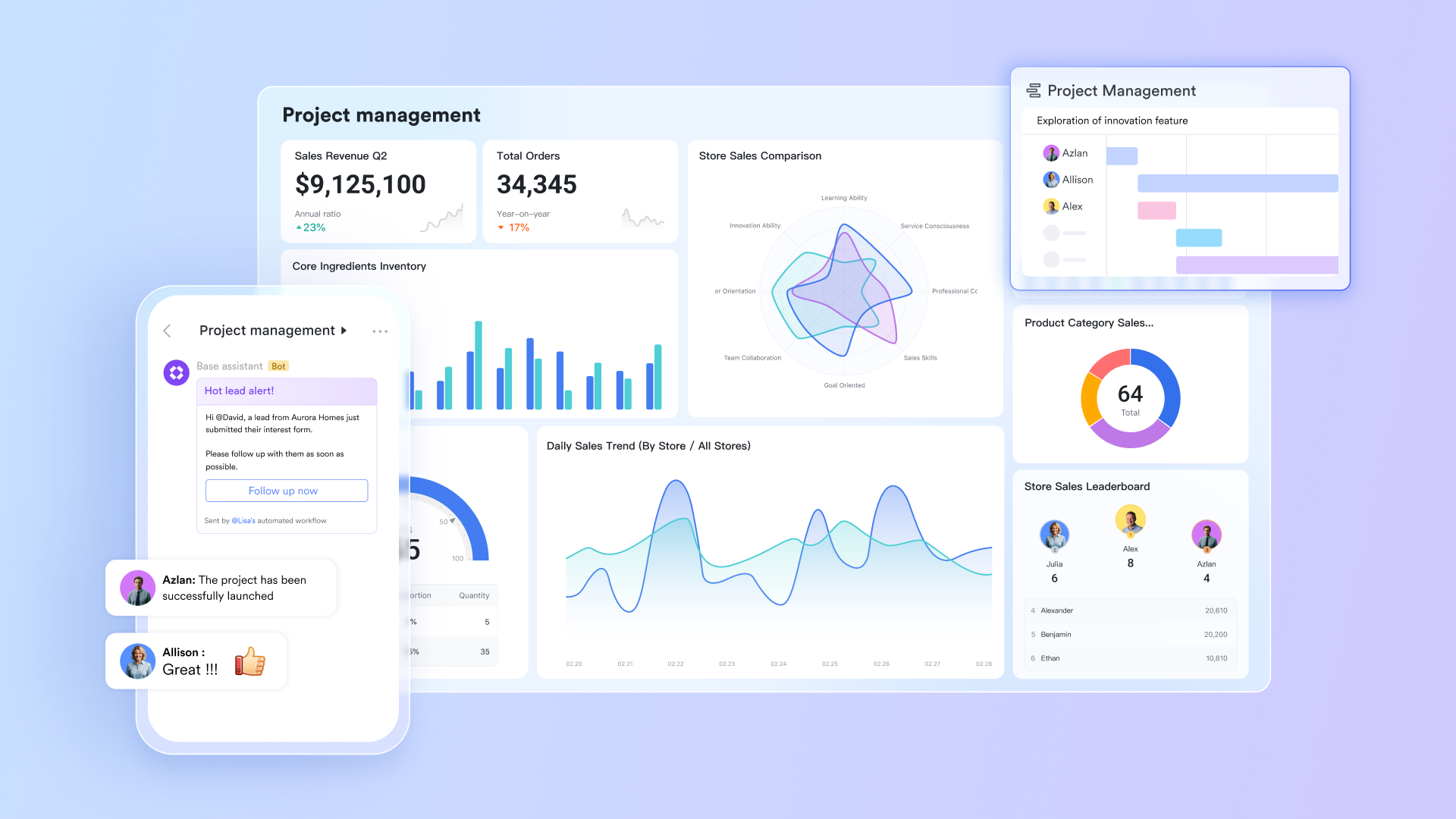
Unified digital workspace for all your team operations
Lark provides a fully connected workspace where teams can create documents, manage structured data, communicate in real time, schedule meetings, assign tasks, and run automated approval—without jumping between separate tools. Lark Docs, Lark Base tables, Lark Tasks, Lark Calendar events, and Lark Messenger chats all stay connected, so teams always work with consistent information. When someone updates an entry in Base or shares a file in Messenger, the entire workspace reflects the change instantly. This connected environment reduces friction between communication and execution, making it ideal for fast-paced teams that need all their work—content, coordination, and operations—in one organized platform.
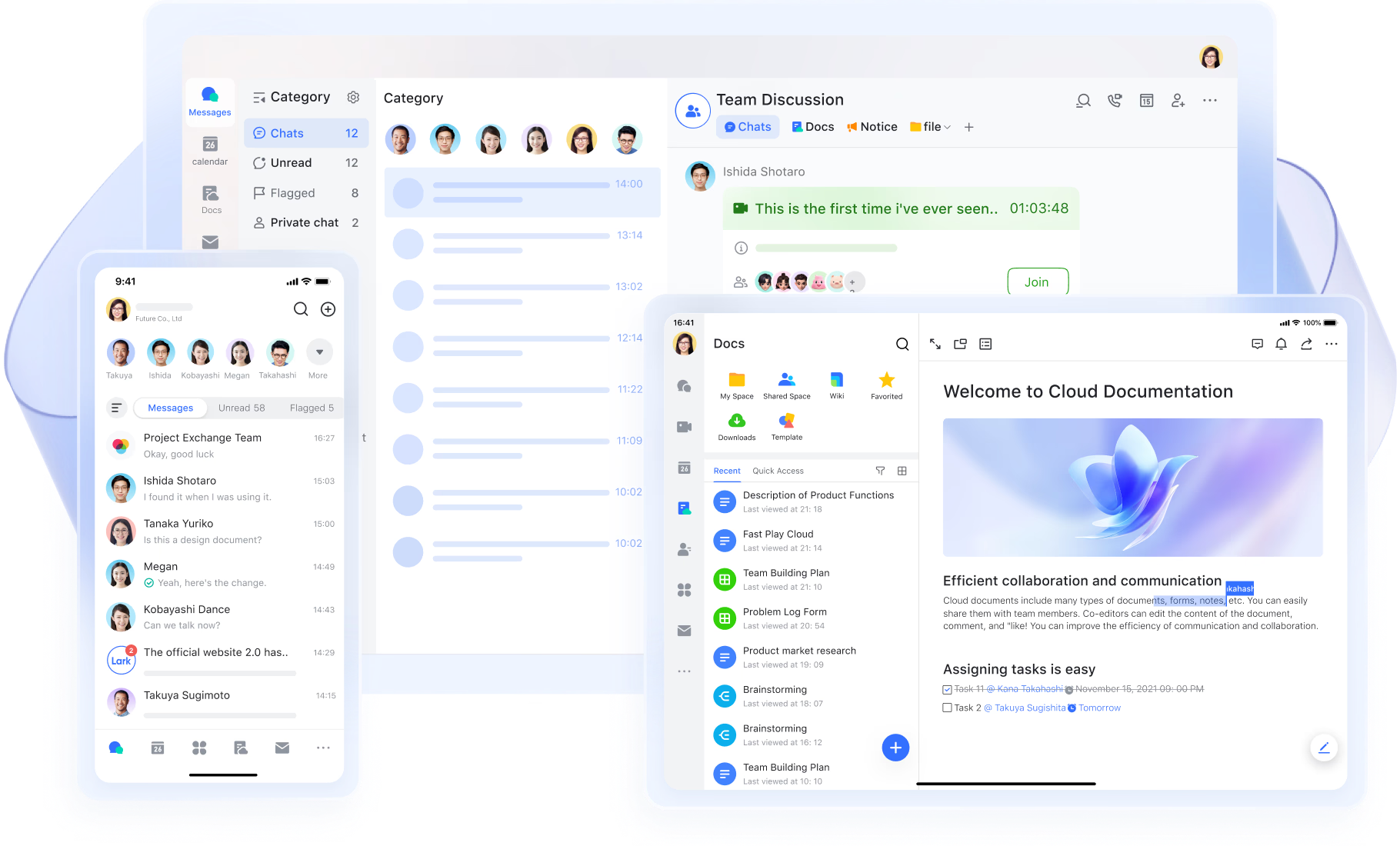
Advanced database system for structured, multi-view data management
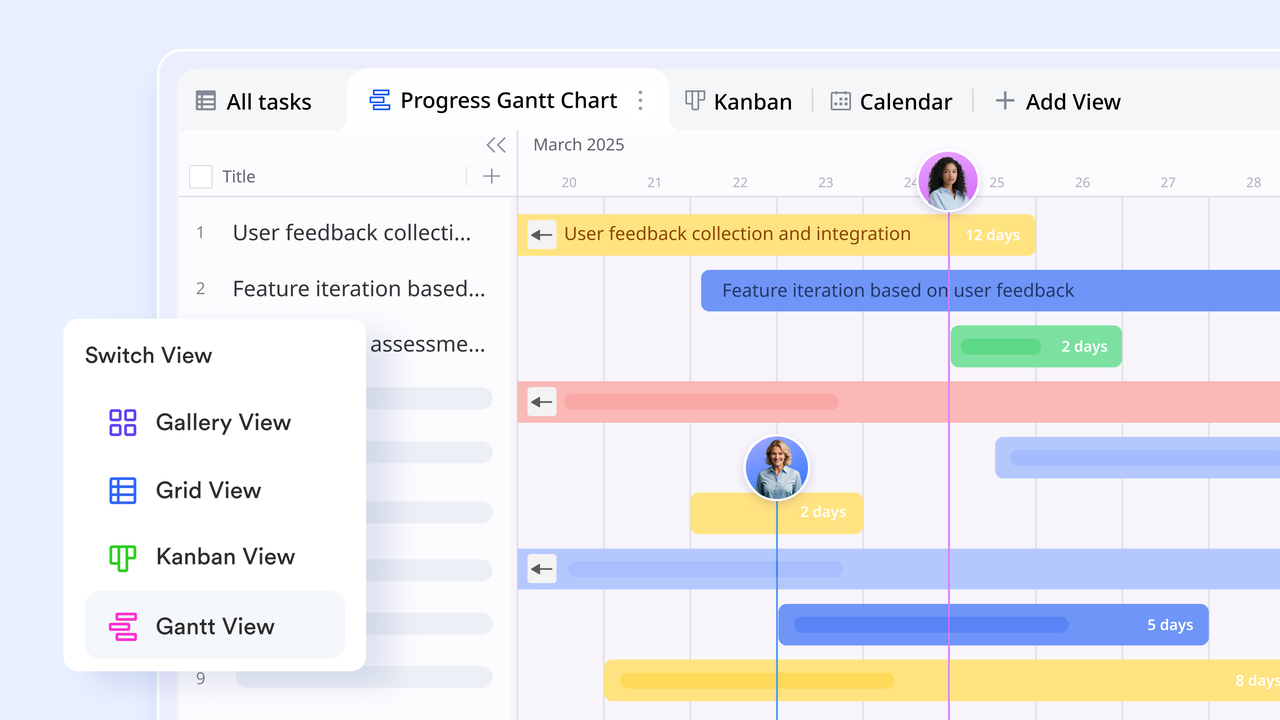
Lark Base gives teams a flexible, structured system for managing data such as projects, customers, assets, tasks, requests, and workflows. Base supports multiple visual views—including grid, Kanban, Gantt, and dashboards—so teams can see information from the angle that suits their needs. Grid views help with detailed record management, Kanban views show workflow stages, Gantt views map timelines and dependencies, and dashboards highlight performance insights in one place. With fields for text, dates, files, formulas, and linked records, Base allows teams to build powerful operational systems that remain easy to use. This makes it suitable for project tracking, CRM-style needs, content operations, and complex team workflows.
AI-powered support across documents, data, and meetings
Lark includes AI capabilities throughout the workspace to help teams work faster and more accurately. In meetings, AI Meeting Notes capture key points, decisions, and next steps—instantly turning conversations into actionable summaries. AI field shortcuts inside Base allow teams to translate, classify, organize, and process information without manual effort. With AI available inside Docs, Base, and Lark Meetings, Lark helps teams automate routine tasks and maintain high-quality documentation with less time and effort.

Organize your workspace and projects with automated workflows
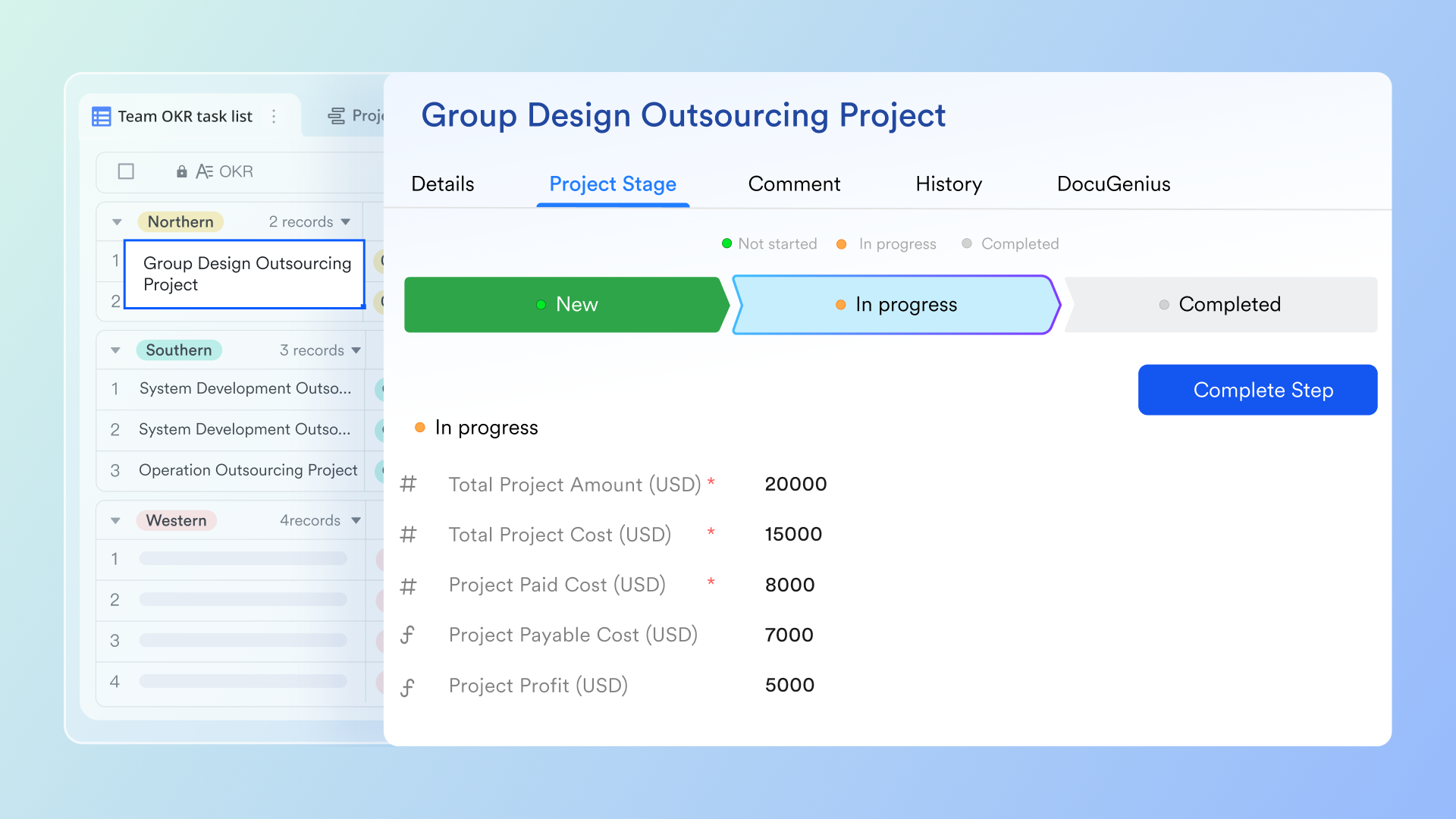
Lark Base automations let you instantly create events, tasks, and groups from your table data, helping teams move faster and stay aligned. You can break projects into tasks and sync them directly to Lark Calendar so everyone knows their deadlines and responsibilities. Automated workflow can also send customized, formatted messages—including images and Markdown—straight to chats, making updates clearer and more engaging. And with scheduled summaries or notifications, the right teams stay informed at the right time, improving follow-up and coordination.
- Starter plan: Free forever plan that includes 11 powerful tools for up to 20 users. It also comes with 100GB of storage, 1000 automation runs, AI translations, and more.
- Basic plan: $6/user/month (billed annually) for up to 500 users. It includes everything in Starter plus group calling for up to 500 attendees, 5TB of storage, 1000 automation runs, and more. If you want to learn more about or purchase the plan, please contact sales.
- Pro plan: $12/user/month (billed annually) for up to 500 users. It includes everything in Starter plus group calling for up to 500 attendees, 15TB of storage, 50,000 automation runs, and more.
- Enterprise plan: Contact sales for custom pricing. Supports unlimited users and includes even more automation runs and advanced security, compliance, and management features.
Final verdict: Is Notion worth it compared to Lark?
Notion remains an excellent choice for teams that prioritize flexible documentation, personal workflows, and lightweight projects. Its strength lies in adaptable pages, clean databases, and strong writing-focused AI. But for organizations that need a connected workspace where communication, structured data, tasks, meetings, and workflows operate together, Lark delivers significantly broader value. With Lark Base for operational data, Tasks for accountability, Messenger for real-time discussions, and Meetings, Calendar, Docs, and Approvals all in one environment, teams gain a unified system that supports end-to-end execution—not just documentation. Here is the detailed comparison:
Conclusion
Notion is a versatile workspace that excels at note-taking, documentation, lightweight project management, and personal productivity. Its flexible databases, rich templates, and clean interface make it ideal for individuals, small teams, and creative workflows. Features like inline databases, calendars, AI-assisted writing, and collaborative wikis enhance efficiency and organization. However, for larger teams or operations that require real-time communication, workflow automation, advanced project tracking, and cross-functional visibility, Notion can have limitations, including slower performance in large workspaces and restricted native automation.
Lark addresses these gaps by providing a unified digital workspace where documents, tasks, structured data, meetings, and communication all connect seamlessly. With integrated AI support, workflow automation, and multiple database views, teams can streamline operations, maintain accountability, and stay aligned. For teams looking to centralize collaboration and operational execution, exploring a platform like Lark can be a practical next step.
FAQs
Is Notion good for project management?
Notion can handle basic project management with Kanban boards, tables, timelines, and task tracking. It works well for small teams or personal projects that don't require complex dependencies or automation. For larger teams or structured workflows, it may fall short in performance and reporting. Lark, by comparison, offers robust task management tied to structured databases and calendar integration. Teams looking for connected workflows and cross-functional visibility may find Lark more suited for comprehensive project management.
Is Notion better than Google Docs?
Notion and Google Docs serve different purposes. Google Docs excels at collaborative document editing and real-time word processing. Notion adds flexibility with databases, project trackers, and note linking, making it more versatile for structured workflows. However, Google Docs may remain faster for long-form document collaboration. Lark integrates real-time docs with communication, task tracking, and workflow automation, providing a more unified workspace than either tool alone.
For more Google Workspace's information, you can refer to Google Workspace Pricing and Google Workspace alternatives.
Can Notion replace a CRM?
Notion can manage lightweight CRM workflows using databases and custom views. It works for small teams tracking clients, leads, or projects manually. However, it lacks advanced automation, reporting, and pipeline management features found in dedicated CRM systems. Lark's Base database and task automation allow teams to manage contacts, projects, and pipelines in a structured, real-time workspace. For organizations needing CRM-like functionality with collaboration, Lark can serve as a more complete alternative.
How secure is Notion?
Notion provides encryption in transit and at rest, along with workspace-level permissions for sharing pages and databases. While generally secure for small to medium teams, enterprises may require additional compliance, audit, and admin controls. Lark offers enterprise-grade security features, including role-based access, approval flows, and centralized governance. Teams handling sensitive data may benefit from Lark's more comprehensive security and operational oversight features.
Is Notion good for large teams?
Notion works for teams of all sizes, but large teams may experience slower performance in data-heavy workspaces. Managing permissions, automation, and cross-team workflows can become cumbersome without external tools. Lark supports large-scale collaboration with connected tasks, structured databases, messaging, and automated workflows. Teams that need cross-department visibility and operational efficiency often find Lark better suited for enterprise-level use cases.
Best free Notion alternative?
While Notion offers a free plan suitable for individuals and small teams, its limitations in automation and structured data may require alternative solutions for larger workflows. Lark provides a free plan with multiple tools including docs, tasks, databases, messaging, and AI support. This makes it a strong free alternative for teams seeking a unified workspace without additional integrations. Exploring Lark's free plan can help teams streamline work while maintaining flexibility and collaboration.
Related reading
Table of contents
Start using Lark today

Manage all your work in one place
Boost team efficiency by 10x
Save up to 70% on software costs
Table of contents
Start using Lark today
Manage all your work in one place
Boost team efficiency by 10x
Save up to 70% on software costs
Keep reading







2026 Lark Technologies Pte. Ltd.
Headquartered in Singapore with offices worldwide.






Explore: