














Smartsheet vs Jira: Which Tool Fits Your Workflow Better?

Ryan Tanner
Product Marketing Specialist
Sep 18, 2026
Ryan Tanner
Sep 18, 2026

21 min read


Managing modern projects often requires tools that support structured workflows, cross-team coordination, and scalable task management. Two of the most widely compared platforms—Smartsheet vs Jira—offer very different approaches to organizing work. This guide breaks down their strengths, limitations, pricing, and best use cases, so you can choose the right tool for your workflow. Let's dive in.

Smartsheet vs Jira comparison snapshot
What is Smartsheet?
Smartsheet is a cloud-based work management platform designed to help teams plan, track, and automate projects using a familiar spreadsheet-style interface. It combines grids, Gantt charts, calendars, forms, and dashboards to support everything from simple task lists to complex portfolio management. Because it mirrors the structure of traditional spreadsheets, it's easy for business, operations, and administrative teams to adopt without steep learning curves. Smartsheet is especially useful for managing timelines, dependencies, resource allocation, and cross-functional workflows. With built-in reporting and permission controls, it helps organizations streamline processes and maintain visibility across multiple projects and departments.
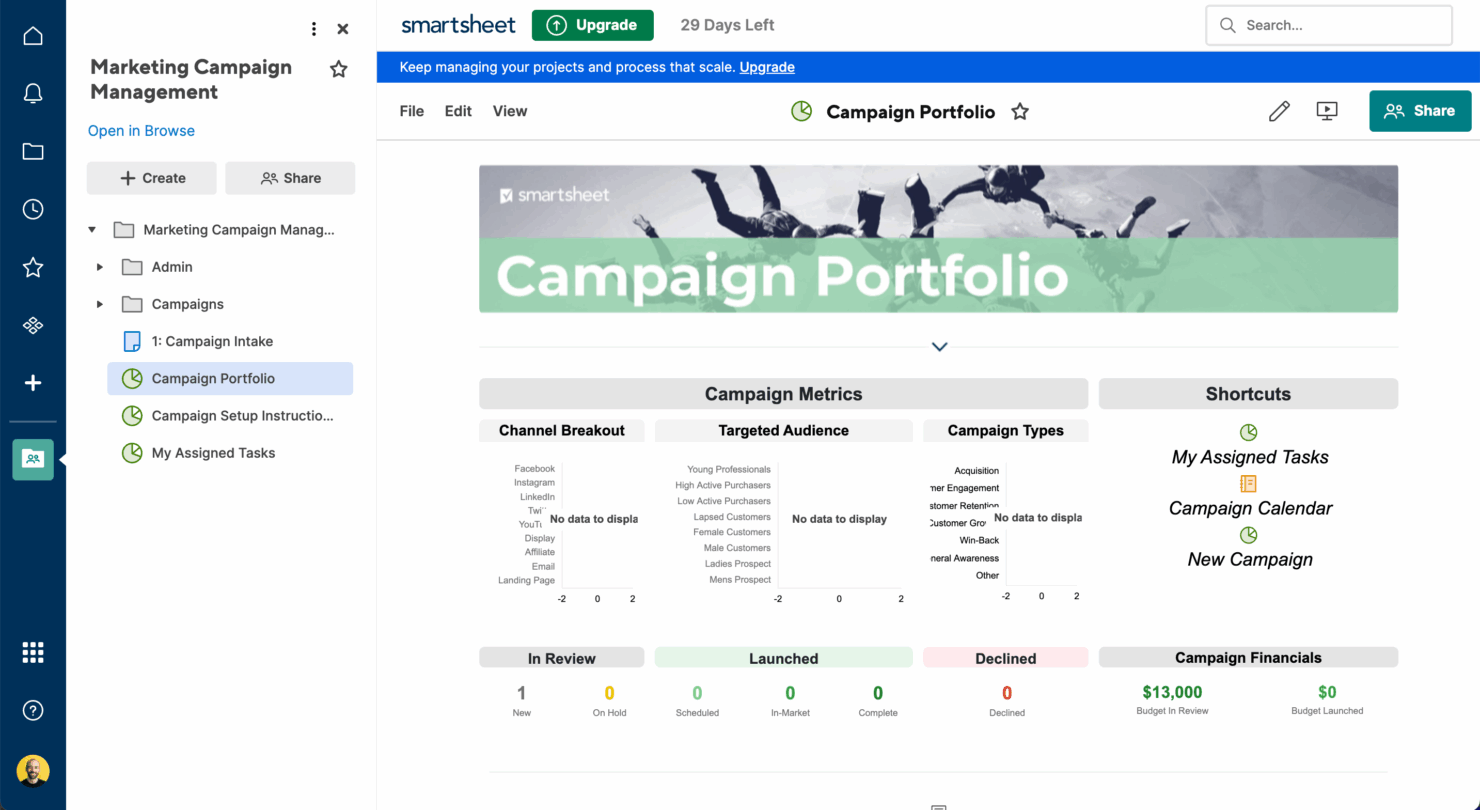
Image source: smartsheet.com
What is Jira?
Jira is a powerful issue-tracking and agile project management platform designed for software development, engineering, and IT teams. It allows users to manage work through Scrum boards, Kanban boards, sprints, and customizable workflows that support complex technical processes. Jira helps teams break down work into issues, epics, and user stories while offering automation features that streamline repetitive tasks. Its reporting tools—such as burndown charts, velocity reports, and sprint insights—make it easy to analyze progress and improve team performance. Highly scalable and configurable, Jira is widely used for organizing code-related tasks, tracking bugs, and supporting full agile development lifecycles.
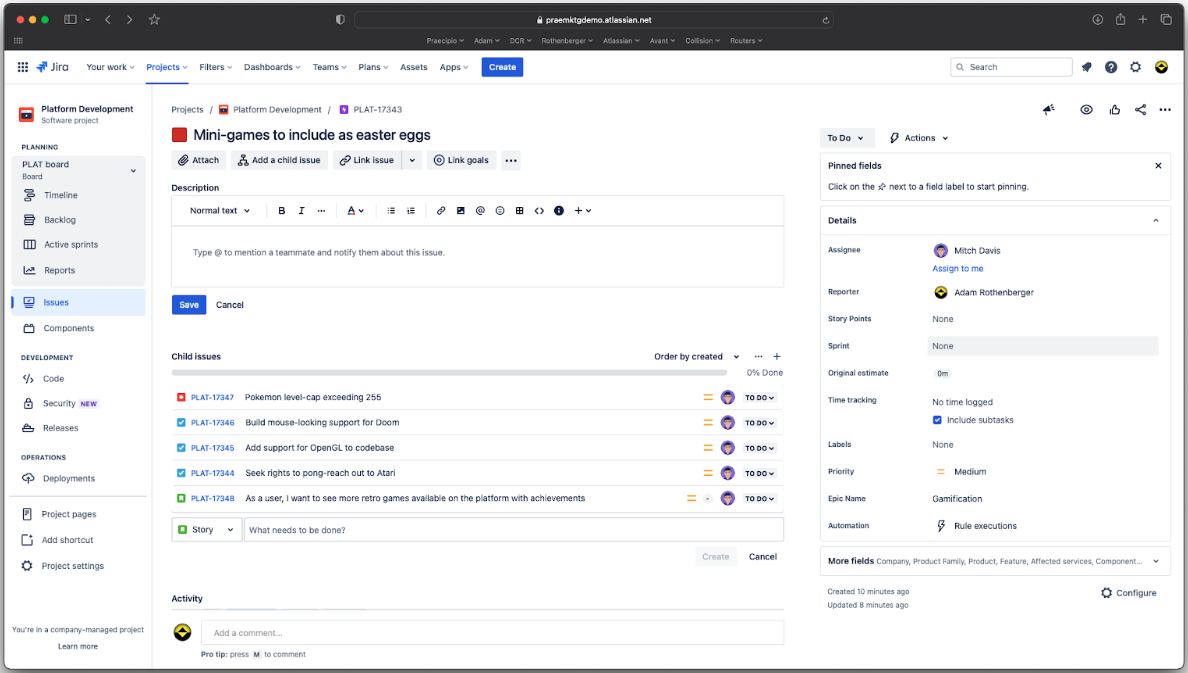
Image source: jira.com
Smartsheet vs Jira: Detailed comparison across key categories
Before choosing between Smartsheet and Jira, it's important to look at how each platform handles core areas like task management, agile workflows, collaboration, automation, documentation, and scalability. This Jira vs Smartsheet comparison review highlights how the two tools differ so you can match the right platform to your team's workflow needs.
Task & project management
In a direct Jira vs Smartsheet comparison, Smartsheet is stronger for operational work, thanks to its spreadsheet-style interface, timelines, dependencies, and portfolio views. It supports multi-department planning, resource allocation, and structured project layers. Row-level permissions and intake forms make onboarding vendors or executives painless, and many non-technical organizations run their entire yearly planning inside one workspace.
Jira excels in issue-based project execution. It helps teams manage epics, user stories, bugs, and technical tasks with clear status flows. Engineering and IT teams benefit most from its configurable workflows and detailed task-level tracking. Custom fields, issue linking, and component ownership give software teams traceability down to the exact line of code—something most Fortune 500 dev teams rely on daily.
Agile workflows
When evaluating Jira vs Smartsheet, Jira clearly leads the agile category. It offers powerful Scrum boards, Kanban boards, sprint planning, backlog grooming, and detailed reports like velocity and burndown charts. These tools provide agile teams with the structure they need for continuous iteration. Teams can run SAFe, LeSS, or fully custom frameworks natively—no third-party plugins required.
Smartsheet supports basic Kanban-style cards and task movement but lacks deep agile capabilities. With templates provided, it works better for hybrid project models or teams that don't follow strict agile frameworks. Even its "agile" add-ons feel lightweight and nowhere near Jira's decades of refinement.
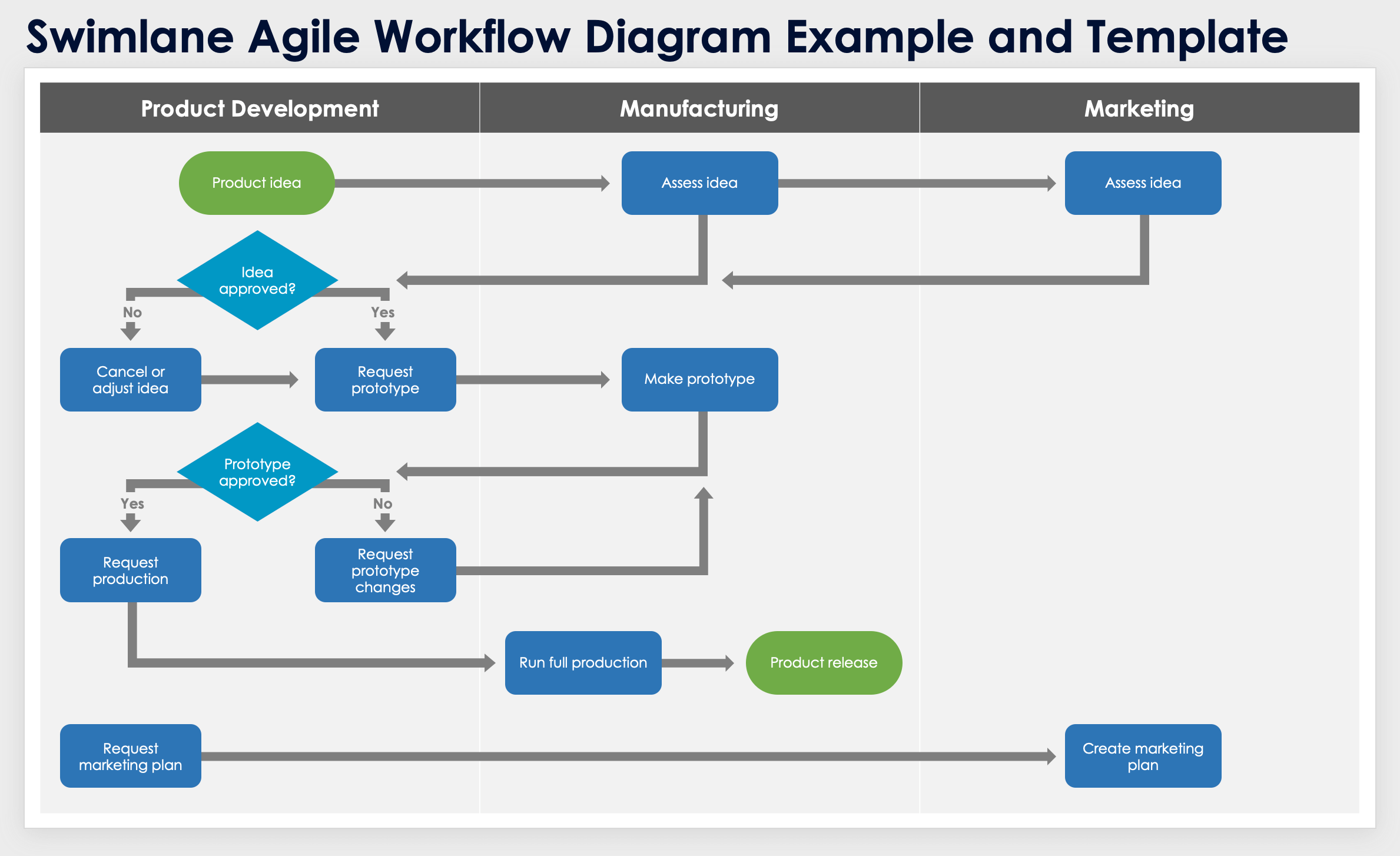
Image source: smartsheet.com
Cross-team collaboration
Smartsheet enables collaboration through shared sheets, comments, file attachments, and dashboards. Its spreadsheet-like layouts make it easier for operational teams—like PMOs, admin teams, field teams, and marketing—to work in one place. External clients and vendors jump in safely with viewer/commenter licenses, keeping everyone on the same source of truth.
Jira's collaboration is centered on issues, which works well for developers but becomes restrictive for cross-functional groups. Non-technical teams may find Jira's structure too rigid, making multi-team planning difficult in a Jira vs Smartsheet comparison review. Marketing or ops often end up duplicating work in a second tool because Jira feels too "dev-heavy."
Reporting & dashboards
Smartsheet shines with customizable dashboards, real-time metrics, and powerful operational reporting. Its grid-based data makes it easier to build executive summaries and portfolio-level visibility. Leaders can drill from a company KPI dashboard straight into the underlying sheet in one click.
Jira's reporting focuses heavily on development cycles. Velocity, cycle time, burndown, sprint insights, and issue analytics make it an excellent choice for engineering teams. However, it requires additional setup or add-ons for non-technical reporting—executives often request PowerPoint exports because native reports feel too technical.
Workflow automation
Smartsheet offers rule-based automation that supports reminders, status changes, and approval routing. It's simple and accessible but limited for complex workflows. A marketing manager can automate campaign status updates in under five minutes.
Jira provides significantly stronger automation with conditional triggers, branching logic, and workflow controls. This makes Jira better for large, structured workflows, though setup may require admin oversight. This difference is important in any Jira vs Smartsheet comparison. Large enterprises routinely replace hundreds of manual checks with Jira automation rules that run flawlessly 24/7.
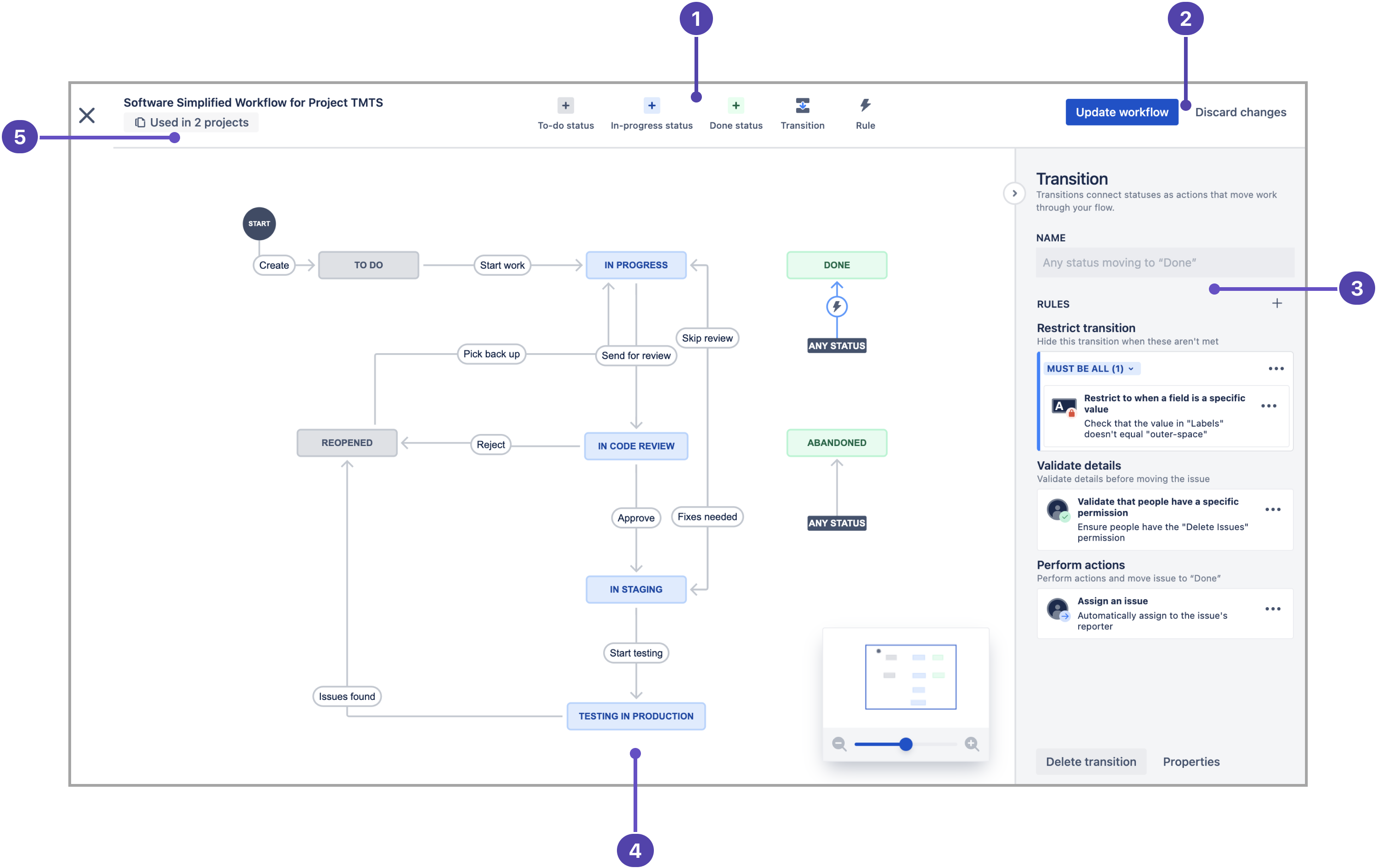
Image source: jira.com
Document management
Smartsheet supports attachments, forms, and file sharing, but it lacks true document creation or version-controlled collaboration. Teams often rely on external storage tools like Google Drive or Box. It's strong for managing supporting files, not authoring them.
Jira also lacks native document editing and depends on add-ons like Confluence. For organizations that rely heavily on documentation workflows, both tools require multiple connected systems to function smoothly. Most companies end up running a separate docs tool regardless of which PM platform they choose.
Smartsheet pricing vs Jira pricing: Which tool fits your workflow?
Choosing between Smartsheet and Jira often comes down to budget, team size, and how much automation or cross-team coordination you need. Both tools offer tiered pricing, but their plans are structured very differently — Smartsheet focuses on project and work management packages, while Jira emphasizes scaled teamwork and software-style workflows. Here's a clear side-by-side breakdown based on the latest pricing from both tools.
Smartsheet pricing overview
Smartsheet offers four pricing tiers designed for teams that need project tracking, dashboards, forms, and automation capabilities. The plans scale from basic grid-based project management to advanced enterprise workflows, resource controls, and large portfolio operations. Here's a breakdown of what each tier includes based on the latest pricing.
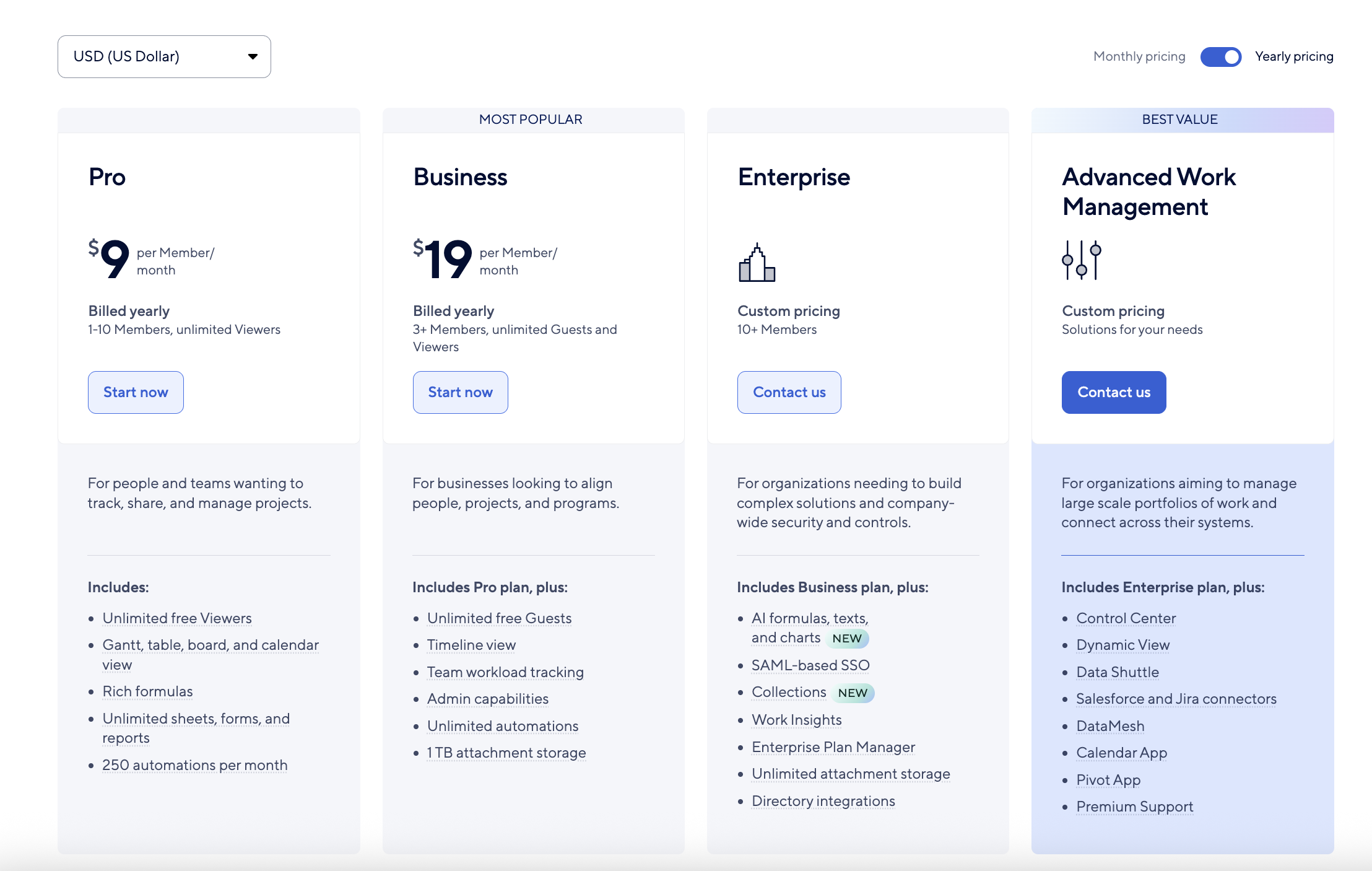
Image source: smartsheet.com
Information source: smartsheet.com
Update time: 2025-11-25
Note: Pricing and plan details reflect publicly available data as of the update date and may vary based on region, billing cycle, and number of agents.
Jira pricing overview
Jira offers four pricing tiers designed for software, engineering, and IT teams that need structured workflows, agile boards, and advanced automation. The plans scale smoothly from small teams using basic issue tracking to large enterprises managing complex, multi-site operations. Below is an accurate breakdown based on the latest pricing.
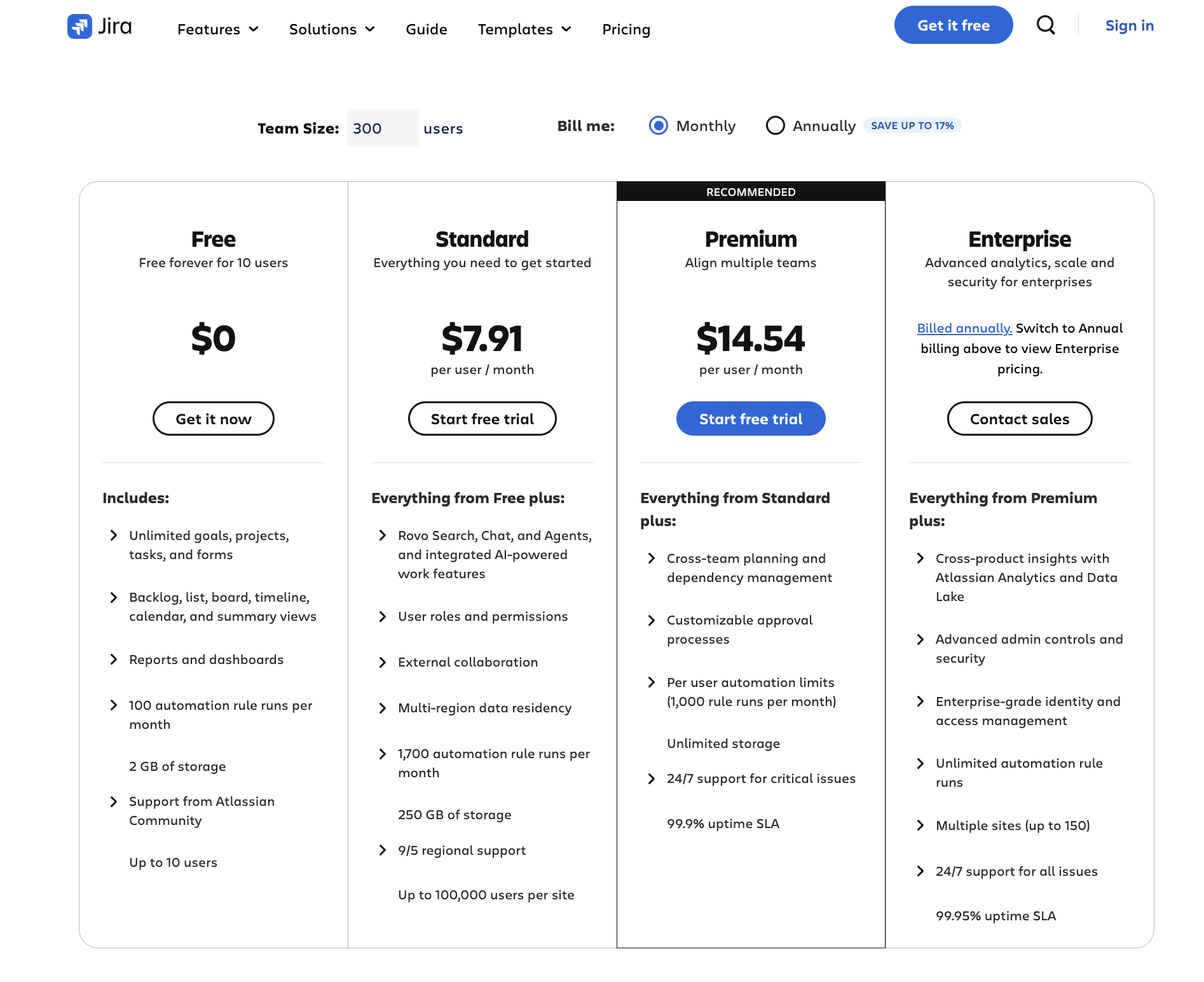
Image source: jira.com
Information source: jira.com
Update time: 2025-11-25
Note: Pricing and plan details reflect publicly available data as of the update date and may vary based on region, billing cycle, and number of agents.
Smartsheet vs Jira: Which tool fits your budget?
When comparing Smartsheet and Jira, pricing quickly becomes one of the most noticeable differences. Looking at the numbers side by side makes it easier to understand the true long-term investment and how much organizations can save depending on the tool they choose. Below is a breakdown of how Smartsheet and Jira pricing compares across plans and team sizes:
- Smartsheet fits teams looking for flexible project management, spreadsheet-like tracking, portfolio dashboards, and form-driven processes. However, advanced capabilities quickly push users into higher-tier custom pricing.
- Jira fits teams needing structured workflows, automation-heavy operations, and scalable task tracking across departments. Its mid-tier plans offer more automation and storage at a lower cost than Smartsheet's Business plan.
If your team relies heavily on automation, structured workflows, or cross-team task orchestration, Jira generally delivers more value per dollar. But if your team uses spreadsheet-style planning, resource management, and executive dashboards, Smartsheet may feel more intuitive—though potentially more expensive as you scale.
Smartsheet vs Jira: Which tool is best for which team?
Choosing between Smartsheet and Jira depends heavily on each team's workflow, technical depth, and the type of visibility they need. Below is a practical breakdown to help different departments understand which platform aligns best with their daily operations.
- IT teams: IT teams often prefer Jira because it supports structured incident workflows, permissions, dependencies, and SLA-driven tasks. Its automation capabilities simplify ticket routing and escalation for support operations. Smartsheet can still work for IT operations needing spreadsheets or asset logs, but Jira remains the stronger fit.
- PMOs: PMOs usually benefit more from Smartsheet's Gantt charts, dashboards, portfolio tracking, and executive reporting. Its spreadsheet-style interface supports cross-department planning, budgeting, and resource allocation with more clarity. Jira can complement PMOs for technical projects, but Smartsheet offers better visibility for organization-wide programs.
- Construction: Construction teams prefer Smartsheet because it mirrors field workflows: checklists, forms, schedules, dependencies, and site documentation. Resource timelines and milestone reporting help align contractors, vendors, and internal teams. Jira is rarely used in construction since issue/ticket workflows do not fit day-to-day field operations.
- Marketing teams: Marketing teams typically lean toward Smartsheet for campaign planning, content calendars, asset tracking, and approvals. Its flexible grids and dashboards help visualize timelines and deliverables across multiple stakeholders. Jira works only for marketing teams operating in agile sprints, but it's not the mainstream choice.
- Agile software teams: Jira is undeniably the best match for agile software teams thanks to its Scrum boards, Kanban flows, sprints, velocity charts, and dev-focused automations. Engineering squads rely on Jira for release tracking, bug management, and CI/CD alignment. Smartsheet cannot match the depth of agile-specific features Jira provides.
- Operations teams: Operations teams often find Smartsheet more adaptable for SOPs, workload planning, process checklists, and cross-functional coordination. Its dashboards and forms streamline recurring operational tasks effectively. Jira works for technical operations, but Smartsheet offers more flexibility for general business processes.
Limitations of both tools: Smartsheet and Jira
As powerful as Smartsheet and Jira are, both platforms come with constraints that can slow teams down—especially as workflows become more complex or cross-functional. Understanding these limitations gives you a clearer picture of where each tool may fall short in real-world use. Below is a breakdown of the key challenges users commonly face when relying on Smartsheet and Jira:
- Fragmented communication across workflows: Both tools rely heavily on external apps (Slack, Teams, email) for collaboration, causing context-switching and scattered discussions.
- Steep setup and admin overhead: Advanced automation, permissions, and cross-team workflows often require significant configuration, plugins, or dedicated admins.
- Limited documentation experience: Neither platform offers true real-time collaborative documents; users must depend on attachments or separate tools like Confluence or Google Docs.
For more Google Workspace's information, you can refer to Google Workspace Pricing and Google Workspace alternatives.
- Inefficient cross-team visibility: Work becomes siloed within sheets (Smartsheet) or tickets (Jira), making it hard for non-technical or cross-functional teams to see the full workflow picture.
- Scaling requires addons, connectors, or higher-cost tiers: As teams grow, both tools demand premium upgrades or third-party tools for automation, advanced reporting, or multi-team orchestration — driving total cost up quickly.
As teams expand their workflows, the limitations of Smartsheet and Jira become more noticeable—whether it's fragmented communication, heavy admin overhead, or complex setup across modules and connectors. These gaps often push growing organizations to look for tools that unify messaging, documentation, approvals, tasks, automation, and dashboards in one place. This is where a more streamlined, workspace-wide platform becomes valuable, making Lark a natural next step.
Smart alternative: Use Lark for tight-knit collaboration & smart workflows
Lark combines task management, group chatting, online conferencing, docs, and CRM databases into one connected workspace, removing the silos that slow teams down. Instead of relying on multiple tools to fill the gaps left by Smartsheet and Jira, such as real-time collaboration, built-in communication, or easy cross-team alignment. In a nutshell, Lark provides an all-in-one environment built for speed, clarity, and execution.
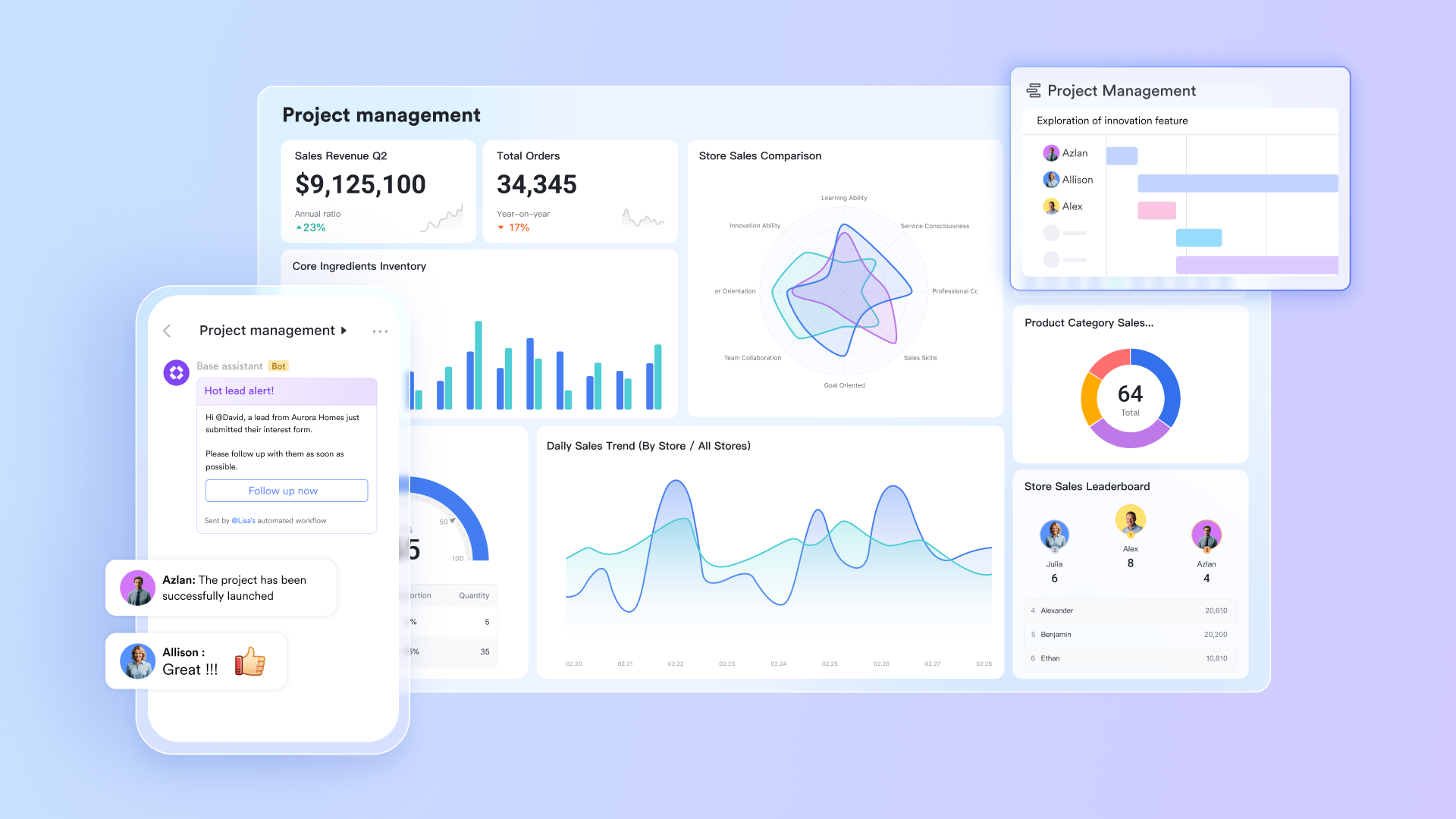
Lark Base for structured data management & processing
Lark Base gives teams a flexible, database-style environment for managing project records, tasks, milestones, risk logs, procurement details, design files, issue tracking, and cross-team handoffs. Every record can include fields, attachments, linked documents, dashboards, and workflow triggers. This centralizes project truth, so teams work from a single, structured source instead of scattered spreadsheets, tickets, or static tables.
Lark advantage:
- Smartsheet relies heavily on sheet-style layouts, which become cluttered and harder to scale for multi-phase, multi-team projects.
- Jira structures data around tickets only, limiting flexibility for construction, operations, admin workflows, or cross-functional projects.
- Lark Base adapts to any project type—agile, operational, administrative, or field-based—without forcing teams into strict templates.
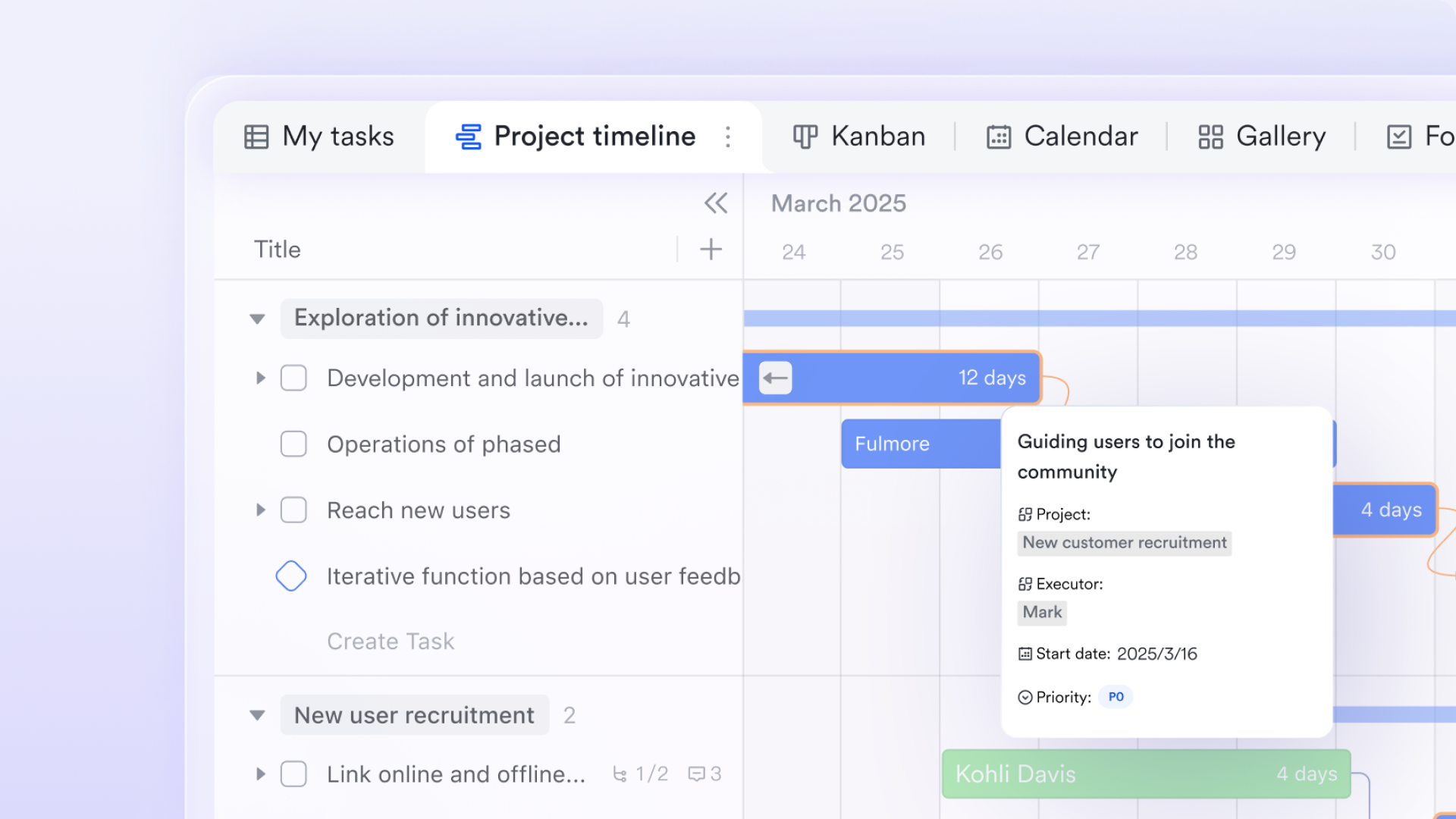
Lark Messenger for contextual teamwork & seamless communication
Lark Messenger keeps conversations directly connected to the project record, task, approval, or document being discussed. Instead of scattered chat threads across channels, group messages stay anchored to the workflow itself, giving instant clarity about what each decision relates to. Teams can share files, voice notes, photos, screen captures, and quick updates in real time.
Why Lark is better:
- Smartsheet requires external communication tools (email, Slack, Teams), causing constant context switching.
- Jira comments live inside tickets only, making it difficult for cross-team, non-technical users to collaborate fluidly.
- Lark Messenger blends chat + workflow context—helping site teams, PMs, finance, and leadership stay aligned without jumping between platforms.

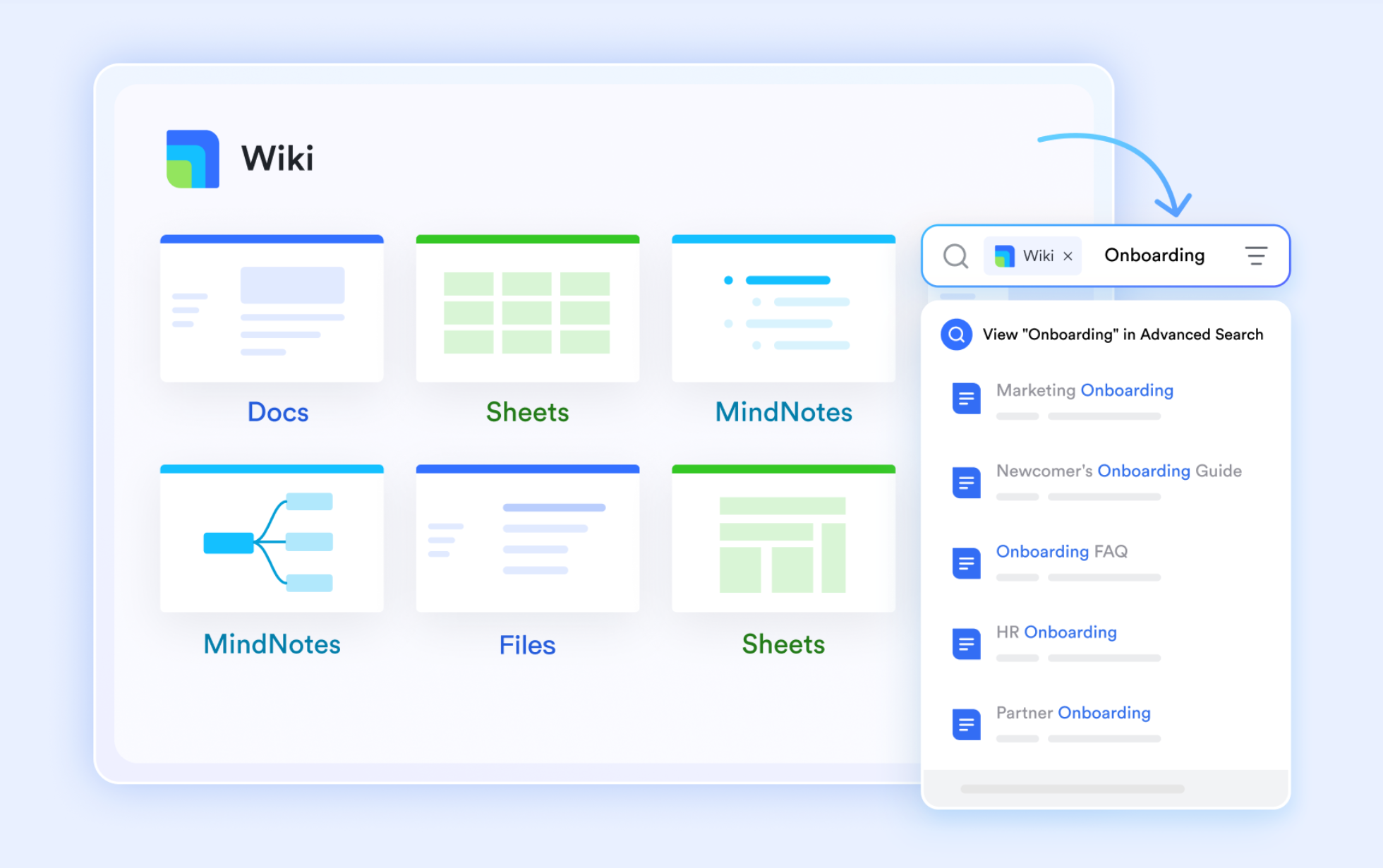
Lark Docs & Lark Wiki for collaborative documentation & knowledge hub
Lark Docs makes it easy to co-edit project plans, scopes, reports, requirements, inspection templates, and client deliverables in real time. Files, tables, project records, Sheets, and videos can sit inside one Doc. Lark Wiki stores SOPs, standards, safety protocols, and handover documentation in a structured, searchable knowledge base.
Why Lark is better:
- Smartsheet forces users to store documents elsewhere (Google Drive, Dropbox), breaking workflow continuity.
- Jira attachments are static and not collaborative—no real-time co-editing or document lifecycle tracking.
- Lark allows live documents to be tied directly to project workflows, so teams always access the latest version without toggling apps.
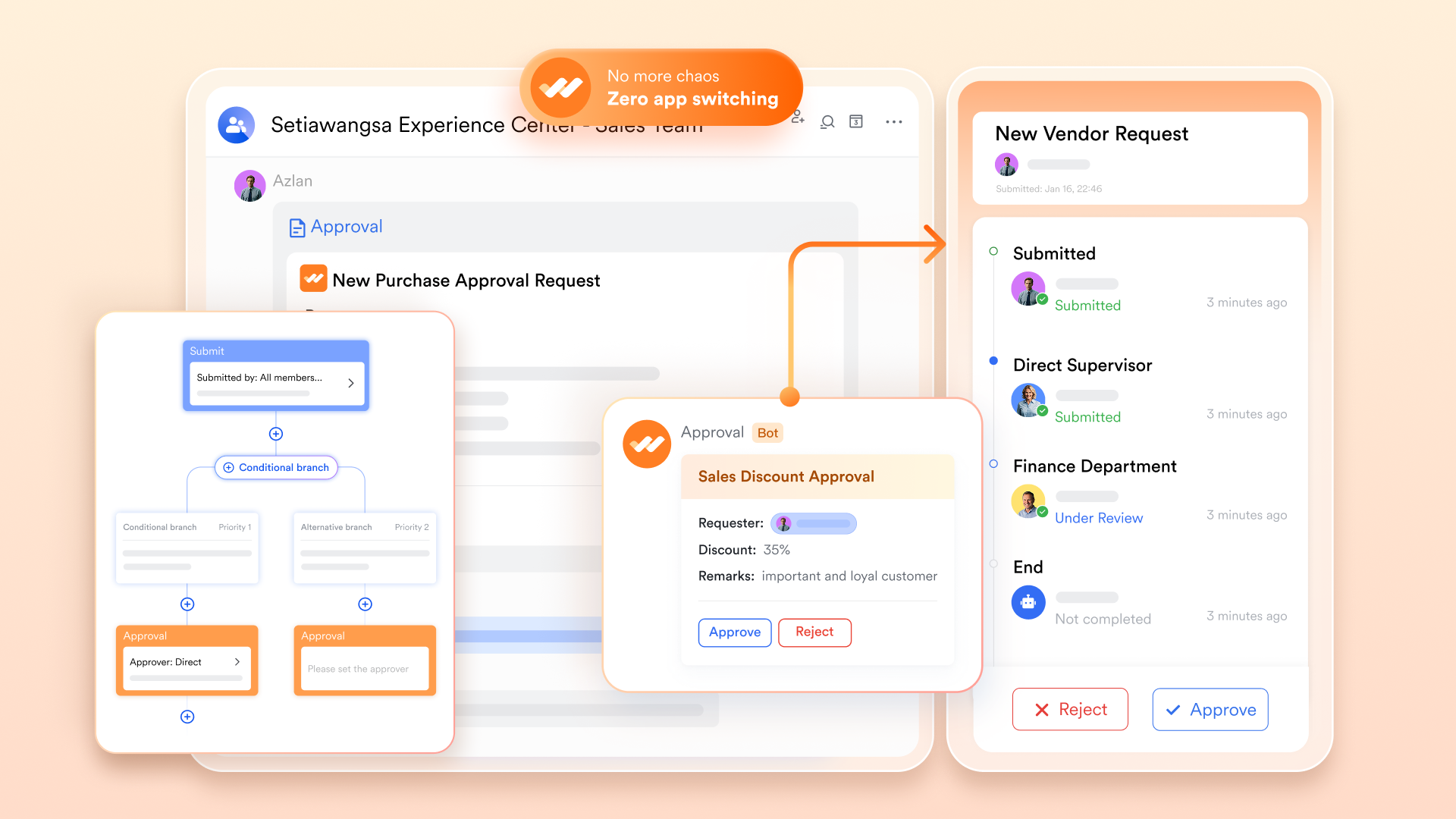
Lark Approval for automated workflow for approvals & requests
Lark Approval streamlines request and approval processes by letting you customize forms, workflows, and rules to match your organization's needs, with ready-made templates available to get started quickly. Submitting requests is simple, and necessary materials can be attached directly. With notifications and automatically recording results, teams can keep approvals moving without manual follow-ups.
Why Lark is better:
- Smartsheet offers basic automation but requires layers of permission rules and usually external apps for detailed approvals.
- Jira is strong for agile dev teams, but approval-heavy workflows (finance, HR, procurement, operations) become complex and require plugins.
- Lark supports approvals as part of the workspace by default, making it ideal for multi-department processes—not just technical teams.
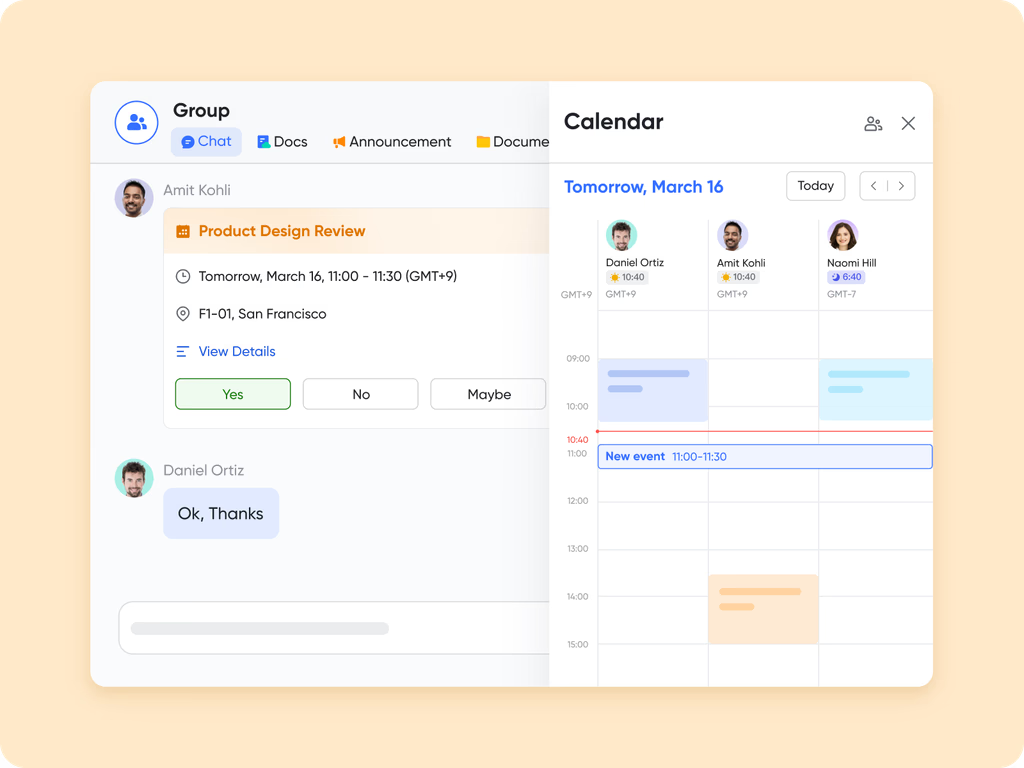
Lark Meetings & Lark Calendar for close team coordination
Lark Meetings helps teams run project check-ins, design reviews, sprint plans, and client sessions with automatic summaries, transcripts, and action-point extraction. These summaries can link directly to Lark Base records or Lark Docs. Lark Calendar keeps project timelines, milestones, and team availability visible in one place, reducing scheduling conflicts.
Why Lark is better:
- Smartsheet depends on external meeting tools (Zoom, Teams), creating fragmentation between discussions and project charts.
- Jira has no native meeting capability—teams must rely entirely on external tools.
- Lark connects meetings → tasks → workflow → documentation instantly, building a continuous loop from discussion to execution.
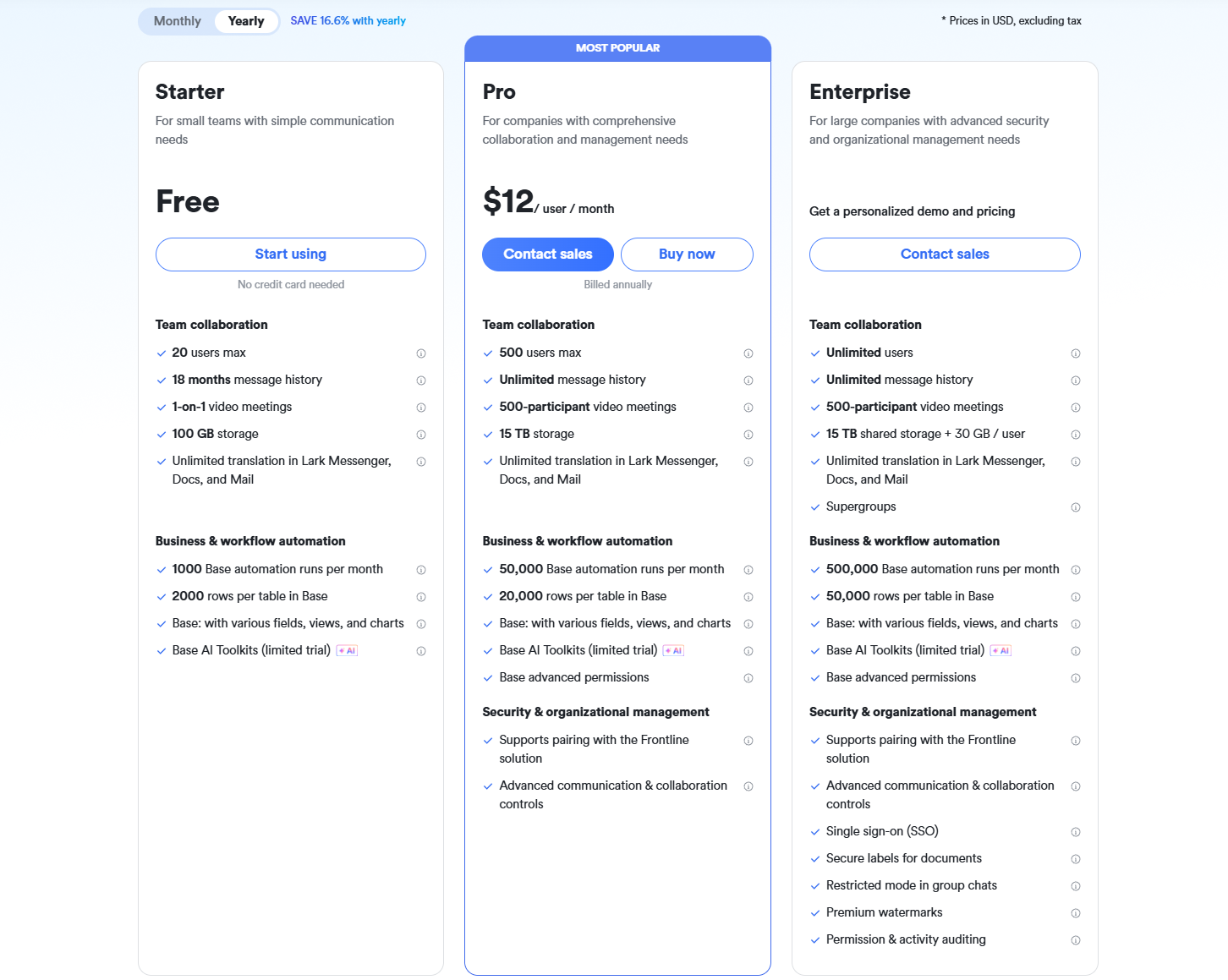
- Starter plan: Free forever plan that includes 11 powerful tools for up to 20 users. It also comes with 100GB of storage, 1000 automation runs, AI translations, and more.
- Basic plan: $6/user/month (billed annually) for up to 500 users. It includes everything in Starter plus group calling for up to 500 attendees, 5TB of storage, 1000 automation runs, and more. For more details, please contact sales.
- Pro plan: $12/user/month (billed annually) for up to 500 users. It includes everything in Basic plus group calling for up to 500 attendees, 15TB of storage, 50,000 automation runs, and more.
- Enterprise plan: Contact sales for custom pricing. Supports unlimited users and includes even more automation runs and advanced security, compliance, and management features.
Final verdict: Smartsheet vs Jira vs Lark on features & prices
After all we have mentioned, it's clear that each platform serves different needs and team types. The tables below offer a side-by-side comparison of Smartsheet, Jira, and Lark, highlighting how each platform handles in different dimensions:
Feature comparison
Pricing comparison
Conclusion
Choosing between Smartsheet and Jira ultimately depends on your team's workflow style, technical depth, and operational needs. Smartsheet is better suited for spreadsheet-style work, operations, and project monitoring, while Jira excels in agile development, issue tracking, and automation-heavy engineering workflows. But as your organization scales, both tools begin to feel fragmented—requiring add-ons for communication, external tools for documentation, and complex setups for multi-team coordination.
This is where Lark becomes a modern alternative that unifies tasks, communication, documents, approvals, workflows, and structured records in one seamless platform. With Lark, teams eliminate the tool overload that slows down Smartsheet and Jira, creating a simpler, faster, and more connected workspace built for today's cross-functional operations.
FAQs
Is Smartsheet better than Jira for cross-functional teams?
Smartsheet is often easier for non-technical teams because of its spreadsheet-style layout and flexible grids. It works well for operations, PMOs, and admin teams that rely on forms, resource tracking, and dashboards. Jira, on the other hand, is optimized for engineering workflows and can feel overwhelming for cross-functional groups. If your team includes both business and technical departments, Smartsheet may be more accessible—but both tools still suffer from communication fragmentation across teams.
Can Jira replace Smartsheet for project reporting?
Jira provides strong reporting for agile metrics like velocity, burndown, and sprint insights, but it isn't built for operational or business reporting. Smartsheet offers dashboards, formulas, and portfolio views that make it better for executive-level reporting across departments. While Jira could replace Smartsheet for dev-focused reporting, it cannot match the spreadsheet-like flexibility or cross-project visibility that operations teams require.
What's the difference between Smartsheet vs Jira for agile teams?
Jira is purpose-built for agile development, providing Scrum boards, Kanban workflows, sprints, and automation tailored for engineering teams. Smartsheet supports agile through templates and Gantt views but lacks deep native agile mechanics. If your team runs sprints, tracks issues, or manages backlogs, Jira is the natural fit. Smartsheet works better for hybrid project environments where agile is not the main methodology.
Is Jira or Smartsheet easier for non-technical users?
Smartsheet tends to be easier for non-technical users because of its familiar spreadsheet interface and drag-and-drop structure. Jira requires understanding issues, epics, story points, workflows, and board setups, which can be complex for business users. However, Smartsheet's formulas and large sheets can become difficult at scale, while Jira's complexity grows as workflows expand. Neither tool fully solves accessibility across every team.
Smartsheet vs Jira comparison: Which tool scales better for enterprise?
Jira scales extremely well for engineering-heavy enterprises because of its automation capacity, admin controls, and ecosystem of developer integrations. Smartsheet scales better for operational teams but requires expensive enterprise-tier upgrades for advanced controls, reporting, and automations. Both tools become costly and complex at higher tiers. For organizations wanting unified, cross-team scalability without relying on multiple add-ons, a platform like Lark offers a more seamless path.
Related reading
Table of contents
Start using Lark today

Manage all your work in one place
Boost team efficiency by 10x
Save up to 70% on software costs
Table of contents
Start using Lark today
Manage all your work in one place
Boost team efficiency by 10x
Save up to 70% on software costs
Keep reading



Lark recognized in 2023 Gartner® Collaborative Content Workspaces and Meeting Solutions reports
Lark, the global superapp for productivity, is delighted to announce it receives recognition in the Gartner's 2023 Innovation Insight for Collaborative Content Workspaces and Market Guide for Meeting Solutions.





2026 Lark Technologies Pte. Ltd.
Headquartered in Singapore with offices worldwide.






Explore: