














16 Software for Expense Tracking You Should Know

Ryan Tanner
Product Marketing Specialist
Sep 18, 2026
Ryan Tanner
Sep 18, 2026


Key takeaways: Top 5 tools used in expense tracking
Snapshot: Top software for expense tracking

What is software for expense tracking?
Why businesses adopt expense tracking software
- Improve expense visibility: Expense-tracking tools provide real-time insights into where money is spent across teams, departments, and projects. This transparency helps managers identify trends, control unnecessary costs, and make informed budgeting decisions. With centralized dashboards, businesses gain a clear overview of financial activity at all times.
- Automating reimbursement processes: Manual reimbursement processes are time-consuming and often lead to delays and errors. Expense tracking software automates submissions, approvals, and payouts, significantly reducing processing time. Employees get reimbursed faster while finance teams spend less time on administrative tasks.
- Improve financial accuracy: Manual data entry increases the risk of errors, duplicate entries, and missing records. Automated tools use receipt scanning, OCR, and predefined rules to ensure accurate expense recording. This improves the reliability of financial data and minimizes discrepancies during audits.
- Centralize financial reporting: Expense tracking software consolidates data from multiple sources into a single platform. This centralization simplifies reporting and enables finance teams to generate consistent, real-time financial reports. It also improves collaboration between departments by providing a unified source of truth.
- Strengthen financial compliance: Maintaining compliance with internal policies and external regulations is critical for businesses. Expense tracking tools enforce policy rules, flag violations, and maintain detailed audit trails. This ensures that all expenses are properly documented and aligned with company guidelines. Concur has traditionally been the default solution for travel and expense management, but businesses are increasingly exploring modern Concur alternatives like ITILITE for more streamlined travel booking, expense management, and reimbursement processes.
Key capabilities in expense tracking platforms
- Expense reporting and receipt capture: Employees can easily log expenses and upload receipts through mobile apps or web interfaces. Many tools use OCR technology to extract key details like date, amount, and vendor automatically. This reduces manual entry and ensures all records are stored digitally for easy access and audits.
- Automated approval workflows: Expense-tracking platforms enable businesses to create structured approval processes based on rules and conditions. Requests are automatically routed to the right approvers, reducing delays and confusion. This ensures faster approvals while maintaining accountability and control.
- Expense analytics dashboards: Interactive dashboards provide real-time insights into spending patterns across teams and categories. Finance teams can track trends, identify cost-saving opportunities, and monitor budget usage effectively. These visual reports make it easier to support strategic financial decisions.
- Corporate card and payment tracking: Many platforms integrate with corporate cards to automatically record and categorize transactions. This eliminates the need for manual expense entry and provides instant visibility into company spending. It also helps reconcile expenses quickly and accurately.
- Budget monitoring tools: Expense tracking software enables businesses to set budgets for departments, projects, or categories. Real-time tracking ensures teams stay within limits, and alerts are triggered when thresholds are exceeded. This proactive approach helps prevent overspending and improve financial discipline.
16 software for expense tracking
1. Lark: Collaboration platform for smart expense tracking
- Combines expense tracking, approvals, databases, and team communication in one platform, reducing tool switching and improving overall workflow efficiency.
- Highly customizable workflows allow finance teams to automate approvals, track budgets in real time, and adapt processes to business needs.
- Real-time dashboards and automation features enhance visibility into spending patterns, enabling faster decision-making and better financial control across departments.
- Advanced features and scalability options may be complex for small teams, although Lark Help Center provides complete guides.
- Starter plan: Free forever plan that includes 11 powerful tools for up to 20 users. It also comes with 100GB of storage, 1000 automation runs, AI translations, and more.
- Basic plan: $6/user/month (billed annually) for up to 500 users. It includes everything in Starter plus group calling for up to 500 attendees, 5TB of storage, 1000 automation runs, and more. For more details, please contact sales.
- Pro plan: $12/user/month (billed annually) for up to 500 users. It includes everything in Basic plus group calling for up to 500 attendees, 15TB of storage, 50,000 automation runs, and more.
- Enterprise plan: Contact sales for custom pricing. Supports unlimited users and includes additional automation runs, as well as advanced security, compliance, and management features.
Starter
For small teams with simple communication needs
$0
/ user / month

Pro
For companies with comprehensive collaboration and management needs
$12
/ user / month
Enterprise
For large companies with advanced security and organizational management needs
Get a personalized demo and pricing
Pro
For companies with comprehensive collaboration and management needs
$12
/ user / month
2. Expensify: Expense reporting and receipt tracking platform
- SmartScan OCR technology automatically captures receipt data, extracts key details, and creates expense entries, significantly reducing manual input and errors.
- Automated expense reporting allows users to generate, submit, and manage reports quickly with real-time tracking and minimal manual intervention.
- Custom approval workflows route expense reports to appropriate managers, ensuring compliance, faster approvals, and better financial control across departments.
- Integration capabilities connect seamlessly with accounting tools like QuickBooks and Xero, enabling synchronized financial data and streamlined bookkeeping processes.
- A user-friendly interface makes expense tracking, receipt uploads, and report generation simple, improving adoption rates across teams and significantly reducing training requirements.
- Automation features like OCR, real-time tracking, and AI categorization reduce manual workload, saving time and improving overall operational efficiency.
- Strong mobile functionality enables employees to capture receipts, submit expenses, and manage reports anytime, effectively supporting remote work and travel-heavy teams.
- Occasional syncing issues and bugs can disrupt workflows, requiring manual checks and causing delays in expense reporting and reconciliation processes.
- Interface and setup complexity may create a learning curve for new users, especially when configuring policies and managing advanced features.
- Collect plan: $5/member/month (billed annually).
- Control plan: Custom pricing.
3. Zoho Expense: Expense tracking for small businesses
- OCR-powered receipt scanning captures expense details automatically, reducing manual data entry and significantly improving accuracy in expense reporting.
- Automated approval workflows route expense reports through multi-level approvals, ensuring compliance with company policies and reducing reimbursement delays.
- Real-time expense tracking and reporting dashboards provide visibility into company spending, helping finance teams monitor budgets and make informed decisions.
- Integration with accounting systems and corporate cards enables seamless reconciliation, ensuring financial data flows smoothly across platforms without manual intervention.
- A user-friendly interface and simple setup make it easy for teams to adopt quickly, with no extensive training or technical expertise required.
- Affordable pricing and strong value make it suitable for small businesses, especially those already using the Zoho ecosystem applications.
- Automation features like receipt scanning and expense categorization save time, reduce errors, and streamline overall financial management workflows effectively.
- Limited flexibility outside the Zoho ecosystem may restrict integration for businesses relying on non-Zoho tools or complex tech stacks.
- Advanced features and travel management capabilities may require higher-tier plans or custom pricing, increasing overall costs for growing businesses.
- Standard plan: $3/user/month (billed annually).
- Premium plan: $5/user/month (billed annually).
- Enterprise plan: Custom pricing.
4. SAP Concur: Enterprise expense and travel management software
- Automated expense reporting imports transactions from corporate cards, matches receipts, and reduces manual data entry while improving reimbursement speed and accuracy.
- Mobile receipt capture and expense submission allow employees to upload receipts, track expenses, and manage approvals directly from their smartphones.
- Integrated travel booking enables users to manage flights, hotels, and transport while ensuring compliance with company travel policies and budgets.
- Advanced analytics dashboards provide real-time visibility into spending, helping finance teams monitor budgets, detect anomalies, and improve financial decision-making.
- Enterprise-level automation streamlines expense reporting, reduces manual work, and significantly improves efficiency across finance operations and reimbursement processes.
- The centralized platform integrates travel, expenses, and invoices, giving organizations complete visibility and control over company-wide spending and compliance.
- Strong integrations with ERP, CRM, and accounting systems ensure seamless data flow and better financial reporting across business systems.
- Interface can feel outdated and slow, with users reporting lag in navigation and performance issues during routine expense management tasks.
- Customer support and onboarding experience may be inconsistent, causing delays when resolving issues or implementing the platform at scale.
- Quote-based pricing
5. Ramp: Corporate card and expense management platform
- Corporate cards with built-in controls allow businesses to set spending limits, monitor transactions in real time, and prevent unauthorized expenses.
- Automated expense tracking captures transactions instantly, matches receipts, and categorizes expenses, significantly reducing manual work and improving accuracy.
- AI-powered insights identify cost-saving opportunities, flag duplicate subscriptions, and provide recommendations to optimize company spending and improve financial efficiency.
- Seamless integrations with accounting systems enable automatic syncing, reconciliation, and reporting, ensuring accurate financial data across business tools and platforms.
- Intuitive interface and automation features simplify expense tracking, making it easy for teams to manage receipts, reports, and reimbursements efficiently.
- Real-time visibility into spending helps finance teams monitor transactions in real time, control budgets, and make faster, data-driven financial decisions.
- Unlimited virtual and physical cards provide flexibility in managing employee expenses while maintaining strong control over company-wide spending.
- Some users report limitations in invoice syncing and integration with certain financial tools, which may require additional manual adjustments.
- The platform may require onboarding effort and adaptation for teams unfamiliar with automated spend management systems and AI-driven financial workflows.
- Plus plan: $15/user/month (billed annually).
- Enterprise plan: Custom pricing.
6. Brex: Corporate expense and spend management platform
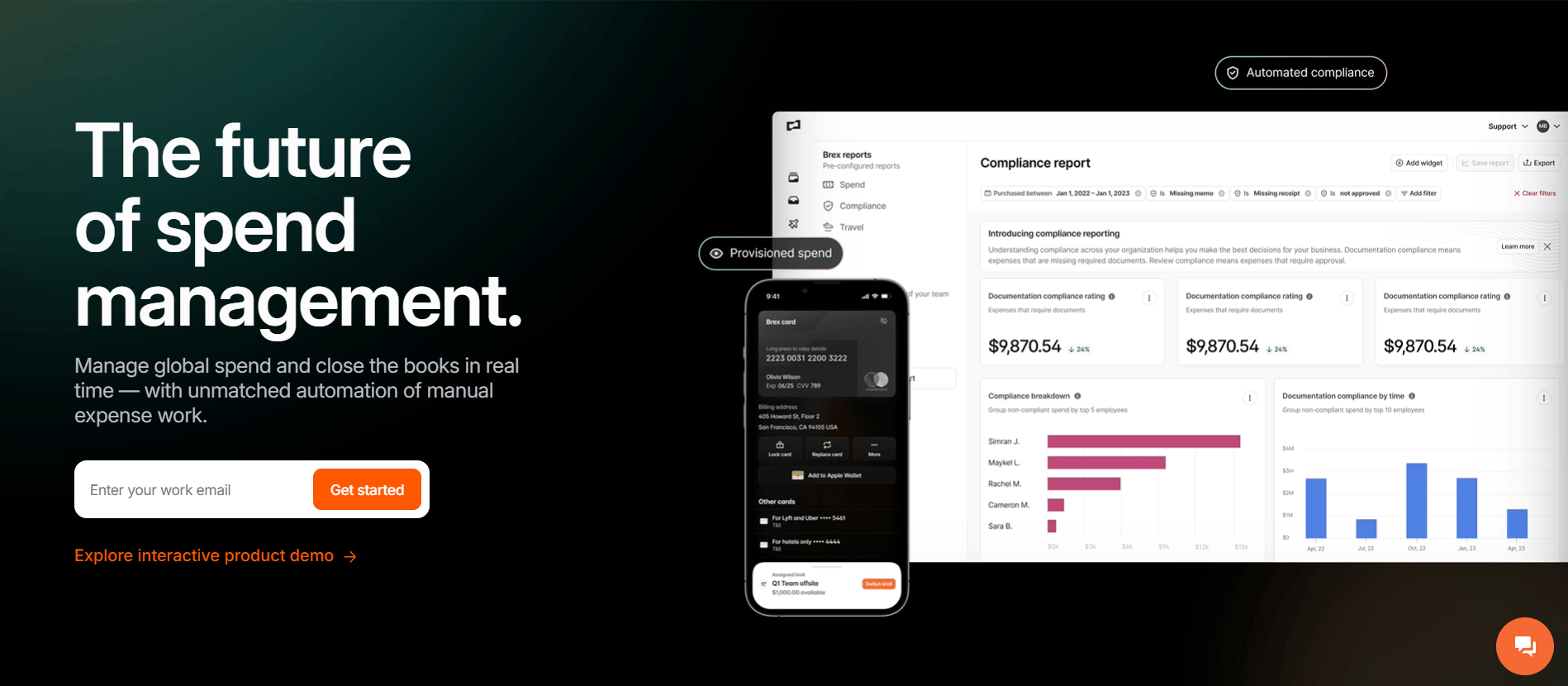
- AI-powered receipt matching automatically pairs receipts from email or SMS with transactions, minimizing manual data entry.
- Global corporate cards allow teams to issue local currency cards in over 100 countries with built-in policy controls.
- Automated accounting sync integrates financial data directly with ERPs like NetSuite, Workday, and QuickBooks.
- Eliminates personal guarantees for many businesses, making it ideal for venture-backed startups and growing companies.
- Real-time spend tracking helps departments stay within budget with proactive alerts and dynamic limits.
- The primary focus on high-growth companies may leave solo entrepreneurs or very small businesses with fewer tailored features.
- Premium plan: $12 per user / month for advanced global controls and features.
- Essentials: $0 for core cards and basic spend management features.
- Enterprise plan: Custom pricing for large organizations requiring tailored solutions.Custom pricing.
7. Pleo: Employee expense tracking and corporate card platform
- Smart company cards with customizable spending limits allow employees to make purchases while finance teams maintain full control and visibility.
- Automated expense reporting captures receipts instantly and matches them to transactions, eliminating manual entry and significantly reducing the administrative workload.
- Real-time expense tracking provides instant visibility into company spending, helping teams monitor budgets and proactively identify trends.
- Seamless accounting integrations sync expense data with financial systems, improving reconciliation accuracy and streamlining bookkeeping processes across teams.
- User-friendly interface and mobile accessibility make it easy for employees to submit expenses quickly, reducing friction and improving overall adoption.
- Automation features reduce manual work, saving time and improving accuracy in expense tracking, reporting, and reimbursement processes.
- Real-time visibility into transactions helps finance teams monitor spending effectively and enforce budgets across departments with greater control.
- Limited advanced financial features, such as treasury management, may restrict use for businesses needing a more comprehensive financial platform.
- Subscription costs and additional fees can be higher than those of some competitors, especially for smaller businesses with tight budgets.
- Essential plan: $39/month (billed annually).
- Advanced plan: $99/month (billed annually).
- Beyond plan: $199/month (billed annually).
8. Divvy (Bill.com): Expense management and spend control software
- Corporate cards with built-in spending controls allow businesses to set budgets by team, project, or vendor and manage expenses proactively.
- Real-time expense tracking provides instant visibility into transactions, helping finance teams monitor spending and maintain better financial control.
- Automated expense reporting captures transactions, categorizes expenses, and reduces manual effort in reconciliation and financial reporting processes.
- Virtual cards and budgeting tools enable granular control over employee spending, improve security, and significantly reduce unauthorized transactions.
- A free expense management platform with no annual fees makes it highly attractive for small businesses looking to reduce operational costs.
- An easy-to-use interface and real-time visibility help streamline expense tracking, budgeting, and reporting across teams.
- Strong automation and integration significantly reduce manual work, improve accuracy, and simplify reconciliation with accounting systems.
- Some users report syncing and integration issues that can delay reconciliation and affect the accuracy of expense-tracking workflows.
- Customer support and platform reliability may vary, with occasional bugs or performance issues impacting user experience and efficiency.
- Essentials plan: $49/user/month (billed annually).
- Team plan: $65/user/month (billed annually).
- Corporate plan: $89/user/month (billed annually).
- Enterprise plan: Custom pricing.
9. Spendesk: Spend and expense management software
- Corporate cards and virtual cards enable controlled employee spending while providing real-time visibility and customizable limits for better financial management.
- Automated approval workflows streamline expense validation, ensuring policy compliance while significantly reducing delays in reimbursements and financial processing.
- Expense tracking and reporting tools centralize all transactions, helping finance teams monitor budgets, analyze spending patterns, and improve financial decision-making.
- Invoice and subscription management features automate accounts payable processes, reduce manual work, and improve accuracy in tracking recurring business expenses.
- The unified platform combines cards, expenses, invoices, and approvals, simplifying financial operations and improving overall efficiency across business spend management workflows.
- Real-time visibility into expenses helps finance teams monitor budgets effectively, detect overspending early, and maintain better financial control organization-wide.
- User-friendly interface and automation features reduce administrative workload, saving time and making expense management easier for employees and finance teams.
- Integration limitations with certain tools and rigid workflows may reduce flexibility for businesses with complex or highly customized financial systems.
- Some users report payment or card acceptance issues that can disrupt transactions and occasionally require alternative payment methods.
- Quote-based pricing
10. Emburse: Expense automation and financial reporting platform
- AI-powered expense automation captures, categorizes, and validates expenses instantly, significantly reducing errors and ensuring compliance before submission.
- Real-time expense tracking provides visibility into company spending, helping finance teams monitor budgets, detect risks, and improve financial decision-making.
- Automated workflows streamline expense reporting, approvals, and reimbursements, reducing manual processing time and improving operational efficiency across finance teams.
- Mobile receipt capture and OCR technology allow employees to submit expenses on the go, improving accuracy and speeding up reimbursement cycles.
- User-friendly interface and automation features simplify expense reporting, making it easier for employees and finance teams to manage expenses efficiently.
- Strong compliance and policy enforcement capabilities help reduce fraud, ensure accuracy, and maintain consistent financial governance across organizations.
- Real-time visibility and analytics provide better control over spending, enabling finance teams to identify trends and optimize budgets effectively.
- Some users report a learning curve and interface complexity, especially for non-technical users or teams new to expense automation systems.
- Integration and transition issues may arise during implementation, requiring additional setup effort and time for smooth adoption across systems.
- Quote-based pricing
11. FreshBooks: Accounting and expense tracking software
- Expense tracking with receipt uploads allows users to log expenses in real time and easily link them to projects or clients.
- Automated invoicing and billing enable businesses to create, send, and manage invoices while ensuring steady cash flow and timely payments.
- Time tracking tools help teams record billable hours and convert them into invoices, improving accuracy in client billing processes.
- Financial reporting dashboards provide insights into income, expenses, and profitability, helping businesses make informed financial decisions.
- A user-friendly interface makes it easy for non-accountants to manage expenses, invoices, and financial data without extensive training or expertise.
- All-in-one platform combines invoicing, expense tracking, and time tracking, reducing the need for multiple tools and simplifying workflows.
- Cloud-based access allows users to manage finances anytime, improving flexibility and real-time visibility into business cash flow and expenses.
- Limited advanced accounting features make it less suitable for large businesses with complex financial management and reporting requirements.
- Additional user costs and feature limitations in lower plans can increase expenses for growing teams over time.
- Lite plan: $211.14/year (billed annually).
- Plus plan: $394.74/year (billed annually).
- Premium plan: $642.60/year (billed annually).
- Select plan: Custom pricing.
12. QuickBooks: Accounting software with expense tracking
- Automatic expense tracking connects bank and credit card accounts, imports transactions, and categorizes spending in real time without manual entry.
- Receipt capture via mobile app allows users to snap, store, and organize receipts digitally for easy access and audit readiness.
- Financial reporting tools generate profit and loss statements, cash flow reports, and expense summaries for better financial decision-making.
- Integration ecosystem with 750+ apps enables seamless syncing with CRM, payment systems, and ecommerce platforms for unified financial workflows.
- Comprehensive accounting and expense-tracking features provide strong financial visibility and control, making them suitable for growing businesses with complex needs.
- Automation features like bank syncing, categorization, and reporting reduce manual work, improve accuracy, and save significant time for finance teams.
- Extensive integrations and scalability enable businesses to connect multiple tools and scale financial operations as they grow.
- Higher pricing compared to simpler tools may not be ideal for freelancers or small businesses with limited budgets and basic requirements.
- A steeper learning curve and a complex interface can require time and training for users unfamiliar with accounting software.
- Simple start plan: $19/month (billed annually).
- Essentials plan: $37.50/month (billed annually).
- Plus plan: $57.50/month (billed annually).
- Advanced plan: $137.50/month (billed annually).
13. Rydoo: Corporate travel and expense management platform
- Real-time expense capture allows employees to submit expenses instantly on mobile or desktop, significantly reducing delays and improving reporting efficiency.
- OCR-based receipt scanning automatically extracts key data, minimizing manual entry errors and speeding up expense logging for finance teams.
- Automated approval workflows and policy controls ensure compliance by routing expenses according to predefined rules and reducing manual review effort.
- AI-powered audit tools detect non-compliant or suspicious expenses, helping businesses strengthen financial controls and reduce fraud risk.
- A user-friendly interface and intuitive design make it easy for employees to submit, track, and manage expenses with minimal training.
- Strong automation and OCR capabilities reduce manual workload, improve accuracy, and streamline expense management processes across finance teams.
- Real-time visibility and global compliance features support multi-country operations, making it suitable for international businesses managing complex expenses.
- Pricing can be relatively high with no free plan, making it less suitable for small businesses or teams with limited budgets.
- Occasional OCR inaccuracies and integration limitations may require manual corrections, thereby affecting efficiency in some expense-tracking workflows.
- Essentials plan: $9/user/month (billed annually).
- Pro plan: $11/user/month (billed annually).
- Business plan: Custom pricing.
- Enterprise plan: Custom pricing.
14. Airbase: Finance operations and expense management software
- An all-in-one spend management platform combines expense tracking, bill payments, corporate cards, and approvals into a unified financial workflow.
- Automated approval workflows streamline purchase requests, expense reports, and invoice processing, significantly reducing manual work and improving operational efficiency.
- Real-time expense tracking and reporting provide full visibility into company spending, helping finance teams monitor budgets and make informed decisions.
- Corporate cards and payment automation allow businesses to control spending, categorize transactions, and simplify reconciliation across financial systems seamlessly.
- The unified platform integrates expenses, payments, and cards, reducing tool fragmentation and improving efficiency across finance and accounting workflows.
- Strong automation features reduce manual data entry, accelerate approvals, and improve accuracy in financial reporting and reconciliation processes.
- Real-time visibility into spending enables better budgeting, cost control, and data-driven financial decision-making across departments.
- Pricing may be high for small businesses, making it less suitable for teams with limited budgets or simple expense tracking needs.
- Implementation and onboarding can require time and training, especially for teams unfamiliar with comprehensive financial management systems.
- Quote-based pricing
15. Fyle: Expense tracking automation for finance teams
- Real-time expense tracking captures transactions from corporate cards in real time, providing immediate visibility into employee spending and significantly improving financial control.
- OCR-powered receipt captures extract data from images or messages, automatically creating expense entries and reducing manual input errors efficiently.
- Automated expense reporting and reconciliation match receipts to transactions, streamlining workflows and minimizing manual effort for finance teams.
- Seamless integrations with accounting systems and tools such as Gmail, Slack, and ERP platforms ensure smooth data synchronization and accurate financial reporting.
- Highly automated platforms reduce manual work, improve accuracy, and speed up expense reporting, approvals, and reimbursement processes across organizations.
- User-friendly interface and mobile accessibility make it easy for employees to submit expenses quickly and track reimbursements without friction.
- Real-time tracking and integrations provide better visibility into spending, helping finance teams manage budgets and make informed decisions effectively.
- May require initial setup and configuration, especially for businesses integrating with multiple financial systems or managing complex workflows.
- Occasional usability or integration limitations may arise depending on business requirements and the compatibility of the existing tech stack.
- Growth plan: $11.99/user/month (billed annually).
- Business plan: $14.99/user/month (billed annually).
- Enterprise plan: Custom pricing.
16. Navan: Unified travel and expense management platform
- Corporate card and Navan Connect: Navan issues its own corporate cards with up to 1.5% back per transaction. Companies can also link existing Visa, Mastercard, or American Express cards via Navan Connect -- keeping their current bank relationships and rewards while gaining Navan's real-time spend controls.
- Automated expense management: Transactions are automatically captured, categorized, and reconciled in real time. Out-of-policy spend is flagged at the point of swipe, and every expense carries a full audit trail.
- Navan Rewards: A fully funded incentive program (zero cost to employers). Employees earn personal travel rewards when they book hotels below a dynamic "Price to Beat." Companies report up to 15% travel cost savings and 19% higher platform adoption.
- Travel booking: Global inventory of flights, hotels, car rentals, and trains with exclusive rates, unlimited policy and approval workflows, self-serve changes, 24/7 travel support, and direct airline loyalty program integrations.
- Real-time reporting: Track spend as it happens, monitor budgets by department or project, and surface savings opportunities with Ava, Navan's AI-powered data analyst. Direct integrations with major ERP, HRIS, and SSO platforms.
- Navan Business is free for companies with up to 300 employees, with no platform fees for travel and no trip limits.
- Unified platform eliminates separate tools for travel, cards, and expense reporting -- reducing admin overhead and improving data accuracy.
- Navan Rewards and Navan Connect meet companies where they are, whether they want Navan's own cards or prefer to keep existing ones.
- The all-in-one approach assumes some admin setup; smaller teams without a dedicated travel admin may find initial configuration more involved than lighter tools.
- Maximum ROI is reached when fully adopting Navan's card, travel, and expense ecosystem together.
- Navan Business (up to 300 employees): Travel is free with no trip limits. Expense is free for the first 5 monthly active users, then $15 per user per month.
- Navan Enterprise (300+ employees): Custom pricing. Includes everything in Business plus unlimited users, a dedicated Customer Success Manager, custom implementation, corporate negotiated rates, and enterprise-grade support.
How to choose the right expense tracking software
- Expense reporting automation features: Automation is a core requirement when selecting expense-tracking software, as it reduces manual effort and improves efficiency. Tools with OCR, auto-categorization, and automated approvals streamline the entire expense lifecycle. This helps businesses minimize errors, speed up reimbursements, and maintain consistent financial records.
- Integration with accounting and finance systems: The software should integrate seamlessly with existing accounting tools, such as ERP systems or bookkeeping software, to ensure smooth data flow. Integration eliminates duplicate data entry and improves accuracy in financial reporting and reconciliation. It also ensures real-time syncing of expenses across all financial platforms.
- Expense analytics and reporting capabilities: Advanced analytics features allow businesses to track spending patterns, identify cost-saving opportunities, and monitor budgets effectively. Detailed reports by department, project, or category support better financial planning and decision-making. These insights help organizations optimize spending and improve overall financial performance.
- Mobile accessibility for employees: A strong mobile experience is essential for employees who incur expenses on the go, such as sales or travel teams. Mobile apps enable users to capture receipts, submit expenses, and track approvals in real time. This improves convenience, reduces delays, and ensures more accurate expense reporting.
- Scalability for growing organizations: As businesses expand, their expense management needs become more complex, requiring scalable solutions. The right software should support more users, transactions, and advanced workflows without performance issues. Scalable platforms ensure long-term usability and eliminate the need for frequent system changes.
Emerging trends in expense management software
- AI-powered expense categorization: AI is increasingly used to automatically categorize expenses based on vendor data, past transactions, and predefined rules. This significantly reduces manual effort and improves accuracy in expense reporting. Advanced systems can also detect anomalies and flag potential errors or fraud in real time.
- Real-time spending dashboards: Modern platforms provide real-time dashboards that display company-wide spending in a single view. These dashboards help finance teams monitor budgets, identify trends, and make faster, data-driven decisions. Instant visibility ensures businesses can react quickly to overspending or financial risks.
- Integrated corporate card management: Expense management tools now integrate directly with corporate cards to automatically track transactions. This eliminates manual data entry and ensures accurate, real-time expense recording across teams. Built-in spending controls also help enforce budgets and prevent unauthorized purchases.
- Automated financial compliance monitoring: Automation improves compliance by enforcing expense policies and detecting violations instantly. AI-powered systems can flag suspicious transactions, missing data, or policy breaches before approval. This reduces fraud risks and ensures businesses maintain accurate audit trails and regulatory compliance.
- Cloud-based financial workflow automation: Cloud-based platforms enable businesses to access expense data anytime, from anywhere, supporting remote and distributed teams. They also enable seamless integration with accounting systems and automate workflows such as approvals and reimbursements. The growing adoption of cloud solutions is driving scalability and efficiency in financial operations.
Conclusion
FAQs
What is software for expense tracking used for?
How does expense tracking software automate reimbursements?
What features should expense tracking platforms include?
Can small businesses use expense tracking software?
How does expense tracking software improve financial visibility?
Related reading

Start using Lark today

Manage all your work in one place
Boost team efficiency by 10x
Save up to 70% on software costs
Start using Lark today
Manage all your work in one place
Boost team efficiency by 10x
Save up to 70% on software costs
Keep reading







2026 Lark Technologies Pte. Ltd.
Headquartered in Singapore with offices worldwide.





