Managing inventory efficiently is essential for businesses that handle products, warehouses, or retail operations. Without the right tools, tracking stock levels, managing orders, and preventing shortages can quickly become challenging. This is where stock control software plays a critical role. These solutions help businesses monitor inventory in real time, automate stock updates, and maintain accurate records across multiple locations and sales channels.
From small retailers to large enterprises, modern stock control software improves visibility, reduces manual errors, and streamlines supply chain operations. In this guide, we explore the best stock control software solutions to help businesses manage inventory more effectively and keep operations running smoothly.
Key takeaways: 5 solutions for stock control
To offer the cream of the crop, we narrowed down the list into these 5 best options. The following solutions are widely used for their reliability, scalability, and inventory management capabilities.
1. Lark: Lark is a collaboration platform that supports inventory tracking through shared databases, automation, and teamwork tools.
2. SafetyCulture: SafetyCulture helps businesses monitor operations and track inventory through digital inspections, checklists, and real-time reporting.
3. Sortly: Sortly provides a simple visual system to track stock using images, QR codes, and barcode scanning.
4. Oracle NetSuite: Oracle NetSuite offers a powerful cloud-based ERP system with advanced inventory management features.
5. inFlow: inFlow is an inventory management solution designed for small and medium-sized businesses.
Overview: 5 software for stock control management
By automating inventory tracking and providing real-time visibility into product movement, these tools help companies reduce errors, avoid stock shortages, and streamline supply chain operations.
Information source: Official vendor sites
Update time: 2026-03-06
Note: Pricing and plan details reflect publicly available data as of the update date and may vary based on region, billing cycle, and number of agents.
Master stock data and gain insights with the #1 tool
What is a stock management app?
A stock management app is a digital tool that helps businesses track inventory, monitor product movement, and manage stock levels across warehouses, stores, or online channels. It allows companies to record incoming and outgoing products, receive low-stock alerts, and maintain accurate inventory records in real time.
Many modern solutions also combine with stock control, allowing businesses to manage financial data and inventory within one system. Some platforms even function as invoicing stock control software, enabling companies to create invoices, process orders, and update inventory automatically when sales occur. These features help businesses reduce errors, improve efficiency, and maintain better control over their inventory operations.
Full list: Top 15 software solutions for stock control
The following tools help companies automate inventory tracking, monitor orders, and improve supply chain visibility in real time. By using digital inventory solutions, organizations can reduce manual errors, avoid stock shortages, and make smarter based on accurate data.
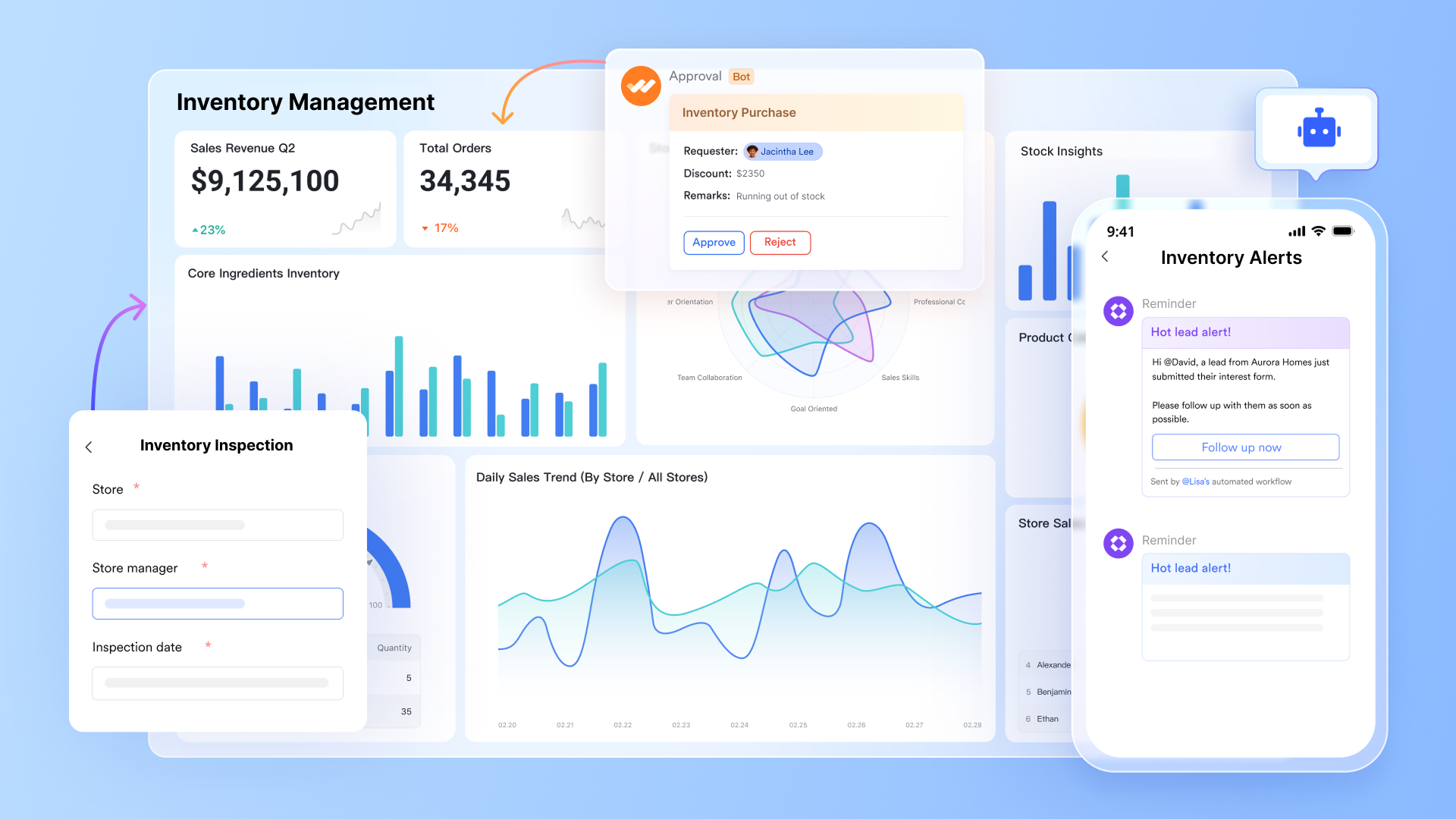
1. Lark: A collaboration platform with streamlined stock control workflows
is an all-in-one collaboration workspace that combines messaging, meetings, documents, project management, approvals, and AI-powered workflows in a single platform. Instead of separating diagram creation from execution tools, Lark allows teams to visualize processes, assign tasks, , and collaborate in context without switching systems.
Structured stock control console
streamlines stock control with its structured fields and multiple views. Using Link and Lookup fields to connect product catalogs with real-time inbound and outbound logs, it automatically updates stock levels across the system. Formula fields further enhance accuracy by calculating remaining inventory and triggering automated alerts when items fall below safety thresholds. To maintain operational clarity, Kanban views allow managers to track the status of restock orders, while Gallery views provide a visual reference for SKU identification. 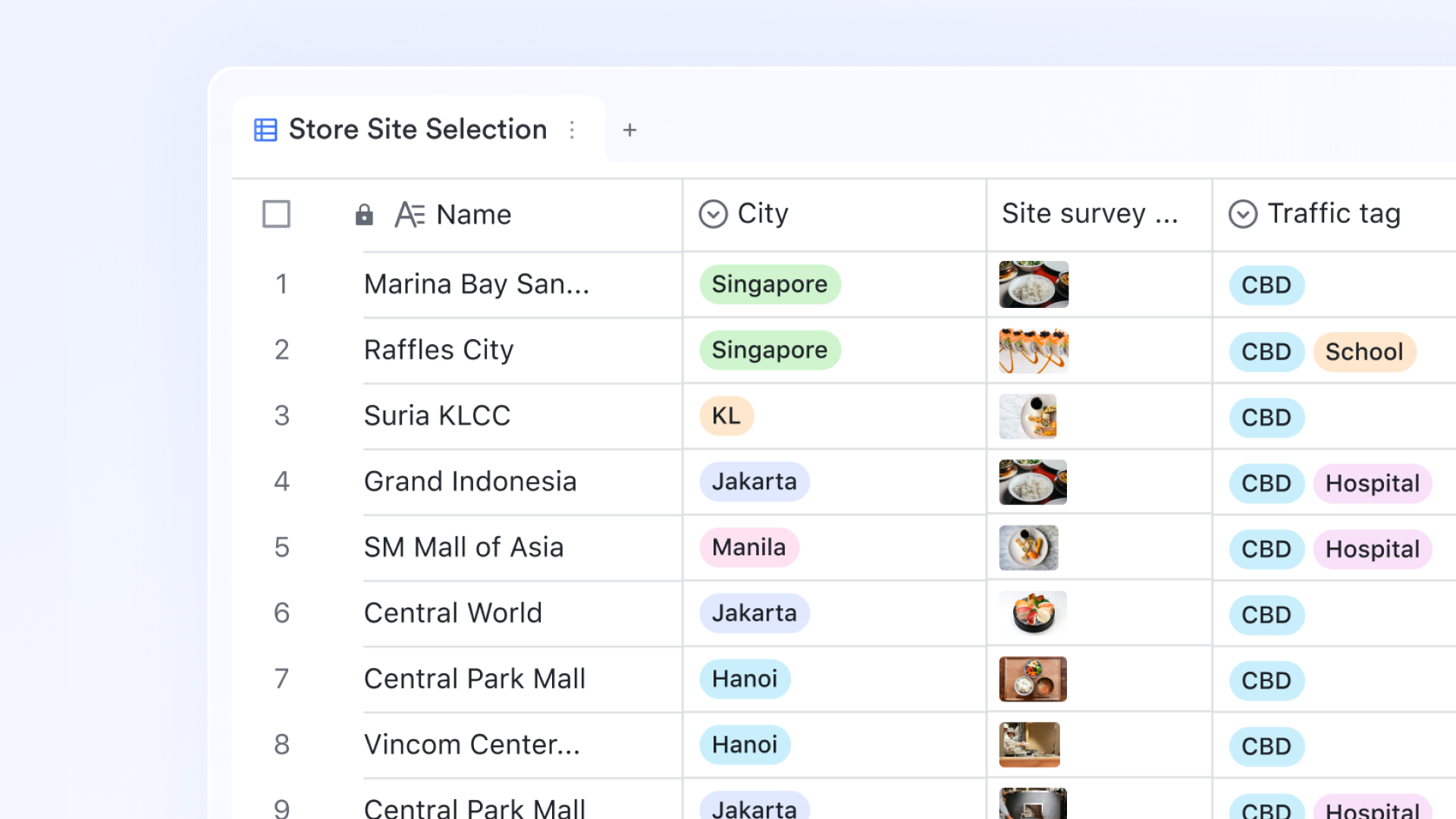
A real-time dashboard with AI analysis
Lark Base dashboards empower warehouse managers by visualizing real-time metrics through 36 block types, including metrics, ranking, and progress charts. By embedding functional view blocks and button blocks, the dashboard acts as a central control center to oversee fulfillment processes and trigger automations instantly. Additionally, smart analysis uses AI power to simplify complex data into actionable insights for stakeholders. 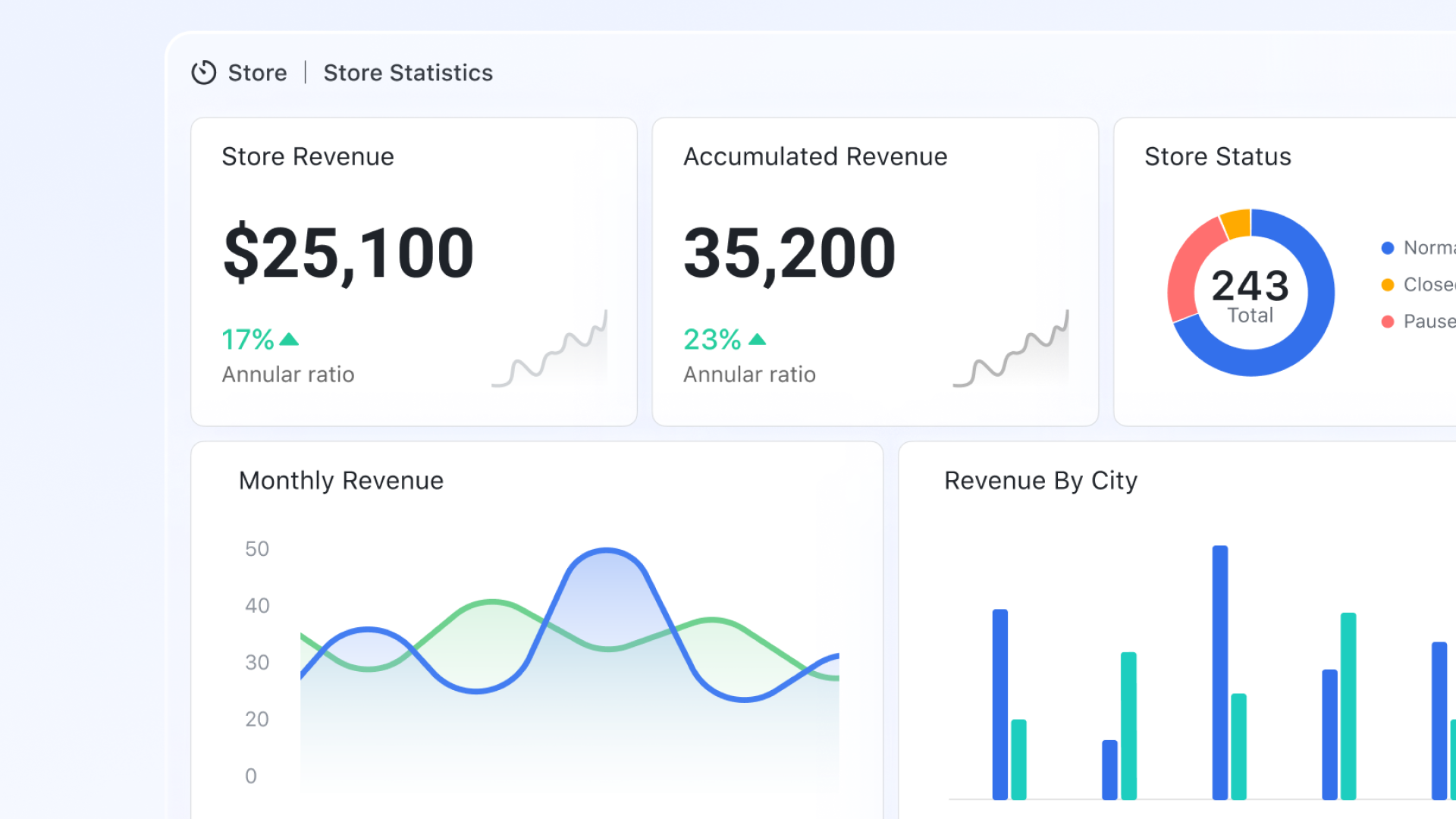
Automated workflows for replenishment alerts
To prevent stockouts, you can configure workflow automations using "IF/Else" nodes to monitor inventory thresholds constantly. When the formula-calculated stock level falls below a pre-defined safety margin, the system automatically triggers a high-priority notification to the procurement team. These alerts can be sent via , complete with a button that links directly to the purchase order form. 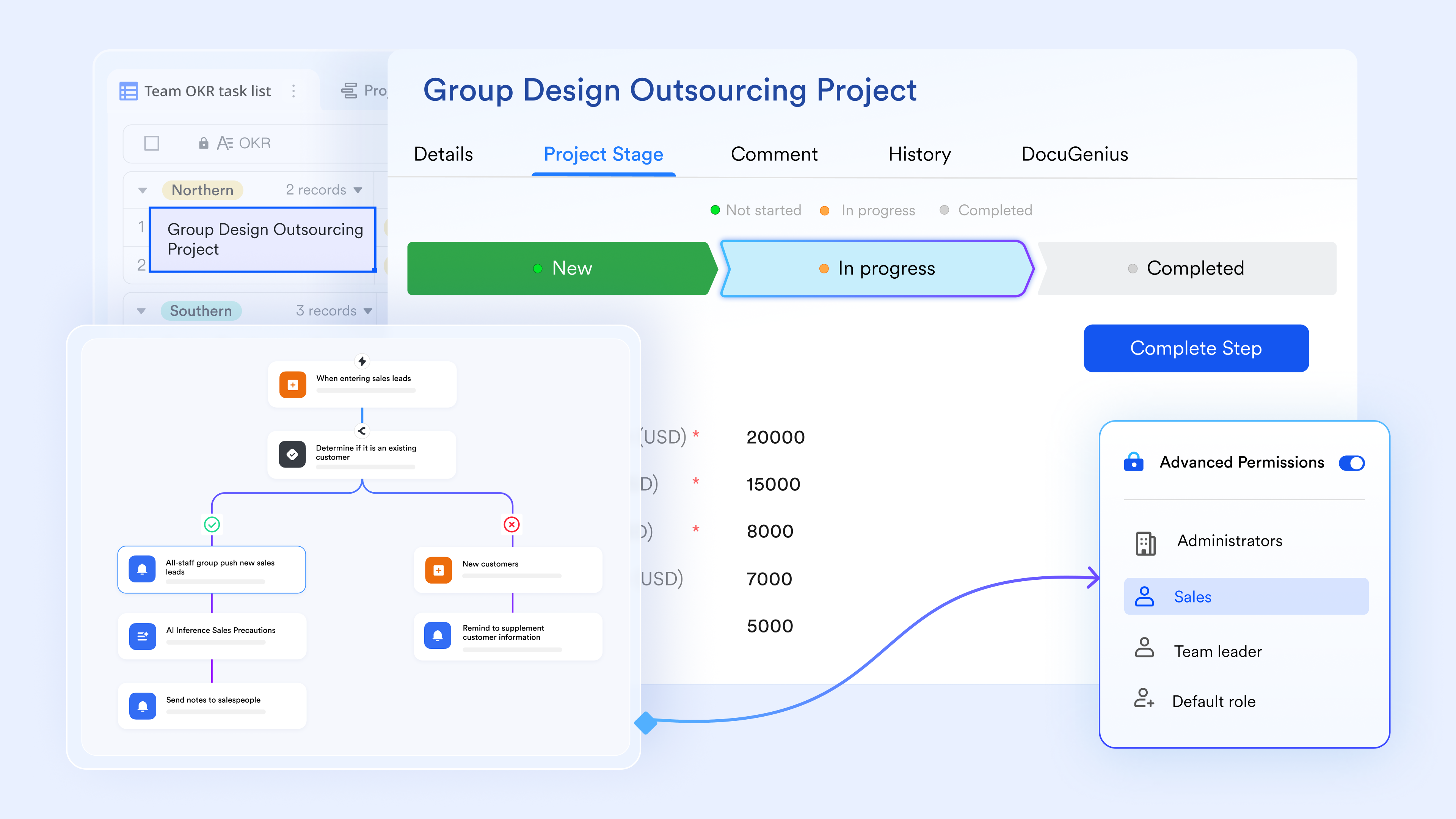
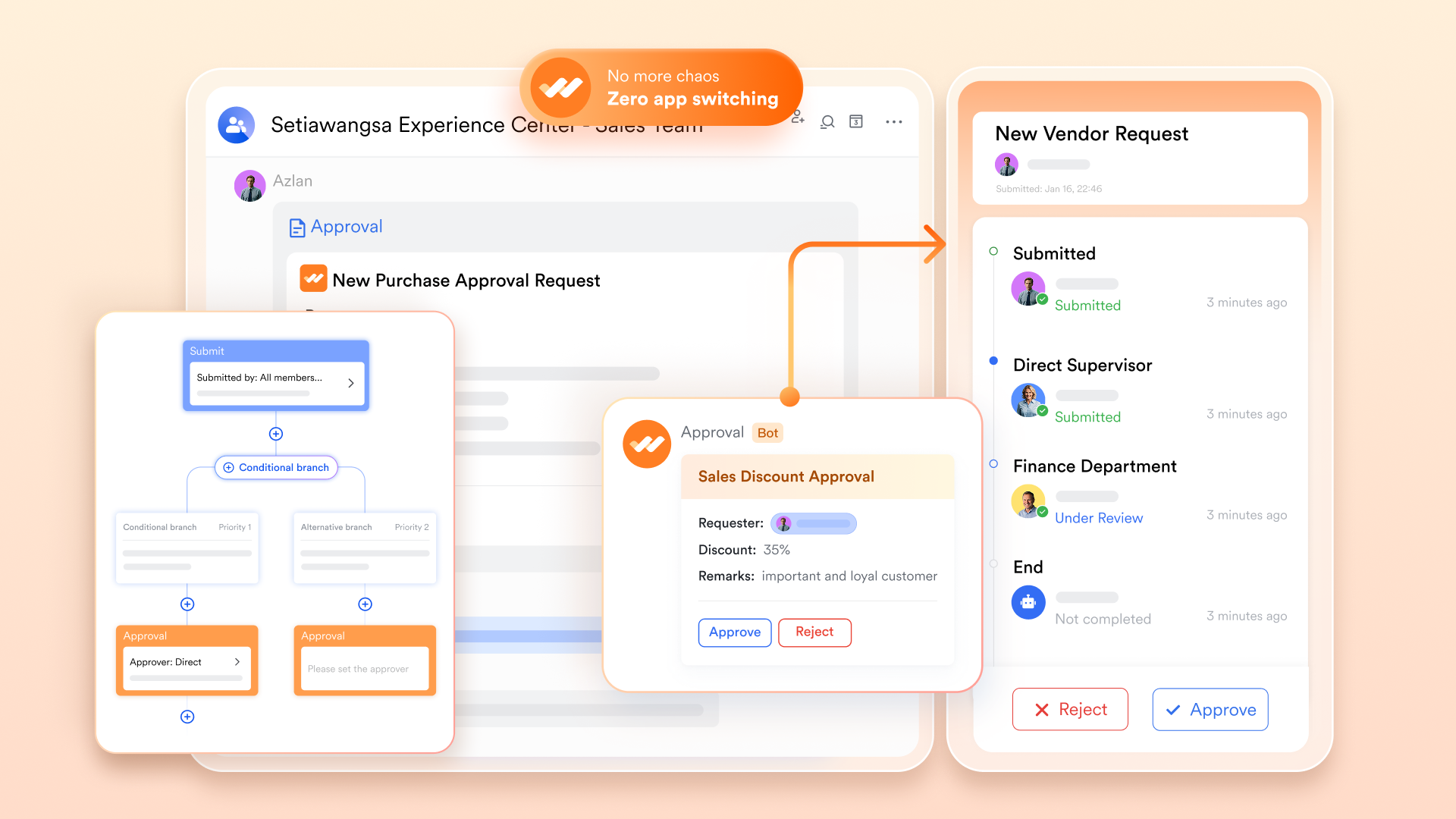
Streamlined approval and requests process
Lark Base connects warehouse stock control to , streamlining high-stakes requests like inventory releases. By syncing finalized approval data directly into the Base, the system ensures real-time record updates while eliminating the risks of manual entry. With pre-built templates, managers can quickly fill in conditional branches in the approval process—for example, a request for a high-value asset might automatically route to a senior director.
Pros:
- Automates accounting workflows such as approvals and notifications
- Supports real-time financial dashboards and reporting
- Enables strong cross-team collaboration in one workspace
- Scales easily for growing finance teams
Cons:
- Initial setup may require guidance, but the step-by-step guides are available through the
:
- Starter plan: Free forever plan that includes 11 powerful tools for up to 20 users. It also comes with 100GB of storage, 1000 automation runs, AI translations, and more.
- Pro plan: $12/user/month (billed annually) for up to 500 users. It includes everything in Starter plus group calling for up to 500 attendees, 15TB of storage, 50,000 automation runs, and more.
- Enterprise plan: for custom pricing. Supports unlimited users and includes even more automation runs and advanced security, compliance, and management features.
For small teams with simple communication needs

18 months message history
1000 Base automation runs/month
2000 rows per table in Base
Most POPULAR
For companies with comprehensive collaboration and management needs
Unlimited message history
500-participant video meetings
50k Base automation runs/month
20k rows per table in Base
For large companies with advanced security and organizational management needs
Get a personalized demo and pricing
Unlimited message history
500-participant video meetings
15 TB storage + 30 GB storage/user
500k Base automation runs/month
50k Base automation runs/month
Most POPULAR
For companies with comprehensive collaboration and management needs
Unlimited message history
500-participant video meetings
50k Base automation runs/month
20k rows per table in Base
2. SafetyCulture: Operations and inventory tracking platform for workplace teams
SafetyCulture is a workplace operations platform designed to help teams manage inspections, track inventory, and improve operational efficiency. It enables organizations to conduct digital inspections, monitor workplace conditions, and collect real-time data from teams in the field. Users can create checklists, report issues, and track tasks through mobile and web applications. The platform also provides analytics and reporting tools that help managers identify trends and improve operational performance. SafetyCulture is widely used in industries such as manufacturing, construction, retail, and logistics to maintain safety standards and streamline daily operations.
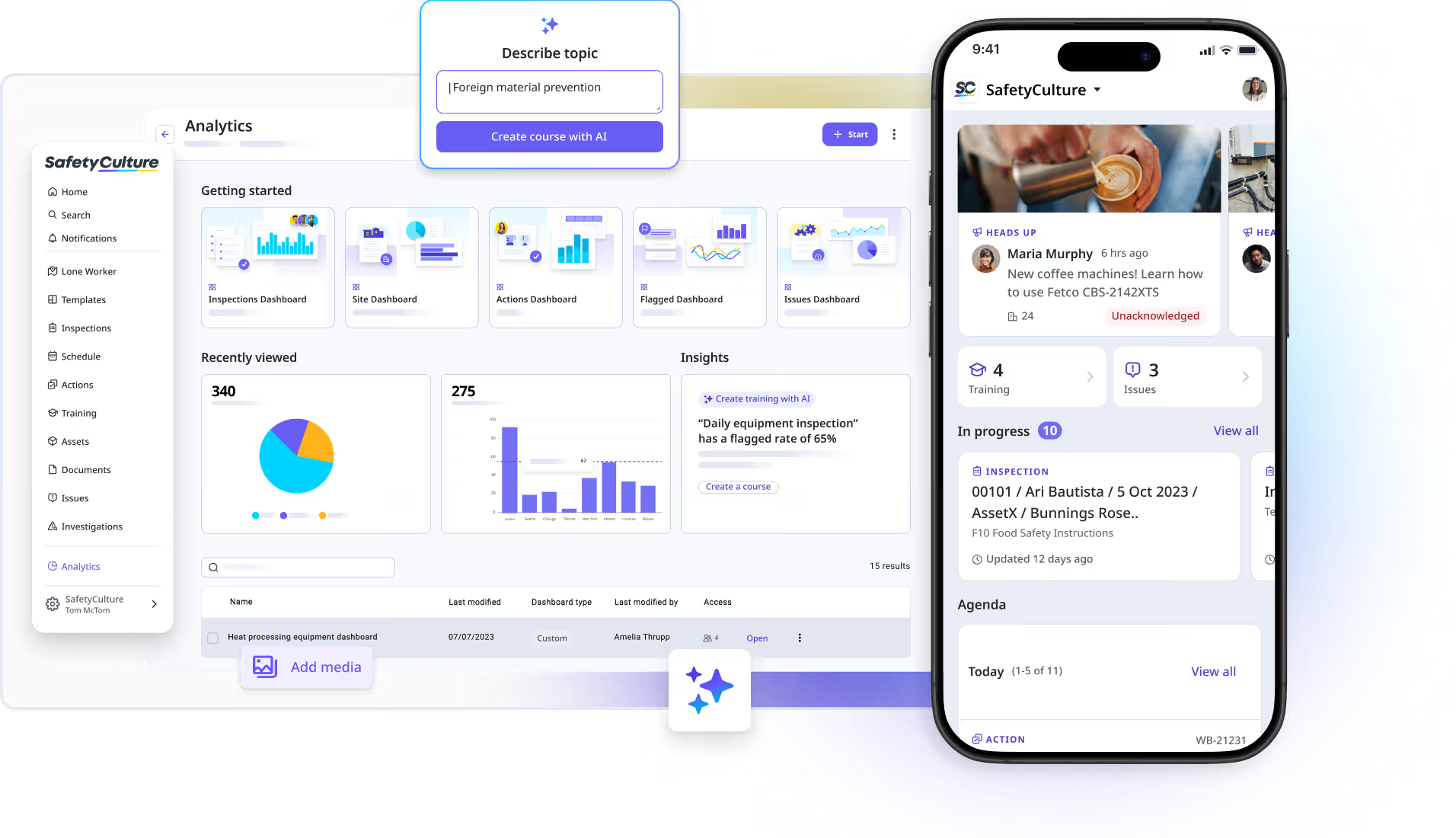
Image source: safetyculture.com
Key features:
- Expense and receipt tracking
Pros:
- Easy to use for beginners
- Strong third-party integrations
- Reliable reporting tools
Cons:
- Pricing increases with features
- Limited workflow customization
- Collaboration can feel basic
Pricing:
- Premium: $24 per seat/month (billed annually)
- Enterprise: Custom pricing
3. Sortly: Visual inventory and stock management software for small businesses
Sortly is an inventory management platform designed to help small businesses track products, supplies, and equipment through a simple visual system. It allows users to organize inventory using folders, images, and custom tags, making it easy to locate and manage items. Teams can scan QR codes or barcodes to update stock levels and monitor inventory in real time. The platform also provides reporting tools that help businesses track usage, manage stock movement, and avoid shortages. Sortly’s user-friendly interface makes it a practical solution for businesses that need clear and organized inventory management.
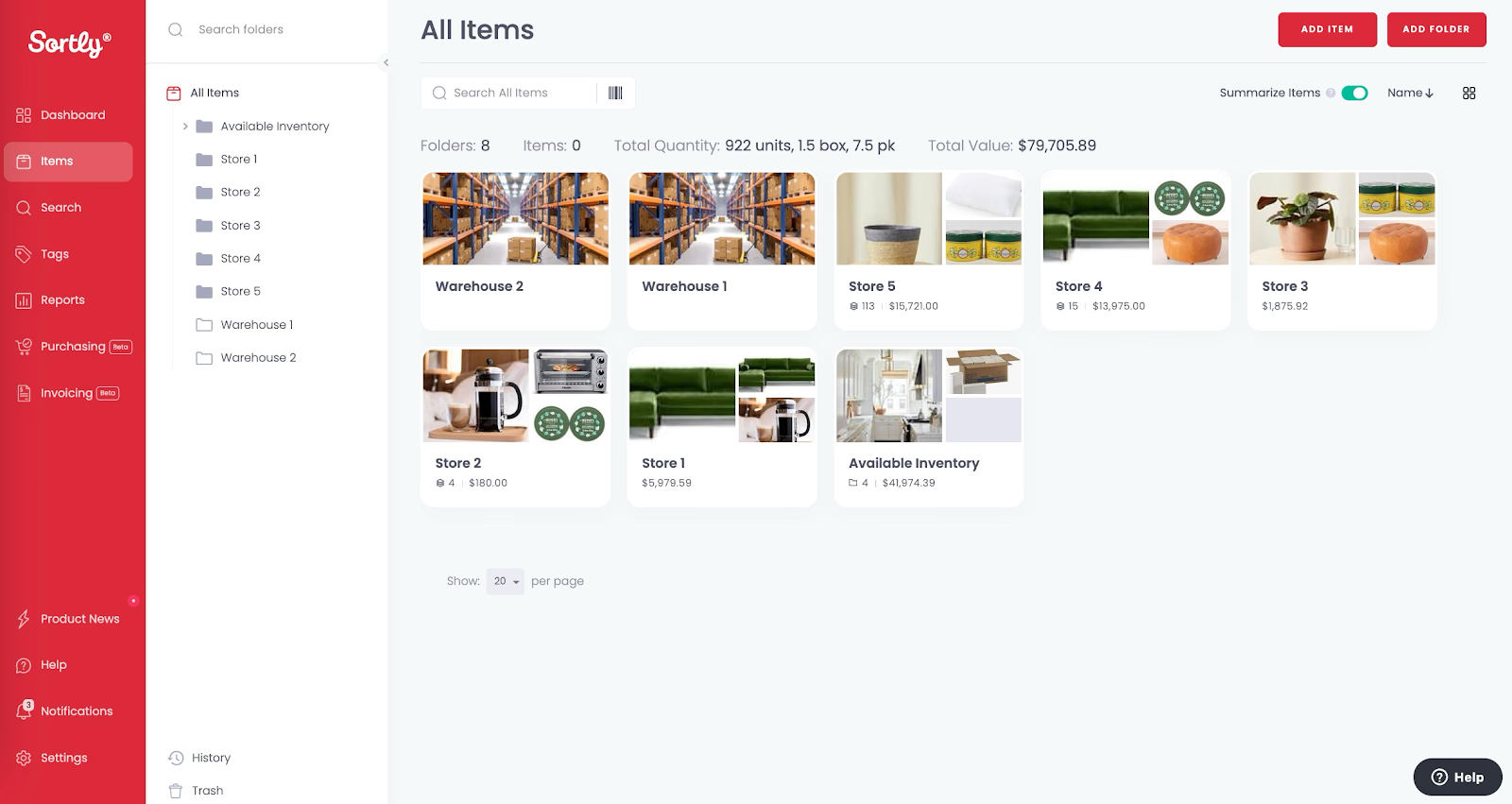
Image source: sortly.com
Key features:
- Inventory reconciliation
Pros:
- Strong automation capabilities
- Scales well for growing teams
- Global support availability
Cons:
- Payroll limitations in some regions
- Add-ons increase overall cost
- Learning curve for advanced features
Pricing:
- Advanced: $24 per month (billed annually)
- Ultra: $74 per month (billed annually)
- Premium: $149 per month (billed annually)
- Enterprise: custom pricing
4. Oracle NetSuite: Enterprise inventory and stock control management system
Oracle NetSuite is a cloud-based enterprise resource planning (ERP) platform that includes advanced inventory and stock management capabilities. It helps businesses track inventory levels, manage orders, and monitor stock movement across warehouses and locations. The system provides real-time visibility into inventory data, allowing organizations to optimize supply chains and avoid stock shortages. NetSuite also integrates inventory management with financials, procurement, and sales processes, helping enterprises maintain accurate records and streamline operations. Its scalable cloud architecture makes it suitable for growing businesses that require centralized inventory and operational control.
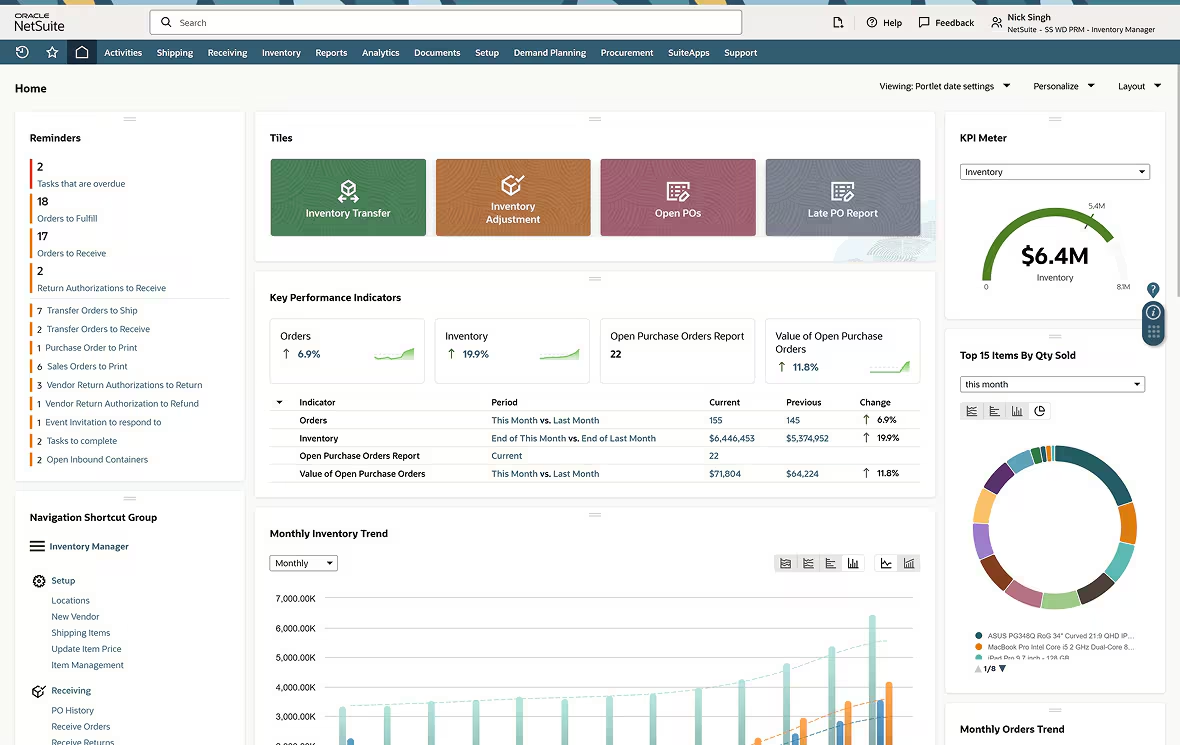
Image source: oracle.com
Key features:
Pros:
- Client-friendly experience
Cons:
- Limited inventory features
- Not ideal for complex accounting
- Pricing scales by clients
Pricing:
5. inFlow: Inventory and stock control software for small business operations
inFlow is an inventory management solution designed to help small and medium-sized businesses track stock, manage orders, and organize product data efficiently. It provides tools for monitoring inventory levels, handling purchase and sales orders, and managing suppliers and customers. Businesses can scan barcodes, update stock in real time, and generate reports to understand product movement and demand. inFlow also supports integrations with eCommerce platforms and accounting tools, helping businesses maintain accurate inventory records while simplifying daily operations and order management.
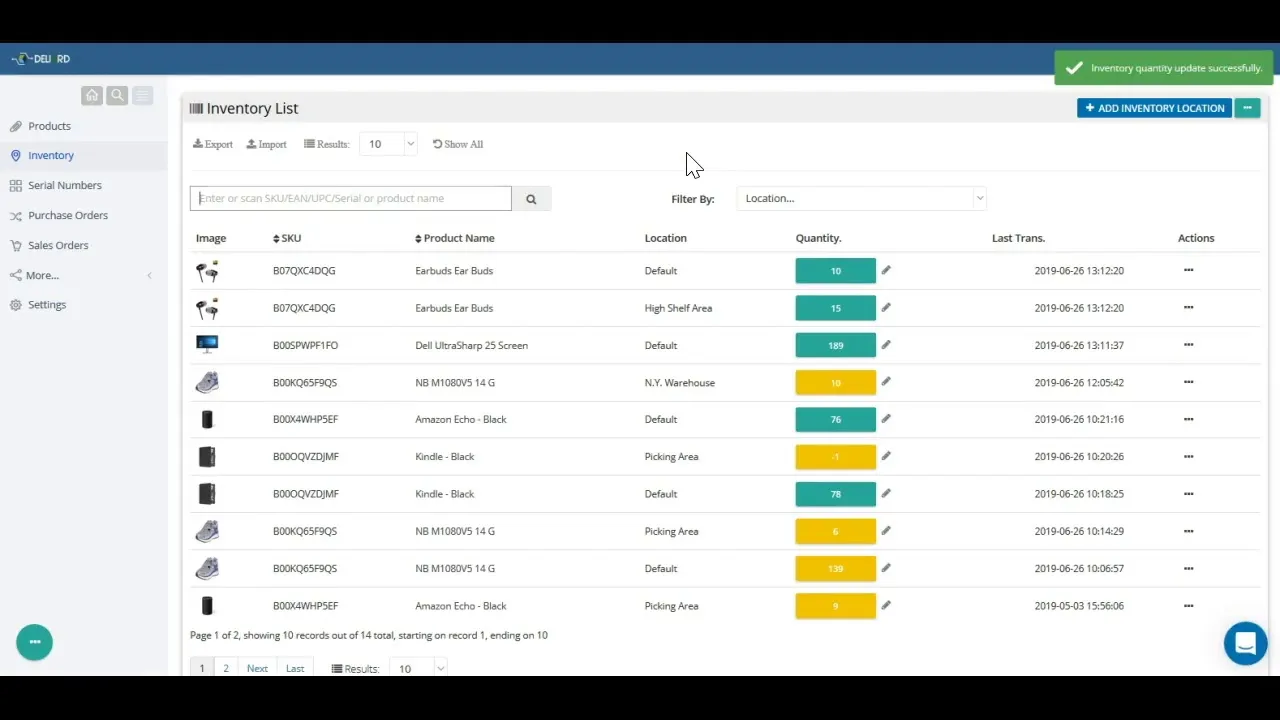
Image source: inflow.com
Key features:
Pros:
- Seamless inFlow integrations
Cons:
- Interface can feel complex
- Limited third-party apps
Pricing:
- Entrepreneur: $129 per month (billed annually)
- Small Business: $349 per month (billed annually)
- Mid-Size: $699 per month (billed annually)
- Enterprise: Custom pricing
6. Cin7: Retail and multi-channel stock control management software
Cin7 is an inventory and stock control platform designed for retailers and businesses selling across multiple channels. It helps companies manage inventory, orders, and product data from a single system while syncing stock levels across online stores, marketplaces, and physical locations. Businesses can track product movement, manage warehouses, and automate order processing in real time. Cin7 also integrates with eCommerce platforms, accounting tools, and shipping systems, helping businesses maintain accurate inventory records and streamline operations across different sales channels.
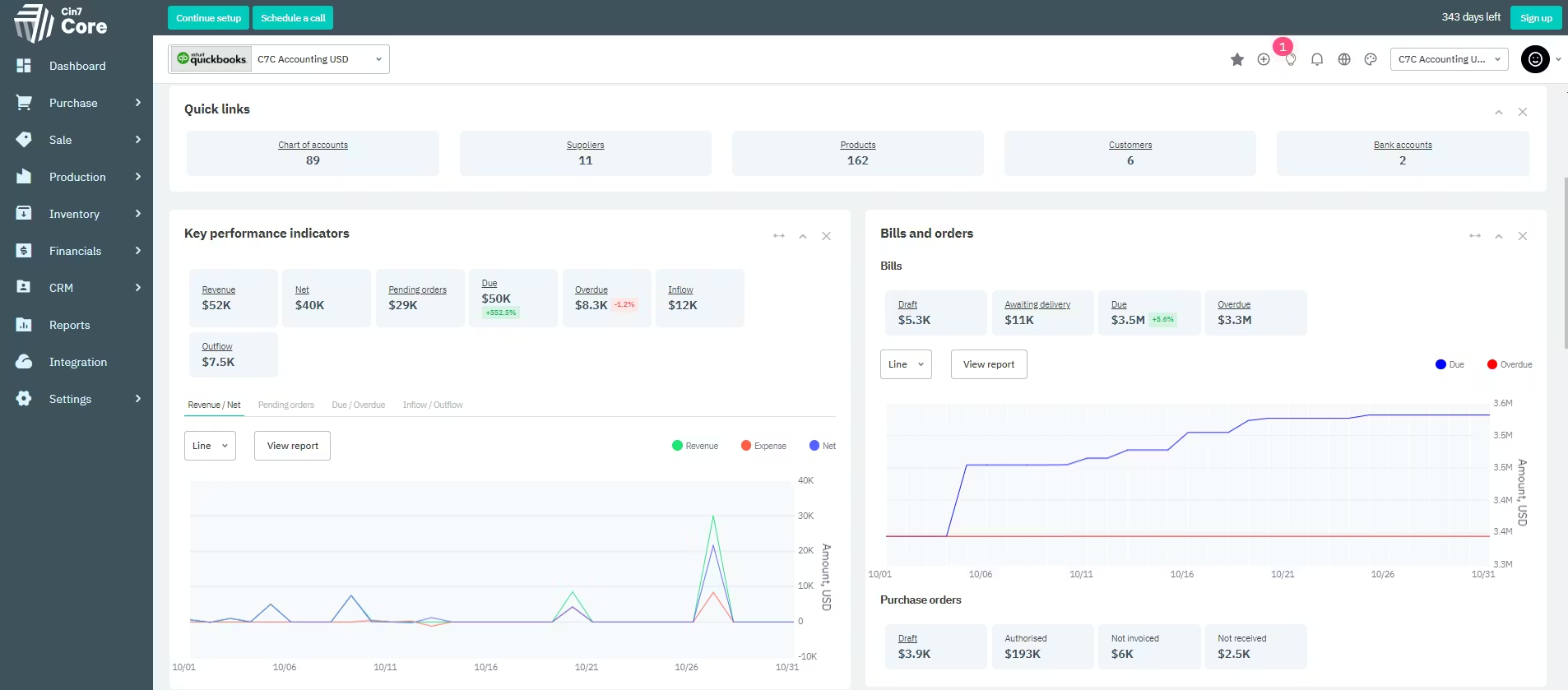
Image source: cin7.com
Key features:
Pros:
Cons:
Pricing:
- Standard: $349 per month
- Advanced: $999 per month
7. Fishbowl: Warehouse inventory and stock control management platform
Fishbowl is an inventory management platform designed to help businesses manage warehouse operations and track stock efficiently. It provides tools for inventory tracking, order management, manufacturing workflows, and warehouse organization. Businesses can monitor stock levels, manage purchase orders, and track product movement across multiple locations. Fishbowl also supports barcode scanning and integrates with accounting software such as QuickBooks, helping companies maintain accurate inventory records. Its warehouse-focused features make it especially useful for manufacturers, distributors, and growing businesses that require structured inventory control.
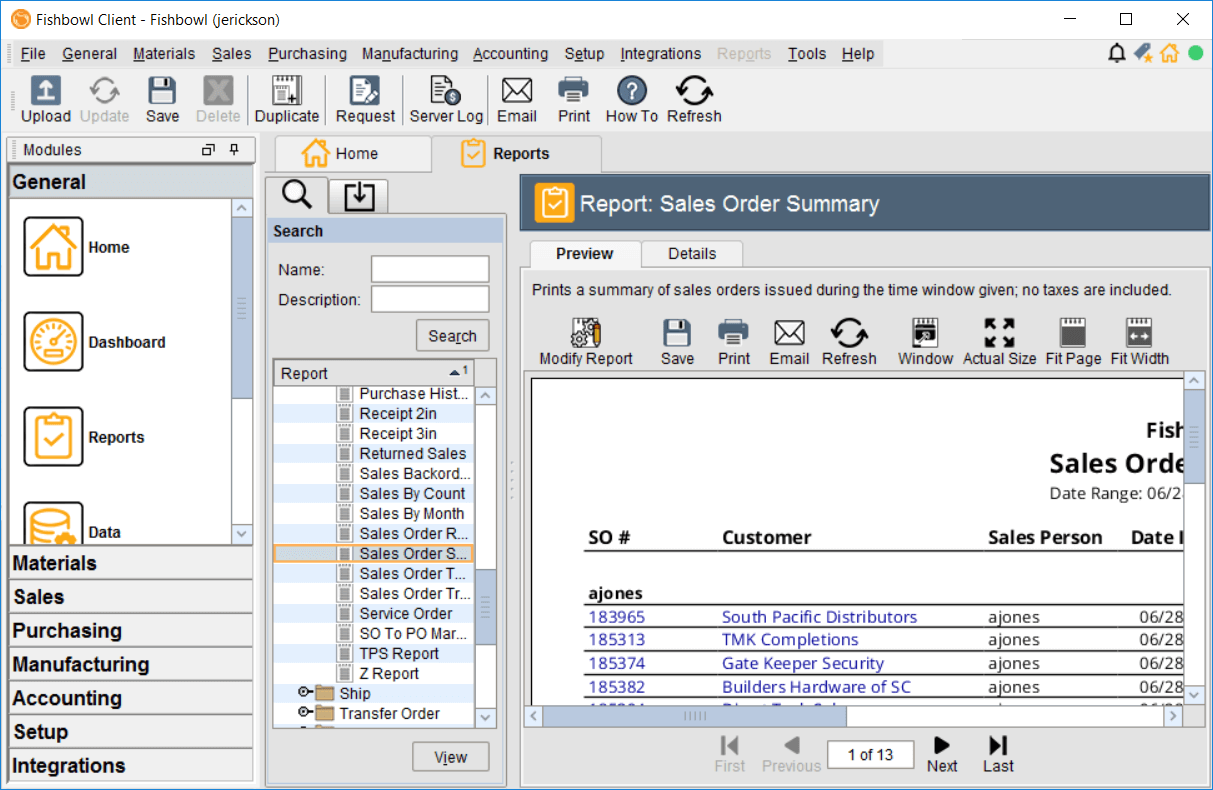
Image source: fishbowl.com
Key features:
Pros:
- Strong compliance support
- Reliable customer service
Cons:
Pricing:
- Essentials: $229 per month (billed annually)
- Growth: $429 per month (billed annually)
- Scale: $729 per month (billed annually)
- Advanced: Custom pricing
8. Acctivate: Accounting-integrated inventory and stock control management
Acctivate is an inventory management platform designed to work closely with accounting systems to help businesses maintain accurate financial and inventory records. It provides tools for tracking stock levels, managing purchase and sales orders, and monitoring product movement across warehouses. By integrating with accounting software such as QuickBooks, Acctivate synchronizes financial data with inventory updates, reducing manual data entry and errors. The platform also offers reporting, order management, and demand forecasting features, helping businesses improve inventory planning and maintain better control over stock operations
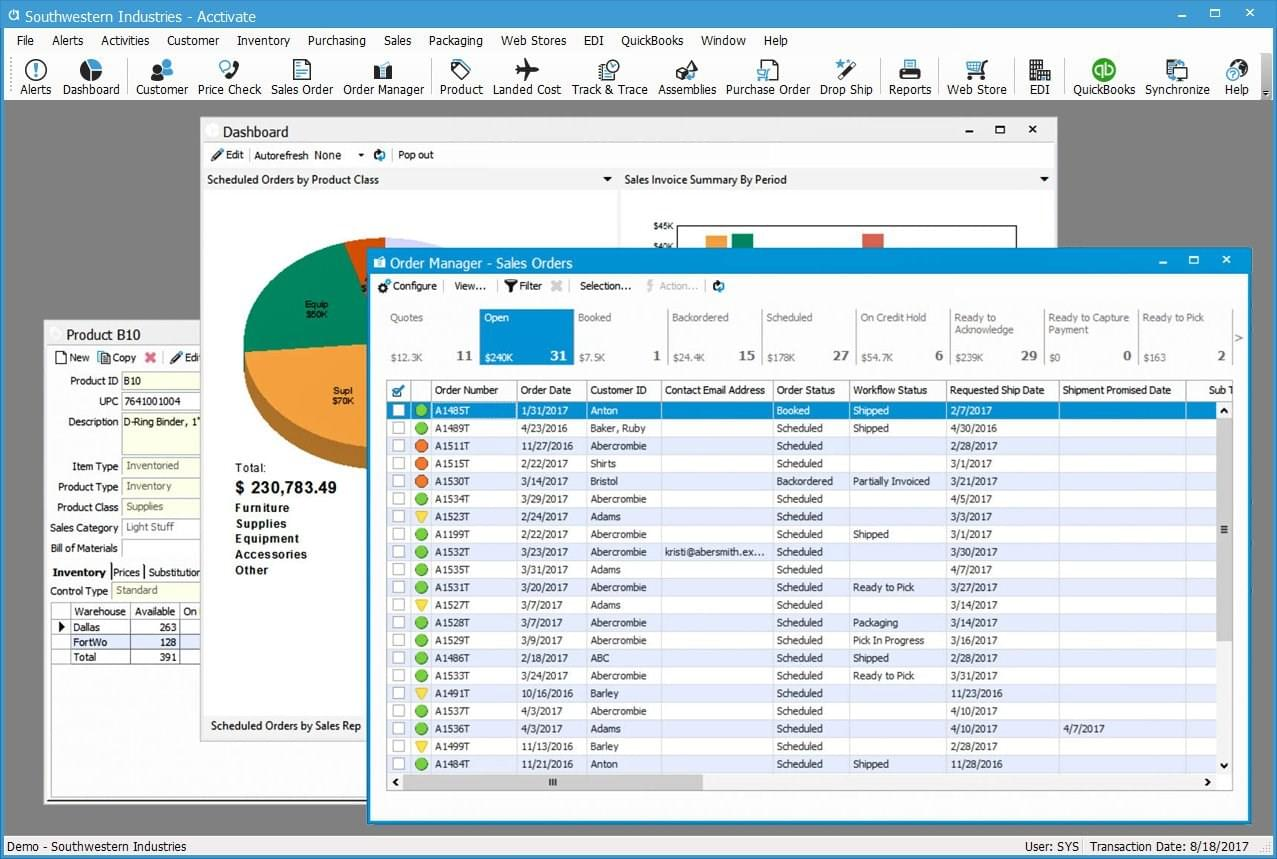
Image source: acctivate.com
Key features:
Pros:
Cons:
- Long implementation time
- Overkill for small businesses
Pricing:
9. Lightspeed: Retail inventory and stock control software with POS integration
Lightspeed is a retail management platform that combines inventory control with point-of-sale (POS) functionality. It helps businesses track stock levels, manage product catalogs, and process sales across physical stores and online channels. Retailers can monitor inventory in real time, manage suppliers, and automate reordering to prevent stock shortages. The platform also provides sales analytics and reporting tools that help businesses understand product performance and customer trends. With built-in POS integration, Lightspeed enables retailers to manage sales transactions and inventory updates within the same system.
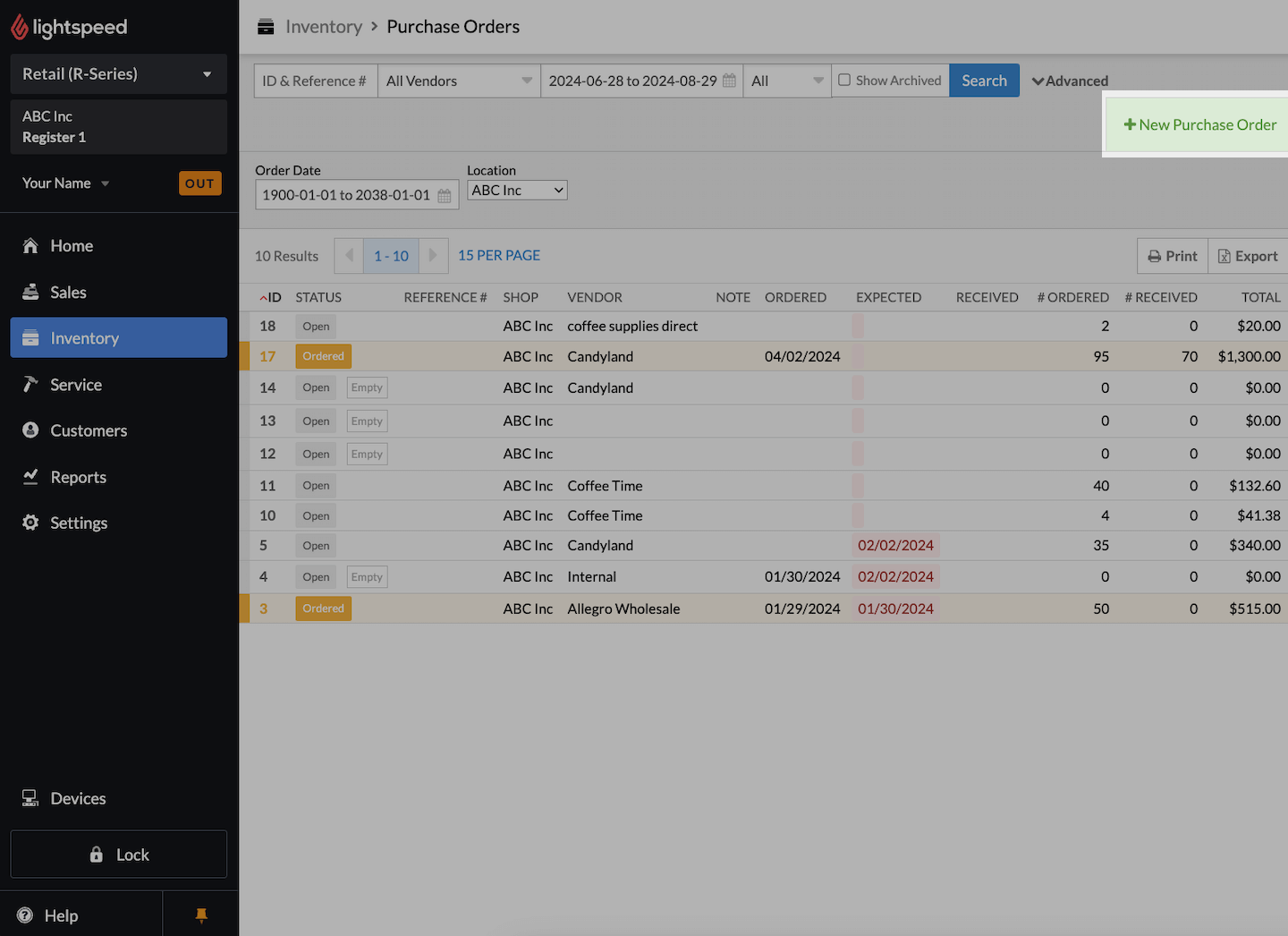
Image source: lightspeed.com
Key features:
Pros:
Cons:
Pricing:
- Basic: $89 per month (billed annually)
- Core: $149 per month (billed annually)
- Plus: $289 per month (billed annually)
10. Extensiv: Warehouse and order fulfillment stock control management system
Extensiv is a warehouse and inventory management platform designed to support order fulfillment and stock control for growing businesses. It helps companies track inventory across warehouses, manage order processing, and streamline fulfillment operations. Businesses can monitor stock levels in real time, automate warehouse workflows, and coordinate shipping processes more efficiently. Extensiv also integrates with eCommerce platforms, marketplaces, and logistics providers, allowing organizations to manage multi-channel orders and inventory from a centralized system. This makes it particularly useful for businesses that handle large volumes of orders and require efficient warehouse management.
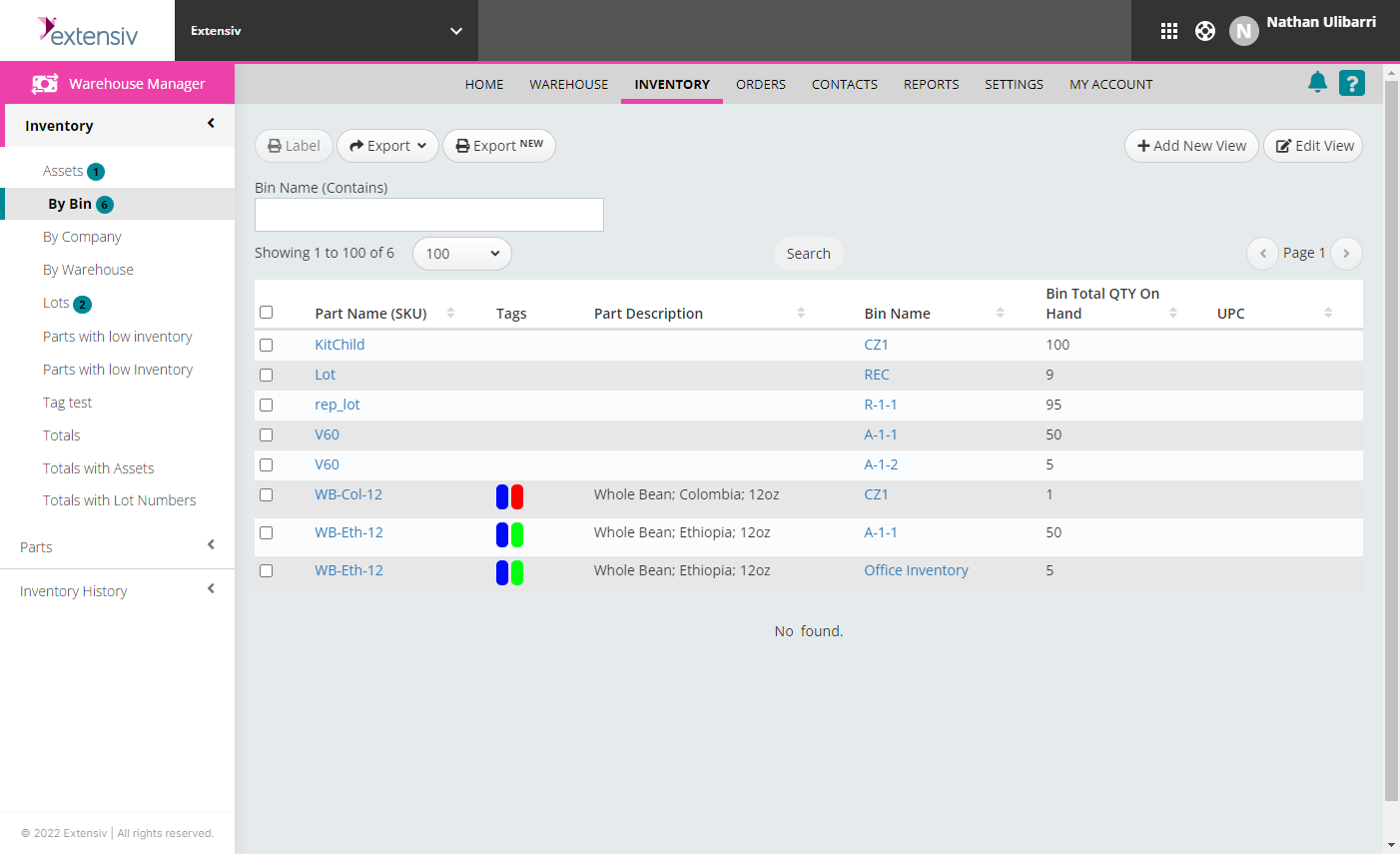
Image source: extensiv.com
Key features:
Pros:
Cons:
- Limited advanced accounting
Pricing:
11. Hybrent: Healthcare supply and inventory stock control software
Hybrent is an inventory and supply chain management platform designed specifically for healthcare organizations. It helps hospitals, clinics, and medical facilities track medical supplies, manage purchasing, and monitor inventory usage. The system provides real-time visibility into stock levels, allowing healthcare teams to avoid shortages and reduce waste. Hybrent also supports procurement management, vendor coordination, and spending analysis, helping healthcare organizations control costs while maintaining adequate medical supply availability. Its healthcare-focused features make it a practical solution for managing critical inventory in medical environments.
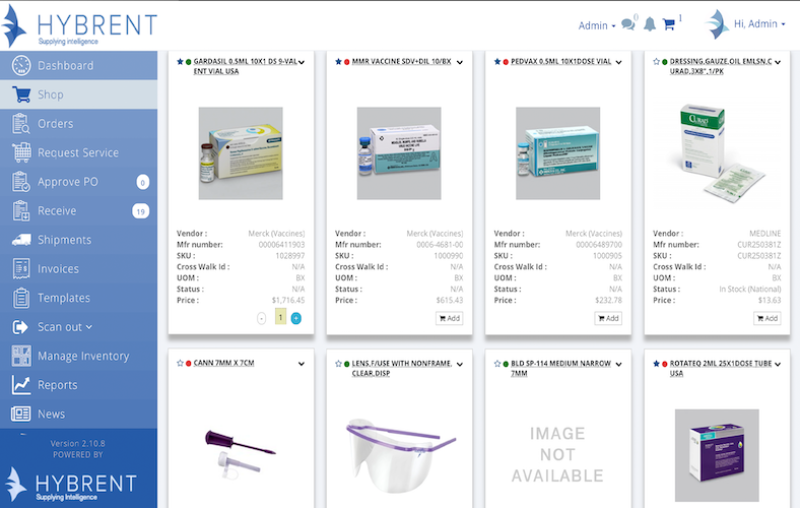
Image source: hybrent.com
Key features:
Pros:
Cons:
Pricing:
12. QuickBooks: Accounting software with integrated stock control features
QuickBooks is a widely used accounting platform that also includes basic inventory and stock control capabilities. It helps businesses manage financial records while tracking product quantities, sales, and purchase orders. Users can monitor inventory levels in real time, update stock automatically when sales occur, and generate financial and inventory reports. By combining accounting and inventory management in one system, QuickBooks helps businesses maintain accurate financial data while keeping track of product movement and stock availability.
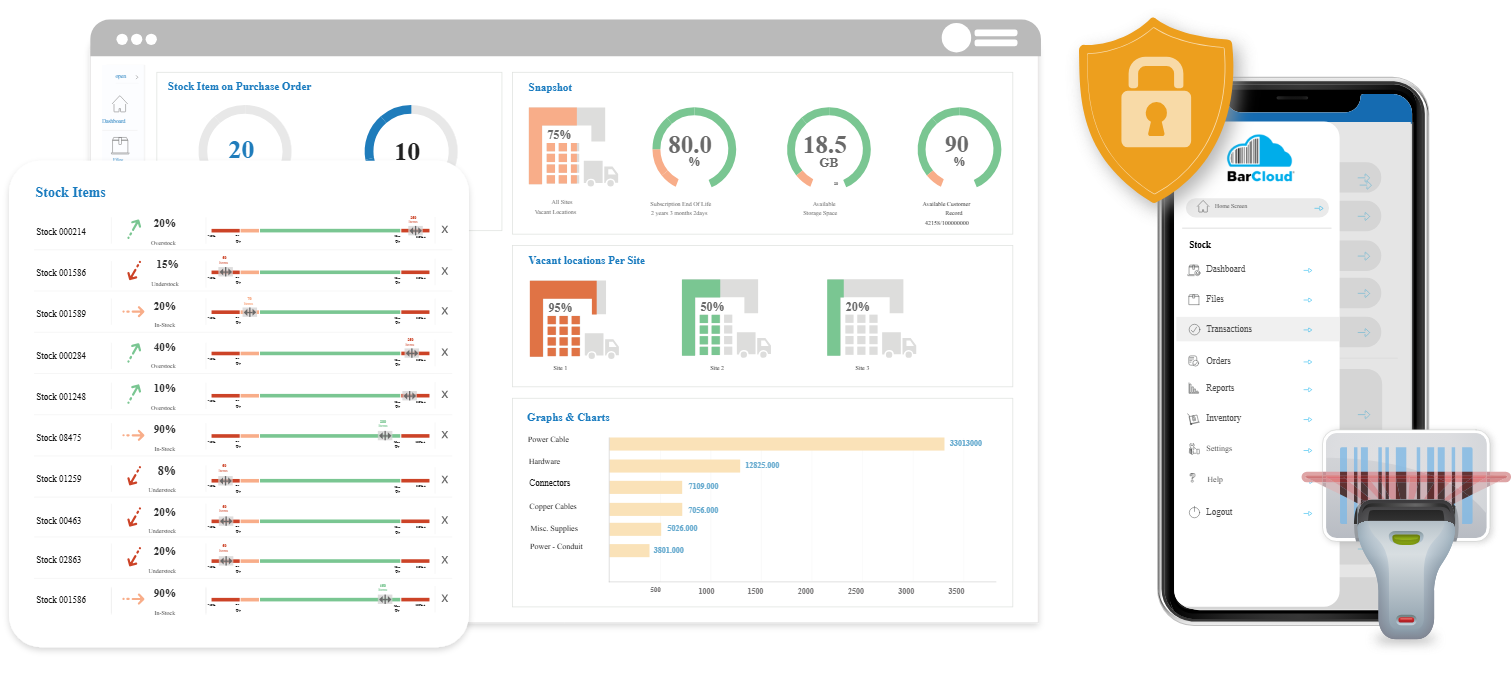
Image source: quickbooks.com
Key features:
Pros:
Cons:
- Limited advanced features
Pricing:
- Simple start: $19 per month
- Essentials: $37.50 per month
- Advanced: $137.50 per month
13. Zoho Inventory: Small business inventory and stock management software
Zoho Inventory is a cloud-based inventory management solution designed to help small and growing businesses track stock, manage orders, and control warehouse operations from a single platform. It allows companies to monitor inventory levels in real time, automate order processing, and manage sales across multiple channels such as online marketplaces and physical stores. The platform also supports features like barcode scanning, batch and serial number tracking, and low-stock alerts to prevent shortages. By centralizing inventory, orders, and shipping management, Zoho Inventory helps businesses streamline operations and maintain accurate stock records.
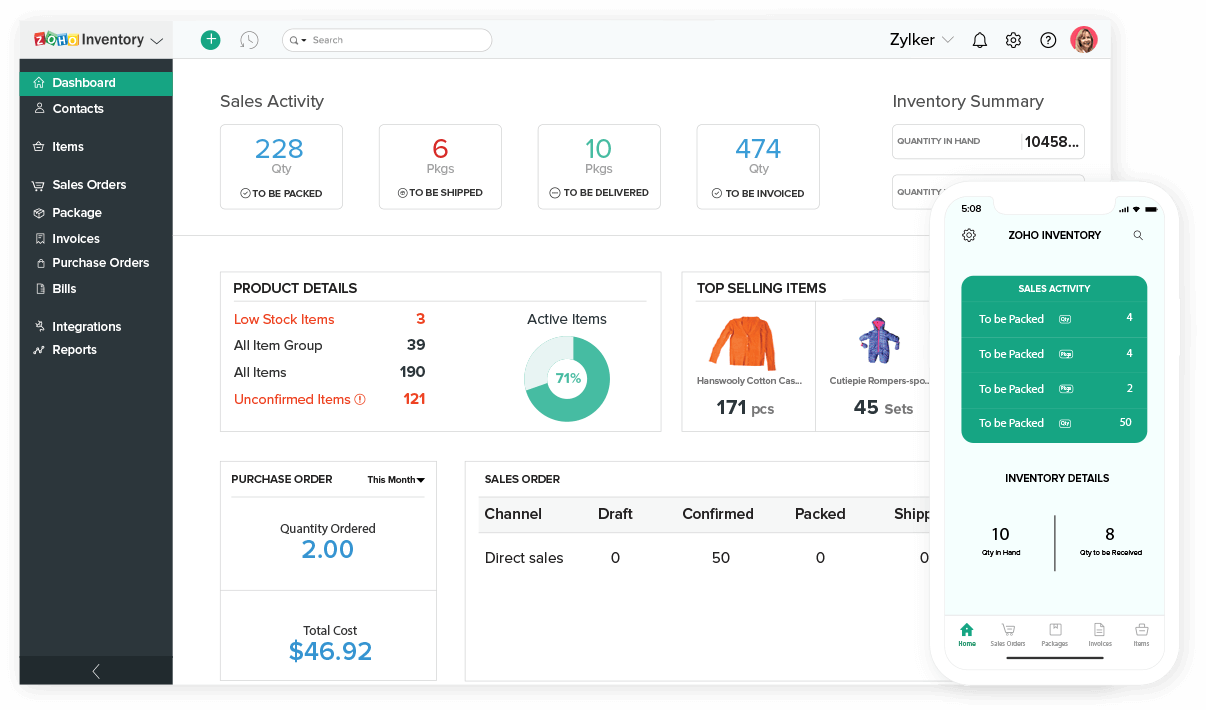
Image source: zoho.com
Key features:
Pros:
Cons:
Pricing:
- Standard: $29 per organization/month (billed annually)
- Professional: $79 per organization/month (billed annually)
- Premium: $129 per organization/month (billed annually)
- Enterprise: $249 per organization/month (billed annually)
14. Odoo Inventory: Customizable stock control and warehouse management
Odoo Inventory is a flexible inventory management system designed to help businesses manage stock, warehouses, and supply chain operations efficiently. It provides tools for tracking inventory levels, managing multiple warehouses, and automating stock movements between locations. Businesses can use features such as barcode scanning, batch tracking, and automated replenishment rules to maintain accurate stock records. Because it is part of the broader Odoo ERP ecosystem, the inventory module can integrate with sales, accounting, purchasing, and manufacturing tools. This customization capability makes Odoo Inventory suitable for businesses that need adaptable stock control and warehouse management solutions.
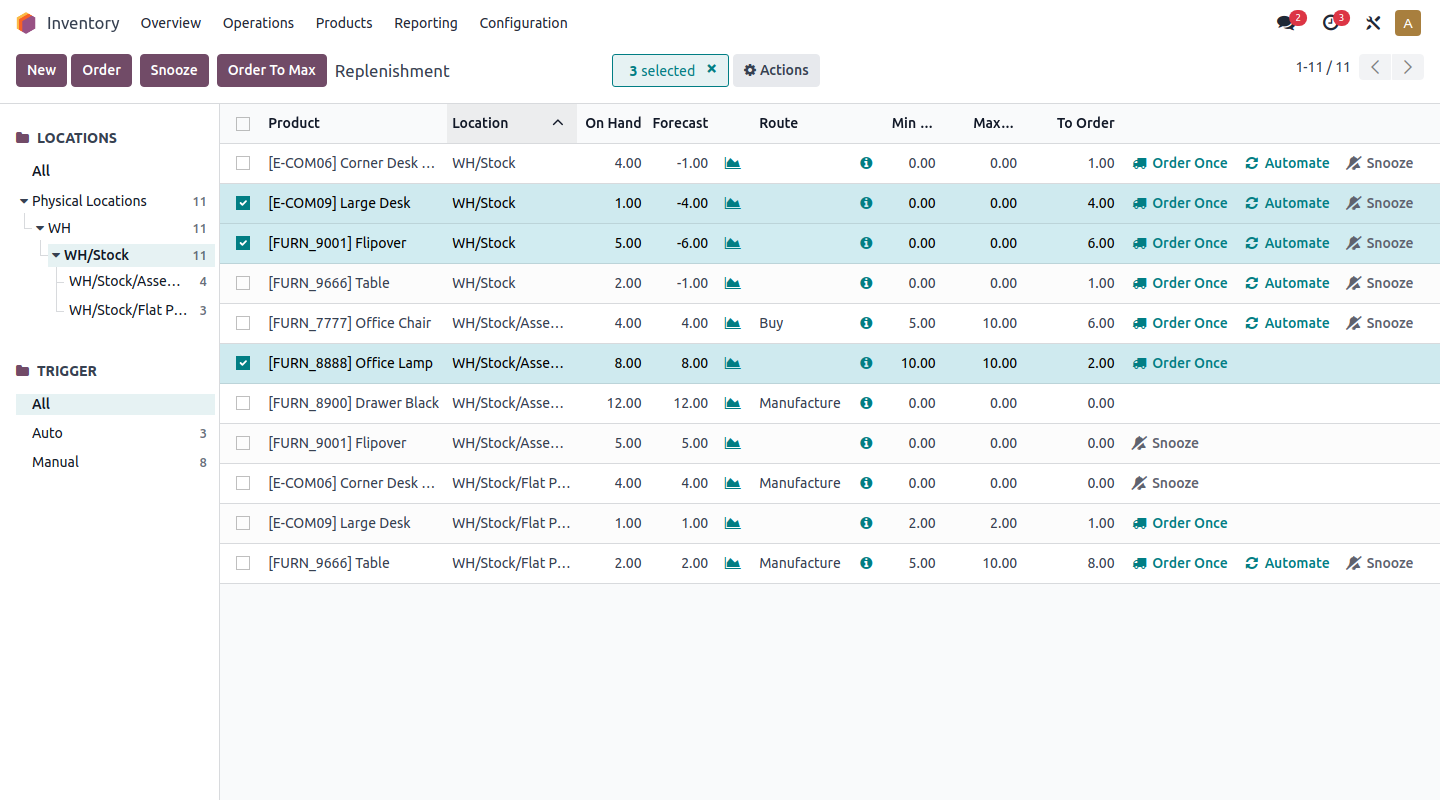
Image source: odoo.com
Key features:
Pros:
Cons:
- Limited official support
Pricing:
- One app free: $0 per user/month (billed annually)
- Standard: $24.90 per user/month (billed annually)
- Custom: $37.40 per user/month (billed annually)
15. Square: Retail and shop stock control software with POS inventory tracking
Square is a retail management platform that combines point-of-sale (POS) functionality with built-in inventory tracking tools. Businesses can track product quantities, manage stock levels, and monitor sales activity from a single system. The platform automatically updates inventory counts when a sale is completed, helping retailers maintain accurate stock records. It also provides features such as low-stock alerts, inventory reports, and product catalog management to help businesses stay organized and avoid shortages. By integrating POS payments, inventory tracking, and sales analytics, Square enables retailers to manage both transactions and stock control efficiently within one platform.
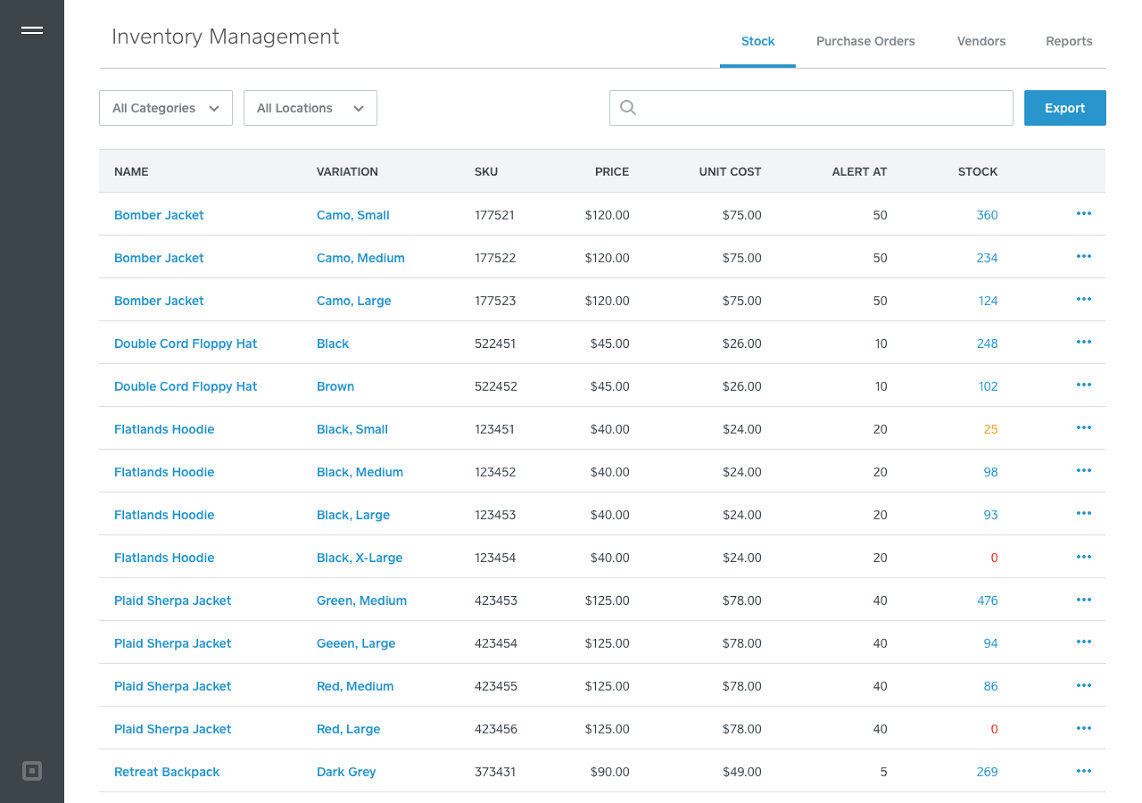
Image source: square.com
Key features:
Pros:
Cons:
Pricing:
- Square Free: $0 per location/month
- Square Plus: $49 per location/month
- Square Premium: $149 per location/month
Major advantages of inventory stock control software
Inventory stock control software helps businesses manage products, track stock levels, and streamline supply chain operations more efficiently. By automating inventory processes and providing real-time data, these tools improve accuracy, reduce operational delays, and support better inventory planning.
- Real-time inventory visibility: Inventory stock control software provides businesses with real-time insights into stock levels across warehouses, retail locations, or online stores. This visibility helps managers quickly identify shortages, overstock situations, and product movement, enabling better decision-making and smoother .
- Reduced manual errors: By automating stock updates and tracking processes, businesses can significantly reduce human errors that often occur with manual inventory management. Automated systems ensure that stock counts, order records, and product data remain accurate and consistent.
- Improved order and supply management: Stock control systems help businesses , supplier relationships, and product replenishment more efficiently. Automated reorder alerts and demand tracking ensure that businesses maintain optimal inventory levels and avoid unexpected stockouts.
- Better financial and operational planning: Many platforms integrate with accounting tools and provide detailed inventory reports. This allows businesses to analyze sales trends, track product profitability, and forecast demand more accurately, helping managers plan inventory purchases and budgets effectively.
- Enhanced warehouse efficiency: Inventory management software helps streamline warehouse operations by organizing product locations, tracking stock movement, and supporting barcode or QR code scanning. This improves picking, packing, and shipping processes while reducing delays and operational confusion.
- Multi-channel inventory control: Businesses that sell across multiple channels, such as eCommerce platforms, marketplaces, and physical stores, can manage all inventory from a single centralized system. This ensures stock levels remain synchronized across channels and prevents overselling or stock discrepancies.
- Scalability for growing businesses: As businesses grow, managing inventory manually becomes increasingly complex. Stock control software can scale with the business by supporting multiple warehouses, larger product catalogs, and higher order volumes while maintaining operational efficiency.
Grow businesses with accurate control of inventory with Lark
Emerging trends shaping the future of stock control software
Modern inventory systems are evolving rapidly as businesses adopt smarter and more automated tools. New technologies are transforming how stock control management software tracks products, manages supply chains, and supports growing businesses.
- AI-powered demand forecasting: Advanced analytics and artificial intelligence are being integrated into modern stock control management software to predict product demand more accurately. By analyzing historical sales data, seasonal patterns, and market trends, these systems help businesses plan inventory levels more efficiently and reduce the risk of overstocking or shortages.
- Cloud-based inventory platforms: Cloud technology is becoming a standard feature in many inventory solutions. Cloud-based stock control software for small businesses allows companies to access inventory data from anywhere, making it easier to manage warehouses, retail stores, and online sales channels from a centralized platform.
- Integration with retail and eCommerce systems: Many modern retail stock control software platforms now integrate directly with eCommerce platforms, marketplaces, and point-of-sale systems. This integration ensures that inventory levels update automatically whenever a product is sold online or in-store, reducing manual and improving accuracy.
- Automation and smart warehouse management: Automation features such as automatic reorder alerts, barcode scanning, and warehouse tracking systems are becoming more common. These tools help businesses streamline warehouse operations, reduce manual labor, and ensure that products are stored and retrieved efficiently.
- Mobile-first inventory management: Mobile applications are becoming an essential part of modern inventory solutions. Mobile-enabled stock control management software allows employees to scan products, update stock levels, and manage inventory directly from smartphones or tablets while working on the warehouse floor or in retail environments.
- Data-driven inventory insights: Businesses increasingly rely on detailed reporting and analytics to understand product performance and stock movement. Modern stock control software for small businesses includes dashboards and analytics tools that provide insights into sales trends, supplier performance, and inventory turnover rates.
- Multi-location inventory management: As companies expand their operations, managing inventory across multiple warehouses and retail locations becomes more complex. Advanced retail stock control software now provides centralized across multiple locations, helping businesses maintain accurate stock visibility across their entire supply chain.
Conclusion
Effective inventory management is essential for businesses that handle physical products, warehouses, or retail operations. Modern inventory stock control software helps companies monitor product movement, reduce manual errors, and maintain accurate stock levels across multiple locations. Whether a business needs warehouse stock control software for logistics operations or shop stock control software for retail environments, the right solution can significantly improve efficiency and supply chain visibility.
Platforms like also support operational coordination by enabling teams to manage workflows, track updates, and collaborate on inventory processes in a single centralized workspace. By choosing the right stock control tools and adopting modern inventory technologies, businesses can streamline operations and build a more reliable for long-term growth.
Eliminate stockouts and sync your team with Lark today
FAQs
What software is used for stock control?
Businesses use different types of inventory stock control software to track products and manage stock levels. Popular solutions include Zoho Inventory, Oracle NetSuite, inFlow, Odoo Inventory, and Cin7. These tools help companies monitor stock movement, automate reorder processes, and manage inventory across warehouses, stores, and online sales channels.
What is the best inventory control system?
The best inventory control system depends on business size and operational needs. Small businesses often prefer tools like Zoho Inventory or Sortly, while larger companies may use enterprise platforms such as Oracle NetSuite or advanced warehouse stock management systems. A good inventory system should provide real-time tracking, reporting, automation, and integration with accounting or eCommerce platforms.
Can I use Excel for inventory management?
Yes, Excel can be used for basic inventory management, especially for small businesses with limited product catalogs. However, spreadsheets require manual updates and may become difficult to manage as inventory grows. Dedicated stock control software offers automation, real-time tracking, and reporting features that make inventory management more efficient.
What is the 80/20 rule in inventory management?
The 80/20 rule, also known as the Pareto Principle, suggests that around 80% of a company’s sales often come from about 20% of its products. In inventory management, this concept helps businesses identify their most valuable items, so they can focus on maintaining adequate stock levels and optimizing purchasing strategies for those high-demand products.
Related reading