Streak CRM has built a substantial following by offering a lightweight CRM that works directly inside Gmail. For individuals and small teams who live in their inbox, this approach feels natural and easy to adopt. However, as teams grow and workflows become more structured, questions about Streak pricing, plan limits, and long-term value surface.
This guide breaks down Streak CRM pricing, including what the free plan really offers, what you get at each paid tier, and where the limitations begin to matter. We'll also look at why many teams eventually move beyond inbox-centric CRMs and how platforms like Lark support more scalable, collaborative workflows without forcing constant upgrades.
Align CRM workflows with your needs today
Quick overview: Streak pricing in a glance
Before selecting a productivity suite, it's worth reviewing the latest and plans.
Information source: streak.com
Update time: 2025-12-16
Note: Pricing and plan details reflect publicly available data as of the update date and may vary based on region, billing cycle, and number of agents.
What is Streak
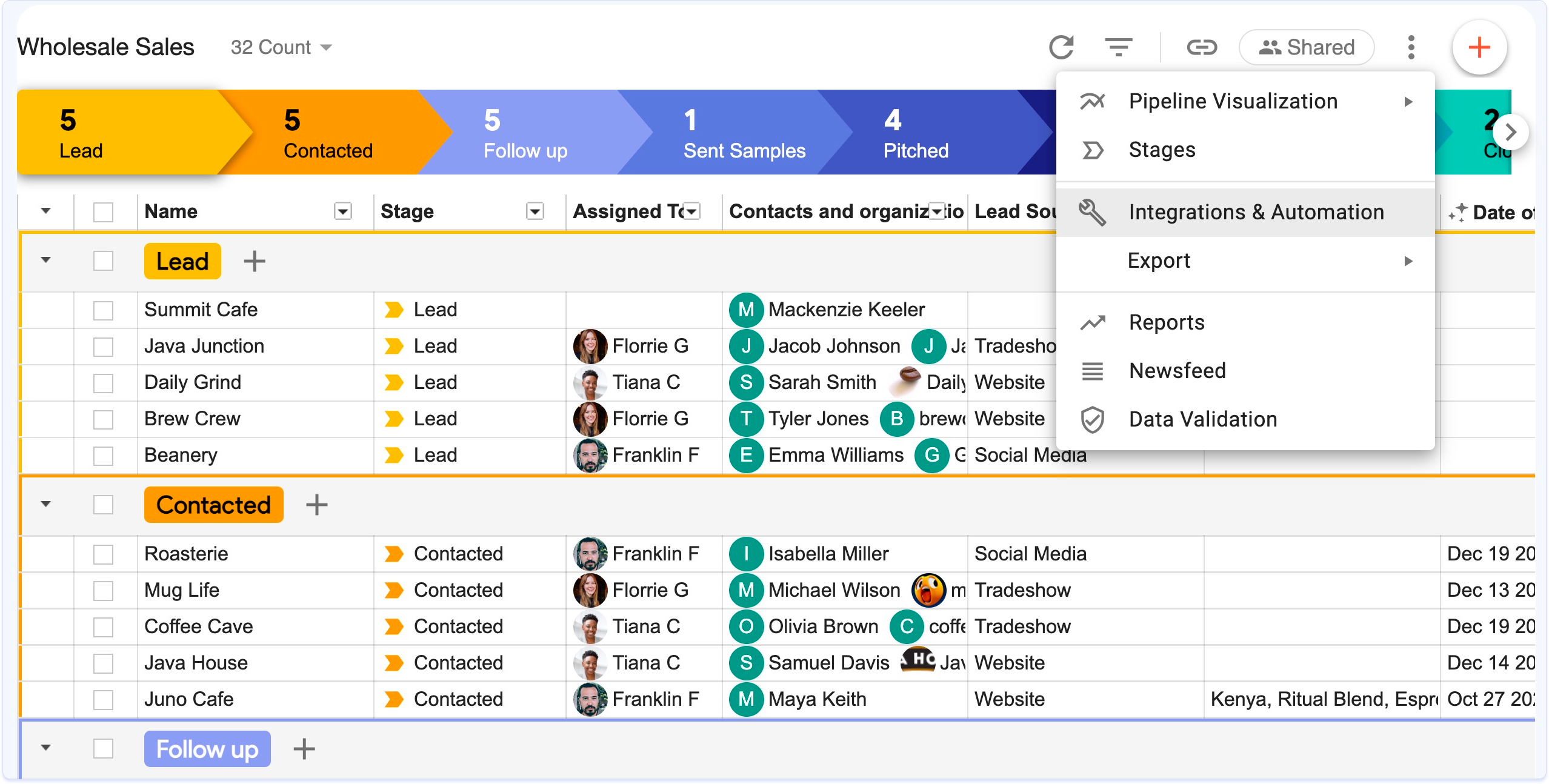
Image source: streak.com
Streak is a lightweight built directly into Gmail, designed for users who prefer managing relationships from their email inbox. Instead of using a separate CRM interface, Streak allows individuals and small teams to organize contacts, deals, and workflows using pipelines that live alongside email conversations. Each record, known as a "box," can store notes, tasks, reminders, and files tied to specific email threads.
Streak is commonly used for sales outreach, recruiting, partnerships, fundraising, and customer support, where email remains the primary communication channel. Its native Gmail integration reduces setup time and makes adoption easier for users who want basic CRM functionality without complex configuration. However, because Streak is centered around email-based workflows, it offers limited collaboration, automation, and reporting compared to full-scale CRM platforms. As teams grow and require shared ownership, structured processes, and , organizations often reassess whether an inbox-based CRM like Streak can continue to meet their operational needs.
Streak CRM pricing plan: What you actually get
Streak CRM pricing plans are structured around how deeply teams want to use CRM functionality inside Gmail. While each tier builds on the same inbox-based foundation, , reporting, and administrative controls increases with price. The differences between plans are less about core CRM usage and more about scale, visibility, and control. Understanding what each tier actually unlocks helps teams assess whether higher plans solve fundamental workflow gaps or simply extend inbox-based limitations.
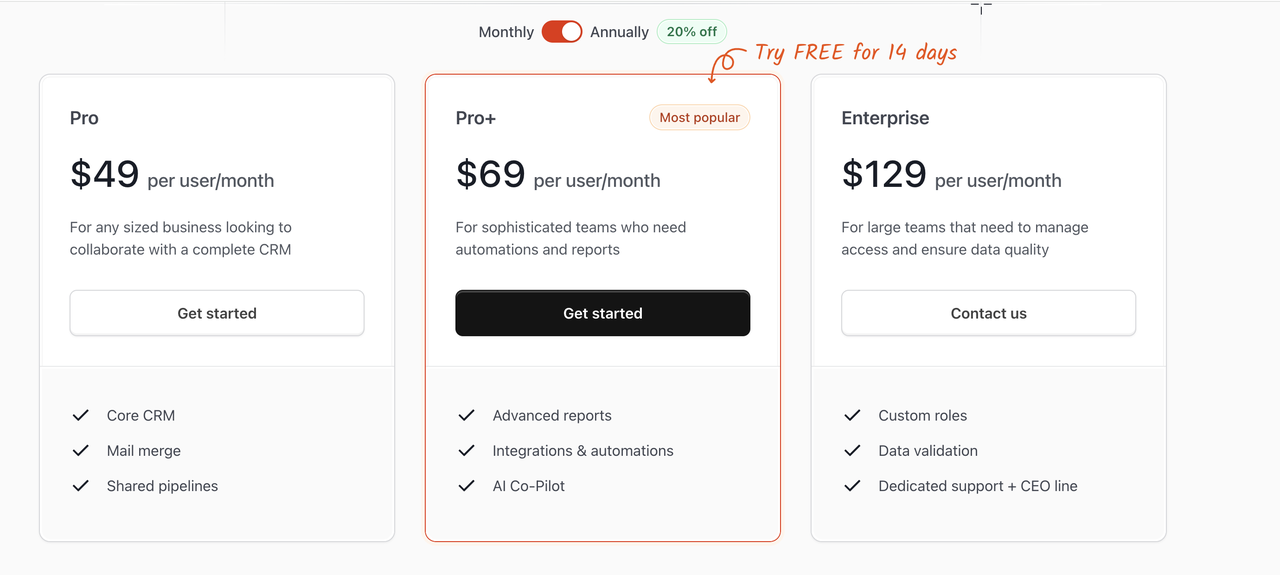
Image source: streak.com
Pro plan: $49 per user/month
The Pro plan is designed for individuals or small teams that want essential CRM functionality directly inside Gmail. It focuses on organizing relationships, tracking pipelines, and collaborating at a basic level without advanced automation. This plan suits teams with simple, email-driven workflows and limited reporting needs. Key features:
- Core CRM: Core CRM features allow users to create and manage pipelines within Gmail. Contacts, deals, or relationships can be tracked alongside email conversations. This keeps basic CRM data accessible without switching tools, but remains largely inbox-centric.
- Mail merge: Mail merge enables users to send personalized bulk emails from Gmail. It supports outreach campaigns while maintaining a familiar email workflow. However, customization and automation depth are limited compared to .
- Shared pipelines: Shared pipelines allow multiple users to view and update the same CRM pipelines. This supports basic collaboration and transparency across a small team. Ownership and visibility controls remain relatively simple at this tier.
Pro+ plan: $69 per user/month
The Pro+ plan targets growing teams that need better visibility and workflow support beyond basic CRM tracking. It adds reporting, automation, and while still operating primarily within Gmail. This tier is positioned for teams seeking more insight without leaving an inbox-based model.
Key features:
- Advanced reports: Advanced reports provide deeper insights into pipeline performance and activity trends. Teams can analyze progress, bottlenecks, and outcomes more effectively. Reporting remains structured around Gmail-based CRM data rather than broader operational metrics.
- Integrations & automations: This feature enables connections with external tools and introduces workflow automations. Repetitive actions like updates or notifications can be partially automated. The automation scope improves efficiency but is still limited compared to full workflow platforms.
- AI Co-Pilot: AI Co-Pilot assists with suggestions, summaries, and . It helps users process CRM data and emails more efficiently. The AI support focuses on enhancing inbox workflows rather than managing end-to-end processes.
Enterprise plan: $129 per user/month
The Enterprise plan is built for large organizations with advanced governance and control requirements. It focuses on security, , and administrative oversight rather than expanding core CRM functionality. Teams with compliance or scale-driven needs typically choose this tier.
Key features:
- Custom roles: Custom roles allow administrators to define detailed user permissions. Access can be controlled based on responsibility and data sensitivity. This helps larger teams without exposing unnecessary information.
- Data validation: Data validation ensures consistency and accuracy across CRM records. Rules can be applied to reduce errors and maintain data quality at scale. This is especially important for organizations relying on standardized reporting.
- Dedicated support & CEO line: Enterprise users receive prioritized support and direct access to senior leadership channels. This helps resolve issues faster and supports complex deployments. The focus is on service reliability rather than feature expansion.
Overall, Streak's higher-tier plans increase costs primarily to unlock reporting, automation, and administrative controls, rather than to expand the core CRM experience. As teams scale, this often leads to paying more while still working within an email-centric model. In comparison, all-in-one platforms like Lark bundle CRM-style tracking, collaboration, and automation under a single subscription, reducing tool sprawl and making long-term costs easier to justify.
Factors to consider before choosing a paid Streak CRM plan
Before upgrading to a paid Streak CRM plan, teams should evaluate whether an inbox-based CRM will continue to support their workflows as they grow. The right choice depends not just on current needs, but on how processes, collaboration, and visibility are expected to evolve over time.
- Team size and growth expectations: Streak works best for individuals and small teams with limited coordination needs. As team size grows, managing shared ownership and consistency inside Gmail can become increasingly complex.
- Reporting and automation needs: Basic reporting may be sufficient early on, but as teams grow, they often need deeper insights and . Streak's advanced reporting and automation are available only on higher-cost plans with defined limits.
- Need for collaboration beyond email: Email-centric collaboration can slow decision-making as more stakeholders get involved. Teams that rely on real-time discussions, shared context, and visibility may find inbox-only workflows restrictive.
- Data visibility and cross-team workflows: Streak stores most CRM data within , limiting broader access and structured visibility. Cross-team workflows often require centralized views that extend beyond individual inboxes.
- Long-term cost vs short-term convenience: Streak offers quick setup and immediate value, but costs rise as more features are unlocked. Over time, teams may pay more without gaining flexibility outside Gmail.
Many teams outgrow email-based CRMs as processes become more structured. Platforms like Lark support shared ownership, automation, and collaboration across teams without centering workflows around inboxes.
What Streak does not focus on
Streak CRM is intentionally designed to stay lightweight and inbox-centric, prioritizing simplicity over breadth. As a result, several capabilities commonly needed by growing teams are not core to the platform.
- Deep automation workflows: Streak offers basic automation features, but it does not support complex, multi-step workflows. Teams with evolving processes often need more .
- Cross-team collaboration beyond email: Collaboration in Streak essentially happens through shared inboxes and email threads. This limits real-time coordination and shared visibility across multiple teams.
- Advanced dashboards and real-time operational views: Reporting in Streak focuses on pipeline-level insights rather than . Leadership teams may find it challenging to monitor performance across functions in real time.
- Built-in documents, chat, or task systems outside Gmail: Streak does not include native tools for documents, messaging, or task management beyond Gmail. Teams must rely on external tools to support broader collaboration needs.
As teams grow beyond individual inboxes, their workflows often extend past what an email-centric CRM like Streak can support. Collaboration begins to involve shared ownership, structured execution, and visibility across multiple teams—not just email threads. This is where Lark comes in. Come closer to enjoy a differen CRM workflow.
Beyond Gmail-based CRM: How Lark supports real workflows
As mentioned, as teams grow, their workflows naturally extend beyond email into shared planning, execution, and . For those needs, Lark, one of the best , provides an all-in-one collaboration suite. It features Lark Base for building structured, data-driven workflows like , using customizable tables and Kanban views. The platform emphasizes real-time collaboration via its Messenger and supports rapid decision-making with real-time metric dashboards. Automation reduces manual work, while Lark Docs and Lark Tasks ensure , and clear accountability for follow-ups.
Structured CRM workflows beyond inboxes
allows teams to build CRM-style pipelines using structured tables instead of email threads. Deals, contacts, or relationships can be tracked with custom fields, owners, statuses, deadlines, and linked records. Unlike Streak, where data lives primarily inside Gmail conversations, Base keeps CRM data accessible to the entire team with multiple views, such as grid or . This makes CRM workflows scalable and easier to adapt as processes evolve. 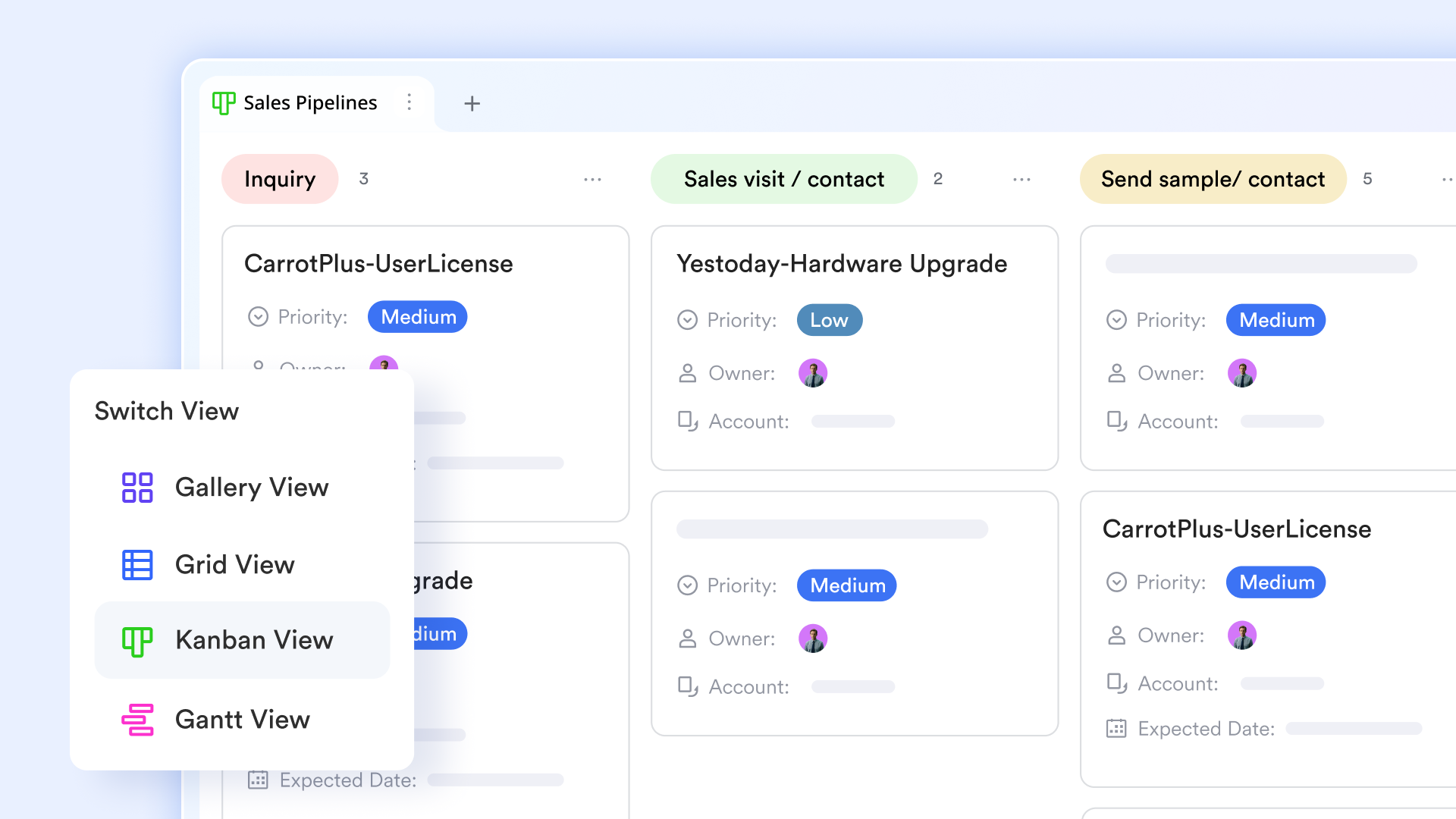
Real-time dashboard for accurate CRM data insights
Unlike Streak's Gmail-based data monitoring, Lark Base dashboards provide crucial support for CRM data by consolidating all key metrics—like pipeline health, conversion rates, and revenue forecasts—into a single, real-time visual interface. They use various chart types, including funnel charts, to visualize and spot bottlenecks instantly. This real-time visualization helps teams gain immediate, actionable insights into customer behavior and team performance, enabling faster, data-driven decisions. They turn complex raw data into clear, strategic intelligence. 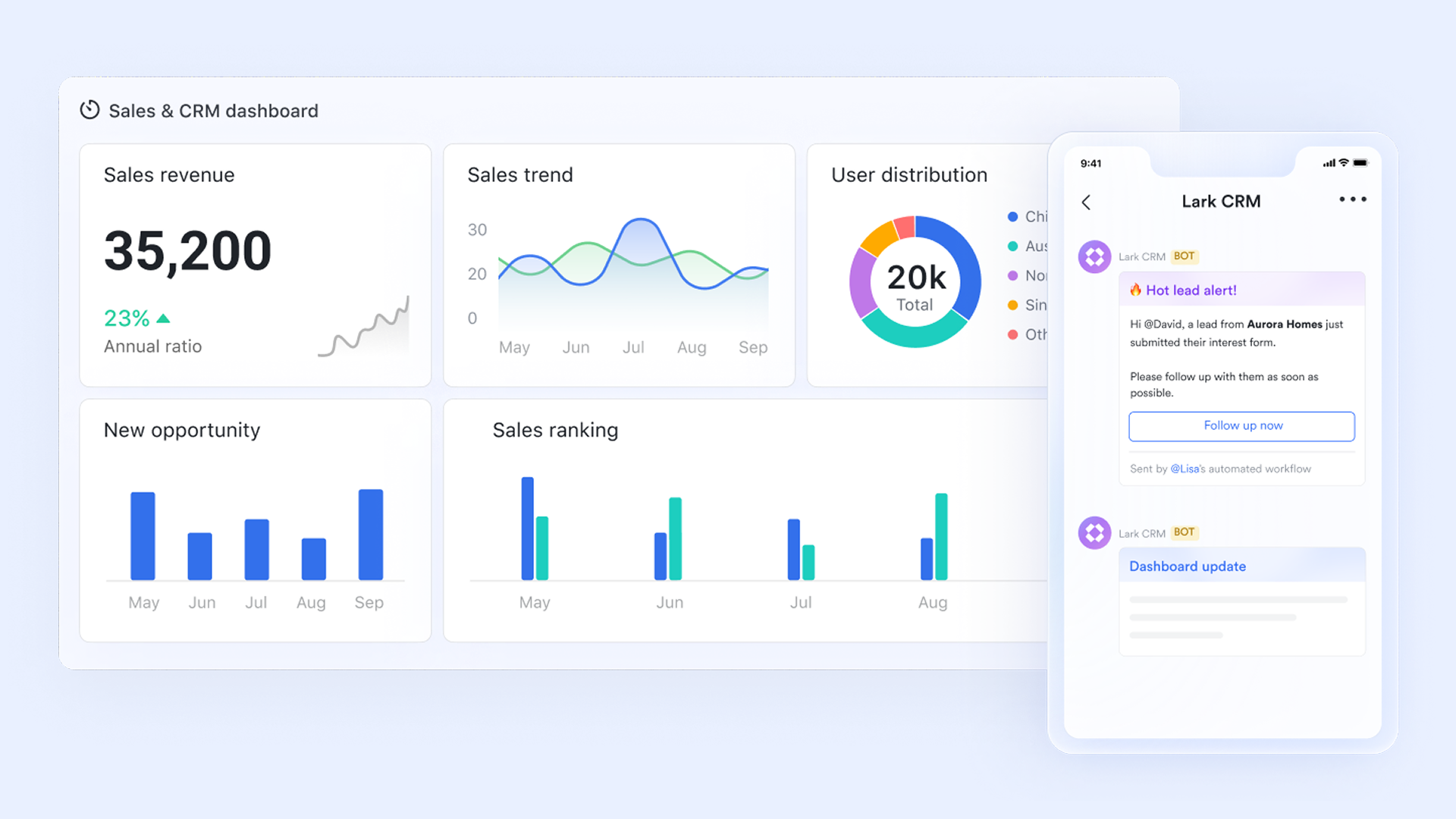
Automation that supports growth without complexity
Lark Base includes automation feature that help teams reduce manual work as processes scale. Teams can trigger notifications, status updates, or reminders when conditions are met—such as when a deal moves to a new stage or a task nears a deadline. Unlike Streak's limited automation, Lark's automation supports without requiring heavy configuration or external tools. 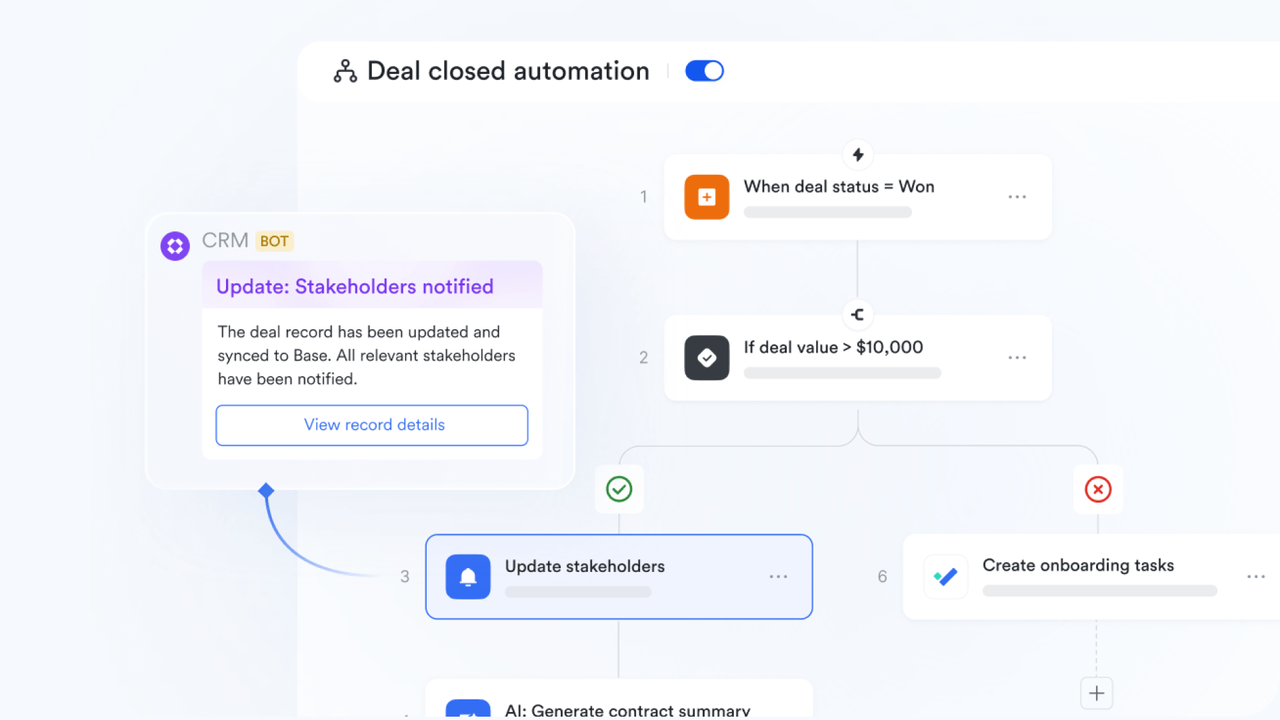
Real-time collaboration without relying on email
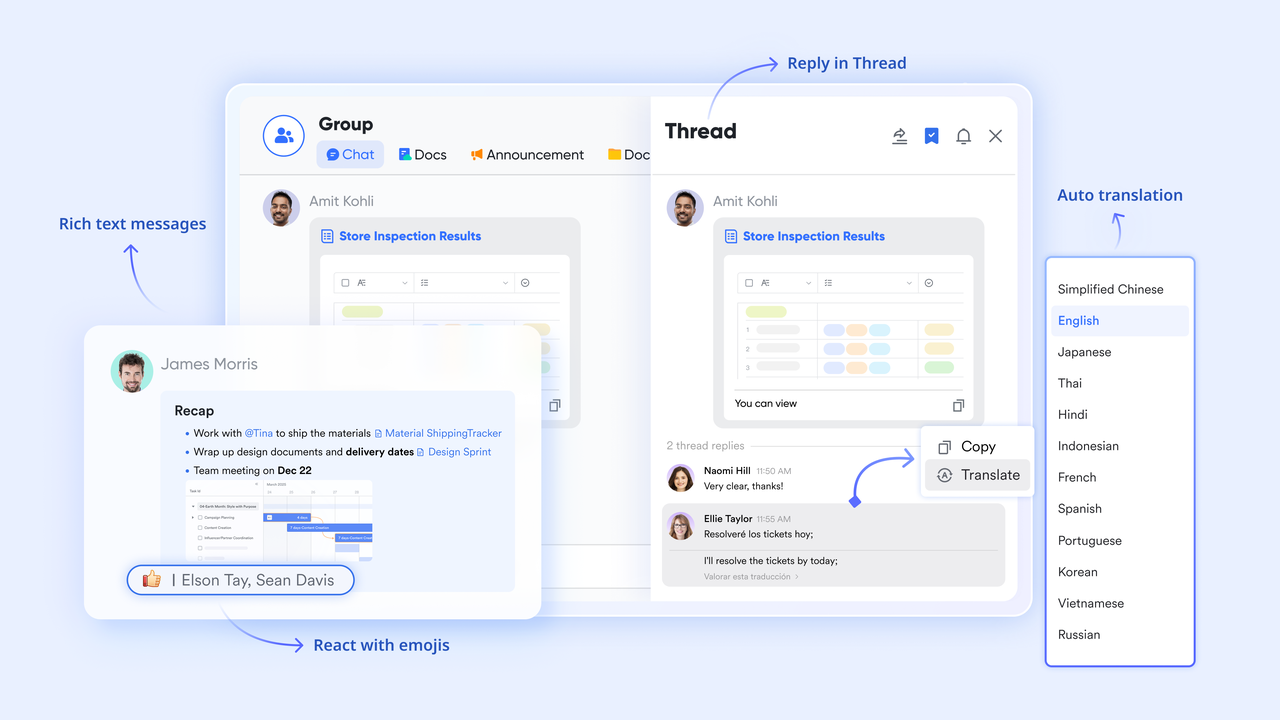
enables instant team communication through direct messages, group chats, threads, and mentions, keeping teams connected to ongoing work. Teams can discuss deals, clarify updates, and align on next steps without sending internal emails or searching inboxes. Compared to Streak's email-based collaboration, Messenger supports faster decision-making and keeps to all relevant stakeholders.
Collaborative notes and documentation that evolve over time
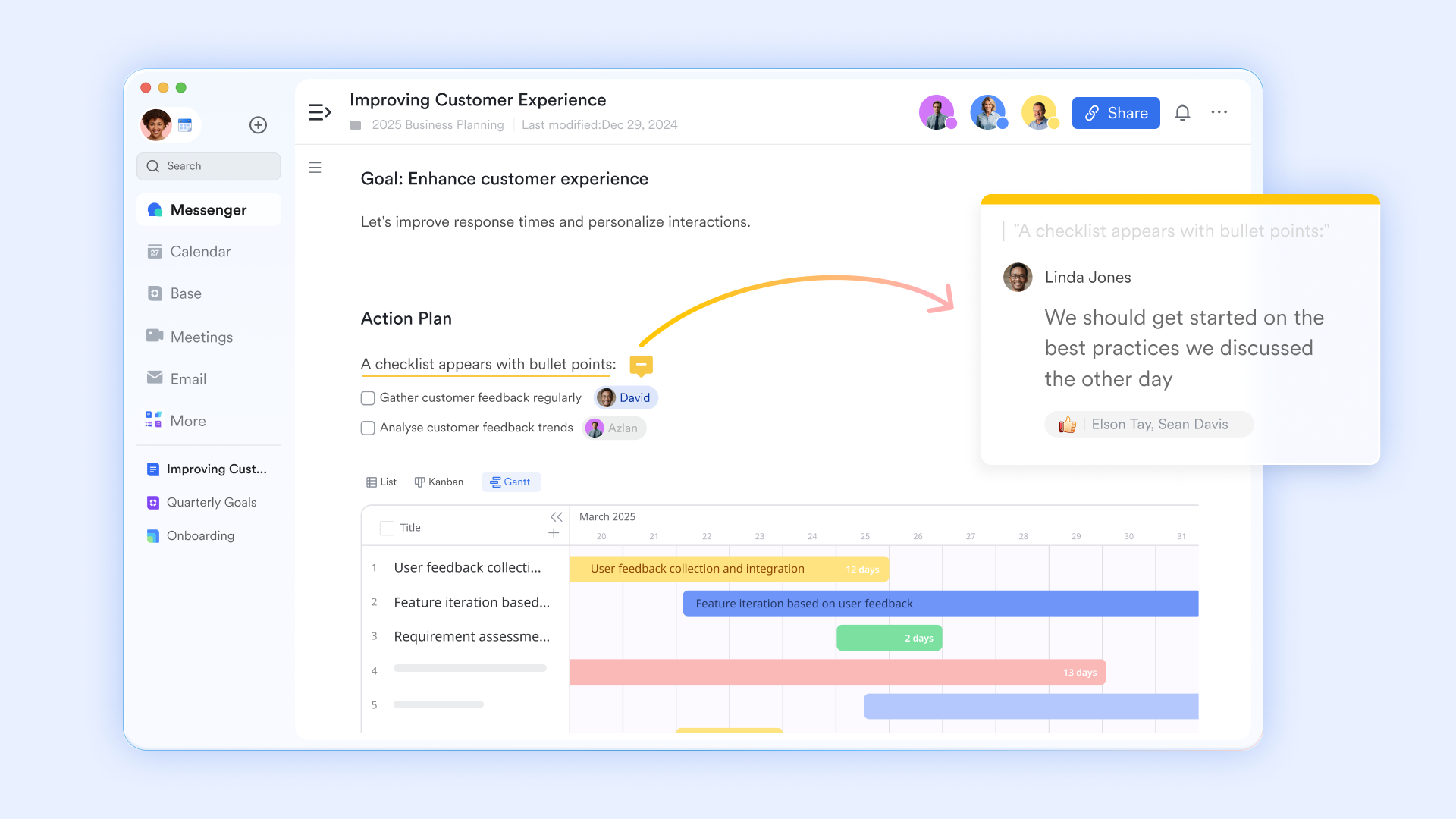
provides a shared space for creating and editing meeting notes, proposals, sales playbooks, and customer summaries in real time. , edit, and refine content simultaneously, ensuring information stays current. Streak supports notes tied to emails, but Lark Docs allows teams to maintain living documents that support ongoing CRM processes beyond individual conversations.
Clear ownership and follow-ups that don't get lost
With Lark Tasks, follow-ups move beyond reminders and become clearly assigned actions with owners, due dates, and . Tasks can be linked to records or discussions, giving teams visibility into who is responsible for what. This provides far more accountability than Streak's inbox-based reminders, which are often limited to individual users. 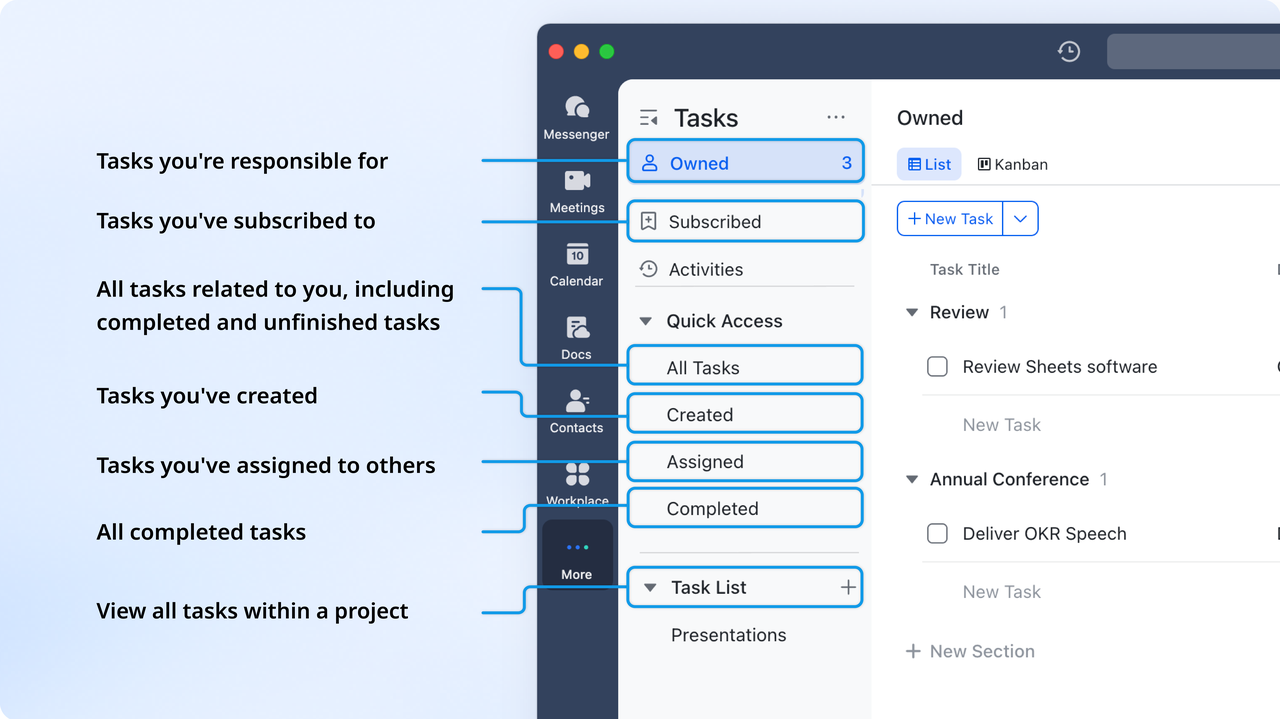
:
- Starter plan: Free forever plan that includes 11 powerful tools for up to 20 users. It also comes with 100GB of storage, 1000 automation runs, AI translations, and more.
- Pro plan: $12/user/month (billed annually) for up to 500 users. It includes everything in Starter plus group calling for up to 500 attendees, 15TB of storage, 50,000 automation runs, and more.
- Enterprise plan: for custom pricing. Supports unlimited users and includes even more automation runs and advanced security, compliance, and management features.
For small teams with simple communication needs

18 months message history
1000 Base automation runs/month
2000 rows per table in Base
Most POPULAR
For companies with comprehensive collaboration and management needs
Unlimited message history
500-participant video meetings
50k Base automation runs/month
20k rows per table in Base
For large companies with advanced security and organizational management needs
Get a personalized demo and pricing
Unlimited message history
500-participant video meetings
15 TB storage + 30 GB storage/user
500k Base automation runs/month
50k Base automation runs/month
Most POPULAR
For companies with comprehensive collaboration and management needs
Unlimited message history
500-participant video meetings
50k Base automation runs/month
20k rows per table in Base
Streak vs Lark: Which is better?
Final verdict: Why Lark is the better long-term choice
Streak works well for individuals or that want a lightweight CRM experience directly inside Gmail. However, as teams grow, their email-centric design, usage limits, and tier-based feature restrictions can quickly become constraints. Lark offers a more future-ready alternative by combining CRM-style tracking with , structured execution, and automation in one workspace. For teams that need visibility beyond inboxes, clearer ownership, and workflows that evolve over time, Lark delivers more value without forcing constant plan upgrades or tool switching.
Take the modern team's choice & streamline CRM today
Conclusion
Streak CRM is a practical option for individuals and small teams that want a simple way to manage relationships directly from Gmail. Its ease of setup and inbox-based workflows make it appealing for early-stage use cases where email is the primary system of record. However, as teams grow, limitations around collaboration, automation, reporting, and often become more apparent. Higher pricing tiers unlock incremental improvements while still keeping workflows centered on individual inboxes.
For teams planning to scale, it's essential to evaluate whether an email-first CRM can support long-term operational needs. offers a more comprehensive alternative by combining CRM-style tracking with real-time communication, tasks, documents, and automation in a single workspace. Instead of layering tools or upgrading plans to remove limitations, teams can manage end-to-end workflows with greater clarity and ownership. If your organization is looking for a future-ready approach to managing work beyond the inbox, Lark provides a strong foundation to grow on.
FAQs
Does Streak CRM charge extra for integrations or third-party tools?
Streak CRM includes limited integrations depending on the plan, with more advanced options available only at higher tiers. Teams often rely on additional third-party tools to extend functionality, which can increase overall costs beyond the base subscription. When evaluating Streak CRM free plan pricing, some teams compare it with platforms like Lark that bundle collaboration and features without requiring multiple add-ons.
Can Streak CRM pricing scale efficiently beyond small teams?
Streak pricing can work well for individuals and small teams, but costs rise as more users and advanced features are added. Scaling often means upgrading to plans that include reporting, automation, and admin controls. This is why teams evaluating Streak CRM pricing free plan frequently assess whether Lark offers better long-term value as team size increases.
Is Streak CRM pricing better for sales teams or relationship management?
Streak is commonly used for lightweight sales tracking, partnerships, and relationship management, where email is the primary channel. Its structure favors personal pipelines over complex sales operations. When analyzing Streak CRM for Gmail features pricing, teams often compare it with Lark to determine which platform better supports structured sales workflows.
How does Streak CRM for Gmail pricing work, and what are you paying for?
Streak CRM pricing is tied to how much functionality you unlock within Gmail, including pipelines, reporting, and automation. Higher tiers mainly expand visibility and controls rather than changing the core inbox-based experience. Teams reviewing Streak CRM for Gmail features pricing often evaluate whether Lark's broader workspace offers more value at similar price points.
Is Streak CRM related to Streak by Zerodha, and why is there pricing confusion?
Streak CRM and Streak by are entirely separate products serving different industries, despite sharing the same name. Pricing confusion arises because users mistakenly associate trading tools with CRM software. Searches around Streak zerodha pricing often lead teams to reassess their needs and compare Streak CRM with alternatives like Lark for clarity and fit.
Related reading





























