Modern teams rely on project management tools not just to track tasks, but to coordinate people, timelines, budgets, and outcomes. As work becomes more cross-functional and delivery-driven, choosing the right platform can directly impact productivity, accountability, and long-term scalability.
Two tools that frequently come up in this decision are Asana and Teamwork. While both support task tracking and collaboration, the real difference in Teamwork vs. Asana lies in how each structure works and defines success. In this guide, we compare Asana vs Teamwork across workflows, collaboration models, pricing, scalability, and real-world use cases, while also briefly acknowledging how other modern work platforms approach these challenges.
Reduce context switching with a unified platform
What is Asana?
Asana is a designed for internal teams to plan, assign, and track tasks across projects. It focuses on execution clarity by breaking work into tasks with owners, deadlines, and dependencies. Teams use Asana to coordinate cross-functional work, monitor progress through timelines and dashboards, and align daily execution with broader goals. It is most commonly used by products, operations, marketing, and business teams that need structured visibility into who is doing what and by when.
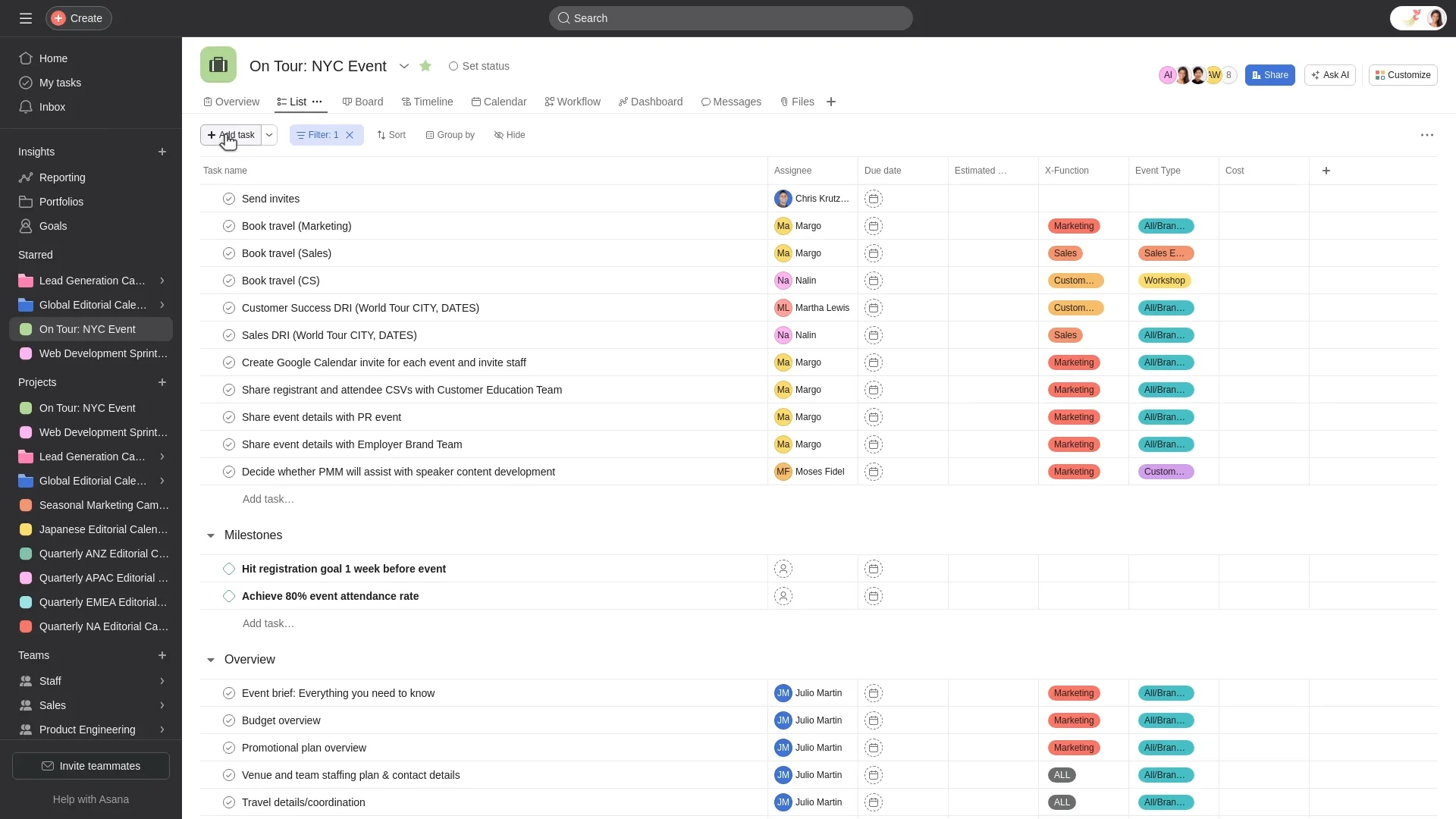
Image source: asana.com
What is Teamwork?
Teamwork is a built for client delivery and service-based work. It organizes work around projects and clients, with , budgeting, and profitability reporting. Agencies and professional services teams use Teamwork to manage delivery timelines while keeping financial performance visible. Its structure supports external collaboration, making it easier to report progress to clients and manage multiple engagements at scale.
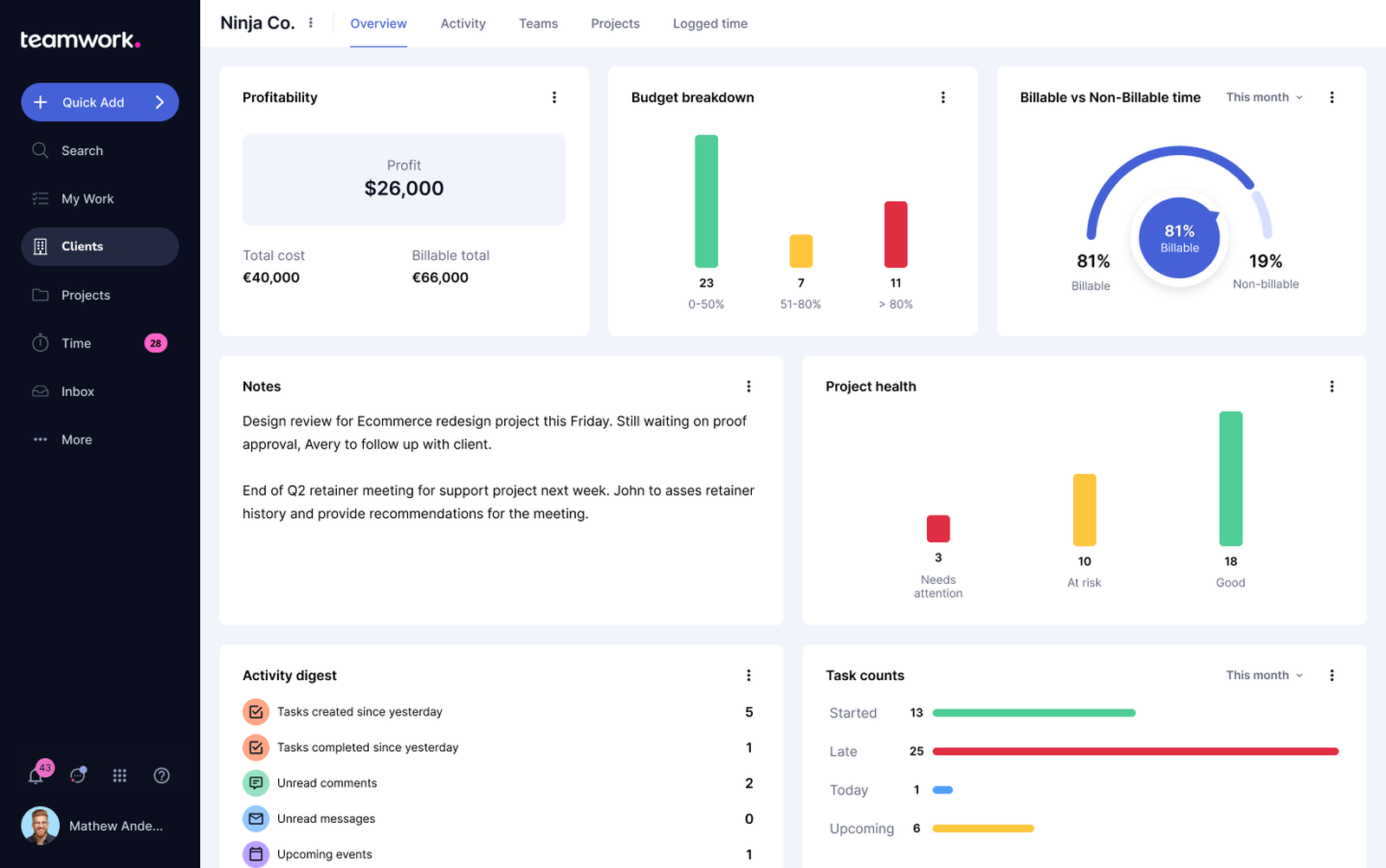
Image source: teamwork.com
Teamwork vs Asana: Client delivery vs internal execution
The comparison of Asana vs.Teamwork goes beyond features and pricing. It comes down to how each platform is designed to support work. Asana is built around internal execution, , assign ownership, and coordinate across departments. Teamwork takes a delivery-first approach, structuring work around clients, projects, and outcomes. Understanding this distinction makes it easier to choose the tool that aligns with how your team actually operates.
Ultimate success often hinges on whether your team's primary goal is maximizing internal output or managing external client accounts. Your choice between Asana and Teamwork should depend on whether your primary focus is organizational alignment or client-driven profitability.
Choose Asana if your priority is internal execution, clear ownership, and smooth cross-team coordination. Asana is designed around tasks and responsibilities, making it easy for teams to break work into actionable steps, assign owners, and track progress across departments. Features like dependencies, timelines, goals, and workload views help managers keep internal projects on track without adding financial or client-facing complexity. This makes Asana a strong fit for product, operations, marketing, and PMO teams that need alignment, visibility, and predictable execution inside the organization.
Choose Teamwork if your priority is client delivery, budgeting, and . Teamwork is built for teams that deliver work to external clients and need to track time, costs, and profitability alongside project progress. Its project-centric structure, combined with , time tracking, and client reporting, helps agencies and service teams understand not just whether work is done, but whether it is delivered profitably. For organizations where project success is tied directly to revenue and client satisfaction, Teamwork offers controls that task-focused tools typically lack.
Asana vs Teamwork pricing overview: What you pay vs what you unlock
Pricing is often where the fundamental differences between tools become clear. In comparing teamwork projects vs. Asana, both platforms may look similar to entry-level plans, but the value unlocked at higher tiers varies widely. Asana focuses on unlocking advanced planning and coordination features as teams grow internally. Teamwork, on the other hand, ties pricing closely to client delivery, budgeting, and revenue-focused project management.
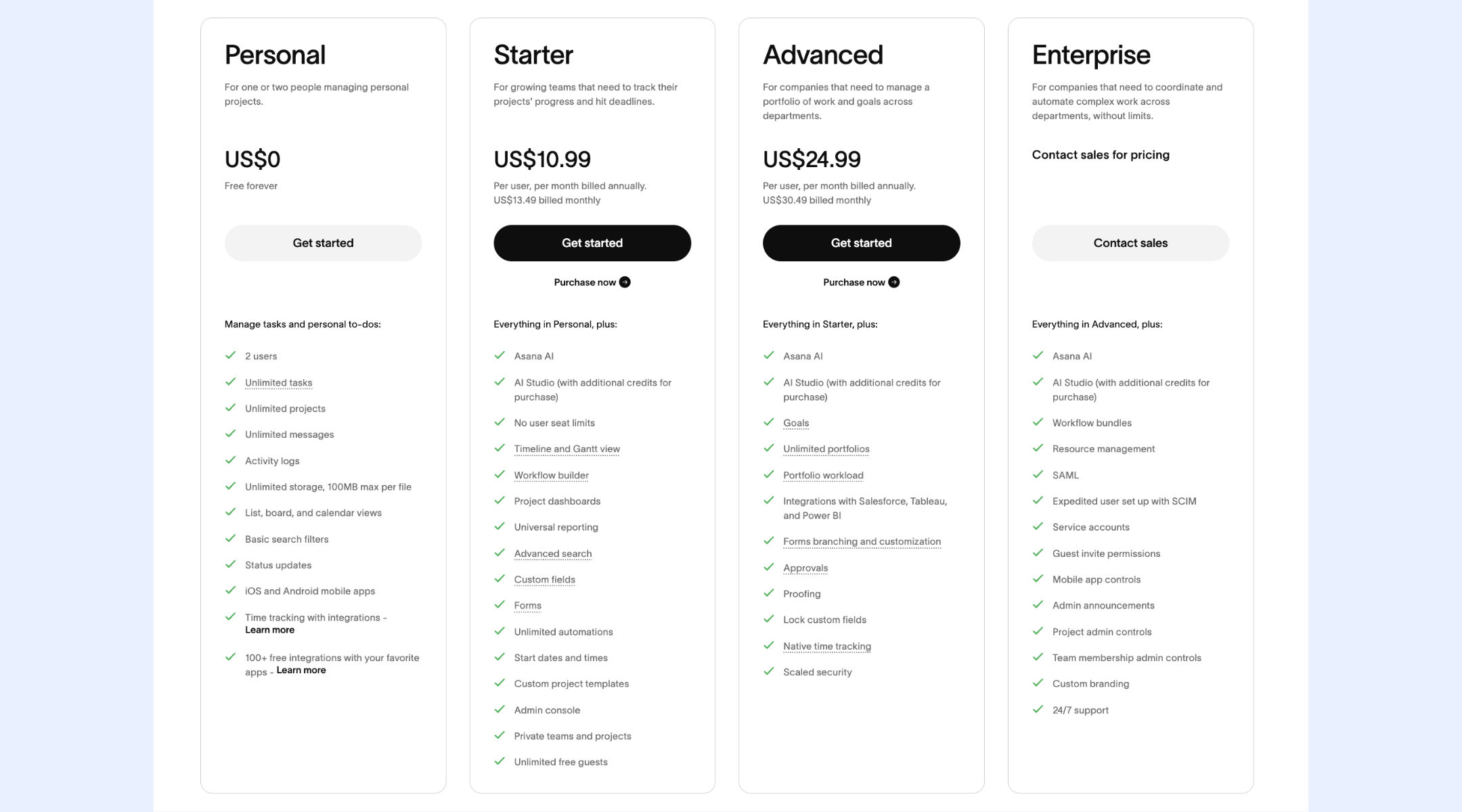
Image source: asana.com
Update time: 2025-12-17
Note: Pricing and plan details reflect publicly available data as of the update date and may vary based on region, billing cycle, and number of agents.
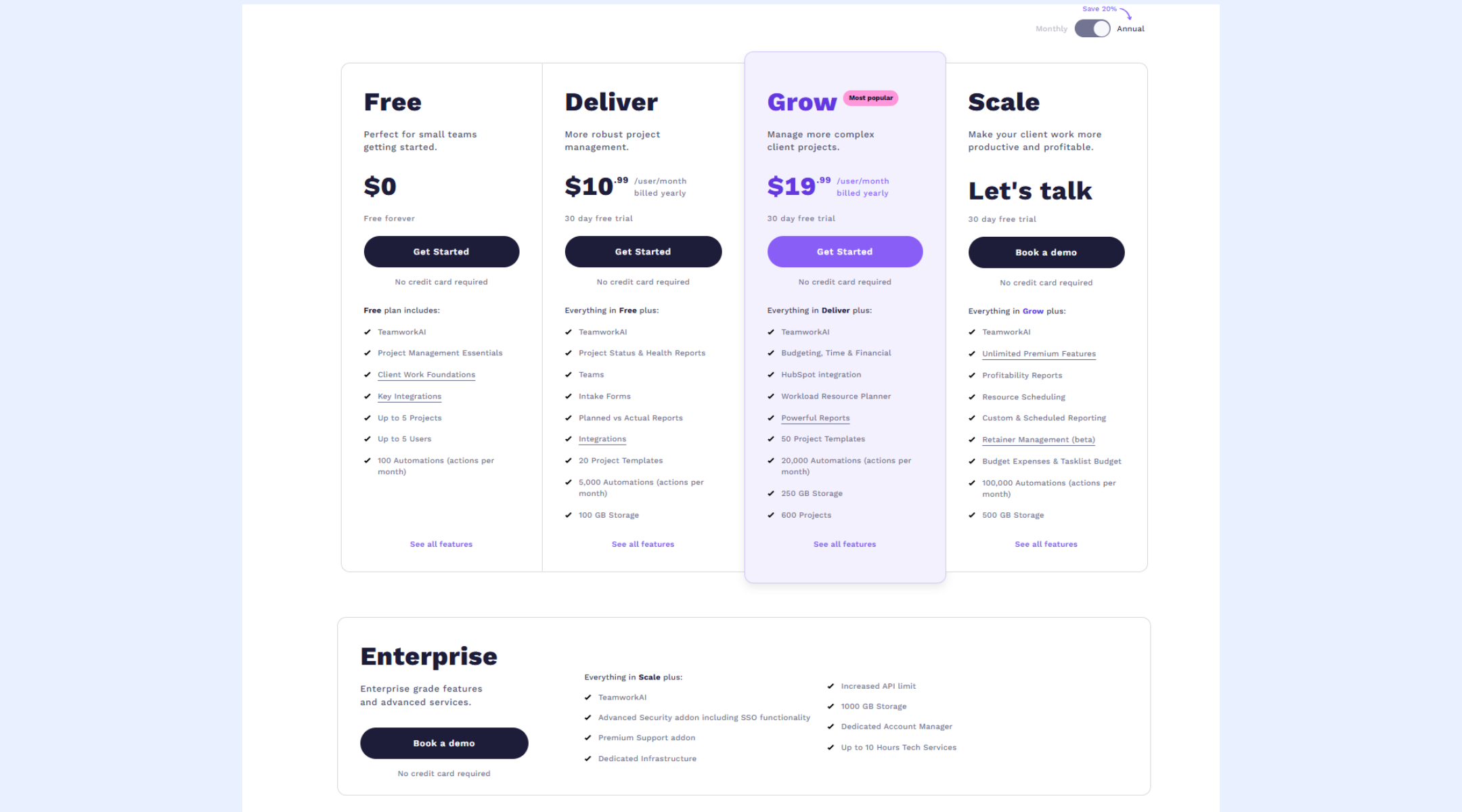
Image source: teamwork.com
Deciding between Asana and Teamwork typically depends on whether your workflow is focused inward on organizational alignment or outward on client deliverables. While both offer significant savings via annual pricing, the following breakdown illustrates how their core philosophies differ:
Asana works best for teams that prioritize internal execution, clarity of ownership, and structured task visibility. Its task-first design makes it easy for product, operations, and cross-functional teams to break work into actionable steps, assign owners, and track progress across timelines and portfolios. Features like goals, workload views, and approvals help managers monitor execution without needing , making Asana a strong fit for organizations focused on internal alignment and predictable delivery.
Teamwork, on the other hand, is better suited for client delivery, budgeting, and agency-style workflows. Its project-centric approach is designed to manage external stakeholders, track billable time, and monitor project profitability. With built-in financial controls, , and client reporting, Teamwork supports agencies and service teams that need to balance delivery timelines with revenue, utilization, and client visibility, areas where task-centric tools often fall short.
Common reasons teams outgrow both tools
When comparing Teamwork vs. Asana, many teams initially find success with either platform but begin to feel friction as workflows grow more complex. Over time, structural limitations, not missing features, often push teams to look for more flexible solutions.
- Fragmented communication across tools: Both Asana and Teamwork rely heavily on comments and notifications, which often leads teams to move discussions into separate chat or email tools. As conversations spread across platforms, context gets lost, and important decisions become harder to trace. This fragmentation slows execution and increases the risk of misalignment.
- Limited flexibility to adapt workflows: As teams evolve, their processes rarely remain static. In both Asana vs Teamwork, workflows can become rigid when teams need custom fields, cross-project logic, or non-standard processes. Adjusting structures often requires workarounds rather than native support, reducing efficiency over time.
- Reporting that doesn't match how teams actually work: While both tools offer reporting, dashboards are often limited to predefined metrics. Teams with or cross-functional dependencies may struggle to surface insights that reflect real execution patterns. This makes it harder for leaders to get accurate, decision-ready visibility.
As teams grow, the challenge often shifts from managing tasks or projects to connecting execution, , and decision-making in one place. When workflows span multiple tools, context gets fragmented, and processes become harder to scale. This is where some teams begin exploring broader work platforms that go beyond traditional project management, introducing solutions like Lark that approach work as an interconnected system rather than isolated tasks or projects.
Explore a smarter way to manage work end-to-end
Meet Lark: Balance workflows, collaboration, and coordination smartly
While both Asana and Teamwork excel at specific types of work, many teams find themselves needing capabilities that go beyond task lists and project delivery. Modern work increasingly demands unified , customizable data structures, and that adapt over time. This is where alternatives to traditional project tools begin to matter. Below, we explore how compares with tools like Asana and Teamwork.
One place to structure work beyond task lists
Lark excels at structured project and through , which allows teams to manage projects, tasks, pipelines, and operational data using tables, , and Gantt-style timelines. Unlike Asana's task-first model or Teamwork's project-centric structure, Lark Base supports fully customizable fields, relational data, and multiple views in one place. This means teams can track not just tasks, but also clients, priorities, ownership, and status changes without switching tools or duplicating information.
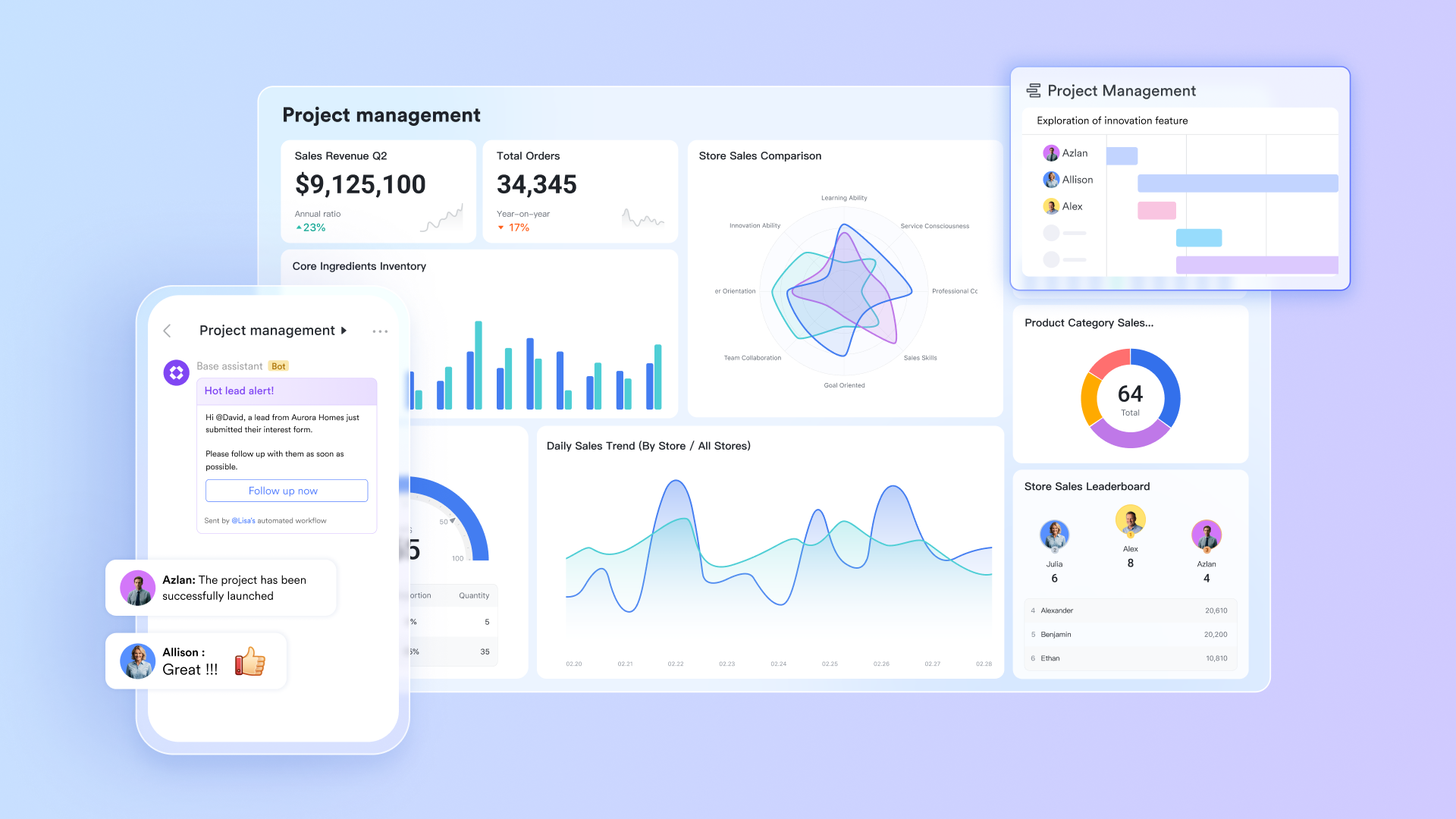
Conversations stay connected to execution
With and , collaboration happens directly alongside the work itself. Teams can discuss tasks, share updates, @ teammates, comment with ideas, and reference documents without losing context. Compared to Asana, where discussions often stay limited to task comments, and Teamwork, where conversations can become project-bound and siloed, Lark keeps communication fluid and searchable across workflows. Docs remain live, for plans, updates, and decisions that stay connected to ongoing work.
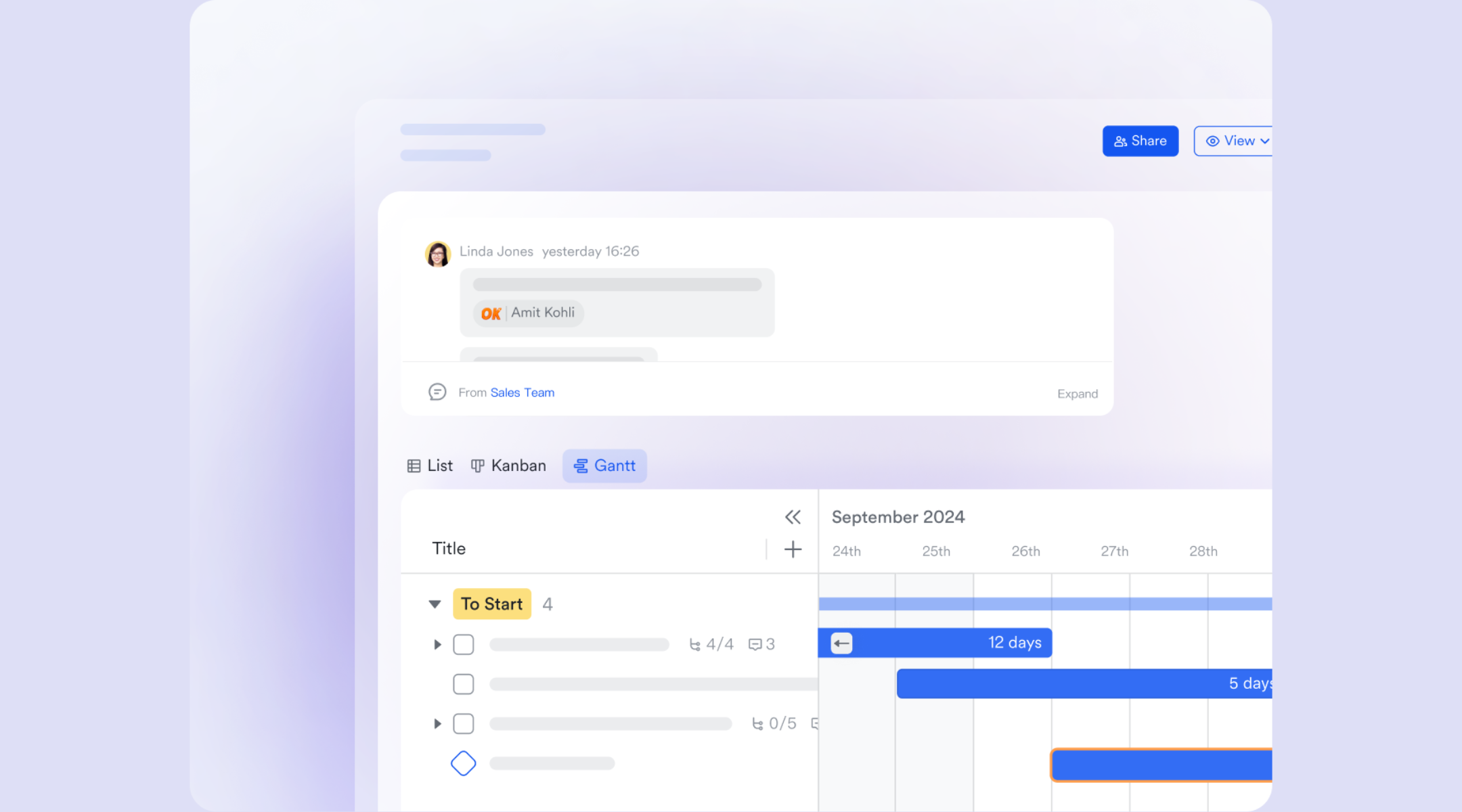
Consistent processes without tool overload
Lark supports standardized execution through built into Lark Base, allowing teams to trigger actions, notifications, and status changes based on defined rules. This helps teams reduce manual follow-ups and maintain consistency across projects without relying on multiple add-ons. Compared to Asana's rule-based automation limits and Teamwork's usage-based automation caps, Lark enables teams to scale repeatable processes while keeping workflows clear, visible, and easy to adapt as needs evolve. 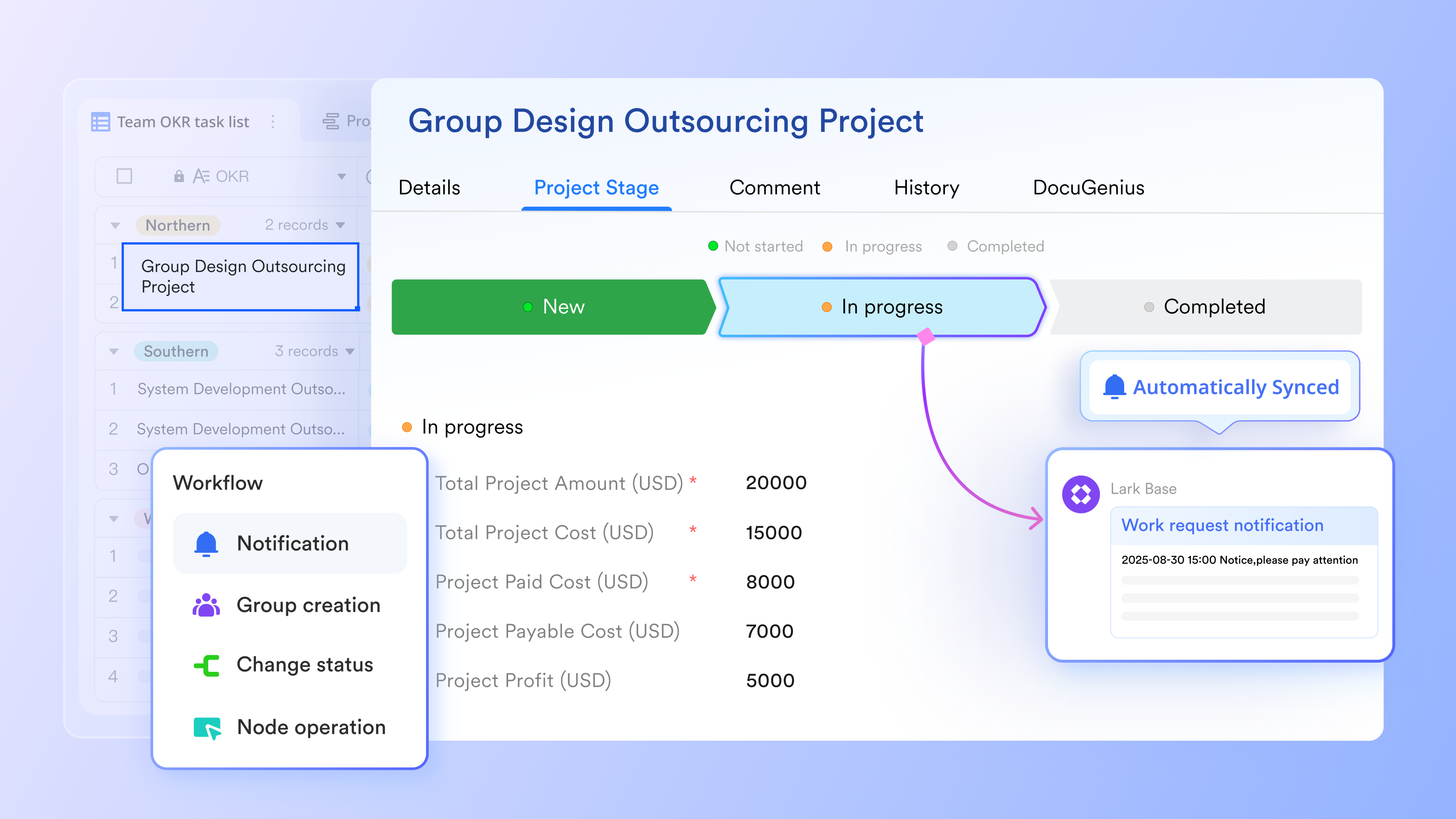
Visibility and alignment across timelines and ownership
Lark Calendar and Lark Tasks help teams align work schedules, deadlines, and responsibilities in one shared view. Tasks can be assigned with clear owners and due dates, while calendars reflect real project timelines and workload distribution. Compared to Asana's task-heavy planning and Teamwork's , Lark makes it easier for teams to see who is working on what and when without jumping between views or tools, improving accountability and planning accuracy. 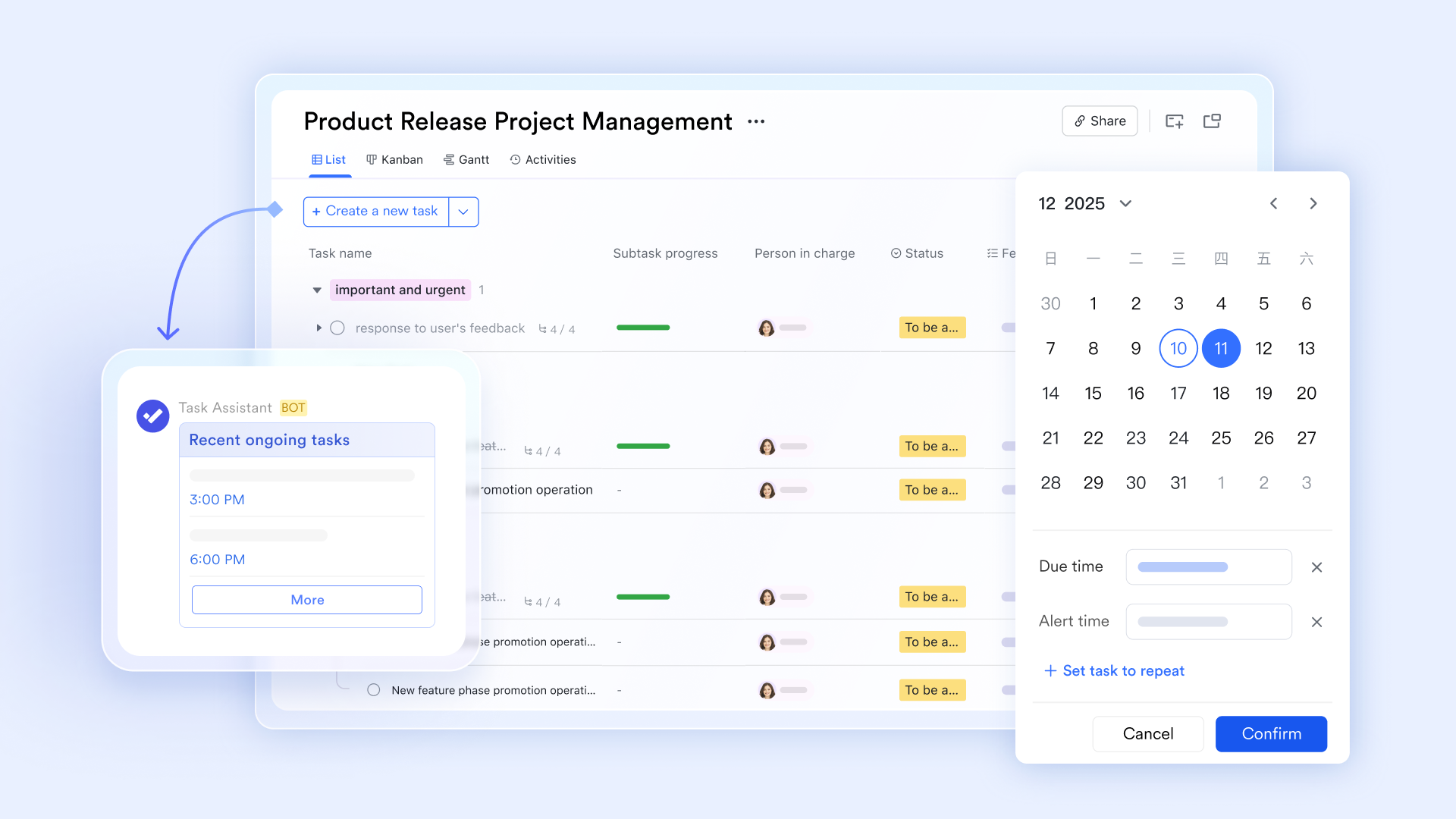
Decisions, approvals, and accountability in one flow
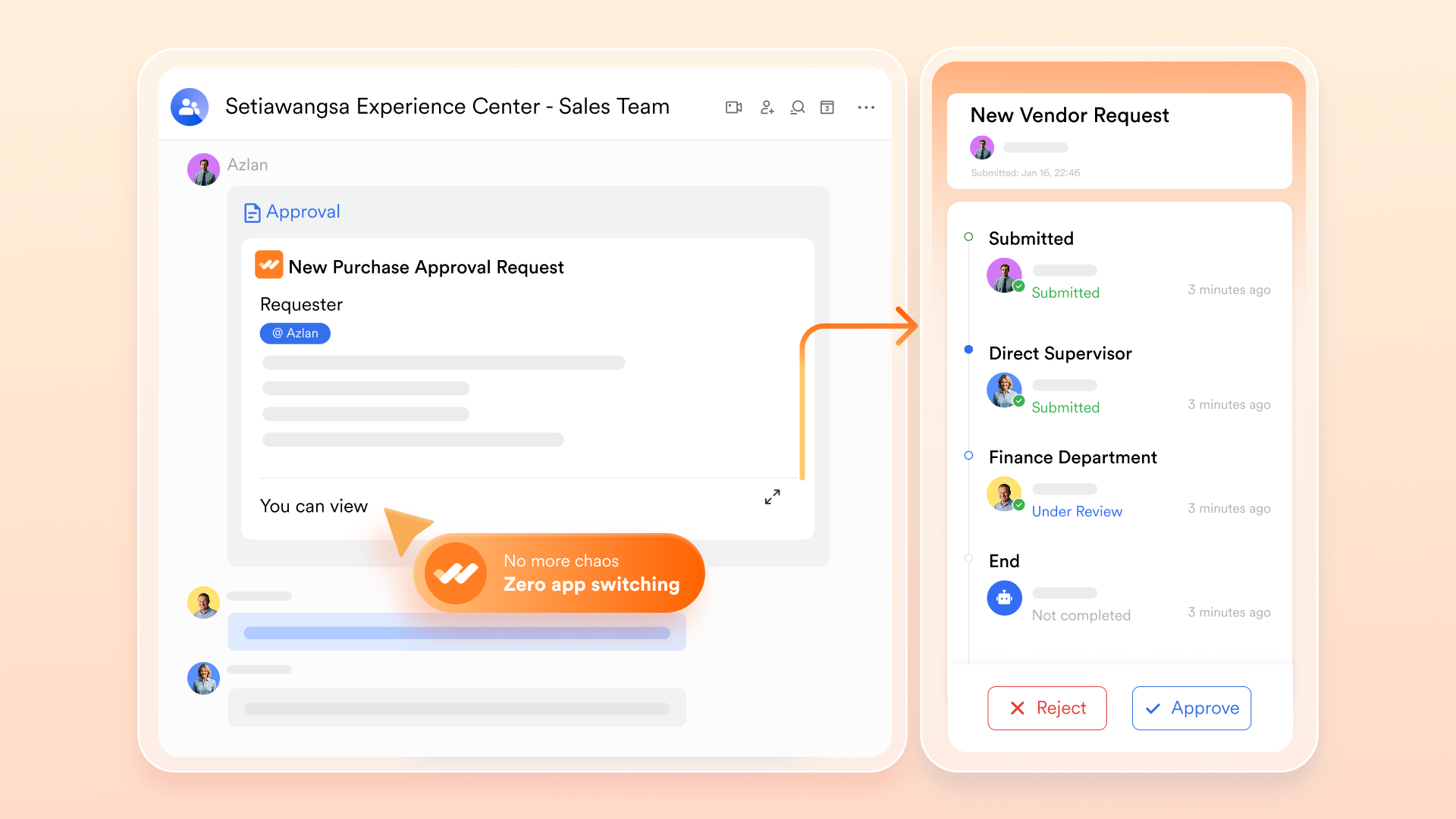
With , teams can manage requests, reviews, and sign-offs directly within their workflows. Whether it's budget approvals, project changes, or operational requests, are standardized and transparent. Unlike Asana and Teamwork, which often rely on comments or external tools for approvals, Lark keeps decision-making structured and traceable, helping teams move faster while maintaining control.
:
- Starter plan: Free forever plan that includes 11 powerful tools for up to 20 users. It also comes with 100GB of storage, 1000 automation runs, AI translations, and more.
- Basic plan: $6/user/month (billed annually) for up to 500 users. It includes everything in Starter plus group calling for up to 500 attendees, 5TB of storage, 1000 automation runs, and more. For more details, please .
- Pro plan: $12/user/month (billed annually) for up to 500 users. It includes everything in Basic plus group calling for up to 500 attendees, 15TB of storage, 50,000 automation runs, and more.
- Enterprise plan: for custom pricing. Supports unlimited users and includes even more automation runs and advanced security, compliance, and management features.
For small teams with simple communication needs

18 months message history
1000 Base automation runs/month
2000 rows per table in Base
Most POPULAR
For companies with comprehensive collaboration and management needs
Unlimited message history
500-participant video meetings
50k Base automation runs/month
20k rows per table in Base
For large companies with advanced security and organizational management needs
Get a personalized demo and pricing
Unlimited message history
500-participant video meetings
15 TB storage + 30 GB storage/user
500k Base automation runs/month
50k Base automation runs/month
Most POPULAR
For companies with comprehensive collaboration and management needs
Unlimited message history
500-participant video meetings
50k Base automation runs/month
20k rows per table in Base
Decision checklist: Teamwork vs Asana vs Lark
Choosing the right depends on how your team plans, executes, and collaborates. While Teamwork and Asana focus heavily on task and project tracking, other platforms take a broader approach to execution. Understanding these differences helps teams avoid overbuying or underusing features. This checklist highlights key decision points to guide your final choice.
Final verdict: Which tool fits your team's reality
Choosing between Teamwork vs. Asana depends less on feature checklists and more on how your team defines success, delivers work, and plans to scale. Each tool excels in different scenarios, and understanding those contexts helps avoid costly tool changes later.
When Teamwork is the better fit
Teamwork is the stronger choice for organizations that deliver work to external clients and need visibility into time, budgets, and profitability. Agencies, consultancies, and professional services teams benefit from its , built-in time tracking, and financial reporting. If project success is closely tied to billable hours, utilization, and client outcomes, Teamwork aligns well with those operational needs.
When Asana makes more sense
Asana is better suited for teams focused on internal execution and cross-functional coordination. Product, marketing, operations, and PMO teams often prefer Asana's task-first model, clear ownership, and like timelines and portfolios. If your priority is to organize internal work, align teams, and track progress without the complexity of clients or finances, Asana offers a streamlined experience.
When Lark offers a more complete long-term workspace
Lark becomes relevant for teams that outgrow single-purpose tools and need a unified environment for execution, communication, and decision-making. Instead of separating tasks, data, chat, documents, and approvals across multiple platforms, Lark brings these elements together in an . For teams planning to scale across functions, projects, and processes without increasing tool sprawl, this broader approach can offer greater long-term flexibility.
Conclusion
Choosing between Asana and Teamwork ultimately comes down to how your team works and what you need to manage at scale. Asana excels at internal task execution, ownership clarity, and cross-team coordination, while Teamwork is better suited for client delivery, time tracking, and revenue-linked project management. Both tools solve specific problems well, but they also reflect different assumptions about how work is structured. For teams that need to move beyond task lists or client projects and bring execution, collaboration, data, and decision-making into a single workspace, a more unified platform like can offer a stronger long-term foundation.
Bring tasks, data, and collaboration into one place
FAQs
Is anything better than Asana?
"Better" depends on whether you need a generalist tool or a specialist one. For teams focused on client-facing work and profitability, Teamwork is often superior because it includes native billing and time-tracking features that Asana lacks. If you require extreme customization or a "one-stop-shop" for docs and whiteboards, ClickUp is frequently cited as a better value, while Monday.com is often preferred by those who want more robust, visual automation and CRM-style flexibility.
For more information? 👉
Why is Asana so popular?
Asana remains a top choice primarily because of its intuitive user experience and its focus on "clarity of ownership." It is designed to be adopted quickly with minimal training, making it ideal for non-technical teams like Marketing or HR who need to know exactly who is doing what by when. Its "Multi-homing" feature, which allows a single task to live in multiple projects without duplication, is a unique organizational advantage that most competitors haven't quite perfected.
What is a potential downside of Asana?
The most significant drawback for many users is the rigid pricing structure, which often enforces a 5-seat minimum, meaning smaller teams may end up paying for "ghost seats." Additionally, Asana lacks certain built-in essentials like native time tracking and advanced budgeting, which usually require paying for third-party integrations or upgrading to the most expensive tiers. Finally, its "one assignee" rule—while great for accountability—can be a bottleneck for collaborative tasks where multiple people share equal responsibility.
Can Teamwork or Asana handle structured business workflows beyond projects?
Both tools support workflows, but they shine in different areas. In Asana vs. Teamwork comparisons, Asana handles task sequences and approvals well, while Teamwork focuses on client projects and billable work. For more complex, structured workflows, teams often supplement with low-code workflow tools. Comparisons like Asana vs Basecamp vs Teamwork further highlight that none fully replace dedicated workflow platforms.
Which tool causes less overhead for non-technical teams?
In Asana vs. Teamwork evaluations, Asana generally causes less overhead for non-technical groups due to its intuitive task-centric interface and templates. Teamwork's client and budget features add complexity that suits delivery teams. When teams compare teamwork vs Asana vs Monday, simpler navigation and straightforward task ownership often make Asana easier for non-technical users.
Related reading






























