Teamwork has become one of the most recognized project management platforms for agencies, client service teams, and fast-growing service businesses that need structured, organized operations. Yet as workflows scale and collaboration spreads across multiple departments, many teams question whether Teamwork still delivers the depth, automation, and flexibility required for modern work. In this Teamwork review, we break down its core features, pricing, pros, cons, and ideal use cases. You'll also find performance insights, collaboration examples, and clarity on when teams may need more than task tracking. In this guide, you'll get a complete look at where Teamwork excels and where it struggles.
Streamline coordination and workflows today
What exactly is Teamwork, and which teams should use it?
Teamwork is a designed to help organizations plan tasks, track time, manage resources, and collaborate seamlessly across projects. Built primarily for agencies and service-driven teams, it offers structured tools for workload planning, client communication, and financial tracking, making it especially useful for teams that bill by the hour or manage multiple client accounts. Many companies adopt it to improve collaboration and teamwork, streamline delivery timelines, and gain clearer visibility across complex projects.
In performance-focused environments, Teamwork also supports clearer expectations, helping managers reference teamwork phrases, set measurable goals, and create teamwork performance review examples that show how work is progressing. It's particularly effective for professional services, creative agencies, consulting teams, distributed teams, and growing businesses needing predictable, repeatable workflows. However, as explored throughout this Teamwork review, teams requiring deeper automation or unified communication may eventually outgrow their traditional task-based model.
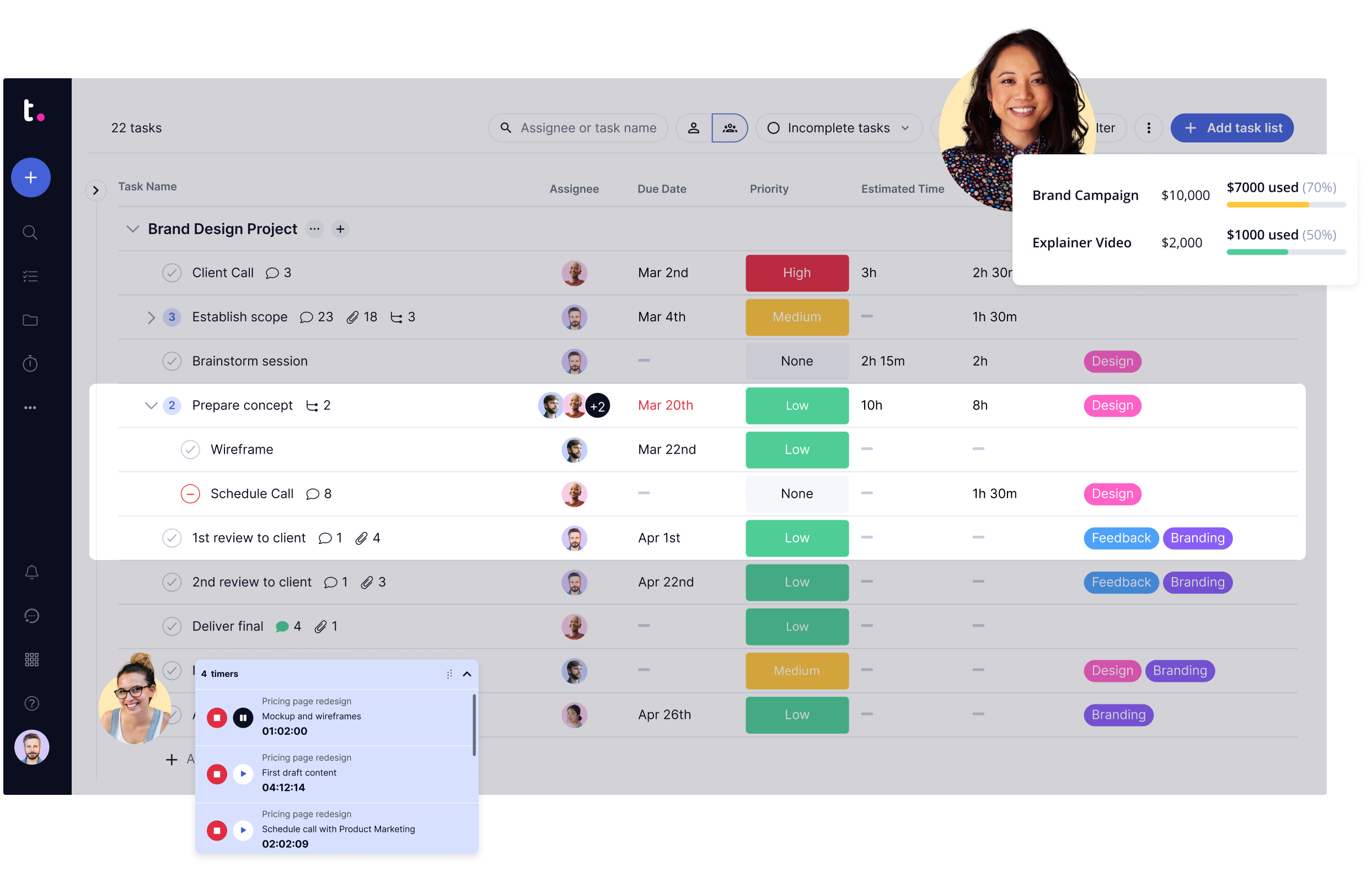
Image source: teamwork.com
A closer look at Teamwork's key features
Teamwork offers a structured suite of project management tools designed to help teams plan, execute, and deliver work with consistency. Its features cover everything from daily task coordination to high-level and client collaboration. In this guide, we break down each capability to show how it supports productivity, transparency, and teamwork across projects. Here's a closer look at Teamwork's key features and what they mean for growing teams.
Task & project management
Teamwork's form the core of the platform, giving teams a structured way to plan, assign, prioritize, and track work. You can create tasks, subtasks, dependencies, checklists, and milestones, ensuring every piece of the project has a clear owner and timeline. Custom fields and project views (List, Board, Table) enable workflows to adapt to different teams, whether they work in sprints, Kanban, or structured project phases.
For managers, Teamwork's visibility features support better assessments and performance review teamwork insights, making it easier to reference real examples of ownership, accountability, and collaboration.
Time tracking
Teamwork includes native , a significant benefit for agencies and service teams. Users can log hours directly on tasks, use timers while working, categorize billable vs. non-billable time, and generate time reports for billing or internal analysis. These insights are invaluable for teamwork performance review phrases related to productivity, efficiency, and workload management.
Time logs also help teams understand profitability and accurately track how long projects or service deliverables take, which is critical for client-facing work.
Client access & collaboration
One of Teamwork's strongest differentiators is its client collaboration layer. Clients can be invited into projects with restricted visibility, allowing agencies to share updates, files, messages, and deliverables transparently. This reduces back-and-forth email threads and builds trust through real-time visibility.
Client access also supports smoother communication cycles, allowing teams to demonstrate and teamwork throughout the project. Feedback, approvals, and file exchanges stay organized inside a single shared environment.
Workload & resource management
Teamwork offers resource planning tools that help managers understand who is overloaded, who is available, and how work is distributed across teams. The Workload Planner visualizes team capacity, making it easier to balance tasks, prevent burnout, and schedule work realistically.
This feature is handy during performance review teamwork and collaboration evaluations, as it gives managers objective data on contribution levels, output quality, and workload alignment. It's also valuable for scaling teams that need predictable project staffing.
Project templates
Teamwork includes a wide range of templates for common workflows, , product launches, onboarding, client delivery, and more. Teams can also build custom templates that include tasks, due dates, dependencies, and reusable structures.
Templates help standardize processes across departments and ensure consistency, which is essential when teams want repeatable success or need to document expectations for teamwork review examples or operational performance metrics.
Gantt charts & timelines
Teamwork's provide a visual view of project timelines, dependencies, critical paths, and bottlenecks. Managers can drag-and-adjust dates, update dependencies, and quickly reschedule work when priorities shift.
For cross-functional teams, this view supports more substantial alignment and collaboration, as it clearly shows how individual tasks affect the broader project timeline. It's beneficial for teams managing complex, multi-stage client projects.
Team messaging & collaboration
Teamwork includes built-in messaging tools, such as project comments, message boards, and task attachments. While it's not a complete chat platform like Slack or a unified suite, it provides enough communication features to keep project-related discussions in context, right beside the work.
This setup helps managers evaluate communication clarity and when preparing teamwork performance review examples, since all updates remain tied directly to tasks and deliverables.
Reporting & dashboards
Teamwork offers customizable dashboards and reporting tools that , progress, budgets, time logs, task completion, and workload distribution. You can build reports for executive summaries, client updates, or internal performance analysis.
Reports are valuable for assessing efficiency and creating data-backed performance reviews, collaboration, and teamwork insights. Teams can surface operational issues early, missed deadlines, resource gaps, scope creep, and respond before they impact delivery.
Invoicing & budget tracking
Teamwork's built-in and invoicing features help teams track project financials, actual vs. planned hours, cost estimates, and profitability. For agencies, having time logs tied directly to invoices ensures accurate billing and fewer manual steps.
Budget visibility supports better performance and accountability across teams, helping leaders reference measurable, financial-based teamwork review examples during evaluations. Teams can clearly see how their work contributes to revenue and profitability.
Manage projects, timelines & budgets
Teamwork pricing: Plans, costs & what you get
Understanding cost and value is crucial when choosing the right project management tool. In this section, we break down each Teamwork pricing plan, what it includes, and who it's best for. We'll highlight the differences between the free and paid tiers and help you assess which plan fits your team's needs and budget. Read on to get a clear picture of what you get and what you'd be investing in.
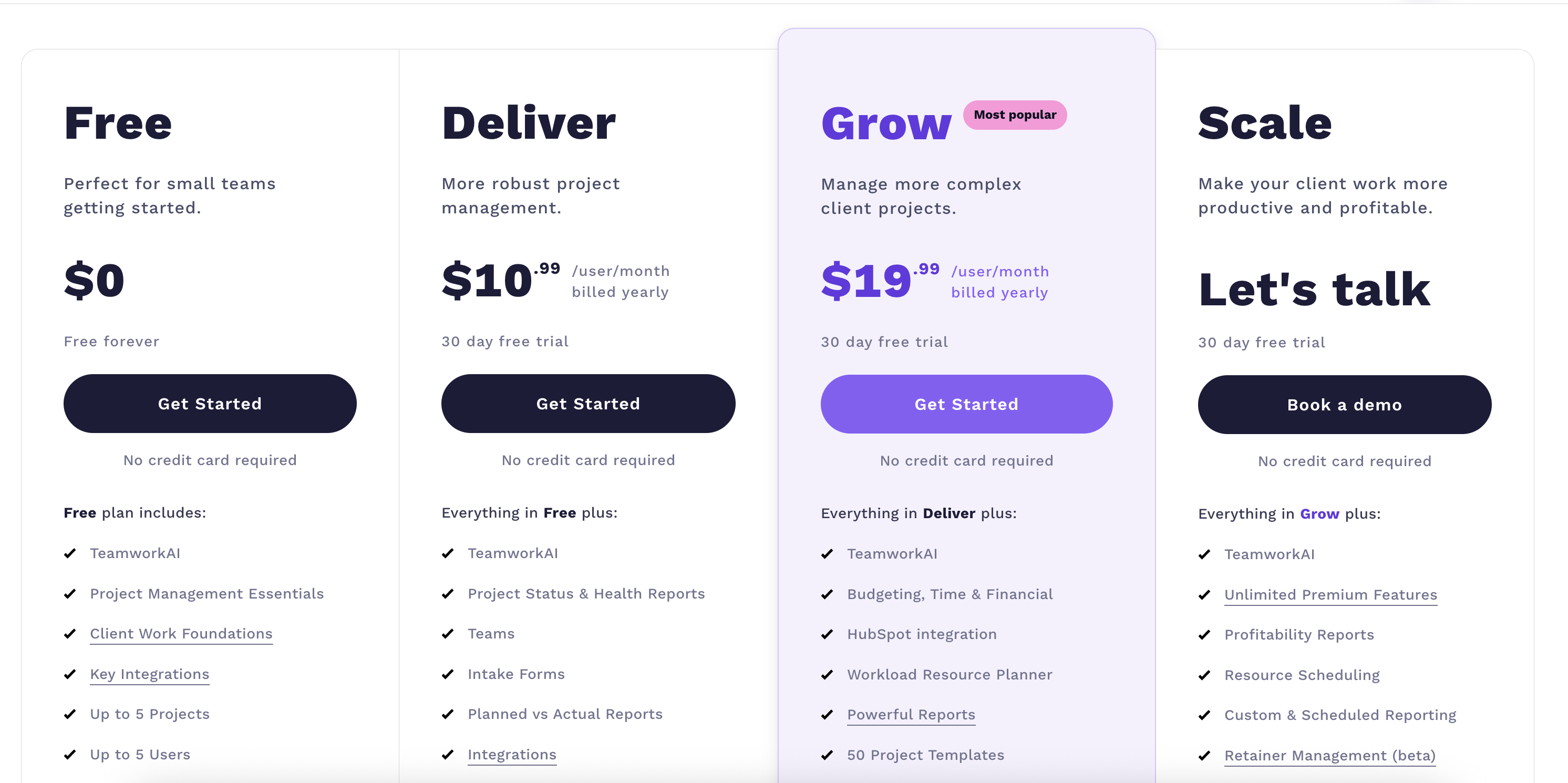
Image source: teamwork.com
Update time: 2025-12-09
Note: Pricing and plan details reflect publicly available data as of the update date and may vary based on region, billing cycle, and number of agents.
Who should use Teamwork?
In this Teamwork review, it's clear that the platform shines for teams that manage clients, track billable work, and need structured delivery processes. Below is a breakdown of the types of teams that benefit most from Teamwork's strengths.
- Creative agencies: Creative teams juggling multiple client deliverables rely on Teamwork's structured task lists, , and file sharing. It reduces back-and-forth and keeps designers, writers, and clients aligned on timelines. The platform helps agencies maintain clarity across complex creative production cycles.
- Consulting & professional services: Consulting teams benefit from Teamwork's strong time tracking, budgeting, and . It helps teams present accurate billing, manage scope, and maintain accountability across long-term engagements. This makes it ideal for firms needing reliable project visibility and client transparency.
- Distributed teams: Remote and hybrid teams use Teamwork to centralize communication, documentation, and task updates. Shared timelines and comments help eliminate confusion across time zones. Teamwork ensures progress continues even without real-time collaboration.
- Growing service businesses: Fast-scaling service companies rely on Teamwork's templates, resource forecasting, and repeatable workflows. It supports standardized delivery as new clients and team members are onboarded. This makes it a strong fit for teams transitioning from simple tools to a more advanced project system.
Who might not find teamwork the best fit?
While this Teamwork review highlights many strengths, the platform isn't ideal for every type of business. Some teams may find its structure, pricing, or communication features more than they need.
- Teams needing lightweight task tools: Teams that only need simple to-do lists, bare boards, or minimalist may find Teamwork too feature-heavy. Its layered setup, permissions, time logs, and billing can feel overwhelming for simple workflows. Tools like Trello or Todoist may offer a faster, simpler experience.
- Teams requiring a deep, all-in-one communication suite: Teamwork's built-in chat and collaboration features are basic and lack unified messaging, video meetings, and real-time communication. Teams wanting everything, chat, docs, meetings, and automation in one platform may need a more modern, integrated suite. This often leads to tool fragmentation.
- Small businesses are not billing hours: Since many of Teamwork's strongest features revolve around time tracking, invoicing, and client billing, non-billable teams may not fully use their capabilities. Small teams with fixed pricing or internal workflows might end up paying for features they don't need.
Pros and Cons of Teamwork
In this Teamwork review, it's clear that the platform delivers substantial value to client-service teams, but it also has certain limitations depending on how a business scales. Here's a detailed look at the major pros and cons.
Pros
- Strong : Teamwork is built with agencies in mind, offering client portals, permission controls, and organized communication threads. This makes it easier to manage expectations, track deliverables, and centralize project updates. Teams working with multiple clients benefit from clearer visibility and less back-and-forth.
- Built-in time tracking: The platform includes native time tracking that integrates directly with tasks and projects. This allows teams to understand effort, monitor billable hours, and prepare more accurate invoices. It's beneficial for service teams who depend on transparent time logs.
- Scales well for agencies: Teamwork supports complex project structures, multiple client accounts, and repeatable workflows. As agencies expand, they can add users, templates, and advanced reporting without reworking their processes. This scalability helps teams maintain consistency even during rapid growth.
- Excellent task visibility: With lists, boards, Gantt charts, and workload views, Teamwork makes it easy to see who's doing what and when. Clear hierarchy and dependencies reduce confusion and improve day-to-day execution. Teams can quickly identify blockers and maintain smoother delivery timelines.
Cons
- It can feel complex for beginners: New users may find Teamwork's layered structure overwhelming, especially when juggling task lists, portfolios, time tracking, and detailed permissions. The learning curve is higher compared to simpler project tools. Teams often need onboarding time before they can use it efficiently.
- Cost increases with scaling: As teams add more users, clients, and needs, the overall subscription cost rises significantly. For small businesses or early-stage agencies, this can feel limiting. Scaling features are often available only with higher-tier plans, increasing long-term expenses.
- Limited built-in chat compared to modern unified suites: While Teamwork offers basic messaging and commenting, it lacks the depth of real-time communication found in unified platforms. Teams usually rely on external chat tools to fill the gap. This leads to fragmented communication and reduces overall workflow cohesion.
Emerging limitations: When project tools need more than task tracking
Even though this Teamwork review shows the platform's strengths, growing businesses eventually reach a stage where they need more automation, unified communication, and real-time collaboration. Here are the signs teams may be ready for something beyond Teamwork.
- Need for deeper : Teamwork offers basic automation, but advanced, cross-tool workflows are limited. Teams managing complex approvals, multi-step automations, or interconnected processes may hit roadblocks. This leads to manual work and inconsistent operations.
- Fragmented communication across Slack/email/docs: Because Teamwork lacks a strong native communication layer, teams rely on Slack, email, and scattered documents. This fragmentation slows decision-making and creates silos. Important updates often get lost across channels.
- Limited real-time : Teamwork doesn't support true real-time co-editing for documents, brainstorming, or planning. Teams must switch to Google Docs or Notion for live collaboration. This constant app-hopping breaks focus and reduces workflow efficiency.
- Dependency on multiple external tools: To fill gaps, chat, docs, forms, automation, and meetings, teams must integrate several external apps. This creates a heavy tech stack with overlapping features and added costs. Managing updates, permissions, and integrations becomes draining.
- Scaling complexity, permissions, and integrations: As teams grow, the admin workload increases significantly. Permissions, custom roles, and multi-level project structures become harder to maintain. Integrations also require more oversight to prevent data gaps or sync issues.
- Desire for a single, connected platform to replace multiple apps: Many teams eventually want one unified workspace that replaces fragmented tools. They look for built-in chat, docs, workflows, analytics, and automation within a single connected platform. Teamwork's suite doesn't provide complete end-to-end visibility.
Afterthought
As these operational challenges accumulate, the limits of Teamwork become more noticeable—growing teams expect less tool sprawl, faster communication, and more scalable workflows than Teamwork's ecosystem can fully support. When project operations expand across departments, channels, and tools, businesses often realize they need a platform that unifies messaging, documentation, task management, and automation into one connected environment. This shift marks the point where teams begin exploring more comprehensive, all-in-one solutions built to handle modern, collaborative, fast-moving work.
Meet Lark: Achieve tight-knit collaboration & streamlined workflows
provides an all-in-one workspace that combines tasks, docs, chat, meetings, and automation. Here's why users are switching to Lark for faster . With everything connected, from project workflows, Gantt view for , to real-time messaging and approvals, teams can move from idea to execution without losing momentum. Here's why users are switching to Lark for faster team collaboration.
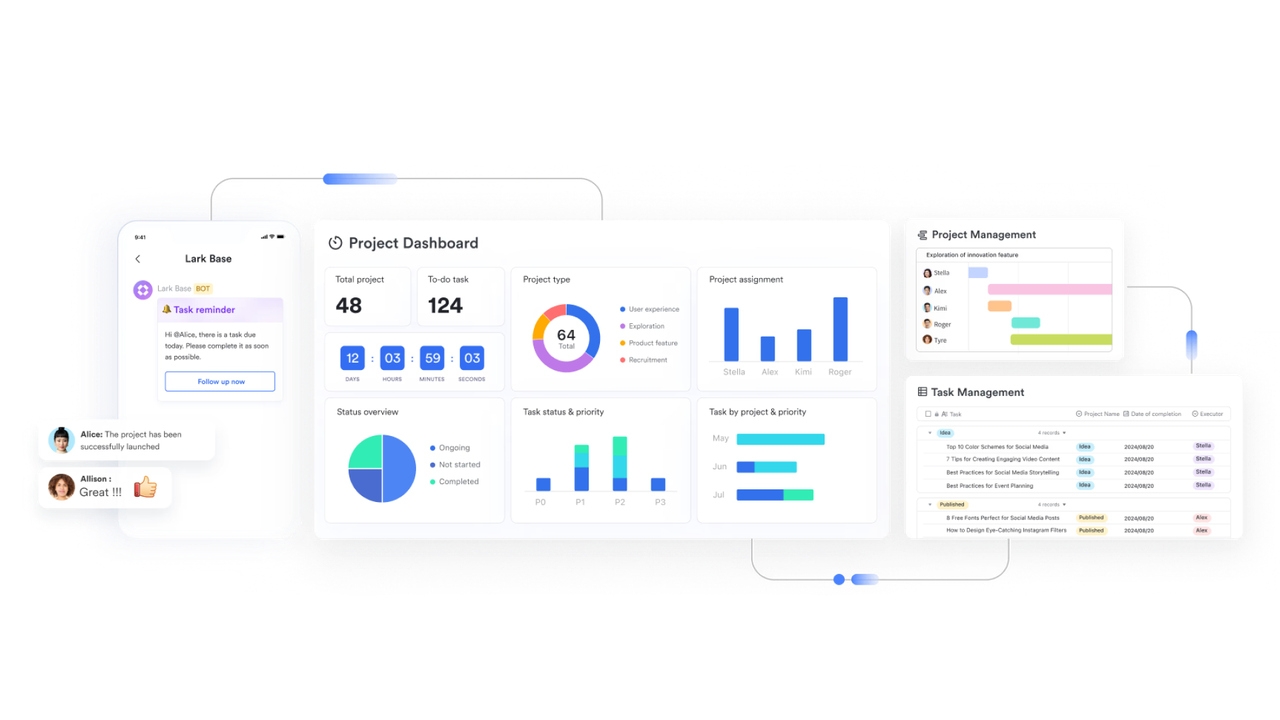
Customizable data workflows beyond task lists
Lark enables teams to design workflows using structured databases rather than being limited to simple to-do lists. With customizable fields, tables, Kanban views, and in , organizations can model real processes such as , onboarding pipelines, approval stages, or client delivery workflows. Records move through defined statuses with built-in dependencies and milestones, enabling teams to visualize progress across complex operations rather than manually coordinating tasks across disconnected lists.
Built-in automated workflow without external tools
Lark Base workflow includes native workflow automation powered by triggers, conditional IF/Else branches, formulas, and scheduled actions. Teams can automatically assign tasks, update records, calculate values, send reminders, or route approval requests when defined conditions occur. For example, when a form is submitted, a task can be assigned instantly; when a deadline passes, stakeholders receive reminders automatically. This removes the need for third-party automation platforms while keeping workflows synchronized within a single system. 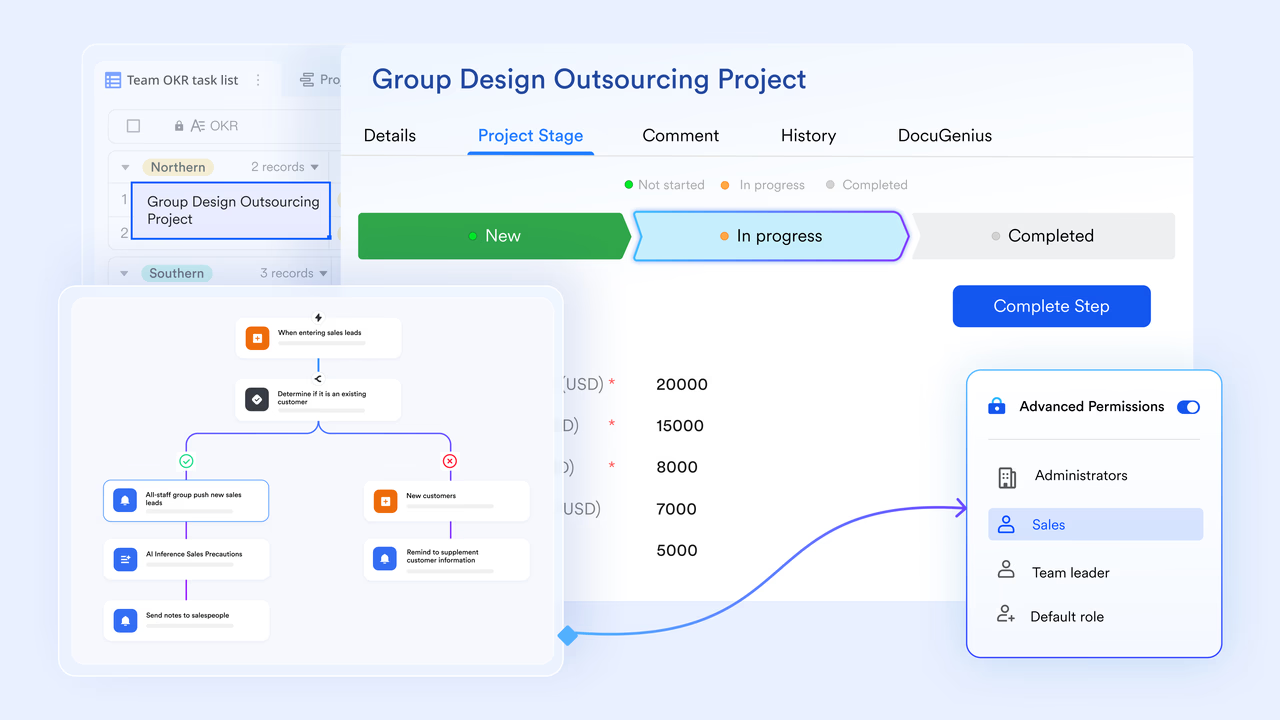
Real-time communication and coordination inside one platform
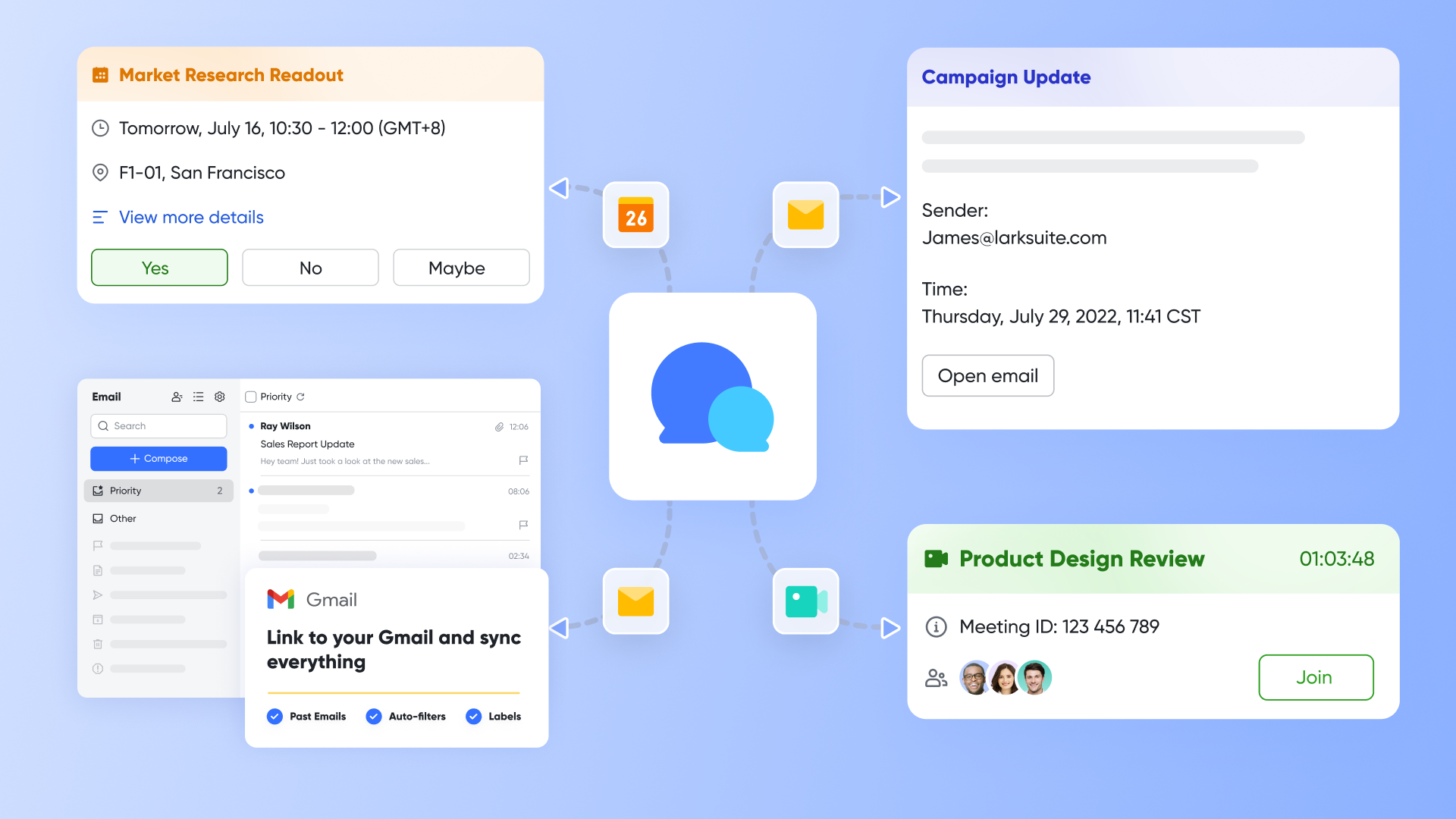
Lark's core applications—Messenger, Meetings, and Calendar—work together to form a unified collaboration ecosystem. acts as the central hub, allowing teams to instantly share documents, adjust permissions, and quickly schedule meetings directly from chats. When meetings start, provides features like in-meeting translation for seamless global communication and for textual readability. supports team members' availability checks, making scheduling effortless, and allows users to attach notes and documents directly to events.
Unified collaborative platform for documents, sheets, & slides
Lark's creation suite—Docs, Sheets, Slides, and Mindnote—ensures collaborative work happens directly within the files. enables simultaneous editing, advanced sharing, and direct team input via commenting and @mentions, fostering cross-departmental discussion without formal meetings. Lark Sheets supports real-time data analysis using pivot tables and formulas, while allows teams to edit presentations collaboratively. Finally, Mindnote supports real-time idea mapping and brainstorming, ensuring teams can visualize and organize complex thoughts together. More surprisingly, during the meeting, you can use Magic Share to let participants interact with shared Docs, Sheets, Slides, and Mindnotes in real time. 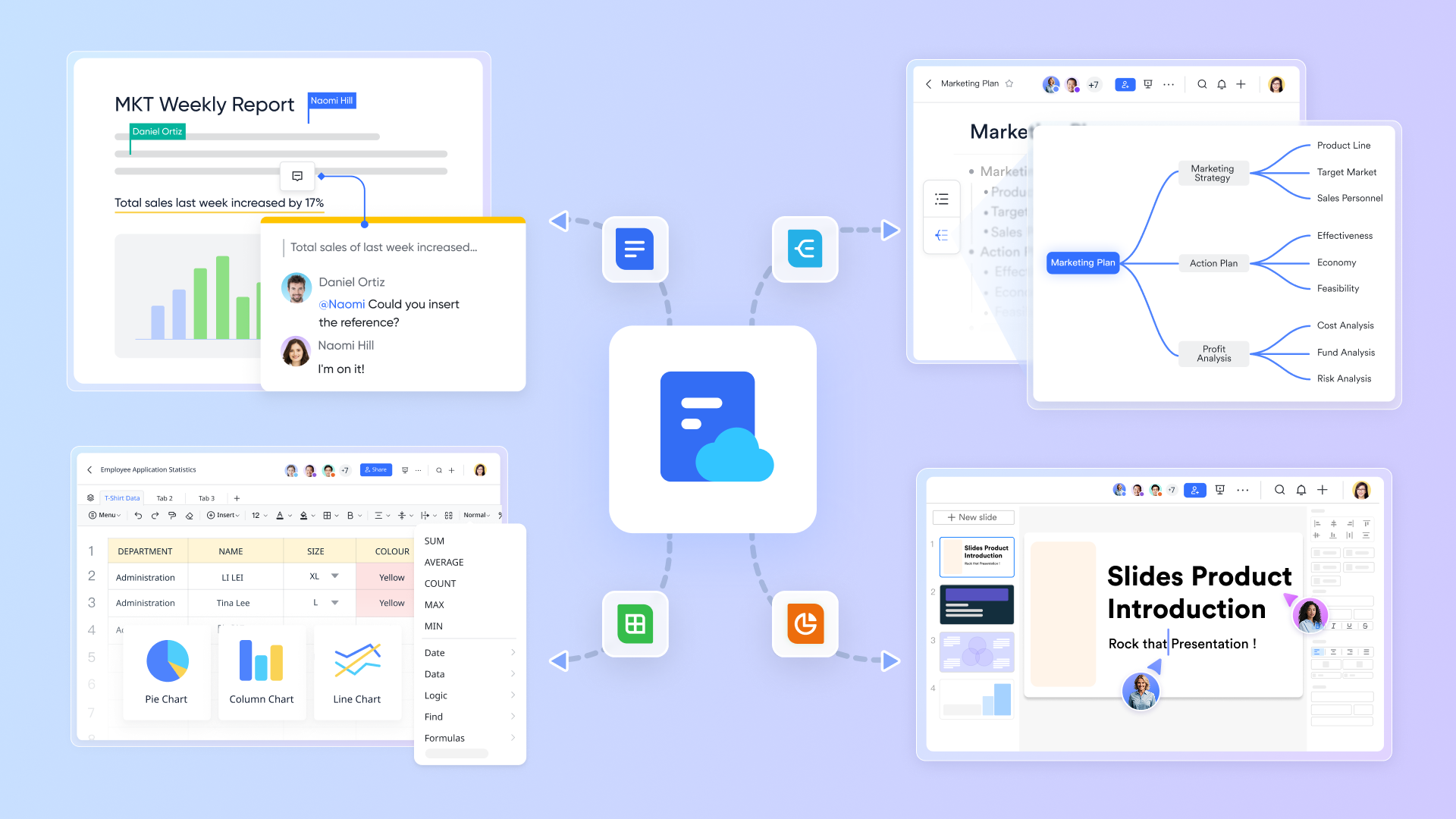
Enterprise-grade permission management
Lark provides advanced access controls that restrict visibility and editing rights at the document, table, workflow, and workspace levels. Administrators can define user roles by team, department, or project, and apply granular permissions to sensitive records or financial data. Enterprise users benefit from additional security layers, including Single Sign-On (SSO), account audit logs, and , ensuring data compliance and secure collaboration at scale. 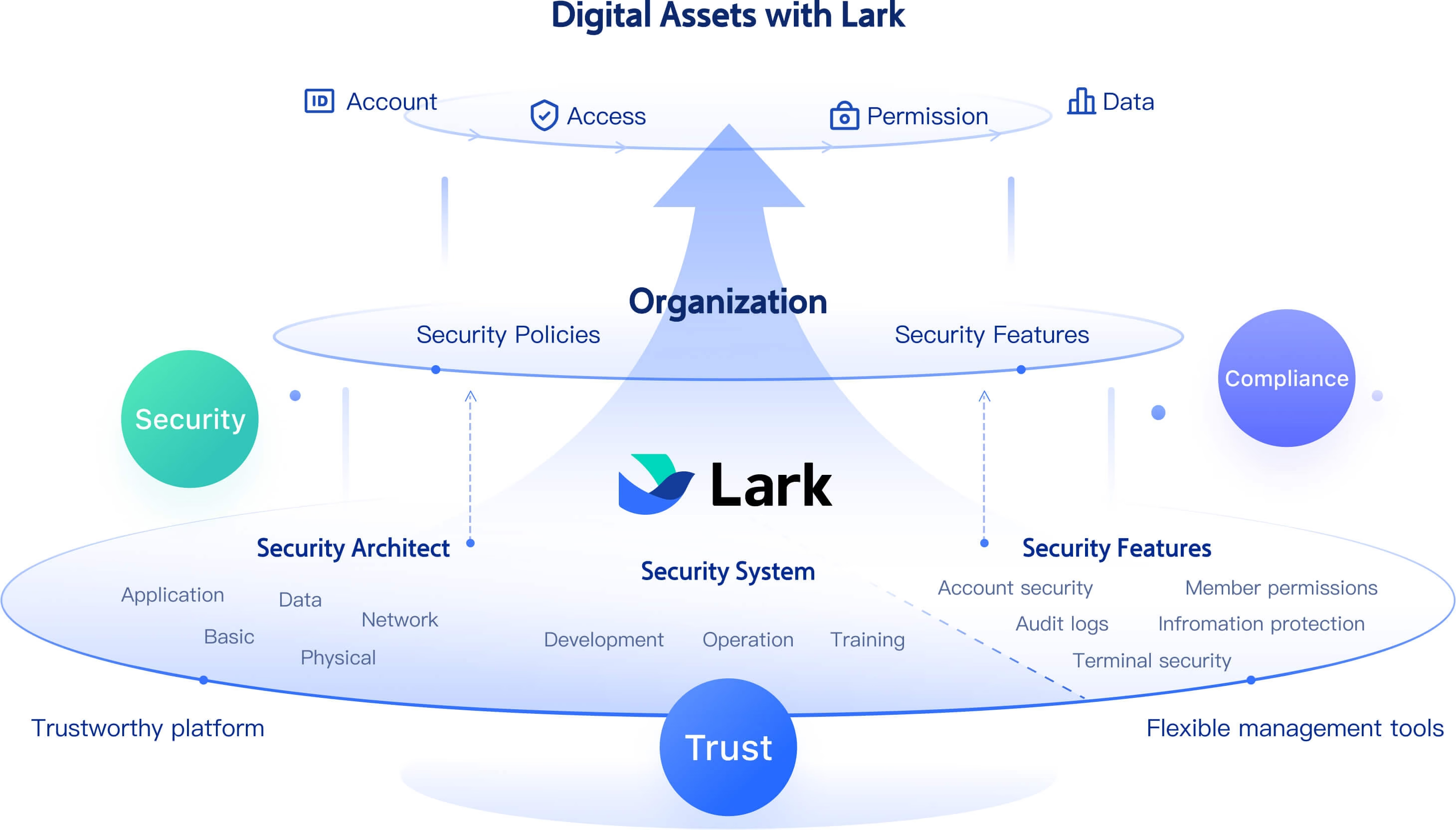
Built-in cloud storage
Lark provides for files, documents, meeting recordings, images, and workflow attachments. Storage is centralized, searchable, and accessible across devices, ensuring teams no longer need to manage external file drives. and permission settings protect content while enabling easy collaboration. With generous storage allowances across plans, organizations can securely store operational files alongside active workflows and documentation in one unified system.
:
- Starter plan: Free forever plan that includes 11 powerful tools for up to 20 users. It also comes with 100GB of storage, 1000 automation runs, AI translations, and more.
- Basic plan: $6/user/month (billed annually) for up to 500 users. It includes everything in Starter plus group calling for up to 500 attendees, 5TB of storage, 1000 automation runs, and more. For more details, please .
- Pro plan: $12/user/month (billed annually) for up to 500 users. It includes everything in Basic plus group calling for up to 500 attendees, 15TB of storage, 50,000 automation runs, and more.
- Enterprise plan: for custom pricing. Supports unlimited users and includes even more automation runs and advanced security, compliance, and management features.
For small teams with simple communication needs

18 months message history
1000 Base automation runs/month
2000 rows per table in Base
Most POPULAR
For companies with comprehensive collaboration and management needs
Unlimited message history
500-participant video meetings
50k Base automation runs/month
20k rows per table in Base
For large companies with advanced security and organizational management needs
Get a personalized demo and pricing
Unlimited message history
500-participant video meetings
15 TB storage + 30 GB storage/user
500k Base automation runs/month
50k Base automation runs/month
Most POPULAR
For companies with comprehensive collaboration and management needs
Unlimited message history
500-participant video meetings
50k Base automation runs/month
20k rows per table in Base
Final checklist: Lark & Teamwork overall comparison
Choose Lark if: Your organization needs a unified, all-in-one collaboration suite (chat, documents, tasks, meetings) and places a high value on automation and generous user/storage limits for a predictable, low per-user cost. Its free tier is highly capable for startups and small teams.
Choose Teamwork if: Your primary need is dedicated project management, specifically focused on client work, budget tracking, workload planning, and resource scheduling for professional services. While its collaboration features appear secondary, its strength lies in structured project delivery.
Get real-time updates on all projects with Lark
Conclusion
Teamwork remains a strong platform for project management for agencies, professional services, and teams that rely heavily on time tracking, client management, and structured delivery workflows. This review shows that while it excels in visibility, project organization, and billable work management, it can feel limited for teams needing deeper automation, unified communication, or real-time collaboration. As businesses scale, many outgrow fragmented tools and look for a single connected workspace that centralizes tasks, chat, docs, and workflows. For teams seeking that next level of operational clarity and cohesion, platforms like offer an all-in-one alternative.
FAQs
Is Teamwork suitable for small businesses?
Yes, Teamwork can work well for small businesses that need structured task management, client tracking, and visibility. Small teams often evaluate collaboration using teamwork and teamwork review examples to understand whether a tool supports shared ownership. Teamwork's free plan helps new businesses test workflows before upgrading to features needed for more advanced project delivery.
Does Teamwork support agile project workflows?
Teamwork supports agile teams through boards, sprints, and flexible . Many teams rely on performance review teamwork criteria and performance review phrases for teamwork to measure collaboration during agile cycles. The platform's Kanban and timeline tools help visualize progress and highlight blockers, making it suitable for teams practicing Scrum, hybrid agile, or iterative delivery models.
Can Teamwork replace timesheets and invoicing tools?
Yes, Teamwork includes built-in time tracking, billable hours, and invoicing exports, which can replace separate timesheet tools for many service businesses. During evaluations, managers often refer to teamwork performance review examples and teamwork examples for performance review to understand how effectively teams log work and collaborate on deadlines. Its tracked hours directly connect to budgets, making financial reporting more accurate.
Does Teamwork integrate with Slack, Teams, and Google Workspace?
Yes, Teamwork integrates with Slack, Teams, and Google Workspace to streamline collaboration. Teams often consider cooperation and teamwork performance review phrases, as well as performance review collaboration and teamwork, when assessing whether communication across platforms feels seamless. These integrations help reduce context-switching, align updates, and centralize project-related conversations for distributed and hybrid teams.
For more Google Workspace's information, you can refer to and .
Is Teamwork secure for client files and sensitive project data?
Teamwork uses encryption, controlled permissions, and role-based access to protect sensitive project information. Security and reliability often influence performance review examples teamwork and performance review teamwork and collaboration, especially for client-facing roles. Teams handling confidential work depend on consistent, secure file sharing and auditability to maintain compliance and client trust.
Related reading






























