














Trello AI features guide: News, capabilities, and alternatives for project management
Sep 18, 2026
Sep 18, 2026

9 min read


Managing projects across scattered tools is a headache. You might have followed the recent Trello AI news and wondered if adding artificial intelligence to your Kanban boards will fix the chaos. While Trello’s new AI features offer helpful writing assistance and task extraction, they operate entirely within a single tool. In this guide, we will break down exactly what Trello AI can do, evaluate its real-world impact on your daily project management, and explore why unified platforms like Lark might be a smarter choice for teams tired of fragmented workflows.
What is Trello AI?
Trello AI is not a standalone robot that runs your projects, nor is it a separate application you need to download. It is a suite of machine learning features built directly into your existing task cards and boards.
Powered by its parent company's broader technological framework, Atlassian Intelligence, it uses advanced large language models (LLMs) to help you draft, summarize, and automate the text-heavy, administrative aspects of project management. The core philosophy here is localized assistance. Atlassian did not build an AI to replace the Kanban methodology; they built an AI to reduce the amount of time you spend typing and reading within that specific methodology.
Before you spend time looking for these new buttons on your dashboard, it is crucial to understand the rollout strategy and access limitations. These capabilities are not universally available to the entire user base. Currently, Atlassian Intelligence features are restricted to Premium and Enterprise plan subscribers. If you are operating on the free tier or a standard plan, you will not have access to these tools.
Furthermore, even if you are on a qualifying plan, the features do not automatically appear. Workspace administrators have to actively navigate into their backend settings, review the data handling policies, and toggle Atlassian Intelligence on. This deliberate activation process means that many teams might have access to the technology but remain completely unaware of it because their IT department has not flipped the switch.
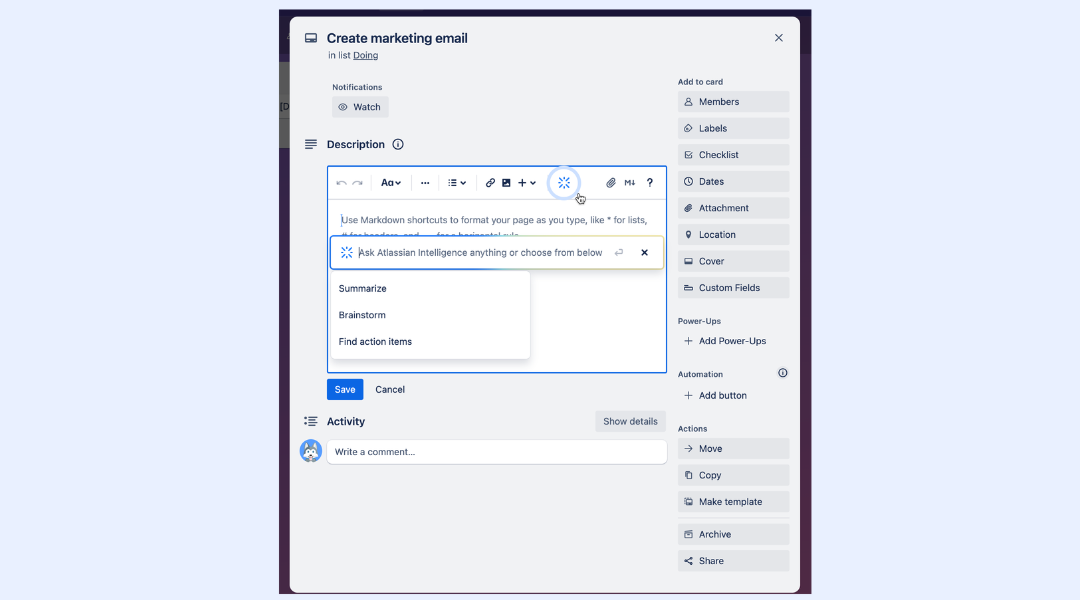
Image source: atlassian.com

Core Trello AI features explained
When you open a card after the features are activated, the AI acts as an embedded editor and logic assistant. It targets the specific, repetitive administrative tasks that eat up your afternoon, allowing you to focus on actual strategy rather than card maintenance.
The writing assistant for card descriptions
We have all stared at a blank card description, unsure how to condense a complex issue into a readable format. Trello's AI sits directly inside the description and comment fields to fix this exact problem.
You can dump your raw, unformatted thoughts into the text box and ask the assistant to clean up the grammar, fix the spelling, or adjust the tone. If you are escalating a bug report to an executive stakeholder, you can ask the AI to make your hasty notes sound more professional and structured.
However, its most practical application is handling long-winded, asynchronous discussions. Imagine a scenario where a single task card has been active for three weeks. A stakeholder leaves a massive, rambling, five-paragraph comment detailing their feedback on a recent design iteration. The next developer who opens that card is immediately overwhelmed by the wall of text. You can command the AI to summarize that massive comment into three quick bullet points. This localized summarization saves every subsequent person who opens the card from having to read an essay just to understand the current context and the immediate next steps.
Action item wizard: Extracting tasks from raw text
Project managers frequently deal with massive dumps of unformatted information. You receive briefs, meeting transcripts, and strategy docs, and you are expected to turn those static paragraphs into trackable actions. This is where the action item extraction feature proves its worth.
Consider a highly realistic scenario: You just received a comprehensive, 10-page Project Initiation Document (PID) from a new client. The PID outlines the background, objectives, and high-level deliverables of the engagement. Normally, translating this into a functional Work Breakdown Structure (WBS) is an agonizing process. You would have the PID open on your left monitor, and you would manually create lists, type out dozens of individual cards, and build checklists on your right monitor.
With the action item wizard, you bypass this manual labor. You can copy sections of that dense PID and paste the raw text directly into Trello. The AI scans the paragraphs, understands the context of the deliverables, and extracts them into a neat, structured checklist right inside the card. It identifies what needs to be done based on the phrasing in the document. It is a highly effective way to draft a rough WBS in seconds, turning a static brain dump into a working, trackable schedule without the tedious data entry.
Smart automation via Butler
Trello has long relied on its "Butler" system to automate routines—like assigning a due date when a card moves to a new column, or tagging a specific user when a label is added. While powerful, setting up these automations historically required clicking through complex, rigid logic menus. If you did not understand basic "if-this-then-that" logic structures, building a robust automation was intimidating.
Now, Atlassian uses natural language processing to simplify board automation. You do not need to hunt through dropdown menus. You can simply type out the workflow you want in plain English.
For example, you can type: "When a card is moved to the 'Pending Review' list, tag the QA manager, add a yellow label, and set the due date for two days from now." The system will process that sentence, translate it into the correct logical parameters, and attempt to build the functioning automated board rule for you. It lowers the technical barrier to entry, allowing any team member to optimize their own workflow without needing an operations specialist.
Evaluating Trello AI features in project workflows
To understand the real value of these updates, we must evaluate how they fit into rigid daily routines. Are they actually saving measurable time, or are they just a neat interface trick?
Impact on Agile and Scrum routines
If you manage an agile engineering or marketing team, the practical utility of these tools is immediate. Scrum masters dealing with a fast-paced two-week sprint often have to sift through a flurry of daily stand-up comments on various cards to identify blockers. When a sprint is derailed, tracking down the exact communication breakdown across dozens of cards is painful.
Instead of reading every single update manually during a sprint retrospective, a Scrum master can use the AI to summarize the activity thread on the most complex tasks. This provides a rapid, accurate status check, allowing the team to focus on resolving the blocker rather than just finding it.
The technical reality of fragmented data
However, as we evaluate these features deeply, we hit a hard friction point. Trello AI is incredibly useful, but its awareness is entirely confined. It stops at the edges of the Kanban card. It cannot listen to the 45-minute video sync you just had about that PID, nor can it cross-reference your team's shared calendar to suggest realistic deadlines based on holiday schedules.
To see the real cost of this limitation, you do not even need to look at your monthly software bill. Just open your Chrome DevTools Network panel while trying to coordinate a project across separate chat, doc, and task apps.
Watch the network traffic. You will see a constant, heavy stream of redundant data requests, overlapping API calls, and sync processes firing back and forth just to keep basic information updated across different browser tabs. You are constantly pulling data from a communication server, pushing it to a document server, and then verifying it on a project management server. This browser-level technical friction perfectly mirrors the operational friction your team experiences every single day. The AI inside Trello might help you write a card faster, but it does absolutely nothing to stop the relentless, inefficient ping-ponging of data across your fragmented tool stack.
The hidden cost of isolated AI tools
When analyzing the real-world utility of any software update, we have to look at the broader ecosystem it lives within. This brings us to a growing, critical problem I see with modern tech stacks: the compounding cost of isolated intelligence.
Over the last few years, teams have adopted a highly fragmented approach to work. You likely have Microsoft Teams or Slack for messaging, Google Workspace or Notion for your documentation, and Trello or Asana for your task boards. Now, every single one of these vendors is releasing their own localized AI assistant. You have an AI writing your documents, another AI summarizing your chat channels, and Trello AI formatting your task cards.
However, buying an AI writing assistant for every separate box does not actually fix a broken, disconnected system. It just creates faster silos.
The core friction in project management is not just about the time it takes to write a card description; it is the cognitive load of context switching. If a critical design decision happens in a Slack channel, someone still has to manually copy that context, open a new browser tab for Trello, find the correct card, and paste the information in so the AI can summarize it. The intelligence is trapped in different environments. Human beings are still acting as the manual API, carrying data back and forth between apps.
Beyond the operational drag, there is a very literal financial cost. Software vendors are not giving these advanced capabilities away for free. You end up paying for Premium Trello to access Atlassian Intelligence, a premium Slack tier for their workflow builder, and a premium Zoom license for AI meeting notes. You are stacking expensive, redundant subscriptions just to maintain a disconnected workflow. For growing SMEs and remote teams, this bloated tool stack quickly becomes an unsustainable line item on the annual budget. If you want to see just how much these overlapping tools cost side by side, Lark's comparison with Trello breaks down the numbers in detail.
Beyond the board: The inherent limitations of Trello
While Atlassian Intelligence certainly makes maintaining individual cards faster, it is crucial to recognize what it does not fix. The fundamental friction most growing teams experience with Trello is not a lack of AI; it is the structural limitation of the Kanban system itself.
Trello was designed to do one thing exceptionally well: move visual cards across columns. However, as projects scale from simple task tracking to comprehensive operational management, teams quickly hit a wall.
First, there is a lack of native, heavy-duty documentation. When managing a software release or a major marketing campaign, you need robust cloud documents, spreadsheets, and wikis. Trello forces you to either link out to Google Drive or rely on limited third-party Power-Ups, fracturing your single source of truth.
Second, it completely lacks real-time communication. Trello boards are inherently asynchronous. If an urgent bug is flagged on a card, the actual problem-solving conversation almost always migrates over to a Slack or Teams channel. The project manager is then forced to act as a human bridge, summarizing the chat channel discussion and pasting it back into the Trello card so the rest of the team has context.
Finally, for enterprise use cases, standard Trello struggles with complex business logic. If a task requires a formal sign-off from the legal department or needs to be tied directly to a quarterly OKR, you have to build fragile workarounds or pay for additional integrations. The AI assistant can help you write a better description for a card, but it cannot fundamentally change the fact that Trello treats task management in isolation from your actual communication and documentation.
Lark as the unified alternative to fragmented project management
If your team is exhausted by patching together different applications just to get a project across the finish line, you need to reconsider your underlying infrastructure. Instead of adding more specialized apps to your stack, the more effective strategy is consolidation. This is where Lark completely shifts the paradigm, offering a structural solution for growing businesses and enterprise teams struggling with fragmented tool stacks.
Rather than positioning project management as an isolated destination you visit in a separate browser tab, Lark is engineered as a true unified workspace. It is an all-in-one SaaS suite that combines messaging, video meetings, cloud-native documents and sheets, shared calendars, email, wiki, and automation tools into a single, centralized platform.

Bridging the gap with native collaboration and multilingual support
To understand the difference, consider a common scenario for remote or hybrid teams. Imagine you are a product manager coordinating a software launch with a global team. In a fragmented setup, you would jump from a Zoom call, copy the transcript, paste it into a Google Doc, translate it manually for your overseas developers using a third-party tool, and then create Trello cards.
In Lark, that entire sequence happens in one continuous motion. You hold the video meeting directly inside the platform. The Lark Minutes tool automatically transcribes and captures the meeting notes. Because Lark features robust multilingual support and AI translations, your developers in Brazil can read the shared documentation and chat messages in Portuguese in real-time, while your marketing team reads them in English. You can then highlight an action item inside that very same Lark Doc and convert it into a trackable task assigned to a team member. There is no data lost in transit, no overlapping permissions to configure, and zero context switching.

Moving beyond boards: Approval workflows and OKR tracking
Where single-purpose Kanban tools often fall short is handling the actual business logic that surrounds a task. Trello is excellent at tracking the status of a deliverable, but it struggles with complex operational processes. If you are evaluating whether to switch, this side-by-side breakdown of Lark vs. Trello covers exactly where these gaps show up.
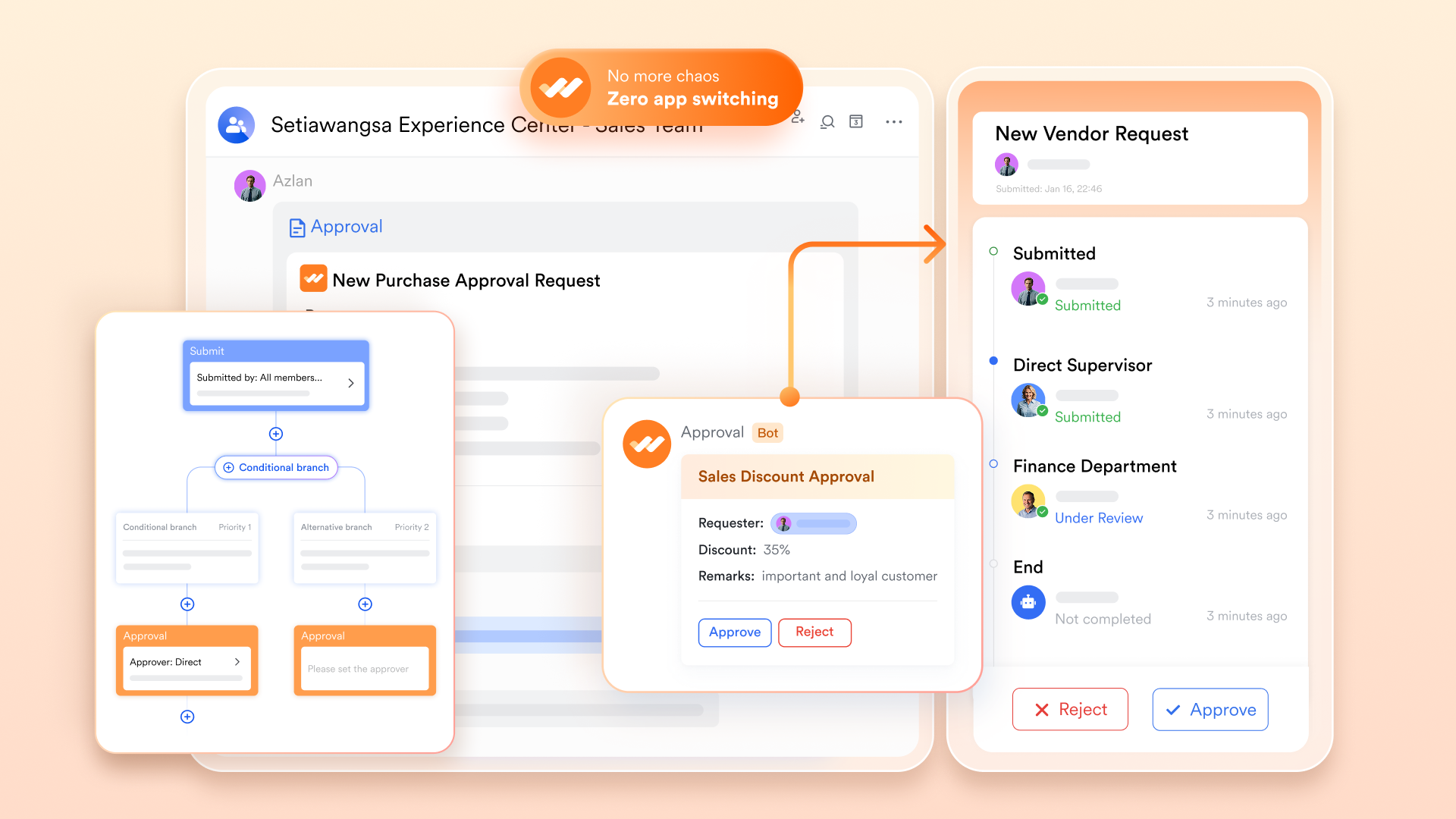
Lark addresses this by integrating robust approval workflows directly into the communication stream. If a project requires budget sign-off or a specific Project Initiation Document needs executive approval, you do not need to send an email and wait. You can configure an automated approval flow that pings the right manager directly in their chat interface.
Furthermore, Lark ties daily tasks to high-level strategy through native goal and OKR (Objectives and Key Results) tracking. Instead of keeping company goals in a static spreadsheet that nobody checks, your team's OKRs are visible within the same workspace where they execute their daily work. Every automated run, every completed task, and every approved document feeds directly into the larger strategic picture. You can get started immediately using Lark's ready-made OKR management template.
Transparent pricing built for scale
One of the most compelling arguments for consolidation is cost-efficiency. Replacing a combination of Slack, Google Workspace, and project management tools like ClickUp or Basecamp with a single suite drastically reduces your overhead. Lark's pricing structure is explicitly designed to support teams from their early stages through enterprise scale.
- Starter plan: Free forever plan that includes 11 powerful tools for up to 20 users. It also comes with 100GB of storage space, 1000 automation runs, AI translations, and more. No credit card needed.
- Pro plan: $12/user/month (billed annually) for up to 500 users. It includes everything in Basic plus group calling for up to 500 attendees, 15TB of storage space, 50,000 automation runs, and more.
- Enterprise plan: Contact sales for custom pricing. Supports unlimited users and includes even more automation runs and advanced security, compliance, and management features.

Starter
Pro
Enterprise
Starter
For small teams with simple communication needs
$0
/ user / month
20 users max
18 months message history
1-on-1 video meetings
100 GB storage
Lark Docs & Mail
1000 Base automation runs/month
2000 rows per table in Base
Pro
For companies with comprehensive collaboration and management needs
$12
/ user / month
500 users max
Unlimited message history
500-participant video meetings
15 TB storage
Lark Docs & Mail
50k Base automation runs/month
20k rows per table in Base
Enterprise
For large companies with advanced security and organizational management needs
Get a personalized demo and pricing
Unlimited users
Unlimited message history
500-participant video meetings
15 TB storage + 30 GB storage/user
Lark Docs & Mail
500k Base automation runs/month
50k Base automation runs/month
Single sign-on (SSO)
Pro
For companies with comprehensive collaboration and management needs
$12
/ user / month
500 users max
Unlimited message history
500-participant video meetings
15 TB storage
Lark Docs & Mail
50k Base automation runs/month
20k rows per table in Base
How to transition your team's workflow
Ripping out your existing software stack all at once is a recipe for operational disaster. If you recognize the waste in your current setup and want to move toward a unified suite, you need a methodical migration strategy. Here is a three-phase approach I recommend for minimizing disruption.
Phase 1: Audit and map your current bloat
Before you cancel any subscriptions, document exactly how your team works right now. Identify the redundant tools. Are you paying for a dedicated video conferencing tool when your chat app already has video capabilities? Document the specific manual tasks your team hates—like copying weekly metrics from a sheet into an email update. This audit gives you a clear baseline of the friction you need to eliminate.
Phase 2: The single-project pilot
Do not migrate your entire company layout on day one. Choose a single, upcoming initiative—perhaps a specific marketing campaign launch or a distinct product development sprint. Run this entire project strictly within the new unified platform. Route all the team communication, strategy documents, calendar events, and task tracking through the new system. This controlled environment allows your core team to experience the reduction in context switching firsthand and figure out the best organizational structure without risking your standard daily operations. Lark's project planning and implementation template is a good starting point to structure this pilot.
Phase 3: Gradual data migration and legacy sunsetting
Once the pilot team is comfortable and the new workflows are established, begin exporting your legacy data. Move your old Kanban boards and cloud documents into the unified workspace in structured batches. Once the active projects are safely housed in the new system, set a hard deadline for the team to stop using the old apps, and freeze the upcoming renewal payments for those isolated tools.
Conclusion
While the recent Trello AI updates introduce highly practical tools for managing localized board data, they are fundamentally limited by their isolated nature. Features like the action item wizard and writing assistant certainly save time when drafting cards, but applying AI to a single silo does not resolve the broader operational friction of fragmented communication. For project managers looking to genuinely streamline their operations and reduce software bloat, unified productivity suites like Lark offer a much stronger foundation. By centralizing your chat, documents, and task automation, you eliminate the friction of context switching and build a more efficient, scalable workflow.
FAQs
Does Trello have an AI?
Yes, Trello uses AI through Atlassian Intelligence, which is integrated directly into Premium and Enterprise plans to help automate tasks, generate content, and summarize information. It offers features like AI-powered quick capture to turn emails/messages into tasks and tools to improve card descriptions or brainstorm ideas.
What is Trello used for?
Trello is a visual, card-based project management and productivity tool used to organize tasks, track workflows, and collaborate on projects. It uses boards, lists, and cards to represent projects at various stages, commonly for content calendars, CRM, onboarding, and personal task management.
What is Atlassian Intelligence AI in Trello?
AI in Trello can generate new content in your card's descriptions and comments. It can be used to help you brainstorm new content, summarize or shorten the content you already have, find action items in your content, and improve your spelling and grammar.
What are the disadvantages of using Trello?
- Trello lacks advanced reporting features you might find in more complex tools.
- You can't create intricate task dependencies, which may limit complex project planning.
- Trello's simplicity might not suit large teams with detailed project management needs.
Related reading
Table of contents
Start using Lark today

Manage all your work in one place
Boost team efficiency by 10x
Save up to 70% on software costs
Table of contents
Start using Lark today
Manage all your work in one place
Boost team efficiency by 10x
Save up to 70% on software costs
Keep reading







2026 Lark Technologies Pte. Ltd.
Headquartered in Singapore with offices worldwide.






Explore: