Kanban has become one of the most widely adopted frameworks for managing work visually, helping teams streamline workflows, reduce bottlenecks, and improve delivery speed. Among the many tools available today, Trello stands out as a simple yet powerful platform for implementing Kanban boards. Its intuitive drag-and-drop interface and visual structure make it accessible to teams of all sizes—from individuals managing daily tasks to organizations coordinating complex workflows.
This guide offers a comprehensive look at Trello Kanban boards, including how they work, their core features, real-world use cases, limitations, and when teams should consider more advanced alternatives. Whether you're new to Kanban or evaluating tools for scaling your workflow, this guide will help you make an informed decision.
What is Trello Kanban?
Trello Kanban is a built within Trello that follows the Kanban methodology to organize and track work. It uses a simple structure of boards, lists, and cards to represent projects, workflow stages, and individual tasks.
On a Trello Kanban board, tasks are displayed as cards that move across lists such as To Do, In Progress, and Done, reflecting their progress in real time. This visual approach helps teams quickly understand workload, identify bottlenecks, and prioritize tasks effectively.
Trello Kanban is widely used by teams for , agile workflows, marketing campaigns, and even personal productivity. Its drag-and-drop interface makes it easy to update task status, collaborate with team members, and maintain transparency across workflows.
Overall, Trello Kanban simplifies work management by turning complex processes into clear, trackable visual systems that improve efficiency and team coordination.
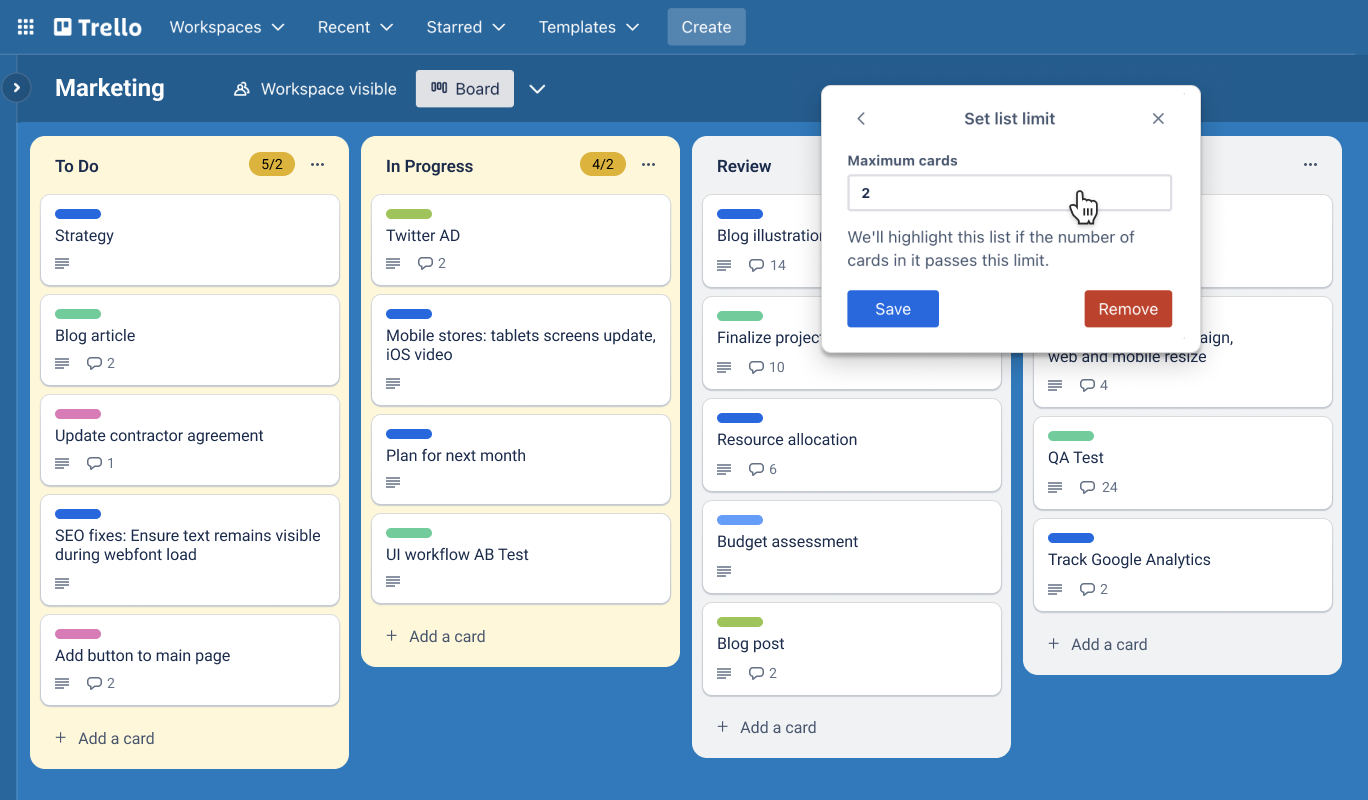
Image source: atlassian.com
5 core features of Trello Kanban boards
Trello Kanban boards are built around a simple yet powerful visual structure that helps teams organize, track, and manage work efficiently. Breaking workflows into clear stages and tasks provides real-time visibility into progress and priorities. Understanding these core features is essential for using Trello effectively in both simple and complex workflows.
Boards for project organization
Boards in Trello serve as the foundation for organizing work, where each board represents a specific project, team, or workflow. They provide a centralized space to capture all tasks, discussions, files, and updates related to that project. Teams can customize boards to their processes, making them flexible for use cases such as , product development, or daily task management. This structure ensures better visibility, alignment, and collaboration across everyone involved in the workflow.
Lists for workflow stages
Lists in Trello represent the different stages of a workflow, helping teams organize how work progresses from start to completion. Common stages include To Do, In Progress, and Done, but they can be customized to match any process. By structuring tasks into lists, teams can clearly see what needs attention, what is actively being worked on, and what has been completed. This visual flow makes it easier to track progress and quickly identify bottlenecks.
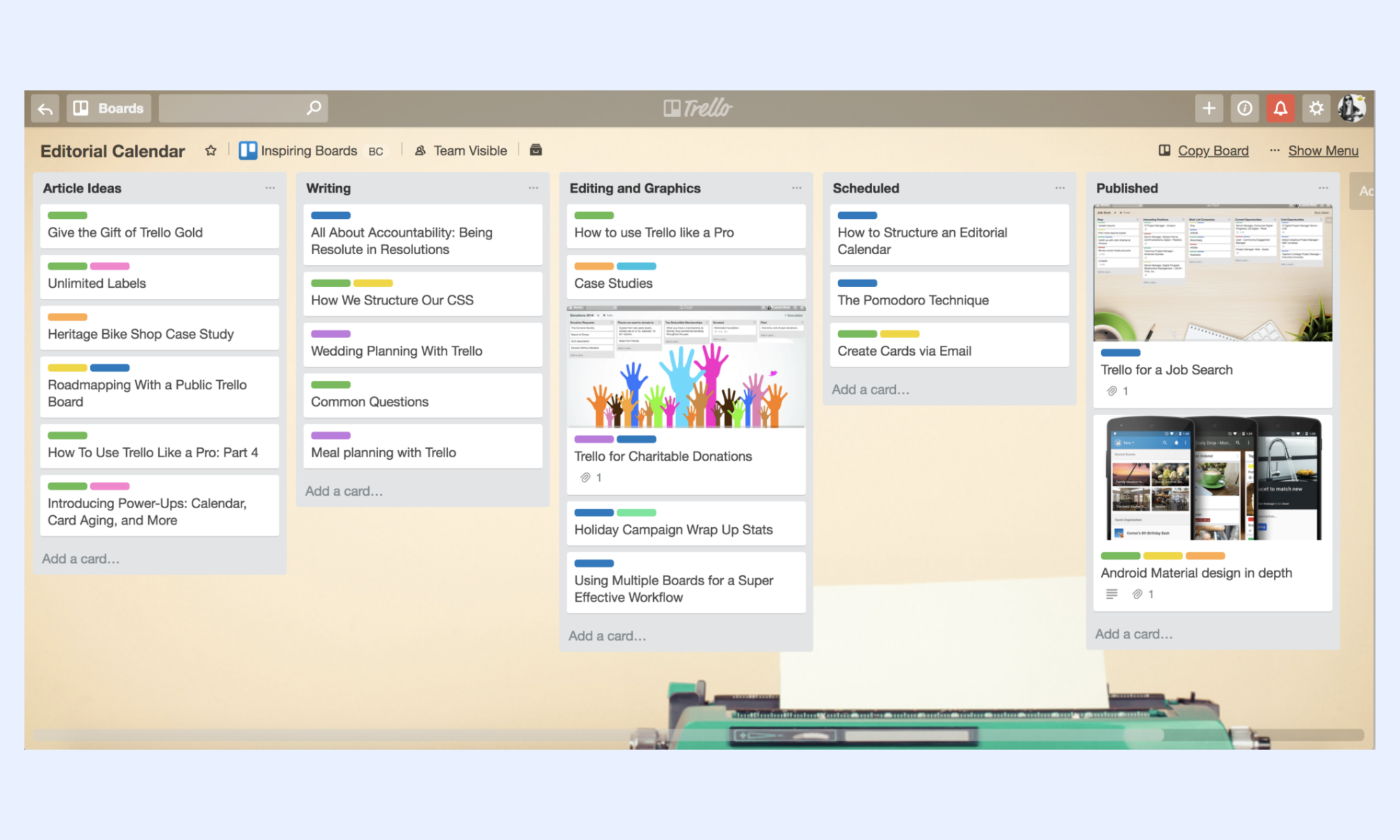
Image source: atlassian.com
Cards for task management
Cards are the core task units in a Trello Kanban board, representing individual pieces of work within a workflow. Each card can store detailed information, such as descriptions, due dates, attachments, checklists, and comments, to provide better context. on cards by adding updates, tagging colleagues, or uploading files. As tasks progress, cards are moved across lists, providing a clear and real-time view of work status.
Labels and tagging system
Labels in Trello provide a simple way to categorize and prioritize tasks using color-coded tags. Teams can use labels to indicate urgency, task type, department, or any custom classification that fits their workflow. This makes it easier to filter, search, and quickly identify important tasks across the board. By adding structure and clarity, labels help teams stay organized and focused on high-priority work.
Power-Ups for extended functionality
Power-Ups in Trello are add-ons that enhance the platform's core functionality and allow teams to customize their workflows. They enable features like calendar views, automation, time tracking, and integrations with third-party tools such as Slack or Google Drive. By using Power-Ups, teams can tailor Trello to fit more advanced use cases beyond basic task management. However, many advanced Power-Ups are limited to free plans, which can impact scalability for growing teams.
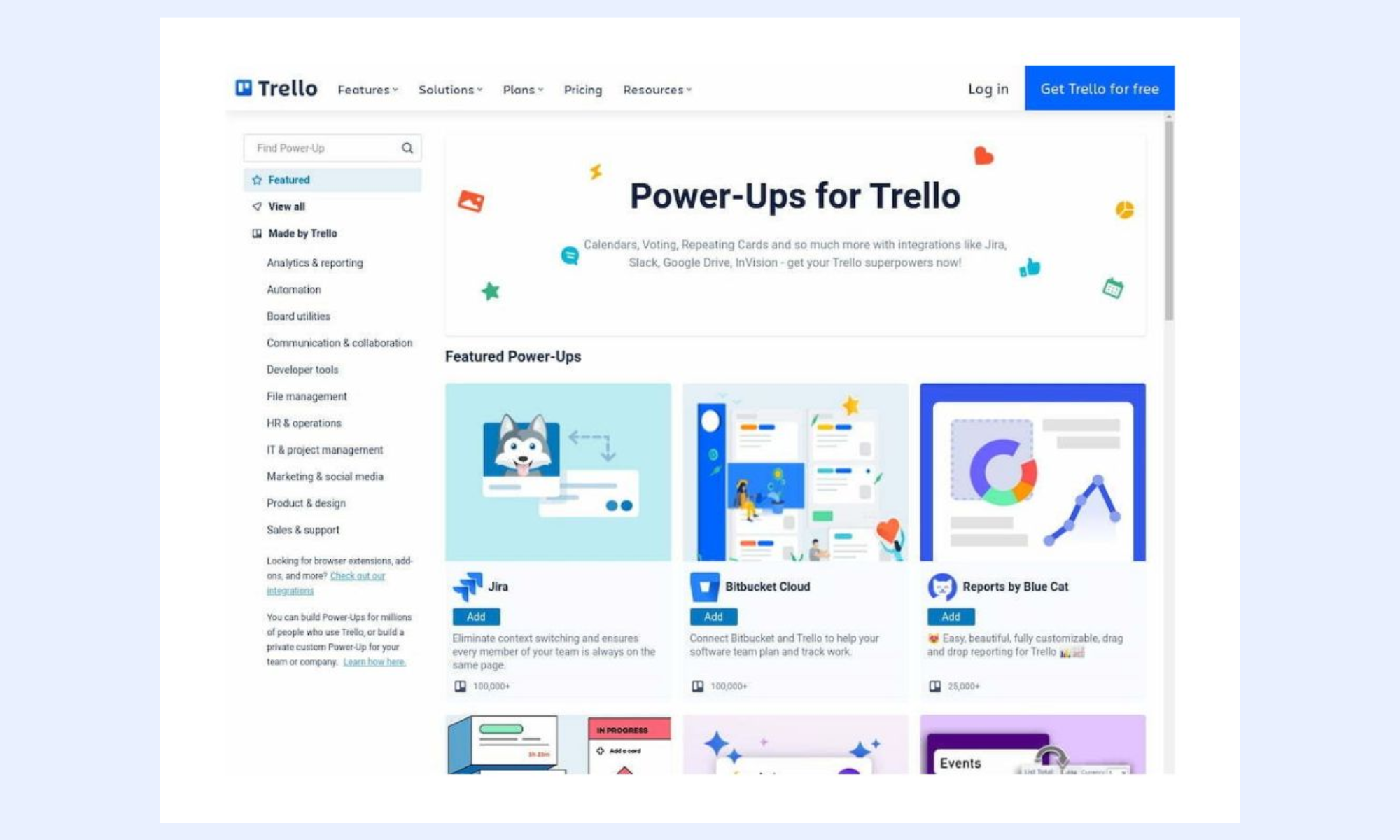
Image source: atlassian.com
How teams use Trello kanban boards in real workflows
Teams use Trello Kanban boards to visualize workflows, manage tasks, and . By organizing work into clear stages, they can track progress, identify bottlenecks, and maintain transparency. This makes Trello especially useful for streamlining real-world workflows across different functions and industries.
Agile software development workflows
In agile software development workflows, teams use Trello Kanban boards to manage sprints and track progress across development stages. Tasks such as features, bug fixes, and improvements are organized as cards and moved through lists like backlog, development, testing, and deployment. This helps teams maintain clarity on priorities and ensures smooth collaboration between developers, testers, and stakeholders. By visualizing the entire workflow, teams can quickly identify bottlenecks and improve delivery speed.
Marketing campaign planning
Marketing teams use Trello Kanban boards to plan, organize, and from ideation to execution. Tasks such as content creation, design, approvals, and publishing are managed as cards and moved through different stages. This helps teams stay aligned with deadlines, responsibilities, and deliverables across channels. By visualizing the workflow, marketers can ensure campaigns run smoothly and are completed on time.
Content production pipelines
Content teams use Trello Kanban boards to manage the entire content production pipeline from idea to publication. Tasks move through stages like drafting, editing, review, and publishing, ensuring a structured workflow. Each card can include content briefs, attachments, feedback, and deadlines for better coordination. This helps teams maintain consistency, meet deadlines, and across writers, editors, and designers.
Personal productivity tracking
Individuals use Trello Kanban boards to organize daily tasks and manage personal productivity in a structured way. Tasks are created as cards and moved across lists such as To Do, In Progress, and Done to track progress. This , reduce overwhelm, and stay focused on important tasks. By regularly updating the board, individuals can build better habits and maintain a clear overview of their responsibilities.
Pros and cons of Trello Kanban
Trello Kanban boards are highly effective for simple workflows, but as teams grow, they often encounter limitations as complexity increases. While the visual simplicity is a major draw, the need for advanced automation and structured dependencies becomes more critical as projects scale.
Pros
- Intuitive visual interface: The drag-and-drop system makes it incredibly easy for teams to adopt Kanban principles without extensive training.
- Flexible card-based system: Cards enable easy organization of tasks, checklists, and attachments in a single central view.
- Low barrier to entry: The straightforward setup is ideal for small teams or individual projects that need to get moving quickly.
- Extensive power-up ecosystem: A wide variety of integrations allows users to add specific features, such as calendars or Google Drive syncing, as needed.
Cons
- Limited advanced workflow automation: Trello offers basic automation, but it often lacks the complex, multi-step conditional logic required by larger, dynamic teams.
- Scaling challenges for large teams: As team size and project volume grow, boards can become cluttered, making it difficult to maintain visibility across multiple departments.
- Minimal dependency tracking: Trello does not natively support detailed task relationships. This makes it hard to visualize how one task impacts another, often leading to project delays.
- Basic reporting and analytics: Built-in reporting is limited, often forcing teams to rely on external tools to track key performance metrics and make data-driven decisions.
- Fragmented management overhead: For complex workflows involving cross-functional approvals, Trello frequently requires multiple add-ons, which can fragment the user experience and increase manual effort.
Avoid board clutter and maintain visibility in a new way
Meet Lark: Connect your team and manage projects without tool sprawl
As teams grow and workflows become more complex, relying on fragmented tools can slow down execution and reduce efficiency. offers a unified platform that goes beyond basic Kanban boards by combining collaboration, automation, and in one place. It enables teams to manage tasks, communicate, and track progress without switching between multiple applications. With advanced features such as automation, messaging, and real-time analytics, Lark supports more scalable, structured workflows.
Multidimensional Kanban views
lets you visualize your workflow with a "" powered by a relational database. Unlike simple boards, each "card" in your Lark Base Kanban can contain rich data types, including linked records, multi-select tags, and attachment fields for design assets. You can instantly toggle between the Kanban view for execution and a for timeline planning, ensuring that your task flow is always aligned with the broader project roadmap.
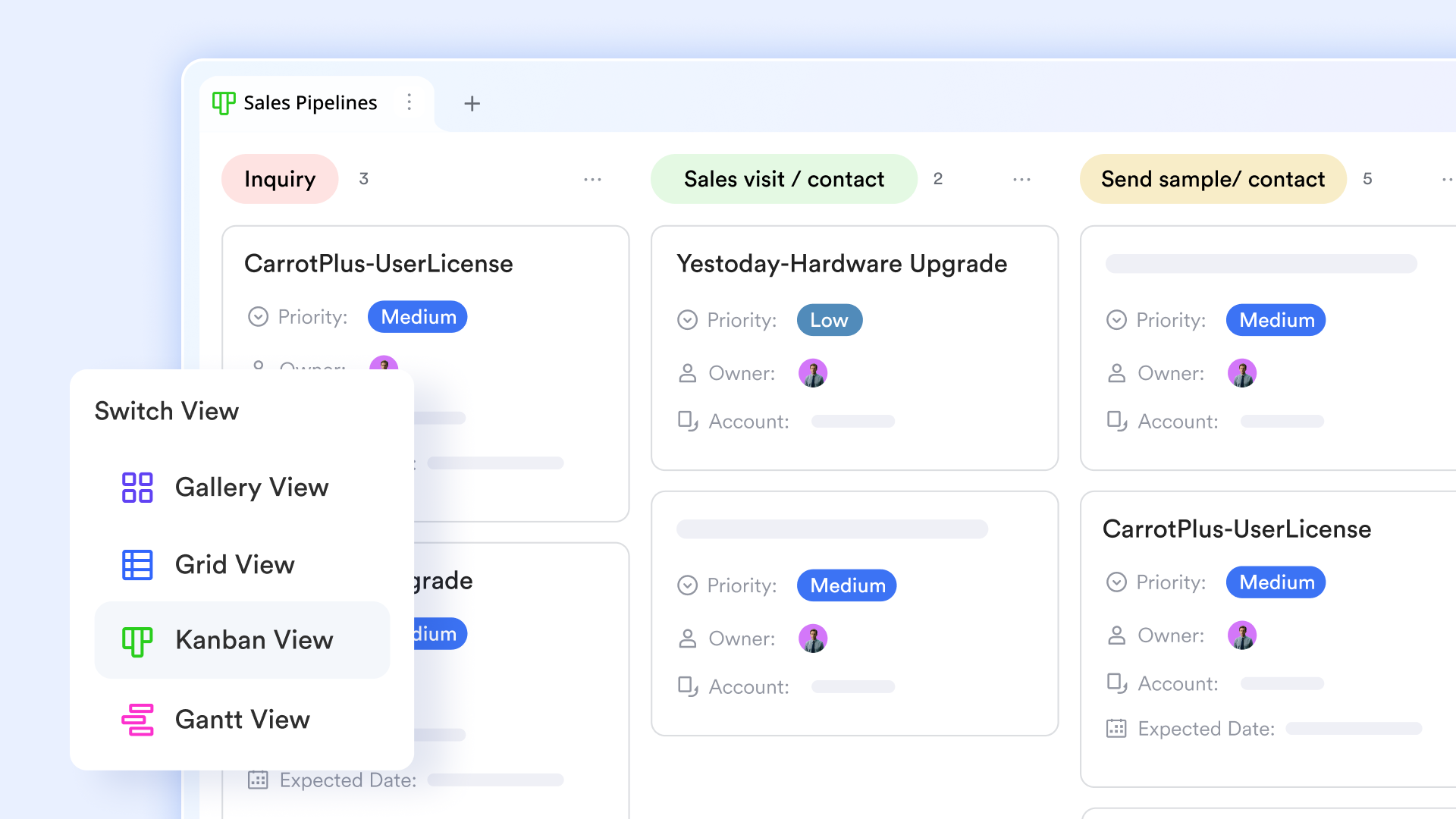
Live throughput analytics in Lark Base dashboards
Lark Base dashboards provide into your Kanban's health and "Cycle Time." You can create charts that visualize the number of cards in each stage to identify bottlenecks (e.g., a "Review" column that is consistently overloaded). By tracking "Cumulative Flow" and "Lead Time" through these live dashboards, project managers can make data-driven decisions to reallocate resources and optimize the team's delivery velocity. 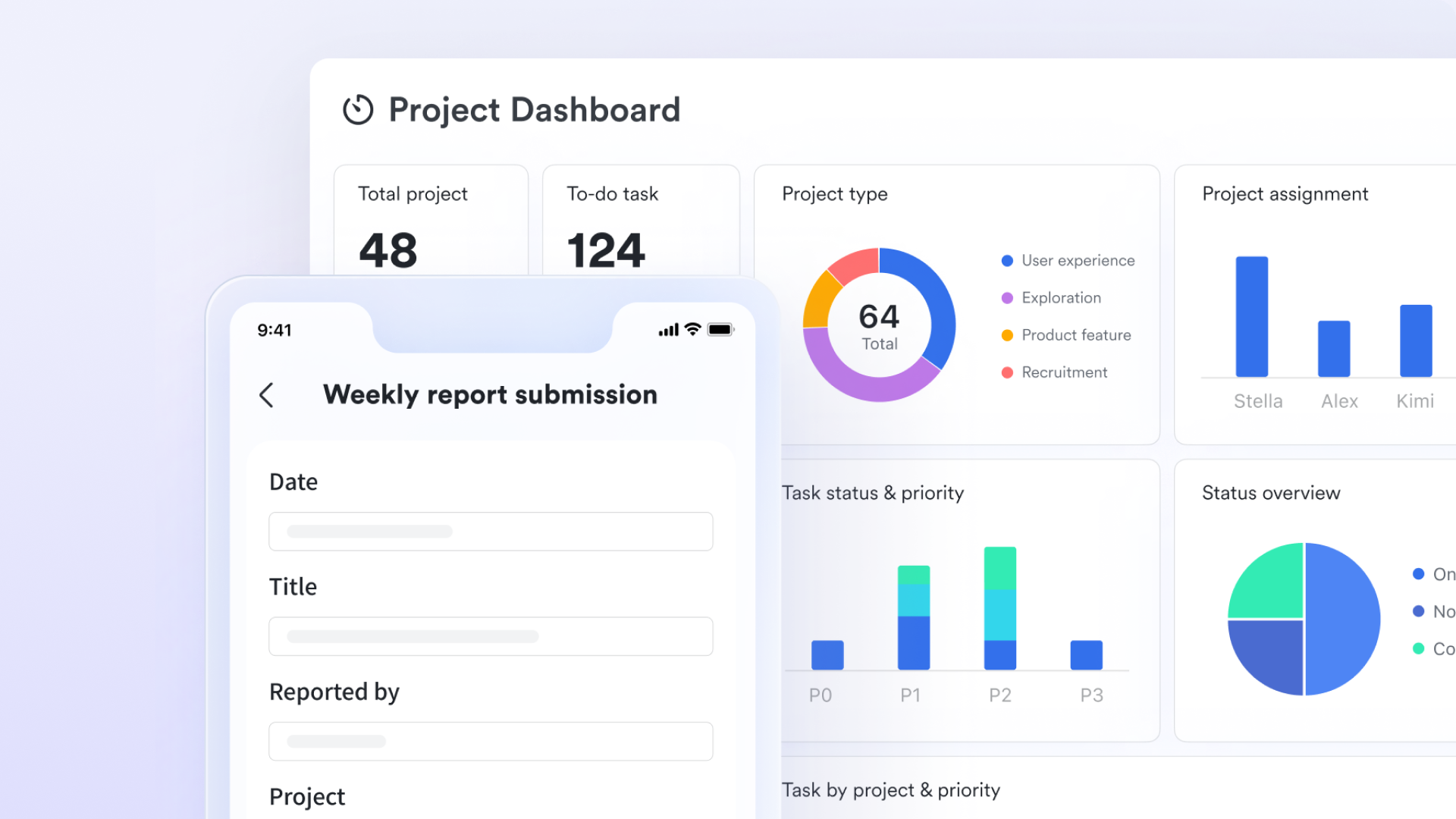
Automated state-transition triggers
Lark eliminates manual "status-chasing" through Lark Base Automations. You can set up triggers so that when a card is dragged from "In Progress" to "Review," the system to a specific stakeholder and sends an instant alert via . This ensures that work never sits idle in a column and that the next person in the chain is notified the moment their input is required. 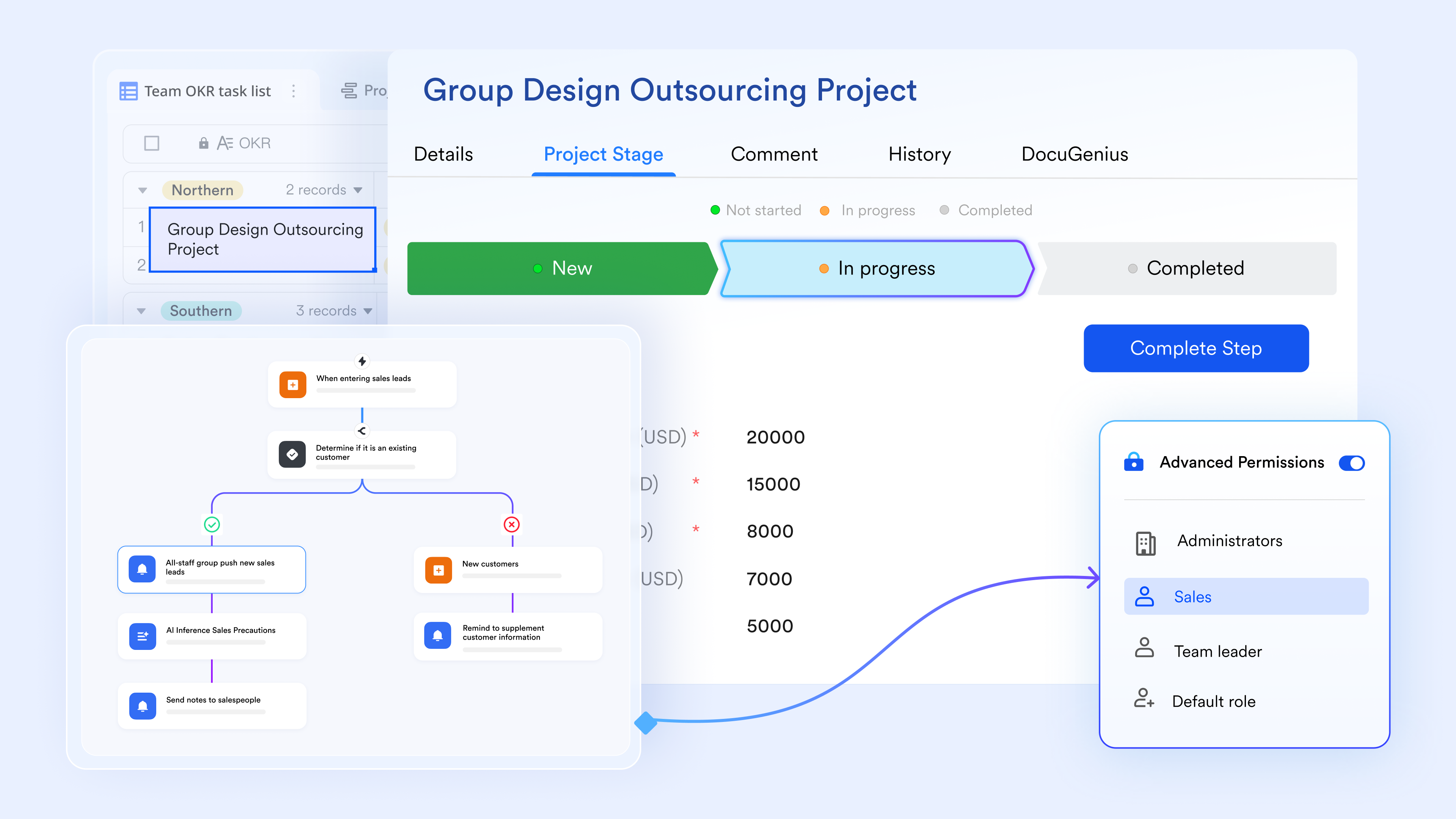
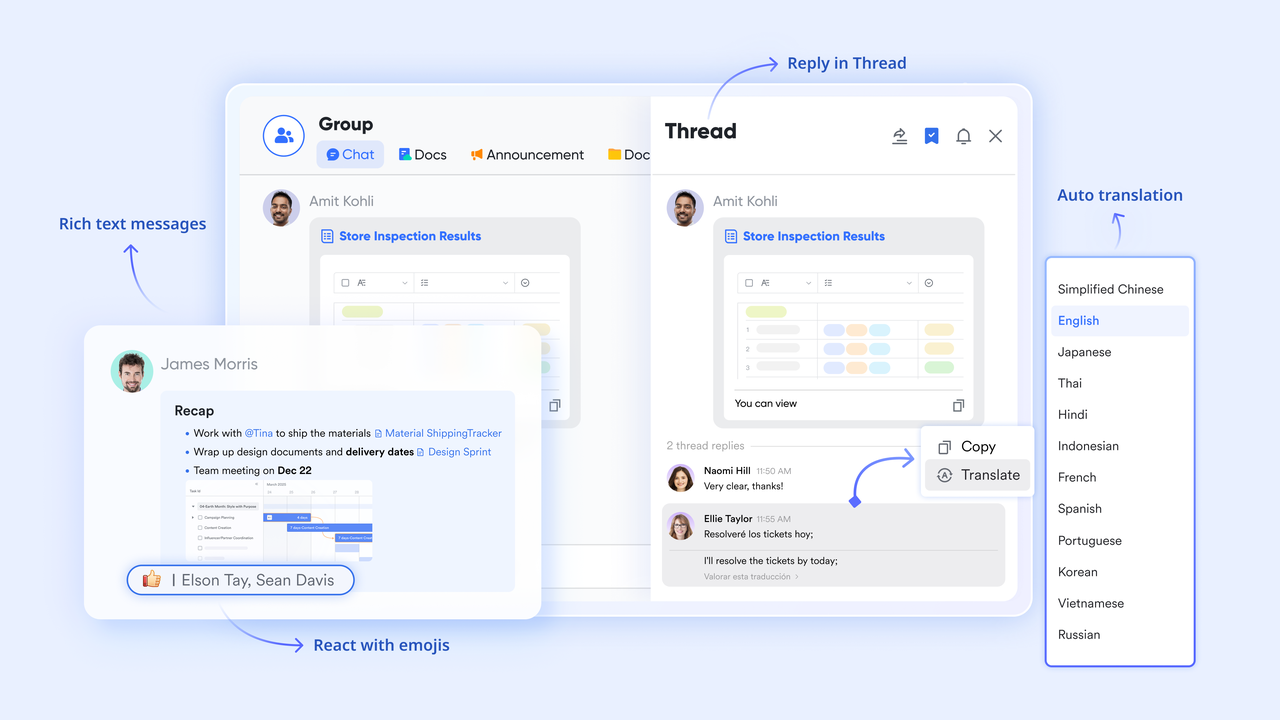
Context-linked "Card chats"
To keep execution focused, every Kanban card in Lark Base can launch a . Instead of discussing a task on a massive group channel, team members can @mention colleagues directly on the card. These "Card Chats" are synced with , allowing you to provide feedback, upload revised files, or clarify requirements without losing the specific context of that individual work item.
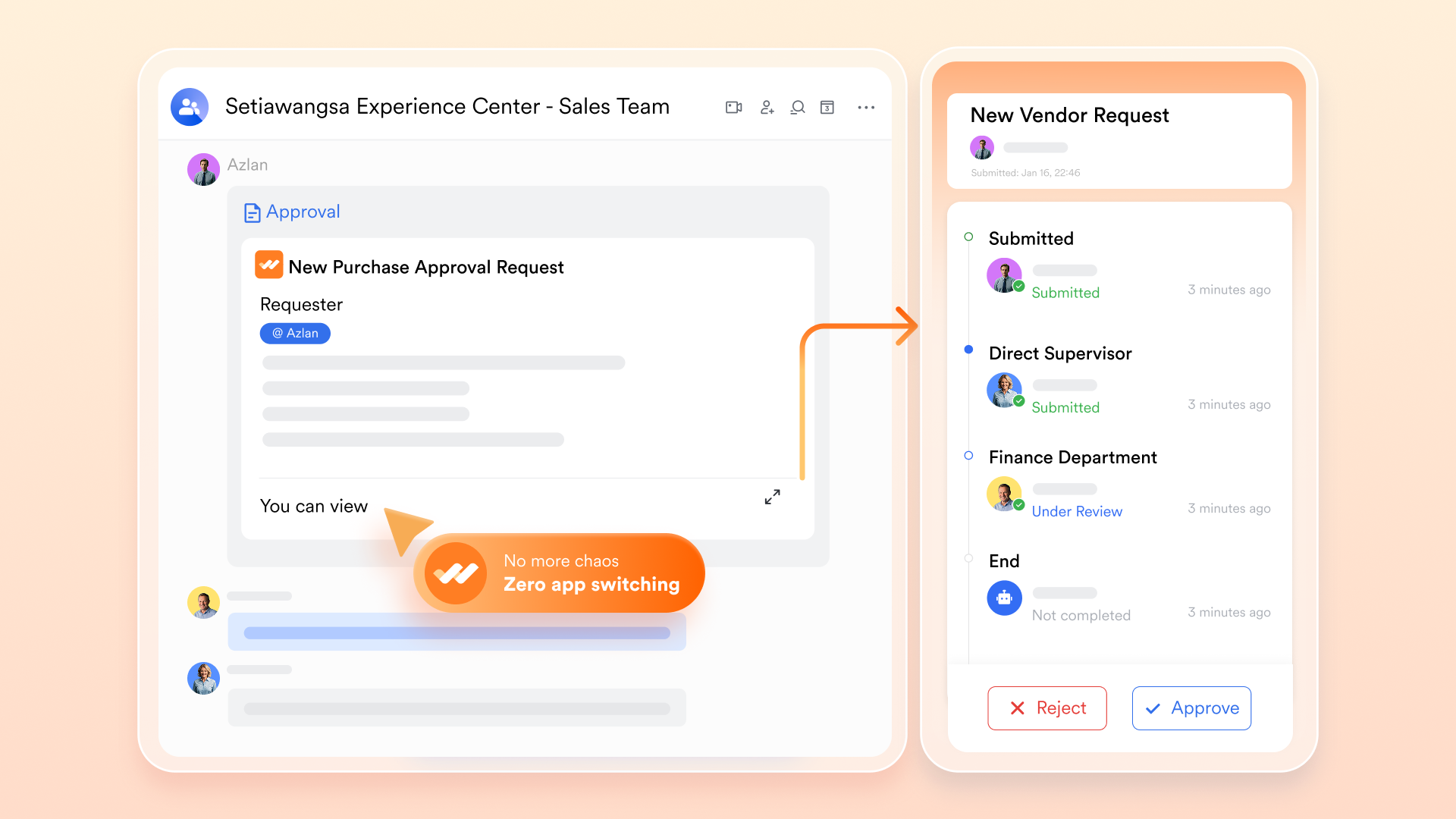
Unified approval gates within columns
For workflows that require formal sign-offs (like creative assets or financial requisitions), you can embed directly into your Kanban stages. When a card enters a "Pending Approval" column, a pre-configured . The task cannot move to the "Done" column until the designated manager provides a digital signature, ensuring that your Kanban board automatically enforces your organization's governance standards.
:
- Starter plan: Free forever plan that includes 11 powerful tools for up to 20 users. It also comes with 100GB of storage, 1000 automation runs, AI translations, and more.
- Pro plan: $12/user/month (billed annually) for up to 500 users. It includes everything in Starter plus group calling for up to 500 attendees, 15TB of storage, 50,000 automation runs, and more.
- Enterprise plan: for custom pricing. Supports unlimited users and includes additional automation runs, as well as advanced security, compliance, and management features.
For small teams with simple communication needs

18 months message history
1000 Base automation runs/month
2000 rows per table in Base
Most POPULAR
For companies with comprehensive collaboration and management needs
Unlimited message history
500-participant video meetings
50k Base automation runs/month
20k rows per table in Base
For large companies with advanced security and organizational management needs
Get a personalized demo and pricing
Unlimited message history
500-participant video meetings
15 TB storage + 30 GB storage/user
500k Base automation runs/month
50k Base automation runs/month
Most POPULAR
For companies with comprehensive collaboration and management needs
Unlimited message history
500-participant video meetings
50k Base automation runs/month
20k rows per table in Base
When to use Trello Kanban vs. Lark
Choosing between Trello Kanban and Lark depends on the complexity and scale of your workflows. While Trello works well for simple, visual task management, growing teams often require the more advanced features and native integrations found in Lark. Understanding when to use Trello versus Lark ensures better efficiency, scalability, and long-term workflow management.
Trello is best for
Trello is best suited for teams and individuals who need a simple, visual way to manage tasks and workflows. Its intuitive interface makes it easy to get started without extensive setup or training. This makes it ideal for lightweight project management and straightforward collaboration needs.
- Small teams and simple workflows: Trello works best for small teams that need a straightforward way to manage tasks without complex configurations. Its simple board structure keeps workflows easy to understand and maintain.
- Visual task tracking: Trello's Kanban-style layout makes it easy to track tasks visually as they move across different stages. Teams can quickly see progress, identify delays, and adjust priorities.
- Lightweight project management: Trello is ideal for managing projects that don't require advanced features or detailed reporting. It provides just enough functionality to organize tasks, assign responsibilities, and track deadlines.
Lark is better for
Lark is better suited for teams that require advanced workflow automation, deeper project tracking, and seamless cross-functional collaboration. As projects grow in complexity, Lark's built-in analytics, dependency management, and scalable features become essential. This solution helps organizations manage large teams, optimize processes, and make data-driven decisions more effectively—all within a single platform.
- Complex workflow automation: Lark excels at handling multi-step workflows with conditional logic and automated triggers. It reduces manual work by automating task transitions, approvals, and notifications across chat and docs.
- Cross-team collaboration: Lark provides better support for cross-team collaboration by centralizing communication, tasks, and data in one place, helping avoid silos.
- Enterprise project management: For large-scale projects, Lark offers features like resource planning, dependency tracking, and advanced permissions. These capabilities help manage complex timelines and multiple stakeholders effectively.
- Data-driven workflow tracking: Lark includes robust built-in analytics and reporting tools to track performance and productivity. Teams can monitor key metrics, identify bottlenecks, and optimize workflows based on real-time insights.
Conclusion
Trello Kanban boards offer a simple and , making them a popular choice for small teams and straightforward workflows. With features like boards, lists, cards, and labels, teams can easily organize work, track progress, and collaborate effectively. However, as workflows become more complex and teams scale, limitations such as basic automation, minimal reporting, and a lack of advanced dependency tracking can slow down productivity. This is where modern, unified platforms provide greater value.
goes beyond traditional Kanban tools by combining task management, automation, communication, and analytics in one place. It enables teams to streamline workflows, reduce tool fragmentation, and improve overall efficiency. Whether you're managing growing teams or complex projects, Lark provides the scalability and structure needed for better execution. If you're ready to move beyond basic Kanban boards, try Lark today and build smarter, more connected workflows.
Turn project data into insights and actions with Lark
FAQs
What is a Trello Kanban board used for?
A Trello Kanban board is used to organize tasks, visualize workflows, and track progress across different stages of work. It helps teams manage projects efficiently by moving tasks through lists like To Do, In Progress, and Done. Tools like Lark enhance this experience by adding automation and collaboration to a setup in Trello.
Is Trello a true Kanban tool or just a task manager?
Trello follows Kanban principles like visual workflows and task tracking, but it lacks some advanced Kanban features, such as detailed analytics and dependency management. This often places it between a Kanban tool and a task manager. Platforms like Lark provide a more complete solution when comparing Kanban vs. Trello for scalability.
How do you create a Kanban board in Trello?
To create a Kanban board in Trello, start by setting up a board, then add lists for workflow stages and cards for tasks. Customize with labels, due dates, and attachments to organize work effectively. For more advanced workflows, Lark offers enhanced features beyond basic Kanban Trello setups.
What are the limitations of Trello for project management?
Trello has limitations, including basic automation, limited reporting, and minimal dependency tracking for complex projects. As teams grow, managing multiple boards and workflows can become challenging. Lark addresses these gaps by providing a unified platform with advanced automation and insights for Kanban board Trello users.
What tools are better than Trello for Kanban workflows?
Tools that offer automation, analytics, and are often better suited for advanced Kanban workflows. They help manage complex projects and improve efficiency at scale. Lark stands out as a strong alternative when evaluating Kanban vs. Trello, offering an all-in-one solution for modern teams.
Related reading