10 Best Google Calendar Alternatives for Scheduling & Team Planning

Ryan Tanner

Product Marketing Specialist

Aug 5, 2026

Ryan Tanner

Product Marketing Specialist

Aug 5, 2026

Try Lark for free
18 min read
Many people explore Google Calendar alternatives today as teams and individuals look for better privacy, stronger collaboration, and cross-device scheduling. Some users search for free alternatives to Google Calendar for simple personal planning, while others compare tools with more advanced features for teams. Online discussions on Google Calendar alternative Reddit also influence how users evaluate privacy, flexibility and mobile experiences. Lark appears gradually in these comparisons because it connects scheduling with tasks, documents and collaboration. This guide reviews the best alternatives to Google Calendar across mobile, desktop and web platforms, so users can choose tools that match both personal and team needs.

Key takeaways: Best Google Calendar alternatives

1. Lark: Best team scheduling system connected to a full work workspace
2. TimeTree: Best shared family and small team calendar
3. Fantastical: Best premium cross-device personal calendar
4. Proton Calendar: Best privacy-first Google Calendar alternative
5. Zoho Calendar: Best scheduling option for Zoho Workspace users

Explore smarter scheduling options for your team

Google Calendar alternatives at a glance

This quick snapshot covers the top 5 Google Calendar alternatives reviewed in this guide. For more in-depth comparisons and additional tools, refer to the full list later in the post.
Top 5 tools
Best for
Platforms
Key features
Team collaboration
Free plan
Pricing (USD/annual)
Lark
Team scheduling connected to a full work workspace
Web, Windows, macOS, iOS, Android
Shared calendars, task-linked events, meeting rooms, team scheduling, chat, docs, approvals
✅ Built-in team coordination
✅ Yes
Basic: $6/user/mo
Pro: $12/user/mo
Enterprise: Contact sales
TimeTree
Shared family and small team calendars
Web, iOS, Android
Shared schedules, comments, reminders, basic chat
✅ Small group sharing
✅ Yes
Free plan available;
Premium add-ons available via subscription.
Fantastical
Premium cross-device personal scheduling
macOS, iOS, iPadOS, watchOS
Natural language input, weather views, calendar sets
⚠️ Mostly personal use
✅ Limited
Limited free version available;
Premium plan starts around $4.75 per month.
Proton Calendar
Privacy-first calendar alternative
Web, iOS, Android
End-to-end encrypted events, zero-access encryption
⚠️ Limited sharing
✅ Yes
Free plan available;
Premium plans begin around $4 per month.
Zoho Calendar
Scheduling inside Zoho workspace
Web, iOS, Android
Team calendars, meeting invites, event permissions
✅ Workspace sharing
✅ Limited
Free basic plan;
Paid plans vary by Zoho suite selection.
Information source: Official vendor sites
Update time: 2025/11/30
Note: Pricing and plan details reflect publicly available data as of the update date and may vary based on region, billing cycle, and number of agents.

When you should consider alternatives to Google Calendar

Teams and individuals often start exploring alternatives to Google Calendar when their current setup cannot support complex scheduling or privacy needs. Some want shared team calendars, while others want private planning spaces. These points help determine when switching makes sense.
  • Teams needing shared resource calendars: Teams that manage rooms, equipment or shifts often need calendars built for structured resource scheduling. Alternatives offer clearer coordination and multi-user access controls. This improves planning accuracy.
  • Organizations requiring privacy-first scheduling: Businesses that handle sensitive data often need encrypted or high-security calendars. Privacy-focused tools offer stronger event protection than default cloud options. This keeps internal planning safe.
  • Multi-timezone distributed workforces: Global teams benefit from calendars that automatically adjust time zones and simplify cross-region meetings. These tools reduce confusion and help remote teams stay aligned. Scheduling becomes more predictable.
  • Teams coordinate schedules with tasks and projects: If teams need calendars tied to tasks, documents or project work, alternatives provide better integration. This keeps planning and execution in one place. Workflows stay consistent.
  • Businesses wanting everything centralized rather than spread across many apps: When teams juggle multiple apps for scheduling and communication, workflows become scattered. Centralized platforms bring all coordination into one workspace. This improves visibility and reduces switching.

Improve your scheduling workflow instantly

What makes a good Google Calendar alternative?

The best Google Calendar alternatives offer more flexibility, stronger privacy controls and smoother team coordination. Users look for tools that match their scheduling habits, whether they prefer personal planning or shared team workflows. Some tools focus on privacy, others focus on collaboration, while some balance both. This framework helps identify what matters most.
  • Privacy-friendly scheduling: A strong alternative should offer tighter control over event visibility, encryption and data access. Many users look for tools that protect personal or company information more securely than standard cloud calendars. Privacy-first options reduce risks for sensitive work. This is important for regulated industries or privacy-conscious teams.
  • Team calendars vs personal calendars: A good alternative must support both simple personal planning and shared team scheduling without forcing users into one mode. Individuals need reminders and organization, while teams need multi-user visibility and coordination. A flexible calendar adapts to both. This helps support diverse workflows in one tool.
  • Shared availability visibility: The right alternative should make it easy to see who is free, busy or overlapping across teams. Clear visibility reduces friction during scheduling and avoids unnecessary back-and-forth. This is especially useful for cross-team collaboration. Better visibility supports faster planning.
  • Android compatibility: Many users look for an alternative to Google Calendar Android, so strong mobile support and consistent syncing are essential. A good option works smoothly across phones and tablets and stays reliable on the go. This ensures planning continues outside the desktop. Mobile-first users benefit the most.
  • Support for events, tasks and meeting coordination: A useful alternative should combine events with tasks, reminders and meeting details to reduce fragmented planning. Integrated workflows help teams see deadlines and priorities directly inside the calendar. This improves coordination and reduces missed work. Everything stays aligned.
  • Data ownership concerns: Some users and organizations prefer tools that let them control how data is stored, hosted or encrypted. Self-hosted or privacy-focused calendars offer more ownership than standard cloud options. This matters for compliance-heavy teams. Strong data control builds trust.

Full list: 10 Best Google Calendar alternatives

1. Lark: Best team scheduling system connected to a full work workspace

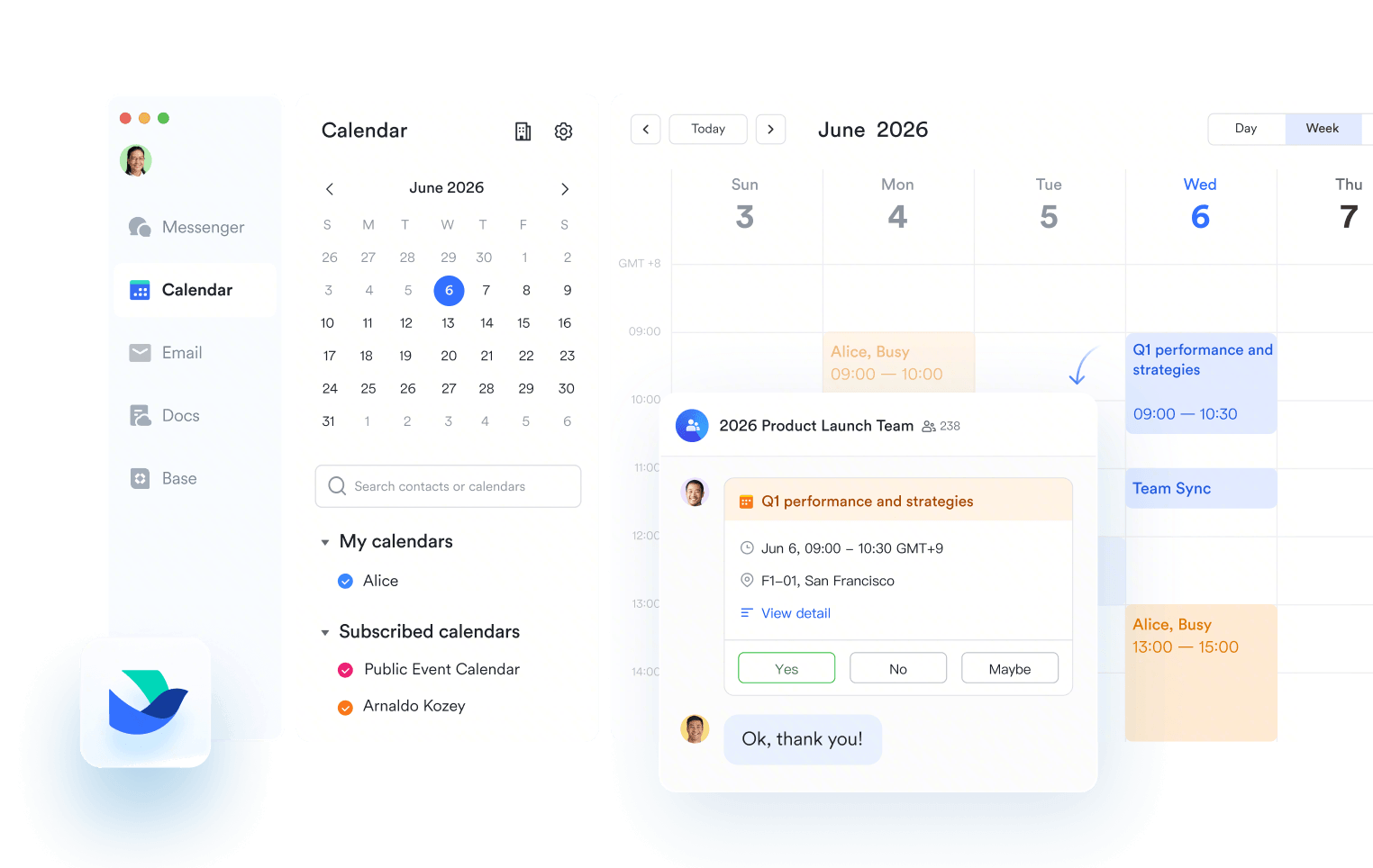
Lark is designed for teams that expect project scheduling, communication, and task management connected in one place. Its calendar links directly to tasks, documents, attendance, and meetings, so scheduling becomes part of the full workflow. This makes it suitable for distributed teams, shift-based workforces and companies that want to reduce tool switching. Lark gradually appears in discussions as an alternative to Google Calendar because of its unified workspace approach.
Lark: Best team scheduling system connected to a full work workspace
Advanced agenda scheduling & time-blocking
Lark Calendar offers powerful features to help you manage your schedule efficiently. It provides flexible time-blocking controls, allowing you to create dedicated time blocks for tasks, set reminders, and clearly mark yourself as "Busy" so colleagues can view your workload accurately. When arranging team meetings, Lark offers smart suggestions by automatically syncing everyone's availability and finding the best common time with just a single click. Overall, this calendar simplifies your planning, giving you the ability to auto-schedule tasks and easily adjust them around existing events and shifting priorities.
Advanced agenda scheduling & time-blocking
Seamless cross-team collaboration with availability & permission
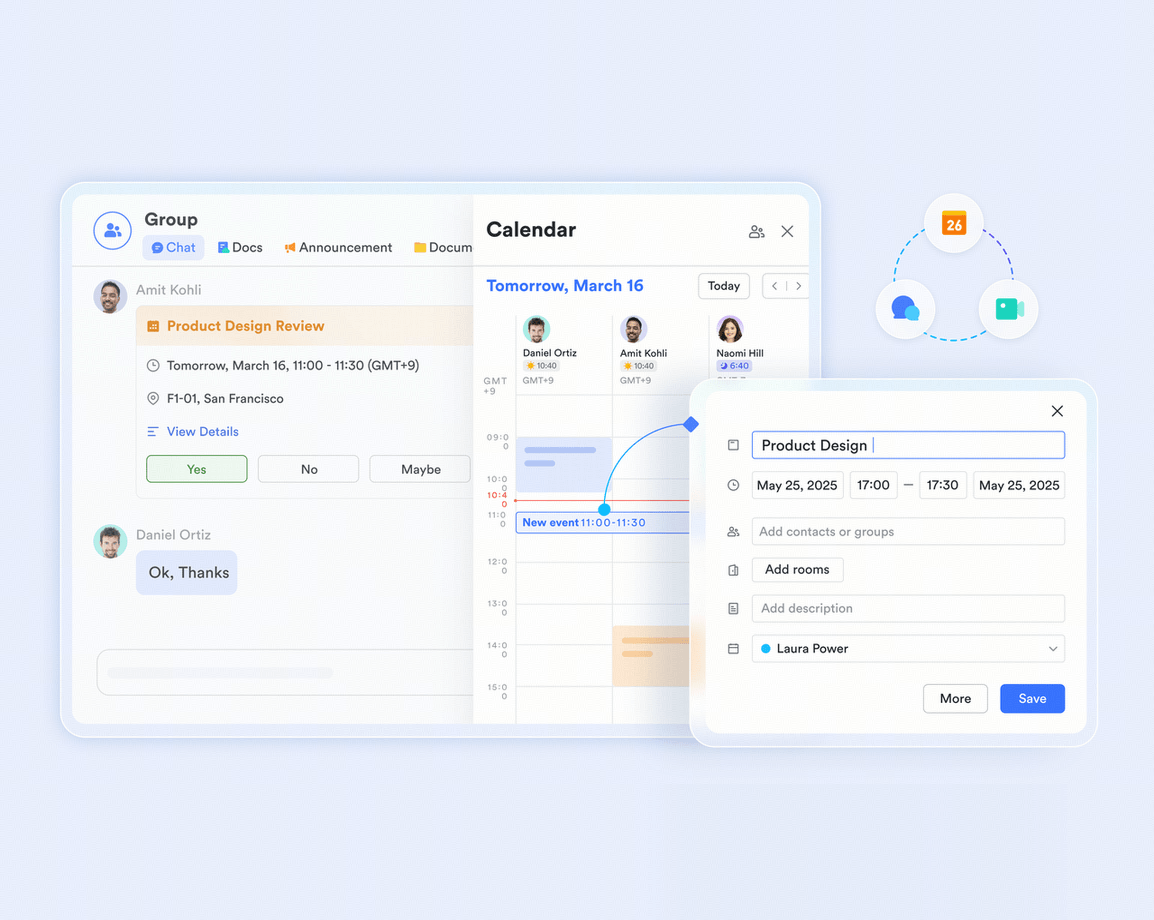
Lark is designed to make cross-team work seamless, starting with its Calendar feature, which enables shared team calendars and real-time availability checks across your organization. You can even see the availability of and invite shared members from external organizations to your events. For control, Lark allows you to set precise permission controls when sharing documents with specific individuals or departments, defining who can view, edit, or comment. To top it off, you can quickly create integrated group chats right from a meeting invitation, ensuring instant communication and updates among all participants, regardless of their department.
Seamless cross-team collaboration with availability & permission
Robust connection to Google Calendar
Lark Calendar ensures you never miss an event by offering a seamless, one-way sync with Google Calendar. This powerful connection allows you to quickly import all your existing Google events directly into Lark, consolidating your entire personal and professional schedule into one easy-to-manage view. You won't have to worry about manually transferring appointments or juggling multiple apps. This means you can keep using Google for your external life while having all your commitments instantly visible within your Lark workspace, creating a smooth and unified scheduling experience.
Robust integration to Google Calendar
Smooth collaboration via built-in chat, task, meeting, & agenda
Lark seamlessly connects your chat, tasks, and scheduling for maximum efficiency. Right inside any Lark Messenger chat, you can click the Calendar icon to instantly view free time slots of all members and schedule meetings directly, or simply start a voice or video call. Plus, critical messages can be converted directly into tasks, and you'll receive real-time notifications right back in Messenger as their status changes. These tasks are then conveniently displayed in your Calendar, giving you a powerful, integrated view of all your actions and events in one place.
Collaboration via built-in chat, task, meeting, & agenda
Personalized calendar settings and coordinated time zones
Lark Calendar provides deep personalization options to fit your working style perfectly. You can easily switch between Day, Week, and Month views to organize your schedule exactly as needed. For visual organization, you can color-code both individual events and entire calendars to help you quickly identify different categories of commitments. Beyond the visual settings, you have full control to adjust alert times, manage time zones, and even sync external third-party calendars for a truly unified and personalized scheduling experience
Lark Calendar scheduling
Pros
  • Unified workspace reduces switching between scheduling, docs and communication.
  • Strong for cross-team planning with shared visibility and unified workflows.
  • Real-time collaboration improves preparation for meetings and deadlines.
  • Useful for shift-based, hybrid and distributed teams.
  • Connects scheduling with attendance and real workload data.
Cons
  • Some advanced features may require onboarding for new users, but its AI assistant provide smart and instant help.
  • Starter plan: Free forever plan that includes 11 powerful tools for up to 20 users. It also comes with 100GB of storage, 1000 automation runs, AI translations, and more.
  • Basic plan: $6/user/month (billed annually) for up to 500 users. It includes everything in Starter plus group calling for up to 500 attendees, 5TB of storage, 1000 automation runs, and more. For more details, please contact sales.
  • Pro plan: $12/user/month (billed annually) for up to 500 users. It includes everything in Basic plus group calling for up to 500 attendees, 15TB of storage, 50,000 automation runs, and more.
  • Enterprise plan: Contact sales for custom pricing. Supports unlimited users and includes even more automation runs and advanced security, compliance, and management features.
Starter
Pro
Enterprise

Starter

For small teams with simple communication needs

$0

/ user / month

Try for free

No credit card needed

20 users max
18 months message history
1-on-1 video meetings
100 GB storage
Lark Docs & Mail
1000 Base automation runs/month
2000 rows per table in Base

Pro

For companies with comprehensive collaboration and management needs

$12

/ user / month

Billed annually

500 users max
Unlimited message history
500-participant video meetings
15 TB storage
Lark Docs & Mail
50k Base automation runs/month
20k rows per table in Base

Enterprise

For large companies with advanced security and organizational management needs

Get a personalized demo and pricing

Unlimited users
Unlimited message history
500-participant video meetings
15 TB storage + 30 GB storage/user
Lark Docs & Mail
500k Base automation runs/month
50k Base automation runs/month
Single sign-on (SSO)

Pro

For companies with comprehensive collaboration and management needs

$12

/ user / month

Billed annually

500 users max
Unlimited message history
500-participant video meetings
15 TB storage
Lark Docs & Mail
50k Base automation runs/month
20k rows per table in Base

2. TimeTree: Best shared family and small team calendar

TimeTree focuses on shared calendars for families, small teams and social groups. It is simple, friendly and designed for multiple people planning the same schedule. Many users compare TimeTree vs Google Calendar Reddit threads when deciding how to manage shared events or small team coordination. It is strong for casual group planning.
TimeTree calender
Image source: timetreeapp.com
Features
  • Offers shared calendars that allow families or small teams to plan events together in one space.
  • Supports comments on events so members can discuss details inside the calendar.
  • Provides reminders and notifications for upcoming activities.
  • Includes a basic chat for group communication.
  • Allows color-coded schedules for easier visual planning.
Pros
  • Easy for families and small groups to use.
  • Clear shared visibility for events and reminders.
  • Free plan works well for basic needs.
  • Simple design helps non-technical users.
  • Good mobile performance on Android and iOS.
Cons
  • Not suitable for large teams with complex scheduling.
  • Collaboration limited compared to full work platforms.
  • Lacks professional workflow features.
Pricing
  • Free plan available.
  • Premium add-ons available via subscription.

3. Fantastical: Best premium cross-device personal calendar

Fantastical is a polished calendar app for Apple users seeking fast scheduling and a clean visual experience. It supports natural language input, calendar sets and seamless syncing across macOS, iOS and iPadOS. Personal users appreciate how quickly they can add events and view weekly or monthly layouts. While it excels in individual planning, it is not primarily designed for large teams or collaborative scheduling.
Fantastical: The calendar and tasks app
Image source: flexibits.com
Features
  • Provides natural language event creation for fast scheduling.
  • Offers calendar sets that switch based on time or location.
  • Includes weather views, task integration and alerts.
  • Syncs across macOS, iOS, iPadOS and Apple Watch.
  • Supports multiple account types, including iCloud and Exchange.
Pros
  • Very clean and intuitive interface.
  • Excellent for personal organization.
  • Works seamlessly across Apple devices.
  • Strong natural language scheduling.
  • Smooth performance for busy calendars.
Cons
  • Not ideal for team collaboration.
  • Apple-only, no Android support.
  • Premium plan required for full features.
Pricing
  • Limited free version available.
  • Premium plan starts around $4.75 per month.

4. Proton Calendar: Best privacy-first Google Calendar alternative

Proton Calendar is ideal for users who want an encrypted, privacy-focused scheduling tool. It protects all event data with end to end encryption, so only the user can view event details. The interface is simple and built with secure-by-design principles, making it appealing to individuals and organizations with sensitive scheduling needs. Its core strength is privacy rather than extensive collaboration.
Proton Calendar
Image source: proton.me
Features
  • Provides end-to-end encryption for events and calendar data.
  • Offers zero-access encryption, so even Proton cannot read event details.
  • Includes private reminders and secure invites.
  • Works across the web, Android and iOS.
  • Designed to protect metadata and user privacy.
Pros
  • Strong privacy and encryption guarantees.
  • Free plan supports essential scheduling.
  • Good choice for sensitive or regulated work.
  • Clean interface with simple controls.
  • Strong security architecture.
Cons
  • Limited team collaboration features.
  • Mobile apps are still evolving.
  • Not suitable for complex scheduling workflows.
Pricing
  • Free plan available.
  • Premium plans begin around $4 per month.

5. Zoho Calendar: Best scheduling option for Zoho workspace users

Zoho Calendar works well for teams already using the Zoho ecosystem for email, projects or CRM. It connects seamlessly with other Zoho apps to support shared events, permissions and team scheduling. The tool brings structure to work calendars by allowing detailed access control and role-based visibility. Its strength lies in business-focused scheduling rather than casual personal planning.
Zoho Calendar
Image source: zoho.com
Features
  • Offers team calendars for shared scheduling.
  • Allows event permissions and detailed access control.
  • Supports reminders, time zone settings and meeting invitations.
  • Includes Android and iOS apps for mobile use.
Pros
  • Works well inside the Zoho ecosystem.
  • Good for SMB teams needing flexibility.
  • Free plan covers basic scheduling.
  • Strong internal team collaboration.
  • Integrates with email and work tools.
Cons
  • Limited features for non-Zoho users.
  • Offline access is basic.
  • Complex setup for some functions.
Pricing
  • Free basic plan.
  • Paid plans vary by Zoho suite selection.

6. Outlook Calendar: Best Microsoft calendar alternative

Outlook Calendar is a familiar choice for organizations that rely heavily on Microsoft tools. It syncs with Exchange, Teams and OneDrive, making scheduling simple for enterprise users. Outlook allows teams to manage shared calendars, meeting rooms and formal invites in a structured way. The tool is best suited for professional environments that require consistent cross-department visibility.
Microsoft outlook calender
Image source: microsoft.com
Features
  • Provides shared calendars for teams and departments.
  • Syncs with Exchange and Microsoft 365 tools.
  • Offers meeting invites, reminders and scheduling suggestions.
  • Includes cross-device support across the web, desktop and mobile.
  • Integrates with teams for meetings and chat.
Pros
  • Strong enterprise-level collaboration.
  • Works well in Microsoft-first organizations.
  • Wide device compatibility.
  • Reliable meeting scheduling and invite structure.
  • Professional-grade feature set.
Cons
  • Not ideal for casual personal use.
  • Can feel heavy for small teams.
  • Some advanced features are tied to paid Microsoft plans.
Pricing
  • Free basic outlook.com calendar.
  • Microsoft 365 plans start at around $6.99 per month.

7. Nextcloud Calendar: Best self-hosted open-source scheduling tool

Nextcloud Calendar is designed for privacy-aware users who want full control over their data. It is self-hosted, meaning organizations can run the calendar on their own server instead of relying on external cloud platforms. This makes it popular among users who prioritize data ownership, compliance or open-source solutions. It is a strong choice for technical teams comfortable with managing their own infrastructure.
Nextcloud Groupware
Image source: nextcloud.com
Features
  • Supports CalDAV syncing for open-source compatibility.
  • Allows custom hosting and full control of calendar data.
  • Offers group sharing, reminders and color coding.
  • Integrates with other Nextcloud productivity apps.
  • Provides privacy-focused scheduling features.
Pros
  • Total data ownership through self-hosting.
  • Good for privacy-sensitive teams.
  • Free and open-source.
  • Customizable based on user needs.
  • Works across devices with CalDAV.
Cons
  • Requires server setup and IT knowledge.
  • Not ideal for non-technical users.
  • Team features depend heavily on configuration.
Pricing
  • Free open-source software.
  • Enterprise support is available for a fee.

8. Tutanota Calendar: Best encrypted calendar service

Tutanota Calendar focuses on providing secure and encrypted event management for users who value privacy above all else. It encrypts event titles, descriptions and metadata to protect personal information. The tool is simple and lightweight, making it appealing to individuals who want basic scheduling wrapped in strong privacy protections. Collaboration is limited, but privacy is its biggest strength.
Tutanota Calendar
Image source: tuta.com
Features
  • Provides end-to-end encrypted calendars and event details.
  • Offers secure invites and notifications.
  • Includes cross-platform apps for desktop and mobile.
  • Protects metadata for privacy-focused users.
  • Includes basic sharing options.
Pros
  • Strong privacy foundation.
  • Free plan with essential features.
  • Lightweight and easy to use.
  • Good for confidential events and private planning.
  • Fully encrypted calendar storage.
Cons
  • Limited collaboration tools.
  • Basic interface compared to full-featured calendars.
  • Not suitable for complex team workflows.
Pricing
  • Free plan available.
  • Paid plans start around $1.20 per month.

9. Teamup Calendar: Best shared public event calendars

Teamup Calendar is useful for groups, communities and organizations that need shared or public calendars that are easy to access. It supports permission-based links, color-coded categories and group visibility settings. Many nonprofits, schools and clubs use it for managing events that involve multiple participants. Its strong point is flexibility in sharing rather than deep workflow integration.
Teamup Calendar: Customizable shared calendar for business
Image source: teamup.com
Features
  • Offers public and private calendars for large groups.
  • Supports permission-based access to manage visibility.
  • Provides color-coded categories and shared links.
  • Works on web and mobile apps.
  • Includes reminders and recurring events.
Pros
  • Great for community or group scheduling.
  • Wide sharing flexibility.
  • Easy to set up public calendars.
  • Useful for multi-group coordination.
  • Suitable for non-technical users.
Cons
  • Limited workflow and team features.
  • Not designed for deep project scheduling.
  • Free plan has basic limitations.
Pricing
  • Free plan available.
  • Paid plans start around $8 per month.

10. Cal.com: Best meeting scheduling alternative to Google appointments

Cal.com is ideal for individuals and teams that rely on external booking links and appointment scheduling. It allows users to create customizable booking pages, automate availability and connect with multiple calendar types. The platform works well for consultants, agencies and service providers that need easy client scheduling. While not a full team calendar, it excels at structured appointment workflows.
Cal.com instant meetings feature
Image source: cal.com
Features
  • Offers scheduling links for personal and team bookings.
  • Automates availability rules and meeting routing.
  • Integrates with video call platforms and calendars.
  • Provides customizable booking pages.
  • Supports workflows for appointment-based work.
Pros
  • Excellent for booking and external scheduling.
  • Strong customization for links and pages.
  • Easy for clients to schedule meetings.
  • Works well for consultants and sales teams.
  • Open-source flexibility.
Cons
  • Not a full team calendar replacement.
  • Limited internal collaboration features.
  • Web-only for now.
Pricing
  • Free plan available.
  • Paid plans start around $12 per month.

How to choose the right Google Calendar alternative

Choosing the right calendar tool depends on how you plan, how your team works and what level of privacy or connection you need. Some users prioritise simple personal planning, while others depend on shared calendars for cross-team coordination. Many also explore alternatives to Google Calendar to find better privacy controls or more structured workflows. This guide helps identify the calendar that fits your daily routine and collaboration style.
  • Match features to your workflow: Different tools suit different scheduling needs. Individuals may want clean personal calendars, while teams rely on shared visibility, reminders and collaboration. Choosing a tool that fits your daily habits helps avoid workflow gaps.
  • Consider privacy and data ownership: Users interested in Google Calendar alternative privacy options should look for encrypted or self-hosted platforms. Privacy-first tools protect event details and give more control over data storage. This matters most for regulated industries or confidential work.
  • Check Android and cross-platform performance: For anyone searching for an alternative to Google Calendar Android, reliable syncing across mobile devices is essential. Smooth performance on both desktop and mobile ensures planning stays consistent across all environments.
  • Evaluate collaboration depth: Some teams need advanced collaboration features such as scheduling rooms, linking tasks or sharing availability. A good calendar should help teams align workloads and stay organized. This is important for distributed or hybrid teams.
  • Look for integration with daily tools: Calendars work best when connected to tasks, documents or communication tools. Integrated platforms reduce switching and keep planning tied to actual execution. This helps teams coordinate deadlines and follow-ups.

Conclusion

Google Calendar alternatives continue to gain popularity as teams and individuals look for stronger privacy, smoother collaboration and more flexible shared scheduling. Many people start by checking reviews like Time Tree vs Google Calendar Reddit to understand how real users compare different planning tools. Others explore free alternatives to Google Calendar or privacy-focused platforms for more control over their data.
Platforms like Lark appear gradually in these comparisons because they connect scheduling with tasks, documents, automated approval and communication inside one workspace. Whether you need shared visibility, personal organization, or a privacy-first approach, the tools in this list help match the right calendar for your workflow. By understanding your scheduling needs, you can select a system that improves coordination, reduces friction and supports daily productivity.

Plan smarter with connected team scheduling

FAQs

Can Google Calendar alternatives sync with external booking tools?

Many alternative calendars support syncing with booking systems, especially tools designed for appointments or client sessions. Some offer built-in scheduling links, while others connect through integrations or third-party services. Users looking for deeper automation may prefer options that support routing and availability rules. Lark also helps teams coordinate bookings through connected events, tasks and workflows.

Which calendar tools allow encrypted event storage?

Privacy-first tools like Proton Calendar and Tutanota Calendar offer end-to-end encryption for events and metadata. These platforms are built for users who want stronger protection than standard cloud calendars. Some self-hosted options also offer private data control. Lark provides business-grade security within its workspace, making it suitable for teams concerned about secure scheduling.

Are shared calendars better than individual calendars for remote work?

Shared calendars help distributed teams coordinate time zones, project timelines and meeting schedules more effectively. Individual calendars work well for personal planning, but may not support multi-person coordination. Teams benefit from tools that show availability and upcoming work clearly. Lark enhances this by linking calendars with tasks and attendance data.

Can teams track project deadlines directly inside calendars?

Many calendar alternatives allow teams to schedule deadlines, milestones or review sessions using shared events. Some tools also unify tasks or reminders to make planning smoother. This reduces the need to update multiple disconnected apps. Lark supports this by connecting events with tasks, documents and workflow data inside the same workspace.

Which alternatives work without a Google account?

Several tools operate independently of Google accounts and can serve as Google Workspace alternatives, including TimeTree, Zoho Calendar, Proton Calendar, Nextcloud Calendar and Tutanota Calendar. These services offer their own logins and storage methods. Users can choose between cloud-based, privacy-first or self-hosted options. Lark also provides full scheduling and collaboration features without relying on any Google services.

Related reading

Ryan Tanner

Product Marketing Specialist

Ryan is a Product Marketing Specialist. Having helped over 150 project managers overcome challenges, Ryan delivers actionable strategies and forward-thinking insights to elevate your team's performance by leveraging innovative methods for revolutionary project execution.

Keep reading