











Limited access control
Protected ranges limit editing, not viewing, so sensitive data may need separate files.




 alternatives
Still juggling customer lists, project trackers, and budgets across dozens of Google Sheets?
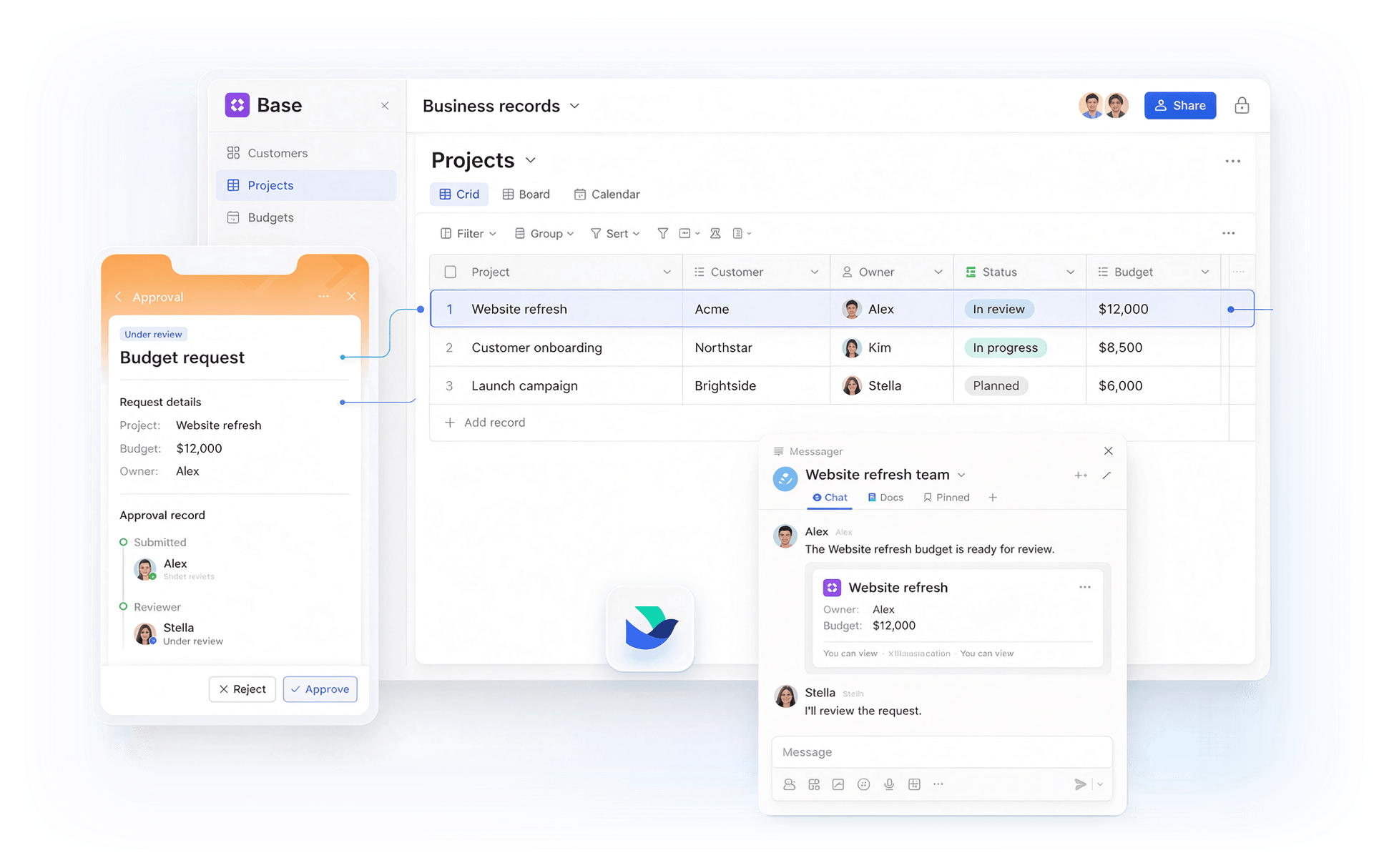
See how Lark keeps those records, permissions, and conversations in one place to cut duplicate updates, keep records current, and turn follow-ups into action.
Protected ranges limit editing, not viewing, so sensitive data may need separate files.
Custom scripts can automate everyday tasks in Google Sheets, but someone still has to maintain them.
Linking customers, projects, and orders across sheets can mean more lookup formulas and manual upkeep.
Share safely. Set record and field permissions in Lark Base so sales reps can view and edit only their own deals, while sensitive fields stay restricted.
Explore Lark Base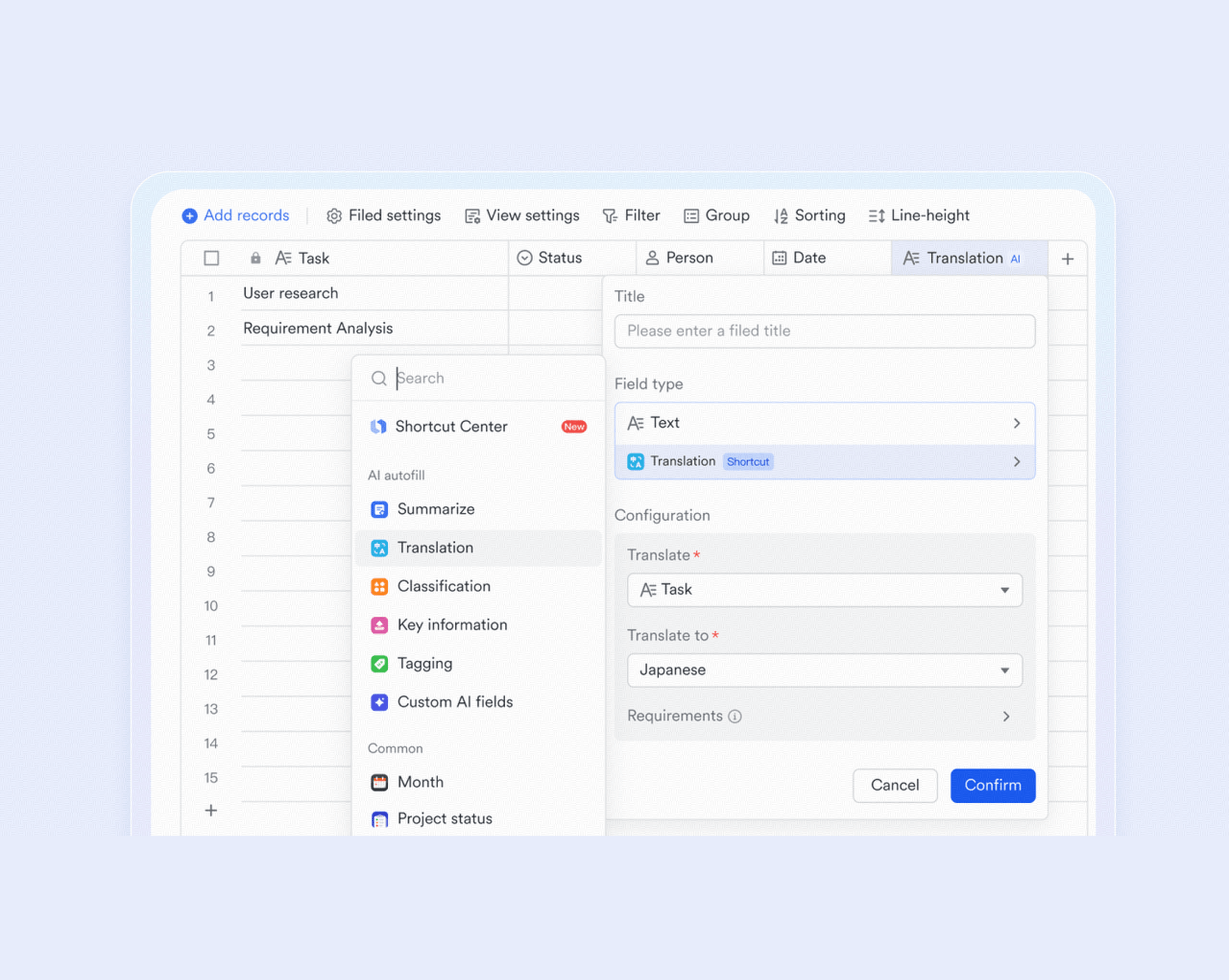
Share safely. Set record and field permissions in Lark Base so sales reps can view and edit only their own deals, while sensitive fields stay restricted.
Explore Lark BaseCut software bloat while keeping teams fast, clear, and connected.
Book a demo Basic $6user/month |  Pro $12user/month |  Business Standard $14user/month | |
|---|---|---|---|
| User limit | 500 | 500 | 300 |
| Online spreadsheets |  |  | |
| Real-time collaboration | | | |
| Native Kanban views | | |  |
| Built-in gallery views | | | |
| Built-in record calendar views | | | |
| Forms within the data tool | | | |
| Built-in row permissions | | | |
| Database row limit | 2,000/Base table | 20,000/Base table | 2,500/AppSheet database |
| No-code workflows | | | |
| Automated chat alerts | | | AppSheet/Studio |
| Team chat | | | |
| Auto-translation in messenger | | | |
| File storage | 5 TB | 15 TB | 2 TB |
| Videoconferencing | 1 on 1 only | 500 participants | 150 participants |
| Meeting transcripts | | | Limited |
| Project management | | | |
| Approval | | | |
| All-in-one Workspace | | | |
Calculate how much you can save by replacing your tools with Lark



"Lark's Base provides a clear overview of business goal progress, and has greatly improved efficiency at realme. The visual presentation of data provides clarity over execution - how tasks have progressed and empower me to make informed and timely decisions."

"As a business coach and as a consultant, we are able to improve our workflow greatly thanks to Lark’s cloud-based approach. This quicker, more engaging moment-to-moment interaction is something we are very excited about."

"Lark changed how we work every day and we cannot imagine leaving it now. We recommend Lark to any company in the real estate space who want to operate their properties efficiently, store and share property information with transparency, and let projects flow with no error."
Trusted by 2000+ global leaders across 125+ countries














Pros
Cons
Pricing
Pros
Cons
Pricing
Pros
Cons
Pricing
Pros
Cons
Pricing
Pros
Cons
Pricing
Sales teams track leads, accounts, and deal stages in shared sheets, and need owners, stages, and follow-ups to stay together as deals move.

Lark keeps leads and deals in Base with stage views, access settings, and Messenger follow-ups, so sales teams update one record instead of scattered sheets.

Airtable suits teams that want linked records, custom forms, and multiple views, so client and deal data stays connected without extra sheets.

Project teams plan tasks, owners, and deadlines in shared sheets, and need dependencies, status changes, and reminders to stay visible without manual updates.

Lark keeps tasks, owners, and deadlines in Base, with kanban and calendar views and Messenger reminders, so project updates reach everyone without a separate tracker.

Smartsheet fits teams that need Gantt charts, automated reminders, and cross-sheet reports to manage large projects with many owners and dependencies.

Finance and ops teams build budget sheets, compare actuals, and explain variances, and need formulas, refreshable data, and clear sign-off before numbers circulate.

Lark handles budgets in Sheets and Base, with formulas, linked records, and built-in Approval for spend requests, so plans and sign-offs stay together.

Excel handles heavy formulas, pivot tables, Power Query refreshes, and offline desktop editing for large budget workbooks with many tabs.

Most teams just need shared sheets for trackers, lists, and light analysis, with fast co-editing, comments, and a free start for occasional contributors.

Lark gives teams shared Sheets, Docs, and Messenger in one workspace, with real-time co-editing and comments, so everyday trackers stay in one place.

Zoho Sheet offers free real-time co-editing, built-in data cleaning, and charts, while desktop apps keep light spreadsheet work available offline.

Teams organize requests, assets, and other business records, and need structured fields, flexible views, and automated updates.

Lark Base organizes business records with forms, custom views, and automated updates, while connected Docs and Messenger keep data and team discussions together.

Baserow organizes business records in an open-source no-code database with custom fields and flexible views, plus self-hosting for teams that need control over their infrastructure.


2026 Lark Technologies Pte. Ltd.
Headquartered in Singapore with offices worldwide.