














Free WBS Template in Word: Your Guide to Smarter Project Planning

Chloe Wang
Content Manager
Sep 8, 2026
Chloe Wang
Sep 8, 2026

9 min read


Complex projects often feel like navigating a maze without a map. There are countless tasks, dependencies, and stakeholders, and keeping everything organized can quickly become overwhelming. This is where a Work Breakdown Structure, or WBS, becomes an invaluable tool. It’s a foundational piece of project planning that helps you visualize, manage, and execute even the most intricate initiatives. If you are looking for the right WBS template word format, this guide will explore how to effectively use it to bring clarity to your projects, ensuring you have a solid plan from the start. We'll also look at how modern tools can build upon this foundation for enhanced collaboration and execution.
What exactly is a work breakdown structure?
At its core, a Work Breakdown Structure (WBS) is a hierarchical decomposition of the total scope of work to be carried out by a project team to accomplish project objectives and create the required deliverables. Think of it as systematically breaking down your large, daunting project into smaller, more manageable pieces. Instead of facing a single, giant mountain, you're identifying individual hills and trails that make up the ascent.
For example, imagine you're planning a product launch. A high-level WBS might start with Product Launch at the top. Below that, you'd have major deliverables like Product Development, Marketing Campaign, and Sales Enablement. Each of these would then be broken down further into specific work packages. This structured approach helps ensure that all necessary work is identified and organized, creating a clear roadmap for your team.
The WBS can take various forms, from a simple outline in a document to a visual tree diagram. The goal is always the same: to present your project's work in a clear, hierarchical way that fosters understanding and accountability.
Why a WBS template in Word is your project planning ally
Starting a project with a blank page can be intimidating. This is precisely why a WBS template in Word can be such a valuable ally in your project planning efforts. Most of us are familiar with Microsoft Word; its accessibility and ease of use make it a natural starting point for many planning activities.
Using a WBS template in Word offers several immediate benefits:
- Clarity and Organization: Templates provide a ready-made structure, guiding you to break down your project logically. This prevents you from overlooking critical steps and helps organize your thoughts.
- Familiarity and Accessibility: Almost everyone has access to Word and knows how to use it. This means less time spent learning new software and more time focused on planning.
- Effective Communication: A well-structured WBS in a common format like Word makes it easier to communicate the project scope and deliverables to stakeholders who may not be familiar with specialized project management tools.
- Foundation for Further Planning: Your WBS serves as the blueprint for other project documents, such as schedules, budgets, and resource plans. Having it clearly defined in Word provides a solid base.
Consider a small marketing team planning a new campaign. They might not need complex project management software initially, but a simple WBS template in Word allows them to quickly outline Content Creation, Social Media Strategy, and Performance Tracking. This initial structure ensures everyone understands their role and what needs to be done before moving into more detailed execution. For initial brainstorming or smaller, less complex projects, a Word template offers a practical, no-fuss solution.

Deconstructing the WBS: key components you need to know
To build an effective WBS, whether in Word or another tool, it's important to understand its fundamental components. These elements work together to ensure your project is thoroughly planned and nothing falls through the cracks.
Project deliverables
At the highest levels of your WBS are your project deliverables. These are the tangible outcomes or results that your project is designed to produce. They are the what of your project. For example, in a website redesign project, deliverables might include New Website Design, Content Migration Complete, and User Acceptance Testing (UAT) Report. Every item in your WBS should contribute to one of these deliverables.
Work packages
Work packages represent the lowest level of decomposition in your WBS. They are distinct, manageable segments of work within a deliverable. Each work package should be clearly defined, have a clear start and end, and be assignable to a specific individual or team. The goal is to break down work until it's small enough to be easily estimated, scheduled, and monitored.
A common guideline for sizing work packages is the 8/80 rule. This suggests that a work package should generally take no less than 8 hours and no more than 80 hours (or roughly 1 to 10 working days) to complete. If a task is less than 8 hours, it might be too granular and could be combined with others. If it's more than 80 hours, it's likely too broad and needs further breakdown. For instance, Develop Marketing Plan is too vague. Breaking it down into Research Target Audience (40 hours), Draft Campaign Messaging (60 hours), and Review and Finalize Plan (20 hours) creates clear work packages.
WBS dictionary
While the WBS visually breaks down the work, the WBS Dictionary provides the crucial textual detail. It's a supporting document that defines each work package within your WBS, ensuring clarity and avoiding ambiguity. For every work package, the WBS Dictionary should typically include:
- Identifier: A unique code or number corresponding to the WBS element.
- Description of Work: A detailed explanation of the work to be performed.
- Responsible Organization/Individual: Who is accountable for completing this work package.
- Dependencies: Any predecessor or successor tasks.
- Estimated Cost: The projected cost for completing this work package.
- Estimated Duration: The projected time to complete the work package.
- Acceptance Criteria: What constitutes successful completion of the work package.
The WBS Dictionary ensures that everyone involved has a shared understanding of what each piece of work entails, preventing scope creep and misinterpretations.
Finding and choosing the right free WBS template for Word
With a clear understanding of WBS components, your next step is often finding a suitable template. The good news is that many free WBS templates for Word are available online. Knowing where to look and what to look for can save you time and help you get started quickly.
You'll typically find these templates on project management resource websites, in the template galleries of productivity software providers, or sometimes through a simple web search. When you're sifting through the options, consider these criteria:
- Customization: Can you easily adapt the template to your specific project needs? A good template provides a structure but allows you to modify headings, add rows, or change formatting without much hassle.
- Clarity and Simplicity: The best templates are straightforward and easy to understand. Avoid overly complex designs that might confuse rather than clarify your project breakdown.
- Format Options: Do you prefer a hierarchical outline, a tabular format, or a visual tree structure? Many templates offer variations, so choose one that aligns with how you best visualize and organize information. For instance, some templates are designed to be purely text-based, while others might incorporate SmartArt for more visual appeal.
Ultimately, the right template is one that helps you effectively organize your project work and supports clear communication with your team.
6 Essential templates to structure your next project
Before you start formatting a blank document, leveraging a proven structure can save you hours of administrative work. While you are searching for a WBS template word, you will often find that pairing your work breakdown structure with other foundational project documents creates a much stronger execution plan.
Here are six essential template structures you can use to map out your project:
Work Breakdown Structure template
The core tool for decomposing your project. It organizes your main objective into clear deliverables, tasks, and subtasks so you can accurately estimate time and assign responsibilities without missing critical steps.
Project charter template
Before breaking down the work, you need to define the project's baseline. This template outlines high-level objectives, key stakeholders, and initial timelines to ensure everyone is aligned from day one.
Scope of work template
Use this to clearly define what is included—and just as importantly, what is excluded—in your project. It details the expected outcomes and acceptance criteria, acting as your primary defense against scope creep.
Requirements document template
Perfect for technical or complex deliverables. It captures functional needs, user constraints, and specific criteria required before the actual execution or coding begins.
Project plan template
A comprehensive guide that takes your WBS deliverables and maps them against schedules, resource allocations, and risk management strategies.
Project planning & implementation template
This structure bridges the gap between your initial outline and actual execution, providing clear, chronological steps to take your project from the planning board to the finish line.
Beyond the static document: evolving your WBS for modern teams
While creating a WBS in Word is an excellent starting point, relying solely on a static document can present challenges, especially for dynamic projects and distributed teams. The traditional Word file can struggle with:
- Version control: Keeping track of the latest version when multiple people are making edits can lead to confusion and errors.
- Real-time collaboration: Word documents often require check-in/check-out processes or emailing versions back and forth, which hinders real-time, simultaneous teamwork.
- Bridging planning and execution: A WBS in Word is a plan, but it's disconnected from the actual task management, communication, and document sharing where the work happens.
- Dynamic updates: As projects evolve, a static document needs constant manual updates, increasing the risk of outdated information.
This is where the concept of a Living WBS becomes powerful. Instead of a fixed document, think of your WBS as an evolving framework that is integrated into your project's daily operations. Digital collaboration platforms are designed to support this dynamic approach, turning your initial WBS plan into an active part of your project lifecycle.
How Lark helps: elevating your WBS from plan to progress
Lark goes beyond a static Word document, transforming your WBS into a dynamic, collaborative, and actionable project management system. Here is how Lark bridges the gap between project planning and execution.
Collaborative WBS development with Lark Docs
Creating an effective WBS is a team effort. Lark Docs supports real-time collaborative editing, making the WBS creation process transparent and efficient. Project managers can start a WBS dictionary or project brief and share it with the entire team. Multiple stakeholders can simultaneously edit, add suggestions, and leave inline comments. Lark automatically tracks all version history, allowing you to easily review previous iterations and understand who made modifications, ensuring your WBS reflects diverse team perspectives and stays up-to-date.
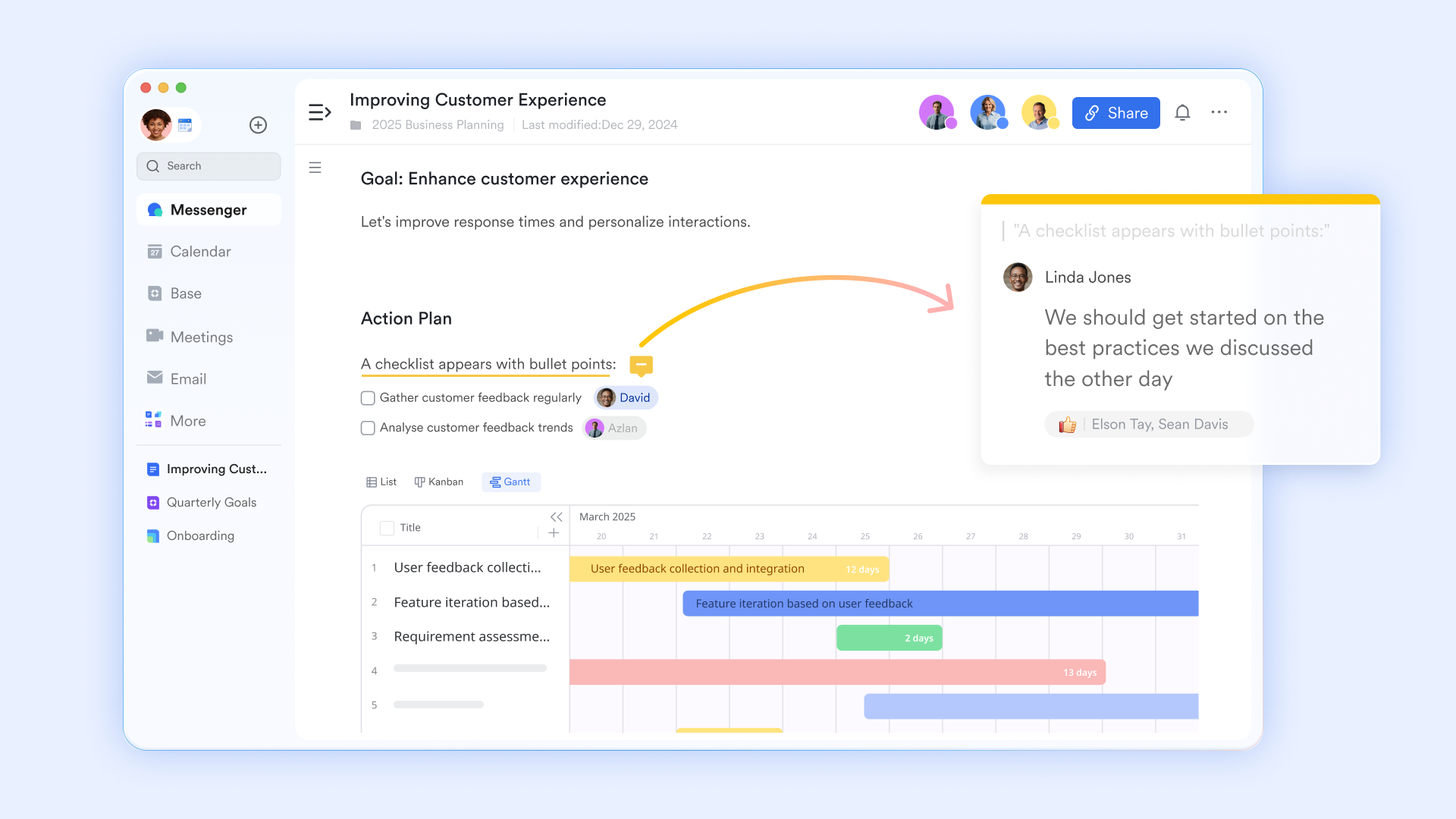
WBS to task conversion in one click
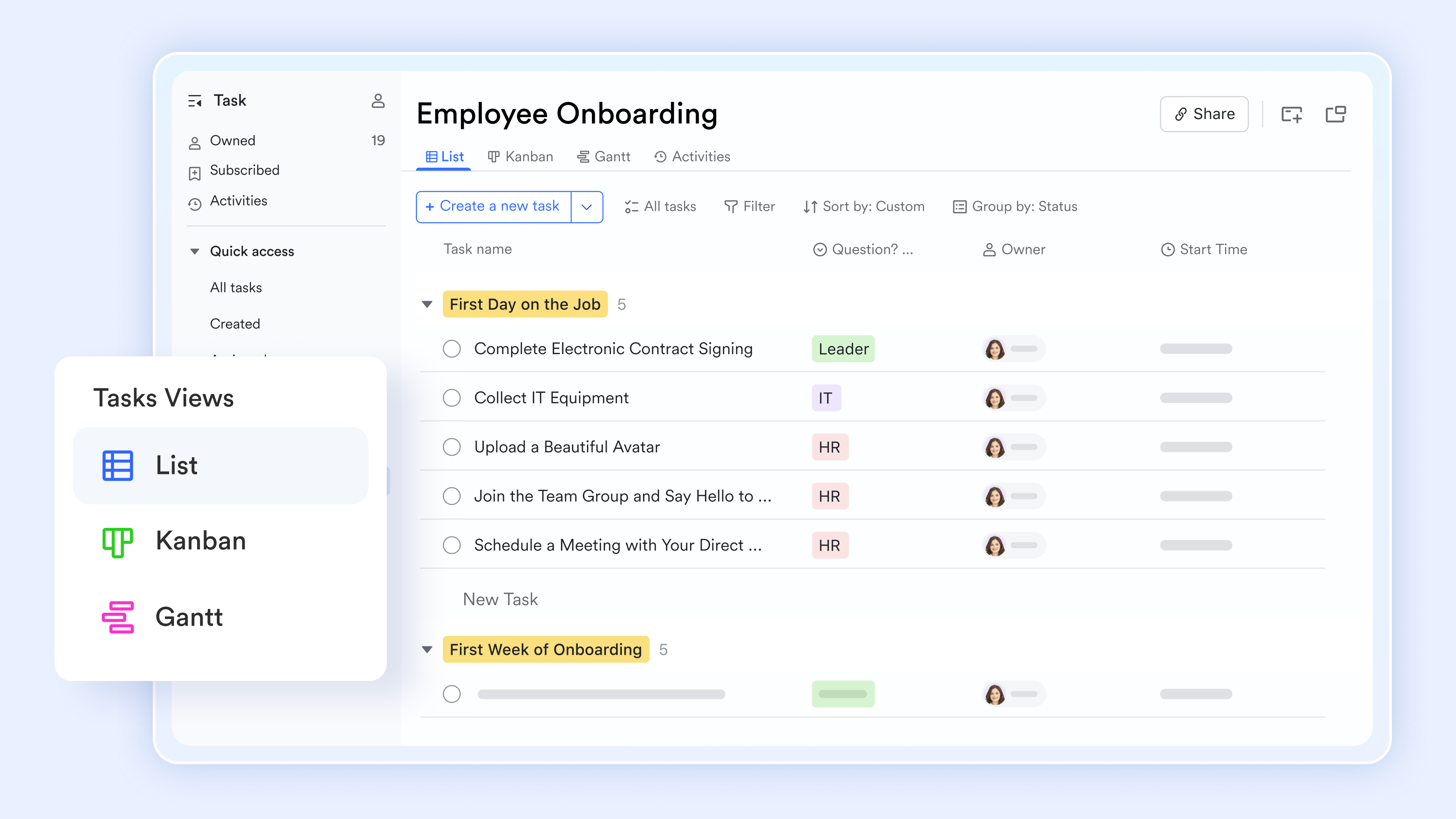
A plan is only as good as its execution. With Lark Tasks, you have a direct path from WBS definition to actual work. You can simply highlight a work package description directly within your Lark Doc and convert that text into a specific, trackable task. From there, project managers can assign the task to a team member, set a due date, add priorities, and link it directly back to the relevant section in the WBS document. "Develop Backend API" immediately becomes an actionable item for the engineering team, tracked within the exact same platform.
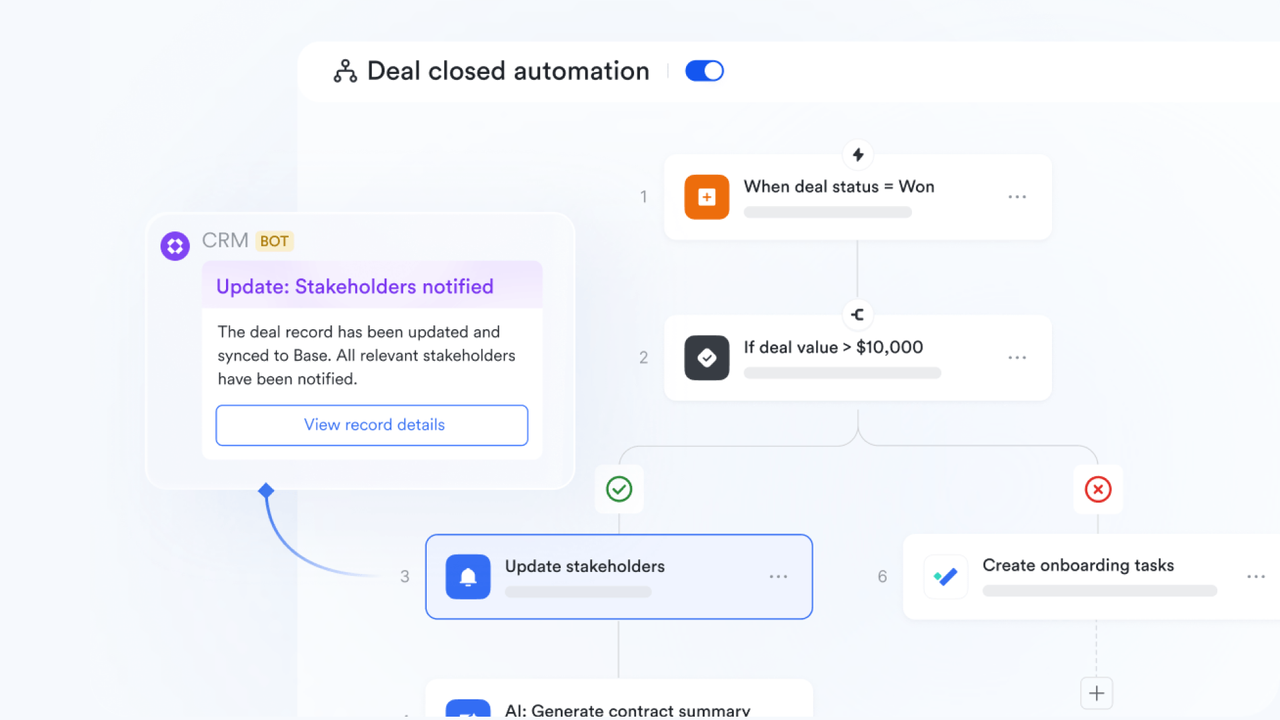
Automating WBS milestones with trigger-action rules
Once your WBS is established, Lark Base Automation streamlines the workflows tied to your project's progress. Project managers can configure trigger-action rules so that when a specific work package is marked "Complete," the system automatically notifies key stakeholders or the next team in the project sequence. By integrating your WBS with automated workflows, you eliminate manual follow-ups and keep execution moving seamlessly from one phase to the next.
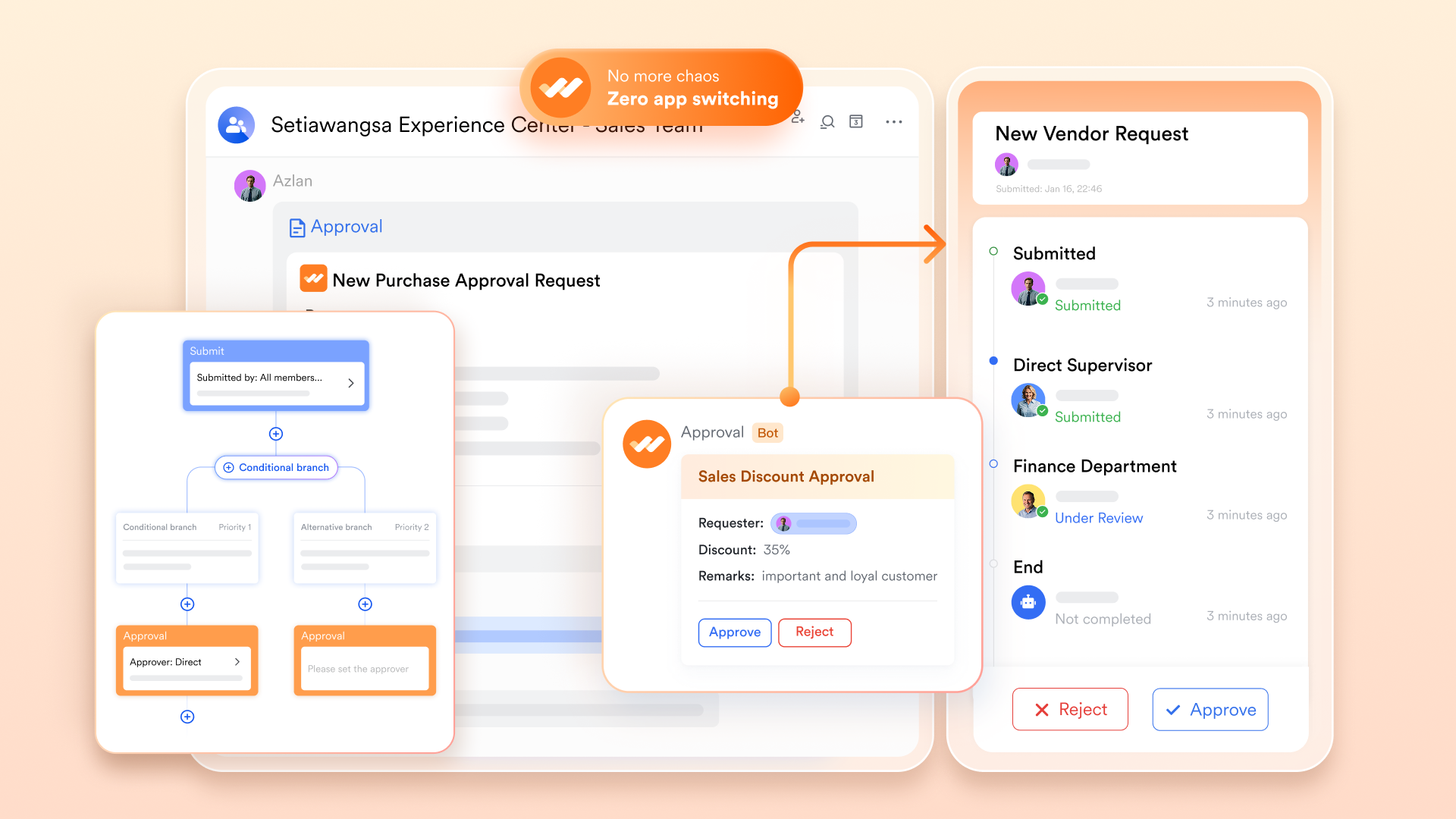
Deliverable sign-offs with Lark Approval
For critical WBS deliverables, quality checks are non-negotiable. Lark Approval lets you configure structured sign-off flows tied to project milestones. When a work package task is finished, an approval request can be automatically routed to the relevant manager, QA lead, or project sponsor. The acceptance decision is recorded with a timestamp, ensuring that strict governance and quality control are in place before the team moves to the next project phase.
- Starter plan: Free forever plan that includes 11 powerful tools for up to 20 users. It also comes with 100GB of storage space, 1000 automation runs, AI translations, and more. No credit card needed.
- Pro plan: $12/user/month (billed annually) for up to 500 users. It includes everything in Basic plus group calling for up to 500 attendees, 15TB of storage space, 50,000 automation runs, and more.
- Enterprise plan: Contact sales for custom pricing. Supports unlimited users and includes even more automation runs and advanced security, compliance, and management features.

Starter
Pro
Enterprise
Starter
For small teams with simple communication needs
$0
/ user / month
20 users max
18 months message history
1-on-1 video meetings
100 GB storage
Lark Docs & Mail
1000 Base automation runs/month
2000 rows per table in Base
Pro
For companies with comprehensive collaboration and management needs
$12
/ user / month
500 users max
Unlimited message history
500-participant video meetings
15 TB storage
Lark Docs & Mail
50k Base automation runs/month
20k rows per table in Base
Enterprise
For large companies with advanced security and organizational management needs
Get a personalized demo and pricing
Unlimited users
Unlimited message history
500-participant video meetings
15 TB storage + 30 GB storage/user
Lark Docs & Mail
500k Base automation runs/month
50k Base automation runs/month
Single sign-on (SSO)
Pro
For companies with comprehensive collaboration and management needs
$12
/ user / month
500 users max
Unlimited message history
500-participant video meetings
15 TB storage
Lark Docs & Mail
50k Base automation runs/month
20k rows per table in Base
Best practices for an effective WBS
Creating a WBS is more than just listing tasks; it's about strategic decomposition to ensure project success. To get the most out of your WBS, consider these best practices:
- The 100% Rule: This fundamental rule states that your WBS must include 100% of the work defined by the project scope and capture all project deliverables – internal, external, interim – in terms of the work to be completed, including project management. Nothing should be left out, and no extra work should be included.
- Deliverable-Oriented, Not Activity-Oriented: Focus on what needs to be produced, not how it will be produced. While activities are part of the work package description, the WBS itself should outline tangible results. For example, Marketing Campaign Launched is a deliverable, while Schedule social media posts is an activity within that.
- Involve the Team in Creation: The people who will actually do the work often have the best insights into how it should be broken down. Fostering cross-functional collaboration during the WBS creation process increases accuracy, fosters buy-in, and helps identify potential gaps early on.
- Regular Reviews and Updates: A WBS isn't a static document you create once and forget. Projects evolve, and so should your WBS. Schedule regular reviews with your team to ensure it remains accurate, reflects current scope, and accommodates any changes—a core tenet of agile project management.
Conclusion
Navigating project complexity doesn't have to be a daunting task. By embracing the power of a Work Breakdown Structure, you gain a clear, hierarchical view of all the work required to achieve your project's objectives. Whether you start with a simple WBS template in Word for its familiarity and accessibility or evolve to more dynamic, collaborative platforms like Lark, the core principle remains the same: breaking down the big picture into manageable, actionable components. A well-crafted WBS not only clarifies scope and aids planning but also serves as a critical communication tool, fostering alignment and empowering your team to turn plans into successful outcomes.
FAQs
Is a WBS always needed?
A WBS is essential when teams are clarifying the project scope and identifying what the final deliverable includes.
What's the WBS 100% rule?
The 100% Rule is a fundamental principle in project management that asserts that the Work Breakdown Structure (WBS) should include all the work defined by the project scope, capturing 100% of the work necessary to complete the project successfully.
What are the 5 steps of WBS?
The phase-based WBS displays the final deliverable on top, with the WBS levels below showing the five phases of a project (initiation, planning, execution, control and closeout). Just as in the deliverable-based WBS, the project phases are divided into project deliverables and work packages.
How does a WBS look like?
The tree format is one of the most popular and visually intuitive ways to represent a WBS. It looks like an organisational chart, with the main project goal at the top, branching down into phases, deliverables, sub-deliverables and work packages.
Can you create diagrams in Word?
How to make a diagram in Word using the shape library. In Word, go to Insert. In the Illustrations section, select Shapes. A drop-down menu will appear.
Related reading
Table of contents
Start using Lark today

Manage all your work in one place
Boost team efficiency by 10x
Save up to 70% on software costs
Table of contents
Start using Lark today
Manage all your work in one place
Boost team efficiency by 10x
Save up to 70% on software costs
Keep reading








2026 Lark Technologies Pte. Ltd.
Headquartered in Singapore with offices worldwide.






Explore: