Asana project management is a popular approach for teams that want clear task ownership, structured timelines, and visibility into project progress. As a cloud-based work management platform, Asana helps teams plan projects, assign tasks, track dependencies, and meet deadlines without relying on complex tools. It is especially effective for task-driven workflows where clarity and accountability matter most.
From marketing campaigns and product launches to operational initiatives, Asana project management enables teams to organize work, collaborate efficiently, and monitor progress in real time. This guide explains how Asana project management works, its key features, pricing, use cases, and when teams may need more advanced alternatives.
What is Asana for project management?
Using Asana for project management means using it to plan, organize, and track work across teams and projects. It focuses on task-based execution, breaking projects into actionable tasks with clear owners, due dates, and priorities. Teams can visualize work using lists, boards, timelines, and calendars, making it easier to manage dependencies and deadlines. The Asana project management approach is commonly used for marketing campaigns, product launches, and operational projects that require structure and accountability. Centralizing tasks and progress updates helps teams stay aligned, improve visibility, and deliver projects more efficiently.
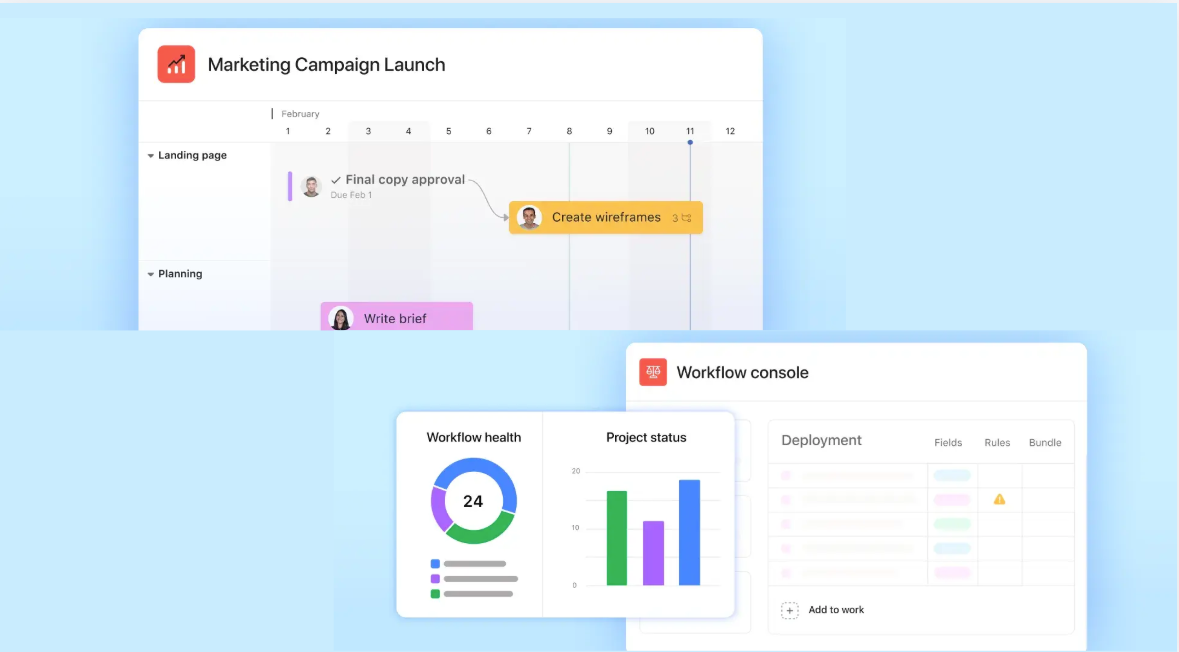
Image source: asana.com
Key features of Asana project management
Asana is designed to help teams plan, execute, and track work with clarity. Its feature set focuses on task visibility, timeline control, and progress tracking, standing out , especially effective for structured, task-driven teams. Below are the core features that define how Asana supports day-to-day execution.
Task creation and assignment: Task creation is the foundation of Asana project management. Teams can create tasks with clear owners, due dates, descriptions, and attachments to eliminate ambiguity. Subtasks, priorities, and comments keep all execution details in one place, ensuring accountability across teams using the Asana project management tool.
- Project timelines and dependencies: Timelines provide a visual way to plan work and understand how tasks connect. With dependencies, teams can see which tasks must be completed before others can begin, reducing delays. This capability is one of the strongest Asana project management features, especially for managing sequential or deadline-driven projects.
- Custom fields and tags: Custom fields allow teams to track metadata such as priority, status, budget, or effort directly within tasks. Tags and labels make it easier to filter and organize work across multiple projects. These tools help teams tailor Asana's project management features to their unique workflows.
- Team workload tracking: Workload tracking helps managers see how tasks are distributed across team members. By visualising capacity, teams can rebalance assignments before burnout or bottlenecks occur. This makes Asana for project management particularly useful for in growing teams.
- Reporting dashboards: Dashboards provide real-time insights into project progress using charts and status indicators. Teams can monitor task completion, overdue work, and overall performance without manual reporting. These dashboards turn project management data into actionable insights for stakeholders.
- Goal tracking and milestones: Goals connect to higher-level objectives, helping teams understand how their work contributes to business outcomes. Milestones mark key phases or achievements within a project timeline. Together, they strengthen strategic alignment when using project management Asana for long-term initiatives.
Asana pricing tiers for teams
Asana offers multiple pricing tiers to support teams of different sizes and project needs. Each plan builds on the previous one, adding advanced features for collaboration, automation, and reporting. Understanding these tiers helps teams choose the right level of functionality without overspending.
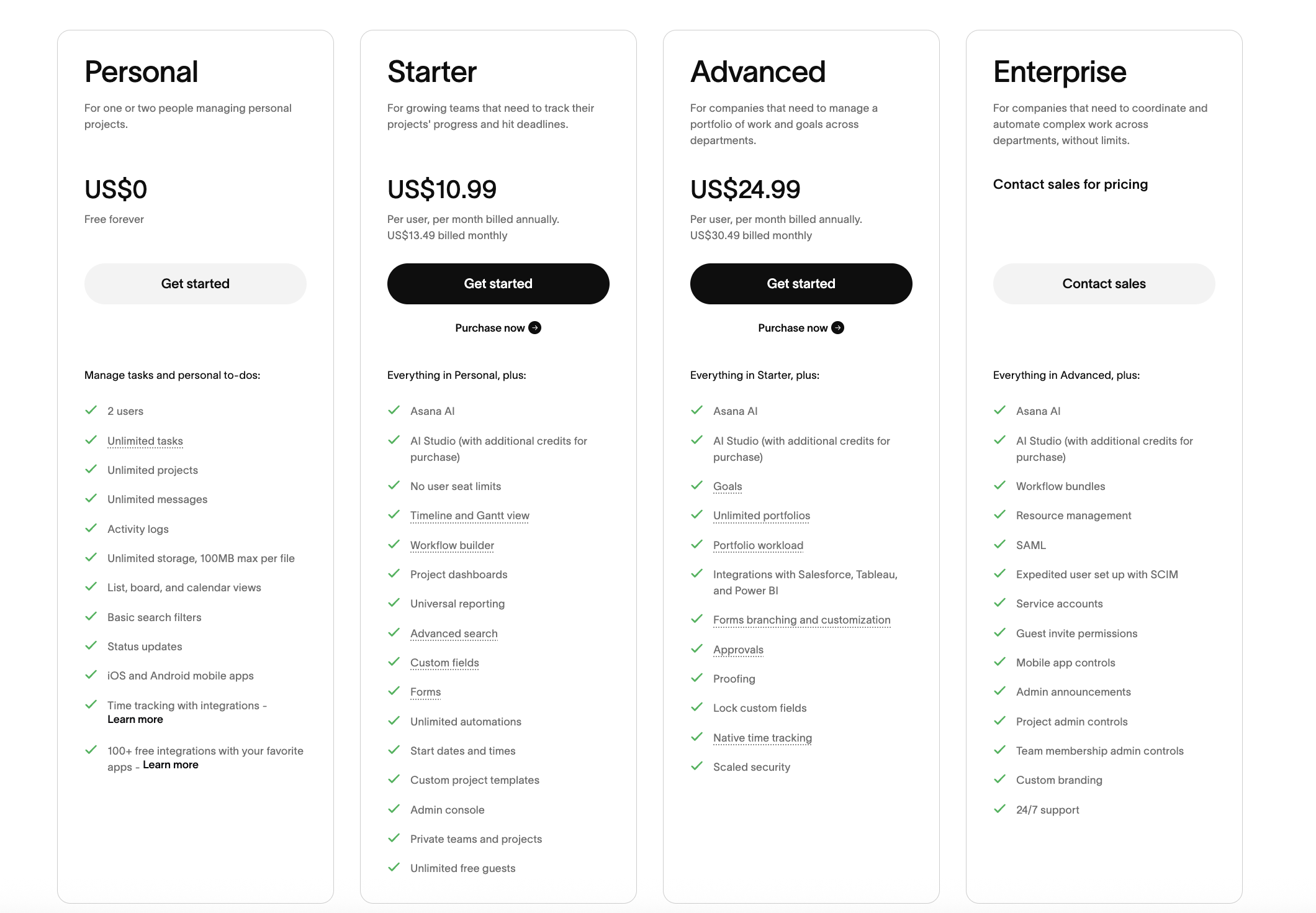
Image source: asana.com
Information source: asana.com
Update time: 2026-01-15
Note: Pricing and plan details reflect publicly available data as of the update date and may vary based on region, billing cycle, and number of agents.
How to use Asana for project management effectively
Using Asana effectively requires more than just creating tasks. By setting up clear structures, assigning ownership, and , teams can get the most value from the platform and keep projects on track from planning to delivery.
Step 1: Create clear project structures
Start by setting up projects with a clear goal, timeline, and owner. Break the project into sections or phases, so work is logically organized. This structure makes it easier for teams to understand priorities from day one.
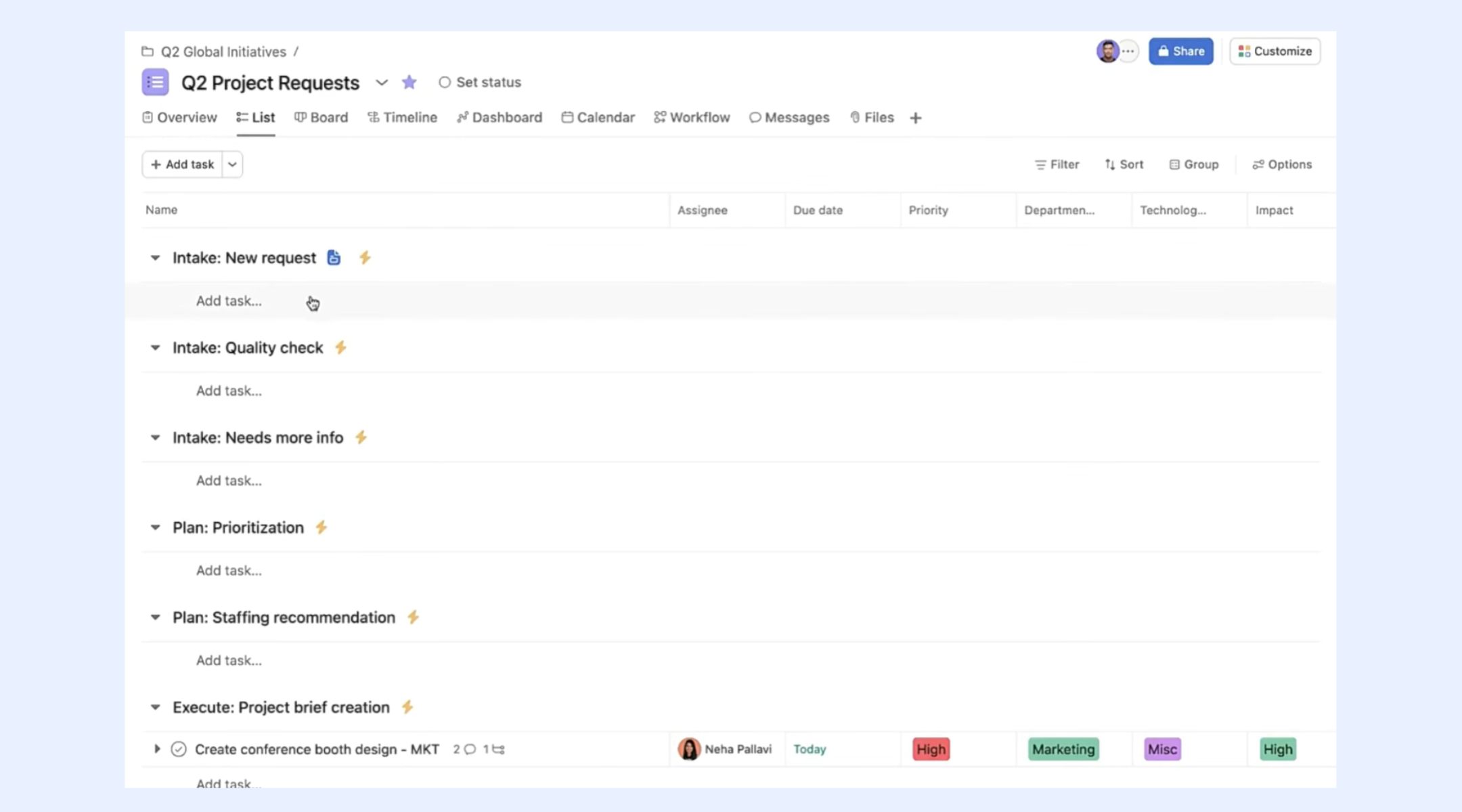
Image source: asana.com
Step 2: Assign ownership to tasks
Every task should have a single owner responsible for completion. Clear ownership reduces confusion and ensures accountability. In Asana, assignees also receive notifications and .
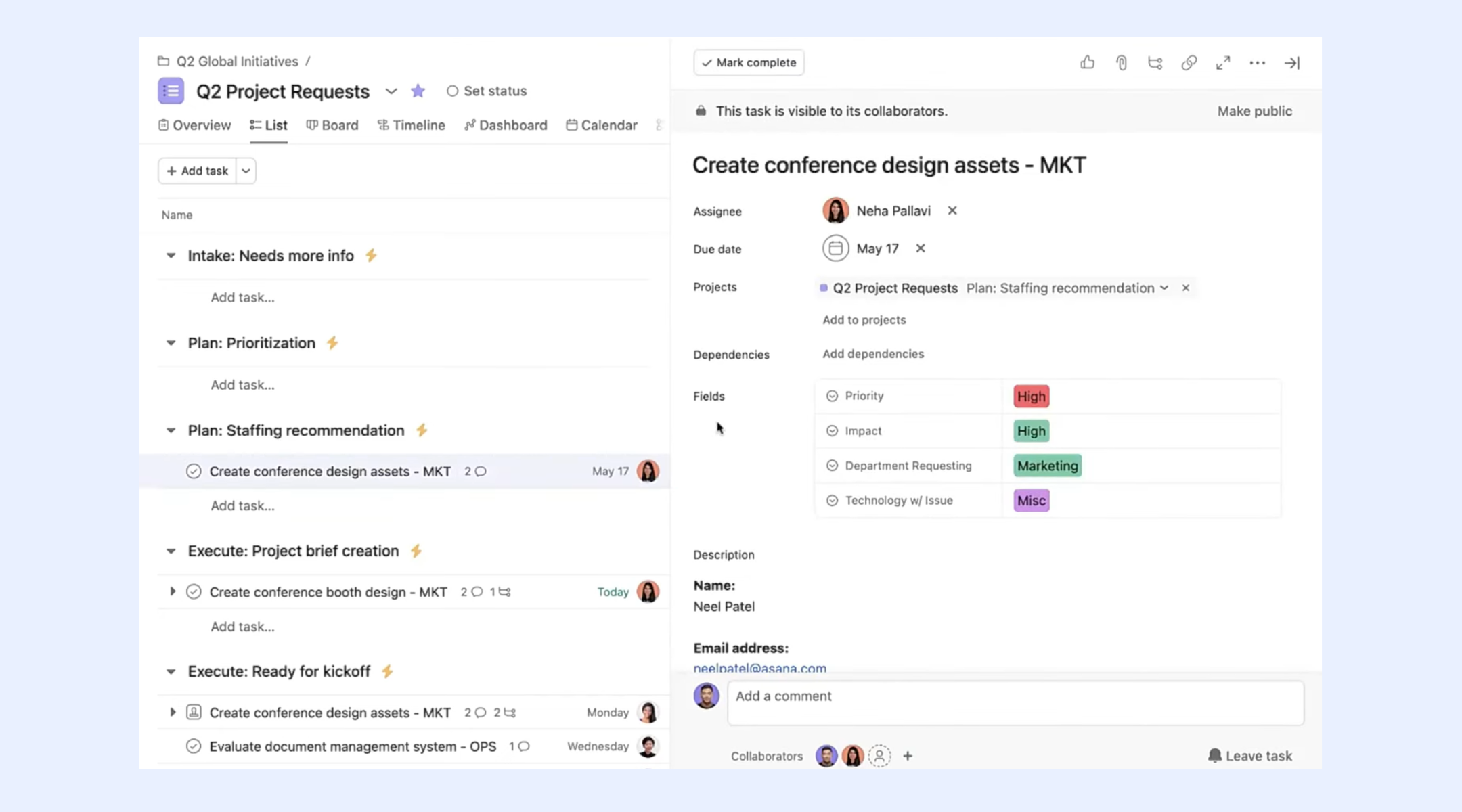
Image source: asana.com
Step 3: Set due dates and priorities
Add realistic due dates and priority levels to tasks to guide execution. This helps teams plan their workload and avoid last-minute rushes. Dependencies ensure tasks move in the right order.
Step 4: Use timelines for planning
Timelines provide a visual view of how tasks overlap and depend on each other. Project managers can quickly spot delays and adjust schedules. This keeps projects aligned with deadlines.
Step 5: Track progress with dashboards
Dashboards show through charts and status indicators. Teams can monitor completed, ongoing, and overdue work without manual reporting. This supports faster decision-making.
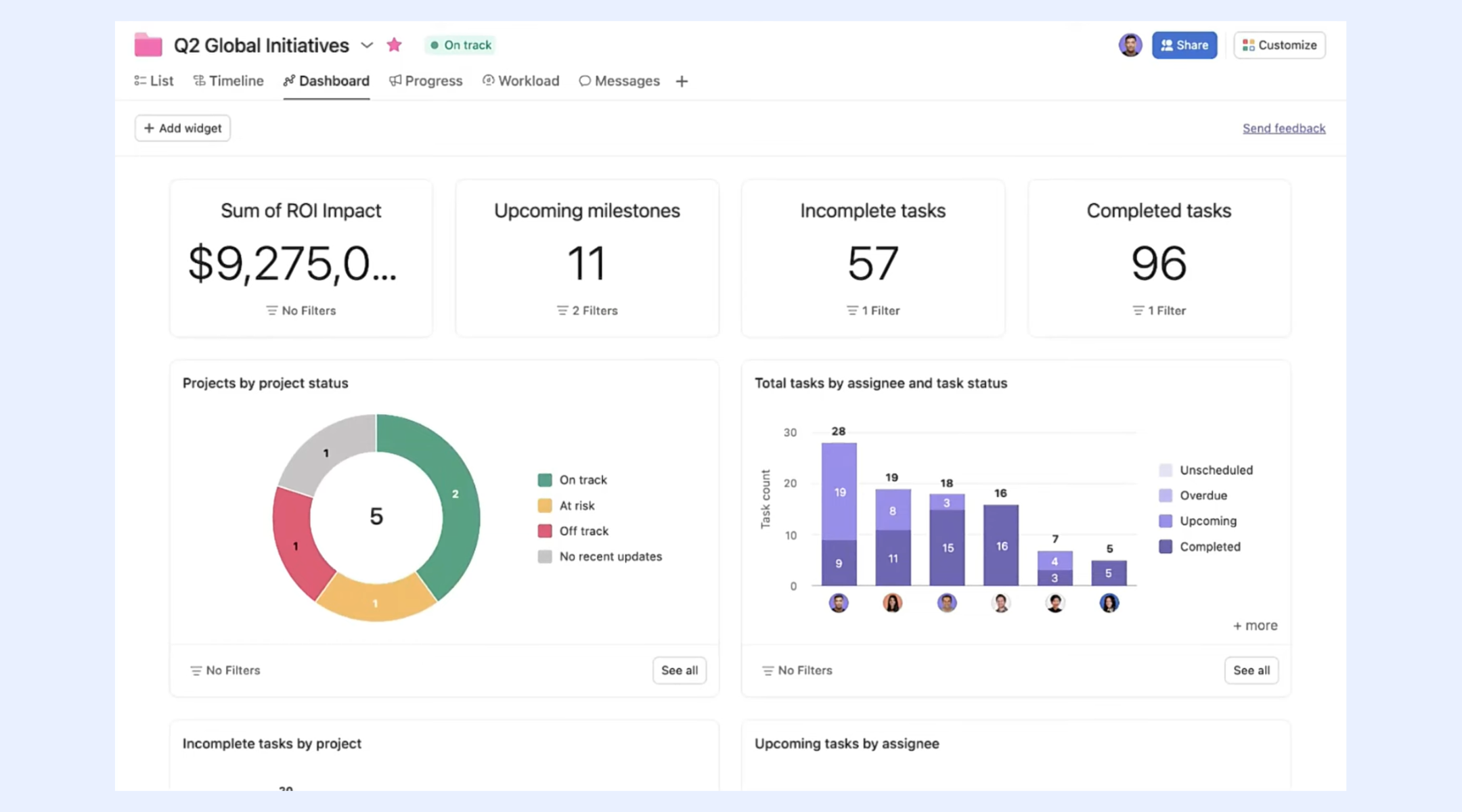
Image source: asana.com
Step 6: Review projects weekly
Hold weekly reviews to assess progress, resolve blockers, and reprioritize tasks. Regular check-ins help teams stay aligned and adapt to changes early. Consistent reviews improve long-term project success.
Common challenges teams face using Asana
While Asana is a capable tool for task-focused project management, many teams encounter limitations as their workflows grow more complex. These challenges often appear when organizations scale, add cross-functional processes, or require deeper automation and collaboration.
- Limited end-to-end workflows: Asana works best for linear, task-based execution, but it can feel restrictive for teams managing end-to-end processes across multiple departments. often require workarounds, manual updates, or third-party integrations to connect planning, execution, and reporting.
- Automation depth increases with cost: Basic automation is available, but advanced rules, triggers, and workflow customization are locked behind higher-tier plans. As teams grow and rely more on automation, costs rise quickly, making long-term scaling expensive for budget-conscious organizations.
- Fragmented collaboration experience: Collaboration in Asana is mostly task-centric. Conversations, files, and decisions live inside individual tasks, which can make it harder to follow broader project discussions. Teams often need separate chat or document tools, increasing context switching.
- Complexity for non-technical users: As projects become more detailed—with custom fields, dependencies, portfolios, and goals—the interface can feel overwhelming. New users may require onboarding and training before they can confidently use the platform for project management.
- Limited document and knowledge management: Asana is not designed as a document-first workspace. Project documentation, SOPs, and shared knowledge usually live outside the platform, which can create gaps between planning, execution, and reference materials.
- Challenges with cross-department visibility: Managing projects that span or business units can be difficult. Portfolio views provide high-level tracking, but real-time, organization-wide visibility into workflows, conversations, and documentation is limited.
These challenges don't make Asana ineffective—but they do explain why many growing teams eventually look for platforms that offer broader workflow coverage, deeper automation, and more integrated collaboration.
Enjoy a new way for seamless collaboration
Asana vs modern project management platforms
Asana remains a strong choice for teams that need clear task structures and timeline tracking, but when compared with , differences emerge in flexibility, automation depth, and collaboration capabilities. Here's how Asana stacks up against contemporary alternatives that are redefining how teams plan, execute, and communicate work.
Flexibility
Asana: Asana offers flexible task lists, boards, timelines, and calendars that support various work styles. Custom fields and tags let teams tailor project views, but adapting these elements often requires manual configuration. For highly bespoke workflows—especially those spanning multiple business units—Asana's flexibility can feel limited.
Modern platforms: Many next-gen tools let users build fully customized workflows with modular building blocks. Instead of fitting work into predefined views, users can create dashboards, data tables, forms, and automations that reflect their unique processes. This flexibility is especially valuable for teams that need to manage cross-functional operations or non-traditional workflows.
Automation depth
Asana: Asana provides basic automation capabilities such as rule-based triggers and task updates, but is restricted to higher-tier plans. This means teams that rely on automated sequences, complex triggers, or cross-project workflows may face both cost and functional barriers when using Asana as a project management tool.
Modern platforms: Current project platforms often include deeper, more intuitive automation engines that don't require coding or expensive upgrades. These can handle conditional logic, multi-step workflows, and integrations with external systems out of the box, reducing manual work and ensuring consistent process execution from start to finish.
Collaboration
Asana: Collaboration in Asana revolves around task comments, mentions, and file attachments. While these features are useful for task-level coordination, broader team communication—like free-flowing discussion, real-time chat, or document collaboration—usually happens in separate tools. This can lead to context switching and fragmented workspaces.
Modern platforms: Many modern platforms , documentation, and task management within a unified workspace. Real-time messaging, shared documents, and interactive dashboards exist side by side with project work, eliminating the need to juggle multiple apps. This centralization improves team alignment and keeps conversations connected to the work they inform.
Bottom line
While Asana is a powerful tool for task management and team accountability, it can feel restrictive as projects grow. Teams requiring deeper automation, end-to-end flexibility, and truly unified collaboration should consider modern workspaces designed to connect every stage of the workflow.
Why Lark is a stronger alternative to Asana
Lark is a stronger alternative to Asana because it combines project management, real-time collaboration, communication, and automation into a single unified platform. While Asana focuses primarily on task tracking and timelines, Lark connects chats, docs, calendars, and workflows so teams can plan, discuss, and execute without switching apps. Built-in automation and flexible views help teams streamline processes across departments, while and co-editing keep everyone aligned. For teams seeking an all-in-one solution that goes beyond task lists, Lark offers broader capabilities and deeper collaboration.
Visual project tracking with multiple views
multi-view boards allow teams to visualize the same dataset in different formats, including Gantt charts, , calendars, and forms. Project managers can track timelines, while team members focus on task stages. Custom fields, filters, and linked records keep complex projects organized. This flexible view system improves clarity and helps teams adapt tracking methods to their workflow. 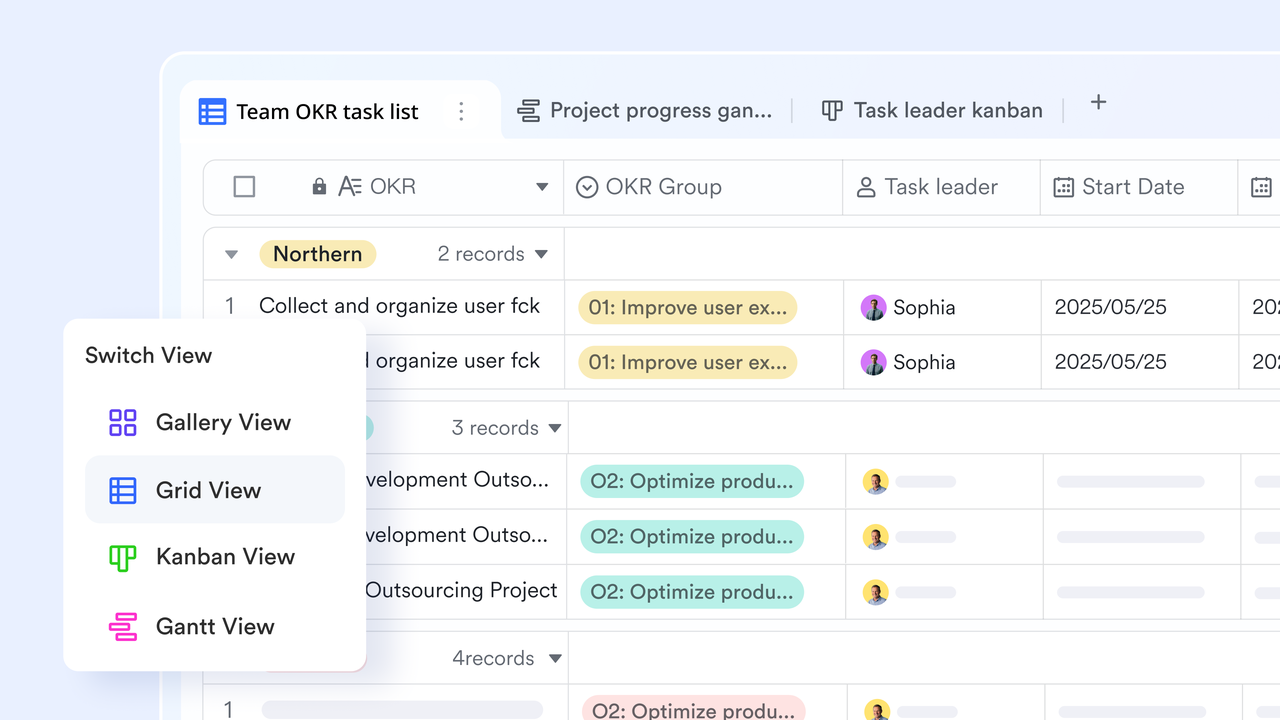
Automated workflows to reduce manual efforts
Base workflows let teams create rule-based workflows without coding. You can set triggers based on status changes, deadlines, or field updates to automatically send chat notifications, assign owners, or update records. For example, when a task moves to "Completed," the bot can notify managers instantly. This removes manual follow-ups, ensures consistent processes, and keeps distributed teams aligned. 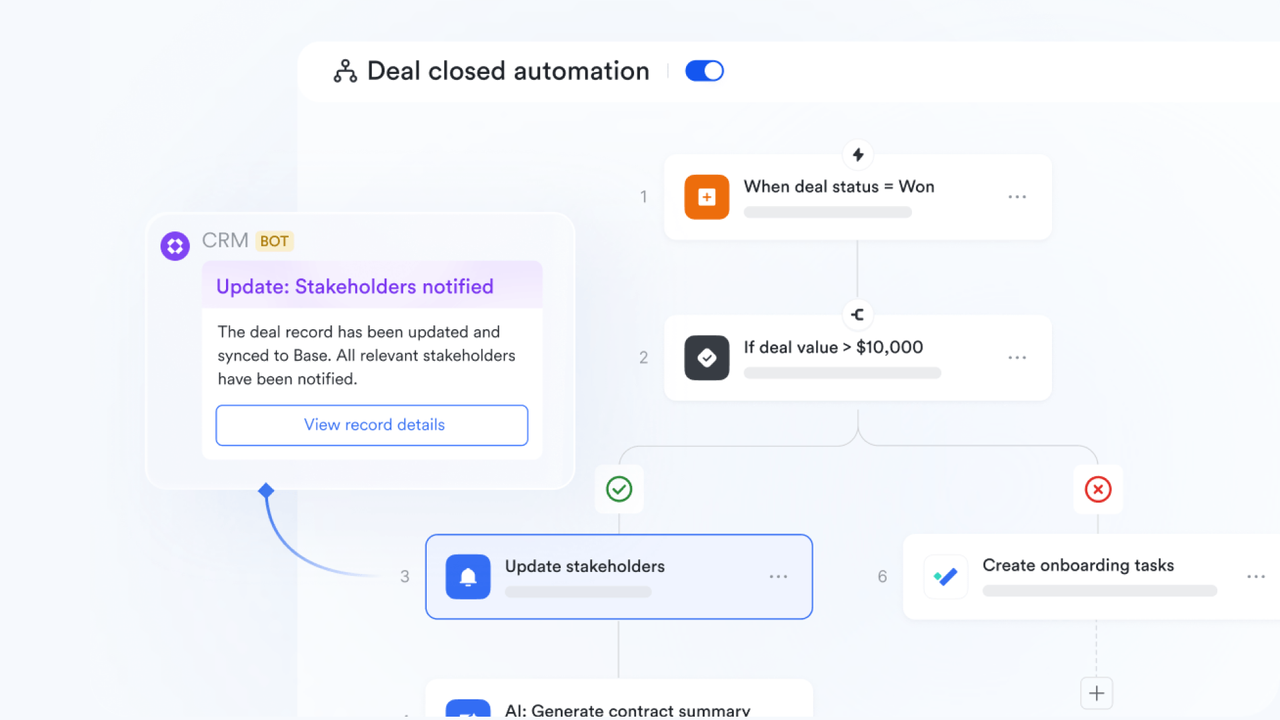
Powerful dashboard for accurate project control
For real-time visual insights, Lark Base dashboards serve as a powerful project control center. With blocks like metric blocks, progress charts, and pivot tables, it eliminates manual reporting by automatically tracking task completion, project health, and budget status in a single centralized view. With customizable charts, bars, and filters, managers can easily identify bottlenecks and balance team workloads to ensure deadlines are met. 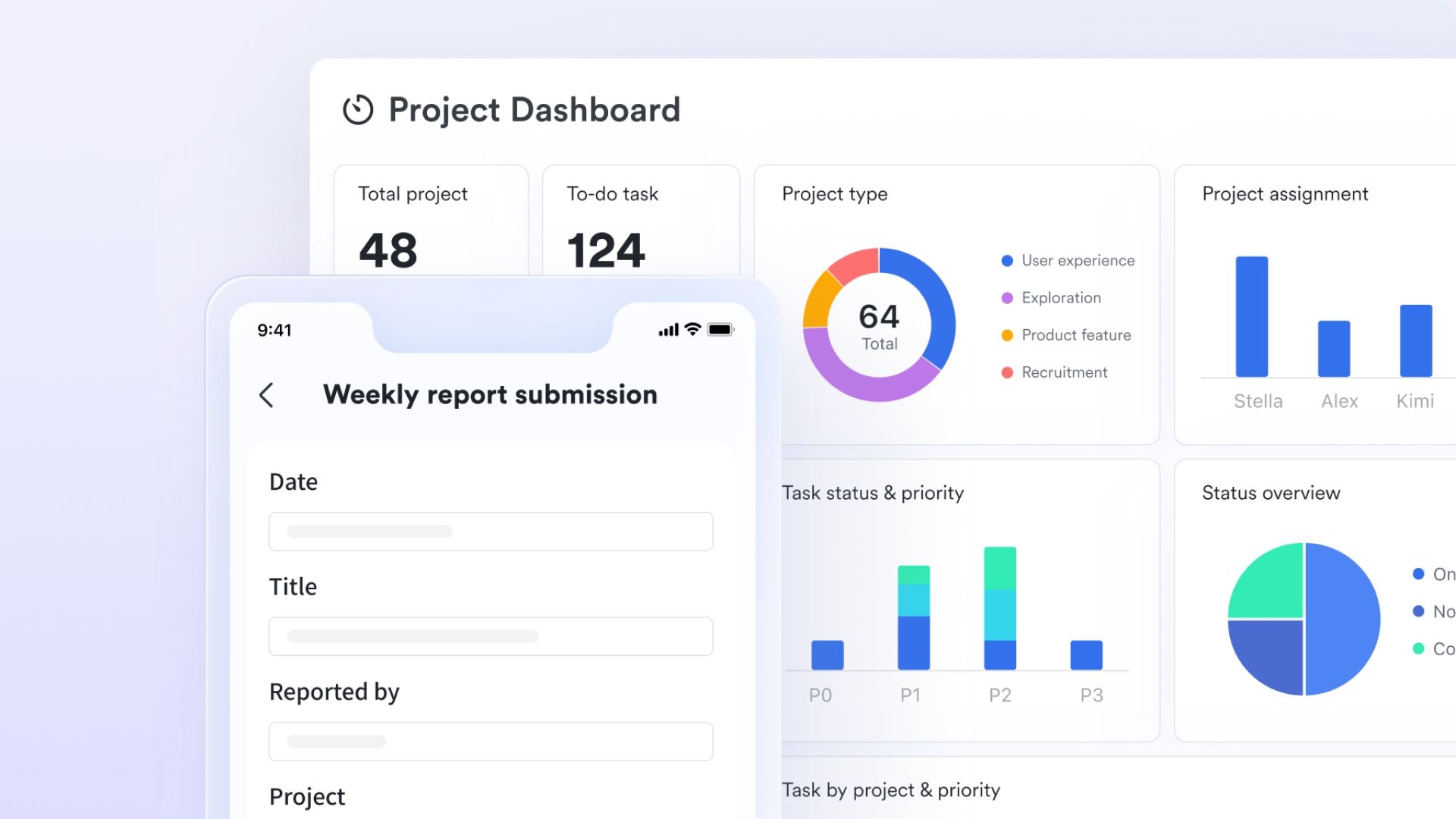
Centralised tasks management console
If you are struggling with project goals, Lark Tasks helps you to break them down into manageable sub-tasks and recurring workflows. It fosters team accountability through shared Task Lists where members can be assigned as owners or subscribers to stay updated. Projects can be visualized via custom lists or shared dashboards, allowing for flexible tracking of timelines and bottlenecks. 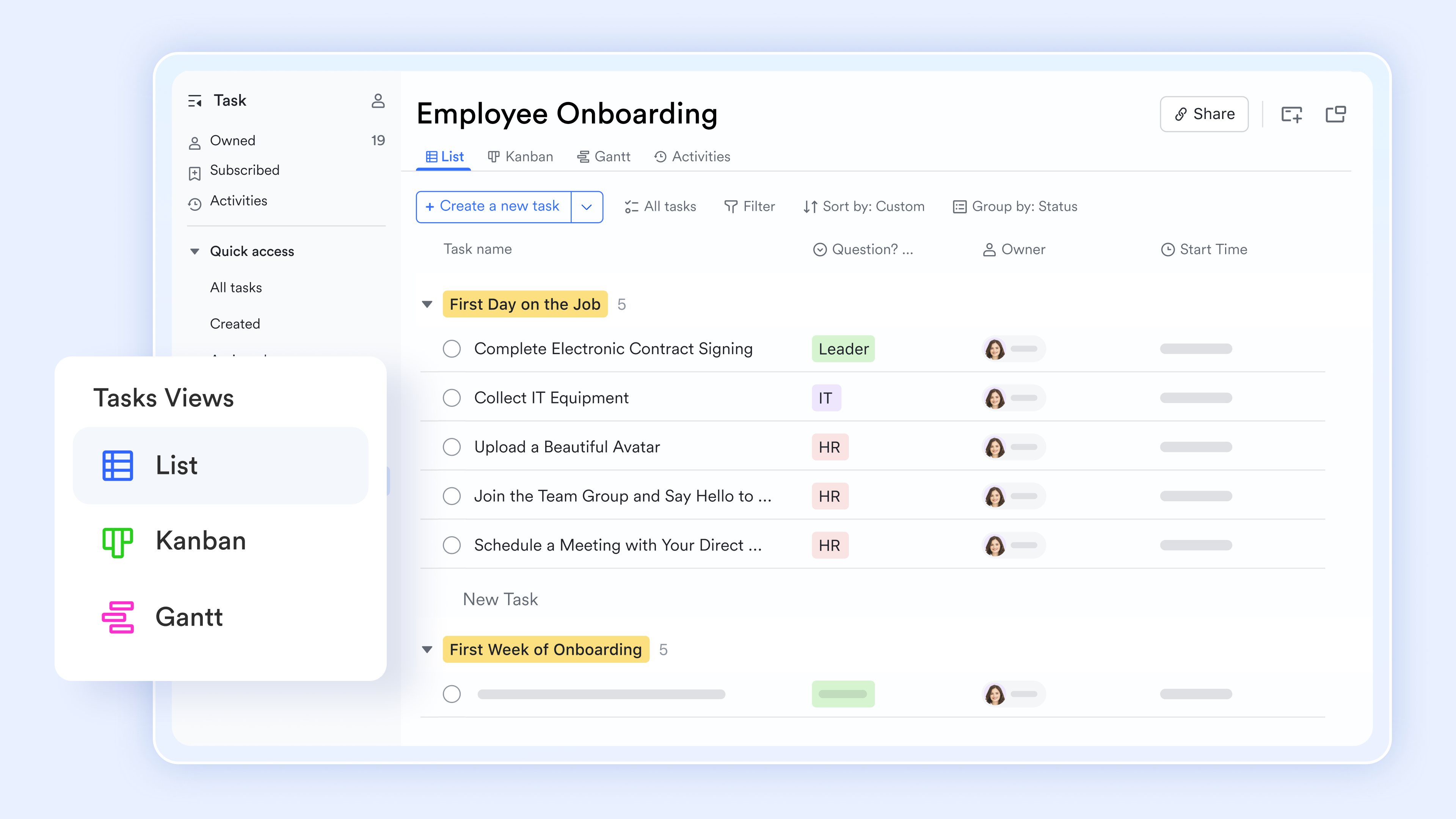
Real-time team communication
Messenger actions transform everyday conversations into actionable work. Users can convert messages into tasks, , or events directly from chat. Threaded replies keep discussions organized, while @mentions notify the right people instantly. Real-time Translation automatically converts messages into different languages, making it easier for global teams to collaborate smoothly without switching. 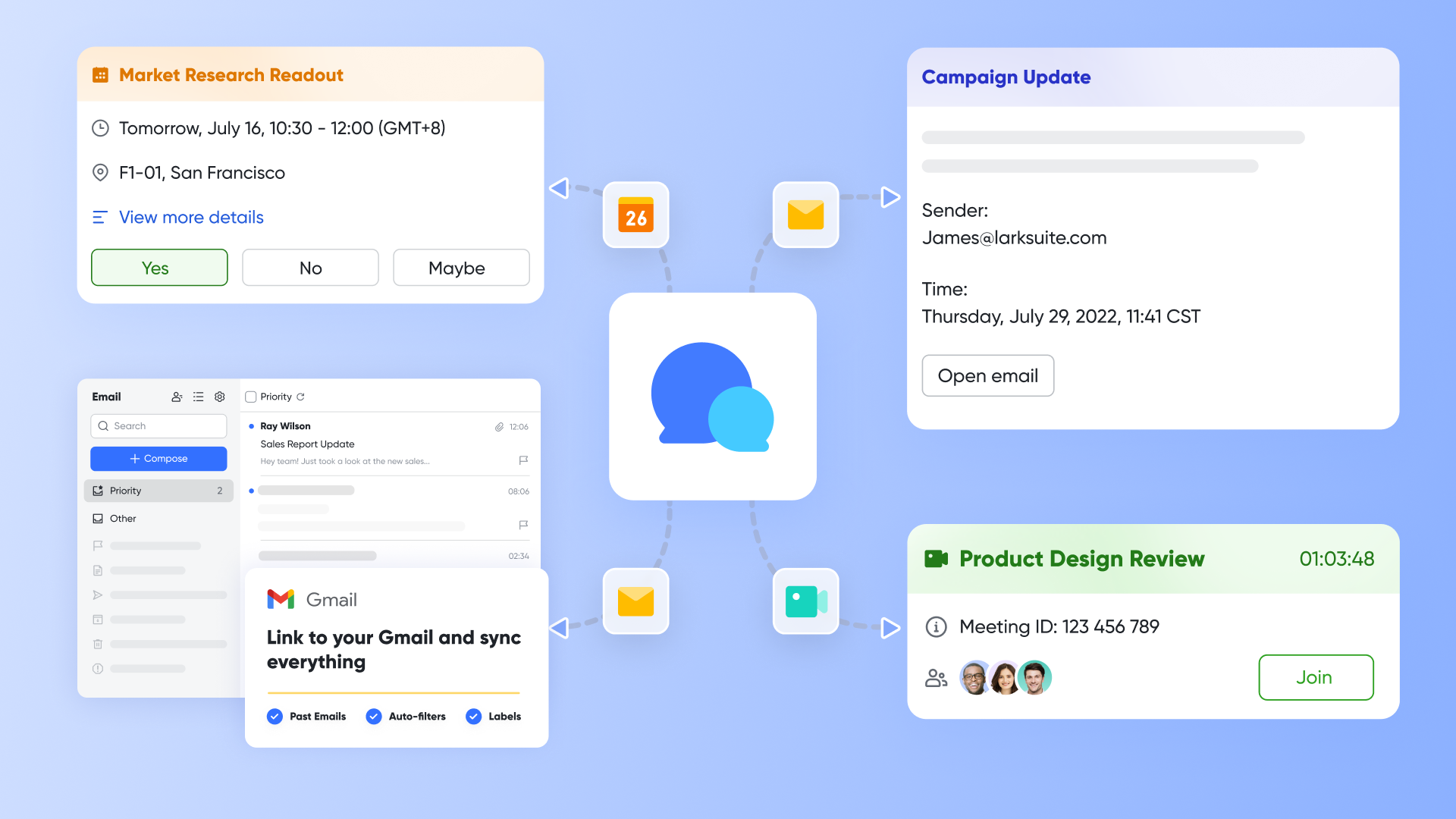
:
- Starter plan: Free forever plan that includes 11 powerful tools for up to 20 users. It also comes with 100GB of storage, 1000 automation runs, AI translations, and more.
- Basic plan: $6/user/month (billed annually) for up to 500 users. It includes everything in Starter plus group calling for up to 500 attendees, 5TB of storage, 1000 automation runs, and more. For more details, please .
- Pro plan: $12/user/month (billed annually) for up to 500 users. It includes everything in Basic plus group calling for up to 500 attendees, 15TB of storage, 50,000 automation runs, and more.
- Enterprise plan: for custom pricing. Supports unlimited users and includes even more automation runs and advanced security, compliance, and management features.
For small teams with simple communication needs

18 months message history
1000 Base automation runs/month
2000 rows per table in Base
Most POPULAR
For companies with comprehensive collaboration and management needs
Unlimited message history
500-participant video meetings
50k Base automation runs/month
20k rows per table in Base
For large companies with advanced security and organizational management needs
Get a personalized demo and pricing
Unlimited message history
500-participant video meetings
15 TB storage + 30 GB storage/user
500k Base automation runs/month
50k Base automation runs/month
Most POPULAR
For companies with comprehensive collaboration and management needs
Unlimited message history
500-participant video meetings
50k Base automation runs/month
20k rows per table in Base
When Asana is the right choice
Asana is best suited for teams that need clear task organization, simple planning, and reliable deadline tracking. It works well when project requirements are well defined, and workflows don't require heavy automation or deep cross-team integration.
- Small teams: Asana is easy for to adopt without extensive setup or training. Its clean interface helps team members quickly understand tasks, owners, and due dates.
- Task-heavy projects: Projects with many individual tasks benefit from Asana's strong task creation and dependency management. Teams can easily track progress and avoid missed steps.
- Marketing campaigns: Asana works well for managing campaign timelines, content calendars, and approvals. Teams can coordinate deliverables and deadlines without overcomplicating workflows.
- Short-term initiatives: For projects with clear start and end dates, Asana provides enough structure to stay on track. Timelines and milestones help .
- Simple workflows: When processes are linear and predictable, Asana keeps work organized without unnecessary complexity. Teams can focus on execution rather than system configuration.
- Budget-conscious teams: Asana's free and lower-tier plans make it accessible for teams with limited budgets. It offers essential project management features without requiring a large upfront investment.
When to move beyond Asana
As teams grow and workflows become more interconnected, Asana's task-focused design can start to feel limiting. Organizations managing complex operations, advanced automation, or distributed teams may need a more comprehensive .
- Cross-department projects: Projects involving multiple departments often require shared visibility across tasks, discussions, and documents. Asana can struggle to provide a unified view of work that spans different teams and functions.
- Automation requirements: Teams relying on multi-step workflows, conditional logic, or high automation volumes may find Asana's automation capabilities restrictive. Advanced automation is often tied to higher plans and is still limited in depth.
- Enterprise scaling: As organizations scale, managing portfolios, permissions, and governance becomes more complex. Asana may require additional tools or manual processes to support large, enterprise-level operations.
- Document-heavy workflows: Projects that depend heavily on documentation, SOPs, and need tighter integration between tasks and documents. Asana is not built as a document-centric workspace.
- Remote team coordination: Distributed teams benefit from seamless communication, real-time collaboration, and fewer tools. Asana often needs to be paired with external chat and meeting platforms, increasing context switching.
- Process-driven teams: Teams running standardized, repeatable processes need systems that support end-to-end workflows. Asana's task-centric approach can make process management harder as complexity increases.
Bonus tips: 6 best practices for project management success
Tools can be useful, but strong project management is also built on clarity, consistency, and visibility. By following proven best practices, you can reduce risks, , and deliver projects on time while maintaining quality and alignment.
- Define clear ownership: Every task and project should have a clearly assigned owner responsible for outcomes. Clear ownership eliminates confusion and speeds up decision-making. It also ensures accountability throughout the project lifecycle.
- Set realistic deadlines: Deadlines should be based on scope, dependencies, and team capacity rather than assumptions. Realistic timelines reduce pressure and prevent burnout. They also improve delivery quality and predictability.
- Hold weekly reviews: Weekly reviews help teams assess progress, identify blockers, and adjust priorities early. Regular check-ins keep everyone aligned on goals. This practice prevents small issues from becoming major delays.
- Use dashboards: into progress, workload, and risks. They reduce the need for manual status updates and reporting. Managers can make faster, data-driven decisions.
- Track KPIs: Tracking key performance indicators shows how well projects are performing. Metrics like completion rate, cycle time, and workload balance reveal improvement areas. KPIs support better planning for future projects.
- Maintain documentation: Up-to-date documentation preserves project knowledge and decisions. It supports onboarding, handovers, and long-term continuity. Good documentation keeps teams aligned even as members change.
Conclusion
Ultimately, choosing the right project management platform depends on how complex your workflows and collaboration needs are. Asana is effective for organizing tasks, , and keeping small teams aligned on clearly defined projects. However, as teams scale and work becomes more cross-functional, limitations around automation, documentation, and communication become more visible. This is where Lark delivers greater value. By unifying project management, chat, documents, meetings, and automation in one workspace, helps teams streamline execution and reduce tool overload. For organizations planning long-term growth, Lark provides a more flexible and scalable foundation for project success.
Simplify teamwork and project tracking now
FAQs
What is a potential downside of Asana?
A key downside of is that advanced automation and portfolio features are locked behind higher-priced plans. Teams with complex workflows may also need additional tools for communication and documentation. This can increase cost and tool fragmentation over time.
How hard is Asana to learn?
Asana is generally easy to learn for basic task and project management. Most users can get started quickly with lists and boards. However, advanced features like dependencies, portfolios, and goals require some onboarding and practice.
Does Asana support agile project workflows?
Yes, Asana supports agile workflows through boards, sprint-style task organization, and custom fields. Teams can manage backlogs, track progress, and run iterative cycles. It may lack some advanced agile-specific features compared to dedicated agile tools.
How secure is Asana for enterprise teams?
Asana offers enterprise-grade security features such as SSO, data encryption, and admin controls on higher plans. It complies with common security standards used by large organizations. Advanced security and governance features are primarily available on enterprise tiers.
Can Asana manage cross-department projects?
Asana can manage cross-department projects using shared projects and portfolios. However, visibility and coordination can become challenging as complexity increases. Larger organizations often supplement Asana with additional collaboration or workflow tools
Related reading





























