














Asana vs Basecamp 2026: Honest Comparison for Modern Teams

Cecilia Lane
Go-to-Market Associate
Sep 18, 2026
Cecilia Lane
Sep 18, 2026

18 min read


Choosing the right project management solution can feel overwhelming when tools like Asana and Basecamp seem similar on the surface. Yet, the subtle differences between Basecamp vs Asana often define how efficiently teams collaborate and deliver results.
In this Asana vs Basecamp comparison, we'll look closely at their interfaces, collaboration tools, and core features — and later, why Lark is quickly becoming a strong modern alternative for growing teams.
As someone who's tested both platforms, I'll share balanced insights drawn from authentic Asana vs Basecamp reviews and real-world use cases to help you make a confident, informed choice.
Key takeaways: Which tool to choose?
Asana excels at structure — offering powerful automation, advanced reporting, and scalability for organizations that manage layered workflows. Basecamp, on the other hand, thrives on simplicity — giving teams a clear, conversation‑first workspace with transparent pricing and minimal setup. Lark stands out as the best modern alternative — merging project management, chat, meetings, docs, tasks, and approvals into one unified platform. It brings together the structure of Asana and the accessibility of Basecamp, while eliminating the friction of juggling multiple tools. In short:
- Choose Asana if your projects demand detailed control and workflow automation.
- Choose Basecamp if you value ease, communication, and predictable pricing.
Asana vs Basecamp at a glance
Both Asana and Basecamp aim to simplify how teams manage projects, but they do so from fundamentally different philosophies.
Asana structures work into tasks, sections, and timelines — making it ideal for teams that thrive on clarity, hierarchy, and automation.
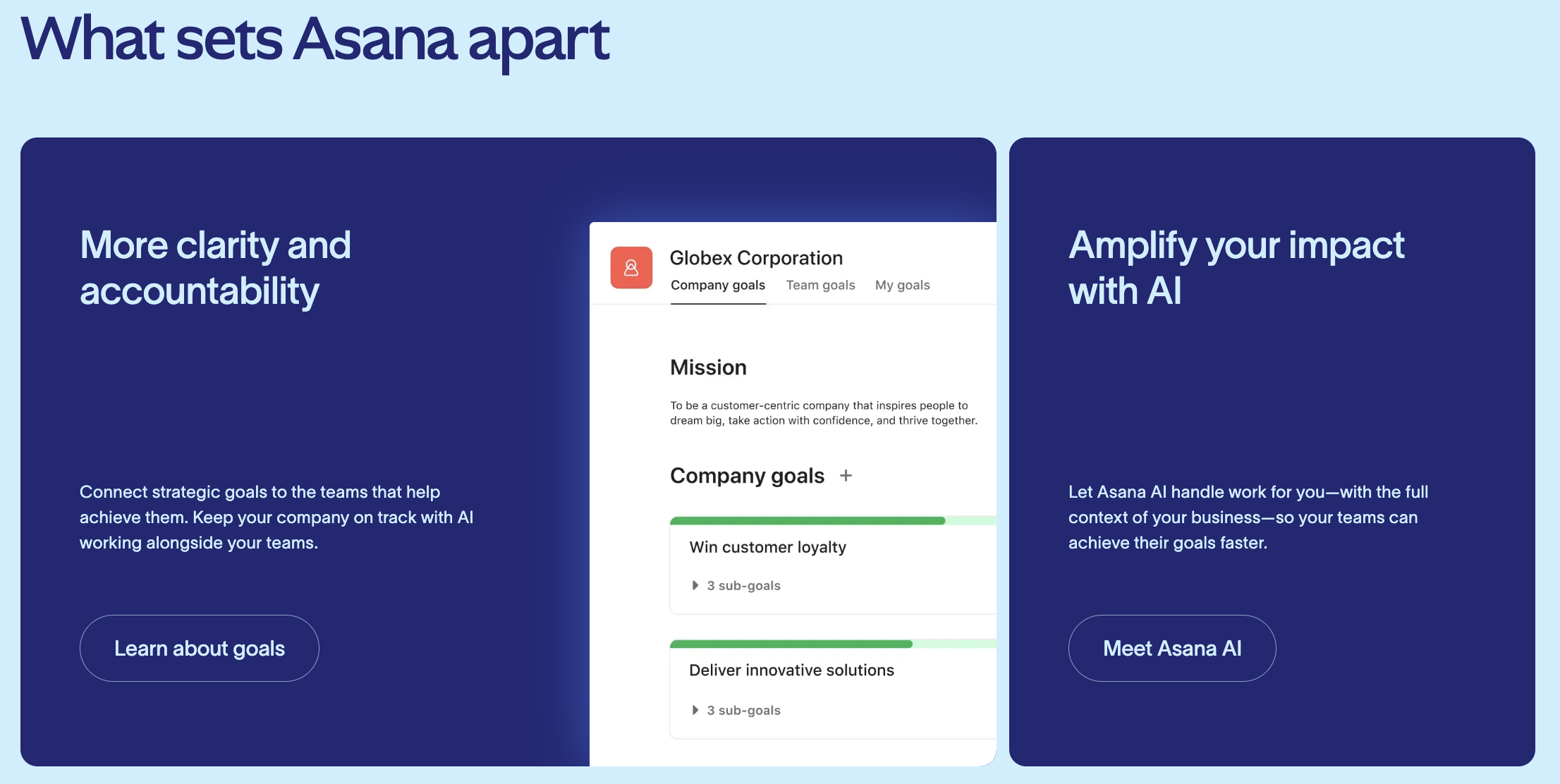
Image source: asana.com
Basecamp, on the other hand, focuses on communication and simplicity, keeping everyone aligned without heavy process layers.
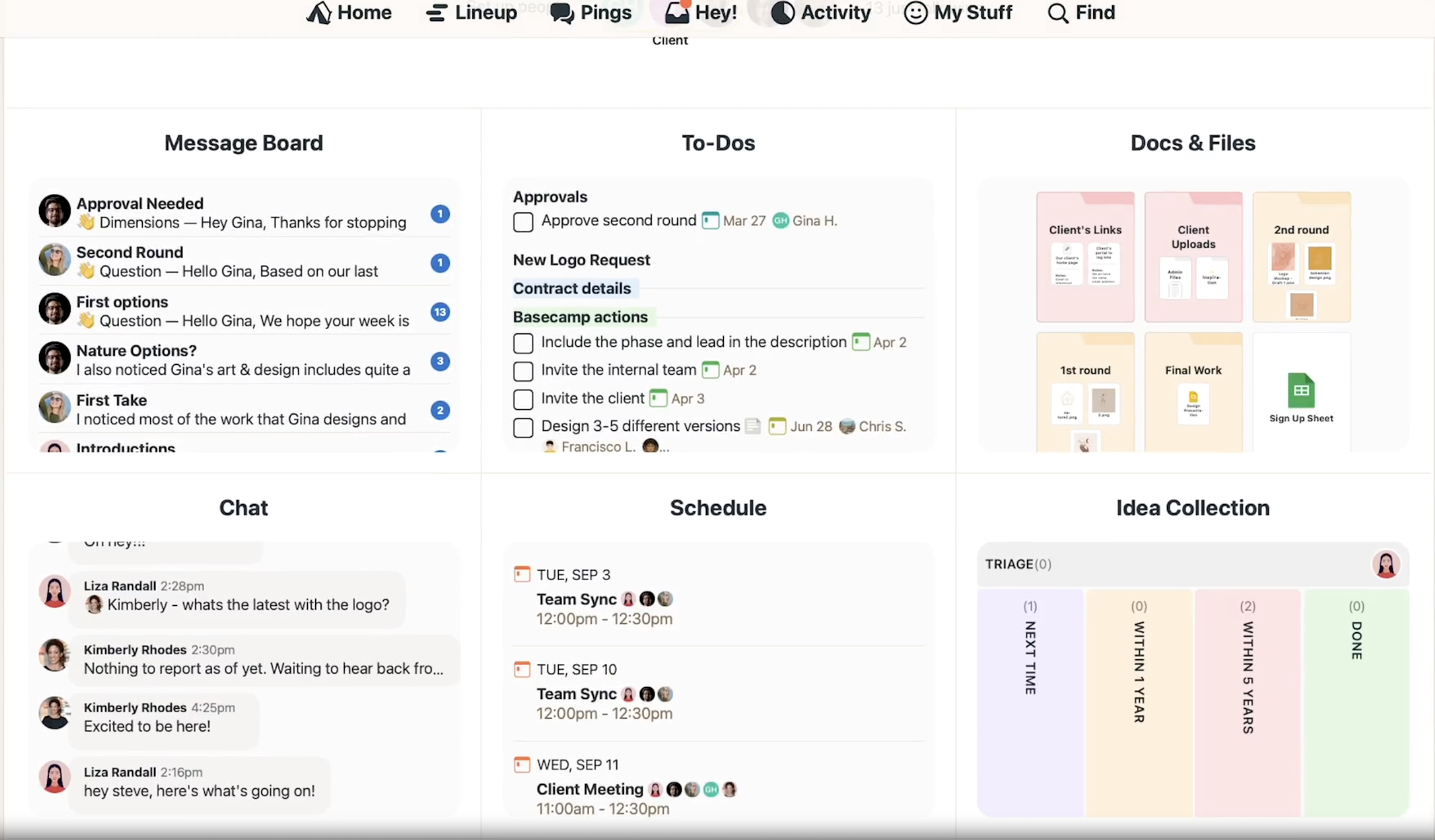
Image source: basecamp.com
Here's a snapshot comparison of key aspects modern teams consider before deciding between Asana vs. Basecamp:
Overall, Asana appeals to teams ready for structured growth, while Basecamp excels at creating a straightforward, no-clutter workspace.
Ease of use and interface comparison
When it comes to user experience, both tools champion clarity — but they approach it differently. Asana favors visual structure, offering list, Kanban, board, and calendar views that make it easier for users to plan, track, and pivot between projects. Teams can customize dashboards and organize workflows with sections and subtasks, which helps them stay aligned as projects scale. Basecamp, on the other hand, reduces interface complexity by presenting everything — messages, tasks, schedules, and files — in one centralized dashboard. It's a cleaner experience with fewer clicks, making it appealing for teams that prioritize communication over process management.
Here's how to think about it:
- Asana's flexibility rewards teams who enjoy tailored workflows and visualization.
- Basecamp's simplicity favors teams looking for a minimal learning curve.
From what I've observed in Asana vs Basecamp reviews, many users appreciate Asana's sleek navigation and customizable spaces but note that it requires more initial setup time. Conversely, Basecamp feels comfortable almost instantly, though it may lack advanced options for teams that depend on data visibility and workflow control.
Both platforms have solid designs — the choice ultimately depends on whether your team values visibility or simplicity more.
Collaboration and communication comparison
Effective collaboration defines whether a project management tool truly helps teams move work forward. Both Asana and Basecamp deliver strong communication features, but in distinct ways that reflect how each tool approaches teamwork.
- Asana integrates collaboration directly into the workflow. Team members can leave comments on tasks, tag colleagues, attach files, and manage conversations within the project itself. Notifications are organized and contextual, making it easy to follow updates without overflowing inboxes. Its integration with Slack, Google Workspace, and Microsoft Teams extends collaboration beyond the app itself, supporting diverse and remote work environments.
- Basecamp places communication front and center. Its built‑in message boards, Campfire chat, and automatic check‑ins encourage open discussion and reduce scattered email threads. The interface groups project conversations, schedules, and tasks in one place, which helps teams stay connected without switching tools.
On this comparison level, Asana vs. Basecamp represents a difference in philosophy: Asana embeds communication within structured project management, while Basecamp builds project management around conversation. Teams that value real‑time alignment and detailed accountability may favor Asana, while those who want a conversational, low‑maintenance workspace often lean toward Basecamp.
Task management comparison
Task management is where Asana and Basecamp differ the most in both depth and flexibility.
- Asana provides layered organization through projects, tasks, and subtasks. Users can assign responsibilities, set deadlines, add dependencies, and visualize work through multiple views — such as List, Board, Calendar, and Timeline. This structure benefits teams managing multiple projects with varying levels of complexity. Its automation rules reduce repetitive steps, helping managers maintain momentum without constant oversight.
- Basecamp simplifies task tracking into straightforward to‑do lists inside each project. Every task supports assignees, due dates, and comments, keeping things clear and uncluttered. It's practical for teams that don't need granular control or advanced reporting — just a consistent way to see what's next.
While Basecamp vs Asana comparisons frequently mention Asana's versatility, many Asana vs Basecamp reviews highlight that simplicity remains Basecamp's biggest strength. Choosing between the two depends on whether your priority is scalability and structure (Asana) or clarity and ease (Basecamp).
Integrations and automation comparison
Modern teams depend on tools that connect seamlessly with the rest of their workflow. Both Asana and Basecamp support integrations, but their depth and automation flexibility differ noticeably.
- Asana stands out for its extensive integration ecosystem — with over 100 available connectors for Microsoft 365, Google Workspace, Slack, Zoom, Jira Cloud, and Salesforce. It also includes built‑in workflow automation through Asana Rules, which allows users to trigger actions automatically based on status changes, due dates, or task assignments. Recent updates even introduced Asana AI features like Smart Summaries and Smart Chat, designed to streamline project updates and reduce manual follow‑ups.
- Basecamp, in contrast, keeps integrations lighter and focuses on essential connectivity with calendar apps and file storage tools like Google Drive and Dropbox. Automation is more limited — it doesn't offer native workflow builders but can integrate through Zapier or third‑party connectors for teams that need simple triggers and actions.
When comparing Asana vs Basecamp, Asana clearly offers broader automation capabilities for teams seeking precision and efficiency. Basecamp's minimalistic approach may better fit teams that value collaboration without the complexity of automated systems.
Pricing and plans comparison
Before selecting a productivity suite, it's worth reviewing the latest Google Workspace pricing and ClickUp pricing plans. And pricing between Asana and Basecamp reflects their different approaches to teamwork and scalability. Asana uses a per‑user pricing structure, while Basecamp offers flat-rate options that stay predictable regardless of team size.
Information source: asana.com & basecamp.com
Update time: 11.12.2025
Asana is best for teams that scale gradually and need advanced automation or portfolio-level oversight. Costs rise with team size, but so does feature richness.
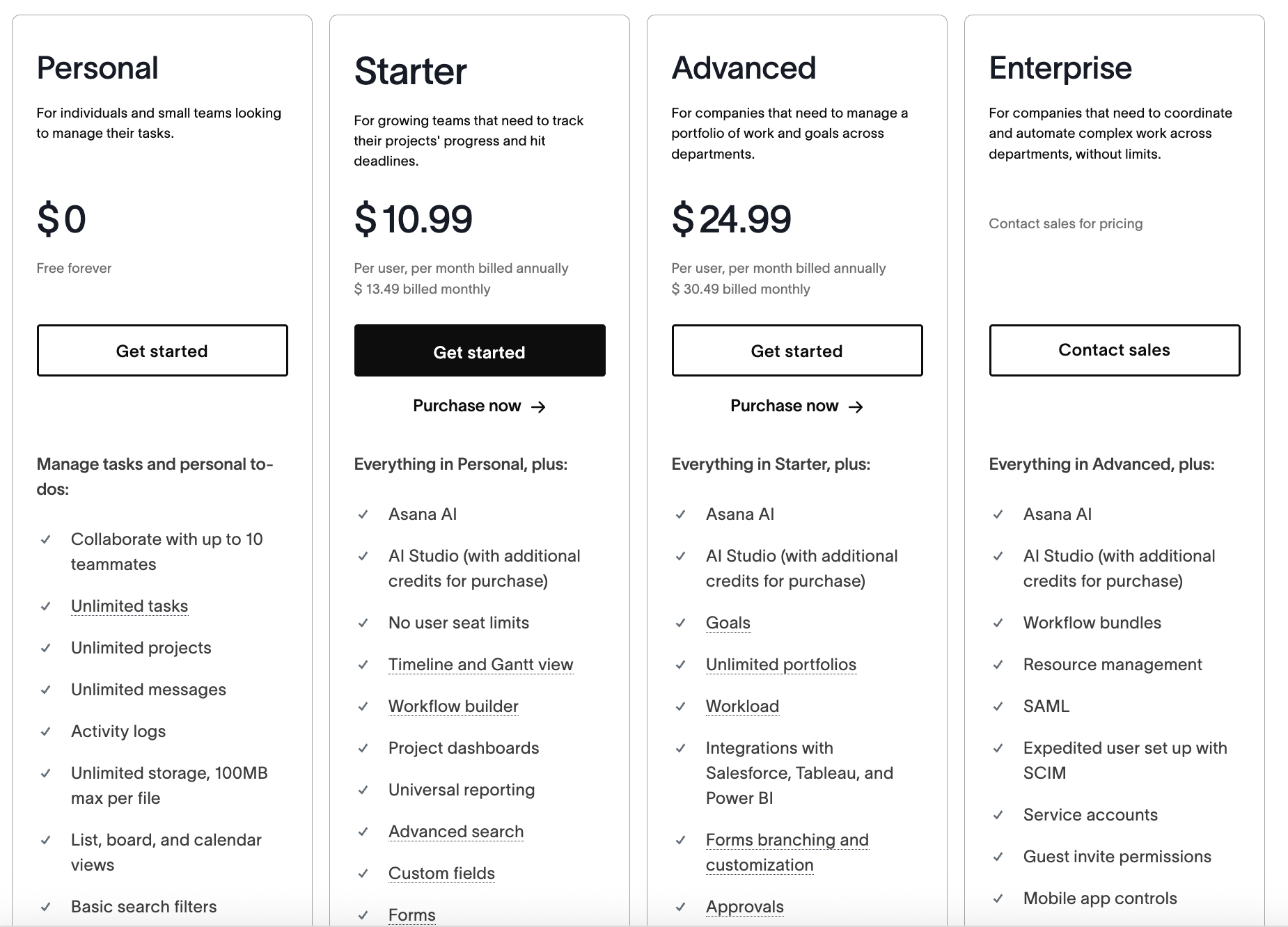
Image source: asana.com

Basecamp simplifies budgeting with a flat rate — perfect for larger teams wanting predictable pricing and fewer billing calculations.
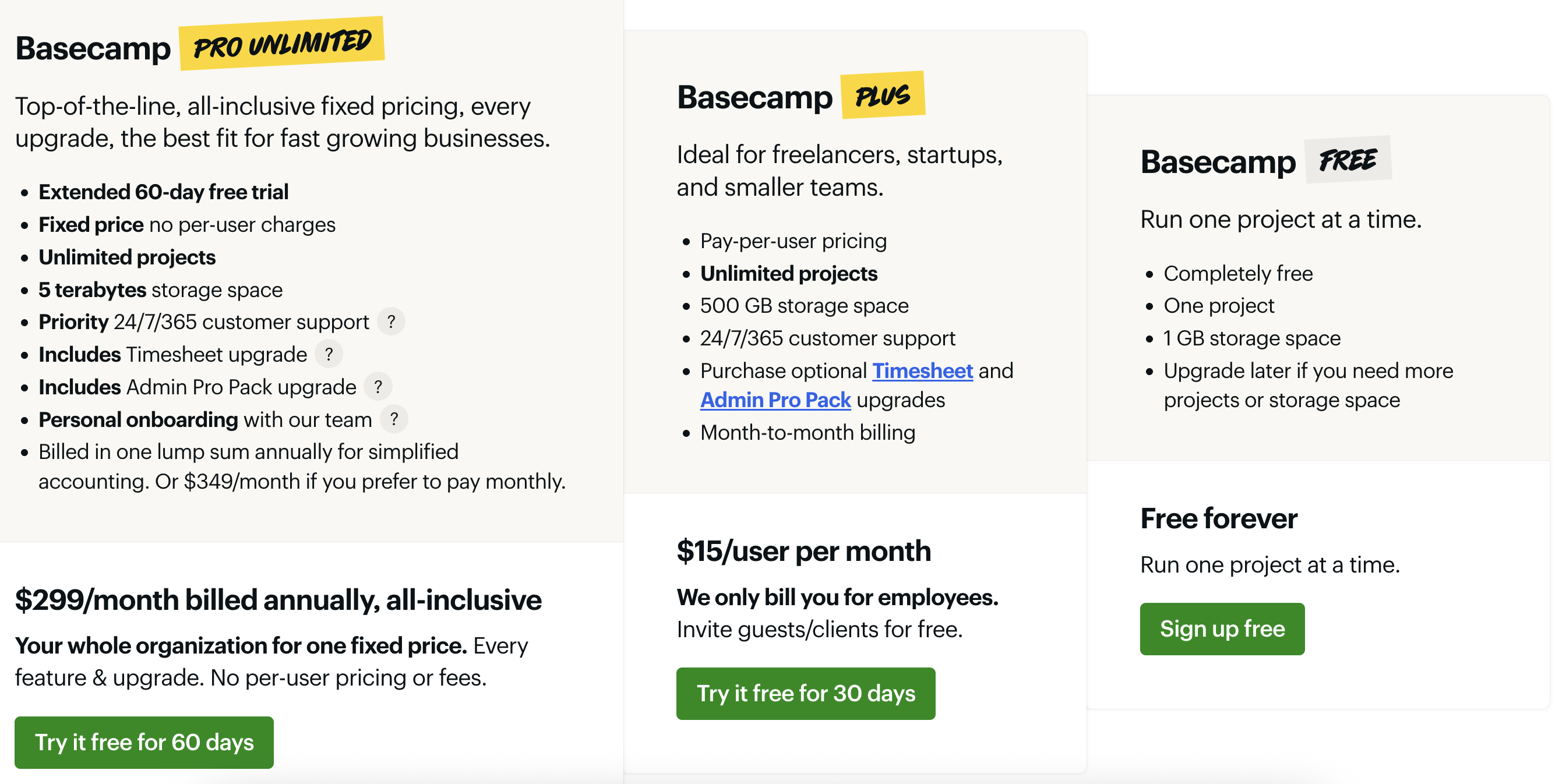
Image source: basecamp.com
The best alternative to Asana and Basecamp
While Asana and Basecamp are well‑known for structure and simplicity, modern teams are increasingly looking for a platform that unifies project planning, communication, documentation, and workflow automation. Lark has emerged as that all‑in‑one alternative — bringing together every tool teams need to collaborate without switching apps or contexts.
Here's how Lark stands out across five key products that together make it a strong Asana vs. Basecamp alternative:
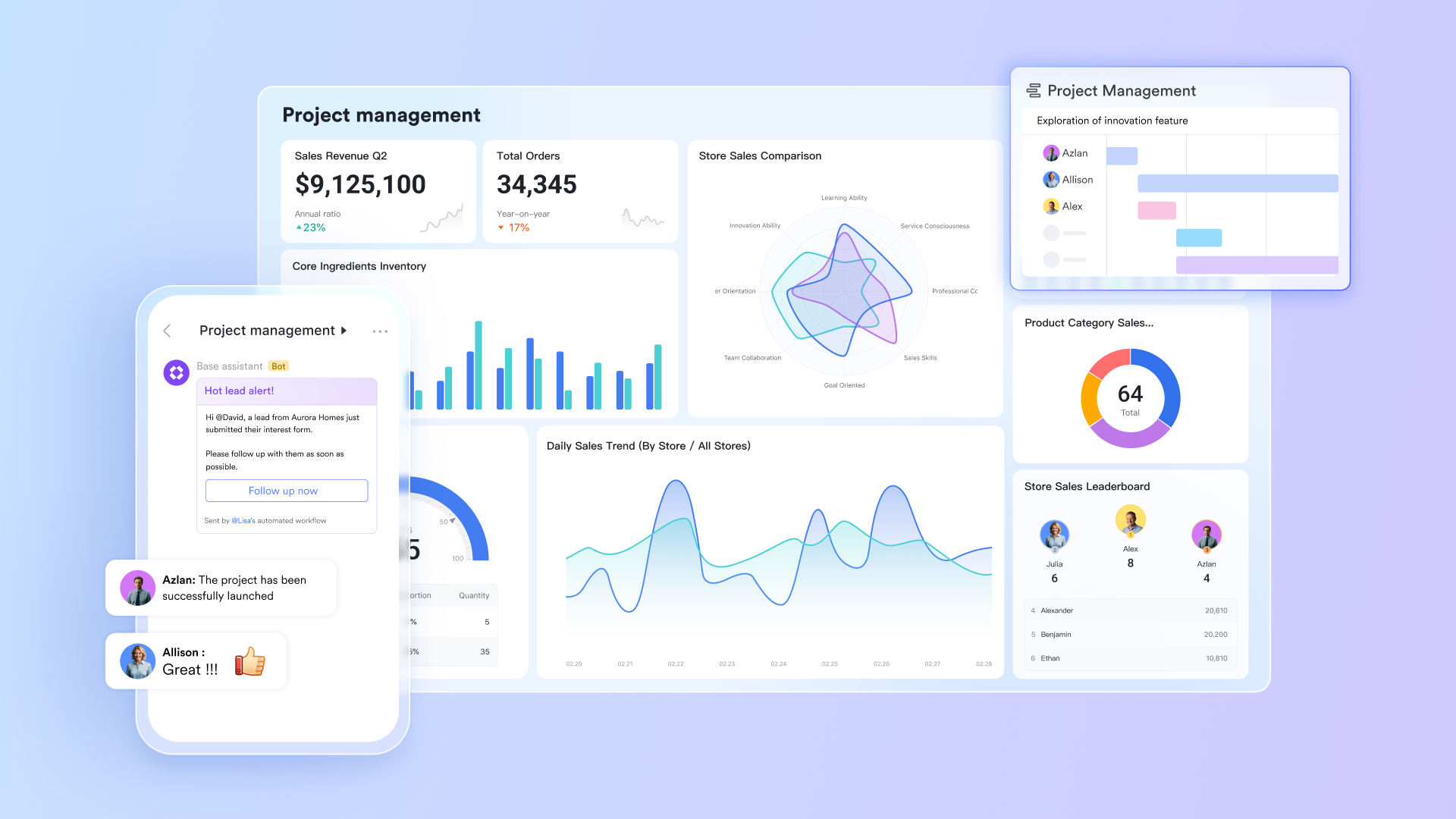
Lark Base: This is Lark's no‑code data management and project tracking workspace. Teams can build custom tables, Kanban boards, and automation workflows that connect directly to other Lark tools. It's similar to Asana's projects feature but far more centralized and customizable — perfect for teams that want flexibility without extra integration costs
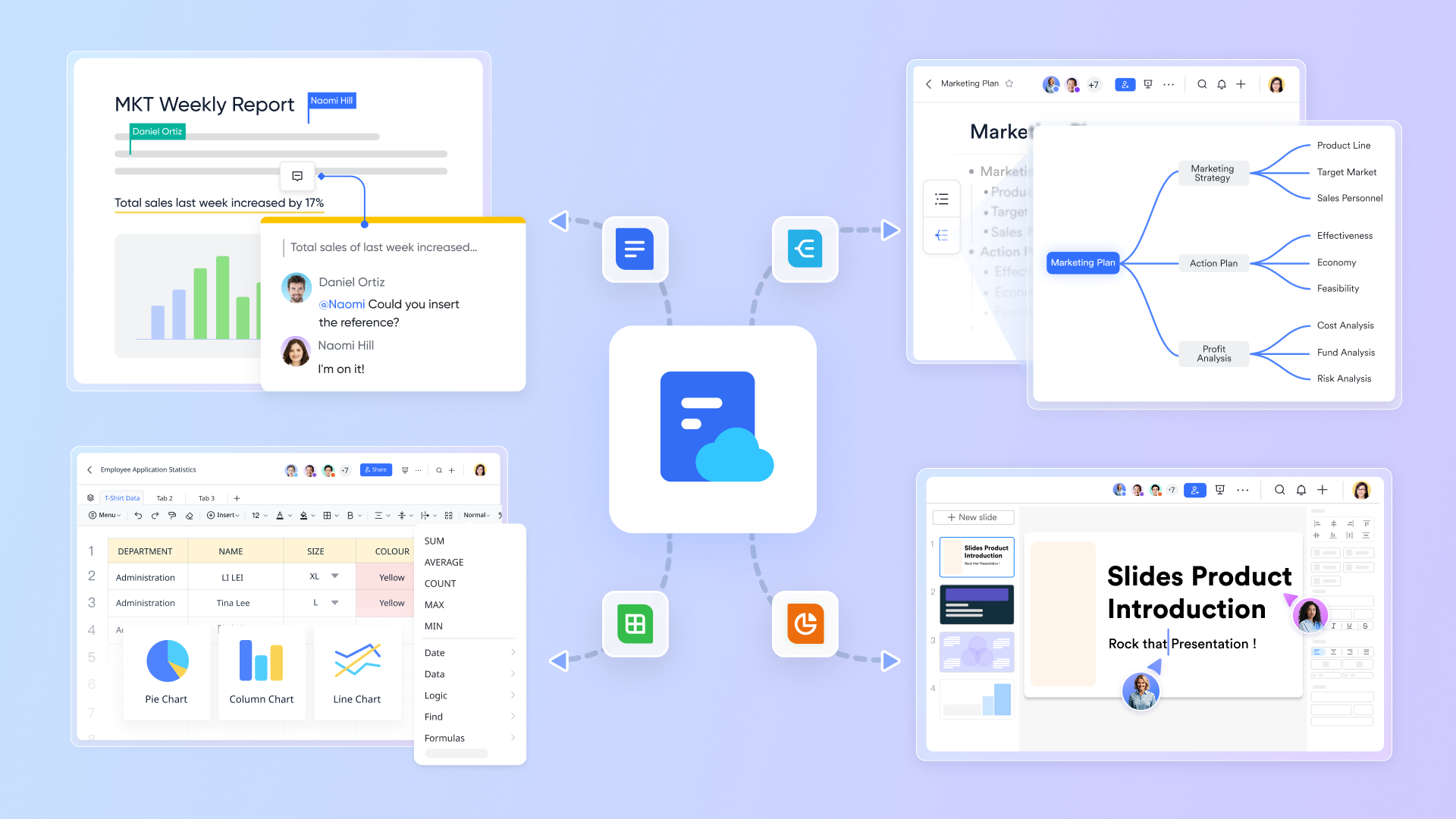
Lark Docs: Designed for real‑time collaboration, Lark Docs combines document writing, sheet editing, and commenting into one interface. Multi‑user editing feels smoother than email attachments or shared files — a leap beyond what Basecamp's limited doc sharing or Asana's task comments provide.
Lark Meetings: Fully integrated video conferencing with chat, calendar scheduling, and file sharing in the same platform. It matches Asana's integrations with Zoom but eliminates the need for external apps. You can schedule, host, and follow up on meetings directly inside the Lark workspace.

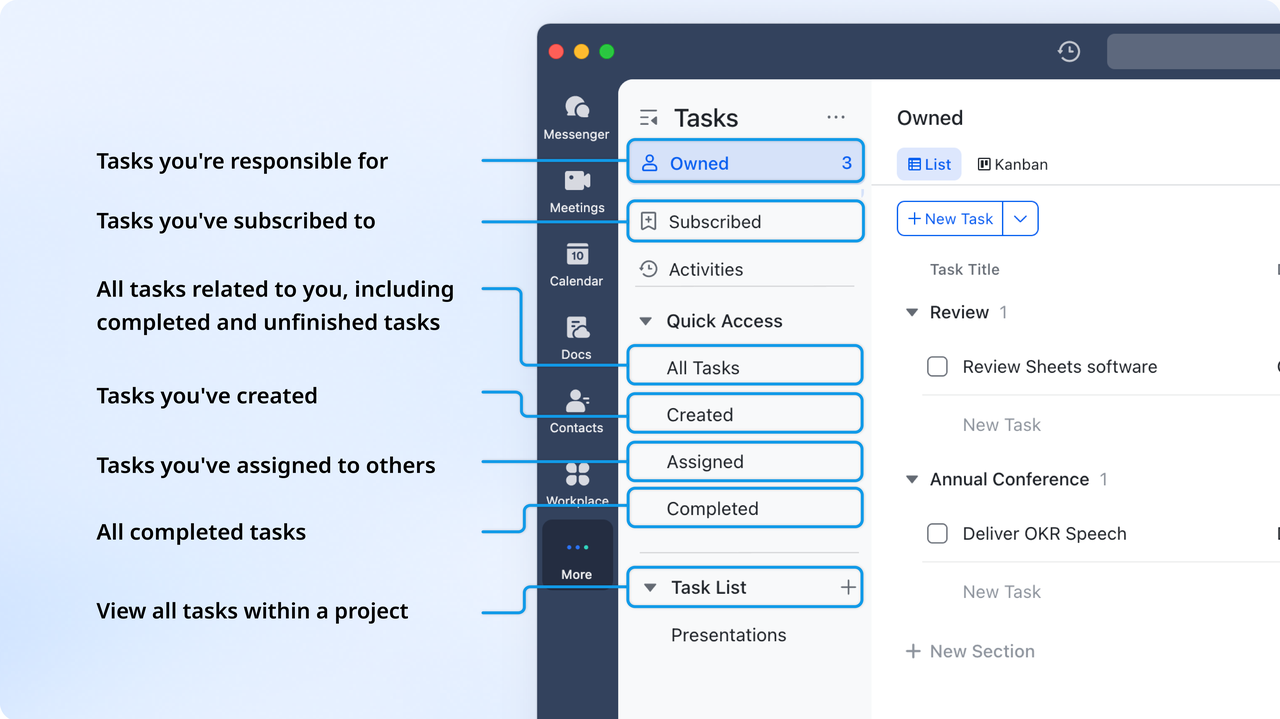
Lark Tasks: Lark Tasks centralizes task assignments similar to Asana's workflows but adds Chat and Calendar connectivity. Users can create tasks directly from messages or meetings — streamlining the flow between discussion and action.
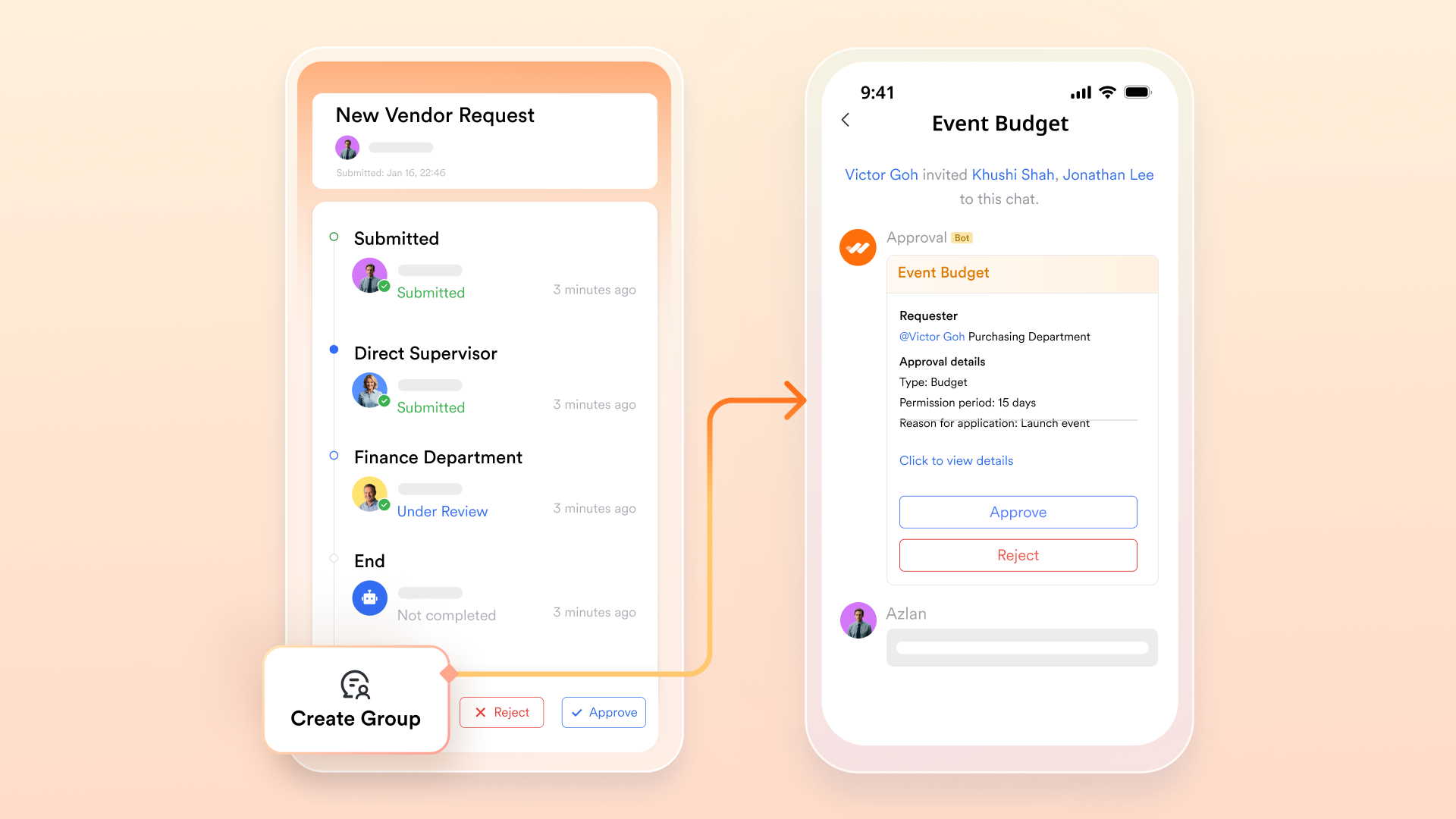
Lark Approval: An automated approval system that supports flexible forms, multi‑level sign‑offs, and mobile‑ready workflows. It integrates with Lark Base and Messenger so employees can submit and track approvals without jumping between tools.
Feature by feature comparion: Lark vs. Asana vs. Basecamp
Why Lark stands out: Lark uniquely merges communication and execution. Instead of stitching together multiple tools, teams handle everything—from strategy to daily check‑ins—on a single platform. This not only reduces friction but also makes scaling faster and decision‑making clearer.
Pricing comparison: Asana vs Basecamp vs Lark
Information source: asana.com & basecamp.com
Update time: 2025-11-12
Observation highlights
- Asana scales feature sets with team complexity — best suited for structured operations or enterprise governance.
- Basecamp remains predictable and transparent in pricing — larger teams pay a fixed flat rate regardless of user count.
- Lark, as an all-in-one platform, includes multiple collaboration tools under a unified plan, potentially reducing combined software costs for companies using separate apps for chat, meetings, and documents.
Try Lark's savings calculator: Switching to Lark's Pro plan can lead to significant cost savings— for example, a 100-employee company using Slack, Google Workspace, and Airtable could save approximately $25,200 annually by consolidating their tools with Lark.
Which tool is right for you?
Every team's workflow is shaped by its size, structure, culture, and goals — which is why there's no single “best” project management tool for everyone. Whether you're comparing Asana vs Basecamp for the first time or looking for a more modern alternative, the real question is which platform aligns most naturally with how your team already works.
Choose Asana if structure and scalability come first
Asana shines for teams that rely on detailed planning and clearly defined processes. If your work involves multiple projects with overlapping timelines, dependencies, and approvals, Asana's structure helps maintain alignment and accountability.
Key reasons to favor Asana:
- It supports complex hierarchies of tasks, subtasks, and milestones that help large teams stay synchronized.
- Automation rules and workflow templates minimize manual work, letting teams focus on execution rather than maintenance.
- Asana's advanced reporting and dashboards give managers a real sense of project health across departments.
- With integrations to tools like Slack, Google Drive, and Jira, Asana fits naturally into a hybrid enterprise environment.
💡 Asana works best for fast‑growing organizations, marketing teams, and product development groups that value data‑driven structure and consistent progress tracking.
Choose Basecamp if simplicity and communication matter most
Basecamp appeals to teams that prefer straightforward collaboration without the clutter of complex dashboards or automation rules. Its clean design and deep focus on human communication make it a great fit for creative studios, small agencies, and startups that work closely day to day.
Why Basecamp might be right for you:
- The message boards and Campfire chats bring team discussions, files, and updates together in one clean hub.
- There's little setup required—you can invite teammates, create projects, and start assigning tasks within minutes.
- Flat‑rate pricing keeps things predictable for growing teams, especially if you dislike per‑user billing.
- The overall experience favors collaboration and transparency over rigid process controls.
💡 Choose Basecamp if your team's success depends more on open communication than on fine‑tuned automation or reporting.
Choose Lark if you want an all‑in‑one digital workspace
For teams that feel split between multiple tools — chat apps, meetings, project trackers, shared documents — Lark offers a different philosophy. It unites communication, documentation, and project execution in one environment.
Teams often switch to Lark after realizing that endless integrations between Asana, Zoom, and Slack create unnecessary complexity.
Why Lark stands out:
- All-in-one platform: Every feature — from Lark Docs and Lark Base to Lark Meetings, Lark Tasks, and Lark Approval — is natively built, so context and collaboration are never lost.
- Cross‑tool automation keeps work flowing: tasks from , approvals linked to documents, and calendar‑synced meetings mean fewer gaps in communication.
- Boost team collaboration: It's especially effective for global or hybrid teams, offering built‑in multilingual support and smooth meeting experiences across time zones.
- Easy pricing plans: Unlike Basecamp's minimalism or Asana's modular integrations, Lark gives you one unified platform — and fewer costs from managing multiple tools.
💡 Lark fits modern, distributed organizations that want to communicate, collaborate, and execute seamlessly from a single workspace.
Explore more tool/software comparisons
If you're still exploring which platform fits best, you may find these in‑depth guides useful:
- Wrike vs Asana vs Basecamp — for growth‑focused teams balancing flexibility and structure. You can read our former guide about Wrike's pricing and what Wrike's alternatives are available.
- Asana vs Monday vs Trello vs Basecamp — to evaluate visual workflow tools. If you are also considering choosing from Trello or Monday, you'd best read this professional comparison guide between Trello and Monday.
- Asana vs Trello vs Basecamp — for teams comparing simplicity and task visibility. In many comparing discussions, Asana and Trello often form a comparison pair, about which we also provide specific breakdowns.
- Asana vs Basecamp vs Monday — if you're focusing on team scalability and automation. To find out about how to choose from Asana and Monday, reading this guide must be helpful.
Each analysis provides a focused perspective on the unique strengths of different collaboration ecosystems — helping you narrow down a toolset that matches your team's rhythm and vision.
Conclusion
When comparing Asana vs Basecamp, it's clear that each serves a distinct purpose: Asana offers structured project control, automation, and analytics for teams that thrive on process visibility, while Basecamp delivers simplicity and straightforward collaboration for teams that value clarity over complexity.
However, as modern work moves toward integration and speed, Lark emerges as the smarter choice — a unified workspace that combines the best of both worlds. With built‑in chat, tasks, meetings, docs, and approvals, Lark eliminates tool fragmentation and empowers teams to collaborate effortlessly in real time. For growing, hybrid, or global teams seeking productivity without compromise, Lark isn't just an alternative — it's the future of streamlined teamwork.
FAQs
Is Basecamp better than Asana?
Not necessarily — it depends on what your team values most. Basecamp focuses on simplicity and team communication, making it ideal for small organizations or creative teams that prefer minimal structure. Asana, by contrast, offers more advanced project mapping, automation, and reporting. For teams managing complex workflows, Asana often proves more powerful, while Basecamp wins on ease of use and straightforward collaboration.
What has replaced Basecamp?
While Basecamp remains a strong and actively supported tool, newer platforms like Lark, Monday.com, and ClickUp have gained traction as modern all‑in‑one solutions. Lark, in particular, extends beyond project tracking by combining chat, meetings, tasks, approvals, and document collaboration — something Basecamp users often seek through third‑party apps. These newer platforms haven't “replaced” Basecamp outright, but they reflect how team collaboration is evolving toward integrated digital workspaces.
Is Asana a Korean company?
No. Asana is an American company headquartered in San Francisco, California. It was founded in 2008 by Dustin Moskovitz, one of Facebook's co‑founders, and Justin Rosenstein, a former Google and Facebook engineer. The platform serves global customers, but its core development and leadership are based in the United States.
Why is Basecamp so popular?
Basecamp is popular because it keeps project management simple and human‑centered. Instead of overwhelming users with features, it emphasizes communication through message boards, check‑ins, and to‑do lists. Many small teams appreciate its predictable flat‑rate pricing and the fact that it “just works” without a long onboarding process. Its straightforward design encourages focus and accountability, which explains why Basecamp continues to have a loyal user base after more than a decade.
Which is more affordable: Asana or Basecamp?
Basecamp can be more cost‑effective for larger teams, thanks to its flat‑rate $299 / month (annual) plan that includes unlimited users. Asana, charged per user, becomes more expensive as team sizes grow but also offers granular permission controls and advanced analytics that justify the cost for enterprise settings. The choice depends on whether your priority is cost stability (Basecamp) or feature scalability (Asana).
What is the best alternative to Asana and Basecamp?
For teams seeking both structural and seamless communication, Lark has emerged as one of the best modern alternatives. It unifies chat, meetings, docs, tasks, approvals, and data management in one platform, eliminating the need for multiple subscriptions. Compared to Asana vs Basecamp, Lark reduces context‑switching and improves real‑time decision‑making — a major advantage for distributed and hybrid teams.
Related reading:
Table of contents
Start using Lark today

Manage all your work in one place
Boost team efficiency by 10x
Save up to 70% on software costs
Table of contents
Start using Lark today
Manage all your work in one place
Boost team efficiency by 10x
Save up to 70% on software costs
Keep reading



Lark recognized in 2023 Gartner® Collaborative Content Workspaces and Meeting Solutions reports
Lark, the global superapp for productivity, is delighted to announce it receives recognition in the Gartner's 2023 Innovation Insight for Collaborative Content Workspaces and Market Guide for Meeting Solutions.





2026 Lark Technologies Pte. Ltd.
Headquartered in Singapore with offices worldwide.






Explore: