














15 Best Free Productivity Apps for Modern Teams

Ryan Tanner
Product Marketing Specialist
Sep 18, 2026
Ryan Tanner
Sep 18, 2026


- Best all-in-one productivity app: Lark combines chat, docs, tasks, calendar, and automation in one free workspace for up to 20 users.
- Best modular workspace: Notion: flexible block-based editor for notes, databases, and lightweight project tracking.
- Best personal task manager: Todoist: clean interface with natural language input and cross-device syncing for daily planning.
- Best visual board: Trello: simple Kanban boards with drag-and-drop task tracking for small teams.
- Best feature-rich platform: ClickUp: customizable views, docs, and automation even on the free plan.
Snapshot of the 5 best free productivity apps

What are productivity apps?
How we select and assess these productivity apps
- Free-tier generosity: daily message limits, storage caps, automation runs, and number of allowed users — the fine print that separates "free" from "freemium with a catch."
- Cross-platform sync: real-time sync across web, desktop, and mobile, plus offline access, verified by logging in from MacBook, Windows laptop, and iPhone.
- Integration ecosystem: native connectors to Slack, Google Workspace, Microsoft 365, Calendar, Zapier, and webhooks, checked against each vendor marketplace.
- Trust signals: aggregate ratings on G2, Capterra, and Product Hunt, plus recurring mentions in the best productivity apps Reddit threads communities actually recommend.
- 2026 recency: product updates, pricing changes, and AI-feature announcements tracked through productivity app news feeds and official changelogs as of February 2026.
Top 15 best free productivity apps
1. Lark: All-in-one productivity superapp
- G2: 4.5
- Capterra: 4.4
- Apple App Store: 4.8
"To simplify our operations, we’ve integrated Lark as our go-to platform for managing workflows across teams. Lark helps us stay organized by bringing everything into one place, making collaboration smoother, reducing unnecessary complexity, and improving how we handle data."

Zengyu Li
Regional Product & Marketing Director
- Starter plan: Free forever plan that includes 11 powerful tools for up to 20 users. It also includes 100GB of storage, 1000 automation runs, AI translation, and more.
- Basic plan: $6/user/month (billed annually) for up to 500 users. It includes everything in Starter plus group calling for up to 500 attendees, 5TB of storage, 1000 automation runs, and more. For more details, please contact sales.
- Pro plan: $12/user/month (billed annually) for up to 500 users. It includes everything in Basic plus group calling for up to 500 attendees, 15TB of storage, 50,000 automation runs, and more.
- Enterprise plan: Contact sales for custom pricing. Supports unlimited users and includes even more automation runs and advanced security, compliance, and management features.
Starter
For small teams with simple communication needs
$0
/ user / month

Pro
For companies with comprehensive collaboration and management needs
$12
/ user / month
Enterprise
For large companies with advanced security and organizational management needs
Get a personalized demo and pricing
Pro
For companies with comprehensive collaboration and management needs
$12
/ user / month
2. Todoist: Lightweight task manager for daily productivity
- Natural language input allows users to add tasks quickly with due dates, priorities, and reminders using simple phrases.
- Project and subtask organization helps break down large goals into smaller, manageable actions for better daily productivity.
- Cross-platform syncing keeps tasks up to date across web, desktop, and mobile devices for consistent access anywhere.
- Karma productivity tracking provides visual insights into task completion trends, helping users build better productivity habits over time.
- A clean, minimal interface makes it easy to capture tasks quickly without unnecessary complexity or steep learning curves.
- Reliable cross-platform syncing ensures tasks stay up to date across all devices, supporting consistent personal productivity.
- The free plan includes essential features such as projects, priorities, and recurring tasks for everyday task management.
- Advanced features such as reminders, labels, and filters are limited to paid plans, reducing flexibility for power users.
- Lacks built-in document collaboration or team communication tools compared to more comprehensive productivity platforms.
- Pro plan: $5 per user/month (billed annually).
- Business plan: $8 per user/month (billed annually).
3. Notion: Flexible workspace for personal and team organization
- The block-based editor lets users create pages with text, tables, boards, calendars, and embeds to build fully customizable workflows.
- Powerful databases support filtering, sorting, relationships, and multiple views, such as Kanban, calendar, and gallery, for flexible project tracking.
- Real-time collaboration enables teams to edit documents together, leave comments, assign tasks, and track updates across shared workspaces.
- The template library provides ready-made setups for project management, note-taking, content planning, and personal productivity, significantly reducing setup time.
- A highly customizable structure allows users to build personal or team workflows without requiring separate apps for notes, tasks, or databases.
- A generous free plan supports unlimited pages and blocks, making it suitable for students, freelancers, and small teams.
- Cross-platform availability ensures seamless syncing across web, desktop, and mobile devices for consistent productivity on the go.
- Initial setup can feel overwhelming for new users due to the high level of customization and lack of rigid structure.
- Performance may slow down in very large workspaces with heavy databases, numerous pages, or complex nested structures.
- Plus plan: $10 per user per month (billed annually).
- Business plan: $20 per user per month (billed annually).
- Enterprise plan: Custom pricing.
4. Toggl Track: Simple time tracking for accurate work logs
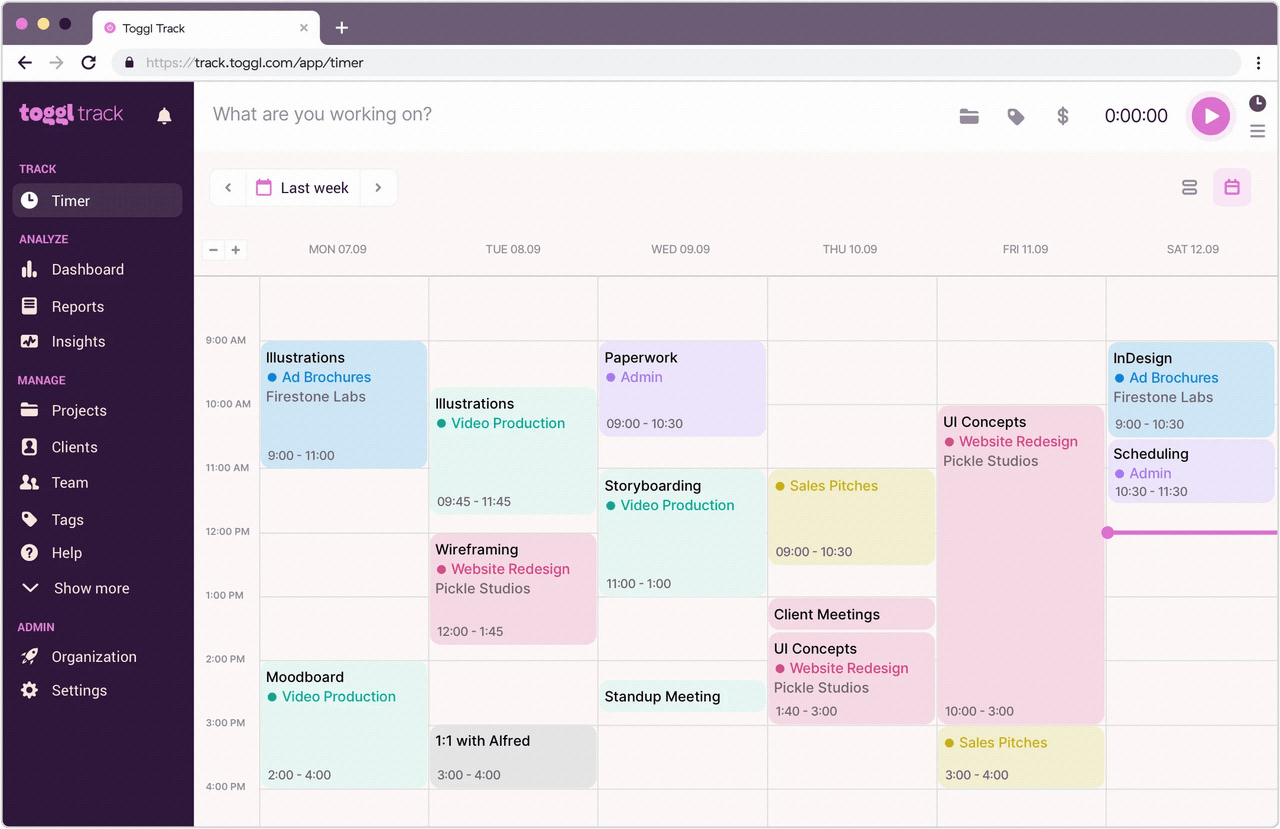
- One-click timers start and stop work sessions with a single tap, logging time by task, project, or client without interrupting your flow.
- Detailed reports and dashboards break tracked hours down by project, billable rate, and team member, so you can see exactly where time is spent.
- Calendar integrations with Google and Outlook block out meetings automatically, keeping tracked hours accurate across your schedule.
- Billable rates and tags let teams assign rates to clients and label entries for clear billing and forecasting.
- A clean, intuitive timer makes time tracking effortless, so users actually stick to logging their hours.
- The free plan supports up to five users with unlimited tracking, reports, and clients at no cost.
- Reliable cross-platform sync keeps entries consistent across web, desktop, and mobile.
- Automation, timesheet approvals, and advanced reporting are limited to the higher-tier paid plans.
- It focuses purely on time tracking and does not include built-in task or project management workflows.
- Starter plan: $9 per user/month (billed annually).
- Premium plan: $18 per user/month (billed annually).
5. Asana: Structured project management tool
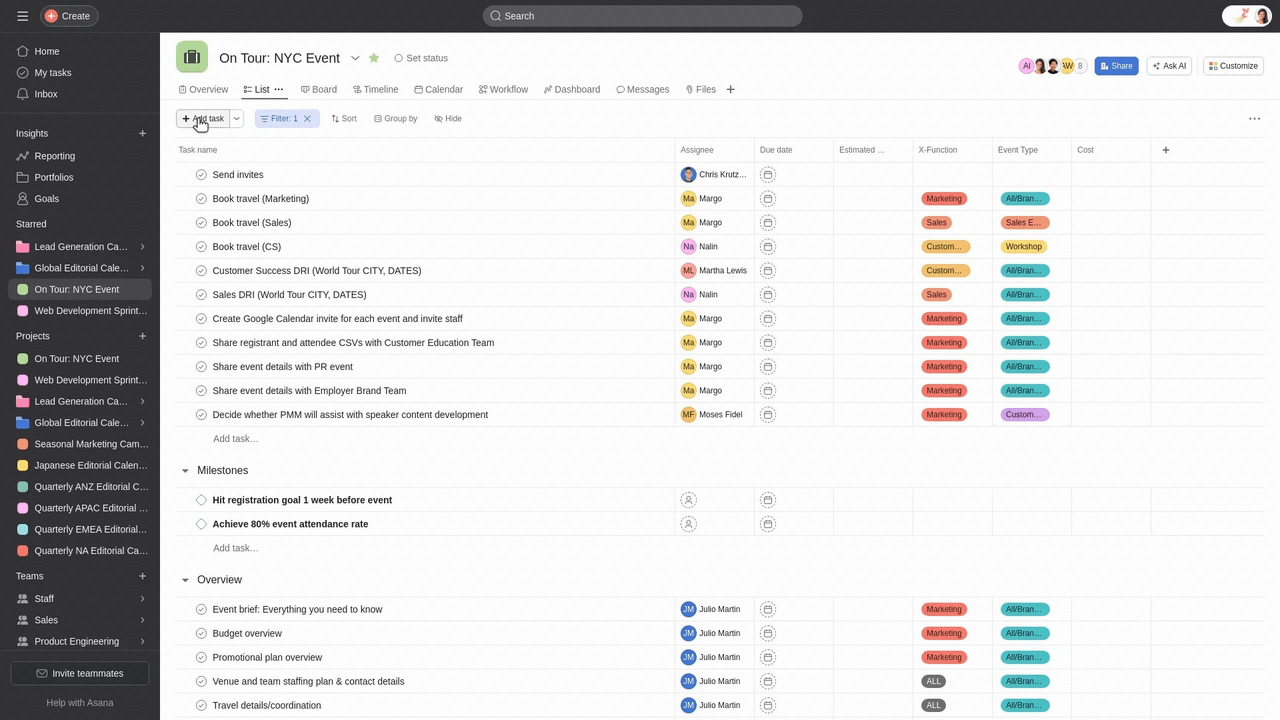
- Task assignments and due dates help teams organize responsibilities, track deadlines, and maintain accountability across projects.
- Multiple project views, including list, board, and calendar, allow teams to visualize work and adapt to different planning styles.
- Team collaboration tools include comments, file attachments, and notifications to keep communication linked directly to tasks.
- A clean and structured interface makes it easy for teams to organize tasks, track progress, and manage projects.
- The free plan supports small teams with essential project management features and basic collaboration capabilities.
- Multiple project views help teams adapt workflows to different project types and planning preferences.
- Advanced features such as timelines, automation, and reporting are available only on paid plans for larger teams.
- The free plans have team size and feature limitations that may not suit complex or fast-growing organizations.
- Starter (premium) plan: $10.99 per user per month (billed annually).
- Advanced (business) plan: $24.99 per user per month (billed annually).
- Enterprise & enterprise+ plans: Custom pricing.
6. TickTick: Task and habit productivity tracker
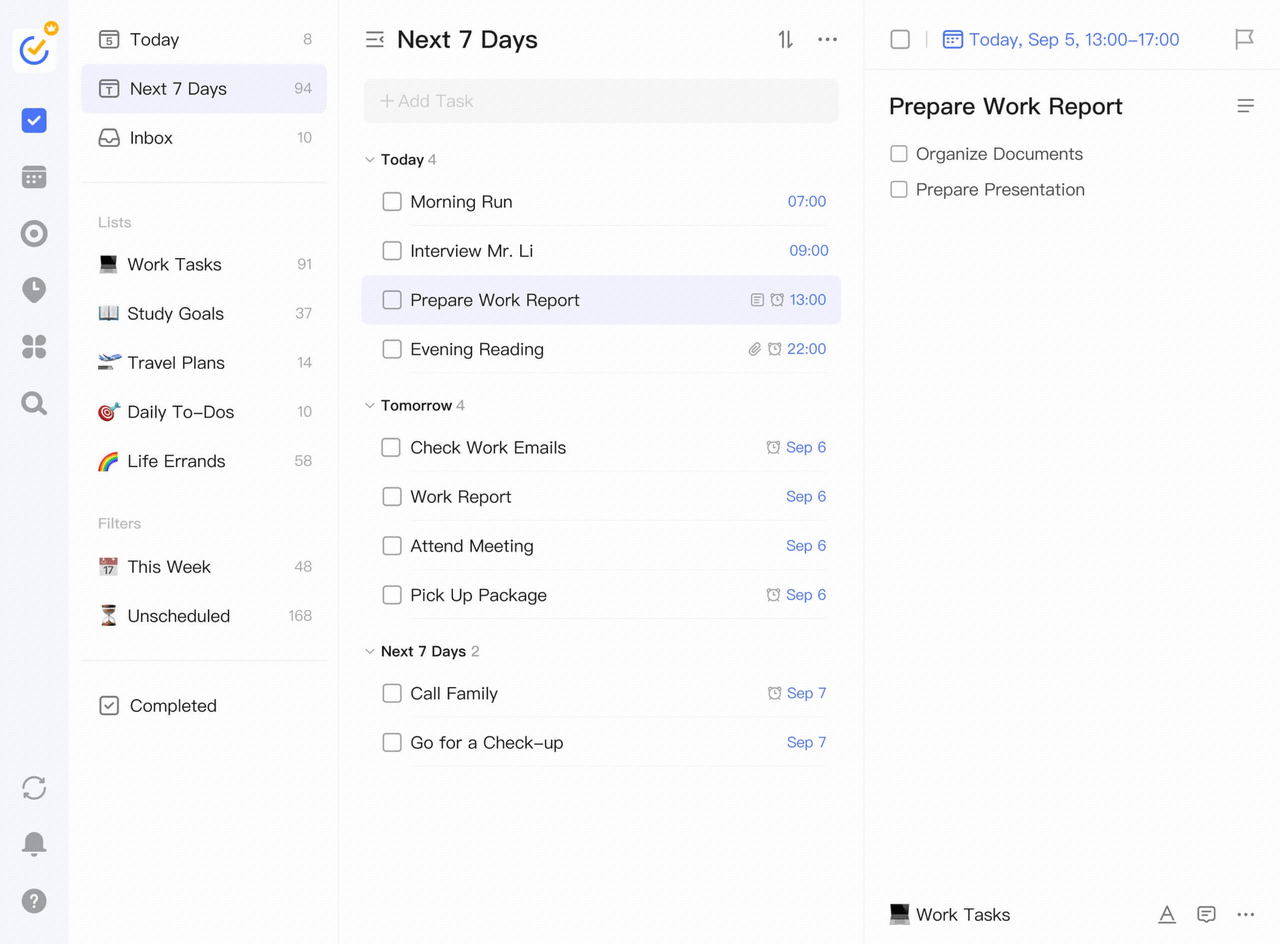
- Task lists with priorities, tags, and due dates help users organize work, track deadlines, and manage responsibilities efficiently.
- Built-in habit tracker allows users to monitor routines, set goals, and build consistent productivity habits over time.
- The calendar view displays tasks, deadlines, and habits together, giving users a clear overview of their schedules and upcoming commitments.
- Pomodoro timer supports focused work sessions by breaking tasks into timed intervals, helping reduce distractions and improve concentration.
- Combines task management, habit tracking, and focus tools, reducing the need for multiple productivity apps.
- Clean and intuitive interface makes it easy to manage tasks, routines, and schedules without complex setup.
- The free plan includes essential features such as tasks, calendar view, and basic habit tracking to support everyday productivity.
- Some advanced features, such as full calendar syncing and detailed statistics, are available only with paid plans.
- Collaboration and team features are limited compared to dedicated project management or team productivity platforms.
- Premium plan: $35.99/year (billed annually).
7. Obsidian: Knowledge graph note-taking tool
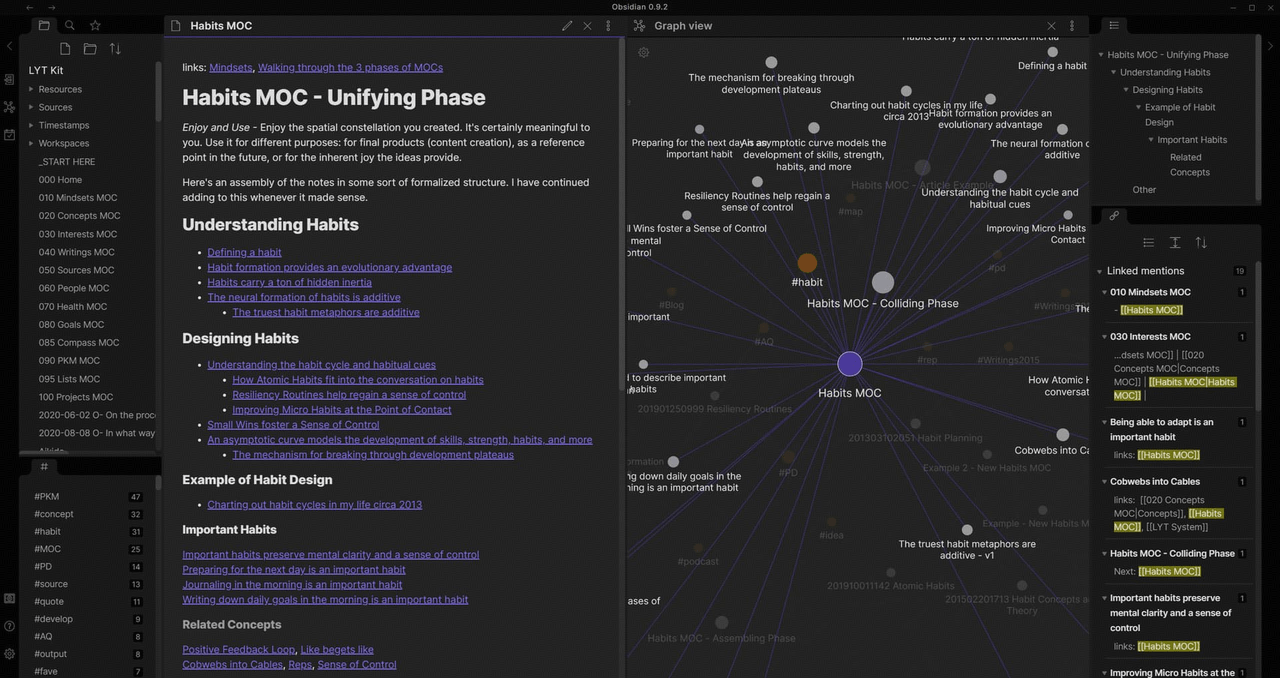
- The linked notes system connects ideas across files, helping users build a personal knowledge graph for deeper understanding.
- The graph view visualizes relationships between notes, making it easier to explore connections and identify patterns.
- Local file storage keeps notes on the user's device, ensuring privacy and offline access at all times.
- An extensive plugin ecosystem allows customization with themes, automation tools, and advanced note-taking features.
- A local-first approach ensures full data ownership and privacy without relying on cloud-based storage systems.
- Highly customizable through plugins and themes, allowing users to tailor the workspace to their workflow.
- The free plan includes core note-taking features, making it suitable for personal knowledge management.
- Collaboration and real-time sharing features are limited compared to cloud-based productivity platforms.
- Initial setup and linking concepts may feel complex for users unfamiliar with knowledge management systems.
- Sync plan: $4 per user/month (billed annually).
- Publish plan: $8 per user/month (billed annually).
- Catalyst plan: $25 per user/month (billed annually).
- Commercial plan: $50 per user/month (billed annually).
8. Trello: Visual Kanban boards for simple project tracking
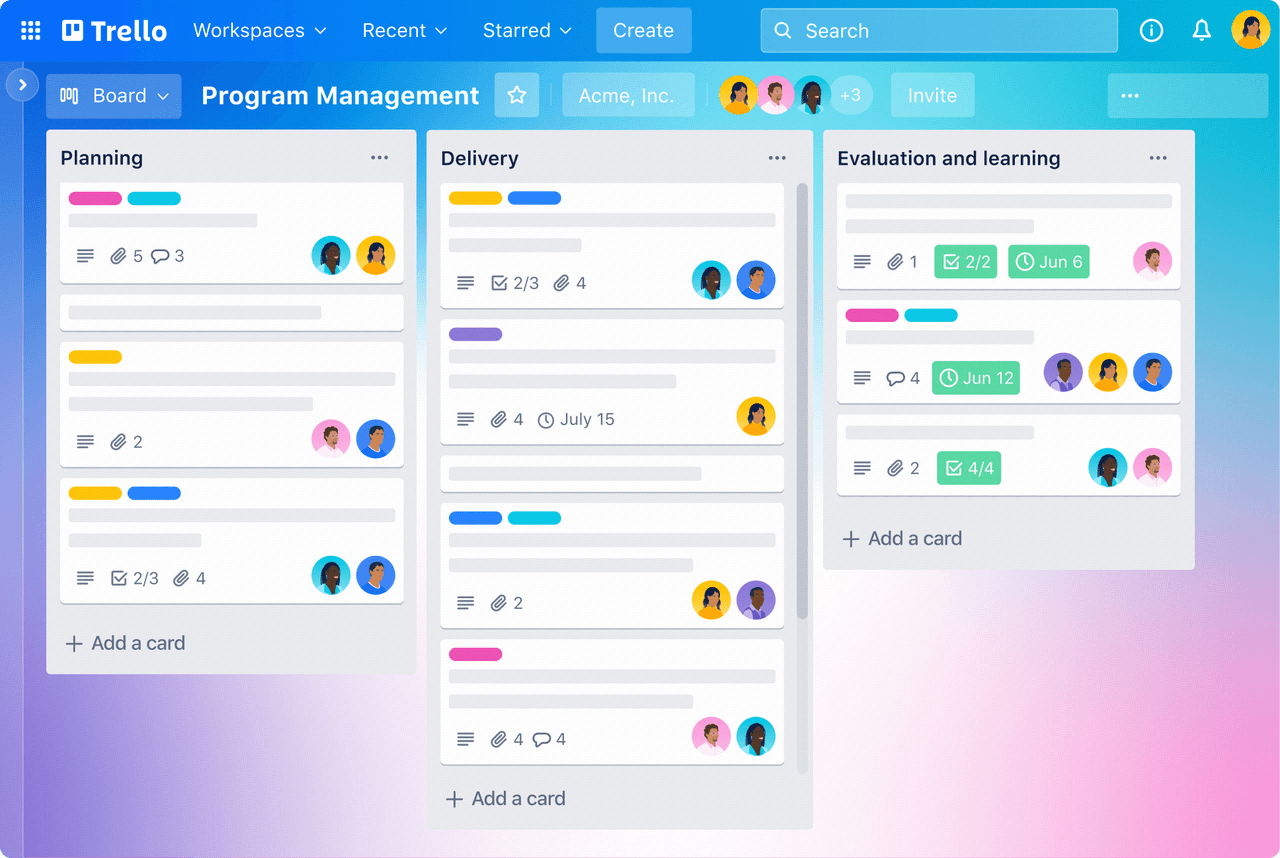
- Kanban boards use lists and cards to visualize tasks, allowing teams to track progress from idea to completion.
- Drag-and-drop interface makes it easy to move tasks between stages and keep workflows clear and organized.
- Built-in checklists, due dates, attachments, and comments help teams manage tasks without switching between multiple tools.
- Power-Ups add integrations and features, such as calendars, automation, and third-party apps, to extend functionality.
- A simple and intuitive interface makes it easy for beginners to start managing projects without a steep learning curve.
- The free plan supports unlimited cards and members, making it suitable for small teams and personal use.
- The visual Kanban approach improves clarity by showing task progress and bottlenecks at a glance.
- Limited advanced project management features compared to more comprehensive productivity or task management platforms.
- The free plan limits the number of Power-Ups per board, reducing customization options for complex workflows.
- Standard plan: $5 per user per month (billed annually).
- Premium plan: $10 per user per month (billed annually).
- Enterprise plan: $17.50 per user per month (billed annually).
9. Forest: Gamified focus timer that beats distraction
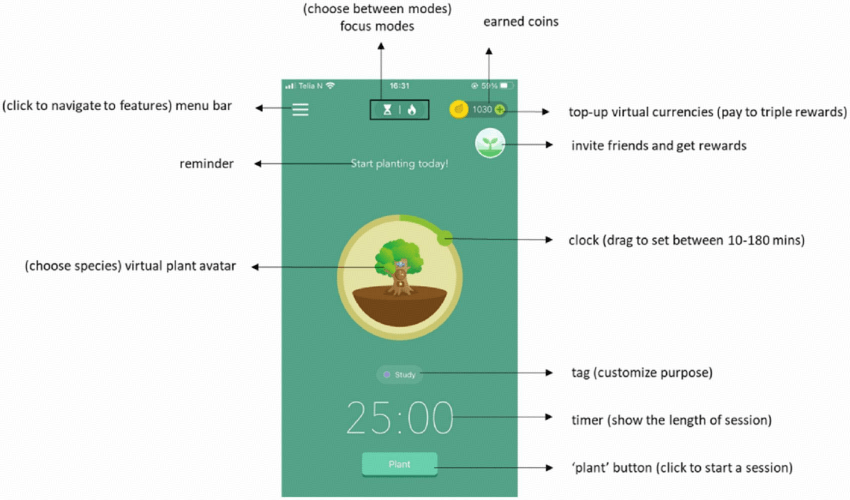
- A Pomodoro-style focus timer blocks distracting apps while you work, keeping sessions focused and measurable.
- Gamified tree-growing rewards keep you motivated, planting a virtual forest as you complete focused sessions.
- White noise and calming background sounds support concentration during deep-work blocks.
- Cross-device streaks and the real-tree partnership let you track consistency and fund reforestation.
- A playful, visual reward system makes staying off distractions feel satisfying rather than punishing.
- It is quick to set up and lightweight, fitting seamlessly into existing study or work routines.
- The free tier covers the core focus sessions, so it is accessible without an upfront commitment.
- It is a focus timer only and does not manage tasks, projects, or notes.
- App blocking, detailed stats, and extra tree rewards require a one-time purchase or subscription.
- Free: core focus sessions and virtual tree planting.
- Premium: subscription from around $4 per month (billed annually).
10. Sunsama: Daily planning and time-blocking companion
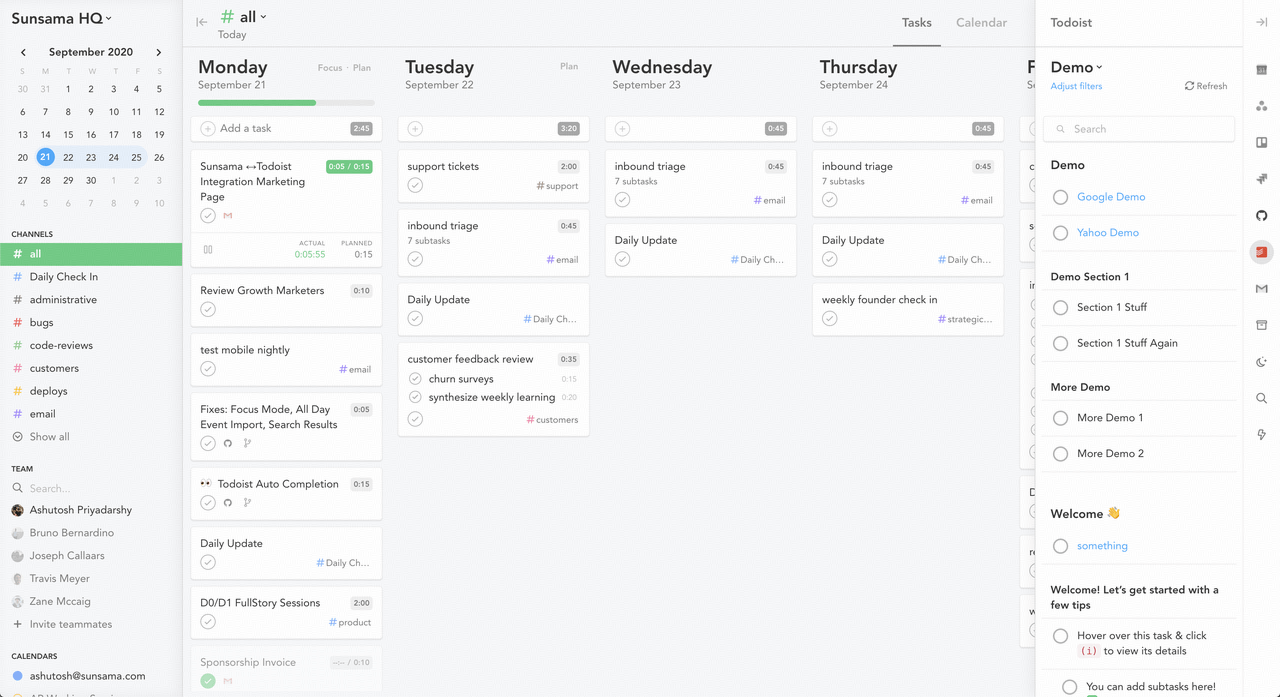
- A guided daily planning routine combines tasks and calendar events, helping you choose what fits each day realistically.
- Time blocking schedules tasks alongside meetings, protecting focused work and preventing overcommitment.
- Integrations with Todoist, Gmail, Slack, and Google Calendar pull tasks and reminders into one place.
- Weekly reviews and doneness tracking reflect on progress and help you shape the next week's plan.
- A guided daily routine keeps planning simple and stops you from overpacking your schedule.
- It connects your tasks and calendar in one view, giving a clear picture of each day.
- Gentle reminders and an end-of-day wrap-up help you build a sustainable planning habit.
- There is no permanent free tier; access requires a paid subscription after the free trial.
- It is a personal daily planner and does not replace team project management software.
- Premium plan: from $20 per user/month (billed annually).
11. Clockify: Free time tracking software
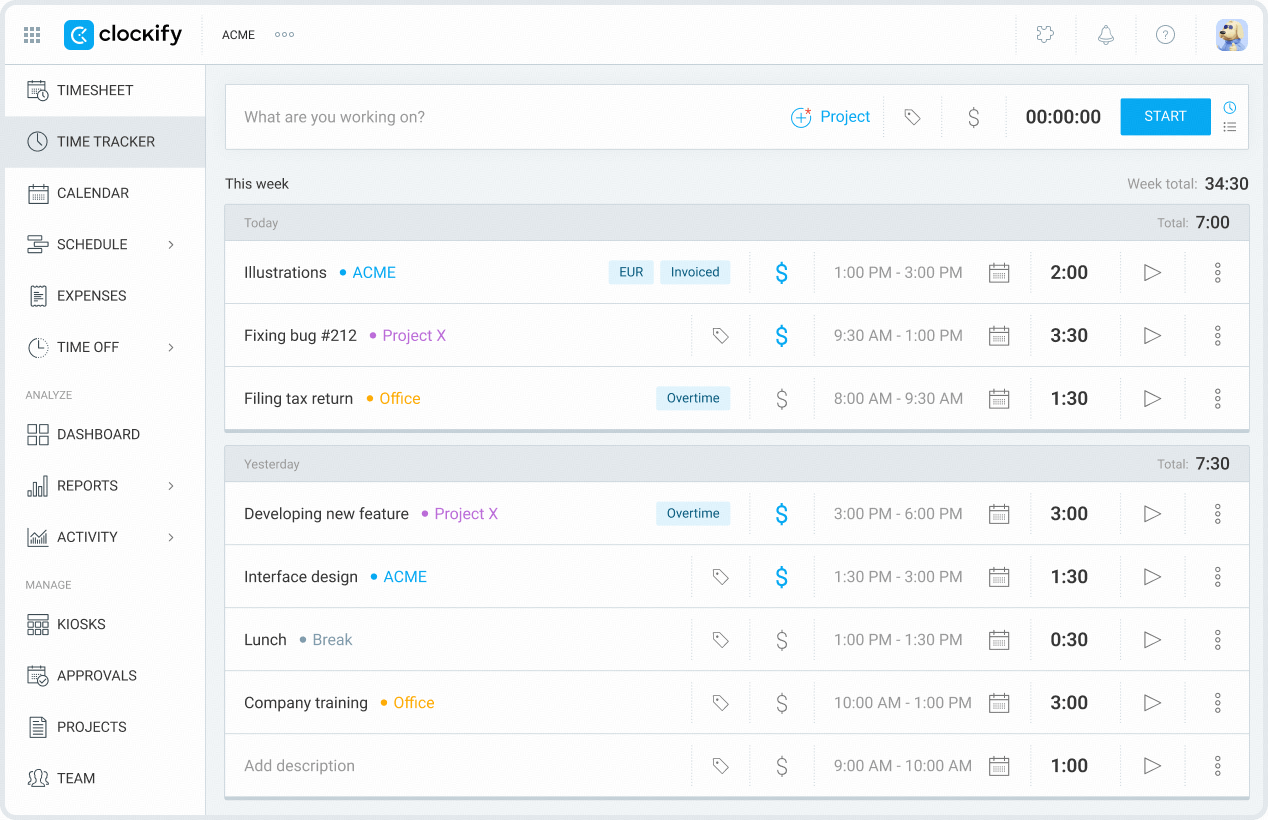
- Start and stop timer tracks work hours in real time, helping users monitor productivity across tasks, projects, and clients.
- Manual time entry allows users to log hours after work, ensuring accurate tracking even without running timers.
- Project and client organization help categorize work, making it easier to analyze time spent on different tasks.
- Basic reporting features generate summaries of tracked hours, helping users review productivity trends and workload distribution.
- The free plan supports unlimited users and projects, making it suitable for freelancers, agencies, and growing remote teams.
- A simple, intuitive interface lets users start tracking time quickly, without complex onboarding or configuration.
- Cross-platform availability ensures time entries stay synced across web, desktop, and mobile devices for consistent tracking.
- Advanced reporting, invoicing, and forecasting features are limited to paid plans, reducing value for businesses with advanced needs.
- Interface focuses primarily on time tracking and lacks built-in task management or more advanced team productivity features.
- Basic plan: $3.99 per user/month (billed annually).
- Standard plan: $5.49 per user/month (billed annually).
- Pro plan: $7.99 per user/month (billed annually).
- Enterprise plan: $11.99 per user/month (billed annually).
12. Google Workspace: Integrated business email, docs, and cloud storage
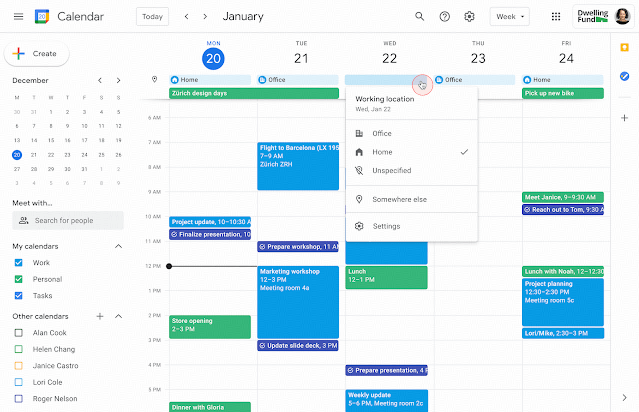
- Integrated apps — Gmail, Docs, Sheets, Slides, Drive, Calendar, and Meet — cover email, documents, spreadsheets, and video calls in one place.
- Real-time collaboration lets several people edit the same document at once, with comment and suggestion modes built in.
- Shared cloud storage and admin controls keep files organized, searchable, and secured across the organization.
- Familiar cross-platform access works on web, desktop, iOS, and Android with consistent sync.
- A unified suite replaces fragmented tools for email, documents, spreadsheets, and meetings.
- Real-time co-authoring and a low learning curve make onboarding fast for teams.
- A free consumer tier with 15GB of storage and affordable business plans make it widely accessible.
- Advanced security, archival, and compliance features require the higher-priced plans.
- Offline editing and deep customization are more limited than dedicated desktop suites.
- Business Starter: from $6 per user/month (billed annually).
- Business Standard: from $12 per user/month (billed annually).
13. Habitica: Gamified task and habit-building RPG
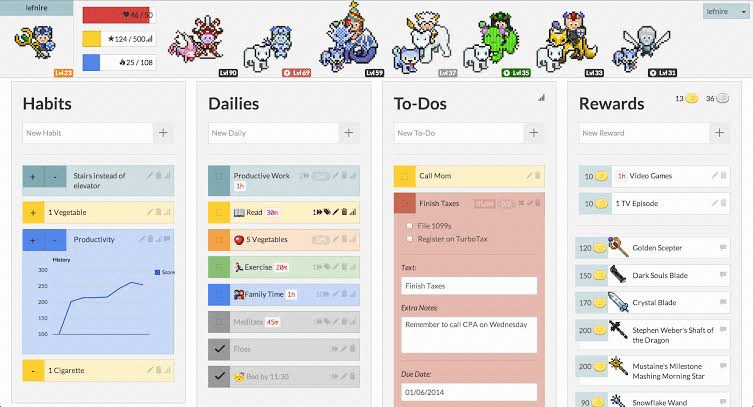
- An RPG quest system turns habits, dailies, and to-dos into character experience and gold, making routine work rewarding.
- Party and guild features let friends team up for quests and boss fights, adding social accountability.
- Custom rewards and streaks let you set real-world incentives and track consistency over time.
- Cross-platform sync works on web, iOS, and Android for quick daily check-ins anywhere.
- Gamification turns mundane tasks into motivating quests, helping users actually stick to their habits.
- The core app is free to use, with optional upgrades rather than paywalled basics.
- Social features and accountability groups make it easier to maintain routines over the long term.
- The game interface can feel distracting or overwhelming for users who prefer plain lists.
- Team and collaboration features are limited compared with dedicated project management tools.
- Free: core RPG task and habit features.
- Subscription: from around $4.99 per month (billed annually).
14. Slack: Team messaging productivity app
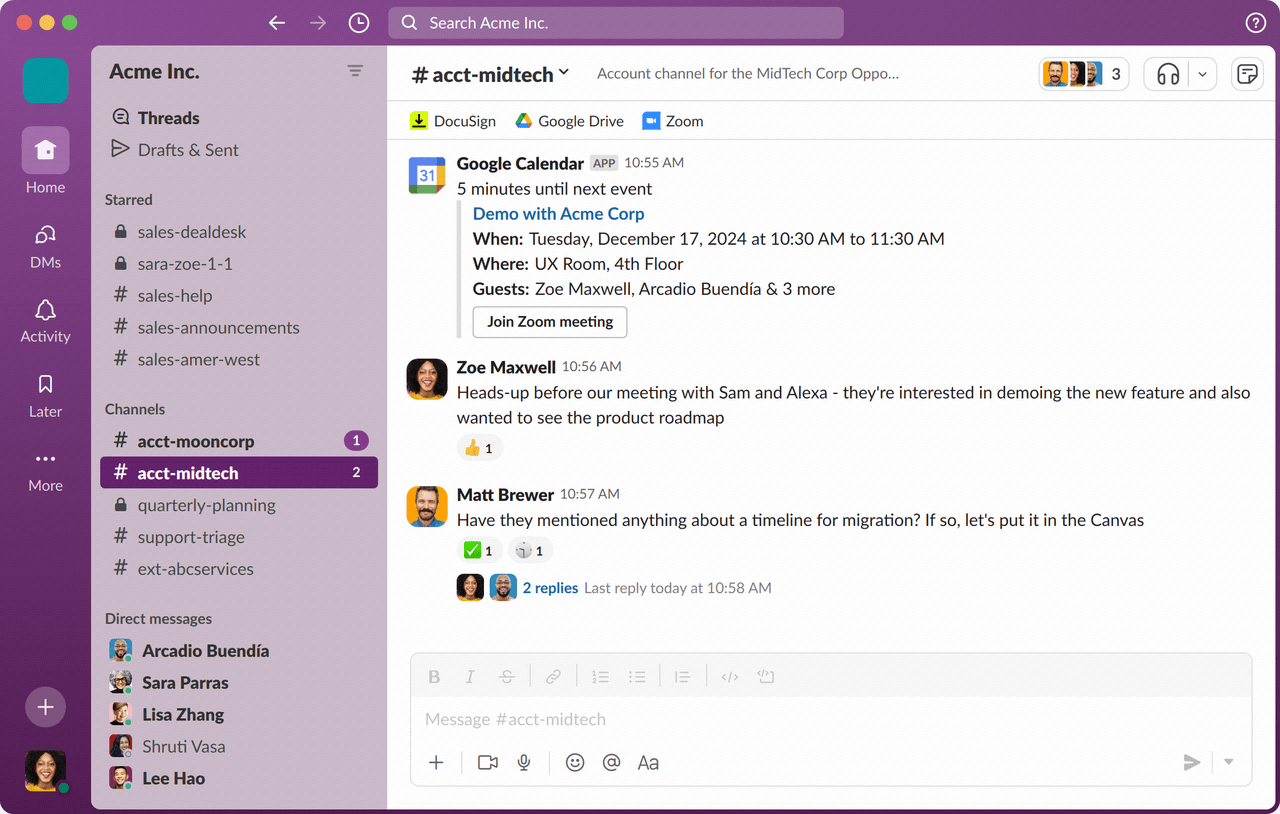
- Channel-based messaging organizes conversations by team, project, or topic, keeping discussions structured and easy to follow.
- Direct messages and group chats enable quick communication between teammates without switching to external messaging tools.
- File sharing and searchable history allow teams to store documents and quickly find past messages or attachments.
- App integrations connect Slack with tools such as calendars, project management systems, and cloud storage to streamline workflows.
- Organized channel structure keeps team communication clear and reduces clutter compared to long email threads.
- A large integration ecosystem allows teams to connect Slack with many popular productivity and project management tools.
- The free plan provides essential messaging features suitable for small teams and basic collaboration needs.
- The free plan limits message history, making it harder to access older conversations in active workspaces.
- Advanced features such as workflow automation and deeper analytics are available only on paid plans.
- Pro plan: $7.25 per user/month (billed annually).
- Business+ plan: $15 per user/month (billed annually).
- Enterprise+ plan: Custom pricing.
15. Loom: Async video messaging for faster updates
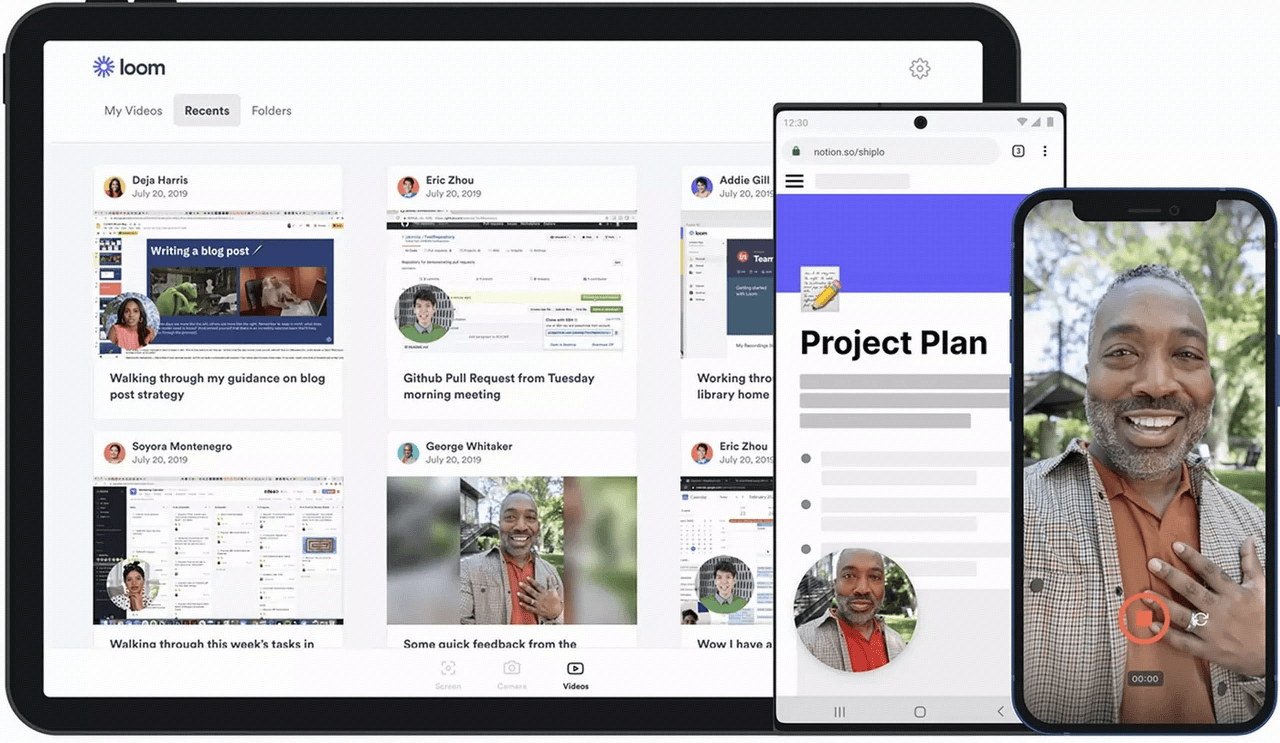
- A one-click screen-and-camera recorder captures video messages that are shared instantly via a link.
- Viewer reactions and time-stamped comments keep conversations threaded on the video itself.
- Transcripts, captions, and trimming help viewers skim and let you tighten a clip without re-recording.
- Team libraries organize videos by team, project, or topic for easy discovery later.
- Async video cuts down unnecessary meetings and speeds up explanations that are hard to put in writing.
- The free Starter plan lets individuals record up to 25 videos at no cost.
- The fast, lightweight recorder integrates cleanly with browsers and desktop apps.
- The free plan caps recordings at five minutes and displays Loom branding.
- Unlimited length, branding removal, and engagement insights require a paid plan.
- Starter plan: free (25 videos, 5-minute limit).
- Business plan: from $15 per user/month (billed annually).
When to upgrade from free productivity apps
- Team growth: As teams expand, coordination becomes more challenging, and communication gaps can slow down work. Upgrading ensures better permissions, collaboration tools, and shared resources. Many of the best productivity apps offer scalable plans for growing teams.
- Workflow complexity: Simple task lists may work at first, but complex projects require automation, dependencies, and multiple views. Paid plans often unlock advanced features that streamline operations. This is where good productivity apps provide more structured workflows and deeper customization.
- Need for automation: Manual processes can slow down teams and increase the risk of errors over time. Upgrading enables automation rules, triggers, and integrations that reduce repetitive work. Many great productivity apps offer powerful automation features in their paid tiers. Recent productivity app updates push deeper automation to premium plans.
- Data and reporting requirements: As projects scale, teams need insights into performance, timelines, and resource allocation. Advanced analytics and reporting tools are typically included in paid plans. This is especially true for the best productivity apps for Mac, which often include deeper reporting in premium versions. Productivity app updates 2026 have added dashboards and forecasting mainly to paid tiers.
How to choose your best productivity apps
- Platform compatibility: Your productivity app should work smoothly across all the devices you use. Cross-platform syncing ensures your tasks and documents stay up to date wherever you work. Many of the best productivity apps on Mac also offer strong support for Windows and mobile platforms. Discussions on best productivity apps Reddit threads consistently stress cross-platform sync as the first filter.
- Individual vs team needs: Some tools are built for personal task management, while others are designed for team collaboration. Choosing the wrong type can create unnecessary complexity or missing features. Top productivity apps typically offer options for both individual users and teams.
- Automation depth: Automation can save time by handling repetitive tasks and reminders automatically. Some free plans include basic automation, while others restrict it to paid tiers. When evaluating the best productivity apps for Windows, consider how much automation each offers.
- Long-term scalability: A tool that works today should also support your future needs as projects and teams grow. Look for apps that offer clear upgrade paths and advanced features. Many of the best productivity apps for Windows users are designed with long-term scalability in mind.
- Hidden free plan limitations: Free plans often include restrictions on storage, users, automation, or integrations. Understanding these limits helps you avoid disruptions as your needs expand. The best Windows productivity apps clearly outline the limits of free plans so users can plan upgrades wisely. The best free apps for productivity spell these limits out before you sign up, not after.
Benefits of using free productivity apps
- Cost-effective start: Free plans allow users to access essential productivity app features without upfront costs, making it easy for students, freelancers, and small teams to start organizing their work right away.
- Quick adoption: Many free productivity apps offer simple, intuitive interfaces that require minimal setup, helping individuals and teams get productive faster without lengthy onboarding.
- Cross-platform access: Most top free productivity apps support web, desktop, and mobile platforms, enabling users to manage tasks and information from any device, anywhere.
- Risk-free evaluation: Free plans let users test core features, workflows, and collaboration capabilities before committing to a paid productivity app, ensuring the tool fits their needs.
- Scalable foundation: Many best free productivity apps offer upgrade paths with advanced features, so users can grow into paid plans as their needs expand without switching tools.
Productivity app trends 2026: What's changed this year
Conclusion
FAQs
What is the 3-3-3 rule for productivity?
The 3-3-3 rule suggests focusing on three major tasks, three medium tasks, and three small tasks each day. This approach helps reduce overwhelm and keeps priorities clear. Many of the best personal productivity apps, including Lark, support structured daily planning to apply this rule effectively.
What is the No. 1 productivity app?
No single app fits everyone's workflow, as needs vary across individuals and teams. Some users prefer task managers, while others choose all-in-one platforms like Lark. Discussions on the best productivity apps on Reddit often highlight tools that combine communication, tasks, and documents in one place.
Are free productivity apps safe for storing sensitive data?
Most reputable apps use encryption, secure login, and compliance with applicable standards to protect user information. However, security levels may vary by provider and plan. Tools like Lark are designed with enterprise-grade security, which is why they're often listed among the best productivity apps on iOS and other platforms.
Do free productivity apps include automation features?
Some free plans include basic automation, while advanced workflows are typically included in paid tiers. Automation helps reduce repetitive work, reminders, and task updates. Lark, for example, offers automation features even in its free plan, making it practical for growing teams.
Can free productivity apps replace paid software for teams?
For small teams and simple workflows, free plans can often replace paid tools without major limitations. However, larger teams may eventually need advanced automation, reporting, or security features. Platforms like Lark offer robust free tiers, allowing teams to start small and upgrade only when necessary.
Which free productivity app is best for students?
For students on a tight budget, the best free apps for productivity start with Todoist for assignments and deadlines, Google Keep for quick notes and flashcards, and TickTick or Focus To-Do for Pomodoro study sessions. Notion is also popular among students as a free second-brain for class notes and review sheets. Among the best personal productivity apps, these three or four together cover most study workflows without paying anything.
Are AI features inside a productivity app worth it in 2026?
It depends on how you work. An AI productivity app that auto-summarizes meetings, drafts task descriptions, or reschedules conflicts can save hours a week for knowledge workers, but for simple to-do lists the AI layer adds little. Check recent productivity app updates 2026 before buying: many vendors now bundle AI into entry tiers, so read the fine print rather than paying for a separate AI add-on.
What does Reddit say are the best productivity apps?
Threads about the best productivity apps reddit communities recommend usually converge on a short list: Todoist or TickTick for tasks, Notion or Obsidian for notes, Toggl or Clockify for time tracking, and Lark or Slack for team chat. The recurring advice is the same across r/productivity and r/apps: pick one tool per category and resist stacking too many good productivity apps, since context switching cancels out the gains.
How many productivity apps should I actually use?
Most people are better off with four to five great productivity apps, not twenty: one for tasks, one for notes, one for team chat, one for time or focus, and optionally one all-in-one platform like Lark that already combines several of these. The best apps for work are the ones you will open every day — a perfect tool you ignore is worse than a simpler tool you actually use.
Related reading

Start using Lark today

Manage all your work in one place
Boost team efficiency by 10x
Save up to 70% on software costs
Start using Lark today
Manage all your work in one place
Boost team efficiency by 10x
Save up to 70% on software costs
Keep reading







2026 Lark Technologies Pte. Ltd.
Headquartered in Singapore with offices worldwide.





