Every team knows the frustration of searching for that one crucial document, often lost in a forgotten email thread, a maze of shared drive folders, or buried within chat histories. This scattered information creates friction, wastes valuable time, and undermines the potential for effective collaboration. With the need for a single source of truth, teams require a solution that organizes knowledge seamlessly.
This is precisely the challenge that Atlassian Confluence aims to address. Promising a centralized, structured, and searchable space for all team knowledge, Confluence positions itself as a go-to tool for effective collaboration. But does it truly deliver on that promise for all users?
In this Confluence review, we will explore its core functionalities and user experience, helping team leaders and managers determine whether Confluence is the right fit for your specific needs in 2025.
My personal take: A quick summary of this Confluence review
For those who need the short version, here it is. Confluence is an incredibly powerful tool for creating a structured, long-term . If your team is already using Confluence, Jira, and other Atlassian products, its deep integration makes it an almost unbeatable choice for technical documentation and project planning. It provides a level of order and process that few other tools can match.
However, this power comes with a price, and I'm not just talking about the subscription. The platform has a significant learning curve. Its interface, while robust, can feel rigid and overwhelming for non-technical teams who crave simplicity and speed. This is a recurring theme you'll see in discussions on forums like Confluence Reddit. The core question isn't whether Confluence is capable, but whether its structured approach will empower your team or slow it down. The rest of this review will explore that question in detail.
What is Confluence?
At its heart, Atlassian Confluence is a designed to be the central home for a company's knowledge. Think of it as a highly structured, professional wiki. It's built to capture and organize information that needs to outlive a simple chat message or email.
To do this, it uses two core concepts: Spaces and Pages. A "Space" acts as a dedicated hub for a specific team or project—like a marketing team's workspace or an engineering team's . Within that Space, you create "Pages," which are much more than static documents. They are living, collaborative documents where your team can , leave comments, and track version history. This structured approach is a key differentiator in comparisons like Confluence vs SharePoint or Confluence vs Teams, which often handle documentation in a less centralized way.
But its true power, and a key point in any Confluence review, is its role within the Atlassian ecosystem. You can't talk about Confluence without mentioning Jira. They are built to work together seamlessly. This is a constant source of discussion in forums like Confluence vs Jira Reddit, but the relationship is simple: Confluence is for planning and documenting the "why" and "how," while Jira is for tracking the execution of that work. This built-in-framework approach is what separates it from more flexible, blank-canvas tools in the Confluence vs Notion debate. And to answer the common question, "Is Confluence free?"—yes, it offers a free plan, making it possible for small teams to experience this powerful ecosystem firsthand.
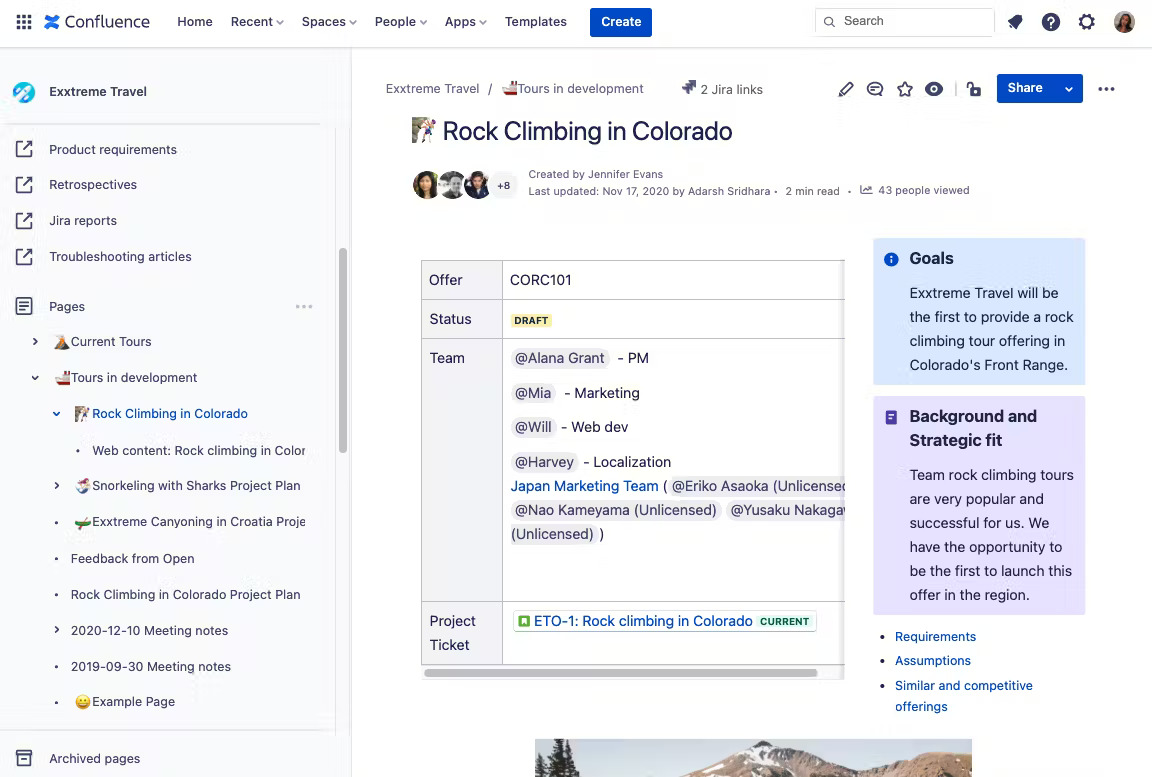
Image source: atlassian.com
A deep dive into Confluence's key features
Now that we understand the core concepts, let's get into the specifics. What are the tools you and your team will actually be using every day? I've spent countless hours inside Atlassian Confluence, and here's my breakdown of the features that truly define the experience.
Creating and collaborating with Pages
The Page is the backbone of Confluence. At first glance, the editor feels familiar, like a standard word processor. You have all the usual formatting options for text, tables, and layouts. But the real power lies in its collaborative features. Like Google Docs, it supports , so you can see your teammates typing right alongside you.
The commenting system is also robust. You can highlight any piece of text to leave an inline comment, or add general comments at the bottom of the page. This is fantastic for feedback and review cycles. Every Page also has a complete version history, which is a lifesaver. You can easily see who changed what and revert to a previous version if a mistake is made. While the editor isn't as slick or minimalist as some newer tools, it's highly functional and built for serious documentation.
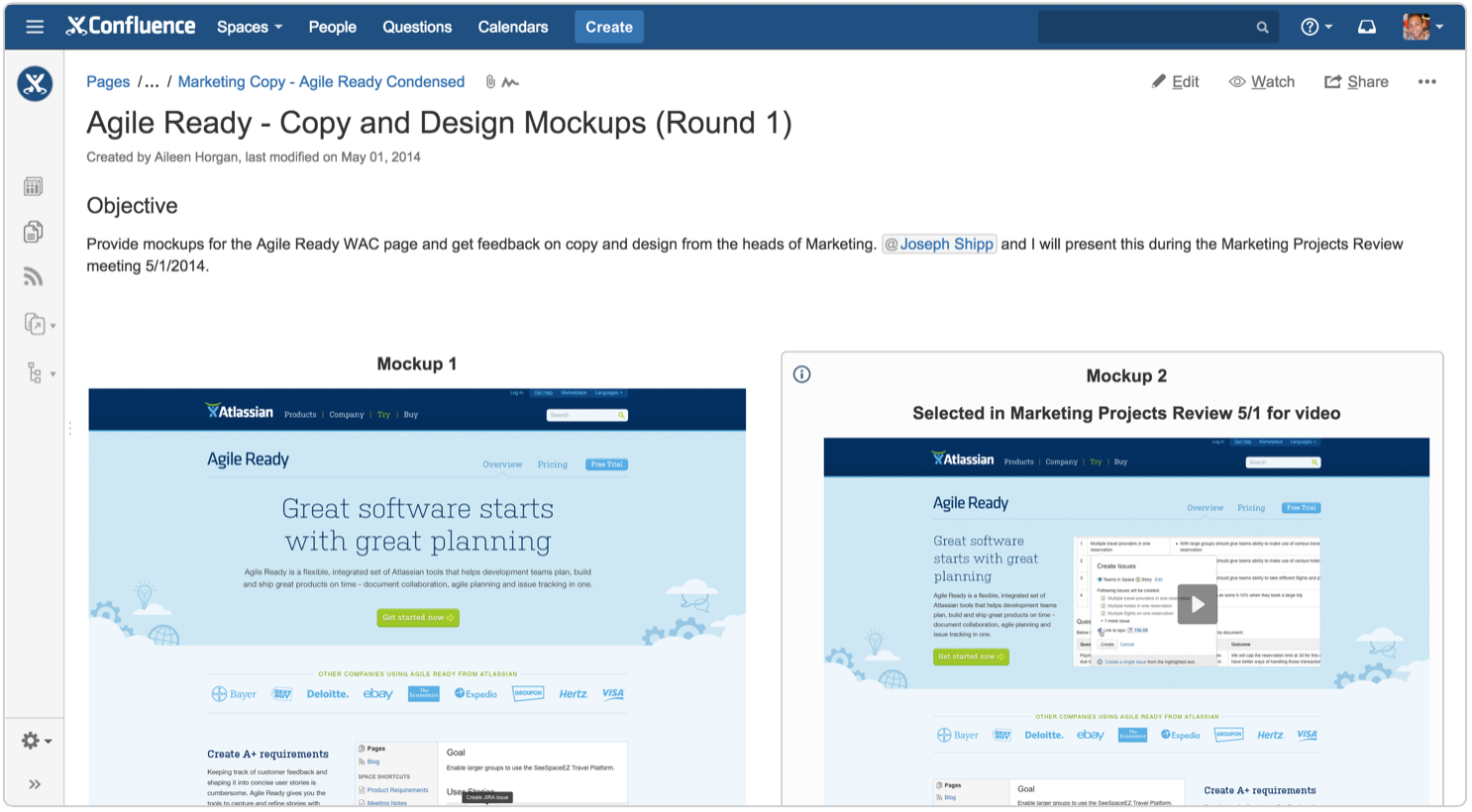
Image source: atlassian.com
Finding anything with search and labels
A is useless if you can't find anything. Confluence's search is powerful, in theory. It indexes everything, including the content of attached files. For a disciplined team that uses "labels" (tags you can add to pages) consistently, you can create a highly organized and searchable library.
However, in practice, this is a common pain point I see discussed on forums like Confluence Reddit. If your team isn't diligent with organization and labeling, the search can feel hit-or-miss. It can sometimes feel like you know a page exists, but the search results bury it under less relevant content. It's a capable tool, but it requires your team to meet it halfway with good habits.
Unbeatable Jira integration
For many teams, this is the number one reason to choose Confluence. The integration between Confluence, Jira, and the broader Atlassian suite is seamless and powerful. You are not just inserting a hyperlink to a Jira task; you are embedding live, dynamic information.
You can, for example:
- Type /jira on a page to paste in a specific issue, which will always show its live status (To Do, In Progress, Done).
- Create dynamic lists of issues based on a filter. You could have a page that automatically shows all open bugs for a project or all tasks assigned to a specific person.
- Build charts and reports based on live Jira data to create a high-level project dashboard right inside a Confluence Page.
This two-way street—planning in Confluence and tracking in Jira—creates a cohesive project ecosystem that is difficult for any other combination of tools to replicate.
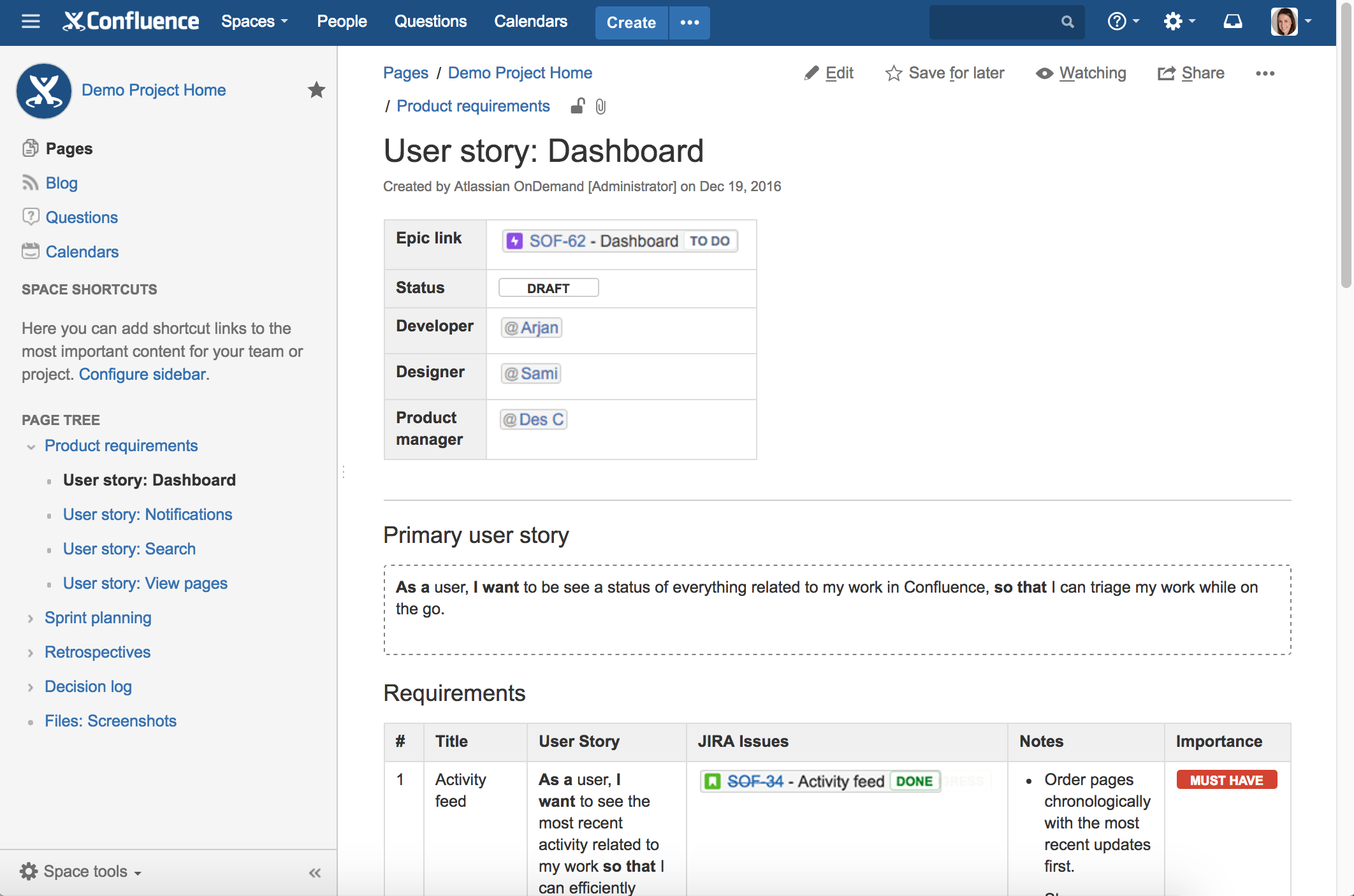
Image source: confluence.atlassian.com
Extending functionality with the Atlassian marketplace
If a feature doesn't exist out of the box, there's a good chance you can add it via the Atlassian Marketplace. It's an app store for Confluence, offering hundreds of free and paid add-ons that provide new macros, diagramming tools, custom themes, and integrations with other services. This allows for incredible customization. However, it's a double-edged sword. While it makes the platform flexible, relying on many paid apps can significantly increase your total cost and add layers of complexity.
Ease of use
Confluence provides a structured and organized environment for , which can be beneficial for teams seeking a clear framework. The editor is relatively straightforward, and the platform offers a range of templates to help users get started quickly. However, some users find Confluence's interface to be somewhat complex and overwhelming, particularly when navigating large and intricate knowledge bases. The learning curve can be steeper for new users compared to more intuitive platforms like Notion or . The administrative side of Confluence can also be challenging, requiring technical expertise to manage users, permissions, and integrations.
How much does Confluence cost?
Pricing is a critical part of any Confluence review. The cost can range from completely free to thousands of dollars a month, so understanding the tiers is essential. Evaluating and alongside competing platforms can provide useful budgeting insights.
Confluence pricing plans table
Below is the monthly pricing & core features for 300 users (data from Atlassian's pricing interface; for latest details, visit the official Atlassian website):
Information source: atlassian.com
Update time: 2025-12-3
The hidden costs of Confluence
Your monthly subscription is only part of the story. When budgeting for Confluence, you must also consider:
- Atlassian access: Required for SSO/SCIM in Standard/Premium plans (Enterprise includes it). Priced at $5.50 per user/month, this is essential for teams prioritizing identity management.
- Marketplace apps: Popular add-ons like ScriptRunner ($10–$300/month) or Table Filter & Charts ($120–$1,200/year) extend functionality but add recurring costs. Most apps use the same tiered pricing as Confluence itself.
- Storage overages: Standard/Premium plans include 250 GB/unlimited storage, but Free users pay $0.25/GB/month for extra space. Enterprise teams may incur costs for advanced data retention policies.
- Training & migration: Atlassian's professional services start at $1,000/day for onboarding or cloud migration. Third-party providers like Adaptavist offer similar support at $150–$300/hour.
Explore more cost-effective tools
What's not included in Confluence
Atlassian Confluence is a robust platform, but it's not a perfect fit for every team. Its strengths in structure and documentation come with certain trade-offs. It's important to understand where it falls short.
Limited built-in communication tools
Confluence focuses primarily on long-form documentation and . While it offers commenting and basic notifications, it lacks real-time communication tools many teams rely on daily. Teams often need to rely on external chat applications, which creates context switching and can lead to information silos. The built-in collaboration features don't fully replace the need for separate messaging apps.
Project management lacks depth
While Confluence integrates with Jira for , it doesn't offer robust project management features within the platform itself. Teams that want to do more than simply document project plans need to look elsewhere. Core project management functionalities like , Gantt charts, and are simply not present within Confluence itself.
Mobile experience can feel secondary
Confluence's mobile app offers access to most of the core features, but it can feel like a scaled-down version of the desktop experience. Certain administrative functions and advanced editing capabilities are limited on mobile devices. For teams that need to stay highly productive on the go, this can be a significant drawback.
Discover these missing features in another tool
What users are saying about Confluence
I've shared my experience, but what do other users think? To provide a balanced view, I've spent time on G2, Capterra, and the Confluence Reddit community to gather real-world feedback. A clear pattern of pros and cons emerges.
What users love (the pros)
- The single source of truth: Overwhelmingly, users praise Confluence for its ability to centralize knowledge. A reviewer on G2 mentioned it "ended their chaotic scavenger hunts for documents," creating one place for all official company information.
- Deep Jira integration: This is almost always cited as the top reason for choosing and sticking with Confluence. Technical teams, in particular, see the workflow between Confluence, Jira as indispensable. One Reddit user described it as "the two halves of our team's brain."
- Powerful structure and organization: Users who value process and order love Confluence's hierarchical structure of Spaces and Pages. It forces teams to be deliberate about how they organize knowledge, which is invaluable for things like onboarding new employees or maintaining compliance documentation.
Where users get frustrated (the cons)
- Clunky and slow user interface: This is the most common complaint by far. Compared to modern rivals in the Confluence vs Notion debate, many users find the Confluence editor to be slow and dated. A comment on a Reddit thread summed it up: "It feels powerful, but it's just not a joy to use for quick notes."
- Inconsistent search: While the search is technically powerful, many users voice frustration with it. A G2 review noted, "I often find it easier to ask a coworker for a link than to find it myself with search," which highlights a common sentiment that the search doesn't always feel intuitive.
- Steep learning curve for non-technical users: Many reviews point out that while engineers might feel at home, getting marketing, HR, or sales teams to adopt Confluence can be a struggle. The sheer number of features and the complexity of permissions can be intimidating, making it feel like "overkill" for simpler needs.
Alternatives to Confluence: Finding the right fit
If Confluence doesn't quite meet your team's needs, you're in luck. Plenty of excellent alternatives offer different strengths and approaches to knowledge management and collaboration. Here's a quick comparison:
How Lark compares to Confluence:
delivers a unified team collaboration solution centered on streamlined workflows. Unlike Confluence—primarily focused on documentation—Lark combines , , , and in one platform, eliminating tool-switching, reducing context gaps, and boosting productivity. With an intuitive interface and mobile-friendly design, it's easy for teams of all technical levels to adopt. For seamless, all-in-one collaboration, Lark is a compelling alternative to Confluence's structured, docs-centric approach, offering native capabilities that Confluence requires add-ons for.
How SharePoint compares to Confluence:
SharePoint is a strong choice for organizations deeply embedded in the Microsoft ecosystem, prioritizing enterprise-level document management and strict compliance. While robust in features like version control and access control, its user interface can feel less modern than Confluence. It's more focused on document storage than collaborative knowledge creation, and lacks Confluence's seamless project management workflow through Jira.
How Notion compares to Confluence:
Notion's strength lies in its unparalleled flexibility, allowing teams to build highly customized workspaces and databases. Its block-based editor enables visually appealing and organized pages. However, this flexibility requires teams to build their own knowledge management systems, whereas Confluence offers a more structured, pre-defined framework.
How Teams compares to Confluence:
Microsoft Teams excels as a chat-based collaboration hub, ideal for quick communication, file sharing, and real-time interactions. While it provides some document collaboration features, it lacks Confluence's robust knowledge management capabilities for creating and organizing long-form content. Teams is best suited for day-to-day communication, while Confluence is the better choice for building a durable, searchable knowledge base.
How Jira compares to Confluence:
It's crucial to remember that Jira and Confluence serve distinct but complementary purposes. Jira is specifically designed for project and issue tracking, while Confluence is tailored for knowledge management and documentation. They integrate seamlessly, with Jira managing tasks and workflows, and Confluence providing the space to plan, document, and share project information.
Try the best Confluence alternative right now
Unlock seamless teamwork: Why Lark is the smarter choice
Confluence is a powerful team knowledge base, but its core design focuses on static document storage and asynchronous collaboration. If you're looking for more than just a document repository—if you want a that connects people, work, and knowledge to dynamically drive projects forward—then offers a highly competitive . First of all, watch this video to get general knowledge about Lark.
From static wiki to dynamic collaboration hub
Confluence excels at creating structured pages and spaces, but it is essentially an "endpoint" for knowledge. Lark, however, is designed as a "starting point" and "central nervous system" for collaboration.
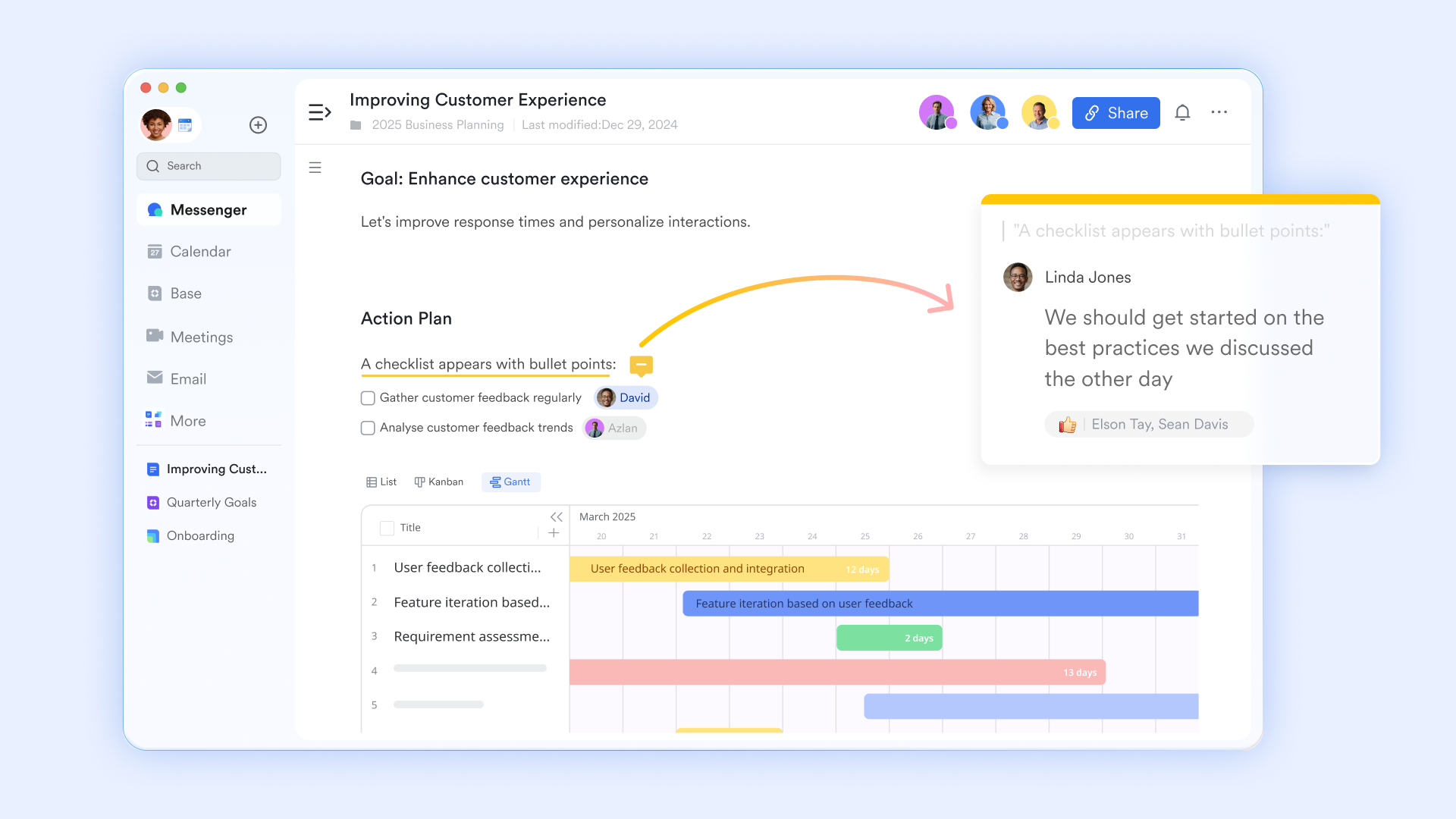
From recording to real-time execution: In Confluence, you record meeting minutes and product requirements. In Lark, you can create tasks and assign them to colleagues right next to the , or embed interactive data tables directly within a document. The document is no longer just the subject of discussion but becomes the interface for getting work done. Seamless context connection: Comments and @mentions in Confluence are asynchronous. In , an @mention inside a document instantly triggers a chat notification, and the recipient can jump to the exact context with one click. Discussions around a document flow naturally between group chats and document comments, ensuring ideas and feedback aren't lost in an inbox.
Turn knowledge retrieval from a "marathon" into a "sprint"
Confluence is often criticized for slow page loads and inaccurate search, hindering efficiency with users saying "opening a page feels like running a marathon." Lark is architected from the ground up to tackle these bottlenecks.
Faster loading and response: Lark's cloud document architecture optimizes the loading speed of large documents, avoiding long wait times for users. This protects the fluency of collaborative thinking instead of interrupting it with loading icons.
Accurate and efficient knowledge retrieval: Lark's smart search can understand the context of your query, delivering more precise results. You can search for information across all Lark apps (Docs, Messenger, Base) and filter results by author, or file type. This smart search lets you quickly find what you need without wasting time sifting through irrelevant results. This directly addresses the core pain point in Confluence where "inaccurate search results turn the file knowledge base into a maze." 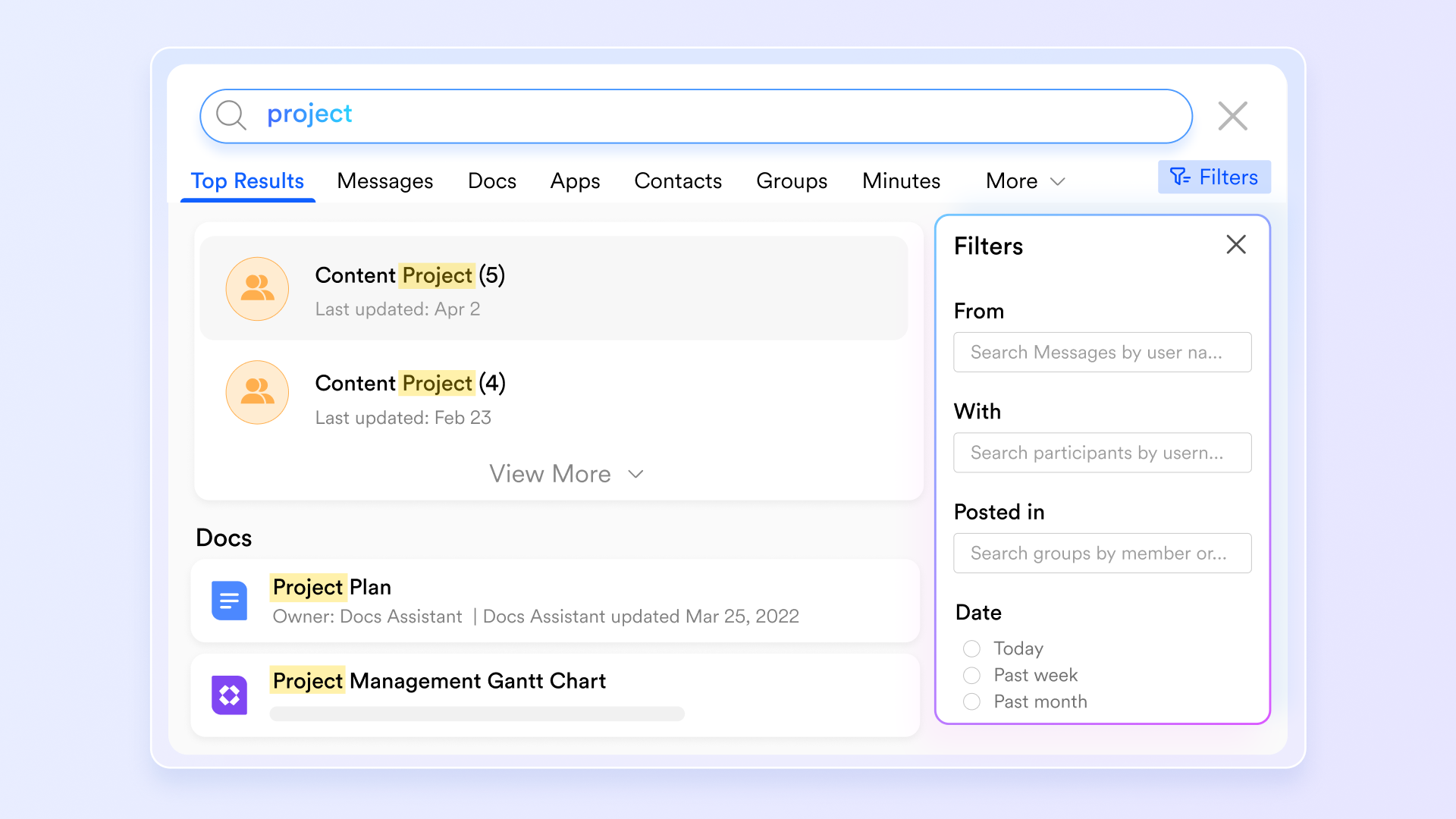
Go beyond tool integration to a natively unified workflow
Integration with tools like Jira is a classic strength of Confluence, but this is essentially stitching together separate products. Lark delivers a deeply unified experience native to one platform.
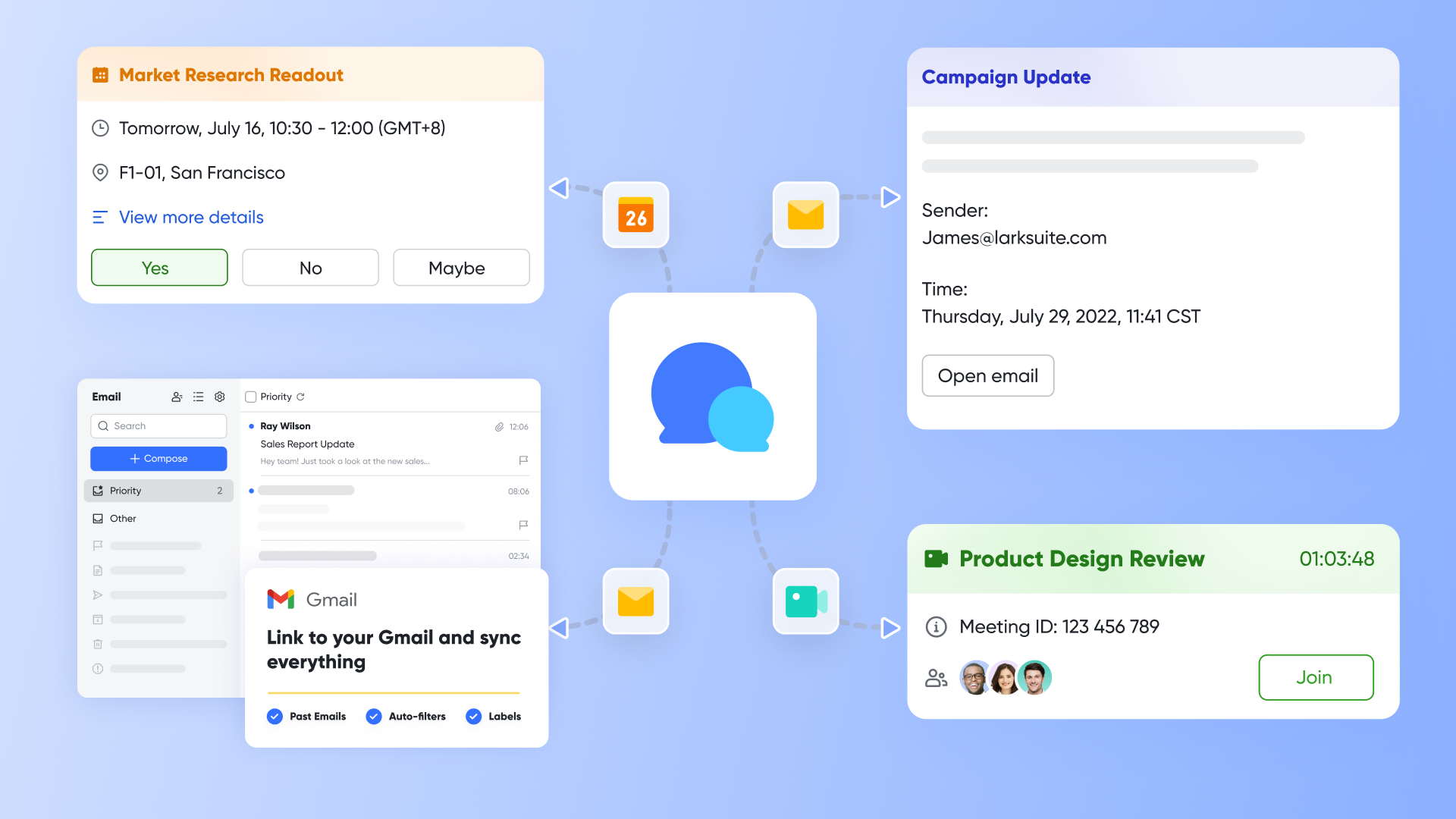
"Natural fusion" without complex integration: You don't need to configure complicated connectors. In Lark, project tasks (similar to Jira issues) can be directly linked to document paragraphs, and can be embedded into docs, and results can automatically update the status in a Base. This all works out of the box.
A unified information portal: Your team doesn't need to view docs in Confluence, communicate in Slack, and check tasks in Trello. A single Lark project group can aggregate all relevant chats, files, tasks, and schedules, providing a single source of truth. This greatly reduces cognitive load and the cost of context switching.
Upgrade from document management to project & goal management
Confluence's core function is document collaboration. Modern teams need to dynamically connect knowledge, goals, execution, and people.
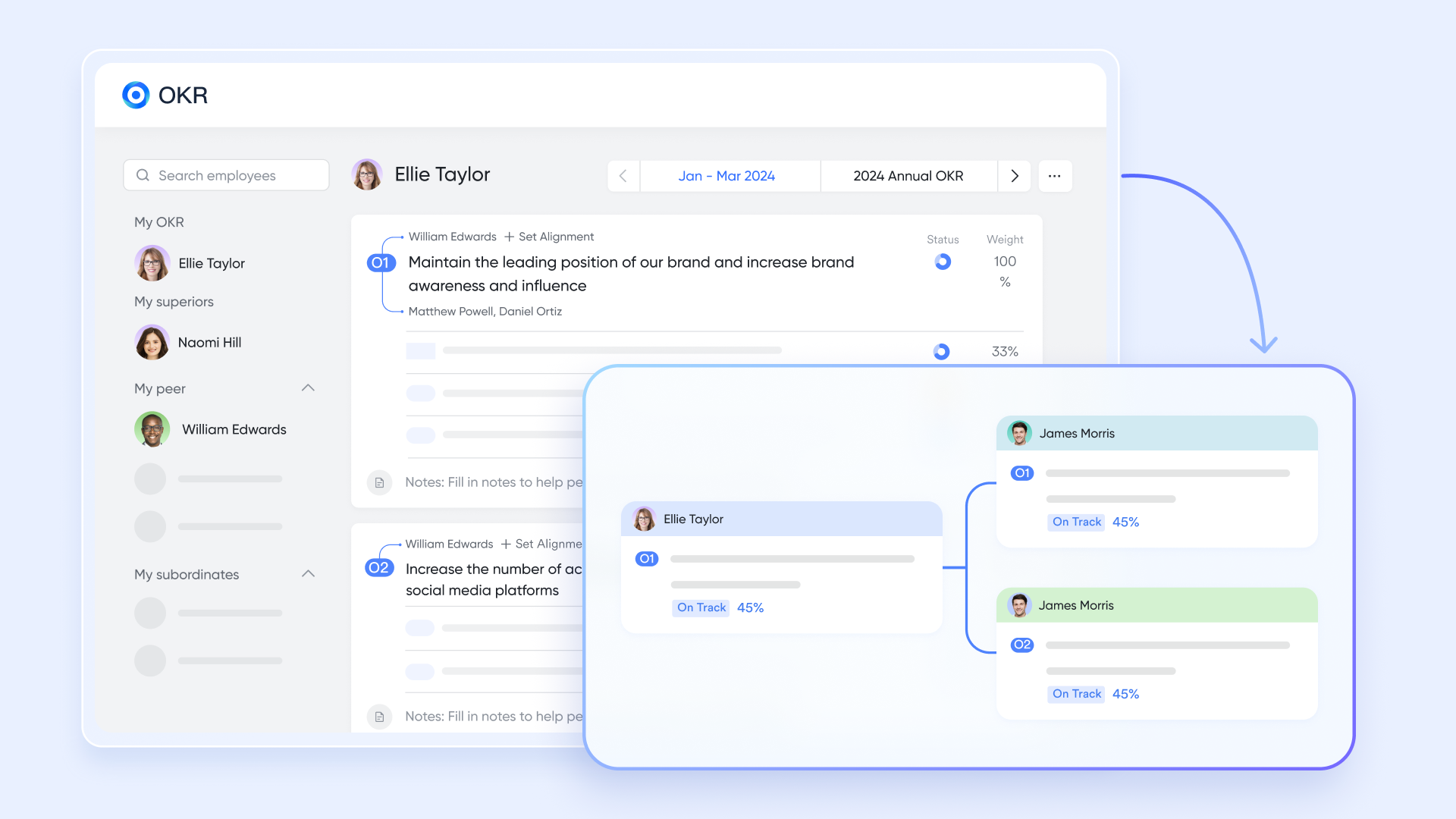
Directly connect goals to execution: allows teams to align the strategic goals written in documents directly with specific projects, tasks, and responsible persons. Progress is transparently tracked, ensuring all documentation and project work serves a unified direction.
Automated processes and bots: Using Lark's automated workflows, updates to the knowledge base (like the publication of a revised API document in ) can be automatically synced to relevant project groups and notified to all developers. This changes the "publish and forget" model common in Confluence, proactively pushing knowledge into execution scenarios.
In summary, choosing Lark over Confluence is not just about choosing a different documentation tool. It's about choosing a more fluid, unified, and action-oriented collaboration paradigm for your team. It solves Confluence's inherent pain points around performance, search, and workflow fragmentation, upgrading a "document"-centric system into an intelligent, "teamwork"-centric platform.
Mobile-friendly productivity
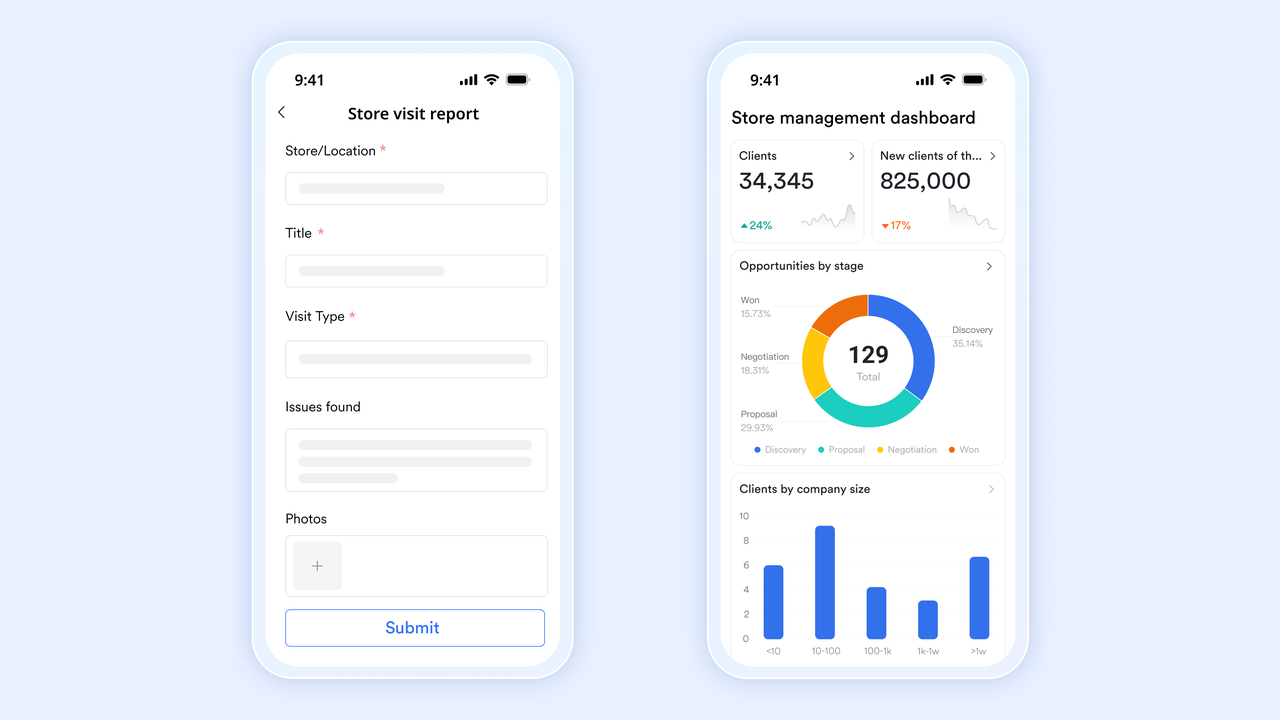
Confluence's mobile app provides access to most of its core features, but it often feels like a scaled-down version of the desktop experience. , on the other hand, was designed with a mobile-first approach, providing a seamless and intuitive user experience across all devices. You can access and edit documents, participate in group chats, and attend video meetings from your smartphone or tablet, without sacrificing functionality or usability. This is particularly valuable for remote teams or anyone who needs to stay productive on the go. Lark also has offline support, where you can access and edit documents without the internet, and sync when online again.
- Free plan: Includes 11 powerful products, supporting up to 20 users, 100 GB storage, 1,000 automation runs and unlimited AI translation in chats, docs and email.
- Basic plan: $6/user/month (billed annually) for up to 500 users. Includes everything in Starter plus unlimited message history, 5TB storage, 1,000 automation runs, and more. Some users may need to to purchase.
- Pro plans: $12/user/month, supporting up to 500 users. Includes unlimited message history, 50,000 automated Base workflow executions per month.
- Enterprise plan: for custom pricing. Supports unlimited users and includes even more automation runs and advanced security, compliance, and management features.
For small teams with simple communication needs

18 months message history
1000 Base automation runs/month
2000 rows per table in Base
Most POPULAR
For companies with comprehensive collaboration and management needs
Unlimited message history
500-participant video meetings
50k Base automation runs/month
20k rows per table in Base
For large companies with advanced security and organizational management needs
Get a personalized demo and pricing
Unlimited message history
500-participant video meetings
15 TB storage + 30 GB storage/user
500k Base automation runs/month
50k Base automation runs/month
Most POPULAR
For companies with comprehensive collaboration and management needs
Unlimited message history
500-participant video meetings
50k Base automation runs/month
20k rows per table in Base
Conclusion
Confluence is undoubtedly a powerful tool for creating a structured knowledge base, especially for teams deeply embedded in the Atlassian ecosystem. Its deep integration with Jira and its robust organization features make it a compelling choice for software development and technical documentation.
However, it's essential to weigh its strengths against its potential drawbacks. If you are looking for a platform that also empowers your team with flexible, all-in-one experience, it is time to consider . Its tightly unified communication, project management, and document collaboration tools provide a seamless experience. Take control of your knowledge base and boost your team's productivity today—give Lark a try and discover a better way to collaborate.
Take next steps for better knowledge management
FAQs
Is Confluence the best choice for all teams?
Confluence excels in structured knowledge management and integrates well with the Atlassian suite, making it a strong choice for software development teams. However, it's not a universal solution. Teams with different priorities might find that platforms like Lark better suit their needs. Consider your team's specific workflow before committing.
What are the main drawbacks of using Confluence?
Some common issues include a complex interface that can be overwhelming for new users. It also relies on integrations for communication and project management, which can add complexity. The administrative overhead, requiring technical expertise, can also be a drawback for some organizations.
Is Confluence expensive?
Confluence's per-user, per-month pricing model can become costly as your team grows. Add-ons and integrations can also contribute to the overall expense. Be sure to carefully evaluate your team's needs and compare Confluence's pricing with that of alternatives like Lark, which may offer more flexible or cost-effective plans.ations.
What kind of support is offered for Confluence users?
Atlassian provides online documentation, community forums, and direct support channels. However, response times can sometimes be slow, particularly for non-critical issues. For organizations that prioritize responsive support, alternatives like Lark, which is known for its commitment to customer satisfaction, may be a better fit.
Related reading


















