Modern projects involve dozens of parallel tasks, interdependent teams, and tight delivery windows. Without a structured scheduling approach, even small delays can cascade into missed deadlines and budget overruns. This is why timeline control has become a core competency for successful delivery teams.
Critical path scheduling provides a systematic method for identifying tasks that directly determine the completion date. By focusing attention on the most time-sensitive activities, teams gain clarity on where delays truly matter. As project environments become more dynamic, collaborative platforms like Lark are increasingly used to support critical path scheduling through real-time visibility and coordinated execution.
What is critical path scheduling?
Critical path scheduling is a used to identify the longest sequence of dependent tasks that determines the minimum time required to complete a project. This sequence is called the , and tasks on it have zero float, meaning any delay directly affects the project completion date. The method helps teams focus on the activities that truly control the schedule and avoid surprises late in execution.
The primary objective of the critical path method scheduling is to provide clear visibility into timing, dependencies, and flexibility. By distinguishing critical tasks from those with slack, teams can plan realistically and respond quickly to issues. This approach is especially valuable in complex initiatives where parallel activities and dependencies are common.
- Determine the shortest possible project duration: Critical path method scheduling calculates the minimum time required to complete all activities based on dependencies and durations. This provides a realistic baseline schedule rather than an optimistic guess. Teams can with greater confidence. Accurate duration planning reduces last-minute schedule compression.
- Identify tasks that cannot be delayed: Tasks on the critical path have zero slack and must be completed exactly as planned. Any delay in these activities directly affects the project's finish date. Identifying these tasks allows managers to prioritize monitoring and intervention. This focus reduces the risk of hidden schedule threats.
- Allocate resources more effectively: Scheduling critical path analysis highlights where float exists in non-critical tasks. Managers can temporarily reassign resources from tasks with slack to critical activities when needed. This flexibility improves overall resource utilization. It also helps teams respond quickly to unexpected constraints.
- Monitor and control progress through dependencies: Critical path scheduling emphasizes task relationships rather than isolated activities. By tracking dependencies, managers can see how delays propagate through the schedule. This visibility enables proactive corrective action. It also supports more accurate progress reporting.
Understanding the critical path diagram and scheduling methods
A critical path diagram is a powerful visual tool in project management that maps out all the project activities, their dependencies, and the sequence in which they must be completed to achieve project completion. This diagram highlights the critical path—the longest sequence of dependent tasks that determines the overall project duration. By laying out each activity and its relationship to others, the critical path diagram provides project managers with a clear overview of the project schedule.
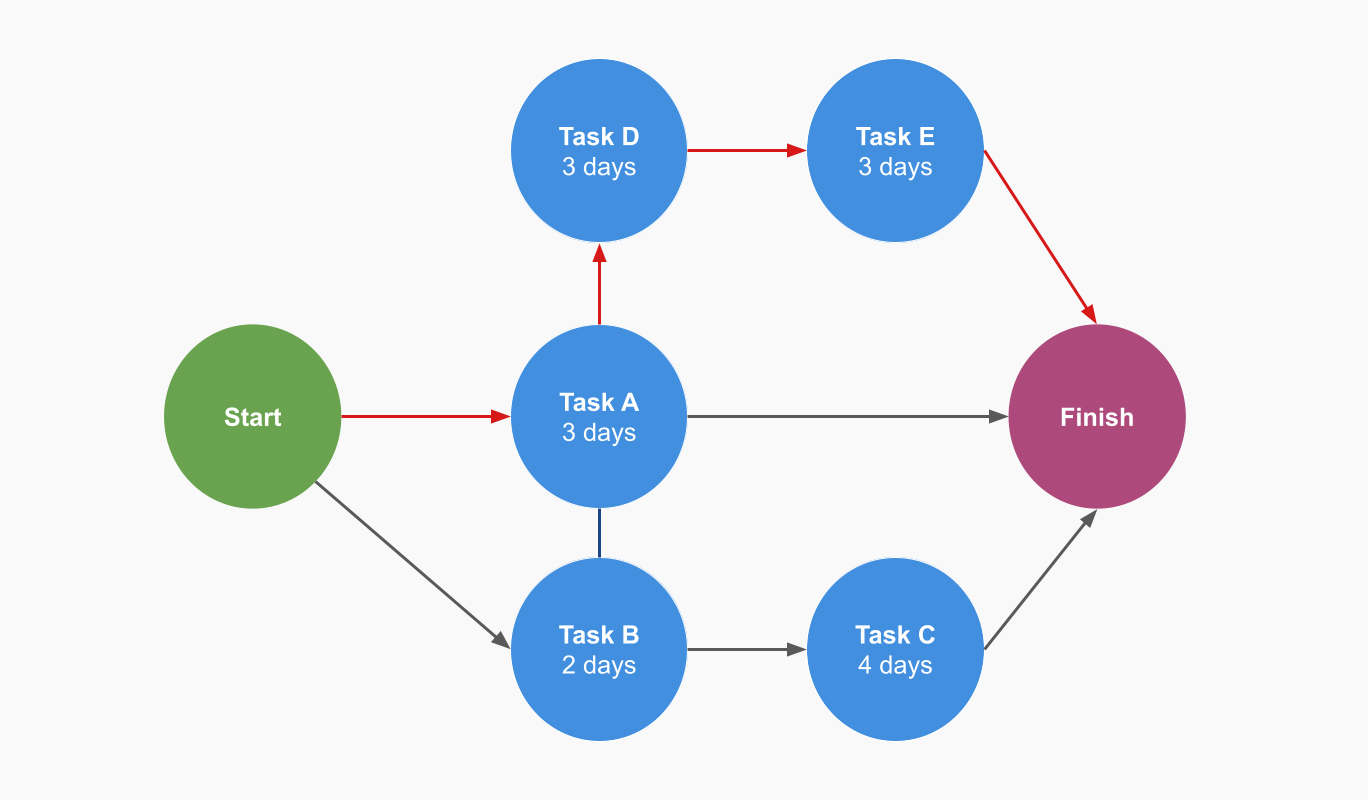
Image source: planyway.com
The diagram not only shows which tasks must be finished before others can begin, but also reveals which activities can be performed in parallel, helping teams identify opportunities to optimize workflow. Many project managers choose to visualize these timelines by using that integrate Gantt charts into their planning process, as they provide a more linear view of the same data. Critical tasks—those that fall on the critical path—are easily spotted, allowing project managers to focus on the activities that have the greatest impact on the project's end date.
By analyzing the critical path diagram, project managers can quickly assess the impact of potential delays, understand where schedule flexibility exists, and make informed decisions to keep the project on track. This is often part of a broader strategy for , ensuring that no bottleneck in one department stalls the entire organization. This visual representation is especially valuable for communicating the project's structure and progress to stakeholders, ensuring everyone understands the key milestones and dependencies.
To better understand the value of critical path diagrams, it helps to compare them with simpler scheduling approaches. While both methods arrange tasks in sequence, they differ greatly in depth and strategic value.
Critical path scheduling method vs simple task sequencing
- Simple task sequencing places activities in basic chronological order, with one task following another. It does not account for parallel work or analyze which tasks truly control the completion date. This approach is only suitable for small, low-complexity with minimal dependencies.
- In contrast, the critical path scheduling method evaluates all possible paths through a project, considers simultaneous tasks, and mathematically identifies the longest path. It highlights activities that directly affect project deadlines, making it a powerful tool for and resource optimization. This method is designed for complex projects with multiple interdependencies and helps teams determine the most efficient project timeline.
Ultimately, understanding the critical path diagram is essential for effective project management, as it provides a roadmap of critical activities and their interconnections. When combined with proper , it enables teams to deliver projects on time and within scope without overextending their personnel.
Plan schedules with clarity from day one
How to find a project's critical path
Finding a project's critical path is a structured scheduling exercise that converts a complex list of activities into a clear execution roadmap. Rather than treating all tasks as equally important, this process identifies the exact sequence of dependent activities that determines the shortest possible completion time. Understanding this path allows teams to focus attention where delays truly matter and , resources, and risk with far greater precision.
Step 1: Document all project activities
The foundation of critical path scheduling is a complete and accurate activity list. Every task required to deliver the outcome must be documented before any calculations begin. Missing even one activity can distort the schedule and produce a misleading critical path.
Each activity should be defined in a consistent, deliverable-oriented way so it can be estimated and tracked reliably. Vague task definitions lead to inaccurate durations and unclear dependencies later in the process.
- Activity name: Use clear, outcome-based descriptions that represent completed work.
- Estimated duration: Assign realistic time estimates using historical data or expert input.
- Dependencies: Identify immediate predecessor tasks that control when work can begin.
Step 2: Build a network diagram
Once activities are they must be organized into a dependency network. This diagram focuses on logical relationships rather than calendar dates, showing how work flows from start to finish.
By visualizing dependencies, teams can immediately see which activities can happen in parallel and which must follow a strict order. This clarity is critical for identifying bottlenecks early.
- Activity on Node structure: Each task is represented as a node.
- Directional links: Arrows show task dependencies and sequencing logic.
- Parallel paths: Multiple execution streams become visible at once.
Step 3: Perform the "Forward pass"
The forward pass calculates the earliest possible start and finish times for every activity in the network. This step logically progresses from the to its end, ensuring that dependencies are respected.
The result of the forward pass is the minimum duration required to complete the entire initiative, assuming no delays occur on critical activities.
- Earliest Start (ES): Determined by the finish time of predecessor tasks.
- Earliest Finish (EF): Calculated as ES plus task duration.
- Minimum completion time: Defined by the EF of the final activity.
Step 4: Perform the "Backward pass"
After establishing the earliest timeline, the backward pass works from the end of the project back to the beginning. This step determines how late activities can occur without affecting the completion date.
The backward pass introduces flexibility analysis and helps distinguish between critical and non-critical work.
- Latest Finish (LF): The latest allowable completion time for each task.
- Latest Start (LS): Calculated as LF minus task duration.
- Schedule tolerance: Highlights where timing adjustments are possible.
Step 5: Calculate float and identify the path
Float represents the amount of scheduling flexibility available for each task. By comparing early and late start times, teams can determine which activities have no room for delay.
The sequence of tasks with zero float forms the critical path. These activities directly control the completion date and require the highest level of monitoring.
- Float calculation: Float equals LS minus ES.
- Zero float activities: Tasks that define the critical path.
- Direct impact: Any delay on these tasks delays the entire schedule.
Critical path scheduling example in a real project
A practical critical path scheduling example helps clarify how theory translates into execution. Consider a medium-scale initiative such as launching a new corporate website, where in parallel under tight deadlines. Without identifying the critical path, attention may be spread evenly across tasks, even though only a few activities actually determine the final launch date. This example shows how critical path scheduling brings focus, predictability, and control.
The activity list & dependencies
The first step is to document all activities, their duration, and their dependencies. This creates the foundation for the critical path method scheduling and ensures that no required work is overlooked.
Identifying the parallel paths
With dependencies defined, the schedule reveals multiple paths leading to frontend development. Each path represents a different stream of work that converges later in the timeline.
- Content-driven path: A to B to E to F to G totals thirty-three days and represents the longest sequence.
- Design-driven path: A to C to E to F to G totals thirty days and includes schedule flexibility.
- IT-driven path: D to E to F to G totals twenty-two days and has significant slack.
This comparison highlights how the critical path analysis goes beyond simple sequencing by evaluating all possible paths.
Calculating the critical path
In this critical path scheduling example, the longest sequence of dependent activities is Path 1, with a total duration of thirty-three days. This sequence defines the critical path and determines the earliest possible completion date. Any delay in this path directly extends the overall timeline. Other paths, such as the IT setup and visual design sequences, have float and therefore offer limited flexibility. For example, the design-driven path totals thirty days, giving the design team a three-day buffer without affecting delivery. If visual design overruns by one day, the schedule remains intact. However, if copywriting on the critical path exceeds its estimate, even by a single day, the entire website launch is delayed by the same amount.
Real-world management via the critical path
Once the path is identified, the project manager uses it to make strategic decisions:
- Resource leveling: If the copywriters are overwhelmed, the manager might move a junior designer (who has 3 days of float) to help format the content, ensuring Activity B stays on schedule.
- Crashing the Schedule: If the CEO demands the site be live in 30 days, the manager knows they must shorten a task on the critical path (like hiring more writers for Activity B) rather than speeding up the IT setup, which wouldn't change the finish date.
Automation in practice
In real environments, critical path scheduling calculations are rarely performed manually. handle dependency logic and recalculation automatically. When a task duration changes, the system updates the schedule and highlights new risks instantly. Platforms like Lark support this by linking tasks visually in a Gantt view, recalculating the critical path in real time, and signaling when previously non-critical work becomes schedule-defining. This automation ensures that critical path scheduling remains accurate throughout execution, not just during initial planning.
Turn your critical path into actionable workflows
Action time: Practice the critical path in real projects with Lark
Critical path scheduling only delivers value when it stays accurate as conditions change. Static plans break down once tasks slip, dependencies shift, or resources are reallocated. To manage this complexity, teams need a system that continuously recalculates dependencies, highlights risks, and surfaces issues the moment they appear. supports critical path scheduling in practice by connecting planning logic, real-time execution updates, and automated alerts in a single workspace. This is achieved by utilizing that keep all departments aligned.
Dynamic Gantt view with dependency linking
With Lark Tasks, you can manage the critical paths through the by enabling the "highlight critical path" toggle in settings, which visually identifies the longest sequence of dependent tasks essential to the project's success. This function relies on (established via drag-and-drop or the "blocking/blocked by" fields) and milestones to map out the project's backbone. To maintain the integrity of this path during schedule shifts, the dependency management tool allows you to choose between "maintaining" or "consuming" buffers, ensuring that changes automatically update the timelines of all subsequent tasks in the chain. 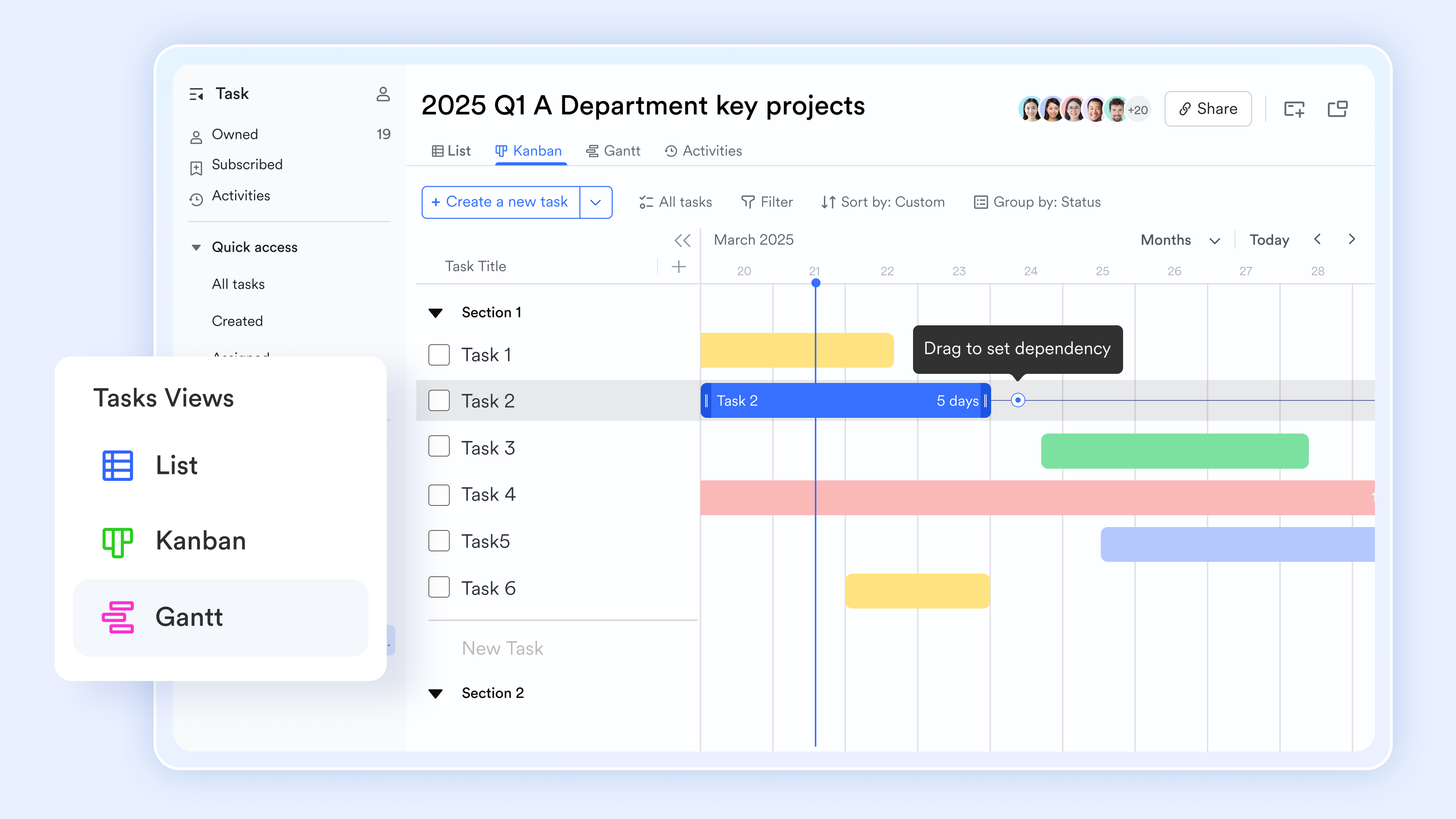
Automated "Float" logic via advanced formulas
In , formulas help find the float in a critical path by calculating the "wiggle room" between a task's early and late schedules. By using the "DATEDIF" function, you can determine the exact number of days between the latest possible finish and the earliest possible finish to identify total float. More advanced logic utilizes "NETWORKDAYS" to ensure slack calculations only include working days, while IF or IFS functions can be applied to automatically categorize tasks as "critical" if their float reaches zero. For reminders, you can then apply conditional formatting so that any task with "0 Float" turns bright red. 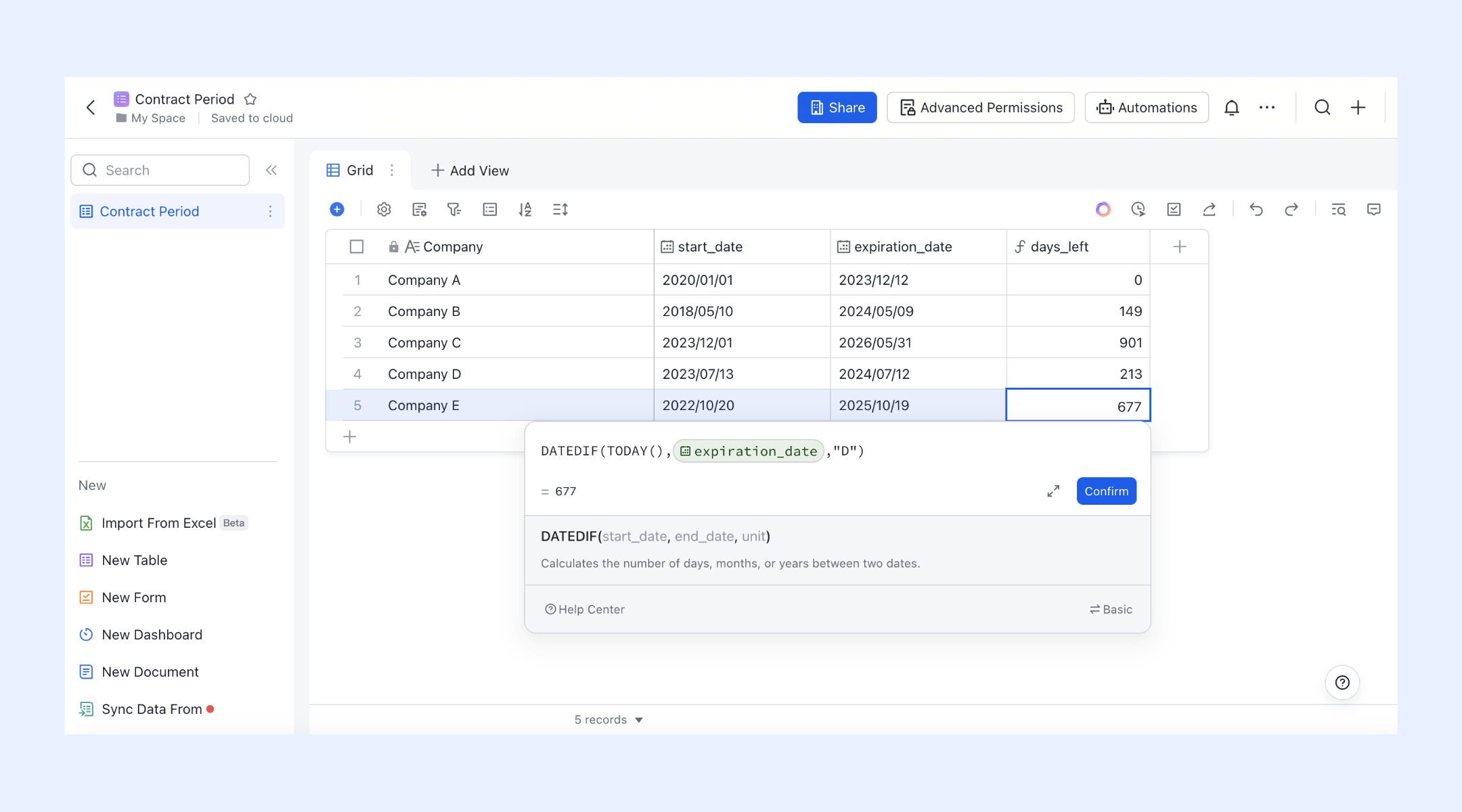
Base sandbox for "What-If" critical path testing
Before committing to a major schedule change, project managers can use the Lark Base sandbox. This isolated environment allows you to test how adding a new requirement or shifting a resource will impact the critical path. You can simulate a "crashing" scenario (adding resources to shorten durations) to see if it successfully pulls in the project deadline before applying the changes to the live production board. 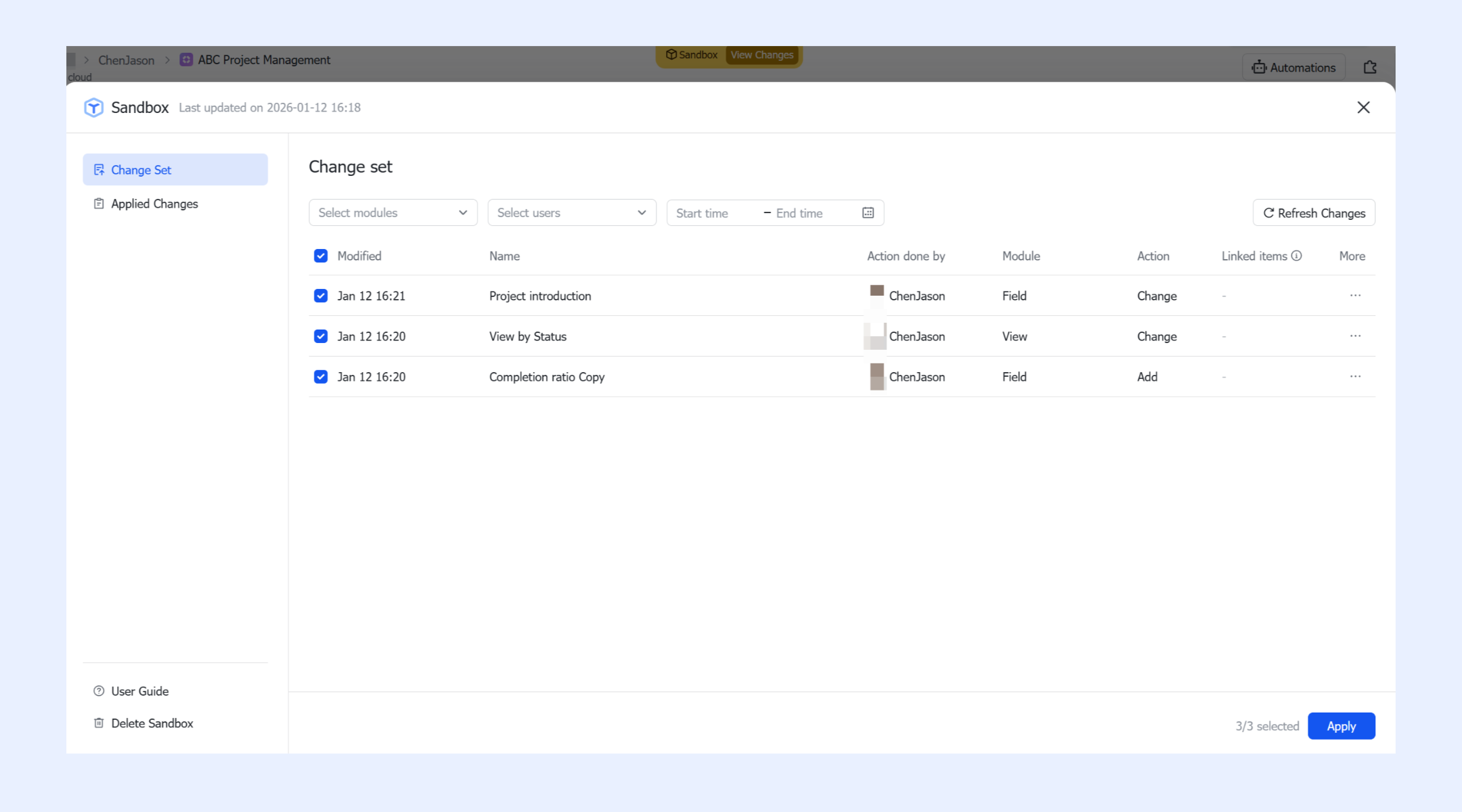
Automated workflows for overdue critical tasks
In Lark Base, the automation feature helps practice critical path management with customized workflows. With the "when a record updates" trigger, you can set up workflows that instantly "send a Lark message" to task owners if a task on the critical path is delayed, preventing the "domino effect" on subsequent dependencies. Furthermore, the "create tasks" or "modify records" actions can be used to automatically adjust downstream deadlines or generate follow-up reminders when a predecessor is completed. 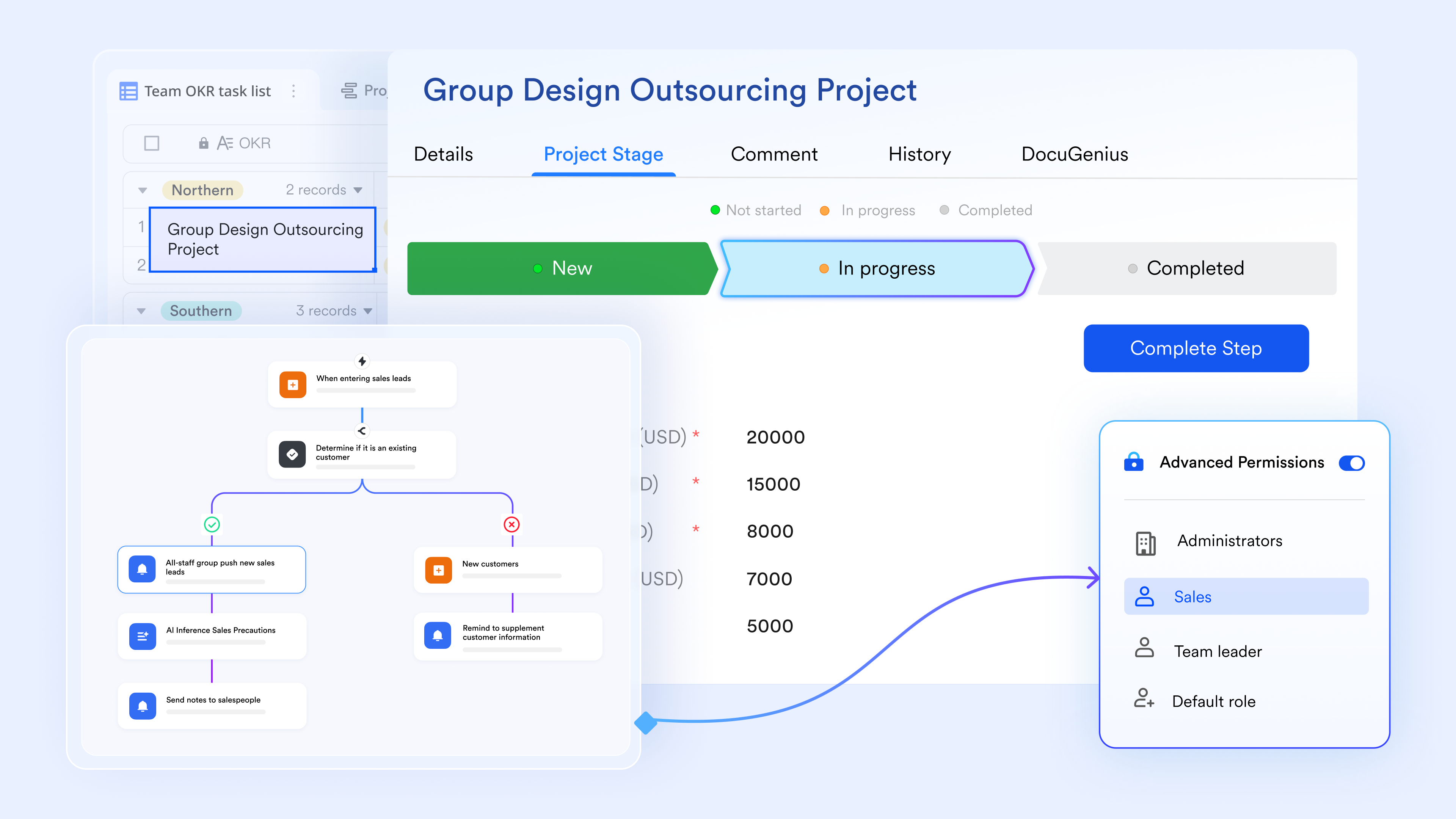
:
- Starter plan: Free forever plan that includes 11 powerful tools for up to 20 users. It also comes with 100GB of storage, 1000 automation runs, AI translations, and more.
- Pro plan: $12/user/month (billed annually) for up to 500 users. It includes everything in Starter plus group calling for up to 500 attendees, 15TB of storage, 50,000 automation runs, and more.
- Enterprise plan: for custom pricing. Supports unlimited users and includes even more automation runs and advanced security, compliance, and management features.
For small teams with simple communication needs

18 months message history
1000 Base automation runs/month
2000 rows per table in Base
Most POPULAR
For companies with comprehensive collaboration and management needs
Unlimited message history
500-participant video meetings
50k Base automation runs/month
20k rows per table in Base
For large companies with advanced security and organizational management needs
Get a personalized demo and pricing
Unlimited message history
500-participant video meetings
15 TB storage + 30 GB storage/user
500k Base automation runs/month
50k Base automation runs/month
Most POPULAR
For companies with comprehensive collaboration and management needs
Unlimited message history
500-participant video meetings
50k Base automation runs/month
20k rows per table in Base
Critical path construction scheduling use cases
In construction, schedules are directly tied to cost, safety, and contractual risk. A single missed dependency can cascade into weeks of delay, idle crews, and liquidated damages. This is why critical path construction scheduling is not optional but foundational. By identifying tasks with zero float, teams can focus attention on the activities that truly determine the finish date and protect progress from on-site uncertainty. Below are four that show how the critical path method for project scheduling is applied in construction environments.
Use case 1: Foundation and structural integrity
In most residential and , early structural work almost always sits on the critical path. Substructure activities must be completed in a strict sequence before vertical construction can begin.
- The scenario: Framing cannot start until the foundation is poured, and the foundation cannot be poured until soil tests, inspections, and underground rough-ins are approved.
- The use case: With critical path construction scheduling, a two-day delay in soil inspection is immediately visible as a schedule threat. That delay halts concrete placement, which then delays framing and shifts the entire completion date. By tracking inspection approvals as critical tasks, managers can intervene early and eliminate idle time across dependent trades.
Use case 2: Specialized long-lead procurement
Many modern construction delays are driven by materials rather than labor. Equipment with long manufacturing or delivery cycles often defines the critical path long before installation begins.
- The scenario: Custom HVAC systems, generators, or medical equipment may require months of lead time before arriving on site.
- The use case: The critical path method for highlights procurement activities such as schedule drivers, not administrative tasks. If ordering is delayed, interior finishing work depends on climate control stalls, even if the building shell is complete. Linking delivery dates to the construction schedule creates early warnings that allow corrective action before the delay becomes irreversible.
Use case 3: Integrated MEP (Mechanical, Electrical, Plumbing) coordination
Mechanical, electrical, and plumbing work is one of the most complex coordination challenges in construction. These systems often share the same physical space and must be installed in a precise order.
- The scenario: Plumbing, electrical, and fire protection must be completed before drywall can close walls, and drywall is frequently a critical path task.
- The use case: Critical path construction scheduling ensures that if one trade falls behind, others are redirected to non-critical areas to avoid labor waste. Real-time updates from the field allow downstream trades to mobilize exactly when their critical window opens, keeping momentum without overlap or rework.
Use case 4: Weather-dependent exterior envelope
Environmental conditions often define the schedule more than productivity, especially in regions with extreme weather patterns.
- The scenario: Roofing, windows, and exterior walls must be completed to dry in the building before interior finishes can begin.
- The use case: Using critical path , the dry-in milestone is identified as a primary schedule risk. If forecasts indicate severe weather, managers can justify overtime or additional crews for roofing because the cost of acceleration is far lower than a month-long interior delay. Knowing the task is on the critical path makes these decisions data-driven rather than reactive.
See schedule risks before they escalate
Best practices for maintaining an accurate critical path
The critical path scheduling method only remains reliable when it is actively maintained throughout execution. As tasks progress, dependencies shift, and conditions change, the critical path can move without warning. Treating it as a living control mechanism rather than a one-time calculation ensures schedules remain realistic and actionable.
- Define scope accurately: An accurate critical path starts with a clear and complete scope definition. If the work breakdown structure is incomplete or vague, the resulting schedule will be flawed from the start. Ensuring all deliverables and supporting tasks are captured prevents hidden work from distorting the critical path later.
- Validate dependencies regularly: Dependencies should be reviewed frequently to confirm they still reflect reality. Tasks initially assumed to be sequential may later run in parallel, while others may become constrained. Adjusting these relationships keeps the critical path aligned with actual execution logic.
- Monitor progress relentlessly: The critical path can shift as soon as a task finishes early or slips behind schedule. Regular progress updates are essential to compare planned versus actual performance. Real-time tracking tools help surface these shifts before they escalate into .
- Communicate critical path status clearly: Teams working on critical tasks must understand the importance of their work and the impact of delays. Transparent communication ensures accountability and prioritization remain aligned with schedule reality. Visibility into critical path status reduces surprises during reviews.
- Re-evaluate periodically: A critical path should never be calculated once and ignored. , scope changes, or unexpected disruptions should always trigger a re-evaluation. This discipline keeps the schedule credible as conditions evolve.
Conclusion
Critical path scheduling is not simply a planning exercise but a disciplined way of thinking about time, risk, and priorities. By identifying the exact sequence of activities that determines completion, teams gain clarity on where focus truly matters. This visibility supports better decisions, tighter coordination, and more effective use of resources, especially in environments where delays carry real financial and operational consequences.
As schedules grow more complex, static plans quickly lose relevance. Maintaining an accurate critical path requires continuous updates, clear communication, and alignment between planning and execution. Over time, teams increasingly rely on modern to keep this process dynamic and transparent. Solutions like help teams move from calculating the critical path once to actively managing it throughout execution, ensuring schedules remain realistic and actionable.
Keep timelines aligned and under control
FAQs
What is a critical path in a schedule?
The critical path is the longest sequence of dependent tasks that determines the minimum completion time. Activities on this path have zero float, meaning any delay directly impacts the finish date. Understanding this path helps teams prioritize the work that truly controls delivery. Tools like Lark make this visibility easier to maintain as schedules change.
Is critical path analysis sequencing or scheduling?
Critical path analysis is primarily a scheduling technique, not just simple sequencing. It evaluates task durations and dependencies to calculate timing flexibility and risk. Sequencing alone shows order, while critical path scheduling reveals impact. such as Lark support this deeper level of analysis.
Can a project have more than one critical path?
Yes, a schedule can have multiple critical paths if several task sequences share the same longest duration. This situation increases risk because delays on any of these paths affect completion. Continuous monitoring becomes essential in such cases. Modern tools like Lark help track multiple critical paths simultaneously.
What happens when a non-critical task becomes critical?
When a float is consumed due to delays, a previously non-critical task can move onto the . This shift changes priorities and requires immediate attention. Regular updates ensure these changes are identified early. Platforms like Lark automatically surface such shifts as work progresses.
What is the difference between the critical path and the longest path?
The refers to the total duration through a network of tasks, while the critical path is the longest path with zero float. Not all long paths are critical if they retain slack. Distinguishing between the two is essential for effective schedule control. Scheduling tools like Lark help clarify this distinction in real time.
Related reading





























