Scheduling meetings should be simple. Yet for many individuals and teams, it becomes surprisingly complex once calendars, time zones, clients, payments, and internal coordination are involved. Doodle pricing often looks straightforward at first, especially for basic scheduling needs using polls and booking pages that reduce email back-and-forth.
However, as teams grow and scheduling becomes part of broader workflows—such as sales, hiring, project coordination, or client management—pricing tiers and feature limits start to matter. Users increasingly question upgrade triggers, per-user costs, and long-term scalability when evaluating Doodle in 2026 and beyond. This guide breaks down Doodle's plans, real costs, and limitations, and briefly highlights alternatives like Lark for teams needing more than scheduling alone.
Improve coordination across calendars and time zones
What is Doodle and how its pricing model works
Doodle is an designed to simplify finding meeting times without endless back-and-forth emails. Users can create polls where participants vote on available time slots, or share personal booking pages that let others reserve open times directly. It integrates with major calendars (like Google Calendar, Outlook, and iCal) so availability stays up to date and double bookings are avoided.
Doodle's pricing model is subscription-based with tiered plans. A free, forever tier offers unlimited group polls, 1:1 meetings, one booking page, and integrations with conferencing tools. Paid tiers — such as Pro and Team — are billed per user per month (annually) and unlock additional features like unlimited booking pages, , admin controls, and enhanced calendar integrations. Enterprise pricing is custom and includes organization-level features such as single sign-on and priority support. Feature limits and per-user billing are key factors affecting long-term costs and scalability.
Doodle pricing explained: What features are included in free and paid tiers
Doodle's free tier offers unlimited group polls, one booking page, 1:1 scheduling, basic calendar integrations, and standard reminders at no cost. Pro adds unlimited booking pages, ad-free use, custom branding, advanced , and broader conferencing support. The Team plan builds on this with admin controls, roles & permissions, co-hosting capabilities, and activity reporting. Enterprise includes all Team features plus priority support, single sign-on (SSO), onboarding services, and higher availability guarantees for large organizations.
Information source: doodle.com
Update time: 2025-12-20
Note: Pricing and plan details reflect publicly available data as of the update date and may vary based on region, billing cycle, and number of agents.
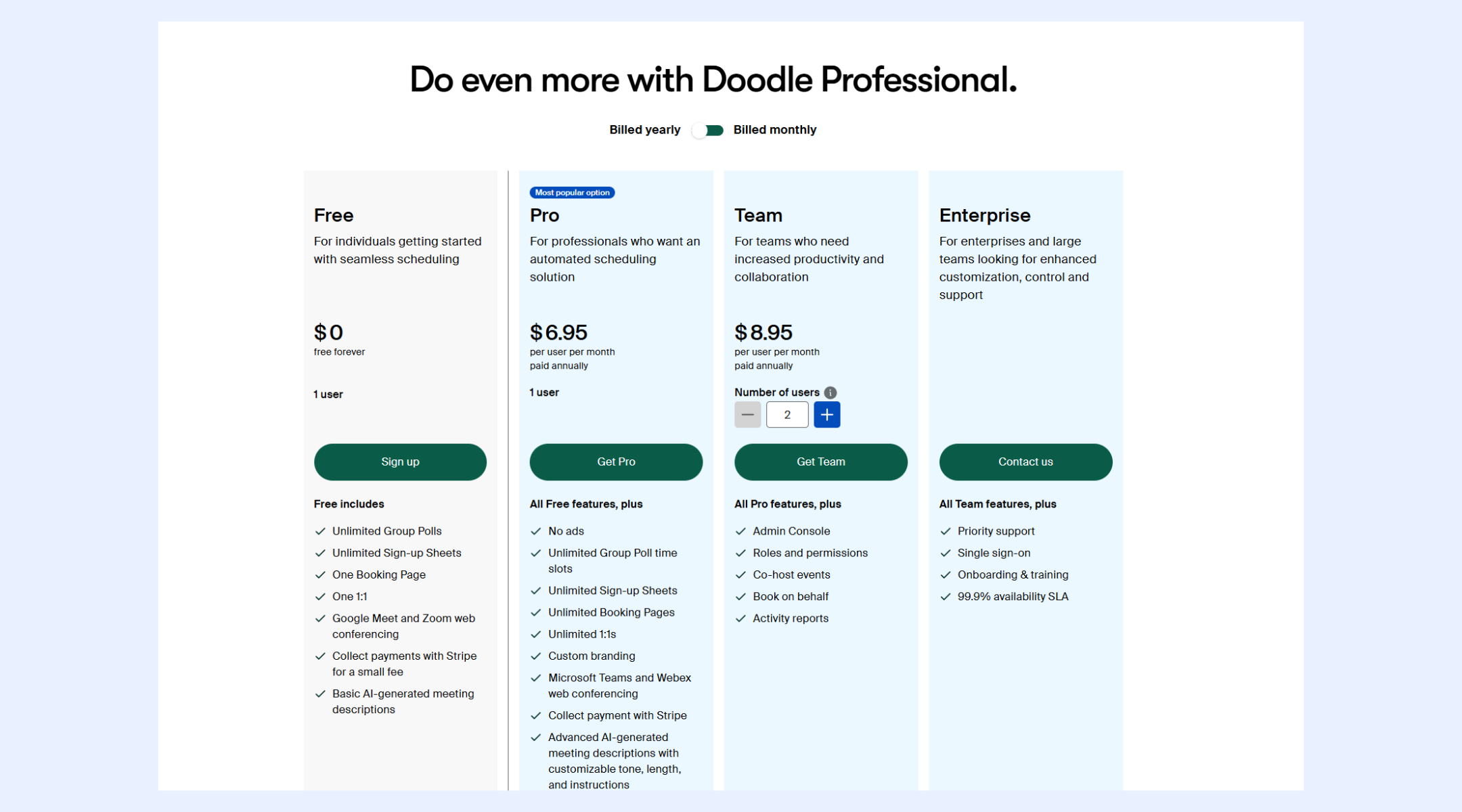
Image source: doodle.com
Free Plan ($0)
The Free plan is designed for individuals who need basic scheduling without any upfront cost. It supports through polls and booking links synced to personal calendars. This plan works best for personal use or very light professional scheduling needs.
Key features:
- Unlimited group polls: Users can create as many polls as needed to collect availability from multiple participants. This helps identify suitable meeting times without long email chains. However, poll customization and control remain limited compared to paid tiers.
- One booking page: The plan includes a single booking page that allows others to schedule meetings directly. Availability is automatically pulled from the connected calendar to avoid conflicts. Multiple booking types or advanced rules are not supported.
- Basic AI-generated meeting descriptions: Doodle generates simple meeting descriptions automatically when creating events. This saves some setup time for users. Custom tone, structure, or instructions are not available at this level.
Pro Plan ($6.95 per user/month, billed annually)
The Pro plan is aimed at professionals who rely on scheduling regularly for client or stakeholder interactions. It removes ads and unlocks advanced scheduling flexibility. This plan is still limited to one user but offers significantly more control.
Key features:
- Unlimited booking pages: Users can create multiple booking pages for different meeting types. This is useful for separating client calls, , or paid sessions. Each page can have its own availability rules.
- Custom branding: Pro users can add logos, brand colors, and personalized elements to booking pages. This creates a more professional, client-facing scheduling experience. Branding helps maintain consistency across external interactions.
- Advanced AI meeting descriptions: AI tools allow customization of tone, length, and instructions. This improves clarity and professionalism in invites. It is beneficial for client calls or structured sessions.
Team Plan ($8.95 per user/month, billed annually)
The Team plan is built for organizations that need shared scheduling and centralized management. It introduces collaboration features and administrative oversight. This plan requires a minimum number of users and is designed for .
Key features:
- Admin console: Admins can manage users, settings, and access from a central dashboard. This helps maintain consistency across team scheduling practices. It also simplifies onboarding and offboarding processes.
- Roles and permissions: Different permission levels can be assigned to team members. This ensures control over who can create, manage, or modify scheduling assets. It reduces the risk of accidental changes in shared environments.
- Book on behalf of others: Team members can schedule meetings for colleagues without manual coordination. This is useful for assistants, sales coordinators, or shared inbox workflows. It improves efficiency in team-based scheduling scenarios.
Enterprise Plan (Custom pricing)
The Enterprise plan is designed for large organizations with advanced security and support requirements. Pricing is customized based on scale and needs. This tier focuses on reliability, compliance, and enterprise-grade controls.
Key features:
- Single sign-on (SSO): SSO allows employees to log in using corporate identity systems. This improves security and simplifies access management. It also reduces password-related risks for large teams.
- Priority support and onboarding: Enterprise customers receive faster support response times and guided onboarding. Dedicated assistance helps teams adopt the platform efficiently. Training resources are included to support large rollouts.
- 99.9% availability SLA: The plan includes a service-level agreement guaranteeing high uptime. This is critical for organizations relying on . It ensures reliability for mission-critical use cases.
Hidden costs and limitations to consider before upgrading
As teams grow and scheduling needs become more complex, Doodle's pricing structure can introduce expenses that are not immediately obvious. Understanding these limitations early helps avoid unexpected upgrades and budget strain.
- Per-user pricing impacts scale: Doodle charges per user for paid plans, which can quickly increase costs as more team members are added. What starts as an can become expensive when scheduling is needed across departments.
- Feature restrictions that push upgrades: Many functional capabilities, such as unlimited booking pages, branding, and admin controls, are locked behind higher tiers. Teams often upgrade not for new value, but to remove limitations that disrupt everyday workflows.
- When Doodle becomes too expensive for growing teams: As coordination needs expand, teams may need to switch to Pro or Team plans for multiple users. At that point, Doodle can cost more than that include scheduling as part of a larger platform.
What real users like and dislike about Doodle pricing
User feedback on Doodle pricing highlights a mix of simplicity and frustration. While many appreciate its ease of use, others question whether the cost aligns with as needs expand.
- Common positives mentioned in reviews: Users frequently praise Doodle's clear pricing tiers and the availability of a free plan for basic scheduling. The straightforward setup and reliable poll-based scheduling are often seen as fair value for individuals.
- Recurring complaints about value for money: Many reviewers note that essential features are limited to higher-tier plans, leading to rapidly increasing costs. Teams often feel forced to upgrade to remove limitations rather than to gain meaningful new capabilities.
- Usability vs pricing trade-offs highlighted by users: Doodle is widely considered easy to use for . However, users report that its limited collaboration depth makes pricing harder to justify as workflows become more complex.
When Doodle stops making sense
Doodle works well for straightforward scheduling, but its value decreases as organizational needs become more complex. At a certain point, teams outgrow what a scheduling-only tool can support.
- Scaling issues for cross-functional teams: As start relying on shared scheduling, per-user pricing, and limited team controls, this creates friction. Coordinating across sales, hiring, and operations becomes harder without unified visibility.
- Limited workflow and collaboration depth: Doodle focuses narrowly on scheduling and lacks , documents, or communication. Teams often need additional tools to manage follow-ups, decisions, and ownership after meetings.
- Why scheduling-only tools can become restrictive: When scheduling is just one step in a broader process, standalone tools create silos. Over time, this fragmentation reduces efficiency and makes scheduling feel disconnected from real work.
As teams move beyond basic scheduling, the need for tools that connect meetings with real work becomes more apparent. Scheduling alone cannot support collaboration, follow-ups, or cross-team coordination at scale. This is where many organizations begin evaluating platforms that combine scheduling, communication, and execution. Lark enters this space by addressing scheduling as part of a broader workspace rather than a standalone function.
Make scheduling easier for clients and stakeholders
Why Lark is a smarter alternative to Doodle for modern teams
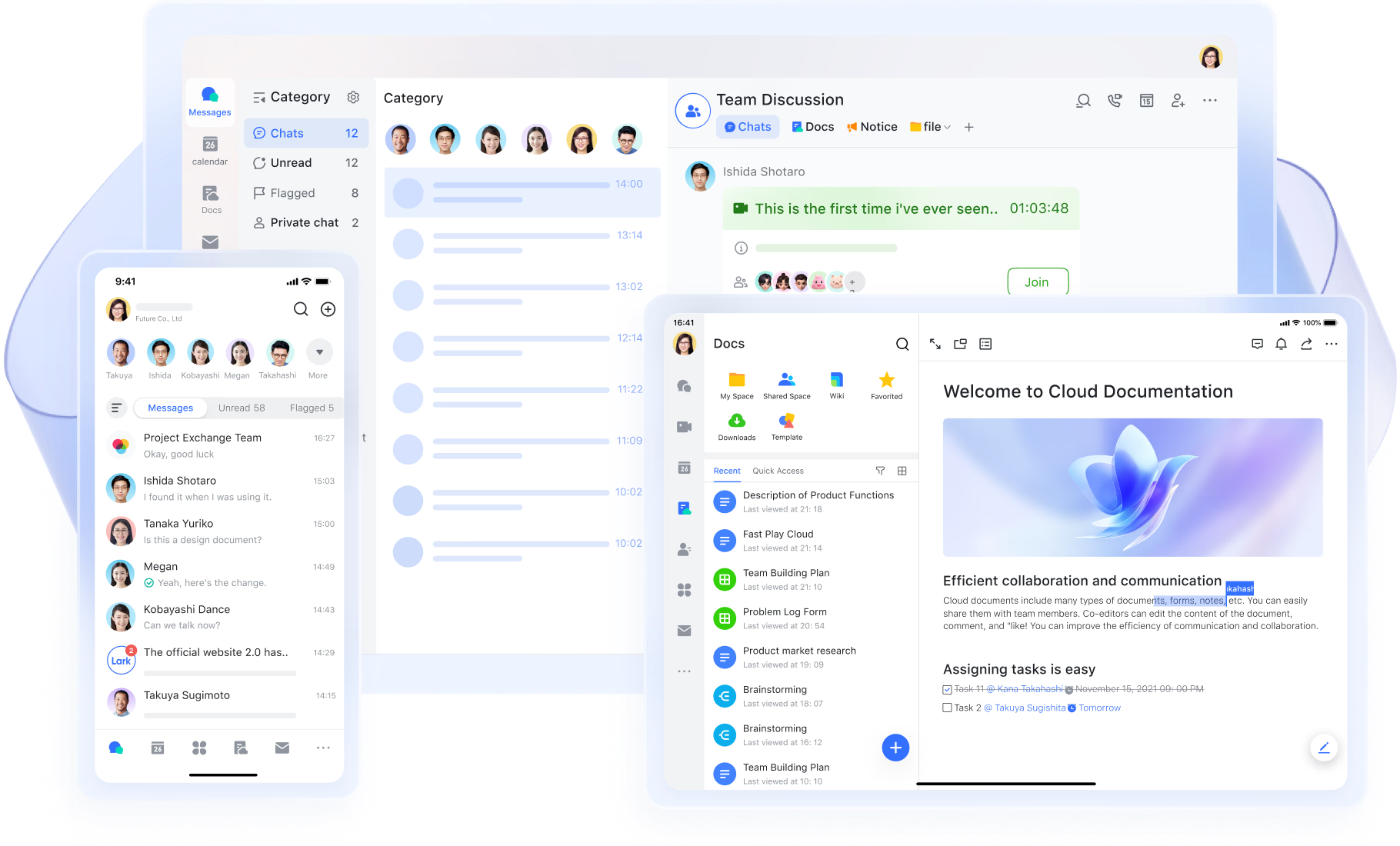
Modern teams need more than just a way to find meeting times. As work becomes more collaborative and distributed, scheduling must connect seamlessly with communication, documents, tasks, and . Tools designed only for scheduling often create gaps between meetings and actual execution. approaches scheduling as part of a workspace where conversations, planning, and follow-ups live side by side. This makes it better suited for teams that want coordination, visibility, and scalability without juggling multiple disconnected tools.
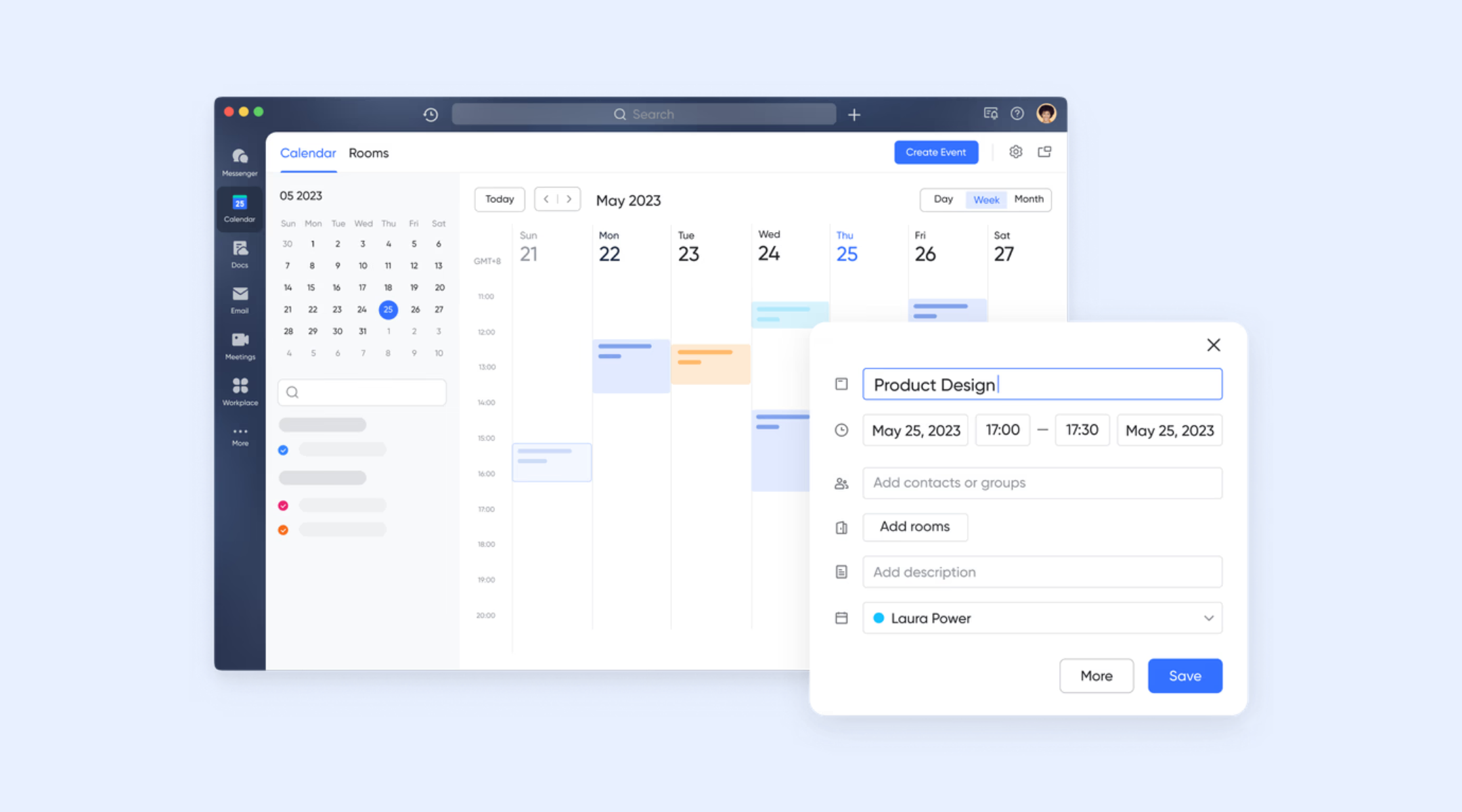
Lark Calendar enables smart scheduling with shared visibility
shows individual, group, and shared availability in a unified view, helping teams schedule meetings faster. Real-time calendar data reduces guesswork and prevents overlapping bookings across team members. Built-in time zone awareness supports across regions. Shared calendars improve coordination between departments and roles. Changes update instantly to keep everyone aligned. Scheduling remains transparent and reliable as organizations grow.
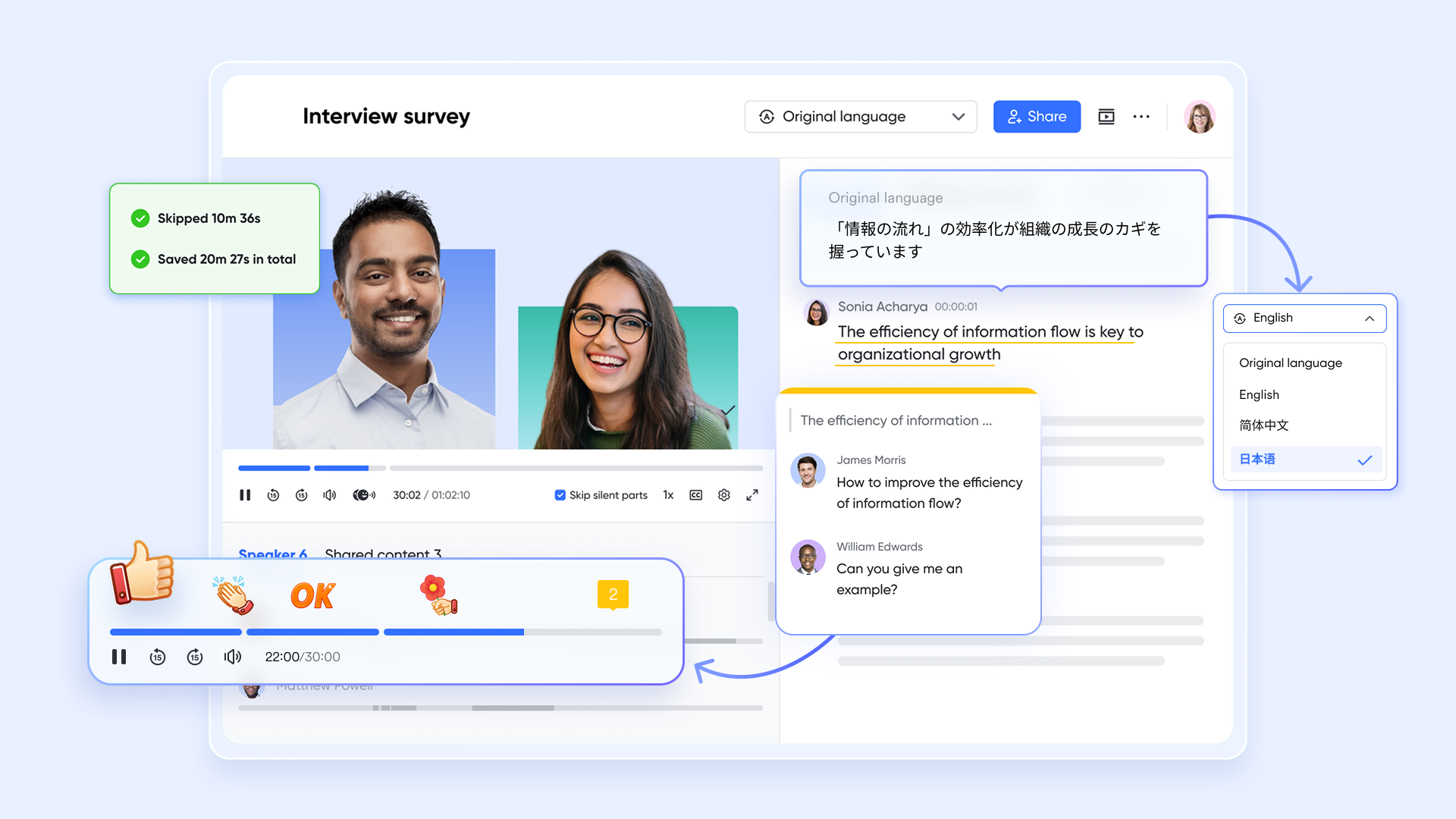
Lark Meetings connects scheduling directly with video calls
automatically creates when events are scheduled. Users do not need to rely on external tools or manage separate meeting links. Meeting details, participants, and timing stay connected in one workflow. This reduces setup time for both internal and external meetings. Calendar invitations remain consistent across attendees. Joining meetings becomes faster and more reliable.
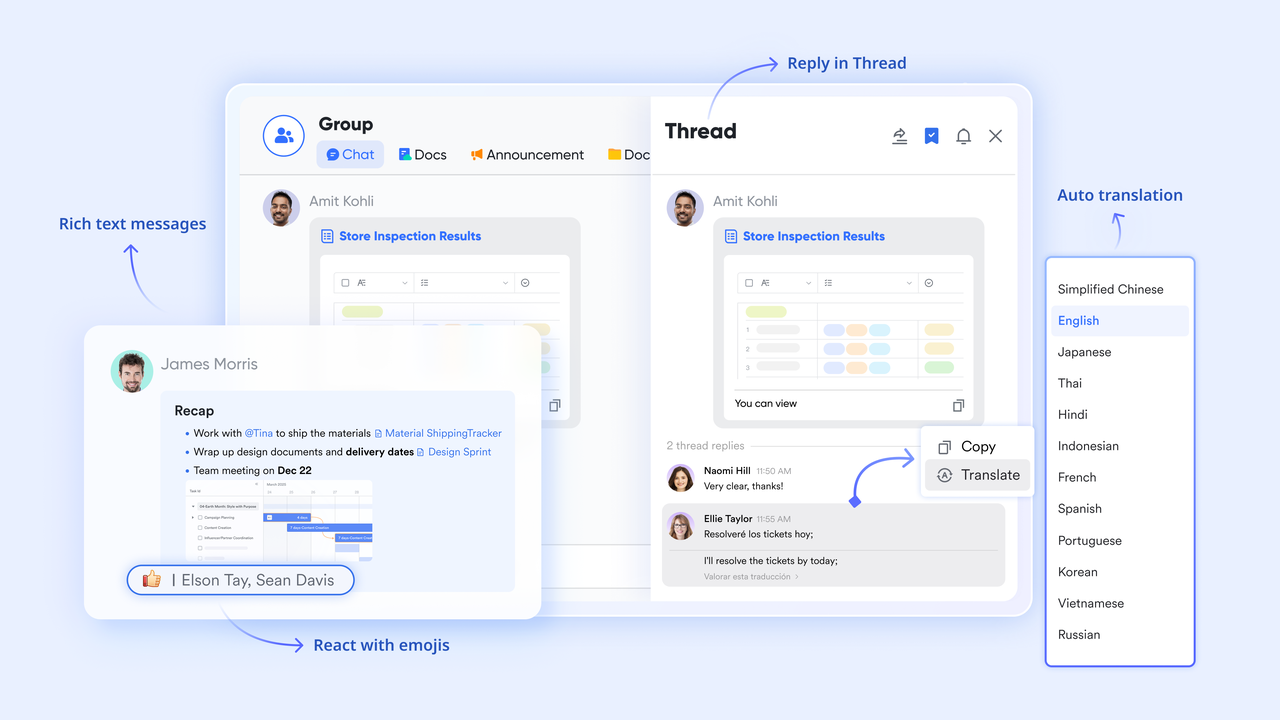
Lark Messenger allows meetings to be scheduled from conversations
enables teams to schedule meetings directly from active discussions. Conversations can quickly turn into structured meetings without context loss. Participants are added automatically . This reduces delays caused by switching between tools. Scheduling feels like a natural extension of collaboration. Team momentum remains uninterrupted.
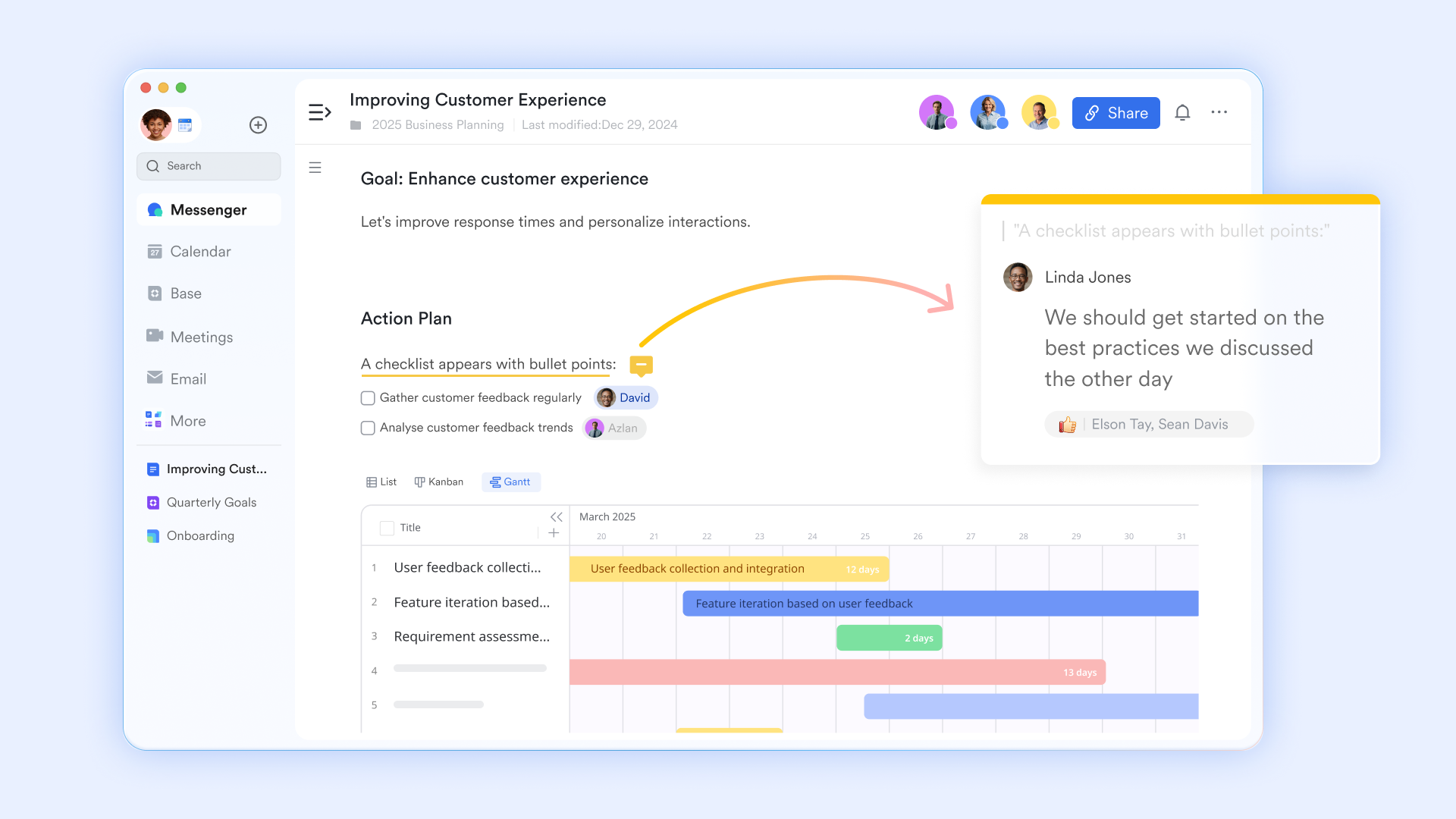
Lark Docs connects scheduling with meeting preparation
allows agendas and reference materials to be attached to scheduled meetings. Teams can review and update documents before the meeting begins. to all participants. This improves preparation and meeting efficiency. Documents remain accessible during and after meetings. Scheduling becomes linked to outcomes rather than just time slots.
Lark Tasks links meetings with clear follow-ups
Lark Tasks makes it easy to create action items directly from meetings. Tasks can be assigned, tracked, and connected to the original scheduled event. Owners and deadlines are clearly defined within the same workspace. to all stakeholders. This reduces reliance on separate task tools. Meetings translate more consistently into execution. 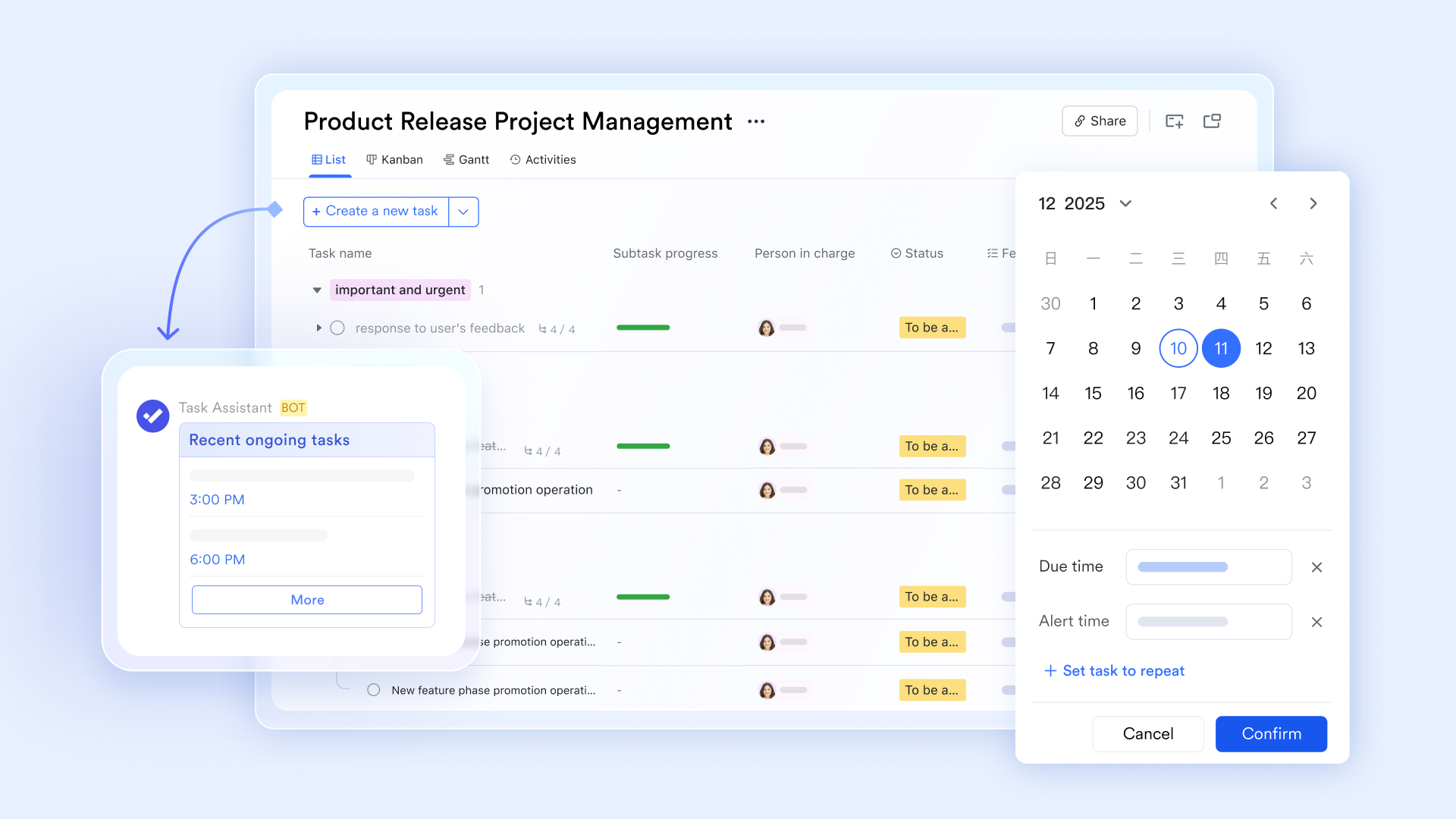
:
- Starter plan: Free forever plan that includes 11 powerful tools for up to 20 users. It also comes with 100GB of storage, 1000 automation runs, AI translations, and more.
- Basic plan: $6/user/month (billed annually) for up to 500 users. It includes everything in Starter plus group calling for up to 500 attendees, 5TB of storage, 1000 automation runs, and more. For more details, please .
- Pro plan: $12/user/month (billed annually) for up to 500 users. It includes everything in Basic plus group calling for up to 500 attendees, 15TB of storage, 50,000 automation runs, and more.
- Enterprise plan: for custom pricing. Supports unlimited users and includes even more automation runs and advanced security, compliance, and management features. Evaluating and alongside competing platforms can provide useful budgeting insights.
For small teams with simple communication needs

18 months message history
1000 Base automation runs/month
2000 rows per table in Base
Most POPULAR
For companies with comprehensive collaboration and management needs
Unlimited message history
500-participant video meetings
50k Base automation runs/month
20k rows per table in Base
For large companies with advanced security and organizational management needs
Get a personalized demo and pricing
Unlimited message history
500-participant video meetings
15 TB storage + 30 GB storage/user
500k Base automation runs/month
50k Base automation runs/month
Most POPULAR
For companies with comprehensive collaboration and management needs
Unlimited message history
500-participant video meetings
50k Base automation runs/month
20k rows per table in Base
Who should choose Doodle vs who should choose Lark
Choosing between Doodle and a broader workspace depends on how scheduling fits into daily work. Team size, workflow complexity, and long-term cost play a significant role in this decision.
- Best-fit use cases for Doodle: Doodle works well for individuals or small teams focused mainly on scheduling meetings. It suits use cases where finding a standard time is the primary requirement.
- Teams that benefit more from Lark's all-in-one approach: alongside chat, documents, and follow-ups benefit more from Lark. It reduces tool switching by keeping scheduling connected to collaboration and execution.
- Final recommendation based on pricing and scalability: Doodle remains cost-effective for simple, single-user scheduling needs. As teams scale, platforms like Lark often offer better value by combining scheduling with .
Conclusion
Doodle remains a for individuals and small teams that need a simple way to coordinate meeting times. Its free and paid plans cover essential scheduling needs, but limitations around per-user pricing, feature access, and collaboration depth become more noticeable as teams grow. When scheduling is only one part of a broader workflow, relying on a standalone tool can create friction, added costs, and disconnected processes over time.
For modern teams, scheduling works best when it is closely tied to communication, preparation, and follow-through. approaches scheduling as part of an all-in-one workspace, allowing meetings to connect naturally with chats, documents, tasks, and ongoing collaboration. This reduces tool sprawl and improves visibility across teams. If your organization is scaling or looking to streamline how meetings turn into real work, exploring Lark can help you move beyond scheduling alone.
Simplify how meetings are scheduled across teams
FAQs
Is Doodle no longer free?
Doodle still offers a free plan under its Doodle pricing, allowing basic and unlimited group polls at no cost. However, advanced scheduling features and multiple booking pages are available only in paid tiers, so many users eventually upgrade. If your team needs scheduling plus chat, docs, and tasks in one place, Lark can be a more comprehensive alternative.
What is the free limit for Doodle poll?
Under the Doodle pricing free plan, users can create unlimited group polls, but are limited to only one booking page and basic features. This can be enough for individual use or occasional scheduling, but lacks depth for larger teams. For teams that want built-in meeting follow-ups and workspace features, Lark combines scheduling with collaboration tools.
Does Doodle charge per poll or per user?
Doodle primarily charges per user for its paid tiers, not per poll, which means costs scale with team size under Doodle pricing 2026. Polls themselves remain free in the basic version, but key enhancements require a user-level subscription. If per-user charges add up, Lark offers broader team features under consolidated plans.
Can Doodle pricing be negotiated for large teams?
For large teams, Doodle offers custom enterprise pricing that can often be negotiated, especially when volume or support needs are significant. This is common for organizations evaluating Doodle pricing 2026 at scale. If you want both scheduling and team collaboration features with flexible plans, Lark also provides enterprise options that combine tools.
Does Doodle offer discounts for education or nonprofits?
Doodle sometimes offers special pricing or adjustments for education and nonprofit organizations under Doodle nonprofit pricing, though these vary by region and program. Eligibility often requires verification, and discounts may not apply to all plans or features. Lark similarly offers tailored plans and support for education or nonprofit teams looking for scheduling alongside and productivity tools.
Related reading






























